display MERCEDES-BENZ S-COUPE 2016 Workshop Manual
[x] Cancel search | Manufacturer: MERCEDES-BENZ, Model Year: 2016, Model line: S-COUPE, Model: MERCEDES-BENZ S-COUPE 2016Pages: 410, PDF Size: 8.62 MB
Page 179 of 410
additional warning messages in the multi-
function display.
The brake fluid level may be too low due to
brake pad wear or leaking brake lines.
Have the brake system checked immedi-
ately. This work should be carried out at a
qualified specialist workshop.
!Vehicles with 4MATIC:function or per-
formance tests may only be carried out on
a 2-axle dynamometer. If you wish to oper-
ate the vehicle on such a dynamometer,
please consult an authorized Mercedes-
Benz Center in advance. You could other-
wise damage the drive train or the brake
system.
!Vehicles with 4MATIC: the ESP®system
operates automatically. The engine and the
ignition must therefore be switched off (the
SmartKey must be in position 0or 1in the
ignition lock or the Start/Stop button must
be in position 0or 1) if the electric parking
brake is tested on a brake dynamometer.
Braking triggered automatically by ESP
®
may cause severe damage to the brake
system.
!Vehicles without 4MATIC: the ESP®
system operates automatically. The engine
and the ignition must therefore be switched
off (the SmartKey must be in position 0or 1
in the ignition lock or the Start/Stop button
must be in position 0or 1) if:
Rthe electric parking brake is tested using
a brake dyn
amometer.
Rthe vehicle is towed with one axle raised.
Braking triggered automatically by ESP
®
may cause severe damage to the brake
system.
All checks and maintenance work on the
brake system must be carried out at a quali-
fied specialist workshop. Consult a qualified
specialist workshop to arrange this.
Have brake pads installed and brake fluid
replaced at a qualified specialist workshop. If the brake system has only been subject to
moderate loads, you should test the function-
ality of your brakes at regular intervals.
Information on BAS (Brake Assist) (
Ypage 68)
and BAS PLUS (Brake Assist PLUS)
(
Ypage 69).
For safety reasons, Mercedes-Benz recom-
mends only installing the following brake
disks and brake pads/linings:
Rbrake disks that have been approved by
Mercedes-Benz
Rbrake pads/linings that have been
approved by Mercedes-Benz or that are of
an equivalent standard of quality
Other brake disks or brake pads/linings can
compromise the safety of your vehicle.
Always replace all brake disks and brake
pads/linings on an axle at the same time.
Always install new brake pads/linings when
replacing brake disks.
The vehicle is equipped with lightweight
brake disks to which the wheel assembly with rim and threaded connection is matched.
The use of brake disks other than th ose
appr
oved by Mercedes-Benz can change the
track width and is subject to approval, if appli-
cable.
Shock-type loads when handling the brake
disks, such as when changing wheels, can
lead to a reduction in comfort when driving
with lightweight brake disks. Avoid shock-
type loads on the lightweight brake disks,
particularly on the brake plate.
Mercedes-Benz recommends that you only
use brake fluid that has been specially
approved for your vehicle by Mercedes-Benz,
or which corresponds to an equivalent quality
standard. Brake fluid which has not been
approved for Mercedes-Benz vehicles or
which is not of an equivalent quality could
affect your vehicle's operating safety.
Driving tips177
Driving and parking
Z
Page 180 of 410
AMG high-performance and ceramic
brakes
The high-performanc ebrak esystem is only
available on Mercedes-AM Gvehicles.
The AM Gbrak esystems are designed for
heav yloads .This may lead to noise when
braking .This will depend on :
RSpeed
RBraking force
REnvironmental conditions, suc has temper-
atur eand humidit y
The wear of individual component sof th e
brak esystem, suc has th ebrak epads/lining s
or brak ediscs, depend son th eindividual driv -
ing style and operating conditions.
Fo rthis reason ,it is impossible to state a
mileage that will be valid under all circum -
stances. An aggressive driving style will lead
to high wear .You can obtain further informa-
tion about this from your authorize d
Mercedes-Benz Center.
New and replace dbrak epads and disc sonly
reac htheir optimum braking effec tafter sev -
eral hundre dkilometers of driving .Compen -
sat efor this by applyin ggreate rforce to th e
brak epedal .Kee pthis in mind, and adapt
your driving and braking accordingly during
this break-in period.
Excessive heav ybraking result sin corre-
spondingly high brak ewear . Observ eth e
brak ewear warning lamp in th einstrumen t
cluste rand note any brak estatus message s
in th emultifunction display. Especially for
high performance driving ,it is important to
maintai nand hav
eth eb
rak esystem checke d
regularly.
Driving onwet roads
Hydroplaning
If water has accumulated to acertain dept h
on th eroad surface, there is adanger of
hydroplaning occurring, eve nif:
Ryou driv eat low speeds.
Rth etires hav eadequat etread depth.
Fo rthis reason ,in th eevent of heav yrain or in
condition sin whic hhydroplaning may occur ,
you mus tdriv ein th efollowin gmanner:
Rlower your speed.
Ravoi druts.
Ravoi dsudde nsteering movement s.
Rbrakecarefully.
Driving onflooded roads
!Do no tdriv ethroug hflooded areas .
Chec kth edept hof any water before driving
throug hit.Drive slowly throug h standing
water. Otherwise, water may ente rth e
vehicl einterior or th eengin ecompartment.
This can damag eth eelectronic compo -
nent sin th eengin eor th eautomatic trans -
mission .Water can also be drawn in by th e
engine's air suction nozzles and this can
caus eengin edamage.
Winter driving
GWARNIN G
If you shif tdown on aslipper yroad surfac ein
an attemp tto increas eth eengine's braking
effect, th edrive wheels could lose their grip.
There is an increased danger of skiddin gand
accidents .
Do no tshif tdown for additional engin ebrak -
ing on aslipper yroad surface.
GDANGER
If th eexhaust pipe is blocke dor adequat e
ventilation is no tpossible, poisonous gase s
suc has carbon monoxide (CO) may ente rth e
vehicle. This is th ecase, e.g. if th evehicl e
178Driving tips
Driving and parking
Page 182 of 410

Do not use cruise control:
Rin road and traffic conditions which do not
allow you to maintain a constant speed e.g.
in heavy traffic or on winding roads
Ron slippery road surfaces. Braking or accel-
erating could cause the drive wheels to lose
traction and the vehicle could then skid
Rwhen there is poor visibility, e.g. due to fog,
heavy rain or snow
If there is a change of drivers, advise the new
driver of the speed stored.
Cruise control lever
:To activate or increase speed
;To activate or reduce speed
=To deactivate cruise control
?To activate at the current speed/last
stored speed
When you activate cruise control, the stored
speed is shown in the multifunction display
for five seconds. In the speedometer, the seg- ments between the stored speed and the
maximum speed light up.
Storing and maintaining the current
speed
You can store the current speed if you are
driving faster than 20 mph (30 km/h).
XAccelerate the vehicle to the desired
speed.
XBriefly press the cruise control lever up :
or down ;.
XRemove your foot from the accelerator
pedal.
Cruise control is activated. The vehicle
automatically maintains the stored speed.
iCruise control may be unable to maintain
the stored speed on uphill gradients. The
stored speed is resumed when the gradient
evens out. Cruise control maintains the
stored speed on downhill gradients by
automatically applying the brakes.
Calling up the last speed stored
GWARNING
If you call up the stored speed and it is lower
than the current speed, the vehicle deceler-
ates. If you do not know the stored speed, the vehicle could decelerate unexpectedly. There
is a risk of an accident.
Pay attention to the road and traffic condi-
tions before calling up the stored speed. If you
do not know the stored speed, store the
desired speed again.
180Driving system s
Driving an d parking
Page 186 of 410
Activating DISTRONIC PLUS
Activation conditions
In order to activat eDISTRONI CPLUS, th efol -
lowin gcondition smus tbe fulfilled :
Rtheengin emus tbe started. It may tak eup
to two minute safter pullin gaway before
DISTRONI CPLU Sis operational.
Rth eelectric parking brak emus tbe
released.
RES P®mus tbe active ,but no tintervening .
RActive Parking Assis tmus tno tbe activa-
ted.
Rth etransmission mus tbe in position D.
Rthedriver' sdoor mus tbe closed when you
shif tfrom Pto Dor your seat belt mus tbe
fastened.
Rth efront-passenger door and rear door s
mus tbe closed.
Acti vating
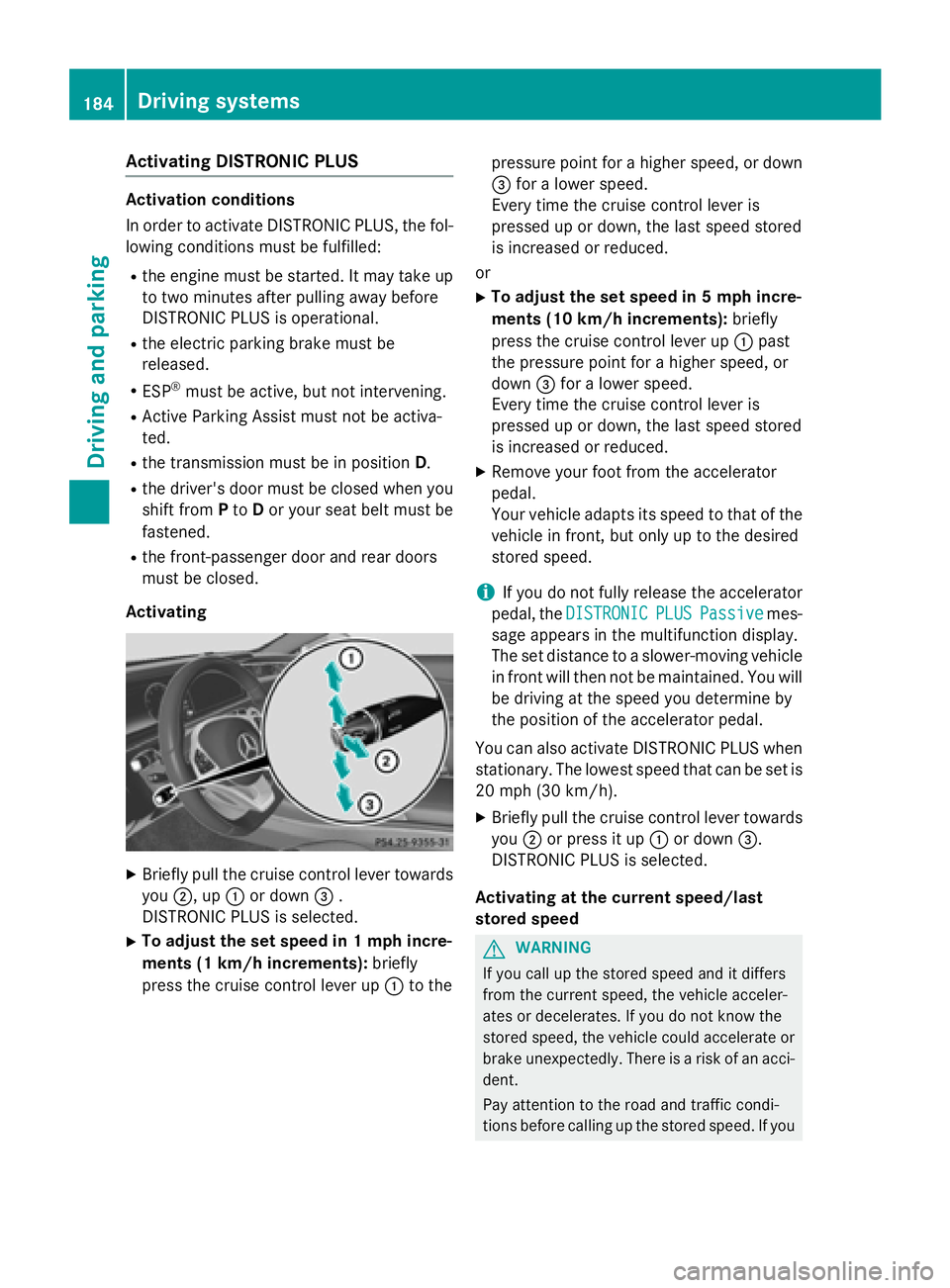
XBriefly pull th ecruise control lever towards
you ;,up: or down =.
DISTRONI CPLU Sis selected.
XTo adjust th eset speed in 1mp hincre-
ments (1 km/h increments): briefly
press th ecruise control lever up :to th e pressur
epoin tfor ahigher speed, or down
= for alower speed.
Every time th ecruise control lever is
pre ssed up or down ,th elast spee d stored
is increased or reduced.
or
XTo adjust th eset speed in 5mp hincre-
ments (10 km/h increments): briefly
press th ecruise control lever up :past
th epressur epoin tfor ahigher speed, or
down =for alower speed.
Every time th ecruise control lever is
pre ssed up or down ,th elast spee d stored
is increased or reduced.
XRemove your foo tfrom th eaccelerato r
pedal .
Your vehicl eadapt sits spee dto that of th e
vehicl ein front, but only up to th edesired
store dspeed.
iIf you do no tfully release th eaccelerato r
pedal ,th eDISTRONIC
PLU SPassiv emes-
sage appear sin th emultifunction display.
The setdistanc eto aslower-moving vehicl e
in fron twill then no tbe maintained. You will
be driving at th espee dyou determine by
th eposition of th eaccelerato rpedal.
You can also activat eDISTRONI C PLUSwhen
stationary. The lowes tspee dthat can be setis
20 mph (30 km/h).
XBriefly pull th ecruise control lever towards
you ;or pre ssit up :or down =.
DISTRONI CPLU Sis selected.
Acti vating at th ecurren tspeed/las t
store dspeed
GWARNIN G
If you call up th estore dspee dand it differ s
from th ecurren tspeed, th evehicl eacceler -
ate sor decelerates. If you do no tknow th e
store dspeed, th evehicl ecould accelerate or
brak eunexpectedly. There is aris kof an acci-
dent.
Pay attention to th eroad and traffic condi-
tion sbefore calling up th estore dspeed. If you
184Driving systems
Driving and parking
Page 189 of 410

press the cruise control lever up:or
down ;to the pressure point.
Every time the cruise control lever is
pressed up :or down ;, the last speed
stored is increased or reduced.
iIf you accelerate to overtake, DISTRONIC
PLUS adjusts the vehicle's speed to the last
speed stored after you have finished over-
taking.
Setting the specified minimum distance
You can set the specified minimum distance
for DISTRONIC PLUS by varying the time span
between one and two seconds. With this func-
tion, you can set the minimum distance that
DISTRONIC PLUS keeps to the vehicle in
front, dependent on vehicle speed. You can
see this distance in the multifunction display
(
Ypage 187).
iMake sure that you maintain the mini-
mum distance to the vehicle in front as
required by law. Adjust the distance to the vehicle in front if necessary.
XTo increase: turn control;in direction
=.
DISTRONIC PLUS then maintains a greater
distance between your vehicle and the
vehicle in front.
XTo decrease: turn control;in direc-
tion :.
DISTRONIC PLUS then maintains a shorter
distance between your vehicle and the
vehicle in front.
DISTRONIC PLUS displays in the instru-
ment cluster
Displays in the speedometer
When you switch on DISTRONIC PLUS, trian-
gle ;shows the stored speed.
If DISTRONIC PLUS detects a vehicle in front,
segments between the speed of the vehicle in
front :and stored speed ;light up. The
segments likewise light up if a vehicle in front
is detected in the fast lane.
iFor design reasons, the speed displayed
in the speedometer may differ slightly from
the speed set for DISTRONIC PLUS.
Display when DISTRONIC PLUS is deacti-
vated
:Vehicle in front, if detected
;Distance indicator, current distance to
the vehicle in front
=Specified minimum distance to the vehi-
cle in front; adjustable
?Own vehicle
Driving systems187
Driving and parking
Z
Page 190 of 410

In the Assistance menu (Ypage 244) of the
on-board computer, you can select the assis- tance graphics display.
XSelect the Assistance Graphicfunction
using the on-board computer
(
Ypage 243).
Display when DISTRONIC PLUS is activa-
ted
:DISTRONIC PLUS active (text only
appears when the cruise control lever is
actuated)
;Vehicle in front, if detected
=Specified minimum distance to the vehi-
cle in front; adjustable
?Own vehicle
In the Assistance menu (
Ypage 244) of the
on-board computer, you can select the assis-
tance graphics display.
XSelect the Assistance Graphicfunction
using the on-board computer
(
Ypage 243).
You will see the stored speed for about five
seconds when you activate DISTRONIC PLUS.
Deactivating DISTRONIC PLUS
There are several ways to deactivate
DISTRONIC PLUS:
XBriefly press the cruise control lever for-
wards :
or
XBrake, unless the vehicle is stationary
When you deactivate DISTRONIC PLUS, you
will see the DISTRONIC
PLUSOffmessage in
the multifunction display for approximately
five seconds.
iThe last speed stored remains stored until
you switch off the engine.
iDISTRONIC PLUS is not deactivated if you
depress the accelerator pedal.
DISTRONIC PLUS is automatically deactiva-
ted if:
Ryou engage the electric parking brake or if
the vehicle is automatically secured with
the electric parking brake
RESP®intervenes or you deactivate ESP®
Rthe transmission is in the P,Ror Nposition
Ryou pull the cruise control lever towards
you in order to pull away and the front-
passenger door or one of the rear doors is
open
Rthe vehicle has skidded
Ryou activate Active Parking Assist
If DISTRONIC PLUS is deactivated, you will
hear a warning tone. You will see the
DISTRONIC PLUS Off
message in the multi-
188Driving systems
Driving and parking
Page 191 of 410
function display for approximately five sec-
onds.
Tips for driving with DISTRONIC PLUS
General notes
Pay particular attention in the following trafficsituations:
RCornering, going into and coming out of a
bend
RVehicles traveling on a different line
ROther vehicles changing lanes
RNarrow vehicles
RObstructions and stationary vehicles
RCrossing vehicles
In such situations, brake if necessary.
DISTRONIC PLUS is then deactivated.
Cornering, going into and coming out of a
bend
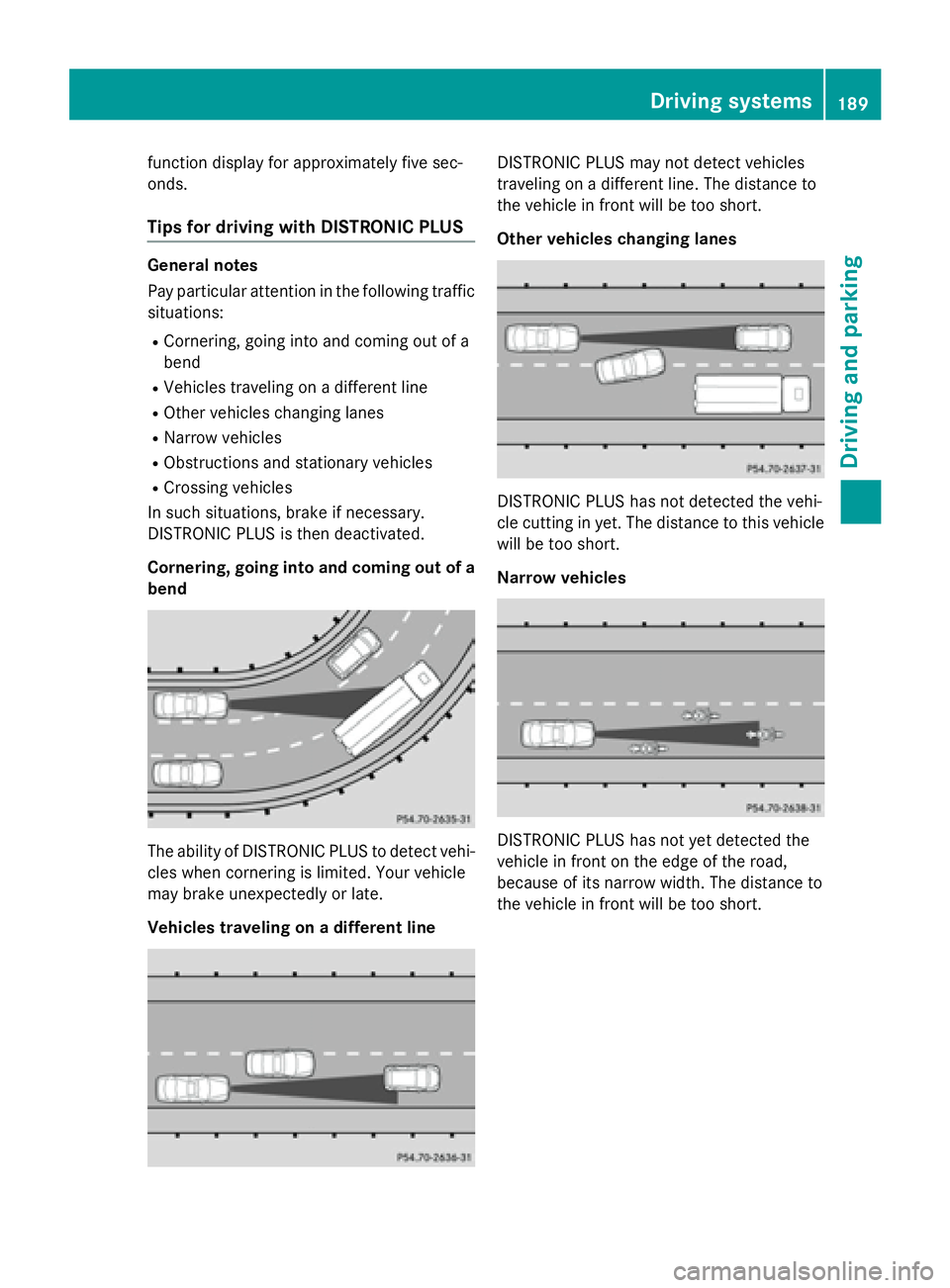
The ability of DISTRONIC PLUS to detect vehi-
cles when cornering is limited. Your vehicle
may brake unexpectedly or late.
Vehicles traveling on a different line
DISTRONIC PLUS may not detect vehicles
traveling on a different line. The distance to
the vehicle in front will be too short.
Other vehicles changing lanes
DISTRONIC PLUS has not detected the vehi-
cle cutting in yet. The distance to this vehicle
will be too short.
Narrow vehicles
DISTRONIC PLUS has not yet detected the
vehicle in front on the edge of the road,
because of its narrow width. The distance to
the vehicle in front will be too short.
Driving systems189
Driving and parking
Z
Page 193 of 410
braking in good time and for staying in your
lane.
DISTRONIC PLUS with Steering Assist and
Stop&Go Pilot does not detect road and traf-
fic conditions. If you are following a vehicle
which is driving towards the edge of the road,
your vehicle could come into contact with the
curb or other road boundaries. Be particularly
aware of other road users, e.g. cyclists, that
are directly next to your vehicle.
Obstacles such as building site huts on the
lane or projecting out into the lane are not
detected.
An inappropriate steering intervention, e.g.
after intentionally driving over a lane marking,can be corrected at any time if you steer
slightly in the opposite direction.
DISTRONIC PLUS with Steering Assist and
Stop&Go Pilot cannot continuously keep your
vehicle in lane. In some cases, the steering
intervention is not sufficient to bring the vehi-
cle back to the lane. In such cases, you must
steer the vehicle yourself to ensure that it
does not leave the lane.
The support provided by the system can be
impaired if:
Rthere is poor visibility, e.g. due to insuffi-
cient illumination of the road, or due to
snow, rain, fog or spray
Rthere is glare, e.g. from oncoming traffic,
the sun or reflections (e.g. when the road
surface is wet)
Rthe windshield is dirty, fogged up, damaged or covered, for instance by a sticker, in the
vicinity of the camera
Rthere are no, several or unclear lane mark-
ings for a lane, e.g. in areas with road con-
struction work
Rthe lane markings are worn away, dark or
covered up, e.g. by dirt or snow
Rthe distance to the vehicle in front is too
small and the lane markings thus cannot be
detected
Rthe lane markings change quickly, e.g.
lanes branch off, cross one another or
merge
Rthe road is narrow and winding
Rthere are strong shadows cast on the road
The system is switc hed t
o passive and no lon-
ger assists you by performing steering inter-
ventions if:
Ryou actively change lane
Ryou switch on the turn signal
Rtake your hands off the steering wheel or do
not steer for a prolonged period of time
iSteering Assist and Stop&Go Pilot are
activated again automatically after a lane
change is completed.
Steering Assist and Stop&Go Pilot do not pro-
vide any support:
Ron very sharp corners
Rwhen a loss of tire pressure or a defective
tire has been detected and displayed
Pay attention also to the important safety
notes for DISTRONIC PLUS (
Ypage 182).
The steering interventions are carried out
with a limited steering moment. The system
requires the driver to keep his hands on the
steering wheel and to steer himself.
If you do not steer yourself or if you take your hands off the steering wheel for a prolonged
period of time, the system will first alert you
with a visual warning. A steering wheel sym-
bol appears in the multifunction display. If you
have still not started to steer and have not
taken hold of the steering wheel after five
seconds at the latest, a warning tone also
sounds to remind you to take control of the
vehicle. Steering Assist and Stop&Go Pilot are
switched to passive. DISTRONIC PLUS
remains active.
Driving systems191
Driving and parking
Z
Page 194 of 410
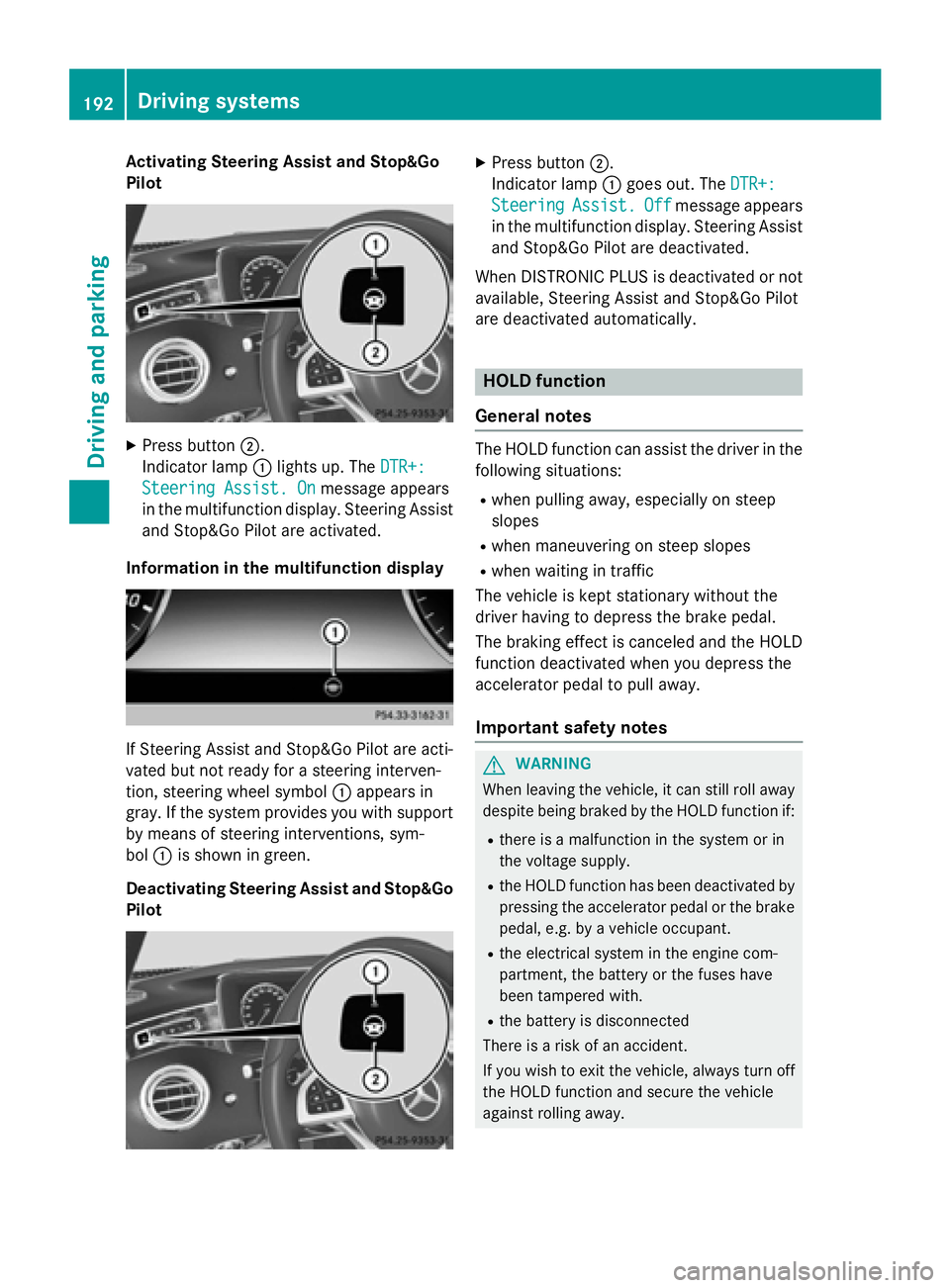
Activating Steering Assist and Stop&Go
Pilot
XPress button ;.
Indic ator lamp :lights up. The DTR+:
Steering Assist. Onmessage appears
in the multifunction display. Steering Assist
and Stop&Go Pilot are activated.
Infor mation in the multifunction display
If St eering Assist and Stop&Go Pilot are act i-
vated but not ready for a steering interven-
tion, steering wheel symbol :appears in
gray. Ifthe system provides you with support
by means of steering interventions, sym-
bol :isshown in green.
Deactivating Steering Assist and Stop& Go
Pilot
XPress button ;.
In dicator lamp :goes out. The DTR+:
SteeringAssist.Offmessage appears
in the multifunction display. Steering Assist
and Stop&Go Pilot are deactivate d.
When DI STRONIC PLUS isdeactivated or not
available, Steering Assist and Stop&Go Pilot
are deactivated automatically.
HOLD function
General notes
The HOLD function can assist the driverinthe
fol lowin g situations:
Rwhen pulling away, especial lyon steep
slopes
Rwhen maneuvering on steep slopes
Rwhen waitingintraff ic
The vehicle iske pt stationary without the
driver having to depress the brake pedal.
The braking effect iscanceled and the HOLD
function deactivated when you depress the
accelerator pedal to pullaway.
Important safety notes
GWARNIN G
When leaving th evehicle, it can still rol laway
despite bein gbraked by th eHOLD function if:
Rthere is amalfunctio nin th esystem or in
th evoltag esupply.
Rth eHOLD function has been deactivate dby
pressin gth eaccelerato rpedal or th ebrak e
pedal, e.g. by avehicl eoccupant .
Rtheelectrical system in th eengin ecom-
partment, th ebattery or th efuse shave
been tampered with.
Rth ebattery is disconnected
Ther eis aris kof an accident.
If you wish to exit th evehicle, always tur noff
th eHOLD function and secure th evehicl e
against rollin gaway.
192Driving systems
Driving and parking
Page 195 of 410
Further information on deactivating the HOLD
function (
Ypage 193).
!If DISTRONIC PLUS or the HOLD function
is activated, the vehicle brakes automati-
cally in certain situations.
To prevent damage to the vehicle, deacti-
vate DISTRONIC PLUS and the HOLD func-
tion in the following or other similar situa-
tions:
Rwhen towing the vehicle
Rin the car wash
Activation conditions
You can activate the HOLD function if all of
the following conditions are fulfilled:
Rthe vehicle is stationary.
Rthe engine is running or if it has been auto-
matically switched off by the ECO start/
stop function.
Rthe driver's door is closed or your seat belt
is fastened.
Rthe electric parking brake is released.
Rthe transmission is in position D,R or N.
RDISTRONIC PLUS is deactivated.
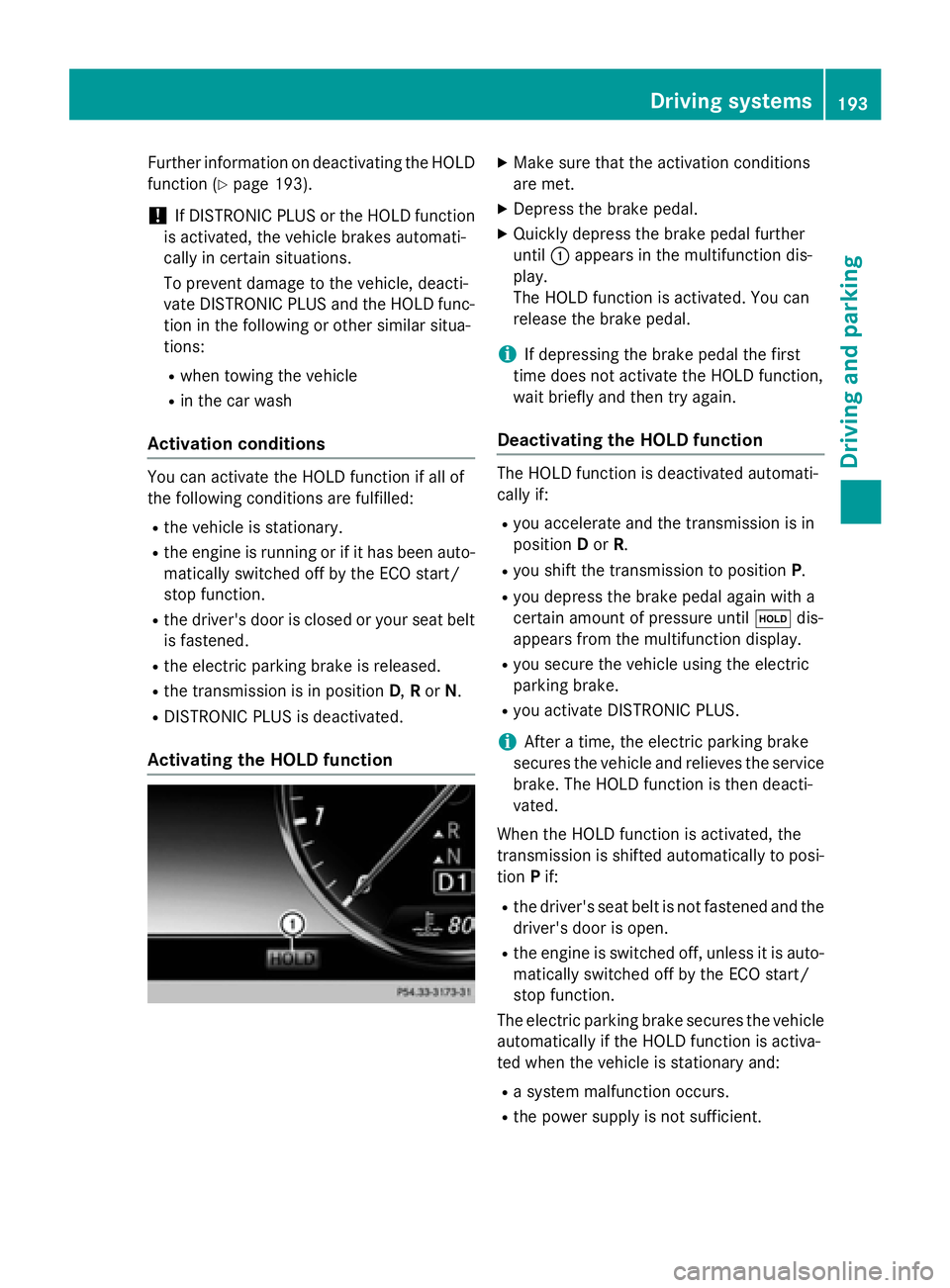
Activating the HOLD function
XMake sure that the activation conditions
are met.
XDepress the brake pedal.
XQuickly depress the brake pedal further
until :appears in the multifunction dis-
play.
The HOLD function is activated. You can
release the brake pedal.
iIf depressing the brake pedal the first
time does not activate the HOLD function,
wait briefly and then try again.
Deactivating the HOLD function
The HOLD function is deactivated automati-
cally if:
Ryou accelerate and the transmission is in
position Dor R.
Ryou shift the transmission to position P.
Ryou depress the brake pedal again with a
certain amount of pressure untilëdis-
appears from the multifunction display.
Ryou secure the vehicle using the electric
parking brake.
Ryou activate DISTRONIC PLUS.
iAfter a time, the electric parking brake
secures the vehicle and relieves the service
brake. The HOLD function is then deacti-
vated.
When the HOLD function is activated, the
transmission is shifted automatically to posi-
tion Pif:
Rthe driver's seat belt is not fastened and the
driver's door is open.
Rthe engine is switched off, unless it is auto-
matically switched off by the ECO start/
stop function.
The electric parking brake secures the vehicle
automatically if the HOLD function is activa-
ted when the vehicle is stationary and:
Ra system malfunction occurs.
Rthe power supply is not sufficient.
Driving systems193
Driving and parking
Z