mirror MERCEDES-BENZ S-COUPE 2016 Owner's Manual
[x] Cancel search | Manufacturer: MERCEDES-BENZ, Model Year: 2016, Model line: S-COUPE, Model: MERCEDES-BENZ S-COUPE 2016Pages: 410, PDF Size: 8.62 MB
Page 118 of 410
Problems with the steering wheel heating
ProblemPossible causes/consequences andMSolutions
The steering wheel
heating has switched
off prematurely or can-
not be switched on.The on-board voltage is too low because too many electrical con-
sumers are switched on.
XSwitch off electrical consumers that you do not need, such as
the rear window defroster or interior lighting.
EASY-ENTRY/EXIT feature
Important safety notes
GWARNING
When the EASY-ENTRY/EXIT feature adjusts
the steering wheel and the driver's seat, you
and other vehicle occupants – particularly
children – could become trapped. There is a
risk of injury.
While the EASY-ENTRY/EXIT feature is mak-
ing adjustments, make sure that no one has
any body parts in the sweep of the seat and
the steering wheel.
If there is a risk of becoming trapped by
Rthe steering wheel: move the steering
wheel adjustment lever.
Rthe seat: press the switch for seat adjust-
ment.
The adjustment process is stopped.
Press one of the memory function position
switches. The adjustment process is stopped.
GWARNING
If children activate the EASY-ENTRY/EXIT fea-
ture, they can become trapped, particularly
when unattended. There is a risk of injury.
When leaving the vehicle, always take the
SmartKey with you and lock the vehicle. Never
leave children unsupervised in the vehicle.
GWARNING
If you drive off while the EASY-ENTRY/EXIT
feature is making adjustments, you could lose
control of the vehicle. There is a risk of an
accident.
Always wait until the adjustment process is
complete before driving off.
The EASY-ENTRY/EXIT feature makes getting
in and out of your vehicle easier.
You can activate and deactivate the EASY-
ENTRY/EXIT feature using COMAND (see the
separate operating instructions).
Position of the steering wheel and the
driver's seat when the EASY-ENTRY/
EXIT feature is active
The steering wheel tilts upwards and the driv-
er's seat moves backwards if you:
Rremove the SmartKey from the ignition lock
Rwith KEYLESS-GO: open the driver's door;
KEYLESS-GO must be in position 1
Rwith the SmartKey:open the driver's
door; the SmartKey must be in position 0or
1 in the ignition lock (
Ypage 151)
Ropen the driver's door when the ignition is
switched off
iThe steering wheel only tilts upwards and
the driver's seat only moves backwards if
the driving position is stored after seat or
steering wheel adjustment.
The last position of the steering wheel or seat
is stored if:
Rthe ignition is switched off
Rthe setting is stored with the memory func-
tion (
Ypage 121).
iThe steering wheel only moves upwards if
it has not already reached the upper stop.
116Steering wheel
Seats, steering wheel and mirrors
Page 119 of 410
The driver's seat only moves backwards if itis not already in the rearmost position.
Position of the steering wheel and the
driver's seat for driving
The steering wheel and the driver's seat are
moved to the previously set position if:
Rthe driver's door is closed and you insert
the SmartKey into the ignition lock
Ryou close the driver's door when the igni-
tion is switched on
Ryou press the Start/Stop button once on
vehicles with KEYLESS-GO
iThe steering wheel and the driver's seat
only return to the last set position when the
driving position is stored after seat or steer-
ing wheel adjustment.
The last position of the steering wheel or seat
is stored if:
Rthe ignition is switched off
Rthe setting is stored with the memory func-
tion (
Ypage 121).
Crash-responsive EASY-EXIT feature
If the crash-responsive EASY-EXIT feature is
triggered in an accident, the steering column
will move upwards when the driver's door is
opened or the SmartKey is removed from the ignition lock. This makes it easier to exit the
vehicle and rescue the occupants.
The crash-responsive EASY-EXIT feature is
only operational if the EASY-EXIT/ENTRY fea-
ture is activated in COMAND (see the sepa-
rate operating instructions).
Mirrors
Rear-view mirror
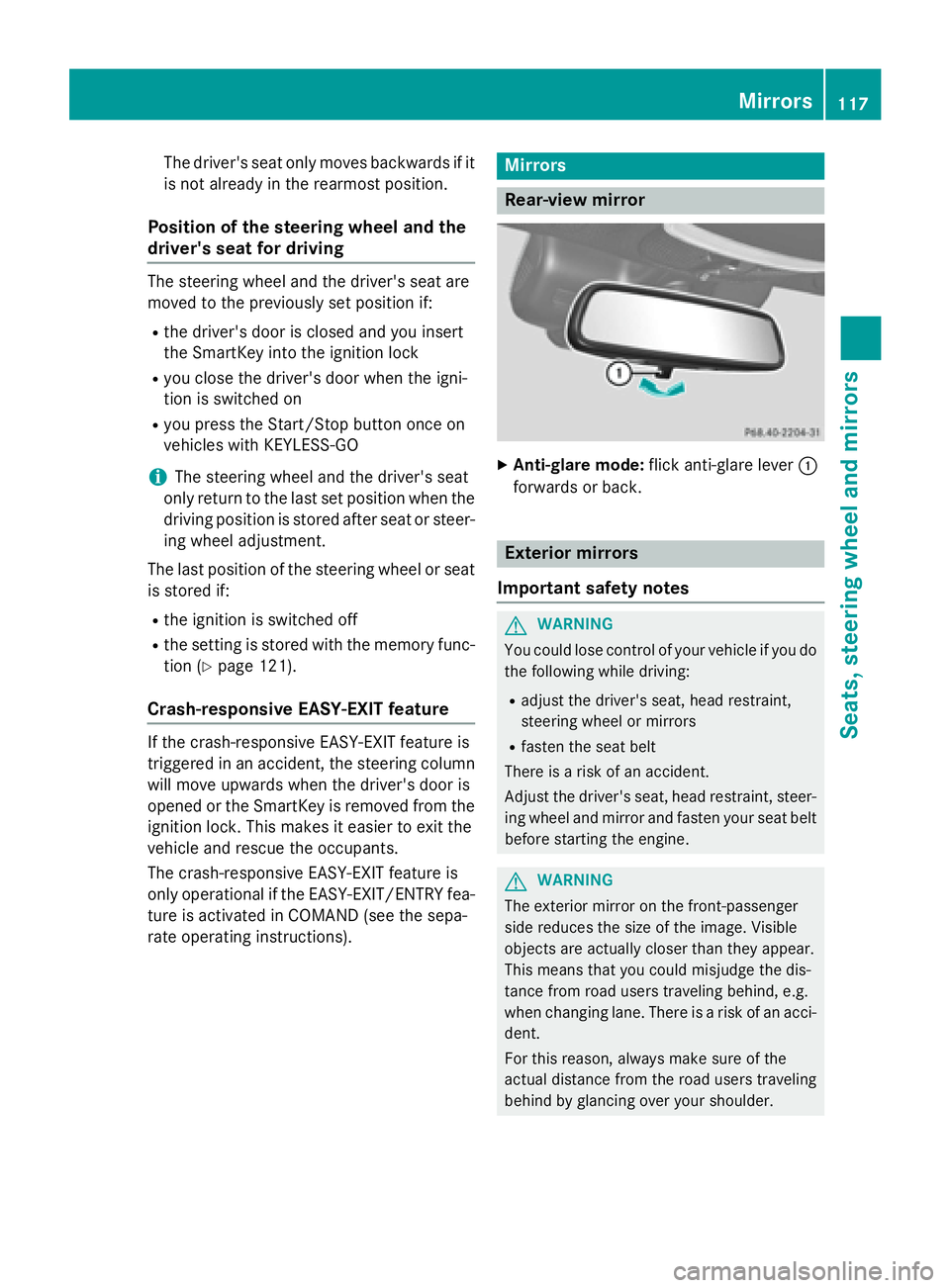
XAnti-glare mode: flick anti-glare lever :
forwards or back.
Exterior mirrors
Important safety notes
GWARNING
You could lose control of your vehicle if you do the following while driving:
Radjust the driver's seat, head restraint,
steering wheel or mirrors
Rfasten the seat belt
There is a risk of an accident.
Adjust the driver's seat, head restraint, steer-
ing wheel and mirror and fasten your seat belt before starting the engine.
GWARNING
The exterior mirror on the front-passenger
side reduces the size of the image. Visible
objects are actually closer than they appear.
This means that you could misjudge the dis-
tance from road users traveling behind, e.g.
when changing lane. There is a risk of an acci-
dent.
For this reason, always make sure of the
actual distance from the road users traveling
behind by glancing over your shoulder.
Mirrors117
Seats, steering wheel and mirrors
Z
Page 120 of 410
Adjusting the exterior mirrors
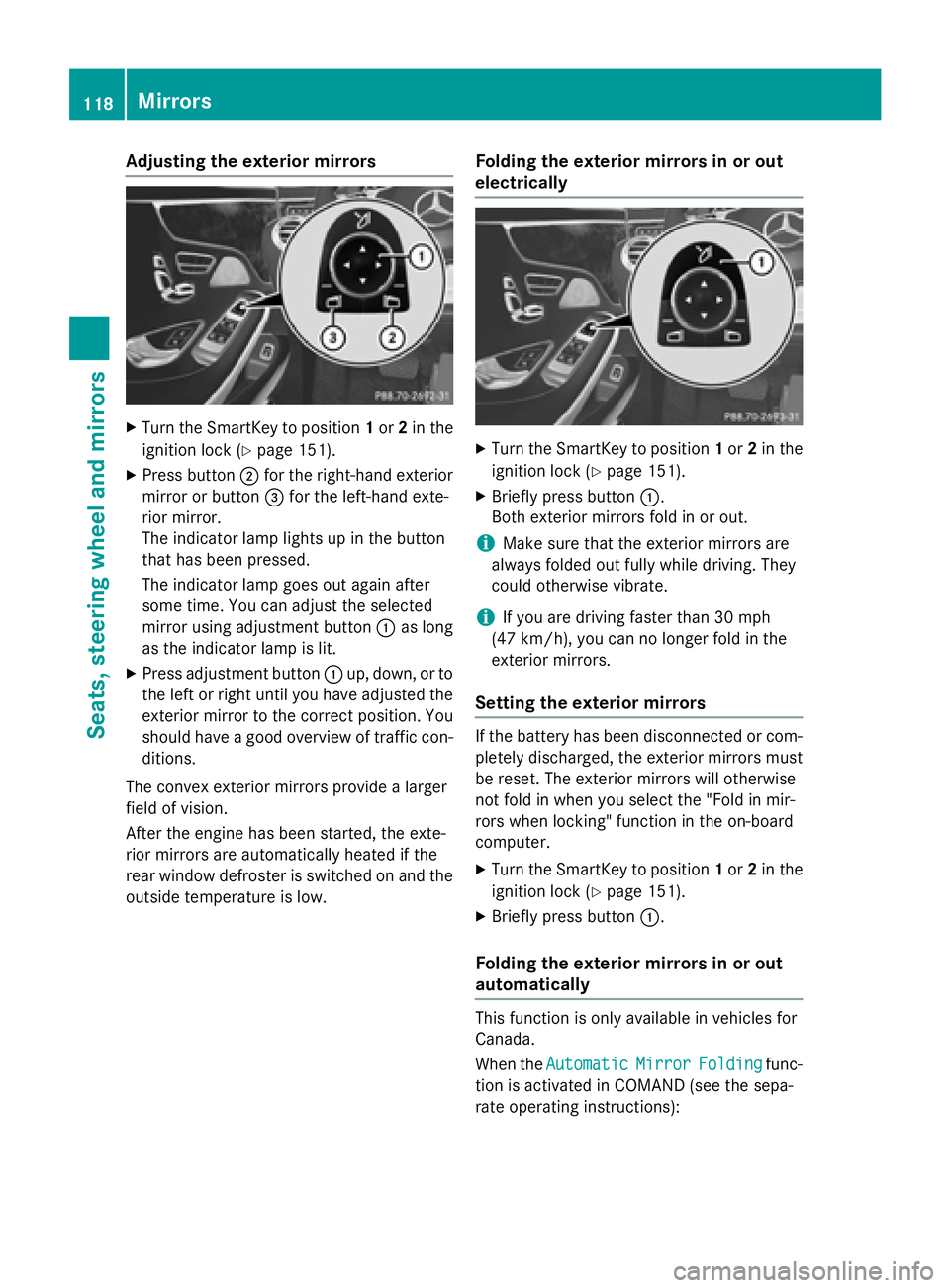
XTurn theSmartKey to position 1or 2in th e
ignition loc k (
Ypage 151).
XPress butto n; for th eright-hand exterio r
mirror or butto n= for th eleft-han dexte -
rio rmirror .
The indicator lamp lights up in th ebutto n
that has been pressed.
The indicator lamp goes out again after
som etime. You can adjust th eselected
mirror usin gadjustmen tbutto n: as lon g
as th eindicator lamp is lit .
XPress adjustmentbutto n: up, down ,or to
th elef tor right until you hav eadjusted th e
exterio rmirror to th ecorrec tposition .You
should hav e agoo doverview of traffic con-
ditions.
The convex exterio rmirror sprovide alarger
field of vision .
Afte rth eengin ehas been started, th eexte -
rio rmirror sare automatically heated if th e
rear window defroste ris switched on and th e
outside temperature is low.
Folding the exteri or mirrorsinor out
electri cally
XTurn th eSmartKey to position 1or 2in th e
ignition loc k (
Ypage 151).
XBriefly pressbutto n:.
Both exterio rmirror sfol din or out .
iMake sure that theexterio rmirror sare
always folded out fully while driving .The y
could otherwise vibrate .
iIf you are driving fasterthan 30 mph
(47 km/ h), you can no longer fold in the
exterior mirrors.
Setting the exterior mirrors
If the battery has been disconnected or com-
pletely discharged, the exterior mirrors must
be reset. The exterior mirrors will otherwise
not fold in when you select the "Fold in mir-
rors when locking" function in the on-board
computer.
XTurn the SmartKey to position 1or 2in the
ignition lock (
Ypage 151).
XBriefly press button :.
Folding the exterior mirrors in or out
automatically
This function is only available in vehicles for
Canada.
When theAutomatic
MirrorFoldingfunc-
tion is activated in COMAND (see the sepa-
rate operating instructions):
118Mirrors
Seats, steering wheel and mirrors
Page 121 of 410
Rthe exterior mirrors fold in automatically as
soon as you lock the vehicle from the out-
side.
Rthe exterior mirrors fold out automatically
again as soon as you unlock the vehicle.
iIf the exterior mirrors have been folded in
manually, they do not fold out.
Exterior mirror pushed out of position
This function is only available in vehicles for
Canada.
If an exterior mirror has been pushed out of
position, proceed as follows:
XPress and hold button :until you hear a
click and the mirror engages audibly into
position (
Ypage 118).
The mirror housing is engaged again and
you can adjust the exterior mirrors as usual
(
Ypage 118).
Automatic anti-glare mirrors
GWARNING
Electrolyte may escape if the glass in an auto-
matic anti-glare mirror breaks. The electrolyte
is harmful and causes irritation. It must not
come into contact with your skin, eyes, res-
piratory organs or clothing or be swallowed.
There is a risk of injury.
If you come into contact with the electrolyte,
observe the following:
RRinse off the electrolyte from your skin
immediately with water.
RImmediately rinse the electrolyte out of
your eyes thoroughly with clean water.
RIf the electrolyte is swallowed, immediately
rinse your mouth out thoroughly. Do not
induce vomiting.
RIf electrolyte comes into contact with your
skin or hair or is swallowed, seek medical
attention immediately.
RImmediately change out of clothing which
has come into contact with electrolyte.
RIf an allergic reaction occurs, seek medical
attention immediately.
The rear-view mirror and the exterior mirror
on the driver's side automatically go into anti-
glare mode if the following conditions are met
simultaneously:
Rthe ignition is switched on
Rincident light from headlamps strikes the
sensor in the rear-view mirror.
The mirrors do not go into anti-glare mode if
reverse gear is engaged or if the interior light-
ing is switched on.
Parking position for the exterior mir-
ror on the front-passenger side
Setting and storing the parking position
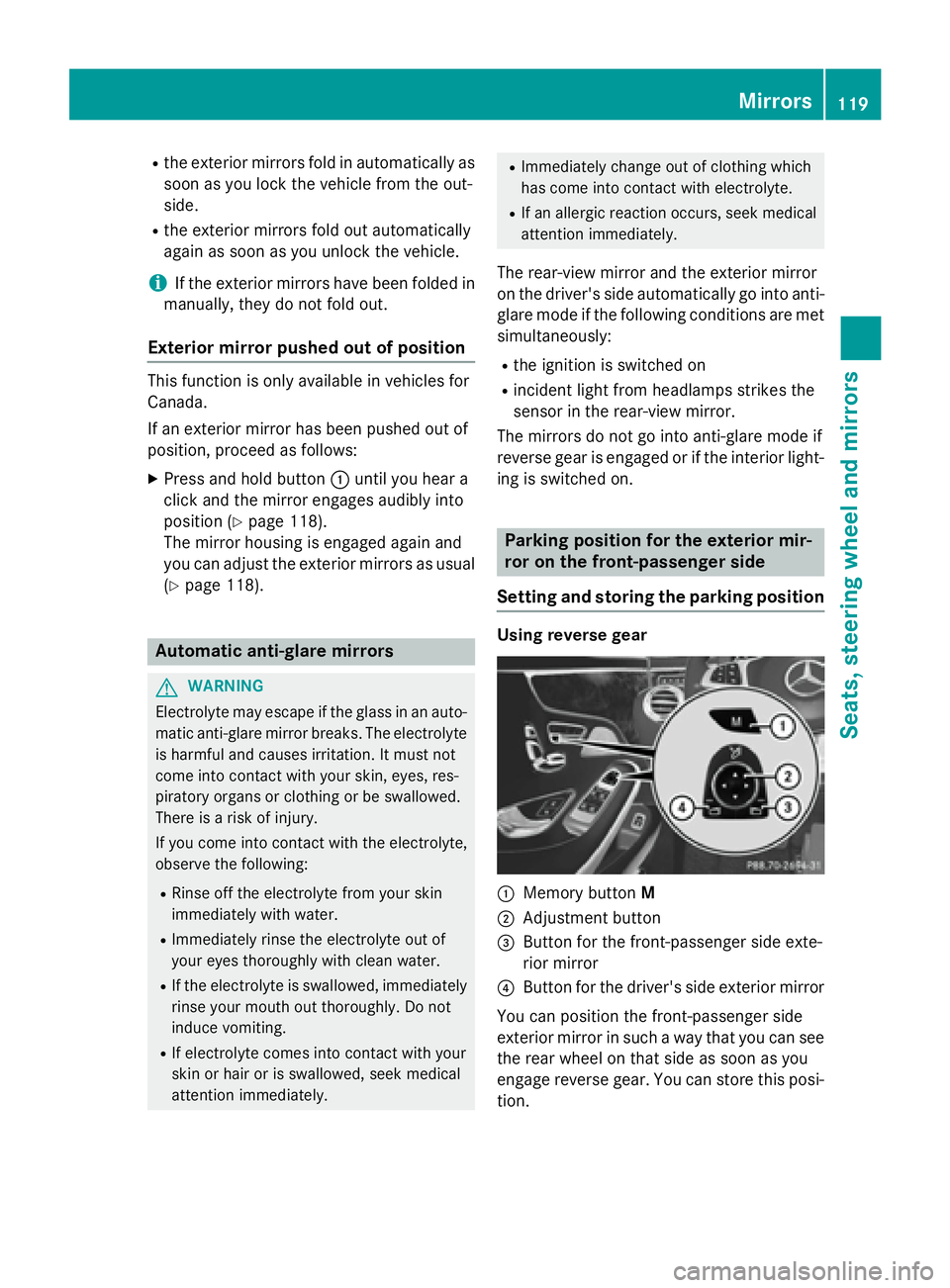
Using reverse gear
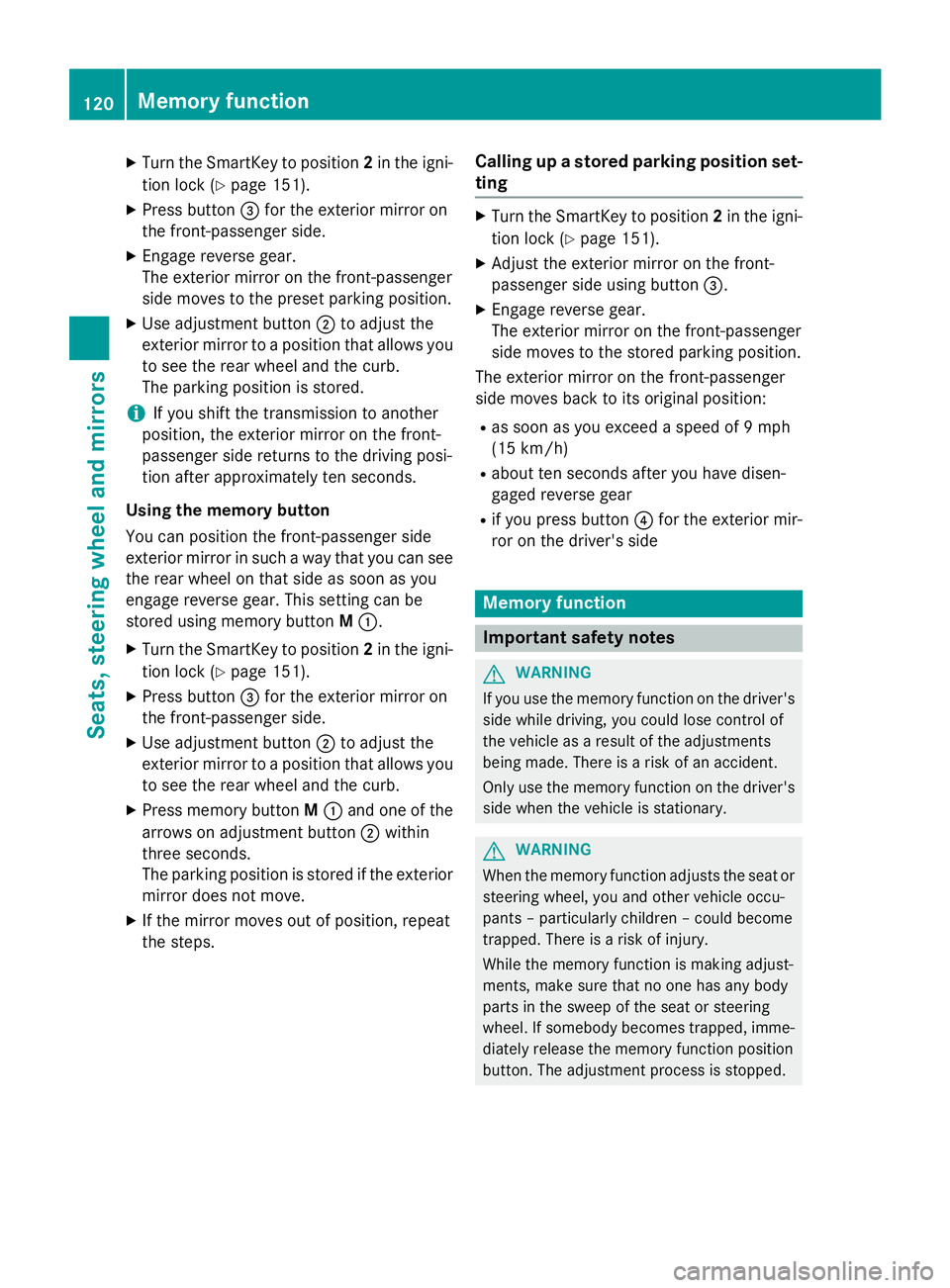
:Memory button M
;Adjustment button
=Button for the front-passenger side exte-
rior mirror
?Button for the driver's side exterior mirror
You can position the front-passenger side
exterior mirror in such a way that you can see
the rear wheel on that side as soon as you
engage reverse gear. You can store this posi-
tion.
Mirrors119
Seats, steering wheel and mirrors
Z
Page 122 of 410
XTurn the SmartKey to position2in the igni-
tion lock (
Ypage 151).
XPress button =for the exterior mirror on
the front-passenger side.
XEngage reverse gear.
The exterior mirror on the front-passenger
side moves to the preset parking position.
XUse adjustment button ;to adjust the
exterior mirror to a position that allows you
to see the rear wheel and the curb.
The parking position is stored.
iIf you shift the transmission to another
position, the exterior mirror on the front-
passenger side returns to the driving posi-
tion after approximately ten seconds.
Using the memory button
You can position the front-passenger side
exterior mirror in such a way that you can see
the rear wheel on that side as soon as you
engage reverse gear. This setting can be
stored using memory button M:.
XTurn the SmartKey to position 2in the igni-
tion lock (
Ypage 151).
XPress button =for the exterior mirror on
the front-passenger side.
XUse adjustment button ;to adjust the
exterior mirror to a position that allows you
to see the rear wheel and the curb.
XPress memory button M: and one of the
arrows on adjustment button ;within
three seconds.
The parking position is stored if the exterior
mirror does not move.
XIf the mirror moves out of position, repeat
the steps.
Calling up a stored parking position set-
ting
XTurn the SmartKey to position 2in the igni-
tion lock (
Ypage 151).
XAdjust the exterior mirror on the front-
passenger side using button =.
XEngage reverse gear.
The exterior mirror on the front-passenger
side moves to the stored parking position.
The exterior mirror on the front-passenger
side moves back to its original position:
Ras soon as you exceed a speed of 9 mph
(15 km/h)
Rabout ten seconds after you have disen-
gaged reverse gear
Rif you press button ?for the exterior mir-
ror on the driver's side
Memory function
Important safety notes
GWARNING
If you use the memory function on the driver's side while driving, you could lose control of
the vehicle as a result of the adjustments
being made. There is a risk of an accident.
Only use the memory function on the driver's
side when the vehicle is stationary.
GWARNING
When the memory function adjusts the seat or steering wheel, you and other vehicle occu-
pants – particularly children – could become
trapped. There is a risk of injury.
While the memory function is making adjust-
ments, make sure that no one has any body
parts in the sweep of the seat or steering
wheel. If somebody becomes trapped, imme-
diately release the memory function position
button. The adjustment process is stopped.
120Memory function
Seats, steering wheel and mirrors
Page 123 of 410
GWARNING
Children could become trapped if they acti-
vate the memory function, particularly when
unattended. There is a risk of injury.
When leaving the vehicle, always take the
SmartKey with you and lock the vehicle. Never
leave children unsupervised in the vehicle.
The memory function can be used at any time,
e.g. even when the SmartKey isn't in the igni-
tion lock.
Storing settings
With the memory function, you can store up
to three different settings, e.g. for three dif-
ferent people.
The following settings are stored as a single
memory preset:
Rseat, backrest, head restraint position and
contour of the backrest in the lumbar
region
Ractive multicontour seat: side bolsters of
the backrest, shoulder of the backrest, con-
tour of the backrest, dynamic function level
Rseat heating: distribution of the heated sec- tions of the seat cushion and backrest
Rdriver's side: position of the exterior mir-
rors on the driver's and front-passenger
sides
Rposition of the head-up display
XAdjust the seat accordingly (Ypage 108).
XOn the driver's side, adjust the steering
wheel (
Ypage 114) and the exterior mirrors
(
Ypage 118).
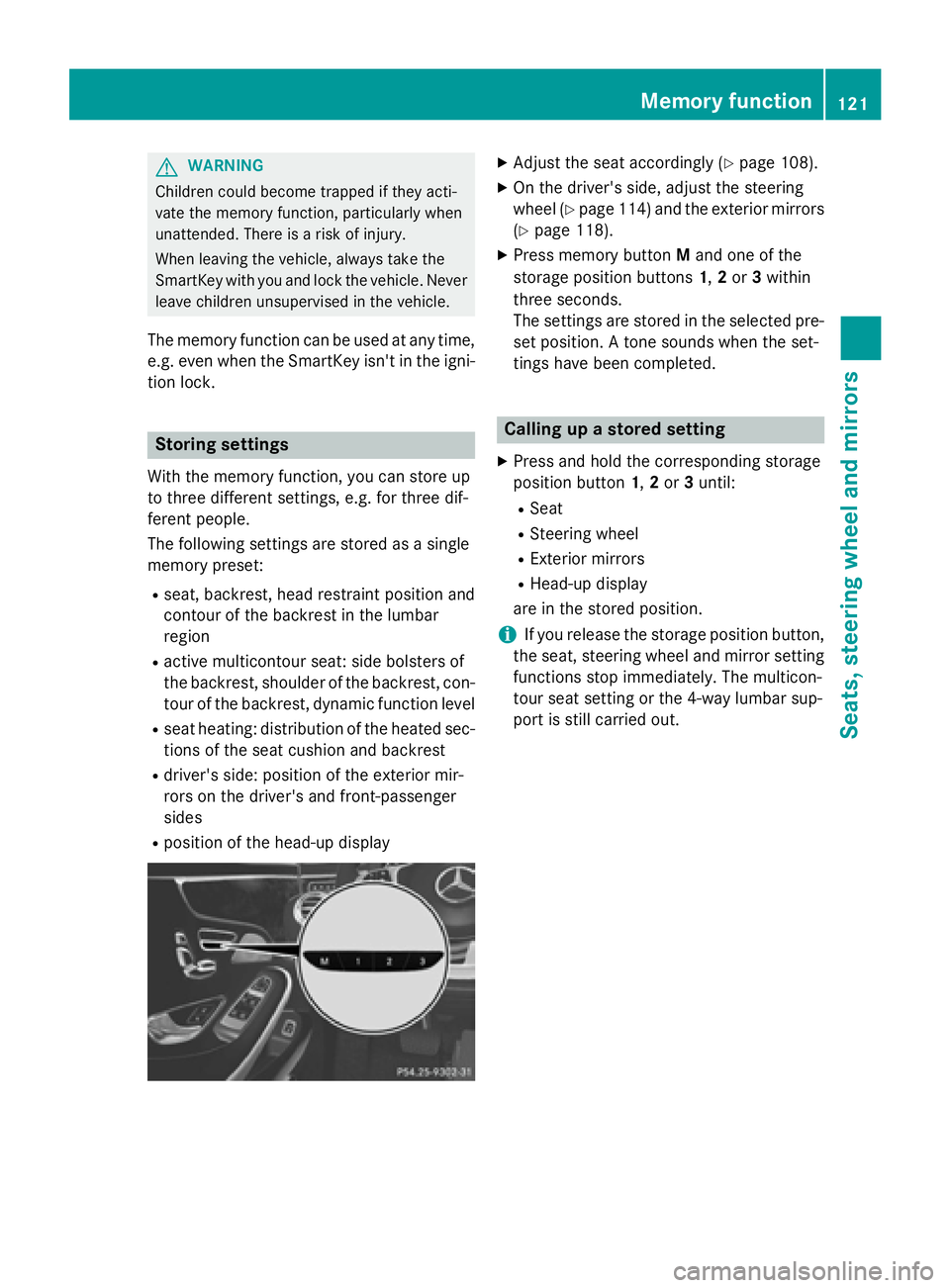
XPress memory button Mand one of the
storage position buttons 1,2or 3within
three seconds.
The settings are stored in the selected pre-
set position. A tone sounds when the set-
tings have been completed.
Calling up a stored setting
XPress and hold the corresponding storage
position button 1,2or 3until:
RSeat
RSteering wheel
RExterior mirrors
RHead-up display
are in the stored position.
iIf you release the storage position button,
the seat, steering wheel and mirror setting
functions stop immediately. The multicon-
tour seat setting or the 4-way lumbar sup-
port is still carried out.
Memory function121
Seats, steering wheel and mirrors
Z
Page 209 of 410
shows thePark Assist Canceledmes-
sage.
When Active Parking Assist is canceled, you
must steer and brake again yourself.
If a system malfunction occurs, the vehicle is
braked to a standstill. To drive on, depress the
accelerator again.
Rear view camera
General notes
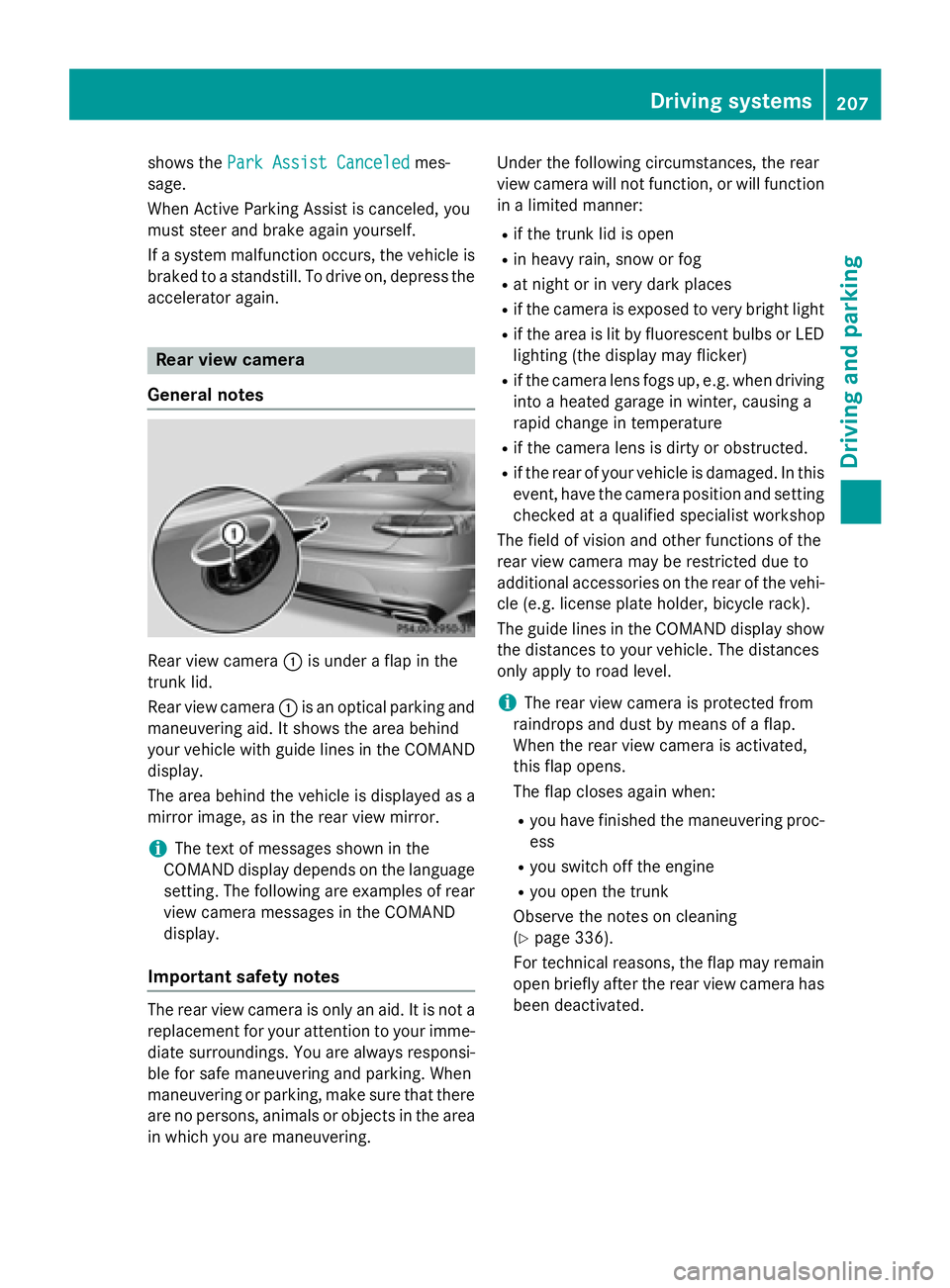
Rear view camera :is under a flap in the
trunk lid.
Rear view camera :is an optical parking and
maneuvering aid. It shows the area behind
your vehicle with guide lines in the COMAND
display.
The area behind the vehicle is displayed as a
mirror image, as in the rear view mirror.
iThe text of messages shown in the
COMAND display depends on the language
setting. The following are examples of rear
view camera messages in the COMAND
display.
Important safety notes
The rear view camera is only an aid. It is not a
replacement for your attention to your imme-
diate surroundings. You are always responsi-
ble for safe maneuvering and parking. When
maneuvering or parking, make sure that there
are no persons, animals or objects in the area in which you are maneuvering. Under the following circumstances, the rear
view camera will not function, or will function
in a limited manner:
Rif the trunk lid is open
Rin heavy rain, snow or fog
Rat night or in very dark places
Rif the camera is exposed to very bright light
Rif the area is lit by fluorescent bulbs or LED
lighting (the display may flicker)
Rif the camera lens fogs up, e.g. when driving
into a heated garage in winter, causing a
rapid change in temperature
Rif the camera lens is dirty or obstructed.
Rif the rear of your vehicle is damaged. In this
event, have the camera position and setting
checked at a qualified specialist workshop
The field of vision and other functions of the
rear view camera may be restricted due to
additional accessories on the rear of the vehi-
cle (e.g. license plate holder, bicycle rack).
The guide lines in the COMAND display show
the distances to your vehicle. The distances
only apply to road level.
iThe rear view camera is protected from
raindrops and dust by means of a flap.
When the rear view camera is activated,
this flap opens.
The flap closes again when:
Ryou have finished the maneuvering proc-
ess
Ryou switch off the engine
Ryou open the trunk
Observe the notes on cleaning
(
Ypage 336).
For technical reasons, the flap may remain
open briefly after the rear view camera has
been deactivated.
Driving systems207
Driving and parking
Z
Page 210 of 410
Activating/deactivating the rear view
camera
XTo activate:makesur ethat th eSmartKey
is in position 2in th eignition lock.
XMak esur ethat th eActivatio nby R
gearfunction is selected in COMAND (see
separat eoperating instructions).
XEngage revers egear .
The rear vie wcamera flap opens. The area
behind th evehicl eis shown in th e
COMAND display wit hguide lines.
The imag efrom th erear vie wcamera is
available throughout th emaneuverin g
process.
To deacti vate:therear vie wcamera deacti -
vates if you shif tth etransmission to Por after
driving forwards ashort distance.
Displays in the COMAND display
The rear vie wcamera may sho w adistorted
vie wof obstacles, sho wthem incorrectl yor
no tat all. The rear vie wcamera does no tsho w
objects in th efollowin gpositions:
Rver yclose to th erear bumper
Runder th erear bumper
Rin th earea immediately abov eth ebadge in
th etrunk lid
!Objects no tat ground level may appear to
be further away than they actually are, e.g. :
Rthebumper of aparked vehicl e
Rthedrawbar of atrailer
Rth eball couplin gof atrailer to whitch
Rtherear section of an HGV
Raslante dpos t
Use th eguidelines only for orientation .
Approach objects no further than th ebot -
tom-mos tguideline.
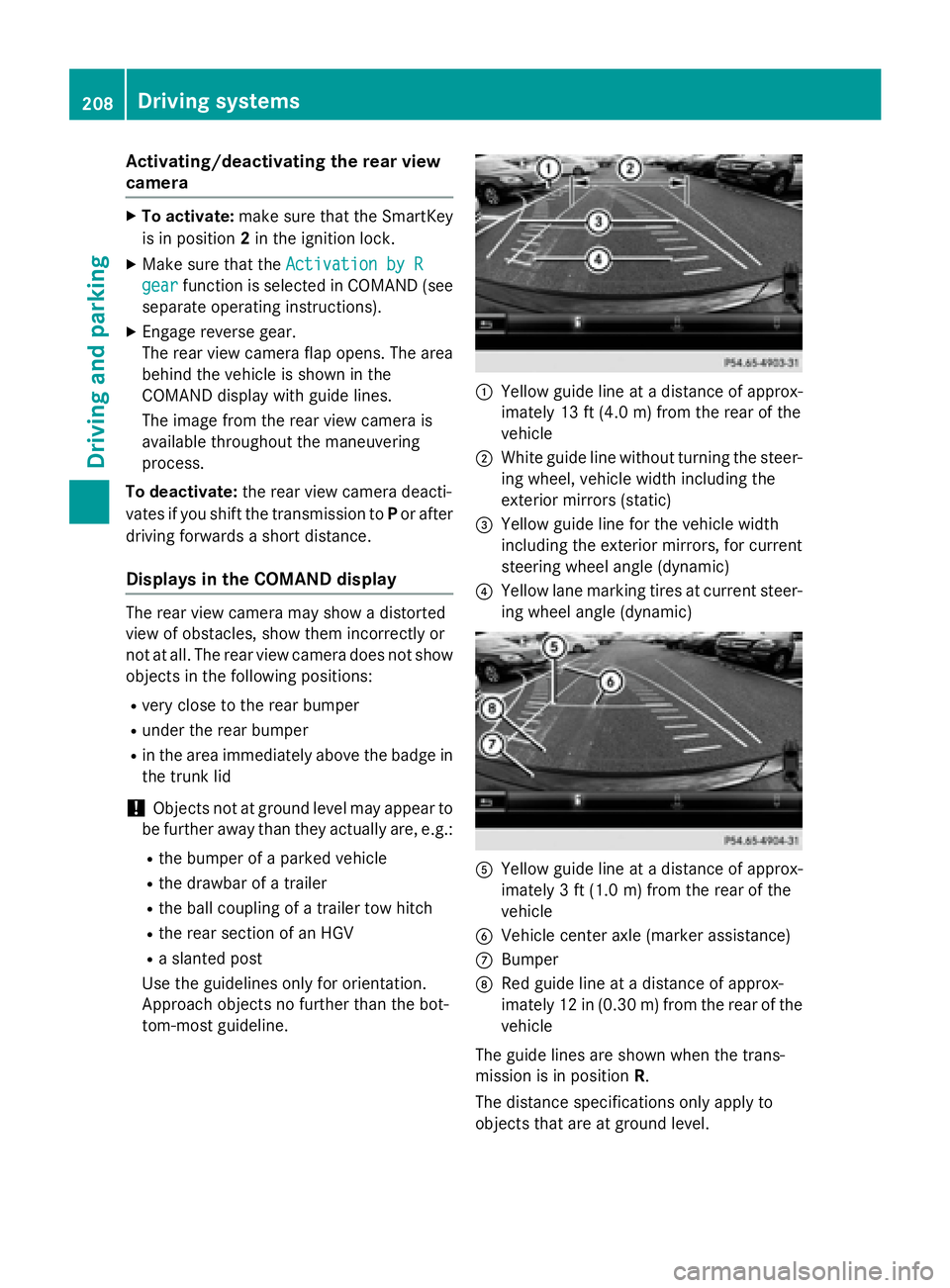
:Yello wguide lin eat adistanc eof approx -
imately 13 ft (4. 0m) from th erear of th e
vehicl e
;Whiteguide lin ewithout turnin gth e steer -
ing wheel, vehicl ewidt hincludin gth e
exterio rmirror s (static)
=Yellowguide lin efor th evehicl ewidt h
includin gth eexterio rmirrors, for curren t
steering whee langle (dynamic )
?Yellowlan emarking tires at curren tsteer -
ing whee langle (dynamic )
AYellowguide lin eat adistanc eof approx -
imately 3ft (1.0 m) from the rear of the
vehicle
BVehicle center axle (marker assistance)
CBumper
DRed guide line at a distance of approx-
imately 12 in (0.30 m) fromthe rear of the
vehicle
The guide lines are shown when the trans-
mission is in position R.
The distance specifications only apply to
objects that are at ground level.
208Driving system s
Driving an d parking
Page 211 of 410
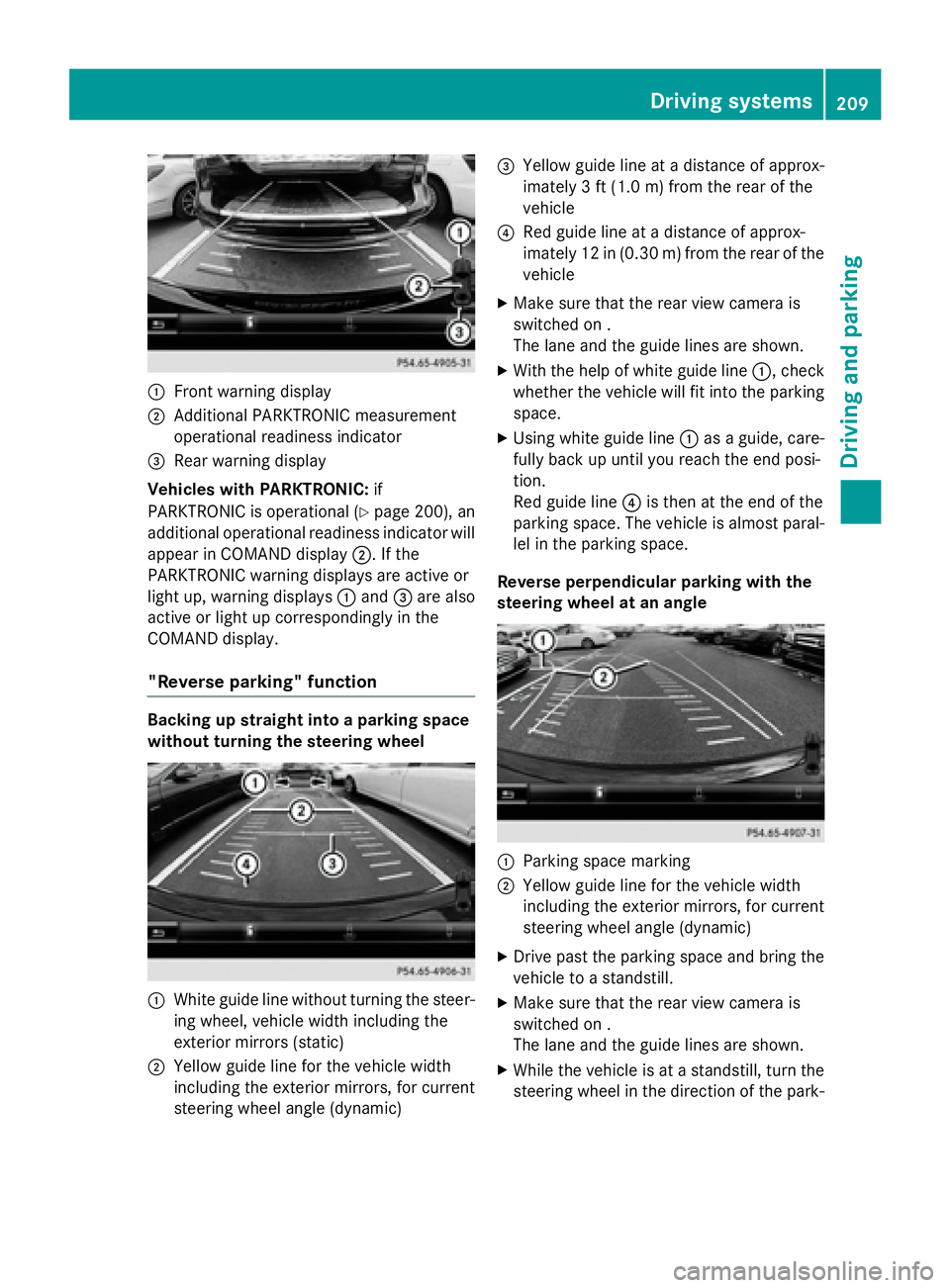
:Front warning display
;Additional PARKTRONIC measurement
operational readiness indicator
=Rear warning display
Vehicles with PARKTRONIC: if
PARKTRONIC is operational (
Ypage 200), an
additional operational readiness indicator will
appear in COMAND display ;. If the
PARKTRONIC warning displays are active or
light up, warning displays :and =are also
active or light up correspondingly in the
COMAND display.
"Reverse parking" function
Backing up straight into a parking space
without turning the steering wheel
:White guide line without turning the steer-
ing wheel, vehicle width including the
exterior mirrors (static)
;Yellow guide line for the vehicle width
including the exterior mirrors, for current
steering wheel angle (dynamic)
=Yellow guide line at a distance of approx-
imately 3 ft (1.0 m) fromthe rear of the
vehicle
?Red guide line at a distance of approx-
imately 12 in (0.30 m) fromthe rear of the
vehicle
XMake sure that the rear view camera is
switched on .
The lane and the guide lines are shown.
XWith the help of white guide line :, check
whether the vehicle will fit into the parking
space.
XUsing white guide line :as a guide, care-
fully back up until you reach the end posi-
tion.
Red guide line ?is then at the end of the
parking space. The vehicle is almost paral-
lel in the parking space.
Reverse perpendicular parking with the
steering wheel at an angle
:Parking space marking
;Yellow guide line for the vehicle width
including the exterior mirrors, for current
steering wheel angle (dynamic)
XDrive past the parking space and bring the vehicle to a standstill.
XMake sure that the rear view camera is
switched on .
The lane and the guide lines are shown.
XWhile the vehicle is at a standstill, turn the
steering wheel in the direction of the park-
Driving system s209
Driving an d parking
Z
Page 212 of 410
ing space until yellow guide line;reaches
parking space marking :.
XKeep the steering wheel in that position
and back up carefully.
:Yellow guide line for the vehicle width
including the exterior mirrors, for current
steering wheel angle (dynamic)
XStop the vehicle when it is almost exactly in
front of the parking space.
The white lane should be as close to parallel
with the parking space marking as possi-
ble.
:White guide line at current steering wheel
angle
;Parking space marking
XTurn the steering wheel to the center posi-
tion while the vehicle is stationary.
:Red guide line at a distance of approx-
imately 12 in (0.30 m) from the rear of the
vehicle
;White guide line without turning the steer- ing wheel
=End of parking space
XBack up carefully until you have reached
the final position.
Red guide line :is then at end of parking
space =. The vehicle is almost parallel in
the parking space.
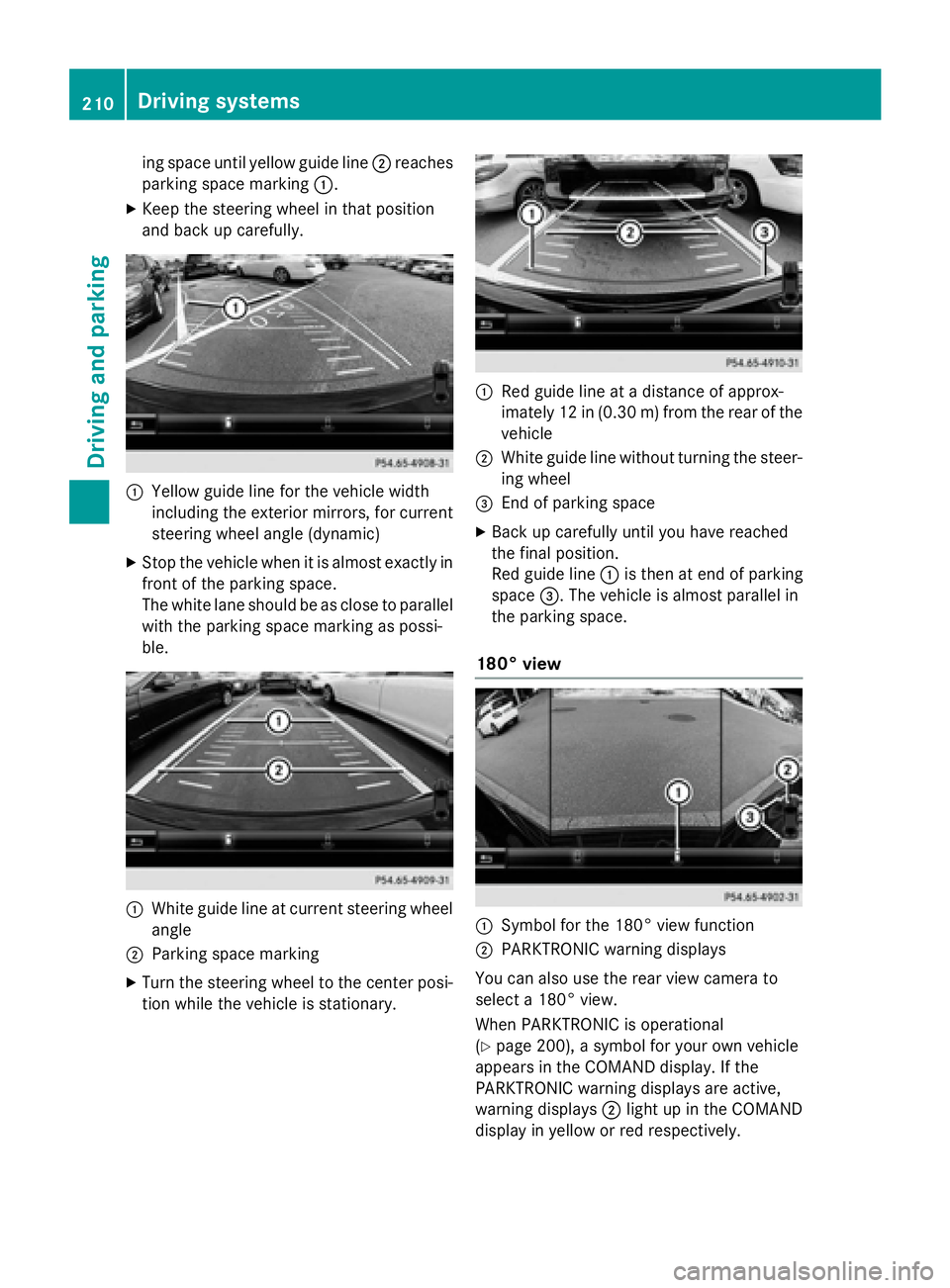
180° view
:Symbol for the 180° view function
;PARKTRONIC warning displays
You can also use the rear view camera to
select a 180° view.
When PARKTRONIC is operational
(
Ypage 200), a symbol for your own vehicle
appears in the COMAND display. If the
PARKTRONIC warning displays are active,
warning displays ;light up in the COMAND
display in yellow or red respectively.
210Driving systems
Driving and parking