ESP MERCEDES-BENZ S63AMG 2010 W221 Service Manual
[x] Cancel search | Manufacturer: MERCEDES-BENZ, Model Year: 2010, Model line: S63AMG, Model: MERCEDES-BENZ S63AMG 2010 W221Pages: 548, PDF Size: 12.48 MB
Page 153 of 548
The following conditions must be met for a
“911” emergency call via COMAND:
RMobile phone must be switched on.
RThe corresponding mobile
communications network must be
available.
iEmergency calls may not be possible with
all telephone networks or if certain network
services and/or telephone functions are
active. Check with your local service
providers.
If you cannot make an emergency call, you
will have to initiate rescue measures yourself.
Placing a “911” emergency call using
COMAND with the mobile phone
unlocked
XPress button S to switch to telephone
mode.
XEnter 911 using the telephone keypad in
the center console.
XPress button 6 on the telephone
keypad in the center console.
or
XSelect 6 in the COMAND display and
press W for dialing to begin.
Connecting call… appears in the
COMAND display while the mobile phone
establishes the connection.
XWait until the emergency call center
answers, then describe the emergency.
iDepending on the phone type, if no SIM
card is inserted in a GSM mobile phone or
if there is no service on a CDMA mobile
phone, NO SERVICE may appear in the
COMAND display. In that case, you only can
make an emergency call on the mobile
phone itself, without the use of COMAND.
Placing a “911” emergency call with the
mobile phone locked
iIf the mobile phone is locked, you only can
make an emergency call on the mobile
phone itself, without the use of COMAND.
Bluetooth interface
Bluetooth® is a technology for wireless
exchange of data over short distances of up
to approximately 33 feet (10 m). You can
connect your mobile phone to COMAND or
exchange vCards using Bluetooth®.
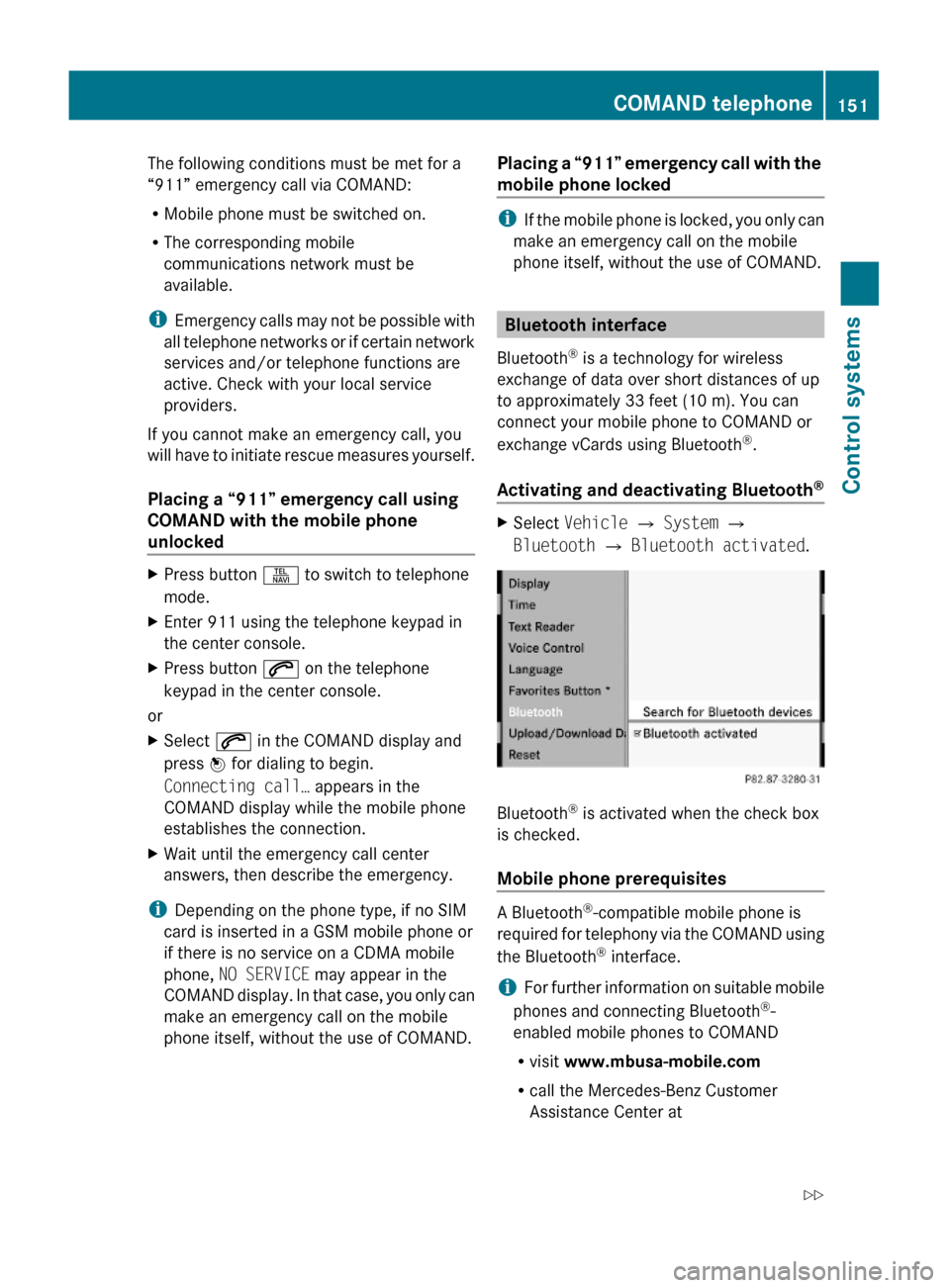
Activating and deactivating Bluetooth®
XSelect Vehicle Q System Q
Bluetooth Q Bluetooth activated.
Bluetooth® is activated when the check box
is checked.
Mobile phone prerequisites
A Bluetooth®-compatible mobile phone is
required for telephony via the COMAND using
the Bluetooth® interface.
iFor further information on suitable mobile
phones and connecting Bluetooth®-
enabled mobile phones to COMAND
Rvisit www.mbusa-mobile.com
Rcall the Mercedes-Benz Customer
Assistance Center at
COMAND telephone151Control systems221_AKB; 6; 20, en-USd2ugruen,Version: 2.11.8.12009-09-24T13:28:17+02:00 - Seite 151Z
Page 155 of 548
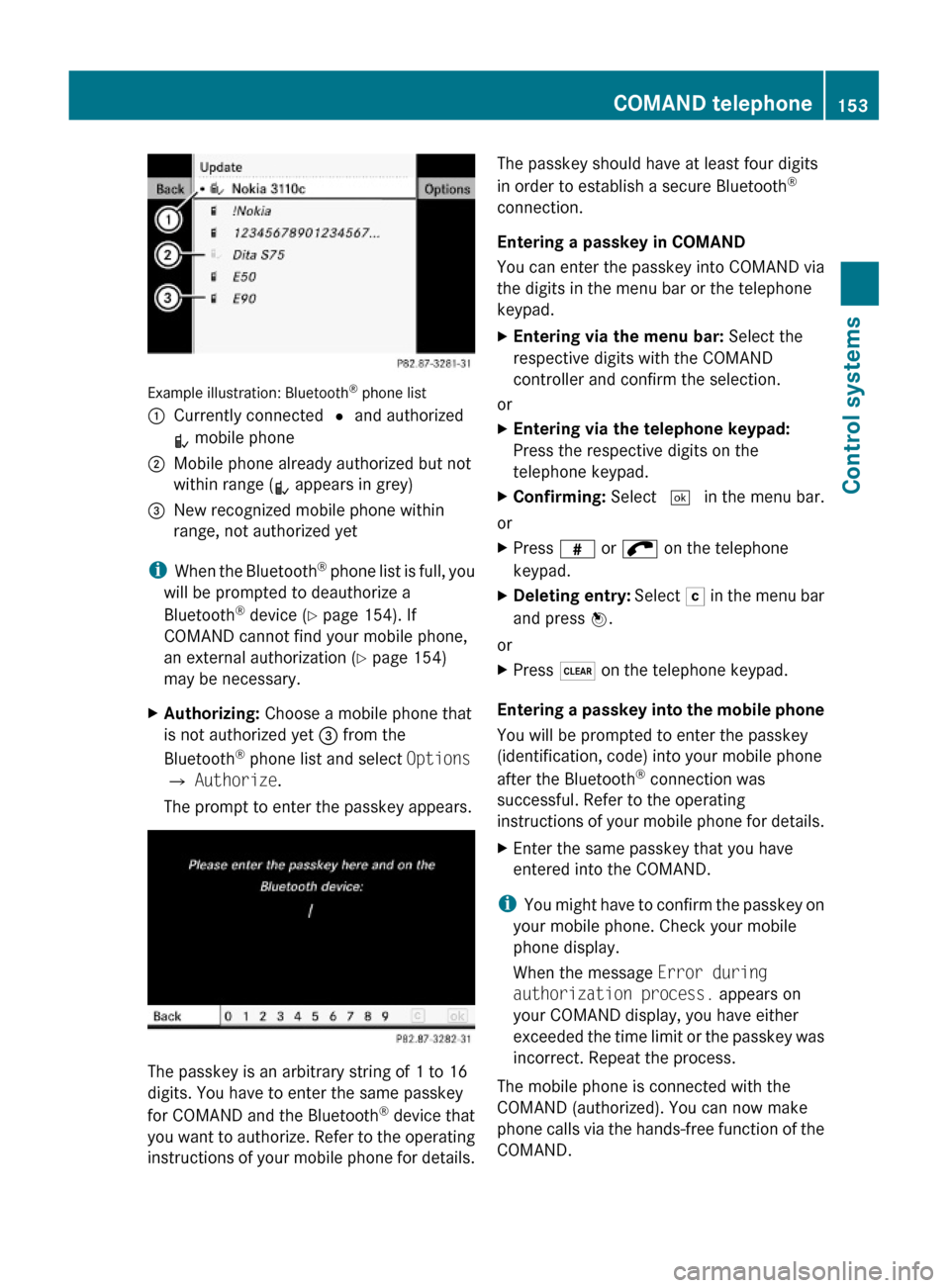
Example illustration: Bluetooth® phone list
:Currently connected # and authorized
L mobile phone
;Mobile phone already authorized but not
within range (L appears in grey)
=New recognized mobile phone within
range, not authorized yet
iWhen the Bluetooth® phone list is full, you
will be prompted to deauthorize a
Bluetooth® device (Y page 154). If
COMAND cannot find your mobile phone,
an external authorization (Y page 154)
may be necessary.
XAuthorizing: Choose a mobile phone that
is not authorized yet = from the
Bluetooth® phone list and select Options
Q Authorize.
The prompt to enter the passkey appears.
The passkey is an arbitrary string of 1 to 16
digits. You have to enter the same passkey
for COMAND and the Bluetooth® device that
you want to authorize. Refer to the operating
instructions of your mobile phone for details.
The passkey should have at least four digits
in order to establish a secure Bluetooth®
connection.
Entering a passkey in COMAND
You can enter the passkey into COMAND via
the digits in the menu bar or the telephone
keypad.
XEntering via the menu bar: Select the
respective digits with the COMAND
controller and confirm the selection.
or
XEntering via the telephone keypad:
Press the respective digits on the
telephone keypad.
XConfirming: Select ¬ in the menu bar.
or
XPress z or ; on the telephone
keypad.
XDeleting entry: Select F in the menu bar
and press W.
or
XPress $ on the telephone keypad.
Entering a passkey into the mobile phone
You will be prompted to enter the passkey
(identification, code) into your mobile phone
after the Bluetooth® connection was
successful. Refer to the operating
instructions of your mobile phone for details.
XEnter the same passkey that you have
entered into the COMAND.
iYou might have to confirm the passkey on
your mobile phone. Check your mobile
phone display.
When the message Error during
authorization process. appears on
your COMAND display, you have either
exceeded the time limit or the passkey was
incorrect. Repeat the process.
The mobile phone is connected with the
COMAND (authorized). You can now make
phone calls via the hands-free function of the
COMAND.
COMAND telephone153Control systems221_AKB; 6; 20, en-USd2ugruen,Version: 2.11.8.12009-09-24T13:28:17+02:00 - Seite 153Z
Page 156 of 548
External authorization
Certain security settings in your mobile
phone may prevent COMAND from finding
your mobile phone. In this case, you might
want to check if your mobile phone can
recognize the COMAND. The Bluetooth ®
device name of COMAND is MB Bluetooth.XSelect Data/Connections Q
Bluetooth Telephones .XGo to Update and select Options Q
External Authorization .XActivate the Bluetooth®
search on the
mobile phone. Refer to mobile phone
operating instructions for detail.XSelect MB Bluetooth on the mobile phone.XWhen prompted, enter the passkey into
COMAND and the mobile phone
( Y page 153).
Show details
Details can be displayed for each mobile
phone in the Bluetooth ®
phone list.
XSelect Data/Connections Q
Bluetooth Telephones .XChoose the mobile phone from the list and
select Options Q Details .
The following mobile phone details appear:
R Bluetooth ®
name
R Bluetooth ®
address
R Availability status
R Authorization
R Bluetooth ®
Class (mobile phone,
notebook, etc.)XClosing detail display: Slide XV Y.Deauthorizing the mobile phone XSelect Data/Connections Q
Bluetooth Telephones .XChoose the mobile phone from the list and
select Options Q De-authorize .
You will be asked whether you want to
deauthorize the device.XSelect Yes.
i
You should delete the device name MB
Bluetooth from the Bluetooth ®
list of the
mobile phone before authorizing that
mobile phone again.
Connecting another mobile phone
You can switch between several mobile
phones that you have authorized.
i Switching to another authorized mobile
phone is only possible while no phone calls
are being made.
XSelect Data/Connections Q
Bluetooth Telephones .XSelect the mobile phone from the
Bluetooth ®
phone list.XConfirm the selection.
The selected mobile phone is connected
provided it is within Bluetooth ®
range and
Bluetooth ®
is activated on the respective
device.
You can only connect one mobile phone at
a time. The currently connected mobile
phone is indicated by a dot # in the
Bluetooth ®
phone list ( Y page 153).
Main telephone menu
When the connected mobile phone is ready,
the following display appears:
154COMAND telephoneControl systems
221_AKB; 6; 20, en-USd2ugruen,Version: 2.11.8.12009-09-24T13:28:17+02:00 - Seite 154
Page 159 of 548
XDeleting entire number: Press and hold
$ on the telephone keypad in the center
console until the number is deleted.
or
XSelect r via the telephone menu and
press and hold W until the number is
deleted.
XConnecting call: Press button 6 on the
multifunction steering wheel or on the
telephone keypad in the center console.
or
XSelect 6 via the telephone menu
Redial
XGo to the telephone menu.XPress 6 on the telephone keypad in the
center console.
or
XSelect SEND from the telephone menu and
press W.
The list of previously dialed number
appears. The last number you have called
at the top of the list.
XSelecting number and connecting call:
Slide ZVÆ and press W to select a number
or press 6 on the telephone keypad in
the center console.
Calling voice mail15
Your voice mail number must be stored on the
SIM card of your mobile phone and be
assigned to key 4 on the mobile phone
keypad.
XPress and hold ´ on the telephone
keypad in the center console.
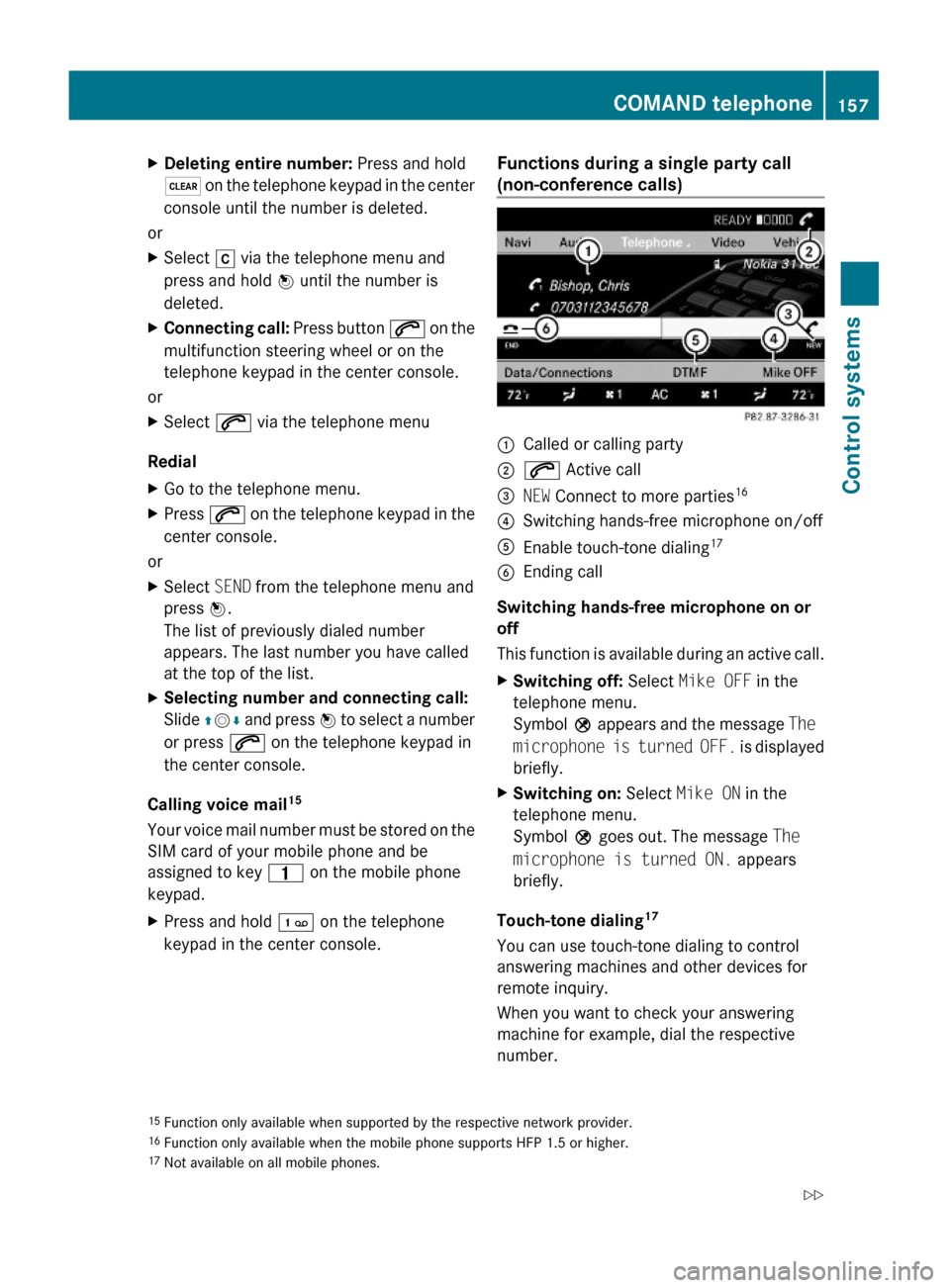
Functions during a single party call
(non-conference calls) :Called or calling party;6 Active call=NEW Connect to more parties16?Switching hands-free microphone on/offAEnable touch-tone dialing17BEnding call
Switching hands-free microphone on or
off
This function is available during an active call.
XSwitching off: Select Mike OFF in the
telephone menu.
Symbol Q appears and the message The
microphone is turned OFF. is displayed
briefly.
XSwitching on: Select Mike ON in the
telephone menu.
Symbol Q goes out. The message The
microphone is turned ON. appears
briefly.
Touch-tone dialing17
You can use touch-tone dialing to control
answering machines and other devices for
remote inquiry.
When you want to check your answering
machine for example, dial the respective
number.
15Function only available when supported by the respective network provider.16Function only available when the mobile phone supports HFP 1.5 or higher.17Not available on all mobile phones.
COMAND telephone157Control systems221_AKB; 6; 20, en-USd2ugruen,Version: 2.11.8.12009-09-24T13:28:17+02:00 - Seite 157Z
Page 160 of 548
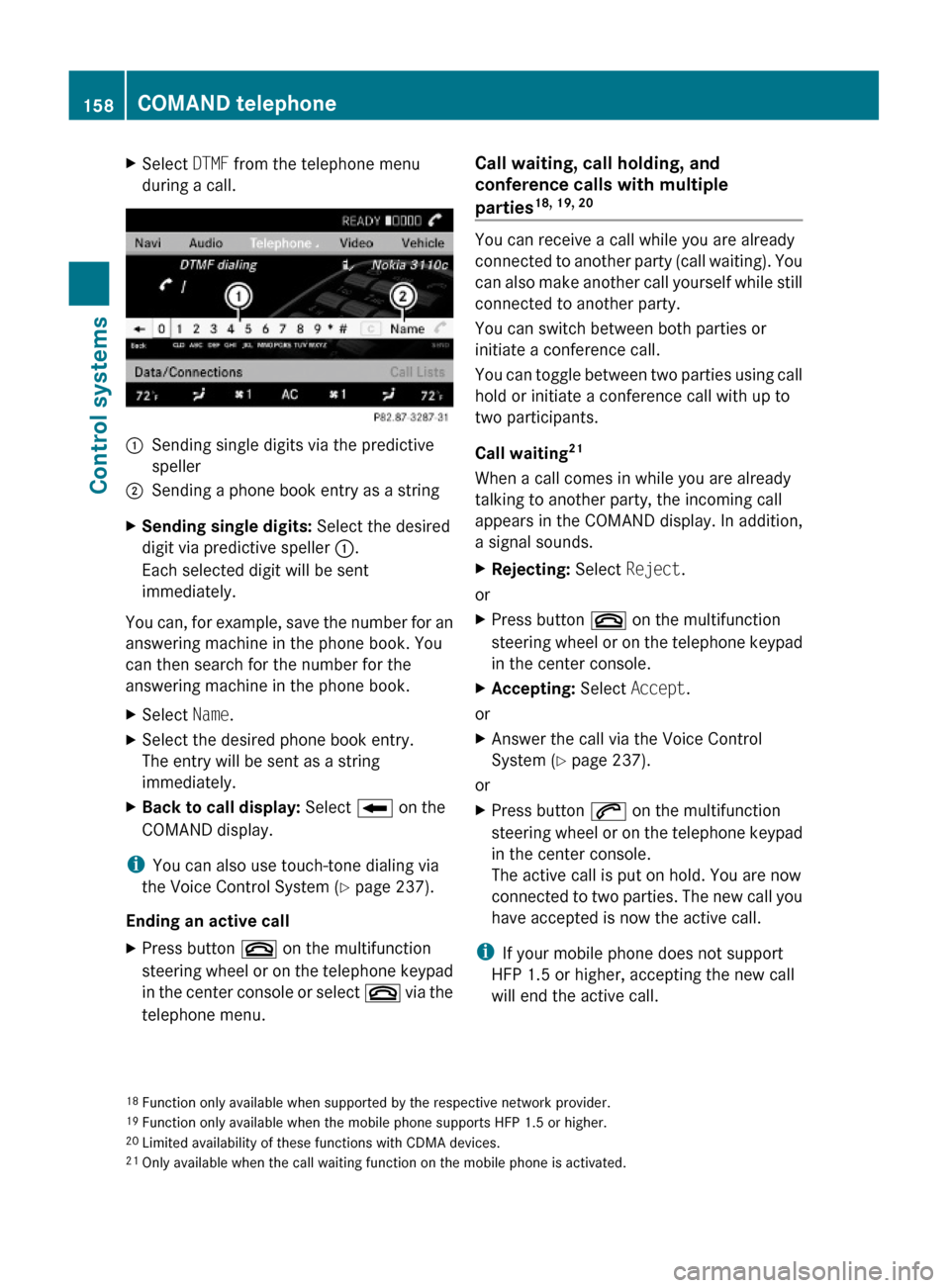
XSelect DTMF from the telephone menu
during a call.:Sending single digits via the predictive
speller
;Sending a phone book entry as a stringXSending single digits: Select the desired
digit via predictive speller :.
Each selected digit will be sent
immediately.
You can, for example, save the number for an
answering machine in the phone book. You
can then search for the number for the
answering machine in the phone book.
XSelect Name.XSelect the desired phone book entry.
The entry will be sent as a string
immediately.
XBack to call display: Select B on the
COMAND display.
iYou can also use touch-tone dialing via
the Voice Control System (Y page 237).
Ending an active call
XPress button ~ on the multifunction
steering wheel or on the telephone keypad
in the center console or select ~ via the
telephone menu.
Call waiting, call holding, and
conference calls with multiple
parties18, 19, 20
You can receive a call while you are already
connected to another party (call waiting). You
can also make another call yourself while still
connected to another party.
You can switch between both parties or
initiate a conference call.
You can toggle between two parties using call
hold or initiate a conference call with up to
two participants.
Call waiting21
When a call comes in while you are already
talking to another party, the incoming call
appears in the COMAND display. In addition,
a signal sounds.
XRejecting: Select Reject.
or
XPress button ~ on the multifunction
steering wheel or on the telephone keypad
in the center console.
XAccepting: Select Accept.
or
XAnswer the call via the Voice Control
System (Y page 237).
or
XPress button 6 on the multifunction
steering wheel or on the telephone keypad
in the center console.
The active call is put on hold. You are now
connected to two parties. The new call you
have accepted is now the active call.
iIf your mobile phone does not support
HFP 1.5 or higher, accepting the new call
will end the active call.
18Function only available when supported by the respective network provider.19Function only available when the mobile phone supports HFP 1.5 or higher.20Limited availability of these functions with CDMA devices.21Only available when the call waiting function on the mobile phone is activated.
158COMAND telephoneControl systems
221_AKB; 6; 20, en-USd2ugruen,Version: 2.11.8.12009-09-24T13:28:17+02:00 - Seite 158
Page 162 of 548
be accessed when the respective mobile
phone is connected to COMAND via the
Bluetooth® interface.
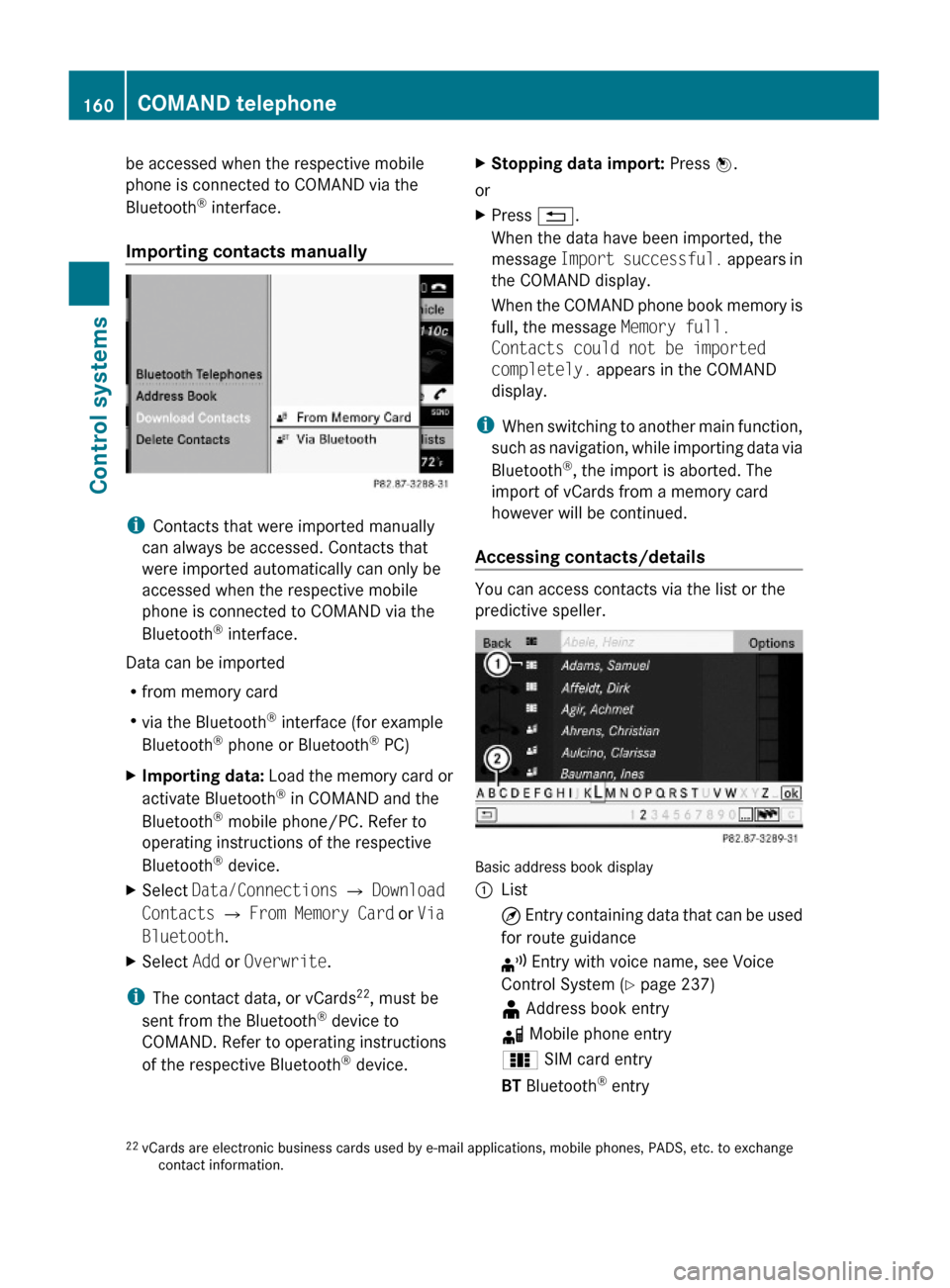
Importing contacts manually
iContacts that were imported manually
can always be accessed. Contacts that
were imported automatically can only be
accessed when the respective mobile
phone is connected to COMAND via the
Bluetooth® interface.
Data can be imported
Rfrom memory card
Rvia the Bluetooth® interface (for example
Bluetooth® phone or Bluetooth® PC)
XImporting data: Load the memory card or
activate Bluetooth® in COMAND and the
Bluetooth® mobile phone/PC. Refer to
operating instructions of the respective
Bluetooth® device.
XSelect Data/Connections Q Download
Contacts Q From Memory Card or Via
Bluetooth.
XSelect Add or Overwrite.
iThe contact data, or vCards22, must be
sent from the Bluetooth® device to
COMAND. Refer to operating instructions
of the respective Bluetooth® device.
XStopping data import: Press W.
or
XPress %.
When the data have been imported, the
message Import successful. appears in
the COMAND display.
When the COMAND phone book memory is
full, the message Memory full.
Contacts could not be imported
completely. appears in the COMAND
display.
iWhen switching to another main function,
such as navigation, while importing data via
Bluetooth®, the import is aborted. The
import of vCards from a memory card
however will be continued.
Accessing contacts/details
You can access contacts via the list or the
predictive speller.
Basic address book display
:List¤ Entry containing data that can be used
for route guidance
¦ Entry with voice name, see Voice
Control System (Y page 237)
¥ Address book entryd Mobile phone entry0 SIM card entryBT Bluetooth® entry22vCards are electronic business cards used by e-mail applications, mobile phones, PADS, etc. to exchangecontact information.
160COMAND telephoneControl systems
221_AKB; 6; 20, en-USd2ugruen,Version: 2.11.8.12009-09-24T13:28:17+02:00 - Seite 160
Page 164 of 548
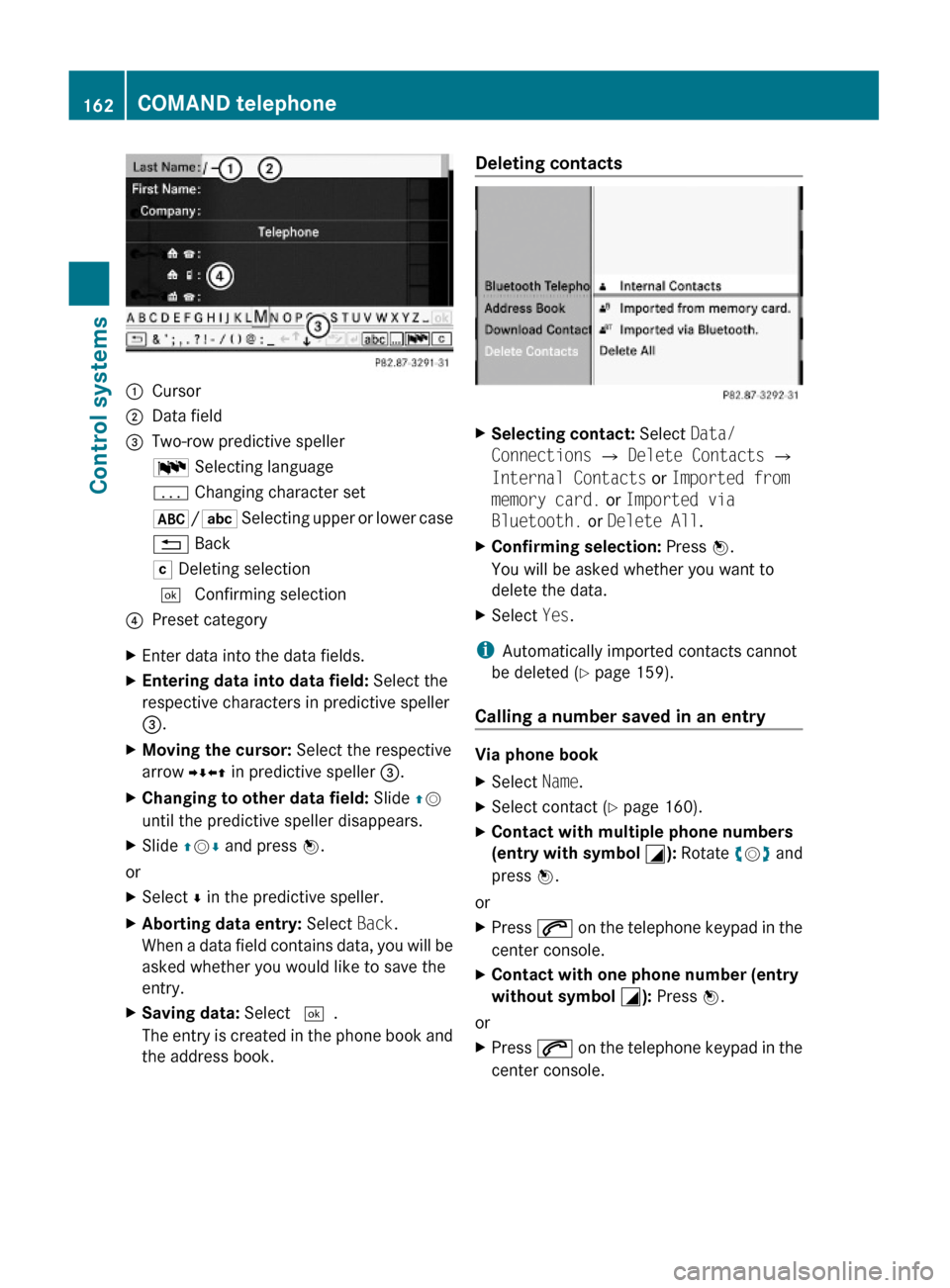
:Cursor;Data field=Two-row predictive spellerB Selecting languagep Changing character set*/E Selecting upper or lower case% BackF Deleting selection¬ Confirming selection?Preset categoryXEnter data into the data fields.XEntering data into data field: Select the
respective characters in predictive speller
=.
XMoving the cursor: Select the respective
arrow YÆXZ in predictive speller =.
XChanging to other data field: Slide ZV
until the predictive speller disappears.
XSlide ZVÆ and press W.
or
XSelect Æ in the predictive speller.XAborting data entry: Select Back.
When a data field contains data, you will be
asked whether you would like to save the
entry.
XSaving data: Select ¬.
The entry is created in the phone book and
the address book.
Deleting contacts XSelecting contact: Select Data/
Connections Q Delete Contacts Q
Internal Contacts or Imported from
memory card. or Imported via
Bluetooth. or Delete All.
XConfirming selection: Press W.
You will be asked whether you want to
delete the data.
XSelect Yes.
iAutomatically imported contacts cannot
be deleted (Y page 159).
Calling a number saved in an entry
Via phone book
XSelect Name.XSelect contact (Y page 160).XContact with multiple phone numbers
(entry with symbol G): Rotate cVd and
press W.
or
XPress 6 on the telephone keypad in the
center console.
XContact with one phone number (entry
without symbol G): Press W.
or
XPress 6 on the telephone keypad in the
center console.
162COMAND telephoneControl systems
221_AKB; 6; 20, en-USd2ugruen,Version: 2.11.8.12009-09-24T13:28:17+02:00 - Seite 162
Page 165 of 548
Via address bookXSelect Data/Connections.XOpen Address Book.XSelect contact (Y page 160).XPress W.XRotate cVd and press W.
or
XSelect Options Q Call.
Starting route guidance to an entry
iYou can use this function once you have
saved a destination to the destination
memory (Y page 120). COMAND will then
also save the entire destination data in the
address book.
XSelect an address book entry with symbol
¤.
XDisplay the entry details and select the
address data field.
XSelect Options Q Navigate Q Start.
iYou can only select the function
Navigate when the address data field
contains complete data usable for route
guidance. Entries with complete, usable
data is indicated by symbol ¤.
Voice names
iVoice names are made via the Voice
Control System (Y page 237).
Adding or changing voice names
iYou can add one voice name for each
address book entry.
XSearch for an address book entry. Entries
with voice name are indicated by symbol
¦.
XSelect Options Q Voice Name Q Add
or Change.
Further operations is conducted via the
Voice Control System. The Voice Control
System will lead you through the menus.
Deleting voice nameXSearch for an address book entry with voice
name.
XSelect Options Q Voice Name Q
Delete.
You will be asked if you want to delete the
voice name.
Listening to a voice name
XSearch for an address book entry with voice
name.
XSelect Options Q Voice Name Q
Listen.
You will hear the voice name.
Call lists
COMAND displays separate lists of the phone
calls that came in and went out while the
mobile phone was in operation. The list of
incoming calls includes the ones you have
missed.
iThe respective menu item can only be
selected when calls were made or received
via COMAND or when call lists were
imported from the mobile phone.
Selecting a call list entry
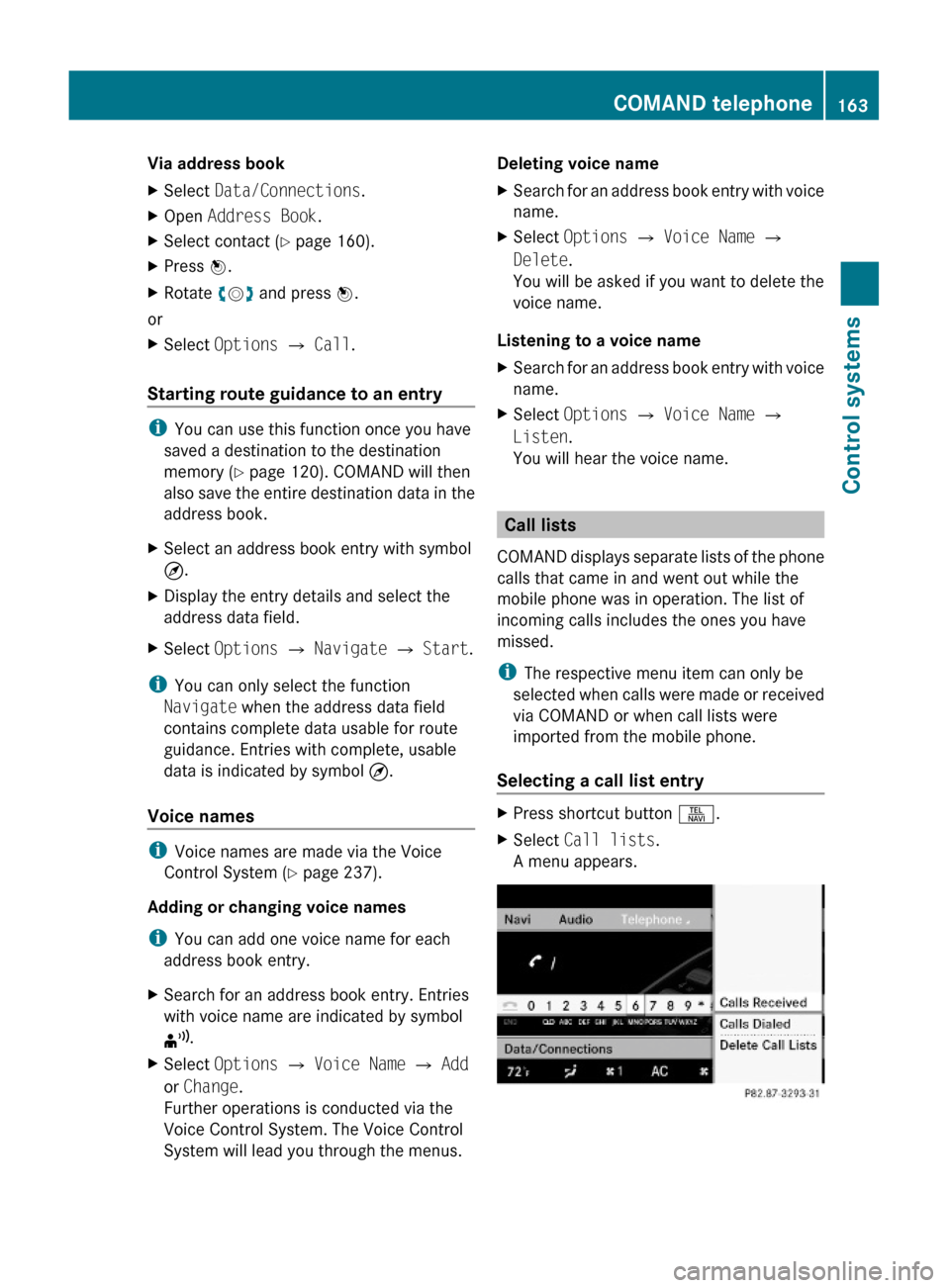
XPress shortcut button S.XSelect Call lists.
A menu appears.
COMAND telephone163Control systems221_AKB; 6; 20, en-USd2ugruen,Version: 2.11.8.12009-09-24T13:28:17+02:00 - Seite 163Z
Page 166 of 548
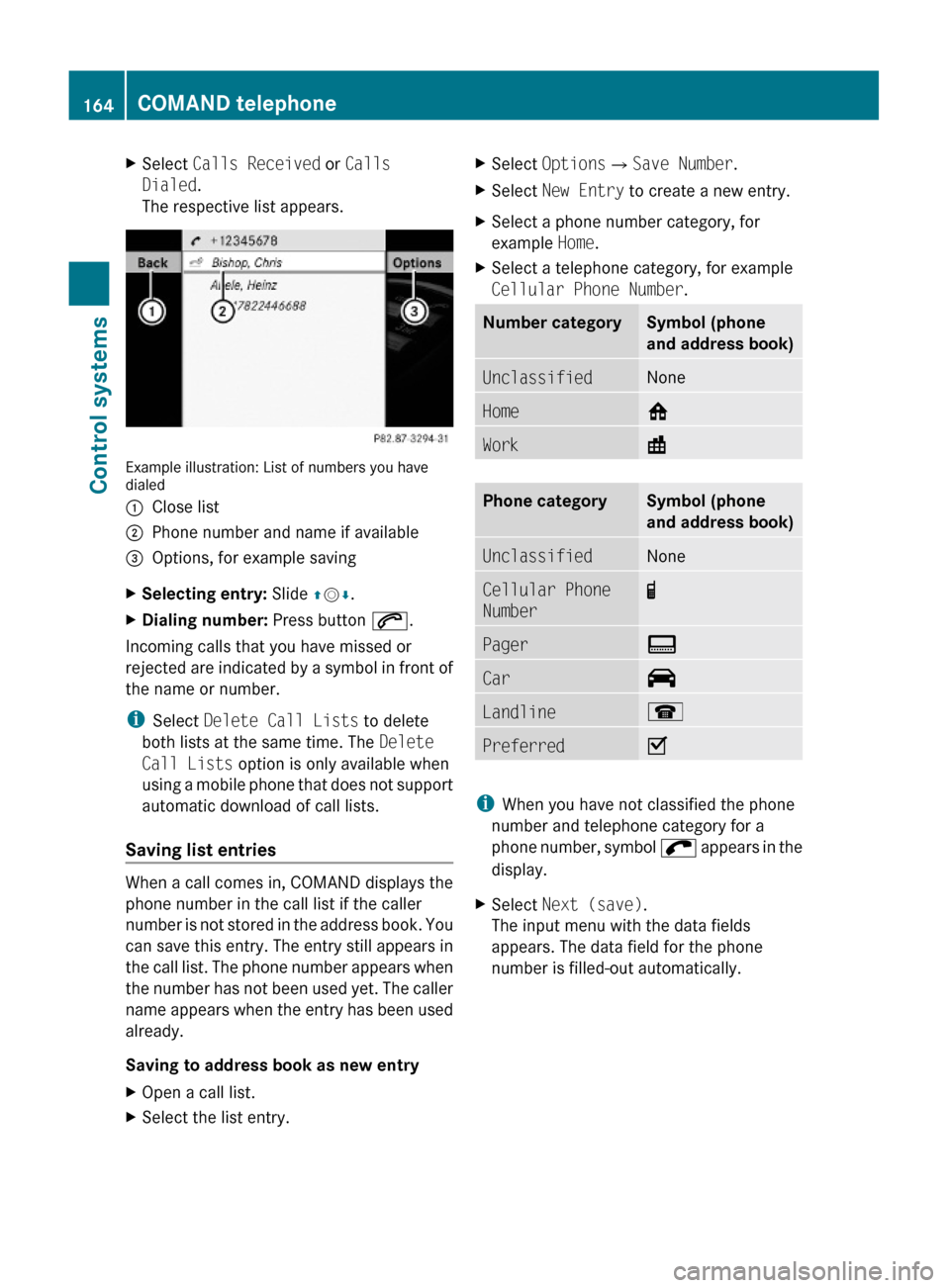
XSelect Calls Received or Calls
Dialed.
The respective list appears.
Example illustration: List of numbers you havedialed
:Close list;Phone number and name if available=Options, for example savingXSelecting entry: Slide ZVÆ.XDialing number: Press button 6.
Incoming calls that you have missed or
rejected are indicated by a symbol in front of
the name or number.
iSelect Delete Call Lists to delete
both lists at the same time. The Delete
Call Lists option is only available when
using a mobile phone that does not support
automatic download of call lists.
Saving list entries
When a call comes in, COMAND displays the
phone number in the call list if the caller
number is not stored in the address book. You
can save this entry. The entry still appears in
the call list. The phone number appears when
the number has not been used yet. The caller
name appears when the entry has been used
already.
Saving to address book as new entry
XOpen a call list.XSelect the list entry.XSelect OptionsQSave Number.XSelect New Entry to create a new entry.XSelect a phone number category, for
example Home.
XSelect a telephone category, for example
Cellular Phone Number.
Number categorySymbol (phone
and address book)
UnclassifiedNoneHome6Work\Phone categorySymbol (phone
and address book)
UnclassifiedNoneCellular Phone
Number
¢Pager¨Car^Landline¬PreferredO
iWhen you have not classified the phone
number and telephone category for a
phone number, symbol ; appears in the
display.
XSelect Next (save).
The input menu with the data fields
appears. The data field for the phone
number is filled-out automatically.
164COMAND telephoneControl systems
221_AKB; 6; 20, en-USd2ugruen,Version: 2.11.8.12009-09-24T13:28:17+02:00 - Seite 164
Page 167 of 548
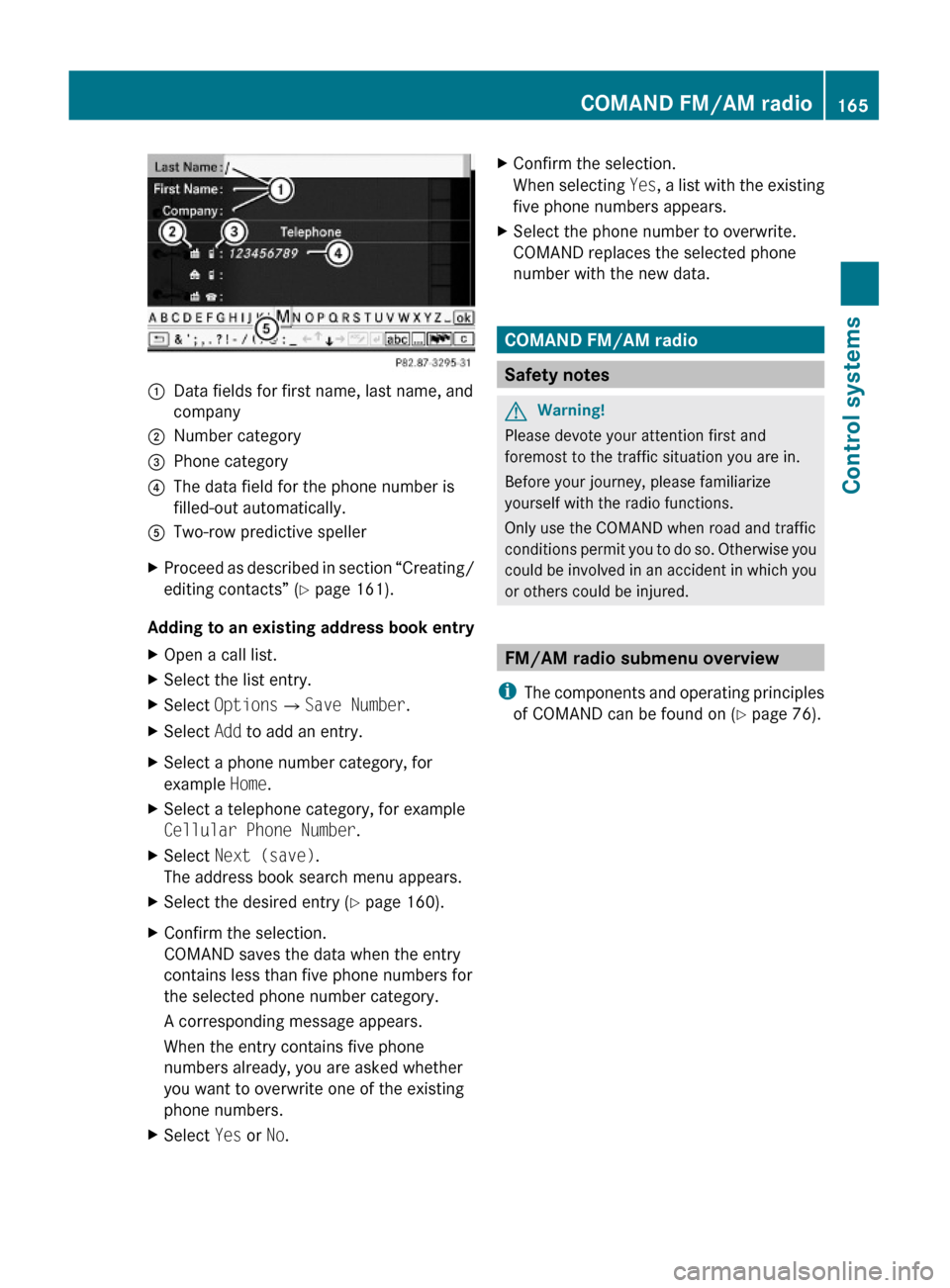
:Data fields for first name, last name, and
company
;Number category=Phone category?The data field for the phone number is
filled-out automatically.
ATwo-row predictive spellerXProceed as described in section “Creating/
editing contacts” (Y page 161).
Adding to an existing address book entry
XOpen a call list.XSelect the list entry.XSelect OptionsQSave Number.XSelect Add to add an entry.XSelect a phone number category, for
example Home.
XSelect a telephone category, for example
Cellular Phone Number.
XSelect Next (save).
The address book search menu appears.
XSelect the desired entry (Y page 160).XConfirm the selection.
COMAND saves the data when the entry
contains less than five phone numbers for
the selected phone number category.
A corresponding message appears.
When the entry contains five phone
numbers already, you are asked whether
you want to overwrite one of the existing
phone numbers.
XSelect Yes or No.XConfirm the selection.
When selecting Yes, a list with the existing
five phone numbers appears.
XSelect the phone number to overwrite.
COMAND replaces the selected phone
number with the new data.
COMAND FM/AM radio
Safety notes
GWarning!
Please devote your attention first and
foremost to the traffic situation you are in.
Before your journey, please familiarize
yourself with the radio functions.
Only use the COMAND when road and traffic
conditions permit you to do so. Otherwise you
could be involved in an accident in which you
or others could be injured.
FM/AM radio submenu overview
iThe components and operating principles
of COMAND can be found on (Y page 76).
COMAND FM/AM radio165Control systems221_AKB; 6; 20, en-USd2ugruen,Version: 2.11.8.12009-09-24T13:28:17+02:00 - Seite 165Z