engine MERCEDES-BENZ SL CLASS 2011 Workshop Manual
[x] Cancel search | Manufacturer: MERCEDES-BENZ, Model Year: 2011, Model line: SL CLASS, Model: MERCEDES-BENZ SL CLASS 2011Pages: 316, PDF Size: 6.55 MB
Page 128 of 316
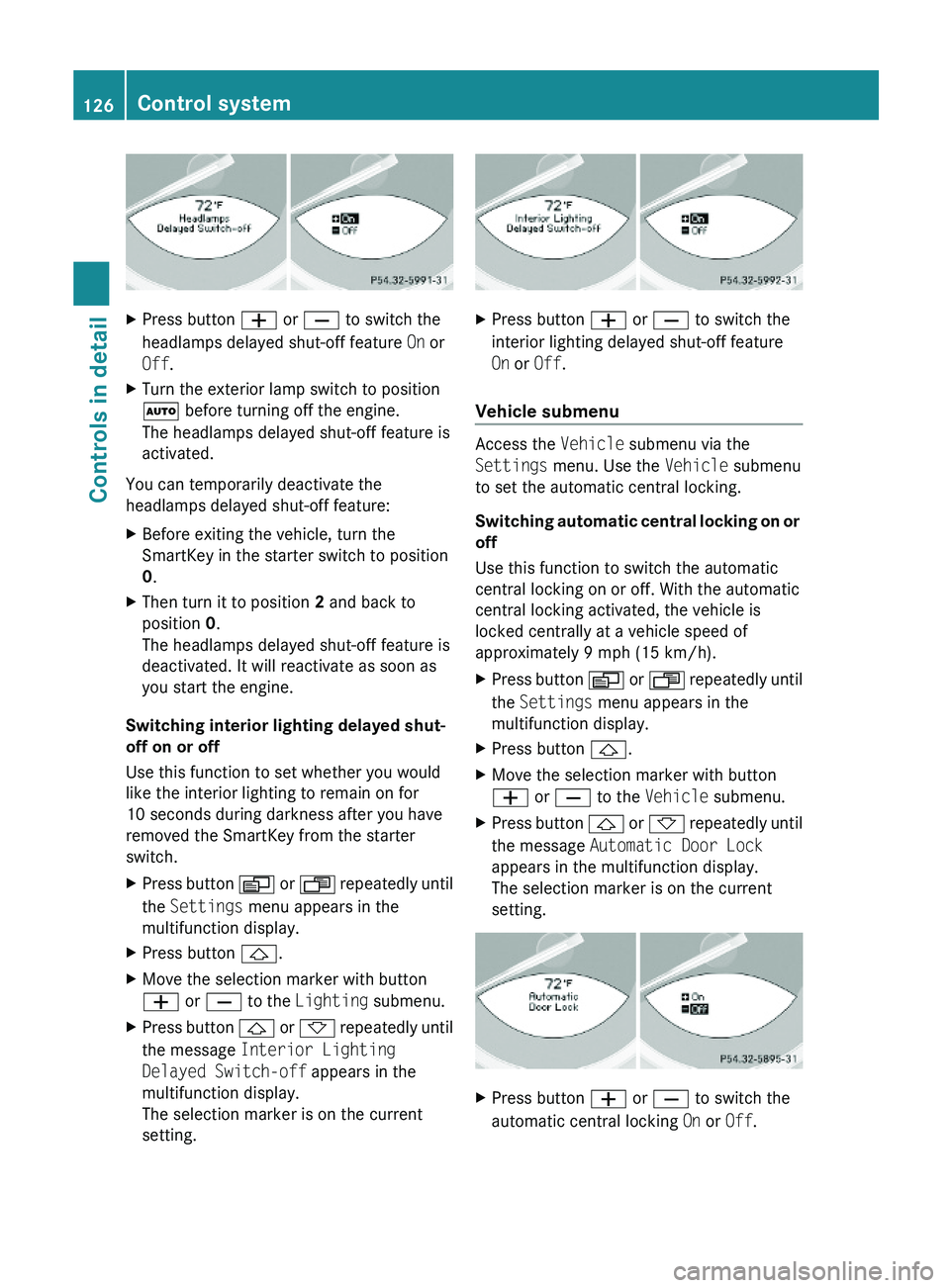
XPress button \000Z or \000[ to switch the
headlamps delayed shut-off feature On or
Off.
XTurn the exterior lamp switch to position
\000Z before turning off the engine.
The headlamps delayed shut-off feature is
activated.
You can temporarily deactivate the
headlamps delayed shut-off feature:
XBefore exiting the vehicle, turn the
SmartKey in the starter switch to position
0.
XThen turn it to position 2 and back to
position 0.
The headlamps delayed shut-off feature is
deactivated. It will reactivate as soon as
you start the engine.
Switching interior lighting delayed shut-
off on or off
Use this function to set whether you would
like the interior lighting to remain on for
10 seconds during darkness after you have
removed the SmartKey from the starter
switch.
XPress button \000Y or \000X repeatedly until
the Settings menu appears in the
multifunction display.
XPress button \000\).XMove the selection marker with button
\000Z or \000[ to the Lighting submenu.
XPress button \000\) or \000- repeatedly until
the message Interior Lighting
Delayed Switch-off appears in the
multifunction display.
The selection marker is on the current
setting.
XPress button \000Z or \000[ to switch the
interior lighting delayed shut-off feature
On or Off.
Vehicle submenu
Access the Vehicle submenu via the
Settings menu. Use the Vehicle submenu
to set the automatic central locking.
Switching automatic central locking on or
off
Use this function to switch the automatic
central locking on or off. With the automatic
central locking activated, the vehicle is
locked centrally at a vehicle speed of
approximately 9 mph (15 km/h).
XPress button \000Y or \000X repeatedly until
the Settings menu appears in the
multifunction display.
XPress button \000\).XMove the selection marker with button
\000Z or \000[ to the Vehicle submenu.
XPress button \000\) or \000- repeatedly until
the message Automatic Door Lock
appears in the multifunction display.
The selection marker is on the current
setting.
XPress button \000Z or \000[ to switch the
automatic central locking On or Off.
126Control systemControls in detail
230_AKB; 6; 22, en-USd2ureepe,Version: 2.11.8.12009-07-28T18:49:58+02:00 - Seite 126
Page 134 of 316
the grade eases, the set speed will be
resumed.
On downhill grades, the cruise control
maintains the set speed by braking with the
vehicle’s brake system. In addition, on
longer downhill grades the automatic
transmission will downshift automatically.
Canceling cruise control XDepress the brake pedal.
or
XBriefly push the cruise control lever in
direction of arrow 008A.
The last set speed is stored for later use.
The last stored speed is deleted from memory
when the engine is turned off.
The cruise control switches off automatically
when you depress the brake pedal or you
engage the parking brake.
The cruise control also switches off
automatically when
R the vehicle speed falls below 20 mph
(30 km/h)
R the ESP ®
is in operation
R the ESP ®
is switched off with the ESP ®
switch
R the ESP ®
has switched off due to a
malfunction
R you shift the automatic transmission into
neutral position N while driving
An acoustic warning will sound. Observe
additional messages in the multifunction
display that may appear.
Depressing the accelerator pedal does not
deactivate the cruise control. After a brief
acceleration (e.g. for passing), the cruise
control will resume the last set speed.
Changing the set speed GWarning!
Keep in mind that it may take a brief moment
until the vehicle has made the necessary
adjustments.
Increase or decrease the set vehicle speed to
a value that the prevailing road conditions and
legal speed limits permit. Otherwise, sudden
and unexpected acceleration or deceleration
of the vehicle could cause an accident and/
or serious injury to you and others.
When you use the cruise control lever to
decelerate, the brake system will brake the
vehicle automatically if the engine’s braking
power does not brake the vehicle sufficiently.
XIncreasing: Lift the cruise control lever in
direction of arrow 0046 and hold it up until
the desired speed is reached.XDecreasing: Press the cruise control lever
in direction of arrow 0047 and hold it down
until the desired speed is reached.XRelease the cruise control lever.
The new speed is set and the vehicle will
accelerate or decelerate.
Fine adjustment in 1 mph (Canada:
1 km/h) increments
XIncreasing: Briefly tip the cruise control
lever in direction of arrow 0046.XDecreasing: Briefly tip the cruise control
lever in direction of arrow 0047.
Setting stored speed (Resume
function)
GWarning!
The set speed stored in memory should only
be set again if prevailing road conditions and
legal speed limits permit. Possible
acceleration or deceleration differences
arising from returning to the preset speed
could cause an accident and/or serious injury
to you and others.
132Driving systemsControls in detail
230_AKB; 6; 22, en-USd2ureepe,Version: 2.11.8.12009-07-28T18:49:58+02:00 - Seite 132
Page 135 of 316
XBriefly pull the cruise control lever in
direction of arrow 0088.
If no speed is stored, the current speed is
set and stored.XRemove your foot from the accelerator
pedal.
The last stored speed is deleted from memory
when the engine is turned off.
Distronic
Safety notes
When activated, the Distronic adaptive cruise
control increases the driving convenience
afforded by the cruise control while traveling
on expressways and other major roadways.
R If the Distronic distance sensor detects a
slower moving vehicle directly ahead, your
vehicle speed will be reduced so that you
follow that vehicle at your preset following
distance.
R If there is no vehicle directly ahead of you,
the Distronic will function in the same way
as standard cruise control ( Y page 130).
GWarning!
The Distronic requires familiarity with its
operational characteristics. We strongly
recommend that you review the following
information carefully before operating the
system.
GWarning!
The Distronic is a convenience system. Its
speed adjustment reduction capability is
intended to make cruise control more
effective and usable when traffic speeds vary.
It is not however, intended to, nor does it,
replace the need for extreme care.
The responsibility for the vehicle’s speed,
distance to the preceding vehicle and, most
importantly, brake operation to ensure a safe
stopping distance, always remains with the
driver.
The Distronic cannot take street and traffic
conditions into account. Complex driving
situations are not always fully recognized by
the Distronic. This could result in wrong or
missing distance warnings.GWarning!
The Distronic adaptive cruise control is not a
substitute for active driving involvement. It
does not react to pedestrians or on stationary
objects, nor does it recognize or predict the
lane curvature or the movement of preceding
vehicles.
The Distronic can only apply 20% of the
maximum braking power of the vehicle.
It is the driver’s responsibility at all times to
be attentive to the road, weather and traffic
conditions. Additionally, the driver must
provide the steering, braking and other driving
inputs necessary to remain in control of the
vehicle.
High-frequency sources such as toll stations,
speed measuring systems etc. can cause the
Distronic system to malfunction.
GWarning!
The Distronic cannot take road and traffic
conditions into account. Only use the
Distronic if the road, weather and traffic
conditions make it advisable to travel at a
constant speed.
GWarning!
Use of the Distronic can be dangerous on
slippery roads. Rapid changes in tire traction
can result in wheel spin and loss of control.
The Distronic does not function in adverse
sight and distance conditions. Do not use the
Distronic during conditions of fog, heavy rain,
snow or sleet.
Driving systems133Controls in detail230_AKB; 6; 22, en-USd2ureepe,Version: 2.11.8.12009-07-28T18:49:58+02:00 - Seite 133Z
Page 143 of 316
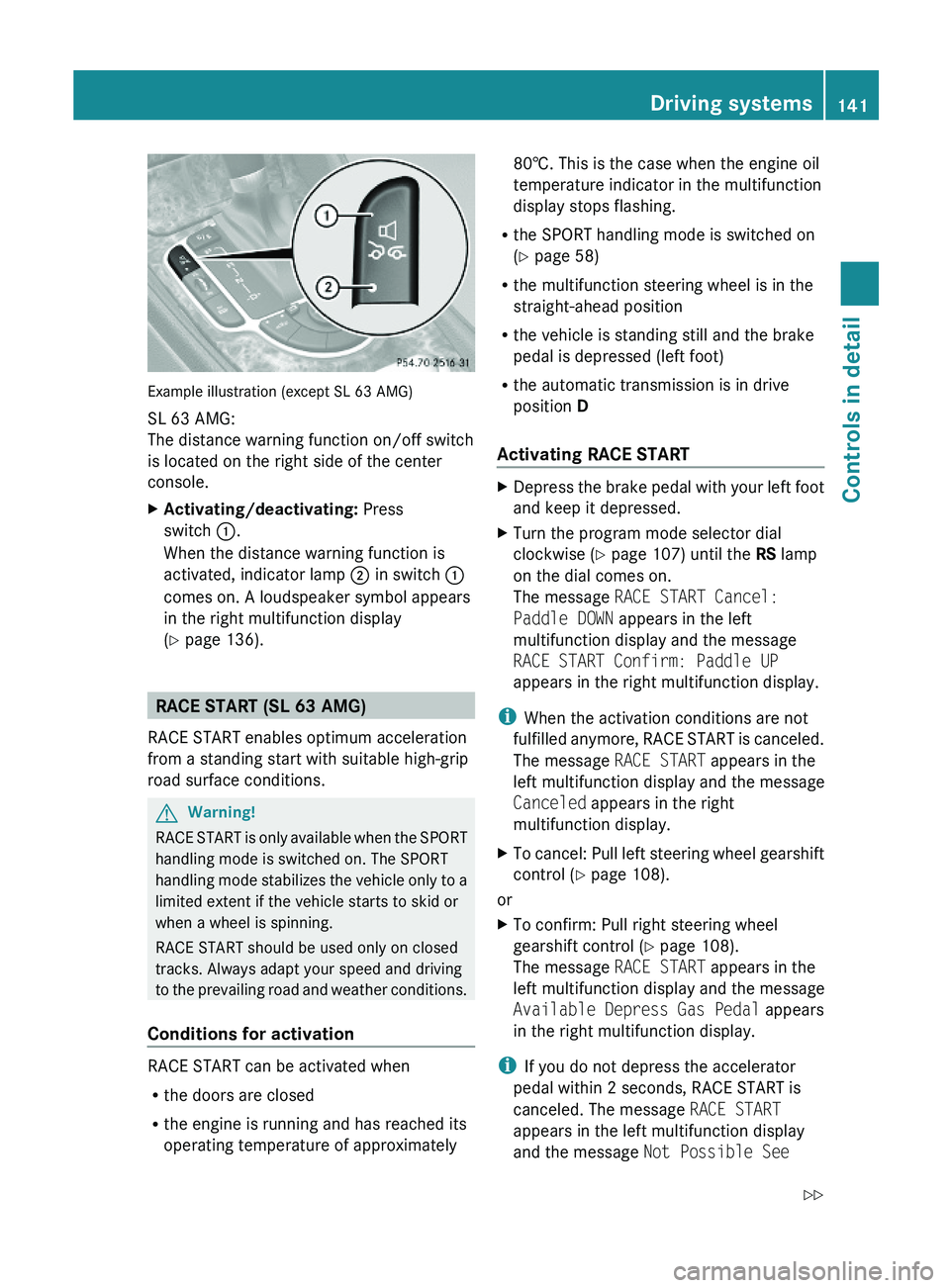
Example illustration (except SL 63 AMG)
SL 63 AMG:
The distance warning function on/off switch
is located on the right side of the center
console.
XActivating/deactivating: Press
switch \000F.
When the distance warning function is
activated, indicator lamp \000G in switch \000F
comes on. A loudspeaker symbol appears
in the right multifunction display
(Y page 136).
RACE START (SL 63 AMG)
RACE START enables optimum acceleration
from a standing start with suitable high-grip
road surface conditions.
GWarning!
RACE START is only available when the SPORT
handling mode is switched on. The SPORT
handling mode stabilizes the vehicle only to a
limited extent if the vehicle starts to skid or
when a wheel is spinning.
RACE START should be used only on closed
tracks. Always adapt your speed and driving
to the prevailing road and weather conditions.
Conditions for activation
RACE START can be activated when
Rthe doors are closed
Rthe engine is running and has reached its
operating temperature of approximately
80†. This is the case when the engine oil
temperature indicator in the multifunction
display stops flashing.
Rthe SPORT handling mode is switched on
(Y page 58)
Rthe multifunction steering wheel is in the
straight-ahead position
Rthe vehicle is standing still and the brake
pedal is depressed (left foot)
Rthe automatic transmission is in drive
position D
Activating RACE START
XDepress the brake pedal with your left foot
and keep it depressed.
XTurn the program mode selector dial
clockwise (Y page 107) until the RS lamp
on the dial comes on.
The message RACE START Cancel:
Paddle DOWN appears in the left
multifunction display and the message
RACE START Confirm: Paddle UP
appears in the right multifunction display.
iWhen the activation conditions are not
fulfilled anymore, RACE START is canceled.
The message RACE START appears in the
left multifunction display and the message
Canceled appears in the right
multifunction display.
XTo cancel: Pull left steering wheel gearshift
control (Y page 108).
or
XTo confirm: Pull right steering wheel
gearshift control (Y page 108).
The message RACE START appears in the
left multifunction display and the message
Available Depress Gas Pedal appears
in the right multifunction display.
iIf you do not depress the accelerator
pedal within 2 seconds, RACE START is
canceled. The message RACE START
appears in the left multifunction display
and the message Not Possible See
Driving systems141Controls in detail230_AKB; 6; 22, en-USd2ureepe,Version: 2.11.8.12009-07-28T18:49:58+02:00 - Seite 141Z
Page 144 of 316
Operator’s Manual appears in the right
multifunction display.XDepress the accelerator pedal fully.
The engine speed rises to approximately
4000 rpm.
The message RACE START appears in the
left multifunction display and the message
Release Brake To Start appears in the
right multifunction display.
i If you do not release the brake pedal
within 7 seconds, RACE START is canceled.
The message RACE START appears in the
left multifunction display and the message
Canceled appears in the right
multifunction display.
XTake your foot off the brake pedal while
keeping the accelerator pedal depressed.
The vehicle pulls away at maximum
acceleration.
The message RACE START appears in the
left multifunction display and the message
Active appears in the right multifunction
display.
RACE START deactivates at a vehicle speed
of approximately 50 km/h. The automatic
transmission switches to program mode S+.
The SPORT handling mode remains switched
on.
RACE START is canceled immediately if you
release the accelerator pedal while RACE
START is active or when the activation
conditions are not fulfilled anymore. The
message RACE START appears in the left
multifunction display and the message Not
Possible See Operator’s Manual
appears in the right multifunction display.
i If RACE START is used repeatedly in a
short period of time, it is only available
again after having driven the vehicle a
certain distance.
Hill-start assist system (SL 63 AMG)
On uphill grades, the hill-start assist system
maintains the pressure in the brake system
for approximately 1 second after you have
released the brake pedal. Therefore, you can
start off smoothly without the vehicle moving
immediately after releasing the brake pedal.GWarning!
The hill-start assist system is not designed to
function as a parking brake. It does not
prevent the vehicle from moving when parked
on an incline.
Always engage the parking brake in addition
to shifting the automatic transmission into
park position P.
XDepress the brake pedal.XShift the automatic transmission into drive
position D or reverse gear R.XRelease the brake pedal.XCarefully depress the accelerator pedal.
The hill-start assist system is inactive
R when starting off on a level road or downhill
grades
R with the automatic transmission in neutral
position N
R with the parking brake engaged
R if the ESP ®
has switched off due to a
malfunction
ABC
The ABC system is an active, computer-
controlled system that adjusts the
suspension hydraulically at all four wheels in
response to various driving situations. It
selects the optimum suspension tuning and
ride height for your vehicle automatically.
Vehicle level control
Your vehicle adjusts its ride height
automatically to increase vehicle safety and
to reduce fuel consumption.
142Driving systemsControls in detail
230_AKB; 6; 22, en-USd2ureepe,Version: 2.11.8.12009-07-28T18:49:58+02:00 - Seite 142
Page 145 of 316
The vehicle chassis ride height is raised or
lowered according to the selected level
setting and to the vehicle speed. With
increasing speed, the ride height is reduced
by up to approximately 0.5 in (12 mm). With
decreasing speed, the ride height is again
raised to the selected vehicle level.
These height adjustments are so small that
you may not notice any change.
Setting the vehicle level
GWarning!
To help avoid personal injury, keep hands and
feet away from wheel housing area, and stay
away from under the vehicle when lowering
the vehicle chassis.
The following vehicle level settings can be
selected when the vehicle is stationary and
the engine is running:
LevelUse forIndicator
lamps
NormalFor driving on
normal roads.
Both lamps
are off.
Level 1For driving on
rough roads or
with snow chains
(Y page 208).
One lamp
is on.
Level 2For driving on very
rough road surface
conditions.
Both lamps
are on.
Select the level 1 and level 2 settings only
when required by current driving conditions.
Otherwise the fuel consumption may
increase and/or the handling may be
impaired.
iThe selected setting remains stored in
memory, even when the engine is turned
off and restarted.
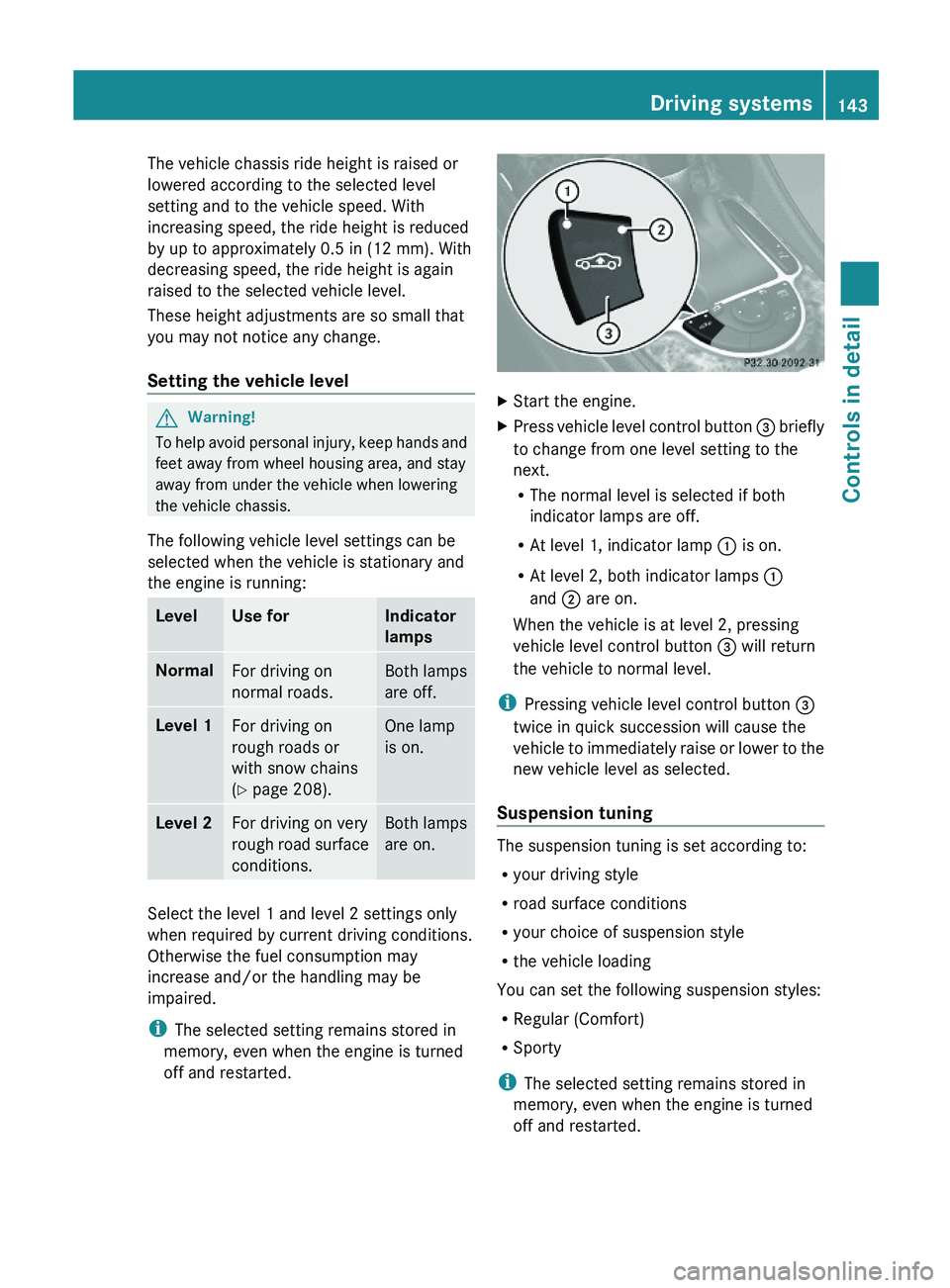
XStart the engine.XPress vehicle level control button \000
Page 146 of 316
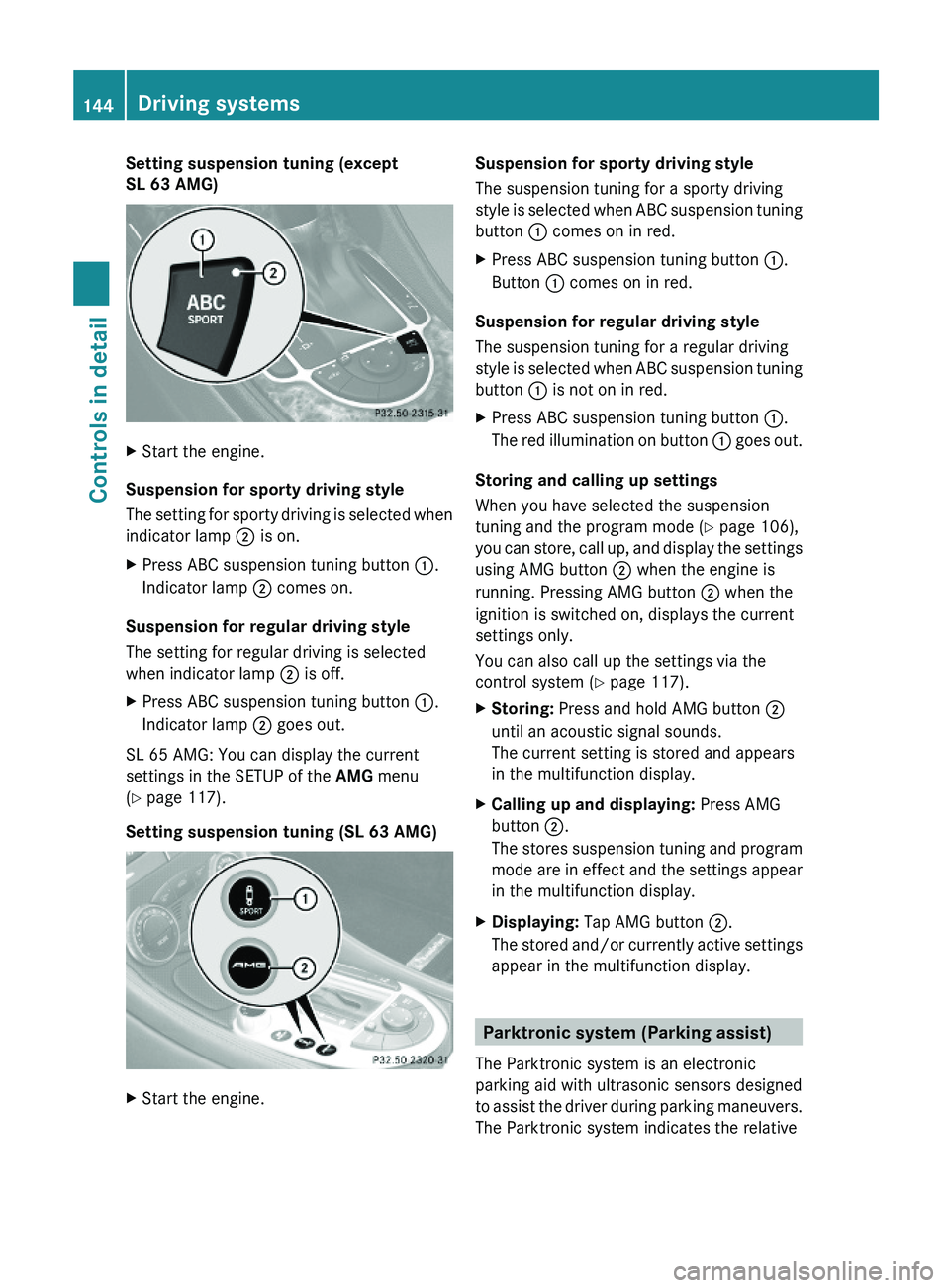
Setting suspension tuning (except
SL 63 AMG)
XStart the engine.
Suspension for sporty driving style
The setting for sporty driving is selected when
indicator lamp \000G is on.
XPress ABC suspension tuning button \000F.
Indicator lamp \000G comes on.
Suspension for regular driving style
The setting for regular driving is selected
when indicator lamp \000G is off.
XPress ABC suspension tuning button \000F.
Indicator lamp \000G goes out.
SL 65 AMG: You can display the current
settings in the SETUP of the AMG menu
(Y page 117).
Setting suspension tuning (SL 63 AMG)
XStart the engine.Suspension for sporty driving style
The suspension tuning for a sporty driving
style is selected when ABC suspension tuning
button \000F comes on in red.
XPress ABC suspension tuning button \000F.
Button \000F comes on in red.
Suspension for regular driving style
The suspension tuning for a regular driving
style is selected when ABC suspension tuning
button \000F is not on in red.
XPress ABC suspension tuning button \000F.
The red illumination on button \000F goes out.
Storing and calling up settings
When you have selected the suspension
tuning and the program mode (Y page 106),
you can store, call up, and display the settings
using AMG button \000G when the engine is
running. Pressing AMG button \000G when the
ignition is switched on, displays the current
settings only.
You can also call up the settings via the
control system (Y page 117).
XStoring: Press and hold AMG button \000G
until an acoustic signal sounds.
The current setting is stored and appears
in the multifunction display.
XCalling up and displaying: Press AMG
button \000G.
The stores suspension tuning and program
mode are in effect and the settings appear
in the multifunction display.
XDisplaying: Tap AMG button \000G.
The stored and/or currently active settings
appear in the multifunction display.
Parktronic system (Parking assist)
The Parktronic system is an electronic
parking aid with ultrasonic sensors designed
to assist the driver during parking maneuvers.
The Parktronic system indicates the relative
144Driving systemsControls in detail
230_AKB; 6; 22, en-USd2ureepe,Version: 2.11.8.12009-07-28T18:49:58+02:00 - Seite 144
Page 150 of 316
Climate control system
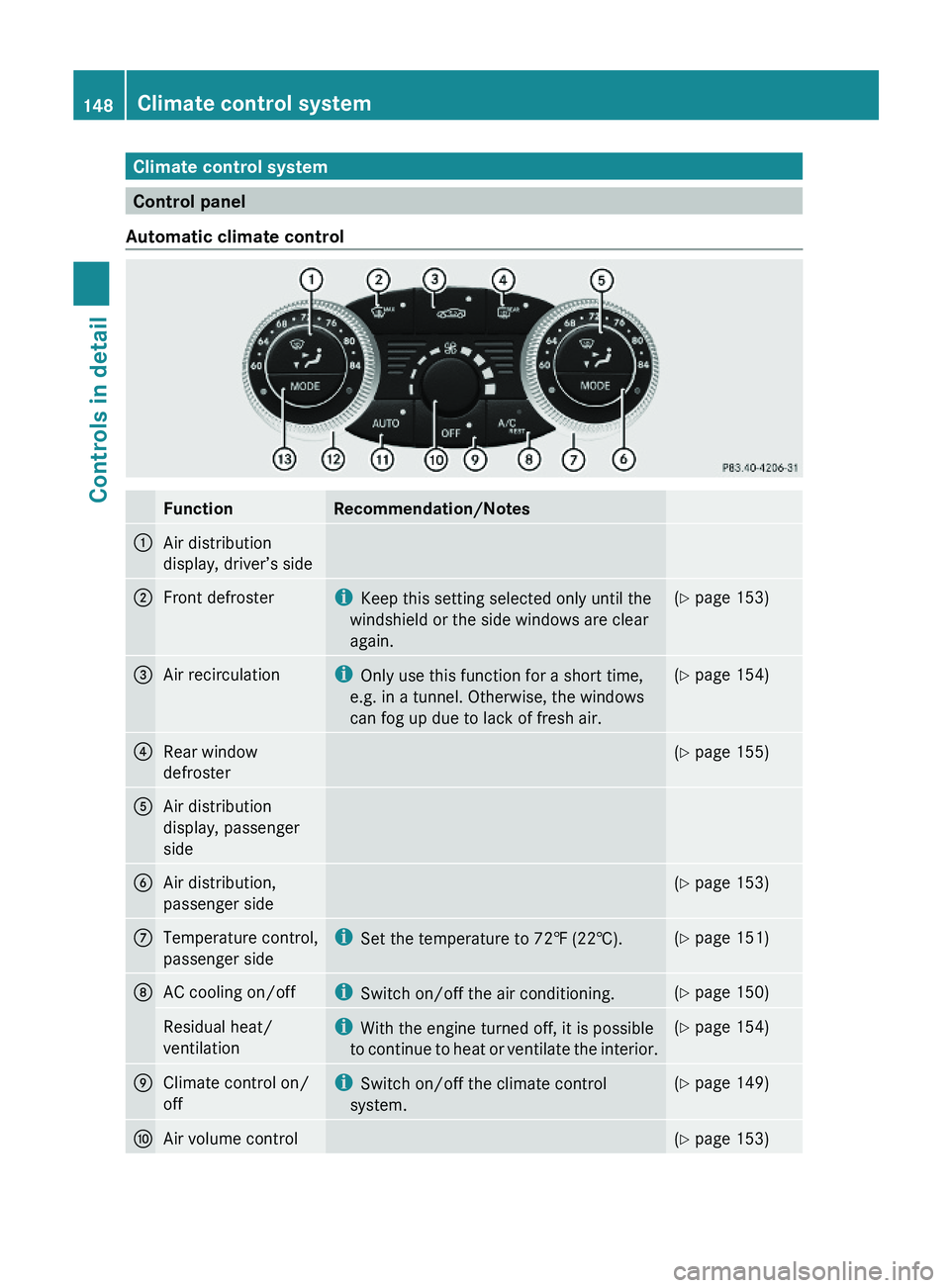
Control panel
Automatic climate control
FunctionRecommendation/Notes1Air distribution
display, driver’s side
2Front defrosteriKeep this setting selected only until the
windshield or the side windows are clear
again.
(Y page 153)3Air recirculationiOnly use this function for a short time,
e.g. in a tunnel. Otherwise, the windows
can fog up due to lack of fresh air.
(Y page 154)4Rear window
defroster
(Y page 155)5Air distribution
display, passenger
side
6Air distribution,
passenger side
(Y page 153)7Temperature control,
passenger side
iSet the temperature to 72‡ (22†).(Y page 151)8AC cooling on/offiSwitch on/off the air conditioning.(Y page 150)Residual heat/
ventilation
iWith the engine turned off, it is possible
to continue to heat or ventilate the interior.
(Y page 154)9Climate control on/
off
iSwitch on/off the climate control
system.
(Y page 149)aAir volume control(Y page 153)148Climate control systemControls in detail
230_AKB; 6; 22, en-USd2ureepe,Version: 2.11.8.12009-07-28T18:49:58+02:00 - Seite 148
Page 151 of 316
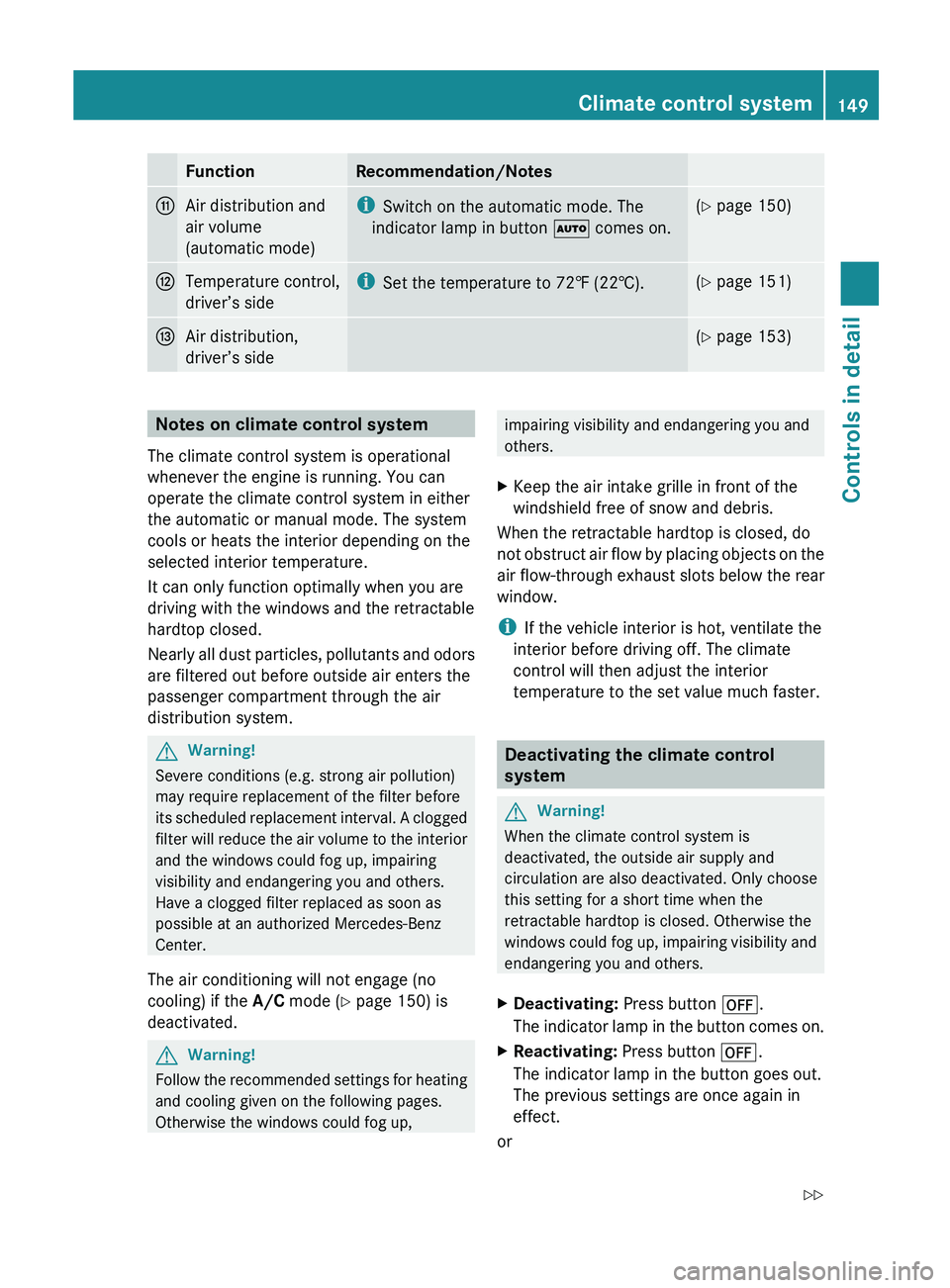
FunctionRecommendation/NotesbAir distribution and
air volume
(automatic mode)i Switch on the automatic mode. The
indicator lamp in button 005A comes on.(Y page 150)cTemperature control,
driver’s sidei Set the temperature to 72‡ (22†).(Y page 151)dAir distribution,
driver’s side( Y page 153)Notes on climate control system
The climate control system is operational
whenever the engine is running. You can
operate the climate control system in either
the automatic or manual mode. The system
cools or heats the interior depending on the
selected interior temperature.
It can only function optimally when you are
driving with the windows and the retractable
hardtop closed.
Nearly all dust particles, pollutants and odors
are filtered out before outside air enters the
passenger compartment through the air
distribution system.GWarning!
Severe conditions (e.g. strong air pollution)
may require replacement of the filter before
its scheduled replacement interval. A clogged
filter will reduce the air volume to the interior
and the windows could fog up, impairing
visibility and endangering you and others.
Have a clogged filter replaced as soon as
possible at an authorized Mercedes-Benz
Center.
The air conditioning will not engage (no
cooling) if the A/C mode ( Y page 150) is
deactivated.
GWarning!
Follow the recommended settings for heating
and cooling given on the following pages.
Otherwise the windows could fog up,
impairing visibility and endangering you and
others.XKeep the air intake grille in front of the
windshield free of snow and debris.
When the retractable hardtop is closed, do
not obstruct air flow by placing objects on the
air flow-through exhaust slots below the rear
window.
i If the vehicle interior is hot, ventilate the
interior before driving off. The climate
control will then adjust the interior
temperature to the set value much faster.
Deactivating the climate control
system
GWarning!
When the climate control system is
deactivated, the outside air supply and
circulation are also deactivated. Only choose
this setting for a short time when the
retractable hardtop is closed. Otherwise the
windows could fog up, impairing visibility and
endangering you and others.
XDeactivating: Press button 0061.
The indicator lamp in the button comes on.XReactivating: Press button 0061.
The indicator lamp in the button goes out.
The previous settings are once again in
effect.
or
Climate control system149Controls in detail230_AKB; 6; 22, en-USd2ureepe,Version: 2.11.8.12009-07-28T18:49:58+02:00 - Seite 149Z
Page 152 of 316
XTurn temperature controls 006E or 0073
( Y page 148) clockwise or
counterclockwise.
The indicator lamp in button 0061 goes out.
or
XPress button 005A.
The indicator lamp in button 005A comes
on. The air volume and air distribution are
adjusted automatically.
or
XPress button 0066.
The indicator lamp in button 0061 goes out.
Air conditioning
The air conditioning is operational while the
engine is running and cools the interior air to
the temperature set by the operator. In
addition, the air conditioning dehumidifies
the interior air and helps prevent window
fogging.
GWarning!
If you deactivate the air conditioning, the
vehicle will not be cooled when weather
conditions are warm. The windows can fog up
more quickly. Window fogging may impair
visibility and endanger you and others.
i Condensated water may drip out from
underneath the vehicle. This is normal and
not an indication of a malfunction.
The air conditioning uses the refrigerant
R134a. This refrigerant is free of CFCs which
are harmful to the ozone layer.
Deactivating
It is possible to deactivate the air
conditioning. The interior air will then no
longer be cooled or dehumidified.
XPress button 0058.
The indicator lamp in the button goes out.
The cooling function switches off after a
short delay.Activating
Moist air can fog up the windows. You can
dehumidify the interior air with the air
conditioning.
XPress button 0058.
The indicator lamp in the button comes on.
Automatic mode
Air distribution and air volume can be
adjusted automatically by the climate control
system. You can also adjust the settings for
air distribution and air volume manually.
When operating the climate control system in
automatic mode, the interior air temperature,
air volume and air distribution are adjusted
automatically.
In automatic mode, cooling with
dehumidification is switched on. This function
can be switched off if necessary.
GWarning!
If you deactivate the air conditioning, the
vehicle will not be cooled when weather
conditions are warm. The windows can fog up
more quickly. Window fogging may impair
visibility and endanger you and others.
XSet the desired temperature
( Y page 151).XActivating: Press button 005A.
The indicator lamp in the button comes on.
The air volume and air distribution are
adjusted automatically.XDeactivating: Press button 005A.
The indicator lamp in the button goes out.
The blower will run at speed setting 3. The
air flows through the center and side air
vents.
or
XPress one button 0056.
The indicator lamp in button 005A goes out.
The climate control settings for the
respective side of the passenger
compartment is adjusted manually.150Climate control systemControls in detail
230_AKB; 6; 22, en-USd2ureepe,Version: 2.11.8.12009-07-28T18:49:58+02:00 - Seite 150