ESP MERCEDES-BENZ SL-Class 2013 R131 Owner's Guide
[x] Cancel search | Manufacturer: MERCEDES-BENZ, Model Year: 2013, Model line: SL-Class, Model: MERCEDES-BENZ SL-Class 2013 R131Pages: 590, PDF Size: 9.73 MB
Page 79 of 590

otherwise not be able to stabilize the
vehicle if the vehicle starts to skid or a
wheel starts to spin.
! Avoid spinning the driven wheels for an
extended period with ESP ®
deactivated.
You could otherwise damage the drivetrain.
Deactivating/activating ESP ®X
To switch off: press button0002.
The 0013 ESP®
OFF warning lamp in the
instrument cluster lights up.
X To switch on: press button0002.
The 0013 ESP®
OFF warning lamp in the
instrument cluster goes out.
Characteristics when ESP ®
is deactivated
If ESP ®
is deactivated and one or more wheels
start to spin, the 000BESP®
warning lamp in
the instrument cluster flashes. In such
situations, ESP ®
will not stabilize the vehicle.
If you deactivate ESP ®
:
R ESP ®
no longer improves driving stability.
R the engine's torque is no longer limited and
the drive wheels are able to spin. The
spinning of the wheels results in a cutting
action, which provides better grip.
R ETS is still active.
R ESP ®
still provides support when you
brake. Deactivating/activating ESP
®
(AMG
vehicles) Important safety notes
i
Observe the "Important safety notes"
section (Y page 73).
You can select between the following states
of ESP ®
:
R ESP ®
is activated.
R SPORT handling mode is activated.
R ESP ®
is deactivated. G
WARNING
When SPORT handling mode is activated,
there is a greater risk of skidding and
accidents.
Only activate SPORT handling mode in the
situations described in the following. G
WARNING
If you deactivate ESP ®
, ESP ®
no longer
stabilizes the vehicle. There is an increased
risk of skidding and an accident.
Only deactivate ESP ®
in the situations
described in the following.
In the following situations, it may be better to
activate SPORT handling mode or deactivate
ESP ®
:
R when using snow chains
R in deep snow
R on sand or gravel
R on designated roads when the vehicle's
own oversteering and understeering
characteristics are desired
Driving in SPORT handling mode or without
ESP ®
requires an extremely qualified and
experienced driver.
i Activate ESP ®
as soon as the situations
described above no longer apply.E SP®
will
otherwise not be able to stabilize the
vehicle if the vehicle starts to skid or a
wheel starts to spin. Driving safety systems
77Safety Z
Page 80 of 590
!
Avoid spinning the driven wheels for an
extended period with ESP ®
deactivated.
You could otherwise damage the drivetrain.
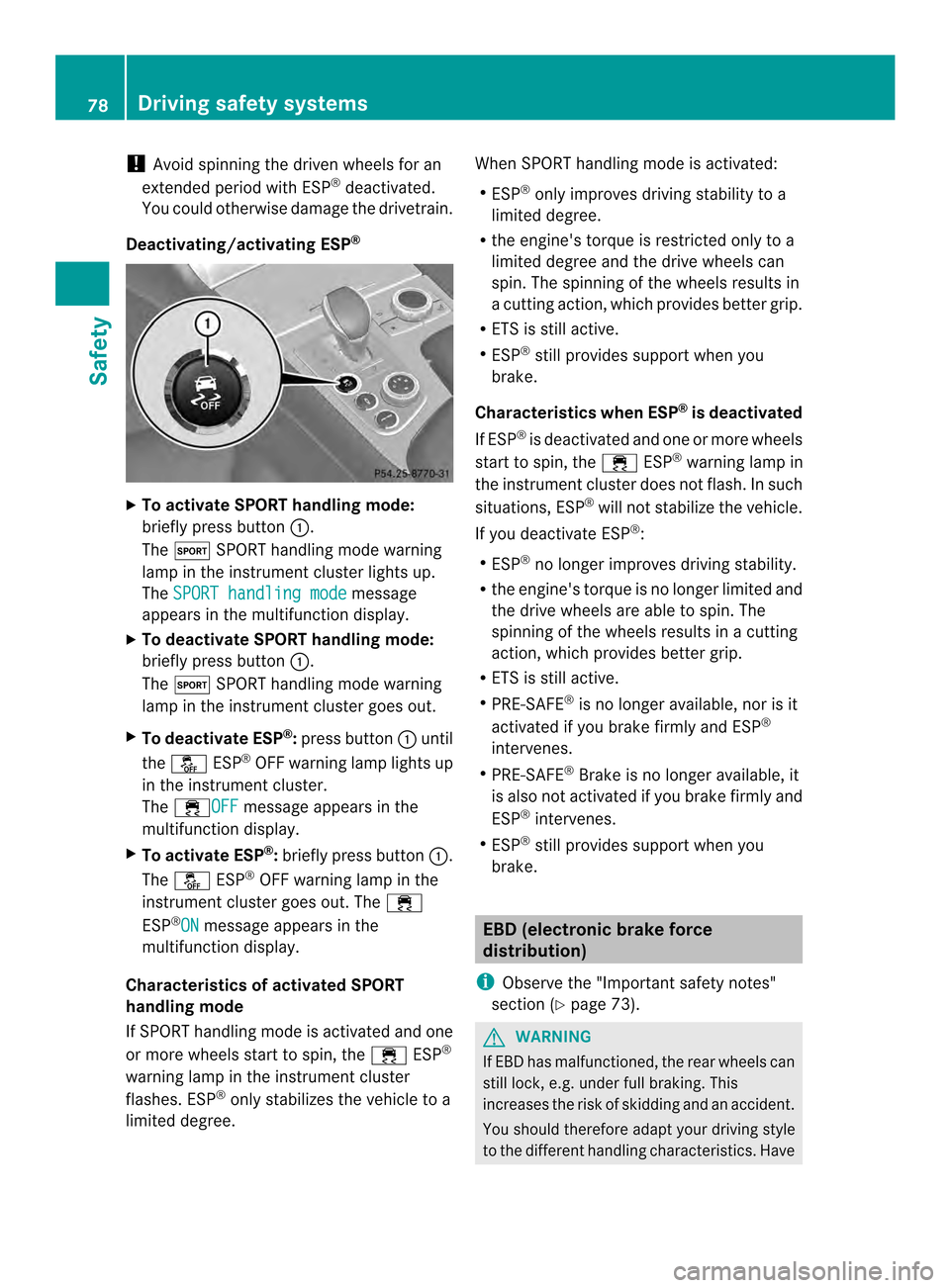
Deactivating/activating ESP ®X
To activate SPORT handling mode:
briefly press button 0002.
The 0002 SPORT handling mode warning
lamp in the instrument cluster lights up.
The SPORT handling mode message
appears in the multifunction display.
X To deactivate SPORT handling mode:
briefly press button 0002.
The 0002 SPORT handling mode warning
lamp in the instrument cluster goes out.
X To deactivate ESP ®
:press button 0002until
the 0013 ESP®
OFF warning lamp lights up
in the instrument cluster.
The 000BOFF message appears in the
multifunction display.
X To activate ESP ®
:briefly press button 0002.
The 0013 ESP®
OFF warning lamp in the
instrument cluster goes out. The 000B
ESP ®
ON message appears in the
multifunction display.
Characteristics of activated SPORT
handling mode
If SPORT handling mode is activated and one
or more wheels start to spin, the 000BESP®
warning lamp in the instrument cluster
flashes. ESP ®
only stabilizes the vehicle to a
limited degree. When SPORT handling mode is activated:
R
ESP ®
only improves driving stability to a
limited degree.
R the engine's torque is restricted only to a
limited degree and the drive wheels can
spin. The spinning of the wheels results in
a cutting action, which provides better grip.
R ETS is still active.
R ESP ®
still provides support when you
brake.
Characteristics when ESP ®
is deactivated
If ESP ®
is deactivated and one or more wheels
start to spin, the 000BESP®
warning lamp in
the instrument cluster does not flash. In such
situations, ESP ®
will not stabilize the vehicle.
If you deactivate ESP ®
:
R ESP ®
no longer improves driving stability.
R the engine's torque is no longer limited and
the drive wheels are able to spin. The
spinning of the wheels results in a cutting
action, which provides better grip.
R ETS is still active.
R PRE-SAFE ®
is no longer available, nor is it
activated if you brake firmly and ESP ®
intervenes.
R PRE-SAFE ®
Brake is no longer available, it
is also not activated if you brake firmly and
ESP ®
intervenes.
R ESP ®
still provides support when you
brake. EBD (electronic brake force
distribution)
i Observe the "Important safety notes"
section (Y page 73). G
WARNING
If EBD has malfunctioned, the rear wheels can
still lock, e.g. under full braking. This
increases the risk of skidding and an accident.
You should therefore adapty our driving style
to the different handling characteristics. Have 78
Driving safety systemsSafety
Page 82 of 590
If, at speeds over 20 mph (30 km/h), a risk
of collision remains and you do not brake,
take evasive action or significantly
accelerate, automatic braking may be
performed up to a level of automatic
emergency braking. Automatic emergency
braking is not performed until immediately
prior to an accident that can no longer be
avoided.
G
WARNING
PRE-SAFE ®
Brake will initially brake your
vehicle by a partial application of the brakes
if a danger of collision is detected. There may
be a collision unless you also brake.
Automatic emergency braking cannot prevent
a collision. There is a risk of an accident.
Always apply the brakes yourself and try to
take evasive action. G
WARNING
PRE-SAFE ®
Brake cannot always clearly
identify objects and complex traffic
conditions.
In these cases, PRE-SAFE ®
Brake may:
R give an unnecessary warning and then
brake the vehicle
R not give a warning or intervene
There is a risk of an accident.
Always pay particular attention to the traffic
situation and be ready to brake, especially if
PRE-SAFE ®
Brake warns you. Terminate the
intervention in a non-critical driving situation.
In particular, the detection of obstacles can
be impaired if:
R there is dirt on the sensors or anything else
covering the sensors.
R snow or heavy rain
R interference by other radars ources
R the possibility of strong radar reflections,
for example in parking garages R
a narrow vehicle traveling in front, e.g. a
motorbike
R a vehicle traveling in front on a different line
relative to the center of your vehicle G
WARNING
PRE-SAFE ®
Brake does not react:
R to people or animals
R to oncoming vehicles
R to crossing traffic
R when cornering
As a result, PRE-SAFE ®
Brake may neither
give warnings nor intervene in all critical
situations. There is a risk of an accident.
Always pay careful attention to the traffic
situation and be ready to brake.
In order to maintain an appropriate distance
from the vehicle in front and thus prevent a
collision, you must apply the brakes yourself.
X To activate/deactivate: activate or
deactivate PRE-SAFE ®
Brake in the on-
board computer (Y page 231).
When PRE-SAFE ®
Brake is activated, the
0001 symbol appears in the multifunction
display as long as the HOLD function is
deactivated (Y page 195). On vehicles with
Active Parking Assist, the 0001symbol is
displayed when Pis engaged or you are
driving faster than 22 mph (35 km/h).
Following damage to the front end of the
vehicle, have the configuration and operation
of the radar sensors checked at a qualified
specialist workshop. This also applies to
collisions at low speeds where there is no
visible damage to the front of the vehicle. STEER CONTROL
STEER CONTROL helps you by transmitting a
noticeable steering force to the steering
wheel in the direction required for vehicle
stabilization. 80
Driving safety systemsSafety
Page 83 of 590
This steering assistance is provided in
particular if:
R both right wheels or both left wheels are on
a wet or slippery road surface when you
brake
R the vehicle starts to skid
If ESP ®
is malfunctioning, you will not receive
steering support from STEER CONTROL.
Power steering will, however, continue to
function. Theft deterrent locking system
Immobilizer
X To activate with the SmartKey: remove
the SmartKey from the ignition lock.
X To activate with KEYLESS-GO: switch the
ignition off and open the driver's door.
X To deactivate: switch on the ignition.
The immobilizer prevents your vehicle from
being started without the correct SmartKey.
When leaving the vehicle, always take the
SmartKey with you and lock the vehicle. The
engine can be started by anyone with a valid
SmartKey that is left inside the vehicle.
i The immobilizer is always deactivated
when you start the engine.
In the event that the engine cannot be
started when the starter battery is fully
charged, the immobilizer may be faulty.
Contact an authorized Mercedes-Benz
Center or call 1-800-FOR-MERCedes (in
USA) or 1-800-387-0100 (in Canada). ATA (anti-theft alarm system)
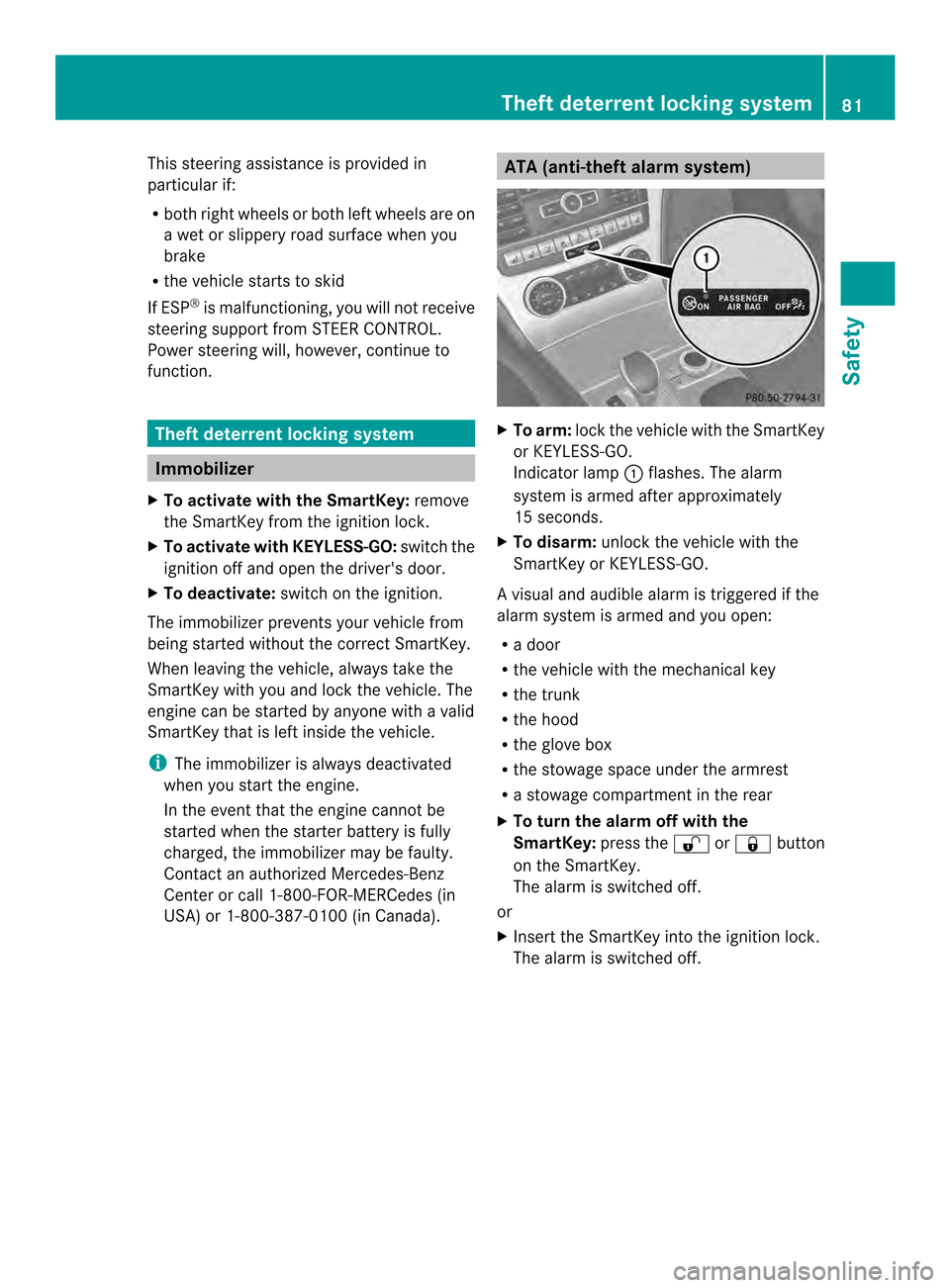
X
To arm: lock the vehicle with the SmartKey
or KEYLESS-GO.
Indicator lamp 0002flashes. The alarm
system is armed after approximately
15 seconds.
X To disarm: unlock the vehicle with the
SmartKey or KEYLESS-GO.
Av isual and audible alarm is triggered if the
alarm system is armed and you open:
R a door
R the vehicle with the mechanical key
R the trunk
R the hood
R the glove box
R the stowage space under the armrest
R a stowage compartmen tinthe rear
X To turn the alarm off with the
SmartKey: press the000Eor000D button
on the SmartKey.
The alarm is switched off.
or
X Insert the SmartKey into the ignition lock.
The alarm is switched off. Theft deterrent locking system
81Safety Z
Page 87 of 590
If you do not open the vehicle within
approximately 40 seconds of unlocking:
R
the vehicle is locked again.
R the theft deterrent locking system is
armed again.
X To lockc entrally:press the 000Dbutton.
The SmartKey centrally locks/unlocks:
R the doors
R the trunk lid
R the glove box
R the stowage compartmen tunde rthe
armrest
R the stowage compartmentint he rear
compartment
R the fuel filler flap
When unlocking, the turn signals flash once.
When locking, they flash three times.
You can also set an audible signal to confirm
that the vehicle has been locked. The audible
signal can be activated and deactivated using
the on-board computer (Y page 235).
When it is dark, the surround lighting also
comes on if it is activated in the on-board
computer (Y page 234). KEYLESS-GO
General notes Bear in mind that the engine can be started
by any of the vehicle occupants if there is a
KEYLESS-GO key in the vehicle.
Locking/unlocking centrally You can start, lock or unlock the vehicle using
KEYLESS-GO. To do this, you only need carry
the SmartKey with you. When you touch the
surface of the sensors on the vehicle's
outside door handles, KEYLESS-GO
establishes a radio connection between the
vehicle and the SmartKey. When the engine
is started and while you are driving, KEYLESS-
GO also checks whether a valid SmartKey is in the vehicle by periodically establishing
radio contact.
You can combine the functions of KEYLESS-
GO with those of a conventional SmartKey.
Unlock the vehicle by using KEYLESS-GO, for
instance, and lock it using the
000Dbutton on
the SmartKey.
When locking or unlocking with KEYLESS-GO,
the distance between the SmartKey and the
corresponding door handle must not be
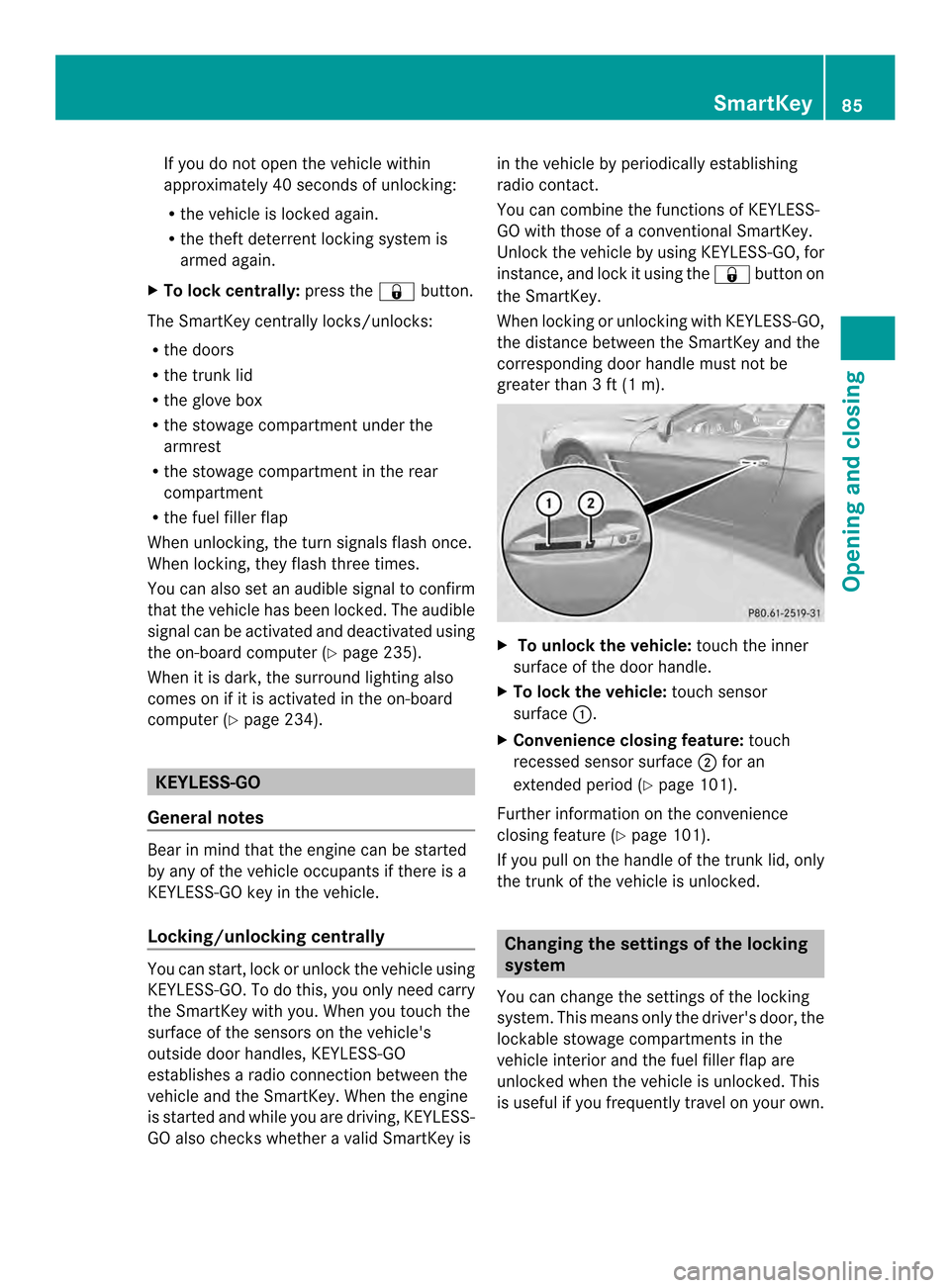
greater than 3 ft (1 m). X
To unlock the vehicle: touch the inner
surface of the door handle.
X To lock the vehicle: touch sensor
surface 0002.
X Convenience closing feature: touch
recessed sensor surface 0003for an
extended period (Y page 101).
Further information on the convenience
closing feature (Y page 101).
If you pull on the handle of the trunk lid, only
the trunk of the vehicle is unlocked. Changing the settings of the locking
system
You can change the settings of the locking
system. This means only the driver's door, the
lockable stowage compartments in the
vehicle interior and the fuel filler flap are
unlocked when the vehicle is unlocked. This
is useful if you frequently travel on your own. SmartKey
85Opening and closing Z
Page 94 of 590
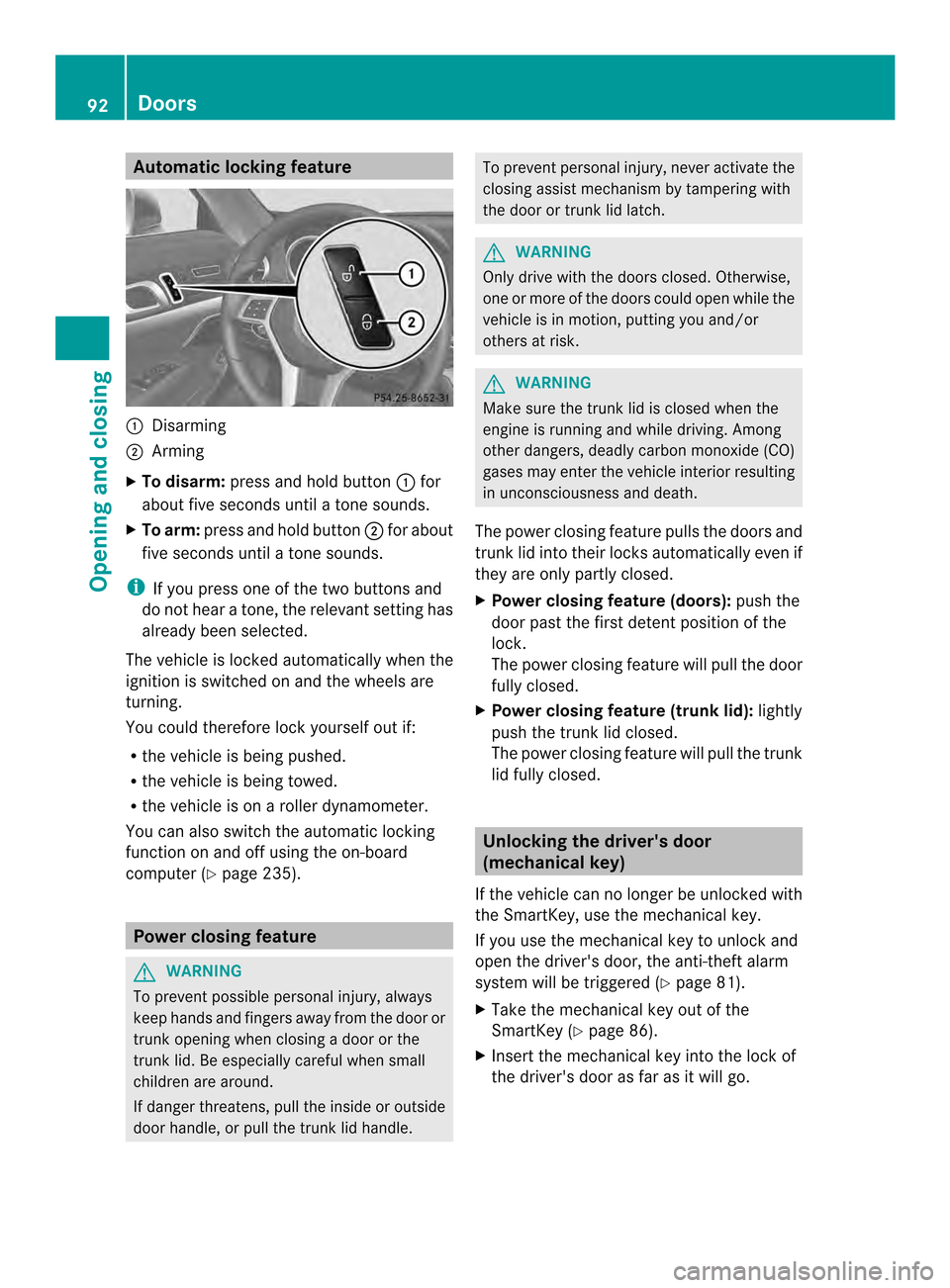
Automatic locking feature
0002
Disarming
0003 Arming
X To disarm: press and hold button 0002for
about five seconds until a tone sounds.
X To arm: press and hold button 0003for about
five seconds until a tone sounds.
i If you press one of th etwo buttons and
do not hear a tone, the relevant setting has
already been selected.
The vehicle is locked automatically when the
ignitio nis switched on and the wheels are
turning.
You could therefore lock yourselfo ut if:
R the vehicle is being pushed.
R the vehicle is being towed.
R the vehicle is on a roller dynamometer.
You can also switch the automatic locking
function on and off using the on-board
computer (Y page 235). Power closing feature
G
WARNING
To preven tpossible personal injury, always
keep hands and fingers away from the door or
trunk opening when closing a door or the
trunk lid. Be especially careful when small
children are around.
If danger threatens, pull the inside or outside
door handle, or pull the trunk lid handle. To prevent personal injury, never activate the
closing assist mechanism by tampering with
the door or trunk lid latch. G
WARNING
Only drive with the doors closed. Otherwise,
one or more of the doors could open while the
vehicle is in motion, putting you and/or
others at risk. G
WARNING
Make sure the trunk lid is closed when the
engine is running and while driving. Among
other dangers, deadly carbon monoxide (CO)
gases may enter the vehicle interior resulting
in unconsciousness and death.
The power closing feature pulls the doors and
trunk lid into their locks automatically even if
they are only partly closed.
X Power closing feature (doors): push the
door past the first detent position of the
lock.
The power closing feature will pull the door
fully closed.
X Power closing feature (trunk lid): lightly
push the trunk lid closed.
The power closing feature will pull the trunk
lid fully closed. Unlocking the driver's door
(mechanical key)
If the vehicle can no longer be unlocked with
the SmartKey, use the mechanical key.
If you use the mechanical key to unlock and
open the driver's door, the anti-theft alarm
system will be triggered (Y page 81).
X Take the mechanical key out of the
SmartKey (Y page 86).
X Insert the mechanical key into the lock of
the driver's door as far as it will go. 92
DoorsOpening and closing
Page 97 of 590
X
Press the 000Ebutton on the SmartKey.
X Pull handle 0002.
X Raise the trunkl id.
i With the roof open, you can use the
loading aid ( Ypage 492) to raise the
folded-up roof in the trunk, enabling you to
load and unload more easily. For this
purpose, you can also open the trunk
partition.
Do not forget to close the trunk partition
again afterwards .Otherwise, it will not be
possible to close the roof.
Closing G
WARNING
To prevent possible personal injury, always
keep hands and fingers away fro mthe trunk
opening when closing the trunk lid. Be
especially careful when small children are
around. X
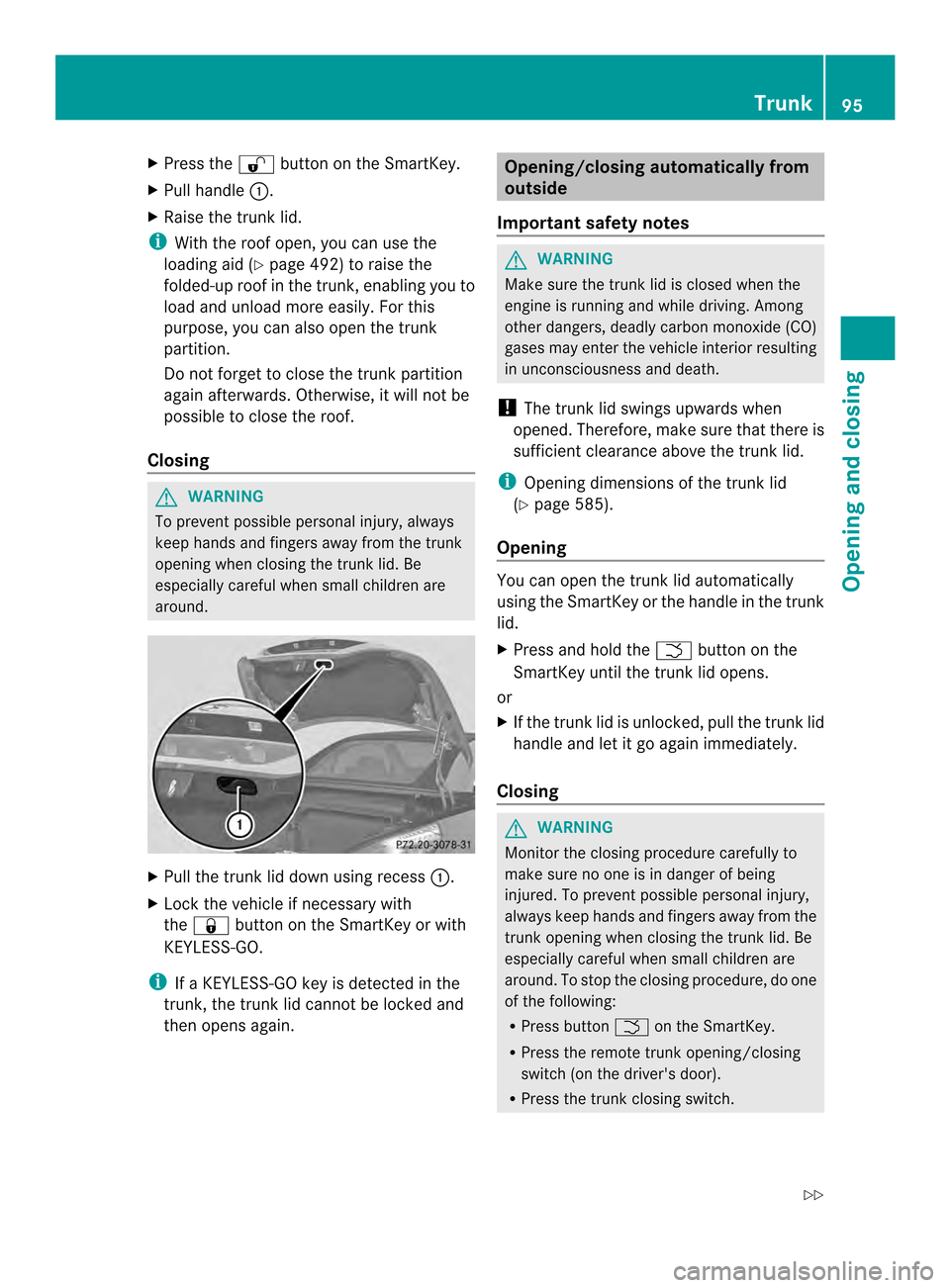
Pull the trunk lid down using recess 0002.
X Lock the vehicle if necessary with
the 000D button on the SmartKey or with
KEYLESS-GO.
i If a KEYLESS-GO key is detected in the
trunk, the trunk lid cannot be locked and
then opens again. Opening/closing automatically from
outside
Important safety notes G
WARNING
Make sure the trunk lid is closed when the
engine is running and while driving. Among
other dangers, deadly carbon monoxide (CO)
gases may enter the vehicle interior resulting
in unconsciousness and death.
! The trunk lid swings upwards when
opened. Therefore, make sure that there is
sufficient clearance above the trunk lid.
i Opening dimensions of the trunk lid
(Y page 585).
Opening You can open the trunk lid automatically
using the SmartKey or the handle in the trunk
lid.
X
Press and hold the 0005button on the
SmartKey until the trunk lid opens.
or
X If the trunk lid is unlocked, pull the trunk lid
handle and let it go again immediately.
Closing G
WARNING
Monitor the closing procedure carefully to
make sure no one is in danger of being
injured. To prevent possible personal injury,
always keep hands and fingers away from the
trunk opening when closing the trunk lid. Be
especially careful when small children are
around. To stop the closing procedure, do one
of the following:
R Press button 0005on the SmartKey.
R Press the remote trunk opening/closing
switch (on the driver's door).
R Press the trunk closing switch. Trunk
95Opening and closing
Z
Page 102 of 590
The closing of the door windows can be
immediately halted by releasing the switch or,
if the switch was pulled past the resistance
point and released, by pressing or pulling the
respective switch.
If a door window encounters an obstruction
that blocks its path in a circumstance where
you are closing the windows by pressing and
holding 000Dbutton on the SmartKey or by
pressing and holding the lock button (vehicles
with KEYLESS-GO) on an outside door handle,
the anti-entrapment feature will not operate. Opening and closing the side
windows
Opening and closing the side windows
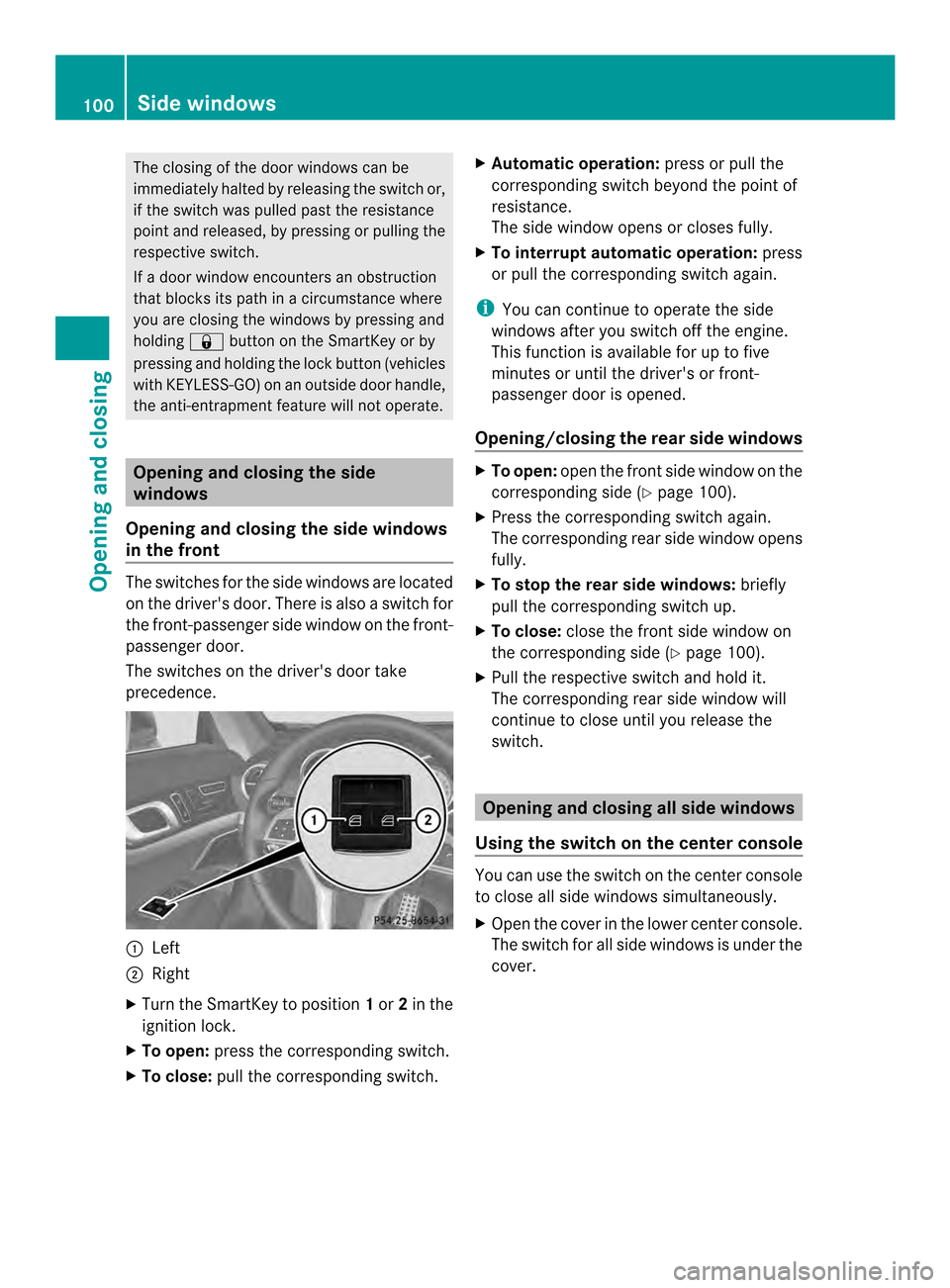
in the front The switches for the side windows are located
on the driver's door. There is also a switch for
the front-passenger side window on the front-
passenger door.
The switches on the driver's door take
precedence. 0002
Left
0003 Right
X Turn the SmartKey to position 1or 2in the
ignition lock.
X To open: press the corresponding switch.
X To close: pull the corresponding switch. X
Automatic operation: press or pull the
corresponding switch beyond the point of
resistance.
The side window opens or closes fully.
X To interrupt automatic operation: press
or pull the corresponding switch again.
i You can continue to operate the side
windows after you switch off the engine.
This function is available for up to five
minutes or until the driver's or front-
passenger door is opened.
Opening/closing the rear side windows X
To open: open the fronts ide window on the
corresponding side (Y page 100).
X Press the corresponding switc hagain.
The corresponding rear side window opens
fully.
X To stop the rear side windows: briefly
pull the corresponding switch up.
X To close: close the front side window on
the corresponding side (Y page 100).
X Pull the respective switch and hold it.
The corresponding rear side window will
continue to close until you release the
switch. Opening and closing all side windows
Using the switch on the center console You can use the switch on the center console
to close all side windows simultaneously.
X
Open the cover in the lower center console.
The switch for all side windows is under the
cover. 100
Side windowsOpening and closing
Page 103 of 590
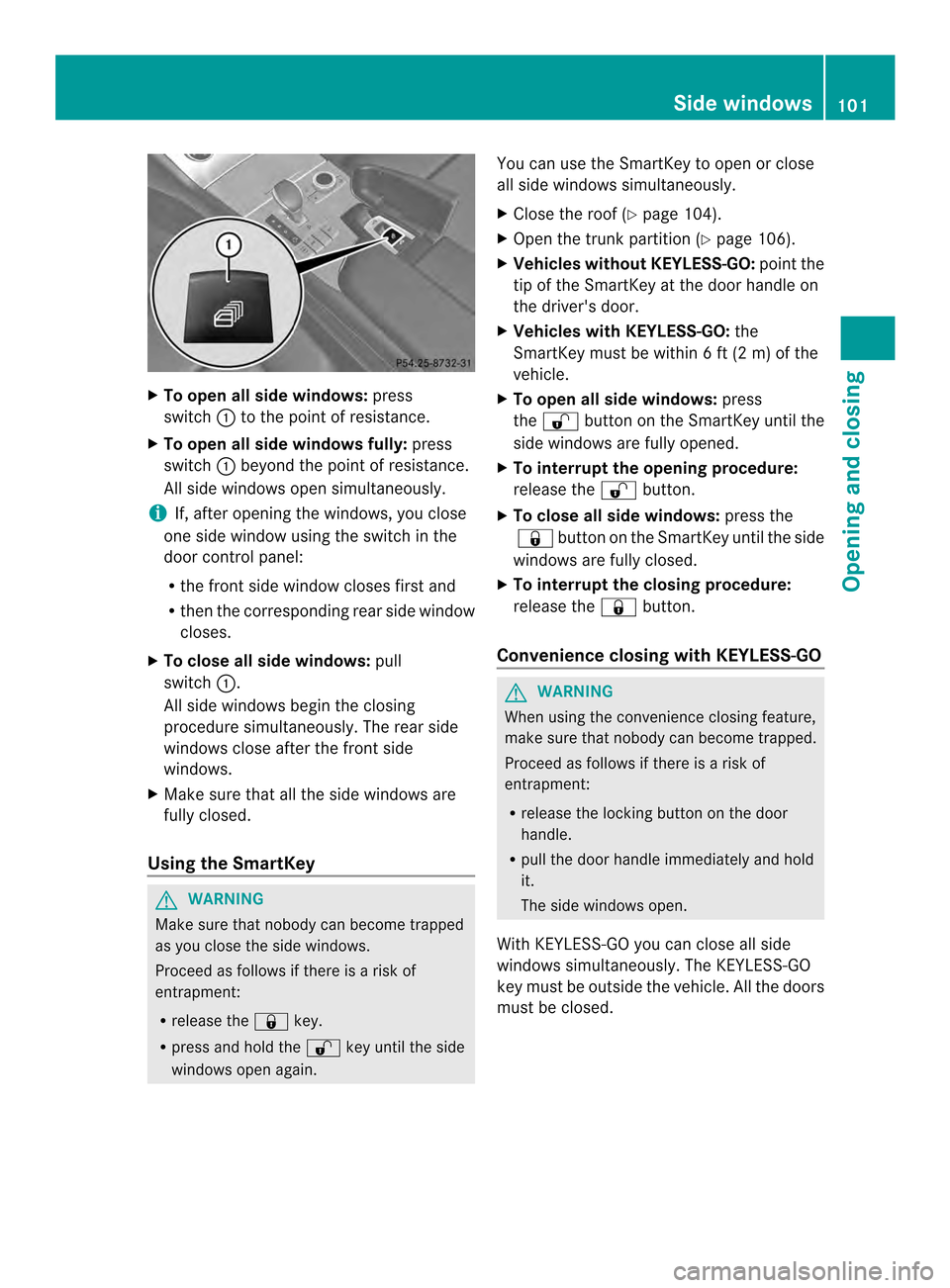
X
To open all side windows: press
switch 0002to the point of resistance.
X To open all side windows fully: press
switch 0002beyond the point of resistance.
All side windows open simultaneously.
i If, after opening the windows, you close
one side window using the switch in the
door control panel:
R the front side window closes first and
R then the corresponding rea rside window
closes.
X To close all side windows: pull
switch 0002.
All side windows begin the closing
procedure simultaneously. The rear side
windows close after the front side
windows.
X Make sure that all the side windows are
fully closed.
Using the SmartKey G
WARNING
Make sure that nobody can become trapped
as you close the side windows.
Proceed as follows if there is a risk of
entrapment:
R release the 000Dkey.
R press and hold the 000Ekey until the side
windows open again. You can use the SmartKey to open or close
all side windows simultaneously.
X
Close the roof (Y page 104).
X Open the trunk partition (Y page 106).
X Vehicles withou tKEYLESS-GO: pointthe
tip of the SmartKey at the door handle on
the driver's door.
X Vehicles with KEYLESS-GO: the
SmartKey must be within 6 ft (2 m) of the
vehicle.
X To open all side windows: press
the 000E button on the SmartKey until the
side windows are fully opened.
X To interrupt the opening procedure:
release the 000Ebutton.
X To close all side windows: press the
000D button on the SmartKey until the side
windows are fully closed.
X To interrupt the closing procedure:
release the 000Dbutton.
Convenience closing with KEYLESS-GO G
WARNING
When using the convenience closing feature,
make sure that nobody can become trapped.
Proceed as follows if there is a risk of
entrapment:
R release the locking button on the door
handle.
R pull the door handle immediately and hold
it.
The side windows open.
With KEYLESS-GO you can close all side
windows simultaneously .The KEYLESS-GO
key must be outside the vehicle. All the doors
must be closed. Side windows
101Opening and closing Z
Page 104 of 590
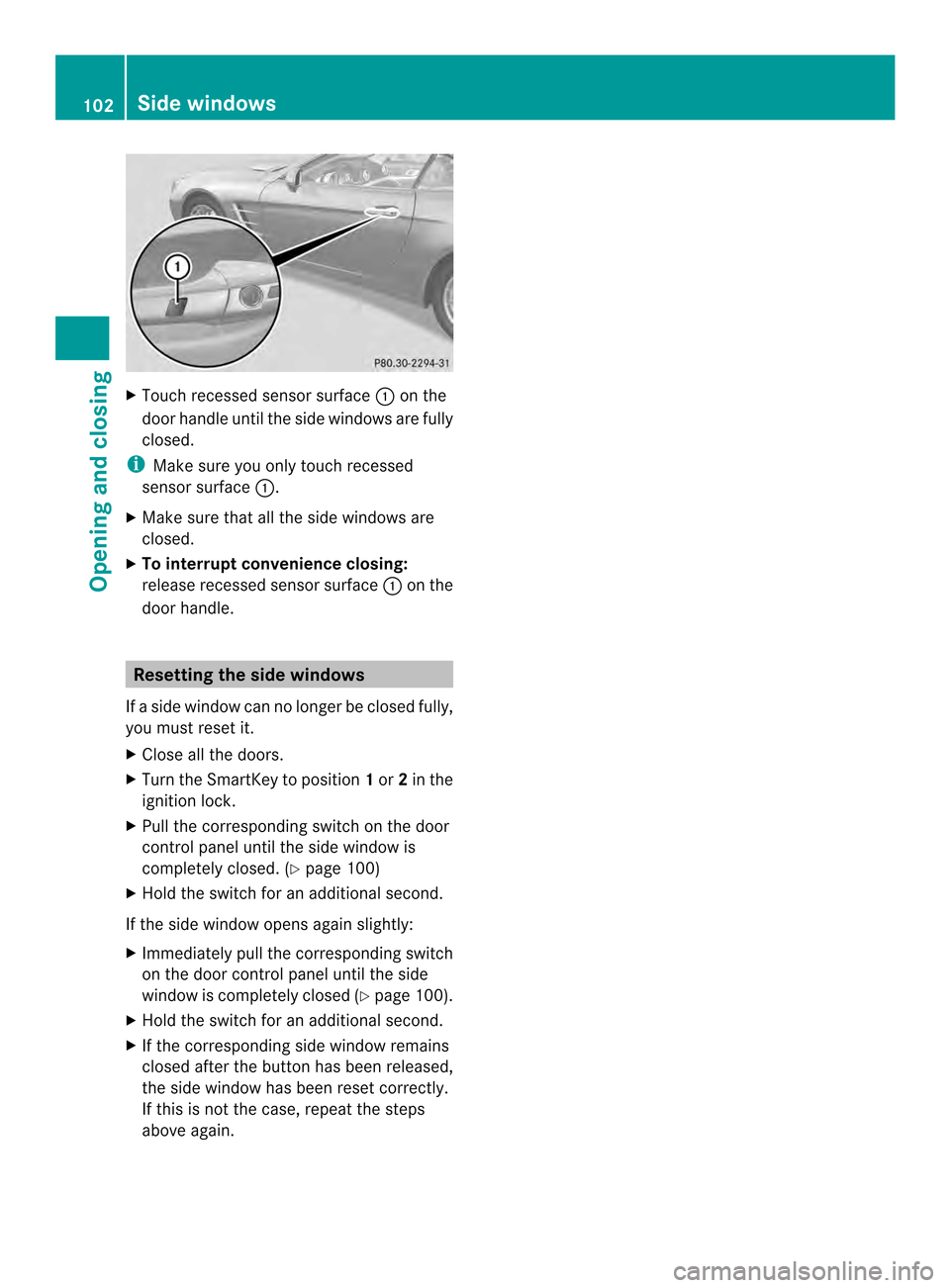
X
Touch recessed sensor surface 0002on the
door handle until the side windows are fully
closed.
i Make sure you only touch recessed
sensor surface 0002.
X Make sure that all the side windows are
closed.
X To interrupt convenience closing:
release recessed sensor surface 0002on the
door handle. Resetting the side windows
If a side window can no longer be closed fully,
you must reset it.
X Close all the doors.
X Turn the SmartKey to position 1or 2in the
ignition lock.
X Pull the corresponding switch on the door
control panel until the side window is
completely closed. (Y page 100)
X Hold the switch for an additional second.
If the side window opens again slightly:
X Immediately pull the corresponding switch
on the door control panel until the side
window is completely closed (Y page 100).
X Hold the switch for an additional second.
X If the corresponding side window remains
closed after the button has been released,
the side window has been reset correctly.
If this is not the case, repeat the steps
above again. 102
Side windowsOpening and closing