ESP MERCEDES-BENZ SL-Class 2013 R131 Workshop Manual
[x] Cancel search | Manufacturer: MERCEDES-BENZ, Model Year: 2013, Model line: SL-Class, Model: MERCEDES-BENZ SL-Class 2013 R131Pages: 590, PDF Size: 9.73 MB
Page 187 of 590

Cruise control lever
X
To adjust the set speed in 1 mph
increments (1 km/h increments): briefly
press the cruise control leve rup0002 to the
pressure point for a higher speed or
down 0003for a lower speed.
Every time the cruise control lever is
pressed up or down, the last speed stored
is increased or reduced.
X To adjust the set speed in 5 mph
increments (10 km/h increments):
briefly press the cruise control lever
up 0002 past the pressure point for a higher
speed or down 0003for a lower speed.
Every time the cruise control lever is
pressed up or down, the last speed stored
is increased or reduced.
i Cruise control is not deactivated if you
depress the accelerator pedal. For
example, if you accelerate briefly to
overtake, cruise control adjusts the
vehicle's speed to the last speed stored
after you have finished overtaking. Deactivating cruise control Cruise control lever
There are several ways to deactivate cruise
control:
X
Briefly press the cruise control lever
forwards 0002.
or
X Brake.
Cruise control is automatically deactivated if:
R you engage the electric parking brake.
R you are driving at less than 20 mph
(30 km/h).
R ESP ®
intervenes or you deactivate ESP ®
.
R on vehicles with manual transmission, you
shift to a gear that is too high, and as a
result the engine speed is too low.
R on vehicles with manual transmission, you
shift to a gear that is too high, and as a
result the engine speed is too low.
R you shift the transmission to position N
while driving.
If cruise control is deactivated, you will hear
a warning tone. You will see the Cruise Control Off message in the multifunction
display for approximately five seconds.
i When you switch off the engine, the last
speed stored is cleared. Driving systems
185Driving and parking Z
Page 188 of 590
DISTRONIC PLUS
Important safety notes G
WARNING
DISTRONIC PLUS does not react to:
R people or animals
R stationary obstacles on th eroad, e.g.
stopped or parked vehicles
R oncoming and crossin gtraffic
As a result, DISTRONIC PLUS may neither give
warnings nor intervene in such situations.
There is a risk of an accident.
Always pay careful attention to the traffic
situation and be ready to brake. G
WARNING
DISTRONIC PLUS cannot always clearly
identify other road users and comple xtraffic
situations.
In such cases, DISTRONIC PLUS may:
R give an unnecessary warning and then
brake the vehicle
R neither give a warning nor intervene
R accelerate unexpectedly
There is a risk of an accident.
Continue to drive carefully and be ready to
brake, in particular when warned to do so by
DISTRONIC PLUS. G
WARNING
DISTRONIC PLUS brakes yourv ehicle with up
to 40% of the maximum braking force. If this
braking force is insufficient, DISTRONIC PLUS
warns you visually and audibly .There is a risk
of an accident.
In such cases, apply the brakes yourself and
try to take evasive action. !
If DISTRONIC PLUS or the HOLD function
is activated, the vehicle brakes
automatically in certain situations. To
prevent damage to the vehicle, deactivate
DISTRONIC PLUS and the HOLD function in
the following or other similar situations:
R when towing the vehicle
R in the car wash
If you fail to adapt your driving style,
DISTRONIC PLUS can neither reduce the risk
of accident nor override the laws of physics.
DISTRONIC PLUS cannot take into account
the road, traffic and weather conditions.
DISTRONIC PLUS is only an aid. You are
responsible for the distance to the vehicle in
front, for vehicle speed, for braking in good
time and for staying in lane.
Do not use DISTRONIC PLUS:
R in road and traffic conditions which do not
allow you to maintain a constant speed e.g.
in heavy traffic or on winding roads
R on slippery road surfaces. Braking or
accelerating could cause the drive wheels
to lose traction and the vehicle could then
skid
R when there is poor visibility, e.g. due to fog,
heavy rain or snow
DISTRONIC PLUS may not detect narrow
vehicles driving in front, e.g. motorcycles, or
vehicles driving on a different line.
In particular, the detection of obstacles can
be impaired if:
R there is dirt on the sensors or anything else
covering the sensors
R snow or heavy rain
R interference by other radar sources
R strong radar reflections, for example, in
parking garages
If DISTRONIC PLUS no longer detects a
vehicle in front, DISTRONIC PLUS may
unexpectedly accelerate the vehicle to the
stored speed. 186
Driving systemsDriving and parking
Page 189 of 590
This speed may:
R
be too high if you are driving in a filter lane
or an exit lane
R be so high when driving in the right-hand
lane that you overtake vehicles in the left-
hand lane
R be so high when driving in the left-hand lane
that you overtake vehicles in the right-hand
lane
If there is a change of drivers, advise the new
driver of the speed stored.
General notes DISTRONIC PLUS regulates the speed and
automatically helps you maintain the
distance to the vehicle detected in front.
DISTRONIC PLUS brakes automatically so
that the set speed is not exceeded.
On long and steep downhill gradients,
especially if the vehicle is laden, you must
select shift range 1,2or 3in good time
(Y page 169) .Bydoing so, you will make use
of the braking effect of the engine, This
relieves the load on the brake system and
prevents the brakes from overheating and
wearing too quickly.
If a slower-moving vehicle is detected in front,
DISTRONIC PLUS brakes your vehicle. It
maintains the preset distance to the vehicle
in front.
If DISTRONIC PLUS detects that there is a risk
of a collision, you will be warned visually and
acoustically. DISTRONIC PLUS cannot
prevent a collision without your intervention.
An intermittent warning tone will then sound
and the distance warning lamp will light up in
the instrument cluster. Brake immediately in
order to increase the distance to the vehicle
in front or take evasive action provided it is
safe to do so.
For DISTRONIC PLUS to assist you when
driving, the radar sensor system must be:
R activated(Y page 235)
R operational If there is no vehicle in front, DISTRONIC
PLUS operates in the same way as cruise
control in the speed range between 20 mph
(Canada: 30 km/h) and120 mph (Canada:
200 km/h). If a vehicle is driving in front of
you, it operates in the speed range between
0 mph (0 km/h) and 120 mph (Canada:
200 km/h).
Do not use DISTRONIC PLUS while driving on
roads with steep gradients.
As DISTRONIC PLUS transmits radar waves,
it can resemble the radar detectors of the
responsible authorities. You can refer to the
relevant chapter in the Operator's Manual if
questions are asked about this.
i
USA only: This device has been approved
by the FCC as a "Vehicular RadarS ystem".
The rada rsensor is intended for use in an
automotive radar system only. Removal,
tampering, or altering of the device will void
any warranties, and is not permitted by the
FCC. Do not tamper with, alter, or use in
any non-approved way.
Any unauthorized modification to this
device could void the user's authority to
operate the equipment.
i Canada only: This device complies with
RSS-210 of Industry Canada. Operation is
subject to the following two conditions:
1. This device may not cause harmful
interference, and
2. this device must accept any interference
received, including interference that may
cause undesired operation of the device.
Removal, tampering, or altering of the
device will void any warranties, and is not
permitted. Do not tamper with, alter, or use
in any non-approved way.
Any unauthorized modification to this
device could void the user's authority to
operate the equipment. Driving systems
187Driving and parking Z
Page 190 of 590

Cruise control lever
Cruise control lever
0002 To store the curren tspeed or a higher
speed
0003 To set the specified minimum distance
0027 To store the curren tspeed or calling up
the last stored speed
0026 To store the curren tspeed or a lower
speed
0024 To deactivate DISTRONIC PLUS
Activating DISTRONIC PLUS; storing,
maintaining and calling up aspeed Important safety notes
! If DISTRONIC PLUS or the HOLD function
is activated, the vehicle brakes
automatically in certain situations. To
prevent damage to the vehicle, deactivate
DISTRONIC PLUS and the HOLD function in
the following or othe rsimilar situations:
R when towing the vehicle
R in the car wash
In order to activate DISTRONIC PLUS, the
following conditions must be fulfilled:
R the engine must be started. It may take up
to two minutes after pulling away before
DISTRONIC PLUS is operational.
R your vehicle must not be secured by the
electric parking brake.
R ESP ®
must be activated.
R the transmission must be in position D.
R the hood must be closed. R
the driver's door must be closed when you
shift from Pto Dor your seat belt must be
fastened.
R the front-passenger door must be closed.
R the vehicle must not skid.
Activating while driving Cruise control lever
X
Briefly pull the cruise control lever toward
you 0003, up 0002or down 0027.
DISTRONIC PLUS is selected.
X To adjust the set speed in 1 mph
increments (1 km/h increments): briefly
press the cruise control lever up 0002to the
pressure point for a higher speed or down
0027 for a lower speed.
Every time the cruise control lever is
pressed up or down, the last speed stored
is increased or reduced.
or
X To adjust the set speed in 5 mph
increments (10 km/h increments):
briefly press the cruise control lever
up 0002 past the pressure point for a higher
speed or down 0027for a lower speed.
Every time the cruise control lever is
pressed up or down, the last speed stored
is increased or reduced.
X Remove your foot fro mthe accelerator
pedal.
Your vehicle adapts its speed to that of the
vehicle in front, but only up to the desired
stored speed.
If the vehicle in front has been detected and
is shown in the multifunction display, you can 188
Driving systemsDriving and parking
Page 192 of 590
If DISTRONIC PLUS detects that the vehicle
in front has slowed down, it brakes your
vehicle. It maintains the preset distance to
the vehicle in front.
If DISTRONIC PLUS detects that there is a risk
of a collision, you will be warned visually and
acoustically. DISTRONIC PLUS cannot
prevent a collision withou tyour intervention.
An intermittent warning tone will then sound
and the distance warning lamp will light up in
the instrument cluster. Brake immediately in
order to increase the distance from the
vehicle in front, or take evasive action,
provided it is safe to do so.
If DISTRONIC PLUS detects a faster-moving
vehicle in front, it increases the driving speed.
However, the vehicle is only accelerated up
to the speed you have stored.
Changing lanes
If you wish to change to the passing lane (in
countries where traffic drives on the right, the
passing lane is the left-hand lane),
DISTRONIC PLUS supports you if:
R you are driving faster than 40mph
(60 km/h).
R DISTRONIC PLUS is maintaining the
distance to a vehicle in front.
R you have switched on the corresponding
turn signal.
R DISTRONIC PLUS does not detect a danger
of collision.
If these conditions are fulfilled, your vehicle
is accelerated. Acceleration will be
interrupted if changing lanes takes too long
or if the distance between your vehicle and
the vehicle in front becomes too small. Stopping G
WARNING
When leaving the vehicle, even if it is braked
only by DISTRONIC PLUS, it could roll away if:
R there is a malfunction in the system or in
the voltage supply.
R DISTRONIC PLUS has been deactivated
with the cruise control lever, e.g. by a
vehicle occupant or from outside the
vehicle.
R the electrical system in the engine
compartment, the battery or the fuses have
been tampered with.
R the battery is disconnected.
R the accelerator pedal has been depressed,
e.g. by a vehicle occupant.
There is a risk of an accident.
If you wish to exit the vehicle, always turn off
DISTRONIC PLUS and secure the vehicle
against rolling away.
Deactivating DISTRONIC PLUS
(Y page 193).
If DISTRONIC PLUS detects that the vehicle
in front is stopping, it brakes your vehicle until
it is stationary.
Once your vehicle is stationary, it remains
stationary and you do not need to depress the
brake. After a time, the electric parking brake
secures the vehicle and relieves the service
brake.
Depending on the specified minimum
distance, your vehicle will come to a standstill
at a sufficient distance behind the vehicle in
front.T he specified minimum distance is set
using the control on the cruise control lever.
The electric parking brake automatically
secures the vehicle if DISTRONIC PLUS is
activated and:
R the driver's door is open and the driver's
seat belt is unfastened.
R the engine is switched off, unless it is
automatically switched off by the ECO
start/stop function. 190
Driving systemsDriving and parking
Page 195 of 590

0027
Specified minimum distance to the
vehicle in front; adjustable
0026 Vehicle in front, if detected
X Select the Distance Display function
using the on-board computer
(Y page 230).
You will initially see the stored speed for
abou tfive seconds when you activate
DISTRONIC PLUS.
Deactivating DISTRONIC PLUS G
WARNING
DISTRONIC PLUS is deactivated and releases
the brakes if the vehicle is slowed down to a
speed below 20 mph (30km/h) by the system,
provided that DISTRONIC PLUS does not
detec tavehicle directly in front. At this point,
the driver must apply the brakes in order to
slow down further and bring the vehicle to a
standstill. Cruise control lever
There are several ways to deactivate
DISTRONIC PLUS:
X
Briefly press the cruise control lever
forwards 0002.
or
X Brake, unless the vehicle is stationary.
When you deactivate DISTRONIC PLUS, you
will see the DISTRONIC PLUS Off message
in the multifunction display for approximately
five seconds. i
The lasts peed stored remains stored until
you switch off the engine.
i DISTRONIC PLUS is not deactivated if you
depress the accelerator pedal. If you
accelerate to overtake, DISTRONIC PLUS
adjusts the vehicle's speed to the last
speed stored after you have finished
overtaking.
DISTRONIC PLUS is automatically
deactivated if:
R you engage the electric parking brake or if
the vehicle is automatically secured with
the electric parking brake.
R you are driving slower than 15 mph
(25 km/h) and there is no vehicle in front,
or if the vehicle in front is no longer
detected.
R ESP ®
intervenes or you deactivate ESP ®
.
R the transmission is in the P,Ror Nposition.
R you switch off the radar senso rsystem
(Y page 235)
R you pull the cruise contro llever towards
you in order to pull away and the front-
passenger door is open.
R the vehicle has skidded.
If DISTRONIC PLUS is deactivated, you will
hear a warning tone. You will see the
DISTRONIC PLUS Off message in the
multifunction display for approximately five
seconds.
Tips for driving with DISTRONIC PLUS Important safety notes
G
WARNING
The DISTRONIC PLUS works to maintain the
speed selected by the driver unless a moving
obstacle proceeding directly ahead of it in the
same travel direction is detected (e.g.
following another vehicle ahead of you at your
set distance). Driving systems
193Driving and parking
Z
Page 197 of 590
because of its narrow width. The distance to
the vehicle in fron
twill be too short.
Obstructions and stationary vehicles DISTRONIC PLUS does not brake for
obstacles or stationary vehicles. If, for
example, the detected vehicle turns a corner
and reveals an obstacle or stationary vehicle,
DISTRONIC PLUS will not brake for these.
Crossing vehicles DISTRONIC PLUS may mistakenly detect
vehicles that are crossing your lane.
Activating DISTRONIC PLUS at traffic lights
with crossing traffic, for example, could cause
your vehicle to pull away unintentionally. HOLD function
Important safety notes G
WARNING
When leaving the vehicle, it can still roll away
despite being braked by the HOL Dfunctio nif:
R there is a malfunction in the system or in
the voltage supply.
R the HOLD function has been deactivated by
pressing the accelerator peda lorthe brake
pedal, e.g. by a vehicle occupant.
R the electrical system in the engine
compartment, the battery or the fuses have
been tampered with.
R the battery is disconnected
There is a risk of an accident.
If you wish to exit the vehicle, always turn off
the HOLD function and secure the vehicle
against rolling away.
! If DISTRONIC PLUS or the HOLD function
is activated, the vehicle brakes
automatically in certain situations. To
prevent damage to the vehicle, deactivate
DISTRONIC PLUS and the HOLD function in
the following or other similar situations:
R when towing the vehicle
R in the car wash
Deactivate the HOLD function (Y page 196).
General notes The HOLD function can assist the driver in the
following situations:
R
when pulling away, especially on steep
slopes
R when maneuvering on steep slopes
R when waiting in traffic
The vehicle is kept stationary without the
driver having to depress the brake pedal.
The braking effect is canceled and the HOLD
function deactivated when you depress the
accelerator pedal to pull away. Driving systems
195Driving and parking Z
Page 202 of 590
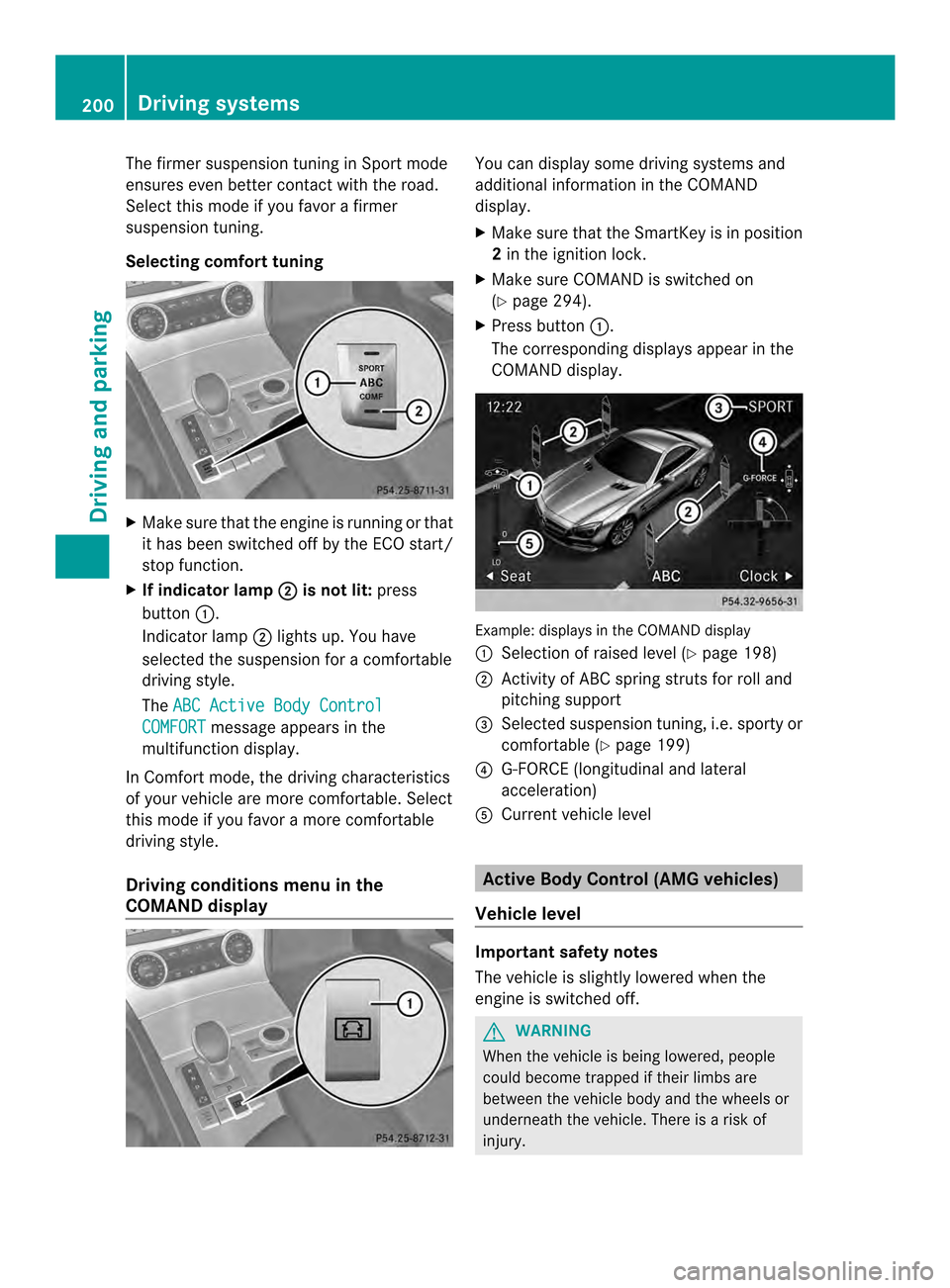
The firmer suspension tunin
ginSport mode
ensures even better contact with the road.
Select this mode if you favor a firmer
suspension tuning.
Selecting comfor ttuning X
Make sure that the engine is running or that
it has been switched off by the ECO start/
stop function.
X If indicator lamp 0003 is not lit:
press
button 0002.
Indicator lamp 0003lights up. You have
selected the suspension for acomfortable
driving style.
The ABC Active Body Control COMFORT message appears in the
multifunction display.
In Comfort mode, the driving characteristics
of your vehicle are more comfortable. Select
this mode if you favor amore comfortable
driving style.
Driving conditions menu in the
COMAND display You can display some driving systems and
additional information in the COMAND
display.
X
Make sure that the SmartKey is in position
2in the ignition lock.
X Make sure COMAND is switched on
(Y page 294).
X Press button 0002.
The corresponding displays appear in the
COMAND display. Example: displays in the COMAND display
0002
Selection of raised level (Y page 198)
0003 Activity of ABC spring struts for roll and
pitching support
0027 Selected suspension tuning, i.e. sporty or
comfortable (Y page 199)
0026 G-FORCE (longitudinal and lateral
acceleration)
0024 Current vehicle level Active Body Control (AMG vehicles)
Vehicle level Important safety notes
The vehicle is slightly lowered when the
engine is switched off.
G
WARNING
When the vehicle is being lowered, people
could become trapped if their limbs are
between the vehicle body and the wheels or
underneath the vehicle. There is a risk of
injury. 200
Driving systemsDriving and parking
Page 204 of 590
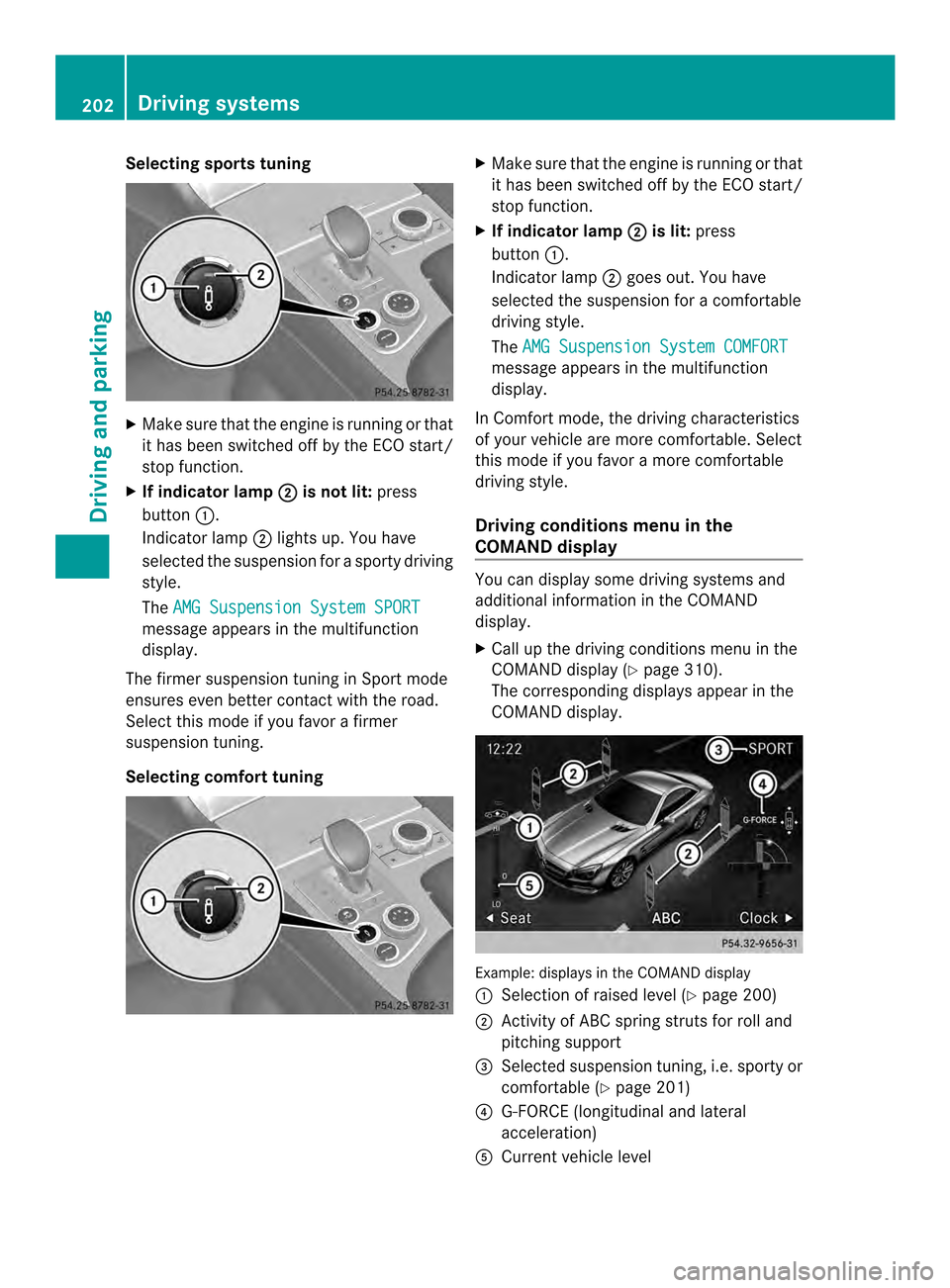
Selecting sports tuning
X
Make sure that the engine is running or that
it has been switched off by the ECO start/
stop function.
X If indicator lamp 0003 is not lit:
press
button 0002.
Indicator lamp 0003lights up. You have
selected the suspension for a sporty driving
style.
The AMG Suspension System SPORT message appears in the multifunction
display.
The firmer suspension tuning in Sport mode
ensures even better contact with the road.
Select this mode if you favor a firmer
suspension tuning.
Selecting comfort tuning X
Make sure that the engine is running or that
it has been switched off by the ECO start/
stop function.
X If indicator lamp 0003 is lit:
press
button 0002.
Indicator lamp 0003goes out. You have
selected the suspension for acomfortable
driving style.
The AMG Suspension System COMFORT message appears in the multifunction
display.
In Comfort mode, the driving characteristics
of your vehicle are more comfortable. Select
this mode if you favor amore comfortable
driving style.
Driving conditions menu in the
COMAND display You can display some driving systems and
additional information in the COMAND
display.
X
Call up the driving conditions menu in the
COMAND display (Y page 310).
The corresponding displays appear in the
COMAND display. Example: displays in the COMAND display
0002
Selection of raised level (Y page 200)
0003 Activity of ABC spring struts for roll and
pitching support
0027 Selected suspension tuning, i.e. sporty or
comfortable (Y page 201)
0026 G-FORCE (longitudinal and lateral
acceleration)
0024 Current vehicle level 202
Driving systemsDriving and parking
Page 205 of 590
PARKTRONIC
Important safety notes PARKTRONIC is an electronic parking aid with
ultrasonic sensors. It indicates visually and
audibly the distance between your vehicle
and an object.
PARKTRONIC is only an aid. It is not a
replacement for your attention to your
immediate surroundings. You are always
responsible for safe maneuvering, parking
and exiting a parking space. When
maneuvering, parking or pulling out of a
parking space, make sure that there are no
persons, animals or objectsint he area in
which you are maneuvering.
! When parking, pay particular attention to
objects above or below the sensors, such
as flower pots or trailer drawbars.
PARKTRONIC does not detect such objects
when they are in the immediate vicinity of
the vehicle. You could damage the vehicle
or the objects.
The sensors may not detect snow and other
objects that absorb ultrasonic waves.
Ultrasonic sources such as an automatic
car wash, the compressed-air brakes on a
truck or a pneumatic drill could cause
PARKTRONIC to malfunction.
PARKTRONIC may not function correctly on
uneven terrain.
PARKTRONIC is activated automatically when
you:
R switch on the ignition.
R shift the transmission to position D,Ror
N.
R release the electric parking brake.
PARKTRONIC is deactivated at speeds above
11 mph (18km/h). It is reactivated at lower
speeds.
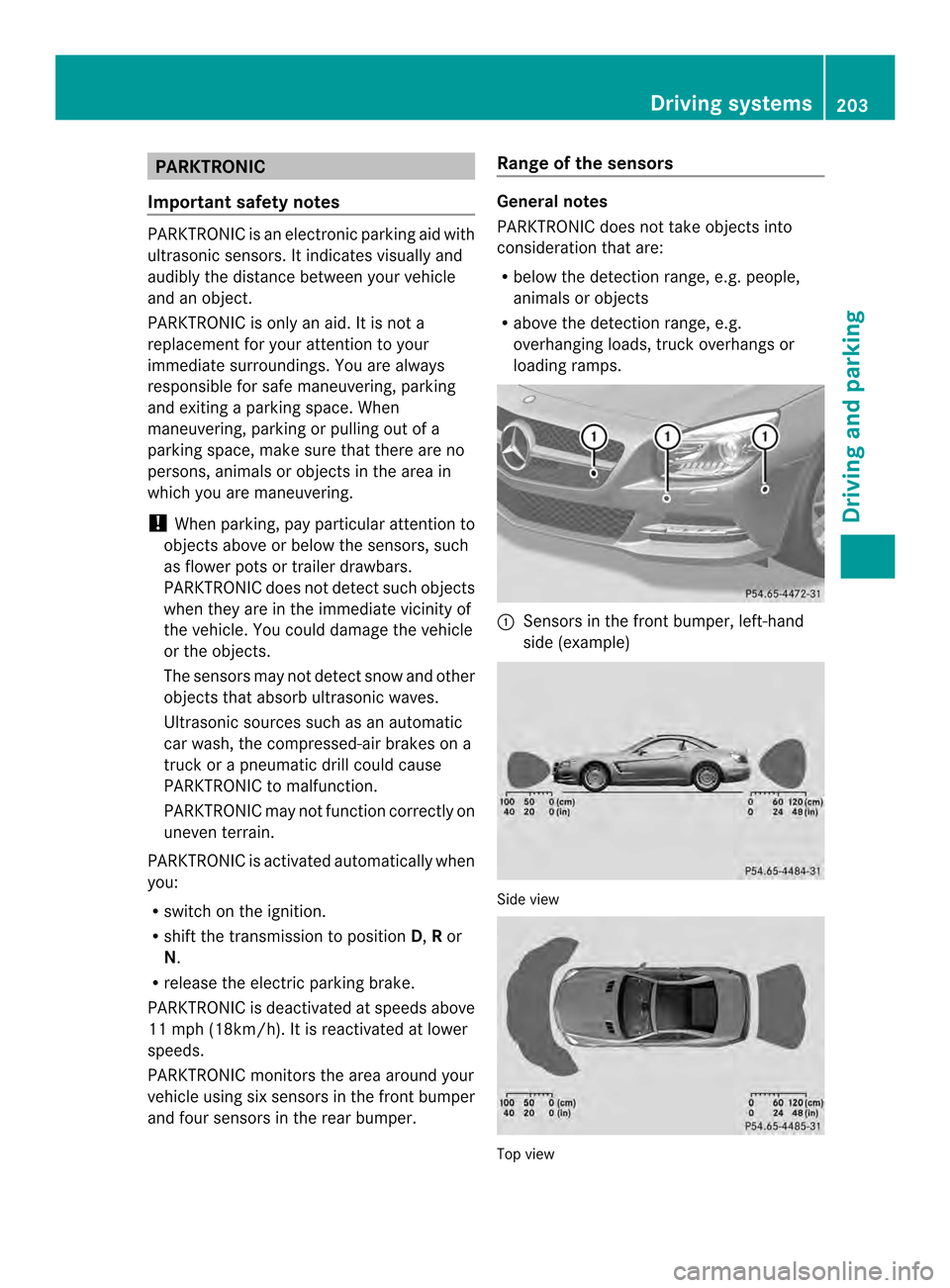
PARKTRONIC monitors the area around your
vehicle using six sensors in the front bumper
and four sensors in the rear bumper. Range of the sensors General notes
PARKTRONIC does not take objects into
consideration that are:
R
below the detection range, e.g. people,
animals or objects
R above the detection range, e.g.
overhanging loads, truck overhangs or
loading ramps. 0002
Sensors in the front bumper, left-hand
side (example) Side view
Top view Driving systems
203Driving and parking Z