roof MERCEDES-BENZ SL-Class 2015 R131 Owner's Guide
[x] Cancel search | Manufacturer: MERCEDES-BENZ, Model Year: 2015, Model line: SL-Class, Model: MERCEDES-BENZ SL-Class 2015 R131Pages: 610, PDF Size: 12.21 MB
Page 107 of 610

MAGIC SKY CONTROL
General notes MAGIC SKY CONTROL is a glass roof, the
transparency of which can be changed by
applying electrical voltage.
MAGIC SKY CONTROL can be switched
between darkened and transparent states.
i MAGIC SKY CONTROL darkens automat-
ically when you turn the SmartKey to posi-
tion 0in the ignition lock or remove the
SmartKey.
Risk of electric shock G
DANGER
MAGIC SKY CONTROL operates using high
voltage. If the trim behind the overhead con-
trol panel is damaged or removed, electrical
components will be exposed. If you touch
these components, you could get an electric
shock. There is a risk of fatal injury.
R Never remove the trim behind the overhead
control panel.
R If the trim is damaged, never touch the
electrical components behind it.
R Always have work on the MAGIC SKY CON-
TROL carried out at a qualified specialist
workshop.
The electrical components of MAGIC SKY
CONTROL are protected by a paneling behind the overhead control panel.
The MAGIC SKY CONTROL control unit is
marked with a yellow warning sticker that
warns you of high voltage. The electric cables
of the high-voltage section are colored
orange. Operating MAGIC SKY CONTROL X
Turn the SmartKey to position 1or 2in the
ignition lock.
MAGIC SKY CONTROL switches to the sta- tus it was set to before the engine was
switched off.
X To change the degree of transparency:
press button 0043.
i At sub-zero temperatures, the change is
slower and uneven. The entire process may
take some time. Roof
105Opening and closing Z
Page 108 of 610

Problems with the roof
Problem
Possible causes/consequences and
0050
0050Solutions The roof will not open or
close. The trunk partition is not in place.
X Close the trunk partition (Y page 103). The trunk lid is open.
X Close the trunk lid (Y page 92). The on-board voltage is too low.
X Leave the engine running. The roof has been opened and closed several times in a row. The
roof drive has been automatically deactivated.
You can open and close the roof again after approximately ten
minutes.
X Switch off the ignition and turn it back on.
X Repeat the opening or closing procedure. The automatic roof mechanism is faulty.
X Consult a qualified specialist workshop. 106
RoofOpening and closing
Page 115 of 610
X
Make sure that the SmartKey is in position
1 or 2in the ignition lock.
X To switch on: press button0043repeatedly
until the desired heating level is set.
X To switch off: press button0043repeatedly
until all the indicator lamps go out.
i If the battery voltage is too low, the seat
heating may switch off.
Problems with the seat heating The seat heating has switched off prema-
turely or cannot be switched on. The vehicle's
electrical system voltage is too low because
too many electrical consumers are switched
on.
X Switch off electrical consumers that you do
not need, such as the rear window
defroster or interior lighting.
X Once the battery is sufficiently charged,
switch on the seat heating again. Switching the seat ventilation on/off
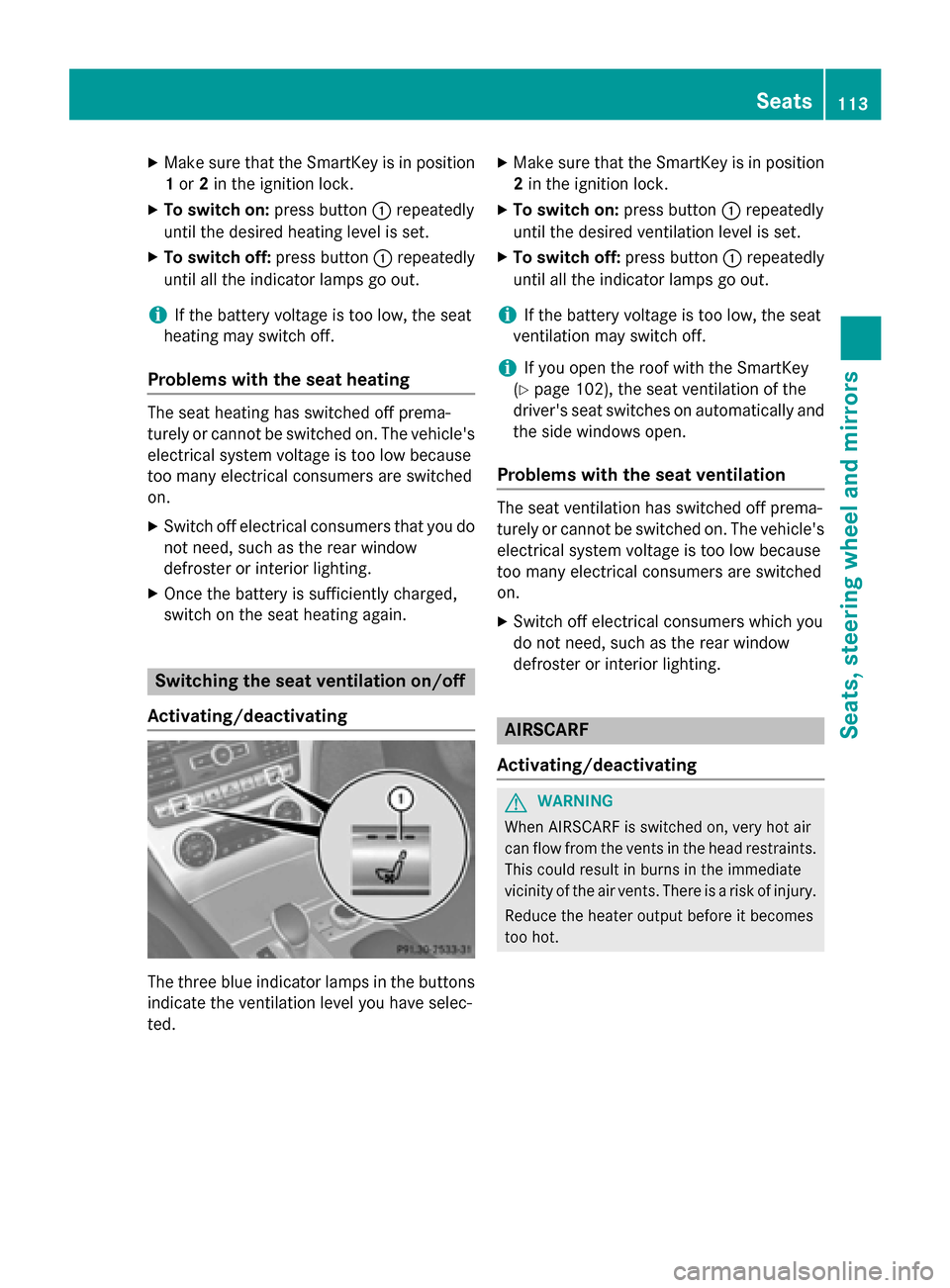
Activating/deactivating The three blue indicator lamps in the buttons
indicate the ventilation level you have selec-
ted. X
Make sure that the SmartKey is in position
2 in the ignition lock.
X To switch on: press button0043repeatedly
until the desired ventilation level is set.
X To switch off: press button0043repeatedly
until all the indicator lamps go out.
i If the battery voltage is too low, the seat
ventilation may switch off.
i If you open the roof with the SmartKey
(Y page 102), the seat ventilation of the
driver's seat switches on automatically and
the side windows open.
Problems with the seat ventilation The seat ventilation has switched off prema-
turely or cannot be switched on. The vehicle's
electrical system voltage is too low because
too many electrical consumers are switched
on.
X Switch off electrical consumers which you
do not need, such as the rear window
defroster or interior lighting. AIRSCARF
Activating/deactivating G
WARNING
When AIRSCARF is switched on, very hot air
can flow from the vents in the head restraints. This could result in burns in the immediate
vicinity of the air vents. There is a risk of injury.
Reduce the heater output before it becomes
too hot. Seats
113Seats, steering wheel and mirrors Z
Page 138 of 610
Useful information
i This Operator's manual describes all
models and all standard and optional equip- ment of your vehicle available at the time of
publication of the Operator's manual.
Country-specific differences are possible.
Please note that your vehicle may not be
equipped with all features described. This
also applies to safety-related systems and
functions.
i Read the information on qualified special-
ist workshops (Y page 35). Overview of climate control systems
General notes
Observe the settings recommended on the
following pages. The windows could other-
wise fog up.
To prevent the windows from fogging up:
R switch off climate control only briefly
R switch on air-recirculation mode only
briefly
R switch on the cooling with air dehumidifi-
cation function
R switch on the defrost windshield function
briefly, if required
Climate control regulates the temperature
and the humidity in the vehicle interior and
filters undesirable substances out of the air.
Climate control can only be operated when
the engine is running. Optimum operation is
only achieved with the side windows and roof closed.
The residual heat function can only be acti-
vated or deactivated with the ignition
switched off (Y page 146).
i When the weather is warm, ventilate the
vehicle for a brief period. This will speed up the cooling process and the desired vehicle
interior temperature will be reached more
quickly. i
It is possible that the dehumidification
function of the climate control system may be activated automatically an hour after the
SmartKey has been removed. The vehicle is
then ventilated for 30 minutes to dry the
air-conditioning system. 136
Overview of climate control systemsClimate control
Page 181 of 610
X
Hold test gauge 0083vertically on brake
disc 0043and slide measuring pin 0044onto
brake disc 0043.
X Check which color field 0085the arrow on
measuring pin 0044is pointing to.
Green: the brake pad/lining thickness is
sufficient.
Red : the brake pad/lining thickness is not
sufficient. Have the brake pads/lining
checked at a qualified specialist workshop.
i To avoid an inaccurate measurement:
R make sure you position the wheels suit-
ably
R do not put the measuring pin on a recess
in the brake disc Driving on wet roads
Hydroplaning If water has accumulated to a certain depth
on the road surface, there is a danger of
hydroplaning occurring, even if:
R
you drive at low speeds.
R the tires have adequate tread depth.
For this reason, in the event of heavy rain or in
conditions in which hydroplaning may occur,
you must drive in the following manner:
R lower your speed.
R avoid ruts.
R avoid sudden steering movements.
R brake carefully.
Driving on flooded roads !
Do not drive through flooded areas.
Check the depth of any water before driving through it. Drive slowly through standing
water. Otherwise, water may enter the
vehicle interior or the engine compartment.
This can damage the electronic compo-
nents in the engine or the automatic trans- mission. Water can also be drawn in by the
engine's air suction nozzles and this can
cause engine damage. Winter driving
G
WARNING
If you shift down on a slippery road surface in an attempt to increase the engine's braking
effect, the drive wheels could lose their grip.
There is an increased danger of skidding and
accidents.
Do not shift down for additional engine brak-
ing on a slippery road surface. G
DANGER
If the exhaust pipe is blocked or adequate
ventilation is not possible, poisonous gases
such as carbon monoxide (CO) may enter the vehicle. This is the case, e.g. if the vehicle
becomes trapped in snow. There is a risk of
fatal injury.
If you leave the engine or the auxiliary heating
running, make sure the exhaust pipe and area
around the vehicle are clear of snow. To
ensure an adequate supply of fresh air, open a window on the side of the vehicle that is not
facing into the wind.
Have your vehicle winter-proofed at a quali-
fied specialist workshop at the onset of win-
ter.
Drive particularly carefully on slippery road
surfaces. Avoid sudden acceleration, steering and braking maneuvers. Do not use cruise
control.
If the vehicle threatens to skid or cannot be
stopped when moving at low speed:
X Shift the transmission to position N.
The outside temperature indicator is not
designed to serve as an ice-warning device
and is therefore unsuitable for that purpose.
Changes in the outside temperature are dis-
played after a short delay.
Indicated temperatures just above the freez-
ing point do not guarantee that the road sur-
face is free of ice. The road may still be icy,
especially in wooded areas or on bridges. The vehicle could skid if you fail to adapt your
driving style. Always adapt your driving style Driving tips
179Driving and parking Z
Page 268 of 610
Display messages
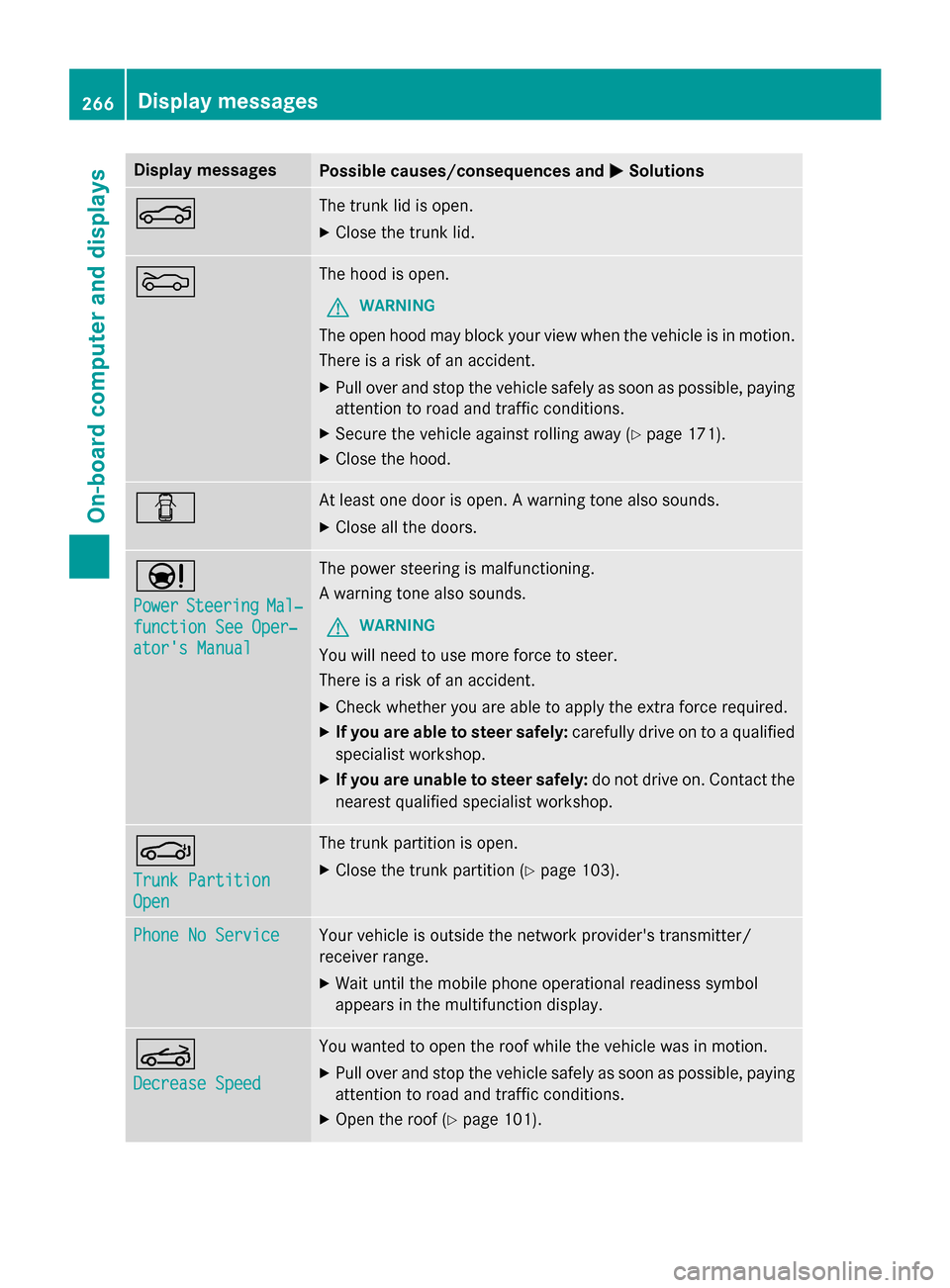
Possible causes/consequences and
0050
0050Solutions 0084 The trunk lid is open.
X Close the trunk lid. 0083 The hood is open.
G WARNING
The open hood may block your view when the vehicle is in motion.
There is a risk of an accident.
X Pull over and stop the vehicle safely as soon as possible, paying
attention to road and traffic conditions.
X Secure the vehicle against rolling away (Y page 171).
X Close the hood. 0051 At least one door is open. A warning tone also sounds.
X Close all the doors. 00CC
Power Power
Steering
Steering Mal‐
Mal‐
function See Oper‐
function See Oper‐
ator's Manual ator's Manual The power steering is malfunctioning.
A warning tone also sounds.
G WARNING
You will need to use more force to steer.
There is a risk of an accident. X Check whether you are able to apply the extra force required.
X If you are able to steer safely: carefully drive on to a qualified
specialist workshop.
X If you are unable to steer safely: do not drive on. Contact the
nearest qualified specialist workshop. 0058
Trunk Partition Trunk Partition
Open Open The trunk partition is open.
X Close the trunk partition (Y page 103).Phone No Service
Phone No Service Your vehicle is outside the network provider's transmitter/
receiver range.
X Wait until the mobile phone operational readiness symbol
appears in the multifunction display. 0059
Decrease Speed Decrease Speed You wanted to open the roof while the vehicle was in motion.
X Pull over and stop the vehicle safely as soon as possible, paying
attention to road and traffic conditions.
X Open the roof (Y page 101).266
Display
messagesOn-board computer and displays
Page 269 of 610
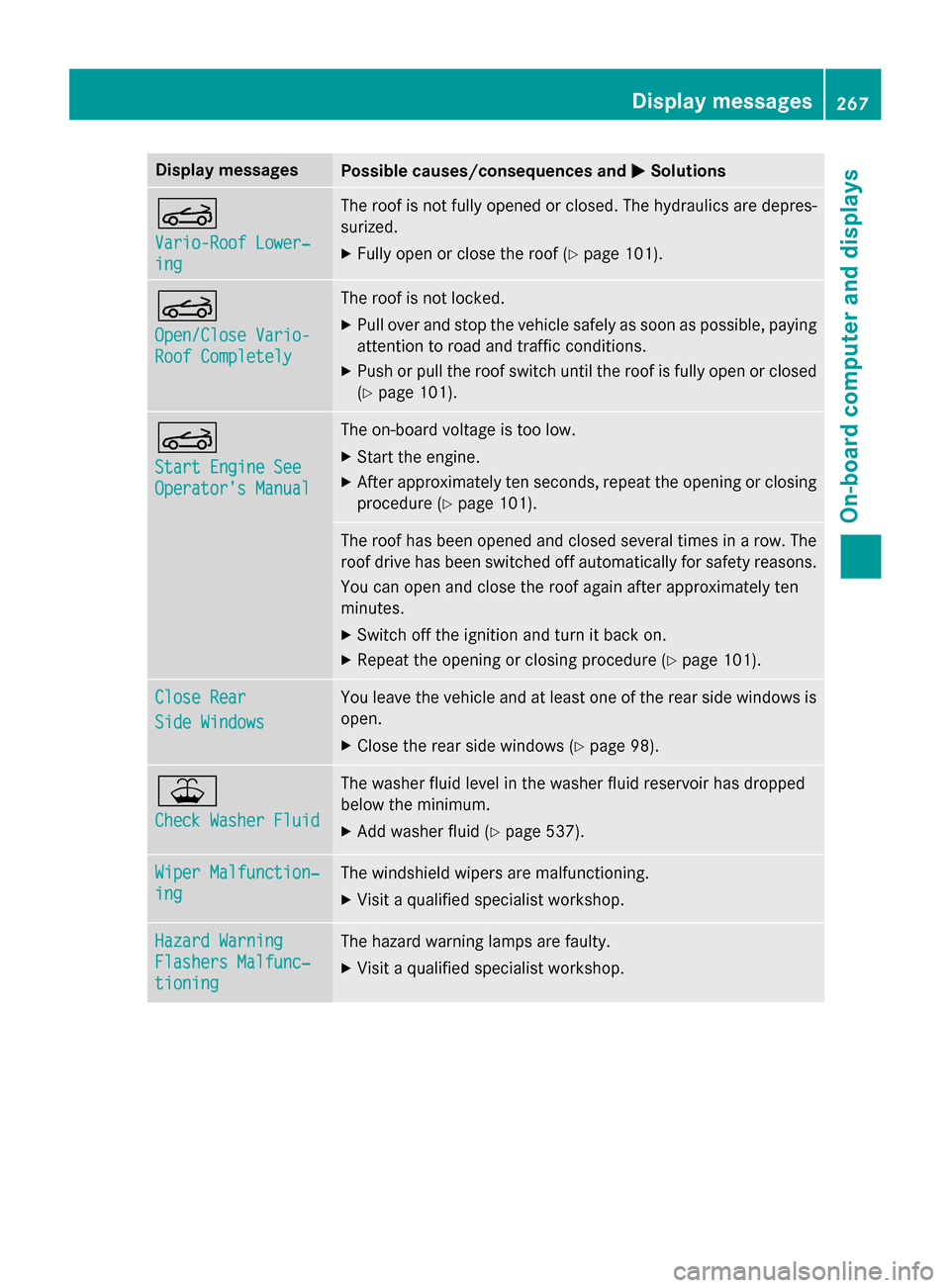
Display messages
Possible causes/consequences and
0050
0050Solutions 0059
Vario-Roof Lower‐ Vario-Roof Lower‐
ing ing The roof is not fully opened or closed. The hydraulics are depres-
surized.
X Fully open or close the roof (Y page 101).0059
Open/Close Vario- Open/Close Vario-
Roof Completely Roof Completely The roof is not locked.
X Pull over and stop the vehicle safely as soon as possible, paying
attention to road and traffic conditions.
X Push or pull the roof switch until the roof is fully open or closed
(Y page 101). 0059
Start Engine See Start Engine See
Operator's Manual Operator's Manual The on-board voltage is too low.
X Start the engine.
X After approximately ten seconds, repeat the opening or closing
procedure (Y page 101). The roof has been opened and closed several times in a row. The
roof drive has been switched off automatically for safety reasons.
You can open and close the roof again after approximately ten
minutes.
X Switch off the ignition and turn it back on.
X Repeat the opening or closing procedure (Y page 101).Close Rear
Close Rear
Side Windows Side Windows You leave the vehicle and at least one of the rear side windows is
open.
X Close the rear side windows (Y page 98).00B2
Check Washer Fluid Check Washer Fluid The washer fluid level in the washer fluid reservoir has dropped
below the minimum.
X Add washer fluid (Y page 537). Wiper Malfunction‐ Wiper Malfunction‐
ing ing The windshield wipers are malfunctioning.
X Visit a qualified specialist workshop. Hazard Warning
Hazard Warning
Flashers Malfunc‐ Flashers Malfunc‐
tioning tioning The hazard warning lamps are faulty.
X Visit a qualified specialist workshop. Display
messages
267On-board computer and displays Z
Page 285 of 610

quency (RF) Exposure Guidelines in Supple-
ment C to OET65.
This equipment has very low levels of RF
energy that is deemed to comply without
maximum permissive exposure evaluation
(MPE). But it is desirable that it should be
installed and operated with at least 8inches
(20 cm) and more between the radiator and a
person's body (excluding extremities: hands,
wrists, feet and legs.) Declarations of conformity
Vehicle components which receive
and/or transmit radio waves i
USA only:
The wireless devices of this
vehicle comply with Part 15 of the FCC
Rules. Operation is subject to the following two conditions:
1) These devices may not cause interfer-
ence, and
2) These devices must accept any interfer-
ence, including interference that may
cause undesired operation of the device.
Changes or modifications not expressly
approved by the party responsible for com- pliance could void the user's authority to
operate the equipment.
i Canada only:
The wireless devices of this
vehicle comply with Industry Canada
license-exempt RSS standard(s). Operation is subject to the following two conditions:
1) These devices may not cause interfer-
ence, and
2) These devices must accept any interfer-
ence, including interference that may
cause undesired operation of the device. Correct use
Observe the following information when using
COMAND:
R the safety notes in this manual
R traffic rules and regulations
R laws and safety standards pertaining to
motor vehicles
i Work improperly carried out on electronic
components or systems (e.g. radio, DVD
changer) and associated software could
cause them to cease functioning. Even sys-
tems that have not been modified could be
affected because the electronic systems
are connected. Electronic malfunctions
can seriously jeopardize the operational
safety of your vehicle.
i Roof antenna functionality (telephone,
satellite radio, GPS) can be affected by the use of roof carrier systems.
Attaching metalized retrofit film to the
windshield may affect radio reception and
have a negative impact on all other anten-
nas (e.g. emergency antenna) in the vehicleinterior.
i Therefore, have all work on or modifica-
tions to electronic components carried out at a qualified specialist workshop. This
workshop should have the necessary spe-
cialist knowledge and tools to carry out the
work required. Mercedes-Benz recom-
mends that you use an authorized
Mercedes-Benz Center for this purpose. In
particular, work relevant to safety or on
safety-related systems must be carried out at a qualified specialist workshop.
i Protection against theft:
this device is
equipped with technical provisions to pro-
tect it against theft. Further information on protection against theft can be obtained
from an authorized Mercedes-Benz Center. Operating safety
283COMAND Z
Page 321 of 610
COMAND can give incorrect navigation com-
mands if the actual street/traffic situation
does not correspond with the digital map's
data. Digital maps do not cover all areas nor
all routes in an area. For example, a route may have been diverted or the direction of a one-
way street may have changed.
For this reason, you must always observe
road and traffic rules and regulations during
your journey. Road and traffic rules and reg-
ulations always have priority over the sys-
tem's driving recommendations.
Navigation announcements are intended to
direct you while driving without diverting your attention from the road and driving.
Please always use this feature instead of con- sulting the map display for directions. Look-
ing at the icons or map display can distract
you from traffic conditions and driving, and
increase the risk of an accident.
General notes Operational readiness of the navigation
system
The navigation system must determine the
position of the vehicle before first use or
whenever operational status is restored.
Therefore, you may have to drive for a while
before precise route guidance is possible.
GPS reception
Among other things, correct functioning of
the navigation system depends on GPS recep-
tion. In certain situations, GPS reception may
be impaired, there may be interference or
there may be no reception at all, e.g. in tun-
nels or parking garages.
i Using roof carriers may impair the correct
functioning of a roof antenna (phone, sat-
ellite radio, GPS).
Entry restriction
On vehicles for certain countries, there is a
restriction on entering data.
The restriction is active from a vehicle speed of above approximately 3 mph (5 km/h).As soon as the speed falls below approximately
2 mph (3 km/h), the restriction becomes
inactive.
When the restriction is active, certain entries cannot be made. This will be indicated by the fact that certain menu items are grayed out
and cannot be selected.
The following entries are not possible, for
example:
R entering the destination city and street
R entering a destination via the map
R entering POIs in the vicinity of a city or via a
name search
R editing entries
R using the number keypad for direct entry
Other entries are possible, such as entering
points of interest in the vicinity of the desti-
nation or current position.
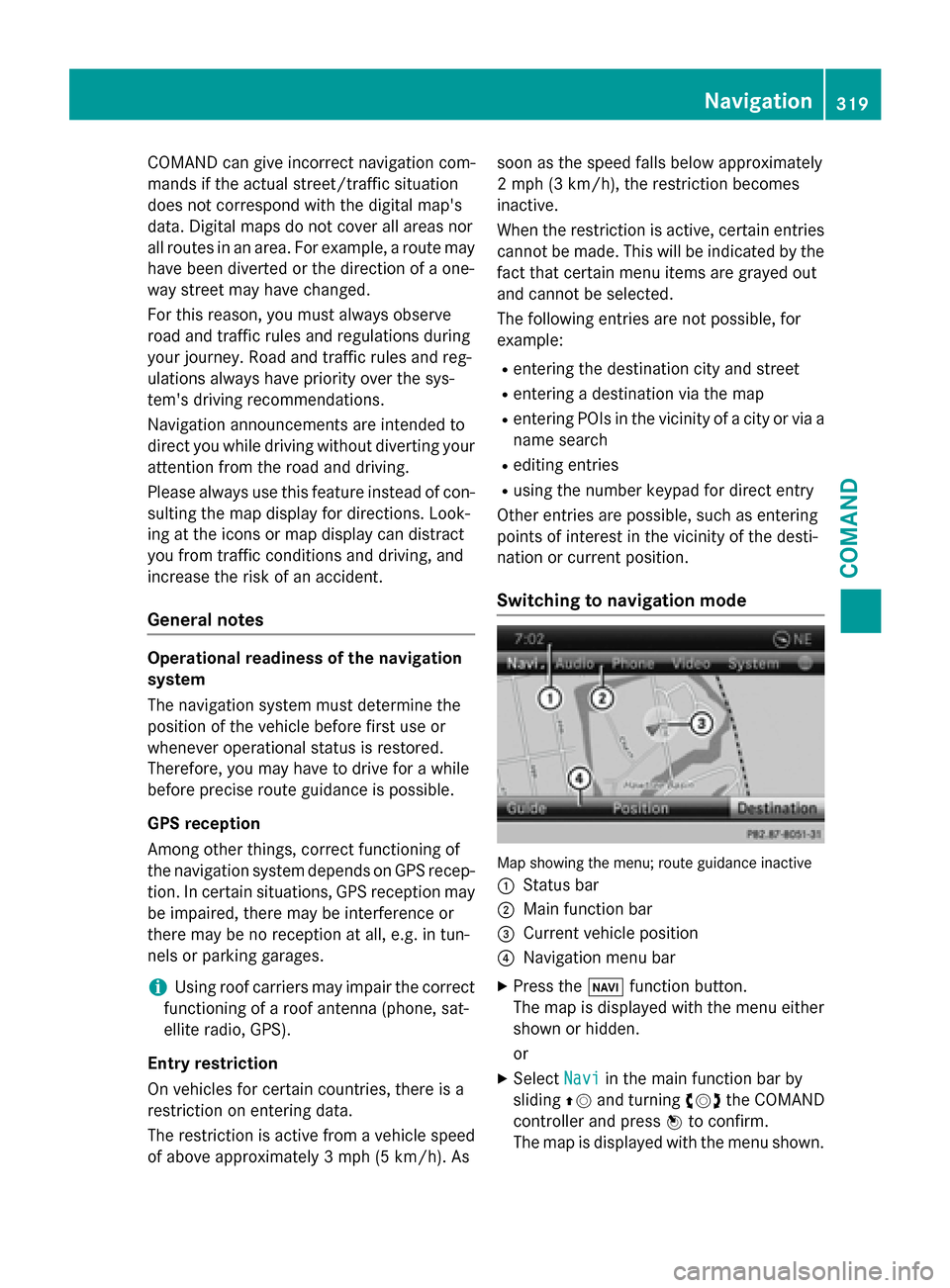
Switching to navigation mode Map showing the menu; route guidance inactive
0043 Status bar
0044 Main function bar
0087 Current vehicle position
0085 Navigation menu bar
X Press the 00BEfunction button.
The map is displayed with the menu either
shown or hidden.
or
X Select Navi Naviin the main function bar by
sliding 00970052and turning 00790052007Athe COMAND
controller and press 0098to confirm.
The map is displayed with the menu shown. Navigation
319COMAND Z
Page 516 of 610
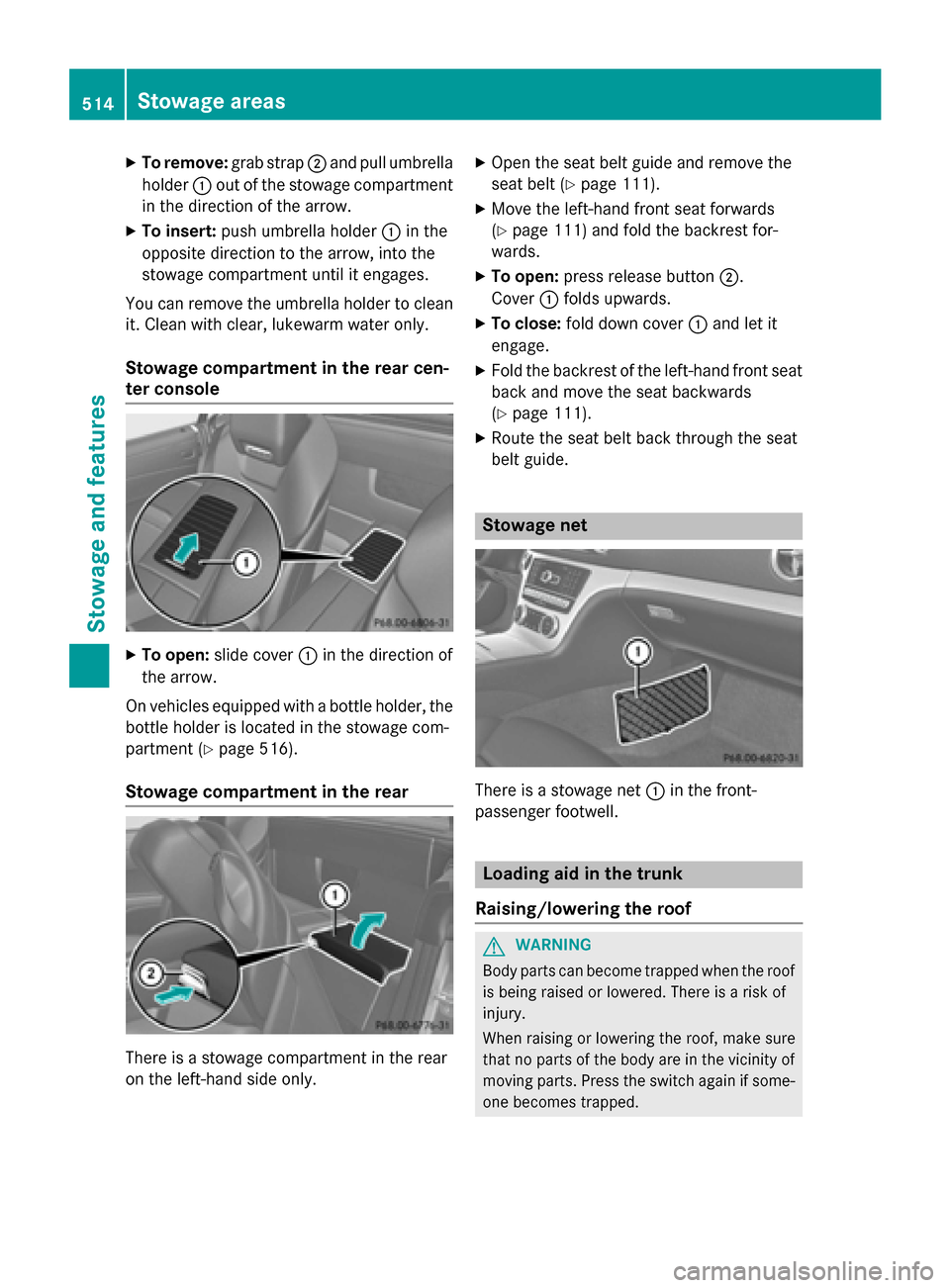
X
To remove: grab strap0044and pull umbrella
holder 0043out of the stowage compartment
in the direction of the arrow.
X To insert: push umbrella holder 0043in the
opposite direction to the arrow, into the
stowage compartment until it engages.
You can remove the umbrella holder to clean it. Clean with clear, lukewarm water only.
Stowage compartment in the rear cen-
ter console X
To open: slide cover 0043in the direction of
the arrow.
On vehicles equipped with a bottle holder, the
bottle holder is located in the stowage com-
partment (Y page 516).
Stowage compartment in the rear There is a stowage compartment in the rear
on the left-hand side only. X
Open the seat belt guide and remove the
seat belt (Y page 111).
X Move the left-hand front seat forwards
(Y page 111) and fold the backrest for-
wards.
X To open: press release button 0044.
Cover 0043folds upwards.
X To close: fold down cover 0043and let it
engage.
X Fold the backrest of the left-hand front seat
back and move the seat backwards
(Y page 111).
X Route the seat belt back through the seat
belt guide. Stowage net
There is a stowage net
0043in the front-
passenger footwell. Loading aid in the trunk
Raising/lowering the roof G
WARNING
Body parts can become trapped when the roof is being raised or lowered. There is a risk of
injury.
When raising or lowering the roof, make sure
that no parts of the body are in the vicinity of moving parts. Press the switch again if some-
one becomes trapped. 514
Stowage areasSto
wage an d features