checking oil MERCEDES-BENZ SL-Class 2015 R131 Owner's Manual
[x] Cancel search | Manufacturer: MERCEDES-BENZ, Model Year: 2015, Model line: SL-Class, Model: MERCEDES-BENZ SL-Class 2015 R131Pages: 610, PDF Size: 12.21 MB
Page 14 of 610
Engine
Check Engine warning lamp .......... .277
Display message ............................ 254
ECO start/stop function ................ 155
Engine number ............................... 601
Irregular running ............................ 158
Jump-starting ................................. 557
Starting problems .......................... 158
Starting the engine with the
SmartKey ....................................... 154
Starting with KEYLESS-GO ............. 154
Switching off .................................. 172
Tow-starting (vehicle) ..................... 562
Engine electronics
Problem (malfunction) ................... 158
Engine oil
Adding .......................................... .536
Additives ........................................ 604
Checking the oil level ..................... 535
Checking the oil level using the
dipstick .......................................... 535
Display message ............................ 256
Filling capacity ............................... 604
Notes about oil grades ................... 603
Notes on oil level/consumption .... 535
Temperature (on-board com-
puter) ............................................. 236
Viscosity ........................................ 604
Entering an intersection name ......... 325
Entering a street name ..................... 323
Entering the address (example) ....... 322
Entering the city ................................ 323
Entering the house number .............. 323
Entry Deleting ......................................... 302
Saving ............................................ 300
ESP ®
(Electronic Stability Pro-
gram) AMG menu (on-board computer) ... 236
Characteristics ................................. 75
Deactivating/activating (AMG
vehicles) .......................................... 76
Deactivating/activating (notes;
except AMG vehicles) ..................... .75
Display message ............................ 240
ETS .................................................. 74
Function/note s................................ 74 General notes .................................. 74
Important safety information ........... 74
Warning lamp ................................. 273
ETS (Electronic Traction System) ....... 74
Example display Audio CD mode .............................. 446
MUSIC REGISTER ........................... 455
Exhaust check ................................... 175
Exhaust pipe (cleaning instruc-
tions) .................................................. 544
Exterior lighting Setting options .............................. 122
see Lights
Exterior mirrors
Adjusting ....................................... 116
Dipping (automatic) ....................... 117
Folding in/out (electrically) ........... 117
Folding in when locking (on-board
computer) ...................................... 235
Out of position (troubleshooting) ... 117
Storing settings (memory func-
tion) ............................................... 119
Storing the parking position .......... 118
Eyeglasses compartment ................. 513 F
Factory setting (reset function) ....... 311
Fast forward Audio mode (CD, MP3) .................. 448
Video DVD ..................................... 475
Fast rewind
Audio mode (CD, MP3) .................. 448
Video DVD ..................................... 475
Favorites (Internet) ........................... 431
Favorites button ................................ 309
Filler cap see Fuel filler flap
Filling capacities (Technical data) ... 601
Flat tire MOExtended tire s.......................... 549
Preparing the vehicle ..................... 548
TIREFIT kit ...................................... 550
Floormats ........................................... 531
Frequencies Adjusting for radio stations ............ 437 12
Index
Page 24 of 610

Adjusting the lumbar support
(COMAND) ....................................
.315
Balance (seat heating) ................... 316
Belt guide ...................................... 111
Cleaning the cover ......................... 545
Correct driver's seat position ....... .108
Important safety notes .................. 109
Multicontour seat .......................... 314
Overview ........................................ 109
Resetting settings .......................... 317
Seat functions (COMAND) ............. 314
Seat heating problem .................... 113
Seat ventilation problem ................ 113
Selecting for adjustment
(COMAND) ..................................... 314
Sliding forward/back ..................... 111
Storing settings (memory func-
tion) ............................................... 119
Switching AIRSCARF on/off .......... 113
Switching seat heating on/off ....... 112
Switching seat ventilation on/off .. 113
Selecting a province ......................... 323
Selecting a state ............................... 323
Selecting stations Radio ............................................. 436
Selector lever
Cleaning ......................................... 545
Positions ........................................ 159
Sending DTMF tones ......................... 389
Sensors (cleaning instructions) ....... 543
Service center see Qualified specialist workshop
Service Center
see Qualified specialist workshop
Service menu (on-board com-
puter) ................................................. .231
Service products Brake fluid ..................................... 604
Coolant (engine) ............................ 605
Engine oil ....................................... 603
Fuel ................................................ 602
Important safety notes .................. 601
Refrigerant (air-conditioning sys-
tem) ............................................... 606
Washer fluid ................................... 606 Settings
Factory (on-board computer) ......... 236
Menu overview .............................. 288
On-board computer ....................... 232
Picture (COMAND) ......................... 473
Sound settings ............................... 296
Setting the air distribution ...............142
Setting the airflow ............................ 143
Setting the audio format Rear Seat Entertainment System ... 496
Setting the language
COMAND ....................................... 308
Rear Seat Entertainment System ... 496
Setting the night design ................... 306
Setting the text reader speed .......... 308
Setting the volume Telephone call s.............................. 296
Video AUX ..................................... 479
SETUP (on-board computer) ............. 236
Side impact air bag ............................. 57
Side windows Cleaning ......................................... 542
Convenience closing feature ............ 99
Important safety information ........... 96
Opening/closing (all) ....................... 98
Opening/closing (front) ................... 97
Opening/closing (rear) .................... 98
Overview .......................................... 96
Problem (malfunction) ................... 100
Resetting ......................................... 99
SIRIUS weather display
5-day forecast ................................ 501
Daily forecas t................................. 500
Detail information .......................... 501
Information chart ........................... 500
Selecting the area for the weather forecast ......................................... 501
Switching on/of f........................... 500
Weather map ................................. 503
SmartKey
Changing the battery ....................... 85
Changing the programming ............. 83
Checking the battery ....................... 85
Convenience opening feature .......... 98
Display message ............................ 268
Door central locking/unlocking ....... 82
Important safety notes .................... 82 22
Index
Page 27 of 610

Text messages (SMS) .................... 398
Toggling ......................................... 390
Using the telephone ....................... 387
see Bluetooth
®
Telephone basic menu Bluetooth ®
interface ......................3 85
Telephone mode
Redialing ........................................ 388
Telephone number
Entering ......................................... 387
Temperature
Coolant .......................................... 222
Coolant (on-board computer) ......... 236
Engine oil (on-board computer) ...... 236
Outside temperature ..................... .223
Setting (climate control) ................ 142
Text messages (SMS)
Calling the sender .......................... 400
Deleting ......................................... 400
Inbox .............................................. 399
Information and requirements ....... 398
Reading .......................................... 399
Reading aloud ................................ 399
Storing sender in address book ..... 400
Storing the sender as a new
address book entry ........................ 400
Time
Setting .......................................... .307
Setting summer/standard time ..... 307
Setting the forma t......................... 306
Setting the time ............................. 306
Setting the time/date format ........ 306
Setting the time manually .............. 306
Setting the time zone ..................... 307
Timing (RACETIMER) ......................... 237
TIREFIT kit .......................................... 550
Tire pressure Calling up (on-board computer) ..... 575
Checking manually ........................ 575
Display message ............................ 263
Important safety notes .................. 575
Maximum ....................................... 574
Notes ............................................. 573
Not reached (TIREFIT) .................... 552
Reached (TIREFIT) .......................... 552
Recommended ............................... 572 Tire pressure monitor
Radio type approval for the tire
pressure monitor ........................... 578
Tire pressure monitoring system
Checking the tire pressure elec-
tronically ........................................ 577
Function/note s............................. 575
General notes ................................ 575
Important safety notes .................. 575
Restarting ...................................... 577
Warning lamp ................................. 280
Warning message .......................... 577
Tires
Aspect ratio (definition) ................. 587
Average weight of the vehicle
occupants (definition) .................... 586
Bar (definition) ............................... 586
Changing a whee l.......................... 588
Characteristics .............................. 586
Checking ........................................ 569
Curb weight (definition) ................. 587
Definition of terms ......................... 586
Direction of rotation ...................... 589
Display message ............................ 263
Distribution of the vehicle occu-
pants (definition) ............................ 588
DOT, Tire Identification Number
(TIN) ............................................... 585
DOT (Department of Transporta-
tion) (definition) ............................. 586
GAWR (Gross Axle Weight Rating)
(definition) ..................................... 587
GVW (Gross Vehicle Weight) (def-
inition) ........................................... 587
GVWR (Gross Vehicle Weight Rat-
ing) (definition) .............................. 587
Important safety notes .................. 568
Increased vehicle weight due to
optional equipment (definition) ...... 587
Kilopascal (kPa) (definition) ........... 587
Labeling (overview) ........................ 582
Load bearing index (definition) ...... 588
Load index ..................................... 585
Load index (definition) ................... 587
M+S tire s....................................... 570
Maximum loaded vehicle weight
(definition) ..................................... 587 Index
25
Page 537 of 610
X
Make sure that the windshield wipers are
turned off.
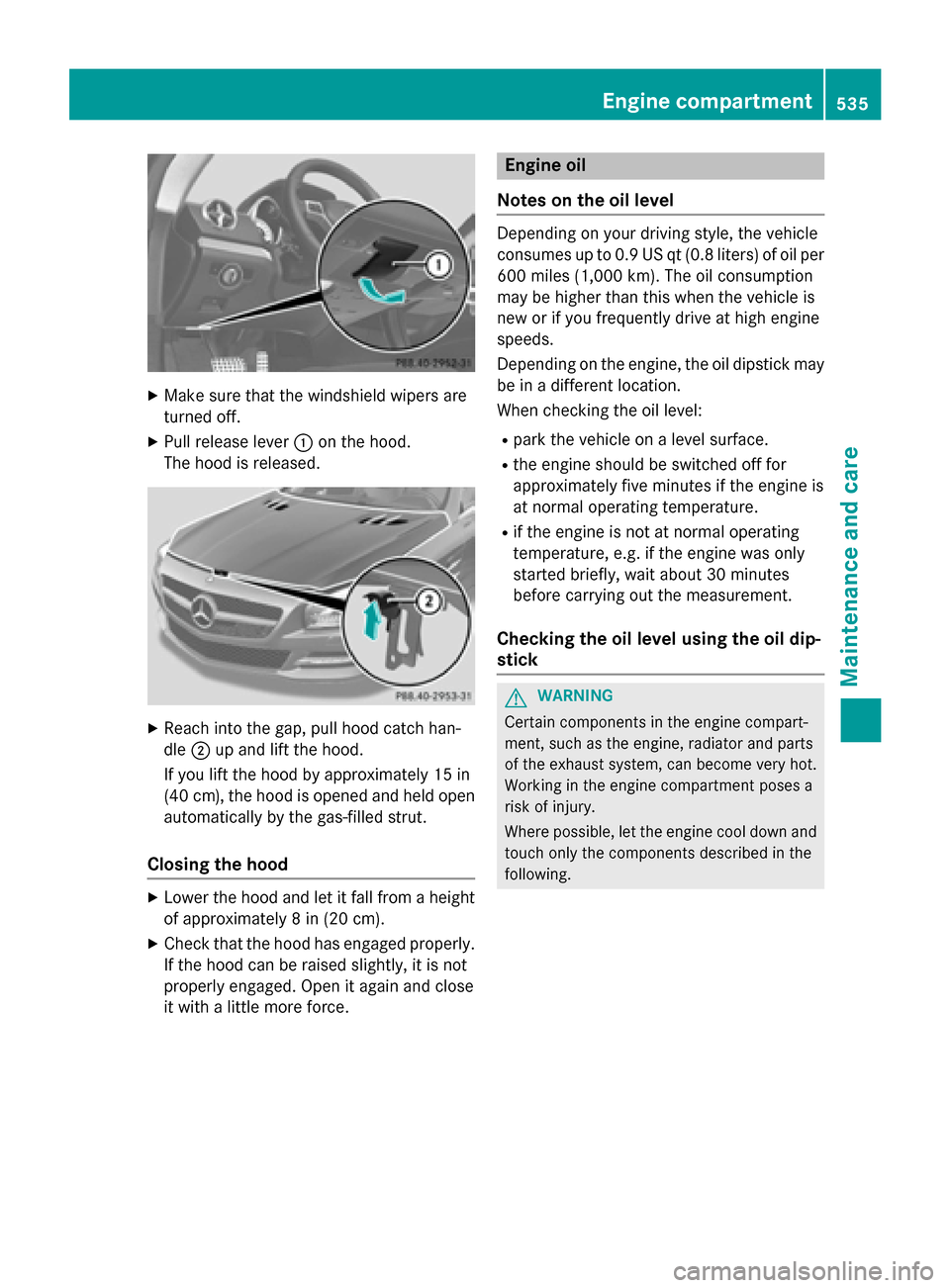
X Pull release lever 0043on the hood.
The hood is released. X
Reach into the gap, pull hood catch han-
dle 0044up and lift the hood.
If you lift the hood by approximately 15 in
(40 cm), the hood is opened and held open automatically by the gas-filled strut.
Closing the hood X
Lower the hood and let it fall from a height
of approximately 8 in (20 cm).
X Check that the hood has engaged properly.
If the hood can be raised slightly, it is not
properly engaged. Open it again and close
it with a little more force. Engine oil
Notes on the oil level Depending on your driving style, the vehicle
consumes up to 0.9 US qt (0.8 liters) of oil per
600 miles (1,000 km). The oil consumption
may be higher than this when the vehicle is
new or if you frequently drive at high engine
speeds.
Depending on the engine, the oil dipstick may be in a different location.
When checking the oil level:
R park the vehicle on a level surface.
R the engine should be switched off for
approximately five minutes if the engine is
at normal operating temperature.
R if the engine is not at normal operating
temperature, e.g. if the engine was only
started briefly, wait about 30 minutes
before carrying out the measurement.
Checking the oil level using the oil dip-
stick G
WARNING
Certain components in the engine compart-
ment, such as the engine, radiator and parts
of the exhaust system, can become very hot.
Working in the engine compartment poses a
risk of injury.
Where possible, let the engine cool down and touch only the components described in the
following. Engine compartment
535Maintenance and care Z
Page 539 of 610
X
Replace cap 0043on the filler neck and turn
clockwise.
Ensure that the cap locks into place
securely.
X Check the oil level again with the oil dip-
stick (Y page 535).
Further information on engine oil
(Y page 603). Checking and adding other service
products
Checking coolant level G
WARNING
Certain components in the engine compart-
ment, such as the engine, radiator and parts
of the exhaust system, can become very hot.
Working in the engine compartment poses a
risk of injury.
Where possible, let the engine cool down and touch only the components described in the
following. G
WARNING
The engine cooling system is pressurized, par- ticularly when the engine is warm. When
opening the cap, you could be scalded by hotcoolant spraying out. There is a risk of injury.
Let the engine cool down before opening the
cap. Wear eye and hand protection when
opening the cap. Open the cap slowly half a
turn to allow pressure to escape. Example X
Park the vehicle on a level surface.
Only check the coolant level when the vehi- cle is on a level surface and the engine has
cooled down.
X Turn the SmartKey to position 2in the igni-
tion lock (Y page 151).
On vehicles with KEYLESS-GO, press the
Start/Stop button twice (Y page 151).
X Check the coolant temperature gauge in
the multifunction display.
The coolant temperature must be below
158 ‡ (70 †).
X Turn the SmartKey to position
0(Y page 151) in the ignition lock.
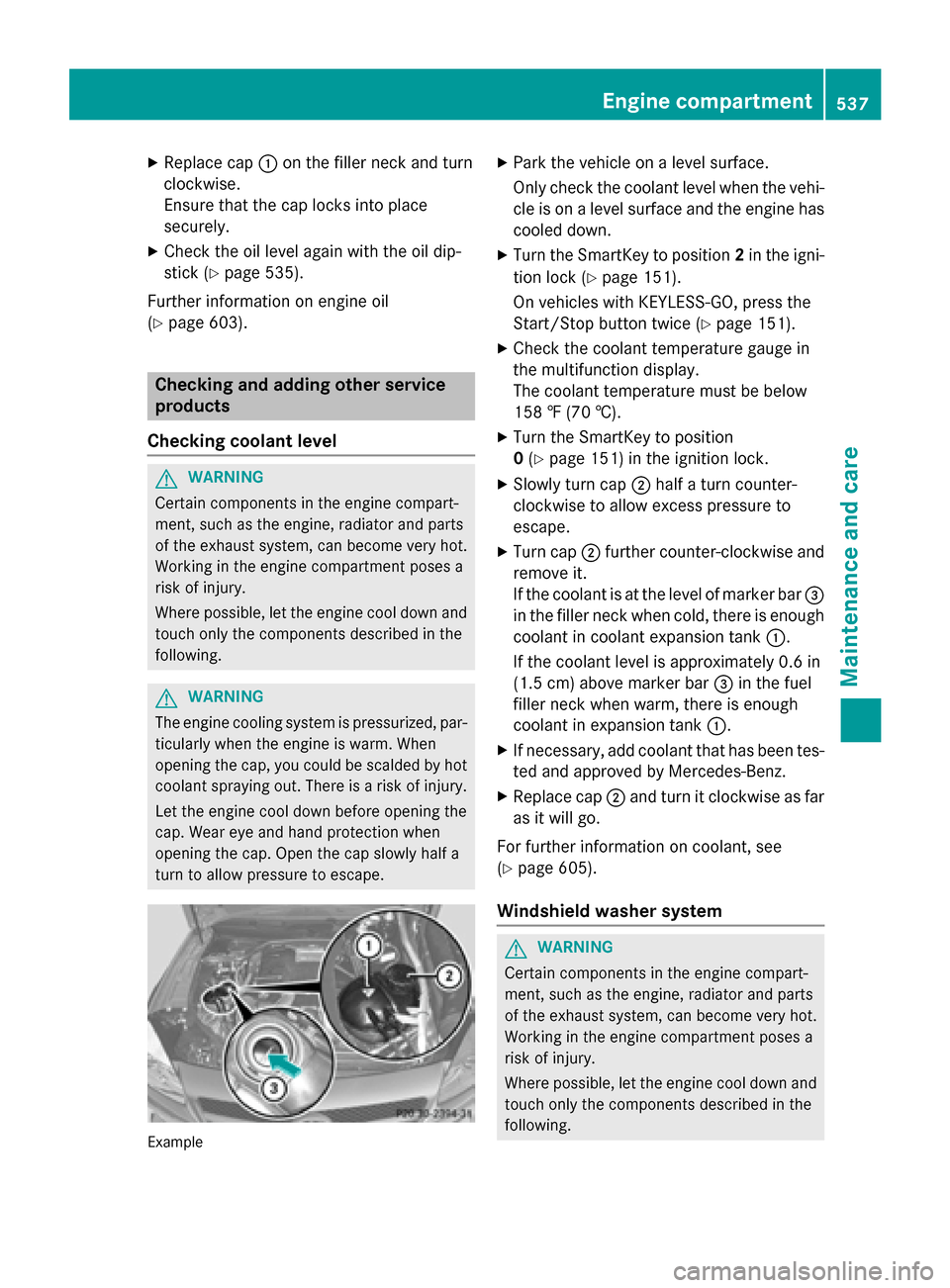
X Slowly turn cap 0044half a turn counter-
clockwise to allow excess pressure to
escape.
X Turn cap 0044further counter-clockwise and
remove it.
If the coolant is at the level of marker bar 0087
in the filler neck when cold, there is enough coolant in coolant expansion tank 0043.
If the coolant level is approximately 0.6 in
(1.5 cm) above marker bar 0087in the fuel
filler neck when warm, there is enough
coolant in expansion tank 0043.
X If necessary, add coolant that has been tes-
ted and approved by Mercedes-Benz.
X Replace cap 0044and turn it clockwise as far
as it will go.
For further information on coolant, see
(Y page 605).
Windshield washer system G
WARNING
Certain components in the engine compart-
ment, such as the engine, radiator and parts
of the exhaust system, can become very hot.
Working in the engine compartment poses a
risk of injury.
Where possible, let the engine cool down and touch only the components described in the
following. Engine compartment
537Maintenance and care Z