roof MERCEDES-BENZ SL-Class 2015 R131 Owner's Manual
[x] Cancel search | Manufacturer: MERCEDES-BENZ, Model Year: 2015, Model line: SL-Class, Model: MERCEDES-BENZ SL-Class 2015 R131Pages: 610, PDF Size: 12.21 MB
Page 9 of 610
Riding tips ...................................... 176
Warning lamp ................................
.271
Breakdown
see Flat tire
see Towing away
Brightness, setting (TV, video) ......... 473
Brightness control (instrument
cluster lighting) ................................... 41
Buttons on the COMAND control-
ler ........................................................ 293 C
California Important notice for retail cus-
tomers and lessees .......................... 32
Call
Accepting/ending/rejecting .......... 387
see Telephone
Calling up a malfunction
see Display messages
Call lists
Displaying details ........................... 395
Opening and selecting an entry ..... 395
Saving an entry in the address
book .............................................. 395
Car
see Vehicle
Care
Carpets .......................................... 546
Car wash ........................................ 540
Display .......................................... .544
Exhaust pipe .................................. 544
Exterior lights ................................ 543
Gear or selector lever .................... 545
Interior .......................................... .544
Matte finish ................................... 542
Night View Assist Plus ................... 544
Notes ............................................. 539
Paint .............................................. 541
Plastic trim ................................... .545
Power washer ................................ 541
Rear view camera .......................... 543
Roof lining ...................................... 546
Seat belt ........................................ 546
Seat cover ..................................... 545
Sensors ......................................... 543
Steering wheel ............................... 545 Trim pieces ...................................
.545
Washing by hand ........................... 540
Wheels .......................................... .542
Windows ........................................ 542
Wiper blades .................................. 543
Wooden trim .................................. 545
Car key
see SmartKey
Car pool lanes ................................... .321
Car wash (care) ................................. 540
Category list (music search) ............ 452
CD Copy protection ............................ .452
Fast forward/fast rewind .............. .448
General information ....................... 452
Inserting ........................................ 444
Inserting/loading (Rear Seat
Entertainment System) .................. 489
Mode, switching to ........................ 446
Multisession .................................. 451
Notes on discs ............................... 452
Pause function ............................... 447
Removing/ejecting (Rear Seat
Entertainment System) .................. 489
Safety notes .................................. 444
Selecting a media type .................. 447
Selecting a track ............................ 447
Sound settings (balance, bass,
treble) ............................................ 296
CD/DVD
Inserting ........................................ 445
Removing ....................................... 445
CD mode
Playback options ........................... 450
CD player/CD changer (on-board
computer) .......................................... 228
Center console Lower section .................................. 45
Lower section (AMG vehicles) .......... 46
Upper section .................................. 44
Central locking
Automatic locking (on-board com-puter) ............................................. 234
Locking/unlocking (SmartKey) ....... .82 Index
7
Page 15 of 610
Front-passenger seat
Adjusting from the driver's seat .... .110
Fuel
Additives ........................................ 603
Consumption statistics .................. 225
Displaying consumption ................. 313
Displaying the current consump-
tion ................................................ 226
Displaying the range ..................... .226
Driving tips ................................... .174
E10 ................................................ 602
Fuel gauge ....................................... 41
Grade (gasoline) ............................ 602
Important safety notes .................. 602
Problem (malfunction) ................... 171
Refueling ........................................ 168
Tank content/reserve fuel ............. 602
Fuel filler flap
Opening ......................................... 169
Fuel level
Calling up the range (on-board
computer) ...................................... 226
Fuel tank
Capacity ........................................ 602
Problem (malfunction) ................... 171
Fuse allocation chart (vehicle tool
kit) ...................................................... 548
Fuses Allocation chart ............................ .562
Before changing ............................ .562
Dashboard fuse box ....................... 563
Fuse box in the engine compart-
ment .............................................. 563
Fuse box in the rear compartment .. 564
Important safety notes .................. 562 G
Garage door opener Clearing the memory ..................... 530
General notes ................................ 527
Important safety notes .................. 528
Opening/closing the garage door .. 530
Programming (button in the rear-
view mirror) ................................... 528
Gasoline ............................................. 602
Gear indicator (on-board com-
puter) ................................................. .236 Genuine parts
...................................... 30
Glass roof (sunblind) ......................... 104
Glove box .......................................... .512
Google™ Local Search Importing a destination/route ....... 419
Popular Searches ........................... 420
Search .......................................... .418
Search history ............................... 420
Selecting a search position ............ 419
Using as the destination ................ 419
GPS reception ................................... .319
Gracenote ®
Media Database ............ 448 H
Handbrake see Parking brake
HANDS-FREE ACCESS .......................... 93
Harman/kardon ®
Logic 7 ®
sur-
round sound system see Surround sound (harman/
kardon ®
surround sound system)
Hazard warning lamps
Display message ............................ 267
Switching on/off ........................... 126
Head bags
Display message ............................ 248
Operation ......................................... 58
Heading up (navigation) ................... 366
Headlamps Cleaning system (notes) ................ 606
Fogging up ..................................... 128
see Automatic headlamp mode
Head level heating (AIRSCARF) ........113
Headphones Changing batteries ........................ 485
Head restraints
Adjusting ....................................... 111
see NECK-PRO head restraints
Heating
see Climate control
High-beam headlamps
Display message ............................ 252
Switching on/off ........................... 125
Highway information ........................ 369
Hill start assist .................................. 154 Index
13
Page 17 of 610
L
Lamps see Warning and indicator lamps
Lane Keeping Assist
see Active Lane Keeping Assist
Lane recommendations
Explanation .................................... 346
Presentation .................................. 346
Lap time (RACETIMER) ...................... 237
License plate lamp (display mes-
sage) .................................................. .252
Light function, active Display message ............................ 253
Lights
Activating/deactivating the inte-
rior lighting delayed switch-off ....... 234
Active light function ....................... 127
Automatic headlamp mode ............ 122
Cornering light function ................. 126
Driving abroad ............................... 122
Fogged up headlamps .................... 128
Hazard warning lamps ................... 126
High beam flasher .......................... 126
High-beam headlamps ................... 125
Light switch ................................... 122
Low-beam headlamps .................... 123
Parking lamps ................................ 124
Setting the brightness of the
ambient lighting (on-board com-
puter) ............................................. 233
Setting the color of the ambient
lighting (on-board computer) ......... 233
Standing lamps .............................. 124
Switching the daytime running
lamps on/off (on-board com-
puter) ............................................. 232
Switching the exterior lighting
delayed switch-off on/off (on-
board computer) ............................ 233
Switching the spotlight on/off ....... 233
Switching the surround lighting
on/off (on-board computer) .......... 233
Turn signals ................................... 125
see Interior lighting
see Replacing bulbs
Light sensor (display message) ....... 253List of access data
New provider ................................. 413
List of mobile phone network pro-
viders
Calling up ....................................... 411
Empty ............................................ 411
With the selected provider ............. 412
Loading aid (trunk)
Raising/lowering the roof .............. 514
Locking
see Central locking
Locking (doors)
Automatic ........................................ 89
Emergency locking ........................... 90
From inside (central locking but-
ton) ................................................. .89
Locking centrally
see Central locking
Locking verification signal (on-
board computer) .............................. .234
Low-beam headlamps Display message ............................ 251
Setting for driving abroad (sym-
metrical) ........................................ 122
Switching on/off ........................... 123
Luggage cover
see Trunk partition
Lumbar support
Adjusting (COMAND) ..................... 315 M
M+S tires ............................................ 570
MAGIC SKY CONTROL ....................... 105
Malfunction message see Display messages
Map (navigation)
Adjusting the scal e........................ 365
Arrival time/distance to the des-
tination .......................................... 368
City model ..................................... 369
Geo-coordinate display .................. 368
Heading ......................................... 366
Information in the display .............. 368
Map settings .................................. 366
Moving ........................................... 365
North orientation ........................... 366 Index
15
Page 23 of 610

Reverse gear (selector lever)
........... 159
Reversing feature Side windows ................................... 97
Trunk lid ........................................... 91
Reversing lamps (display mes-
sage) ................................................... 252
Roadside Assistance (breakdown) .... 32
Roll bar Display messag e............................ 247
Operation ......................................... 63
Roller sunblind .................................. 104
Roof Display message ............................ 266
Important safety notes .................. 100
Opening/closing (with roof
switch) ........................................... 101
Opening/closing (with Smart-
Key) ............................................... 102
Overview ........................................ 100
Problem (malfunction) ................... 106
Relocking ....................................... 102
Roof lining and carpets (cleaning
guidelines) ......................................... 546
Roof switch ........................................ 101
Route Estimated time of arrival ................ 350
Route (navigation)
Calling up the "Routes" menu ........ 352
Displaying the distance to the des-tination .......................................... 350
Recording ...................................... 352
Route overview .............................. 351
Selecting an alternative route ........ 349
Setting route options (avoiding:
highways, toll roads, tunnels, fer-
ries) ............................................... 320
Setting the route type (short
route, fast route, dynamic route or
economic route) ............................ 320
Starting calculation ........................ 327
Route demonstration ........................ 351
Route guidance Canceling ....................................... 349
Continuing ..................................... 349
Destination reached ...................... 349
General notes ................................ 344
Lane recommendations ................. 346 Off-road ......................................... 354
Traffic reports ................................ 355 S
Safety Children in the vehicle ..................... 68
Child restraint systems .................... 69
Occupant Classification System
(OCS) ............................................... 59
Safety notes
Audio CD and MP3 mode ............... 444
Using the telephone ....................... 379
Video DVD mode ........................... 473
Safety system
see Driving safety systems
SatRadio
Displaying information ................... 443
Notes ............................................. 439
Registering .................................... 440
Selecting a category ...................... 441
Switching to ................................... 440
Saving the crosshair position .......... 365
Screen Selecting for remote operation ...... 482
SD memory card
Ejecting .......................................... 445
Inserting ........................................ 445
Search & Send ................................... 343
Seat belts Adjusting the driver's and front-
passenger seat belt ......................... 55
Cleaning ......................................... 546
Correct usage .................................. 54
Fastening ......................................... 54
Important safety guidelines ............. 52
Introduction ..................................... 52
Releasing ......................................... 55
Seat belt guide ............................... 111
Switching belt adjustment on/off
(on-board computer) ...................... 235
Warning lamp ................................. 269
Warning lamp (function) ................... 55
Seats
Active multicontour seat ................ 314
Adjusting (electrically) ................... 110
Adjusting the head restraint .......... 111 Index
21
Page 25 of 610
Loss .................................................87
Mechanical key ................................ 84
Opening/closing the roof .............. 102
Overview .......................................... 82
Positions (ignition lock) ................. 151
Problem (malfunction) ..................... 87
Starting the engine ........................ 154
Snow chains ...................................... 571
Sockets Front-passenger footwell ............... 519
General notes ................................ 518
Trunk ............................................. 519
Under the armrest .........................5 19
Sound
Switching on/off ........................... 295
Sound menu ....................................... 296
Sound mode ....................................... 298
Sound settings Calling up the sound menu ............ 296
Surround sound ............................ .297
Treble and bas s............................. 296
Specialist workshop ............................ 35
Special seat belt retractor .................. 69
Speed, controlling see Cruise control
Speed dial list
Storing a phone book entry in the
speed dial list ................................ 397
Speedometer
Digital ............................................ 226
In the Instrument cluster ................. 41
Segments ...................................... 223
Selecting the unit of measure-
ment .............................................. 232
SPLITVIEW ......................................... 303
SPORT handling mode Activating/deactivating (AMG
vehicles) .......................................... 76
Warning lamp ................................. 274
Standing lamps
Display message ............................ 252
Switching on/of f........................... 124
Start/stop function
see ECO start/stop function
Starting (engine) ................................ 153
Station search ................................... 436
STEER CONTROL .................................. 79 Steering (display message)
.............. 266
Steering assistant STEER CON-
TROL see STEER CONTROL
Steering wheel
Adjusting (electrically) ................... 114
Button overview ............................... 43
Buttons (on-board computer) ......... 223
Cleaning ......................................... 545
Important safety notes .................. 114
Paddle shifters ............................... 164
Storing settings (memory func-
tion) ............................................... 119
Steering wheel paddle shifters ........ 164
Stop function Video DVD ..................................... 475
Stopwatch (RACETIMER) ................... 237
Storing stations Radi o............................................. 437
Stowage areas ................................... 512
Stowage compartments Armrest (under) ............................. 513
Center console .............................. 513
Center console (rear) ..................... 514
Cup holders ................................... 516
Eyeglasses compartment ............... 513
Glove box ....................................... 512
Important safety information ......... 512
Rear ............................................... 514
Stowage net ................................... 514
Stowage net ....................................... 514
Stowage space Umbrella holde r............................. 513
Stowage well beneath the trunk
floor .................................................... 516
Street View ........................................ 331
Summer tires ..................................... 570
Sun visor ............................................ 517
Surround lighting (on-board com-
puter) .................................................. 233
Surround sound ................................. 297
Surround sound (harman/kardon ®
surround sound system) Notes ............................................. 297
Switching on/of f........................... 297 Index
23
Page 32 of 610
Protection of the environment
General notes
H
Environmental note
Daimler's declared policy is one of compre-
hensive environmental protection.
The objectives are for the natural resources
that form the basis of our existence on this
planet to be used sparingly and in a manner
that takes the requirements of both nature
and humanity into account.
You too can help to protect the environment
by operating your vehicle in an environmen-
tally responsible manner.
Fuel consumption and the rate of engine,
transmission, brake and tire wear are affected by these factors:
R operating conditions of your vehicle
R your personal driving style
You can influence both factors. You should
bear the following in mind:
Operating conditions:
R avoid short trips as these increase fuel con-
sumption.
R always make sure that the tire pressures
are correct.
R do not carry any unnecessary weight.
R remove roof racks once you no longer need
them.
R a regularly serviced vehicle will contribute
to environmental protection. You should
therefore adhere to the service intervals.
R always have service work carried out at a
qualified specialist workshop.
Personal driving style:
R do not depress the accelerator pedal when
starting the engine.
R do not warm up the engine when the vehicle
is stationary.
R drive carefully and maintain a safe distance
from the vehicle in front.
R avoid frequent, sudden acceleration and
braking. R
change gear in good time and use each gear
only up to 00C3of its maximum engine speed.
R switch off the engine in stationary traffic.
R keep an eye on the vehicle's fuel consump-
tion. Environmental concerns and recom-
mendations
Wherever the operating instructions require
you to dispose of materials, first try to regen-
erate or re-use them. Observe the relevant
environmental rules and regulations when
disposing of materials. In this way you will
help to protect the environment. Genuine Mercedes-Benz parts
H
Environmental note
Daimler AG also supplies reconditioned major
assemblies and parts which are of the same
quality as new parts. They are covered by the same Limited Warranty entitlements as new
parts.
! Air bags and Emergency Tensioning Devi-
ces, as well as control units and sensors for these restraint systems, may be installed inthe following areas of your vehicle:
R doors
R door pillars
R door sills
R seats
R cockpit
R instrument cluster
R center console
Do not install accessories such as audio
systems in these areas. Do not carry out
repairs or welding. You could impair the
operating efficiency of the restraint sys-
tems.
Have aftermarket accessories installed at a qualified specialist workshop. 30
Introduction
Page 47 of 610
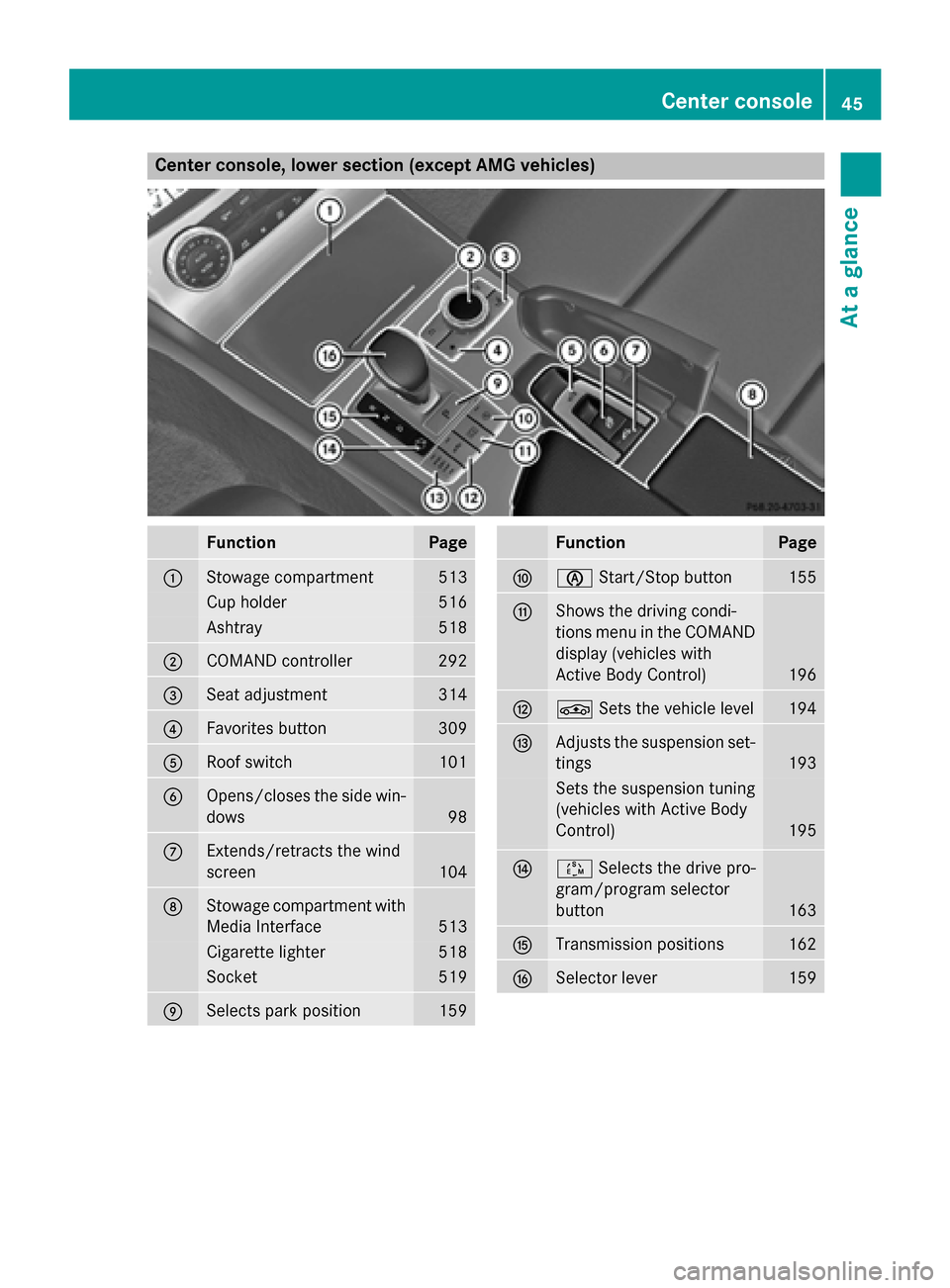
Center console, lower section (except AMG vehicles)
Function Page
0043
Stowage compartment 513
Cup holder 516
Ashtray 518
0044
COMAND controller 292
0087
Seat adjustment 314
0085
Favorites button 309
0083
Roof switch 101
0084
Opens/closes the side win-
dows 98
006B
Extends/retracts the wind
screen
104
006C
Stowage compartment with
Media Interface 513
Cigarette lighter 518
Socket 519
006D
Selects park position 159 Function Page
006E
00D6
Start/Stop button 155
006F
Shows the driving condi-
tions menu in the COMAND
display (vehicles with
Active Body Control) 196
0070
00CC
Sets the vehicle level 194
0071
Adjusts the suspension set-
tings 193
Sets the suspension tuning
(vehicles with Active Body
Control)
195
0072
00C8
Selects the drive pro-
gram/program selector
button 163
0073
Transmission positions 162
0074
Selector lever 159Center console
45At a glance
Page 48 of 610
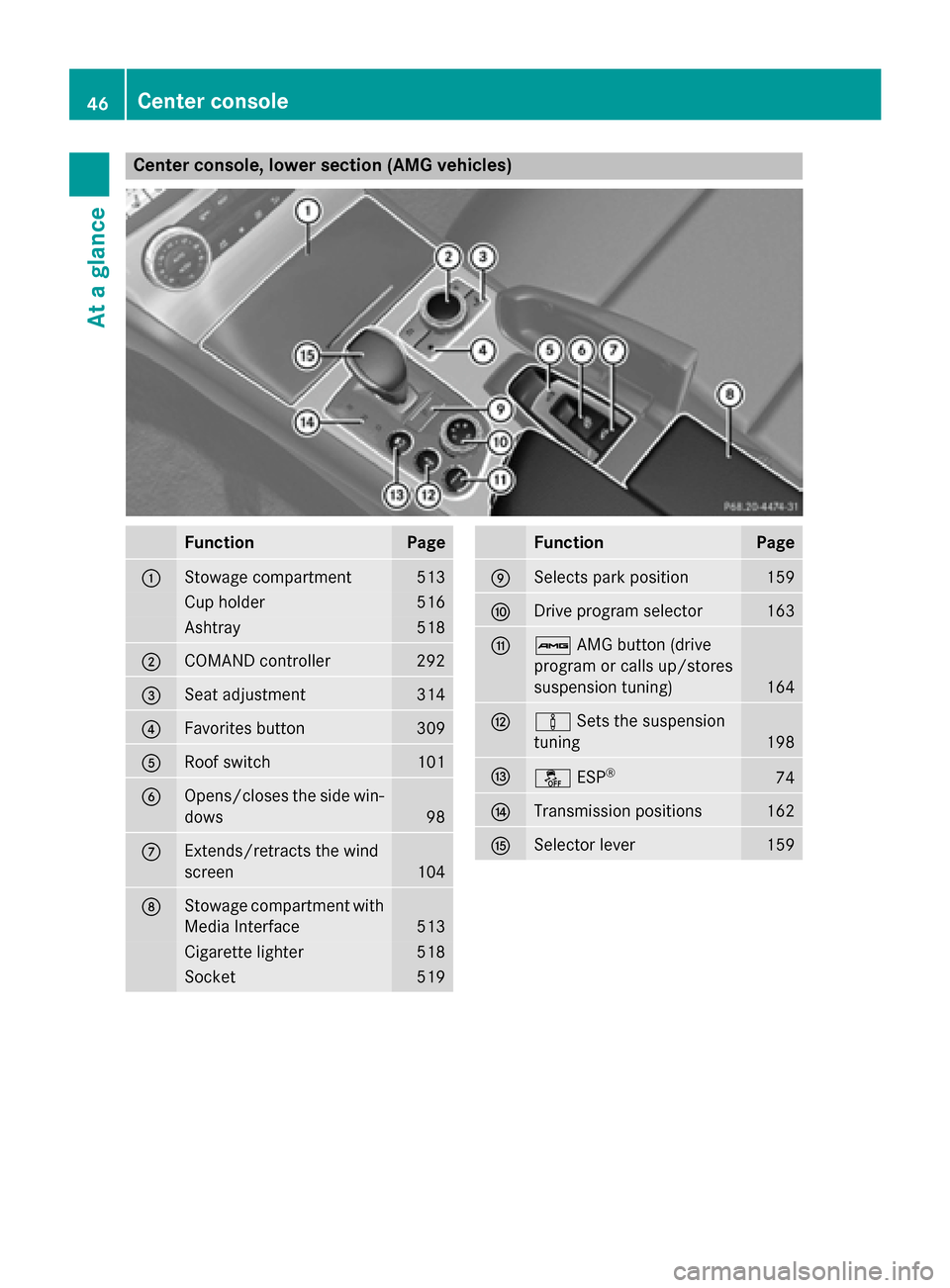
Center console, lower section (AMG vehicles)
Function Page
0043
Stowage compartment 513
Cup holder 516
Ashtray 518
0044
COMAND controller 292
0087
Seat adjustment 314
0085
Favorites button 309
0083
Roof switch 101
0084
Opens/closes the side win-
dows 98
006B
Extends/retracts the wind
screen
104
006C
Stowage compartment with
Media Interface 513
Cigarette lighter 518
Socket 519 Function Page
006D
Selects park position 159
006E
Drive program selector 163
006F
00CB
AMG button (drive
program or calls up/stores
suspension tuning) 164
0070
00CC
Sets the suspension
tuning 198
0071
00BB
ESP® 74
0072
Transmission positions 162
0073
Selector lever 15946
Center consoleAt a glance
Page 61 of 610

Occupant Classification System
(OCS)
Introduction The Occupant Classification System (OCS)
categorizes the person in the front-passenger
seat. Depending on that result, the front-
passenger front air bag and front-passenger
knee bag are either enabled or deactivated.
The system does not deactivate:
R the side impact air bag
R the front-passenger head bag
R the Emergency Tensioning Devices
Prerequisites To be classified correctly, the front passenger
must sit:
R with the seat belt fastened correctly
R in an almost upright position with their
back against the seat backrest
R with their feet resting on the floor, if possi-
ble
If the front passenger does not observe these
conditions, OCS may produce a false classi-
fication, e.g. because the front passenger:
R transfers their weight by supporting them-
selves on a vehicle armrest
R sits in such a way that their weight is raised
from the seat cushion
If you install a child restraint system on the
front-passenger seat, be sure to observe the
correct positioning of the child restraint sys-
tem. Never place objects under or behind the
child restraint system, e.g. cushions. The
entire base of the child restraint system must always rest on the seat cushion of the front-
passenger seat. The backrest of the forwards-
facing child restraint system must, as far as
possible, be resting on the backrest of the
front-passenger seat.
The child restraint system must not touch the
roof or be put under strain by the head
restraint. Adjust the angle of the seat back- rest and the head restraint position accord-
ingly.
Only then can OCS be guaranteed to function correctly. Always observe the child restraint
system manufacturer's installation instruc-
tions.
Occupant Classification System opera-
tion (OCS) 0043
PASSENGER AIR BAG OFF indicator lamp
0044 PASSENGER AIR BAG ON indicator lamp
PASSENGER AIR BAG OFF indicator lamp 0043
informs you whether the front-passenger
front air bag is deactivated.
X Turn the SmartKey to position 1or 2in the
ignition lock, or press the Start/Stop but-
ton once or twice on vehicles with KEY-
LESS-GO.
The system carries out a self-diagnosis.
The PASSENGER AIR BAG ON indicator lamp
is inoperative. It lights up briefly when the
ignition is switched on and then goes out
again.
The PASSENGER AIR BAG OFF indicator lamp
must light up for approximately six seconds.
The PASSENGER AIR BAG OFF indicator lamp
then displays the status of the front-
passenger front air bag. If the status of the
front-passenger front air bag changes while
the vehicle is in motion, an air bag display
message may appear in the instrument clus-
ter (Y page 250). When the front-passenger
seat is occupied, always pay attention to the
PASSENGER AIR BAG OFF indicator lamp. Be Occupant safety
59Safety Z
Page 66 of 610

G
WARNING
If you place objects or clothing on the roll bar covers, these could impair roll bar extension.
The roll bars may then not protect the vehicle occupants as intended. In addition, objects
could endanger the vehicle occupants when
the roll bar is extending. This poses an
increased risk of injury or even fatal injury.
Ensure that the movement area of the roll bar covers is kept clear. Always stow all objects in
the vehicle correctly. The roll bars are located in the rear area of the
vehicle under the two outer rear compart-
ment trim covers.
They extend if systems detect that the vehicle
is in danger of rollover. The two outer rear
compartment trim covers are opened and the roll bars are extended within fractions of a
second.
Once the roll bars are extended, you can no
longer lower them. An open roof can no lon-
ger be closed. In this case, visit the nearest
qualified specialist workshop. Deployment of Emergency Tensioning
Devices and air bags
Important safety notes G
WARNING
The air bag parts are hot after an air bag has
been deployed. There is a risk of injury. Do not touch the air bag parts. Have a
deployed air bag replaced at a qualified spe-
cialist workshop as soon as possible.
G
WARNING
A deployed air bag no longer offers any pro-
tection and cannot provide the intended pro-
tection in an accident. There is an increased
risk of injury.
Have the vehicle towed to a qualified special- ist workshop in order to have a deployed air
bag replaced.
It is important for your safety and that of your
passenger to have deployed air bags replaced and to have any malfunctioning air bags
repaired. This will help to make sure the air
bags continue to perform their protective
function for the vehicle occupants in the
event of a crash. G
WARNING
Pyrotechnic Emergency Tensioning Devices
that have been deployed are no longer opera- tional and are unable to perform their inten-
ded protective function. This poses an
increased risk of injury or even fatal injury.
Therefore, have pyrotechnic Emergency Ten-
sioning Devices which have been triggered
immediately replaced at a qualified specialist workshop.
An electric motor is used by PRE-SAFE ®
to
trigger the tightening of the seat belt in haz-
ardous situations. This procedure is reversi-
ble.
If the Emergency Tensioning Devices or air
bags are deployed, you will hear a bang and a small amount of powder may also be
released. The 0075restraint system warning
lamp will light up.
Only in rare cases will the bang affect your
hearing. The powder released is generally not hazardous to health, it could however cause
short-term breathing difficulties in people
with asthma or other respiratory problems. In
order to prevent breathing difficulties, you 64
Occupant safetySafety