engine MERCEDES-BENZ SL CLASS 2019 Owner's Manual
[x] Cancel search | Manufacturer: MERCEDES-BENZ, Model Year: 2019, Model line: SL CLASS, Model: MERCEDES-BENZ SL CLASS 2019Pages: 330, PDF Size: 16.53 MB
Page 67 of 330

Adaptive Brake Assist provides braking assis-tance in hazardous situations at speeds above4 mph (7 km/h). It uses radar sensor technol-ogy to assess the traffic situation.
Up to a speed of approximately 155 mph(250 km/h), Adaptive Brake Assist is capableof reacting to moving objects that havealready been detected as such at least onceover the period of observation.
Up to a speed of approximately 44 mph(70 km/h), Adaptive Brake Assist reacts tostationary obstacles.
If Adaptive Brake Assist demands particularlyhigh braking force, preventative passenger
protection measures (PRE-SAFE®) are activa-ted simultaneously (Ypage 55).
XKeep the brake pedal depressed until theemergency braking situation is over.ABS prevents the wheels from locking.
The brakes will work normally again if:
Ryou release the brake pedal
Rthere is no longer any danger of a collision
Rno obstacle is detected in front of your vehi-cle
Adaptive Brake Assist is then deactivated.
Important safety notes
GWARNING
Adaptive Brake Assist cannot always clearly
identify objects and complex traffic situa-
tions.
In such cases, Adaptive Brake Assist can:
Rintervene unnecessarily
Rnot intervene
There is a risk of an accident.
Always pay careful attention to the traffic
situation and be ready to brake. Terminate
the intervention in a non-critical driving sit-
uation.
GWARNING
Adaptive Brake Assist does not react:
Rto people or animals
Rto oncoming vehicles
Rto crossing traffic
Rwhen cornering
As a result, the Adaptive Brake Assist may
not intervene in all critical conditions. There
is a risk of an accident.
Always pay careful attention to the traffic
situation and be ready to brake.
Always adapt your speed to suit the prevail-
ing road and traffic conditions.
Due to the nature of the system, particularlycomplicated but non-critical driving conditionsmay also cause Adaptive Brake Assist to inter-vene.
If Adaptive Brake Assist is not available due toa malfunction in the radar sensor system, thebrake system remains available with full brakeboosting effect and BAS.
Adaptive brake lights
iObserve the "Important safety notes" sec-tion (Ypage 60).
If you brake sharply from a speed of more than50 km/h or if braking is assisted by BAS orBrake Assist with Cross-Traffic Assist, thebrake lamps flash rapidly. In this way, traffictraveling behind you is warned in an evenmore noticeable manner.
If you brake sharply from a speed of more than70 km/h to a standstill, the hazard warninglamps are activated automatically. If thebrakes are applied again, the brake lamps lightup continuously. The hazard warning lampsswitch off automatically if you travel fasterthan 10 km/h. You can also switch off thehazard warning lamps using the hazard warn-ing button (Ypage 111).
ESP®(Electronic Stability Program)
General notes
iObserve the "Important safety notes" sec-tion (Ypage 60).
ESP®monitors driving stability and traction,i.e. power transmission between the tires andthe road surface.
If ESP®detects that the vehicle is deviatingfrom the direction desired by the driver, one ormore wheels are braked to stabilize the vehi-cle. The engine output is also modified to keep
Driving safety systems65
Safety
Z
Page 69 of 330

Drive programESP®modeCharacteristics
CComfort
EEconomy
ESP®onThis drive program offers the best compromisebetween traction and stability.
Select drive programEorCin difficult roadconditions such as snow and ice or on wetroads.
SSportESP®onThis drive program offers the best compromisebetween traction and stability.
S+Sport PlusESP®SportThe vehicle's own oversteering and understeer-ing characteristics are emphasized. This ena-bles a more active driving style.
This drive program requires increased driverinteraction.
Select this drive program only when road con-ditions are good, e.g. the roads are dry and theroute is clear.
Always adapt your driving style and drive program to the prevailing road and weather conditions.
Additional information for drive programs (Ypage 138).
ECO start/stop function
The ECO start/stop function switches theengine off automatically when the vehiclestops moving. The engine starts automaticallywhen the driver wants to pull away again.
ESP®remains in its previously selected status,
e.g. if ESP®was deactivated before the enginewas automatically switched off.
Deactivating/activating ESP®(except
Mercedes‑AMG vehicles)
Important safety notes
iObserve the "Important safety notes" sec-tion (Ypage 60).
You can select between the following states of
ESP®:
RESP®is activated
RESP®is deactivated
GWARNING
If you deactivate ESP®, ESP®no longer sta-
bilizes the vehicle. There is an increased risk
of skidding and an accident.
Only deactivate ESP®in the situations
described in the following.
It may be best to deactivate ESP®in the fol-lowing situations:
Rwhen using snow chains
Rin deep snow
Ron sand or gravel
Spinning the wheels results in a cutting actionwhich provides better grip.
iActivate ESP®as soon as the situations
described above no longer apply. ESP®willotherwise not be able to stabilize the vehicleif the vehicle starts to skid or a wheel startsto spin.
!Avoid spinning the driven wheels for an
extended period with ESP®deactivated. Youcould otherwise damage the drivetrain.
Driving safety systems67
Safety
Z
Page 74 of 330
Up to a speed of approximately 44 mph(70 km/h), Active Brake Assist with cross-traf-fic function may react to:
Rstationary objects in the path of your vehi-cle, e.g. stopped or parked vehicles
Rpedestrians in the path of your vehicle
iIf there is an increased risk of a collision,preventive passenger protection measures
(PRE-SAFE®) are triggered (Ypage 55).
If the risk of collision with the vehicle in frontremains and you do not brake, take evasiveaction or accelerate significantly, the vehiclemay perform automatic emergency braking, upto the point of full brake application. Auto-matic emergency braking is not performeduntil immediately prior to an imminent acci-dent.
You can prevent the intervention of ActiveBrake Assist with cross-traffic function at anytime by:
Rdepressing the accelerator pedal further
Ractivating kickdown
Rreleasing the brake pedal
The braking application of Active Brake Assistwith cross-traffic function is ended automati-cally if:
Ryou maneuver to avoid the obstacle
Rthere is no longer a risk of collision
Ran obstacle is no longer detected in front ofyour vehicle
STEER CONTROL
General information
STEER CONTROL helps you by transmitting anoticeable steering force to the steering wheelin the direction required for vehicle stabiliza-tion.
This steering assistance is provided in particu-lar if:
Rboth right wheels or both left wheels are ona wet or slippery road surface when youbrake
Rthe vehicle starts to skid
Important safety notes
iObserve the "Important safety notes" sec-tion (Ypage 60).
No steering support is provided from STEERCONTROL, if:
RESP®is deactivated
RESP®is malfunctioning
Rthe steering is faulty
If ESP®is malfunctioning, you will be assistedfurther by the electrical power steering.
Protection against theft
Immobilizer
XTo activate with the SmartKey:removethe SmartKey from the ignition lock.
XTo activate with KEYLESS-GO:switch theignition off and open the driver's door.
XTo deactivate:switch on the ignition.
The immobilizer prevents your vehicle frombeing started without the correct SmartKey.
When leaving the vehicle, always take theSmartKey with you and lock the vehicle. Theengine can be started by anyone with a validSmartKey that is left inside the vehicle.
iThe immobilizer is always deactivatedwhen you start the engine.
In the event that the engine cannot be star-ted (yet the vehicle's battery is charged),the system is not operational. Contact anauthorized Mercedes-Benz Center or call1-800-FOR-MERCedes (in the USA) or1-800-387-0100 (in Canada).
ATA (anti-theft alarm system)
72Protection against theft
Safety
Page 76 of 330
SmartKey
Important safety notes
GWARNING
If children are left unsupervised in the vehi-
cle, they could:
Roperate the vehicle's equipment
Additionally, children could set the vehicle in
motion if, for example, they:
Rrelease the parking brake
Rshift the automatic transmission out of
park position]
Rstart the engine
There is a risk of an accident and injury.
Never leave children or animals unattended
in the vehicle.
When leaving the vehicle, always take the
SmartKey with you and lock the vehicle. This
also applies for the Digital Vehicle Key if the
"Digital Vehicle Key" function is activated via
Mercedes me connect.
GWARNING
If you attach heavy or large objects to the
SmartKey, the SmartKey could be uninten-
tionally turned in the ignition lock. This
could cause the engine to be switched off.
There is a risk of an accident.
Do not attach any heavy or large objects to
the SmartKey. Remove any bulky key rings
before inserting the SmartKey into the igni-
tion lock.
!Keep the SmartKey away from strong mag-netic fields. Otherwise, the remote controlfunction could be affected.
Strong magnetic fields can occur in thevicinity of powerful electrical installations.
Do not keep the SmartKey:
Rwith electronic devices, e.g. a mobile phoneor another SmartKey
Rwith metallic objects, e.g. coins or metal foil
Rinside metallic objects, e.g. a metal case
This can affect the functionality of theSmartKey.
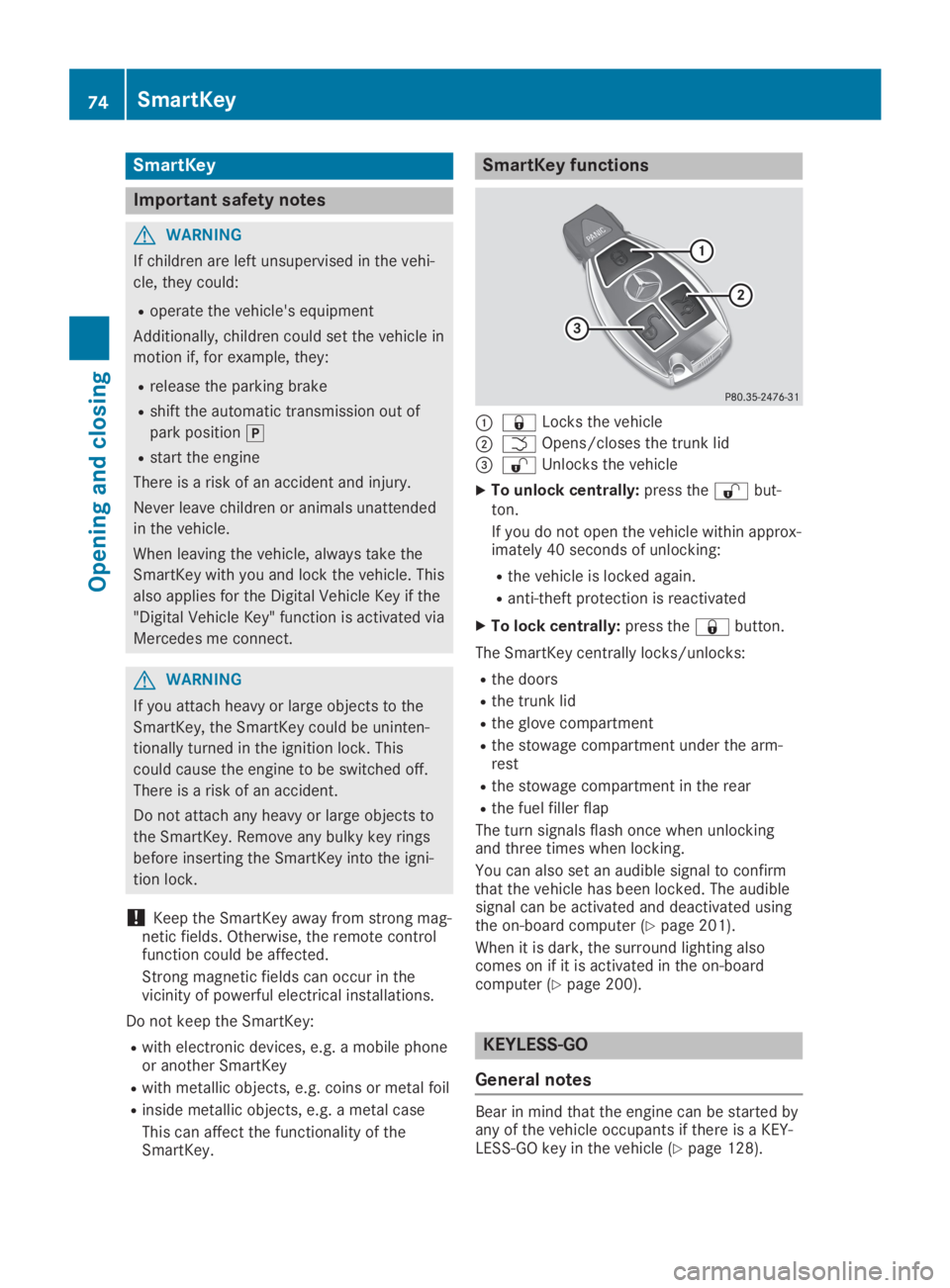
SmartKey functions
C7Locks the vehicle
DTOpens/closes the trunk lid
Page 77 of 330

Locking/unlocking centrally
You can start, lock or unlock the vehicle usingKEYLESS-GO. To do this, you only need carrythe SmartKey with you. You can combine thefunctions of KEYLESS-GO with those of a con-ventional SmartKey. Unlock the vehicle byusing KEYLESS-GO, for instance, and lock itusing the7button on the SmartKey.
The driver's door and the door at which thehandle is used, must both be closed. TheSmartKey must be outside the vehicle. Whenlocking or unlocking with KEYLESS-GO, thedistance between the key and the correspond-ing door handle must not be greater than 3 ft(1 m).
A check which periodically establishes a radioconnection between the vehicle and theSmartKey determines whether a valid Smart-Key is in the vehicle. This occurs, for example:
Rwhen starting the engine
Rwhile driving
Rwhen using HANDS-FREE ACCESS
Rwhen the external door handles are touched
XTo unlock the vehicle:touch the inner sur-face of the door handle.
XTo lock the vehicle:touch sensor sur-faceCorD.
Make sure that you do not touch the innersurface of the door handle.
XConvenience closing feature:touchrecessed sensor surfaceDfor an extendedperiod.
Further information on the convenienceclosing feature (Ypage 89).
Deactivating and activating
If you do not intend to use a SmartKey for anextended period of time, you can deactivatethe KEYLESS-GO function of the key. TheSmartKey will then use very little power,thereby conserving battery power. For the pur-poses of activation/deactivation, the vehiclemust not be nearby.
XTo deactivate:press the7button onthe SmartKey twice in rapid succession.The battery check lamp (Ypage 77) of theSmartKey flashes twice briefly and lights uponce, then KEYLESS-GO is deactivated.
XTo activate:press any button on the Smart-Key.
or
XInsert the SmartKey into the ignition lock.KEYLESS-GO and all of its associated fea-tures are available again.
Changing the settings of the locking
system
You can change the settings of the lockingsystem. This means only the driver's door, thelockable stowage compartments in the vehicleinterior and the fuel filler flap are unlockedwhen the vehicle is unlocked. This is useful ifyou frequently travel alone.
XTo change the setting:press and holddown the6and7buttons simultane-ously for about six seconds until the batteryindicator lamp (Ypage 77) flashes twice.
If the setting of the locking system is changedwithin the signal range of the vehicle, pressingthe7or6button:
Rlocks or
Runlocks the vehicle
The SmartKey now functions as follows:
XTo unlock:press the6button once.
XTo unlock centrally:press the6buttontwice.
XTo lock centrally:press the7button.
SmartKey75
Opening and closing
Z
Page 81 of 330
ProblemPossible causes/consequences andPPSolutions
The engine cannot bestarted using the Smart-Key.
The on-board voltage is too low.
XSwitch off non-essential consumers, e.g. seat heating or interiorlighting, and try to start the engine again.
If this does not work:
XCheck the starter battery and charge it if necessary(Ypage 284).
or
XJump-start the vehicle (Ypage 285).
or
XConsult a qualified specialist workshop.
The engine cannot bestarted using KEYLESS-GO. The SmartKey is inthe vehicle.
The vehicle is locked.
XUnlock the vehicle and try to start the vehicle again.
The SmartKey battery is discharged or nearly discharged.
XCheck the SmartKey battery (Ypage 77) and replace it if neces-sary (Ypage 77).
If this does not work:
XStart your vehicle with the SmartKey in the ignition lock.
There is interference from a powerful source of radio waves.
XStart your vehicle with the SmartKey in the ignition lock.
You have lost a Smart-Key.XHave the SmartKey deactivated at a qualified specialist work-shop.
XReport the loss immediately to the vehicle insurers.
XIf necessary, have the locks changed as well.
You have lost themechanical key.XReport the loss immediately to the vehicle insurers.
XIf necessary, have the locks changed as well.
The side windows can-not be opened or closedusing the convenienceopening/closing fea-ture.
The SmartKey battery is discharged or nearly discharged.
XCheck the SmartKey battery (Ypage 77) and replace it if neces-sary (Ypage 77).
Doors
Important safety notes
GWARNING
If children are left unsupervised in the vehi-
cle, they could:
Roperate the vehicle's equipment
Additionally, children could set the vehicle in
motion if, for example, they:
Rrelease the parking brake
Rshift the automatic transmission out of
park position]
Rstart the engine
There is a risk of an accident and injury.
Doors79
Opening and closing
Z
Page 86 of 330

HANDS-FREE ACCESS
General notes
With KEYLESS-GO and HANDS-FREE ACCESS,you can open or close the trunk lid or stop theprocedure without using your hands. This isuseful if you have your hands full. To do this,make a kicking movement under the bumperwith your foot.
Observe the following points:
RCarry your KEYLESS-GO key about your per-son. The SmartKey must be at the rear ofthe vehicle in the detection range of KEY-LESS-GO.
RWhen making the kicking movement, makesure that you are standing firmly on theground and that there is sufficient clearanceto the rear of the vehicle. You could other-wise lose your balance, for example on ice.
Important safety notes
GWARNING
The vehicle exhaust system can become
very hot. If you use HANDS-FREE ACCESS,
you could burn yourself by touching the
exhaust system. There is a risk of injury.
Always ensure that you make the kicking
movement only within the detection range of
the sensors.
!If the SmartKey is within the rear detectionrange of KEYLESS-GO, the following situa-tions, for example, could lead to the unin-tentional opening of the trunk lid:
Rwhen using an automatic car wash
Rwhen using a power washer
Make sure that the SmartKey is at least10 ft (3 m) away from the vehicle.
RAlways ensure that you make the kickingmovement only within the detection rangeof sensorsC.
RStand at least 12 in (30 cm) away from therear area while doing so.
RDo not come into contact with the bumperwhile making the kicking movement. Other-wise, the sensors may not function cor-rectly.
RHANDS-FREE ACCESS does not functionduring engine start.
RDirt caused by road salt and snow build-uparound sensorsCmay restrict functional-ity.
RUsing the HANDS-FREE ACCESS with aprosthetic leg may restrict functionality.
RIf a KEYLESS-GO key is at the rear of thevehicle in the detection range of KEYLESS-GO, HANDS-FREE ACCESS could be trig-gered. The trunk lid could thus be opened orclosed unintentionally, for example, if you:
-sit on the edge of the trunk.
-set something down or lift something upbehind the vehicle.
-polish the rear of the vehicle.
Do not carry the KEYLESS-GO key aboutyour person in these situations or in situa-tions similar to these. This will prevent theunintentional opening/closing of the trunklid.
84Trunk
Opening and closing
Page 90 of 330
Opening and closing the side win-
dows
Opening and closing the side windows
in the front
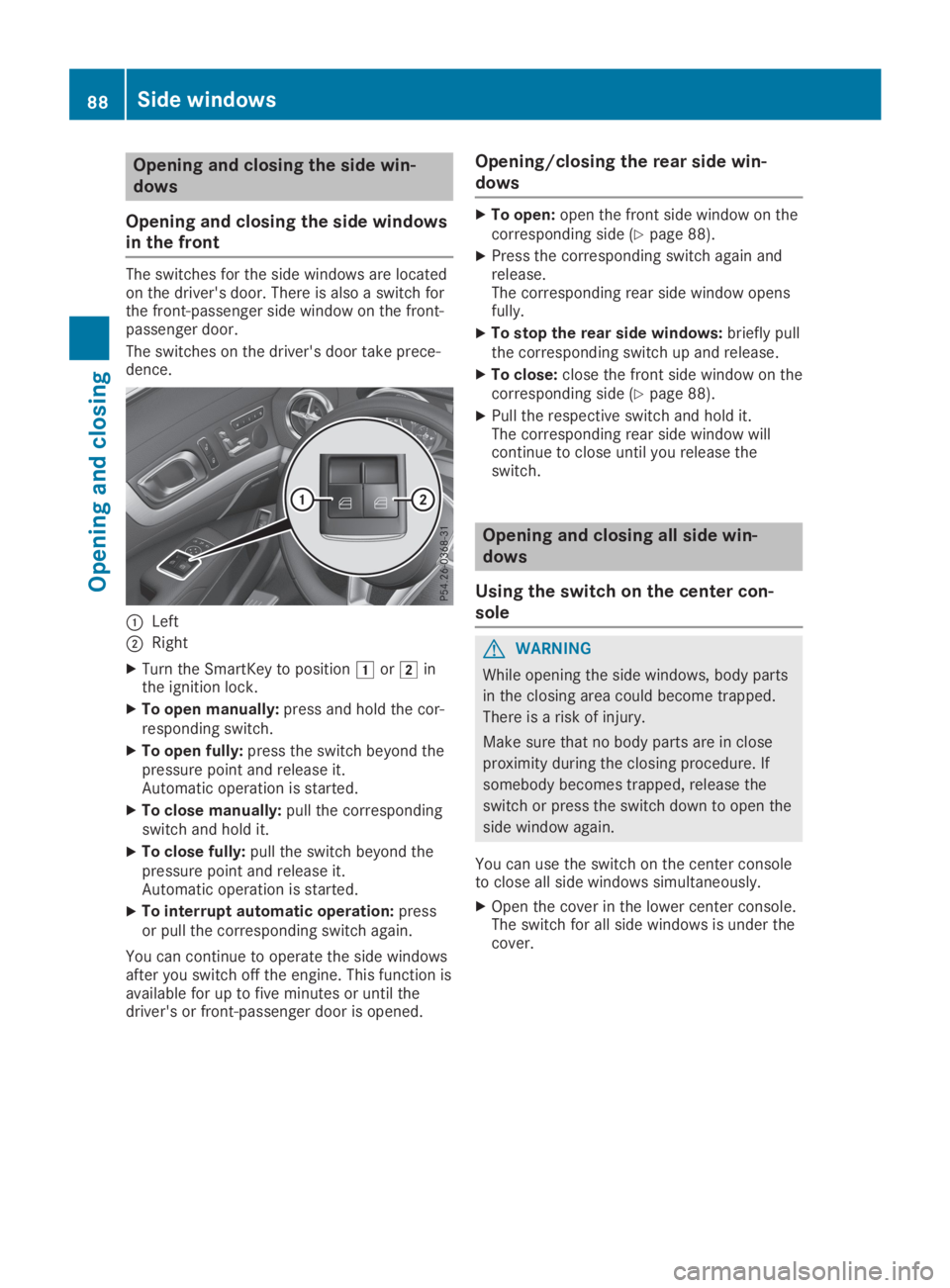
The switches for the side windows are locatedon the driver's door. There is also a switch forthe front-passenger side window on the front-passenger door.
The switches on the driver's door take prece-dence.
CLeft
DRight
XTurn the SmartKey to positionGorHinthe ignition lock.
XTo open manually:press and hold the cor-responding switch.
XTo open fully:press the switch beyond thepressure point and release it.Automatic operation is started.
XTo close manually:pull the correspondingswitch and hold it.
XTo close fully:pull the switch beyond thepressure point and release it.Automatic operation is started.
XTo interrupt automatic operation:pressor pull the corresponding switch again.
You can continue to operate the side windowsafter you switch off the engine. This function isavailable for up to five minutes or until thedriver's or front-passenger door is opened.
Opening/closing the rear side win-
dows
XTo open:open the front side window on thecorresponding side (Ypage 88).
XPress the corresponding switch again andrelease.The corresponding rear side window opensfully.
XTo stop the rear side windows:briefly pullthe corresponding switch up and release.
XTo close:close the front side window on thecorresponding side (Ypage 88).
XPull the respective switch and hold it.The corresponding rear side window willcontinue to close until you release theswitch.
Opening and closing all side win-
dows
Using the switch on the center con-
sole
GWARNING
While opening the side windows, body parts
in the closing area could become trapped.
There is a risk of injury.
Make sure that no body parts are in close
proximity during the closing procedure. If
somebody becomes trapped, release the
switch or press the switch down to open the
side window again.
You can use the switch on the center consoleto close all side windows simultaneously.
XOpen the cover in the lower center console.The switch for all side windows is under thecover.
88Side windows
Opening and closing
Page 99 of 330
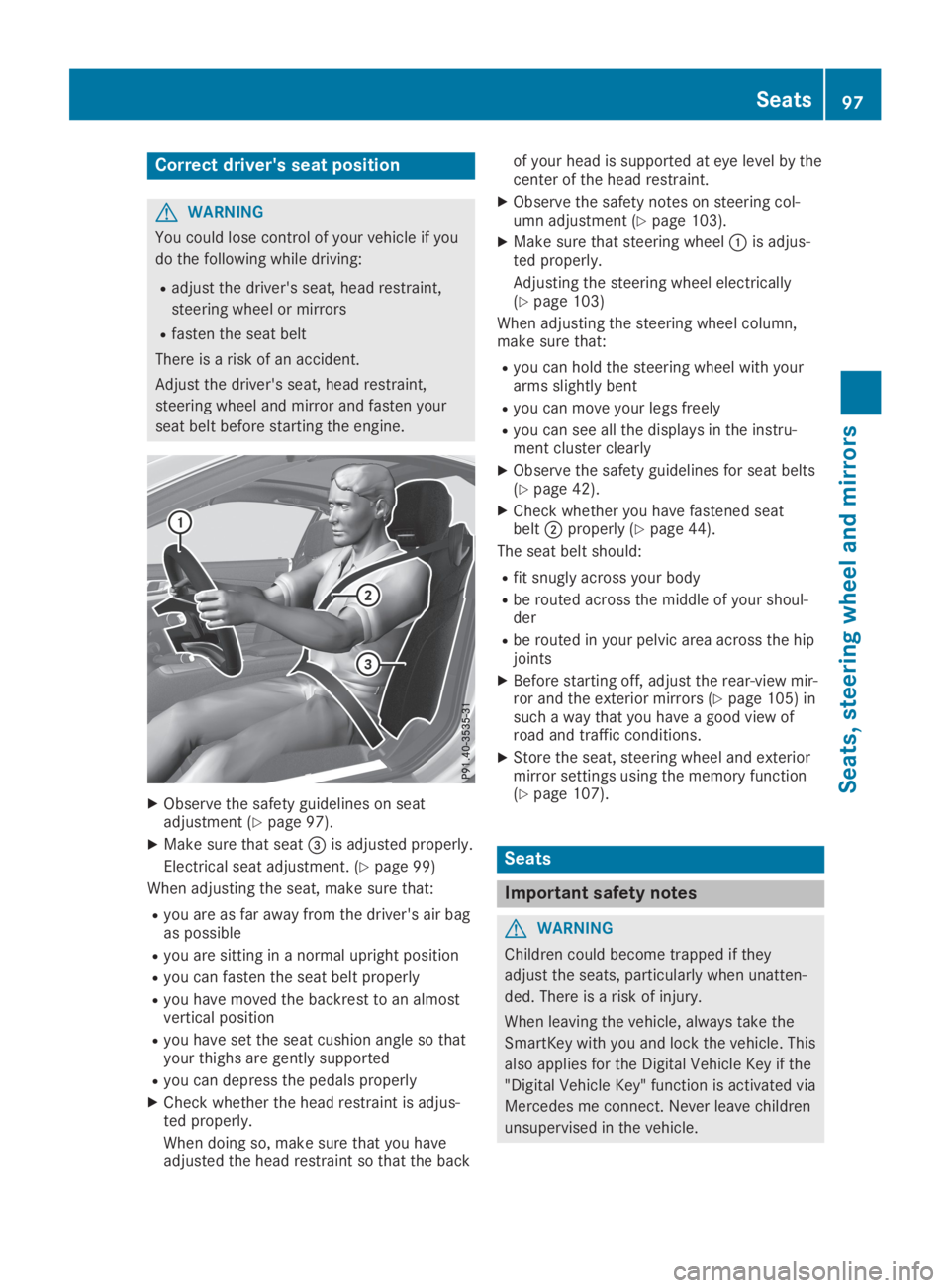
Correct driver's seat position
GWARNING
You could lose control of your vehicle if you
do the following while driving:
Radjust the driver's seat, head restraint,
steering wheel or mirrors
Rfasten the seat belt
There is a risk of an accident.
Adjust the driver's seat, head restraint,
steering wheel and mirror and fasten your
seat belt before starting the engine.
XObserve the safety guidelines on seatadjustment (Ypage 97).
XMake sure that seat
Page 100 of 330
The seats can still be adjusted when there isno SmartKey in the ignition lock.
GWARNING
When you adjust a seat, you or other vehicle
occupants could become trapped, e.g. on
the seat guide rail. There is a risk of injury.
When adjusting a seat, make sure that no
one has any body parts in the sweep of the
seat.
GWARNING
If the driver's seat is not engaged, it could
move forwards as far as the next catch dur-
ing movement such as braking or abrupt
changes of direction. As a result, you would
be pushed against your seat belt by the
unsecured driver's seat.
This could cause you to lose control of the
vehicle. The seat belt cannot protect as
intended and could result in additional
injury.
There is a risk of an accident and injury.
Before every journey, make sure that the
driver's seat is fully engaged.
Observe the safety notes on "Air bags"(Ypage 45) and "Children in the vehicle"(Ypage 57).
GWARNING
If you adjust the seat height carelessly, you
or other vehicle occupants could be trapped
and thereby injured. Children in particular
could accidentally press the electrical seat
adjustment buttons and become trapped.
There is a risk of injury.
While moving the seats, make sure that your
hands or other body parts do not get under
the lever assembly of the seat adjustment
system.
GWARNING
If the head restraints are not installed or not
adjusted correctly, they cannot provide pro-
tection as intended. There is an increased
risk of injury in the head and neck area, e.g.
in the event of an accident or when braking.
Always drive with the head restraints instal-
led. Before driving off, make sure for every
vehicle occupant that the center of the head
restraint supports the back of the head at
about eye level.
GWARNING
You could lose control of your vehicle if you
do the following while driving:
Radjust the driver's seat, head restraint,
steering wheel or mirrors
Rfasten the seat belt
There is a risk of an accident.
Adjust the driver's seat, head restraint,
steering wheel and mirror and fasten your
seat belt before starting the engine.
!To prevent damage to the seats and theseat heating, observe the following notes:
RDo not spill liquids onto the seats. Dry theseats as soon as possible if liquid doesget spilled on the seats.
RIf the seat covers are damp or wet, do notswitch on the seat heating. Also, do notuse the seat heating to dry the seats.
RClean the seat covers as recommended;see the "Interior care" section.
RDo not transport heavy loads on theseats. Do not place pointed objects onthe seat cushions such as knives, nails ortools. Where possible, use the seats onlyfor carrying passengers.
RWhen operating the seat heating, do notcover the seats with insulating materials,e.g. blankets, coats, bags, protective cov-ers, child seats or booster seats.
RWhen the seat heating is switched on, theseat surface can be damaged as a resultof objects being placed on the seats, forexample, seat cushions, child seats andprotective covers not approved byMercedes-Benz.
!Make sure that there are no objects in thefootwell under or behind the seats whenmoving the seats back. There is a risk thatthe seats and/or the objects could be dam-aged.
iThe head restraints cannot be removed.
98Seats
Seats, steering wheel and mirrors