lights MERCEDES-BENZ SL CLASS 2020 Service Manual
[x] Cancel search | Manufacturer: MERCEDES-BENZ, Model Year: 2020, Model line: SL CLASS, Model: MERCEDES-BENZ SL CLASS 2020Pages: 334, PDF Size: 17.43 MB
Page 178 of 334
The
selected transmission position andthe
direction inwhich thevehicle isrolling deter-
mine which warning displayisactive whenthe
engine isrunnin g. Tra
nsmission posi-
tion War
ning display 005B
Fron
tarea active 005E,
005Corthe vehi-
cle isrolling back-
wards Rear
andfront areas
active 005D
No
areas active One
ormore segment slight upasthe vehicle
approaches anobstacle, depending onthe
vehicle's distancefromtheobstacle. Inaddi-
tion, warning tonesare issued.
When thedistance tothe obstacle issufficient ,
you willhear aninter mittentwarning tone.The
shorter thedistance tothe obstacle, the
shorter thefrequency ofthe inter mittentwarn-
ing tonesbecomes. Whentheminimum dis-
tanc eis reached, youhear acont inuous warn-
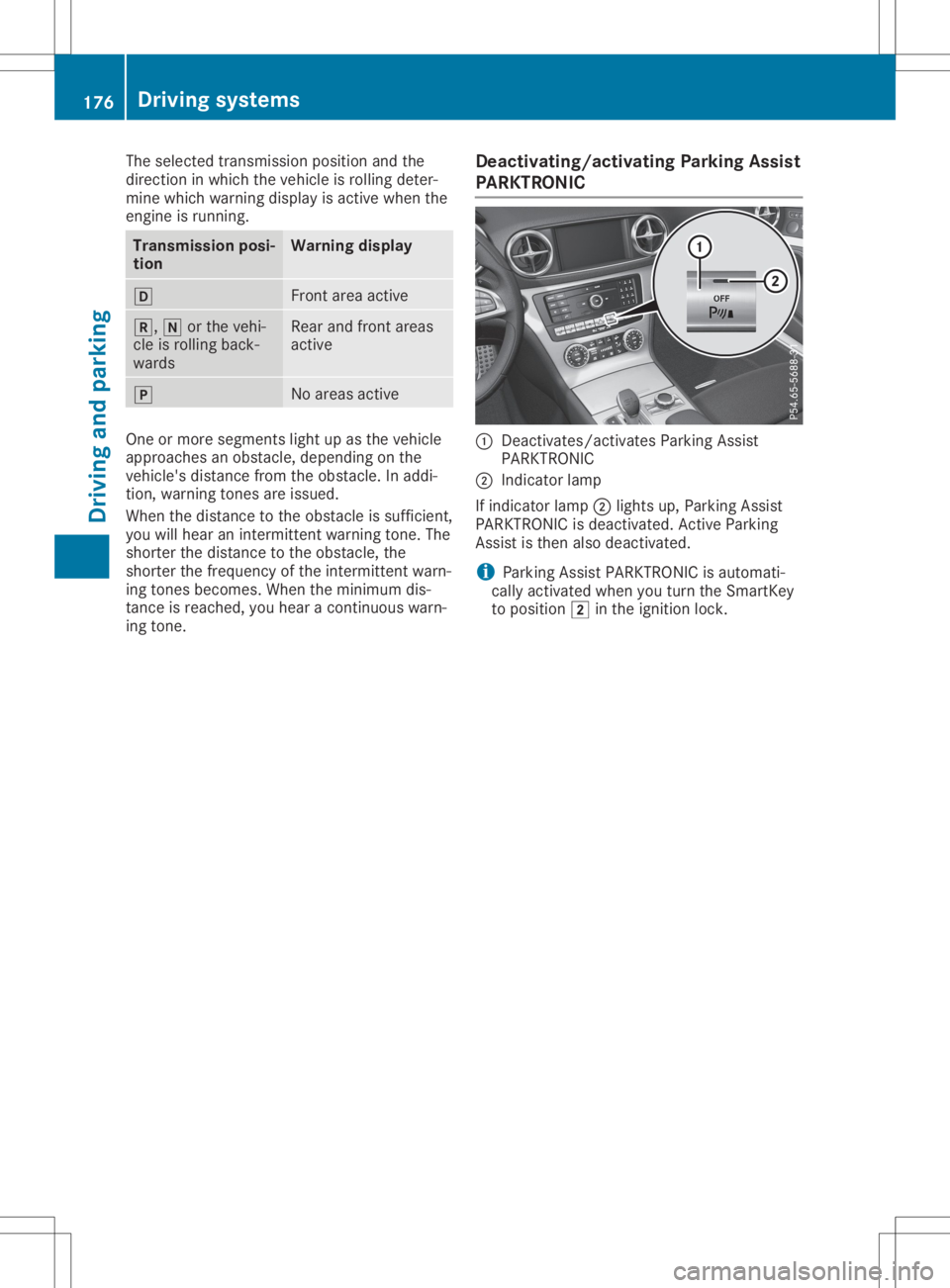
ing tone. <00270048004400460057004C005900440057004C0051004A0012004400460057
004C005900440057>
ingPark ingAssist
PARKTRON IC 0043
Deact ivates/act ivatesParking Assist
PARKTRONIC
0044 Indicat orlamp
If indicator lamp0044lights up,Parking Assist
PARKTRONIC isdeactivated. Active Parking
Assist isthen alsodeactivated.
i Parking
AssistPARKTRONIC isautomati-
cally activated whenyouturn theSmart Key
to position 0048inthe ignition lock. 176
Driving
systemsDriving andparking
Page 179 of 334
Problems
withParking AssistPARKTRONIC Problem
Possible
causes/co nsequences and0050 0050
Solutions Only
thered segments
in the Parking Assist
PARKTRONIC warning
display sare lit.You also
hear awarning tonefor
approximately twosec-
onds.
Parking Assist
PARKTRONIC isdeacti-
vated afterapprox-
imately fiveseconds
and theindicator lamp
in the Parking Assist
PARKTRONIC button
lights up. Parking
AssistPARKTRONIC hasmalfunction edand hasbeen deac-
tivated.
X Ifproblems persist,haveParking AssistPARKTRONIC checkedat
a quali fiedspecialist workshop. Only
thered segments
in the Parking Assist
PARKTRONIC warning
display sare lit.Parking
Assist PARKTRONIC is
deactivated after
approximately fivesec-
onds. The
Parking AssistPARKTRONIC sensorsaredirty orthere isinter-
ferenc e.
X Clean theParking AssistPARKTRONIC sensors(Ypage 278).
X Switch theignition backon. The
problem maybecaused byan extern alsource ofradio orultra-
sound waves.
X Check tosee ifParking AssistPARKTRONIC worksatadifferent
location. Active
Parking Assist
General notes Act
ive Parking Assistisan electron icparking
aid with ultrasound. Itmeasures theroad on
both sides ofthe vehicle. Aparking symbol
indicates asuitable parkingspace.Active
steering intervention canassist youduring
parking andwhen exiting aparking space.You
can also stilluse Parking AssistPARKTRONIC
(Y page 174).
Import antsafety notes Act
ive Parking Assistismerely anaid. Itis not
a replacement foryour atten tiontoyour imme-
diate surroundings. Youarealwa ysresponsi-
ble forsafe maneuvering, parkingandexiting a
parking space.Makesurethatnopersons, ani-
mals orobject sare inthe path ofyour vehicle.
When Parking AssistPARKTRONIC isdeactiva-
ted, Active Parking Assistisalso unavaila ble. G
WARNING
While parking orpulli ngout ofaparking
space, thevehicle swingsoutand candrive
onto areas ofthe oncomin glane. Thiscould
cause youtocollide withother roadusers or
object s.There isarisk ofan accident.
Pay atten tiontoother roadusers orobject s.
Stop thevehicle ifnecessary orcancel the
Act ive Parking Assistparking procedure. G
WARNING
While parking orpulli ngout ofaparking
space, thevehicle swingsoutand candrive
onto areas ofthe oncomin glane. Thiscould
cause youtocollide withother roadusers or
object s.There isarisk ofan accident.
Pay atten tiontoother roadusers orobject s.
Stop thevehicle ifnecessary orcancel the Driving
systems
177Drivingandparking
Z
Page 183 of 334

X
Dep endingonthe mes sage oras req uired ,
shi ftthe transmi ssion topositio n005B or005E
wh en the vehicleis sta tionar y.
Activ ePa rkin gAssi stimm ediatel ystee rsin
the othe rdi recti on.The ParkingAss ist Par
kingAss ist
Act ive Accelerateand Brake Act
ive Accelerateand Brake
Obs erveSur roundings Obs
erveSur roundings message appe ars
in the multifu nctio ndisp lay.
i Yo
uwi llach ieve the best res ults by waiting
for the stee ringpro ced ureto comp lete
be for epu lling away.
If yo uba ck up after acti vatio n,the stee ring
wh eelis mov edtothe stra ight-a head posi-
tio n.
X Driv efor wa rds and revers eas pro mpte dby
the Parkin gAssi stPAR KTRONICwa rning
di sp lays ,sev eraltime sif nece ssary.
Once youha ve exited theparkin gsp ace com-
pl ete ly,the stee ringwh eelis mov edtothe
stra ight-a head positio n.Yo uhe ar atone and
the Active ParkingAss ist Finished Act
ive ParkingAss ist Finishedmes -
sa ge appe arson the multifu nctio ndisp lay. Yo u
wi llthe nha ve tostee rand mergeinto traffic
on your ow n.Parkin gAssi stPAR KTRONICis
sti llav ailabl e. Yo ucan take overthe stee ring
be for ethe vehicleha sexi ted theparkin g
sp ace comp letel y.Thi sis us efu l,for exa mpl e
wh en youreco gnizetha tit is alrea dypossi ble
to pullou tof the parkin gsp ace .
Ca ncelin gAc tiv eParki ngAssist Yo
ucan canc elActiv ePa rkin gAssi stat any
time .
X Stop themov eme ntofthe multifu nctio n
stee ringwh eelor stee ryo ursel f.
Activ ePa rkin gAssi stwillbe canc eled at
once .The Active ParkingAss ist Can‐ Act
ive ParkingAss ist Can‐
cel ed cel
edmes sage appe arsin the multifu nctio n
di sp lay.
or X Pre ssthe "Parking AssistPAR KTRONIC"but-
ton onthe cente rcons ole (Y page 176) .
Pa rkin gAssi stPAR KTRONICis sw itch edoff
and Activ ePa rkin gAssi stisimm ediatel y
canc eled .The Active ParkingAss ist Act
ive ParkingAss ist
Can celed Can
celedmes sage appe arsin the multi-
fu nctio ndisp lay. Activ
ePa rkin gAssi stiscanc eled automa tically
if:
R pa rkin gus ing Activ ePa rkin gAssi stisno
lo nge rpo ssi ble
R youar edri vin gfa ster than6 mph (10km/h )
R awh eelsp ins ,ESP ®
inte rvenes orfails. The
00E5 ESP®
wa rning lamp lights upinthe
ins trument cluster .
A wa rning tone sounds .The parkin gsy mbo l
di sa pp ears and theActive Parking Act
ive Parking
Ass ist Canceled Ass
ist Canceledmes sage appe arsin the
mu ltifu nctio ndisp lay.
Wh enActiv ePa rkin gAssi stiscanc eled ,yo u
mu stalwa ysstee rag ain yo ursel f. Rea
rvi ew camera
Ge neral notes Re
ar vie wcam era0043isan optica lpa rkin gand
ma neu vering aid. Itsho wsthe area behind
yo ur veh iclewi th guide lines inthe multimed ia
sy stem .
The area behind the vehicleis disp laye das a
mir ror ima ge,as inthe rearvie wmir ror.
i The
text showninthe multimed iasystem
di sp layde pends onthe langu agesetti ng.
The followi ng areexa mpl esofrea rvie w
cam eradisp lays inthe multimed iasystem .
Impo rtant safety notes The
rearvie wcam eraisonl yan aid. Itis not a
rep laceme ntfor your atte ntionto your imm edi-
ate surro und ings.Yo uar ealwa ysres ponsi ble
for safe ma neu vering and parkin g.Ma kesure
tha tthe reareno perso ns, anima lsor objects
in the maneu vering area when youar ema neu -
ver ing orparkin g. Dr
ivi ng system s
181Drivi ng andparki ng Z
Page 184 of 334
Under
thefollowi ngcircumstances, therear
view camera willnotfunction, orwill function
in alimited manner:
R ifthe trunk lidisopen
R in heavy rain,snow orfog
R at night orinvery dark places
R ifthe camera isexposed tovery bright light
R ifthe area islit by fluorescent bulbsor LED
lighting (thedispla ymay flicker)
R ifthere isasudden changeintemperature,
e.g. when driving intoaheated garagein
winter
R ifthe camera lensisdirty orobstructed.
Observe thenotes oncleaning
(Y page 278)
R ifthe rear ofyour vehicle isdamage d.Inthis
case, havethecamera position andsetting
checked ataqual ified speciali stworkshop.
The field ofvision andother functions ofthe
rear view camera mayberestrict eddue to
additional accessories onthe rear ofthe vehi-
cle (e.g. license plateholder, bicycle rack).
On vehicles with<004B0048004C004A004B0057001000440047004D00580056005700440045004F
0048[ chassis,
leaving thestandard heightcanresult ininac-
curacies inthe guide lines,depending ontech-
nical conditions.
i The
cont rast ofthe displa ymay beaffec-
ted bythe sudden presence ofsunlight or
other lightsources, e.g.when exiting a
garage. Payparticular attentioninthis situa-
tion.
i If
usabi lityisseverely restricted,e.g. due
to pixel errors, havethedispla yrepaired or
replaced.
Activating/ deactivating therear view
camera X
To activate: makesurethattheSmartKey
is in position 0048inthe ignition lock.
X Make surethattheActivation byRgear Activation
byRgear
function isselected inthe multimedia sys-
tem; seetheDigital Operator's Manual.
X Engage reverse gear.
The multimedia systemshowsthearea
behind thevehicle withguide lines.
The image fromtherear view camera is
avail able throughout themaneuvering proc-
ess. To
deactivate: therear view camera deacti-
vates ifyou shift thetransmission toposition
005D, orafter driving forwards ashort distance.
The inner segments ofthe warning indicator
are displa yedinred ifthere isacomplete sys-
tem failure.The indicator lampinthe
PARKTRONIC buttonlightsup.
If the system failsatthe rear ofthe vehicle:
R the rear segments areshown inred when
backing up.
R the rear segments arehidden whendriving
forwards.
Displays inthe multim ediasystem The
rear view camera mayshow adistorted
view ofobstacles, showthemincorrect lyor
not atall. The rear view camera doesnotshow
objects inthe followi ngpositions:
R very close tothe rear bumper
R under therear bumper
R in close range above thehandle onthe trunk
lid
! Objects
notatground levelmayappea rto
be further awaythan theyactually are,e.g.:
R the bumper ofaparked vehicle
R the drawba rof atrailer
R the ball coupling ofatrailer towhitch
R the rear section ofan HGV
R aslanted post
Use theguide linesonlyfororientation.
Approach objectsnofurther thanthebot-
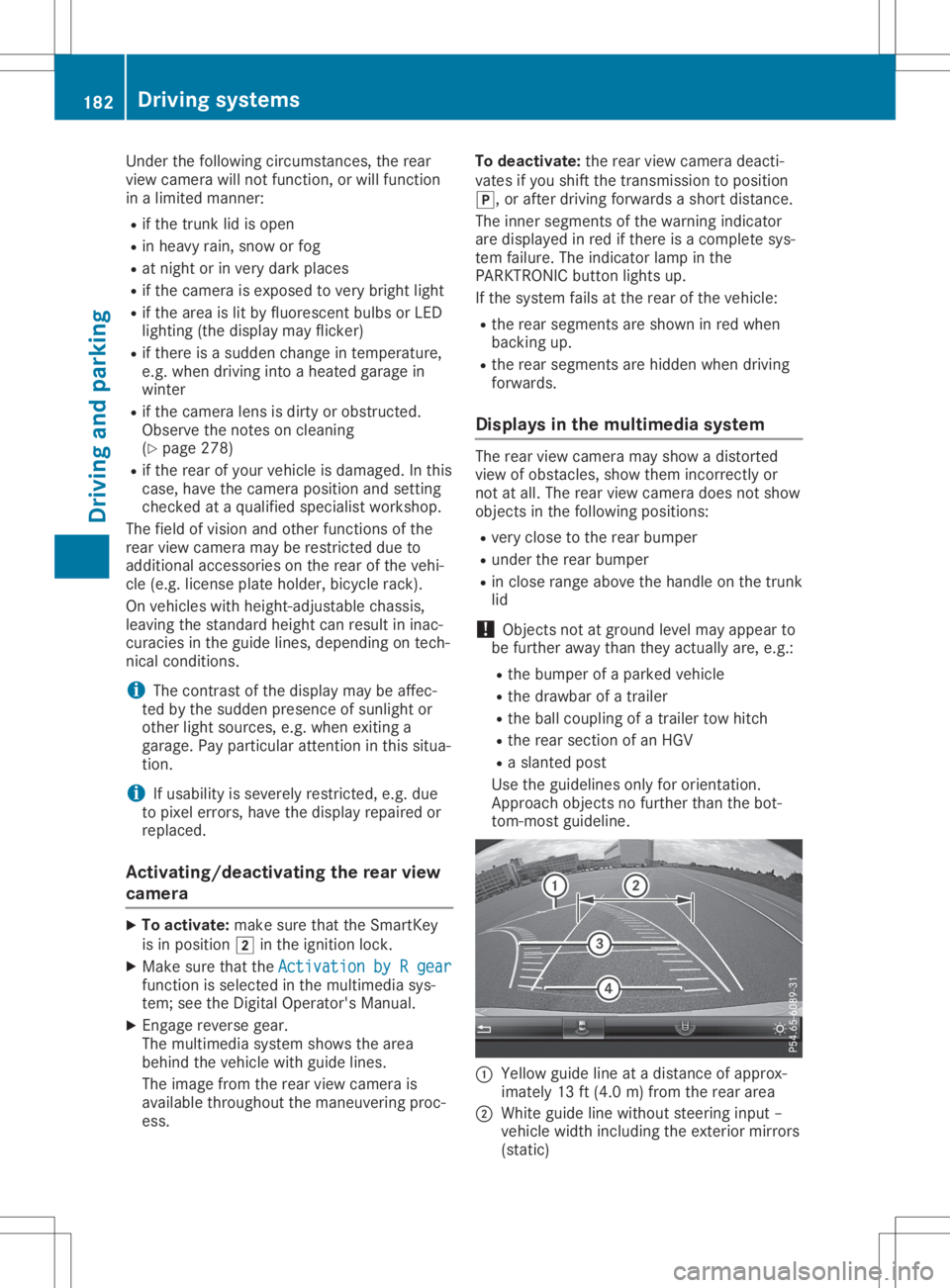
tom-most guideline. 0043
Yello wguide lineatadistance ofapprox-
imately 13ft(4.0 m)from therear area
0044 White guidelinewithout steering input–
vehicle widthincluding theexterior mirrors
(static) 182
Driving
systemsDriving andparking
Page 188 of 334

The
following informationisdisplay ed:
R the length ofthe journey sincethelast
break.
R the atten tionlevel determin edbyATTEN -
TION ASSIST, display edinabar display in
five levels fromhightolow.
R ifATTE NTION ASSISTisunable tocalculate
the atten tionlevel andcann otoutput a
warning, theSystem suspended System
suspended message
appears. Thebardisplay thenchanges the
display ,e.g. ifyou aredriving ataspeed
below 37mph (60km/ h)or above 125mph
(2 00 km/ h).
Acti vating ATT ENT ION ASSIS T X
Ac tivat eAT TENTI ON ASSIST usin gth eon -
boar dco mput er(Y page 200).
The systemdeterm inesth eatt ention levelof
th edri ver depe nding ontheset ting sele c-
te d:
St and ardselect ed:thesen sitivit ywit hwhic h
th esyst emdeterm inesth eatt ention levelis
set tonorm al.
Sens itive select ed:thesen sitivit yis set
high er.The attention leveldet ectedby ATTEN-
TIO NAS SIST isadapt edacc ordinglyand the
dri ver iswarn edearl ier.
When ATTENTI ON ASSIST isdeac tivat ed, the
00AD symboland OFFappear inthemult ifunc-
ti on disp layintheassi stanc edisp laywhen the
en gin eis run ning.
When ATTENTI ON ASSIST has been deactiva-
te d, itis auto maticallyreac tivat ed afterthe
en gin ehas been stoppe d.The sensitivit y
sele cted correspo ndsto thelast selection acti-
vat ed (stand ard/ sensitive ).
Wa rning inthemu ltifu nct ion displa y If
fat igue orinc reas inglapse sin concen trati on
are detected, awarn ingappear sin themult i-
fun ction disp lay:Attention Assist:Tak e Att
ention Assist:Tak e
a bre ak! a
bre ak!
In addit iontothemes sage showninthemult i-
fun ction disp lay,you willthen hear awarn ing
to ne .
X Ifne cessar y,tak eabre ak.
X Con firm themes sage bypre ssing the0076
but tonon thest eer ing whee l.
On longjo urn eys, takereg ular breaks ingoo d
ti me toallow yourselftores t.Ifyou donot tak
eabre ak, you willbewarn edagain after
15 min utesat theearl iest.The precond ition
for this isthat ATTENTI ON ASSIST still det ects
typ ical indicat ors offat igue orinc reas inglap-
ses inconcen trati on.
Veh icles withCOMA ND:ifawarn ingis
iss ued inthemult ifunction disp lay,aser vice
st ati on sear chisper formed inCOMA ND.You
can selectaser vicest ati on and navigat ionto
th is ser vicest ati on will then begi n.This func-
ti on can beact ivat edand deac tivat ed in
COMA ND. Acti
veDri ving Assis tance packa ge
Gene ralnot es The
Active Drivin gAs sis tan cepac kageco n-
sis tsof Active Distanc eAs sis tDI ST RONI C
(Y page 157), Active Steer ing Assis t,Ac tive
Bli nd Spot Assis t(Y page 186)and Active
Lan eKee pingAs sis t(Y page 189).
Acti veBlind Spot Assis t Gene
ralnot es
Ac tive Blind Spot Assis tmon itors theareas on
eit her side oftheveh icleth at are notdir ectly
vis ible tothedri ver withtwo lateral ,rear -
fac ing radar sensors.Awarn inglamp lightsup
in theex terio rmir rorsand draw syour atten-
ti on toveh icles det ectedin themon itore d
area. Ifyou then swit chon theco rrespo nding
tur nsign alto chang elan e,you willalso
rec eivean opt ical and audible warning.If aris k
of lateral collisi onisdet ected, correc tive brak -
ing may help youavoidaco llisi on.Be for ea
co urs e-co rrec ting brak eapplic ation,Ac tive
Bli nd Spot Assis teval uate sth espac ein the
dir ection oftravel andattheside sof theveh i-
cle .Fo rth is, Active Blind Spot Assis tuses the
for ward -facin gradar sensors.
Ac tive Blind Spot Assis tsupp ortsyou from a
spee dof appr oximat ely20mph (30km/h).
Imp ortant safety notes
Ac tive Blind Spot Assis tis on lyan aid and is
no ta subs titut efor attentive drivin g. 186
Driv
ingsystem sDriv ingand parki ng
Page 190 of 334

Due
tothe natu reofthe system :
R wa rnings maybe issu ed inerr orwh en driv-
ing closetocra shbarriers orsimil arsol id
la ne borde rs.
R wa rnings maybe inte rrupte dwh en drivin g
al ong side partic ular ly long veh icles, e.g.
tru cks, forapro longe dtime .
In dic ator andwarning display 0043
Yellow indicator lamp/ redwarning lamp
Activ eBli nd Spo tAssi stisnot activeatspee ds
be low ap pro xim ately20 mph (30km/h ).Veh i-
cle sin the moni toringrange arethe nnot indi-
cate d.
Wh enActiv eBli nd Spo tAssi stisacti vated ,
ind icator lamp 0043inthe exte riormir rorslights
up yellow atspee ds ofup to20 mph
(30 km/h ).At spee ds above 20mph
(30 km/h ),the indicator lamp goes outand
Activ eBli nd Spo tAssi stisop era tional .
If aveh icleis de tecte dwi thi nthe moni toring
ra nge atspee ds above appro xim ately20 mph
(30 km/h ),wa rning lamp 0043onthe corr e-
sp ond ingside lights upred .Thi swa rning
al wa ysoccu rswh en aveh icleente rsthe moni -
tori ngrange frombehind orfro mthe side .
Wh enyouove rtake aveh icle, the warning only
occu rsifthe diffe renc ein spee dis less tha n
7 mph (12km/h ).
The yellow indicator lamp goes outif rev ers e
ge ar iseng aged .In thi seve nt,Activ eBli nd
Spo tAssi stisno longe racti ve.
The brightne ssofthe indicator/w arning lamps
is ad jus ted automa tically acc ording tothe
am bient light.
Vis ual and acou sti cco llis io n wa rning
If yo usw itch onthe turnsigna lsto cha nge
la nes and aveh icleis de tecte din the side
moni toringrange ,yo urece iveavis ualand
aco ustic collisi on warning. Youwi llthe nhe ar a do
ublewa rning tone andredwarning lamp 0043
fla she s.Ifthe turnsigna lrem ains on, detecte d
veh icles areind icated bythe flashi ng ofred
wa rning lamp 0043. Thereareno furthe rwa rning
tone s.
Co urse -corre cting brak eappl icatio n
If Activ eBli nd Spo tAssi stdetects aris kof a
la tera lcol lisi on inthe moni toringrange ,a
cou rse-corr ectingbra keapplica tionis car ried
ou t.Thi sis mea ntto assist youin avoidi ng a
col lisi on. G
WA
RNING
A cou rse-corr ectingbra keapplica tioncan-
not alwa yspre vent acol lisi on. Thereisaris k
of an acc ident.
Alw aysstee r,bra keoracc elera teyoursel f,
esp ecially ifActiv eBli nd Spo tAssi stwa rns
yo uor ma kes acou rse-corr ectingbra ke
ap plica tion.Alw aysma inta inasa fe dista nce
at the side s. If
acou rse-corr ectingbra keapplica tion
occu rs,red warning lamp 0043flashe sin the
exte riormir ror and adu alwa rning tone
sou nds .In additio n,disp lay0044 und erlining the
da nge rof aside collisi on appe arsin the multi-
fu nctio ndisp lay.
In ver yra re cas es, the system mayma kean
ina pprop riate bra keapplica tion.Acou rse-cor-
recti ngbra keapplica tionma ybe inte rrupte d
at any time ,e.g .if yo ustee rsl ig htl yin the
op po site directi onordepre ssthe accelera tor
pe dalmor efir mly .
The course-corr ectingbra keapplica tionis
av ailabl e in the spee dra nge betwe en20 mph
(30 km/h )and 120 mph (200km/h ). 18
8 Dr
ivi ng system sDrivi ng andparki ng
Page 194 of 334
Imp
ortant safety notes G
WAR
NING
If you oper ateinform ation syst ems andcom-
mun ication equipm entint egr atedin the
veh iclewhen driving,you may bedist racted
fr om thetraff icsit uati on.You could also
lose control oftheveh icle. Ther eis aris kof
an acc iden t.
On lyoper atethis equipm entwhen thetraff ic
sit uati onper mits.Ifyou arenotsur eth at
th is ispos sible ,park theveh iclepayin g
att ention totraff icco nd ition sand oper ate
th eequipm entwhen theveh icleis stati on-
ary.
You must observeth elegal require men tsfor
th eco unt ryinwhic hyou arecurren tly driv ing
when operating theon -board comput er. G
WAR
NING
If th eins trumen tclus terhas faile dor mal-
fun ction ed, you may notrec ogn izefunction
res trict ion sin syst ems relevantto saf ety.
The oper ating safetyof your vehiclemay be
impa ired.Ther eis aris kof an acc iden t.
Dr ive oncar eful ly.Hav eth eveh iclech ecke d
at aqualif iedspec ialist workshop immedi-
ate ly.
The on-board comput eronlysho wsmes sage s
or warn ingsfrom certain syst ems inthemult i-
fun ction disp lay.You should there foremak e
sur eyour vehicleis oper ating safely atall
ti mes .
If th eoper ating safetyof your vehicleis
impa ired,pull overas soo nas itis saf eto do
so. Con tacta qualif iedspec ialist workshop.
Fo ran ove rview, seetheins trumen tpan el
illust ration (Ypage 33). Disp
laysand oper ation Inst
rumen tclus terligh ting
The lighting intheins trumen tclus ter, in the
disp lays andtheco ntrol sin theveh icleint erior
can beadjust edusin gth ebrig htne ss control
kn ob. The
brightne ss control knob isloc ate don the
bot tom leftof theins trumen tclus ter
(Y page 33).
X Turn thebrig htne ss control knob clockwise
or count er-clo ckwise.
If you turnth eligh tswit ch(Ypage 109)to
th e0058, 0060or0058 position ,th ebrig ht-
ne ss will depe ndupon thebrig htne ss ofthe
ambi entligh t.
The lightsen sor intheins trumen tclus ter
auto maticallyco ntrol sth ebrig htne ss ofthe
mult ifunction disp lay.Indayligh t,th edis-
plays intheins trumen tclus terare notillu-
min ated. Sp
eedom eterwith segm ents
The segmen tsinthespee dometer ind icat e
whic hspee dran geisavaila ble.
R Cruis eco ntrol activat ed(Ypage 155):
The segmen tsligh tup from thest ore d
spee dto themax imum speed.
R Ac tive Distanc eAs sist DIST RONI Cact ivat ed
(Y page 157):
On eor two segmen tsintheset spee dran ge
ligh tup.
R Ac tive Distanc eAs sist DIST RONI Cdet ects a
veh iclein fron tmov ingmor eslow lythan the
st ore dspee d:
The segmen tsbet ween thespee dof the
veh iclein fron tand thest ore dspee dligh t
up. Ta
chom eter
! Do
notdriv ein theove rrevv ing range, as
th is co uld damag eth een gin e.
The redbandin thetac hom eter ind icat esthe
en gin e's overrevv ing range.
The fuel suppl yis int err upt edtopro tect the
en gin ewhen thered bandis reac hed. Out
sidetem peratur edis pla y
You should pay spec ialattention toroad con-
dit ion swhen tempe ratures arearoun dfreez ing
poin t. 192
Disp
laysand oper ationOn- boar dcomp uter and displa ys
Page 204 of 334
X
Press the0059 or0065 button onthe steer-
ing wheel toselect theSett. Sett.
menu.
X Press the0064 or0063 button toselect the
Instrument Cluster Instrument
Clustersubmenu.
X Press 0076toconf irm.
X Press the0064 or0063 button toselect the
Permanent Display: Permanent
Display:function.
The curren tsett ing, Outside Temperatur e Outside
Temperatur e
or Speedomete r[km/h] Speedomete
r[km/h] orSpeedomete r Speedomete
r
[mph] [mph],
appears.
X To change thesetting: press0076again.
Lights Setting
thedayt imerunning lamps
This funct ionisnot availabl ein Canada.
X Press the0059 or0065 button onthe steer-
ing wheel toselect theSett. Sett.
menu.
X Press the0064 or0063 button toselect the
Light Light
submenu.
X Press 0076toconf irm.
X Press the0064 or0063 button toselect the
Daytime RunningLights Daytime
RunningLightsfunction.
If the Daytime RunningLights Daytime
RunningLightsfunction
has been switched on,the cone oflight and
the 0086 symbol inthe multifunc tiondisplay
are shown inorange.
X Press the0076 button tosave thesetting.
Further informationondaytime runninglamps
(Y page 109).
Setting thebright nessofthe ambient
lighting
X Press the0059 or0065 button onthe steer-
ing wheel toselect theSett. Sett.
menu.
X Press the0064 or0063 button toselect the
Light Light
submenu.
X Press 0076toconf irm.
X Press the0064 or0063 button toselect the
Amb. Light +/- Amb.
Light +/-funct ion.
The curren tsett ingappears.
X Press 0076toconf irm.
X Press the0064 or0063 button toadjust the
brightn esstoany level from Off Off
toLevel 5 Level
5
(bright).
X Press the0076 or0038 button tosave the
sett ing. Setting
theambient lightingcolor
X Press the0059 or0065 button onthe steer-
ing wheel toselect theSett. Sett.
menu.
X Press the0064 or0063 button toselect the
Light Light
submenu.
X Press 0076toconf irm.
X Press the0064 or0063 button toselect the
Amb. Light Col. Amb.
Light Col.function.
X Press 0076toconf irm.
X Press the0064 or0063 button toset the
color toSOLAR SOLAR,
SOLAR Orange SOLAR
Orange orSOLAR SOLAR
Red Red.
X Press the0076 or0038 button tosave the
sett ing.
<002400460057004C005900440057004C0051004A001200470048004400460057
004C00590044> tingsurround light-
ing and exterior lightingdelayed switch-
off
X Press the0059 or0065 button onthe steer-
ing wheel toselect theSett. Sett.
menu.
X Press the0064 or0063 button toselect the
Lights Lights
submenu.
X Press 0076toconf irm.
X Press 0064or0063 toselect theSur‐ Sur‐
round Lighting round
Lighting function.
If the Surround Lighting Surround
Lightingfunctionisacti-
vated, themultifunc tiondisplay showsthe
light cone andthearea around thevehicle in
orange.
X Press the0076 button tosave thesetting.
Deact ivating exteriorlighting delayed switch-
off temporarily:
X Before leaving thevehicle, turntheSmart -
Key toposition 0092inthe ignition lock.
X Turn theSmart Keytoposition 0048inthe igni-
tion lock.
Ex terior lighting delayed switch-offisdeacti-
vated.
Ex terior lighting delayed switch-offisreactiva-
ted thenext time youstart theengine.
If you have activat edthe Surround Lighting Surround
Lighting
funct ionand youturn thelight switch to0058,
the following functionsareactivat edwhen itis
dark:
R surr ound lighting: theexter iorlighting
remains litfor 40seconds afterunlockin g
with theSmart Key.Ifyou start theengine,
the surround lightingisswitched offand 202
Menus
andsubmenusOn-board computerand display s
Page 211 of 334

Safety
systems Display
messages Possible
causes/co nsequences and0050 0050
Solutions 002500E5
Currently Unavaila‐ Currently
Unavaila‐
ble SeeOperator's ble
SeeOperator's
Manual Manual ABS
(Anti- lockBraking System) andESP®
(Electronic StabilityPro-
gram) aretemporarily notavail able.
Other driving systems anddriving safetysystems mayalsomalfunc-
tion.
In addition, the00E5, 00BBand0025 warning lampslightupinthe
instrument cluster.
Possible causesare:
R Self-diagnosis isnot yetcomplete
R The on-board voltagemaybeinsufficient
G WARNING
The brake system continues tofunction normally, butwithout the
functions listedabove. Thewheels couldtherefore lockifyou brake
hard, forexample.
The steerabili tyand braking characteristics maybeseverely affec-
ted. Thebraking distance inan emergency brakingsituation can
increase.
If ESP ®
is not operational, ESP®
is unable tostabilize thevehicle.
There isan increased riskofskidding andanaccident.
X Carefu llydrive asuitabl edistance, makingslightsteering move-
ments ataspeed above12mph (20km/h ).
If the displa ymessage disappears,thefunctions mentioned
above areavail able again.
If the multifunction displaystill shows thedispla ymessage:
X Drive oncarefully .
X Visit aqual ified speciali stworkshop immediately . 002500E5
Inoperative See Inoperative
See
Operator's Manual Operator's
Manual ABS
andESP®
are malfunctioning.
Other driving systems anddriving safetysystems mayalsomalfunc-
tion.
The 0027 (USAonly)or004D (Canad aonly), 00E5, 00BBand0025
warning lampsinthe instrument clusteralsolight up.
G WARNING
The brake system continues tofunction normally, butwithout the
functions listedabove. Thewheels couldtherefore lockifyou brake
hard, forexample.
The steerabili tyand braking characteristics maybeseverely affec-
ted. Thebraking distance inan emergency brakingsituation can
increase.
If ESP ®
is not operational, ESP®
is unable tostabilize thevehicle.
There isan increased riskofskidding andanaccident.
X Drive oncarefully .
X Visit aqual ified speciali stworkshop immediately . Dis
play messages
209On-boardcomp uter anddisplays Z
Page 212 of 334

Disp
laymes sages Poss
iblecauses/co nsequences and 0050 0050
Solu tions 00E5
Cur rently Unavaila‐ Cur
rently Unavaila‐
ble SeeOperator' s ble
SeeOperator' s
Man ual Man
ual ES
P®
is tempo rarilyunav ailable .
Ot her drivin gsyst ems anddrivin gsaf etysyst ems mayalsomalfunc-
ti on .
In addit ion,th e00E5 and00BB warninglamp sligh tup intheins tru-
men tclus ter.
The self-diagn osis function mightnotbe compl ete, for exampl e.
G WAR
NING
The brak esyst emcontinu estofun ction norm ally, butwithout the
fun ction slist ed abov e.
The brak ingdist ancein an eme rgencybrak ingsituati oncan thus
inc reas e.
If ES P®
is no toper ational, ESP®
is unab leto stabiliz eth eveh icle.
The reisan increas edriskof skiddin gand anacc iden t.
X Caref ullydrive asuit able distance,mak ingslightsteer ing mov e-
men tsat aspe edabov e12 mph (20km/ h).
If the displ aymessage disappea rs,the functions mentioned
above areavai lableaga in.
If the multifu nctiondisplaystill shows thedispl aymessag e:
X Drive oncareful ly.
X Visit aqua lifiedspecia listworkshop immediately. 00E5
Inoperative See Inoperative
See
Operator's Manual Operator's
Manual ESP
®
is malfu nctioning.
Other driving systems anddriving safetysystems mayalsomalfu nc-
tion.
In addi tion, the00E5 and00BB warning lampsligh tup inthe instru-
ment cluster.
G WARNING
The brake system continues tofunction normally,but withou tthe
functions listedabove.
The braking distance inan emergency brakingsituationcanthus
increase.
If ESP ®
is not opera tional, ESP®
is unabl eto stabil izethe vehicle .
There isan increased riskofskidding andanaccident.
X Drive oncareful ly.
X Visit aqua lifiedspecia listworkshop immediately. 210
Di
splay message sOn-boardcompu terand displays