lights MERCEDES-BENZ SL CLASS 2020 Repair Manual
[x] Cancel search | Manufacturer: MERCEDES-BENZ, Model Year: 2020, Model line: SL CLASS, Model: MERCEDES-BENZ SL CLASS 2020Pages: 334, PDF Size: 17.43 MB
Page 248 of 334

Gene
ralnotes
The multime diasystem section inthis Opera -
tor's Manua ldescrib esthe basi cprincipl esfor
opera tion.More information canbefound in
the Digital Operator'sManua l. Important
safetynotes G
WARNING
If you opera teinformation systemsandcom-
municatio nequ ipment integrated inthe
vehicle whendriving, youmay bedistracted
from thetraffic situation. Youcould also
lose control ofthe vehicle .There isarisk of
an accide nt.
Only opera tethis equipment whenthetraffic
situa tionpermits. Ifyou arenot sure that
this ispossi ble,park thevehicle paying
attention totraffic conditions andopera te
the equipment whenthevehicle isstation-
ary .
You must observe thelega lrequ irements for
the country inwhich youarecurrently driving
when operatingthemultime diasystem.
The multime diasystem calculates theroute to
the destinati onwithou ttaking thefollo wing
into account, forexampl e:
R traffic lights
R stop andyieldsigns
R parking orstopping restrictions
R road narrowi ng
R other roadandtraffic rulesand regul ations
The multime diasystem maygiveincorrect nav-
iga tion recommendati onsifthe actual street/
traffic situationdoes notcorrespond withthe
digi talmap's data.
For exampl e:
R adiverted route
R the road layout orthe direction ofaone-way
street hasbeen changed
For this reaso n,you must alwaysobserve road
and traffic rulesand regul ations duringyou r
journey. Roadand traffic rulesand regul ations
alw ayshave priorityover multime diasystem
driving recommendati ons. Navig
ation announcements areintended to
direct youwhiledriving withoutdiverting your
attention fromtheroad anddriving.
Plea sealw aysuse this feature instead ofcon-
sul ting themap displayfordirections. Looking
at the icons ormap displaycan distract you
from traffic conditions anddriving, and
increase therisk ofan accide nt.
This equipment complieswith FCCradiation
exposu relimi tsset forth foruncontrolled
equ ipment andmeets theFCC radiofreque ncy
(RF) Exposure Guideli nes inSuppl ement Cto
OET65.
This equipment hasvery lowlevel sof RF
energy thatisdeeme dto comply withoutmaxi-
mum permis siveexposu reeval uation(MPE).
However, itis recommended toinstall itat a
distance ofat lea st8inches (approx. 20cm)
betwee nthe radiation source andaperson's
body (notinclud inglimb ssuch ashands,
wrists, feetandlegs) . G
WARNING
Modi fications toelectronic components,
their software aswel las wiri ngcan impa ir
their function and/orthefunction ofother
networked components. Inparticu lar,sys-
tems releva ntto safety couldalsobeaffec-
ted. Asaresul t,these maynolonger func-
tion asintended and/orjeopardizethe oper-
ating safety ofthe vehicle .There isan
increase drisk ofan accide ntand injury.
Never tamper withthewiringaswel las elec-
tronic components ortheir software .You
shoul dhave allwork toelectrica land elec-
tronic equipment carried outataqua lified
specia listworkshop . Func
tionrestrictio ns
For safety reasons,some functions arerestric-
ted orunava ilable whil ethe vehicle isin
motion. Youwillnotice this,forexampl e,
becau seeither youwillnot beableto sele ct
certain menuitemsoramessag ewil lapp ear
to this effect. 246
Func
tionrestrictio nsMultimedia system
Page 256 of 334

Stowage
compartment inthe rear
passenger compartment Only
theleft side ofthe vehicle features arear
stowage compartmen t.
X Open theseat beltguide andremove the
seat belt(Ypage 99).
X Move theleft-hand frontseatforward
(Y page 100)andfold theseat backrest
forward.
X To open: pressrelease button0044.
Cover 0043folds up.
X To close :fold down cover 0043and letit
engage.
X Fold back theseat backrest ofthe left-hand
front seatandmove theseat back
(Y page 100).
X Insert theseat beltback intotheseat belt
guide. Stowage
net There
isastowage net0043inthe front -
passenger footwell. Loading
aidinthe trunk
Raising/low eringtheroof G
WARNING
Body parts canbecome trappedwhenthe
roof isbeing raised orlowered. Thereisa
risk ofinjury.
When raising orlowering theroof, make
sure thatnoparts ofthe body areinthe
vicinity ofmoving parts.Presstheswitch
again ifsomeone becomestrapped.
! Only
close thetrunk oncetheroof islow-
ered completely. Otherwise,youcould dam-
age theroof.
If you close thetrunk lidbefore theroof is
lowered completely, theloading aidswitch
lights upand awarning tonesounds. To
make iteasier toload your luggage ,you
can raise thestowed roofafter youhave
opened thetrunk lid.
You canonly raise roof0044when thetrunk lid
is fully open.
X To raise theroof: press switch 0043.
Roof 0044israised slightly andtrunk partition
0087 moves tothe open position. Switch0043
lights upbrightly.
X To lowe rthe roof: press switch 0043.
The trunk partition movestothe closed
position androof 0044lowers slightly.
Switch 0043lights updimly.
Vehicles withtrunk lidremote closing
featur e:when thetrunk lidisopened, the
loading aidraises automatically. Itlowers
automatically whenthetrunk lidisclosed.
Vehicles withKEYLESS-GO andHANDS-
FREE ACCESS:when thetrunk lidis 254
Stowage
areasStowage andfeatu res
Page 265 of 334

garage
dooropener, contactanauthorized
Mercedes-B enzCenter.
Altern atively, youcan callthefollowing tele-
phone assistance services:
R USA: Mercedes-B enzCustomer Assistance
Center at1-80 0-FOR-MERCedes
R Canada: Customer Serviceat
1-80 0-38 7-0100
R HomeLink ®
hotline 1-800-355-3515(free of
charge)
More informat iononHomeLink ®
and/or com-
patible products isalso availa bleonline at
htt p:// www.homelink.c om.
Notes onthe declaration ofconf ormity
(Y page 28).
USA: FCCID:CB2HMIH L4
Canada: IC:279B -HMIH L4
Import antsafety notes G
WARNING
When youoperate orprogram thedoor with
the integrat edgarage dooropener, persons
in the range ofmovement ofthe door may
become trappedorbe struck bythe door.
There isarisk ofinjury.
When usingtheintegrat edgarage door
opener, alwaysmake surethatnobody is
within therange ofmovement ofthe door. G
DANGER
Combustion enginesemitpoisonous
exhaust gasessuchascarbon monoxide.
Inhaling theseexhaust gasesishazardous to
health andcanresult inpoisoning. Thereisa
risk offatal injury. Therefore, neverleavethe
engine runningan enclosed spacewithout
adequa tevent ilation.
Program ming Program
mingthebutt ons
Pay atten tiontothe "Important safetynotes"
(Y page 263). Garage
doorremote control0083 isnot included
with theintegrat edgarage dooropener.
X Turn theSmart Keytoposition 0048inthe igni-
tion lock (Ypage 126).
X Select oneofbutton s0044 to0085 touse to
cont rolthe garage doordrive.
X To star tprogr ammingmode: pressand
hold oneofbutton s0044 to0085 onthe integra-
ted garage dooropener.
The garage dooropener isnow inprogram-
ming mode. Afterashort time,indicator
lamp 0043lights upyellow .
Indicator lamp0043lights upyellow assoon
as button 0044,0087or0085 isstored forthe first
time. Ifthe selected buttonhasalready
been programed, indicatorlamp0043will only
light upyellow aftertenseconds have
elapsed.
X Release button0044,0087or0085. Indicator
lamp 0043flashes yellow.
X To progr amthe remote control: point
garage doorremote control0083 towards but-
tons 0044to0085 onthe rear-view mirrorata
distance of2to 8in (5 to 20 cm).
X Press andhold button 0084onremote control
0083 until indicator lamp0043lights upgreen.
When indicator lamp0043lights upgreen:
programming isfinished.
When indicator lamp0043flashes green:pro-
gramming wassuccessful. Thenext step is
to synchron izethe rolling code
(Y page 264).
X Release button0084onremote control0083 for
the garage doordrive system.
If indicator lamp0043lights upred: repeat the
programing procedureforthe correspon ding
button onthe rear-view mirror.Whendoing
so, vary thedistance between remotecon-
trol 0083and therear-view mirror. Featur
es
263Stowage andfeatu res Z
Page 266 of 334
The
required distance between remotecon-
trol 0083and theintegr atedgarage door
opener depends onthe garage doordrive
system. Severalattemptsmight beneces-
sary. Youshould testevery position forat
least 25seconds beforetryinganother posi-
tion.
Synchronizing therolling code
Pay atten tiontothe "Importan tsafety notes"
(Y page 263).
If the garage doorsystem usesarolling code,
you willalso have tosynchron izethe garage
door system withtheintegr atedgarage door
opener inthe rear-view mirror.Todo this you
will need touse theprogramming buttonon
the door drive controlpanel. Theprogramming
button maybelocated indifferent places
depending onthe manufact urer.Itis usuall y
located onthe door drive unitonthe garage
ceiling.
Familiarize yourselfwiththegarage doordrive
operating instructions ,e.g. under "Program-
ming additional remotecontrols", before carry-
ing out thefollowing steps.
Your vehicle mustbewithin reachofthe
garage doororgate opener drive.Makesure
that neither yourvehicle norany persons/
object sare present withinthesweep ofthe
door orgate.
X Turn theSmart Keytoposition 0048inthe igni-
tion lock (Ypage 126).
X Get outofthe vehicle.
X Press theprogramming buttononthe door
drive unit.
Usually ,you now have 30seconds toinitiate
the next step.
X Get into thevehicle.
X Press previously programed button0044,0087
or 0085 onthe integr atedgarage dooropener
repeatedly untilthedoor closes.
The rolling codesynchron izationisthen
complete.
Notes onprogr ammingthe remot econ-
tr ol
Canadian radiofrequency lawsrequire a
"break" (orinter ruption) ofthe trans mission
signals afterbroadcasting forafew seconds.
Therefore, thesesignals maynotlast long
enough forthe integr atedgarage dooropener.
The signal isnot recogn izedduring program-
ming. Comparable withCanadian law,some U.S.
garage dooropeners alsofeature a
"break".
Proceed asfollows:
R ifyou liveinCanada.
R ifyou have difficulties programming the
garage dooropener (regardless ofwhere
you live) when following theprogramming
steps.
X Press andhold oneofbutton s0044 to0085 on
the integr atedgarage dooropener.
Aft erashort time,indicator lamp0043lights
up yellow.
X Release thebutton .
Indicat orlamp 0043flashes yellow.
X Press button 0084ofgarage doorremote con-
trol 0083for two seconds, thenrelease itfor
two seconds.
X Press button 0084again fortwo seconds.
X Repeat thissequence onbutton 0084of
remote control0083 until indicator lamp0043
lights upgreen.
When indicator lamp0043lights upgreen:
programming isfinished.
When indicator lamp0043flashes green:pro-
gramming wassuccessful. Thenext step is
to synchron izethe rolling code.
X Release button0084ofremote control0083 of
the garage doordrive.
When indicator lamp0043lights upred:
repeat theprogramming processforthe cor-
responding buttononthe rear-view mirror.
When doingso,vary thedistance between
remote control0083 and therear-view mirror.
The required distance between remotecon-
trol 0083and theintegr atedgarage door
opener depends onthe garage doordrive
system. Severalattemptsmight beneces-
sary. Youshould testevery position forat
least 25seconds beforetryinganother posi-
tion.
Problems whenprogramming
If you areexperienc ingproblems programming
the integr atedgarage dooropener onthe rear-
view mirror, takenoteof the following instruc-
tions:
R Check thetrans mitterfrequency usedby
garage doordrive remote control0083 and
whether itis supported. Thetrans mitterfre-
quency canusuall ybe found onthe back of
remote control0083 for the garage doordrive. 264
Featur
esStowage andfeatu res
Page 267 of 334
The
integr atedgarage dooropener iscom-
patible withdevices thathave units which
operate inthe frequency rangeof280 to
433 MHz.
R Replace thebatteries ingarage doorremote
cont rol0083. This increases thelikelihood that
garage doorremote control0083 will trans mit
a stron gand precise signaltothe integr ated
garage dooropener.
R When programming, holdremote control0083
at varying distances andangles frombut-
ton s0044 to0085 which youareprogramming.
Try various anglesatadistance between
2and 8inches (5to20cm) oratthe same
angle butatvarying distances .
R Ifafurther remote control0083 isavailabl efor
the same garage doordrive, repeat the
same programming stepswiththisremote
cont rol0083. Before performin gthese steps,
make surethatnew batteries havebeen
installed ingarage doordrive remote control
0083.
R Note thatsome remote controlsonly trans -
mit foralimited amount oftime (theindica-
tor lamp onthe remote controlgoes out).
Press button 0084onremote control0083 again
before transmission ends.
R Align theanten nacable ofthe garage door
opener unit.Thiscanimprove signalrecep-
tion/ transmission.
Opening/clo singthegara gedoor Aft
erithas been programmed, theintegr ated
garage dooropener performs thefunct ionof
the garage doorsystem remote control.Please
also read theoperating instructions forthe
garage doorsystem.
X Turn theSmart Keytoposition 0048inthe igni-
tion lock (Ypage 126).
X Press either button 0044,0087or0085 which you
have programmed tooperate thegarage
door.
Garage doorsystem withafixed code: indi-
cator lamp0043lights upgreen.
Garage doorsystem witharolling code:indi-
cator lamp0043flashes green.
The trans mitterwill trans mitasignal aslong
as the button ispressed. Thetrans mission
is halted afteramaximum often seconds
and indicator lamp0043lights upyellow.
X Press button 0044,0087or0085 again ifneces-
sary. Clearing
thememor y Make
surethatyouclear thememory ofthe
integr atedgarage dooropener beforeselling
the vehicle.
X Turn theSmart Keytoposition 0048inthe igni-
tion lock (Ypage 126).
X Press andhold button s0044 and 0085.
The indicator lampinitially lightsupyellow
and then green.
X Release buttons0044 and 0085.
The memory ofthe integr atedgarage door
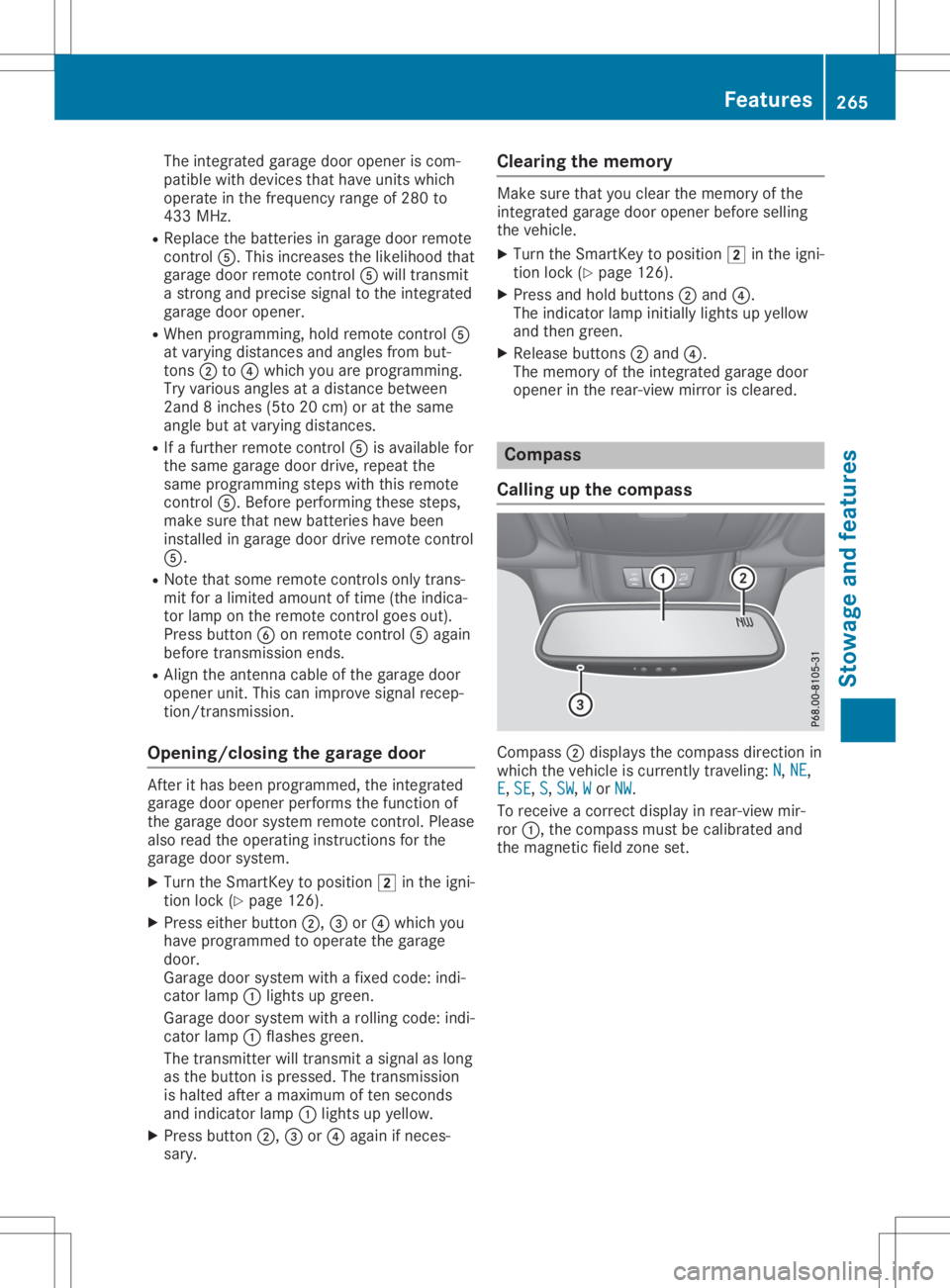
opener inthe rear-view mirroriscleared. Compass
Calling upthe compass Compass
0044display sthe compass directionin
which thevehicle iscurrent lytraveling: N N,
NE NE,
E E,
SE SE,
S S,
SW SW,
W W
or NW NW.
To receive acorrec tdisplay inrear-view mir-
ror 0043, thecompass mustbecalibrated and
the magnetic fieldzone set. Featur
es
265Stowage andfeatu res Z
Page 306 of 334
stantly,
thetire pressure monitorismalfunc-
tioning.
In addition tothe warning lamp,amessage
appea rsinthe multifunction display.Observe
the information ondispla ymessages
(Y page 230).
It may take uptoten minutes foramalfunc-
tion ofthe tire pressure monitortobe indica-
ted. Amalfunction willbeindicated bythe tire
pressure warninglampflashing forapprox-
imately oneminute andthen remaining lit.
When themalfunction hasbeen rectified, the
tire pressure warninglampgoesoutafter a
few minutes ofdriving.
The tirepressure valuesindicated bythe on-
board computer maydiffer fromthose meas-
ured atagas station withapressure gage.The
tire pressures shownbythe on-board com-
puter refertothose measured atsea level. At
high altitudes, thetire pressure valuesindica-
ted byapressure gagearehigher thanthose
shown bythe on-board computer. Inthis case,
do not reduce thetire pressures.
The operation ofthe tire pressure monitorcan
be affected byinterferen cefrom radio trans-
mitting equipment (e.g.radio headphones,
two-way radios)thatmay bebeing operated in
or near thevehicle.
Checki ngthe tire pressure electroni-
cally X
Make surethattheSmartKey isin position
0048 (Ypage 126)inthe ignition lock.
X Press the0059 or0065 button onthe steer-
ing wheel toselect theServ. Serv.
menu.
X Press the0063 or0064 button toselect
Tire Pressure Tire
Pressure.
X Press 0076.
The current tirepressure ofeach tireis
shown inthe multifunction display.
If the vehicle hasbeen parked forover
20 minutes, theTire pressure willbe Tire
pressure willbe
displayed afterdriving afew minutes displayed
afterdriving afew minutes
message appears.
Aft erateach-in process, thetire pressure
monitor automatically detectsnewwheels or
new sensors. Aslong asaclear allocation of
the tire pressure valuetothe individua lwheels
is not possible ,the Tire Pressure Monitor Tire
Pressure Monitor
Active Active
displaymessage isshown instead of
the tire pressure display.The tirepressures
are alread ybeing monitored. Tire
pressure monitorwarning mes-
sages The
tirepressure monitordetectsapressure
loss inone ormore tires:
R Ifthe tire pressure monitordetectsapres-
sure lossinone ormore tires,awarning
message isshown inthe multifunction dis-
play .The yellow tire pressure warninglamp
then lights up.
R Ifthe Please Correct TirePressure Please
Correct TirePressure
message appearsinthe multifunction dis-
play ,the tire pressure inat least onetireis
too low. Thetirepressure mustbecorrect ed
when theopportunity arises.
R Ifthe Check Tires Check
Tiresmessage appearsinthe
multifunction display,the tire pressure inat
least onetirehas dropped significantly. The
tires must bechecked.
R Ifthe Warning TireMalfunction Warning
TireMalfunction mes-
sage appea rsinthe multifunction display,
the tire pressure inat least onetirehas
dropped suddenly .The tires must be
checked.
Observe theinstruct ionsandsafety notesin
the displa ymessages inthe "Tires" section
(Y page 230).
If the wheel positions onthe vehicle arerota-
ted, thetire pressures maybedispla yedfor
the wrong positions forashort time.Thisis
rectified afterafew minutes ofdriving, andthe
tire pressures aredispla yedforthe correct
positions.
Restart ingthe tire pressure monitor When
yourestart thetire pressure monitor,all
existing warning messages aredeleted andthe
warning lampsgoout. Themonitor usesthe
currently settire pressures asthe reference
values formonitoring. Inmost cases, thetire
pressure monitorwillautomaticall ydetect the
new reference valuesafteryouhave changed
the tire pressure. However, youcan also set
reference valuesmanuall yas described here.
The tirepressure monitorthenmonitors the
new tirepressure values.
X Set thetire pressure tothe value recom-
mended forthe corresponding drivingsitua-
tion onthe Tire andLoading Information
placard onthe driver's sideB-pillar
(Y page 299). 304
Tire
pressur eWheels andtires