wheel MERCEDES-BENZ SL CLASS 2020 Workshop Manual
[x] Cancel search | Manufacturer: MERCEDES-BENZ, Model Year: 2020, Model line: SL CLASS, Model: MERCEDES-BENZ SL CLASS 2020Pages: 334, PDF Size: 17.43 MB
Page 172 of 334
Acti
veBod yCont rolABC (excep t
Mer cedes -AMGveh icles)
Set ting theveh icle level Gene
ralnot es
The vehiclelev elcan beset usin gth e
DY NA MIC SELECT but ton(Y page 133)or the
lev elbut ton. The setting always correspo nds
to thelast selected fun ction .
In ord erto red uce fuel consumpt ionand
impr ovethedri vin gdyn amic s,theveh icleis
lower edasits spee dinc reas es.IntheSp ort
and Sport Plusdri ve pro gram s,itis lower ed
by up to0.5in (13 mm)co mp ared totheno r-
mal vehicle level.In theComf ortand CURV E
driv eprog rams,itis lower edbyup to0.2in
(5 mm) compared totheno rm alveh icle level.
As thespee dis reduc ed,theveh icle israise d
up totheset vehicle heigh t.
Sel ect theno rm alleve lfor norm alroad surfa-
ces and theraise dleve lfor driv ingwith snow
ch ains oron part icular lypoor roadsurfaces .
Imp ortant safety notes G
WAR
NING
The vehicle islower edsligh tlyinthefoll ow-
ing situatio ns:
R theSPO RTsuspe nsion settingis selec ted
at theno rm alveh icle level
R theeng ineisswit ched off
Pers onsin thevic init yof thewheel archor
th eunde rbodymay thus bec ome trapped.
Ther eis arisk ofinjury.
Mak esure that nobody isin thevic init yof
th ewheel archor theunde rbodywhen you
swit choff theeng ine. Set
tingra ised level X
Mak esure that theeng ineisrun ningor that
it has been switched off bytheECO start /
st op fun ction .
X Mak esure that aspee dof 75 mph
(12 0km /h) isno texc eeded .
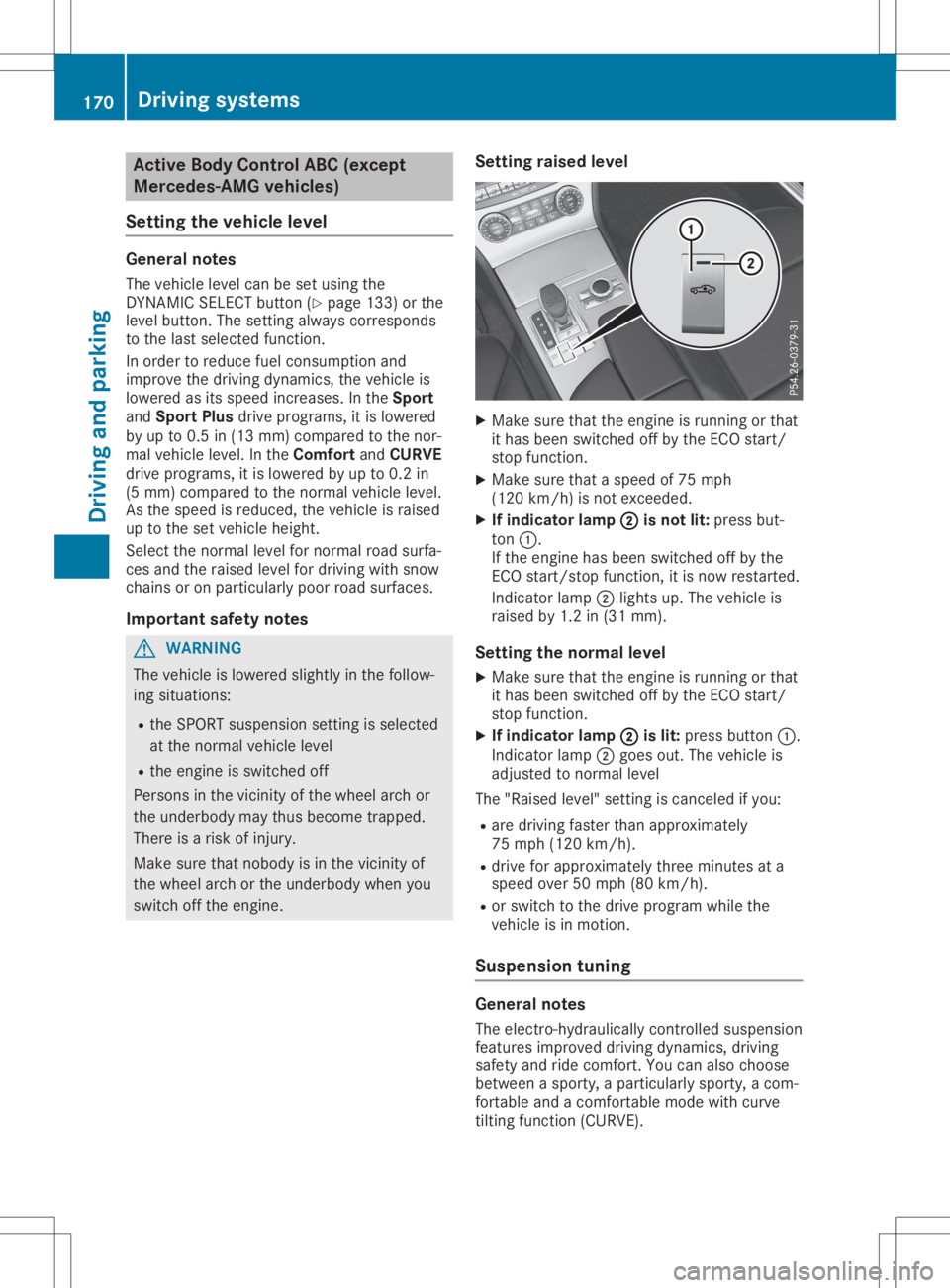
X Ifind icat orlam p0044 0044
isnot lit:pres sbut-
to n0043.
If th eeng inehas been switched off bythe
ECO start /stopfun ction ,it is no wres tarted.
In dicat orlamp 0044light sup. The vehicle is
raise dby 1.2in (31 mm).
Set tingth enor mallevel
X Mak esure that theeng ineisrun ningor that
it has been switched off bytheECO start /
st op fun ction .
X Ifind icat orlam p0044 0044
islit:pres sbutt on0043.
In dicat orlamp 0044goes out.The vehicle is
adjus tedto norm alleve l
The "Raised level"set tingis can celed ifyou:
R are drivingfast erthan appro ximately
75 mph (120km/ h).
R drive forapproximat elythree minut esata
speed over50mph (80km/ h).
R or switch tothe drive program whilethe
vehicle isin motion .
Suspension tuning General
notes
The elect ro-hydraulically controlled suspension
features improved drivingdynamics, driving
safety andride comf ort.You canalso choose
between asport y,apartic ularly sporty,acom-
fort able andacomf ortable modewithcurve
tilt ing func tion (CURVE). 170
Driving
systemsDriving andparking
Page 173 of 334
The
suspension iscont inuously tunedtoeach
wheel individually anddepends on:
R the road surface condition,e.g. bumps
R the vehicle load
R the drive program selected
Each timeyoustart theengine withtheSmart -
Key orthe Start /Stopbutton ,the Comfort
drive program isactivated. Furtherinformation
about startingthe engine (Ypage 127).
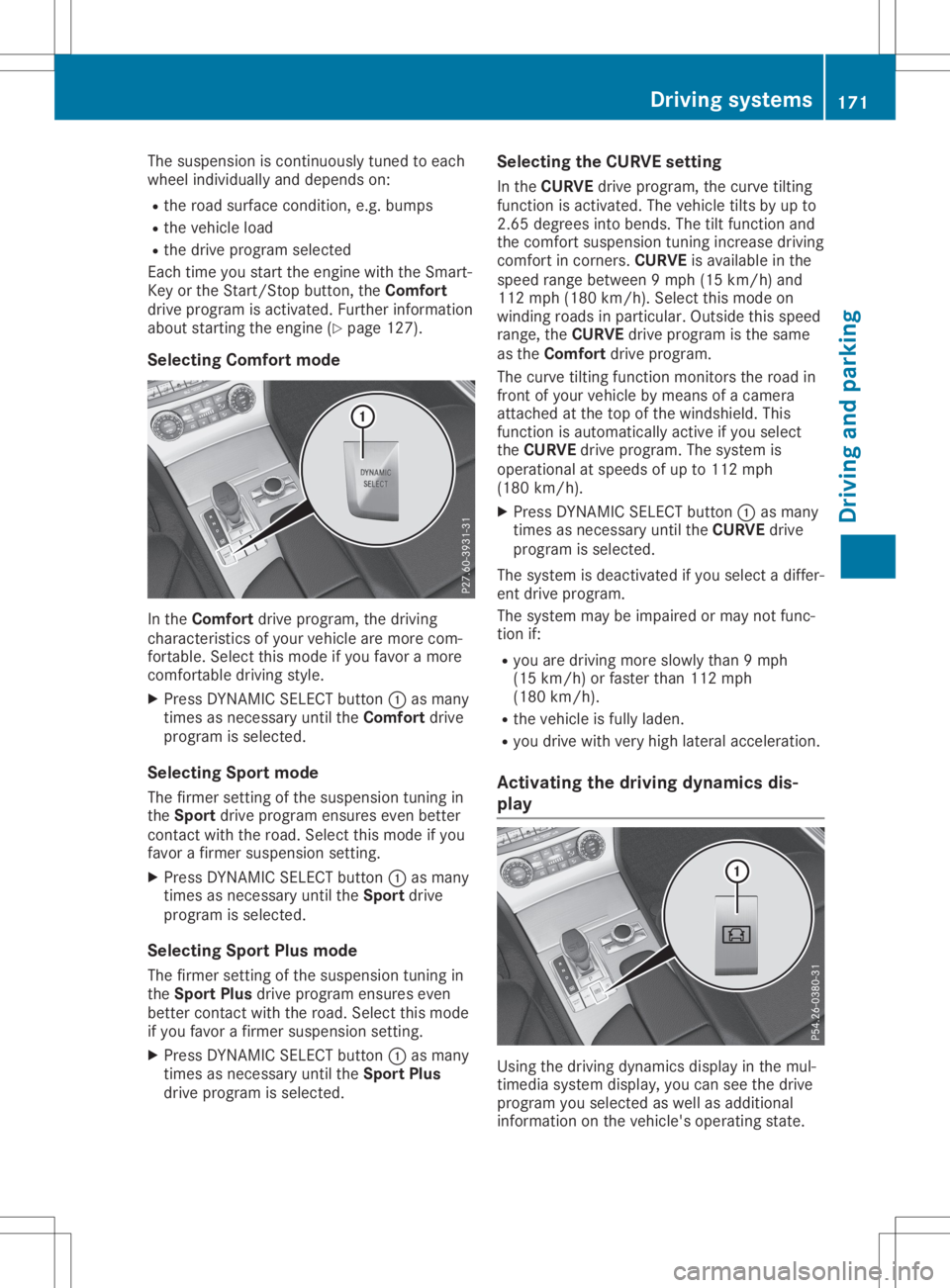
Selecting Comfortmode In
the Comfort driveprogram, thedriving
charact eristics ofyour vehicle aremore com-
fort able. Select thismode ifyou favor amore
comfor tabledriving style.
X Press DYNAMICSELECT button 0043asmany
times asnecessary untiltheComfort drive
program isselected.
Selecting Sportmode
The firmer settingofthe suspension tuningin
the Sport driveprogram ensuresevenbetter
cont actwith theroad. Select thismode ifyou
favor afirmer suspension setting.
X Press DYNAMICSELECT button 0043asmany
times asnecessary untiltheSport drive
program isselected.
Selecting SportPlusmode
The firmer settingofthe suspension tuningin
the Sport Plusdrive program ensureseven
better contactwith theroad. Select thismode
if you favor afirmer suspension setting.
X Press DYNAMICSELECT button 0043asmany
times asnecessary untiltheSport Plus
drive program isselected. Selecting
theCURVE setting
In the CURVE driveprogram, thecurve tilting
funct ionisactivated. Thevehicle tiltsbyup to
2.65 degrees intobends. Thetiltfunct ionand
the comfor tsuspension tuningincrease driving
comfor tin corn ers.CURVE isavailab lein the
speed rangebetween 9mph (15km/ h)and
112 mph (180 km/h).Sel ect this mod eon
wi ndi ng roa dsinpa rticu lar. Ou tsid ethis speed
rang e,the CURVE drive pro gramisthe same
as the Comfort drive pro gram.
The curv etil ting functi onmoni torstheroadin
front ofyour veh icleby mea nsofacame ra
atta ched atthe top ofthe windsh ield .Thi s
functi onisau toma tically acti veifyo usel ect
the CURVE drive pro gram.The system is
ope rationa lat spe eds ofup to112 mph
(180 km/h ).
X Pre ssDYNAM ICSELECT button 0043asmany
time sas neces sary unti lthe CURVE drive
pro gramissel ected .
The system isdea ctiva tedifyo usel ect adi ffer -
ent drive pro gram.
The system maybeimp aired ormay notfunc-
tion if:
R youare driving more slowlythan 9mph
(15 km/h )or fas ter than 112mph
(180 km/h ).
R the vehicleis ful lyladen.
R youdri ve with very highlatera lacce lerati on.
Ac tivati ngthe drivi ngdynami csdis -
play Usi
ngthe driving dynami csdispl ayinthe mul-
time diasy stem displ ay,yo ucan seethedrive
pro gramyousel ected aswellas additiona l
info rma tion onthe vehicle's ope ratingstate . Dri
ving sys tems
171Dri ving and parkin g Z
Page 174 of 334
X
Swi tch onthe multime diasy stem. Further
info rma tion canbefou ndinthe Digi talOpe r-
ato r'sManua l.
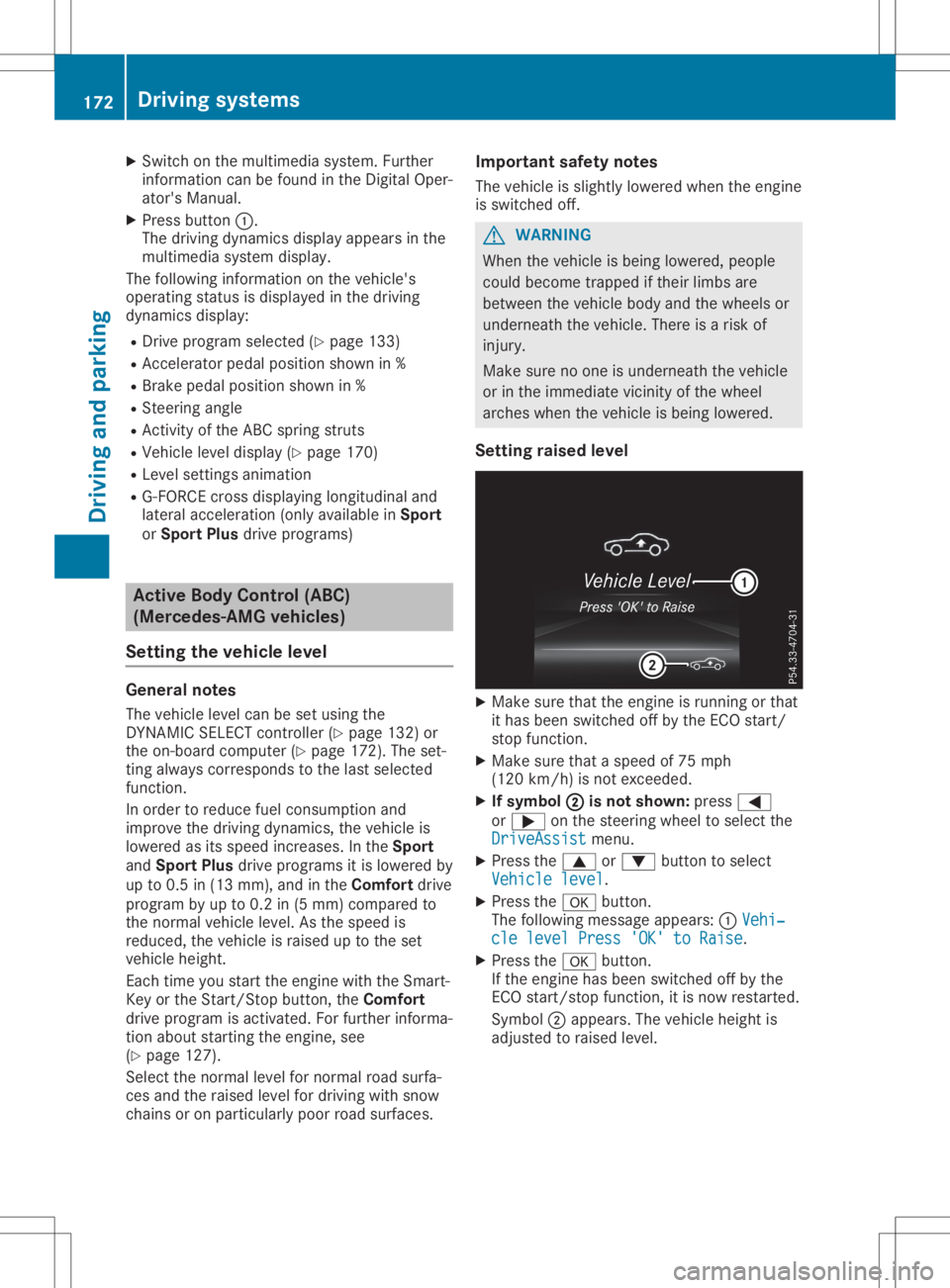
X Pre ssbutton 0043.
The driving dynami csdispl ayappea rsinthe
mul time diasy stem displ ay.
The followi ng info rma tion onthe vehicle's
ope ratingstatu sis displ ayed inthe driving
dy nami csdispl ay:
R Drive programsel ected (Ypage 133 )
R Accel erator ped alpos ition sho wnin%
R Brake pedalpos ition sho wnin%
R Steer ingang le
R Activi tyof the ABC spring stru ts
R Veh iclelevel displ ay(Y page 170)
R Leve lsetti ngsanimati on
R G-FO RCEcross displ aying longitu dinal and
la tera lacce lerati on(onl yava ilab lein Spo rt
or Spo rtPlu sdri ve pro grams) Ac
tive Body Control (ABC)
(Me rcedes -AM Gve hic les)
Se tting thevehic leleve l Gen
eral notes
The vehiclelevel can beset using the
DYNAM ICSELECT controller(Y page 132) or
the on-bo ardcomp uter(Y page 172 ).The set-
ting alwa yscorre sponds tothe last sel ected
functi on.
In ord erto red uce fuelconsu mptionand
imp rove thedriving dynami cs,the vehicleis
lo we red asits spe edincre ases. Inthe Spo rt
and SportPlu sdri ve pro grams itis lowe red by
up to0.5 in(13 mm),and inthe Comfort drive
pro gramby up to0.2 in(5 mm )comp aredto
the norma lveh iclelevel .As the speedis
red uce d,the vehicleis rai sed uptothe set
veh iclehei ght.
Each timeyoustar tthe engi newith the Smar t-
Key orthe Start/Sto pbu tton, theComfort
dri ve pro gramisacti vate d.For further informa -
tion abou tstar ting theengi ne,see
(Y page 127).
Sel ect the norma lle vel fornorma lroa dsu rfa -
ces and theraised level fordriving with snow
cha insoron particu larly poo rroa dsu rfa ces. Impo
rtant safetynotes
The vehicleis slightl ylo we red when the engi ne
is swi tched off. G
WARNI
NG
Whe nthe vehicleis bei ng lowe red ,peo ple
cou ldbeco metrap ped ifthei rlimbs are
betw eenthevehiclebod yand thewheel sor
und erne aththe vehicle. The reisaris kof
inju ry.
Ma kesure no one isund erne aththe vehicle
or inthe imm ediate vicinity ofthe wheel
arch eswhen the vehicleis bei ng lowe red .
Se tting raisedleve l X
Ma kesure that theengi neisrunni ngorthat
it ha sbee nswi tched offbythe ECO start/
stop functi on.
X Ma kesure that aspe edof75 mph
(120 km/h )is not excee ded.
X Ifsymb ol0044 0044
isno tsho wn:pre ss0059
or 0065 onthe stee ring wheel tosel ect the
Driv eAssist Driv
eAssistmenu .
X Pre ssthe 0063 or0064 button tosel ect
Vehi clelevel Vehi
clelevel.
X Pre ssthe 0076 button.
The followi ng mes sage appea rs:0043 Vehi ‐ Vehi
‐
cle levelPres s'OK' toRais e cle
levelPres s'OK' toRais e.
X Pre ssthe 0076 button.
If the engi nehasbee nswi tched offbythe
ECO start/stop function,itis now resta rted.
Symb ol0044 appea rs.The vehiclehei ght is
ad juste dto raised level . 17
2 Dri
vin gsys temsDriving and parking
Page 175 of 334
Setting
thenormal level X
Make surethattheengine isrunning orthat
it has been switched offbythe ECO start/
stop funct ion.
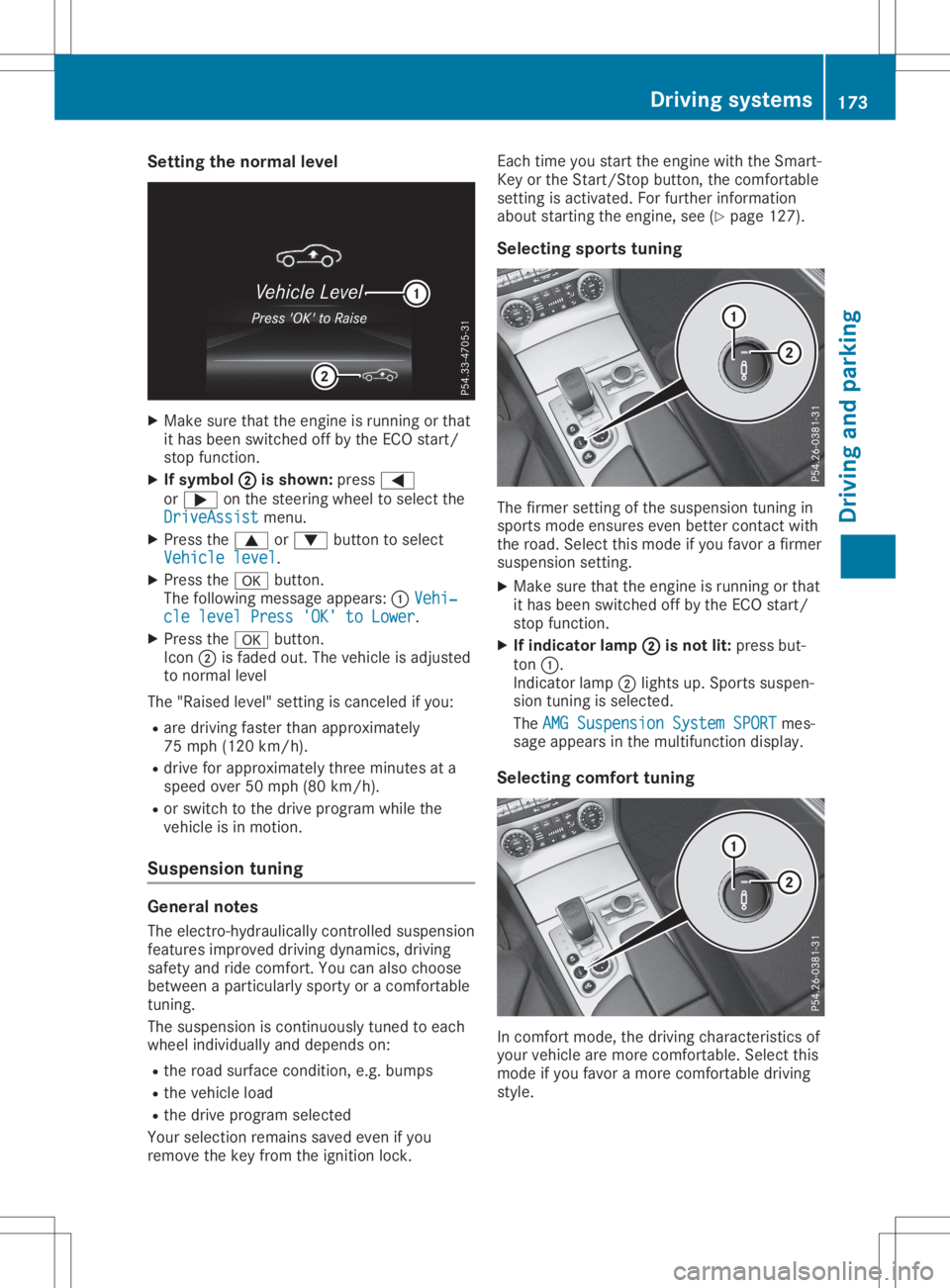
X Ifsymbol 0044 0044
isshown: press0059
or 0065 onthe steering wheeltoselect the
DriveAssist DriveAssist
menu.
X Press the0063 or0064 button toselect
Vehicle level Vehicle
level.
X Press the0076 button.
The following messageappears:0043Vehi‐ Vehi‐
cle level Press'OK'toLower cle
level Press'OK'toLower.
X Press the0076 button.
Icon 0044isfaded out.Thevehicle isadjusted
to normal level
The "Raised level" settingis canceled ifyou:
R are driving fasterthanapproximately
75 mph (120 km/h).
R drive forapproximately threeminutes ata
speed over50mph (80km/h).
R or switch tothe drive program whilethe
vehicle isin motion.
Suspension tuning General
notes
The electro- hydraulicallycontrolled suspension
features improved drivingdynamics, driving
safety andride comfort .You canalso choose
between aparticularly sportyoracomfort able
tuning.
The suspension iscont inuously tunedtoeach
wheel individual lyand depends on:
R the road surface condition ,e.g. bumps
R the vehicle load
R the drive program selected
Your selection remainssavedevenifyou
remove thekey from theignition lock. Each
timeyoustart theengine withtheSmart-
Key orthe Start /Stopbutton, thecomfort able
settin gis activated. Forfurther information
about startin gthe engine, see(Ypage 127).
Selec tingsports tuning The
firmer settingof the suspension tuningin
sports modeensures evenbetter contactwith
the road. Select thismode ifyou favor afirmer
suspension setting.
X Make surethattheengine isrunning orthat
it has been switched offbythe ECO start/
stop funct ion.
X Ifindicator lamp0044 0044
isnot lit:press but-
ton 0043.
Indicator lamp0044lights up.Sports suspen-
sion tuning isselected.
The AMG Suspension SystemSPORT AMG
Suspension SystemSPORTmes-
sage appears inthe multifunct iondisplay .
Selec tingcomfort tuning In
comfort mode,thedriving characterist icsof
your vehicle aremore comfort able.Select this
mode ifyou favor amore comfort abledriving
style. Driving
systems
173Drivingandparking Z
Page 180 of 334
parkin
gprocedure withtheParkin gPackage
with rearview camera.
! If
they cannotbe avoided, driveover
obstac lessuch ascurbs slowly andatan
obtuse angle.Otherwise, youmay damage
the wheels ortires.
Ac tive Parkin gAssist mayalsoshow parkin g
spaces whicharenot suitable forparkin g,for
example:
R where parkingor stoppin gis prohibited
R in fron tof driveways orent ranc esand exits
R on unsuitable surfaces
Parkin gtips:
R on narro wroads, driveasclose tothe park-
ing space aspossible
R parkin gspaces thatarelittered orover-
grown mightbeident ifiedormeasured
incor rectly
R parkin gspaces thatarepartially occupied
by trailer drawbars mightnotbeident ified
as such orbe measured incorrectly
R snowfall orheavy rainmay lead toaparkin g
space beingmeasured inaccurately
R pay attention tothe warning messages of
Parkin gAssist PARKTRONI Cduring the
parkin gprocedure (Ypage 175)
R you can interven ein the steer ingprocedure
to corr ectitat any time. Active Parkin g
Assist willthen becanc eled
R when transport ingaload which protrudes
from yourvehicle, youshould notuse Active
Parkin gAssist
R never useActive Parkin gAssist whensnow
chains areinstalled
R make surethatthetire pressures arealways
corr ect.This hasadirect influen ceon the
parkin gcharact eristicsof the vehicle
Use Active Parkin gAssist forparkin gspaces:
R parallel oratright angles tothe direct ionof
trav el
R on straight roads, notbends
R on the same levelasthe road, e.g.noton
the pavement
Detecting parking spaces Objec
tslocated abovethedetec tionrange of
Ac tive Parkin gAssist willnotbedetec ted
when theparkin gspace ismeasured. These are
not taken intoaccoun twhen theparkin g
procedure iscalculated, e.g.overhan ging
loads, tailsect ions orloading rampsoftruc ks.
Ac tive Parkin gAssist maytherefore guide you
int othe parkin gspace tooearly. G
WARN
ING
If ther eare objec tsabove thedetec tion
range:
R the Parkin gPackage withrearview cam-
era may steer tooearly
R the vehicle maynotstop infron tof these
objec ts
This could cause acollision. Thereisarisk
of an acciden t.
If objec tsare located abovethedetec tion
range, stopanddeactiv atethe Parkin gPack-
age with rearview camera.
Furt herinfor mation aboutthedetec tionrange
(Y page 174).
Ac tive Parkin gAssist doesnotassist youpark-
ing inspaces perpendic ulartothe direct ionof
trav elif:
X Two parkin gspaces arelocated directlynex t
to one anot her.
X The parkin gspace isdirect lynex tto alow
obstac lesuch asalow curb.
X You park forwards.
Ac tive Parkin gAssist doesnotassist youpark-
ing inspaces thatareparallel oratright angles
to the direct ionoftrave lif:
R the parkin gspace ison acurb
R the system readstheparkin gspace asbeing
block ed,forexample byfoliage orgrass
paving blocks
R the area istoo small forthe vehicle to
maneuver into
R the parkin gspace isbordered byan obsta-
cle, e.g. atree, apost oratrailer G
WARN
ING
If ther eare objec tsabove thedetec tion
range:
R Ac tive Parkin gAssist maysteer tooearly
R the vehicle maynotstop infron tof these
objec ts 178
Driving
systemsDriving andparking
Page 181 of 334

This
could cause acollision. Thereisarisk
of an accident .
If object sare located abovethedetect ion
range, stopanddeactivate Active Parking
Assist . 0043
Detec tedparking spaceonthe left
0044 Parking symbol
0087 Detec tedparking spaceonthe right
Act ive Parking Assistisswitched onautomati-
cally when driving forwards. Thesystem is
operational atspeeds ofup toapproximately
22 mph (35km/ h).Whi lein ope ration, the
sy stem indepe ndentl ylo cate sand measures
pa rking spaces onboth sides ofthe vehicle.
Active Parking Assistwillonly detectparking
spa ces:
R pa ral lelor atright ang lesto the directi onof
trav el
R pa ral lelto the directi onoftrav eland atleas t
59 in(1.5 m)wid e
R pa rallel to the directi onoftra vel and atleas t
39.5 in(1.0 m)longer thanyo ur veh icle
R at right ang lesto the directi onoftrav eland
at leas t39.5 in(1.0 m)wid ertha nyo ur veh i-
cle
Wh endrivin gat spee ds below 19 mph
(30 km/h ),yo uwi llse epa rki ng symbo l0044 as
a sta tus indicator inthe instrument cluste r.
Wh enapa rki ng space hasbe en detecte d,an
ar row towards the right or the left also
ap pe ars. By default, Activ ePa rki ng Assi stonl y
di sp lays parki ng space son the front-
pa sse nge rsi de .Pa rki ng space son the driver 's
si de aredisp laye das soo nas the turnsigna l
on the driver 'sside isacti vated .Wh enparki ng
on the driver 'sside ,thi smu strem ain acti vated
unti lyo uconfi rmthe useof Activ ePa rki ng
Assi stby pre ssing the 0076 button onthe mul-
tifu nctio nste ering wheel.The syste mautoma t-
ica lly de term ineswh eth erthe parki ng space is
pa rallel or atright ang lesto the directi onof
tra vel . A
pa rki ng space isdisp laye dwh ile yo uar e
dri vin gpa st it, and untilyo uar eap pro xim ately
50 ft(15 m)awa yfrom it.
Pa rki ng G
WA
RNI NG
Acti veParki ng Ass istonl ysu pp orts youwi th
ac tiv este ering inte rventio n.Ifyo udo not
ap plythe brakes yourse lf,the reisthe risk of
an accid ent.
Alw aysap plythe brakes yourse lfwh ile
ma neu vering and parki ng. G
WA
RNI NG
Th ePa rki ng Packa gewith rea rvi ew camer a
onl ysu pp orts youwi th activ este ering inte r-
ven tion.Ifyo udo not applythe brakes your-
se lf,the reisthe risk ofan accid ent.
Alw aysap plythe brakes yourse lfwh ile
ma neu vering and parki ng.
X Stop thevehiclewh en the parki ng space
sy mbo lsho wsthe desired parki ng spacein
the instrumen tclu ste r.
X Shi ftthe transmi ssion topositio n005E.
Th eSta rtParkingAss ist?Yes :OK Sta
rtParkingAss ist?Yes :OK
No: No:
0038 message appe arsin the multifu nc-
tio ndisp lay.
X To canc elthe proc edure:pressthe 0038
bu tton onthe multifu ncti onsteering wheel
or pullaw ay.
or X To
park using Activ ePark ingAs sist:
pre ssthe 0076 button onthe multifu ncti on
ste ering wheel.
Th ePar kingAss ist Active Acceler‐ Par
kingAss ist Active Acceler‐
ate andBrakeObserveSur roundings ate
andBrakeObserveSur roundings
mes sage appe arsin the multifu ncti ondis-
pl ay .
X Let goofthe multifu ncti onsteering wheel.
X Ba ck up the vehicle, be ing readytobra keat
al ltim es.Wh enbackin gup ,dri ve atasp ee d
be low ap pro xim ately6mph (10km/h ).Oth - Dr
ivi ng system s
179Drivi ng andparki ng Z
Page 182 of 334

erwise,
Active Parkin gAssist willbecan-
celed.
X Stop assoon asParkin gAssist PARKTRONIC
sounds thecontinuous warning tone,ifnot
before.
Maneuverin gmay berequired intight park-
ing spaces.
The Parking AssistActiveSelectD Parking
AssistActiveSelectD
Observe Surroundings Observe
Surroundingsmessage appearsin
the multifunc tiondisplay.
X Shift thetran smission toposition 005Bwhile
the vehicle isstat ionary.
Act ive Parkin gAssist immediately steersin
the other direction.
The Parking AssistActiveAcceler‐ Parking
AssistActiveAcceler‐
ate andBrake Observe Surroundings ate
andBrake Observe Surroundings
message appearsinthe multifunc tiondis-
play.
i You
willachieve thebest results bywaiting
for the steerin gprocedure tocomplet e
before pulling away.
X Drive forwards andbeready tobrake atall
times.
X Stop assoon asParkin gAssist PARKTRONIC
sounds thecontinuous warning tone,ifnot
before.
The Parking AssistActiveSelectR Parking
AssistActiveSelectR
Observe Surroundings Observe
Surroundingsmessage appearsin
the multifunc tiondisplay.
As soon asthe parking procedure iscomplet e,
the Active Parking AssistFinished Active
Parking AssistFinishedmes-
sage appears onthe multifunc tiondisplay and
you hear aton e.The vehicle isnow parked.
Act ive Parkin gAssist nolonger supports you
with steerin ginter ventions. When Active Park-
ing Assist isfinished, youmust steer again
yourself. ParkingAssist PARKTRONIC isstill
available.
Parkin gtips:
R The way your vehicle isposition edinthe
parking spaceafterparking isdependent on
various factors. These include theposition
and shape ofthe vehicles parkedinfron t
and behind itand theconditions ofthe loca-
tion .It may bethe case thatActive Parkin g
Assist guides youtoofarinto aparking
space, ornot farenough intoit.Insome
cases, itmay alsolead youacross oront o the
curb. Ifneces sary,cancelthe parking
procedure withActive Parkin gAssist .
R You canalso preselect transmission position
005B. The vehicle redirect sand does notdrive
as far into theparking space.Should the
tran smission changetakeplace tooearly,
the parking procedure iscanc eled. Asensi-
ble parking position cannolonger beach-
ieved fromthisposition .
Exiting apar king space In
order thatActive Parkin gAssist cansupport
you when exitingthe parking space:
R the border ofthe parking spacemustbe
high enough atthe fron tand therear. A
curb istoo small, forexample.
R the border ofthe parking spacemustnotbe
too wide. Yourvehicle canbemaneuvered
into aposition atamaximum of45° tothe
start ingposition inthe parking space.
R amaneuverin gdistanc eof at least 3.3ft
(1.0 m)must beavailable.
Act ive Parkin gAssist canonly assist youwith
exitin gaparking spaceifyou have parked the
vehicle parallel tothe direct ionoftravel using
Act ive Parkin gAssist .
X Start the engine.
X Release theelectr icparking brake.
X Switc hon the turn signal inthe direct ion
you willdrive outofthe parking space.
X Shift thetran smission toposition 005Bor005E.
The Start Parking Assist?Yes:OK Start
Parking Assist?Yes:OK
No: No:0038
messageappearsinthe multifunc -
tion display.
X To cancel theprocedure: pressthe0038
button onthe multifunc tionsteerin gwheel
or pull away.
or
X To
exit apar king space usingActive
Park ingAssist: pressthe0076 button on
the multifunc tionsteerin gwheel.
The Parking AssistActiveAcceler‐ Parking
AssistActiveAcceler‐
ate andBrake Observe Surroundings ate
andBrake Observe Surroundings
message appearsinthe multifunc tiondis-
play.
X Let goofthe multifunc tionsteerin gwheel.
X Pull away, beingready tobrake atall times.
Do not exceed amaximum speedofapprox-
imately 6mph (10km/ h)when exitinga
parking space.Otherwise, Active Parkin g
Assist willbecanc eled. 180
Driving
systemsDriving andparking
Page 185 of 334

0087
Yellow guidelineforthe vehic lewidth
inc luding theexterior mirrors, atthe cur-
ren tste erin gwheel angle(dynamic )
0085 Yellow lanemark ingthe cours ethe tires
will takeat the curr entsteerin gwheel
angle (dynamic ) 0083
Yellow guidelineatadistan ceofapprox -
imate ly3ft (1. 0m) from therear area
0084 Vehic lecen teraxle (mark erassist ance)
006B Bumper
006C Red guide lineatadistan ceofapprox -
imate ly12 in(0. 30 m)from therear area
The guide linesareshown whenthetransm is-
sion isin posit ion005E.
The distan cespecif ications onlyapply to
obje ctsthat areatgroun dlevel. 0043
Frontwarnin gdisplay
0044 Addit ional measurem entoperat ionalreadi-
ness indicatorforthe Park ingPack age
with rearview camer a
0087 Rear warnin gdisplay
Vehicles withthePar king Packa gewith
rea rview camer a:when thePark ingPack age
with rearview camer ais operat ional
(Y page 174), addition almeasurem entopera-
tion alreadin essindic ator0044appears inthe
multim ediasyste m.Ifthe Park ingPack age with
rearwarnin gdisplays areactive orlight
up, warnin gdisplays 0043and 0087are also active
or light upcor respon dinglyinthe multim edia
syste m.
"Rever separking" funct ion Ba
cking upstraight intoapa rking space
withou tsteer inginpu t 0043
Whit eguide linewithout steerin ginput –
vehic lewidth including theexterior mirrors
(stat ic)
0044 Yellow guidelineforthe vehic lewidth
inc luding theexterior mirrors, atthe cur-
ren tste erin gwheel angle(dynamic )
0087 Yellow guidelineatadistan ceofapprox -
imate ly3ft (1. 0m) from therear area
0085 Red guide lineatadistan ceofapprox -
imate ly12 in(0. 30 m)from therear area
X Make surethattherear view camer ais act i-
vate d(Y page 182).
The lane andtheguide linesareshown .
X With thehelp ofwhite guide line0043,chec k
wheth erthe vehic lewill fitintothe park ing
space.
X Usin gwhite guide line0043asaguide, care-
fully back upunt ilyou reach theend posi-
tion .
Red guide line0085isthe nat the end ofthe
park ingspace. Thevehic leisalmost parallel
in the park ingspace. Driving
systems
183Driving andparking Z
Page 186 of 334

Reve
rseperpe ndicularparkin gwi th
ste ering input 0043
Parking spacemar king
0044 Yellow guide line for the vehi clewidth
incl uding the exteri ormirr ors, atthe cur-
rent steering wheelang le(dyna mic)
X Drive past the parking spaceand bring the
vehi cletoastand still.
X Ma kesure that therearvie wcame raisacti -
vate d(Y page 182).
The lane and theguide lines areshown.
X Whi lethe vehi cleisat astand still,turn the
stee ring wheelin the directi onofthe park-
ing spaceunti lye llow guide line 0044 reaches
pa rking spacemar king 0043.
X Ma inta inthe stee ring inputand reverse
care fully. 0043
Yellow guide line for the vehi clewidth
incl uding the exteri ormirr ors, atthe cur-
rent steering wheelang le(dyna mic)
X Stop thevehi clewhe nit is almost exactly in
front ofthe parking space.
The whitelane sho uld be asclo setoparal lel
wi th the parking spacemar king aspos sible. 0043
Whiteguide line atthe curr entstee ring
inp ut
0044 Parking spacemar king
X Tu rn the stee ring wheelto the center posi-
tion whilethe vehi cleisstati onary. 0043
Redgu ide line atadi stance ofappro x-
ima tely 12in(0.30 m)from the rearar ea
0044 Whiteguide line withou tste ering input
0087 End ofparki ng space
X Bac kup car efully unti lyo uha ve rea che dthe
fin alpo sitio n.
Re dgu ide line 0043 isthe nat end ofparki ng
sp ace 0087.The vehicleis almos tpa rallel in
the parki ng space . 18
4 Dr
ivi ng system sDrivi ng andparki ng
Page 192 of 334
In
such cases, ActiveLaneKeepi ngAssist
can:
R give anunnecessary warningandthen
make a<00460052005800550056004800100046005200550055004800460057004C0051
004A[ brakeapplica-
tion
R neither giveawarning norintervene
There isarisk ofan accident.
Alway spay particul arattention tothe traffic
situa tionandkeep within thelane, espe-
ciall yif Active LaneKeepi ngAssist alerts
you .Terminate theintervention inanon-crit-
ical driving situation.
The system maybeimpa iredormay notfunc-
tion if:
R there ispoor visibility,e.g. due toinsuffi-
cient illuminatio nof the road, ordue to
snow, rain,fogorheavy spray
R there isglare ,e.g. from oncoming traffic,
the sun orreflection fromother vehicle s
(e.g. ifthe road surface iswet)
R the windshi eldisdirty, fogged up,dama ged
or covered, forinstance byasticker, inthe
vicinity ofthe camera
R there arenolane markings, orseveral
unclea rlane markings arepresent, e.g.
arou ndconstruction sites
R the lane markings areworn away,dark or
covered up,e.g. bydirt orsnow
R the distance tothe vehicle infront istoo
short andthus thelane markings cannotbe
detected
R the lane markings changequickly, e.g.lanes
branch off,cross oneanother ormerge
R the road isnarrow andwindi ng
R there arehighl yvaria bleshade conditions
on the roadw ay
R no vehicle isdetected inthe adjacent lane
and there arebroken lanemarkings
Warning vibration inthe steering wheel
A warning maybegiven ifafront wheel passes
over alane marking. Youwillthen bewarned
by means ofavibratio nthrough thesteering
wheel lasting forupto1.5 seconds .
In order thatyouarewarned onlywhen neces-
sary andingood timeifyou cross thelane
marking, thesystem detects certaincondi-
tions andwarns youaccordingly . The
warning vibrationoccurs earlierif:
R you appro achtheouter lanemarking ona
bend
R the road hasvery widelanes, e.g.afreewa y
R the system detects solidlanemarkings
The warning vibrationoccurs laterif:
R the road hasnarrow lanes
R you cutthe corner onabend
Lane-c orrecting brakeapplication G
WARNING
A lane-correcting brakeapplication cannot
alw ays bring thevehicle backintotheorigi-
nal lane. There isarisk ofan accident.
Alway ssteer, brakeoraccelera teyou rself,
especia llyifActive LaneKeepi ngAssist
warns youormakes alane-correcting brake
appl ication. G
WARNING
Active LaneKeepi ngAssist onlydetects traf-
fic conditions orroad users toalimi ted
extent. Invery rarecases, thesystem may
make aninapp ropria tebrake application,
e.g. after intentionally drivingoverasolid
lane marking. Thereisarisk ofan accident.
An inapp ropria tebrake application maybe
interrupted atany time ifyou steer slightly
in the opposi tedirection. Alwaysmake sure
that there issufficie ntdistance onthe side
for other traffic orobstacle s.
In rare cases, ActiveLaneKeepi ngAssist
could detect broken linemarkings orspecia l
structures onthe road surface assolid lane
markings. Aninapp ropria tebrake application
can beinterrupted atany time, forexample if
you steer slightlyinthe opposi tedirection. 190
Drivi
ngsystemsDrivi ngand parking