wheel MERCEDES-BENZ SL CLASS 2020 Repair Manual
[x] Cancel search | Manufacturer: MERCEDES-BENZ, Model Year: 2020, Model line: SL CLASS, Model: MERCEDES-BENZ SL CLASS 2020Pages: 334, PDF Size: 17.43 MB
Page 193 of 334
If
you leaveyou rlane, under certain circum-
stances thevehicle willbrake brieflyon one
side. Thisismeant toassis tyou inbringing the
vehicle backtothe origina llane.
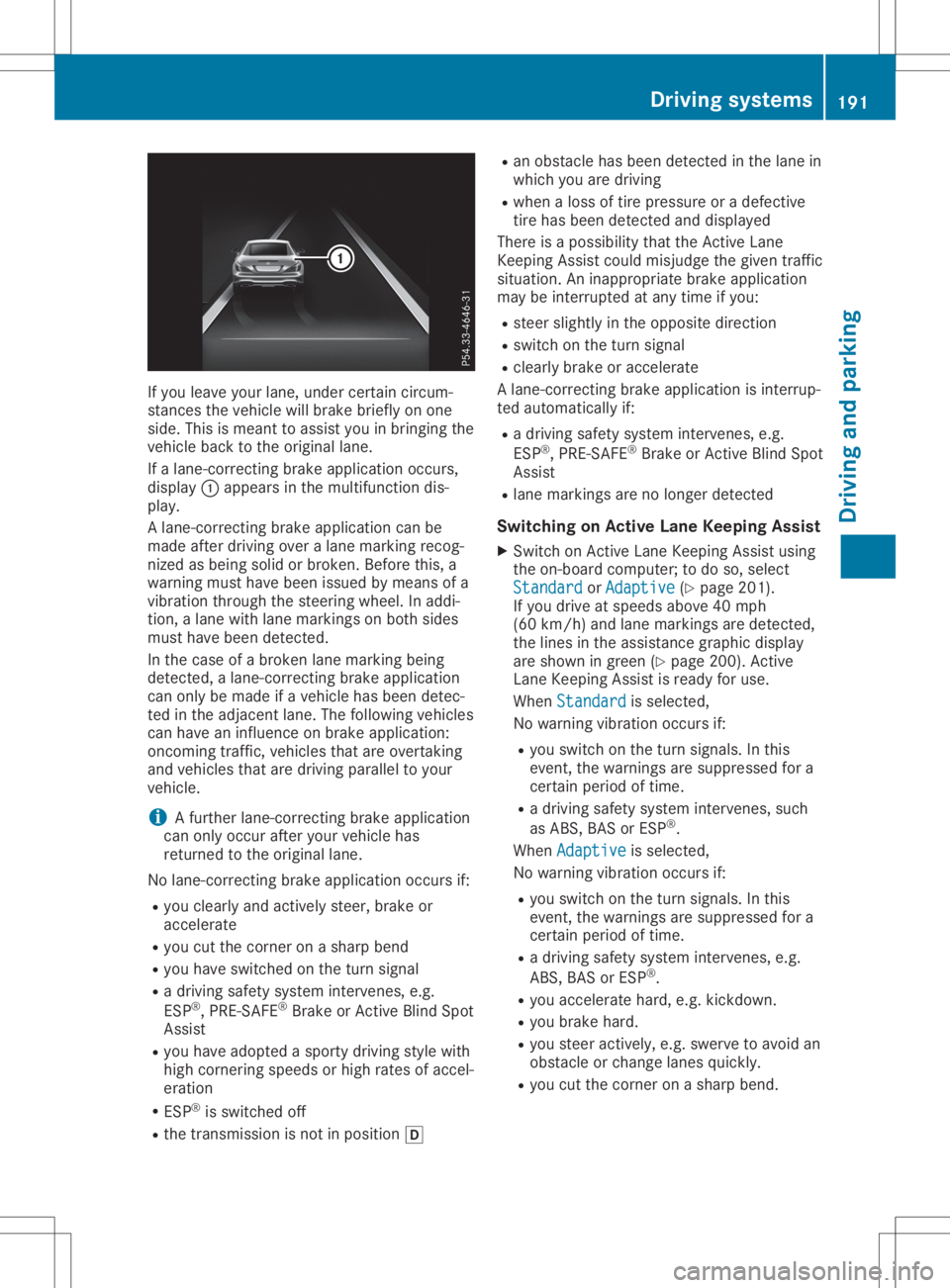
If alane-correcting brakeapplication occurs,
displ ay0043 appe arsinthe multifu nctiondis-
pla y.
A lane-correcting brakeapplication canbe
made afterdriving overalane marking recog-
nized asbeing solidorbroken. Beforethis,a
warning musthavebeen issuedbymeans ofa
vibratio nthrough thesteering wheel.In addi -
tion, alane with lanemarkings onboth sides
must havebeen detected.
In the case ofabroken lanemarking being
detected, alane-correcting brakeapplication
can only bemade ifavehicle hasbeen detec-
ted inthe adjacent lane.Thefollow ingvehicle s
can have aninflue nceonbrake application:
oncoming traffic,vehiclesthat areovertaking
and vehicle sthat aredriving paralleltoyou r
vehicle .
i A
further lane-correcting brakeapplication
can only occur afteryourvehicle has
returned tothe origina llane.
No lane-correcting brakeapplication occursif:
R you clearl yand actively steer,brakeor
accelera te
R you cutthe corner onasharp bend
R you have switched onthe turn signal
R adriving safetysystem intervenes, e.g.
ESP ®
,PRE-SAFE ®
Brake orActive BlindSpot
Assist
R you have adoptedasporty driving stylewith
high cornering speedsor high rates ofaccel-
eration
R ESP ®
is switched off
R the transmission isnot inpositio n005B R
an obstacle hasbeen detected inthe lane in
which youaredriving
R when aloss oftire pressu reor adefective
tire has been detected anddispl ayed
There isapossib ility that theActive Lane
Keepi ngAssist couldmisjudge thegiven traffic
situa tion. Aninapp ropria tebrake application
may beinterrupted atany time ifyou :
R steer slightlyinthe opposi tedirection
R switch onthe turn signal
R clearl ybrake oraccelera te
A lane-correcting brakeapplication isinterrup-
ted automa ticallyif:
R adriving safetysystem intervenes, e.g.
ESP ®
,PRE-SAFE ®
Brake orActive BlindSpot
Assist
R lane markings arenolonger detected
Swi tching onActiv eLane Keeping Assist
X Switch onActive LaneKeepi ngAssist using
the on-board computer; todo so, select
Standard Standard
orAdaptive Adaptive
(Ypage 201).
If you drive atspeed sabove 40mph
(60 km/h )and lane markings aredetected,
the lines inthe assis tance graphi cdispl ay
are shown ingreen (Ypage 200). Active
Lane Keepi ngAssist isready foruse.
When Standard Standard
isselected,
No warning vibrationoccurs if:
R you switch onthe turn signal s.In this
event, thewarnings aresupp ressed fora
certain periodoftime.
R adriving safetysystem intervenes, such
as ABS, BASorESP ®
.
When Adaptive Adaptive
isselected,
No warning vibrationoccurs if:
R you switch onthe turn signal s.In this
event, thewarnings aresupp ressed fora
certain periodoftime.
R adriving safetysystem intervenes, e.g.
ABS, BASorESP ®
.
R you accelera tehard, e.g.kickdown.
R you brake hard.
R you steer actively ,e.g. swerve toavoid an
obstacle orchange lanesquickly.
R you cutthe corner onasharp bend. Drivi
ngsystems
191Drivingand parking Z
Page 196 of 334
0063
0064 Press
andhold:
R In the Audio Audio
menu: selects apre-
set listorastation listinthe
desired frequency range,selects
an audio trackorvideo scene
using rapidscrolling
R In the Tel Tel
(Telephone) menu:
starts rapidscrolling ifthe phone
book isopen 0076 R
Confirms theselection ordisplay
message
R In the Tel Tel
(Telephone) menu:
switches tothe telephone book
and starts dialingthe selected
number 0038 Press
briefly:
R Back
R Switches offthe Voice Control
System
R Hides display messages orcalls
up the last Trip Trip
menu function
used
R Exit sthe telephone book/redial
memory 0038 Press
andhold:
R Call sup the standard displayin
the Trip Trip
menu Right
control panel 0076 R
Rejects orends acall
R Exit sthe telephone book/redial
memory 0061 R
Makes oraccepts acall
R Switches tothe redial memory 0081
0082 R
Adjusts thevolume 0063 R
Mute 0059 R
Switches onthe Voice Control
System Further
information onthe Voice Control Sys-
tem isavaila bleinthe separate operating
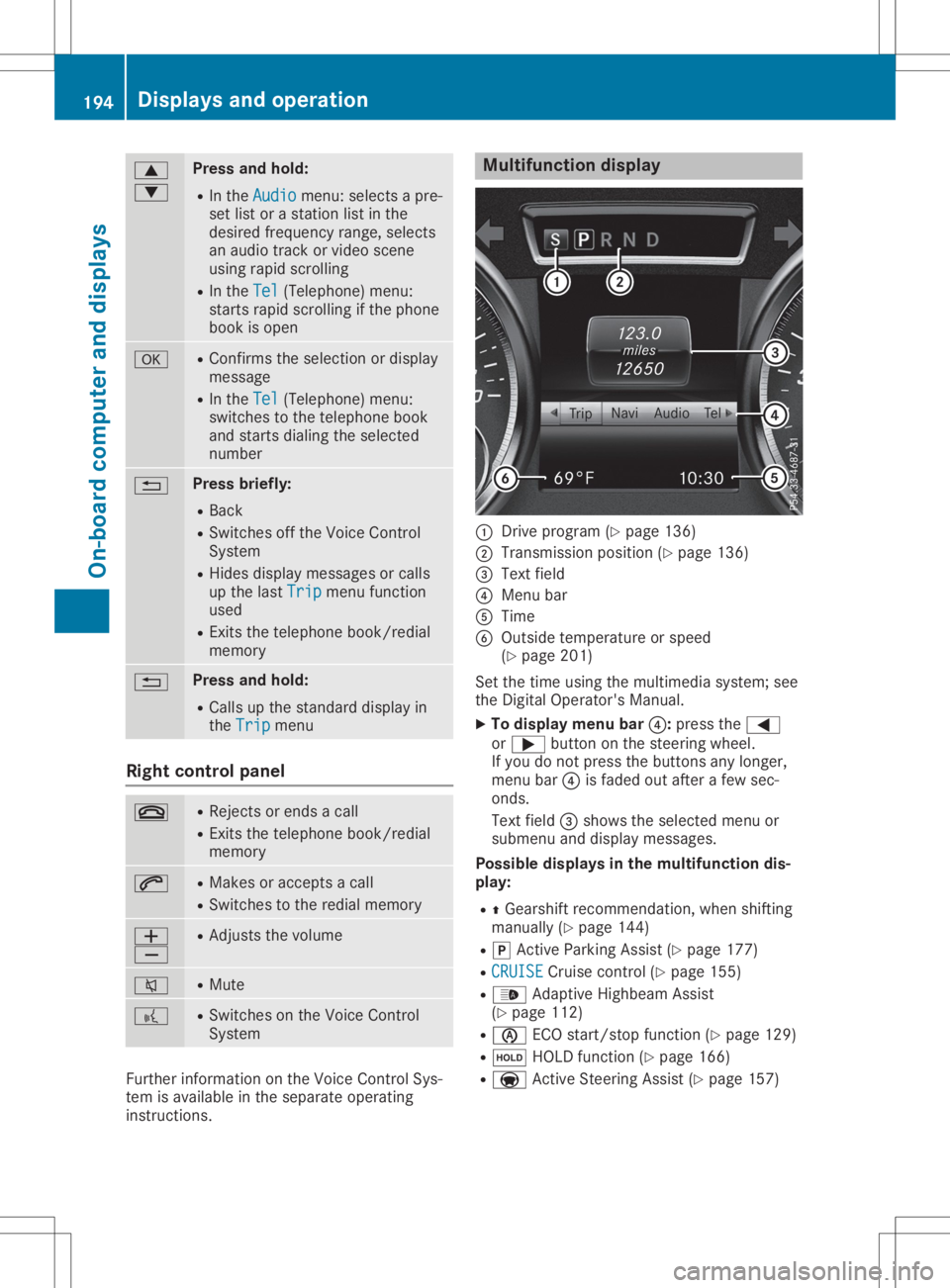
instruct ions. Multifunction
display 0043
Drive program (Ypage 136)
0044 Transmission position(Ypage 136)
0087 Text field
0085 Menu bar
0083 Time
0084 Outside temperature orspeed
(Y page 201)
Set thetime using themultimedia system;see
the Digital Operator's Manual.
X To display menubar0085:press the0059
or 0065 button onthe steering wheel.
If you donot press thebuttons anylonger,
menu bar0085isfaded outafter afew sec-
onds.
Text field 0087shows theselected menuor
submenu anddisplay messages.
Possible displaysinthe multifu nctiondis-
play:
R 0097Gearshift recommen dation,whenshifting
manually (Ypage 144)
R 005D Active Parking Assist(Ypage 177)
R CRUISE CRUISE
Cruisecontrol(Ypage 155)
R 00CE Adaptive Highbeam Assist
(Y page 112)
R 00D6 ECOstart/ stopfunct ion(Ypage 129)
R 00D9 HOLD function(Ypage 166)
R 004F Active Steerin gAssist (Ypage 157) 194
Displays
andoperat ionOn-board computerand displays
Page 197 of 334
Menus
andsubmen us Menu
overview
Using the0059 or0065 button onthe steering
whee l,open themenu bar.
Opera tingtheon-board computer
(Y pag e193).
Dependi ngon the vehicl eequ ipme nt,you can
sele ctthe followi ngmenu:
R Trip Trip
menu (Ypag e195)
R Navi Navi
menu (navigatio ninstructions)
(Y pag e196)
R Audio Audio
menu(Ypag e197)
R Tel Tel
menu (telephone) (Ypag e198)
R DriveAs sist DriveAs
sistmenu (assistance)
(Y pag e199)
R Serv. Serv.
menu(Ypag e201)
R Sett. Sett.
menu(settings) (Ypag e201)
R AMG AMG
menu (Merce des-AMG vehicles)
(Y pag e205) Trip
menu
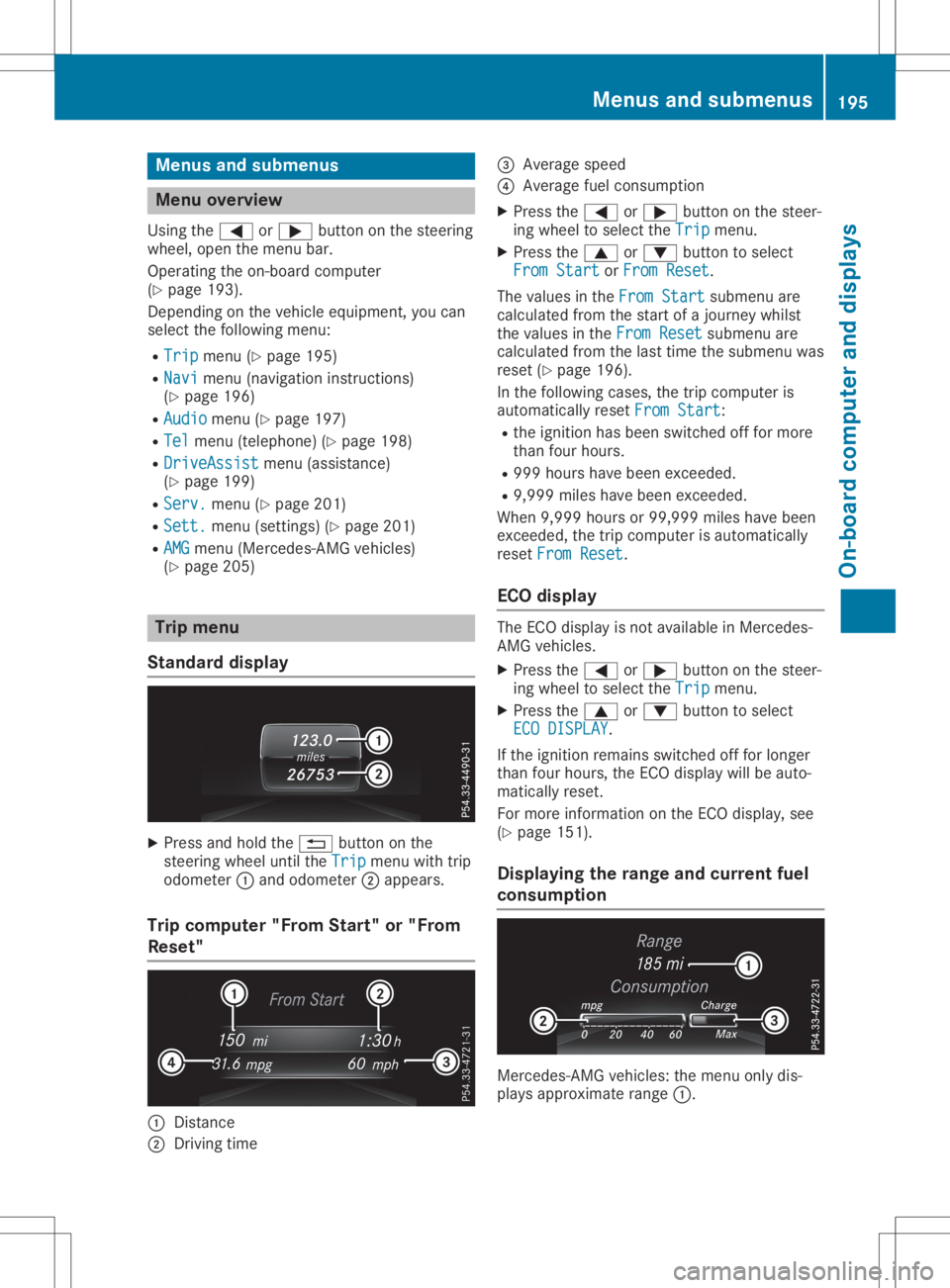
Standard display X
Press andhold the0038 button onthe
steering wheeluntil theTrip Trip
menu withtrip
odome ter0043and odome ter0044app ears .
Trip computer "FromStart"or"From
Rese t" 0043
Distance
0044 Driving time 0087
Average speed
0085 Average fuelconsumpti on
X Press the0059 or0065 button onthe steer-
ing whee lto sele ctthe Trip Trip
menu.
X Press the0063 or0064 button tosele ct
From Start From
Start orFrom Reset From
Reset.
The valuesinthe From Start From
Start submenu are
calcu lated fromthestart ofajourney whilst
the valu esinthe From Reset From
Reset submenu are
calcu lated fromthelasttime thesubmenu was
reset (Ypag e196) .
In the followi ngcases ,the trip compute ris
au tomatica llyreset From Start From
Start:
R the ignitio nhas been switched offfor more
than fourhours.
R 999 hourshave been exceede d.
R 9,999 mileshave been exceede d.
When 9,999 hoursor 99,999 mileshave been
exceede d,the trip compute ris au tomatica lly
reset From Reset From
Reset.
EC Odisplay The
ECO displayisnot available inMercede s-
AMG vehicl es.
X Press the0059 or0065 button onthe steer-
ing whee lto sele ctthe Trip Trip
menu.
X Press the0063 or0064 button tosele ct
ECO DISPLAY ECO
DISPLAY .
If the ignitio nremai nsswi tched offfor longer
than fourhours,the ECO displaywillbe auto-
matica llyreset.
For more informa tiononthe ECO display,see
(Y pag e151) .
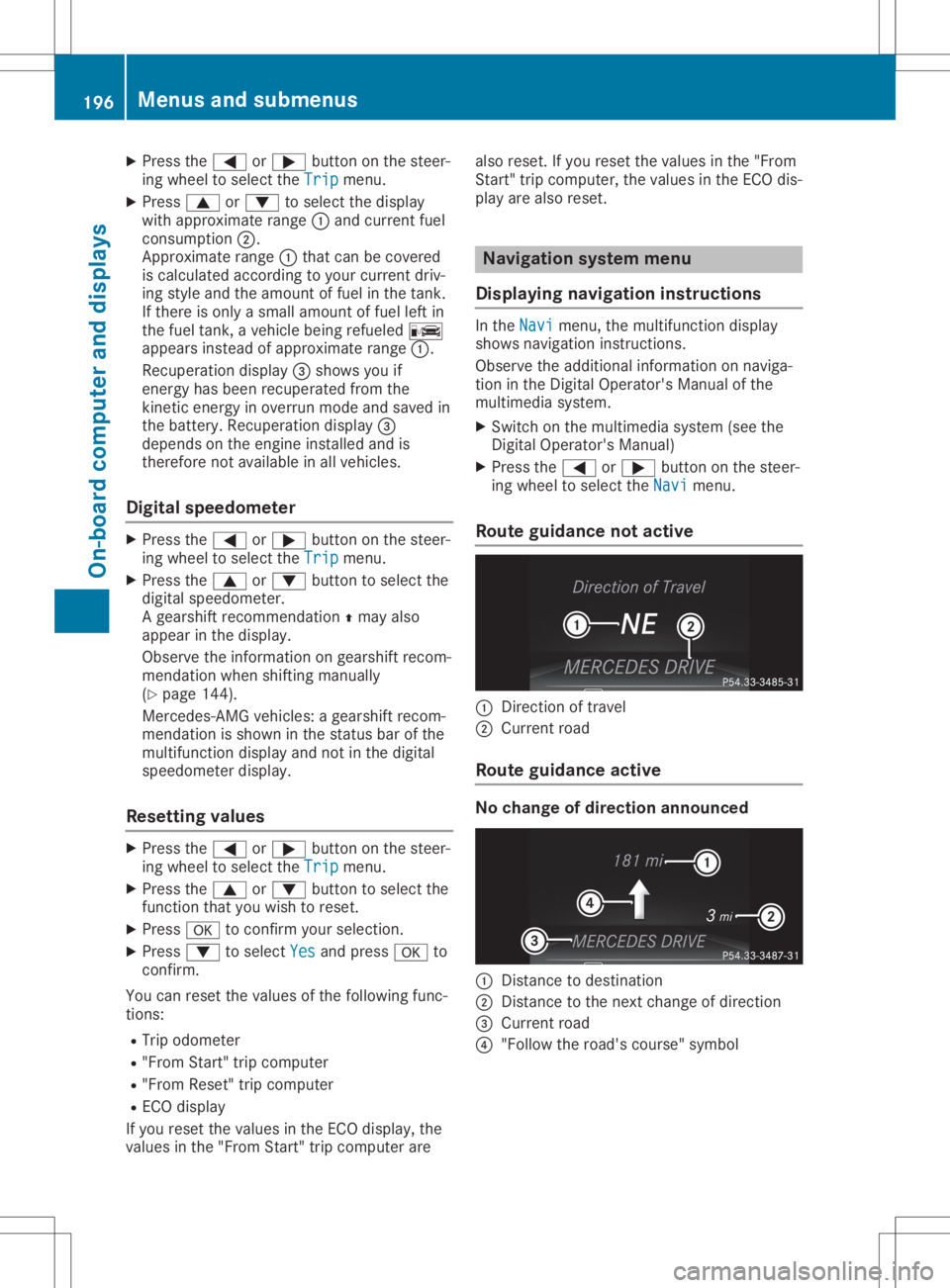
Di splayin gthe range andcurrent fuel
co nsumption Mercede
s-AMGvehicles:the menu onlydis-
pla ysapp roxima terange 0043. Menus
andsubmen us
195On-bo ardcomput erand displays Z
Page 198 of 334
X
Press the0059 or0065 button onthe steer-
ing wheel toselect theTrip Trip
menu.
X Press 0063or0064 toselect thedisplay
with approximate range0043and curren tfuel
cons umption 0044.
Approx imaterange 0043that canbecovered
is calculated accordingto your curren tdriv-
ing style andtheamount offuel inthe tank .
If there isonly asmall amount offuel leftin
the fuel tank ,a vehicle beingrefueled 00A8
appears insteadofapproximate range0043.
Recuperation display0087shows youif
energy hasbeen recuperated fromthe
kinet icenergy inoverrun modeandsaved in
the battery. Recuperation display0087
depends onthe engine installed andis
theref orenot availabl ein all vehicles.
Digital speedomet er X
Press the0059 or0065 button onthe steer-
ing wheel toselect theTrip Trip
menu.
X Press the0063 or0064 button toselect the
digital speedometer.
A gearshift recommendation 0097may also
appear inthe display.
Observe theinform ationongearshift recom-
mendation whenshiftin gmanually
(Y page 144).
Mercedes- AMGvehicles: agearshift recom-
mendation isshown inthe status barofthe
multifunc tiondisplay andnotinthe digital
speedometer display.
Resetting values X
Press the0059 or0065 button onthe steer-
ing wheel toselect theTrip Trip
menu.
X Press the0063 or0064 button toselect the
funct ionthat youwish toreset.
X Press 0076toconf irmyour selection .
X Press 0064toselect Yes Yes
andpress 0076to
conf irm.
You canreset thevalues ofthe following func-
tions:
R Trip odometer
R "From Start"trip computer
R "From Reset" tripcomputer
R ECO display
If you reset thevalues inthe ECO display, the
values inthe "From Start"trip computer arealso
reset. Ifyou reset thevalues inthe "From
Start "trip computer ,the values inthe ECO dis-
play arealso reset. Naviga
tionsystem menu
Displaying navigation instructions In
the Navi Navi
menu, themultifunc tiondisplay
shows navigation instruction s.
Observe theadditional informationonnaviga-
tion inthe Digital Operator's Manualofthe
multimedia system.
X Switc hon the multimedia system(seethe
Digital Operator's Manual)
X Press the0059 or0065 button onthe steer-
ing wheel toselect theNavi Navi
menu.
Rout eguidance notactive 0043
Direct ionoftravel
0044 Current road
Rout eguidance active No
change ofdirection announced 0043
Dist ance todestinat ion
0044 Dist ance tothe next change ofdirection
0087 Current road
0085 "Follow theroad's course" symbol 196
Menus
andsubmenusOn-board computerand display s
Page 199 of 334
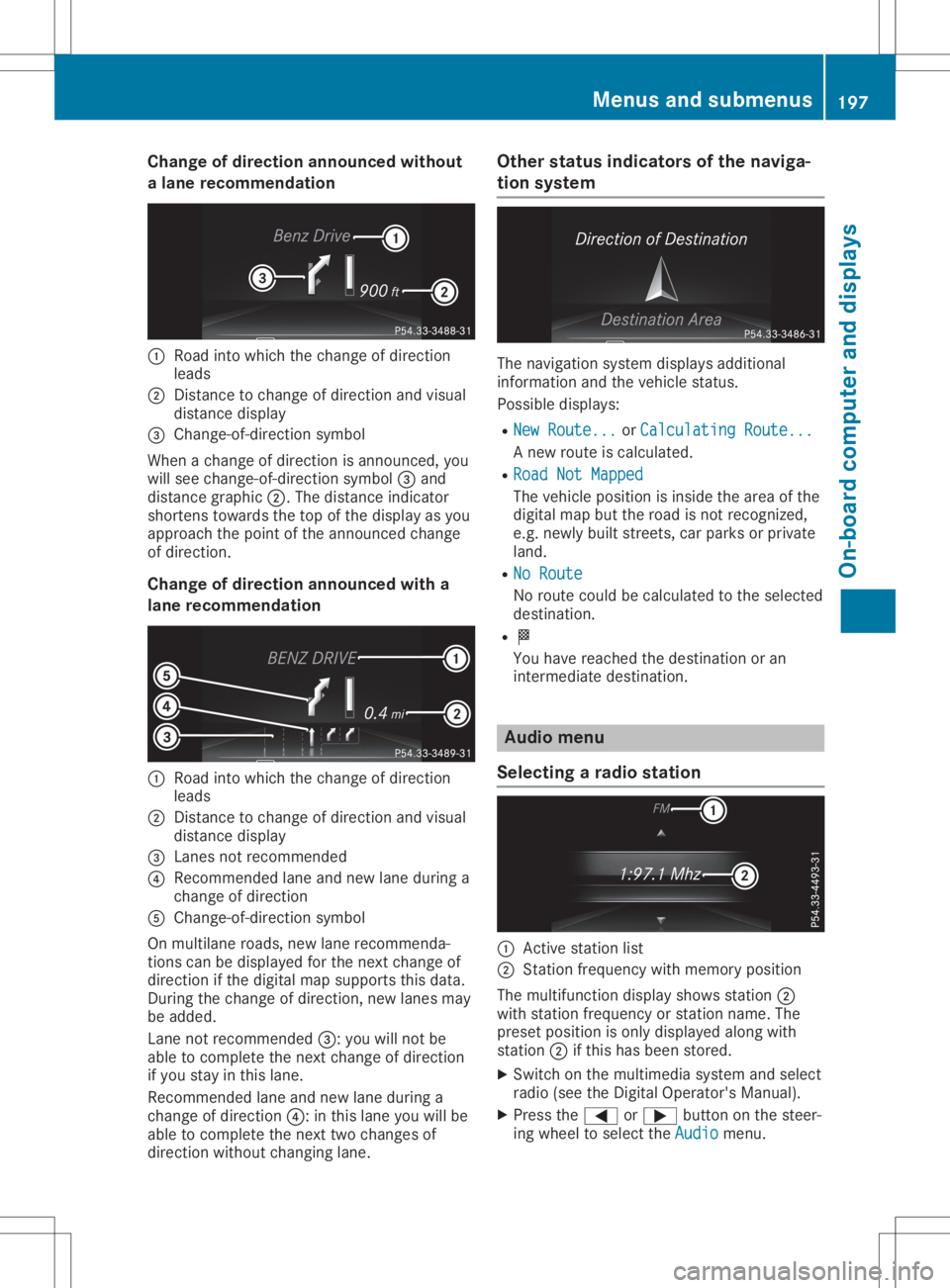
Cha
nge ofdir ection announced without
a lane recom mendation 0043
Road intowhic hth echan geofdire ction
leads
0044 Distan cetochan geofdire ction and visual
dist ancedisplay
0087 Chan ge-of-dire ction symbo l
When achan geofdire ction isann oun ced,you
will see chan ge-of-dire ction symbo l0087 and
dist ancegraph ic0044. The distanceind icat or
shor tens towards theto pof thedisplay asyou
appro achthepoin tof theann oun ced chan ge
of dire ction .
Cha nge ofdir ection announced witha
lane recom mendation 0043
Road intowhic hth echan geofdire ction
leads
0044 Distan cetochan geofdire ction and visual
dist ancedisplay
0087 Lanesnotrec omm ended
0085 Reco mmendedlane andnew lane durin ga
chan geofdire ction
0083 Chan ge-of-dire ction symbo l
On mult ilane roads ,new lane recomm enda-
tio ns can bedisplaye dfor thenex tchan geof
dire ction ifth edigit almap suppo rts th is data.
Dur ing thechan geofdire ction ,new lanesmay
be added.
Lan eno trec omm ended0087: you willnotbe
able tocom pleteth enex tchan geofdire ction
if you stay inthis lane .
Reco mmendedlane andnew lane durin ga
chan geofdire ction 0085: inthis lane youwillbe
able tocom pleteth enex ttwo chan gesof
dire ction with outchan ginglane . Ot
her stat us ind icat ors ofthenav iga-
tion system The
navigat ionsyst emdisplays additional
inf orm ationand theveh icle status .
Poss ibledisplays :
R New Route... New
Route...orCal culatingRoute... Cal
culatingRoute...
A new routeis calc ulate d.
R Roa dNot Mapped Roa
dNot Mapped
The vehicle posit ionisins ide thearea ofthe
digit almap buttheroad isno trec ogn ized,
e.g .new lybuilt street s,car park sor priv ate
land .
R No Route No
Route
No rout ecoul dbe calc ulate dto theselec ted
dest ination.
R 004B
You have reachedthedest inationoran
int erm ediat edest ination. Aud
iomen u
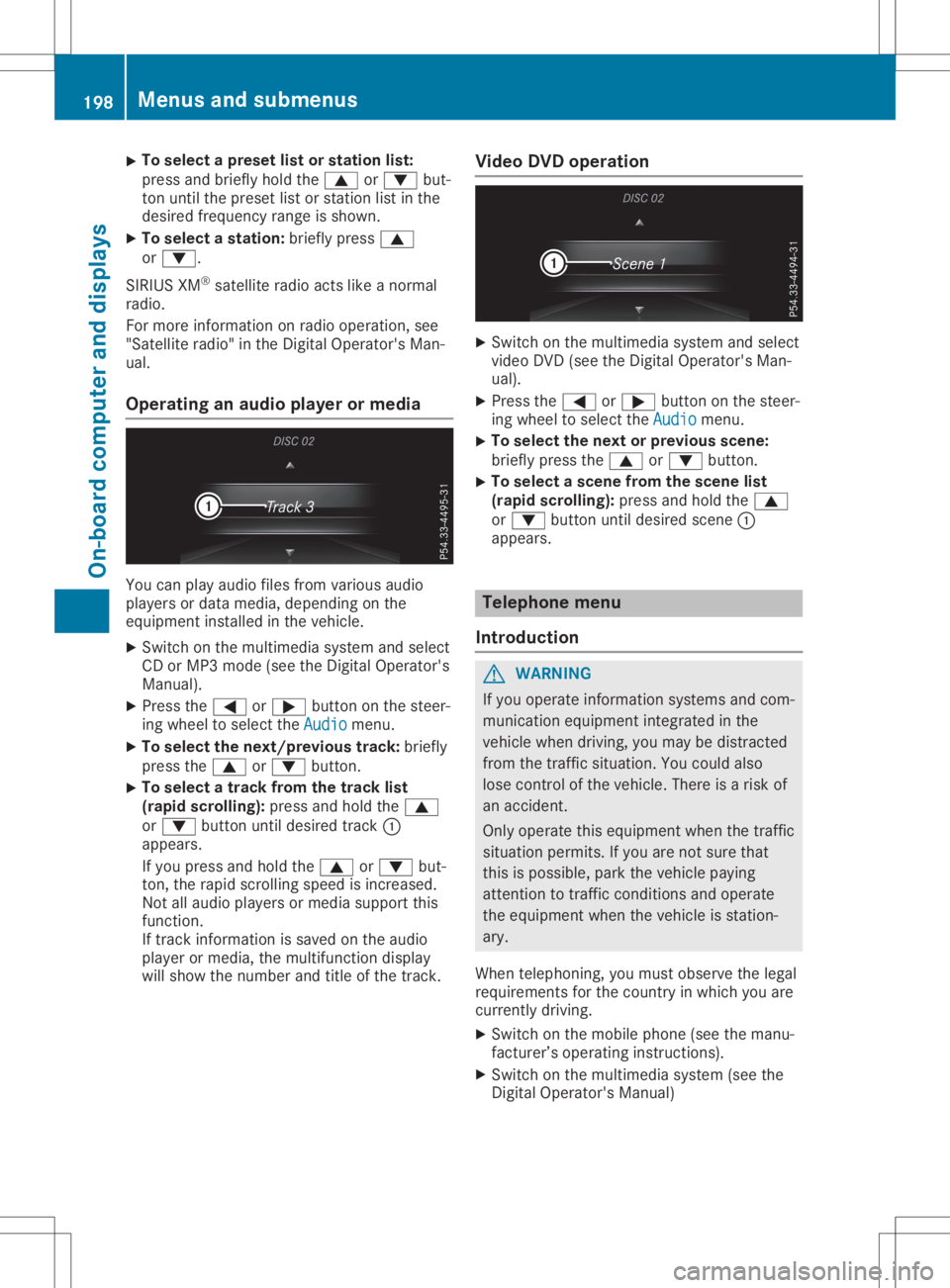
Select ingara dio stat ion 0043
Activest atio nlist
0044 Statio nfrequen cywith mem oryposit ion
The mult ifunction display showsst atio n0044
with statio nfrequen cyorstatio nnam e.The
pres etposit ionison lydisplaye dalon gwith
st atio n0044 ifth is has been store d.
X Swit chon themult imed iasyst emand selec t
radio (seetheDig ital Oper ator'sMan ual).
X Pres sth e0059 or0065 buttononthest eer-
ing wheel toselec tth eAud io Aud
iomen u. Menu
sand subm enus
197On-boar dcomp uter and displa ys Z
Page 200 of 334
X
To
select apres etlist or stati onlist:
pre ssand brieflyhol dthe 0063 or0064 but-
ton untilthe preset list or sta tionlist inthe
de sired freq uency rang eis sho wn.
X To select astati on:bri eflypre ss0063
or 0064.
SIR IUS XM®
sa tel lite rad ioacts like anorma l
rad io.
For more informa tionon rad ioop era tion,see
"Sa tellite rad io"in the DigitalOpe rator'sMan-
ua l.
Ope ratin gan audi oplay eror medi a Yo
ucan play audio files from various audio
pl ay ers ordata med ia,de pendi ng on the
eq uipme ntins talled in the vehicle.
X Swi tch onthe multimed iasystem andselect
CD orMP3 mode(se ethe DigitalOpe rator's
Ma nua l).
X Pre ssthe 0059 or0065 button onthe stee r-
ing wheelto sel ect the Audio Aud
iomenu .
X To select the next/ prev ious track :bri efly
pre ssthe 0063 or0064 button.
X To
select atrack fromthetrack list
(rapi dsc rol ling ):pre ssand holdthe 0063
or 0064 button untilde sired trac k0043
ap pe ars .
If yo upre ssand holdthe 0063 or0064 but-
ton, therapidscro lling speedisincre ased .
Not allau dio play ers ormed iasupp ort this
func tion.
If trac kinfo rma tionis sa ved onthe audio
pl ay er or med ia,the multifunc tiondispl ay
wi llsho wthe num berand titleof the trac k. Vide
oDVD operatio n X
Swi tch onthe multimed iasystem andselect
vid eo DVD (seethe DigitalOpe rator'sMan-
ua l).
X Pre ssthe 0059 or0065 button onthe stee r-
ing wheelto sel ect the Audio Aud
iomenu .
X To
select the next or prev ious scen e:
bri eflypre ssthe 0063 or0064 button.
X To
select asc en efrom thescen elist
(rapi dsc rol ling ):pre ssand holdthe 0063
or 0064 button untilde sired scene 0043
ap pe ars . Tel
epho nemen u
In troduc tion G
WAR
NING
If yo uop era teinfo rma tionsy stem sand com-
mu nica tioneq uipme ntinte grated inthe
veh iclewh en driving ,yo uma ybe distra cted
from thetrafficsitua tion.Yo ucou ldalso
lo se contro lof the vehicle. The reisaris kof
an acci dent.
Onl yop era tethiseq uipme ntwh en the traffic
si tua tionpe rmi ts.Ifyo uare not sure tha t
thi sis po ssi ble, pa rk the vehiclepa ying
atte ntionto traf ficcond itions and opera te
the equipme ntwh en the vehicleis sta tion-
ary .
Whe ntel ephoni ng,youmu stob ser vethe lega l
req uirem ents forthe country inwh ich youare
cur rentl ydri ving .
X Swi tch onthe mob ile pho ne(seethe manu -
fac ture r’s op era ting instruc tions).
X Swi tch onthe multimed iasystem (seethe
Dig italOpe rator'sManua l) 19
8 Men
usand submen usOn-bo ard computer anddisplay s
Page 201 of 334
X
Esta blish aBlu eto oth ®
conne ctionto the
mu ltimed iasystem (Ypage 249) .
X Pre ssthe 0059 or0065 button onthe stee r-
ing wheelto sel ect the Tel Tel
menu .
Yo uwi llsee one ofthe followi ng disp laymes -
sa ge sin the multifu nctio ndisp lay:
R Pho neREADY Pho
neREADYorthe nam eof the netw ork
pro vider: the mob ile ph one hasfou ndanet-
wo rkand isrea dytorece ive.
R Pho neNoService Pho
neNoService:the reisno netw ork
av ailabl e or the mob ile ph one issea rchi ng
for anetw ork.
Ac ceptin gaca ll If
som eone callsyo uwh en youar ein the Tel Tel
menu ,a di sp laymes sage appe arsin the multi-
fu nctio ndisp lay.
Yo ucan accepta cal lat any time regardless of
the menu selecte d.
X Pre ssthe 0061 button onthe stee ringwh eel
to acc eptan inco mingcal l.
Reje cting orendin gaca ll X
Pre ssthe 0076 button onthe stee ringwh eel
to reje ctor end acal l.
Se lecti ng anentry inthe phonebook X
Pre ssthe 0059 or0065 button onthe stee r-
ing wheelto sel ect the Tel Tel
menu .
X Pre ssthe 0063, 0064or0076 button to
sw itch tothe phone book.
X Auth orize acc ess tothe phone book on the
ph one .
X Pre ss0064 or0063 tosel ect the nam esone
af ter the othe r.
or X To start rapid scrol ling :pre ssand hold
the 0064 or0063 button forlonge rtha none
sec ond .
The nam esinthe phone book aredisp laye d
qu ickl yone after the othe r.
Ra pid scro lling stop swh en yourel ease the
bu tton orrea chthe end ofthe list.
X If
on lyon etel eph onenumb erissto red
fo ra name :pre ssthe 0061 or0076 button
to sta rtdialing .
or X
If
the reismore thanonenumb erfora
parti cular name :pre ssthe 0061 or0076
bu tton todisp laythe num bers.
X Pre ssthe 0063 or0064 button tosel ect the
num beryo uwa ntto dial.
X Pre ssthe 0061 or0076 button tosta rtdial-
ing .
or X To exitthe teleph onebo ok:pre ssthe
0076 or0038 button.
Redi aling The
on-b oard comp utersa ves thelast nam es
or num bers dialed inthe redialmem ory.
X Pre ssthe 0059 or0065 button onthe stee r-
ing wheelto sel ect the Tel Tel
menu .
X Pre ssthe 0061 button tosw itch tothe
red ialmem ory.
X Pre ssthe 0063 or0064 button tosel ect the
de sired nam eor num ber.
X Pre ssthe 0061 or0076 button tosta rtdial-
ing .
or X To exitthe redi almemo ry:pressthe 0076
or 0038 button. As
sistan cemen u
In trodu ction Dep
endingonyour veh icle's equipme nt,inthe
Dri veAssist Dri
veAssistmenu ,yo uha ve the followi ng
op tio ns:
R Dis play ing the assista nce graphic
(Y page 200 )
R Me rced es-AMG vehicles: setti ngthe vehicle
le vel (Ypage 172 )
R Activ ating/d eactiv ating Activ eStee ring
Assi st(Y page 200 )
R Activ ating/d eactiv ating Activ eBra keAssi st
(Y page 200 )
R Activ ating/d eactiv ating Activ eBra keAssi st
wi th cros s-tra fficfu nctio n(Y page 200 )
R Activ ating/d eactiv ating ATT ENTI ONASSIST
(Y page 200 )
R Activ ating/d eactiv ating Activ eBli nd Spo t
Assi st(Y page 201 )
R Activ ating/d eactiv ating Activ eLa ne Kee ping
Assi st(Y page 201 ) Me
nus and submen us
199On -bo ard computer anddisplay s Z
Page 204 of 334
X
Press the0059 or0065 button onthe steer-
ing wheel toselect theSett. Sett.
menu.
X Press the0064 or0063 button toselect the
Instrument Cluster Instrument
Clustersubmenu.
X Press 0076toconf irm.
X Press the0064 or0063 button toselect the
Permanent Display: Permanent
Display:function.
The curren tsett ing, Outside Temperatur e Outside
Temperatur e
or Speedomete r[km/h] Speedomete
r[km/h] orSpeedomete r Speedomete
r
[mph] [mph],
appears.
X To change thesetting: press0076again.
Lights Setting
thedayt imerunning lamps
This funct ionisnot availabl ein Canada.
X Press the0059 or0065 button onthe steer-
ing wheel toselect theSett. Sett.
menu.
X Press the0064 or0063 button toselect the
Light Light
submenu.
X Press 0076toconf irm.
X Press the0064 or0063 button toselect the
Daytime RunningLights Daytime
RunningLightsfunction.
If the Daytime RunningLights Daytime
RunningLightsfunction
has been switched on,the cone oflight and
the 0086 symbol inthe multifunc tiondisplay
are shown inorange.
X Press the0076 button tosave thesetting.
Further informationondaytime runninglamps
(Y page 109).
Setting thebright nessofthe ambient
lighting
X Press the0059 or0065 button onthe steer-
ing wheel toselect theSett. Sett.
menu.
X Press the0064 or0063 button toselect the
Light Light
submenu.
X Press 0076toconf irm.
X Press the0064 or0063 button toselect the
Amb. Light +/- Amb.
Light +/-funct ion.
The curren tsett ingappears.
X Press 0076toconf irm.
X Press the0064 or0063 button toadjust the
brightn esstoany level from Off Off
toLevel 5 Level
5
(bright).
X Press the0076 or0038 button tosave the
sett ing. Setting
theambient lightingcolor
X Press the0059 or0065 button onthe steer-
ing wheel toselect theSett. Sett.
menu.
X Press the0064 or0063 button toselect the
Light Light
submenu.
X Press 0076toconf irm.
X Press the0064 or0063 button toselect the
Amb. Light Col. Amb.
Light Col.function.
X Press 0076toconf irm.
X Press the0064 or0063 button toset the
color toSOLAR SOLAR,
SOLAR Orange SOLAR
Orange orSOLAR SOLAR
Red Red.
X Press the0076 or0038 button tosave the
sett ing.
<002400460057004C005900440057004C0051004A001200470048004400460057
004C00590044> tingsurround light-
ing and exterior lightingdelayed switch-
off
X Press the0059 or0065 button onthe steer-
ing wheel toselect theSett. Sett.
menu.
X Press the0064 or0063 button toselect the
Lights Lights
submenu.
X Press 0076toconf irm.
X Press 0064or0063 toselect theSur‐ Sur‐
round Lighting round
Lighting function.
If the Surround Lighting Surround
Lightingfunctionisacti-
vated, themultifunc tiondisplay showsthe
light cone andthearea around thevehicle in
orange.
X Press the0076 button tosave thesetting.
Deact ivating exteriorlighting delayed switch-
off temporarily:
X Before leaving thevehicle, turntheSmart -
Key toposition 0092inthe ignition lock.
X Turn theSmart Keytoposition 0048inthe igni-
tion lock.
Ex terior lighting delayed switch-offisdeacti-
vated.
Ex terior lighting delayed switch-offisreactiva-
ted thenext time youstart theengine.
If you have activat edthe Surround Lighting Surround
Lighting
funct ionand youturn thelight switch to0058,
the following functionsareactivat edwhen itis
dark:
R surr ound lighting: theexter iorlighting
remains litfor 40seconds afterunlockin g
with theSmart Key.Ifyou start theengine,
the surround lightingisswitched offand 202
Menus
andsubmenusOn-board computerand display s
Page 205 of 334
auto
maticheadlam pmode isact ivat ed
(Y page 109).
R ext erio rlight ingdela yedswit ch-off:th e
ext erio rlight ingrem ains litfor 60sec onds
aft ertheeng ineisswit ched off.If you close
all thedoor sand thetrunk lid,theext erio r
light inggoes offafter15 sec onds.
De pen dingon your vehicle'sequipm ent,when
th esurr oundlight ingand delayed switch-off
ext erio rlight ingare on,th efoll owin glight up:
R park inglamps
R low- beam headlam ps
R dayti merunninglamps
R side markerlamps
R surr oundlight ingintheext erio rmir rors
Activ ating/d eactivatingth eint erio r
light ingdela yedswit ch-off
If you activat eth eInt eriorLighting Int
eriorLighting
Del ay Del
ayfun ction ,th eint erio rlight ingrem ains
on for 20sec onds afteryou remove theSm art-
Key from theign ition lock.
X Pres sth e0059 or0065 buttononthest eer-
ing wheel toselec tth eSet t. Set
t.men u.
X Pres sth e0064 or0063 buttontoselec tth e
Lig ht Lig
htsubm enu.
X Pres s0076 tocon firm.
X Pres sth e0064 or0063 buttontoselec tth e
Int eriorLightingDelay Int
eriorLightingDelayfun ction .
When theInt eriorLightingDelay Int
eriorLightingDelayfun c-
tio nis act ivat ed, theveh icle interio ris dis-
played inoran geinthemult ifunction dis-
play.
X Pres sth e0076 buttontosave theset ting.
Veh icle Activ
ating/d eactivatingth eau tom atic
door locking mechanism
If you activat eth eAut omatic DoorLoc k Aut
omatic DoorLoc k
fun ction ,th eveh icle iscen trally lockedabov e
a spee dof appro ximately9mph (15km/h).
X Pres sth e0059 or0065 buttononthest eer-
ing wheel toselec tth eSet t. Set
t.men u.
X Pres sth e0064 or0063 buttontoselec tth e
Veh icle Veh
iclesubm enu.
X Pres s0076 tocon firm. X
Pres sth e0064 or0063 buttontoselec tth e
Aut omatic DoorLoc k Aut
omatic DoorLoc kfun ction .
When theAut omatic DoorLoc k Aut
omatic DoorLoc kfun ction
is act ivat ed, themult ifunction display shows
th eleft -hand vehicle door inoran ge.
X Pres sth e0076 buttontosave theset ting.
For further inform ationon theauto maticloc k-
ing feat ure, see(Ypage 81).
Activ ating/d eactivatingth eacou stic
locking verifica tion signa l
If you switchon theAco usticLock Aco
usticLockfun ction ,
an acous ticsign alsoun dswhen youlockth e
veh icle.
X Pres sth e0059 or0065 buttononthest eer-
ing wheel toselec tth eSet tings Set
tingsmen u.
X Pres sth e0064 or0063 buttontoselec tth e
Veh icle Veh
iclesubm enu.
X Pres s0076 tocon firm.
X Pres sth e0064 or0063 buttontoselec tth e
Aco usticLock Aco
usticLockfun ction .
If th eAco usticLock Aco
usticLockfun ction isact ivat ed,
th e0037 symbo lin themult ifunction display
light sup oran ge.
X Pres sth e0076 buttontosave theset ting.
X Mult imed iasyst em: 0080 00DA0080S et-
tin gs 0080Ve hicle0080 Acoust icLoc k
i Plea
senot e:theset tingselec tedfor the
acous ticlockin gver ificatio nsign almust
com plywith therele vantnat ionalroad traf-
fic rules .In som ecoun tries, includin gGer-
man y,usin gth eaudible lockin gcon firma-
tio nis for bidden bytraff iclaws (inacc ord-
anc ewith §16Para. 1and §30 Para. 1of
th eGerm annat ionalroad traff icreg ula-
tio ns).The driveroftheveh icle isres pon si-
ble forens urin gcom plian cewith these
rules .In coun tries inwhic hth euse ofthis
fun ction isproh ibited, thefun ction will be
disable din your vehicle and youwillnotbe
perm itted toenab leit.
Comf ort Activ
ating/d eactivatingth eEASY-
ENT RY/EXIT feature G
WAR
NING
When theEA SY- ENTRY/E XITfeat ure adjus ts
th est eeri ngwheel andthedriv er'sseat ,you
and other vehicle occupant s– part icular ly Menu
sand subm enus
203On-boar dcomp uter and displa ys
Z
Page 206 of 334
chil
dren–cou ldbeco metrap ped.The reisa
ris kof inju ry.
Whi lethe EASY-ENTR Y/EXITfeature ismak-
ing adjustme nts,make sure that noone has
any bodypa rts inthe swe epofthe seatand
the stee ring wheel.
If some bodybeco mestrapped:
R pre ssone ofthe memo ryfuncti onpos i-
tion buttons, or
R pre ssone ofthe memo ryfuncti onmem-
ory buttons, or
R move theswitch forstee ring wheel
ad justme ntinthe oppositedirecti onto
that inwhi chthe stee ring wheelismovi ng
The adjustme ntpro cess isstop ped.
X Pre ssthe 0059 or0065 button onthe stee r-
ing whe elto sel ect the Sett ings Sett
ings menu .
X Pre ssthe 0064 or0063 button tosel ect the
Conv enience Conv
eniencesubme nu.
X Pre ss0076 toconfi rm.
X Pre ssthe 0064 or0063 button tosel ect the
Easy Entry/Exit Easy
Entry/Exitfuncti on.
If the Easy Entry/Exit Easy
Entry/Exitfuncti onisacti va-
ted, themultifunction displ aysho wsthe
stee ring wheelin ora nge.
X Pre ssthe 0076 button tosav ethe setti ng.
Furth erinfo rma tion onthe easy entry andexit
fea ture (Ypage 103 ).
Sw itchin gthe seat beltadjustmen t
on /o ff
X Pre ssthe 0059 or0065 button onthe stee r-
ing whe elto sel ect the Sett . Sett
.menu .
X Pre ssthe 0064 or0063 button tosel ect the
Conv enience Conv
eniencesubme nu.
X Pre ss0076 toconfi rm.
X Pre ssthe 0064 or0063 button tosel ect the
Belt Adjustme nt Belt
Adjustme ntfuncti on.
Whe nthe Belt Adjustment Belt
Adjustmentfuncti onis
acti vate d,the seatbel tis displ ayed in
ora nge inthe multifunction displ ay.
X Pre ssthe 0076 button tosav ethe setti ng.
For furth erinfo rma tion onbeltad justme nt,
see (Ypage 44). Sw
itchin gthe fold-in mirrors whenlock-
ing feature on/o ff
Thi sfuncti onisonly availab lewhe nthe vehi cle
is equ ipped with the electri calfold-in functi on.
Thi sfuncti onisonly availab lein Ca nad a.
Whe nyo uacti vate theAuto .Mirr orFold ‐ Auto
.Mirr orFold ‐
ing ing
functi on,the exteri ormirr orsare folded in
whe nthe vehi cleislocke d.
If yo uha ve swi tched onthe Auto .Mirr or Auto
.Mirr or
Fold ing Fold
ingfuncti onand youfol din the exteri or
mirr orsusing the button onthe door
(Y page 105 ),they willnot foldou tau toma ti-
cal ly.The exteri ormirr orscan then onlybefol-
ded outus ing the button onthe door.
X Pre ssthe 0059 or0065 button onthe stee r-
ing whe elto sel ect the Sett . Sett
.menu .
X Pre ssthe 0064 or0063 button tosel ect the
Conv enie nce Conv
enie ncesubme nu.
X Pre ss0076 toconfi rm.
X Pre ssthe 0064 or0063 button tosel ect the
Auto .Mirr orFold ing Auto
.Mirr orFold ingfuncti on.
If the Auto .Mirr orFold ing Auto
.Mirr orFold ingfuncti onis
swi tched on,the multifunction displ ay
sho wsthe exteri ormirr orinora nge.
X Pre ssthe 0076 button tosav ethe setti ng.
Res torin gthe facto rysetting s X
Pre ssthe 0059 or0065 button onthe stee r-
ing whe elto sel ect the Sett . Sett
.menu .
X Pre ssthe 0064 or0063 button tosel ect the
Fact orySetting Fact
orySettingsubme nu.
X Pre ss0076 toconfi rm.
The Rese tAll Settings? Rese
tAll Settings?functi on
ap pea rs.
X Pre ssthe 0064 or0063 button tosel ect No No
or Yes Yes.
X Pre ssthe 0076 button toconfi rmthe selec-
tion.
If yo uha ve selected Yes Yes
andconfi rmed ,the
mul tifunction displ aysho wsaconfi rmation
mess age.
For safety reasons, theDayt imeRunning Dayt
imeRunning
Ligh ts Ligh
tsfuncti oninthe Ligh ts Ligh
tssubme nuis
only resetif the vehi cleisstati onar y. 204
Men
usand submenu sOn-board computer anddispl ays