engine MERCEDES-BENZ SL-CLASS ROADSTER 2013 User Guide
[x] Cancel search | Manufacturer: MERCEDES-BENZ, Model Year: 2013, Model line: SL-CLASS ROADSTER, Model: MERCEDES-BENZ SL-CLASS ROADSTER 2013Pages: 572, PDF Size: 9.23 MB
Page 25 of 572
Tires/wheels .................................
552
Vehicle data
................................... 565
TELEAID
Call priority .................................... 489
Downloading destinations
(COMAND) ..................................... 489
Downloading routes .......................492
Emergency call .............................. 487
Geo fencing ................................... 493
Important safety notes .................. 485
Locating a stolen vehicle ............... 491
MB info call button ........................ 488
Remote vehicle locking .................. 491
Roadside Assistance button .......... 488
Search & Send ............................... 490
Self-test ......................................... 486
Speed alert .................................... 493
System .......................................... 486
Triggering the vehicle alarm ........... 493
Vehicle remote malfunction
diagnosis ....................................... 492
Vehicle remote unlocking .............. 490
Telephone
Accepting/ending a call ................364
Accepting a call ............................. 213
Adjusting the volume for calls ....... 277
Calling (outgoing call) ....................365
Connecting a mobile phone
(general information) ..................... 359
De-authorizing a mobile phone ......362
Display message ............................ 252
Ending an active call ...................... 368
Entering a number .........................365
Entering phone numbers ................ 365
External authorization
(Bluetooth ®
) ................................... 361
Function restrictions ...................... 358
General notes ................................ 357
Incoming call ................................. 364
Making a call ................................. 367
Making a call via speed dial ...........365
Menu (on-board computer) ............ 212
Number from the phone book ........ 213
Operating options .......................... 357
Overview ........................................ 357
Overview of functions ....................366
Reception and transmission
volume ........................................... 364Redialing
........................................ 213
Rejecting/accepting a waiting
call ................................................. 367
Rejecting/ending a call ................. 213
Rejecting a call .............................. 364
Safety notes .................................. 357
Sending DTMF tones ......................
366
Single call ...................................... 366
Switching hands-free microphone
on/off ............................................ 366
Text messages (SMS) .................... 375
Toggling ......................................... 368
Using the telephone ....................... 364
see Bluetooth ®
Telephone basic menu
Bluetooth ®
interface ...................... 363
Telephone mode
Redialing ........................................ 365
Telephone number
Entering ......................................... 365
Temperature
Coolant .......................................... 205
Coolant (on-board computer) ......... 220
Engine oil (on-board computer) ...... 220
Outside temperature ...................... 206
Setting (climate control) ................ 127
Text messages (SMS)
Calling the sender .......................... 377
Deleting ......................................... 377
Inbox .............................................. 376
Information and requirements .......375
Reading .......................................... 376
Reading aloud ................................ 376
Storing sender in address book ..... 377
Storing the sender as a new
address book entry ........................ 377
Theft deterrent systems
ATA (Anti-Theft Alarm system) .........65
Immobilizer ...................................... 65
Time
Setting ........................................... 290
Setting summer/standard time ..... 290
Setting the format .........................290
Setting the time ............................. 289
Setting the time/date format ........ 290
Setting the time zone ..................... 290
Timing (RACETIMER) .........................220 Index
23
Page 27 of 572
Removing the towing eye
...............519
With the rear axle raised
................519
Towing away
With both axles on the ground ....... 520
Tow-starting
Emergency engine starting ............ 520
Important safety notes .................. 518
Track
Selecting (CD, DVD, MP3) .............. 427
Selecting using the number
keypad ........................................... 427
Traffic jam function ........................... 326
Traffic reports Calling up a list .............................. 335
Reading out on route ..................... 336
Real-time traffic report .................. 336
Transmission
Selector lever ................................ 143
see Automatic transmission
Transporting the vehicle .................. 520
Treble, adjusting (sound) .................. 278
Trim pieces (cleaning instructions) . 505
Trip computer (on-board
computer) .......................................... 209
Trip meter see Trip odometer
Trip odometer
Calling up ....................................... 208
Resetting (on-board computer) ...... 210
True Image™ ...................................... 280
Trunk Emergency release .......................... 83
Important safety notes .................... 77
Locking separately ...........................82
Opening/closing (automatically
from inside) ...................................... 81
Opening/closing (automatically
from outside) ................................... 79
Opening/closing (from outside,
HANDS-FREE ACCESS) .................... 80
Opening/closing (manually from
outside) ............................................ 78
Overview .......................................... 77
Trunk lid
Display message ............................ 251
Opening/closing .............................. 77Opening dimensions ......................
565
Power closing feature ......................76
Trunk load (maximum) ......................
565
Trunk partition Display message
............................ 252
General notes .................................. 89
Installing .......................................... 89
Opening/closing .............................. 89
Removing ......................................... 89
Turn signals
Display message ............................ 235
Switching on/off ........................... 112
TV
Automatic picture shutoff ..............452
Picture settings .............................. 453
Sound settings (balance, bass,
treble) ............................................ 278
Type identification plate
see Vehicle identification plate U
Umbrella holder ................................. 475
Unlocking Emergency unlocking .......................76
From inside the vehicle (central
unlocking button) ............................. 75
Updating the digital map
..................353
USB see Media Interface V
Vanity mirror (in the sun visor) ........479
Vehicle Correct use
...................................... 31
Data acquisition ............................... 32
Display message ............................ 250
Equipment ....................................... 28
Individual settings ..........................215
Limited Warranty ............................. 32
Loading .......................................... 537
Locking (in an emergency) ............... 77
Locking (SmartKey) .......................... 68
Lowering ........................................ 552
Maintenance .................................... 29
Parking for a long period ................ 156
Pulling away ................................... 138 Index
25
Page 28 of 572
Raising ...........................................
549
Reporting problems .........................32
Securing from rolling away ............ 549
Towing away
.................................. 518
Tow-starting ................................... 518
Transporting .................................. 520
Unlocking (in an emergency) ........... 76
Unlocking (SmartKey) ......................68
Vehicle data ................................... 565
Vehicle battery
see Battery (vehicle)
Vehicle data ....................................... 565
Vehicle dimensions ...........................565
Vehicle emergency locking ................77
Vehicle identification number see VIN
Vehicle identification plate ..............559
Vehicle level Active Body Control (AMG
vehicles) ........................................ 181
Active Body Control (except AMG
vehicles) ........................................ 179
Display message ............................ 241
Vehicle maintenance
see ASSYST PLUS
Vehicle tool kit .................................. 508
Video Operating the DVD ......................... 212
Overview ........................................ 452
see Video DVD
Video AUX
Setting the picture ......................... 453
Video DVD
Automatic picture shutoff ..............452
DVD menu ..................................... 457
Fast forward/rewind ...................... 455
Function restrictions ...................... 454
Interactive content ........................458
Notes on discs ............................... 453
Operation ....................................... 453
Pause function ............................... 456
Playing conditions .......................... 453
Safety notes .................................. 453
Selecting ........................................ 456
Selecting a film/title ...................... 456
Selecting a scene/chapter ............ 456
Setting the audio format ................ 458
Setting the language ...................... 458Setting the picture .........................
453
Showing/hiding the control menu . 454
Showing/hiding the menu
.............455
Stop function ................................. 455
Subtitles ........................................ 458
Switching to ................................... 454
VIN ...................................................... 559
Voice Control System Settings ......................................... 291
Volume, adjusting
COMAND ....................................... 277
Navigation messages ..................... 277 W
Warning and indicator lamps ABS
................................................ 257
Brakes ........................................... 257
Check Engine ................................. 263
Coolant .......................................... 263
Distance warning ........................... 265
DISTRONIC PLUS ........................... 265
ESP ®
.............................................. 259
ESP ®
OFF ....................................... 260
Fuel tank ........................................ 263
Overview ........................................ 255
PASSENGER AIR BAG OFF
indicator lamp .................................. 43
Reserve fuel ................................... 263
Seat belt ........................................ 256
SPORT handling mode ................... 260
SRS ................................................ 262
Tire pressure monitor .................... 266
Warranty ............................................ 558
Washer fluid Display message ............................ 253
Waypoints
Accepting waypoints for the route . 310
Editing ........................................... 310
Entering ......................................... 308
Weather Band
Searching for a channel ................. 415
Switching on .................................. 414
Weather display (COMAND)
Calling up the weather map ...........395
Information chart ........................... 393
Selecting locations in the
information chart ........................... 39426
Index
Page 32 of 572
Customer Service (Canada) at
1-800-387-0100
.Vehicle operation outside the USA
and Canada
If you plan to operate your vehicle in foreign
countries, please be aware that:
R service facilities
or replacement parts may
not be readily available.
R unleaded fuel for vehicles with a catalytic
converter may not be available. Leaded fuel
may cause damage to the catalytic
converter.
R the fuel may have a considerably lower
octane rating. Unsuitable fuel can cause
engine damage.
Some Mercedes-Benz models are available
for delivery in Europe through our European
Delivery Program. For details, consult an
authorized Mercedes-Benz Center or write to
one of the following addresses.
In the USA
Mercedes-Benz USA, LLC
European Delivery Department
One Mercedes Drive
Montvale, NJ 07645-0350
In Canada
Mercedes-Benz Canada, Inc.
European Delivery Department
98 Vanderhoof Avenue
Toronto, Ontario M4G 4C9 Operating safety
Important safety notes
G
WARNING
Work improperly carried out on electronic
components and associated software could
cause them
to cease functioning. Because the
vehicle's electronic components are
interconnected, any modifications made may
produce an undesired effect on other systems. Electronic malfunctions could
seriously impair the operating safety of your
vehicle.
Contact
an
authorized Mercedes-Benz Center
for repairs or modifications to electronic
components.
Other improper work or modifications on the
vehicle could also have a negative impact on
the operating safety of the vehicle.
Some safety systems only function when the
engine is running. You should therefore never
turn off the engine while driving. G
WARNING
Heavy blows against the vehicle underbody or
tires/wheels may cause serious damage and
impair the operating safety of your vehicle.
Such blows can be caused, for example, by
running over an obstacle, road debris or a
pothole.
If you feel a sudden significant vibration or
ride disturbance,
or you suspect that damage
to your vehicle has occurred:
R turn on your hazard warning flashers.
R slow down carefully.
R drive with caution to an area which is a safe
distance from the road.
Inspect the vehicle underbody and tires/
wheels for possible damage. If the vehicle
appears unsafe, have it towed to the nearest
authorized Mercedes-Benz Center or other
qualified maintenance or repair facility for
further inspection or repairs. Declarations of conformity
Vehicle components which receive
and/or transmit radio waves USA: "The wireless devices of this vehicle
comply with Part 15 of the FCC Rules.
Operation is subject to the following two
conditions: 1) These devices may not cause
harmful interference, and 2) These devices
must accept any interference received,30
Introduction
Page 33 of 572
including interference that may cause
undesired operation. Changes or
modifications not expressly approved by the
party responsible for compliance could void
the user’s authority to operate the
equipment."
Canada:
"The
wireless devices of this vehicle
comply with Industry Canada license-exempt
RSS standard(s). Operation is subject to the
following two conditions: (1) These devices
may not cause interference, and (2) These
devices must accept any interference,
including interference that may cause
undesired operation of the device." Diagnostics connection
G
WARNING
If you connect equipment to the on-board
diagnostics connection, it can affect the
operation of the vehicle systems. This can
impair the operating safety of your vehicle
while driving. There is a risk of an accident.
Do not connect any equipment to the on-
board diagnostics connection. G
WARNING
Loose equipment or equipment cables which
are connected to the on-board diagnostics
connection can obstruct the area around the
pedals. The equipment or the cables could
come between the pedals in the event of
sudden braking or acceleration. This may
affect the function of the pedals. There is a
risk of an accident.
Do not
attach any equipment or cables in the
driver's footwell.
! If the engine is switched off and
equipment on the diagnostics connection
is used, the starter battery may discharge.
The diagnostics connection is only intended
for the connection of diagnostic equipment at
a qualified specialist workshop.
Connecting equipment to the diagnostics
connection can, for example, lead to emissions monitoring information being
reset. This may lead to the vehicle failing to
meet
the
requirements of the next emissions
test during the main inspection. Qualified specialist workshop
An authorized Mercedes-Benz Center is a
qualified specialist workshop. It has the
necessary specialist knowledge, tools and
qualifications to correctly carry out the work
required on
your vehicle. This is especially the
case for work relevant to safety.
Observe the notes in the Maintenance
Booklet.
Always have the following work carried out at
an authorized Mercedes-Benz Center:
R work relevant to safety
R service and maintenance work
R repair work
R alterations, installation work and
modifications
R work on electronic components Correct use
G
WARNING
There are various warning stickers affixed to
your vehicle.
Their purpose is to alert you and
others to various dangers. Therefore, do not
remove any warning stickers unless the
sticker clearly states that you may do so.
If you remove any warning stickers, you or
others could fail to recognize certain dangers
and be injured.
Observe the following information when
driving your vehicle:
R the safety notes in this manual
R the "Technical data" section in this manual
R traffic rules and regulations
R laws and safety standards pertaining to
motor vehicles Introduction
31 Z
Page 39 of 572
tamper with electronic components or their
software.
In this section, you will learn the most
important facts about the restraint system
components of the vehicle.
The restraint system consists of:
R seat belts
R child restraint systems
R LATCH-type (ISOFIX) child seat anchors
Additional protection is provided by:
R SRS (Supplemental Restraint System)
R NECK-PRO head restraints
R PRE-SAFE ®
R roll bar
R air bag system components with:
-^a indicator lamp
- front-passenger seat with Occupant
Classification System (OCS)
The different air bag systems work
independently of each other. The protective
functions of the system work in conjunction
with each other. Not all air bags are always
deployed in an accident.
i See "Children in the vehicle" for
information on infants and children
traveling with you in the vehicle restraint
systems for infants and children
(Y page 54). SRS (Supplemental Restraint System)
Introduction SRS consists of:
R
the 6 SRS warning lamp
R air bags
R the air bag control unit with crash sensors
R Emergency Tensioning Devices
R belt force limiters
SRS reduces the risk of occupants coming
into contact with the vehicle's interior in the
event of an accident. It can also reduce the effect of the forces to which occupants are
subjected during an accident.
SRS warning lamp
G
WARNING
The SRS self-check has detected a
malfunction if the 6 SRS indicator lamp:
R does not light up at all
R does not go out after approximately four
seconds after the engine is started
R lights up
after the engine is started or while
the vehicle is in motion
For your safety, Mercedes-Benz strongly
recommends that you have the system
checked as soon as possible at a qualified
specialist workshop. SRS may otherwise fail
to activate when it is needed in the event of
an accident, which could lead to serious or
fatal injuries. SRS might also be activated
unexpectedly and unnecessarily, which could
also result in injury.
In addition, work carried out improperly on
SRS may render SRS inoperative or cause
unintended air bag deployment. Work on the
SRS system should only be carried out by
qualified specialist personnel. Consult a
qualified specialist workshop.
If it is necessary to modify an air bag system
to accommodate a person with disabilities,
contact an authorized Mercedes-Benz Center
for details. USA only: for further information,
contact our Customer Assistance Center at
1-800-FOR-MERCedes (1-800-367-6372).
The 6 SRS warning lamp in the instrument
cluster lights up when the ignition is switched
on. It goes out no later than a few seconds
after the engine is started.
SRS functions are checked regularly when the
engine is running. Therefore, malfunctions
can be detected in good time.
The SRS components are in operational
readiness when the SRS 6 indicator lamp
goes out while the engine is running. Occupant safety
37Safety Z
Page 45 of 572
Roll bar
G
DANGER
If the roll bar is malfunctioning, the
A Malfunction Service Required
message appears
in the multifunction display.
The roll bars will then possibly not be
extended in the event of an accident. This
could result in severe or even fatal injuries to
you and other occupants. In this case, visit a
qualified specialist workshop immediately
and have the roll bar checked. G
WARNING
If
you place objects or clothing on the roll bar
covers, these
could impair roll bar extension.
You and others could be injured by objects
being thrown around when the roll bars are
triggered.
Ensure that the area above the roll bar covers
is kept clear. Stow objects or clothing in a
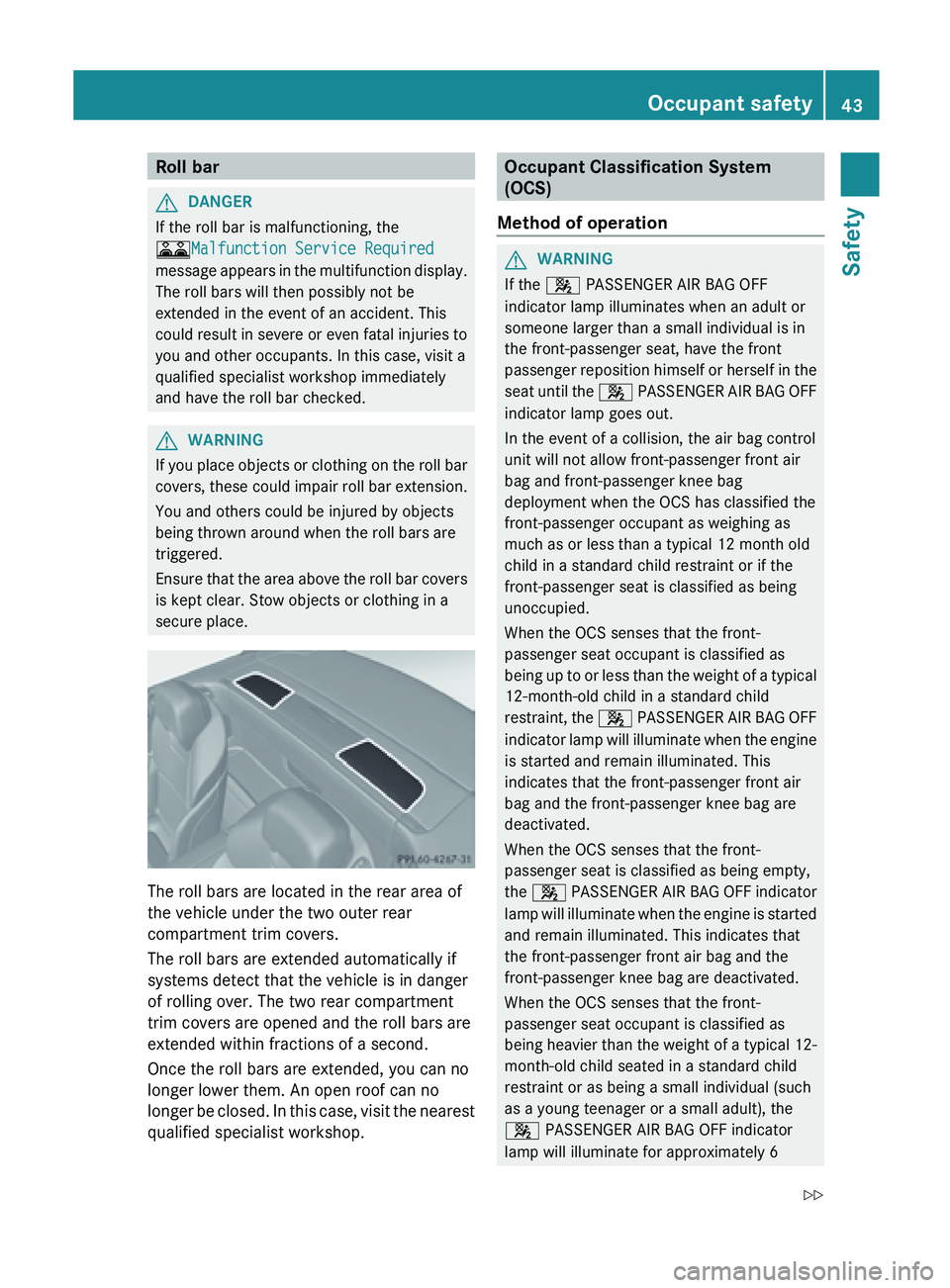
secure place. The roll bars are located in the rear area of
the vehicle under the two outer rear
compartment trim covers.
The roll bars are extended automatically if
systems detect that the vehicle is in danger
of rolling over. The two rear compartment
trim covers are opened and the roll bars are
extended within fractions of a second.
Once the roll bars are extended, you can no
longer lower them. An open roof can no
longer
be
closed. In this case, visit the nearest
qualified specialist workshop. Occupant Classification System
(OCS)
Method of operation G
WARNING
If the 4
PASSENGER AIR BAG OFF
indicator lamp illuminates when an adult or
someone larger than a small individual is in
the front-passenger seat, have the front
passenger reposition
himself or herself in the
seat until the 4 PASSENGER AIR BAG OFF
indicator lamp goes out.
In the event of a collision, the air bag control
unit will not allow front-passenger front air
bag and front-passenger knee bag
deployment when the OCS has classified the
front-passenger occupant as weighing as
much as or less than a typical 12 month old
child in a standard child restraint or if the
front-passenger seat is classified as being
unoccupied.
When the OCS senses that the front-
passenger seat occupant is classified as
being up to or less than the weight of a typical
12-month-old child in a standard child
restraint, the 4 PASSENGER AIR BAG OFF
indicator lamp will illuminate when the engine
is started and remain illuminated. This
indicates that the front-passenger front air
bag and the front-passenger knee bag are
deactivated.
When the OCS senses that the front-
passenger seat is classified as being empty,
the 4 PASSENGER AIR BAG OFF indicator
lamp will illuminate when the engine is started
and remain illuminated. This indicates that
the front-passenger front air bag and the
front-passenger knee bag are deactivated.
When the OCS senses that the front-
passenger seat occupant is classified as
being heavier than the weight of a typical 12-
month-old child seated in a standard child
restraint or as being a small individual (such
as a young teenager or a small adult), the
4 PASSENGER AIR BAG OFF indicator
lamp will illuminate for approximately 6 Occupant safety
43Safety
Z
Page 46 of 572
seconds when the engine is started.
Depending on occupant weight sensor
readings from the seat, it will then remain
illuminated
or
go out. If the 4 PASSENGER
AIR BAG OFF indicator lamp is illuminated, the
front-passenger front air bag and the front-
passenger knee bag are deactivated. If the
4 PASSENGER AIR BAG OFF indicator
lamp is not illuminated, the front-passenger
front air bag and the front-passenger knee
bag are activated.
When the OCS senses that the front-
passenger seat occupant is classified as an
adult or someone larger than a small
individual, the 4 PASSENGER AIR BAG
OFF indicator lamp will illuminate for
approximately six seconds when the engine is
started and then go out. This indicates that
the front-passenger front air bag and the
front-passenger knee bag are activated.
If the 4 PASSENGER AIR BAG OFF
indicator lamp is illuminated, the front-
passenger front air bag and the front-
passenger knee bag are deactivated and are
not deployed.
If the 4 PASSENGER AIR BAG OFF
indicator lamp is not illuminated, the front-
passenger front air bag and the front-
passenger knee bag are activated and are
deployed:
R in certain front impacts
R independently of the side impact air bag
and head bag
R if the impact has exceeded a
predetermined threshold value for
deployment
If the front-passenger front air bag is
deployed, the rate of inflation will be
influenced by:
R the rate of vehicle deceleration as assessed
by the air bag control unit
R the front passenger's weight category as
determined by the OCS G
WARNING
Children under 12 years must be secured
correctly in
a suitable infant or child restraint
system or booster seat suitable for the size
and weight of the child.
The infant or child restraint must be properly
secured with the vehicle's seat belt fully in
accordance with the child seat
manufacturer's instructions.
Occupants, in particular children, must sit as
upright as possible, fasten the seat belt
correctly and use a suitable infant restraint
system, child restraint system or booster seat
suitable for the size and weight of the child.
Children can be seriously or even fatally
injured by an air bag deploying.
Observe the following information:
R Your vehicle is equipped with air bag
technology designed to deactivate the
front-passenger front air bag and the front-
passenger knee bag in your vehicle when
the system senses the weight of a typical
12-month-old child or less along with the
weight of a standard appropriate child
restraint on the front-passenger seat.
R A child in a rear-facing child restraint
system on the front-passenger seat will be
seriously injured or even killed if the front-
passenger front air bag inflates in a collision
despite the air bag technology installed in
your vehicle, which could occur under some
circumstances.
R If you must install a rearward-facing child
restraint on the front-passenger seat, make
sure the 4 PASSENGER AIR BAG OFF
indicator lamp is illuminated, indicating
that the front-passenger front air bag and
front-passenger knee bag are deactivated.
If the 4 PASSENGER AIR BAG OFF
indicator lamp does not light up or goes out
when a rearward-facing child restraint
system is installed, please check
installation. Periodically check the 4
PASSENGER AIR BAG OFF indicator lamp
while driving to make sure the 444
Occupant safety
Safety
Page 54 of 572
X
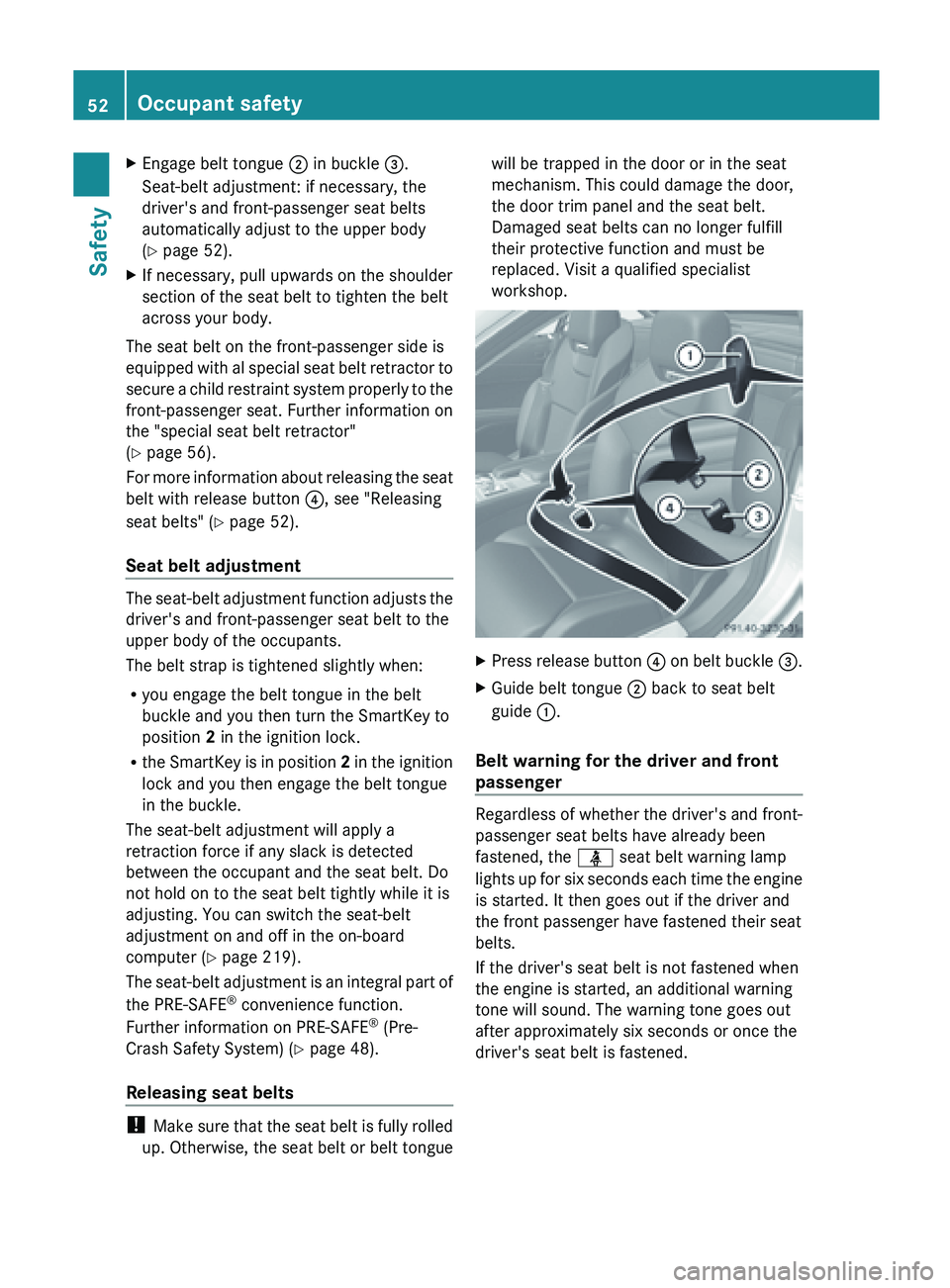
Engage belt tongue ; in buckle =.
Seat-belt adjustment: if necessary, the
driver's and front-passenger seat belts
automatically adjust to the upper body
(Y page 52).
X If necessary, pull upwards on the shoulder
section of the seat belt to tighten the belt
across your body.
The seat belt on the front-passenger side is
equipped with
al special seat belt retractor to
secure a child restraint system properly to the
front-passenger seat. Further information on
the "special seat belt retractor"
(Y page 56).
For more information about releasing the seat
belt with release button ?, see "Releasing
seat belts" ( Y page 52).
Seat belt adjustment The seat-belt adjustment function adjusts the
driver's and front-passenger seat belt to the
upper body of the occupants.
The belt strap is tightened slightly when:
R
you engage the belt tongue in the belt
buckle and you then turn the SmartKey to
position 2 in the ignition lock.
R the SmartKey
is in position 2 in the ignition
lock and you then engage the belt tongue
in the buckle.
The seat-belt adjustment will apply a
retraction force if any slack is detected
between the occupant and the seat belt. Do
not hold on to the seat belt tightly while it is
adjusting. You can switch the seat-belt
adjustment on and off in the on-board
computer (Y page 219).
The seat-belt adjustment is an integral part of
the PRE-SAFE ®
convenience function.
Further information on PRE-SAFE ®
(Pre-
Crash Safety System) ( Y page 48).
Releasing seat belts !
Make sure
that the seat belt is fully rolled
up. Otherwise, the seat belt or belt tongue will be trapped in the door or in the seat
mechanism. This could damage the door,
the door trim panel and the seat belt.
Damaged seat belts can no longer fulfill
their protective function and must be
replaced. Visit a qualified specialist
workshop.
X
Press release button ? on
belt buckle =.
X Guide belt tongue ; back to seat belt
guide :.
Belt warning for the driver and front
passenger Regardless of whether the driver's and front-
passenger seat belts have already been
fastened, the ü seat belt warning lamp
lights
up
for six seconds each time the engine
is started. It then goes out if the driver and
the front passenger have fastened their seat
belts.
If the driver's seat belt is not fastened when
the engine is started, an additional warning
tone will sound. The warning tone goes out
after approximately six seconds or once the
driver's seat belt is fastened. 52
Occupant safety
Safety
Page 60 of 572
When ABS is malfunctioning, other systems,
including driving safety systems, will also
become
inoperative.
Observe the information
on the ABS warning lamp ( Y page 257) and
display messages which may be shown in the
instrument cluster (Y page 224).
ABS regulates brake pressure in such a way
that the wheels do not lock when you brake.
This allows you to continue steering the
vehicle when braking.
ABS works from a speed of about 5 mph
(8 km/h) upwards, regardless of road-surface
conditions. ABS works on slippery surfaces,
even if you only brake gently.
The yellow ! ABS warning lamp in the
instrument cluster lights up when the ignition
is switched on. It goes out when the engine is
running.
Brakes X
If ABS intervenes: continue
to depress the
brake pedal vigorously until the braking
situation is over.
X To make a full brake application:
depress the brake pedal with full force.
If ABS intervenes when braking, you will feel
a pulsing in the brake pedal.
The pulsating brake pedal can be an
indication of hazardous road conditions, and
functions as a reminder to take extra care
while driving. BAS (Brake Assist System)
G
WARNING
If BAS is malfunctioning, the braking distance
in an emergency braking situation is
increased. There is a risk of an accident.
In an emergency braking situation, depress
the brake pedal with full force. ABS prevents
the wheels from locking.
BAS operates in emergency braking
situations. If you depress the brake pedal quickly, BAS automatically boosts the braking
force,
thus
shortening the stopping distance.
The brakes will function as usual once you
release the brake pedal. BAS is deactivated. BAS PLUS (Brake Assist System Plus)
BAS PLUS is only available in vehicles
equipped with DISTRONIC PLUS.
BAS PLUS provides braking assistance in
hazardous situations at speeds greater than
4 mph (7 km/h) and uses radar sensor
technology to assess the traffic situation.
With the
help of the radar sensor system, BAS
PLUS can detect obstacles that are in the
path of your vehicle for an extended period of
time.
At speeds up to 40 mph (70 km/h), BAS PLUS
may also detect stationary obstacles, for
example, stopped or parked vehicles.
To prevent a front-end collision, BAS PLUS
calculates the brake force necessary if:
R you approach an obstacle, and
R BAS PLUS has detected a risk of collision
At a speed greater than 20 mph
(30 km/h) : if you depress the brake sharply,
BAS PLUS automatically raises the brake
pressure to a value adapted to the traffic
situation.
At a speed less than 20 mph (30 km/h) : if
you depress the brake, BAS PLUS is
activated. The increase in brake pressure will
be carried out at the last possible moment.
If BAS PLUS demands particularly high
braking force, preventative passenger
protection measures (PRE-SAFE ®
) are
activated simultaneously.
X Keep the brake pedal depressed until the
emergency braking situation is over.
ABS prevents the wheels from locking.58
Driving safety systems
Safety