sensor MERCEDES-BENZ SL-CLASS ROADSTER 2013 Owner's Manual
[x] Cancel search | Manufacturer: MERCEDES-BENZ, Model Year: 2013, Model line: SL-CLASS ROADSTER, Model: MERCEDES-BENZ SL-CLASS ROADSTER 2013Pages: 572, PDF Size: 9.23 MB
Page 105 of 572
Mirrors
Rear-view mirror
X
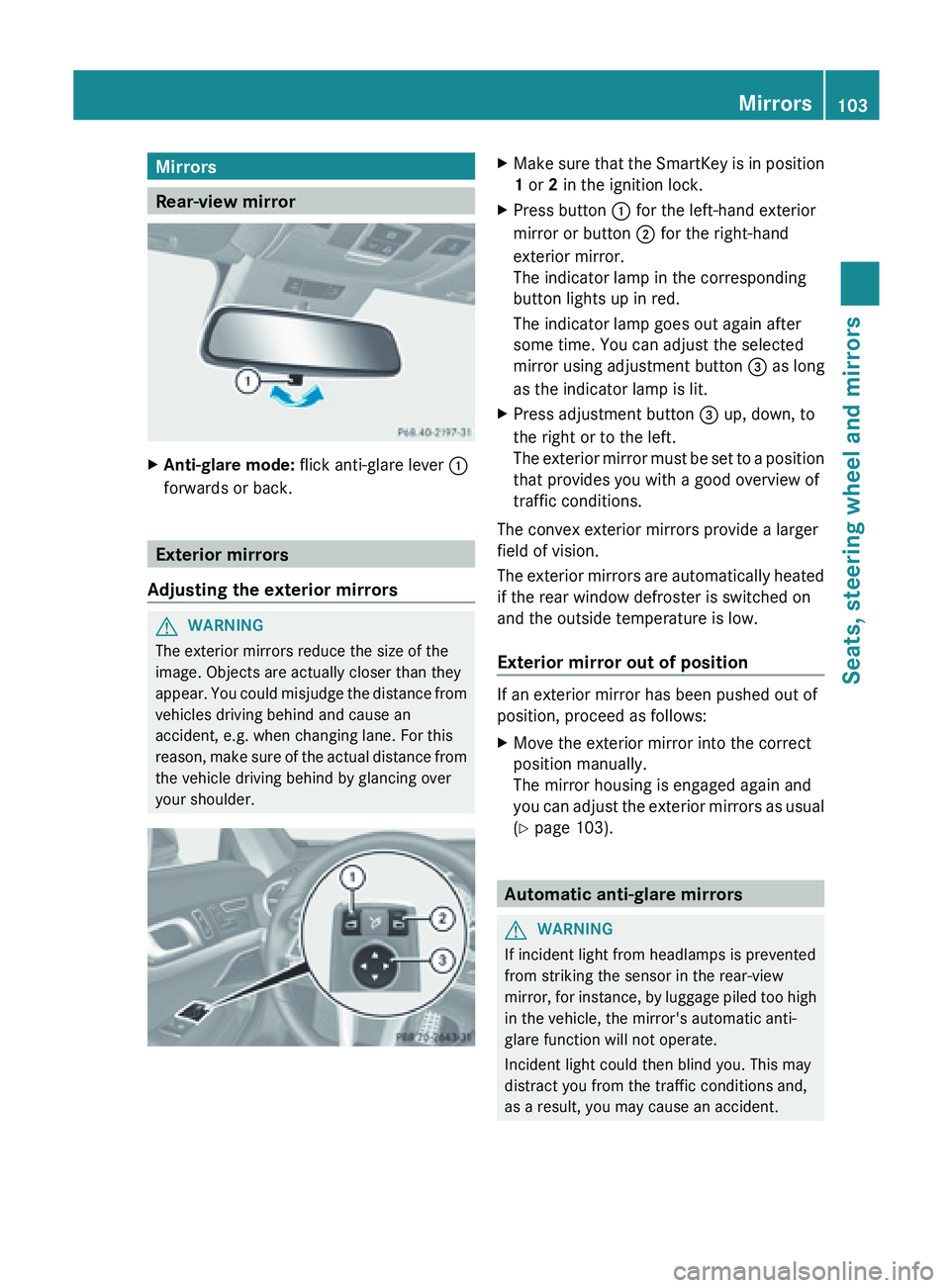
Anti-glare mode: flick anti-glare lever :
forwards or back. Exterior mirrors
Adjusting the exterior mirrors G
WARNING
The exterior mirrors reduce the size of the
image. Objects are actually closer than they
appear. You
could misjudge the distance from
vehicles driving behind and cause an
accident, e.g. when changing lane. For this
reason, make sure of the actual distance from
the vehicle driving behind by glancing over
your shoulder. X
Make
sure that the SmartKey is in position
1 or 2 in the ignition lock.
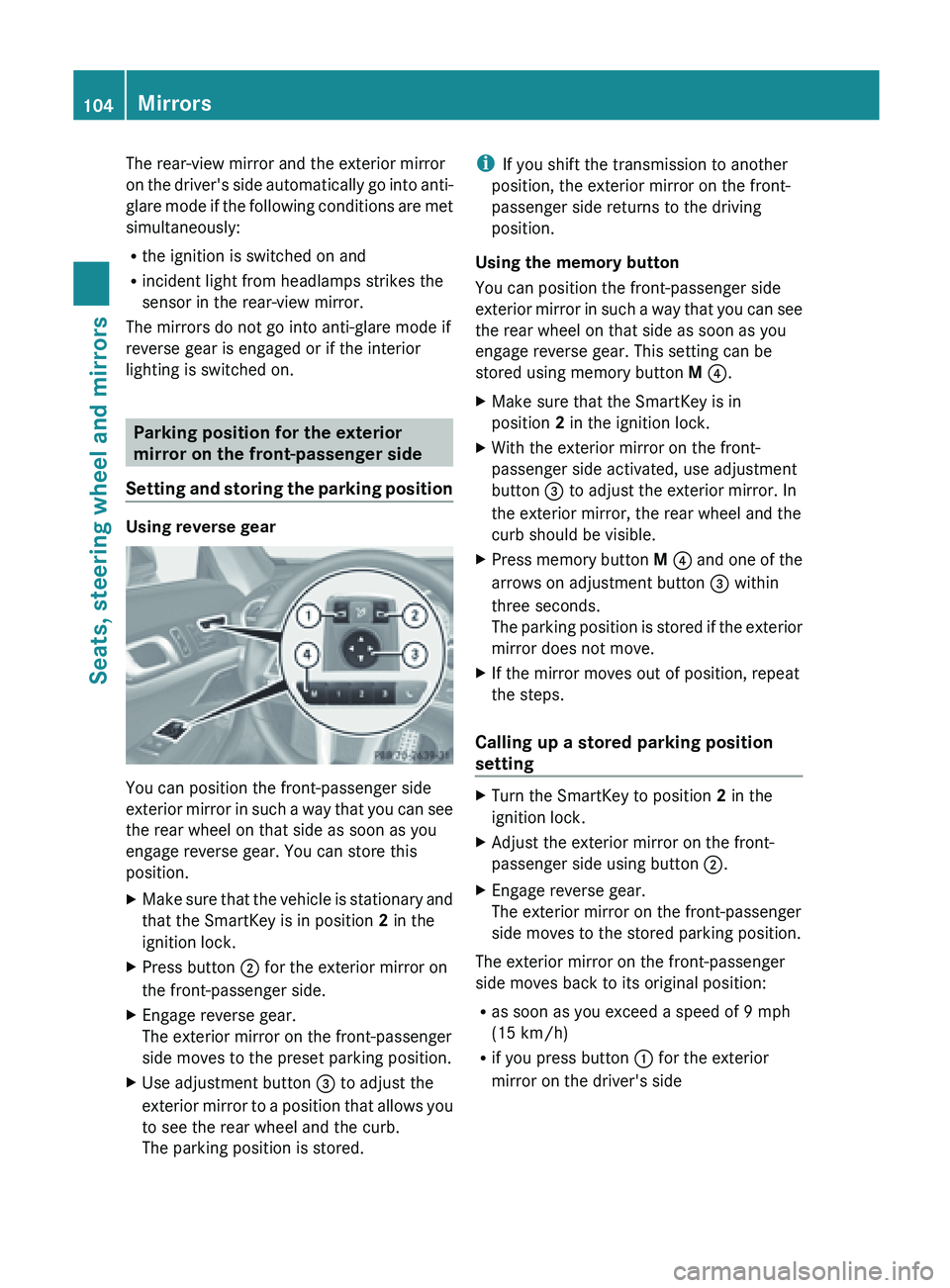
X Press button : for the left-hand exterior
mirror or button ; for the right-hand
exterior mirror.
The indicator lamp in the corresponding
button lights up in red.
The indicator lamp goes out again after
some time. You can adjust the selected
mirror using adjustment button = as long
as the indicator lamp is lit.
X Press adjustment button = up, down, to
the right or to the left.
The exterior
mirror must be set to a position
that provides you with a good overview of
traffic conditions.
The convex exterior mirrors provide a larger
field of vision.
The exterior
mirrors are automatically heated
if the rear window defroster is switched on
and the outside temperature is low.
Exterior mirror out of position If an exterior mirror has been pushed out of
position, proceed as follows:
X
Move the exterior mirror into the correct
position manually.
The mirror housing is engaged again and
you can
adjust the exterior mirrors as usual
(Y page 103). Automatic anti-glare mirrors
G
WARNING
If incident light from headlamps is prevented
from striking the sensor in the rear-view
mirror, for
instance, by luggage piled too high
in the vehicle, the mirror's automatic anti-
glare function will not operate.
Incident light could then blind you. This may
distract you from the traffic conditions and,
as a result, you may cause an accident. Mirrors
103
Seats, steering wheel and mirrors Z
Page 106 of 572
The rear-view mirror and the exterior mirror
on
the
driver's side automatically go into anti-
glare mode if the following conditions are met
simultaneously:
R the ignition is switched on and
R incident light from headlamps strikes the
sensor in the rear-view mirror.
The mirrors do not go into anti-glare mode if
reverse gear is engaged or if the interior
lighting is switched on. Parking position for the exterior
mirror on the front-passenger side
Setting and
storing the parking positionUsing reverse gear
You can position the front-passenger side
exterior
mirror
in such a way that you can see
the rear wheel on that side as soon as you
engage reverse gear. You can store this
position.
X Make sure that the vehicle is stationary and
that the SmartKey is in position 2 in the
ignition lock.
X Press button ; for the exterior mirror on
the front-passenger side.
X Engage reverse gear.
The exterior mirror on the front-passenger
side moves to the preset parking position.
X Use adjustment button = to adjust the
exterior mirror
to a position that allows you
to see the rear wheel and the curb.
The parking position is stored. i
If you shift the transmission to another
position, the exterior mirror on the front-
passenger side returns to the driving
position.
Using the memory button
You can position the front-passenger side
exterior mirror
in such a way that you can see
the rear wheel on that side as soon as you
engage reverse gear. This setting can be
stored using memory button M ?.
X Make sure that the SmartKey is in
position 2 in the ignition lock.
X With the exterior mirror on the front-
passenger side activated, use adjustment
button = to adjust the exterior mirror. In
the exterior mirror, the rear wheel and the
curb should be visible.
X Press memory button M ? and
one of the
arrows on adjustment button = within
three seconds.
The parking position is stored if the exterior
mirror does not move.
X If the mirror moves out of position, repeat
the steps.
Calling up a stored parking position
setting X
Turn the SmartKey to position 2 in the
ignition lock.
X Adjust the exterior mirror on the front-
passenger side using button ;.
X Engage reverse gear.
The exterior mirror on the front-passenger
side moves to the stored parking position.
The exterior mirror on the front-passenger
side moves back to its original position:
R as soon as you exceed a speed of 9 mph
(15 km/h)
R if you press button :
for the exterior
mirror on the driver's side 104
Mirrors
Seats, steering wheel and mirrors
Page 116 of 572
Adaptive Highbeam Assist
Important safety notes G
WARNING
The Adaptive Highbeam Assist is only an aid
intended to support you while driving. The
driver is and remains responsible for proper
vehicle lighting in accordance with the
prevailing light, sight and traffic conditions.
The system may be impaired or unavailable
when
R visibility is
poor, e.g. due to snow, rain, fog,
or heavy spray
R the optical sensor area of the windshield is
dirty, fogged up, or covered by a sticker for
example
The system cannot recognize the following
road users:
R Road users without a lighting system of
their own, e.g. pedestrians
R Road users with dim lighting of their own,
e.g. cyclists
R Road users whose lighting is obstructed,
e.g. road users behind a guardrail
R In some seldom cases, even road users with
a lighting system of their own may be
recognized too late or not at all.
The automatic high-beam headlamps will then
not be deactivated or it will be activated in
spite of preceding or oncoming road users.
This could endanger you and/or others and
cause an accident. Always pay close attention
to the traffic situation and switch off the high
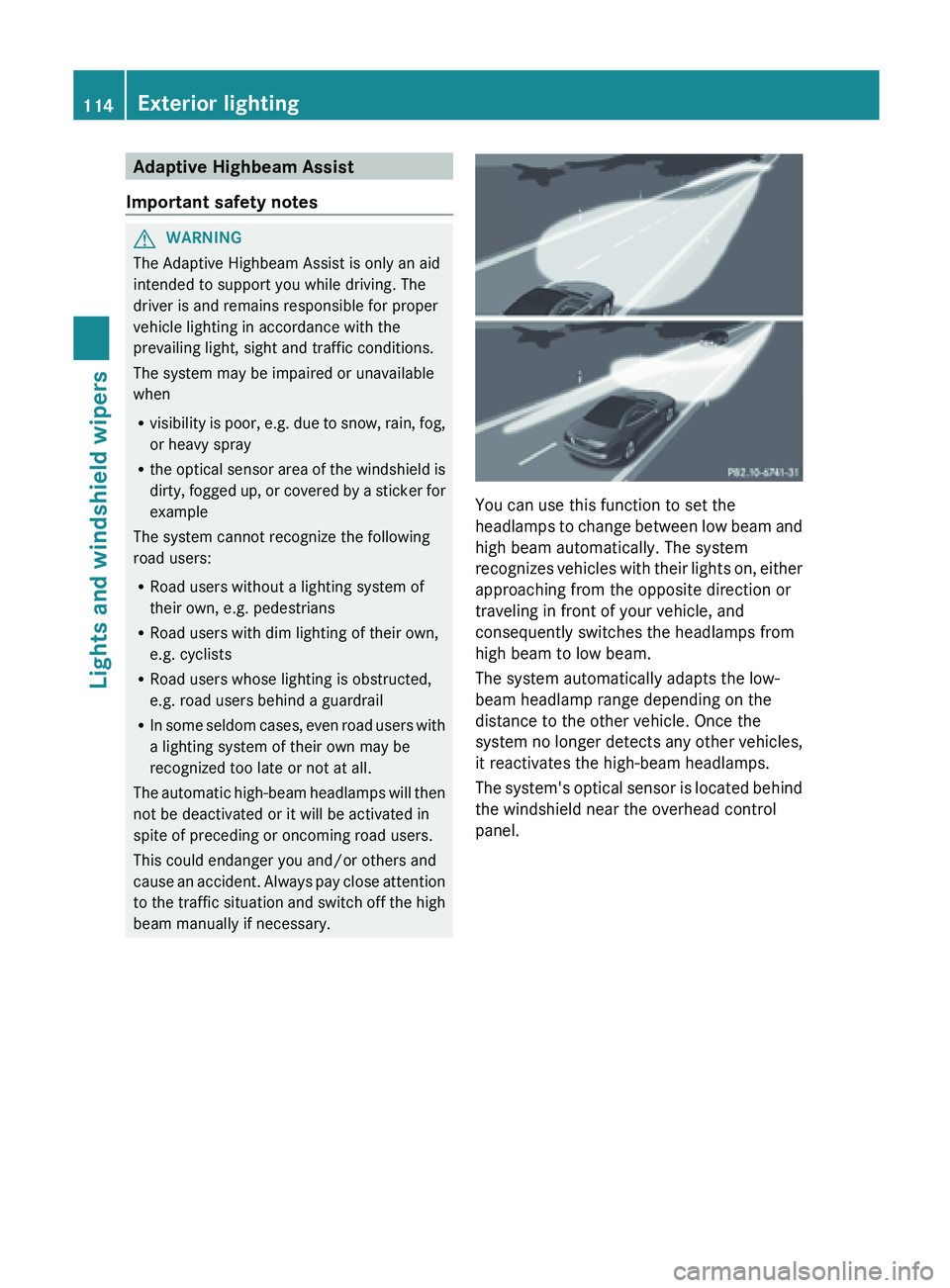
beam manually if necessary. You can use this function to set the
headlamps to
change between low beam and
high beam automatically. The system
recognizes vehicles with their lights on, either
approaching from the opposite direction or
traveling in front of your vehicle, and
consequently switches the headlamps from
high beam to low beam.
The system automatically adapts the low-
beam headlamp range depending on the
distance to the other vehicle. Once the
system no longer detects any other vehicles,
it reactivates the high-beam headlamps.
The system's optical sensor is located behind
the windshield near the overhead control
panel. 114
Exterior lighting
Lights and windshield wipers
Page 117 of 572
Switching Adaptive Highbeam Assist
on/off
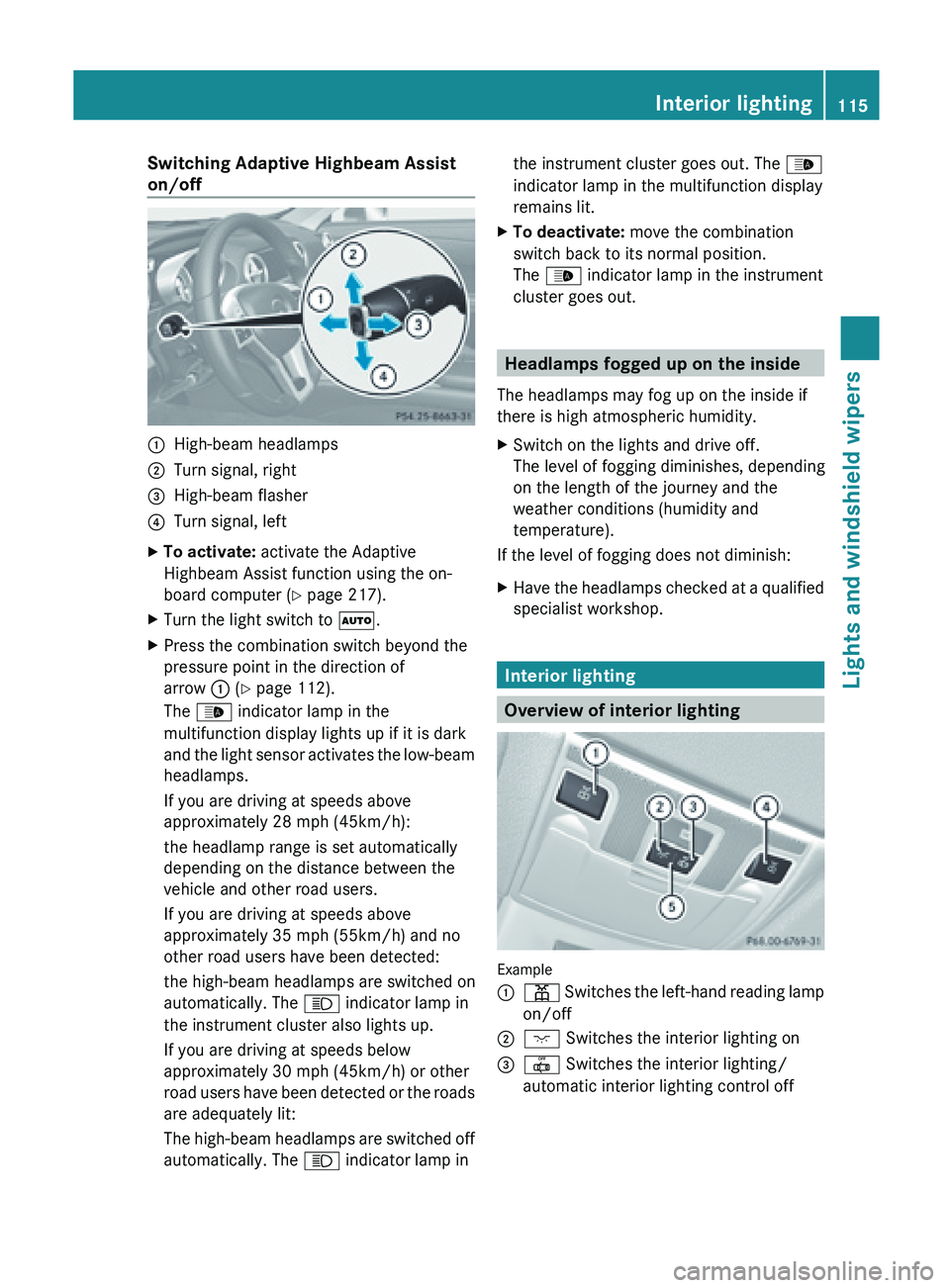
:
High-beam headlamps
; Turn signal, right
= High-beam flasher
? Turn signal, left
X To activate: activate the Adaptive
Highbeam Assist function using the on-
board computer ( Y page 217).
X Turn the light switch to Ã.
X Press the combination switch beyond the
pressure point in the direction of
arrow : (Y page 112).
The _ indicator lamp in the
multifunction display lights up if it is dark
and the
light sensor activates the low-beam
headlamps.
If you are driving at speeds above
approximately 28 mph (45km/h):
the headlamp range is set automatically
depending on the distance between the
vehicle and other road users.
If you are driving at speeds above
approximately 35 mph (55km/h) and no
other road users have been detected:
the high-beam headlamps are switched on
automatically. The K indicator lamp in
the instrument cluster also lights up.
If you are driving at speeds below
approximately 30 mph (45km/h) or other
road users have been detected or the roads
are adequately lit:
The high-beam headlamps are switched off
automatically. The K indicator lamp in the instrument cluster goes out. The
_
indicator lamp in the multifunction display
remains lit.
X To deactivate: move the combination
switch back to its normal position.
The _ indicator lamp in the instrument
cluster goes out. Headlamps fogged up on the inside
The headlamps may fog up on the inside if
there is high atmospheric humidity.
X Switch on the lights and drive off.
The level of fogging diminishes, depending
on the length of the journey and the
weather conditions (humidity and
temperature).
If the level of fogging does not diminish:
X Have the headlamps checked at a qualified
specialist workshop. Interior lighting
Overview of interior lighting
Example
:
p Switches the left-hand reading lamp
on/off
; c
Switches the interior lighting on
= | Switches the interior lighting/
automatic interior lighting control off Interior lighting
115
Lights and windshield wipers Z
Page 120 of 572
Windshield wipers
Switching the windshield wipers on/
off
G
WARNING
The windshield will not longer be wiped
properly if the wiper blades are worn. This
could prevent you from observing the traffic
conditions, thereby causing an accident.
Replace the
wiper blades twice a year, ideally
in spring and fall.
! Do not operate the windshield wipers
when the windshield is dry, as this could
damage the wiper blades. Moreover, dust
that has collected on the windshield can
scratch the glass if wiping takes place when
the windshield is dry.
If it is necessary to switch on the windshield
wipers in dry weather conditions, always
use washer fluid when operating the
windshield wipers.
! If the windshield wipers leave smears on
the windshield after the vehicle has been
washed in an automatic car wash, wax or
other residues may be the reason for this.
Clean the windshield using washer fluid
after washing the vehicle in an automatic
car wash.
! Intermittent wiping with rain sensor: due
to optical influences and the windshield
becoming dirty in dry weather conditions,
the windshield wipers may be activated
inadvertently. This could then damage the
windshield wiper blades or scratch the
windshield.
For this reason, you should always switch
off the windshield wipers in dry weather. Combination switch
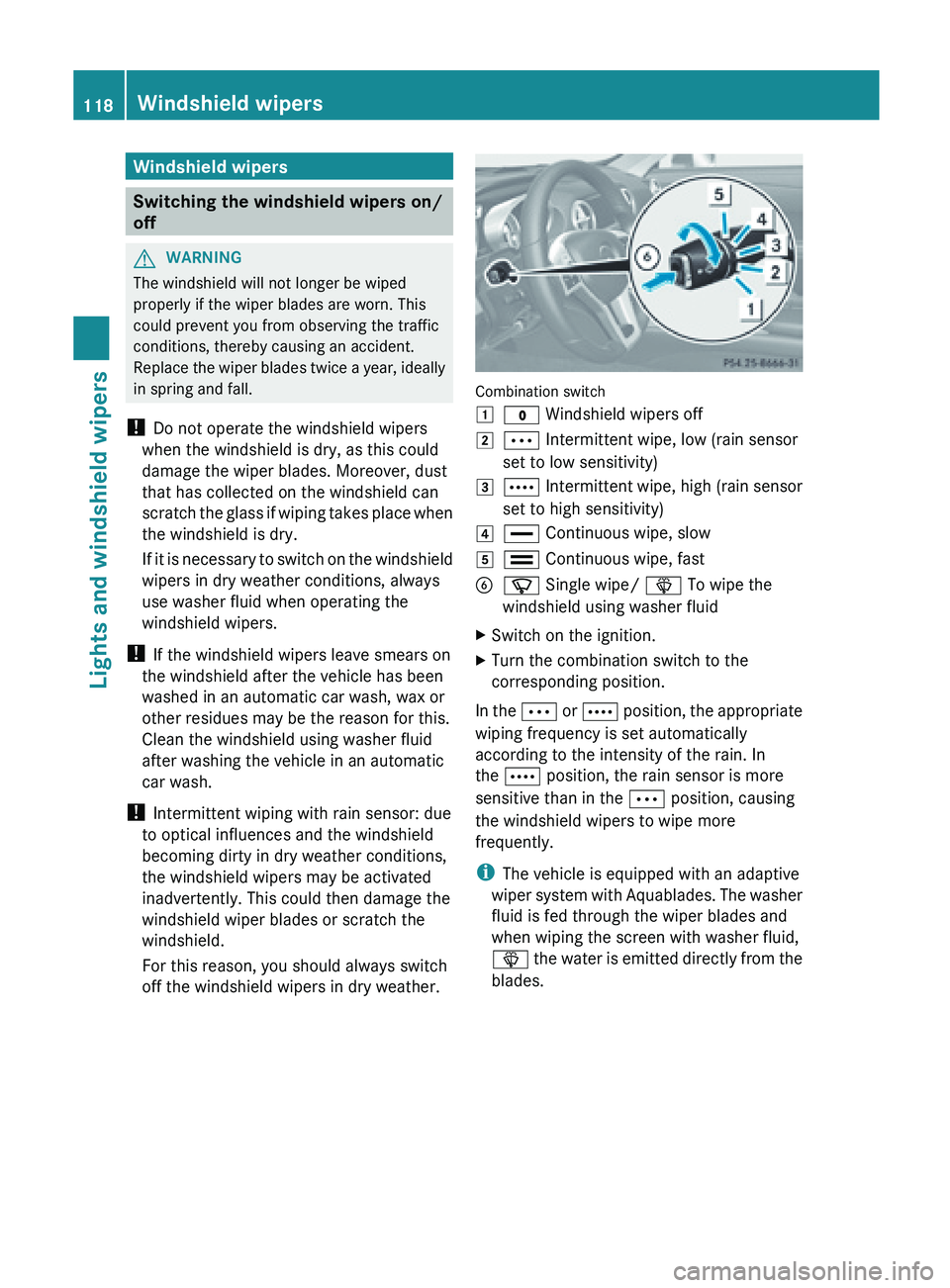
1
$
Windshield wipers off
2 Ä Intermittent wipe, low (rain sensor
set to low sensitivity)
3 Å Intermittent wipe, high (rain sensor
set to high sensitivity)
4 °
Continuous wipe, slow
5 ¯ Continuous wipe, fast
B í Single wipe/ î To wipe the
windshield using washer fluid
X Switch on the ignition.
X Turn the combination switch to the
corresponding position.
In the Ä or Å
position, the appropriate
wiping frequency is set automatically
according to the intensity of the rain. In
the Å position, the rain sensor is more
sensitive than in the Ä position, causing
the windshield wipers to wipe more
frequently.
i The vehicle is equipped with an adaptive
wiper system with Aquablades. The washer
fluid is fed through the wiper blades and
when wiping the screen with washer fluid,
î the water is emitted directly from the
blades. 118
Windshield wipers
Lights and windshield wipers
Page 167 of 572
G
WARNING
DISTRONIC PLUS distance is not a substitute
for the
active intervention of the driver. It does
not detect pedestrians or stationary objects,
nor can it detect, recognize or predict the
road's course or the movements of vehicles
in front. DISTRONIC PLUS can only brake the
vehicle using 40% of the vehicle's maximum
available brake force.
DISTRONIC PLUS may not detect narrow
vehicles driving in front, e.g. motorcycles, or
vehicles driving in the lane beyond the lane
next to your vehicle, especially if the vehicles
are not driving on the middle of their lane.
The driver must always pay careful attention
to the road, weather and traffic conditions.
The driver must drive, steer and brake in a
manner which will allow him to always have
control of the vehicle.
Sources of high-frequency radio waves, such
as toll stations, speed-measuring radar, etc.,
can cause DISTRONIC PLUS to fail
temporarily. G
WARNING
The DISTRONIC PLUS cannot take road and
traffic conditions into account. Only use the
DISTRONIC PLUS if the road, weather and
traffic conditions make it advisable to travel
at a constant speed. G
WARNING
Use of the DISTRONIC PLUS can be
dangerous on slippery roads. Rapid changes
in tire traction can result in wheel spin and
loss of control.
The DISTRONIC PLUS does not function in
adverse sight
and distance conditions. Do not
use the DISTRONIC PLUS during conditions of
fog, heavy rain, snow or sleet. G
WARNING
The DISTRONIC PLUS cannot take weather
conditions into account. Switch off the
DISTRONIC PLUS or do not switch it on if:
R roads are
slippery or covered with snow or
ice. The wheels could lose traction while
braking or accelerating, and the vehicle
could skid.
R the DISTRONIC PLUS system sensor covers
are dirty or visibility is diminished due to
snow, rain or fog, for example. The distance
control system functionality could be
impaired.
Always pay attention to surrounding traffic
conditions even while the DISTRONIC PLUS is
switched on. Otherwise, you may not be able
to recognize dangerous situations until it is
too late. This could cause an accident in which
you and/or others could be injured. G
WARNING
The "Resume" function should only be
operated if the driver is fully aware of the
previously set speed and wishes to resume
this particular preset speed. G
WARNING
Your undivided attention to street and traffic
conditions is necessary at all times whether
DISTRONIC PLUS is active or not.
The use of DISTRONIC PLUS can be
dangerous on
winding roads or in heavy traffic
because conditions do not allow safe driving
at a constant speed.
DISTRONIC PLUS does not react to stationary
objects on the road (for example, a vehicle
stopped in traffic or an abandoned vehicle).
DISTRONIC PLUS likewise does not react to
oncoming vehicles. Driving systems
165
Driving and parking
Z
Page 168 of 572
Deactivate DISTRONIC PLUS:
R
when changing to the right lane, if the
vehicles in the left lane are driving slower
R when driving into a filter lane or an
expressway exit
R in complex driving situations, for example
in construction sites on an expressway
In these situations DISTRONIC PLUS will
maintain the
set speed if it is not deactivated.
DISTRONIC PLUS is intended only for
maintaining a set speed and a set distance
from the objects moving in front of the
vehicle. G
WARNING
An intermittent warning sounds and the
distance warning
lamp · in the instrument
cluster is illuminated if the DISTRONIC PLUS
system calculates that the distance to the
vehicle ahead and your vehicle's current
speed indicate that the DISTRONIC PLUS will
not be capable of slowing the vehicle
sufficiently to maintain the preset following
distance, which creates a danger of a
collision.
Immediately brake the vehicle to increase
your distance to the preceding vehicle. The
warning sound is intended as a final caution
in which you should intercede with your own
braking inputs to avoid a potentially
dangerous situation. Do not wait for the
operation of the warning signal to intercede
with your own braking. This will result in
potentially dangerous emergency braking
which will not always result in an impact being
avoided.
Tailgating increases the risk of an accident. G
WARNING
DISTRONIC PLUS brakes your vehicle with a
maximum deceleration of 13 ft/s 2
(4 m/s 2
).
This corresponds to approximately 40% of
your vehicle's maximum braking force.
To
avoid a collision, you must apply the brakes
yourself. DISTRONIC PLUS brakes the vehicle just
enough to restore the preset speed or the
preset distance to the vehicle in front. G
WARNING
If you do not receive visual or acoustic
warning signals during a critical traffic
situation, DISTRONIC PLUS has either not
recognized the collision risk, has been
deactivated or is malfunctioning.
Remember, whether
or not DISTRONIC PLUS
is operating, it is ultimately always the drivers
responsibility to apply the brakes in order to
control the vehicle and avoid a collision.
General notes DISTRONIC PLUS regulates the speed and
automatically helps you maintain the
distance to the vehicle detected in front.
DISTRONIC PLUS brakes automatically so
that the set speed is not exceeded.
On long and steep downhill gradients,
especially if the vehicle is laden, you must
select shift range
1, 2 or 3 in good time
(Y page 149).
By doing so, you will make use
of the braking effect of the engine, which
relieves the load on the brake system and
prevents the brakes from overheating and
wearing too quickly.
If a slower-moving vehicle is detected in front,
DISTRONIC PLUS brakes your vehicle. It
maintains the preset distance to the vehicle
in front.
If you want DISTRONIC PLUS to assist you,
the radar sensor system must be activated
(Y page 218) and operational.
If there is no vehicle in front, DISTRONIC
PLUS operates in the same way as cruise
control in the speed range between 20 mph
(Canada: 30 km/h) and120 mph (Canada:
200 km/h). If a vehicle is driving in front of
you, it operates in the speed range between
0 mph and (0 km/h) 120 mph (Canada:
200 km/h).
Do not use DISTRONIC PLUS while driving on
roads with steep gradients. 166
Driving systems
Driving and parking
Page 169 of 572
As DISTRONIC PLUS transmits radar waves,
it can resemble the radar detectors of the
responsible authorities. You can refer to the
relevant chapter in the Operator's Manual if
questions are asked about this.
i
USA only:
This device has been approved
by the FCC as a "Vehicular Radar System".
The radar sensor is intended for use in an
automotive radar system only. Removing,
altering or tampering with the device will
void any warranties, and is not permitted
by the FCC. Do not tamper with, alter, or
use the device in any non-approved way.
Any unauthorized modification to this
device could void the user's authority to
operate the equipment.
i Canada only: This device complies with
RSS-210 of Industry Canada. Operation is
subject to the following two conditions:
1. This device may not cause interference,
and
2. this device must accept any interference
received, including interference that may
cause undesired operation of the device.
Removal, tampering, or altering of the
device will void any warranties and is not
permitted. Do not tamper with, alter, or use
the device in any non-approved way.
Any unauthorized modification to this
device could void the user's authority to
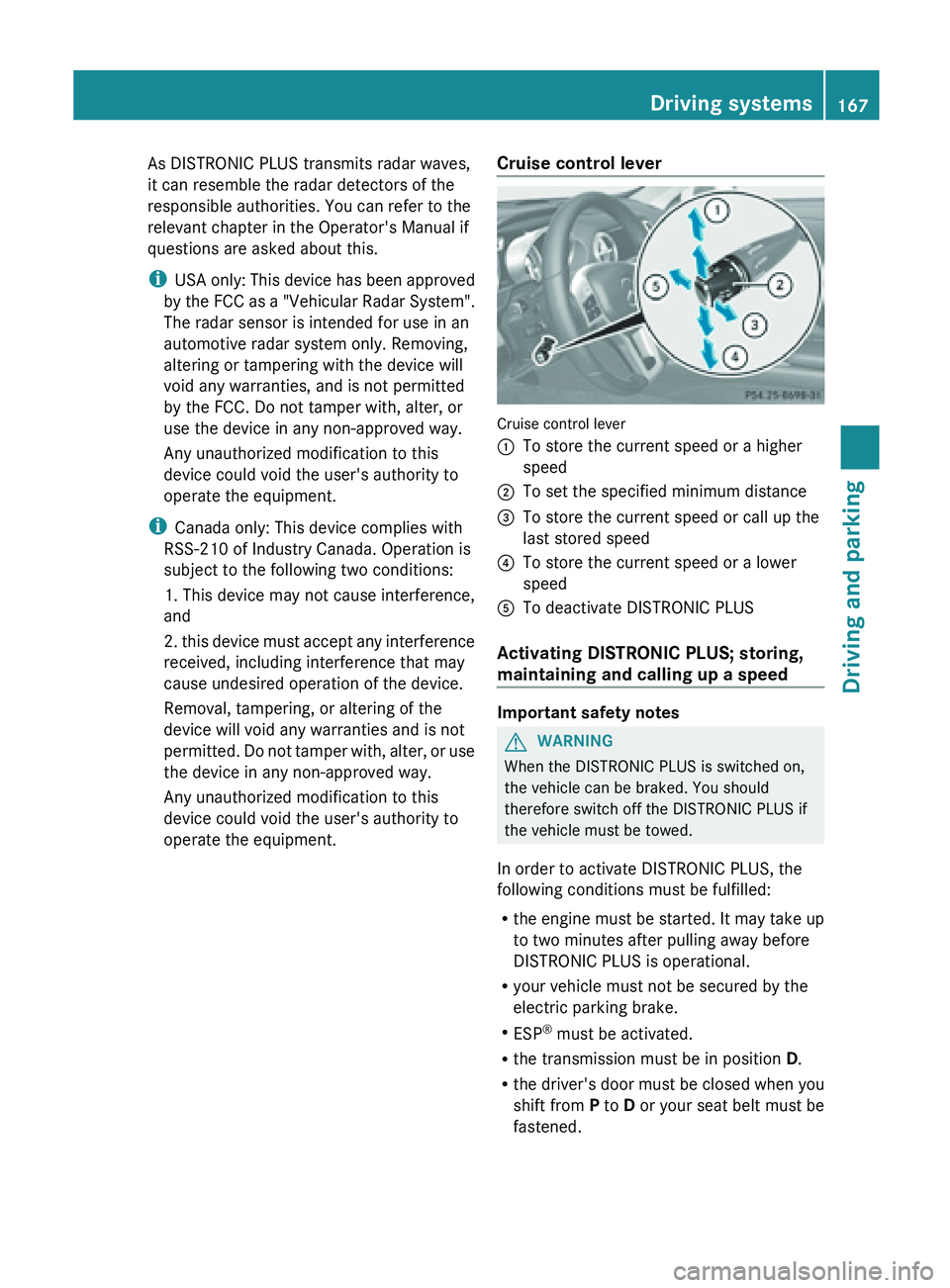
operate the equipment. Cruise control lever Cruise control lever
:
To store the current speed or a higher
speed
; To set the specified minimum distance
= To store the current speed or call up the
last stored speed
? To store the current speed or a lower
speed
A To deactivate DISTRONIC PLUS
Activating DISTRONIC PLUS; storing,
maintaining and calling up a speed Important safety notes
G
WARNING
When the DISTRONIC PLUS is switched on,
the vehicle can be braked. You should
therefore switch off the DISTRONIC PLUS if
the vehicle must be towed.
In order to activate DISTRONIC PLUS, the
following conditions must be fulfilled:
R the engine
must be started. It may take up
to two minutes after pulling away before
DISTRONIC PLUS is operational.
R your vehicle must not be secured by the
electric parking brake.
R ESP ®
must be activated.
R the transmission must be in position D.
R the driver's door must be closed when you
shift from P to D or your seat belt must be
fastened. Driving systems
167
Driving and parking Z
Page 175 of 572
X
Select the Distance Display function
using the on-board computer
(Y page 214).
In the Assistance menu of the on-board
computer, you
can also activate or deactivate
PRE-SAFE ®
Brake (Y page 214).
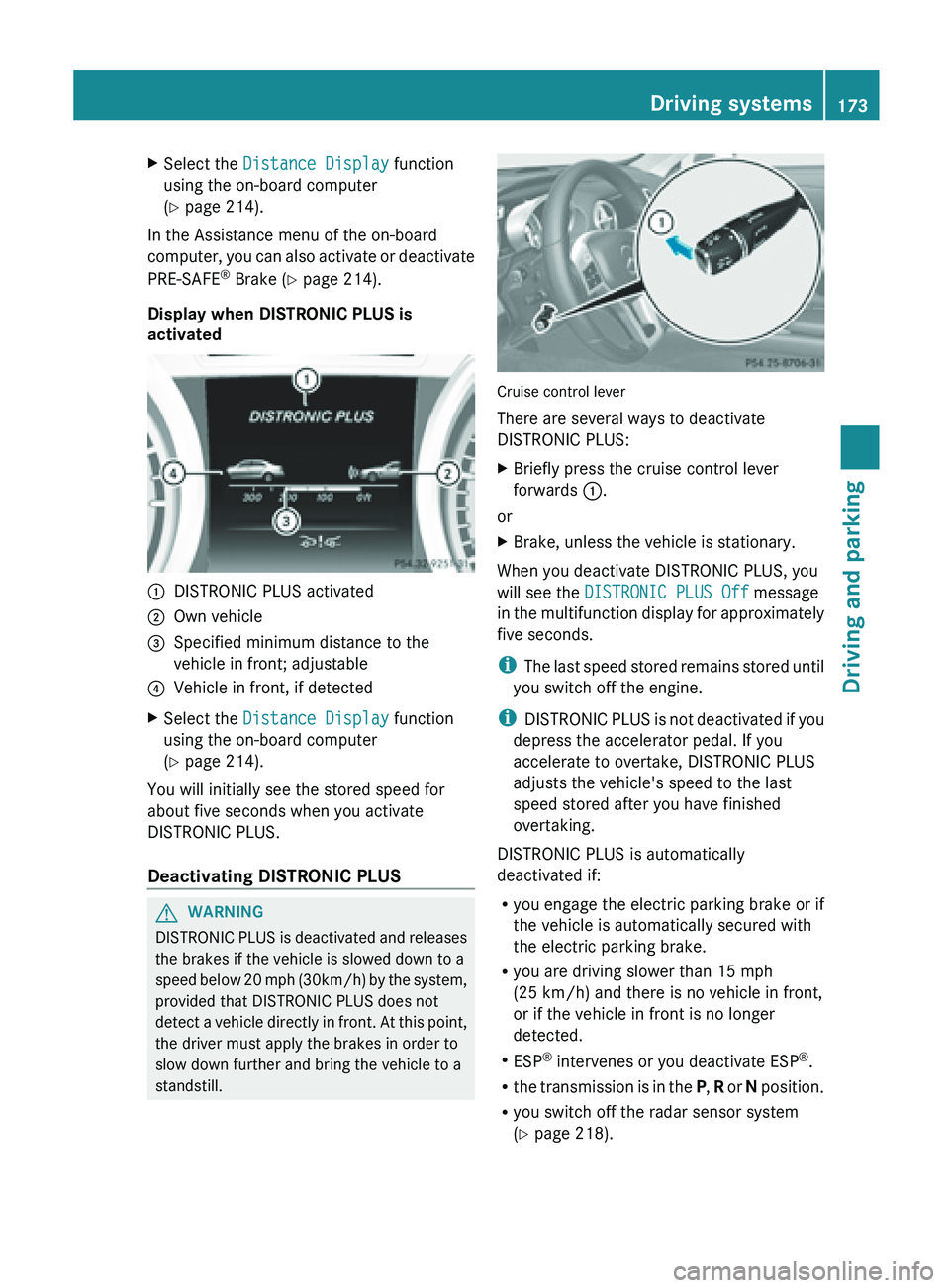
Display when DISTRONIC PLUS is
activated :
DISTRONIC PLUS activated
; Own vehicle
= Specified minimum distance to the
vehicle in front; adjustable
? Vehicle in front, if detected
X Select the Distance Display function
using the on-board computer
(Y page 214).
You will initially see the stored speed for
about five seconds when you activate
DISTRONIC PLUS.
Deactivating DISTRONIC PLUS G
WARNING
DISTRONIC PLUS is deactivated and releases
the brakes if the vehicle is slowed down to a
speed below
20 mph (30km/h) by the system,
provided that DISTRONIC PLUS does not
detect a vehicle directly in front. At this point,
the driver must apply the brakes in order to
slow down further and bring the vehicle to a
standstill. Cruise control lever
There are several ways to deactivate
DISTRONIC PLUS:
X
Briefly press the cruise control lever
forwards :.
or
X Brake, unless the vehicle is stationary.
When you deactivate DISTRONIC PLUS, you
will see the DISTRONIC PLUS Off message
in the
multifunction display for approximately
five seconds.
i The last speed stored remains stored until
you switch off the engine.
i DISTRONIC PLUS is not deactivated if you
depress the accelerator pedal. If you
accelerate to overtake, DISTRONIC PLUS
adjusts the vehicle's speed to the last
speed stored after you have finished
overtaking.
DISTRONIC PLUS is automatically
deactivated if:
R you engage the electric parking brake or if
the vehicle is automatically secured with
the electric parking brake.
R you are driving slower than 15 mph
(25 km/h) and there is no vehicle in front,
or if the vehicle in front is no longer
detected.
R ESP ®
intervenes or you deactivate ESP ®
.
R the transmission is in the P, R or N position.
R you switch off the radar sensor system
(Y page 218). Driving systems
173
Driving and parking Z
Page 185 of 572
X
Make sure that the engine is running or that
it has been switched off by the ECO start/
stop function.
X If indicator lamp ; is lit: press
button :.
Indicator lamp ; goes out. You have
selected the suspension for a comfortable
driving style.
The AMG Suspension System COMFORT
message appears in the multifunction
display.
In Comfort mode, the driving characteristics
of your vehicle are more comfortable. Select
this mode if you favor a more comfortable
driving style.
Driving conditions menu in the
COMAND display You can display some driving systems and
additional information in the COMAND
display.
X
Call up the driving conditions menu in the
COMAND display (Y
page 291).
The corresponding displays appear in the
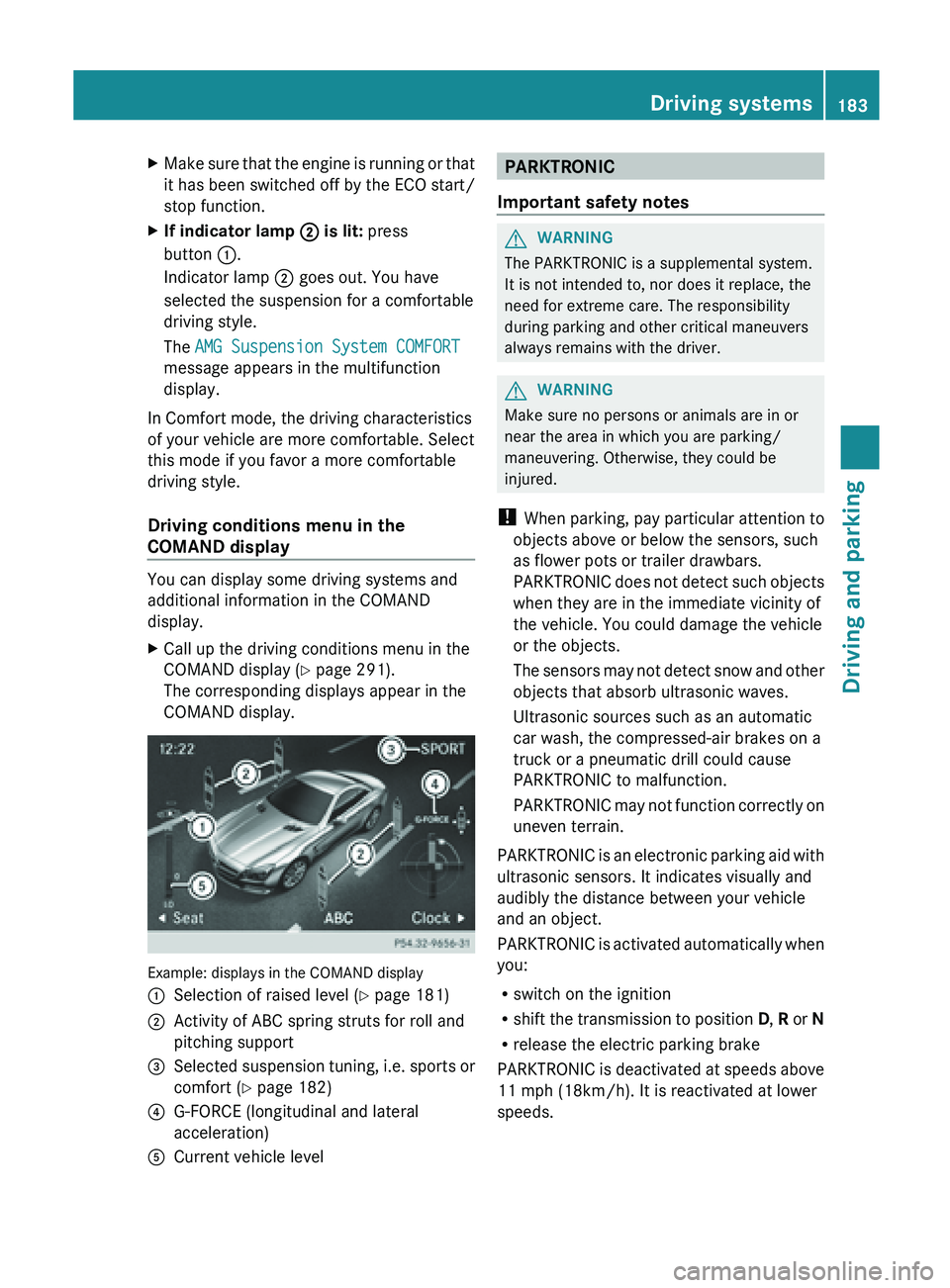
COMAND display. Example: displays in the COMAND display
:
Selection of raised level (Y page 181)
; Activity of ABC spring struts for roll and
pitching support
= Selected suspension tuning, i.e. sports or
comfort (
Y page 182)
? G-FORCE (longitudinal and lateral
acceleration)
A Current vehicle level PARKTRONIC
Important safety notes G
WARNING
The PARKTRONIC is a supplemental system.
It is not intended to, nor does it replace, the
need for extreme care. The responsibility
during parking and other critical maneuvers
always remains with the driver. G
WARNING
Make sure no persons or animals are in or
near the area in which you are parking/
maneuvering. Otherwise, they could be
injured.
! When parking,
pay particular attention to
objects above or below the sensors, such
as flower pots or trailer drawbars.
PARKTRONIC does not detect such objects
when they are in the immediate vicinity of
the vehicle. You could damage the vehicle
or the objects.
The sensors may not detect snow and other
objects that absorb ultrasonic waves.
Ultrasonic sources such as an automatic
car wash, the compressed-air brakes on a
truck or a pneumatic drill could cause
PARKTRONIC to malfunction.
PARKTRONIC may not function correctly on
uneven terrain.
PARKTRONIC is an electronic parking aid with
ultrasonic sensors. It indicates visually and
audibly the distance between your vehicle
and an object.
PARKTRONIC is activated automatically when
you:
R switch on the ignition
R shift the transmission to position D, R or N
R release the electric parking brake
PARKTRONIC is deactivated at speeds above
11 mph (18km/h). It is reactivated at lower
speeds. Driving systems
183
Driving and parking Z