brakes MERCEDES-BENZ SL-CLASS ROADSTER 2013 Owners Manual
[x] Cancel search | Manufacturer: MERCEDES-BENZ, Model Year: 2013, Model line: SL-CLASS ROADSTER, Model: MERCEDES-BENZ SL-CLASS ROADSTER 2013Pages: 572, PDF Size: 9.23 MB
Page 8 of 572
Avoiding an area
................................ 349B
Back button ....................................... 274
Back support see Lumbar support
Balance, adjusting ............................. 278
BAS (Brake Assist System) ................. 58
Basic settings see Settings
BAS PLUS (Brake Assist System
PLUS) .................................................... 58
Bass, setting ...................................... 278
Battery (SmartKey) Checking .......................................... 71
Important safety notes .................... 71
Replacing ......................................... 71
Battery (vehicle)
Charging ........................................ 515
Display message ............................ 240
Important safety notes .................. 513
Jump starting ................................. 516
Overview ........................................ 513
Belt
see Seat belts
Bird's-eye view (navigation) .............344
Blind Spot Assist see Active Blind Spot Assist
Bluetooth ®
Activating/deactivating ................. 292
Activating audio mode ...................443
Conditions (telephone) ..................358
Connecting another mobile phone . 362
Connecting audio devices ..............440
Device list ...................................... 440
Entering the passcode ...................360
External authorization ....................361
General information ....................... 292
Interface ........................................ 357
Introduction ................................... 357
Reconnecting an audio device .......442
Searching for a mobile phone ........359
Settings ......................................... 292
Telephone basic menu ................... 363
Telephony ...................................... 358
Telephony notes ............................ 357
Bluetooth ®
audio basic display ........ 443Bottle holder ......................................
479
Brake Assist System see BAS (Brake Assist System)
Brake fluid
Display message ............................ 230
Notes ............................................. 563
Brake lamps
Display message ............................ 236
Brakes
ABS .................................................. 57
BAS .................................................. 58
BAS PLUS ........................................ 58
Brake fluid (notes) .........................563
Display message ............................ 224
Driving tips .................................... 158
High-performance brake system .... 159
Important safety notes .................. 158
Maintenance .................................. 159
Parking brake ................................ 155
Warning lamp ................................. 257
Breakdown
see Flat tire
see Towing away
Brightness, setting (TV, video) ......... 453
Bulbs see Changing bulbs
Buttons on the COMAND
controller ........................................... 274 C
California Important notice for retail
customers and lessees ....................29
Call
Accepting/ending/rejecting ..........
364
Connecting .................................... 365
see Telephone
Calling up a malfunction
see Display messages
Call lists
Displaying details ........................... 372
Opening and selecting an entry ..... 372
Saving an entry in the address
book .............................................. 372
Car
see Vehicle 6
Index
Page 12 of 572
Setting the specified minimum
distance .........................................
172
Warning lamp ................................. 265
Dolby ®
Digital
.................................... 278
Doors Automatic locking (on-board
computer) ...................................... 218
Automatic locking (switch) ............... 76
Central locking/unlocking
(SmartKey) ....................................... 68
Display message ............................ 251
Emergency locking ........................... 77
Emergency unlocking .......................76
Important safety notes .................... 74
Opening (from inside) ......................75
Overview .......................................... 74
Power closing feature ......................76
Drinking and driving .........................157
Drinks holder see Cup holder
Drive program
Automatic ...................................... 149
Display ........................................... 145
Manual ........................................... 150
SETUP (on-board computer) .......... 220
Drive program selector ..................... 147
Driver's door see Doors
Driver's seat
see Seats
Driving abroad
Symmetrical low beam .................. 108
Driving on flooded roads ..................161
Driving safety systems ABS (Anti-lock Braking System) ....... 57
ADAPTIVE BRAKE ............................. 63
BAS (Brake Assist System) ..............58
BAS PLUS (Brake Assist System
PLUS) ............................................... 58
Electronic brake force distribution ... 62
ESP ®
(Electronic Stability
Program) .......................................... 59
ETS (Electronic Traction System) ..... 60
Important safety information ........... 57
Overview .......................................... 57
PRE-SAFE ®
Brake ............................. 63
STEER CONTROL ............................. 65Driving systems
Active Blind Spot Assist
.................195
Active Body Control (AMG
vehicles) ........................................ 181
Active Body Control (except AMG
vehicles) ........................................ 179
Active Driving Assistance
package ......................................... 195
Active Lane Keeping Assist ............ 199
Active Parking Assist .....................186
Adaptive Damping System ............. 178
ATTENTION ASSIST ........................ 194
Cruise control ................................ 162
Display message ............................ 241
DISTRONIC PLUS ........................... 164
HOLD function ............................... 175
PARKTRONIC ................................. 183
RACE START (AMG vehicles) ..........177
Rear view camera .......................... 190
Driving tips
AMG ceramic brakes ..................... 159
Automatic transmission ................. 146
Brakes ........................................... 158
Break-in period .............................. 134
Checking brake lining thickness ....160
DISTRONIC PLUS ........................... 174
Downhill gradient ........................... 158
Drinking and driving .......................157
Driving abroad ............................... 108
Driving in winter ............................. 161
Driving on flooded roads ................161
Driving on wet roads ...................... 161
Exhaust check ............................... 158
Fuel ................................................ 157
General .......................................... 156
Hydroplaning ................................. 161
Icy road surfaces ........................... 161
Limited braking efficiency on
salted roads ................................... 159
Pedals ............................................ 157
Snow chains .................................. 529
Symmetrical low beam .................. 108
Wet road surface ........................... 158
DVD
Copy protection ............................. 432
Fast forward/fast rewind ............... 428
Inserting ........................................ 421
Notes on discs ............................... 43210
Index
Page 28 of 572
Raising ...........................................
549
Reporting problems .........................32
Securing from rolling away ............ 549
Towing away
.................................. 518
Tow-starting ................................... 518
Transporting .................................. 520
Unlocking (in an emergency) ........... 76
Unlocking (SmartKey) ......................68
Vehicle data ................................... 565
Vehicle battery
see Battery (vehicle)
Vehicle data ....................................... 565
Vehicle dimensions ...........................565
Vehicle emergency locking ................77
Vehicle identification number see VIN
Vehicle identification plate ..............559
Vehicle level Active Body Control (AMG
vehicles) ........................................ 181
Active Body Control (except AMG
vehicles) ........................................ 179
Display message ............................ 241
Vehicle maintenance
see ASSYST PLUS
Vehicle tool kit .................................. 508
Video Operating the DVD ......................... 212
Overview ........................................ 452
see Video DVD
Video AUX
Setting the picture ......................... 453
Video DVD
Automatic picture shutoff ..............452
DVD menu ..................................... 457
Fast forward/rewind ...................... 455
Function restrictions ...................... 454
Interactive content ........................458
Notes on discs ............................... 453
Operation ....................................... 453
Pause function ............................... 456
Playing conditions .......................... 453
Safety notes .................................. 453
Selecting ........................................ 456
Selecting a film/title ...................... 456
Selecting a scene/chapter ............ 456
Setting the audio format ................ 458
Setting the language ...................... 458Setting the picture .........................
453
Showing/hiding the control menu . 454
Showing/hiding the menu
.............455
Stop function ................................. 455
Subtitles ........................................ 458
Switching to ................................... 454
VIN ...................................................... 559
Voice Control System Settings ......................................... 291
Volume, adjusting
COMAND ....................................... 277
Navigation messages ..................... 277 W
Warning and indicator lamps ABS
................................................ 257
Brakes ........................................... 257
Check Engine ................................. 263
Coolant .......................................... 263
Distance warning ........................... 265
DISTRONIC PLUS ........................... 265
ESP ®
.............................................. 259
ESP ®
OFF ....................................... 260
Fuel tank ........................................ 263
Overview ........................................ 255
PASSENGER AIR BAG OFF
indicator lamp .................................. 43
Reserve fuel ................................... 263
Seat belt ........................................ 256
SPORT handling mode ................... 260
SRS ................................................ 262
Tire pressure monitor .................... 266
Warranty ............................................ 558
Washer fluid Display message ............................ 253
Waypoints
Accepting waypoints for the route . 310
Editing ........................................... 310
Entering ......................................... 308
Weather Band
Searching for a channel ................. 415
Switching on .................................. 414
Weather display (COMAND)
Calling up the weather map ...........395
Information chart ........................... 393
Selecting locations in the
information chart ........................... 39426
Index
Page 60 of 572
When ABS is malfunctioning, other systems,
including driving safety systems, will also
become
inoperative.
Observe the information
on the ABS warning lamp ( Y page 257) and
display messages which may be shown in the
instrument cluster (Y page 224).
ABS regulates brake pressure in such a way
that the wheels do not lock when you brake.
This allows you to continue steering the
vehicle when braking.
ABS works from a speed of about 5 mph
(8 km/h) upwards, regardless of road-surface
conditions. ABS works on slippery surfaces,
even if you only brake gently.
The yellow ! ABS warning lamp in the
instrument cluster lights up when the ignition
is switched on. It goes out when the engine is
running.
Brakes X
If ABS intervenes: continue
to depress the
brake pedal vigorously until the braking
situation is over.
X To make a full brake application:
depress the brake pedal with full force.
If ABS intervenes when braking, you will feel
a pulsing in the brake pedal.
The pulsating brake pedal can be an
indication of hazardous road conditions, and
functions as a reminder to take extra care
while driving. BAS (Brake Assist System)
G
WARNING
If BAS is malfunctioning, the braking distance
in an emergency braking situation is
increased. There is a risk of an accident.
In an emergency braking situation, depress
the brake pedal with full force. ABS prevents
the wheels from locking.
BAS operates in emergency braking
situations. If you depress the brake pedal quickly, BAS automatically boosts the braking
force,
thus
shortening the stopping distance.
The brakes will function as usual once you
release the brake pedal. BAS is deactivated. BAS PLUS (Brake Assist System Plus)
BAS PLUS is only available in vehicles
equipped with DISTRONIC PLUS.
BAS PLUS provides braking assistance in
hazardous situations at speeds greater than
4 mph (7 km/h) and uses radar sensor
technology to assess the traffic situation.
With the
help of the radar sensor system, BAS
PLUS can detect obstacles that are in the
path of your vehicle for an extended period of
time.
At speeds up to 40 mph (70 km/h), BAS PLUS
may also detect stationary obstacles, for
example, stopped or parked vehicles.
To prevent a front-end collision, BAS PLUS
calculates the brake force necessary if:
R you approach an obstacle, and
R BAS PLUS has detected a risk of collision
At a speed greater than 20 mph
(30 km/h) : if you depress the brake sharply,
BAS PLUS automatically raises the brake
pressure to a value adapted to the traffic
situation.
At a speed less than 20 mph (30 km/h) : if
you depress the brake, BAS PLUS is
activated. The increase in brake pressure will
be carried out at the last possible moment.
If BAS PLUS demands particularly high
braking force, preventative passenger
protection measures (PRE-SAFE ®
) are
activated simultaneously.
X Keep the brake pedal depressed until the
emergency braking situation is over.
ABS prevents the wheels from locking.58
Driving safety systems
Safety
Page 61 of 572
BAS PLUS is deactivated and the brakes
function as usual, if:
R
you release the brake pedal.
R there is
no longer any danger of a rear-end
collision.
R no obstacle is detected in front of your
vehicle.
For BAS PLUS to assist you when driving, the
radar sensor system must be switched on and
operational. You will find further information
under the keyword "Radar sensor system”.
If the radar sensor system is malfunctioning,
BAS PLUS will not be available. The brake
system is still available with complete brake
boosting effect and BAS. G
WARNING
BAS PLUS cannot always clearly identify
objects and complex traffic situations. BAS
PLUS cannot intervene in these cases. There
is a risk of an accident.
Always pay careful attention to the traffic
situation and be ready to brake.
In particular, the detection of obstacles can
be impaired if there is:
R dirt on the sensors or anything else
covering the sensors
R snow or heavy rain
R interference by other radar sources
R the possibility of strong radar reflections,
for example in parking garages
R a narrow vehicle traveling in front, e.g. a
motorbike
R a vehicle
traveling in front on a different line
relative to the center of your vehicle G
WARNING
BAS PLUS does not react:
R to people or animals
R to oncoming vehicles
R to crossing traffic
R when cornering As a result, BAS PLUS may not intervene in all
critical situations. There is a risk of an
accident.
Always pay careful attention to the traffic
situation and be ready to brake.
Following damage to the front end of the
vehicle, have
the configuration and operation
of the radar sensors checked at a qualified
specialist workshop. This also applies to
collisions at low speeds where there is no
visible damage to the front of the vehicle.
i This device has been approved by the FCC
as a "Vehicular Radar System". The radar
sensor is intended for use in an automotive
radar system only. Removing, altering or
tampering with the device will void any
warranties, and is not permitted by the
FCC. Do not tamper with, alter, or use the
device in any non-approved way.
Any unauthorized modification to this
device could void the user's authority to
operate the equipment. ESP
®
(Electronic Stability Program)
Important safety notes !
Switch the ignition off when:
R the electric
parking brake is being tested
using a brake dynamometer.
R the vehicle is being towed with the rear
axle raised.
Application of the brakes by ESP ®
may
otherwise destroy the brake system.
ESP ®
is deactivated if the å warning lamp
in the instrument cluster lights up
continuously when the engine is running.
If the ÷ warning lamp and the å
warning lamp are lit continuously, ESP ®
is not
available due to a malfunction.
Observe the information on warning lamps
(Y page 259) and display messages which
may be shown in the instrument cluster
(Y page 224). Driving safety systems
59
Safety Z
Page 62 of 572
If ESP
®
detects that the vehicle is deviating
from the direction desired by the driver, one
or more wheels are braked to stabilize the
vehicle. The
engine output is also modified to
keep the vehicle on the desired course within
physical limits. ESP ®
assists the driver when
pulling away on wet or slippery roads. ESP ®
can also stabilize the vehicle during braking.
If ESP ®
intervenes, the ÷ ESP®
warning
lamp flashes in the instrument cluster.
If ESP ®
intervenes:
X Do not deactivate ESP ®
under any
circumstances.
X only depress the accelerator pedal as far as
necessary when pulling away.
X adapt your driving style to suit the
prevailing road and weather conditions.
i Only use wheels with the recommended
tire sizes. Only then will ESP ®
function
properly.
ETS (Electronic Traction System) Traction control is part of ESP
®
.
Traction control brakes the drive wheels
individually if they spin. This enables you to
pull away
and accelerate on slippery surfaces,
for example if the road surface is slippery on
one side.
Traction control remains active if you
deactivate ESP ®
.
Deactivating/activating ESP ®
(except
AMG vehicles) G
WARNING
If you deactivate ESP ®
, ESP ®
no longer
stabilizes the vehicle. There is an increased
risk of skidding and an accident.
Only deactivate ESP ®
in the situations
described in the following.
! Avoid spinning the driven wheels for an
extended period with ESP ®
deactivated.
You could
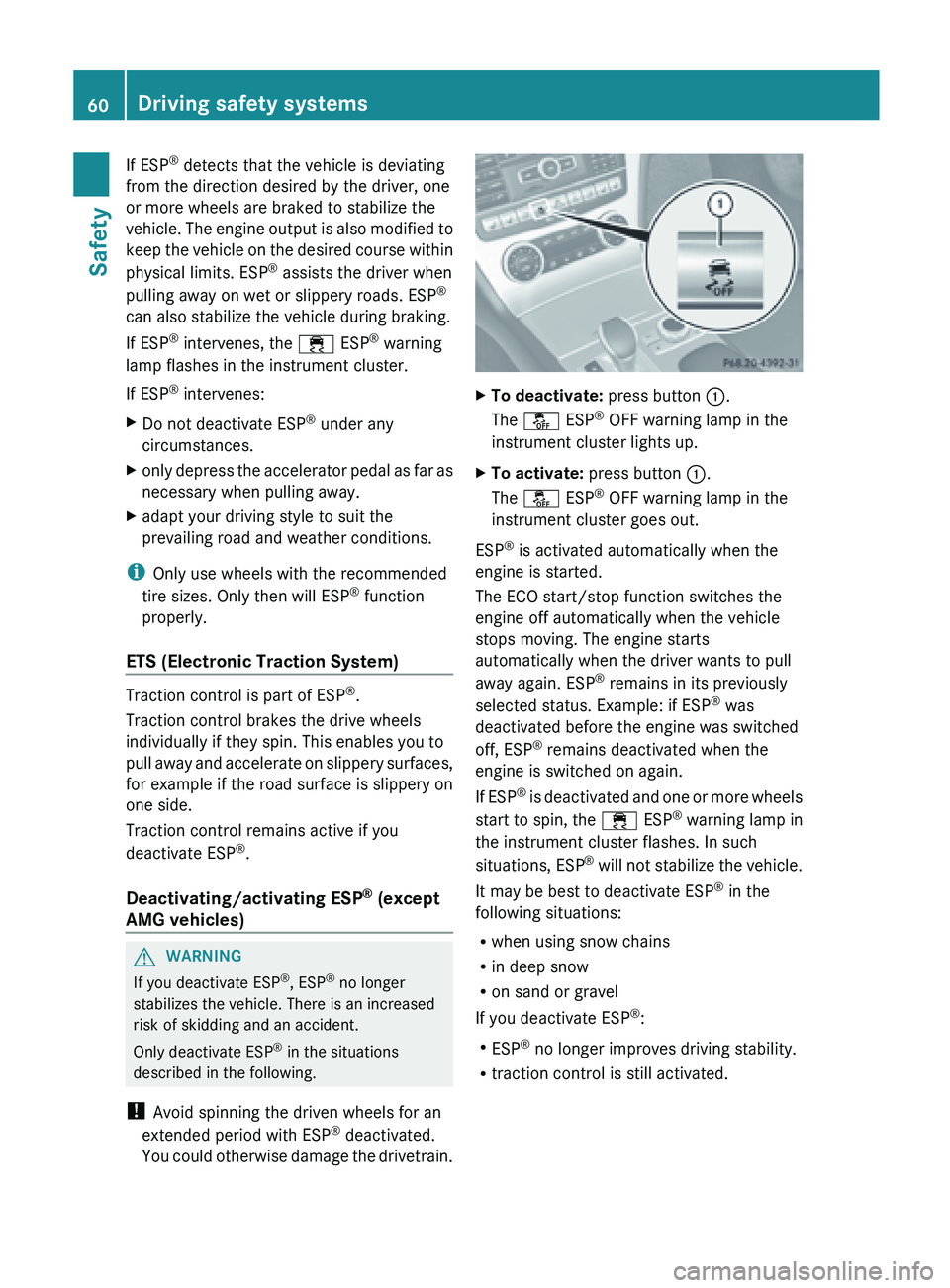
otherwise damage the drivetrain. X
To deactivate: press button :.
The å ESP ®
OFF warning lamp in the
instrument cluster lights up.
X To activate: press button :.
The å ESP ®
OFF warning lamp in the
instrument cluster goes out.
ESP ®
is activated automatically when the
engine is started.
The ECO start/stop function switches the
engine off automatically when the vehicle
stops moving. The engine starts
automatically when the driver wants to pull
away again. ESP ®
remains in its previously
selected status. Example: if ESP ®
was
deactivated before the engine was switched
off, ESP ®
remains deactivated when the
engine is switched on again.
If ESP ®
is deactivated and one or more wheels
start to spin, the ÷ ESP®
warning lamp in
the instrument cluster flashes. In such
situations, ESP ®
will not stabilize the vehicle.
It may be best to deactivate ESP ®
in the
following situations:
R when using snow chains
R in deep snow
R on sand or gravel
If you deactivate ESP ®
:
R ESP ®
no longer improves driving stability.
R traction control is still activated.60
Driving safety systems
Safety
Page 65 of 572
ADAPTIVE BRAKE
ADAPTIVE BRAKE enhances braking safety
and offers increased braking comfort. In
addition to the braking function, ADAPTIVE
BRAKE also has the HOLD function
( Y page 176) and hill start assist
(Y page 138). PRE-SAFE
®
Brake
PRE-SAFE ®
Brake
is only available in vehicles
with DISTRONIC PLUS.
PRE-SAFE ®
Brake can help you to minimize
the risk of a collision with a vehicle ahead or
reduce the effects of such a collision. If PRE-
SAFE ®
Brake has detected a risk of collision,
you will be warned visually and acoustically
as well as by automatic braking. PRE-SAFE ®
Brake cannot prevent a collision without your
intervention.
Starting at a speed of around
4 mph (7 km/h), this function warns you if
you very quickly approach a vehicle in front.
An intermittent warning tone will then sound
and the · distance warning lamp will light
up in the instrument cluster.
X Brake immediately in order to increase the
distance from the vehicle in front.
or
X Take evasive action provided it is safe to do
so.
From a speed of approximately
4 mph (
7 km/h), if the driver and passengers
have fastened their seat belts, PRE-SAFE ®
Brake can brake the vehicle automatically at
speeds up to approximately
124 mph (200 km/h).
Due to the nature of the system, particularly
complicated driving conditions may cause
unnecessary warnings or the unnecessary
intervention of PRE-SAFE ®
Brake. You can end PRE-SAFE
®
Brake
intervention in
a non-critical driving situation at any time by:
R depressing the accelerator pedal further
R activating kickdown
R releasing the brake pedal.
The braking action of PRE-SAFE ®
Brake is
ended automatically if:
R you maneuver to avoid the obstacle.
R there is no longer any danger of a rear-end
collision.
R there is no longer an obstacle detected in
front of your vehicle.
With the help of the radar sensor system,
PRE-SAFE ®
Brake can detect obstacles that
are in front of your vehicle for an extended
period of time.
At speeds up to approximately
40 mph (70 km/h), PRE-SAFE ®
Brake can
also detect stationary obstacles such as
stopped or parked vehicles.
If you approach an obstacle and PRE-SAFE ®
Brake detects a risk of a collision, the system
will alert you both visually and acoustically. If
you do not brake or take evasive action, the
system will warn you by automatically braking
the vehicle gently. If there is an increased risk
of collision, preventative passenger
protection measures (PRE-SAFE ®
) are
activated (Y page 48).
If, at speeds over 20 mph (30 km/h), a risk
of collision remains and you do not brake,
take evasive action or significantly
accelerate, automatic braking may be
performed up to a level of automatic
emergency braking. Automatic emergency
braking is not performed until immediately
prior to an accident that can no longer be
avoided. G
WARNING
PRE-SAFE ®
Brake will initially brake your
vehicle by a partial application of the brakes
if a
danger of collision is detected. There may
be a collision unless you also brake. Driving safety systems
63
Safety
Z
Page 66 of 572
Automatic emergency braking cannot prevent
a collision. There is a risk of an accident.
Always apply the brakes yourself and try to
take evasive action. G
WARNING
PRE-SAFE ®
Brake cannot always clearly
identify objects and complex traffic
conditions.
In these cases, PRE-SAFE ®
Brake may:
R give an unnecessary warning and then
brake the vehicle
R not give a warning or intervene
There is a risk of an accident.
Always pay particular attention to the traffic
situation and be ready to brake, especially if
PRE-SAFE ®
Brake warns you. Terminate the
intervention in
a non-critical driving situation.
In particular, the detection of obstacles can
be impaired if there is:
R dirt on the sensors or anything else
covering the sensors
R snow or heavy rain
R interference by other radar sources
R the possibility of strong radar reflections,
for example in parking garages
R a narrow vehicle traveling in front, e.g. a
motorbike
R a vehicle traveling in front on a different line
relative to the center of your vehicle G
WARNING
PRE-SAFE ®
Brake does not react:
R to people or animals
R to oncoming vehicles
R to crossing traffic
R when cornering
As a result, PRE-SAFE ®
Brake may neither
give warnings nor intervene in all critical
situations. There is a risk of an accident.
Always pay careful attention to the traffic
situation and be ready to brake. In
order to maintain the appropriate distance
to the vehicle in front and thus prevent a
collision, you
must apply the brakes yourself.
X To activate/deactivate: activate or
deactivate PRE-SAFE ®
Brake in the on-
board computer ( Y page 214).
When PRE-SAFE ®
Brake is activated, the
Ä symbol appears in multifunction
display, as long as the HOLD function is
deactivated (Y page
176). On vehicles with
Active Parking Assist, the Ä symbol is
displayed when P is engaged or you are
driving faster than 22 mph (35 km/h).
For PRE-SAFE ®
Brake to assist you when
driving, the radar sensor system must be
switched on (Y page 218) and be
operational.
Following damage to the front end of the
vehicle, have
the configuration and operation
of the radar sensors checked at a qualified
specialist workshop. This also applies to
collisions at low speeds where there is no
visible damage to the front of the vehicle.
i USA only: This device has been approved
by the FCC as a "Vehicular Radar System".
The radar sensor is intended for use in an
automotive radar system only. Removal,
tampering, or altering of the device will void
any warranties, and is not permitted by the
FCC. Do not tamper with, alter, or use the
device in any non-approved way.
Any unauthorized modification to this
device could void the user's authority to
operate the equipment.
i Canada only: This device complies with
RSS-210 of Industry Canada. Operation is
subject to the following two conditions:
1. This device may not cause interference,
and
2. this device must accept any interference
received, including interference that may
cause undesired operation of the device.
Removal, tampering, or altering of the
device will void any warranties and is not 64
Driving safety systems
Safety
Page 142 of 572
Activating (AMG vehicles)
X
Press button :.
If one of the drive programs S, S+ or M is
active, the automatic transmission
switches to drive program C.
Indicator lamp ; lights up and the ¤
symbol is shown in green in the
multifunction display. The Stop/Start
Active message is shown in the AMG
menu in the multifunction display.
If not all conditions are fulfilled, the ¤
symbol is shown in yellow in the
multifunction display.
If this is the case, the
ECO start/stop function is not available.
The Stop/Start Inactive message is
shown in the AMG menu in the
multifunction display.
Automatic engine switch-off If the vehicle is braked to a standstill in
D or
N, the ECO start/stop function switches off
the engine automatically.
The engine is only switched off if:
R the vehicle is stationary.
R the outside
temperature is within the range
which is suitable for the system.
R the engine is at normal operating
temperature.
R the battery is sufficiently charged.
R the system detects that the windshield is
not fogged up when automatic climate
control is switched on.
R the hood is closed.
R the driver's door is closed and the driver's
side belt buckle is engaged.
i If not all conditions are fulfilled, the
¤ symbol is shown in yellow in the
multifunction display.
i The HOLD function can be activated if the
engine has been switched off
automatically. It is then not necessary to
continue applying the brakes during the
automatic stop phase. When you depress the accelerator pedal, the engine starts
automatically
and
the braking effect of the
HOLD function is deactivated. Depress the
accelerator pedal carefully, as the engine
must be started first.
If you shift the transmission from R to D, the
ECO start/stop function is available again
once the ¤ symbol reappears in green in
the multifunction display.
The engine can be switched off automatically
a maximum of four times (first stop and three
subsequent stops, except AMG vehicles) in
succession. The ¤ symbol is shown in
yellow in the multifunction display after the
engine has been started automatically for the
fourth time. The engine can only be switched
off automatically again when the ¤
symbol is shown in green in the multifunction
display.
AMG vehicles: times which the engine can
be automatically switched off is unlimited.
Automatic engine start The engine starts automatically if:
R
you switch
off the ECO start/stop function
by pressing the ECO button.
R you switch to one of the drive programs S,
S+ or M (AMG vehicles).
R the vehicle starts to roll.
R the brake system requires this.
R the system detects that the windshield is
fogged up when automatic climate control
is switched on.
R the condition of charge of the battery is too
low.
R the driver's seat belt is removed or the
driver's door is opened.
R you shift out of P.
R in transmission position D or N the brake
pedal is released and the HOLD function is
not active.
R you engage reverse gear R.
R you depress the accelerator pedal.140
DrivingDriving and parking
Page 146 of 572
i
Neutral
h Drive
When you select a transmission position, the
selector lever subsequently returns to its
original position.
The current transmission position P, R, N or
D appears in the transmission position
display in the multifunction display.
Engaging park position P X
When the vehicle is stationary, depress the
brake pedal.
X Press the P button in the center console.
i If you depress the brake pedal and push
the selector lever forwards or back to the
first point of resistance, park position P is
disengaged. The transmission shifts to
neutral N.
Park position P
is engaged automatically and
the electric parking brake applied:
R if you remove the SmartKey from the
ignition lock
R if you switch off the engine using the Start/
Stop button and open the driver's or front-
passenger door
R if you open the driver's door while traveling
at low speed in transmission position D or
R
R when HOLD ( Y page 175) or DISTRONIC
PLUS (Y page 164) brakes your vehicle
until it is stationary and at least one of the
following conditions is fulfilled:
- the engine is switched off.
- the driver's door is open and the seat belt
is not fastened.
- there is a system malfunction.
- the power supply is insufficient.
Engaging reverse gear R !
Only shift the automatic transmission to
R when the vehicle is stationary. X
When the vehicle is stationary, depress the
brake pedal.
X Push the selector lever forwards past the
first point of resistance.
i When reverse gear is engaged and the
ECO start/stop
function is switched on, the
engine starts up automatically
(Y page 138).
Shifting to neutral N X
When the vehicle is stationary, depress the
brake pedal.
X Push the selector lever forwards or back to
the first point of resistance.
i If the
vehicle is braked to a standstill when
in neutral N and the brake pedal continues
to be depressed, the ECO start/stop
function switches the engine off
automatically ( Y page 138).
Remaining in neutral N G
WARNING
When leaving the SmartKey in the starter
switch, do not leave children unattended in
the vehicle.
It is possible for children to switch
on the ignition which could result in
unsupervised use of vehicle equipment.
Unsupervised use of vehicle equipment could
result in an accident and/or serious personal
injury.
Using the SmartKey:
R make sure that the ignition is switched on.
R when the vehicle is stationary, depress the
brake pedal and keep it depressed.
R shift to neutral N.
R release the brake pedal.
R if the electric parking brake is applied,
release it.
R switch off the ignition and leave the
SmartKey in the ignition lock.144
Automatic transmissionDriving and parking