reset MERCEDES-BENZ SL-CLASS ROADSTER 2013 Owners Manual
[x] Cancel search | Manufacturer: MERCEDES-BENZ, Model Year: 2013, Model line: SL-CLASS ROADSTER, Model: MERCEDES-BENZ SL-CLASS ROADSTER 2013Pages: 572, PDF Size: 9.23 MB
Page 9 of 572
Care
Carpets .......................................... 506
Car wash ........................................
500
Display ........................................... 504
Exterior lights ................................ 503
Gear or selector lever ....................505
Interior ........................................... 504
Matte finish ................................... 502
Notes ............................................. 500
Paint .............................................. 501
Plastic trim .................................... 505
Power washer ................................ 501
Rear view camera .......................... 504
Roof lining ...................................... 506
Seat belt ........................................ 506
Seat cover ..................................... 505
Sensors ......................................... 504
Steering wheel ............................... 505
Tail pipes ....................................... 504
Trim pieces .................................... 505
Washing by hand ........................... 501
Wheels ........................................... 502
Windows ........................................ 503
Wiper blades .................................. 503
Wooden trim .................................. 505
Car pool lanes .................................... 297
Car wash (care) ................................. 500
Category list (music search) ............433
CD Copy protection ............................. 432
Fast forward/fast rewind ............... 428
General information ....................... 432
Inserting ........................................ 421
Mode, switching to ........................ 424
Multisession .................................. 431
Notes on discs ............................... 432
Pause function ............................... 426
Player/changer operation
(COMAND) ..................................... 421
Safety notes .................................. 421
Selecting a media type .................. 426
Selecting a track ............................ 427
Sound settings (balance, bass,
treble) ............................................ 278
CD/DVD
Ejecting (DVD drive) ....................... 423
Inserting (DVD changer) ................421Inserting (single DVD drive)
...........421
Removing (single DVD drive) .......... 421
CD mode
Playback options ........................... 430
CD player/CD changer (on-board
computer)
.......................................... 212
Central locking Automatic locking (on-board
computer) ...................................... 218
Locking/unlocking (SmartKey) ........ 68
Changing bulbs
Important safety notes .................. 116
Overview of bulb types ..................117
Changing direction
Announcement phase .................... 322
Change of direction phase ............. 322
Preparation phase ......................... 322
Changing the character set .............. 284
Channel presets ................................ 413
Characters Changing the character set ............ 282
Changing the language ..................282
Deleting ......................................... 283
Entering ......................................... 283
Entering (address book, phone
book) ............................................. 281
Entering (navigation) ......................283
Moving the cursor .......................... 283
Switching to letters ........................ 282
Children
In the vehicle ................................... 54
Restraint systems ............................ 54
Special seat belt retractor ............... 56
Child seat
LATCH-type (ISOFIX) child seat
anchors ............................................ 56
Cigarette lighter ................................ 480
Cleaning Mirror turn signal ........................... 503
Clear button ....................................... 274
Climate control Automatic climate control (dual-
zone) .............................................. 123
Controlling automatically ...............126
Cooling with air dehumidification ..125
Defrosting the windows ................. 129
Defrosting the windshield .............. 128
Important safety notes .................. 122 Index
7
Page 14 of 572
Exterior mirrors
Adjusting ....................................... 103
Dipping (automatic) .......................103
Out of position (troubleshooting) ...103
Storing settings (memory
function) ........................................ 105
Storing the parking position
..........104
Eyeglasses compartment ................. 475F
Factory setting (reset function) .......294
Fast forward Audio mode (CD, DVD, MP3) .........428
Video DVD ..................................... 455
Fast rewind
Audio mode (CD, DVD, MP3) .........428
Video DVD ..................................... 455
Favorites (Internet) ...........................408
Favorites button ................................ 293
Filling capacities (Technical data) ...560
First-aid kit .........................................
508
Flat tire MOExtended tires
..........................510
Preparing the vehicle .....................509
TIREFIT kit ...................................... 510
Floormat ............................................. 481
Fog lamps Switching on/off ........................... 111
Freeway information .........................347
Frequencies Adjusting for radio stations ............ 413
Front fog lamps
Changing the bulbs ........................ 117
Display message ............................ 237
Switching on/off ........................... 111
Front-passenger seat
Adjusting from the driver's seat ....... 98
Front windshield
see Windshield
Fuel
Additives ........................................ 562
Consumption statistics ..................209
Displaying consumption ................. 290
Displaying the current
consumption .................................. 209
Displaying the range ...................... 209
Driving tips .................................... 157Fuel gauge
..................................... 205
Grade (gasoline)
............................ 561
Important safety notes .................. 561
Premium-grade unleaded gasoline . 561
Problem (malfunction) ...................154
Refueling ........................................ 152
Tank content/reserve fuel .............560
Fuel filler flap, opening/closing ....... 153
Fuel level Calling up the range (on-board
computer) ...................................... 209
Fuel tank
Capacity ........................................ 560
Problem (malfunction) ...................154
Fuse allocation chart (vehicle tool
kit) ...................................................... 508
Fuses Allocation chart ............................. 521
Before changing ............................. 521
Dashboard fuse box ....................... 522
Fuse box in the engine
compartment ................................. 521
Fuse box in the rear compartment . 522
Important safety notes .................. 521 G
Garage door opener Clearing the memory
.....................485
Notes ............................................. 481
Opening/closing the garage door ..485
Programming (button in the rear-
view mirror) ................................... 482
Gear indicator (on-board
computer) .......................................... 220
Genuine Mercedes-Benz parts ......... 558
Glass roof (sunblind) ...........................92
Glove box ........................................... 474
Google Maps ®
.................................... 320
Google™ local search Importing a destination/route .......388
Popular Searches ........................... 389
Search ........................................... 386
Search history ............................... 389
Selecting a search position ............ 387
Using as the destination ................ 388
GPS reception .................................... 295
Gracenote ®
Media Database ............ 42812
Index
Page 19 of 572
Menu (on-board computer) ............
210
Off-road/off-map (off-road
destination) .................................... 331
Overview ........................................ 295
Previous destinations .................... 341
Reading out traffic reports
.............336
Repeating announcements ............ 325
Route guidance .............................. 321
Safety notes .................................. 295
Selecting a destination from the
destination memory ....................... 304
Selecting a destination from the
list of last destinations ................... 305
Selecting your home address ........ 304
Setting options for destination/
route download .............................. 400
Setting route options (avoiding:
highways, toll roads, tunnels,
ferries) ........................................... 297
Setting the route type (short
route, fast route, dynamic route or
economic route) ............................ 297
Showing/hiding the menu ............. 296
Starting route calculation .............. 303
Switching announcements on/off . 325
Switching to ................................... 296
Navigation announcements
Switching off .................................. 277
NECK-PRO head restraints
Operation ......................................... 48
Resetting after being triggered ........ 49
North orientation (navigation) ......... 344
Notes on breaking-in a new
vehicle ................................................ 134O
Occupant Classification System
(OCS) Faults ............................................... 47
Operation ......................................... 43
System self-test
............................... 46
Occupant safety
Children in the vehicle .....................54
Important safety notes .................... 36OCS
Faults ............................................... 47
Operation ......................................... 43
System self-test
............................... 46
Odometer
see Trip odometer
Off-map .............................................. 332
Off-road .............................................. 331
Oil see Engine oil
On-board computer
AMG menu ..................................... 220
Assistance menu ........................... 214
Audio menu ................................... 211
Convenience submenu .................. 219
Display messages ..........................223
DISTRONIC PLUS ........................... 172
Factory settings submenu ............. 219
Important safety notes .................. 204
Instrument cluster submenu ..........215
Lighting submenu .......................... 216
Menu overview .............................. 208
Message memory .......................... 223
Navigation menu ............................ 210
Operation ....................................... 206
RACETIMER ................................... 220
Service menu ................................. 215
Settings menu ............................... 215
Standard display ............................ 208
Telephone menu ............................ 212
Trip menu ...................................... 208
Vehicle submenu ........................... 218
Video DVD operation ..................... 212
Online and Internet functions
Ending the connection ...................386
Establishing/ending the
connection ..................................... 385
Further Mercedes-Benz Apps ......... 402
Mercedes-Benz Mobile Website ..... 401
Options menu ................................ 397
Resetting settings ..........................401
Selecting options for the local
search ............................................ 397
Selecting options for the weather
display ........................................... 398
Setting options for destination/
route download .............................. 400 Index
17
Page 21 of 572
Pulling away (automatic
transmission) .....................................
138Q
Qualified specialist workshop ...........31 R
RACE START Important safety notes
..................177
RACETIMER (on-board computer) .... 220
Radar sensor system Activating/deactivating ................. 218
Display message ............................ 242
Radio
Overview ........................................ 411
Selecting a station .........................211
Setting a station ............................ 413
Sound settings (balance, bass,
treble) ............................................ 278
Storing stations ............................. 414
Switching on .................................. 411
Switching wavebands ....................413
Read-aloud function .......................... 336
Reading lamp ..................................... 115
Real-time traffic reports ...................333
Rear lamps see Lights
Rear view camera
Cleaning instructions ..................... 504
Displaying the image .....................276
Function/notes ............................. 190
Switching on/off ........................... 191
Rear-view mirror
Anti-glare (manual) ........................103
Dipping (automatic) .......................103
Rear window defroster
Problem (malfunction) ...................129
Switching on/off ........................... 129
Receiving vCards ............................... 384
Redialing (telephone) ........................365
Refueling Fuel gauge ..................................... 205
Important safety notes .................. 152
Refueling process .......................... 153
see Fuel Remote control
Programming (garage door
opener) .......................................... 482
Reporting safety defects .................... 32
Reserve (fuel tank) see Fuel
Reserve fuel
Display message ............................ 240
Warning lamp ................................. 263
see Fuel
Reset function ................................... 294
Resetting (factory settings) .............294
Residual heat (climate control) ........130
Restraint system see SRS (Supplemental Restraint
System)
Reverse gear (selector lever) ...........143
Reversing lamps (display
message) ............................................ 237
Roadside Assistance (breakdown) ....29
Roll bar Display message ............................ 231
Operation ......................................... 43
Roller sunblind .................................... 92
Roof Display message ............................ 252
Important safety notes .................... 86
Opening/closing (with roof
switch) ............................................. 87
Opening/closing (with SmartKey) .... 88
Overview .......................................... 86
Problem (malfunction) .....................94
Relocking ......................................... 88
Roof lining and carpets (cleaning
guidelines) ......................................... 506
Roof switch .......................................... 87
Route Estimated time of arrival ................ 328
Route (navigation)
Calling up the "Routes" menu ........ 330
Displaying the distance to the
destination ..................................... 328
Recording ...................................... 329
Route overview .............................. 328
Selecting an alternative route ........ 327 Index
19
Page 22 of 572
Setting route options (avoiding:
highways, toll roads, tunnels,
ferries) ...........................................
297
Setting the route type (short
route, fast
route, dynamic route or
economic route) ............................ 297
Starting calculation ........................ 303
Route demonstration ........................329
Route guidance Canceling ....................................... 326
Continuing ..................................... 326
Destination reached ...................... 326
General notes ................................ 321
Lane recommendations .................323
Off-road ......................................... 331
Traffic reports ................................ 333S
Safety Children in the vehicle .....................54
Child restraint systems ....................54
Occupant Classification System
(OCS) ............................................... 43
Safety notes
Audio CD/DVD and MP3 mode ..... 421
Using the telephone ....................... 357
Video DVD mode
...........................453
Safety systems
see Driving safety systems
SatRadio
Displaying information ...................420
Notes ............................................. 416
Registering .................................... 416
Selecting a category ...................... 418
Switching to ................................... 417
Saving the crosshair position ..........343
SD memory card Ejecting .......................................... 424
Inserting ........................................ 424
Search & Send ................................... 320
Seat belts Adjusting the driver's and front-
passenger seat belt .........................52
Belt force limiters ............................ 53
Cleaning ......................................... 506
Correct usage .................................. 50
Emergency Tensioning Devices ........ 53 Fastening
......................................... 51
Important safety guidelines .............49
Releasing
......................................... 52
Safety guidelines ............................. 38
Seat belt guide ................................. 99
Switching belt adjustment on/off
(on-board computer) ...................... 219
Warning lamp ................................. 256
Warning lamp (function) ................... 52
Seats
Active multicontour seat ................ 287
Adjusting (electrically) .....................98
Adjusting the 4-way lumbar
support .......................................... 287
Balance (seat heating) ...................288
Belt guide ......................................... 99
Cleaning the cover ......................... 505
Correct driver's seat position ........... 96
Important safety notes .................... 97
Massage function .......................... 288
Multicontour seat .......................... 286
Overview .......................................... 97
Resetting settings ..........................288
Seat functions (COMAND) ............. 286
Seat heating problem .................... 100
Seat ventilation problem ................ 101
Selecting for adjustment
(COMAND) ..................................... 286
Sliding forward/back ....................... 99
Storing settings (memory
function) ........................................ 105
Switching AIRSCARF on/off ..........101
Switching seat heating on/off ....... 100
Switching seat ventilation on/off ..100
Selecting a province .........................299
Selecting a state ............................... 299
Selecting stations Radio ............................................. 413
Selector lever
Cleaning ......................................... 505
Positions ........................................ 143
Sending DTMF tones .........................366
Sensors (cleaning instructions) .......504
Service see ASSYST PLUS
Service Center
see Qualified specialist workshop
Service menu (on-board computer) . 21520
Index
Page 23 of 572
Service products
Brake fluid ..................................... 563
Coolant (engine) ............................ 563
Engine oil ....................................... 562
Fuel ................................................ 561
Important safety notes
..................560
Washer fluid ................................... 564
Settings
Factory (on-board computer) ......... 219
On-board computer ....................... 215
Picture (COMAND) ......................... 453
Sound settings ............................... 278
System settings ............................. 289
Setting the air distribution ...............127
Setting the airflow ............................ 127
Setting the language COMAND ....................................... 292
Setting the night design ...................289
Setting the text reader speed ..........291
Setting the volume Telephone calls .............................. 277
Video AUX ..................................... 459
SETUP (on-board computer) ............. 220
Side impact air bag ............................. 41
Side windows Cleaning ......................................... 503
Convenience closing feature ............ 85
Important safety information ........... 83
Opening/closing (all) ....................... 84
Opening/closing (front) ................... 83
Opening/closing (rear) .................... 84
Overview .......................................... 83
Problem (malfunction) .....................86
Resetting ......................................... 85
SIRIUS weather display
5-day forecast ................................ 462
Daily forecast ................................. 462
Detail information .......................... 462
Information chart ........................... 462
Selecting the area for the weather
forecast ......................................... 463
Switching on/off ........................... 462
Weather map ................................. 465
SmartKey
Changing the battery ....................... 71
Changing the programming ............. 70
Checking the battery ....................... 71
Convenience opening feature .......... 84Display message
............................ 253
Door central locking/unlocking
.......68
Important safety notes .................... 68
Loss ................................................. 73
Mechanical key ................................ 70
Opening/closing the roof ................88
Overview .......................................... 68
Positions (ignition lock) ................. 135
Problem (malfunction) .....................73
Starting the engine ........................ 137
Snow chains ...................................... 529
Sockets Front-passenger footwell ...............481
General notes ................................ 480
Trunk ............................................. 481
Under the armrest .........................481
Sound
Switching on/off ........................... 277
Sound menu ....................................... 278
Sound Mode ....................................... 280
Sound settings Calling up the sound menu ............ 278
Surround sound ............................. 278
Treble and bass ............................. 278
Spare wheel
see Emergency spare wheel
Specialist workshop ............................ 31
Special seat belt retractor .................. 56
Speed, controlling see Cruise control
Speed dial list
Storing a phone book entry in the
speed dial list ................................ 374
Speedometer
Digital ............................................ 209
In the Instrument cluster ............... 205
Segments ...................................... 206
Selecting the unit of
measurement ................................ 215
see Instrument cluster
SPORT handling mode
Activating/deactivating (AMG
vehicles) .......................................... 61
Warning lamp ................................. 260 Index
21
Page 27 of 572
Removing the towing eye
...............519
With the rear axle raised
................519
Towing away
With both axles on the ground ....... 520
Tow-starting
Emergency engine starting ............ 520
Important safety notes .................. 518
Track
Selecting (CD, DVD, MP3) .............. 427
Selecting using the number
keypad ........................................... 427
Traffic jam function ........................... 326
Traffic reports Calling up a list .............................. 335
Reading out on route ..................... 336
Real-time traffic report .................. 336
Transmission
Selector lever ................................ 143
see Automatic transmission
Transporting the vehicle .................. 520
Treble, adjusting (sound) .................. 278
Trim pieces (cleaning instructions) . 505
Trip computer (on-board
computer) .......................................... 209
Trip meter see Trip odometer
Trip odometer
Calling up ....................................... 208
Resetting (on-board computer) ...... 210
True Image™ ...................................... 280
Trunk Emergency release .......................... 83
Important safety notes .................... 77
Locking separately ...........................82
Opening/closing (automatically
from inside) ...................................... 81
Opening/closing (automatically
from outside) ................................... 79
Opening/closing (from outside,
HANDS-FREE ACCESS) .................... 80
Opening/closing (manually from
outside) ............................................ 78
Overview .......................................... 77
Trunk lid
Display message ............................ 251
Opening/closing .............................. 77Opening dimensions ......................
565
Power closing feature ......................76
Trunk load (maximum) ......................
565
Trunk partition Display message
............................ 252
General notes .................................. 89
Installing .......................................... 89
Opening/closing .............................. 89
Removing ......................................... 89
Turn signals
Display message ............................ 235
Switching on/off ........................... 112
TV
Automatic picture shutoff ..............452
Picture settings .............................. 453
Sound settings (balance, bass,
treble) ............................................ 278
Type identification plate
see Vehicle identification plate U
Umbrella holder ................................. 475
Unlocking Emergency unlocking .......................76
From inside the vehicle (central
unlocking button) ............................. 75
Updating the digital map
..................353
USB see Media Interface V
Vanity mirror (in the sun visor) ........479
Vehicle Correct use
...................................... 31
Data acquisition ............................... 32
Display message ............................ 250
Equipment ....................................... 28
Individual settings ..........................215
Limited Warranty ............................. 32
Loading .......................................... 537
Locking (in an emergency) ............... 77
Locking (SmartKey) .......................... 68
Lowering ........................................ 552
Maintenance .................................... 29
Parking for a long period ................ 156
Pulling away ................................... 138 Index
25
Page 33 of 572
including interference that may cause
undesired operation. Changes or
modifications not expressly approved by the
party responsible for compliance could void
the user’s authority to operate the
equipment."
Canada:
"The
wireless devices of this vehicle
comply with Industry Canada license-exempt
RSS standard(s). Operation is subject to the
following two conditions: (1) These devices
may not cause interference, and (2) These
devices must accept any interference,
including interference that may cause
undesired operation of the device." Diagnostics connection
G
WARNING
If you connect equipment to the on-board
diagnostics connection, it can affect the
operation of the vehicle systems. This can
impair the operating safety of your vehicle
while driving. There is a risk of an accident.
Do not connect any equipment to the on-
board diagnostics connection. G
WARNING
Loose equipment or equipment cables which
are connected to the on-board diagnostics
connection can obstruct the area around the
pedals. The equipment or the cables could
come between the pedals in the event of
sudden braking or acceleration. This may
affect the function of the pedals. There is a
risk of an accident.
Do not
attach any equipment or cables in the
driver's footwell.
! If the engine is switched off and
equipment on the diagnostics connection
is used, the starter battery may discharge.
The diagnostics connection is only intended
for the connection of diagnostic equipment at
a qualified specialist workshop.
Connecting equipment to the diagnostics
connection can, for example, lead to emissions monitoring information being
reset. This may lead to the vehicle failing to
meet
the
requirements of the next emissions
test during the main inspection. Qualified specialist workshop
An authorized Mercedes-Benz Center is a
qualified specialist workshop. It has the
necessary specialist knowledge, tools and
qualifications to correctly carry out the work
required on
your vehicle. This is especially the
case for work relevant to safety.
Observe the notes in the Maintenance
Booklet.
Always have the following work carried out at
an authorized Mercedes-Benz Center:
R work relevant to safety
R service and maintenance work
R repair work
R alterations, installation work and
modifications
R work on electronic components Correct use
G
WARNING
There are various warning stickers affixed to
your vehicle.
Their purpose is to alert you and
others to various dangers. Therefore, do not
remove any warning stickers unless the
sticker clearly states that you may do so.
If you remove any warning stickers, you or
others could fail to recognize certain dangers
and be injured.
Observe the following information when
driving your vehicle:
R the safety notes in this manual
R the "Technical data" section in this manual
R traffic rules and regulations
R laws and safety standards pertaining to
motor vehicles Introduction
31 Z
Page 44 of 572
When deployed, side impact air bags
: offer
additional protection for the thorax of the
vehicle occupants on the side of the vehicle
on which the impact occurs. However, they
do not protect the:
R head
R neck
R arms
side impact air bags :
are deployed:
R on the side on which an impact occurs
R at the start of an accident with a high rate
of lateral vehicle deceleration or
acceleration, e.g. in a side impact
R depending on whether the seat belt is being
used
R independently of the front air bags
R independently of the ETDs
If the vehicle rolls over, side impact air
bags : are generally not deployed. side
impact air bags : are deployed if the system
detects high vehicle deceleration or
acceleration in a lateral direction and
determines that side impact air bag
deployment can offer additional protection to
that provided by the seat belt.
side impact air bags : will not deploy in side
impacts which do not exceed the system's
preset deployment thresholds for lateral
acceleration/deceleration. You will then be
protected by the fastened seat belt.
If OCS detects that the front-passenger seat
is not occupied and the front-passenger seat
belt is not fastened, side impact air bag : on
the front-passenger side will not deploy. side
impact air bag : on the front-passenger side
will deploy if the front-passenger seat belt is
fastened, regardless of whether the front-
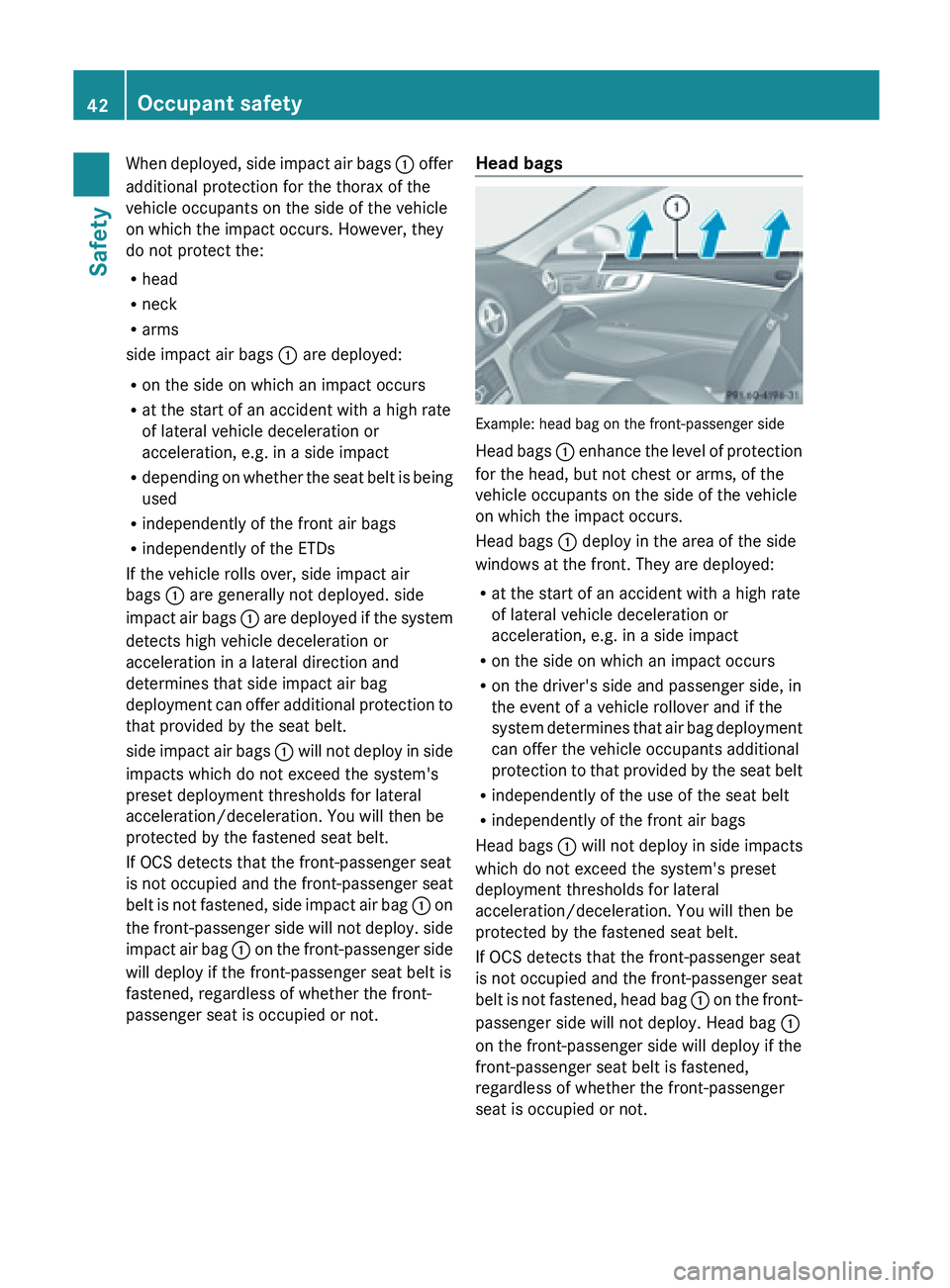
passenger seat is occupied or not. Head bags
Example: head bag on the front-passenger side
Head
bags :
enhance the level of protection
for the head, but not chest or arms, of the
vehicle occupants on the side of the vehicle
on which the impact occurs.
Head bags : deploy in the area of the side
windows at the front. They are deployed:
R at the start of an accident with a high rate
of lateral vehicle deceleration or
acceleration, e.g. in a side impact
R on the side on which an impact occurs
R on the driver's side and passenger side, in
the event of a vehicle rollover and if the
system determines that air bag deployment
can offer the vehicle occupants additional
protection to that provided by the seat belt
R independently of the use of the seat belt
R independently of the front air bags
Head bags : will not deploy in side impacts
which do not exceed the system's preset
deployment thresholds for lateral
acceleration/deceleration. You will then be
protected by the fastened seat belt.
If OCS detects that the front-passenger seat
is not occupied and the front-passenger seat
belt is not fastened, head bag : on the front-
passenger side will not deploy. Head bag :
on the front-passenger side will deploy if the
front-passenger seat belt is fastened,
regardless of whether the front-passenger
seat is occupied or not. 42
Occupant safety
Safety
Page 50 of 572
PRE-SAFE
®
(preventative occupant
protection) G
WARNING
Make sure that nobody can become trapped
as you adjust the seat. G
WARNING
The PRE-SAFE
®
system
reduces the impact of
an accident on vehicle occupants, as long as
their seat belts have been fastened correctly.
Although your vehicle is equipped with a PRE-
SAFE ®
system, the possibility of injury in the
event of an accident cannot be ruled out. You
should therefore always drive carefully and
adapt your driving style to the prevailing road,
weather and traffic conditions.
! Make sure that there are no objects in the
footwell or behind the seats when resetting
the seats. There is a risk that the seats
and/or the objects could be damaged.
PRE-SAFE ®
takes preemptive measures to
protect occupants in certain hazardous
situations.
PRE-SAFE ®
intervenes:
R if BAS intervenes, e.g. in emergency
braking situations
R when BAS PLUS intervenes powerfully on
vehicles with DISTRONIC PLUS.
R when the radar sensor system detects an
imminent danger of collision in certain
situations on vehicles with DISTRONIC
PLUS.
R in critical driving situations, e.g. when
physical limits are exceeded and the
vehicle understeers or oversteers severely
PRE-SAFE ®
takes the following measures
depending on the hazardous situation
detected:
R the seat belts are pre-tensioned.
R the front-passenger seat is adjusted if it is
in an unfavorable position.
R vehicles with a multicontour seat or active
multicontour seat: the air pressure in the side bolsters of the seat cushion and
backrest is increased.
R if the vehicle skids, the side windows are
closed almost completely.
If the hazardous situation passes without
resulting in
an accident, PRE-SAFE ®
slackens
the belt pretensioning. All settings made by
PRE-SAFE ®
can then be reversed.
If the seat belts are not released:
X Move the backrest or seat back slightly, but
only when the vehicle is stationary.
The belt pretensioning is reduced and the
locking mechanism is released.
More information about seat belt adjustment,
a convenience function integrated into PRE-
SAFE (
Y page 52). NECK-PRO head restraints
Introduction G
WARNING
Do
not secure any objects (e.g. coat hangers)
on the
NECK-PRO head restraints. Otherwise,
the NECK-PRO head restraints may not
function properly, or in the event of a rear-end
collision may not be able offer the level of
protection they are designed to provide. G
WARNING
Seat or head restraint covers can cause a
malfunction when the NECK-PRO head
restraints are activated or when the side
impact air bags are deployed, or they can
prevent this
completely. The NECK-PRO head
restraints or side impact air bags can
therefore not provide the intended protection.
Do not use any seat or head restraint covers. G
WARNING
For your protection, drive only with properly
positioned head restraints.
Adjust the
head restraint so that it is as close
to the head as possible and the center of the
head restraint supports the back of the head 48
Occupant safety
Safety