turn signal MERCEDES-BENZ SL-CLASS ROADSTER 2014 Owners Manual
[x] Cancel search | Manufacturer: MERCEDES-BENZ, Model Year: 2014, Model line: SL-CLASS ROADSTER, Model: MERCEDES-BENZ SL-CLASS ROADSTER 2014Pages: 284, PDF Size: 45.52 MB
Page 8 of 284
Breakdown
see Flat tire
see Towing away
Buttons on the COMAND controller 197C
California Important notice for retail
customers and lessees ....................28
Calling up a malfunction
see Display messages
Car
see Vehicle
Care
Carpets .......................................... 223
Car wash ........................................ 222
Display ........................................... 223
Exterior lights ................................ 222
Gear or selector lever ....................223
Interior ........................................... 223
Matte finish ................................... 222
Night View Assist Plus ...................223
Notes ............................................. 221
Paint .............................................. 222
Plastic trim .................................... 223
Power washer ................................ 222
Rear view camera .......................... 222
Roof lining ...................................... 223
Seat belt ........................................ 223
Seat cover ..................................... 223
Sensors ......................................... 222
Tail pipes ....................................... 222
Trim pieces .................................... 223
Washing by hand ........................... 222
Wheels ........................................... 222
Windows ........................................ 222
Wiper blades .................................. 222
Wooden trim .................................. 223
Car keys
see SmartKey
Car wash (care) ................................. 222
CD see also Digital Operator's Manual 188
CD player/CD changer (on-board
computer) .......................................... 161Center console
Lower section .................................. 39
Lower section (AMG vehicles) ..........40
Upper section .................................. 38
Central locking
Automatic locking (on-board
computer) ...................................... 161
Locking/unlocking (SmartKey) ........78
Children
In the vehicle ................................... 62
Restraint systems ............................ 62
Special seat belt retractor ...............66
Child seat
LATCH-type (ISOFIX) child seat
anchors ............................................ 65
Cigarette lighter ................................ 206
Cleaning Mirror turn signal ........................... 222
Clear button ....................................... 197
Climate control Automatic climate control (dual-
zone) .............................................. 115
Controlling automatically ...............116
Cooling with air dehumidification ..116
Defrosting the windows .................116
Defrosting the windshield ..............116
Important safety notes ..................114
Indicator lamp ................................ 116
Maximum cooling .......................... 116
Overview of systems ......................114
Problems with cooling with air
dehumidification ............................ 116
Problem with the rear window
defroster ........................................ 116
Refrigerant ..................................... 278
Refrigerant filling capacity .............279
Setting the air distribution .............116
Setting the airflow .........................116
Setting the air vents ......................116
Setting the climate mode (AIR
FLOW) ............................................ 116
Setting the temperature ................116
Switching air-recirculation mode
on/off ............................................ 116
Switching on/off ........................... 116
Switching residual heat on/off ......116 6
Index
Page 14 of 284
Light function, active
Display message ............................ 163
Lighting
Light switch ................................... 106
Lights
Activating/deactivating the
interior lighting delayed switch-
off.................................................. 161
Active light function .......................109
Automatic headlamp mode .... 107, 108
Cornering light function .................108
Driving abroad ............................... 106
Hazard warning lamps ...................106
High beam flasher .......................... 108
High-beam headlamps ...................108
Low-beam headlamps ............107, 108
Parking lamps ................................ 108
Setting the brightness of the
ambient lighting (on-board
computer) ...................................... 161
Setting the color of the ambient
lighting (on-board computer) .........161
Standing lamps .............................. 108
Switching Adaptive Highbeam
Assist on/off ................................. 161
Switching the daytime running
lamps on/off (on-board
computer) ...................................... 161
Switching the exterior lighting
delayed switch-off on/off (on-
board computer) ............................ 161
Switching the spotlight on/off .......161
Switching the surround lighting
on/off (on-board computer) ..........161
Turn signals ................................... 108
see Replacing bulbs
Light sensor (display message) .......163
Loading aid (trunk) Raising/lowering the roof ..............204
Locking
see Central locking
Locking (doors)
Automatic ........................................ 84
Emergency locking ........................... 84
From inside (central locking
button) ............................................. 84
Locking centrally
see Central locking Locking verification signal (on-
board computer)
............................... 161
Low-beam headlamps Display message ............................ 163
Setting for driving abroad
(symmetrical) ................................. 106
Switching on/off ...................107, 108
Luggage cover
see Trunk partition
Lumbar support
Adjusting the 4-way lumbar
support .......................................... 101 M
MAGIC SKY CONTROL .........................97
Malfunction message see Display messages
Matte finish (cleaning instructions) 222
mbrace Call priority .................................... 211
Display message ............................ 163
Downloading destinations
(COMAND) ..................................... 207
Downloading routes .......................207
Emergency call .............................. 208
General notes ................................ 207
Geo fencing ................................... 207
Locating a stolen vehicle ...............207
MB info call button ........................210
Remote vehicle locking ..................207
Roadside Assistance button ..........209
Search & Send ............................... 207
Self-test ......................................... 207
Speed alert .................................... 207
System .......................................... 207
Triggering the vehicle alarm ........... 207
Vehicle remote malfunction
diagnosis ....................................... 207
Vehicle remote unlocking ..............207
Mechanical key
Function/notes ................................ 80
Locking vehicle ................................ 84
Unlocking the driver's door ..............84
Memory card (audio) .........................161
Memory function ............................... 103
Message memory (on-board
computer) .......................................... 16312
Index
Page 21 of 284
Removing the towing eye
...............239
With the rear axle raised ................239
Towing away
With both axles on the ground .......239
Tow-starting
Emergency engine starting ............240
Important safety notes ..................237
Traffic reports
see also Digital Operator's Manual 188
Transmission
Selector lever ................................ 126
see Automatic transmission
Transporting the vehicle ..................240
Trim pieces (cleaning instructions) .223
Trip computer (on-board
computer) .......................................... 161
Trip odometer Calling up ....................................... 161
Resetting (on-board computer) ......161
Trunk
Emergency release ..........................89
Important safety notes ....................84
Locking separately ...........................88
Opening/closing (automatically
from inside) ...................................... 88
Opening/closing (automatically
from outside) ................................... 86
Opening/closing (from outside,
HANDS-FREE ACCESS) ....................86
Opening/closing (manually from
outside) ............................................ 85
Overview .......................................... 84
Trunk lid
Display message ............................ 163
Opening/closing .............................. 84
Opening dimensions ......................279
Power closing feature ......................84
Trunk load (maximum) ......................279
Trunk partition Display message ............................ 163
General notes .................................. 93
Installing .......................................... 94
Opening/closing .............................. 94
Removing ......................................... 94
Turn signals
Display message ............................ 163
Switching on/off ........................... 108Type identification plate
see Vehicle identification plate U
Umbrella holder ................................. 204
Unlocking Emergency unlocking .......................84
From inside the vehicle (central
unlocking button) ............................. 84 V
Vanity mirror (in the sun visor) ........206
Vehicle Correct use ...................................... 31
Data acquisition ............................... 32
Display message ............................ 175
Equipment ....................................... 27
Individual settings ..........................161
Limited Warranty ............................. 31
Loading .......................................... 253
Locking (in an emergency) ...............84
Locking (SmartKey) .......................... 78
Lowering ........................................ 267
Maintenance .................................... 28
Parking for a long period ................ 131
Pulling away ................................... 124
Raising ........................................... 265
Reporting problems .........................31
Securing from rolling away ............264
Towing away .................................. 237
Tow-starting ................................... 237
Transporting .................................. 240
Unlocking (in an emergency) ...........84
Unlocking (SmartKey) ......................78
Vehicle data ................................... 279
Vehicle battery
see Battery (vehicle)
Vehicle data ....................................... 279
Vehicle dimensions ...........................279
Vehicle emergency locking ................84
Vehicle identification number see VIN
Vehicle identification plate ..............274 Index
19
Page 38 of 284
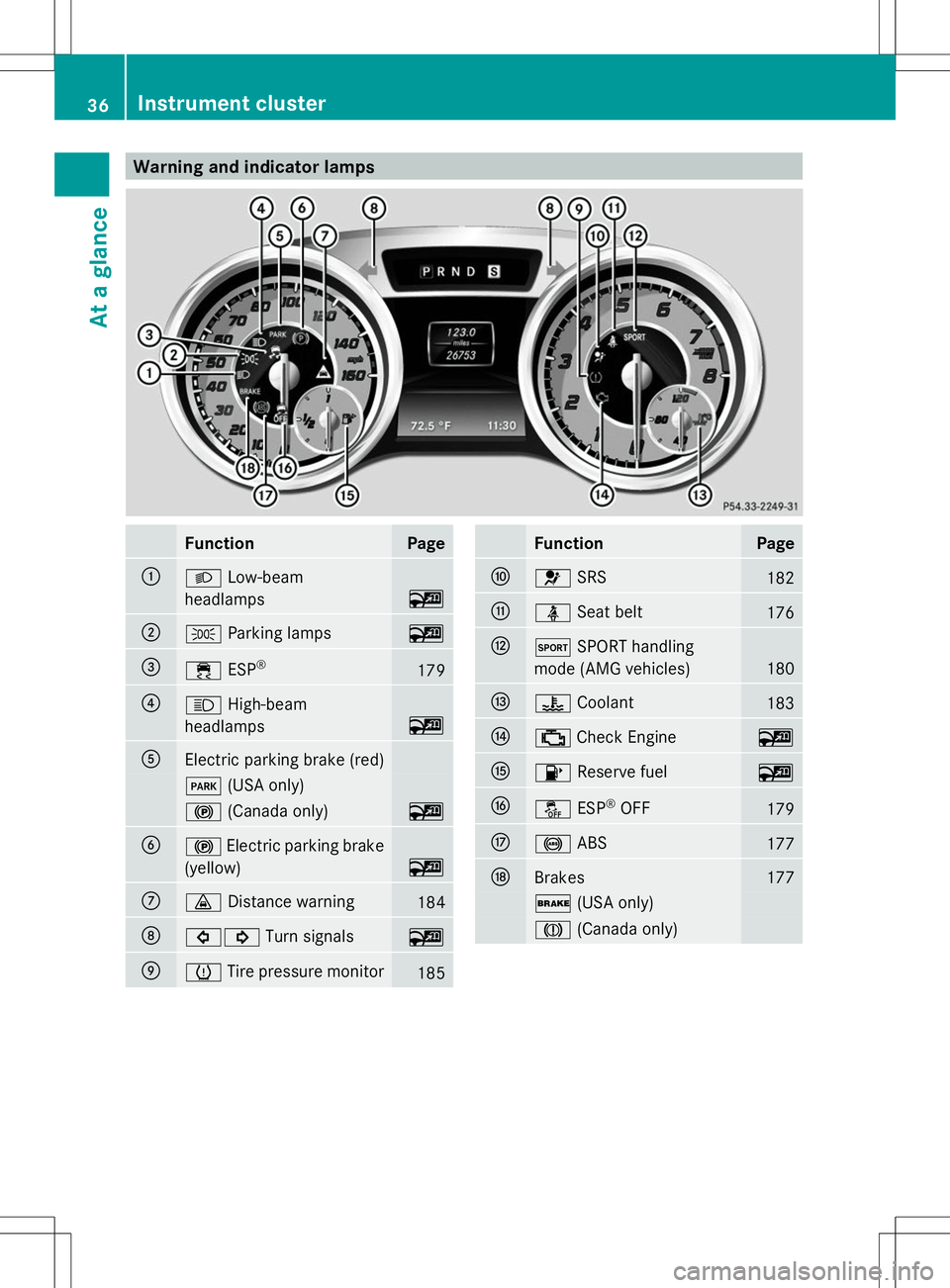
Warning and indicator lamps
Function Page
:
L
Low-beam
headlamps ~
;
T
Parking lamps ~
=
÷
ESP® 179
?
K
High-beam
headlamps ~
A
Electric parking brake (red)
F
(USA only) !
(Canada only) ~
B
!
Electric parking brake
(yellow) ~
C
·
Distance warning 184
D
#!
Turn signals ~
E
h
Tire pressure monitor 185 Function Page
F
6
SRS 182
G
ü
Seat belt 176
H
M
SPORT handling
mode (AMG vehicles) 180
I
?
Coolant 183
J
;
Check Engine ~
K
8
Reserve fuel ~
L
å
ESP®
OFF 179
M
!
ABS 177
N
Brakes 177
$
(USA only) J
(Canada only) 36
Instrument clusterAt a glance
Page 81 of 284
If you do not open the vehicle within
approximately 40 seconds of unlocking:
R
the vehicle is locked again.
R the theft deterrent locking system is
armed again.
X To lock centrally: press the&button.
The SmartKey centrally locks/unlocks:
R the doors
R the trunk lid
R the glove box
R the stowage compartment under the
armrest
R the stowage compartment in the rear
compartment
R the fuel filler flap
When unlocking, the turn signals flash once.
When locking, they flash three times.
You can also set an audible signal to confirm
that the vehicle has been locked. The audible
signal can be activated and deactivated using
the on-board computer (Y page 161).
When it is dark, the surround lighting also
comes on if it is activated in the on-board
computer (Y page 161). KEYLESS-GO
General notes Bear in mind that the engine can be started
by any of the vehicle occupants if there is a
KEYLESS-GO key in the vehicle.
Locking/unlocking centrally
You can start, lock or unlock the vehicle using
KEYLESS-GO. To do this, you only need carry
the SmartKey with you. You can combine the
functions of KEYLESS-GO with those of a
conventional SmartKey. Unlock the vehicle
by using KEYLESS-GO, for instance, and lock
it using the
&button on the SmartKey.
When locking or unlocking with KEYLESS-GO,
the distance between the SmartKey and the corresponding door handle must not be
greater than 3 ft (1 m).
A check which periodically establishes a radio
connection between the vehicle and the
SmartKey determines whether a valid
SmartKey is in the vehicle. This occurs, for
example:
R
when the external door handles are
touched
R when starting the engine
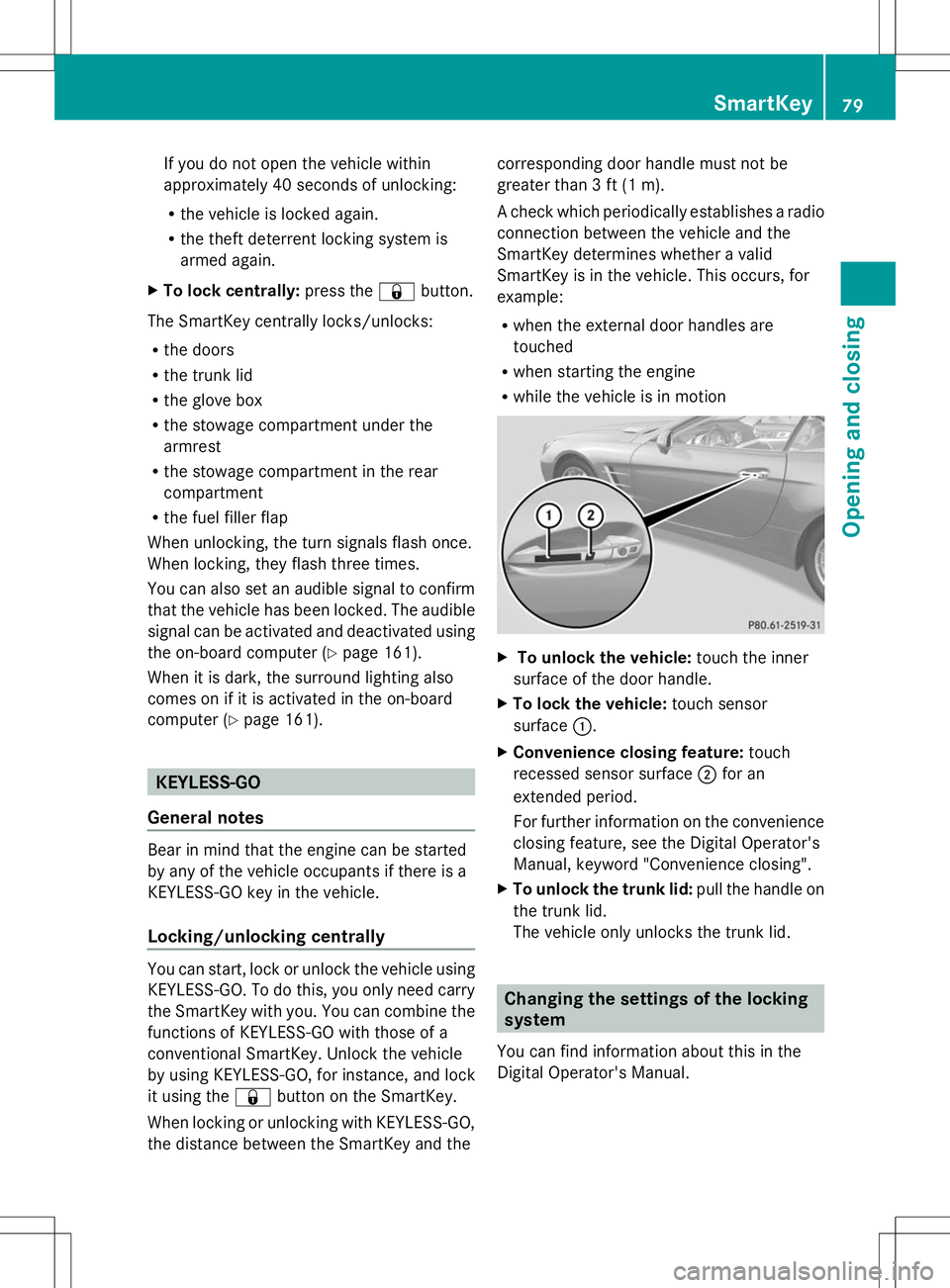
R while the vehicle is in motion X
To unlock the vehicle: touch the inner
surface of the door handle.
X To lock the vehicle: touch sensor
surface :.
X Convenience closing feature: touch
recessed sensor surface ;for an
extended period.
For further information on the convenience
closing feature, see the Digital Operator's
Manual, keyword "Convenience closing".
X To unlock the trunk lid: pull the handle on
the trunk lid.
The vehicle only unlocks the trunk lid. Changing the settings of the locking
system
You can find information about this in the
Digital Operator's Manual. SmartKey
79Opening and closing Z
Page 110 of 284
Parking lamps
!
If the battery has been excessively
discharged, the parking lamps or standing
lamps are automatically switched off to
enable the next engine start. Always park
your vehicle safely and sufficiently lit
according to legal standards. Avoid the
continuous use of the Tparking lamps
for several hours. If possible, switch on the
X right or the Wleft standing lamp.
X To switch on: turn the light switch to
T.
The green Tindicator lamp in the
instrument cluster lights up.
Standing lamps
Switching on the standing lamps ensures the
corresponding side of the vehicle is
illuminated.
X To switch on the standing lamps: the
SmartKey is not in the ignition lock or it is
in position 0.
X Turn the light switch to W(left-hand side
of the vehicle) or X(right-hand side of
the vehicle).
Information in the Digital Operator's
Manual In the Digital Operator's Manual you will find
information on the following topics:
R Automatic headlamp mode
R Low-beam headlamps
R Parking lamps
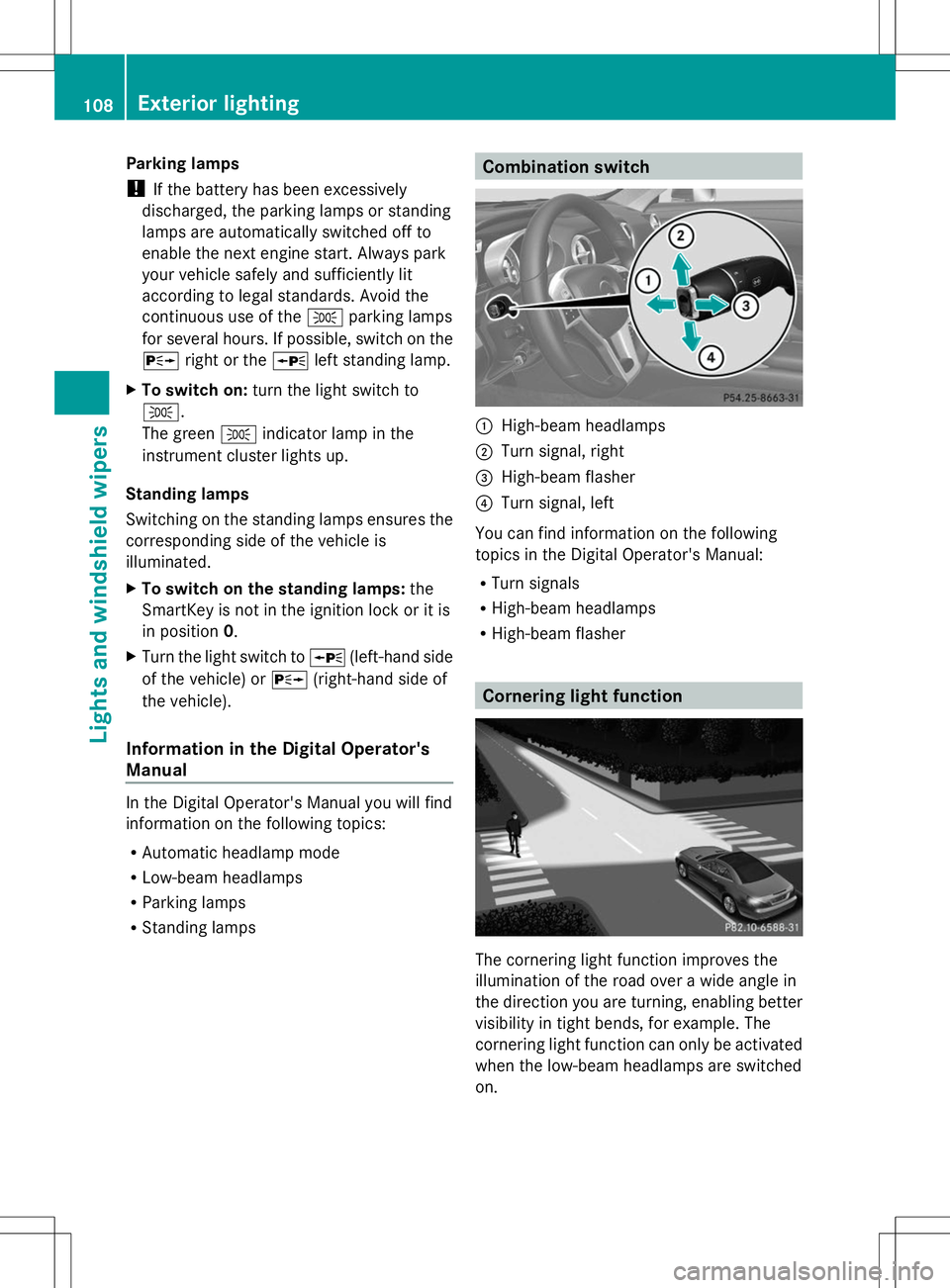
R Standing lamps Combination switch
:
High-beam headlamps
; Turn signal, right
= High-beam flasher
? Turn signal, left
You can find information on the following
topics in the Digital Operator's Manual:
R Turn signals
R High-beam headlamps
R High-beam flasher Cornering light function
The cornering light function improves the
illumination of the road over a wide angle in
the direction you are turning, enabling better
visibility in tight bends, for example. The
cornering light function can only be activated
when the low-beam headlamps are switched
on. 108
Exterior lightingLights and windshield wipers
Page 111 of 284
Active:
R
if you are driving at speeds below
25mph (40 km/h) and switch on the turn
signal or turn the steering wheel.
R if you are driving at speeds between
25mph (40 km/h) and45mph (70 km/h)
and turn the steering wheel
Not active: if you are driving at speeds above
25 mph (40 km/h) or switch off the turn
signals or turn the steering wheel to the
straight-ahead position.
The cornering light function may remain lit for
a short time, but is automatically switched off
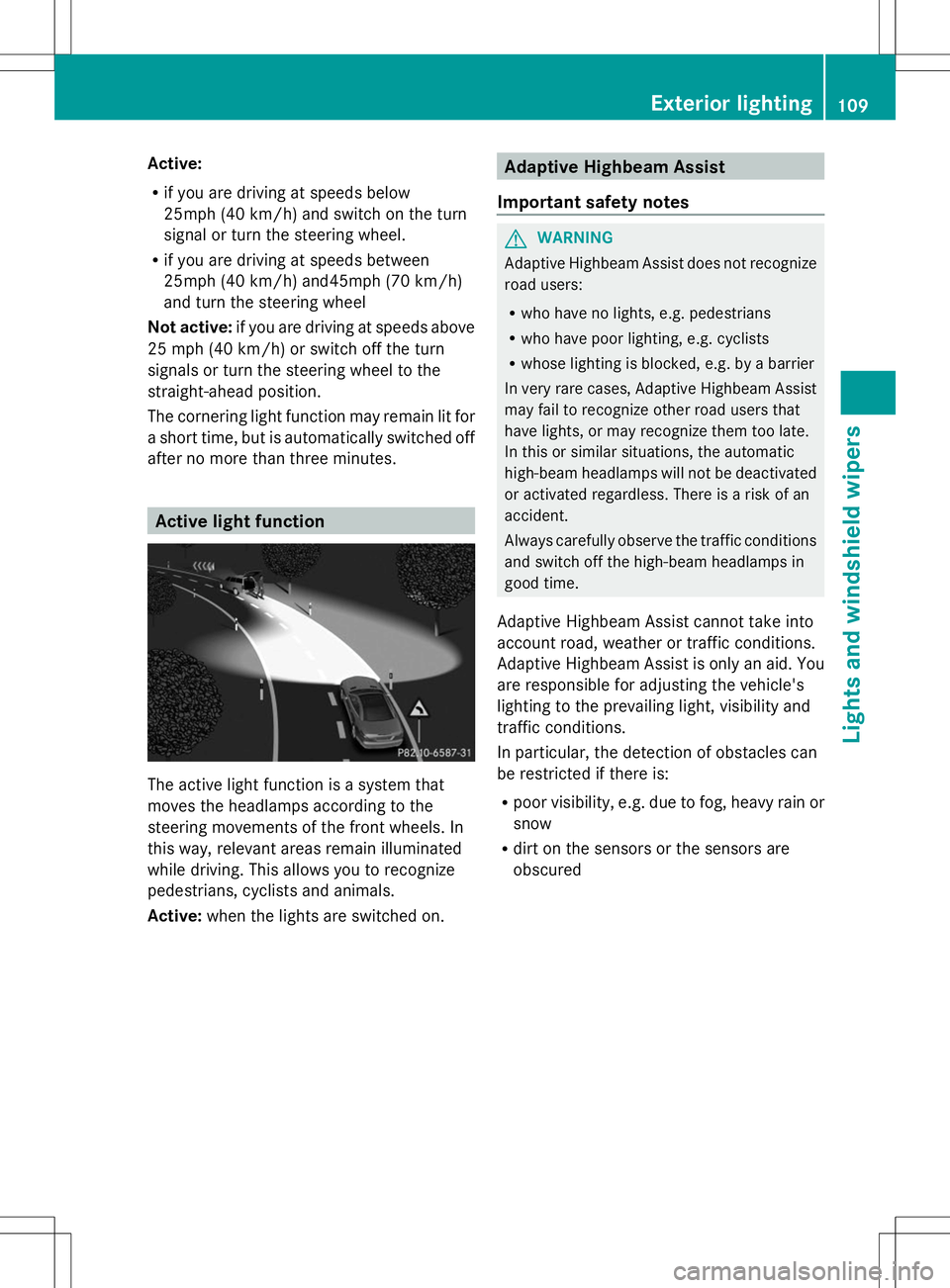
after no more than three minutes. Active light function
The active light function is a system that
moves the headlamps according to the
steering movements of the front wheels. In
this way, relevant areas remain illuminated
while driving. This allows you to recognize
pedestrians, cyclists and animals.
Active: when the lights are switched on. Adaptive Highbeam Assist
Important safety notes G
WARNING
Adaptive Highbeam Assist does not recognize
road users:
R who have no lights, e.g. pedestrians
R who have poor lighting, e.g. cyclists
R whose lighting is blocked, e.g. by a barrier
In very rare cases, Adaptive Highbeam Assist
may fail to recognize other road users that
have lights, or may recognize them too late.
In this or similar situations, the automatic
high-beam headlamps will not be deactivated
or activated regardless. There is a risk of an
accident.
Always carefully observe the traffic conditions
and switch off the high-beam headlamps in
good time.
Adaptive Highbeam Assist cannot take into
account road, weather or traffic conditions.
Adaptive Highbeam Assist is only an aid. You
are responsible for adjusting the vehicle's
lighting to the prevailing light, visibility and
traffic conditions.
In particular, the detection of obstacles can
be restricted if there is:
R poor visibility, e.g. due to fog, heavy rain or
snow
R dirt on the sensors or the sensors are
obscured Exterior lighting
109Lights and windshield wipers Z
Page 139 of 284
vehicle. It maintains the preset distance to
the vehicle in front.
If DISTRONIC PLUS detects that there is a risk
of a collision, you will be warned visually and
acoustically. DISTRONIC PLUS cannot
prevent a collision without your intervention.
An intermittent warning tone will then sound
and the distance warning lamp will light up in
the instrument cluster. Brake immediately in
order to increase the distance from the
vehicle in front, or take evasive action,
provided it is safe to do so.
If DISTRONIC PLUS detects a faster-moving
vehicle in front, it increases the driving speed.
However, the vehicle is only accelerated up
to the speed you have stored.
Changing lanes
If you wish to change to the passing lane (in
countries where traffic drives on the right, the
passing lane is the left-hand lane),
DISTRONIC PLUS supports you if:
R you are driving faster than 40 mph
(60 km/h)
R DISTRONIC PLUS is maintaining the
distance to a vehicle in front
R you have switched on the corresponding
turn signal
R DISTRONIC PLUS does not detect a danger
of collision
If these conditions are fulfilled, your vehicle
is accelerated. Acceleration will be
interrupted if changing lanes takes too long
or if the distance between your vehicle and
the vehicle in front becomes too small.
Stopping G
WARNING
When leaving the vehicle, even if it is braked
only by DISTRONIC PLUS, it could roll away if:
R there is a malfunction in the system or in
the voltage supply.
R DISTRONIC PLUS has been deactivated
with the cruise control lever, e.g. by a vehicle occupant or from outside the
vehicle.
R the electrical system in the engine
compartment, the battery or the fuses have
been tampered with.
R the battery is disconnected.
R the accelerator pedal has been depressed,
e.g. by a vehicle occupant.
There is a risk of an accident.
If you wish to exit the vehicle, always turn off
DISTRONIC PLUS and secure the vehicle
against rolling away.
Deactivating DISTRONIC PLUS
(Y page 138).
If DISTRONIC PLUS detects that the vehicle
in front is stopping, it brakes your vehicle until
it is stationary.
Once your vehicle is stationary, it remains
stationary and you do not need to depress the
brake. After a time, the electric parking brake
secures the vehicle and relieves the service
brake.
Depending on the specified minimum
distance, your vehicle will come to a standstill
at a sufficient distance behind the vehicle in
front. The specified minimum distance is set
using the control on the cruise control lever.
The electric parking brake automatically
secures the vehicle if DISTRONIC PLUS is
activated and:
R the driver's door is open and the driver's
seat belt is unfastened.
R the engine is switched off, unless it is
automatically switched off by the ECO
start/stop function.
R a system malfunction occurs.
R the power supply is not sufficient.
If a malfunction occurs, then the transmission
may also be shifted into position P
automatically. Driving systems
137Driving and parking Z
Page 155 of 284
Problems with Night View Assist Plus
Problem Possible causes/consequences and
M
MSolutions The picture quality of
Night View Assist Plus
has deteriorated. The windshield is fogged up on the inside.
X
Fold down camera cover (Y page 223).
X Defrost the windshield (Y page 116). The windshield is iced up.
X
De-ice the windshield (Y page 116). The windshield wipers are smearing the windshield.
X
Replace the wiper blades (Y page 111). The windshield is smeared after the vehicle has been cleaned in a
car wash.
X
Clean the windshield (Y page 222). There is windshield chip damage in the camera's field of vision.
X
Replace the windshield. The pedestrian and
animal recognition is
not available. The infrared camera in the radiator grill is dirty.
X
Use a soft cloth and water to clean the infrared camera. Active Driving Assistance package
General notes The Active Driving Assistance package
consists of DISTRONIC PLUS (Y
page 133),
Active Blind Spot Assist (Y page 153) and
Active Lane Keeping Assist (Y page 156).
Active Blind Spot Assist General notes
Active Blind Spot Assist uses a radar sensor
system to monitor the side areas of your
vehicle which are behind the driver. A warning
display in the exterior mirrors draws your
attention to vehicles detected in the
monitored area. If you then switch on the
corresponding turn signal to change lanes,
you will also receive an optical and audible
collision warning. If a risk of lateral collision
is detected, corrective braking may help you avoid a collision. To support the course-
correcting brake application, Active Blind
Spot Assist also uses the forward-facing radar
sensor system.
Active Blind Spot Assist supports you from a
speed of approximately 20 mph (30 km/h).
For Active Blind Spot Assist to assist you
when driving, the radar sensor system must
be operational.
Important safety notes
Active Blind Spot Assist is only an aid. It may
fail to detect some vehicles and is no
substitute for attentive driving.
G
WARNING
Active Blind Spot Assist does not react to:
R vehicles overtaken too closely on the side,
placing them in the blind spot area
R vehicles which approach with a large speed
differential and overtake your vehicle Driving systems
153Driving and parking
Z
Page 157 of 284
Due to the nature of the system:
R
warnings may be issued in error when
driving close to crash barriers or similar
solid lane borders.
R warnings may be interrupted when driving
alongside particularly long vehicles, e.g.
trucks, for a prolonged time.
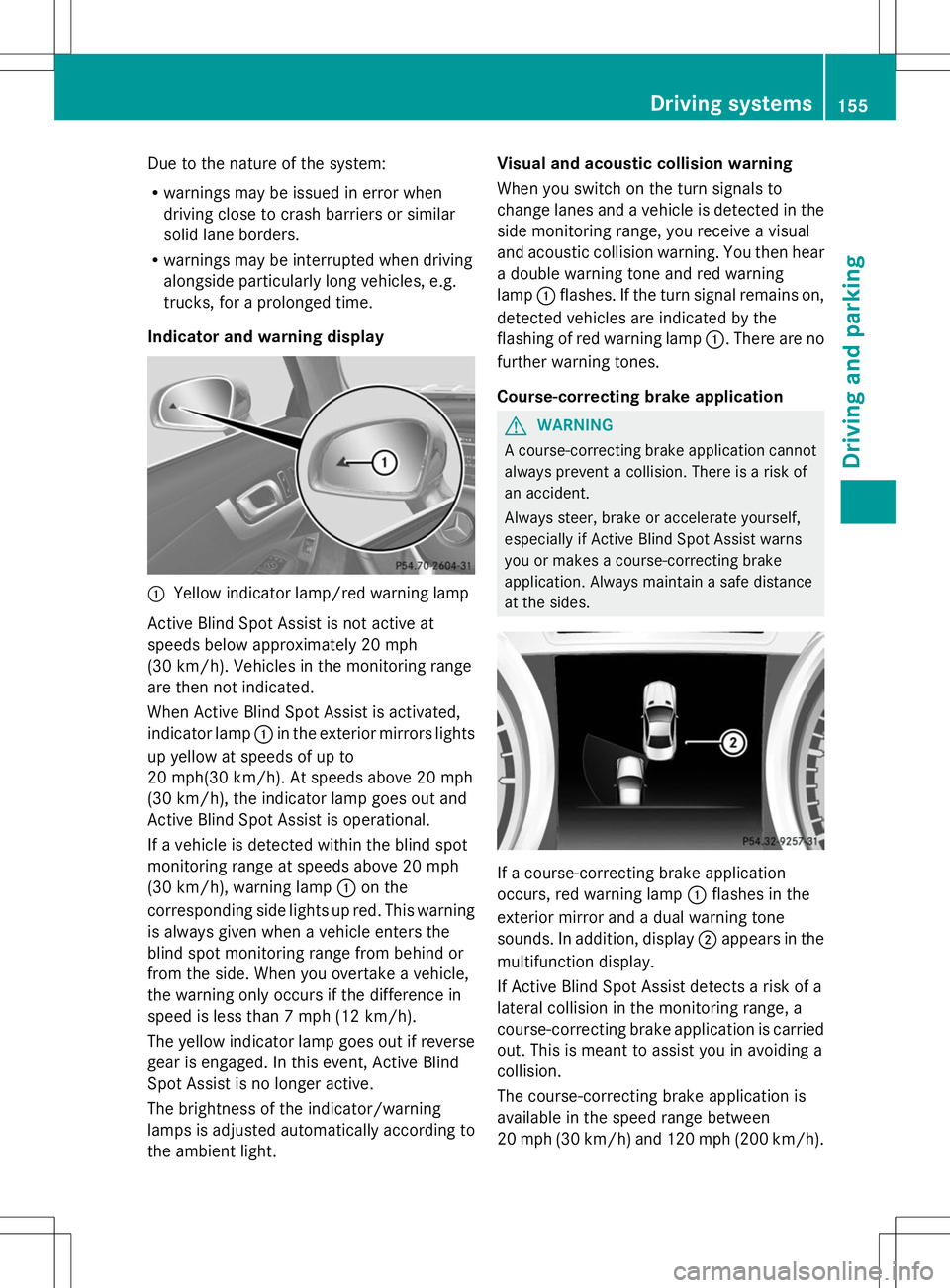
Indicator and warning display :
Yellow indicator lamp/red warning lamp
Active Blind Spot Assist is not active at
speeds below approximately 20 mph
(30 km/h). Vehicles in the monitoring range
are then not indicated.
When Active Blind Spot Assist is activated,
indicator lamp :in the exterior mirrors lights
up yellow at speeds of up to
20 mph(30 km/h). At speeds above 20 mph
(30 km/h), the indicator lamp goes out and
Active Blind Spot Assist is operational.
If a vehicle is detected within the blind spot
monitoring range at speeds above 20 mph
(30 km/h), warning lamp :on the
corresponding side lights up red. This warning
is always given when a vehicle enters the
blind spot monitoring range from behind or
from the side. When you overtake a vehicle,
the warning only occurs if the difference in
speed is less than 7 mph (12 km/h).
The yellow indicator lamp goes out if reverse
gear is engaged. In this event, Active Blind
Spot Assist is no longer active.
The brightness of the indicator/warning
lamps is adjusted automatically according to
the ambient light. Visual and acoustic collision warning
When you switch on the turn signals to
change lanes and a vehicle is detected in the
side monitoring range, you receive a visual
and acoustic collision warning. You then hear
a double warning tone and red warning
lamp :flashes. If the turn signal remains on,
detected vehicles are indicated by the
flashing of red warning lamp :. There are no
further warning tones.
Course-correcting brake application G
WARNING
A course-correcting brake application cannot
always prevent a collision. There is a risk of
an accident.
Always steer, brake or accelerate yourself,
especially if Active Blind Spot Assist warns
you or makes a course-correcting brake
application. Always maintain a safe distance
at the sides. If a course-correcting brake application
occurs, red warning lamp
:flashes in the
exterior mirror and a dual warning tone
sounds. In addition, display ;appears in the
multifunction display.
If Active Blind Spot Assist detects a risk of a
lateral collision in the monitoring range, a
course-correcting brake application is carried
out. This is meant to assist you in avoiding a
collision.
The course-correcting brake application is
available in the speed range between
20 mph (30 km/h) and 120 mph (200 km/h). Driving systems
155Driving and parking Z