ESP MERCEDES-BENZ SLC 2017 Owner's Manual
[x] Cancel search | Manufacturer: MERCEDES-BENZ, Model Year: 2017, Model line: SLC, Model: MERCEDES-BENZ SLC 2017Pages: 294, PDF Size: 9.12 MB
Page 75 of 294
Make sure that no body parts are in close
proximity during the closing procedure. If
someone becomes trapped, press the switch
to open the side window again.
Opening and closing the side win-
dows in the front The switches for the front side windows are
located on the driver's door. There is also a
switch for the front-passenger side window on
the front-passenger door.
The switches on the driver's door take prece-
dence.
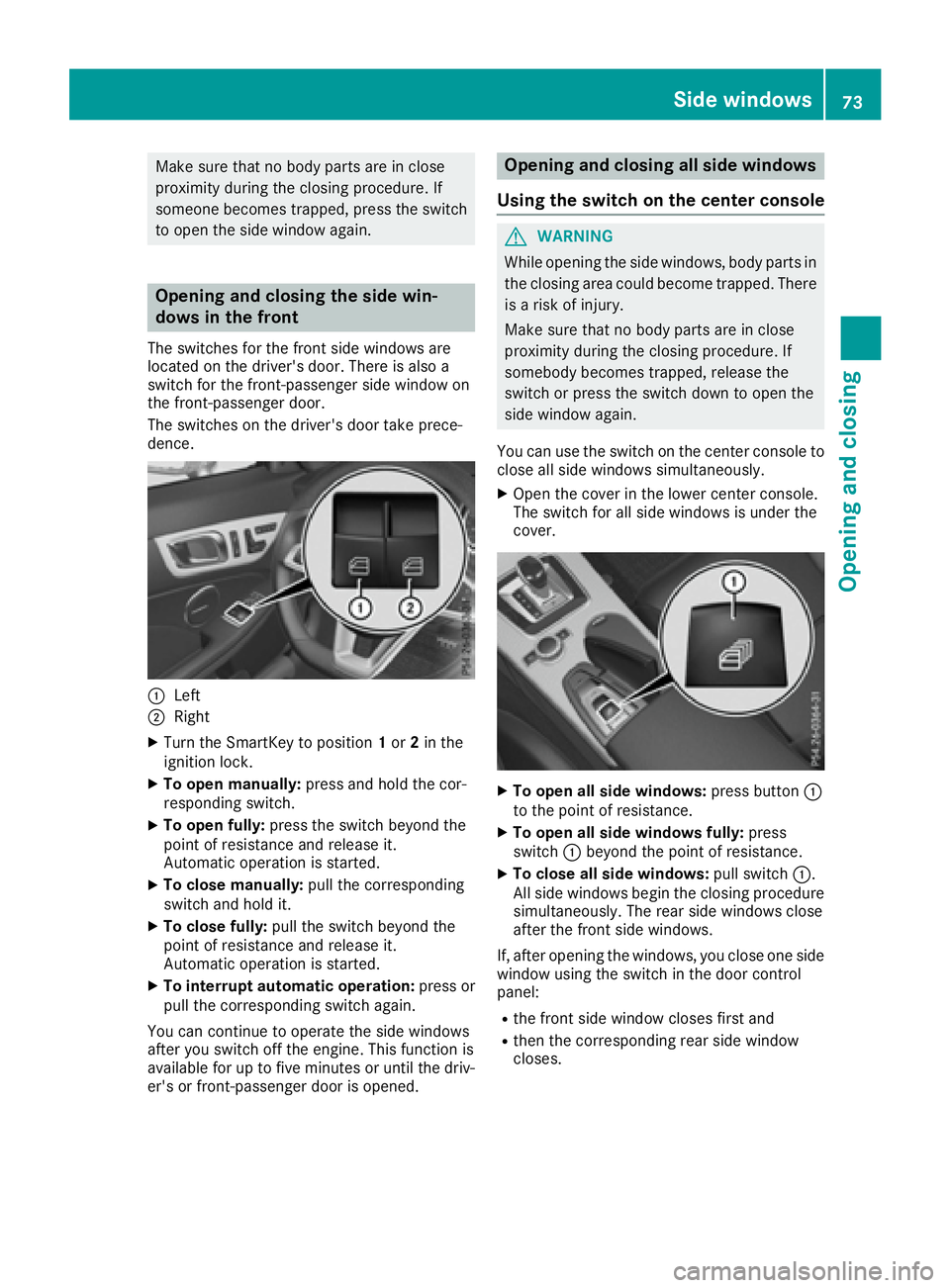
C
LeftD
Right X
Turn the SmartKey to position 1 or 2 in the
ignition lock. X
To open manually: press and hold the cor-
responding switch. X
To open fully: press the switch beyond the
point of resistance and release it.
Automatic operation is started. X
To close manually: pull the corresponding
switch and hold it. X
To close fully: pull the switch beyond the
point of resistance and release it.
Automatic operation is started. X
To interrupt automatic operation: press or
pull the corresponding switch again.
You can continue to operate the side windows
after you switch off the engine. This function is
available for up to five minutes or until the driv-
er's or front-passenger door is opened. Opening and closing all side windows
Using the switch on the center console
G WARNING
While opening the side windows, body parts in
the closing area could become trapped. There
is ar isk of injury.
Make sure that no body parts are in close
proximity during the closing procedure. If
somebody becomes trapped, release the
switch or press the switch down to open the
side window again.
You can use the switch on the center console to
close all side windows simultaneously. X
Open the cover in the lower center console.
The switch for all side windows is under the
cover.
X
To open all side windows: press button C
to the point of resistance. X
To open all side windows fully: press
switch C beyond the point of resistance. X
To close all side windows: pull switch C .
All side windows begin the closing procedure
simultaneously .T he rear side windows close
after the front side windows.
If, after opening the windows, you close one side
window using the switch in the door control
panel: R
the front side window closes first and R
then the corresponding rear side window
closes.Side windows 73
Opening and closing Z
Page 76 of 294
Convenience closing with KEYLESS-GO
G WARNING
When usin gt he convenience closin gf eature,
part soft he body coul dbet ra pped in th ec los-
ing area when as ide window is bein gc losed.
Ther eisar is kofi njury.
Observ et he complet ec losin gp rocedure
when th ec onvenience closin gf eature is oper-
ating. Mak es ure that no body part sa re in
close proximity durin gt he closin gp rocedure.
Procee dasf ollows if someon eist ra pped:X
Release th er ecessed sensor surface on the
door handle. X
Immediately pull and hold th ed oor handle
and keep th ed oor handle pulled.
The side windows open.
Wit hK EY LESS-GO you can close all side win-
dows simultaneously. The KEYLESS-GO key
must be outside th ev ehicle .A ll th ed oor sm ust
be closed.
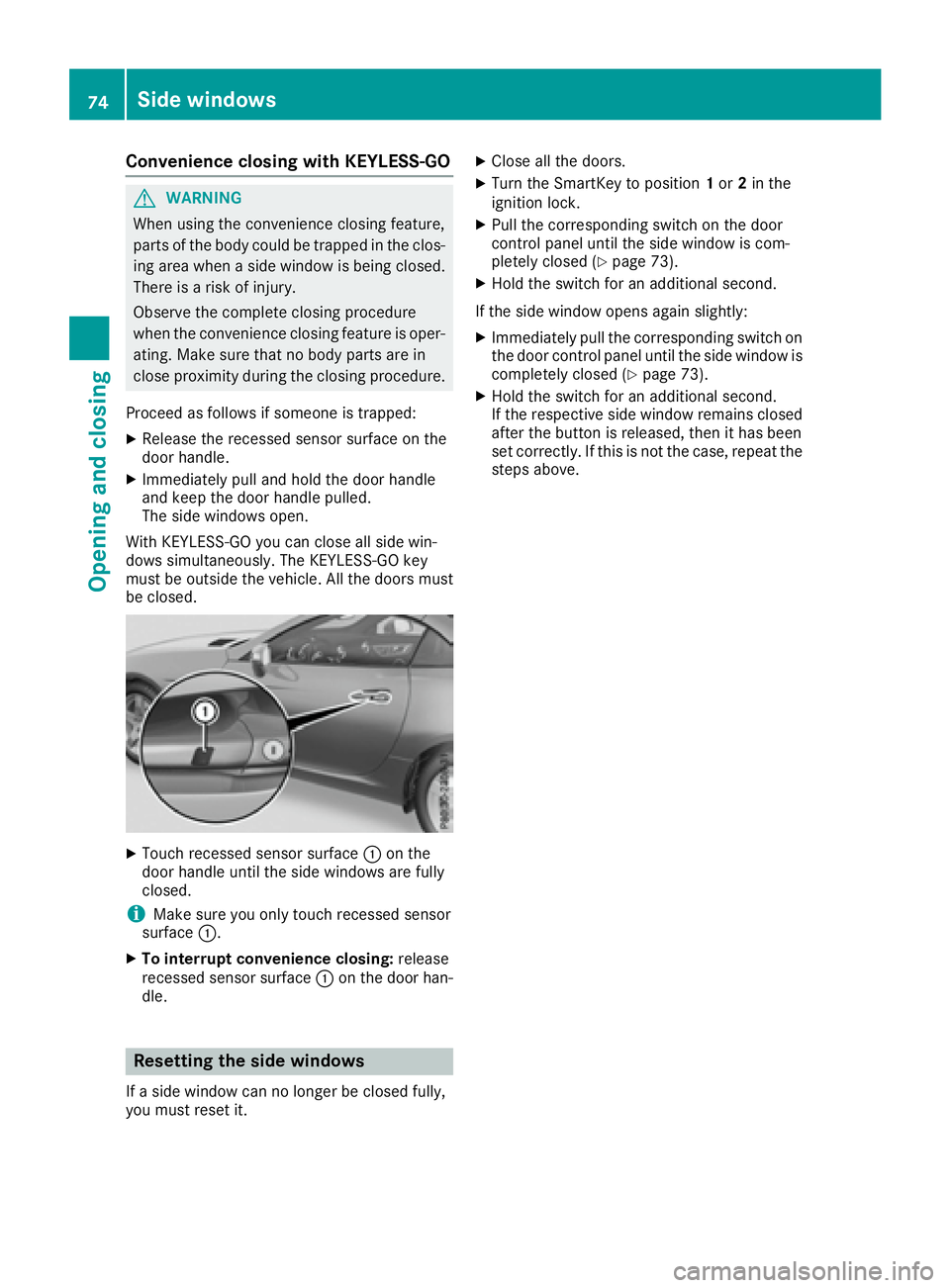
X
Touc hr ecessed sensor surface C on the
door handle until th es ide windows are fully
closed.
i Mak es ure you only touch recessed sensor
surface C .X
To interrup tc onvenience closing: release
recessed sensor surface C on th ed oor han-
dle.
Resetting th es id ew indows
If as ide window can no longer be closed fully,
you must reset it. X
Close all th ed oors. X
Turn th eS ma rtKey to position 1 or 2 in the
ignition lock. X
Pull th ec orrespondin gs witch on th ed oor
control panel until th es ide window is com-
pletely closed ( Y
page 73).X
Hol dt he switch for an additional second.
If th es ide window open sa gain slightly:X
Immediately pull th ec orrespondin gs witch on
th ed oor control panel until th es ide window is
completely closed ( Y
page 73).X
Hol dt he switch for an additional second.
If th er espectiv es ide window remains closed
after th eb utto nisr eleased, then it has been
set correctly. If this is no tt he case, repeat the
steps above.74
Sid ew indows
Opening and closing
Page 77 of 294
Problems with the side windows
G WARNING
If you close as ide window again immediately after it has been blocked or reset, the side window
closes with increased or maximum force. The reversing feature is then not active. Parts of the
body could be trapped in the closing area in the process. This poses an increased risk of injury or
even fatal injury.
Make sure that no parts of the body are in the closing area. To stop the closing process, release
the switch or push the switch again to reopen the side window.
Problem
Possible causes/consequences and P Solutions
As ide window cannot be
closed because it is
blocked by objects, e.g.
leaves in the window
guide. X
Remove the objects. X
Close the side window.
As ide window cannot be
closed and you cannot
see the cause. If as ide window is obstructed during closing and reopens again
slightly: X
Immediately after the window blocks, pull the correspondin gs witch
again until the side window has closed.
The side window is closed with increased force.
If as ide window is obstructed again during closing and reopens again
slightly: X
Immediately after the window blocks, pull the correspondin gs witch
again until the side window has closed.
The side window is closed without the automatic reversing feature.
Roof
Important safety notes
G WARNING
If you do not fully open/close the soft top, the
soft-top hydraulics depressurize after as hort
time. This causes the soft top to lower unex-
pectedly and may cause you or others to be
trapped. There is ar isk of injury.
Always open or close the soft top completely.
G WARNING
Closing the roof manually is ac omplicated
and technically demanding procedure, which
requires al ot of strength. You or others can
become trapped. There is ar isk of injury.
Only have the soft top closed manually at a
qualified specialist workshop. ! Never sit on the rear shelf or store heavy
object st here. You will otherwise damage the
roof and the rear shelf of your vehicle.
! Do not forget that the weather can change
abruptly. Make certain that the roof is closed
when you leave the vehicle. The vehicle elec-
tronics can be damaged if water enters the
vehicle interior.
! When opening and closing the roof, make
sure that: R
there is sufficient clearance, as the roof
swings upwards. R
there is sufficient clearance behind the
vehicle, as the trunk lid swings backwards
beyond the bumper. R
the trunk is only loaded to below the trunk
partition. R
the trunk partition is not pushed up by the
load. R
the trunk partition is closed. Roof 75
Opening and closing Z
Page 90 of 294
Position of the steering wheel when the
EASY-ENTRY/EXIT featur eisa ctiveThe steering wheel swings upwards when you: R
remove the SmartKey from the ignition lock R
open the driver's door with KEYLESS-GO in
position 1R
open the driver's door and the SmartKey is in
position 0 or 1 in the ignition lock
i The steering wheel only moves upwards if it
has not already reached the upper end stop.
Position of the steering wheel for driv-
ing The steering wheel is moved to the last selected
position when: R
the driver's door is closed R
you insert the SmartKey into the ignition lock
or R
you press the Start/Stop button once on vehi-
cles with KEYLESS-GO
When you close the driver's door with the igni-
tion switched on, the steering wheel is also
automatically moved to the previously set posi-
tion.
The last position of the steering wheel is stored
when you switch off the ignition or when you
store the settin gw ith the memory function
( Y
page 91).
Crash-responsive EASY-EXIT feature If the crash-responsive EASY-EXIT feature is trig-
gered in an accident, the steering column will
move upwards when the driver's door is opened.
This occurs irrespective of the position of the
SmartKey in the ignition lock. This makes it eas-
ier to exit the vehicle and rescue the occupants.
The crash-responsive EASY-EXIT feature is only
operational if the EASY-EXIT/ENTRY feature is
activated in the on-board computer
( Y
page 174). Mirrors
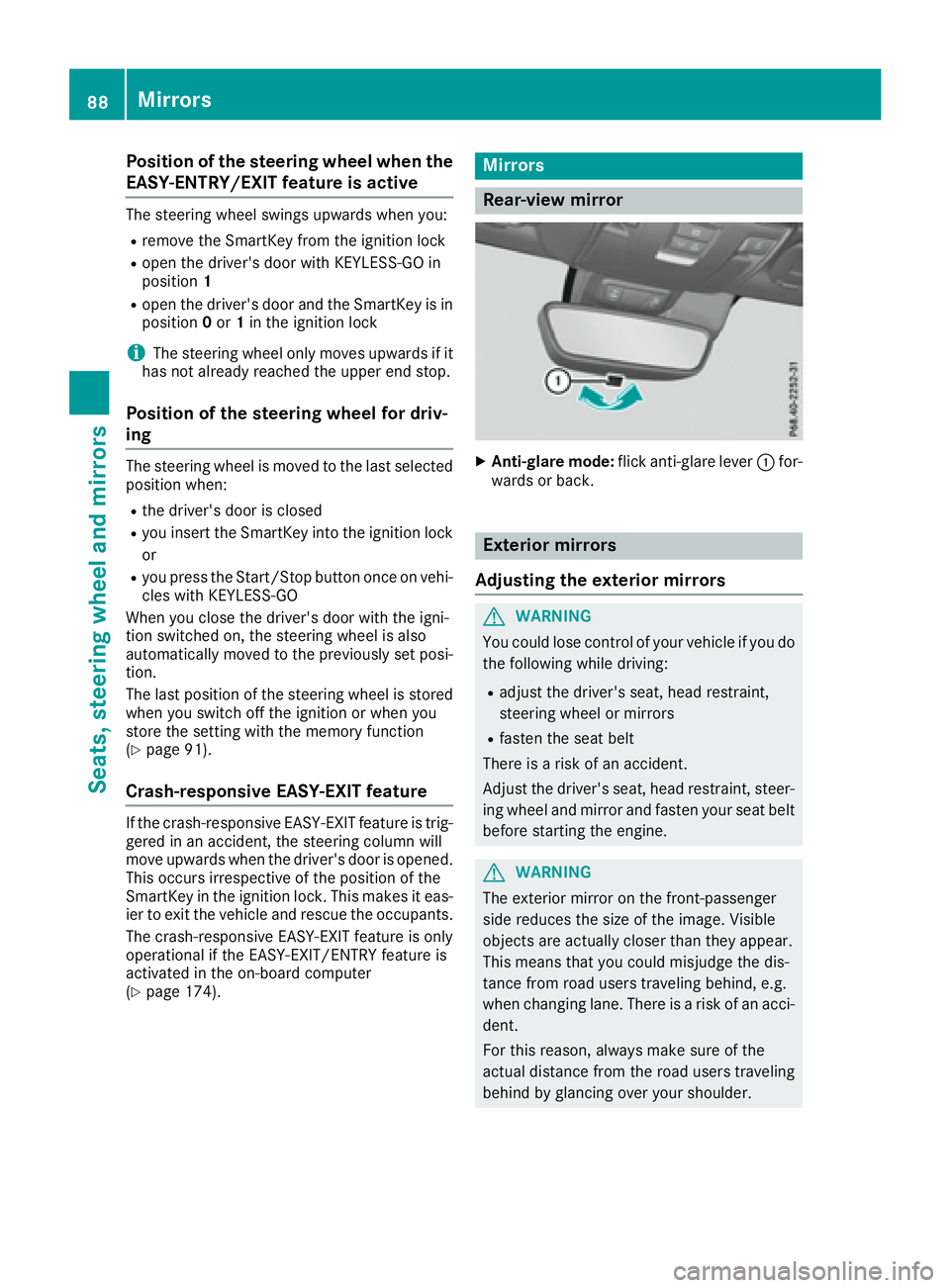
Rear-view mirror X
Anti-glare mode: flick anti-glare lever C for-
wards or back.
Exterior mirrors
Adjusting the exterior mirrors
G WARNING
You could lose control of your vehicle if you do
the following while driving: R
adjust the driver's seat, head restraint,
steering wheel or mirrors R
fasten the seat belt
There is ar isk of an accident.
Adjust the driver's seat, head restraint ,s teer-
ing wheel and mirror and fasten your seat belt
before startin gt he engine.
G WARNING
The exterior mirror on the front-passenger
side reduces the size of the image. Visible
object sa re actually closer than they appear.
This means that you could misjudge the dis-
tance from road users traveling behind, e.g.
when changing lane. There is ar isk of an acci-
dent.
For this reason, always make sure of the
actual distance from the road users traveling
behind by glancing over your shoulder.88
Mirrors
Seats, steering whee la nd mirrors
Page 91 of 294
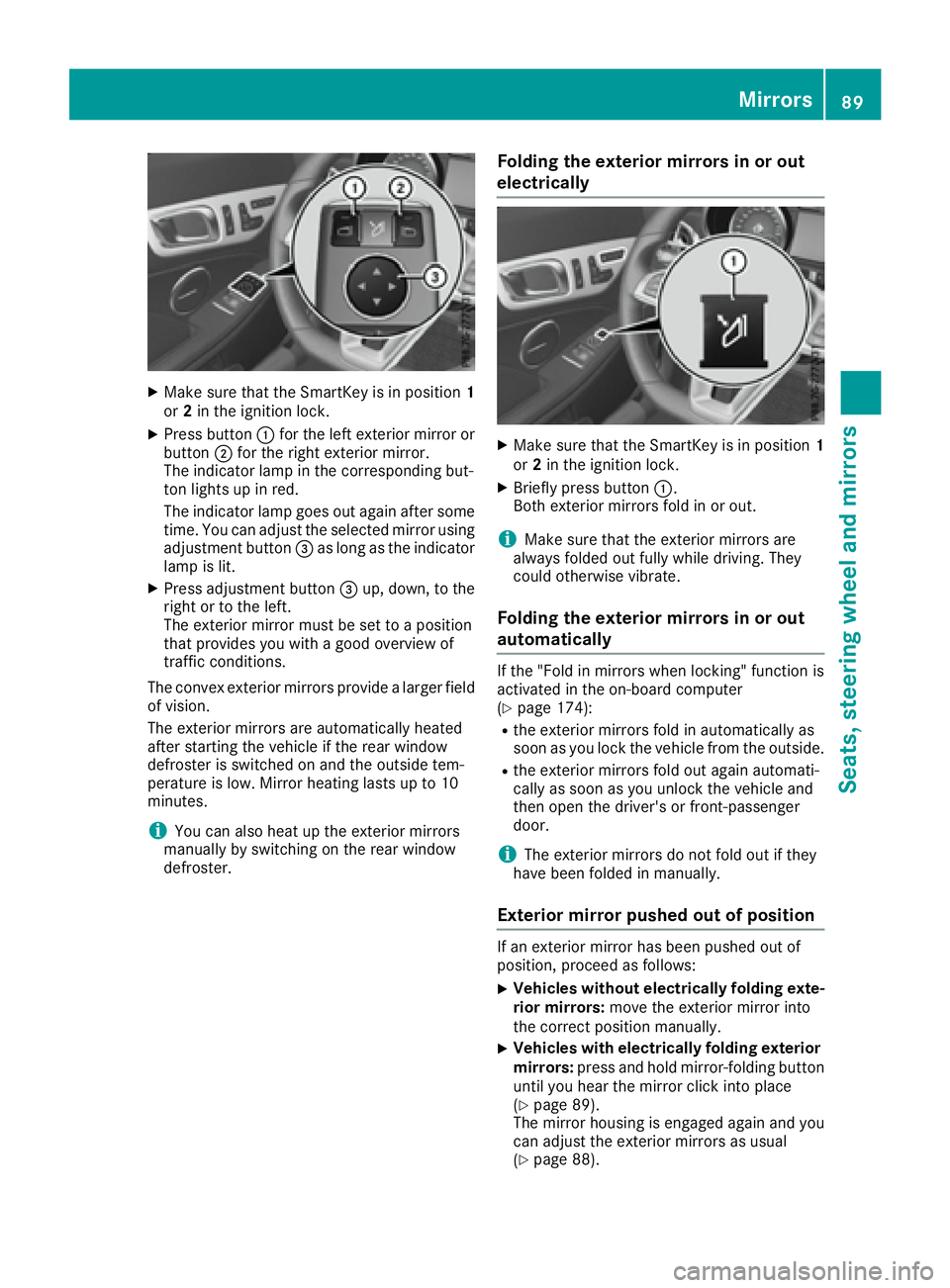
X
Make sure that the SmartKey is in position 1
or 2 in the ignition lock.X
Press button C for the left exterior mirror or
button D for the right exterior mirror.
The indicator lamp in the corresponding but-
ton lights up in red.
The indicator lamp goes out again after some
time. You can adjust the selected mirror using
adjustment button
Page 96 of 294
The daytime runnin gl amps improve the visibility
of your vehicle during the day. To do this, the
daytime runnin gl amps function must be
switched on using the on-board computer
( Y
page 172).
If the engine is runnin ga nd you turn the light
switch to ` or X ,t he manual settings
take precedenc eo ver the daytime running
lamps.
Low-beam headlamps
G WARNING
When the light switch is set to X ,t he low-
beam headlamps may not be switched on
automatically if there is fog, snow or other
causes of poor visibility due to the weather
conditions such as spray. There is ar isk of an
accident.
In such situations, turn the light switch to
X .
Even if the light sensor does not detect that it is
dark, the parking lamps and low-beam head-
lamps switch on when the ignition is switched on
and the light switch is set to the X position.
This is ap articularly useful function in the event
of rain and fog. X
To switch on the low-beam headlamps:
turn the SmartKey in the ignition lock to posi-
tion 2 or start the engine.X
Turn the light switch to X .
The green X indicator lamp in the instru-
ment cluster lights up.
Rear fog lamp
The rear fog lamp improves visibility of your
vehicle for the traffic behind in the event of thick
fog. Please take not eoft he country-specific
regulations for the use of rear fog lamps. X
To switch on the rear fog lamps: turn the
SmartKey to position 2 in the ignition lock or
start the engine. X
Turn the light switch to X or X .X
Press the ^ button.
The yellow ^ indicator lamp in the instru-
ment cluster lights up. X
To switch off the rear fog lamp: press the
^ button.
The yellow ^ indicator lamp in the instru-
ment cluster goes out. Parking lamps
! If the battery charge is very low, the parking
lamps or standin gl amps are automatically
switched off to enable the next engine start.
Always park your vehicle safely and suffi-
ciently lit according to legal standards. Avoid
using the parking lamps ` over ap eriod of
several hours. If possible, switch on the right-
hand d or left-hand c standin gl amp.X
To switch on: turn the light switch to ` .
The green ` indicator lamp in the instru-
ment cluster lights up.
Standing lamps Switching on the standin gl amps ensures the
corresponding side of the vehicle is illuminated. X
To switch on the standing lamps: the
SmartKey is not in the ignition lock or it is in
position 0 . X
Turn the light switch to c (left-han ds ide of
the vehicle) or d (right-hand side of the
vehicle).
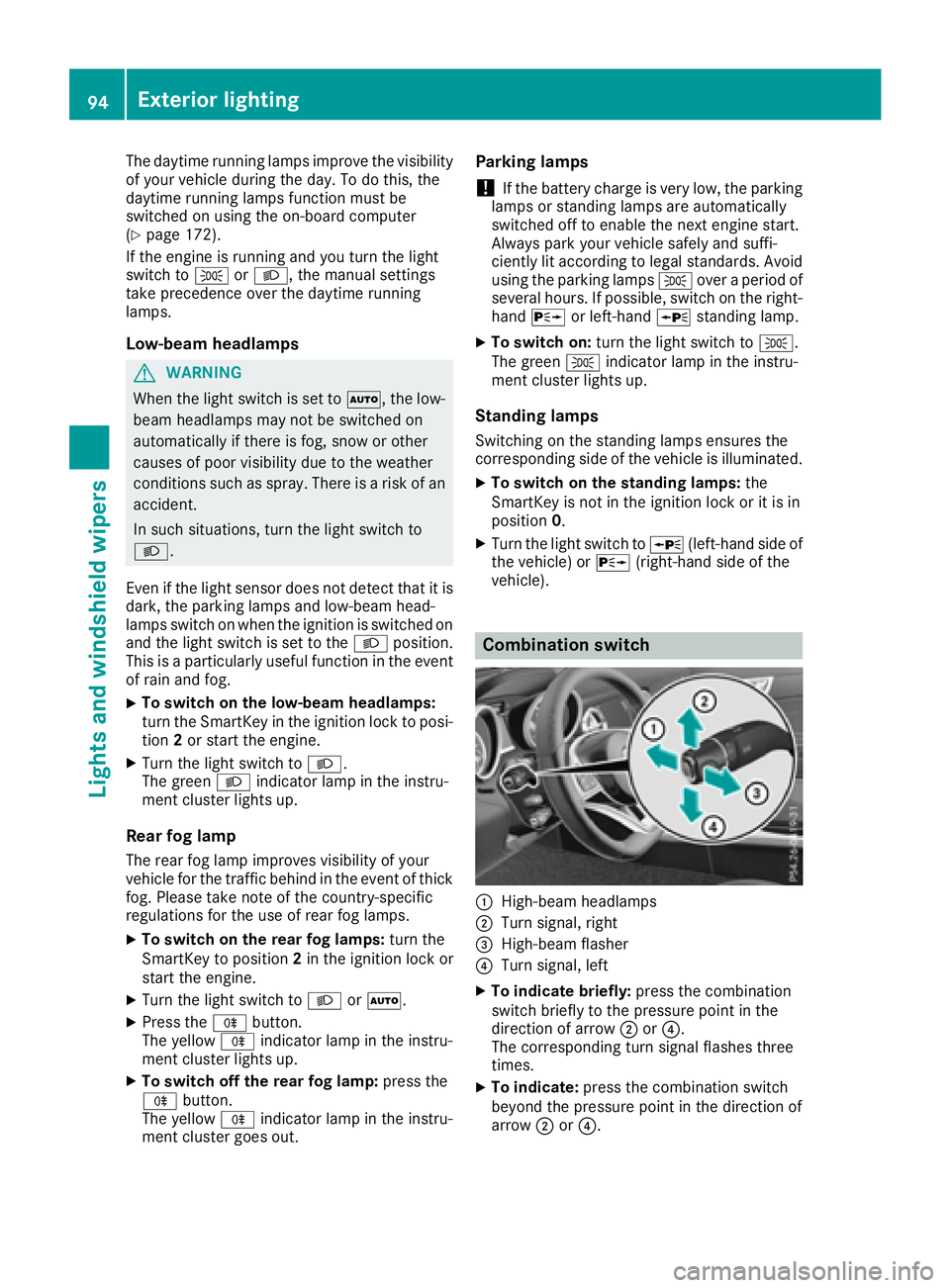
Combination switch
C
High-beam headlamps D
Turn signal, right
Page 97 of 294
X
To switc hont he high-beam headlamps:
turn the light switch to X or X .X
Press the combinatio ns wi tch beyond the
pressure point in the direction of arrow C .
In the X position, the high-bea mh ead-
lamps are onl ys wi tched on when it is dark and
the engine is running.
The blue W indicator lamp in the instru-
ment cluster lights up when the high-beam
headlamps are switched on. X
To switc ho ff the high-beam headlamps:
move the combinatio ns wi tch back to its nor-
ma lp osition.
The blue W indicator lamp in the instru-
ment cluster goe so ut .
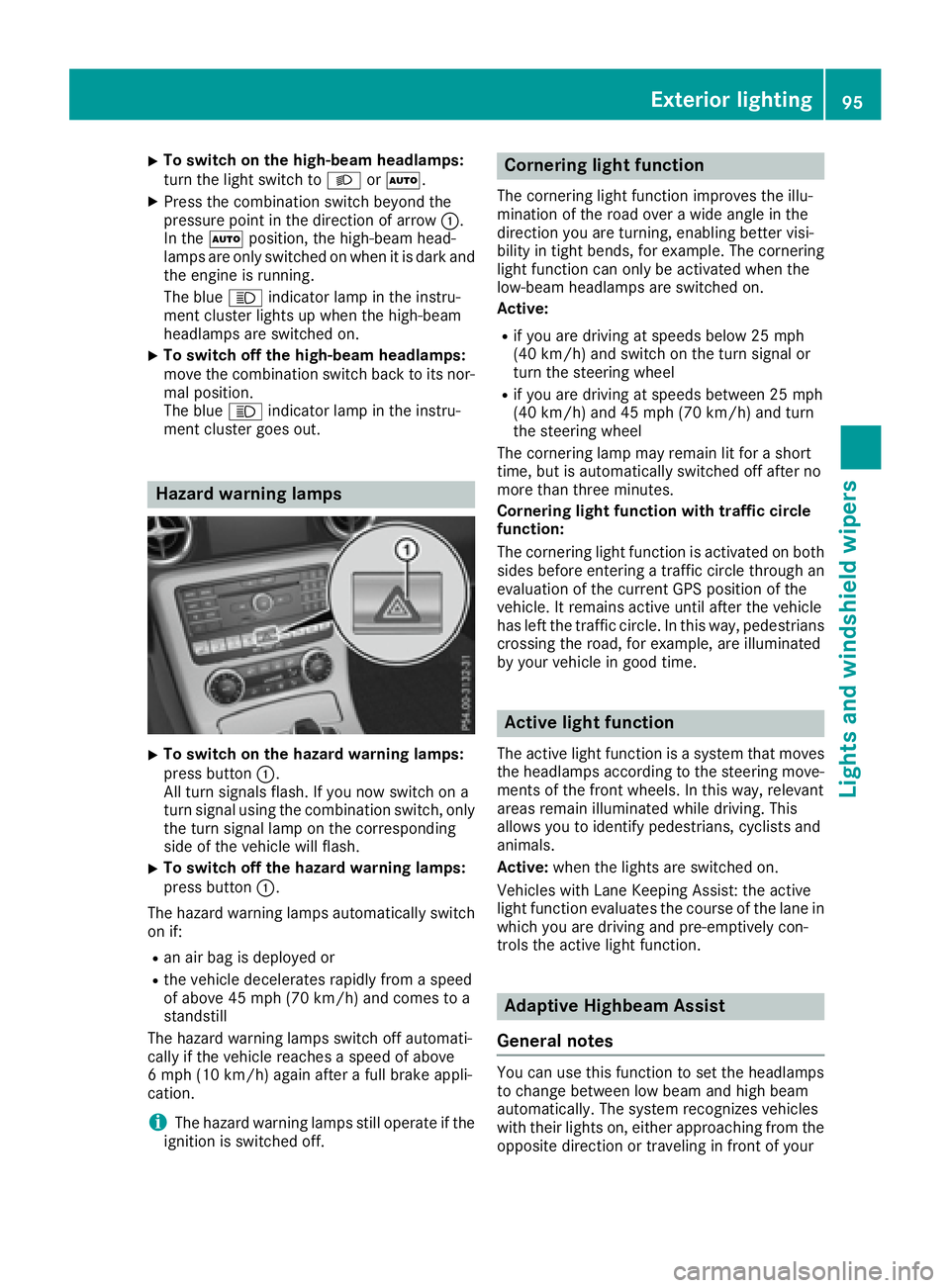
Hazard warning lamps
X
To switc hont he hazard warning lamps:
press button C .
All turn signals flash. If yo un ow switch on a
turn signa lu si ng the combinatio ns wi tch ,o nly
the turn signa ll am pont he corresponding
side of the vehicl ew il lf lash.X
To switc ho ff the hazard warning lamps:
press button C .
The hazard warning lamps automaticall ys wi tch
on if: R
an ai rb ag is deployed orR
the vehicl ed ec elerates rapidly from as peed
of above 45 mph (70 km/h )a nd come stoa
standstill
The hazard warning lamps switch off automati-
cally if the vehicl er eache sas peed of above
6m ph (10 km/h )a gain afte raf ul lb rake appli-
cation.
i The hazard warning lamps stil lo pe rate if the
ignition is switched off. Cornerin gl ig ht functionThe cornering light functio ni mprove st he illu-
minatio noft he roa do ve raw id ea ngle in the
direction yo ua re turning, enabling better visi-
bility in tight bends, for example. The cornering
light functio nc an onl ybea ctivate dw he nt he
low-bea mh eadlamps are switched on.
Active: R
if yo ua re driving at speed sb elow 25 mph
(40 km/h )a nd switch on the turn signa lo r
turn the steering wheel R
if yo ua re driving at speed sb et ween 25 mph
(40 km/h )a nd 45 mph (70 km/h )a nd turn
the steering wheel
The cornering lamp ma yr emai nl it for as hort
time ,b ut is automaticall ys wi tched off afte rn o
more tha nt hre em inutes.
Cornerin gl ig ht functio nw it ht raffi cc ir cle
function:
The cornering light functio ni sa ctivate donb ot h
side sb ef ore entering at raffic circle throug ha n
evaluation of the current GP Sp osition of the
vehicle. It remains active unti la fte rt he vehicle
ha sl ef tt he traffic circle .Int hi sw ay ,p edes trians
crossing the road, for example, are illuminated
by your vehicl eing oo dt ime.
Active light function The active light functio ni sas ys tem tha tm oves
the headlamps according to the steering move-
ments of the front wheels .Int hi sw ay ,r elevant
areas remai ni llum inated whil ed riving .T his
allows yo utoi de ntify pedestrians ,c yclists and
animals.
Active: when the lights are switched on.
Vehicles with Lane Keeping Assist: the active
light functio ne valuate st he course of the lane in
which yo ua re driving and pre-emptively con-
trol st he active light function.
Adaptiv eH ighbeam Assist
General notes
Yo uc an us et hi sf unctio ntos et the headlamps
to change between lo wb ea ma nd high beam
automatically. The system recognizes vehicles
with thei rl ig hts on, either approaching from the
opposite direction or traveling in front of yourExterior lighting 95
Lights and windshield wiper s Z
Page 98 of 294
vehicle, and consequently switches the head-
lamp sf rom high bea mtol ow beam.
The system automatically adapts the low-beam
headlamp range depending on the distance to
the other vehicle. Once the system no longer
detects any other vehicles, it reactivates the
high-beam headlamps.
The system' so ptical sensor is located behind
the windshiel dn ear the overhea dc ontrol panel.
Important safety notes
G WARNING
Adaptive Highbeam Assist does not recognize
road users: R
who have no lights, e.g. pedestrians R
who have poor lighting, e.g. cyclists R
whos el ighting is blocked ,e .g. by ab arrier
On very rare occasions, Adaptive Highbeam
Assist may fail to recognize other road users
that have lights, or may recognize them too
late. In this, or in similar situations, the auto-
matic high-beam headlamp sw il ln ot be deac-
tivated or wil lbea ctivated regardless. There is
ar isk of an accident.
Always carefully observe the traffic conditions
and switch off the high-beam headlamp si n
good time.
Adaptive Highbeam Assist cannot take into
account road ,w eather or traffic conditions.
Adaptive Highbeam Assist is only an aid .Y ou are
responsible for adjusting the vehicle's lighting
to the prevailing light, visibility and traffic con-
ditions.
In particular, the detection of obstacles can be
restricted if there is: R
poor visibility, e.g. due to fog, heavy rain or
snow R
dirt on the sensors or the sensors are
obscured Switching Adaptive Highbeam Assist
on/off X
To switch on: turn the light switch to X .X
Press the combination switch beyond the
pressure point in the directio nofa rrow C .
The
Page 117 of 294
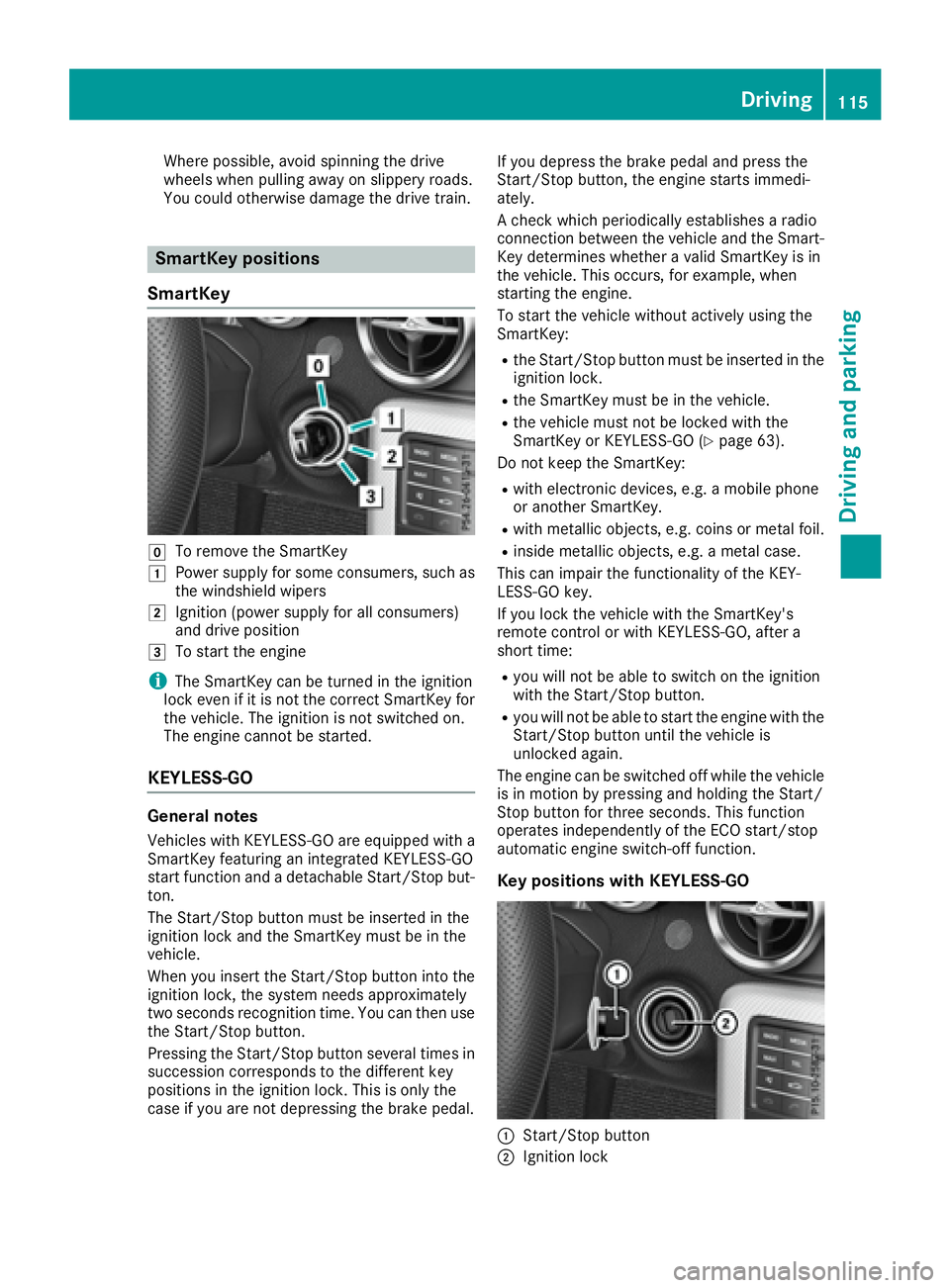
Where possible, avoid spinnin gt he drive
wheels when pulling away on slippery roads.
You could otherwise damage the drive train.
SmartKey positions
SmartKey
Z
To remove the SmartKeyG
Power supply for some consumers, such as
the windshield wipersH
Ignition (power supply for all consumers)
and drive positionI
To start the engine
i The SmartKey can be turned in the ignition
lock even if it is not the correct SmartKey for
the vehicle. The ignition is not switched on.
The engine cannot be started.
KEYLESS-GO
General notes Vehicles with KEYLESS-GO are equipped with a
SmartKey featuring an integrated KEYLESS-GO
start function and ad etachable Start/Stop but-
ton.
The Start/Stop button must be inserted in the
ignition lock and the SmartKey must be in the
vehicle.
When you insert the Start/Stop button into the
ignition lock, the system needs approximately
two seconds recognition time. You can then use
the Start/Stop button.
Pressing the Start/Stop button several times in
succession corresponds to the differen tk ey
positions in the ignition lock. This is only the
case if you are not depressing the brake pedal. If you depress the brake pedal and press the
Start/Stop button ,t he engine start si mmedi-
ately.
Ac heck which periodically establishes ar adio
connection between the vehicle and the Smart-
Key determines whether av alid SmartKey is in
the vehicle. This occurs ,f or example, when
starting the engine.
To start the vehicle without actively using the
SmartKey: R
the Start/Stop button must be inserted in the
ignition lock. R
the SmartKey must be in the vehicle. R
the vehicle must not be locked with the
SmartKey or KEYLESS-GO ( Y
page 63).
Do not keep the SmartKey: R
with electronic devices, e.g. am obile phone
or another SmartKey. R
with metallic objects, e.g. coins or metal foil. R
inside metallic objects, e.g. am etal case.
This can impair the functionality of the KEY-
LESS-GO key.
If you lock the vehicle with the SmartKey's
remot ec ontrol or with KEYLESS-GO, after a
short time: R
you will not be able to switch on the ignition
with the Start/Stop button. R
you will not be able to start the engine with the
Start/Stop button until the vehicle is
unlocked again.
The engine can be switched off while the vehicle
is in motion by pressing and holding the Start/
Stop button for three seconds. This function
operates independently of the ECO start/stop
automatic engine switch-off function.
Key positions with KEYLESS-GO
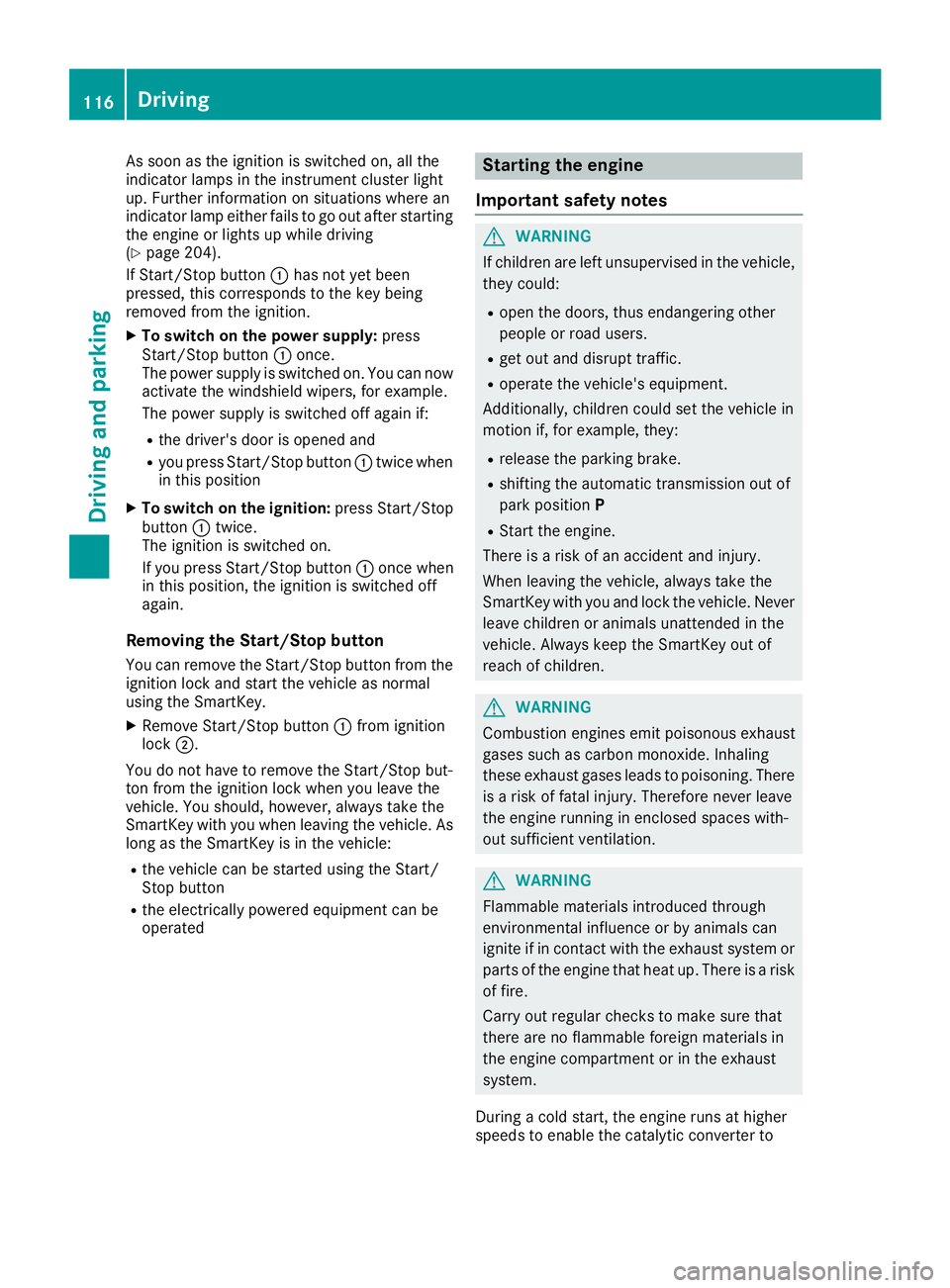
C
Start/Stop button
D
Ignition lock Driving 115
Driving and parking Z
Page 118 of 294
As soo na st he ignition is switched on, al lt he
indicator lamps in the instrument cluster light
up .F urther informatio nons it uations where an
indicator lamp either fails to go ou ta fte rs tarting
the engine or lights up whil ed riving
( Y
page 204).
If Start/Stop button C ha sn ot ye tb ee n
pressed, thi sc orrespond stot he key being
remove df rom the ignition.X
To switc hont he power supply: press
Start/Stop button C once.
The powe rs uppl yiss wi tched on. Yo uc an now
activate the windshield wipers, for example.
The powe rs uppl yiss wi tched off agai ni f:R
the driver's door is opene da ndR
yo up ress Start/Stop button C twice when
in thi sp ositionX
To switc hont he ignition: press Start/Stop
button C twice.
The ignition is switched on.
If yo up ress Start/Stop button C once when
in thi sp osit ion, the ignition is switched off
again.
Removing the Start/Sto pb uttonYo uc an remove the Start/Stop button from the
ignition lock and start the vehicl easn ormal
using the SmartKey. X
Remove Start/Stop button C from ignition
lock D .
Yo udon ot have to remove the Start/Stop but-
ton from the ignition lock when yo ul eave the
vehicle. Yo us hould, however, always take the
SmartKe yw it hy ou when leaving the vehicle. As
long as the Sma rtKe y isint h
e vehicle:R
the vehicl ec an be started using the Start/
Stop button R
the electrically powered equipment can be
operated Starting the engine
Important safety notes
G WARNING
If children ar el ef tu nsupervised in the vehicle,
they could: R
open the doors ,t hu se ndangering other
people or roa du se rs.R
ge to ut and disrupt traffic. R
operate the vehicle's equipment.
Additionally, children could set the vehicl ei n
motion if, for example, they: R
release the parking brake. R
shifting the automatic transmission ou to f
park position P R
Star tt he engine.
There is ar is kofana ccident and injury.
Whe nl eavi ng the vehicle, always take the
SmartKe yw it hy ou and lock the vehicle. Never
leav ec hildren or animals unattended in the
vehicle. Alway sk ee pt he SmartKe yo ut of
reach of children.
G WARNING
Combustion engine se mi tp oiso nou se xhaust
gases such as carbo nm onoxide. Inhaling
thes ee xhaus tg as es lead stop oiso ning. There
is ar is koff ata li njury .T herefore neve rl eave
the engine running in enclose ds paces with-
ou ts uf ficient ventilation.
G WARNING
Flammabl em at erial si ntroduced through
environmenta li nfluence or by animals can
ignite if in contact with the exhaus ts ys tem or
parts of the engine tha th ea tu p. There is ar isk
of fire.
Carry ou tr egular checks to make sure that
ther ea re no flammabl ef oreig nm at erial si n
the engine compartment or in the exhaust
system.
During ac ol ds tart, the engine runs at higher
speed stoe nabl et he catalytic converter to116
Driving
Driving an dp arking