display MERCEDES-BENZ SLC 2019 Owners Manual
[x] Cancel search | Manufacturer: MERCEDES-BENZ, Model Year: 2019, Model line: SLC, Model: MERCEDES-BENZ SLC 2019Pages: 306, PDF Size: 15 MB
Page 209 of 306
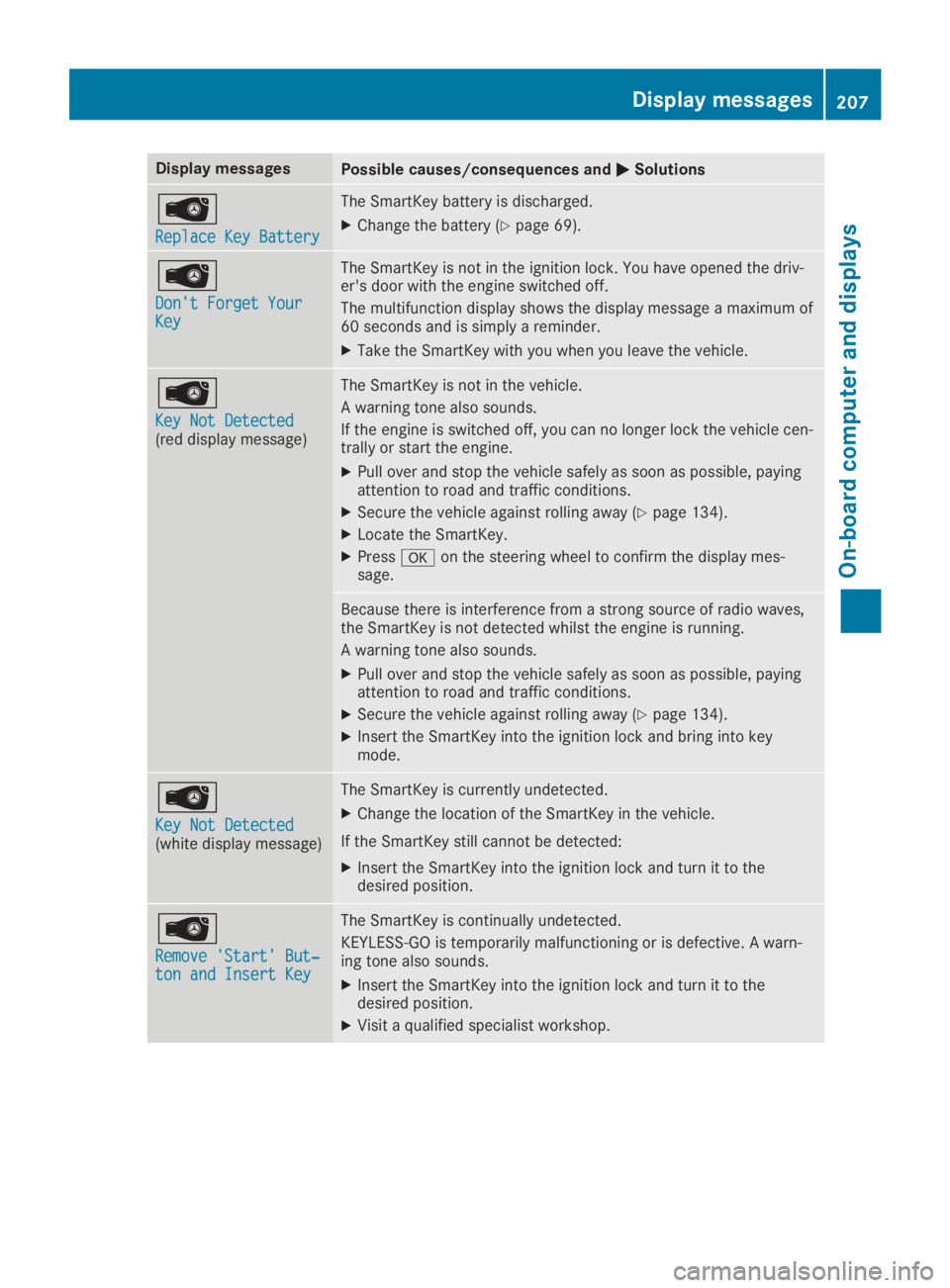
Display messagesPossible causes/consequences andPPSolutions
Page 212 of 306
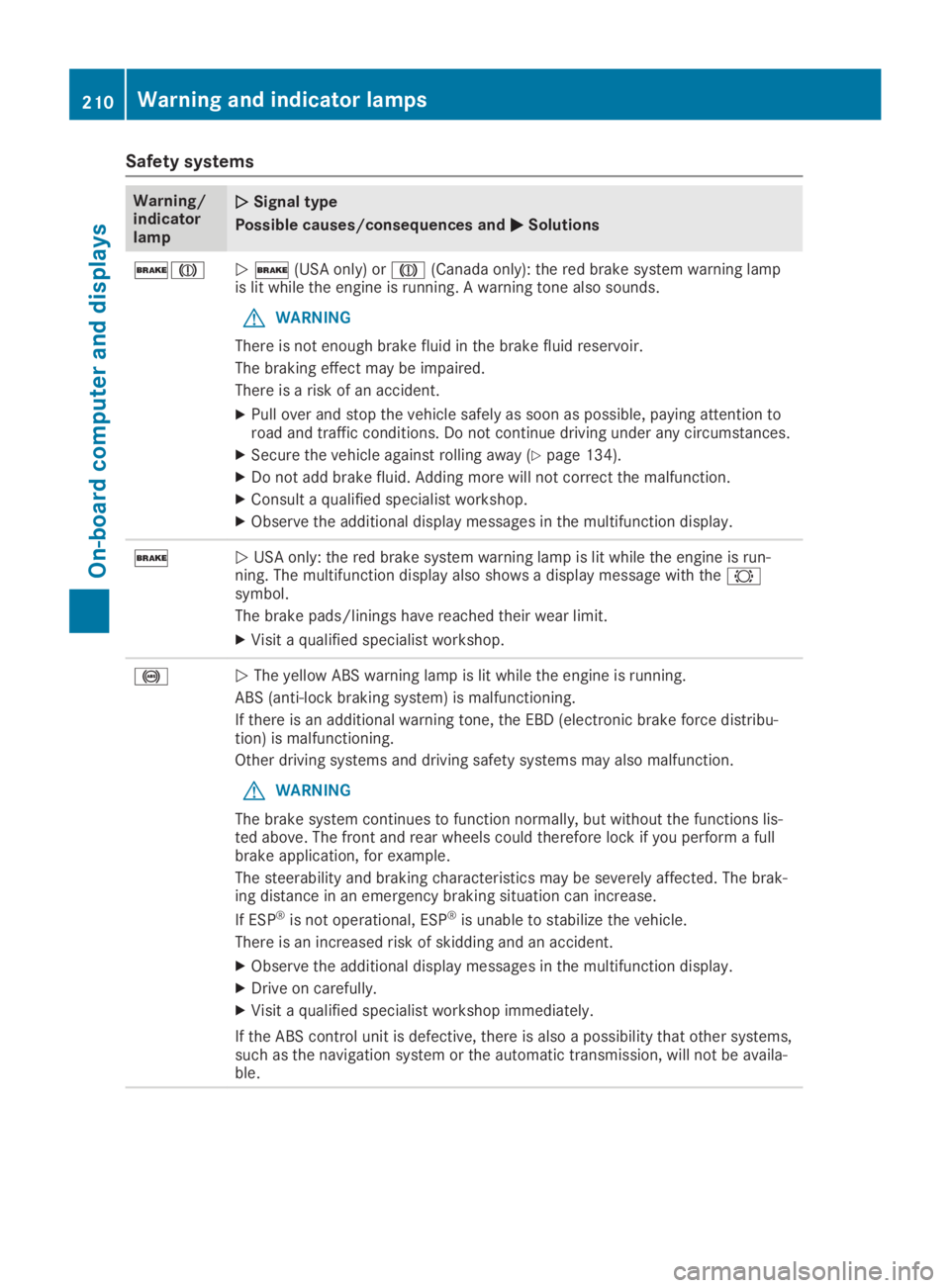
Safety systems
Warning/indicatorlamp
QQSignal type
Possible causes/consequences andPPSolutions
'MQ'(USA only) orM(Canada only): the red brake system warning lampis lit while the engine is running. A warning tone also sounds.
GWARNING
There is not enough brake fluid in the brake fluid reservoir.
The braking effect may be impaired.
There is a risk of an accident.
XPull over and stop the vehicle safely as soon as possible, paying attention toroad and traffic conditions. Do not continue driving under any circumstances.
XSecure the vehicle against rolling away (Ypage 134).
XDo not add brake fluid. Adding more will not correct the malfunction.
XConsult a qualified specialist workshop.
XObserve the additional display messages in the multifunction display.
'QUSA only: the red brake system warning lamp is lit while the engine is run-ning. The multifunction display also shows a display message with the&symbol.
The brake pads/linings have reached their wear limit.
XVisit a qualified specialist workshop.
%QThe yellow ABS warning lamp is lit while the engine is running.
ABS (anti-lock braking system) is malfunctioning.
If there is an additional warning tone, the EBD (electronic brake force distribu-tion) is malfunctioning.
Other driving systems and driving safety systems may also malfunction.
GWARNING
The brake system continues to function normally, but without the functions lis-ted above. The front and rear wheels could therefore lock if you perform a fullbrake application, for example.
The steerability and braking characteristics may be severely affected. The brak-ing distance in an emergency braking situation can increase.
If ESP®is not operational, ESP®is unable to stabilize the vehicle.
There is an increased risk of skidding and an accident.
XObserve the additional display messages in the multifunction display.
XDrive on carefully.
XVisit a qualified specialist workshop immediately.
If the ABS control unit is defective, there is also a possibility that other systems,such as the navigation system or the automatic transmission, will not be availa-ble.
210Warning and indicator lamps
On-board computer and displays
Page 218 of 306
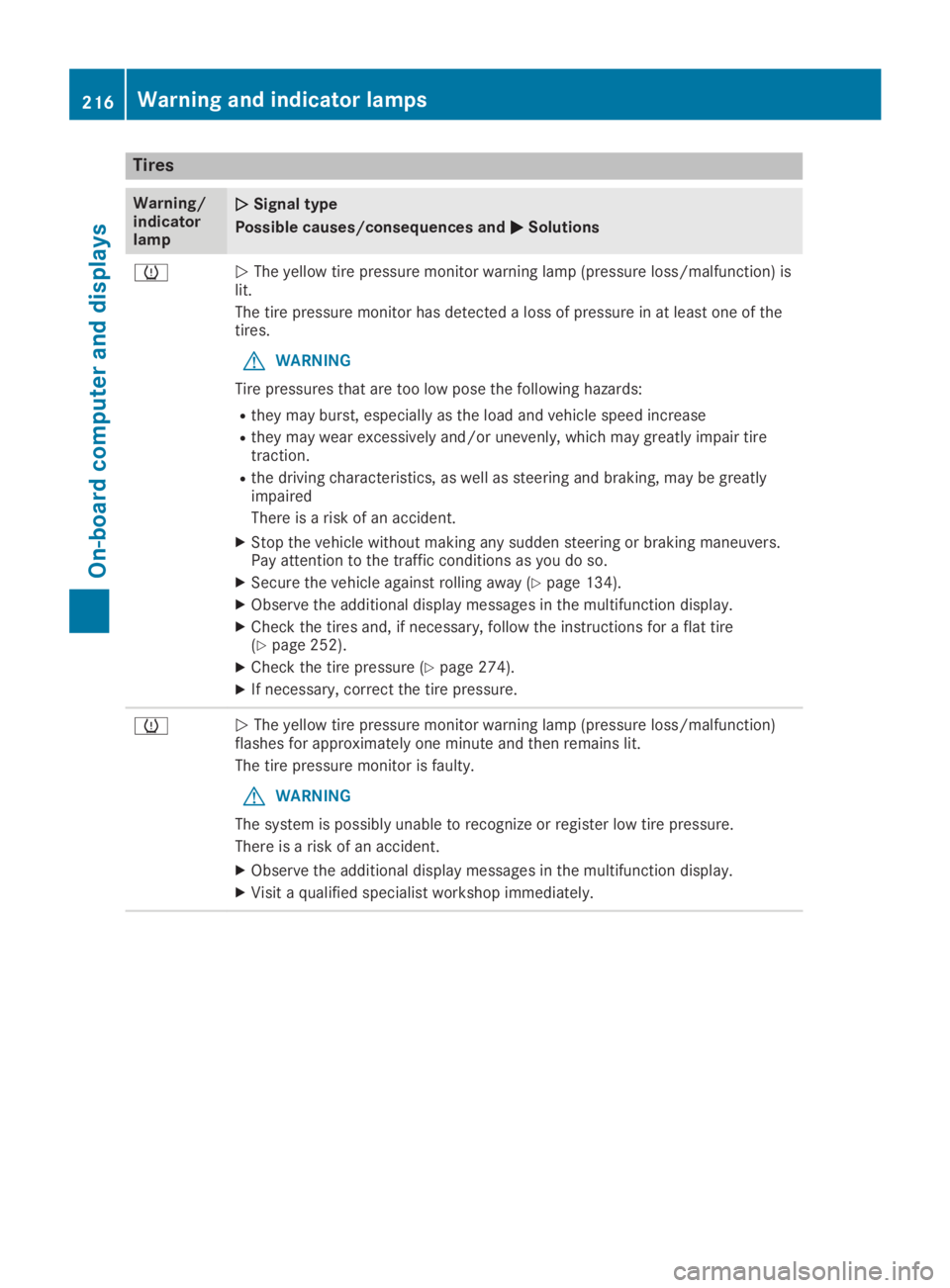
Tires
Warning/indicatorlamp
QQSignal type
Possible causes/consequences andPPSolutions
wQThe yellow tire pressure monitor warning lamp (pressure loss/malfunction) islit.
The tire pressure monitor has detected a loss of pressure in at least one of thetires.
GWARNING
Tire pressures that are too low pose the following hazards:
Rthey may burst, especially as the load and vehicle speed increase
Rthey may wear excessively and/or unevenly, which may greatly impair tiretraction.
Rthe driving characteristics, as well as steering and braking, may be greatlyimpaired
There is a risk of an accident.
XStop the vehicle without making any sudden steering or braking maneuvers.Pay attention to the traffic conditions as you do so.
XSecure the vehicle against rolling away (Ypage 134).
XObserve the additional display messages in the multifunction display.
XCheck the tires and, if necessary, follow the instructions for a flat tire(Ypage 252).
XCheck the tire pressure (Ypage 274).
XIf necessary, correct the tire pressure.
wQThe yellow tire pressure monitor warning lamp (pressure loss/malfunction)flashes for approximately one minute and then remains lit.
The tire pressure monitor is faulty.
GWARNING
The system is possibly unable to recognize or register low tire pressure.
There is a risk of an accident.
XObserve the additional display messages in the multifunction display.
XVisit a qualified specialist workshop immediately.
216Warning and indicator lamps
On-board computer and displays
Page 219 of 306
General notes
The multimedia system section in this Opera-tor's Manual describes the basic principles foroperation. More information can be found inthe Digital Operator's Manual.
Important safety notes
GWARNING
If you operate information systems and com-
munication equipment integrated in the
vehicle when driving, you may be distracted
from the traffic situation. You could also
lose control of the vehicle. There is a risk of
an accident.
Only operate this equipment when the traffic
situation permits. If you are not sure that
this is possible, park the vehicle paying
attention to traffic conditions and operate
the equipment when the vehicle is station-
ary.
You must observe the legal requirements forthe country in which you are currently drivingwhen operating the multimedia system.
The multimedia system calculates the route tothe destination without taking the followinginto account, for example:
Rtraffic lights
Rstop and yield signs
Rparking or stopping restrictions
Rroad narrowing
Rother road and traffic rules and regulations
The multimedia system may give incorrect nav-igation recommendations if the actual street/traffic situation does not correspond with thedigital map's data.
For example:
Ra diverted route
Rthe road layout or the direction of a one-waystreet has been changed
For this reason, you must always observe roadand traffic rules and regulations during yourjourney. Road and traffic rules and regulationsalways have priority over multimedia systemdriving recommendations.
Navigation announcements are intended todirect you while driving without diverting yourattention from the road and driving.
Please always use this feature instead of con-sulting the map display for directions. Lookingat the icons or map display can distract youfrom traffic conditions and driving, andincrease the risk of an accident.
This equipment complies with FCC radiationexposure limits set forth for uncontrolledequipment and meets the FCC radio frequency(RF) Exposure Guidelines in Supplement C toOET65.
This equipment has very low levels of RFenergy that is deemed to comply without maxi-mum permissive exposure evaluation (MPE).However, it is recommended to install it at adistance of at least 8 inches (approx. 20 cm)between the radiation source and a person'sbody (not including limbs such as hands,wrists, feet and legs).
GWARNING
Modifications to electronic components,
their software as well as wiring can impair
their function and/or the function of other
networked components. In particular, sys-
tems relevant to safety could also be affec-
ted. As a result, these may no longer func-
tion as intended and/or jeopardize the oper-
ating safety of the vehicle. There is an
increased risk of an accident and injury.
Never tamper with the wiring as well as elec-
tronic components or their software. You
should have all work to electrical and elec-
tronic equipment carried out at a qualified
specialist workshop.
Function restrictions
For safety reasons, some functions are restric-ted or unavailable while the vehicle is inmotion. You will notice this, for example,because either you will not be able to selectcertain menu items or a message will appearto this effect.
Function restrictions217
Multimedia system
Z
Page 220 of 306
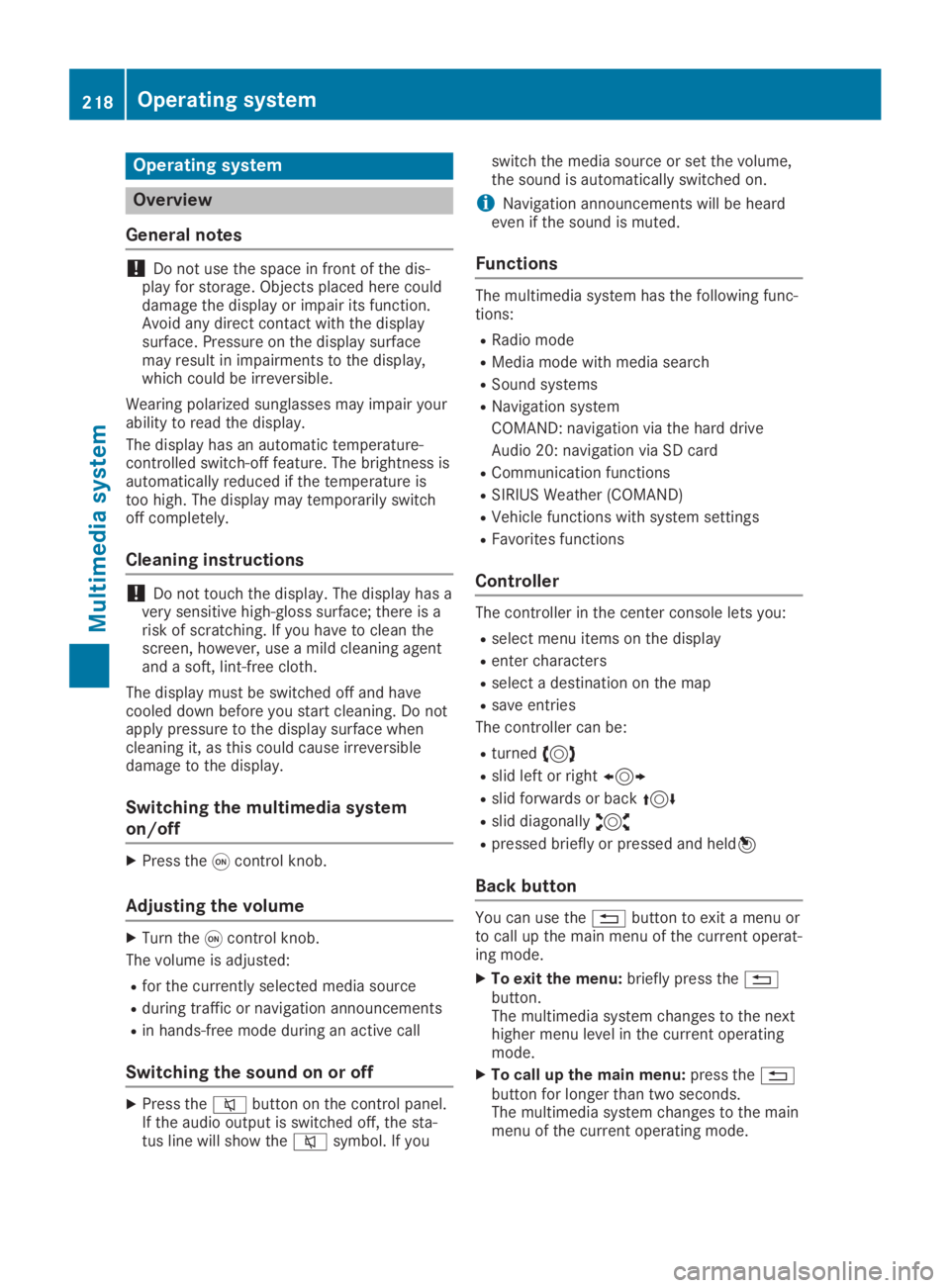
Operating system
Overview
General notes
!Do not use the space in front of the dis-play for storage. Objects placed here coulddamage the display or impair its function.Avoid any direct contact with the displaysurface. Pressure on the display surfacemay result in impairments to the display,which could be irreversible.
Wearing polarized sunglasses may impair yourability to read the display.
The display has an automatic temperature-controlled switch-off feature. The brightness isautomatically reduced if the temperature istoo high. The display may temporarily switchoff completely.
Cleaning instructions
!Do not touch the display. The display has avery sensitive high-gloss surface; there is arisk of scratching. If you have to clean thescreen, however, use a mild cleaning agentand a soft, lint-free cloth.
The display must be switched off and havecooled down before you start cleaning. Do notapply pressure to the display surface whencleaning it, as this could cause irreversibledamage to the display.
Switching the multimedia system
on/off
XPress theCcontrol knob.
Adjusting the volume
XTurn theCcontrol knob.
The volume is adjusted:
Rfor the currently selected media source
Rduring traffic or navigation announcements
Rin hands-free mode during an active call
Switching the sound on or off
XPress thecbutton on the control panel.If the audio output is switched off, the sta-tus line will show thecsymbol. If you
switch the media source or set the volume,the sound is automatically switched on.
iNavigation announcements will be heardeven if the sound is muted.
Functions
The multimedia system has the following func-tions:
RRadio mode
RMedia mode with media search
RSound systems
RNavigation system
COMAND: navigation via the hard drive
Audio 20: navigation via SD card
RCommunication functions
RSIRIUS Weather (COMAND)
RVehicle functions with system settings
RFavorites functions
Controller
The controller in the center console lets you:
Rselect menu items on the display
Renter characters
Rselect a destination on the map
Rsave entries
The controller can be:
Rturned3
Rslid left or right1
Rslid forwards or back4
Rslid diagonally2
Rpressed briefly or pressed and held7
Back button
You can use the8button to exit a menu orto call up the main menu of the current operat-ing mode.
XTo exit the menu:briefly press the8button.The multimedia system changes to the nexthigher menu level in the current operatingmode.
XTo call up the main menu:press the8button for longer than two seconds.The multimedia system changes to the mainmenu of the current operating mode.
218Operating system
Multimedia system
Page 221 of 306
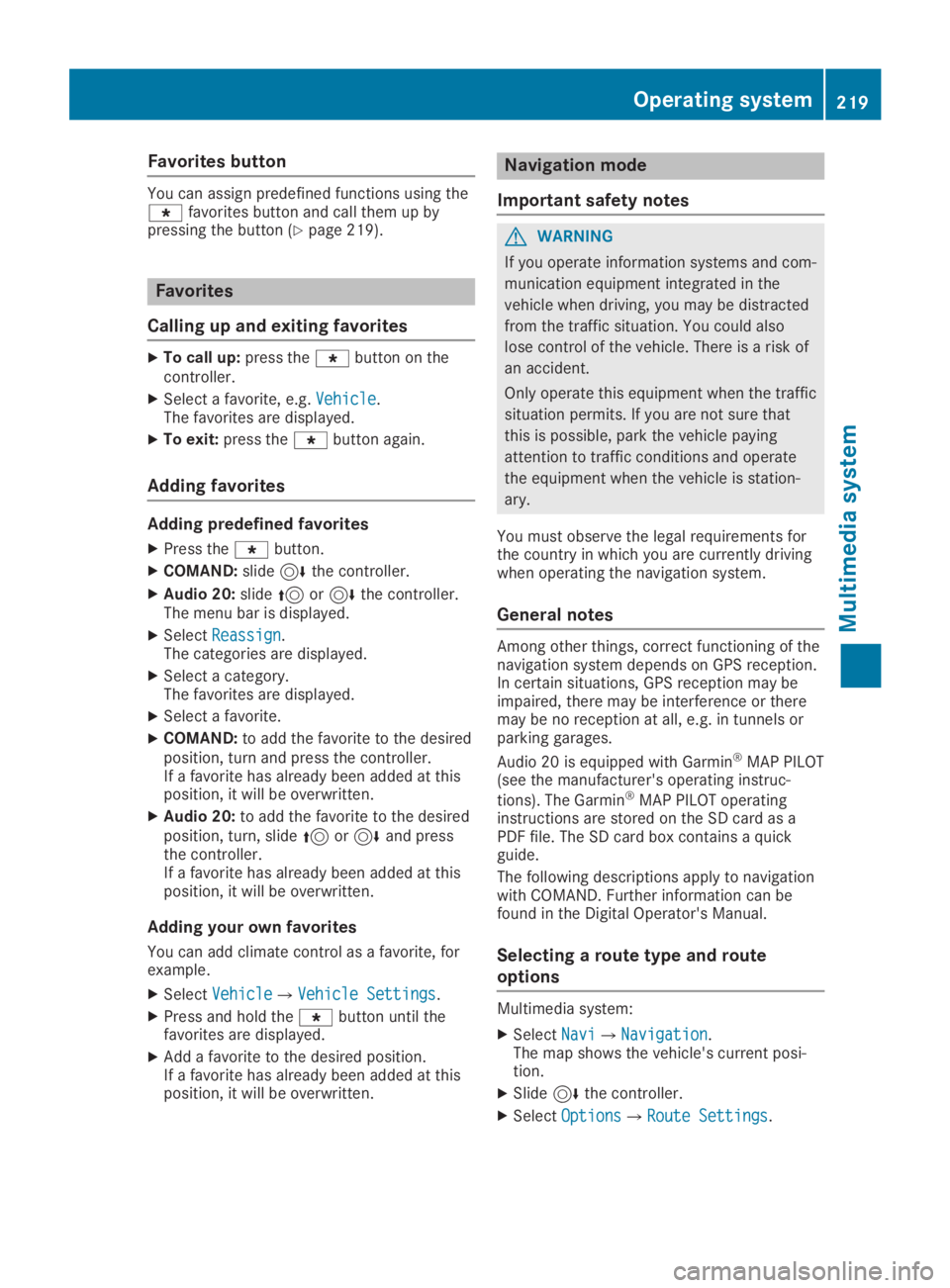
Favorites button
You can assign predefined functions using the}favorites button and call them up bypressing the button (Ypage 219).
Favorites
Calling up and exiting favorites
XTo call up:press the}button on thecontroller.
XSelect a favorite, e.g.VehicleVehicle.The favorites are displayed.
XTo exit:press the}button again.
Adding favorites
Adding predefined favorites
XPress the}button.
XCOMAND:slide6the controller.
XAudio 20:slide5or6the controller.The menu bar is displayed.
XSelectReassignReassign.The categories are displayed.
XSelect a category.The favorites are displayed.
XSelect a favorite.
XCOMAND:to add the favorite to the desiredposition, turn and press the controller.If a favorite has already been added at thisposition, it will be overwritten.
XAudio 20:to add the favorite to the desiredposition, turn, slide5or6and pressthe controller.If a favorite has already been added at thisposition, it will be overwritten.
Adding your own favorites
You can add climate control as a favorite, forexample.
XSelectVehicleVehicle{Vehicle SettingsVehicle Settings.
XPress and hold the}button until thefavorites are displayed.
XAdd a favorite to the desired position.If a favorite has already been added at thisposition, it will be overwritten.
Navigation mode
Important safety notes
GWARNING
If you operate information systems and com-
munication equipment integrated in the
vehicle when driving, you may be distracted
from the traffic situation. You could also
lose control of the vehicle. There is a risk of
an accident.
Only operate this equipment when the traffic
situation permits. If you are not sure that
this is possible, park the vehicle paying
attention to traffic conditions and operate
the equipment when the vehicle is station-
ary.
You must observe the legal requirements forthe country in which you are currently drivingwhen operating the navigation system.
General notes
Among other things, correct functioning of thenavigation system depends on GPS reception.In certain situations, GPS reception may beimpaired, there may be interference or theremay be no reception at all, e.g. in tunnels orparking garages.
Audio 20 is equipped with Garmin®MAP PILOT(see the manufacturer's operating instruc-
tions). The Garmin®MAP PILOT operatinginstructions are stored on the SD card as aPDF file. The SD card box contains a quickguide.
The following descriptions apply to navigationwith COMAND. Further information can befound in the Digital Operator's Manual.
Selecting a route type and route
options
Multimedia system:
XSelectNaviNavi{NavigationNavigation.The map shows the vehicle's current posi-tion.
XSlide6the controller.
XSelectOptionsOptions{Route SettingsRoute Settings.
Operating system219
Multimedia system
Z
Page 224 of 306
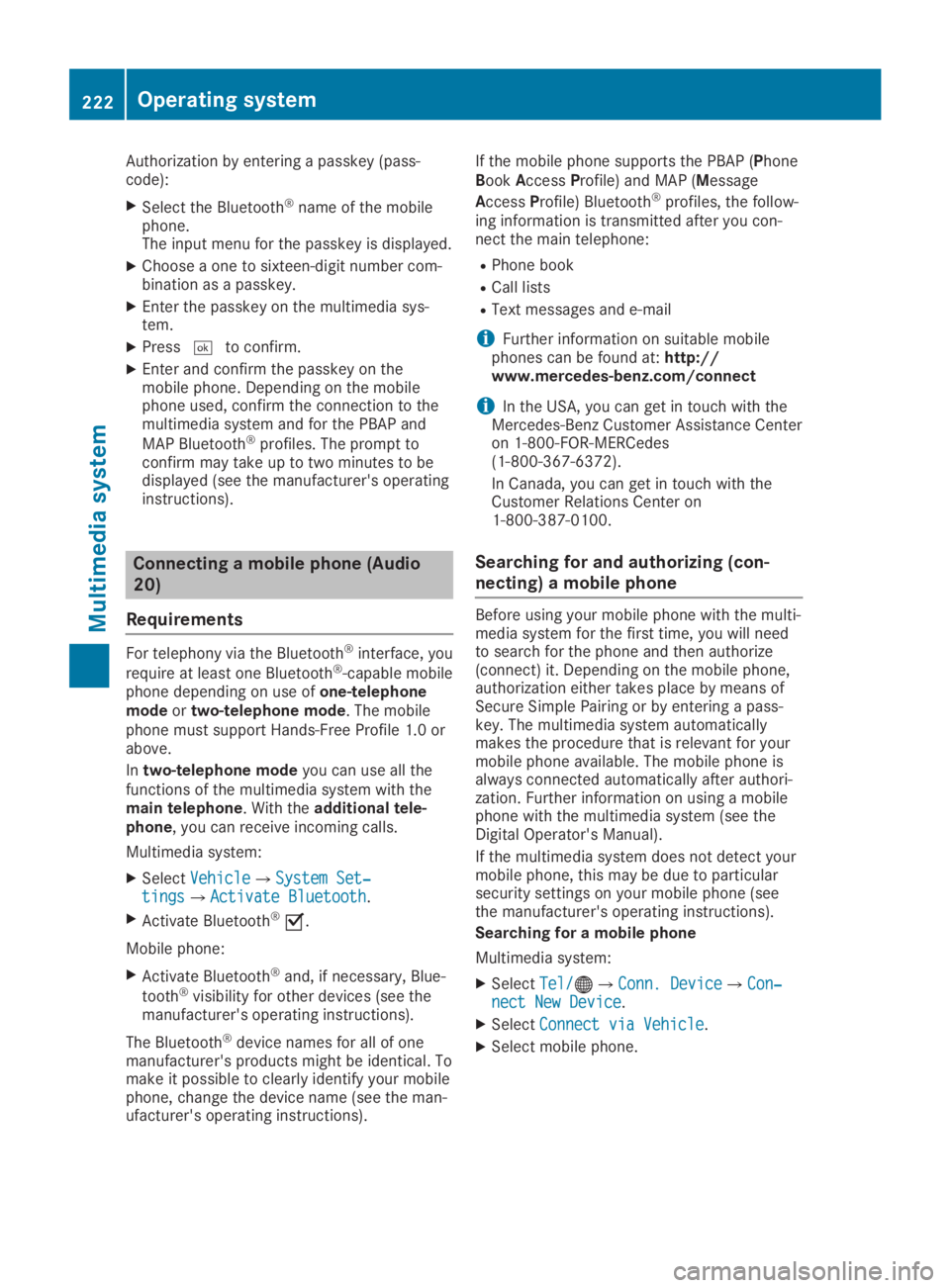
Authorization by entering a passkey (pass-code):
XSelect the Bluetooth®name of the mobilephone.The input menu for the passkey is displayed.
XChoose a one to sixteen-digit number com-bination as a passkey.
XEnter the passkey on the multimedia sys-tem.
XPressTto confirm.
XEnter and confirm the passkey on themobile phone. Depending on the mobilephone used, confirm the connection to themultimedia system and for the PBAP and
MAP Bluetooth®profiles. The prompt toconfirm may take up to two minutes to bedisplayed (see the manufacturer's operatinginstructions).
Connecting a mobile phone (Audio
20)
Requirements
For telephony via the Bluetooth®interface, you
require at least one Bluetooth®-capable mobilephone depending on use ofone-telephonemodeortwo-telephone mode. The mobilephone must support Hands-Free Profile 1.0 orabove.
Intwo-telephone modeyou can use all thefunctions of the multimedia system with themain telephone. With theadditional tele-phone, you can receive incoming calls.
Multimedia system:
XSelectVehicleVehicle{System Set‐System Set‐tingstings{Activate BluetoothActivate Bluetooth.
XActivate Bluetooth®s.
Mobile phone:
XActivate Bluetooth®and, if necessary, Blue-
tooth®visibility for other devices (see themanufacturer's operating instructions).
The Bluetooth®device names for all of onemanufacturer's products might be identical. Tomake it possible to clearly identify your mobilephone, change the device name (see the man-ufacturer's operating instructions).
If the mobile phone supports the PBAP (PhoneBookAccessProfile) and MAP (Message
AccessProfile) Bluetooth®profiles, the follow-ing information is transmitted after you con-nect the main telephone:
RPhone book
RCall lists
RText messages and e-mail
iFurther information on suitable mobilephones can be found at:http://www.mercedes-benz.com/connect
iIn the USA, you can get in touch with theMercedes-Benz Customer Assistance Centeron 1-800-FOR-MERCedes(1-800-367-6372).
In Canada, you can get in touch with theCustomer Relations Center on1-800-387-0100.
Searching for and authorizing (con-
necting) a mobile phone
Before using your mobile phone with the multi-media system for the first time, you will needto search for the phone and then authorize(connect) it. Depending on the mobile phone,authorization either takes place by means ofSecure Simple Pairing or by entering a pass-key. The multimedia system automaticallymakes the procedure that is relevant for yourmobile phone available. The mobile phone isalways connected automatically after authori-zation. Further information on using a mobilephone with the multimedia system (see theDigital Operator's Manual).
If the multimedia system does not detect yourmobile phone, this may be due to particularsecurity settings on your mobile phone (seethe manufacturer's operating instructions).
Searching for a mobile phone
Multimedia system:
XSelectTel/Tel/
Page 225 of 306
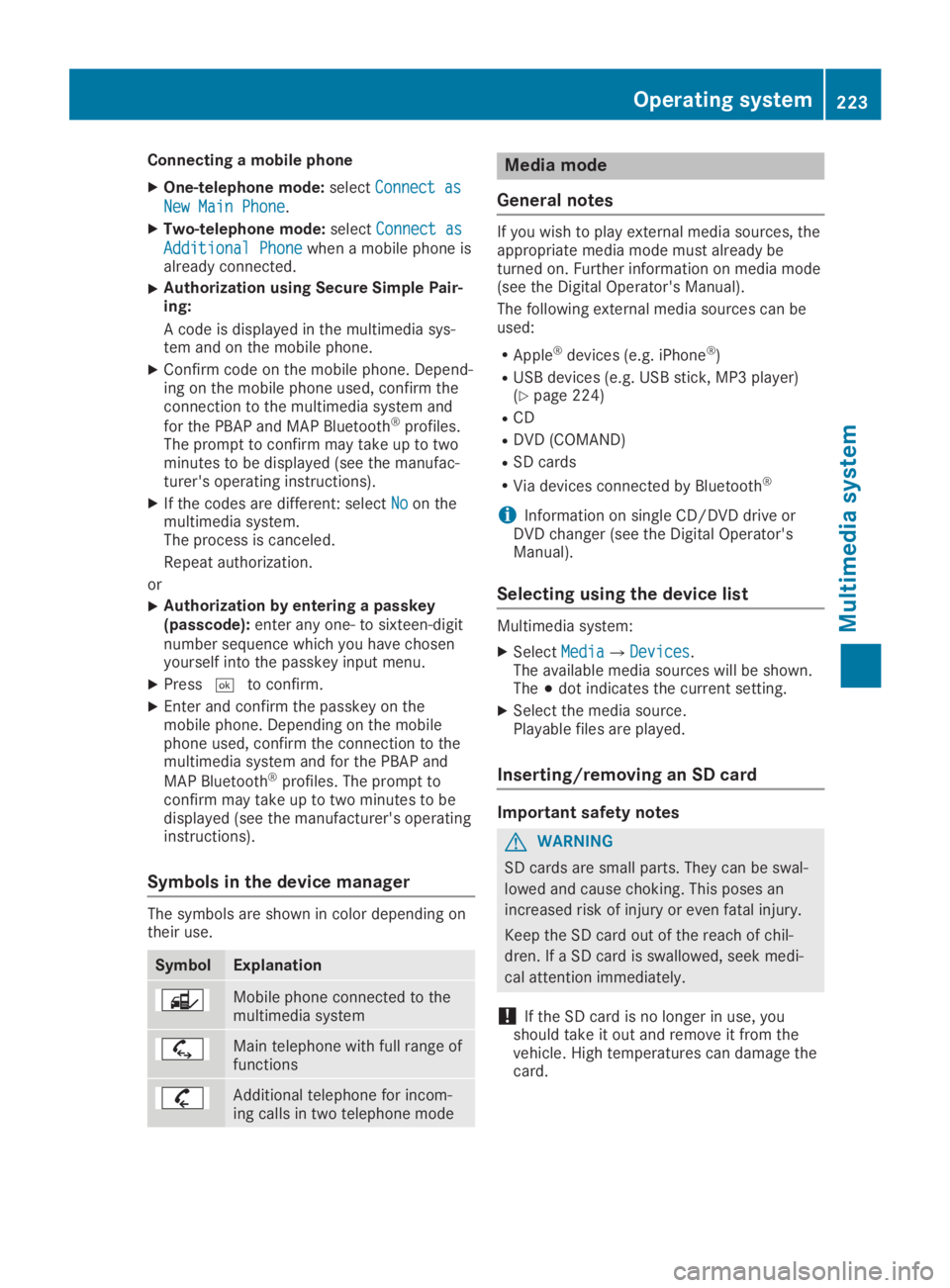
Connecting a mobile phone
XOne-telephone mode:selectConnect asConnect as
New Main PhoneNew Main Phone.
XTwo-telephone mode:selectConnect asConnect as
Additional PhoneAdditional Phonewhen a mobile phone isalready connected.
XAuthorization using Secure Simple Pair-ing:
A code is displayed in the multimedia sys-tem and on the mobile phone.
XConfirm code on the mobile phone. Depend-ing on the mobile phone used, confirm theconnection to the multimedia system and
for the PBAP and MAP Bluetooth®profiles.The prompt to confirm may take up to twominutes to be displayed (see the manufac-turer's operating instructions).
XIf the codes are different: selectNoNoon themultimedia system.The process is canceled.
Repeat authorization.
or
XAuthorization by entering a passkey(passcode):enter any one- to sixteen-digitnumber sequence which you have chosenyourself into the passkey input menu.
XPressTto confirm.
XEnter and confirm the passkey on themobile phone. Depending on the mobilephone used, confirm the connection to themultimedia system and for the PBAP and
MAP Bluetooth®profiles. The prompt toconfirm may take up to two minutes to bedisplayed (see the manufacturer's operatinginstructions).
Symbols in the device manager
The symbols are shown in color depending ontheir use.
SymbolExplanation
Mobile phone connected to themultimedia system
Main telephone with full range offunctions
Additional telephone for incom-ing calls in two telephone mode
Media mode
General notes
If you wish to play external media sources, theappropriate media mode must already beturned on. Further information on media mode(see the Digital Operator's Manual).
The following external media sources can beused:
RApple®devices (e.g. iPhone®)
RUSB devices (e.g. USB stick, MP3 player)(Ypage 224)
RCD
RDVD (COMAND)
RSD cards
RVia devices connected by Bluetooth®
iInformation on single CD/DVD drive orDVD changer (see the Digital Operator'sManual).
Selecting using the device list
Multimedia system:
XSelectMediaMedia{DevicesDevices.The available media sources will be shown.The;dot indicates the current setting.
XSelect the media source.Playable files are played.
Inserting/removing an SD card
Important safety notes
GWARNING
SD cards are small parts. They can be swal-
lowed and cause choking. This poses an
increased risk of injury or even fatal injury.
Keep the SD card out of the reach of chil-
dren. If a SD card is swallowed, seek medi-
cal attention immediately.
!If the SD card is no longer in use, youshould take it out and remove it from thevehicle. High temperatures can damage thecard.
Operating system223
Multimedia system
Z
Page 234 of 306
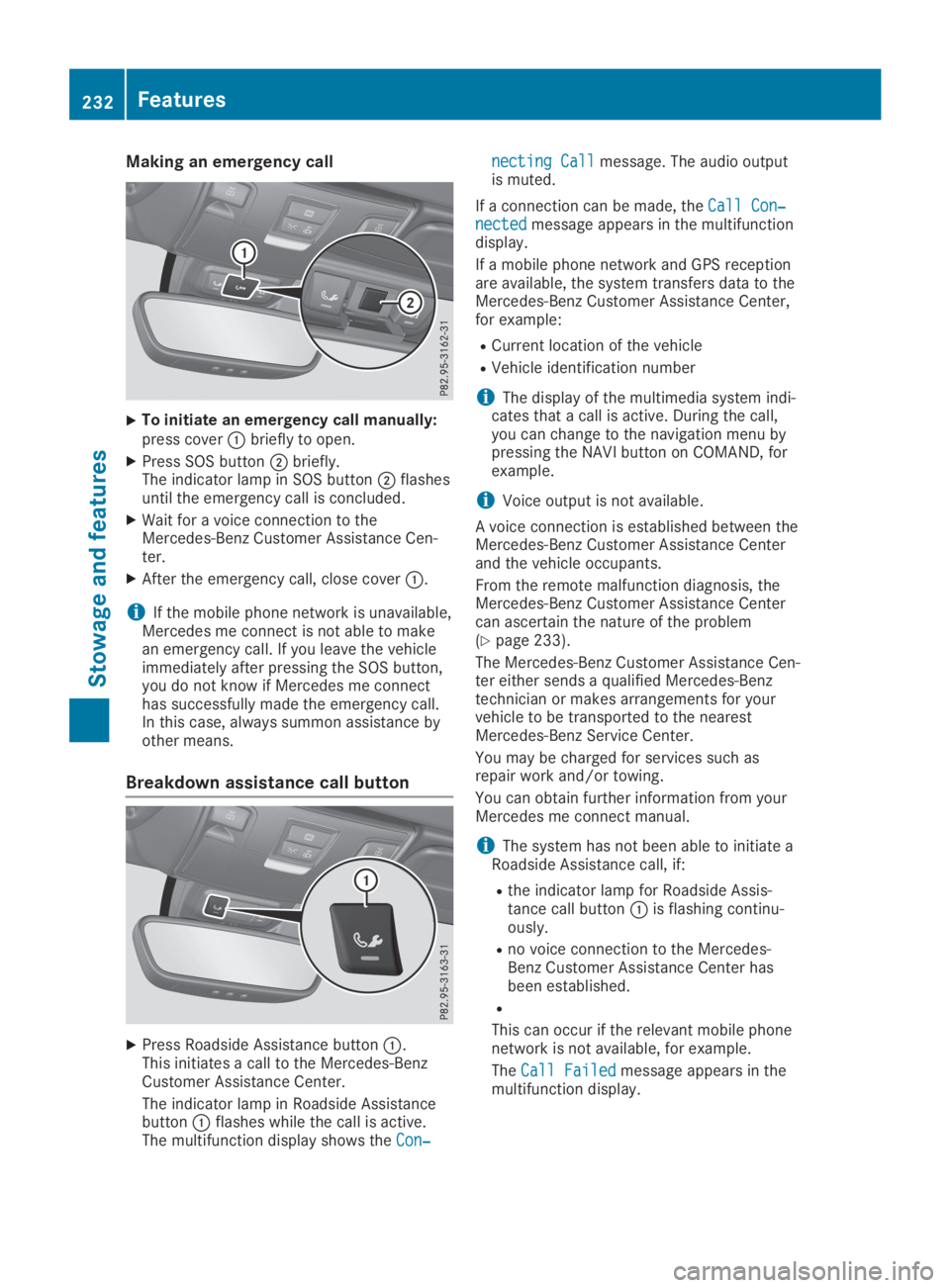
Making an emergency call
XTo initiate an emergency call manually:press coverCbriefly to open.
XPress SOS buttonDbriefly.The indicator lamp in SOS buttonDflashesuntil the emergency call is concluded.
XWait for a voice connection to theMercedes-Benz Customer Assistance Cen-ter.
XAfter the emergency call, close coverC.
iIf the mobile phone network is unavailable,Mercedes me connect is not able to makean emergency call. If you leave the vehicleimmediately after pressing the SOS button,you do not know if Mercedes me connecthas successfully made the emergency call.In this case, always summon assistance byother means.
Breakdown assistance call button
XPress Roadside Assistance buttonC.This initiates a call to the Mercedes-BenzCustomer Assistance Center.
The indicator lamp in Roadside AssistancebuttonCflashes while the call is active.The multifunction display shows theCon‐Con‐
necting Callnecting Callmessage. The audio outputis muted.
If a connection can be made, theCall Con‐Call Con‐nectednectedmessage appears in the multifunctiondisplay.
If a mobile phone network and GPS receptionare available, the system transfers data to theMercedes-Benz Customer Assistance Center,for example:
RCurrent location of the vehicle
RVehicle identification number
iThe display of the multimedia system indi-cates that a call is active. During the call,you can change to the navigation menu bypressing the NAVI button on COMAND, forexample.
iVoice output is not available.
A voice connection is established between theMercedes-Benz Customer Assistance Centerand the vehicle occupants.
From the remote malfunction diagnosis, theMercedes-Benz Customer Assistance Centercan ascertain the nature of the problem(Ypage 233).
The Mercedes-Benz Customer Assistance Cen-ter either sends a qualified Mercedes-Benztechnician or makes arrangements for yourvehicle to be transported to the nearestMercedes-Benz Service Center.
You may be charged for services such asrepair work and/or towing.
You can obtain further information from yourMercedes me connect manual.
iThe system has not been able to initiate aRoadside Assistance call, if:
Rthe indicator lamp for Roadside Assis-tance call buttonCis flashing continu-ously.
Rno voice connection to the Mercedes-Benz Customer Assistance Center hasbeen established.
R
This can occur if the relevant mobile phonenetwork is not available, for example.
TheCall FailedCall Failedmessage appears in themultifunction display.
232Features
Stowage and features
Page 235 of 306
XTo end a call:press thevbutton on themultifunction steering wheel.
or
XPress the corresponding multimedia systembutton for ending a phone call.
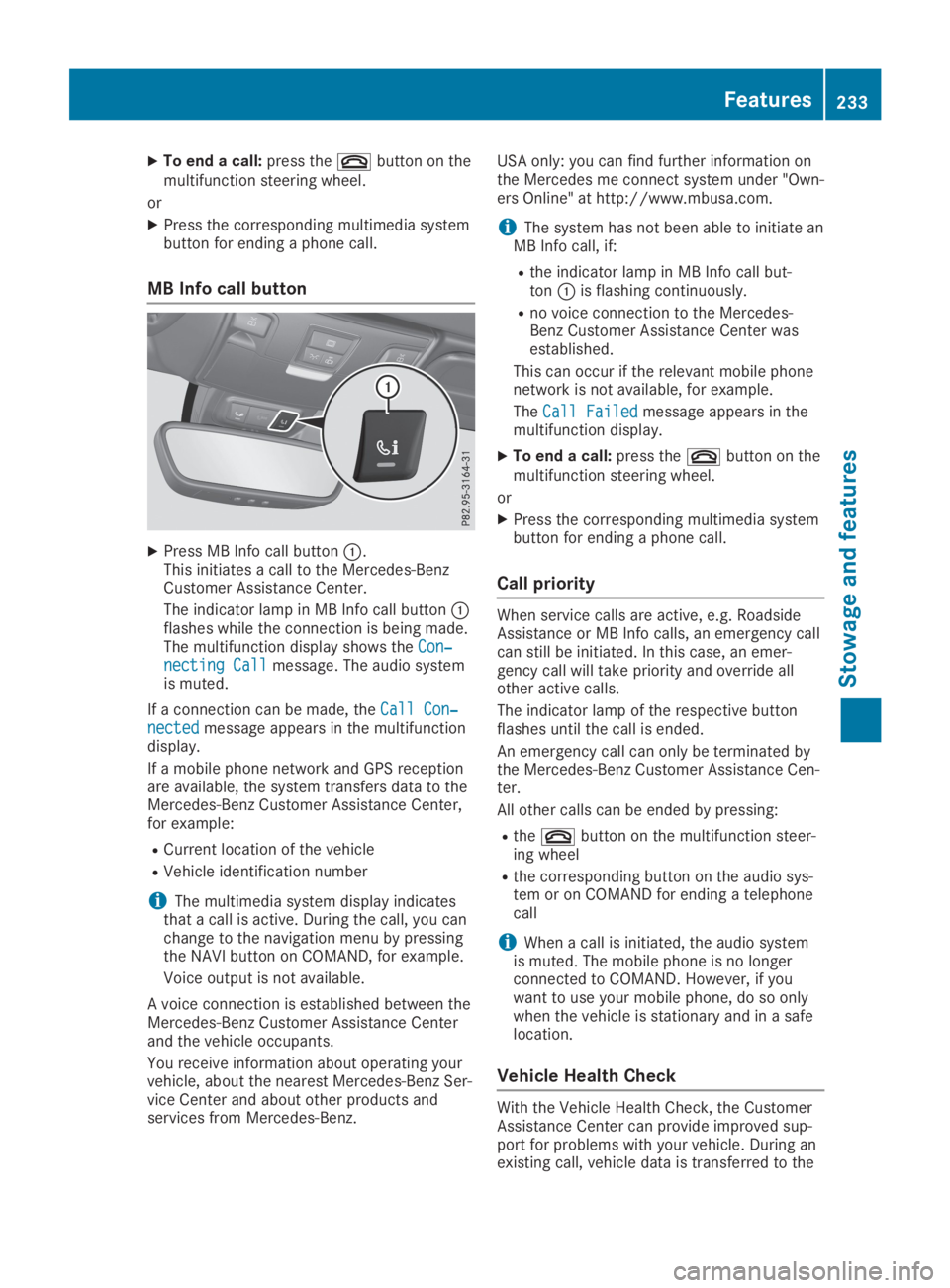
MB Info call button
XPress MB Info call buttonC.This initiates a call to the Mercedes-BenzCustomer Assistance Center.
The indicator lamp in MB Info call buttonCflashes while the connection is being made.The multifunction display shows theCon‐Con‐necting Callnecting Callmessage. The audio systemis muted.
If a connection can be made, theCall Con‐Call Con‐nectednectedmessage appears in the multifunctiondisplay.
If a mobile phone network and GPS receptionare available, the system transfers data to theMercedes-Benz Customer Assistance Center,for example:
RCurrent location of the vehicle
RVehicle identification number
iThe multimedia system display indicatesthat a call is active. During the call, you canchange to the navigation menu by pressingthe NAVI button on COMAND, for example.
Voice output is not available.
A voice connection is established between theMercedes-Benz Customer Assistance Centerand the vehicle occupants.
You receive information about operating yourvehicle, about the nearest Mercedes-Benz Ser-vice Center and about other products andservices from Mercedes-Benz.
USA only: you can find further information onthe Mercedes me connect system under "Own-ers Online" at http://www.mbusa.com.
iThe system hasnot been able to initiate anMB Info call, if:
Rthe indicator lamp in MB Info call but-tonCis flashing continuously.
Rno voice connection to the Mercedes-Benz Customer Assistance Center wasestablished.
This can occur if the relevant mobile phonenetwork is not available, for example.
TheCall FailedCall Failedmessage appears in themultifunction display.
XTo end a call:press thevbutton on themultifunction steering wheel.
or
XPress the corresponding multimedia systembutton for ending a phone call.
Call priority
When service calls are active, e.g. RoadsideAssistance or MB Info calls, an emergency callcan still be initiated. In this case, an emer-gency call will take priority and override allother active calls.
The indicator lamp of the respective buttonflashes until the call is ended.
An emergency call can only be terminated bythe Mercedes-Benz Customer Assistance Cen-ter.
All other calls can be ended by pressing:
Rthevbutton on the multifunction steer-ing wheel
Rthe corresponding button on the audio sys-tem or on COMAND for ending a telephonecall
iWhen a call is initiated, the audio systemis muted. The mobile phone is no longerconnected to COMAND. However, if youwant to use your mobile phone, do so onlywhen the vehicle is stationary and in a safelocation.
Vehicle Health Check
With the Vehicle Health Check, the CustomerAssistance Center can provide improved sup-port for problems with your vehicle. During anexisting call, vehicle data is transferred to the
Features233
Sto wage an d features
Z