ECU MERCEDES-BENZ SLC 2019 Owner's Manual
[x] Cancel search | Manufacturer: MERCEDES-BENZ, Model Year: 2019, Model line: SLC, Model: MERCEDES-BENZ SLC 2019Pages: 306, PDF Size: 15 MB
Page 152 of 306
iThe last speed stored remains stored untilyou switch off the engine.
iActive Distance Assist DISTRONIC is notdeactivated if you depress the acceleratorpedal. If you accelerate to overtake, ActiveDistance Assist DISTRONIC adjusts the vehi-cle's speed to the last speed stored afteryou have finished overtaking.
Active Distance Assist DISTRONIC is automati-cally deactivated if:
Ryou engage the electric parking brake or ifthe vehicle is automatically secured with theelectric parking brake
RESP®intervenes or you deactivate ESP®
Rthe transmission is in position],^or\\
Ryou pull the cruise control lever towards youin order to pull away and the front-passenger door is open
Ryou activate Active Parking Assist
Rthe vehicle is skidding
If Active Distance Assist DISTRONIC is deacti-vated automatically, you will hear a warningtone. TheActive Distance Assist OffActive Distance Assist Offmessage will appear on the multifunction dis-play for approximately five seconds.
Tips for driving with Active Distance
Assist DISTRONIC
General notes
The following contains descriptions of certainroad and traffic conditions in which you mustbe particularly attentive. In such situations,brake if necessary. Active Distance AssistDISTRONIC will then be deactivated.
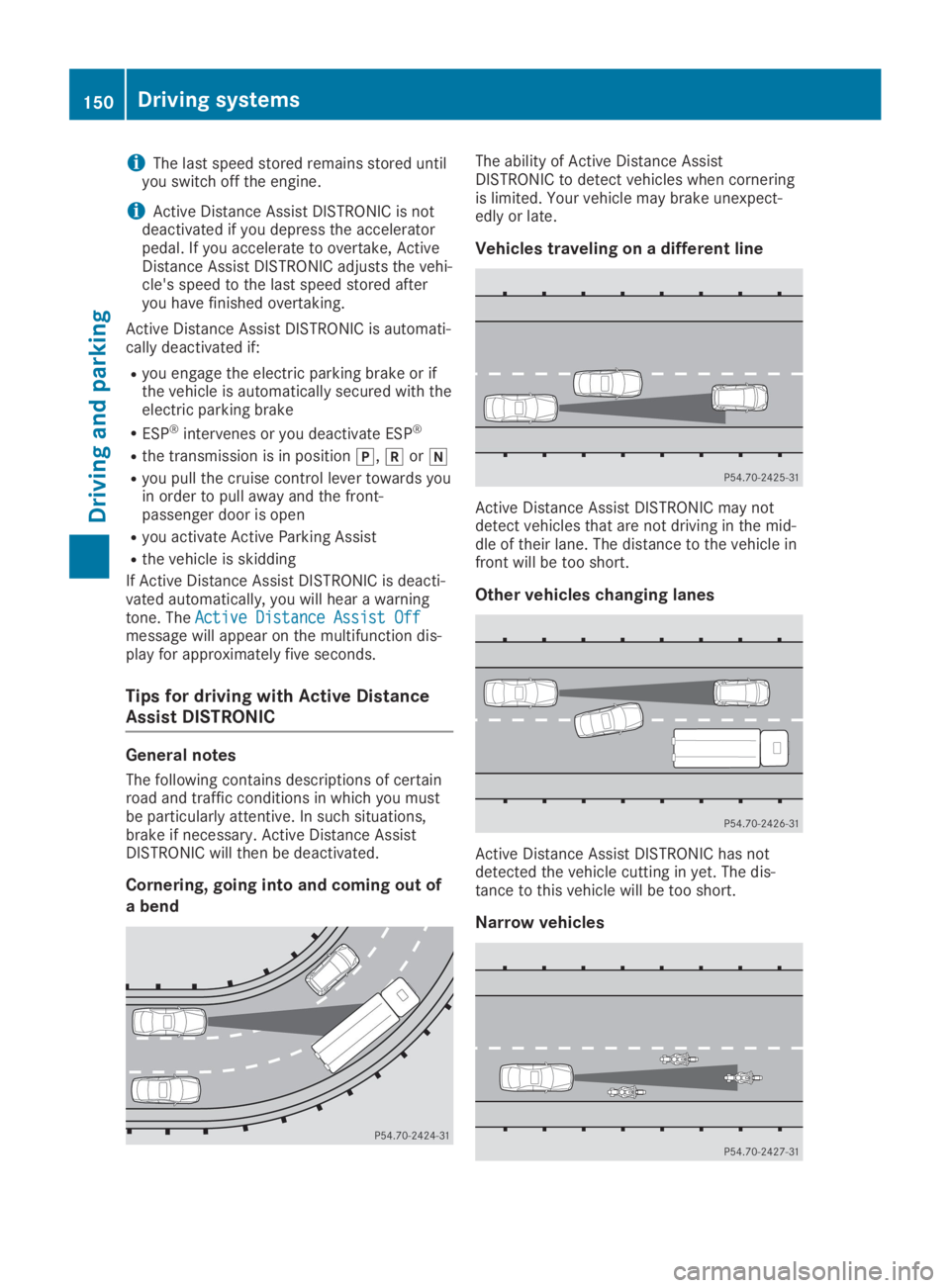
Cornering, going into and coming out of
a bend
The ability of Active Distance AssistDISTRONIC to detect vehicles when corneringis limited. Your vehicle may brake unexpect-edly or late.
Vehicles traveling on a different line
Active Distance Assist DISTRONIC may notdetect vehicles that are not driving in the mid-dle of their lane. The distance to the vehicle infront will be too short.
Other vehicles changing lanes
Active Distance Assist DISTRONIC has notdetected the vehicle cutting in yet. The dis-tance to this vehicle will be too short.
Narrow vehicles
150Driving systems
Driving and parking
Page 153 of 306
Active Distance Assist DISTRONIC has not yetdetected the vehicle in front on the edge ofthe road because of its narrow width. The dis-tance to the vehicle in front will be too short.
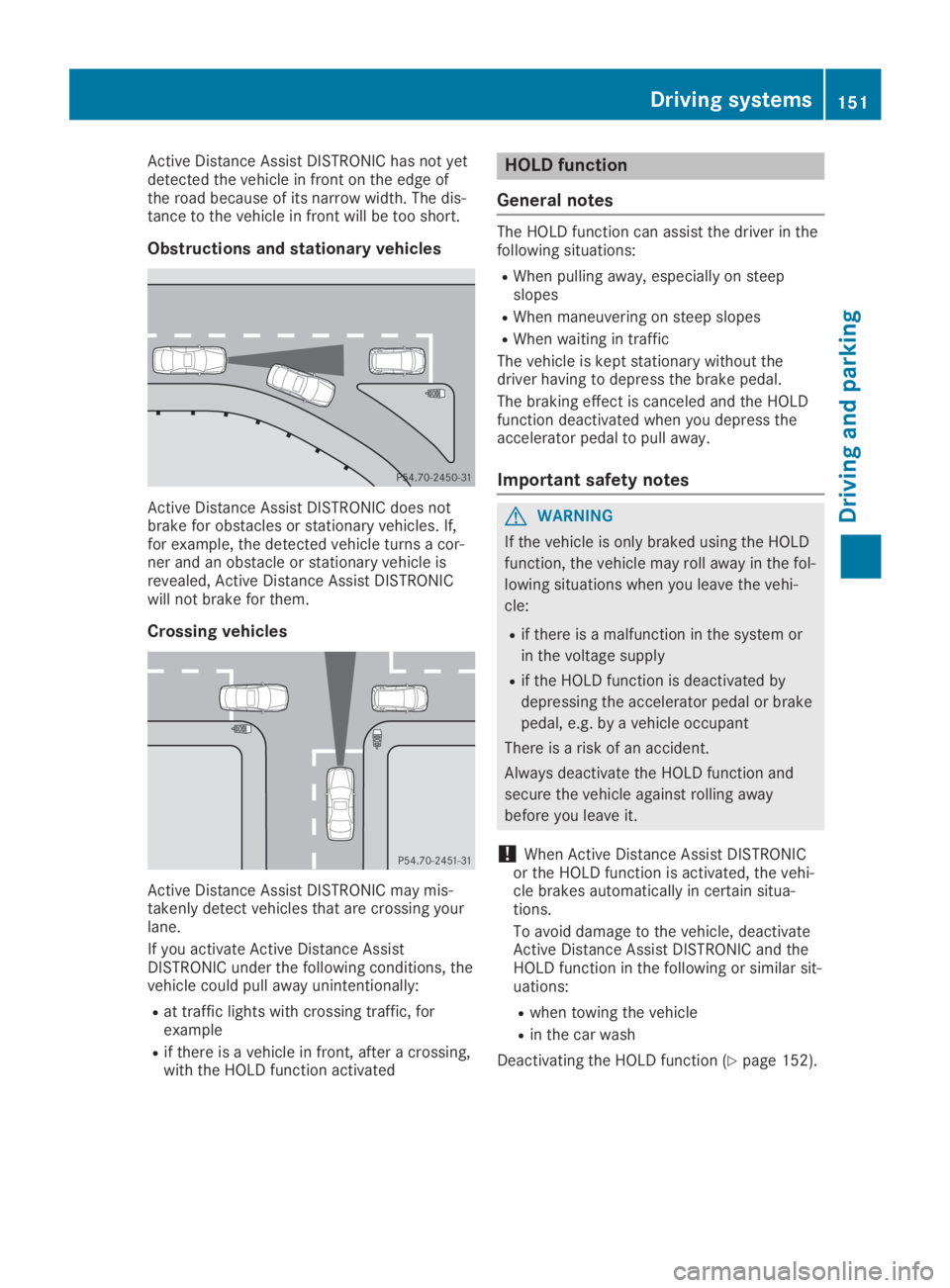
Obstructions and stationary vehicles
Active Distance Assist DISTRONIC does notbrake for obstacles or stationary vehicles. If,for example, the detected vehicle turns a cor-ner and an obstacle or stationary vehicle isrevealed, Active Distance Assist DISTRONICwill not brake for them.
Crossing vehicles
Active Distance Assist DISTRONIC may mis-takenly detect vehicles that are crossing yourlane.
If you activate Active Distance AssistDISTRONIC under the following conditions, thevehicle could pull away unintentionally:
Rat traffic lights with crossing traffic, forexample
Rif there is a vehicle in front, after a crossing,with the HOLD function activated
HOLD function
General notes
The HOLD function can assist the driver in thefollowing situations:
RWhen pulling away, especially on steepslopes
RWhen maneuvering on steep slopes
RWhen waiting in traffic
The vehicle is kept stationary without thedriver having to depress the brake pedal.
The braking effect is canceled and the HOLDfunction deactivated when you depress theaccelerator pedal to pull away.
Important safety notes
GWARNING
If the vehicle is only braked using the HOLD
function, the vehicle may roll away in the fol-
lowing situations when you leave the vehi-
cle:
Rif there is a malfunction in the system or
in the voltage supply
Rif the HOLD function is deactivated by
depressing the accelerator pedal or brake
pedal, e.g. by a vehicle occupant
There is a risk of an accident.
Always deactivate the HOLD function and
secure the vehicle against rolling away
before you leave it.
!When Active Distance Assist DISTRONICor the HOLD function is activated, the vehi-cle brakes automatically in certain situa-tions.
To avoid damage to the vehicle, deactivateActive Distance Assist DISTRONIC and theHOLD function in the following or similar sit-uations:
Rwhen towing the vehicle
Rin the car wash
Deactivating the HOLD function (Ypage 152).
Driving systems151
Driving an d parking
Z
Page 154 of 306
Activation conditions
You can activate the HOLD function if all of thefollowing conditions are fulfilled:
Rthe vehicle is stationary.
Rthe engine is running or if it has been auto-matically switched off by the ECO start/stop function.
Rthe driver's door is closed or your seat beltis fastened.
Rthe electric parking brake is released.
Rthe transmission is in position[,^or\\.
RActive Distance Assist DISTRONIC is deacti-vated
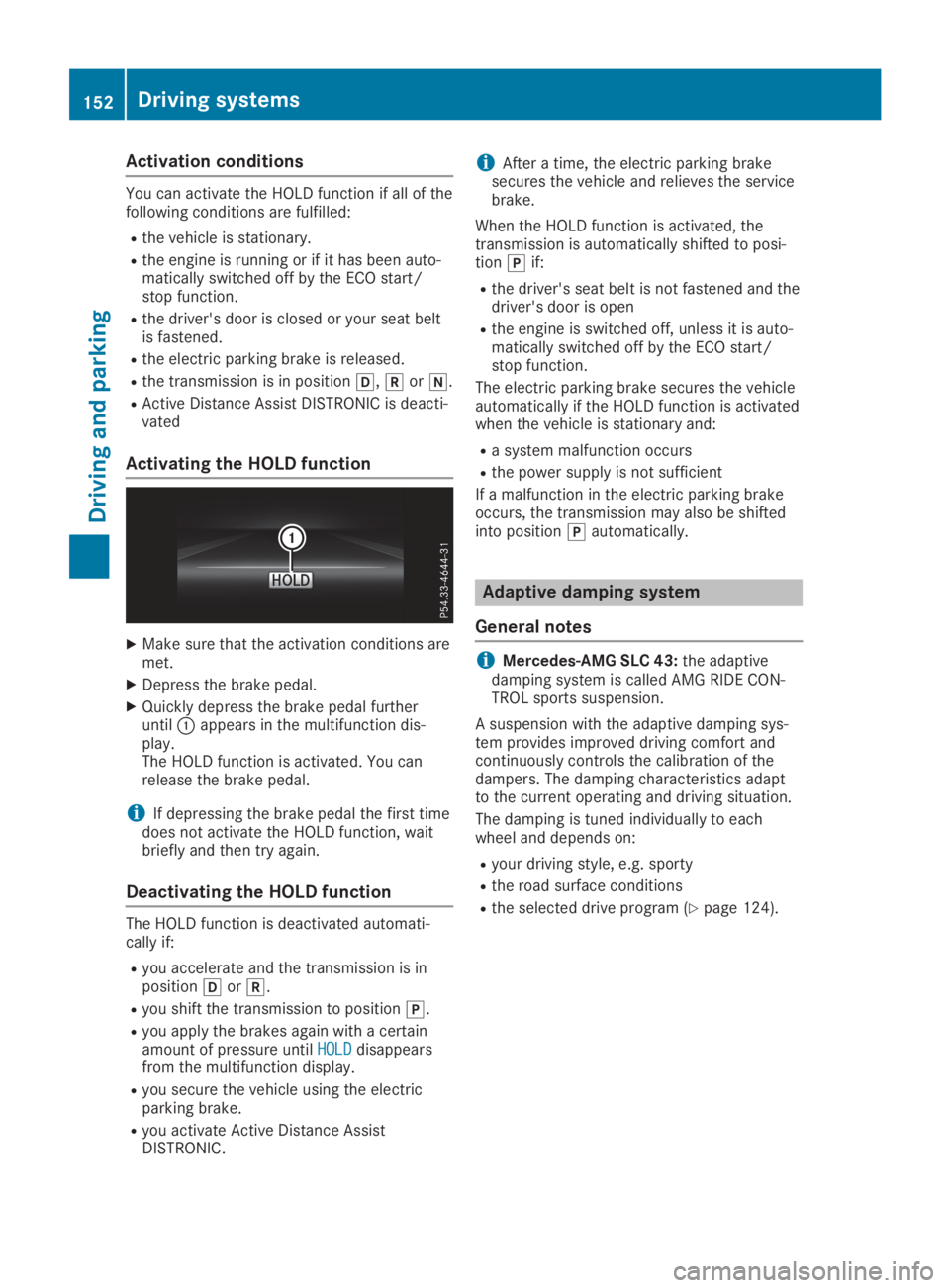
Activating the HOLD function
XMake sure that the activation conditions aremet.
XDepress the brake pedal.
XQuickly depress the brake pedal furtheruntilCappears in the multifunction dis-play.The HOLD function is activated. You canrelease the brake pedal.
iIf depressing the brake pedal the first timedoes not activate the HOLD function, waitbriefly and then try again.
Deactivating the HOLD function
The HOLD function is deactivated automati-cally if:
Ryou accelerate and the transmission is inposition[or^.
Ryou shift the transmission to position].
Ryou apply the brakes again with a certainamount of pressure untilHOLDHOLDdisappearsfrom the multifunction display.
Ryou secure the vehicle using the electricparking brake.
Ryou activate Active Distance AssistDISTRONIC.
iAfter a time, the electric parking brakesecures the vehicle and relieves the servicebrake.
When the HOLD function is activated, thetransmission is automatically shifted to posi-tion]if:
Rthe driver's seat belt is not fastened and thedriver's door is open
Rthe engine is switched off, unless it is auto-matically switched off by the ECO start/stop function.
The electric parking brake secures the vehicleautomatically if the HOLD function is activatedwhen the vehicle is stationary and:
Ra system malfunction occurs
Rthe power supply is not sufficient
If a malfunction in the electric parking brakeoccurs, the transmission may also be shiftedinto position]automatically.
Adaptive damping system
General notes
iMercedes-AMG SLC 43:the adaptivedamping system is called AMG RIDE CON-TROL sports suspension.
A suspension with the adaptive damping sys-tem provides improved driving comfort andcontinuously controls the calibration of thedampers. The damping characteristics adaptto the current operating and driving situation.
The damping is tuned individually to eachwheel and depends on:
Ryour driving style, e.g. sporty
Rthe road surface conditions
Rthe selected drive program (Ypage 124).
152Driving systems
Driving and pa rking
Page 176 of 306
attention to traffic conditions and operate
the equipment when the vehicle is station-
ary.
When telephoning, you must observe the legalrequirements for the country in which you arecurrently driving.
XSwitch on the mobile phone (see the manu-facturer’s operating instructions).
XSwitch on the multimedia system (see theDigital Operator's Manual)
XEstablish a Bluetooth®connection to themultimedia system (Ypage 221).
XPress theYorebutton on the steer-ing wheel to select theTelTelmenu.
You will see one of the following display mes-sages in the multifunction display:
RPhone READYPhone READYor the name of the networkprovider: the mobile phone has found a net-work and is ready to receive.
RPhone No ServicePhone No Service: there is no networkavailable or the mobile phone is searchingfor a network.
Accepting a call
If someone calls you when you are in theTelTelmenu, a display message appears in the multi-function display.
You can accept a call at any time regardless ofthe menu selected.
XPress theabutton on the steering wheelto accept an incoming call.
Rejecting or ending a call
XPress thevbutton on the steering wheelto reject or end a call.
Selecting an entry in the phone book
XPress theYorebutton on the steer-ing wheel to select theTelTelmenu.
XPress thec,dorvbutton toswitch to the phone book.
XAuthorize access to the phone book on thephone.
XPressdorcto select the names oneafter the other.
or
XTo start rapid scrolling:press and holdthedorcbutton for longer than onesecond.The names in the phone book are displayedquickly one after the other.
Rapid scrolling stops when you release thebutton or reach the end of the list.
XIf only one telephone number is storedfor a name:press theaorvbuttonto start dialing.
or
XIf there is more than one number for aparticular name:press theaorvbutton to display the numbers.
XPress thecordbutton to select thenumber you want to dial.
XPress theaorvbutton to start dial-ing.
or
XTo exit the telephone book:press thevor8button.
Redialing
The on-board computer saves the last namesor numbers dialed in the redial memory.
XPress theYorebutton on the steer-ing wheel to select theTelTelmenu.
XPress theabutton to switch to theredial memory.
XPress thecordbutton to select thedesired name or number.
XPress theaorvbutton to start dial-ing.
or
XTo exit the redial memory:press thevor8button.
Assistance menu
Introduction
Depending on your vehicle's equipment, in theDriveAssistDriveAssistmenu, you have the followingoptions:
174Menus and submenus
On-board computer and displays
Page 188 of 306
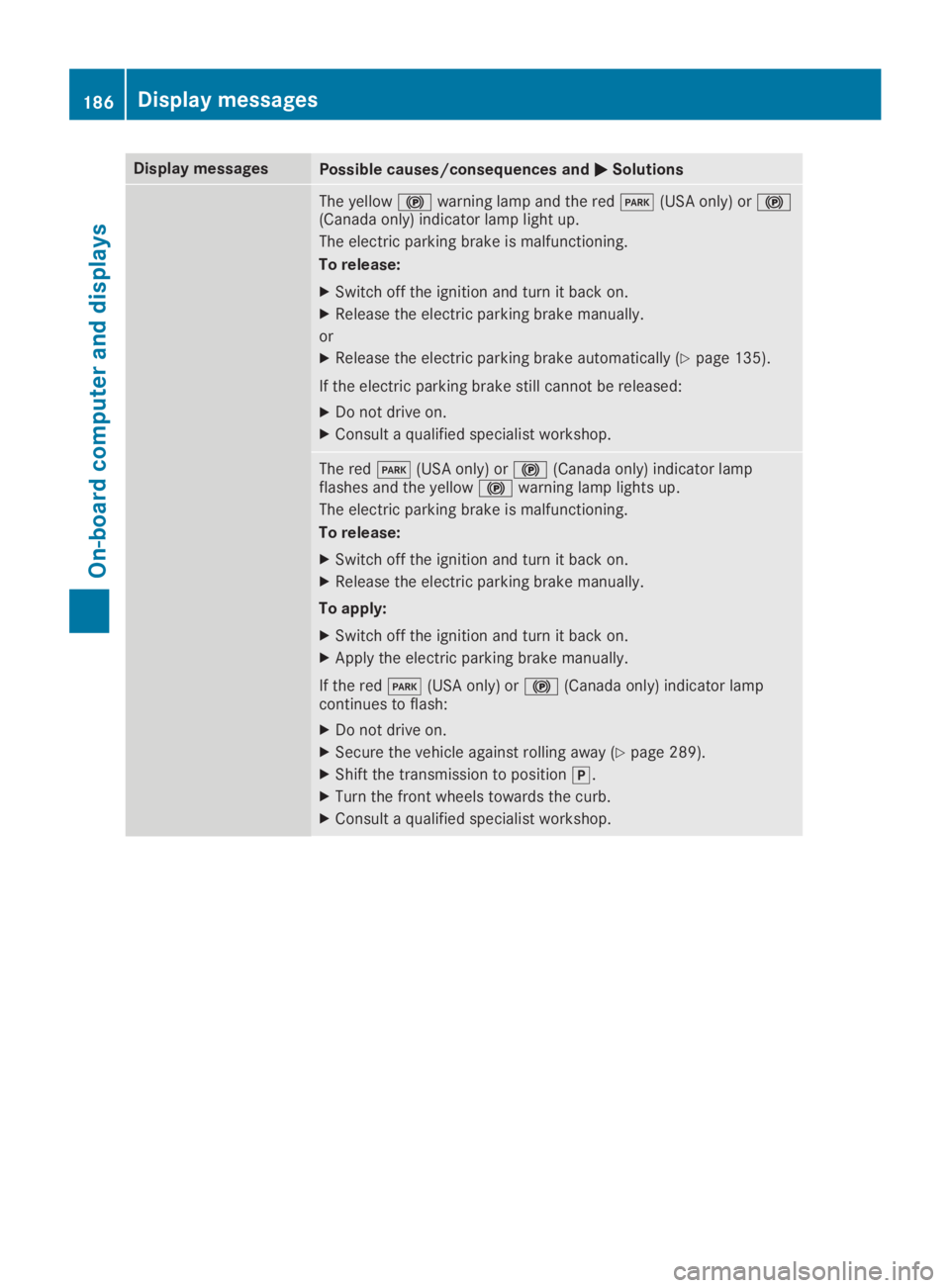
Display messagesPossible causes/consequences andPPSolutions
The yellow$warning lamp and the redI(USA only) or$(Canada only) indicator lamp light up.
The electric parking brake is malfunctioning.
To release:
XSwitch off the ignition and turn it back on.
XRelease the electric parking brake manually.
or
XRelease the electric parking brake automatically (Ypage 135).
If the electric parking brake still cannot be released:
XDo not drive on.
XConsult a qualified specialist workshop.
The redI(USA only) or$(Canada only) indicator lampflashes and the yellow$warning lamp lights up.
The electric parking brake is malfunctioning.
To release:
XSwitch off the ignition and turn it back on.
XRelease the electric parking brake manually.
To apply:
XSwitch off the ignition and turn it back on.
XApply the electric parking brake manually.
If the redI(USA only) or$(Canada only) indicator lampcontinues to flash:
XDo not drive on.
XSecure the vehicle against rolling away (Ypage 289).
XShift the transmission to position].
XTurn the front wheels towards the curb.
XConsult a qualified specialist workshop.
186Displaymessages
On-b oard computer and displays
Page 190 of 306
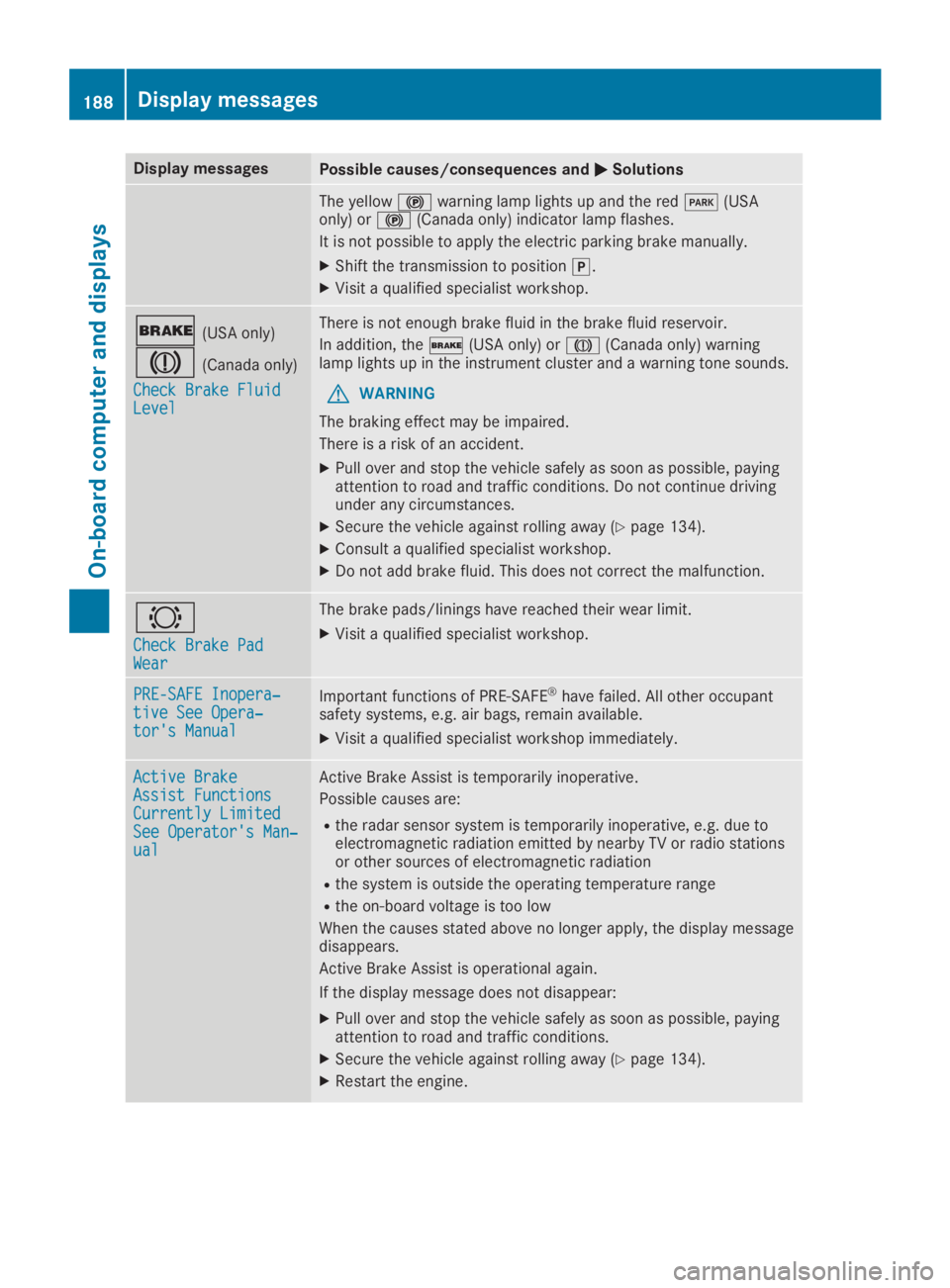
Display messagesPossible causes/consequences andPPSolutions
The yellow$warning lamp lights up and the redI(USAonly) or$(Canada only) indicator lamp flashes.
It is not possible to apply the electric parking brake manually.
XShift the transmission to position].
XVisit a qualified specialist workshop.
'(USA only)
M(Canada only)
Check Brake FluidCheck Brake FluidLevelLevel
There is not enough brake fluid in the brake fluid reservoir.
In addition, the'(USA only) orM(Canada only) warninglamp lights up in the instrument cluster and a warning tone sounds.
GWARNING
The braking effect may be impaired.
There is a risk of an accident.
XPull over and stop the vehicle safely as soon as possible, payingattention to road and traffic conditions. Do not continue drivingunder any circumstances.
XSecure the vehicle against rolling away (Ypage 134).
XConsult a qualified specialist workshop.
XDo not add brake fluid. This does not correct the malfunction.
&
Check Brake PadCheck Brake PadWearWear
The brake pads/linings have reached their wear limit.
XVisit a qualified specialist workshop.
PRE-SAFE Inopera‐PRE-SAFE Inopera‐tive See Opera‐tive See Opera‐tor's Manualtor's Manual
Important functions of PRE-SAFE®have failed. All other occupantsafety systems, e.g. air bags, remain available.
XVisit a qualified specialist workshop immediately.
Active BrakeActive BrakeAssist FunctionsAssist FunctionsCurrently LimitedCurrently LimitedSee Operator's Man‐See Operator's Man‐ualual
Active Brake Assist is temporarily inoperative.
Possible causes are:
Rthe radar sensor system is temporarily inoperative, e.g. due toelectromagnetic radiation emitted by nearby TV or radio stationsor other sources of electromagnetic radiation
Rthe system is outside the operating temperature range
Rthe on-board voltage is too low
When the causes stated above no longer apply, the display messagedisappears.
Active Brake Assist is operational again.
If the display message does not disappear:
XPull over and stop the vehicle safely as soon as possible, payingattention to road and traffic conditions.
XSecure the vehicle against rolling away (Ypage 134).
XRestart the engine.
188Displaymessages
On-b oard computer and displays
Page 191 of 306
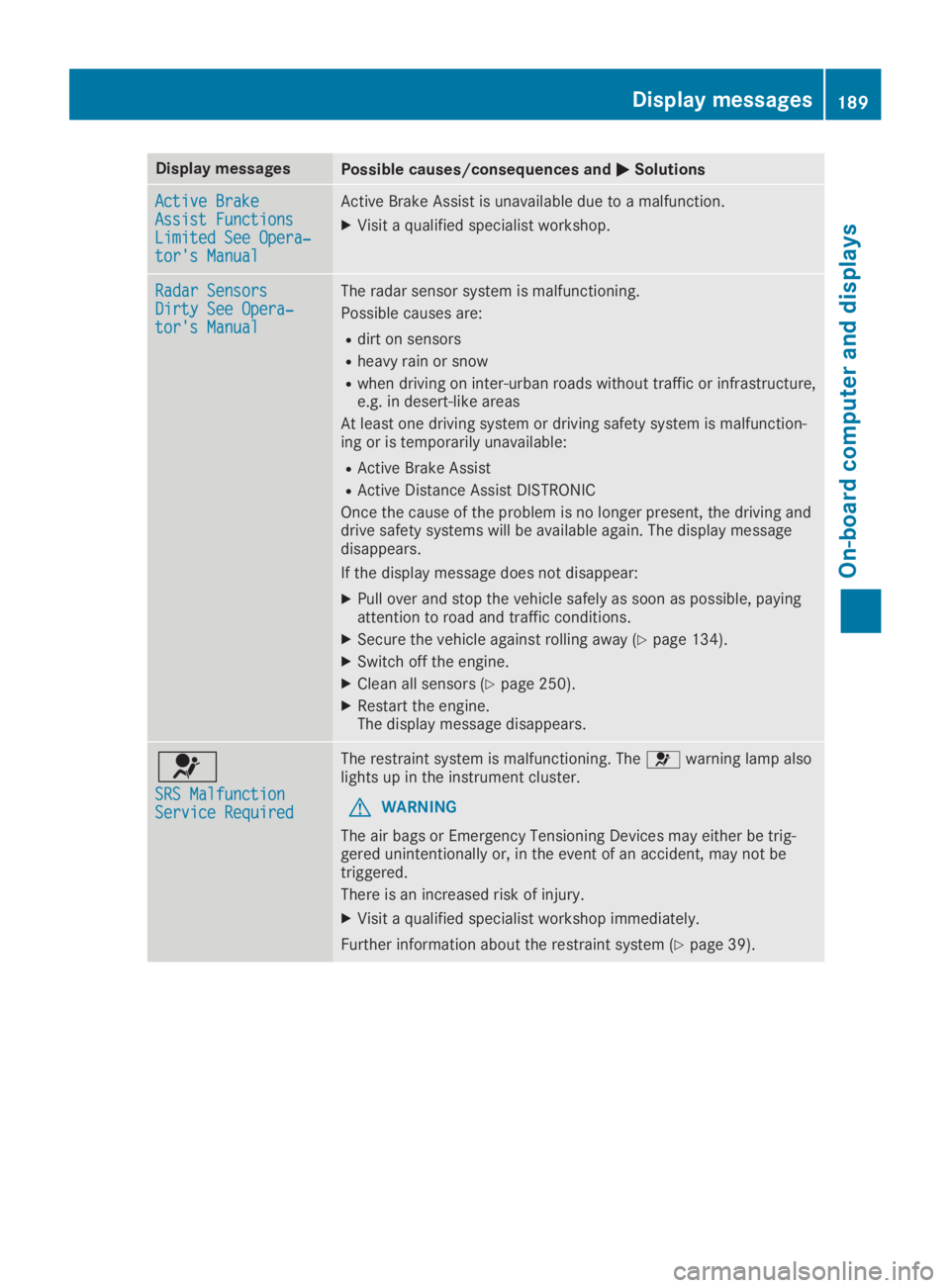
Display messagesPossible causes/consequences andPPSolutions
Active BrakeActive BrakeAssist FunctionsAssist FunctionsLimited See Opera‐Limited See Opera‐tor's Manualtor's Manual
Active Brake Assist is unavailable due to a malfunction.
XVisit a qualified specialist workshop.
Radar SensorsRadar SensorsDirty See Opera‐Dirty See Opera‐tor's Manualtor's Manual
The radar sensor system is malfunctioning.
Possible causes are:
Rdirt on sensors
Rheavy rain or snow
Rwhen driving on inter-urban roads without traffic or infrastructure,e.g. in desert-like areas
At least one driving system or driving safety system is malfunction-ing or is temporarily unavailable:
RActive Brake Assist
RActive Distance Assist DISTRONIC
Once the cause of the problem is no longer present, the driving anddrive safety systems will be available again. The display messagedisappears.
If the display message does not disappear:
XPull over and stop the vehicle safely as soon as possible, payingattention to road and traffic conditions.
XSecure the vehicle against rolling away (Ypage 134).
XSwitch off the engine.
XClean all sensors (Ypage 250).
XRestart the engine.The display message disappears.
u
SRS MalfunctionSRS MalfunctionService RequiredService Required
The restraint system is malfunctioning. Theuwarning lamp alsolights up in the instrument cluster.
GWARNING
The air bags or Emergency Tensioning Devices may either be trig-gered unintentionally or, in the event of an accident, may not betriggered.
There is an increased risk of injury.
XVisit a qualified specialist workshop immediately.
Further information about the restraint system (Ypage 39).
Displaymessages189
On-b oard computer and displays
Z
Page 193 of 306
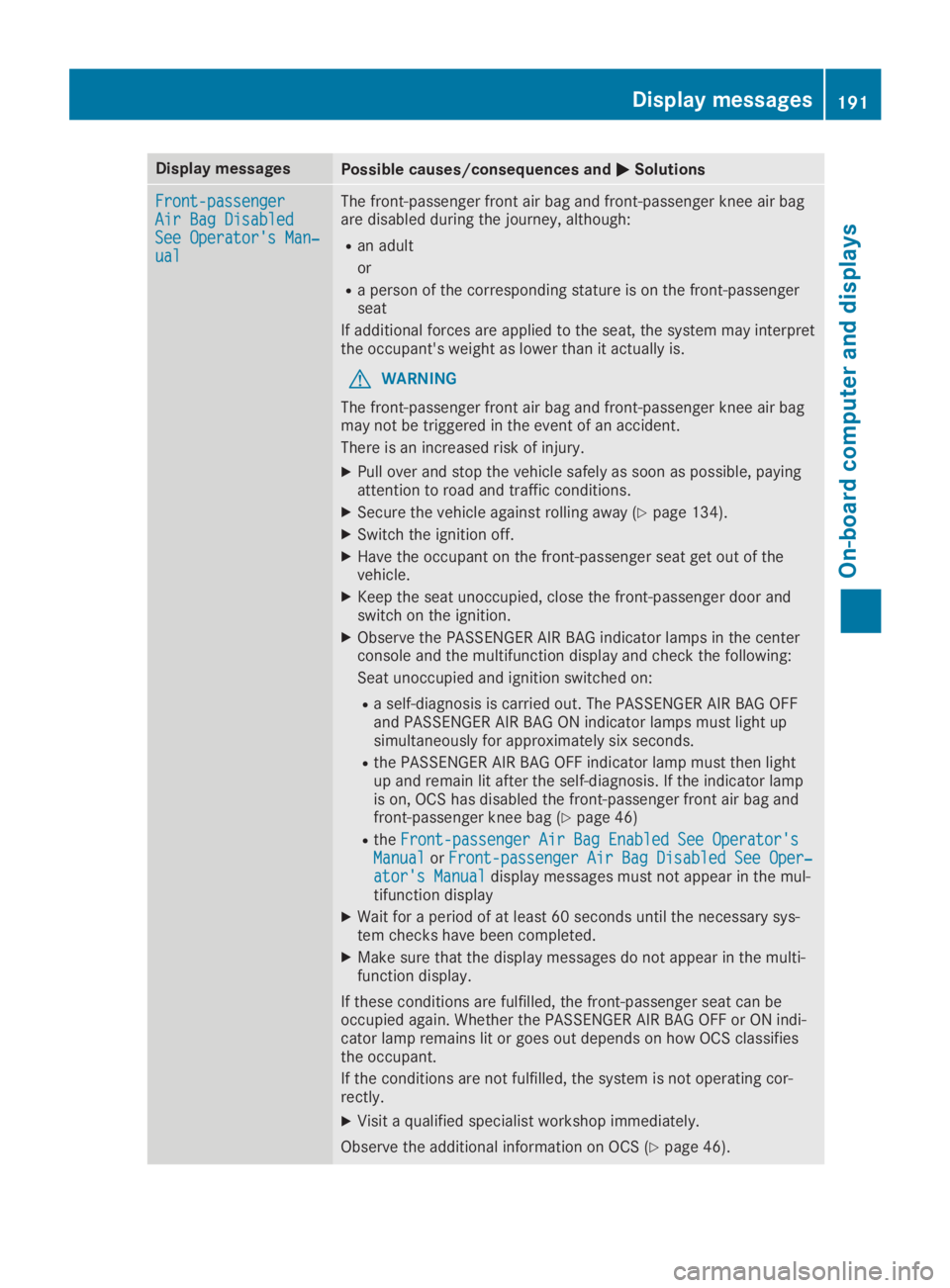
Display messagesPossible causes/consequences andPPSolutions
Front-passengerFront-passengerAir Bag DisabledAir Bag DisabledSee Operator's Man‐See Operator's Man‐ualual
The front-passenger front air bag and front-passenger knee air bagare disabled during the journey, although:
Ran adult
or
Ra person of the corresponding stature is on the front-passengerseat
If additional forces are applied to the seat, the system may interpretthe occupant's weight as lower than it actually is.
GWARNING
The front-passenger front air bag and front-passenger knee air bagmay not be triggered in the event of an accident.
There is an increased risk of injury.
XPull over and stop the vehicle safely as soon as possible, payingattention to road and traffic conditions.
XSecure the vehicle against rolling away (Ypage 134).
XSwitch the ignition off.
XHave the occupant on the front-passenger seat get out of thevehicle.
XKeep the seat unoccupied, close the front-passenger door andswitch on the ignition.
XObserve the PASSENGER AIR BAG indicator lamps in the centerconsole and the multifunction display and check the following:
Seat unoccupied and ignition switched on:
Ra self-diagnosis is carried out. The PASSENGER AIR BAG OFFand PASSENGER AIR BAG ON indicator lamps must light upsimultaneously for approximately six seconds.
Rthe PASSENGER AIR BAG OFF indicator lamp must then lightup and remain lit after the self-diagnosis. If the indicator lampis on, OCS has disabled the front-passenger front air bag andfront-passenger knee bag (Ypage 46)
RtheFront-passenger Air Bag Enabled See Operator'sFront-passenger Air Bag Enabled See Operator'sManualManualorFront-passenger Air Bag Disabled See Oper‐Front-passenger Air Bag Disabled See Oper‐ator's Manualator's Manualdisplay messages must not appear in the mul-tifunction display
XWait for a period of at least 60 seconds until the necessary sys-tem checks have been completed.
XMake sure that the display messages do not appear in the multi-function display.
If these conditions are fulfilled, the front-passenger seat can beoccupied again. Whether the PASSENGER AIR BAG OFF or ON indi-cator lamp remains lit or goes out depends on how OCS classifiesthe occupant.
If the conditions are not fulfilled, the system is not operating cor-rectly.
XVisit a qualified specialist workshop immediately.
Observe the additional information on OCS (Ypage 46).
Displaymessages191
On-b oard computer and displays
Z
Page 194 of 306
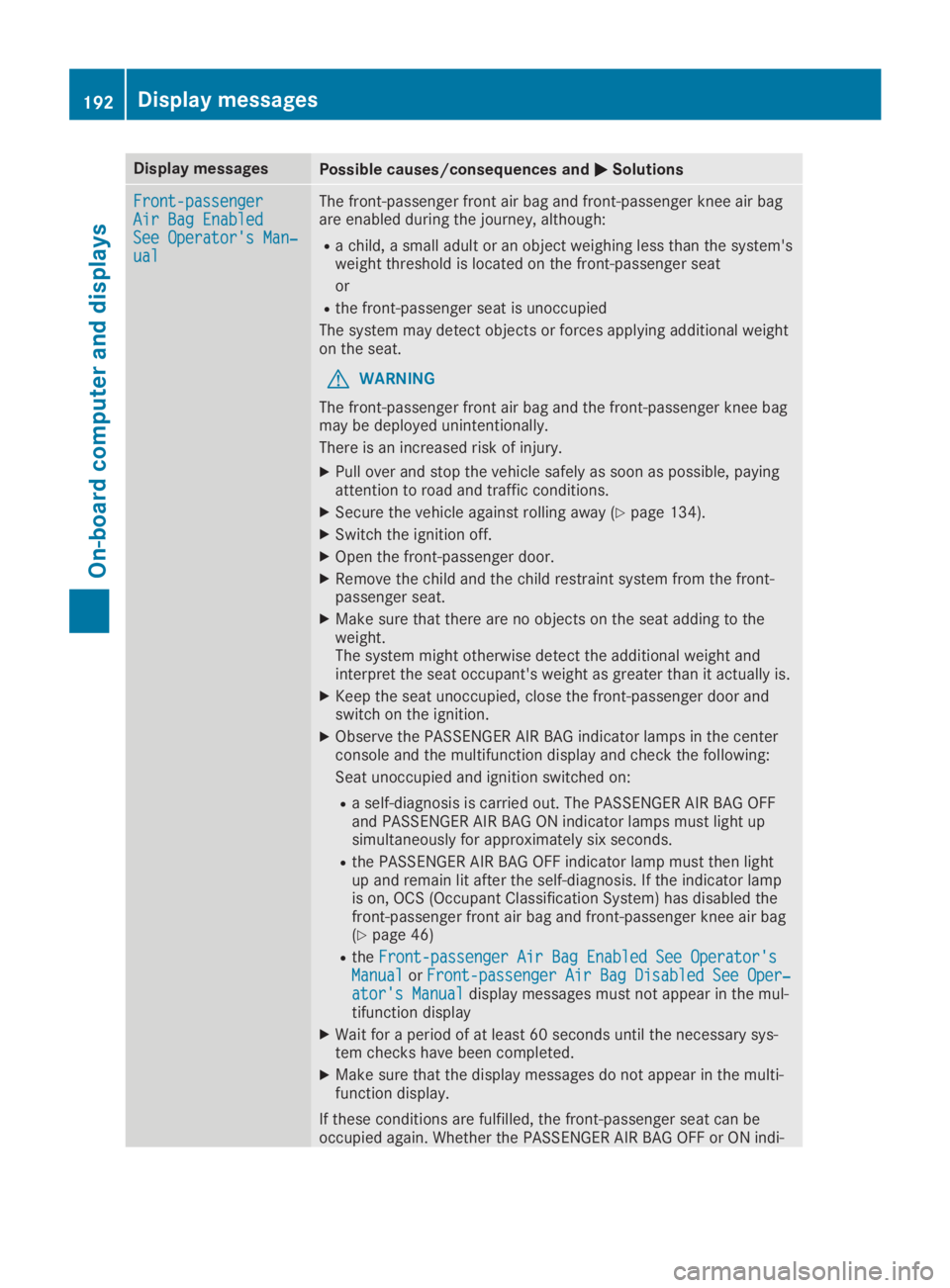
Display messagesPossible causes/consequences andPPSolutions
Front-passengerFront-passengerAir Bag EnabledAir Bag EnabledSee Operator's Man‐See Operator's Man‐ualual
The front-passenger front air bag and front-passenger knee air bagare enabled during the journey, although:
Ra child, a small adult or an object weighing less than the system'sweight threshold is located on the front-passenger seat
or
Rthe front-passenger seat is unoccupied
The system may detect objects or forces applying additional weighton the seat.
GWARNING
The front-passenger front air bag and the front-passenger knee bagmay be deployed unintentionally.
There is an increased risk of injury.
XPull over and stop the vehicle safely as soon as possible, payingattention to road and traffic conditions.
XSecure the vehicle against rolling away (Ypage 134).
XSwitch the ignition off.
XOpen the front-passenger door.
XRemove the child and the child restraint system from the front-passenger seat.
XMake sure that there are no objects on the seat adding to theweight.The system might otherwise detect the additional weight andinterpret the seat occupant's weight as greater than it actually is.
XKeep the seat unoccupied, close the front-passenger door andswitch on the ignition.
XObserve the PASSENGER AIR BAG indicator lamps in the centerconsole and the multifunction display and check the following:
Seat unoccupied and ignition switched on:
Ra self-diagnosis is carried out. The PASSENGER AIR BAG OFFand PASSENGER AIR BAG ON indicator lamps must light upsimultaneously for approximately six seconds.
Rthe PASSENGER AIR BAG OFF indicator lamp must then lightup and remain lit after the self-diagnosis. If the indicator lampis on, OCS (Occupant Classification System) has disabled thefront-passenger front air bag and front-passenger knee air bag(Ypage 46)
RtheFront-passenger Air Bag Enabled See Operator'sFront-passenger Air Bag Enabled See Operator'sManualManualorFront-passenger Air Bag Disabled See Oper‐Front-passenger Air Bag Disabled See Oper‐ator's Manualator's Manualdisplay messages must not appear in the mul-tifunction display
XWait for a period of at least 60 seconds until the necessary sys-tem checks have been completed.
XMake sure that the display messages do not appear in the multi-function display.
If these conditions are fulfilled, the front-passenger seat can beoccupied again. Whether the PASSENGER AIR BAG OFF or ON indi-
192Displaymessages
On-b oard computer and displays
Page 198 of 306
Display messagesPossible causes/consequences andPPSolutions
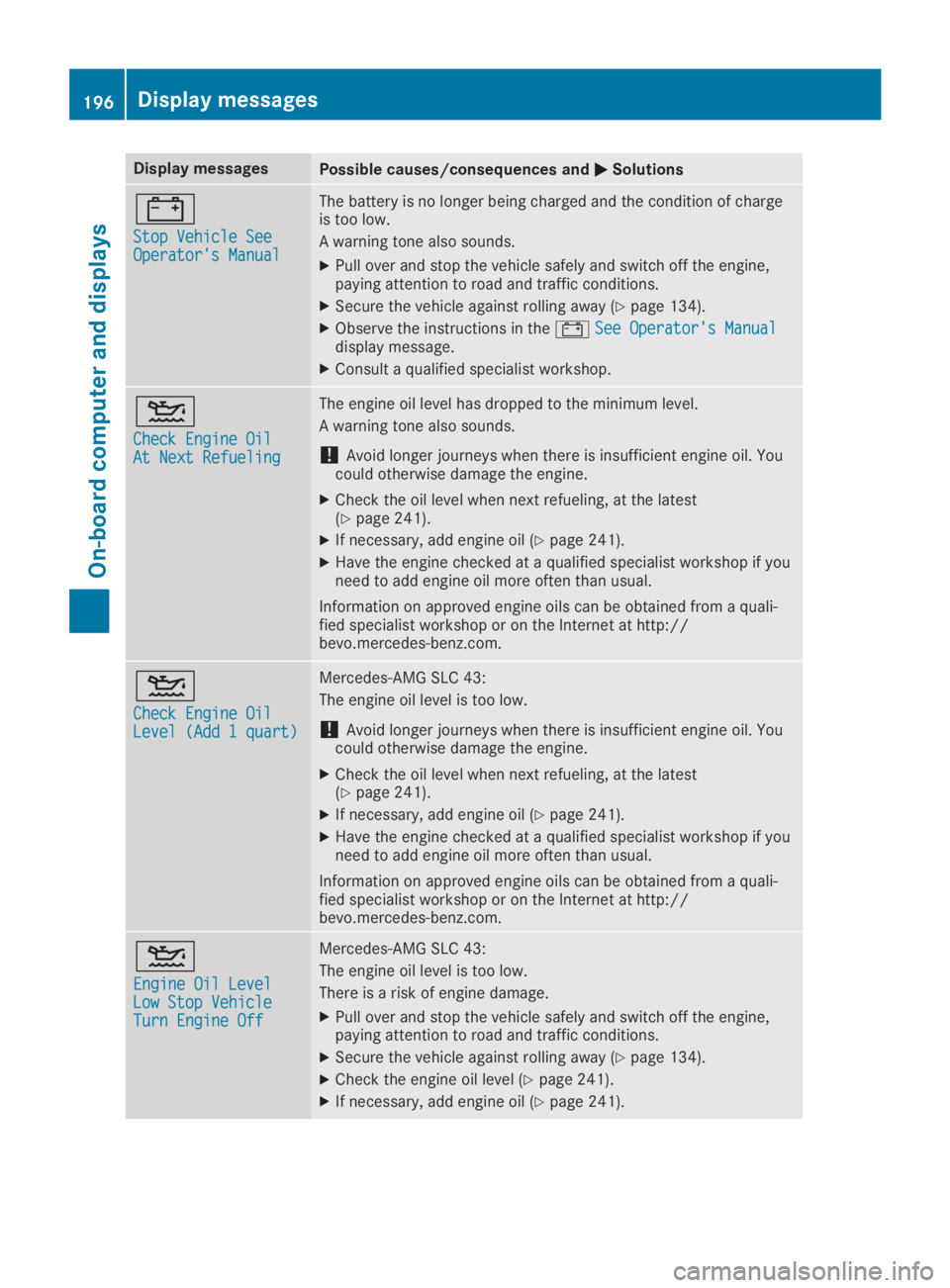
=
Stop Vehicle SeeStop Vehicle SeeOperator's ManualOperator's Manual
The battery is no longer being charged and the condition of chargeis too low.
A warning tone also sounds.
XPull over and stop the vehicle safely and switch off the engine,paying attention to road and traffic conditions.
XSecure the vehicle against rolling away (Ypage 134).
XObserve the instructions in the=See Operator's ManualSee Operator's Manualdisplay message.
XConsult a qualified specialist workshop.