ESP MERCEDES-BENZ SLC 2019 Owner's Manual
[x] Cancel search | Manufacturer: MERCEDES-BENZ, Model Year: 2019, Model line: SLC, Model: MERCEDES-BENZ SLC 2019Pages: 306, PDF Size: 15 MB
Page 63 of 306
the vehicle on the desired course within physi-
cal limits. ESP®assists the driver when pulling
away on wet or slippery roads. ESP®can alsostabilize the vehicle during braking.
ETS (Electronic Traction System)
iObserve the "Important safety notes" sec-tion (Ypage 57).
ETS traction control is part of ESP®.
ETS brakes the drive wheels individually if theyspin. This enables you to pull away and accel-erate on slippery surfaces, for example if theroad surface is slippery on one side. In addi-tion, more drive torque is transferred to thewheel or wheels with traction.
ETS remains active when you deactivate ESP®.
Important safety notes
GWARNING
If ESP®is malfunctioning it will not provide
any vehicle stabilization. There is an
increased risk of skidding or of an accident.
Exercise caution when continuing to drive.
Have ESP®checked at a qualified specialist
workshop.
When towing the vehicle with the rear axle
raised, observe the notes on ESP®
(Ypage 264).
If the
Page 64 of 306
Spinning the wheels results in a cutting actionwhich provides better grip.
iActivate ESP®as soon as the situations
described above no longer apply. ESP®willotherwise not be able to stabilize the vehicleif the vehicle starts to skid or a wheel startsto spin.
!Avoid spinning the driven wheels for an
extended period with ESP®deactivated. Youcould otherwise damage the drivetrain.
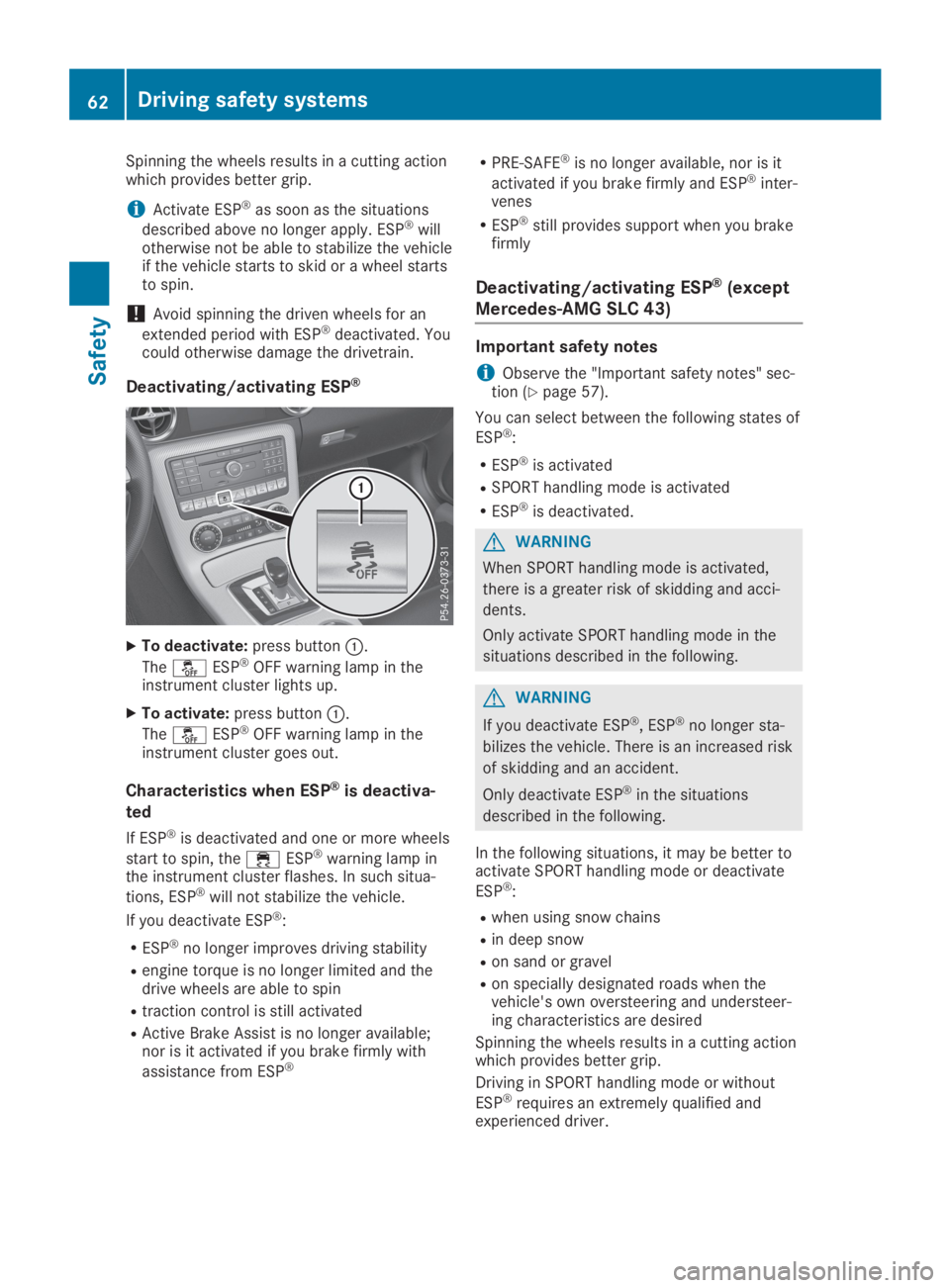
Deactivating/activating ESP®
XTo deactivate:press buttonC.
The
Page 65 of 306
iActivate ESP®as soon as the situations
described above no longer apply. ESP®willotherwise not be able to stabilize the vehicleif the vehicle starts to skid or a wheel startsto spin.
!Avoid spinning the driven wheels for an
extended period with ESP®deactivated. Youcould otherwise damage the drivetrain.
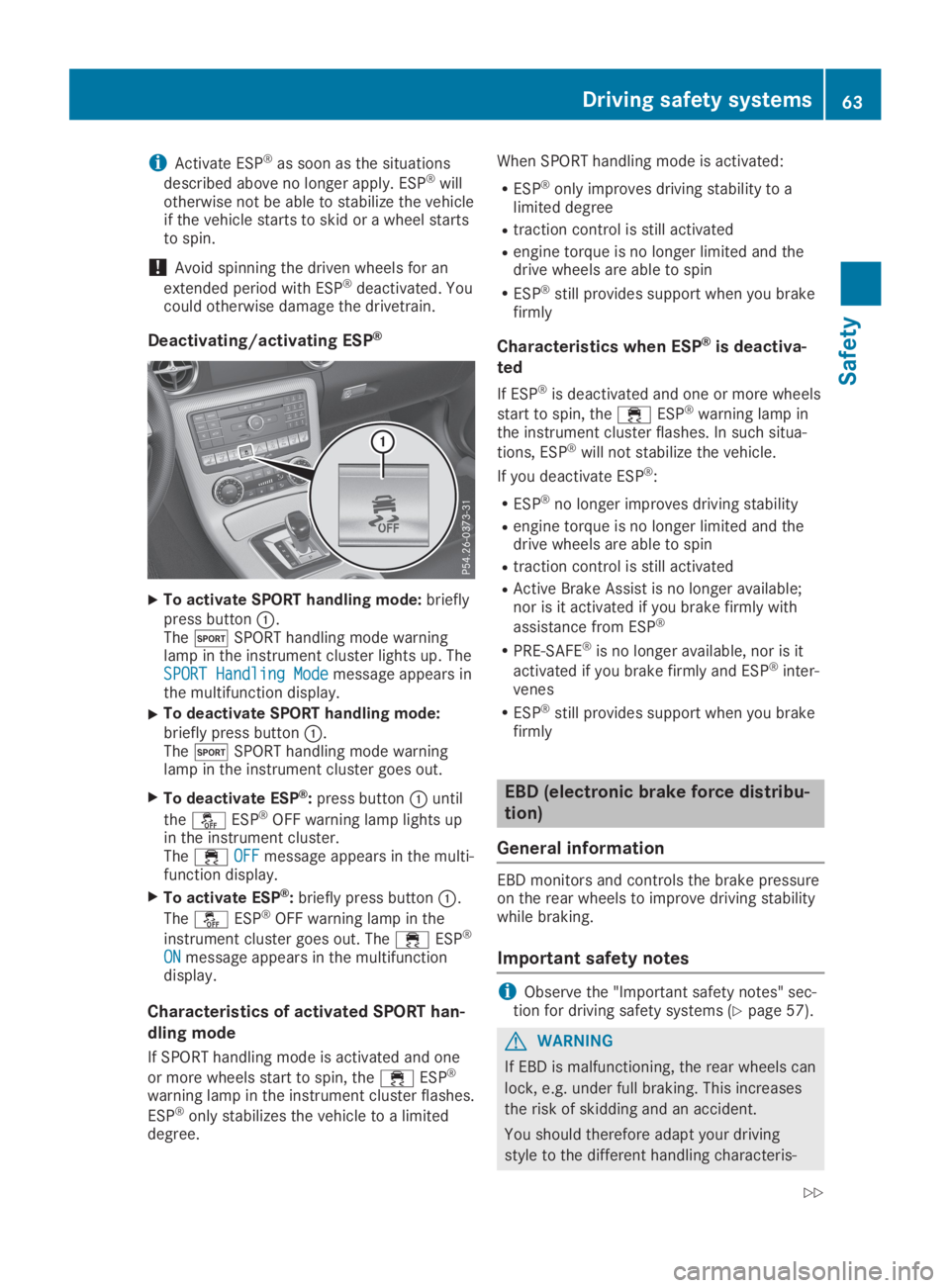
Deactivating/activating ESP®
XTo activate SPORT handling mode:brieflypress buttonC.ThetSPORT handling mode warninglamp in the instrument cluster lights up. TheSPORT Handling ModeSPORT Handling Modemessage appears inthe multifunction display.
XTo deactivate SPORT handling mode:briefly press buttonC.ThetSPORT handling mode warninglamp in the instrument cluster goes out.
XTo deactivate ESP®:press buttonCuntil
the
Page 69 of 306
Locking/unlocking centrally
You can start, lock or unlock the vehicle usingKEYLESS-GO. To do this, you only need carrythe SmartKey with you. You can combine thefunctions of KEYLESS-GO with those of a con-ventional SmartKey. Unlock the vehicle byusing KEYLESS-GO, for instance, and lock itusing the7button on the SmartKey.
The driver's door and the door at which thehandle is used, must both be closed. TheSmartKey must be outside the vehicle. Whenlocking or unlocking with KEYLESS-GO, thedistance between the key and the correspond-ing door handle must not be greater than 3 ft(1 m).
A check which periodically establishes a radioconnection between the vehicle and theSmartKey determines whether a valid Smart-Key is in the vehicle. This occurs, for example:
Rwhen starting the engine
Rwhile driving
Rwhen the external door handles are touched
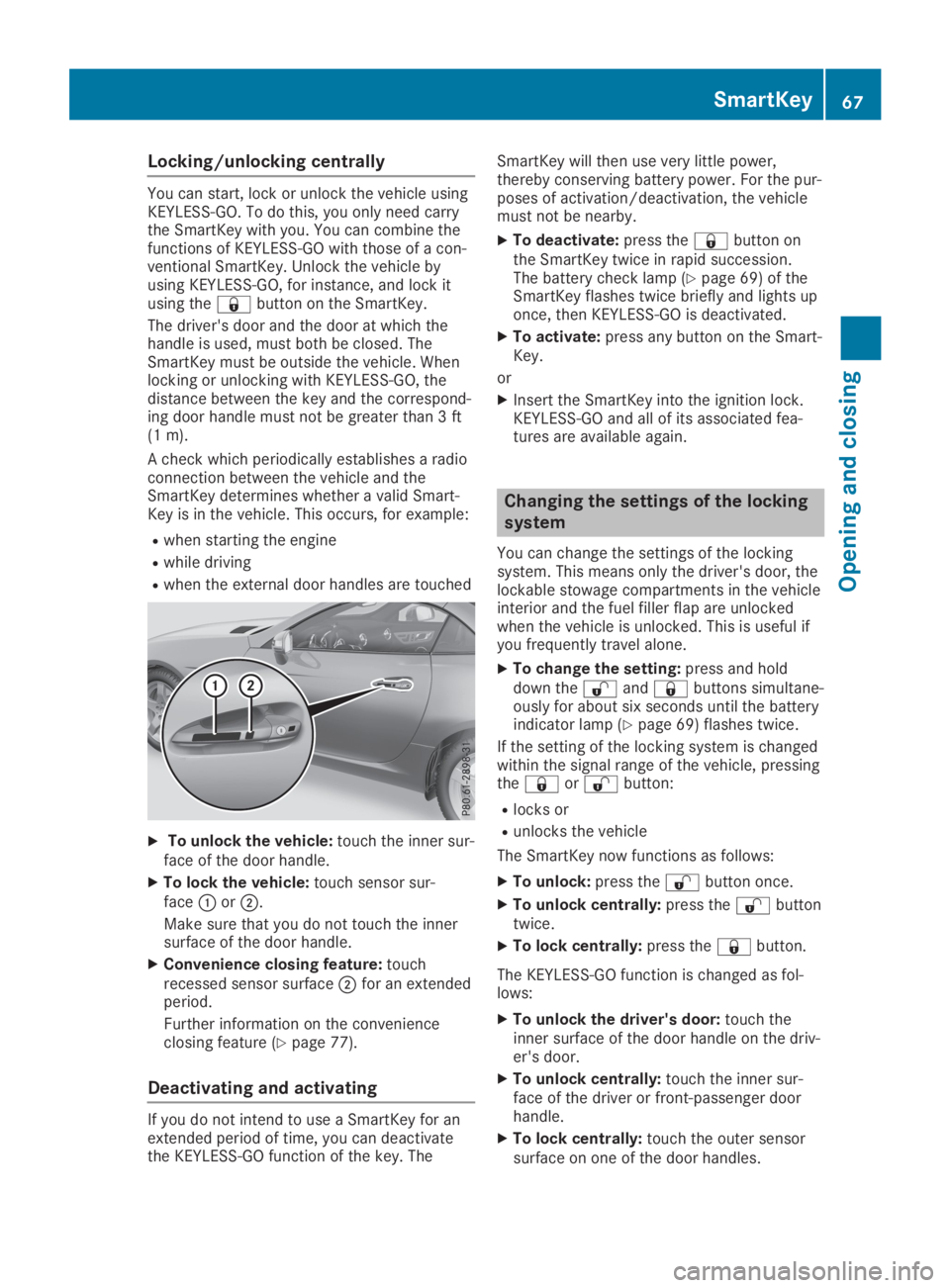
XTo unlock the vehicle:touch the inner sur-face of the door handle.
XTo lock the vehicle:touch sensor sur-faceCorD.
Make sure that you do not touch the innersurface of the door handle.
XConvenience closing feature:touchrecessed sensor surfaceDfor an extendedperiod.
Further information on the convenienceclosing feature (Ypage 77).
Deactivating and activating
If you do not intend to use a SmartKey for anextended period of time, you can deactivatethe KEYLESS-GO function of the key. The
SmartKey will then use very little power,thereby conserving battery power. For the pur-poses of activation/deactivation, the vehiclemust not be nearby.
XTo deactivate:press the7button onthe SmartKey twice in rapid succession.The battery check lamp (Ypage 69) of theSmartKey flashes twice briefly and lights uponce, then KEYLESS-GO is deactivated.
XTo activate:press any button on the Smart-Key.
or
XInsert the SmartKey into the ignition lock.KEYLESS-GO and all of its associated fea-tures are available again.
Changing the settings of the locking
system
You can change the settings of the lockingsystem. This means only the driver's door, thelockable stowage compartments in the vehicleinterior and the fuel filler flap are unlockedwhen the vehicle is unlocked. This is useful ifyou frequently travel alone.
XTo change the setting:press and holddown the6and7buttons simultane-ously for about six seconds until the batteryindicator lamp (Ypage 69) flashes twice.
If the setting of the locking system is changedwithin the signal range of the vehicle, pressingthe7or6button:
Rlocks or
Runlocks the vehicle
The SmartKey now functions as follows:
XTo unlock:press the6button once.
XTo unlock centrally:press the6buttontwice.
XTo lock centrally:press the7button.
The KEYLESS-GO function is changed as fol-lows:
XTo unlock the driver's door:touch theinner surface of the door handle on the driv-er's door.
XTo unlock centrally:touch the inner sur-face of the driver or front-passenger doorhandle.
XTo lock centrally:touch the outer sensorsurface on one of the door handles.
SmartKey67
Opening and closing
Z
Page 70 of 306
XTo restore the factory settings:press andhold down the6and7buttonssimultaneously for approximately six sec-onds until the battery check lamp(Ypage 69) flashes twice.
Mechanical key
General notes
If the vehicle can no longer be locked orunlocked with the SmartKey or with KEYLESS-GO, use the mechanical key.
If you use the mechanical key to unlock andopen the driver's door or the trunk lid, theanti-theft alarm system will be triggered.Switch off the alarm (Ypage 64).
Removing the mechanical key
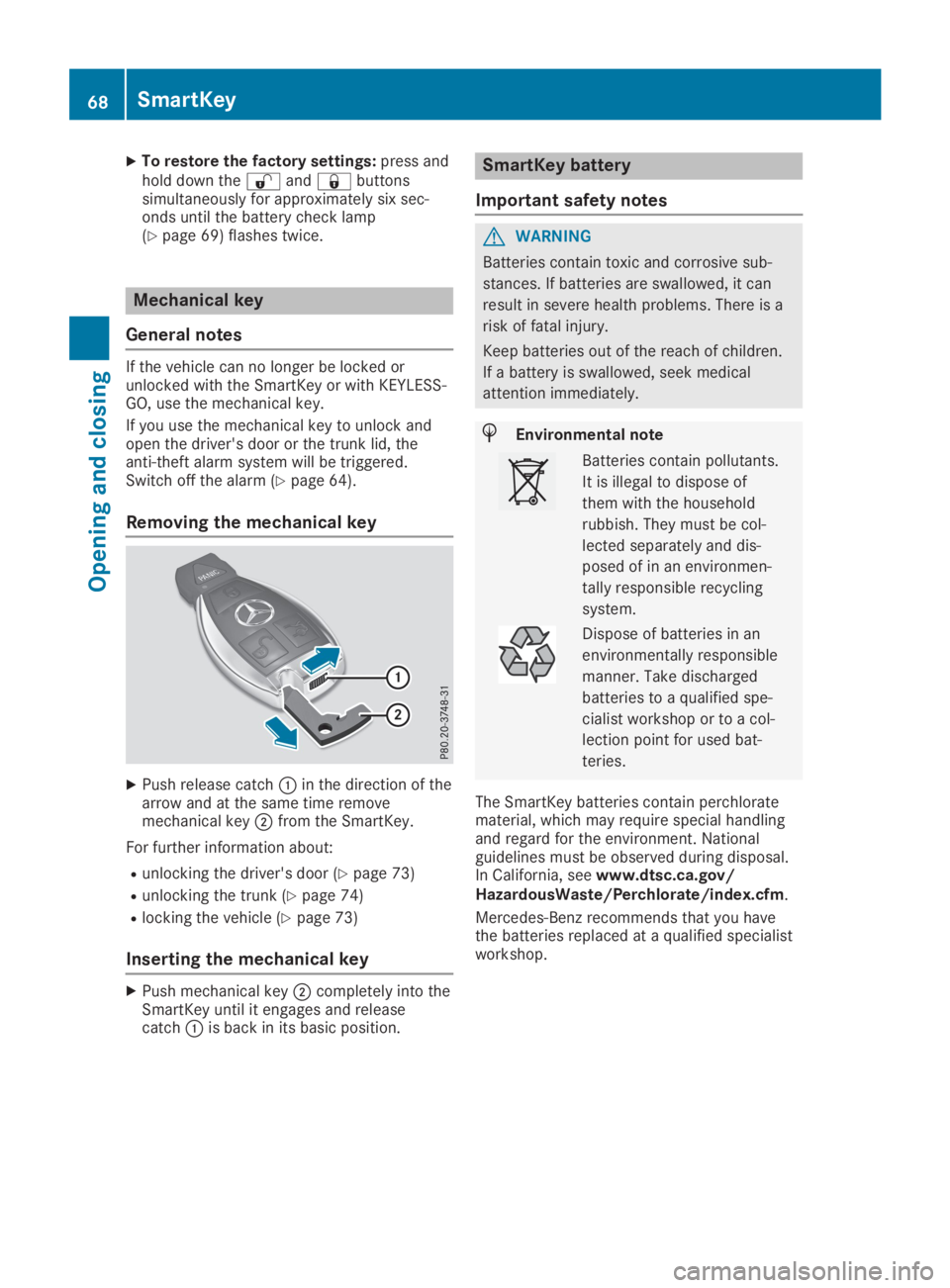
XPush release catchCin the direction of thearrow and at the same time removemechanical keyDfrom the SmartKey.
For further information about:
Runlocking the driver's door (Ypage 73)
Runlocking the trunk (Ypage 74)
Rlocking the vehicle (Ypage 73)
Inserting the mechanical key
XPush mechanical keyDcompletely into theSmartKey until it engages and releasecatchCis back in its basic position.
SmartKey battery
Important safety notes
GWARNING
Batteries contain toxic and corrosive sub-
stances. If batteries are swallowed, it can
result in severe health problems. There is a
risk of fatal injury.
Keep batteries out of the reach of children.
If a battery is swallowed, seek medical
attention immediately.
HEnvironmental note
Batteries contain pollutants.
It is illegal to dispose of
them with the household
rubbish. They must be col-
lected separately and dis-
posed of in an environmen-
tally responsible recycling
system.
Dispose of batteries in an
environmentally responsible
manner. Take discharged
batteries to a qualified spe-
cialist workshop or to a col-
lection point for used bat-
teries.
The SmartKey batteries contain perchloratematerial, which may require special handlingand regard for the environment. Nationalguidelines must be observed during disposal.In California, seewww.dtsc.ca.gov/HazardousWaste/Perchlorate/index.cfm.
Mercedes-Benz recommends that you havethe batteries replaced at a qualified specialistworkshop.
68SmartKey
Opening and closing
Page 78 of 306
one of the front side windows during the clos-ing process, the side window opens againautomatically. During the manual closing proc-ess, the side window only opens again auto-matically after the corresponding switch isreleased. However, the automatic reversingfeature is only an aid and does not relieve youof the responsibility of paying attention whenclosing a side window.
GWARNING
The reversing feature does not respond:
Rto soft, light and thin objects, e.g. fingers
Rover the last 1/6 in (4 mm) of the closing
movement
Rwhile adjusting
Rwhen closing the side window again man-
ually immediately after automatic revers-
ing
This means that the reversing feature can-
not prevent someone being trapped in these
situations. There is a risk of injury.
Make sure that no body parts are in close
proximity during the closing procedure. If
someone becomes trapped, press the
switch to open the side window again.
Opening and closing the side win-
dows in the front
The switches for the front side windows arelocated on the driver's door. There is also aswitch for the front-passenger side window onthe front-passenger door.
The switches on the driver's door take prece-dence.
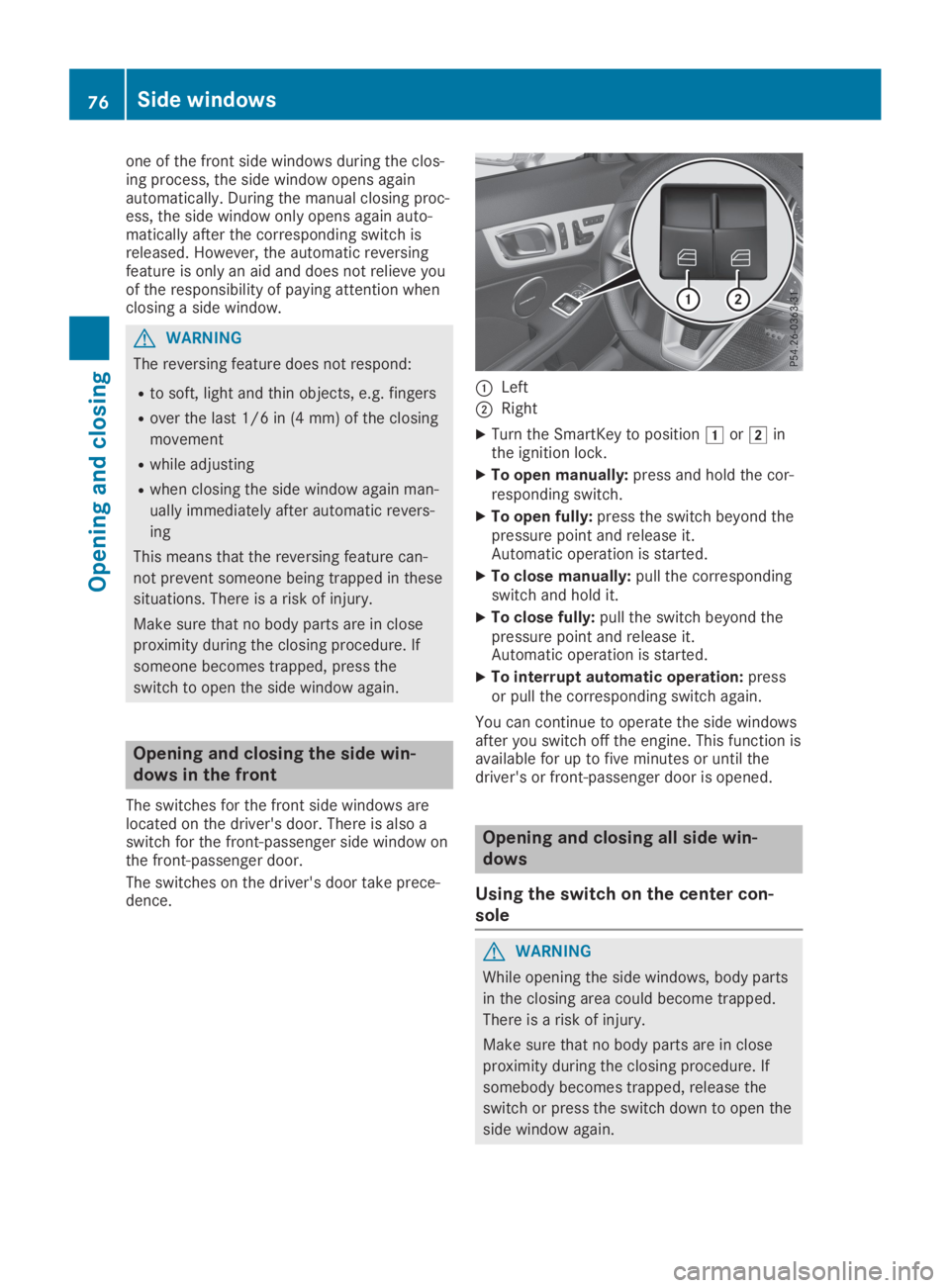
CLeft
DRight
XTurn the SmartKey to positionGorHinthe ignition lock.
XTo open manually:press and hold the cor-responding switch.
XTo open fully:press the switch beyond thepressure point and release it.Automatic operation is started.
XTo close manually:pull the correspondingswitch and hold it.
XTo close fully:pull the switch beyond thepressure point and release it.Automatic operation is started.
XTo interrupt automatic operation:pressor pull the corresponding switch again.
You can continue to operate the side windowsafter you switch off the engine. This function isavailable for up to five minutes or until thedriver's or front-passenger door is opened.
Opening and closing all side win-
dows
Using the switch on the center con-
sole
GWARNING
While opening the side windows, body parts
in the closing area could become trapped.
There is a risk of injury.
Make sure that no body parts are in close
proximity during the closing procedure. If
somebody becomes trapped, release the
switch or press the switch down to open the
side window again.
76Side windows
Opening and closing
Page 79 of 306
You can use the switch on the center consoleto close all side windows simultaneously.
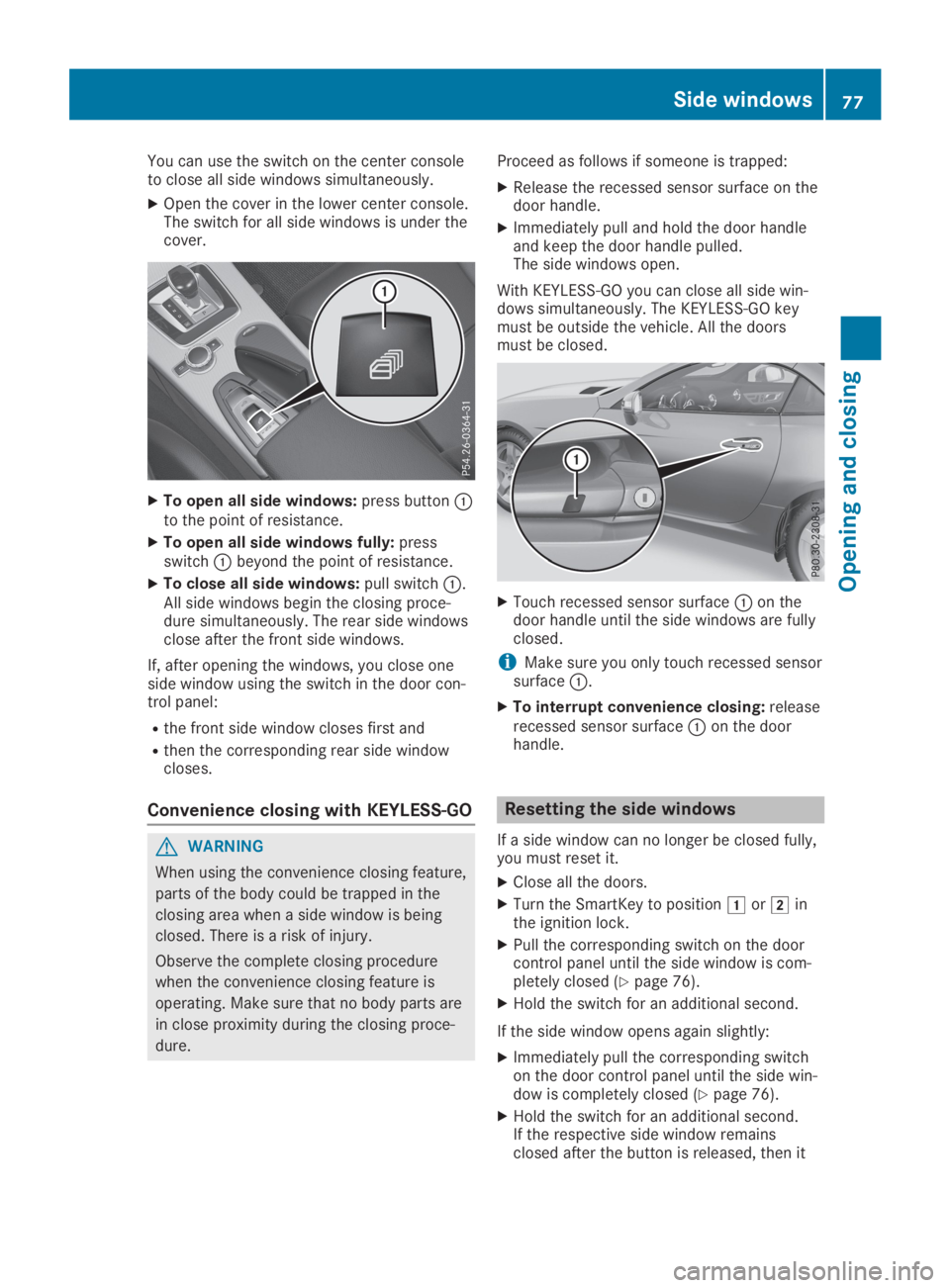
XOpen the cover in the lower center console.The switch for all side windows is under thecover.
XTo open all side windows:press buttonCto the point of resistance.
XTo open all side windows fully:pressswitchCbeyond the point of resistance.
XTo close all side windows:pull switchC.All side windows begin the closing proce-dure simultaneously. The rear side windowsclose after the front side windows.
If, after opening the windows, you close oneside window using the switch in the door con-trol panel:
Rthe front side window closes first and
Rthen the corresponding rear side windowcloses.
Convenience closing with KEYLESS-GO
GWARNING
When using the convenience closing feature,
parts of the body could be trapped in the
closing area when a side window is being
closed. There is a risk of injury.
Observe the complete closing procedure
when the convenience closing feature is
operating. Make sure that no body parts are
in close proximity during the closing proce-
dure.
Proceed as follows if someone is trapped:
XRelease the recessed sensor surface on thedoor handle.
XImmediately pull and hold the door handleand keep the door handle pulled.The side windows open.
With KEYLESS-GO you can close all side win-dows simultaneously. The KEYLESS-GO keymust be outside the vehicle. All the doorsmust be closed.
XTouch recessed sensor surfaceCon thedoor handle until the side windows are fullyclosed.
iMake sure you only touch recessed sensorsurfaceC.
XTo interrupt convenience closing:releaserecessed sensor surfaceCon the doorhandle.
Resetting the side windows
If a side window can no longer be closed fully,you must reset it.
XClose all the doors.
XTurn the SmartKey to positionGorHinthe ignition lock.
XPull the corresponding switch on the doorcontrol panel until the side window is com-pletely closed (Ypage 76).
XHold the switch for an additional second.
If the side window opens again slightly:
XImmediately pull the corresponding switchon the door control panel until the side win-dow is completely closed (Ypage 76).
XHold the switch for an additional second.If the respective side window remainsclosed after the button is released, then it
Side windows77
Opening and closing
Z
Page 80 of 306
has been set correctly. If this is not thecase, repeat the steps above.
Problems with the side windows
GWARNING
If you close a side window again immediately after it has been blocked or reset, the side win-
dow closes with increased or maximum force. The reversing feature is then not active. Parts of
the body could be trapped in the closing area in the process. This poses an increased risk of
injury or even fatal injury.
Make sure that no parts of the body are in the closing area. To stop the closing process,
release the switch or push the switch again to reopen the side window.
ProblemPossible causes/consequences andPPSolutions
A side window cannotbe closed because it isblocked by objects, e.g.leaves in the windowguide.
XRemove the objects.
XClose the side window.
A side window cannotbe closed and you can-not see the cause.
If a side window is obstructed during closing and reopens againslightly:
XImmediately after the window blocks, pull the correspondingswitch again until the side window has closed.The side window is closed with increased force.
If a side window is obstructed again during closing and reopensagain slightly:
XImmediately after the window blocks, pull the correspondingswitch again until the side window has closed.The side window is closed without the automatic reversing fea-ture.
The side windows can-not be opened or closedusing the convenienceopening/closing fea-ture.
The SmartKey battery is discharged or nearly discharged.
XCheck the SmartKey battery (Ypage 69) and replace it if neces-sary (Ypage 69).
Roof
Important safety notes
GWARNING
If you do not fully open/close the soft top,
the soft-top hydraulics depressurize after a
short time. This causes the soft top to lower
unexpectedly and may cause you or others
to be trapped. There is a risk of injury.
Always open or close the soft top com-
pletely.
GWARNING
Closing the roof manually is a complicated
and technically demanding procedure, which
requires a lot of strength. You or others can
become trapped. There is a risk of injury.
78Roof
Opening and closing
Page 94 of 306
or
Ryou press the Start/Stop button once onvehicles with KEYLESS-GO
When you close the driver's door with the igni-tion switched on, the steering wheel is alsoautomatically moved to the previously setposition.
The last position of the steering column isstored when you switch off the ignition orwhen you store the setting with the memoryfunction (Ypage 95).
Crash-responsive EASY-EXIT feature
If the crash-responsive EASY-EXIT feature istriggered in an accident, the steering columnwill move upwards when the driver's door isopened. This occurs irrespective of the posi-tion of the SmartKey in the ignition lock. Thismakes it easier to exit the vehicle and rescuethe occupants.
The crash-responsive EASY-EXIT feature is onlyoperational if the EASY-EXIT/ENTRY feature isactivated in the on-board computer(Ypage 178).
Mirrors
Inside rearview mirror
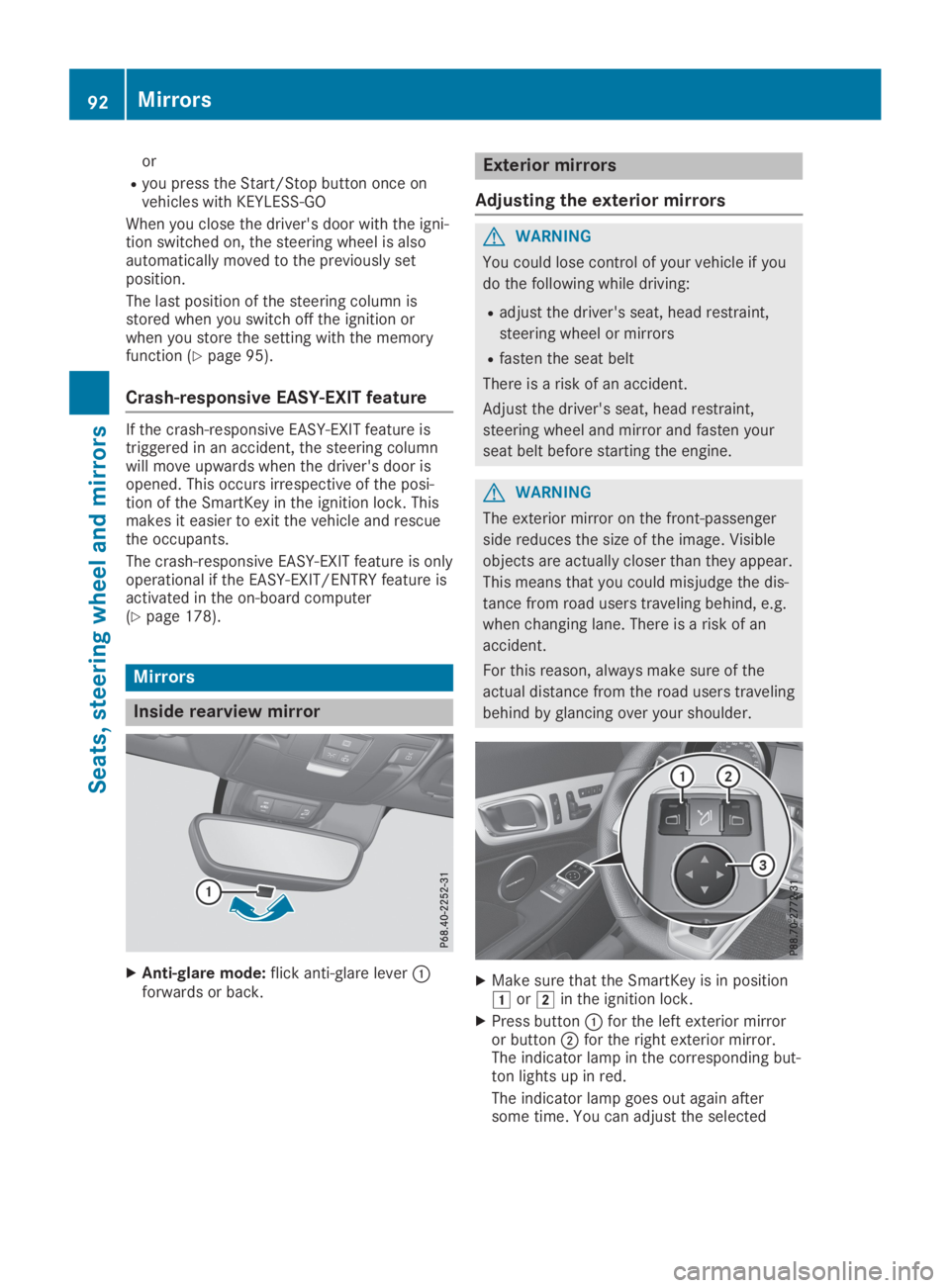
XAnti-glare mode:flick anti-glare leverCforwards or back.
Exterior mirrors
Adjusting the exterior mirrors
GWARNING
You could lose control of your vehicle if you
do the following while driving:
Radjust the driver's seat, head restraint,
steering wheel or mirrors
Rfasten the seat belt
There is a risk of an accident.
Adjust the driver's seat, head restraint,
steering wheel and mirror and fasten your
seat belt before starting the engine.
GWARNING
The exterior mirror on the front-passenger
side reduces the size of the image. Visible
objects are actually closer than they appear.
This means that you could misjudge the dis-
tance from road users traveling behind, e.g.
when changing lane. There is a risk of an
accident.
For this reason, always make sure of the
actual distance from the road users traveling
behind by glancing over your shoulder.
XMake sure that the SmartKey is in positionGorHin the ignition lock.
XPress buttonCfor the left exterior mirroror buttonDfor the right exterior mirror.The indicator lamp in the corresponding but-ton lights up in red.
The indicator lamp goes out again aftersome time. You can adjust the selected
92Mirrors
Seats, steering wheel and mirrors
Page 100 of 306
When the engine is running, the vehicle is sta-tionary and in bright ambient light: if you turnthe light switch to the`position, the day-time running lamps and parking lamps switchon.
If the engine is running and you turn the lightswitch toX, the manual settings take prec-edence over the daytime running lamps.
USA only:
The daytime running lamps improve the visibil-ity of your vehicle during the day. To do this,the daytime running lamps function must beswitched on using the on-board computer(Ypage 176).
If the engine is running and you turn the lightswitch to`orX, the manual settingstake precedence over the daytime runninglamps.
Low-beam headlamps
GWARNING
When the light switch is set toX, the
low-beam headlamps may not be switched
on automatically if there is fog, snow or
other causes of poor visibility due to the
weather conditions such as spray. There is a
risk of an accident.
In such situations, turn the light switch to
X.
Even if the light sensor does not detect that itis dark, the parking lamps and low-beam head-lamps switch on when the ignition is switchedon and the light switch is set to theXposi-tion. This is a particularly useful function in theevent of rain and fog.
XTo switch on the low-beam headlamps:turn the SmartKey to positionHin the igni-tion lock or start the engine.
XTurn the light switch toX.The greenXindicator lamp in the instru-ment cluster lights up.
Rear fog lamp
The rear fog lamp improves visibility of yourvehicle for the traffic behind in the event ofthick fog. Please take note of the country-spe-cific regulations for the use of rear fog lamps.
XTo switch on the rear fog lamp:turn theSmartKey to positionHin the ignition lockor start the engine.
XTurn the light switch toXorX.
XPress the^button.The yellow^indicator lamp in the instru-ment cluster lights up.
XTo switch off the rear fog lamp:press the^button.The yellow^indicator lamp in the instru-ment cluster goes out.
Parking lamps
!If the battery charge is very low, the park-ing lamps or standing lamps are automati-cally switched off to enable the next enginestart. Always park your vehicle safely and ina well lit area, in accordance with the rele-vant legal stipulations. Avoid using the`parking lamps over a period of severalhours. If possible, switch on the right-handdor left-handcstanding lamps.
XTo switch on:turn the light switch to`.The green`indicator lamp in the instru-ment cluster lights up.
Standing lamps
Switching on the standing lamps ensures thecorresponding side of the vehicle is illumina-ted.
XTo switch on the standing lamps:theSmartKey is not in the ignition lock or it is inposition