service MERCEDES-BENZ SLC 2020 Owner's Manual
[x] Cancel search | Manufacturer: MERCEDES-BENZ, Model Year: 2020, Model line: SLC, Model: MERCEDES-BENZ SLC 2020Pages: 310, PDF Size: 16.05 MB
Page 228 of 310
Stowage
areas Stowage
spaces
Import antsafety notes G
WARNING
If object sint he passenger compartmen tare
stowed incorrec tly,they canslide orbe
thrown around andhitvehicle occupants. In
addition, cupholders, openstowage spaces
and mobile phonebrackets cannotalways
retain allobject sthey cont ain.There isa
risk ofinjury, particularly inthe event ofsud-
den braking oras udden change indirection.
R Always stowobject ssothat they cannot
be thrown around insuch situations.
R Always makesurethatobject sdon otpro-
trude fromstowage spaces,parcelnetsor
stowage nets.
R Close thelockable stowagespacesbefore
startin gajourney.
R Always stowandsecure heavy,hard,poin-
ted, sharp-edged, fragileorbulky object s
in the trunk .
Glove box X
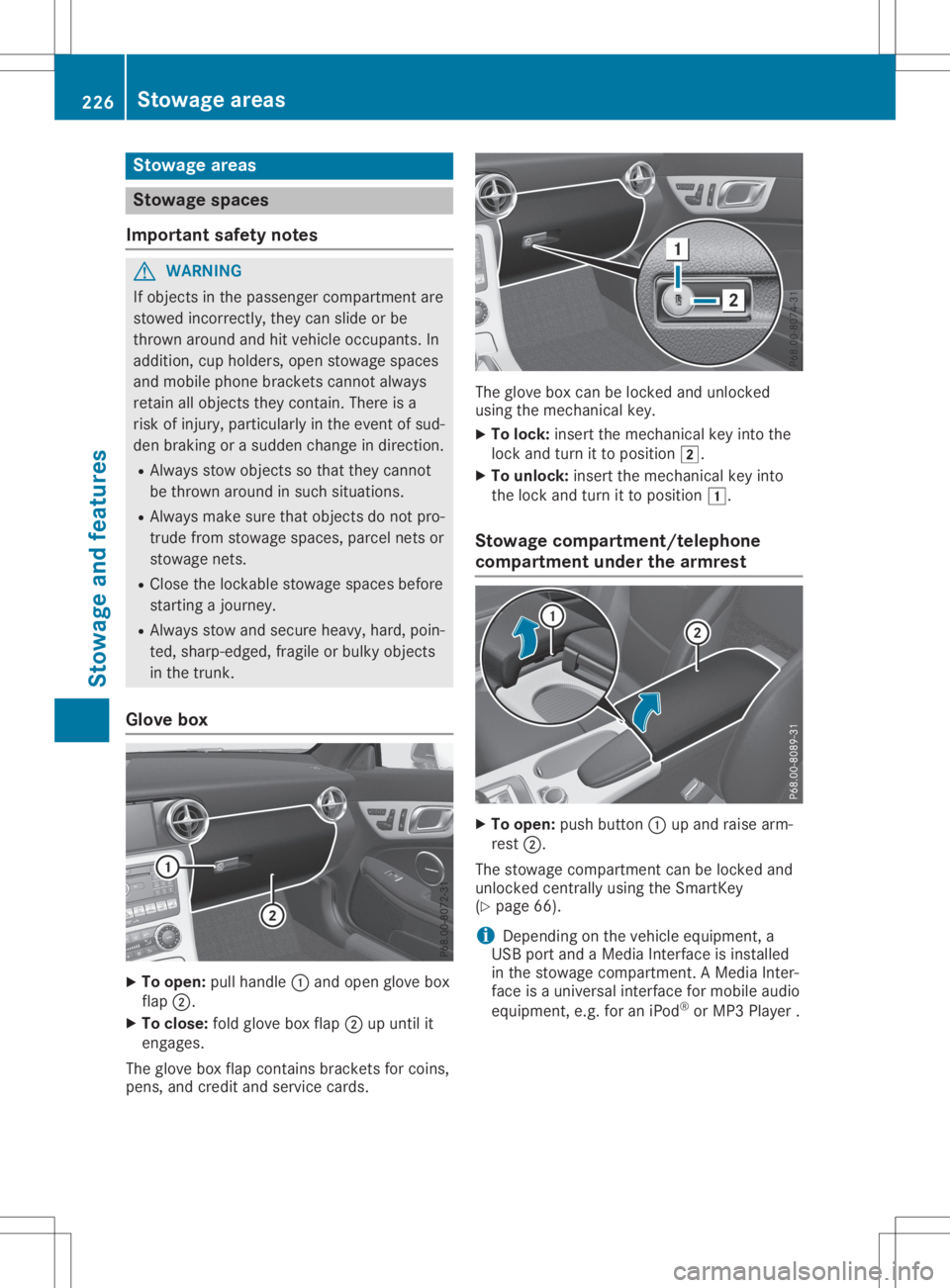
To open: pullhandle 0043and open glove box
flap 0044.
X To close :fold glove boxflap 0044upuntil it
engages.
The glove boxflap cont ains brackets forcoins,
pens, andcredit andservice cards. The
glove boxcanbelocked andunlocked
using themechanical key.
X To lock: insert themechanical keyinto the
lock andturn itto position 0048.
X To unlock: insertthemechanical keyinto
the lock andturn itto position 0047.
Stowage compartment/telephone
compar tment under thearm rest X
To open: pushbutton 0043upand raise arm-
rest 0044.
The stowage compartmen tcan be locked and
unlocked centrally using theSmartK ey
(Y page 66).
i Depending
onthe vehicle equipment, a
USB portandaMedia Interface isinstalled
in the stowage compartmen t.AM edia Inter-
face isau niversal interfaceformobile audio
equipment, e.g.foraniPod ®
or MP3 Playe r. 226
Stowage
areasStowage andfeatu res
Page 233 of 310
Socket
inthe front center console X
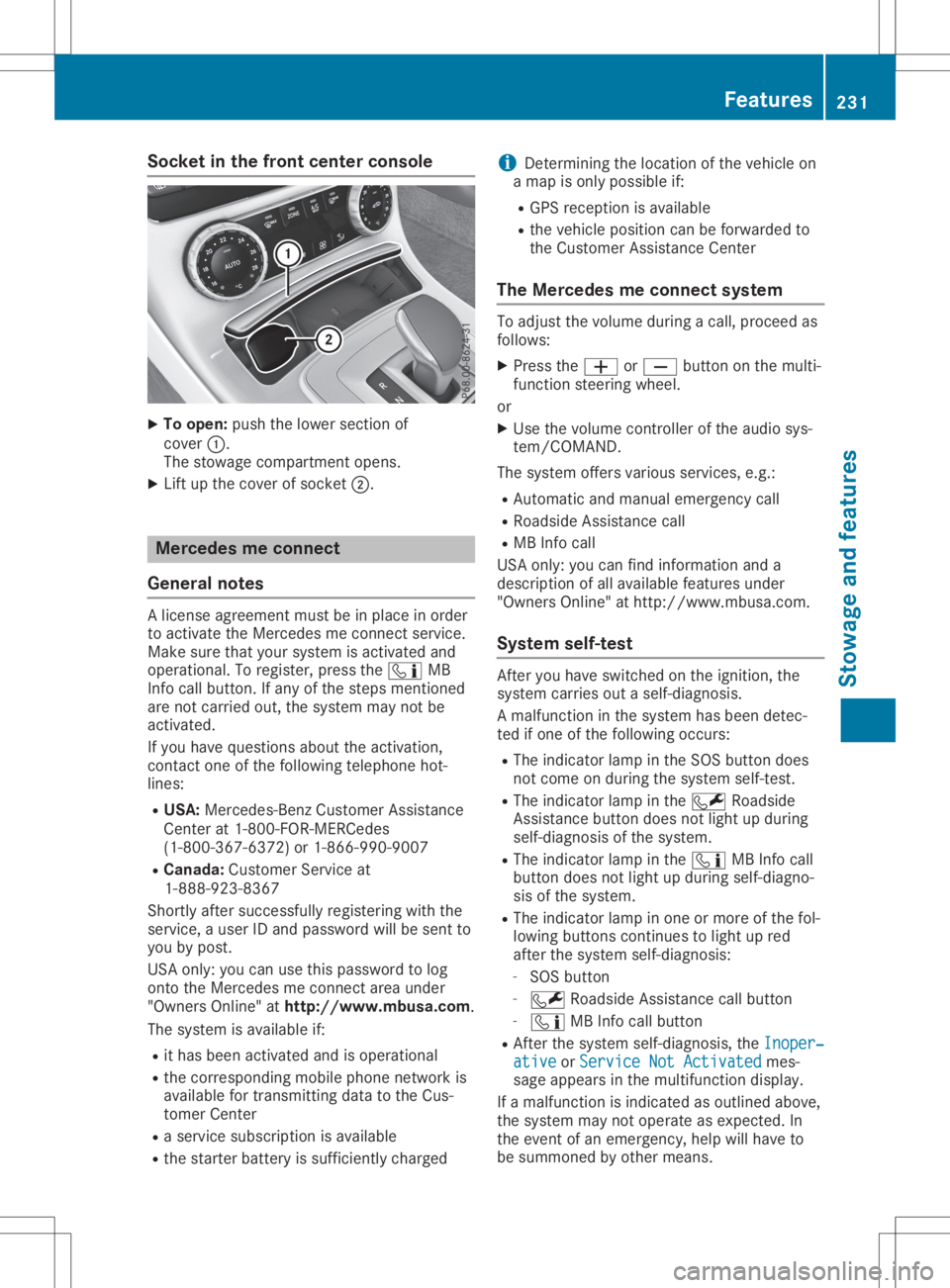
To open: pushthelower section of
cover 0043.
The stowage compartmen topens.
X Lift upthe cover ofsocket 0044. Mercedes
meconne ct
General notes Al
icense agreement mustbeinplace inorder
to activate theMercedes meconn ectservice.
Make surethatyour system isactivated and
operational. Toregister, pressthe00D9 MB
Info callbutton. Ifany ofthe steps mentioned
are not carried out,thesystem maynotbe
activated.
If you have questions abouttheactivation,
cont actone ofthe following telephone hot-
lines:
R USA: Mercedes-B enzCustomer Assistance
Center at1-80 0-FOR-MERCedes
(1-80 0-367-6372)or1-86 6-990-9007
R Canada: Customer Serviceat
1-88 8-92 3-8367
Short lyafter successfully registeringwiththe
service, auser IDand password willbesent to
you bypost.
USA only: youcan usethis password tolog
onto theMercedes meconn ectarea under
"Owners Online"athtt <0053001D00120012005A005A005A001100500045005800560044001100460052
0050>.
The system isavaila bleif:
R ithas been activated andisoperational
R the correspondin gmobile phone network is
availa blefortransm ittingdatatothe Cus-
tomer Center
R as ervice subscription isavaila ble
R the starter battery issufficiently charged i
Determ iningthelocation ofthe vehicle on
am apisonly possible if:
R GPS reception isavaila ble
R the vehicle position canbeforwarded to
the Customer AssistanceCenter
The Mercedes meconne ctsystem To
adjust thevolume duringacall, proceed as
follows:
X Press the0081 or0082 button onthe multi-
funct ionsteering wheel.
or X Use thevolume controller ofthe audio sys-
tem/COMA ND.
The system offersvarious services, e.g.:
R Automatic andmanual emergency call
R Roadsid eAssistanc ecall
R MB Info call
USA only: youcan find information anda
description ofall availa blefeatures under
"Owners Online"athttp: //www.mbusa.com.
System self-test Aft
eryou have switched onthe ignition, the
system carriesoutaself-diagnosis.
Am alfunction inthe system hasbeen detec-
ted ifone ofthe following occurs:
R The indicator lampinthe SOS button does
not come onduring thesystem self-test .
R The indicator lampinthe 0052 Roadsid e
Assistanc ebutton doesnotlight upduring
self-diagnosis ofthe system.
R The indicator lampinthe 00D9 MBInfo call
button doesnotlight upduring self-diagno-
sis ofthe system.
R The indicator lampinone ormore ofthe fol-
lowing buttons continues tolight upred
after thesystem self-diagnosis:
- SOS button
- 0052 Roadsid eAssistanc ecallbutton
- 00D9 MBInfo callbutton
R Aft erthe system self-diagnosis, theInoper‐ Inoper‐
ative ative
orService NotActivated Service
NotActivated mes-
sage appears inthe multifunct iondisplay .
If am alfunction isindicated asoutlined above,
the system maynotoperate asexpected. In
the event ofan emergency, helpwillhave to
be summoned byother means. Features
231Stowageandfeatu res Z
Page 234 of 310
Have
thesystem checked atthe near est
Merce des-Benz ServiceCenter orcontact the
foll owi ngservi cehotli nes:
R USA :Merce des-Benz Customer Assistance
Ce nter at1-800-FOR-M ERCedes
(1-800-367-6372) or1-866-990-9007
R Can ada: Customer Serviceat
1-888-923-8367
Eme rgen cycal l Importan
tsafe tynote s G
WARNI
NG
It can bedangero ustorema ininthe vehi cle,
even ifyo uh avep res sed theSOS button in
an emer gency if:
R yous ee smoke insideorouts ideofthe
vehi cle, e.g. ifthere isaf ire after anacci -
dent
R the vehi cleison adangero ussectio nof
roa d
R the vehi cleisnot visible orcannot easily
be see nbyother roadusers, particu larly
whe ndarko rinp oorvisibil ity condi tions
The reisar isk ofan acci dent andinjury .
Lea vethe vehi cleimme diately inthis orsim-
il ar situ atio nsassoon asitis safe todo so.
Move toas afe loca tion along with other
vehi cleoccup ants.Insuch situatio ns,secu re
the vehi cleinaccord ancewith natio nalregu -
la tions, e.g. with aw arning triangle .
Al icense agreeme ntmus tbeinp lace inorde r
to activ atethe Merce desmeconnect service.
Make surethat your sys tem isactiv ated and
ope rational .Tor egi ster, pressthe 00D9 MB
Info callbutton. Ifany ofthe steps mentio ned
are not carri edout, thesystem may notbe
activ ated.
If yo uh aveq uestio nsabout theactiv ation,
contact oneofthe followi ngtele pho nehot-
li nes:
R USA :Merce des-Benz Customer Assistance
Ce nter at1-800-FOR-M ERCedes
(1-800-367-6372) or1-866-990-9007
R Can ada: Customer Serviceat
1-888-923-8367 Gen
eral note s
An emer gency callisd ialed automati callyifan
ai rb ag orEmerge ncyTensi oning Device istrig-
gere d.
i You
cannot endanautomati callytrigg ered
emer gency callyou rself.
An emer gency callcan also be initi ated man-
ua lly.
As soon asthe emer gency callhas bee niniti -
ated ,the indi cator lamp inthe SOS button
fla shes .The mul tifunction displa yshow sthe
Conne ctingCall Conne
ctingCall mess age.
The audio outp utismuted .
Once theconnectio nhasbee nm ade,the
Call Connected Call
Connectedmess ageappea rsinthe mul-
tifu nction displa y.
All imp ortant informationonthe emer gency is
transmi tted,forexam ple:
R Cu rrent location ofthe vehi cle(asd ete r-
mined bythe GPS system)
R Vehi cleidentifica tionnumb er
R Informa tiononthe seve rityofthe acci dent
Shortl yafter theemer gency callhas bee niniti -
ated ,avoice connectio nisa utomati cally
esta blished betweentheCustomer Assistance
Ce nter andthevehi cleoccup ants.
R Ifthe vehi cleoccup antsareresp onsiv e,the
Merce des-Benz Customer Assistance Center
attemp tsto get more inform ationonthe
emer gency .
R Ifthere isno resp onse fromthevehi cle
occup ants,anamb ulance isimme diately
sent tothe vehi cle.
If no voice connectio ncan be esta blished to
the Merce des-Benz Customer Assistance Cen-
ter, thesystem hasbeenunable toiniti ate an
emer gency call.
Thi scan occur ,for exam ple,ift he releva nt
mobi lepho nenetwor kisn otava ilab le. The
indi cator lamp inthe SOS button flashes con-
tinuo usly.
The Call Failed Call
Failedmess ageappea rsinthe
mul tifunction displa yand mus tbec onfirm ed.
In this case ,sum mon assista nce byother
mea ns. 232
Fe
aturesStow ageand features
Page 235 of 310
Making
anemerge ncycall X
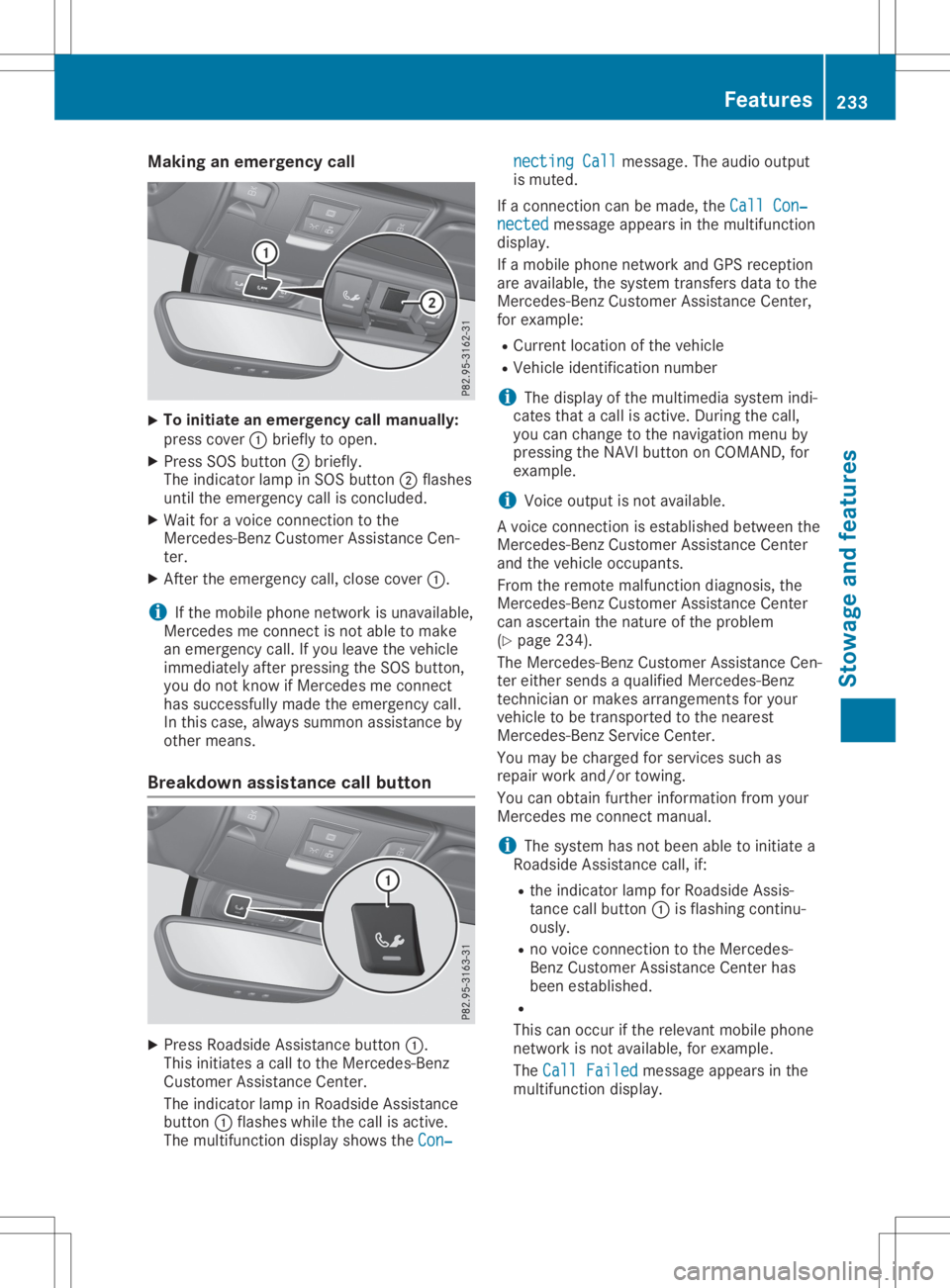
To
initiate anemerge ncycallmanually:
press cover 0043brie flytoopen.
X Press SOSbutton 0044brie fly.
The indica torlamp inSOS button 0044flas hes
until theemerge ncycallisconclude d.
X Wai tfor av oice connection tothe
Mercede s-BenzCustomer Assistance Cen-
ter.
X After theemerge ncycall,close cover 0043.
i If
the mobil ephone network isunava ilable ,
Mercede smeconnect isnot abletom ake
an emerge ncycall.Ify ou leavethe vehicl e
immed iatelyafter pressi ngthe SOS button,
you donot know ifMercede smeconnect
has successfu llymade theemerge ncycall.
In this case, alwayss ummon assistance by
other means.
Breakdown assistance callbutton X
Press Roadsid eAssistance button0043.
This initia tesacalltothe Mercede s-Benz
Cu stomer Assistance Center.
The indica torlamp inRoa dsid eAssistance
button 0043flas hes whilethe call isactive.
The multi function displayshow sthe Con‐ Con‐necting
Call necting
Callmessa ge.The audio outpu t
is muted.
If ac onnection canbemade ,the Call Con‐ Call
Con‐
nected nected
messageapp ears inthe multi function
disp lay.
If am obilephone network andGPS receptio n
are available ,the system transfers datatothe
Mercede s-BenzCustomer Assistance Center,
for exampl e:
R Cu rrent location ofthe vehicl e
R Vehicl eide ntificatio nnumber
i The
displayofthe multi mediasystem indi-
cates thatacallisactive. During thecall,
you can change tothe naviga tionmenu by
pressi ngthe NAVI button onCOMAND, for
exampl e.
i Voice
outputisn otava ilable .
Av oice connection isestabl ishedbetwe enthe
Mercede s-BenzCustomer Assistance Center
and thevehicl eoccupa nts.
From theremote malfunction diagnosis, the
Mercede s-BenzCustomer Assistance Center
can ascerta inthe nature ofthe probl em
(Y pag e234) .
The Mercede s-BenzCustomer Assistance Cen-
ter either sends aqualified Mercede s-Benz
technician ormakes arrangements foryou r
vehicl etob etransported tothe neares t
Mercede s-BenzService Center.
You may becharge dfor services suchas
repa irwork and/or towing.
You canobtai nfurther informati onfrom your
Mercede smeconnect manual.
i The system hasnotbeen abletoinitia tea
Roa dsid eAssistance call,if:
R the indica torlamp forRoa dsid eAssis-
tance callbutton 0043isflas hing continu-
ousl y.
R no voice connection tothe Mercede s-
Benz Customer Assistance Centerhas
been establ ished.
R
This canoccur ifthe relev antmobil ephone
network isnot available ,for exampl e.
The Call Failed Call
Failed messageapp ears inthe
multi function display. Fe
atures
233Stowageand features Z
Page 236 of 310
X
To endac all:pre ssthe 0076 button onthe
mu ltifunc tions tee ring wheel.
or X Pre ssthe corr espond ingmultimed iasystem
bu tton forend ingaphone call.
MB Info cal lbutto n X
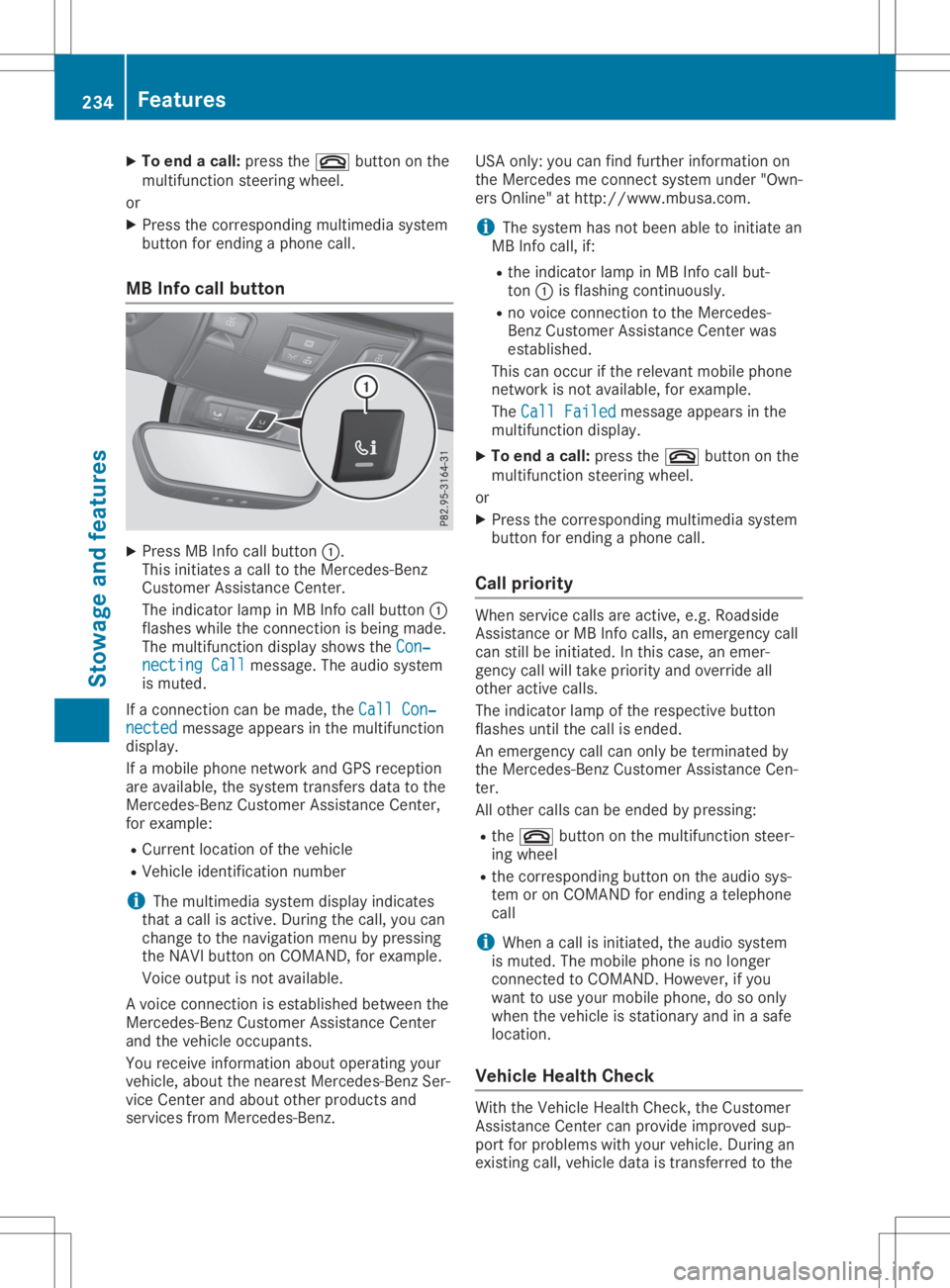
Pre ssMB Info callbutton 0043.
Thi sinitia tes acallt ot he Mer cedes-Be nz
Cu stom erAssi stance Center.
The indicator lamp inMB Info callbutton 0043
fla she swhile the conne ctionisb eing mad e.
The multifunc tiond ispl ay sho wsthe Con‐ Con
‐
nec tingCall nec
tingCallmes sage. The audios ystem
is mu ted .
If ac onne ctioncan be made,the Cal lCon‐ Cal
lCon‐
nec ted nec
ted message appe ars inthe multifunc tion
di spl ay.
If am obilep hone netw orkand GPSrece ption
are availab le,t he system transfersdata to the
Mer cedes-B enzCustom erAssi stance Center,
for exa mpl e:
R Cu rre ntlocati onofthe vehicle
R Veh iclei de nti fica tionn um ber
i The
multimed iasystem displ ayind icates
tha tac allisa ctive. Duri ngthe call,yo uc an
cha nge tothe navi gatio nm enu bypre ssing
the NAVI button onCOMAND, forexa mpl e.
Voi ceoutpu tisn otava ilab le.
Av oice conne ctionise sta blished betwe enthe
Mer cedes-B enzCustom erAssi stance Center
and thevehicleo ccu pants.
Yo ur ece iveinfo rma tiona bout opera ting your
veh icle, ab ou tthe nea restM erced es-Be nzSer-
vice Center andabou to the rprodu cts and
ser vice sfrom Mercedes-Be nz. USA
only:youc an find further informa tiono n
the Mer cedesme conne ctsystem under"Own-
ers Online"athttp:// www.mb usa.co m.
i Thes ystem hasn otbeen ableto initia te an
MB Info call,if:
R the indicator lamp inMB Info callbut-
ton 0043isfla shi ng conti nuously.
R no voice conne ctiontot he Mer cedes-
Benz Custom erAssi stance Center was
esta blished .
Thi scan occu rift he releva ntmob ilep hone
netw orkisnot availab le,f or exa mpl e.
The CallFailed Cal
lFailed message appe ars inthe
mu ltifunc tiond ispl ay .
X To endac all:pre ssthe 0076 button onthe
mu ltifunc tions tee ring wheel.
or X Pre ssthe corr espond ingmultimed iasystem
bu tton forend ingaphone call.
Cal lprio rity Whe
nservice callsare active,e.g.Roadside
Assi stance orMB Info calls,a ne me rge ncy call
can stillbeinitia ted .Int hisc ase, an eme r-
genc ycallw illt ake priorityand override all
othe ractive calls.
The indicator lamp ofthe respective button
fla she suntilthe callise nded.
An eme rgency callcan onlybetermi natedby
the Mer cedes-B enzCustom erAssi stance Cen-
ter.
All othe rcalls can beend edbypre ssing:
R the 0076 button onthe multifunc tions tee r-
ing wheel
R the corr espond ingbutton onthe audios ys-
tem oron COMAND forend ingatelep hone
cal l
i Whe
nac allisi nitia ted ,the audios ystem
is mu ted .The mob ilep hone isno longer
conne ctedtoCO MAND. However,ifyo u
wa ntto usey ourm obilep hone, dosoonl y
wh en the vehiclei ss tatio nary andinas afe
lo cati on.
Vehi cleH ealth Che ck Wi
th the VehicleH ealth Check, theCustom er
Assi stance Center canprovideimp rove dsup-
po rtfor problems with your veh icle. Duri ngan
exi sting call,veh icled atai st rans ferredtothe 23
4 Fe
aturesSto wag eand featur es
Page 237 of 310
Cust
omerAssist anc eCenter. The customer
ser vicerepres entat ive can usether eceive d
dat atod ecide what kindo fassis tanceis
req uired .You are then ,for example ,guided to
th en eares tM erced es-Ben zServic eC entero r
ar ecove ryveh icle iscalle d.
If veh icle dataneeds tobe trans ferred durin g
an MB Info call oraR oadsi deAssist anc ecall,
th is isini tiat edbytheC ustome rAssist anc e
Cen ter. You willsee theRoa dsideAssis‐ Roa
dsideAssis‐
tan ceConnected tan
ceConnected message intheC OMA ND
displ ay.Ifth eV ehicle Heal thChec kcan be
st art ed, theReq uestf orveh icled iagno ‐ Req
uestf orveh icled iagno ‐
sis received. Startvehicled iagno ‐ sis
received. Startvehicled iagno ‐
sis ? sis
?mes sage appear sint he displ ay.
X Con firmt hemes sage withYes Yes
.
X When theVeh icleD iagno sis:P lease Veh
icleD iagno sis:P lease
sta rtignition. sta
rtignition. message appear s,tur n
th eS martKey toposi tion0048 inthei gn ition
loc k(Ypage 118).
X When thePle ase follow theinstruc‐ Ple
ase follow theinstruc‐
tio nsreceivedbyphoneand move tio
nsreceivedbyphoneand move
you rv ehicl et oas afep ositi on you
rv ehicl et oas afep ositi onmes -
sage appear s,foll ow thec ustomer service
rep resentat ive' sins truct ions.
The message inthed ispl aydisapp ears.
If you selectCan cel Can
cel theV ehicle Heal th
Chec kisc ancel ed comple tely.
The vehicle oper atingstate check begin s.
You willsee theVeh icled iagno sis Veh
icled iagno sis
act ivated. act
ivated.mes sage.
When thec heck isco mple ted, theSen d Sen
d
veh icled iagno sticsdata( Voice con‐ veh
icled iagno sti csdata( Voice con‐
nec tionm aybe interruptedduring nec
tionm aybe interruptedduring
dat at ransf er) dat
at ransf er) message appear s.The vehi-
cle datacan nowb esenttot he Cust omer
As sist anc eCenter.
X Pre ssOK OK
toconfirm them essage.
The voiceconnec tionw itht he Cust omer
As sist anc eCenterist ermi nat ed.
You willsee theVeh icleD iagno sis: Veh
icleD iagno sis:
Tra nsferring data... Tra
nsferring data...mes sage.
The vehicle dataiss enttot he Cust omer
As sist anc eCenter.
De pen dingo nw hat thec ustomer servicerep-
res entat ive agre edwithyou, thev oic ec onnec -
tio nisr e-est ablish edafterthet rans fer isco m-
plet e.Ifne ces sary, youwillbecontact edata
late rtim eb yanother mean s,e.g .bye -mail or
phon e.
An other function oftheV ehicle Heal thChec k
is thet rans fer ofser viced atat ot he Cust omer As
sist anc eCenter. Ifas ervic eiso verdue, the
COMA NDdispl aysho wsam essage about vari-
ous spec ialoffers atyour workshop.
US Ao nly: this inf orm ationcan also becalle d
up unde r"Own ersOnline" athttp :/ /
www.m busa.com.
In fo rm atio nonthe dat astoredi nt he veh icle
(Y page 28).
In for mat iononRoadsid eAssist anc e
(Y page 25). Ga
rage door opener
Gener alnot es The
Hom eLink®
garag edoor open erintegr ated
in ther ear -view mirror allows youtooper ate
up tothree differen tdoor and gatesyst ems .
Use thei ntegr atedgarag edoor open eronlyon
garag edoor sthat:
R have safetystop and revers efeat ures and
R meet curren tU.S.fede ralsafe tystandar ds
On ce prog ramed,thei ntegr atedgarag edoor
open erinther ear -view mirror will assum ethe
fun ction oftheg arag edoor syst em'srem ote
con trol. Please alsoread theo per atin ginstruc-
tio ns for theg arag edoor syst em.
When programmingag aragedoor open er,
park thev ehicle outside theg arag e.Do not
run thee ngine while programming.
Cert aingarag edoor drivesare incompat ible
with thei ntegr atedgarag edoor open er.Ifyou
have difficult yprog ram ingthei ntegr ated
garag edoor open er,con tactana uth oriz ed
Mer cedes-Ben zCent er.
Alt ern ativ ely, you can callthef ollowin gtele-
phon eassis tanceser vices:
R USA: Mercedes-Ben zCust ome rAssist anc e
Cent erat1-80 0-FO R-M ERCed es
R Cana da:Cust omerServic ea t
1- 80 0-38 7-01 00
R Hom eLink®
hot line 1-80 0-35 5-35 15 (free of
ch arge )
Mor einform ationonH omeLin k®
and/ orcom -
pat ible prod uctsisa lso availabl eonline at
ht tp :/ /www. homelink.com.
Not eson thed eclarat ionofcon formit y
(Y page 27).
US A:FCC ID:C B2HMI HL4
Canada: IC:279B -HMIH L4 Feat
ures
235Stowage andfeatures Z
Page 243 of 310
Engine
compartm ent Hood
Imp ortant safety notes G
WAR
NING
If th eh ood isunlat ched, itmay open up
when thev ehicle isin mot ionand blockyour
view. Thereisar iskofan acc iden t.
Nev erunlat chtheh ood while driving.Before
ever ytrip, ens ure that theh ood isloc ked. G
WAR
NING
When openingand closingthe hood ,itm ay
sudde nlyfall intot he closed posit ion.Ther e
is ar isk ofinjury topers onsw ithinran geof
mov emen tofthe hood .
Open andclosetheh ood onlywhen noone
is with inits ran geofmov emen t. G
WAR
NING
Open ingtheh ood when thee ngine isove r-
heat edorwhen there isaf irei nt he eng ine
com partmen tcoul de xpose you tohot gases
or other servicep roduct s.Ther eisar iskof
inj ury.
Let anove rheatedengine coo ldown before
open ingtheh ood .Ift he re isaf irei nt he
eng inecom partmen t,ke ep theh ood closed
and contactthe fired epar tment . G
WAR
NING
The enginecom partmen tcontain smoving
com ponents.Cert aincom ponents,suc has
th er adiat orfan ,maycon tinue torun orstart
again sudde nlywhen thei gn ition isoff .
Ther eisar iskofinjury.
If you needtod oanywork inside thee ngine
com partmen t:
R swit choff thei gn ition
R nev erreac hintot he area wherethere isa
risk ofdang erfrom mov ingcom ponents,
suc hasthe fan rotatio narea R
rem ove jewelry andwatc hes
R ke ep items ofclo thing and hair, forexam -
ple, away from mov ingpart s
To ens ure thef low offresh airthroug hthe air
ven tsint ot he veh icle interio r,please observe
th ef ollowin gnotes :(Ypage 115)
Open ingtheh ood G
WAR
NING
Cert aincom ponentsint he eng inecom part-
men t,suc hasthe eng ine,radiat orand parts
of thee xhaust system, canbecome very
hot .Workin gint he eng inecom partmen t
pose sariskofinjury.
Wher eposs ible, letthee ngine coo ldown
and touch onlythec om pon entsdesc ribe din
th ef ollowin g. G
WAR
NING
When theh ood isopen andthew indshie ld
wiper sareset inmot ion,you can beinjured
by thew iper linkage. Thereisar iskofinjury.
Always switchoff thew indshie ldwiper sand
th ei gn ition befo reopen ingtheh ood .
! Mak
esure that thew indshie ldwiper sare
no tfold ed away from thew indshie ld.You
coul dotherwise damag ethe wind shieldwip-
ers ortheh ood . X
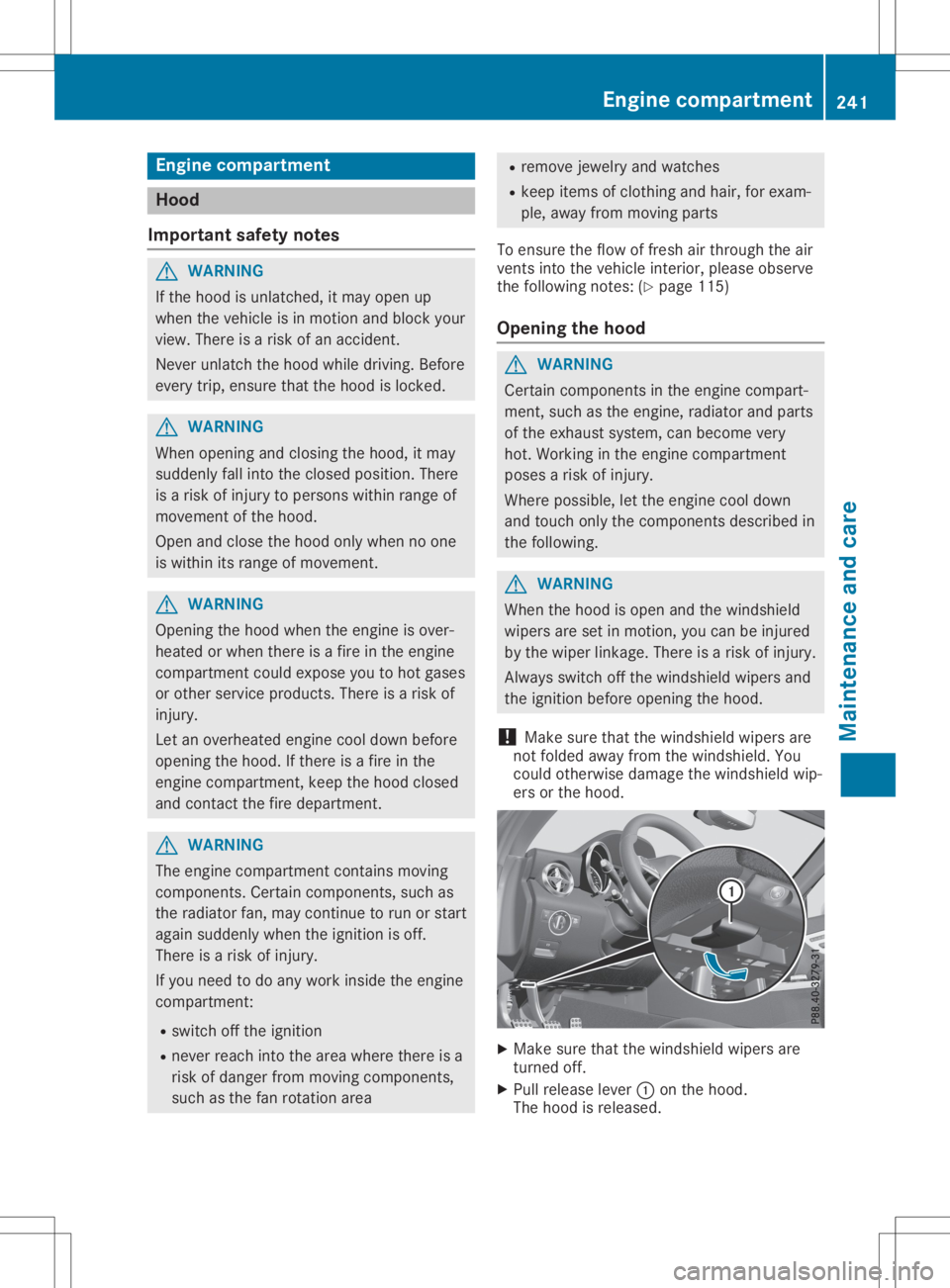
Mak esure that thew indshie ldwiper sare
tur ned off.
X Pull release lever0043 ontheh ood .
The hood isrele ased. Engine
compartm ent
241Maintenance andcare Z
Page 245 of 310
G
WARNING
If engine oilcomes intocontact withhot
components inthe engine compartment, it
may ignite. Thereisar isk offire and injury .
Make surethatengine oilisnot spilled next
to the filler neck. Letthe engine cooldown
and thoroug hlyclea nthe engine oiloff the
components beforestarting theengine. H
Envi
ronmental note
When addingoil,take care nottospil lany. If
oil enters thesoil orwate rways,itis harmfu l
to the environment.
! Use
only engine oilsa nd oilfilters thatare
app roved forvehicl eswith aservice system.
Al ist ofthe engine oilsa nd oilfilters that
have been tested andapproved inaccord-
ance withMercede s-BenzSpecifications for
Service Productsisava ilable atany author-
ized Mercede s-BenzCenter.
The followi ngcaus eengine failure ordam-
age tothe exhau stsystem:
R Use ofengine oilsa nd oilfilters thathave
not been express lyapp roved forthe ser-
vice system
R Rep lace ment ofengine oiland oilfilter
after thereplacement intervalspecified
by the service system hasexpire d
R Use ofengine oiladd itives
! Do
not add toomuch oil.Ift he oilleve lis
abo vethe "ma x"mark onthe dipstick, too
much oilhas been added. This canleadto
dama getothe engine orthe catal yticcon-
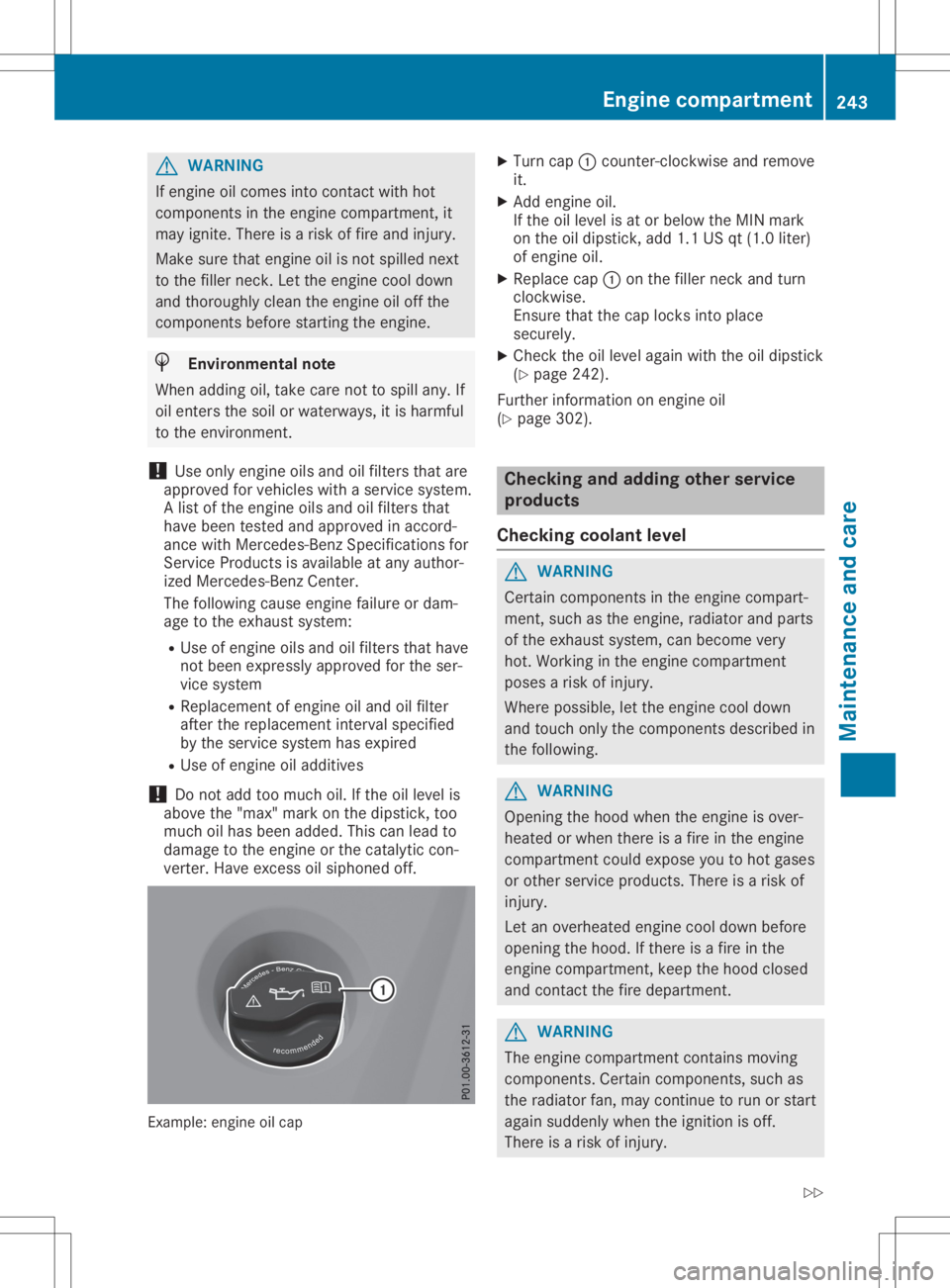
verter. Haveexcess oilsiph oned off. Example
:engine oilcap X
Turn cap0043counter-clockwi seand remove
it.
X Add engine oil.
If the oilleve lisa torb elow the MIN mark
on the oildip stick, add1.1USqt(1.0 liter)
of engine oil.
X Rep lace cap0043onthe filler neck andturn
clockwis e.
Ensure thatthecap locks intoplace
secure ly.
X Che ckthe oilleve laga in with theoildip stick
(Y pag e242) .
Further informati ononengine oil
(Y pag e302) . Che
ckin gand adding otherservice
products
Che ckin gcoolan tlev el G
WARNING
Certa incomponents inthe engine compart-
ment, suchasthe engine, radiator andparts
of the exhau stsystem, canbecome very
hot. Working inthe engine compartment
poses arisk ofinjury .
Where possible,let the engine cooldown
and touch onlythecomponents describedin
the followi ng. G
WARNING
Opening thehood when theengine isover-
heate dorwhen there isaf ire inthe engine
compartment couldexpose youtohot gase s
or other service products.There isar isk of
injury .
Let anoverhe atedengine cooldownbefore
openi ngthe hood. Ifthere isaf ire inthe
engine compartment, keepthehood closed
and contact thefire depa rtment. G
WARNING
The engine compartment containsmoving
components. Certaincomponents, suchas
the radiator fan,may continue torun orstart
aga insud denly whentheignitio niso ff.
There isar isk ofinjury . Eng
inecompar tment
243Mainten anceandcare
Z
Page 246 of 310
If
you need todo any work inside theengine
compartment:
R switch offthe ignition
R never reach intothearea where thereisa
risk ofdanger frommoving components,
such asthe fanrotation area
R remove jewelryandwatches
R keep items ofclothing andhair, forexam-
ple, awayfrom moving parts G
WARNING
The cooling systemispressu rized,particu-
larl yw hen themotor iswarm. Ifyou open
the cap, youcould bescalde difh ot coolant
spray sout. There isar isk ofinjury.
Let the engine cooldown before youopen
the cap. Wear protective glovesandprotec-
tive eyew earwhen opening. Openthecap
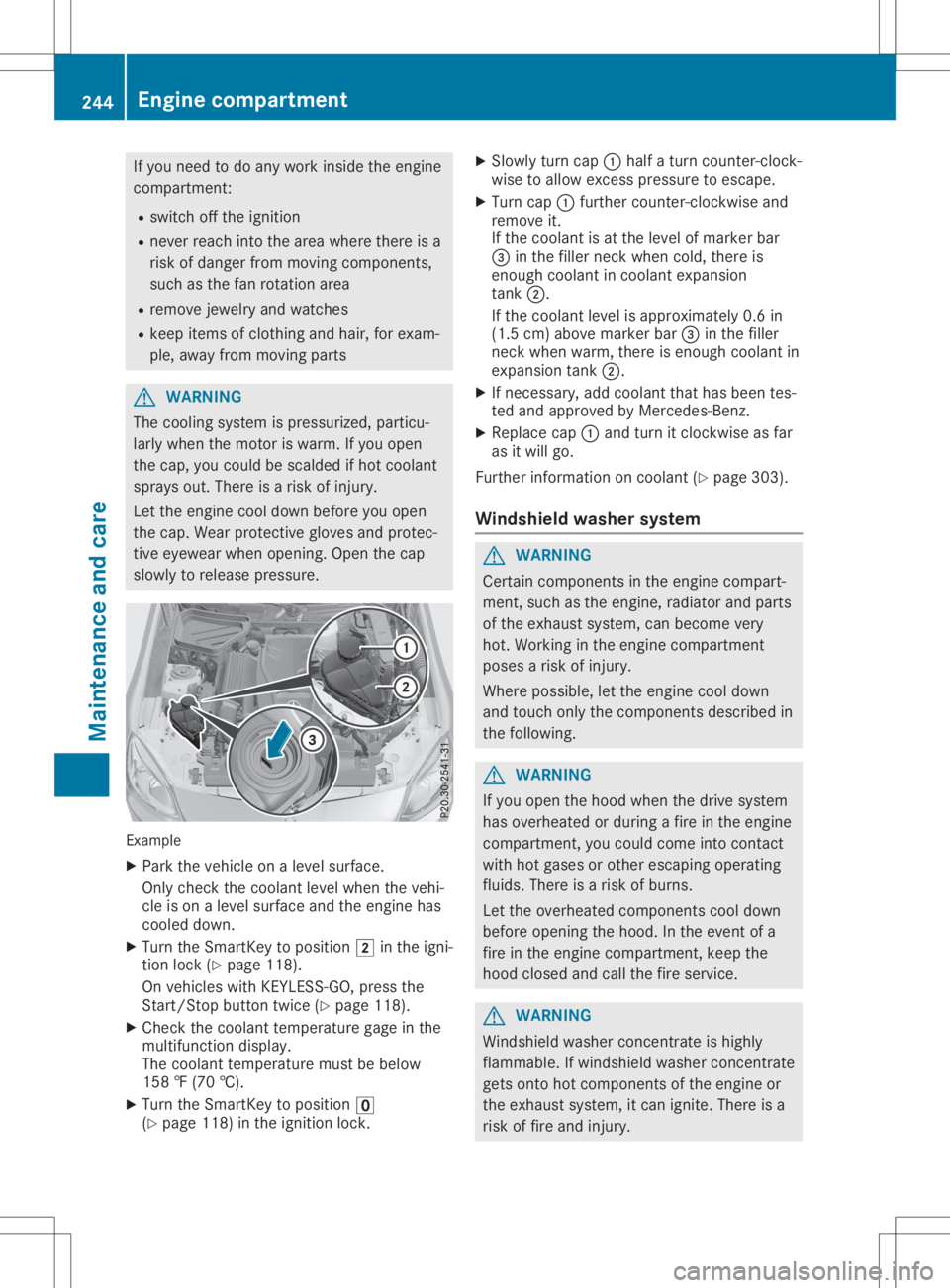
slow lyto relea sepressu re. Example
X Park thevehicle onalevel surface.
Only check thecoolant levelwhen thevehi-
cle ison alevel surface andtheengine has
cooled down.
X Turn theSmartKey topositio n0048 inthe igni-
tion lock (Ypage 118).
On vehicle swithKEYLESS- GO,press the
Start/St opbutton twice(Ypage 118).
X Check thecoolant temperature gageinthe
multifu nctiondisplay.
The coolant temperature mustbebelow
158 ‡(70 †).
X Turn theSmartKey topositio n0092
(Y page 118)inthe ignition lock. X
Slowl yturn cap 0043half aturn counter-clock-
wise toallow excess pressureto escape .
X Turn cap0043further <004600520058005100570048005500100046004F00520046004E005A004C0056
0048[ and
remove it.
If the coolant isat the level ofmarker bar
0087 inthe fillerneck when cold,there is
enough coolant incoolant expansion
tank 0044.
If the coolant levelisappro ximately 0.6in
(1.5 cm)above marker bar0087inthe filler
neck when warm, thereisenough coolant in
expansion tank0044.
X Ifnecessary ,add coolant thathasbeen tes-
ted and appro vedbyMercedes-Benz.
X Repl acecap 0043and turn itclockwise asfar
as itwil lgo.
Further information oncoolant (Ypage 303).
Windshie ldwashe rsystem G
WARNING
Certai ncomponents inthe engine compart-
ment, suchasthe engine, radiator andparts
of the exhau stsystem, canbecome very
hot. Working inthe engine compartment
poses arisk ofinjury.
Where possible,let the engine cooldown
and touch onlythecomponents describedin
the follow ing. G
WARNING
If you open thehood when thedrive system
has overhea tedorduri ngafire inthe engine
compartment, youcould come intocontact
with hotgases orother escapi ngopera ting
flui ds. There isar isk ofburns.
Let the overhea tedcomponents cooldown
before opening thehood. Inthe event ofa
fire inthe engine compartment, keepthe
hood closed andcallthefire service. G
WARNING
Windshi eldwash erconcentrate ishighl y
flamma ble.Ifwindshi eldwash erconcentrate
gets onto hotcomponents ofthe engine or
the exhau stsystem, itcan ignite. Thereisa
risk offire and injury. 244
Eng
inecompar tmentMaintenanc eand care
Page 247 of 310
Make
surethatwindshield washerconcen-
trate isnot spilled inthe vicinity ofthe filler
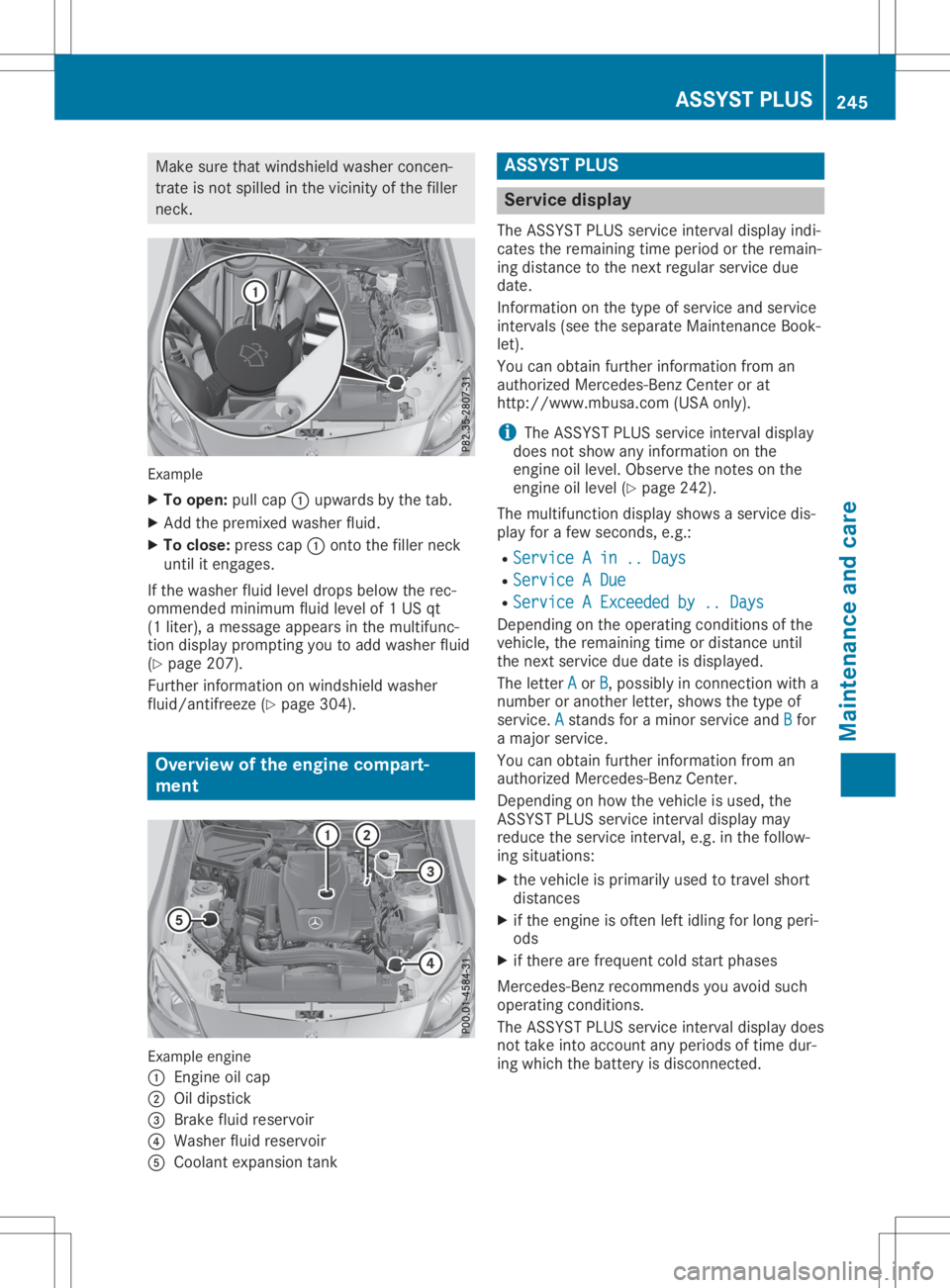
neck . Example
X To open: pullcap 0043upwa rdsbythe tab.
X Add thepremixed washerfluid.
X To close :press cap0043onto thefiller neck
until itengages.
If the washer fluidlevel drops below therec-
ommended minimumfluidlevel of1U Sqt
(1 liter), amessage appears inthe multifunc-
tion display prompting youtoadd washer fluid
(Y page 207).
Further information onwindshield washer
fluid/antifreeze (Ypage 304). Overview
ofthe engine compart -
ment Example
engine
0043 Engin eoilcap
0044 Oildipstick
0087 Brake fluidreservoir
0085 Washer fluidreservoir
0083 Coolant expansion tank ASSYST
PLUS Service
display
The ASSYST PLUS service interval displayindi-
cates theremaining timeperiod orthe remain-
ing distance tothe next regular service due
date.
Inform ationonthe type ofservice andservice
intervals (seetheseparate Maintenanc eBook-
let).
You canobtain further information froman
authorized Mercedes-Ben zCenter orat
http: //www.mbusa.com (USAonly).
i The
ASSYST PLUS service interval display
does notshow anyinformation onthe
engine oillevel. Observe thenotes onthe
engine oillevel (Ypage 242).
The multifunction displayshowsaservice dis-
play forafew seconds, e.g.:
R Service Ain..Days Service
Ain..Days
R Service ADue Service
ADue
R Service AExceeded by..Days Service
AExceeded by..Days
Depending onthe operating conditionsofthe
vehicle, theremaining timeordistance until
the next service duedate isdisplay ed.
The letter A A
or B B,p
ossibly inconn ection witha
number oranother letter,shows thetype of
service. A A
stands foram inor service andB B
for
am ajor service.
You canobtain further information froman
authorized Mercedes-Ben zCenter.
Depending onhow thevehicle isused, the
ASS YST PLUS service interval displaymay
reduce theservice interval, e.g.inthe follow-
ing situations:
X the vehicle isprimarily usedtotravel short
distances
X ifthe engine isoften leftidling forlong peri-
ods
X ifthere arefrequent coldstart phases
Mercedes-Ben zrecommen dsyou avoid such
operating conditions.
The ASSYST PLUS service interval displaydoes
not take intoaccount anyperiods oftime dur-
ing which thebattery isdisconnec ted. ASSY
STPLUS
245Maintenance andcare Z