service MERCEDES-BENZ SLC 2020 User Guide
[x] Cancel search | Manufacturer: MERCEDES-BENZ, Model Year: 2020, Model line: SLC, Model: MERCEDES-BENZ SLC 2020Pages: 310, PDF Size: 16.05 MB
Page 139 of 310
Dur
ing braking :
R aw arning tone sounds
R the ReleaseParkin gBrake Rel
easeParkin gBrake mes sage
ap pe ars
R the red 0049 (USA only)or 0024 (Cana da
onl y)ind icator lamp inthe instrument clus-
ter flashe s
Wh enthe vehicleh asbeen bra ked toas tand-
sti ll,t he electri cparkin gb rake isap plied. Parki
ngthe vehic leforal ongp eriod
If yo ul eave the vehiclep arked forlonge rtha n
fou rweeks,the battery maybed amaged by
exh austive disch arging.
If yo ul eave the vehiclep arked forlonge rtha n
si xw eeks,the veh iclem aysuffe rd am agea sa
res ulto flac ko fuse.
X Visitaq ualifi ed speci alistw orksh opand
see kadvice.
i Yo
uc an obtaininfo rma tiona bout tric kle
cha rgersfro maq ualifi ed speci alistw ork-
sho p. Dri
ving tips Ge
neral notes
Impo rtant safety notes G
WA
RNING
If yo us witch offthe igniti onwhiled rivin g,
sa fety -releva ntfunctio nsareo nlya vailab le
wi th limita tions, ornot atall. Thi scould
af fect, forexa mpl e,the powe rstee ringa nd
the brakeboosti ngeffect. Youw illr eq uire
cons idera blym oree ffort tostee rand bra ke.
The reisar isko fana ccident.
Do not switch offthe igniti onwhiled rivin g. G
WA
RNING
Mob ilec omm unicati ons equipme ntdistra cts
the driver fromt rafficc ond itions. Inaddi-
tio n,the driver couldlose contro lofthe
veh icle. The reisar isko fana ccident. As
adriver ,use mob ilec omm unicati ons
eq uipme ntonl yw hent he veh iclei sa ta
sta nds till.
As avehicleo ccu pant, usem obilec omm uni-
cati ons equipme ntonl yint he designa ted
ar ea ,e .g.t he rea rpasse nge rcomp artment.
Ob ser vethe lega lreq uirem ents forthe country
in wh ich youa redrivin g.Some jurisdi ctio ns
pro hibi tt he driver fromu sing am obilep hone
wh iled rivin gav ehicle.
If yo um akeac allw hile dri vin g,alwa ysuse
ha nds -freem ode.Onl yoperate the telephon e
wh en the traffics itua tio np ermi ts. Ifyo ua re
uns ure, pu llove rtoas afel oc ati on and stop
be for eo perating thetelephon e.
Bea rinm indt hata ta spee do fonly3 0m ph
(a pp roxi mately5 0k m/h ),the vehiclec ove rsa
di sta nce of44 ft(app roxi mately1 4m )per
sec ond .
Dri vesens ibly –s avef uel Ob
ser vethe followi ng tipstos avef uel:
R The tiresshoulda lway sb einfl ate dtothe
reco mme ndedtire pre ssu re.
R Re mov eunne cessary load s.
R Wa rm upthe engineatlowe ngine spee ds.
R Avoi dfrequ ent accelera tiono rbraking .
R Ob ser vethe serviceinte rvalsin the Mainte -
nance Bookletorint he ser viceinte rvaldis-
pl ay .H avea llthe mainte nance workcar ried
in acc ordance with Dai mle rAGr egulati ons.
Fue lcons umption also incr eases when drivin g
in col dw eather, instop -starttra ffica nd inhilly
terr ain.
Dri nki ngand driving G
WA
RNING
Drin king anddrivin ga nd/or takingdru gs
and drivin ga rever ydangerou scomb ina-
tio ns. Even asma llam ount ofalcoh olor
dru gscan affect your ref lexes ,percep tions
and judgme nt.
The possi bility of as erious oreve nfatal
acc ident isgre atlyincr eased when youd rink
or take drugsand drive. Dr
ivi ng tips
137Dr ivi ng andp arki ng
Z
Page 140 of 310
Do
not drink ortake drugsand drive orallo w
any one todrive whoh asbeen drinking or
taki ngdru gs.
Emi ssionc ontro l G
DA
NGE R
Co mbu stion eng inesemitp oiso no us
exh aust gases such ascar bonm onoxide.
Inha ling the seexh aust gases isha zar dous to
he alth and canresulti np oiso ning. Thereisa
ris ko ffatal inju ry.T he ref ore ,neve rlea ve the
eng inerunning anencl osedspace withou t
ad eq uate venti latio n.
Ce rta ineng inesystem saredesigne dtok eep
the level ofpoisono uscomp onents inexh aust
fu mes withi nlegallimits .
The sesystem sonlyw orka tpeake ffici ency if
the yareser viced exa ctly inacc ordance with
the manuf actu rer'ssp eci ficati ons. Alwaysh ave
wo rkon the enginecarriedo utataq ualifi ed
sp eci alistw orksh op.M erced es-Benz recom-
mend sthaty ou usea na uthor izedM erced es-
Benz Center forthisp urpo se. Inpartic ular ,
wo rkreleva ntto safety oron safety -related
sy stem smustb ec arrie do utataq ualifi ed spe-
cia list wo rksh op.
The enginesetti ngsmustnot becha nge d
und erany circum stances .Furthe rmo re,all
sp eci fic ser vicew orkm ustb ec arrie do utat
reg ular inte rvalsand inacc ordance with the
Me rced es-Benz servicerequirem ents .Deta ils
can befou ndinthe Mainte nance Booklet. EC
Od isplay
The ECO disp lays hows youh ow eco nomi cal
yo ur drivin gs tyle is.T he ECO disp laya ssists
yo ui na chievin gthe mos teconomi caldrivin g
sty lefor the selecte dsetti ngs and prevailing
cond itions. Your drivin gs tyle can signi ficantl y
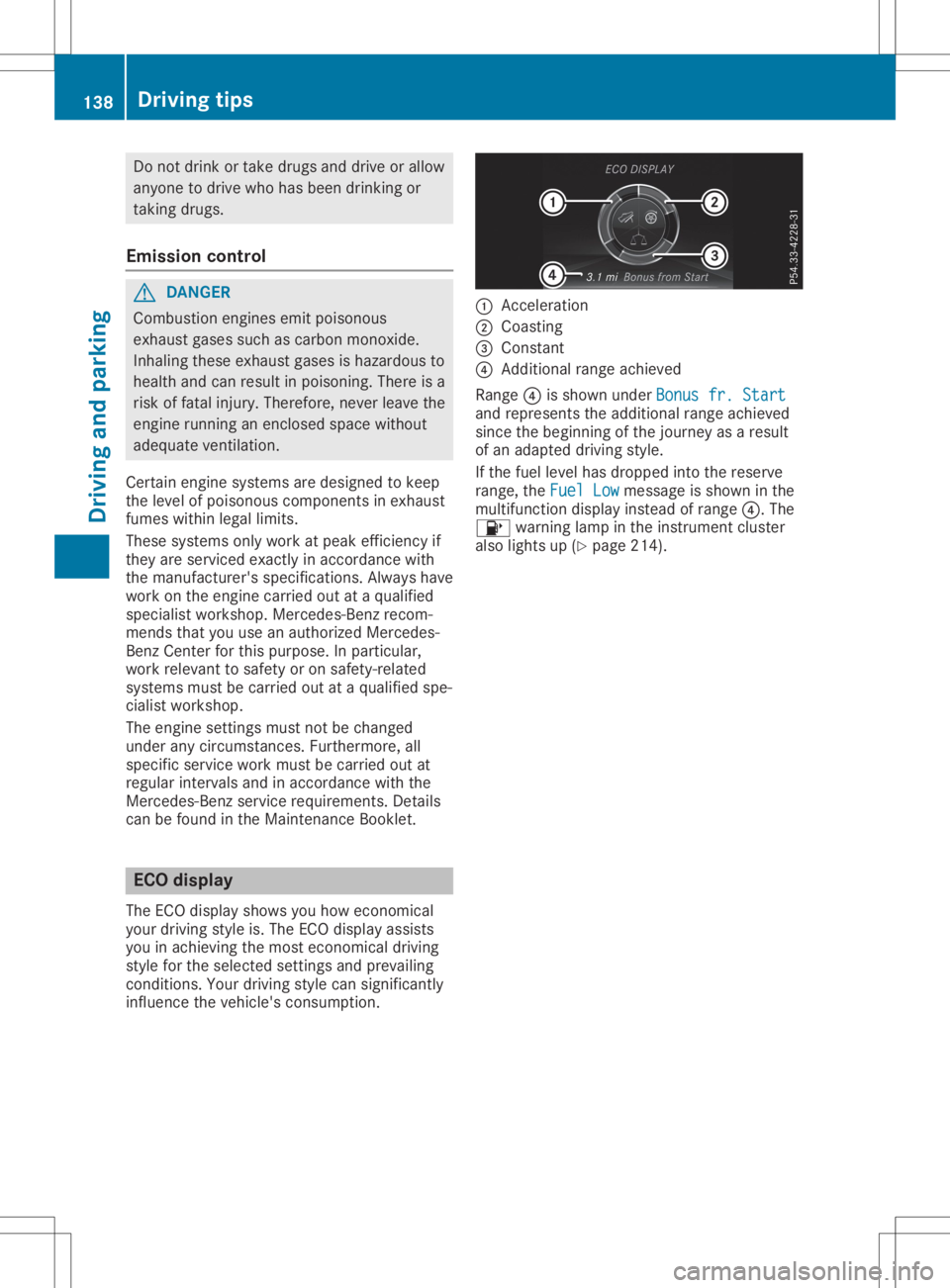
infl uence thevehicle's cons umption. 0043
Accel eration
0044 Coasting
0087 Consta nt
0085 Add itiona lran ge ach ieved
Ra nge 0085issho wnund erBon usfr. Start Bon
usfr. Start
and represents theadditio nal range achieved
si nce thebeginning ofthe journey asaresult
of an adapted drivin gs tyle.
If the fuel level hasd ropp ed into thereserve
ra nge ,the Fue lLow Fue
lLowmes sage issho wninthe
mu ltifu nctio ndispl ay instea dofran ge 0085.T he
00B6 warning lamp inthe instrument cluster
al so lights up(Ypage 214 ). 13
8 Dr
ivi ng tipsDrivi ng andp arki ng
Page 150 of 310
Selec
tingthedrive progra m
Act ive Distanc eAssist DISTRONIC supportsa
sporty driving stylewhen youhave selected
the Sor S+ drive program (Ypage 124).
Acc eleration behindthevehicle infront orto
the setspeed isthen noticeably more
dynamic. Ifyou have selected theCor Edriv-
ing program, thevehicle accelerates more
gently. Incity traffic andstop-st arttraffic,
drive program Cis recommen ded.
Changing lanes
If you want tochange tothe overtakin glane
on multi-lane roads,Active Distanc eAssist
DISTRONIC supportsyouif:
R you aredriving fasterthan45mph
(70 km/h)
R Act ive Distanc eAssist DISTRONIC ismain-
taining thedistance toav ehicle infront
R you switch onthe appropriate turnsignal
R Act ive Distanc eAssist DISTRONIC doesnot
current lydetect adanger ofcollision
If these condition sarefulfilled, yourvehicle is
accelerated. Acceleration willbeinterrupt edif
changing lanestakes toolong orifthe dis-
tance between yourvehicle andthevehicle in
front becomes toosmall.
i When
youchange lanes,Active Distanc e
Assist DISTRONIC monitorsthe left lane on
left-hand- drivevehicles orthe right laneon
right-han d-drivevehicles.
Stopping G
WARNING
If you leave thedriver's seatwhen thevehi-
cle isonly being braked byAct ive Distanc e
Assist DISTRONIC, itcould rollaway :
R ifthere isam alfunction inthe system or
in the voltage supply
R ifAct ive Distanc eAssist DISTRONIC is
deactivated usingthecruise controllever,
for example byavehicle occupant orfrom
outside thevehicle
R ifthe electrical systeminthe engine com-
partment ,the battery orthe fuses are
tampered with R
ifthe battery isdisconnec ted
R ifthe vehicle isaccelerated, e.g.byavehi-
cle occupant
There isar isk ofan accident.
Always deactivate Active Distanc eAssist
DISTRONIC andsecure thevehicle against
rolling awaybefore youleave it.
Further information ondeactivating Active Dis-
tance Assist DISTRONIC (Ypage 150).
If Act ive Distanc eAssist DISTRONIC detects
that thevehicle infront isstopping, itbrakes
your vehicle untilitis stationary.
Once yourvehicle isstationary, itremains sta-
tionary andyoudonot need todepress the
brake.
i Aft
eratime, theelectric parking brake
secures thevehicle andrelieves theservice
brake.
i Depending
onthe specified minimum dis-
tance, yourvehicle willcome toas tandst ill
at as ufficient distance behindthevehicle in
front .The specified minimum distanceisset
using thecont rolonthe cruise controllever.
When Active Distanc eAssist DISTRONIC is
activated, thetransm issionisshifted automati-
cally toposition 005Dif:
R the driver's seatbeltisnot fastened andthe
driver's doorisopen
R the engine isswitched off,unless itis auto-
matically switchedoffbythe ECO start/
stop funct ion.
The electric parking brakeisapplie dautomati-
cally ifAct ive Distanc eAssist DISTRONIC is
active whenthevehicle isstationary and:
R as ystem malfunction occurs
R the power supply isnot sufficient
If am alfunction occurs,thetransm issionmay
also shift toposition 005Dautomatically.
Setting aspeed Keep
inmind thatitmay take abrief moment
until thevehicle hasaccelerated orbraked to
the speed set.
X To
adj ust the setspeed in1m phincre-
ments (1km/h increments): brieflypress
the cruise controllever up0043 tothe pres- 148
Driving
systemsDriving andparking
Page 155 of 310
i
After
atime ,the electri cparking brake
sec ures the vehiclea nd relieves theservice
bra ke.
Whe nthe HOLD functio nisa ctivated ,the
trans mission isau toma ticallys hifted toposi-
tio n005D if:
R the driver 'ssea tbelti sn otfas tene dand the
dri ver 'sdo or isop en
R the engineissw itch edoff, unless itis au to-
ma tica llys witch edoff bythe ECO start/
stop functio n.
The electri cparking brakesec ures the vehicle
au toma ticallyi fthe HOLD functio nisa ctivated
wh en the vehiclei ss tatio nar yand:
R as ystem malfunctio noccu rs
R the powe rsupplyi sn otsufficie nt
If am alfu nctio nint he electri cparking brake
occu rs,the trans mission mayalsob eshifted
into positio n005D automa tically. Ada
ptiv edampin gsystem
Ge neral notes i
Merc
edes-AMG SLC4 3:the adaptive
da mpi ngsystem iscal ledA MG RIDE CON-
TR OL spo rtssuspe nsion.
As uspe nsi on with the adaptive dampi ngsys-
tem provides imp rove ddriving comf ortand
conti nuouslycontro lsthe calibra tio no fthe
da mpe rs.The dampi ngcha racteri stics adapt
to the current opera ting anddriving situa tion.
The dampi ngistune dind ividu ally to each
wh eeland depends on:
R your driving style,e .g.s po rty
R the roadsurface cond itions
R the selecte ddrive pro gram( Ypa ge 124 ). Se
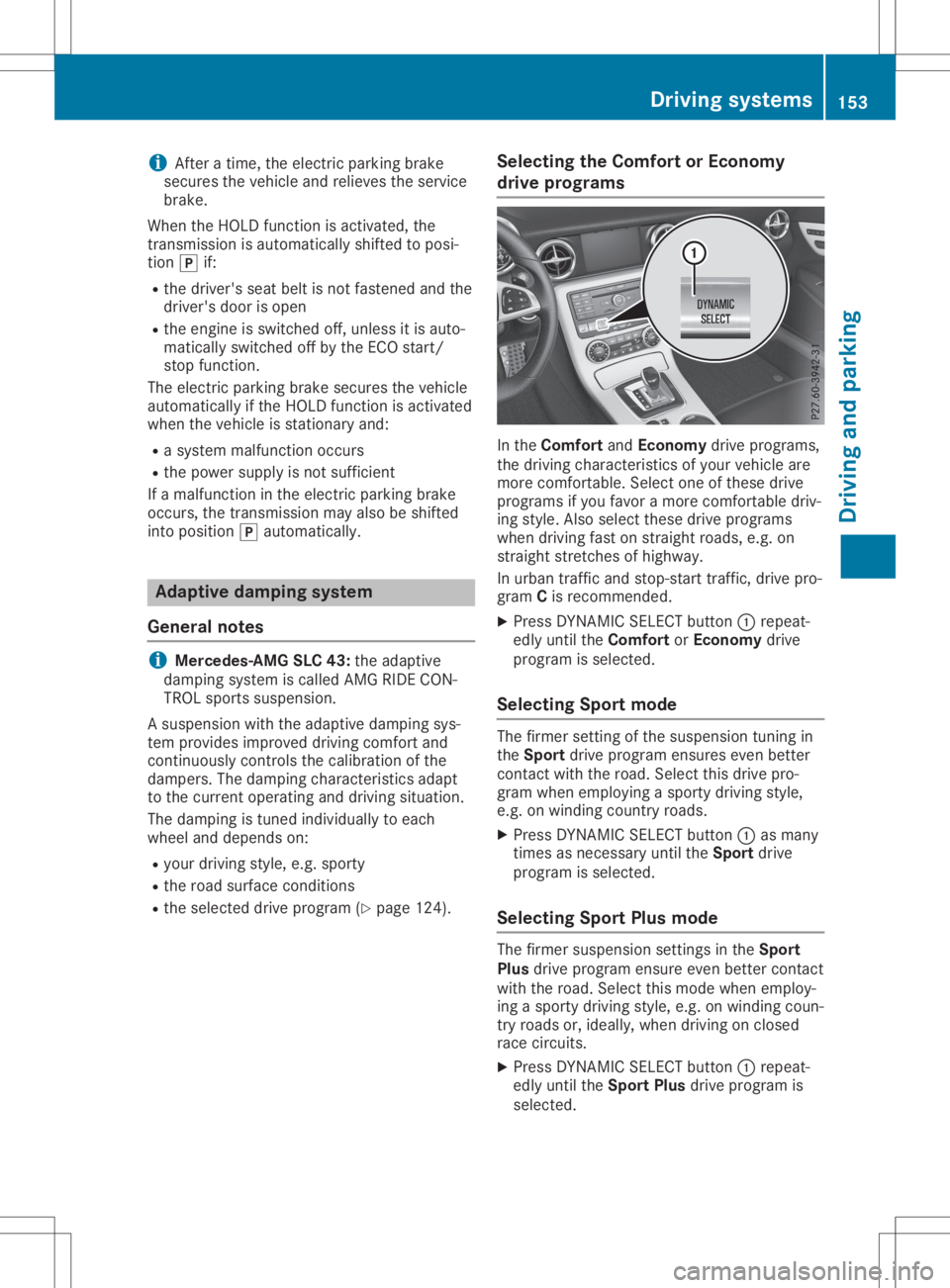
lecti ng the Comfort orEcon omy
driv eprog rams In
the Comfort andEcon omy drive pro grams,
the driving characteri stics ofyour veh iclea re
more comfortable. Sel ect one ofthes edrive
pro grams ifyo uf avor am ore comf ortabled riv-
ing style.A lsos elect thes edrive pro grams
wh en driving fastons traight roa ds, e.g.on
stra ight stre tche sofhighw ay.
In urba nt raf fic and stop -starttraf fic, drive pro -
gra mCis reco mme nded.
X Pre ssDYNAM ICSELEC Tbutton 0043repeat-
ed lyunti lthe Comfort orEcon omy drive
pro gramisselecte d.
Se lecti ng Spo rtmode The
firmer settingofthe suspe nsion tuni ngin
the Spo rtdri ve pro grame nsures evenbetter
conta ctwith the road.Sel ect thisd rive pro -
gra mw hene mp loying asporty driving style,
e.g .onw indi ng cou ntry roads.
X Pre ssDYNAM ICSELEC Tbutton 0043asma ny
time sasn ece ssaryunti lthe Spo rtdri ve
pro gramisselecte d.
Se lecti ng Spo rtPlus mode The
firmer suspe nsion setti ngsinthe Spo rt
Pl us drive pro grame nsureeve nbetter conta ct
wi th the road.Sel ect thism odew hene mp loy-
ing asporty driving style,e .g.o nw indi ng cou n-
try roadsor, idea lly, wh en driving onclosed
ra ce circ uits.
X Pre ssDYNAM ICSELEC Tbutton 0043repeat-
ed lyunti lthe Spo rtPlus drive pro gramis
sel ecte d. Dri
ving sys tems
153Dr ivi ng andp arki ng Z
Page 166 of 310
ATTEN
TIONA SSIST asses ses your level offati -
gu eo rlap sesinc once ntrati onbytaki ngthe
fol lowi ng crite riainto acco unt:
R your perso nal driving style,e .g.s tee ring
cha racteri stics
R jou rney detai ls,e .g.t ime ofdaya nd length
of jou rney
The functio nality ofATTEN TIONA SSIST is
res tricte dand warning smaybe delaye do rnot
occu ratall:
R ifthe roadcond ition ispo or, e.g.ift he sur-
fac eisu neven orifther earepothol es
R ifther eisas trong side wind
R ifyo uh avea dopted asporty driving style
wi th high corne ringspeedso rhighr ates of
acce lera tio n
R ifyo ua repre domina ntlydriving slow ertha n
50 mph (80km/h )orfas ter than112 mph
(180 km/h )
R ifyo ua recur rentl yusing CO MAND orma k-
ing atelep hone callwithi t
R ifthe time hasb eens etinco rrectly
R in acti vedriving situa tions, such aswhen
yo uc hange lanes orcha nge your spe ed
ATTEN TIONA SSIST isonl yana idto the driver .
It mig htnot alwa ysreco gnizefati gueo r
incr easing inattenti venessintime orfailto
reco gnizethem atall. The system isnot asub-
sti tute foraw ell-res ted and attentive driver .
Warni ngand display messagesinthe
multi function display X
Activa teATTEN TIONA SSIST using the on-
bo ardc omp uter(Ypa ge176 ).
If ATTEN TIONA SSIST isacti ve,youw illb e
wa rned nosoo ner than20m inutes afte r
yo ur jou rney hasb egun. Yout hen hearan
inte rmittent warning tonetwice and the
ATT ENTION ASSIST:TakeaB reak! ATT
ENTION ASSIST:TakeaB reak! mes-
sa ge appe arsi nt he mu ltifu nctio ndispl ay .
X Ifnece ssary,t ake abreak.
X Pre ssthe 0076 or0038 button toconfi rm
the mes sage.
On long jou rney s,take regular bre aks ingoo d
time toallo wy ourselft or estp rope rly.Ify ou
do not take abreak and ATTEN TIONA SSIST
sti llde tects increasing lapse sinc once ntra-
tio n,youw illb ew arned againa fter1 5m inutes
at the earliest. ATTEN
TIONA SSIST isres etwh en youc onti nue
yo ur jou rney andstarts asses sing your tire d-
ness againi f:
R yous witch offthe engine
R yout ake offyour sea tbelta nd open the
dri ver 'sdo or, e.g.for ac hange ofdri ver sor
to take abreak
Whe nATTEN TIONA SSIST isde acti vated ,the
00D7 symbo lapp ears inthe multifu nctio ndis-
pl ay inthe assista nce graphicsdispl ay.
Vehi cles with CO MA ND: ifaw arning isou t-
pu tint he mu ltifu nctio ndispl ay ,as ervice sta-
tio ns earch ispe rfor med inthe multimed ia
sy stem .You can select aservice stationa nd
nav igati on tothiss ervice stationw illt hen
be gin. Thi sfun ctio ncan be acti vated and
de acti vated inthe multimed iasystem . Lan
eTrack ingp ackag e
Ge neral notes The
Lane Tra cking packag econsi stsofBlind
Spo tAssist(Y page 164 )and Lane Kee ping
Assi st(Y page 166) .
Bli nd Spo tAssist Gen
eral notes
Bli nd Spo tAssistmoni torsthearea so ne ither
si de ofthe vehiclet hata re not visible to the
dri ver with two latera l,rea r-fa cing rada rs en-
sor s.Aw arning displ ayinthe exte riorm irrors
dra ws your atte ntiontov ehicles detecte din
the moni toredarea. Ifyo ut hen switch onthe
corr espond ingturn signa ltoc hange lane, you
wi llal so rece iveanoptica land audibl ew arn-
ing .
Bli nd Spo tAssistsupp orts youf rom aspeed of
ap pro xima tely2 0m ph(30 km/h ).
For Blind Spo tAssistto assist you, the rada r
sens orsystem mustbe opera tional . 16
4 Dri
ving sys temsDrivi ng andp arki ng
Page 171 of 310
Bea
rinm indthat theoutsid etempe raturedis-
pl ay indi cates thetempe raturemea suredand
doe snotrecor dthe roa dtempe rature.
The outsid etempe raturedispl ayisin the mul-
tifu nction displ ay(Y page 170 ).
Ac hang eint he outsid etempe ratureisshow n
in the multifunction displ ayafte rad elay . Co
olant temperature gage G
WARNI
NG
Ope ning thehoodwhent he engi neisover -
hea ted orwhe nthere isaf ire inthe engi ne
compa rtment couldexpo seyout oh otgases
or other serviceprod ucts. Thereisar isk of
inju ry.
Let anover heated engi necool downbefore
ope ning thehood.Ifthere isaf ire inthe
engi necompa rtment, keepthehoodclosed
and contact thefire departme nt.
! Ad
ispl ay mess ageiss how nifthe cool ant
tempe ratureistoo high.
If the cool anttempe ratureisover 248‡
(120 †),donot continu edriving. The
engi newillother wise be damag ed.
The coolanttempe raturegage isin the instru -
ment cluster onthe right-ha ndside
(Y page 32).
The Hmarki nginthe cool anttempe rature
ga ug ec orre sponds toac ool ant tempe rature
of approxi mate ly248 ‡(120 †).
Unde rnorma lope rati ngcondi tions andatthe
corre ctcool antlevel, the cool anttempe rature
ga ug em ayrise tothe Hmarki ng. Ope
rating theon-bo ard computer
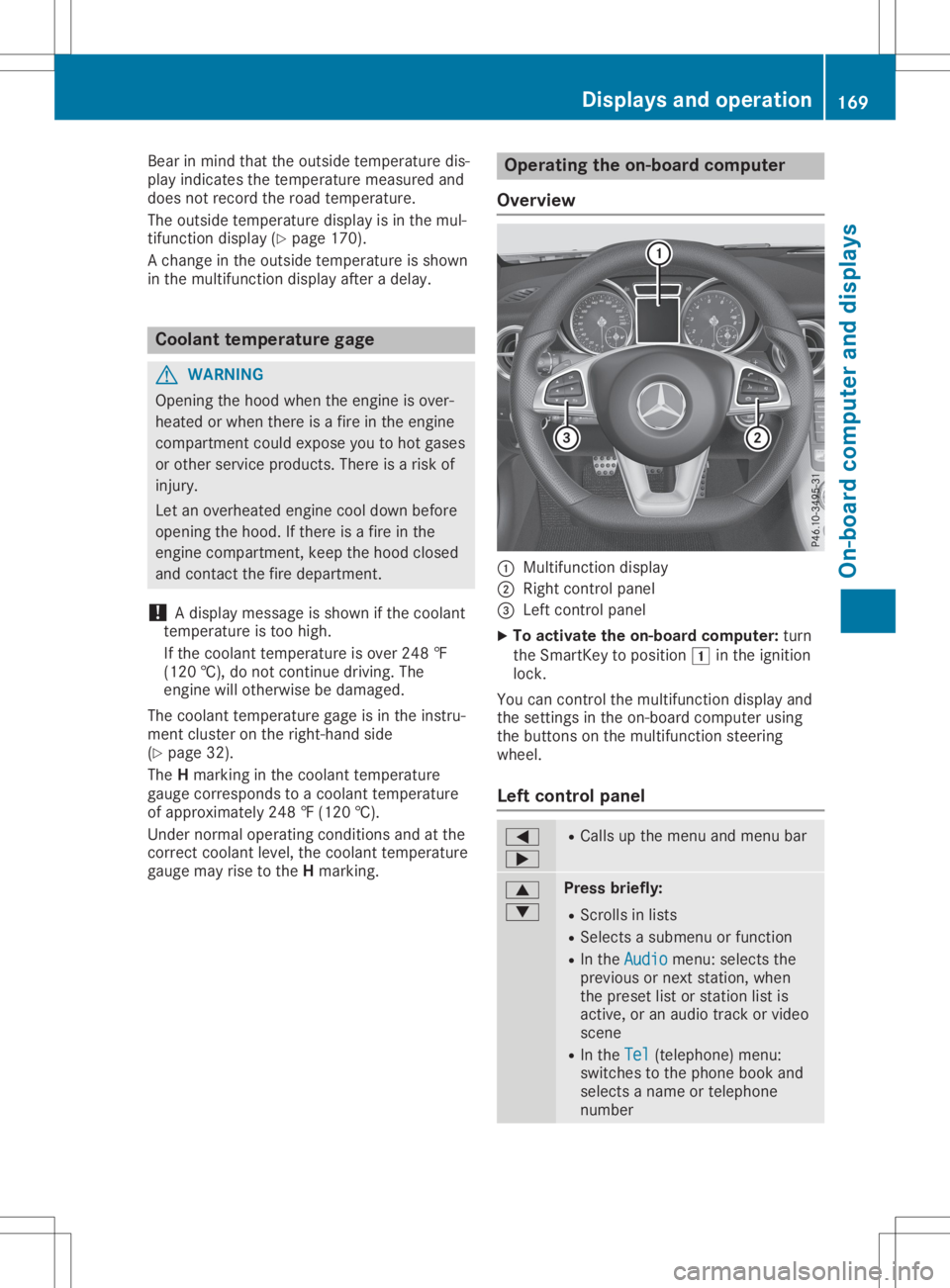
Ove rview 0043
Multifunctio ndispl ay
0044 Right control panel
0087 Left control panel
X To acti vate theon-bo ard computer: turn
the SmartKe ytop ositio n0047 inthe ignition
lock.
You cancontrol themultifunction displ ayand
the setting sint he on-bo ardcompu terusing
the buttons onthe multifunction steering
whe el.
Le ftco ntrol panel 0059
0065 R
Ca llsu pthe menu andmenu bar 0063
0064 Pres
sbriefly:
R Scrol lsin lists
R Sele ctsasubmenu orfuncti on
R In the Audi o Audi
omenu :selects the
pre vious ornext station,whe n
the preset list or stati onlist is
acti ve,oran audiot rack orvid eo
scene
R In the Tel Tel
(teleph one) menu :
swi tches tothe phoneboo kand
sel ects aname ortele pho ne
numb er Di
splay sand ope ration
169On-board computer anddispl ays Z
Page 177 of 310
att
ent ion totraff iccon dition sand oper ate
th ee quipm entwhen thev ehicle isstatio n-
ary.
When telepho ning,you must observet he legal
requi rementsfor thec oun tryi nw hichy ou are
cur ren tlydriv ing.
X Swit chon them obilephon e(see them anu-
fac turer’s oper atinginstruct ions).
X Swit chon them ultimed iasyst em(see the
Dig ital Oper ator'sMan ual)
X Estab lish aBluet ooth®
con nectiont ot he
mult imed iasyst em(Ypage 222).
X Pres sthe 0059 or0065 buttononthes teer-
ing wheel toselec tthe Tel Tel
men u.
You willsee oneo fthe followin gdisplay mes-
sages inthem ultifun ction display:
R Pho neREADY Pho
neREADYorthen am eo fthe net work
prov ider:the mobi lephon ehasfoun dan et-
work andisready torec eive .
R Pho neNoService Pho
neNoService:there isno net work
availabl eorthe mobi lephon eiss ear ching
for anetwork .
Accept ingacall If
som eonecalls you when youareintheTel Tel
men u,ad isplay message appear sint he mult i-
fun ction display.
You canaccept acallatany timeregardle ssof
th em enus elec ted.
X Pres sthe 0061 buttononthes teeri ng wheel
to acc ept anincomin gcall.
Rej ectin gorendi ngacall X
Pres sthe 0076 buttononthes teeri ng wheel
to reject orend acall.
Select inganent ryinthep hone book X
Pres sthe 0059 or0065 buttononthes teer-
ing wheel toselec tthe Tel Tel
men u.
X Pres sthe 0063 ,0064 or0076 buttonto
swit chtothep hon ebook .
X Aut horize acc ess tothep hon ebook onthe
phon e. X
Pres s0064 or0063 toselec tthe nam esone
aft ertheo ther.
or X To star tr ap idscr olling: pressand hold
th e0064 or0063 buttonfor longer than one
sec ond.
The nam esinthep hon ebook aredisplaye d
quick lyon ea fter theo ther.
Rapid scroll ing stops when yourelease the
butt onorreac hthe end ofthel ist .
X If
only onetelephone num berisstored
for anam e:pres sthe 0061 or0076 button
to start dialin g.
or X If
th ere ismor ethano nenum berfora
pa rticula rnam e:pres sthe 0061 or0076
butt ontodisplay then um bers .
X Pres sthe 0063 or0064 buttontoselec tthe
num beryou want todial.
X Pres sthe 0061 or0076 buttontostart dial-
ing .
or X To exit thet ele phone book: pressthe
0076 or0038 button.
Red ialin g The
on-bo ard com pute rsave sthe last nam es
or num bers dialed inther edi almem ory.
X Pres sthe 0059 or0065 buttononthes teer-
ing wheel toselec tthe Tel Tel
men u.
X Pres sthe 0061 buttontoswit chtothe
redi almem ory.
X Pres sthe 0063 or0064 buttontoselec tthe
desir ednam eornum ber.
X Pres sthe 0061 or0076 buttontostart dial-
ing .
or X To exit ther edial mem ory:pres sthe 0076
or 0038 button. Assist
ancemenu
Intr odu ction De
pen dingo nyour vehicle'sequipm ent,int he
Dri veAssist Dri
veAssistmen u,you have thef ollowin g
opt ions: Menu
sand subm enus
175On-boar dcomp uter and displa ys Z
Page 179 of 310
X
Press 0064or0063 toset Off Off,
Standard Standard
or
Adaptive Adaptive.
X Press the0076 button tosave thesetting.
When LaneKeeping Assistisactivat ed,the
multifunc tiondisplay showsthelane mark-
ings asbright linesinthe assistanc e
graphic.
Further informationonLane Keeping Assist
(Y page 166). Service
menu
Dependin gonthe equipment installedinthe
vehicle, youhave thefollowing optionsinthe
Serv. Serv.
menu:
R Calli ngup display messages (Ypage 183)
R Restartin gthe tire pressure losswarning
system (Ypage 275)
R Checking thetire pressure electronically
(Y page 275)
R Calli ngup the service duedate
(Y page 246) Settings
menu
Introdu ction Dependin
gonthe equipment installedinthe
vehicle, inthe Sett. Sett.
menuyouhave thefol-
lowing options:
R Changing theinstr ument cluster settings
(Y page 177)
R Changing thelight settings (Ypage 177)
R Changing thevehicle settings (Ypage 179)
R Changing theconv enienc esettings
(Y page 179)
R Restoring thefactor ysettings (Ypage 180)
Instru mentcluster Selecting
thedista nceunit
The Display UnitSpeed-/Odo meter: Display
UnitSpeed-/Odo meter:func-
tion allows youtochoose whether certaindis-
plays appear inkilometer sorm iles inthe mul-
tifunc tiondisplay.
X Press the0059 or0065 button onthe steer-
ing wheel toselect theSett. Sett.
menu.
X Press the0064 or0063 button toselect the
Instrument Cluster Instrument
Clustersubmenu. X
Press 0076toconf irm.
X Press the0064 or0063 button toselect the
Display UnitSpeed-/Odo meter: Display
UnitSpeed-/Odo meter:func-
tion.
The curren tsett ing km km
ormiles miles
appears.
X Press the0076 button tosave thesetting.
The selected unitofmeasurement fordistanc e
applies to:
R the digital speedometer inthe Trip Trip
menu
R the odometer andtripodometer
R the trip computer
R the curren tcons umption andtherange
R navigation instruction sint he Navi Navi
menu
R cruise control
R DIS TRONIC
R ASS YST PLUS
Selecting permanent display
The Permanent Display: Permanent
Display:functionallows you
to choose whether themultifunc tiondisplay
alway sshows theoutside temperat ureorthe
speed.
The speed display isinverse tothe speedome-
ter.
X Press the0059 or0065 button onthe steer-
ing wheel toselect theSett. Sett.
menu.
X Press the0064 or0063 button toselect the
Instrument Cluster Instrument
Clustersubmenu.
X Press 0076toconf irm.
X Press the0064 or0063 button toselect the
Permanent Display: Permanent
Display:function.
The curren tsett ing, Outside Temperatur e Outside
Temperatur e
or Speedomete r[km/h] Speedomete
r[km/h] orSpeedomete r Speedomete
r
[mph] [mph],a
ppears.
X To change thesetting: press0076again.
Lights Setting
thedayt imerunning lamps
This funct ionisnot availabl einC anada.
X Press the0059 or0065 button onthe steer-
ing wheel toselect theSett. Sett.
menu.
X Press the0064 or0063 button toselect the
Light Light
submenu.
X Press 0076toconf irm.
X Press the0064 or0063 button toselect the
Daytime RunningLights Daytime
RunningLightsfunction.
If the Daytime RunningLights Daytime
RunningLightsfunction
has been switched on,the cone oflight and Menus
andsubmenus
177On-boardcomputerand display s Z
Page 207 of 310
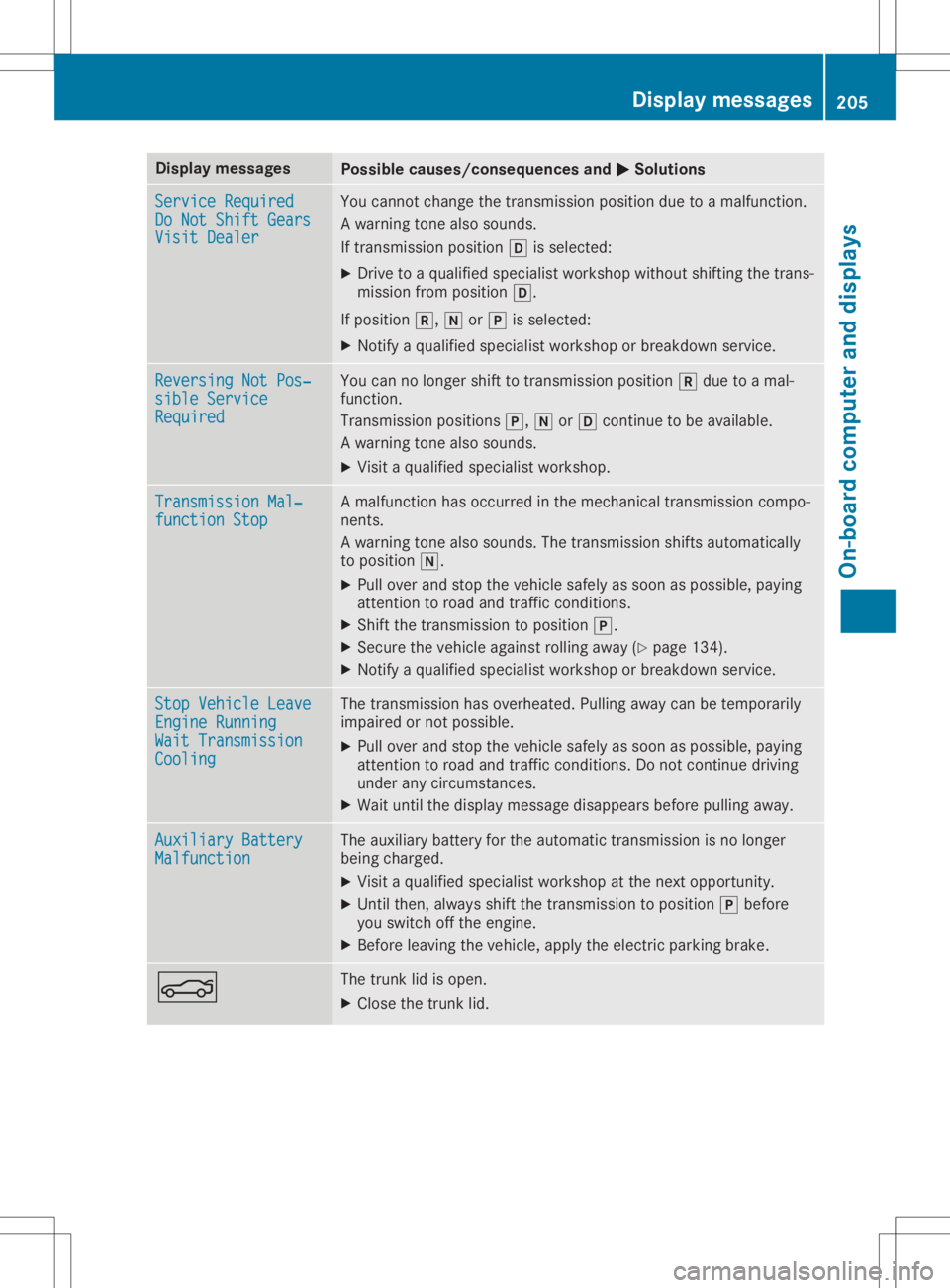
Disp
laymes sages Poss
iblecauses/co nsequences and 0050 0050
Solu tions Ser
viceR equir ed Ser
viceR equir ed
Do Not ShiftGea rs Do
Not ShiftGea rs
Vis itDealer Vis
itDealer You
cannotc hang et he trans mis sion position due toam alfunc tion .
Aw arning tone also soun ds.
If trans mis sion position 005Bissele cted:
X Dr ive toaq ualif iedspecialistwor kshop without shifting thet rans -
mis sion from position 005B.
If pos ition 005E, 005Cor005D issele cted:
X Not ifyaq ualif iedspecialistwor kshop orbre akd own service. Rev
ersing NotPos‐ Rev
ersing NotPos‐
sib leService sib
leService
Req uired Req
uired You
cannolonger shiftto trans mis sion position 005Edue toam al-
fun ction .
Tran smission pos ition s005D, 005Cor005B continu etob eavail able.
Aw arning tone also soun ds.
X Vis itaq ualif iedspecialistwor kshop . Tra
nsmission Mal‐ Tra
nsmission Mal‐
fun ctionStop fun
ctionStop Am
alfunc tion has occur red inthem echan ical trans mis sion compo -
ne nts.
Aw arning tone also soun ds.The trans mis sion shiftsa uto mat ically
to pos ition 005C.
X Pull overand stop thev ehicles afely assoo naspossibl e,payin g
att ention toroa dand traff icco nd ition s.
X Sh ift thet rans mis sion topos ition 005D.
X Se cur ethe veh iclea gain strol linga way (Ypage 134).
X Not ifyaq ualif iedspecialistwor kshop orbre akd own service. Sto
pV ehicl eL eave Sto
pV ehicl eL eave
Eng ine Running Eng
ine Running
Wai tT ransm iss ion Wai
tT ransm iss ion
Coo ling Coo
ling The
trans mis sion hasoverheated.Pullin gaway canbetempo rarily
imp aire dornotpos sible.
X Pull overand stop thev ehicles afely assoo naspossibl e,payin g
att ention toroa dand traff icco nd ition s.Do notc ontin ue drivin g
und erany circum stanc es.
X Wait untilth ed isplay mes sage disap pearsbefore pullin gaway. Aux
iliary Batter y Aux
iliary Batter y
Mal function Mal
function The
auxiliary battery for thea uto mat ictrans mis sion isno longer
bein gcharged.
X Vis itaq ualif iedspecialistwor kshop atthen exto ppo rtuni ty.
X Un tilt he n, always shiftthet rans mis sion topos ition 005Dbefore
you switchoff thee ngine.
X Be for eleav ing thev ehicle, apply thee lectric park ingbrak e. 0084 The
trunk lidisopen .
X Clos ethe trunk lid. Disp
laymes sage s
205On -boar dcomp uter andd ispla ys Z
Page 208 of 310
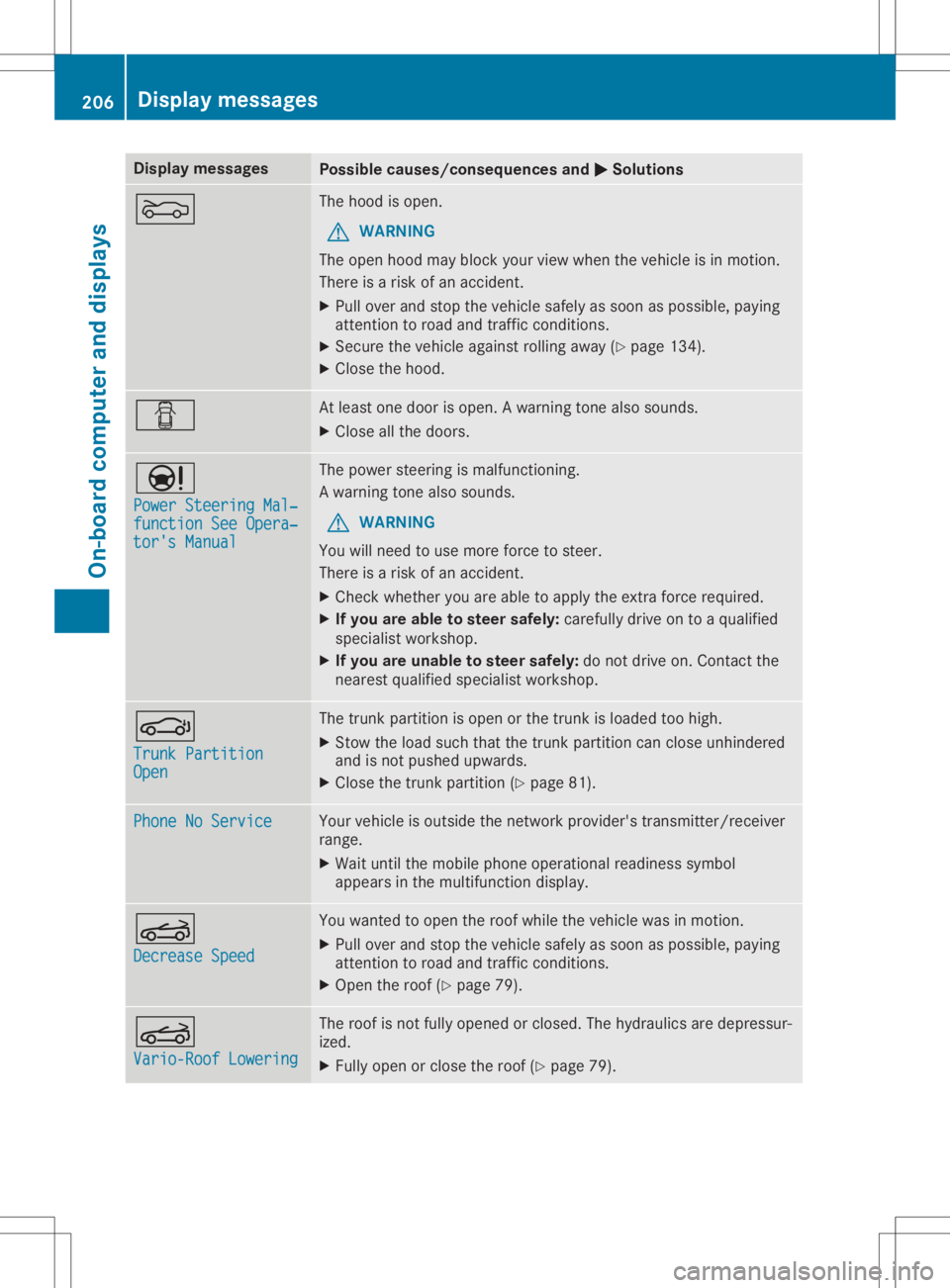
Disp
laymes sages Poss
iblecauses/co nsequences and 0050 0050
Solu tions 0083 The
hoodiso pen .
G WAR
NING
The open hoodm aybloc kyour vieww hen thev ehiclei sinm otion .
The reisar isko fana cciden t.
X Pull overand stop thev ehicles afely assoo naspossibl e,payin g
att ention toroa dand traff icco nd ition s.
X Se cur ethe veh iclea gain strol linga way (Ypage 134).
X Clos ethe hoo d. 0051 At
least oned oor isopen .Awarning tone also soun ds.
X Clos eallth ed oor s. 00CC
Pow erSteeringMal ‐ Pow
erSteeringMal ‐
fun ctionSee Opera‐ fun
ctionSee Opera‐
tor 'sManual tor
'sManual The
powe rsteer ing ismalf unction ing .
Aw arning tone also soun ds.
G WAR
NING
You willneed touse moreforce tosteer .
The reisar isko fana cciden t.
X Chec kwhether you areable toapply thee xtra for ce req uire d.
X Ifyou area blet os teer saf ely: careful lydri ve on toaq ualif ied
spe cialistwor kshop .
X Ifyou areu nable tosteer safely: donotd rive on.C ontac tthe
ne ares tqualif iedspecialistwor kshop . 0058
Tru nkPartition Tru
nkPartition
Ope n Ope
n The
trunk partition isopen orthet runk isloade dtoo high .
X Stow thel oad suchthatthe trunk partition can closeunh indere d
and isno tp ush edupwar ds.
X Clos ethe trunk partition (Ypage 81). Pho
neNoService Pho
neNoService Your
vehiclei so utside then etwo rkpro vider'strans mit ter/ rec eiver
ran ge.
X Wait untilth em obile pho neoper ationalread inesssymb ol
appear sint he mult ifunction disp lay. 0059
Dec reaseSpeed Dec
reaseSpeed You
wantedt oo pen ther oofw hile thev ehiclew asinmot ion.
X Pull overand stop thev ehicles afely assoo naspossibl e,payin g
att ention toroa dand traff icco nd ition s.
X Ope nthe roo f(Ypage 79). 0059
Var io-RoofL oweri ng Var
io-RoofL oweri ng The
roofisn otfull yopen edorclo sed .The hydr aulic saredepr essur-
iz ed.
X Full yopen orclo sether oof(Ypage 79). 206
Disp
laymes sage sOn -boar dcomp uter andd ispla ys