cruise control MERCEDES-BENZ SLC ROADSTER 2018 Owner's Manual
[x] Cancel search | Manufacturer: MERCEDES-BENZ, Model Year: 2018, Model line: SLC ROADSTER, Model: MERCEDES-BENZ SLC ROADSTER 2018Pages: 298, PDF Size: 5.26 MB
Page 9 of 298
Overview of systems ......................104
Problem with the rear window
defroster ........................................ 112
Problems with cooling with air
dehumidification ............................ 109
Refrigerant ..................................... 294
Refrigerant filling capacity ............. 295
Setting the ai rdistribution ............. 110
Setting the ai rvents ......................1 13
Setting the airflow ......................... 110
Setting the temperature ................ 109
Switching air-recirculation mode
on/off ............................................ 112
Switching on/off ........................... 108
Switching residua lheato n/off ...... 112
Switching the rear window
defroster on/off ............................ 111
Switching the ZONE function
on/off ............................................ 110
Cockpit
Overview .......................................... 31
see Instrument cluster
Collapsibles pare wheel
Inflating ......................................... 286
see Emergency spare wheel
Combination switch ............................ 96
Compass
Calibrating ..................................... 232
Calling up ....................................... 231
Setting ...........................................2 31
Connectin gaUSB device
see also Digita lOperator's Man-
ua l..................................................2 11
Consumptions tatistics(on -board
computer) .......................................... 166
Controller ...........................................2 12
Convenience closing feature .............. 76
Coolan t(en gine)
Checking the level. ........................ 235
Display message ............................ 190
Filling capacity ............................... 294
Important safety notes .................. 293
Temperature (on-board computer,
Mercedes-AMG SLC 43) ................ 175
Temperature gauge ........................ 164
Warning lamp ................................. 207
Cooling
see Climate control Copyright
............................................. 30
C
orneringl ight function
Display message ............................ 189
Function/notes ................................ 97
Cruis econtrol
Cruise control lever. ...................... 139
Deactivating ................................... 140
Display message ............................ 195
Driving system ............................... 138
Function/notes .............................1 38
Important safety notes .................. 139
Setting aspeed. ............................. 139
Storing and maintaining current
speed. ............................................ 139
Cup holder
Center console .............................. 222
Important safety notes .................. 221
Customer AssistanceC enter
(CAC) ..................................................... 27
Customer Relations Department ....... 27
D
Dashboard
see Instrument cluster
Data
see Technical data
Data carrier
Selecting ........................................ 169
Daytime runningl amps
Display message ............................ 189
Function/notes ................................ 95
Switching on/off (on-board com-
puter) ............................................. 172
Declarations of conformity ................. 26
Decorative film
Cleaning instructions ..................... 240
Delayeds witch-off
Exterior lighting (on-board com-
puter) ............................................. 173
Interior lighting .............................. 173
Diagnosticsc onnection ......................2 7
Digital Operator's Manua l
Help ................................................ .22
Introduction .....................................2 2
Digital speedomete r........................ .167
Display messages
ASSYST PLUS ................................ 237
Index7
Page 10 of 298
Callingup( on-board computer) .... .178
Driving systems .............................1 93
Engine ............................................ 190
General notes ................................ 177
Hiding (on-board computer) ........... 178
KEYLESS-GO .................................. 202
Lights ............................................. 189
Safety systems .............................. 179
SmartKey ....................................... 201
Tires. .............................................. 196
Vehicle ...........................................1 98
DistanceP ilot DISTRONIC
Activating ....................................... 142
Calling up aspeed. ........................ 143
Cruise control lever ....................... 142
Displa yMessage ............................ 195
Displays in the instrument cluster .. 145
Driving tip s.................................... 146
Function/note s............................. 140
Important safety notes .................. 141
Setting the specified minimum
distance ......................................... 145
Stopping ........................................ 144
Storing aspeed .............................. 143
Switching off .................................. 146
Warning lamp ................................. 209
Distance recorder
see Odometer
see Tripo dometer
Distance warnin g(wa rning lamp) .... 209
Distance warnin gfunction
Function/note s................................ 58
Doors
Automati cloc king (on-board com-
puter) ............................................. 173
Automati cloc king (switch) ............... 71
Central locking/unlocking
(SmartKey). ...................................... 65
Control panel ................................... 37
Displa ymessage ............................ 200
Emergency locking ........................... 72
Emergency unlocking ....................... 72
Important safety notes .................... 70
Opening (fro minside )...................... 71
Overview .......................................... 70
Drinking and driving ......................... 134
Drive program
Automati ctransmissio n................. 125 Displa
y........................................... 122
SETUP (on-board computer,
Mercedes-AMGv ehicles) ............... 175
Driver's door
see Doors
Drivin gabroad
Mercedes-Benz Service ................. 238
Drivin gonfloo
de
droads .................. 138
Drivin gsafety system
Active Brake Assist .......................... 58
Drivin gsafety systems
ABS (Anti-lock Braking System) ....... 57
ADAPTIVEB RAKE............................. 63
Adaptive Brake Assist ...................... 59
Adaptive brake lights ....................... 60
BAS (Brake Assist System) .............. 57
Distance warning function ............... 58
EBD (electronicb rake force distri-
bution) ............................................. 63
ESP
®(Electronic Stability Pro-
gram) ............................................... 60
Important safety information ........... 56
Overview .......................................... 56
Drivin gsystem
AMG sports suspension
(Mercedes-AMGS LC 43) ............... 149
Drivin gsystems
Adaptive Damping System ............. 149
ATTENTIONA SSIST ........................ 158
Blind Spot Assist ............................ 159
Cruise control ................................ 138
Displa ymessage ............................ 193
DISTRONIC PLUS. .......................... 140
HOLD function ............................... 148
Lane Keeping Assist ...................... 161
Lane Tracking packag e.................. 159
Parking Guidance ........................... 152
PARKTRONIC ................................. 149
Rear vie wcamera .......................... 154
Drivin gtips
Automati ctransmission ................. 125
Brakes ........................................... 136
Break-in perio d.............................. 115
Distance Pilo tDISTRONIC ............. 146
Downhil lgradient ........................... 136
Drinking and driving ....................... 134
Driving in winter ............................. 138
Driving on floode droads ................ 138
8Index
Page 19 of 298
SmartKeyChanging the battery ....................... 68
Changing the programming .............6 6
Checkin gthe battery ...................... .68
Display message ............................ 201
Doorc entral locking/unlocking ....... 65
Important safety note s.................... 65
Loss. ................................................ 69
Mechanical key ................................ 67
Opening/closing the roof. ............... 79
Overview .......................................... 65
Positions (ignition lock) ................. 116
Problem (malfunction) ..................... 69
Starting the engine ........................ 118
SMS
see also Digital Operator's Man-
ual.................................................. 211
Snowc hains...................................... 262
Sockets
Center console .............................. 223
Generaln otes ................................ 223
Sound
Switching on/off. .......................... 212
Special seat belt retractor .................. 54
Specialist workshop ............................ 27
Speed, controlling
see Cruise control
Speedometer
Digital ............................................ 167
In the Instrument cluster ................. 32
Segments ...................................... 163
Selecting the display uni t............... 172
Sport handlin gmode
Activating/deactivating
(Mercedes-AMGS LC 43) ................. 62
Warning lamp ................................. 206
Standin glamps
Displa ymessage ............................ 189
Switching on/off. ............................. 96
Start/stopf unction
see ECO start/stop function
Startin g(engine )................................ 117
Steering
Displa ymessage ............................ 200
Steering wheel
Adjusting (electrically) ..................... 89
Adjusting (manually) ........................ 88
Butto noverview ............................... 33 Buttons (on-board computer) ......... 164
Important safety notes .................... 88
Storing settings (memory func-
tion) ................................................. 93
Steering whee lpaddle shifters ........ 126
Stopwatch (RACETIMER) ................... 175
Stowag eareas ................................... 219
Stowag ecom partments
Armrest (under )............................. 219
Cente
r console .............................. 220
Cu ph olders ................................... 221
Door ............................................... 220
Eyeglasses compartment ............... 220
Glove box ....................................... 219
Important safety information ......... 219
Rear wall ........................................ 220
Stowag enet ................................... 220
Stowag enet....................................... 220
Summert ires..................................... 262
Sun visor ............................................ 222
Surround lighting (on-board com-
puter) .................................................. 173
Switchin gair-recirculatio nmode
on/off ................................................. 112
Switchin gonmediam ode
Via the device list .......................... 217
T
Tachometer ........................................ 163
Tail lamps
Displa ymessage ............................ 189
see Lights
Tank content
Fuelgauge ....................................... 32
Technical data
Capacities ...................................... 290
Emergency spare wheel. ................ 286
Information .................................... 288
Tires/wheels ................................. 284
Vehicl edata. .................................. 295
TELEAID
Call priority .................................... 227
Emergency cal l.............................. 225
Generaln otes ................................ 224
MB info cal lbutton ........................ 226
Roadsid eAssistance button .......... 226
Self-test ......................................... 224
Index17
Page 138 of 298
In addition to driving style, the actual consump-
tion is affected by other factors, such as:
Rload
Rtire pressure
Rcold start
Rchoice of route
Ractive electrical consumers
These factors are not includedint he ECO dis-
play.
An economical driving style specially requires
driving at moderate engine speeds.
Achieving ahigher valueint he categories
"Acceleration" and "Constant":
Robserve the gearshift recommendations.
Rdrive the vehicle in drive program Cor E.
In urbant raffic and stop-start traffic, drive pro-
gram Cis recommended.
On long journeys at aconstant speed,e .g. on the
highway, only the outer area for "constant" will
change.
The ECO display summarizes the driving style
from the start of the journey to its completion.
Therefore, there are more marked changes in
the outer areasatt he start ofajourney. On lon-
ger journeys, there are fewer changes. For more
marked changes, perform amanua lrest
(
Ypage 167).
Further information on the ECO display
(
Ypage 166).
Braking
Important safety notes
GWARNING
If you shift down on aslippery road surface in
an attempt to increase the engine's braking
effect, the drive wheelsc ould lose their grip.
There is an increased danger of skidding and
accidents.
Do not shift down for additional engine brak-
ing on aslippery road surface.
Downhill gradients
!On long, steep gradients, you must reduce
the load on the brakes. To use engine braking,
shift to alowerg ear in good time. This helps you to avoid overheating the brakes and wear-
ing them out excessively.
When making use of the engine braking
effect, it is possible that
adrive wheel may not
turn for some time, e.g. in the case of sud-
denly changing or slippery road surface con-
ditions. This could cause damage to the drive
train. This type of damage is not covered by
the Mercedes-Benz warranty.
Change into alowerg ear in good time on long
and steep downhill gradients. This is especially
important if the vehicle is laden.
This also applies if you have activated cruise
control or Distance PilotD ISTRONIC.
Heavy and light loads
GWARNING
If you rest you rfoot on the brake pedalw hile
driving, the braking system can overheat. This increases the stopping distance and can even
cause the braking system to fail.T here is a
risk of an accident.
Never use the brake pedalasaf ootrest. Never
depresst he brake pedala nd the accelerator
pedalatt he same time.
!Depressing the brake pedalc onstantly
results in excessive and premature weart o
the brake pads.
If the brakes have been subjected to aheavy
load,don ot stop the vehicle immediately,b ut
drive on for ashort while. This allows the airflow
to cool the brakes more quickly.
Wet roads
If you have driven for along time in heavy rain
withoutb raking, there may be adelayed reac-
tion from the brakes when braking for the first
time. This may also occur after the vehicle has
been washed or driven through deep water.
You then have to depresst he brake pedalmore
firmly.M aintainagreater distance from the
vehicle in front.
After driving on awet road or having the vehicle
washed, brake firmly whilep aying attention to
the traffic conditions. This willw arm up the
brake discs, thereby drying them more quickly
and protecting them against corrosion.
136Driving tips
Driving and parking
Page 140 of 298
Drivingonw et road s
Hydroplaning
If water has accumulated to acertai ndept hon
th er oads urface, there is adanger of hydro-
planin goccurring.
Fo rthisr eason ,intheevent of heav yrain or in
condition sinwhichh ydroplaning may occur ,
you mus tdrive in th efollowin gmanner:
Rlowe ryour speed
Ravoid rut s
Ravoid sudden steerin gmovements
Rbrake carefully
Drivin gonflooded road s
!Do notdrive through floode dareas. Chec k
th ed ept hofa ny water befor edrivin gthrou gh
it .D rive slowly through standin gwater. Oth-
erwise ,water could ente rthe vehicle interio r
or engin ecom partment. It can then damage
th ee ngine's or automatic transmission' s
electronic components. It can also be sucke d
in by th eengine's air intake connection and
cause engin edamage.
Winte rdrivin g
GWARNING
If you shift down on aslipper yroads urfac ein
an attempt to increase th eengine's braking
effect ,the drive wheels could los etheir grip.
There is an increase ddanger of skidding and
accidents .
Do no tshift down fo radditional engin ebrak-
in gonas lipperyroads urface.
GDANGER
If th eexhaus tpipe is blocke doradequat e
ventilation is no tpossible, poisonous gases
suc hasc arbon monoxide (CO) may ente rthe
vehicle. Thi sisthecase, e.g. if th evehicle
becomes trappe dinsnow. There is arisko f
fatal injury.
If you leav ethe engin eortheauxiliar yheatin g
running ,makes uret he exhaus tpipe and are a
around th evehicle are clear of snow. To
ensur eana dequat esupply of fresh air, ope na
window on thesideoft hevehicle that is no t
facin gintot he wind.
Hav eyour vehicle winter-proofed at aqualified
specialis tworkshop at th eonset of winter.
Drive particularly carefully on slipper yroads ur-
faces. Avoid sudden acceleration ,steerin gand
braking maneuvers .Donotuse cruise control.
If th evehicle threatens to skid or canno tbe
stopped when movin gatlow speed:
XShift th etransmissio ntoposition i.
The outsid etem perature indicator is no t
designed to serve as an ice-warnin gdevic eand
is therefore unsuitable fo rtha tp urpose.
Changes in th eoutsid etem perature are dis -
playe dafter ashort delay.
Indicated temperature sjusta bov ethe freezin g
poin tdon otguarantee that th eroads urfac eis
free of ice. The road may still be icy, especially in
wooded areas or on bridges. The vehicle could
skid if you fail to adapt your drivin gstyle. Always
adapt your drivin gstyle and drive at aspeed to
suit th eprevailin gweather conditions.
You should pay special attention to road condi-
tion swhen temperature sare around freezin g
point.
Fo rm orei nformat ion on drivin gwiths now
chains, see (
Ypage 262).
Fo rm orei nfor mati
on on drivin gwiths ummer
tires ,see (Ypage 262).
Observ ethe note sint he"Winte roperation "sec-
tion (
Ypage 262).
Drivin gsystems
Cruis econtro l
General notes
Cruise contro lmaintain saconstan troa ds peed
fo ry ou. It brake sautomatically in order to avoid
exceedin gthe set speed. On lon gand steep
downhill gradients, especially if th evehicle is
laden, you mus tselec talowe rgear in goo dtim e.
By doin gso, you will mak euse of th ebraking
effect of th eengine. Thi srelieves th eload on th e
brake syste mand prevents th ebrake sfrom
overheatin gand wearin gtoo quickly.
Use cruise contro lonlyifr oada nd traffic con-
dition smakeita ppropriat etomaintain asteady
138Driving systems
Driving an dparking
Page 141 of 298
speed foraprolonged period. You can store any
road speed above 20 mph (30 km/h).
Important safety notes
If you fail to adapty our driving style, cruise con-
trol can neither reduce the risk of an accident
nor override the laws of physics. Cruise control
cannot take into account the road, traffic and
weather conditions. Cruise control is only an
aid. You are responsible for the distance to the
vehicle in front,f or vehicle speed, for braking in
good time and for staying in lane.
Do not use cruise control:
Rin road and traffic conditions which do not
allow you to maintain aconstant speed e.g. in
heavy traffic or on winding roads
Ron slippery road surfaces. Braking or accel-
erating could cause the drive wheels to lose
traction and the vehicle could then skid
Rwhen there is poor visibility, e.g. due to fog,
heavy rain or snow
If there is achange of drivers, advise the new
driver of the speed stored.
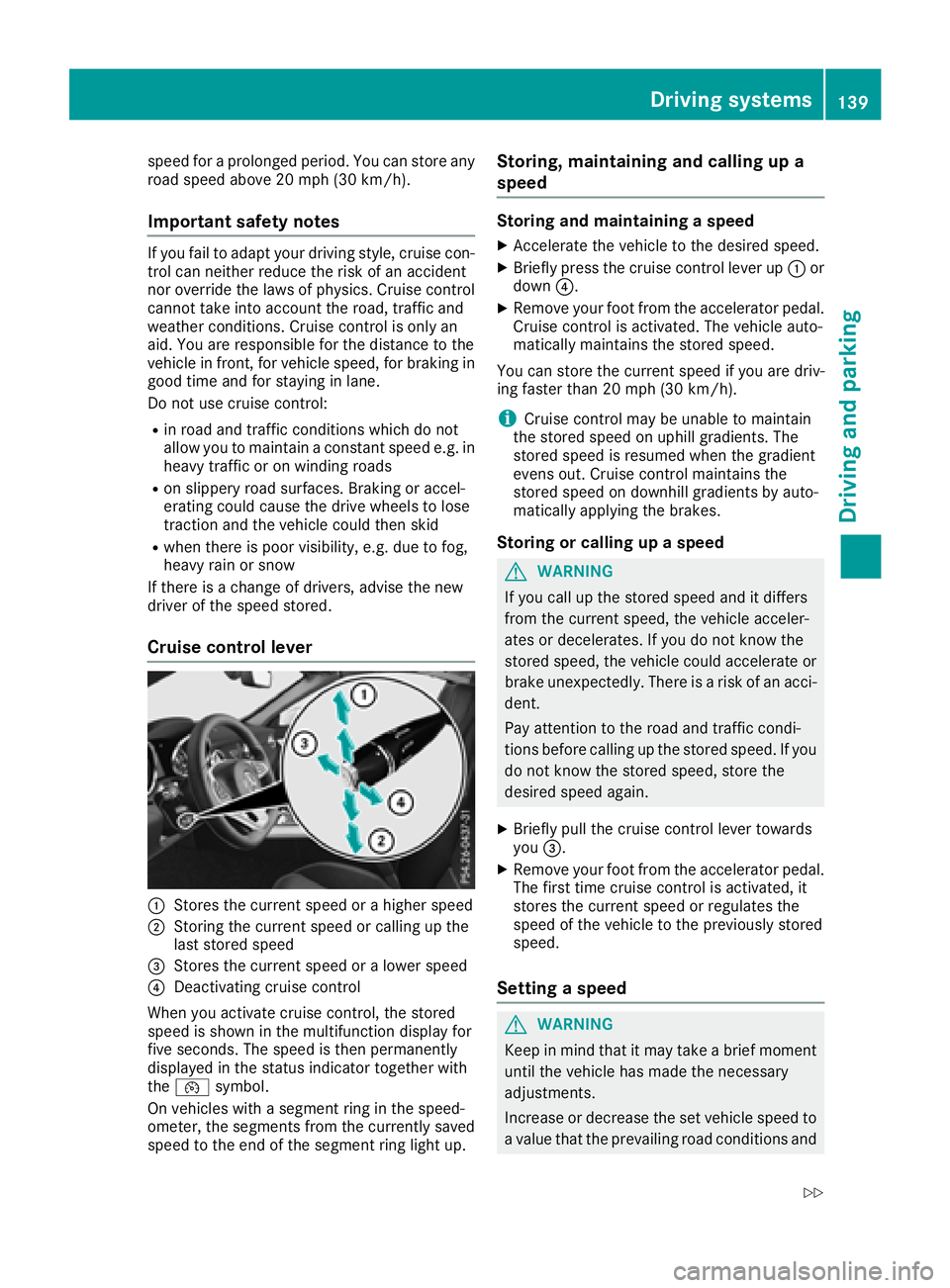
Cruise control lever
:Stores the current speed or ahigher speed
;Storing the current speed or calling up the
last stored speed
=Stores the current speed or alower speed
?Deactivating cruise control
When you activate cruise control, the stored
speed is shown in the multifunction displayf or
five seconds. The speed is then permanently
displayed in the status indicator together with
the ¯ symbol.
On vehicles with asegment ring in the speed-
ometer, the segments from the currently saved speed to the end of the segment ring light up.
Storing, maintaining and callingupa
speed
Storing and maintaining aspeed
XAccelerate the vehicle to the desired speed.
XBriefly press the cruise control lever up :or
down ?.
XRemove your foot from the accelerator pedal.
Cruise control is activated. The vehicle auto-
matically maintains the stored speed.
You can store the current speed if you are driv-
ing faster than 20 mph (30 km/h).
iCruise control may be unable to maintain
the stored speed on uphillg radients. The
stored speed is resumed when the gradient
evens out. Cruise control maintains the
stored speed on downhill gradients by auto-
matically applying the brakes.
Storing or callingupa speed
GWARNING
If you call up the stored speed and it differs
from the current speed, the vehicle acceler-
ates or decelerates. If you do not know the
stored speed, the vehicle could accelerate or brake unexpectedly. There is arisk of an acci-
dent.
Pay attention to the road and traffic condi-
tions before calling up the stored speed. If you
do not know the stored speed, store the
desired speed again.
XBriefly pull the cruise control lever towards
you =.
XRemove your foot from the accelerator pedal.
The first time cruise control is activated, it
stores the current speed or regulates the
speed of the vehicle to the previously stored
speed.
Setting aspeed
GWARNING
Keep in mind that it may take abrief moment
until the vehicle has made the necessary
adjustments.
Increase or decrease the set vehicle speed to
av alue that the prevailing road conditions and
Driving systems139
Driving and parking
Z
Page 142 of 298
legal speed limitspermit. Otherwise, sudden
and unexpected acceleration or deceleration
of the vehicle could cause an accident and/or serious injury to you and others.
XTo adjust th eset speed in 1mphincre-
ment s(1k m/hincrements): briefly press
the cruis econtrol lever up :to the pressure
point for ahigher speed, or down ?for a
lower speed.
Every tim ethe cruis econtrol lever is pressed
up or down, the last speed stored is increased
or reduced.
XTo adjust th eset speed in 5mphincre-
ment s(10 km/h increments): briefly press
the cruis econtrol lever up :past the pres-
sure point for ahigher speed, or down ?for
al ower speed.
Every tim ethe cruis econtrol lever is pressed
up or down, the last speed stored is increased or reduced.
iThe speed indicated in the speedometer
may differs lightly fromt he speed stored.
iCruise control is not deactivate difyou
depresst he accelerator pedal. For example, if
you accelerateb riefly to overtake, cruis econ-
trol adjust sthe vehicle's speed to the last
speed stored after you have finished overtak-
ing.
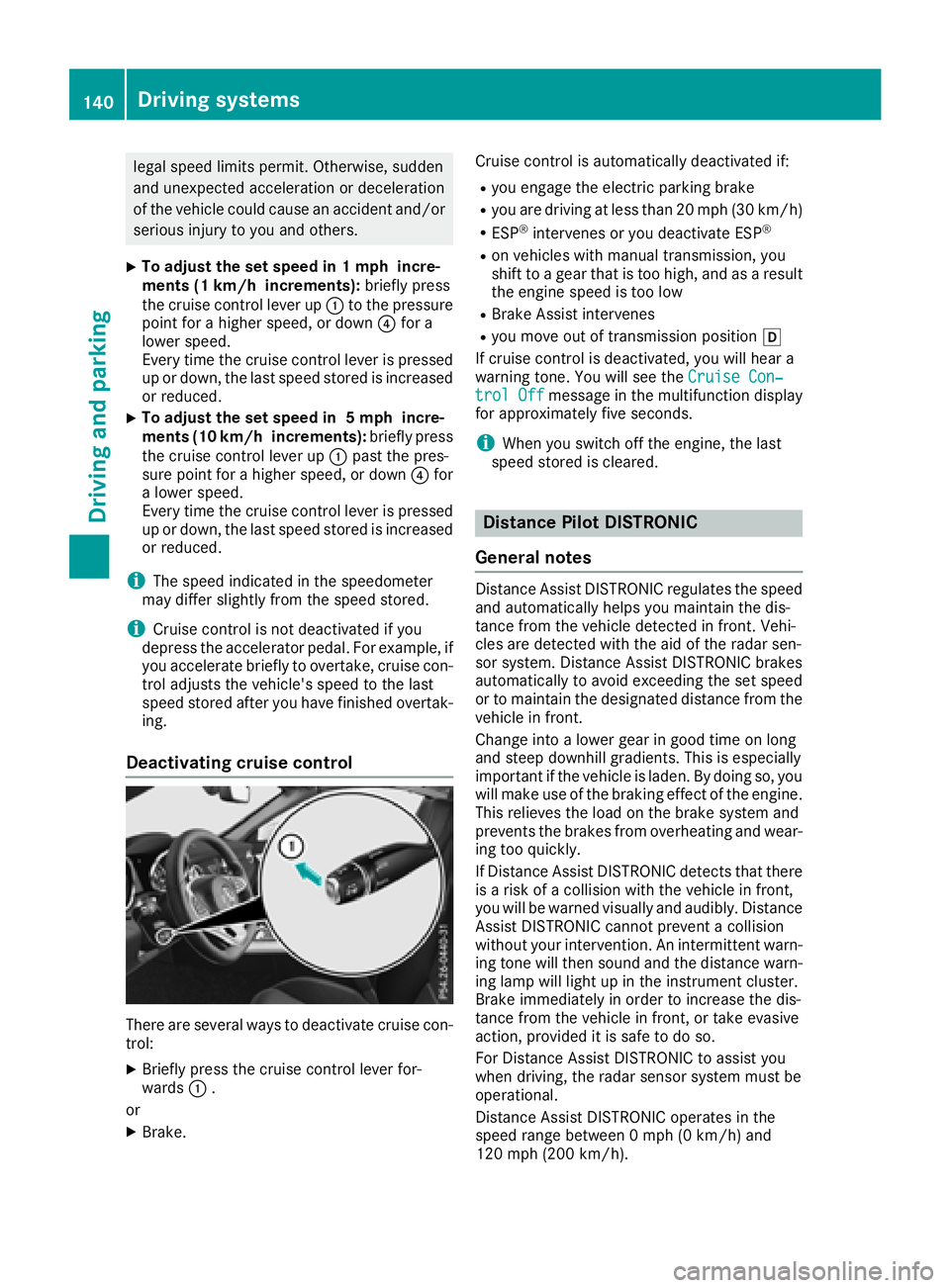
Deactivating cruise control
There are several ways to deactivate cruis econ-
trol:
XBriefly press the cruis econtrol lever for-
wards :.
or
XBrake. Cruise control is automatically deactivated if:
Ryou engag
ethe electric parking brake
Ryou are drivingatl ess than 20 mph (3 0km/ h)
RESP®intervenes or you deactivateE SP®
Ron vehicles with manual transmission,y ou
shift to agear that is too high, and as aresult
the engin espeed is too low
RBrak eAssist intervenes
Ryou move out of transmission position h
If cruis econtrol is deactivated, you will hear a
warnin gtone. You will see the Cruise Con‐
trol Offmessage in the multifunction display
for approximately five seconds.
iWhen you switc hoff the engine, the last
speed stored is cleared.
Distance Pilot DISTRONIC
General notes
Distanc eAssist DISTRONIC regulates the speed
and automatically helps you maintain the dis-
tance fromt he vehicle detected in front .Vehi-
cles are detected with the aid of the radar sen-
sor system. Distanc eAssist DISTRONIC brakes
automatically to avoid exceeding the set speed
or to maintain the designated distanc efromt he
vehicle in front.
Change int oalower gear in good tim eonlong
and steep downhill gradients. This is especially
importan tifthe vehicle is laden. By doing so, you
will make use of the braking effect of the engine.
This relieves the load on the brakes ystem and
prevent sthe brakes fromo verheatingand wear-
ing too quickly.
If Distanc eAssist DISTRONIC detect sthat there
is ar isk of acollision with the vehicle in front,
you will be warne dvisually and audibly. Distance
Assist DISTRONIC cannot prevent acollision
without your intervention. An intermitten twarn-
ing ton ewill the nsound and the distanc ewarn-
ing lamp will light up in the instrumentc luster.
Brak eimmediately in order to increase the dis-
tance fromt he vehicle in front ,ortakee vasive
action, provided it is safe to do so.
For Distanc eAssist DISTRONIC to assist you
when driving, the radar sensor system must be
operational.
Distanc eAssist DISTRONIC operates in the
speed rang ebetwee n0mph (0 km/h) and
120 mph (200 km/h).
140Driving systems
Driving and parking
Page 144 of 298
Do not useDistance Pilo tDISTRONIC:
Rin roa dand trafficc onditions which do not
allo wyouto maintain aconstant speed, e.g .in
heav ytrafficoronw inding roads
Ron slippery roa dsurfaces .Braking or accel-
erating could cause the drive wheels to lose
tractio nand the vehicl ecould thens kid
Rwhen there is poor visibility ,e.g.d ue to fog,
heav yrainors now
Distance Pilo tDISTRONICm aynot detect nar-
row vehicles drivin ginfront, e.g .motorcycles, or
vehicles drivin gonadifferent line.
In particular ,the detection of obstacle scan be
impaired if:
Rthere is dirt on the sensor soranything else
coverin gthe sensors
Rthere is snow or heav yrain
Rthere is interferenc ebyotherradar sources
Rthere ar estrong rada rreflections, for exam-
ple, in parkin ggarages
If Distance Pilo tDISTRONICnol ongerd etects a
vehicl einfront, it mayu nexpectedly accelerate
to the spee dstored.
Thi sspeed may:
Rbe too high if yo uaredrivin ginaf ilter lane or
an exi tlan e
Rbe so high when drivin ginthe right-hand lane
thaty ouovertake vehicles in the left-hand
lane
Rbe so high when drivin ginthe left-hand lane
thaty ouovertake vehicles in the right-hand
lane
If there is achange of drivers, advis ethe new
driver of the spee dstored.
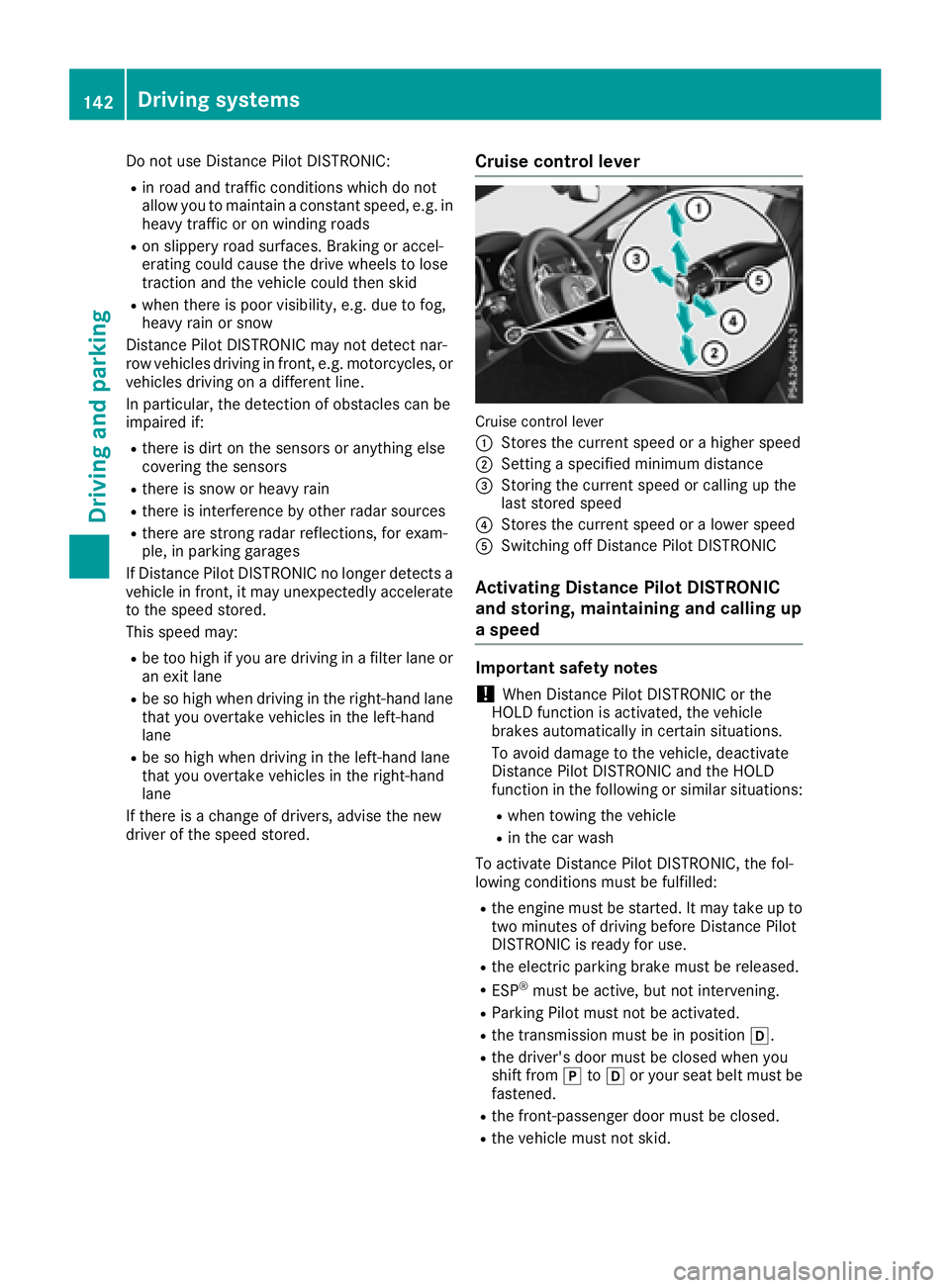
Cruis econtroll ever
Cruise control lever
:
Storest he current spee dorahighe rs peed
;Setting aspecifie dminimu mdistance
=Storing the current spee dorcalling up the
last stored speed
?Storest he current spee doralowerspeed
ASwitching off Distance Pilo tDISTRONIC
Activatin gDistance Pilo tDISTRONIC
and storing, maintainin gand callin gup
as peed
Important safety notes
!When Distance Pilo tDISTRONICort he
HOLD functio nisa ctivated ,the vehicle
brakes automaticall yincertain situations.
To avoi ddamag etothe vehicle, deactivate
Distance Pilo tDISTRONICa nd the HOLD
functio ninthe following or similar situations:
Rwhen towing the vehicle
Rin the car wash
To activate Distance Pilo tDISTRONIC, the fol-
lowing conditions must be fulfilled:
Rthe engine must be started .Itmaytake up to
two minute sofdrivingbefor eD istance Pilot
DISTRONICi sready for use.
Rthe electri cparkin gb rake must be released.
RESP®must be active, bu tnot intervening.
RParkin gPilot must not be activated.
Rthe transmission must be in position h.
Rthe driver's door must be closed when you
shift fromjtoh or your sea tbeltm ustb e
fastened.
Rthe front-passenge rdoorm ustbec losed.
Rthe vehicl emustn ot skid.
142Driving system s
Driving an dparking
Page 145 of 298
Activating
XBrieflypull th ecruise control leve rtow ards
you ?,u p: or down ;.
Distance Pilot DISTRONI Cisa ctivated.
XTo adjust th eset speed in 1mphincre-
ments (1 km/h increments): briefly press
th ec ruise control leve rup: to th epressur e
poin tfor ah igher speed, or down ;to th e
pressur epointfor alower speed.
Every tim ethe cruise control leve rispresse d
up or down ,the last spee dstoredisi ncreased
or reduced.
or
XTo adjust th eset speed in 5mphincre-
ments (10k m/h increments): briefly press
the cruise control lever up :past the pres-
sure point for ahigher speed, or down ;past
the pressure point for alower speed.
Ever ytime the cruise control lever is pressed
up or down, the last speed stored is increased or reduced.
XRemove your foot from the accelerator pedal.
Your vehicle adapts its speed to that of the
vehicle in front, but only up to the desired
stored speed.
iIf you do not fully release the accelerator
pedal, the DistancePilotSuspendedmes-
sage appears in the multifunction display. The set distanc etoaslower-moving vehicle in
frontw ill then not be maintained. You will be
driving at the speed you determine by the
position of the accelerator pedal.
You can also activate Distance Pilot DISTRONIC
when stationary. The lowest speed that can be
set is 20 mph (3 0km/ h).
Activatin gatthe curren tspeed/last
store dspeed
GWARNIN G
If you call up th estoreds pee dand it differs
from th ecurren tspeed, th evehicl eacceler -
ate sord ecelerates. If you do no tknowt he
store dspeed, th evehicl ecould accelerate or
brak eunexpectedly. Ther eisariskofana cci-
dent.
Pay attentio ntotheroad and traffic condi-
tions before calling up th estoreds peed. If you
do no tknowt he store dspeed, store th e
desired spee dagain .
XBriefl ypull th ecruise control leve rtow ards
you ?.
XRemove your foo tfro mt heaccelerato rpedal.
The first tim eDistance Pilot DISTRONI Cis
activated, it store sthe curren tspee dorr eg-
ulates th espee doft hevehicl etotheprevi-
ously store dspeed.
Pulling awa yand driving
XIf you want to pull awa ywith Distance
Pilot DISTRONIC: remove your footfro mt he
brak epedal.
XBriefl ypull th ecruise control leve rtow ards
you ?.
or
XIf Distance Pilot DISTRONI Cisactivated:
accelerate briefly.
Your vehicl epulls away and adapt sits spee d
to that of th evehicl einf ront.Ifnov ehicleis
detected in front, your vehicl eaccelerate sto
th es et speed.
The vehicl ecan also pull away when it is facing
an unidentified obstacle or is driving on adiffer-
en tlinef roma nother vehicle. The vehicl ethen
brakes automatically. Be read yt
ob ra
k eatall
times.
If there is no vehicl einfront,Distance Pilot
DISTRONI Coperate sinthesame way as cruise
control .
If Distance Pilot DISTRONI Cdetect saslower-
moving vehicl einfront,itbrakes your vehicle. In
this way, th edistanc eyou have selected is main -
tained.
If Distance Pilot DISTRONI Cdetect safaster-
moving vehicl einfront,itincreases th edriving
speed. However, th evehicl eiso nlya ccelerate d
up to th espee dyou have stored.
Selecting thed rive program
Distance Pilot DISTRONI Csupport sasporty
driving style when you have selected th eS or S+
driv eprogram (
Ypage 121). Acceleration
behind th evehicl einf rontor to th eset spee dis
then noticeably mor edynamic .Ifyou have
selected th eC or Edriving program ,the vehicl e
accelerate smoreg ently. This settin gisrecom-
mended in stop-and-star ttraffic.
Driving systems143
Driving and parking
Z
Page 146 of 298
Changing lanes
If when driving on multilane roads you wish to
change to theovertakin glane ,Distance Pilot
DISTRONIC support syou if:
Ryou are driving faster than 45 mph (70 km/h)
RDistance Pilo tDISTRONICi smaintaining the
distance to avehicl einf ront
Ryous witch on the appropriate tur nsignal
RDistance Pilo tDISTRONICd oesn ot currently
detect adangerofc ollision
If these conditions ar efulfilled ,you rv ehicl eis
accelerated .Acceleratio nwillbei nterrupte dif
changing lanes take stoo long or if the distance
between your vehicl eand the vehicl einfront
become stoo small.
iWhen yo uchange lanes ,Distance Pilot
DISTRONICm onitors the left lane (o nleft-
hand-driv evehicles) or the right lane (o nright-
hand-driv evehicles).
Stopping
GWARNING
If yo uleave the vehicl ewhenitiso nlyb eing
braked by Distance Pilo tDISTRONIC, it could
rol lawa yif:
Rthere is amalfunctio ninthe system or in
the voltag esupply.
RDistance Pilo tDISTRONICi sswitched off
using the cruis econtro llev er,e .g.b yav ehi-
cle occupant or fromo utside the vehicle
Rthe electrical system in the engine com-
partment, the battery or the fuses ar etam-
pered with.
Rthe battery is disconnected
Rthe vehicl eisaccelerated ,e.g.b yav ehicle
occupant.
There is ariskofana ccident.
Before leaving the vehicle, always deactivate
Distance Pilo tDISTRONICa nd securethe
vehicl eagain st rolling away.
Furtheri nformatio nondeactivating Distance
Pilo tDISTRONIC(
Ypage 146).
If Distance Pilo tDISTRONICd etects thatt he
vehicl einfront is stopping, it brakes your vehicle
unti litiss tationary. Once your vehicl
eisstationary, it remains sta-
tionar yand yo udon ot nee dtodepress the
brake.
iAfter atime ,the electri cparkin gb rake
secures the vehicl eand relieves the service
brake.
iDepending on the specifie dminimu mdis-
tance ,you rvehicl ewillc ome to astandstil lat
as ufficient distance behind the vehicl ein
front. The specifie dm
i
nimu mdistance is set
using the contro lonthe cruis econtro llev er.
When Distance Pilo tDISTRONICisa ctivated,
the transmission is shifted automaticall yto
position jif:
Rthe driver's sea tbeltisn ot fastened and the
driver's door is open.
Rthe engine is switched off ,unless it is auto-
maticall yswitched off by the ECO start/stop
function.
The electri cparkin gb rake secures the vehicle
automaticall yifDistance Pilo tDISTRONICi s
activated when the vehicl eisstationar yand:
Ras ystem malfunctio noccurs.
Rthe powe rsuppl yisn ot sufficient.
If am alfunctio noccurs, the transmission may
also shift to position jautomatically.
Settin gaspeed
Keepinm indt hatitm aytake abrief moment
unti lthe vehicl ehasaccelerated or braked to
the spee dset.
XTo adjustt he setspeed in 1mph incre-
ments (1 km/hi ncrements):briefly press
the cruise control lever up :to the pressure
point for ahigher speed, or down ;for a
lower speed.
Every time the cruise control lever is pressed
up or down, the last speed stored is increased
or reduced.
XTo adjust th eset speed in 5mph incre-
ment s(10 km/h increments): briefly
press the cruise control lever up :past the
pressurep oint forahigher speed, or down ;
for alower speed.
Every time the cruise control lever is pressed
up or down, the last speed stored is increased
or reduced.
144Driving systems
Driving and parking