Time MERCEDES-BENZ SLK-Class 2015 R172 Comand Manual
[x] Cancel search | Manufacturer: MERCEDES-BENZ, Model Year: 2015, Model line: SLK-Class, Model: MERCEDES-BENZ SLK-Class 2015 R172Pages: 270, PDF Size: 5.82 MB
Page 168 of 270
If a preset time has elapsed during which nei-
ther the online functions nor the Internet have
been used, COMAND automatically discon-
nects from the Internet.
X Select Settings Settings in the carousel view by
sliding 00640052and turning 00790052007Athe COMAND
controller and press 0098to confirm.
X Select Disconnect Automatically
Disconnect Automatically
After:
After: and press 0098to confirm.
The 003Bdot indicates the current setting.
X Select 5 min
5 min ,15 min
15 min orOff
Off and press 0098
to confirm.
Off
Off switches the function off.
An active Internet connection is identified by the double arrows on the top right of the dis-
play. Establishing/ending the connection
Establishing the connection
Preconditions for establishing a connection
can be found under "General notes"
(Y page 158).
X Option 1: select the00A7icon in the main
function bar by turning 00790052007Athe COMAND
controller and press 0098to confirm.
The carousel view appears.
X Turn 00790052007A or slide 009500520096the COMAND con-
troller until the Mercedes-Benz Apps Mercedes-Benz Apps
panel or a favorite is brought to the front, if
these have been previously created
(Y page 181).
X Option 2: enter a web address
(Y page 176). X
For both options, press 0098the COMAND
controller.
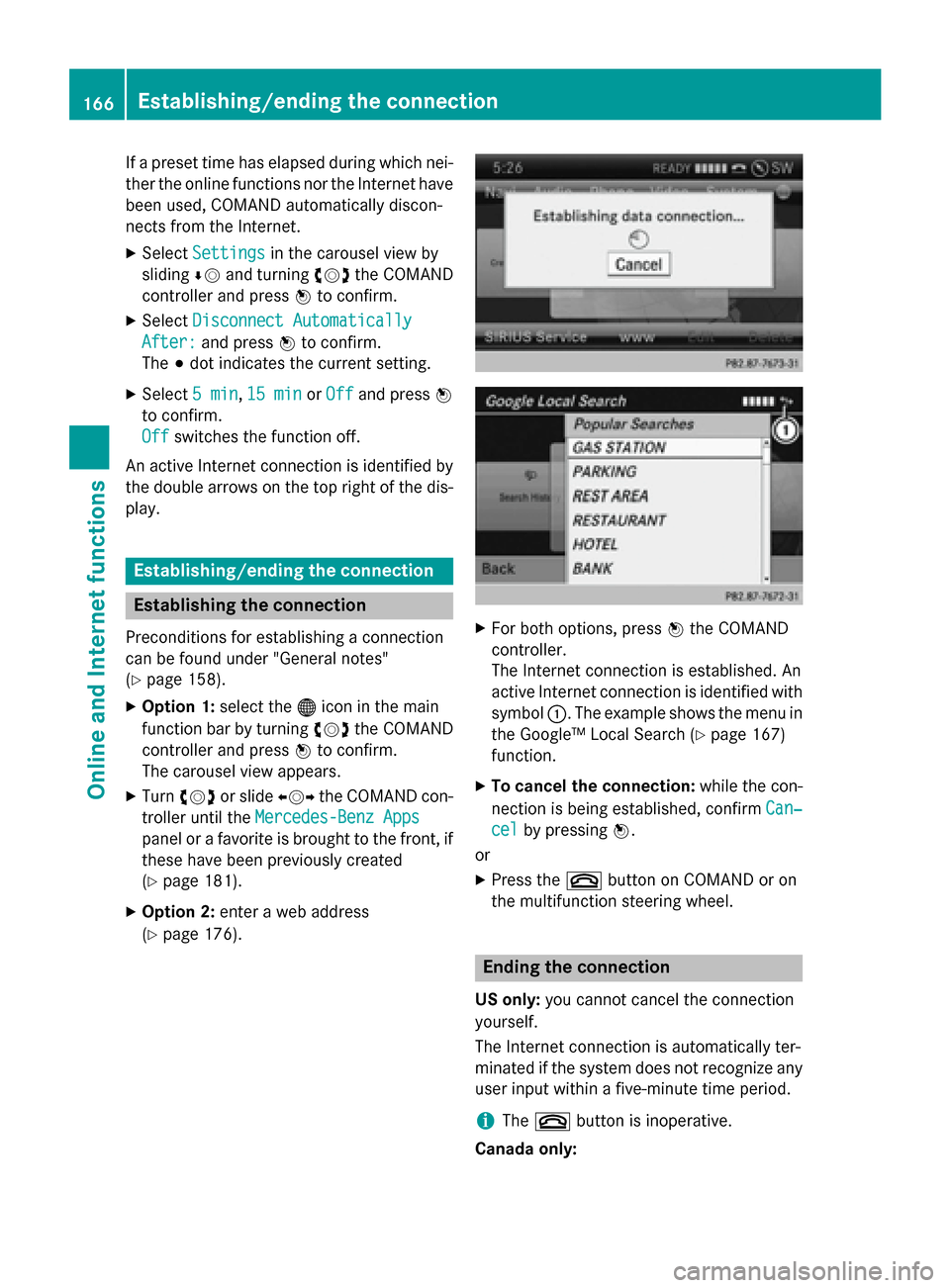
The Internet connection is established. An
active Internet connection is identified with symbol 0043. The example shows the menu in
the Google™ Local Search (Y page 167)
function.
X To cancel the connection: while the con-
nection is being established, confirm Can‐
Can‐
cel cel by pressing 0098.
or
X Press the 0076button on COMAND or on
the multifunction steering wheel. Ending the connection
US only: you cannot cancel the connection
yourself.
The Internet connection is automatically ter-
minated if the system does not recognize any user input within a five-minute time period.
i The
0076 button is inoperative.
Canada only: 166
Establishing/ending the connectionOnline and Internet functions
Page 170 of 270

X
After entering the search term, select 0054
by turning 00790052007Athe COMAND controller
and press 0098to confirm.
A menu appears. Here, you can select
where the destination search should begin.
Selecting the search position X
After a search term has been entered and
confirmed, a menu appears.
COMAND searches for available POIs for
the search term entered:
R near the current vehicle position
R along the calculated route
If a destination has previously been
entered, the function is available.
R near the destination
If a destination has previously been
entered, the function is available.
R near an address
X After selecting Near Destination
Near Destination, enter
an address and confirm.
The search results are displayed. Example: search results Using search results
X
Select an entry in the list of search results
by turning 00790052007Athe COMAND controller
and press 0098to confirm.
A menu appears.
X To show the detailed view: confirm
Details Details by pressing 0098the COMAND con-
troller.
The address of the selected entry is dis-
played.
X To use a search result as the destina-
tion: select Navigate to Navigate to by turning00790052007A
the COMAND controller and press 0098to
confirm.
You then switch to navigation mode and
can start route calculation (Y page 69).
You then switch to navigation mode and
can start route calculation.
i The search result is stored in the
"Last destinations" memory at the same
time (Y page 107). You can take the desti-
nation from this memory and save it per-
manently in the destination memory
(Y page 104).
X To call up a destination: selectCall Callwith
the COMAND controller and press 0098to
confirm.
You then switch to the telephone function
and make the call (Y page 132).
You then switch to the telephone function
and make the call.
i If there is no phone number available, the
menu item cannot be selected. 168
Google™ local searchOnline and Internet functions
Page 176 of 270
controller and press
0098to confirm
(Y page 172).
X Select Mercedes-Benz Apps
Mercedes-Benz Apps orGoogle
Google
and press 0098to confirm.
The respective start page appears.
X Select Continue
Continue to view further content. Resetting adjustments
With the reset function, all Mercedes-Benz
Apps settings are reset to the factory set-
tings. X Select the 00A7symbol in the main function
bar by turning 00790052007Athe COMAND con-
troller and press 0098to confirm.
The carousel view appears.
X Bring the Mercedes-Benz Apps Mercedes-Benz Apps panel to
the front by turning 00790052007Athe COMAND
controller and press 0098to confirm.
X Select Options
Options by sliding 00520064and turning
00790052007A the COMAND controller and press 0098
to confirm.
X Select Reset
Reset and press 0098to confirm.
A prompt appears asking whether you
really wish to reset.
X Select Yes
Yes orNo
No and press 0098to confirm. Other services
Mercedes-Benz Mobile Website
For individual Mercedes-Benz Apps, it may be
necessary to pay license fees before using.
Use is then limited to a certain period of time. License fees must be paid again for use
beyond this time period.
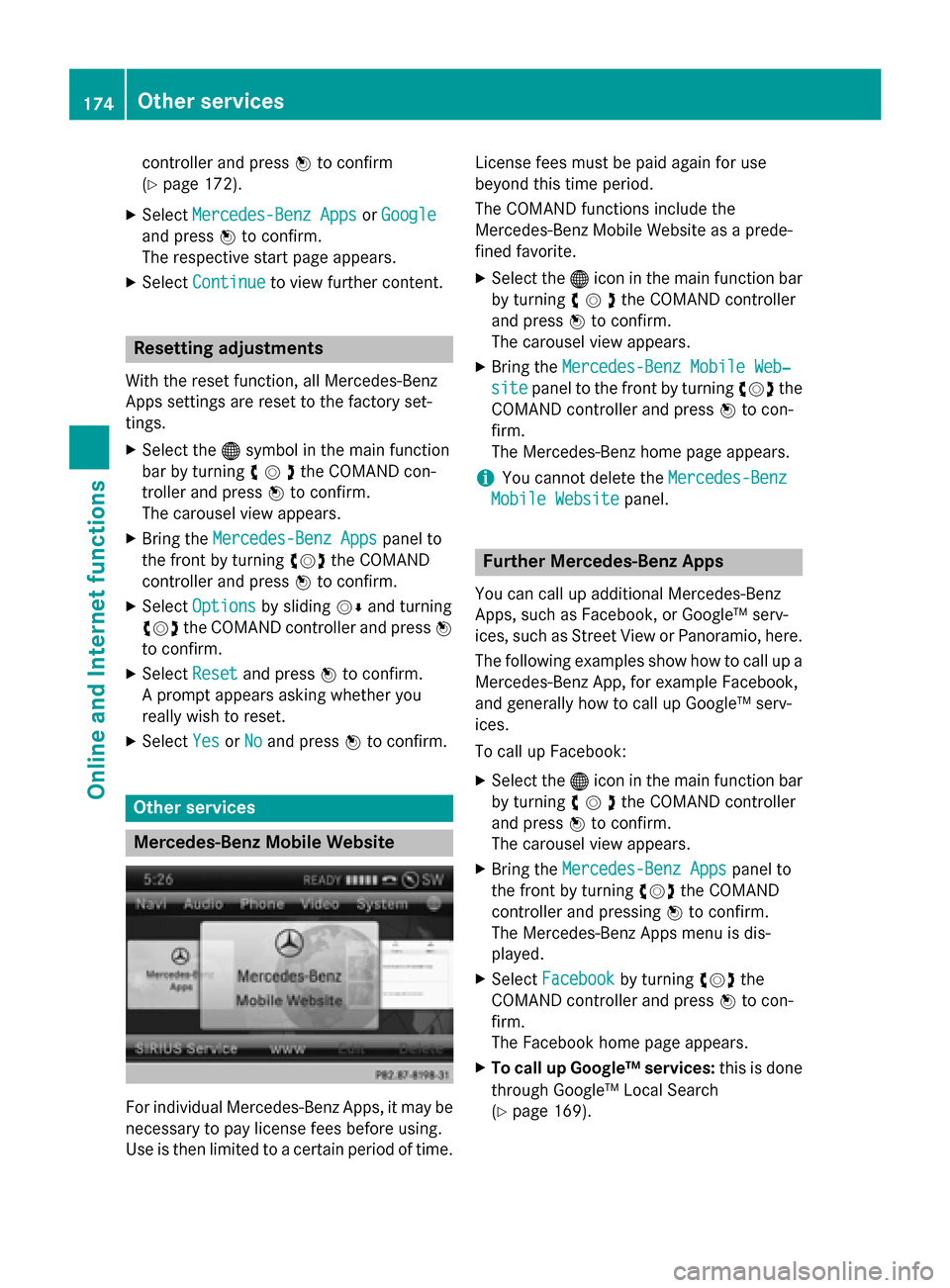
The COMAND functions include the
Mercedes-Benz Mobile Website as a prede-
fined favorite.
X Select the 00A7icon in the main function bar
by turning 00790052007Athe COMAND controller
and press 0098to confirm.
The carousel view appears.
X Bring the Mercedes-Benz Mobile Web‐ Mercedes-Benz Mobile Web‐
site
site panel to the front by turning 00790052007Athe
COMAND controller and press 0098to con-
firm.
The Mercedes-Benz home page appears.
i You cannot delete the
Mercedes-Benz Mercedes-Benz
Mobile Website
Mobile Website panel. Further Mercedes-Benz Apps
You can call up additional Mercedes-Benz
Apps, such as Facebook, or Google™ serv-
ices, such as Street View or Panoramio, here. The following examples show how to call up aMercedes-Benz App, for example Facebook,
and generally how to call up Google™ serv-
ices.
To call up Facebook:
X Select the 00A7icon in the main function bar
by turning 00790052007Athe COMAND controller
and press 0098to confirm.
The carousel view appears.
X Bring the Mercedes-Benz Apps
Mercedes-Benz Apps panel to
the front by turning 00790052007Athe COMAND
controller and pressing 0098to confirm.
The Mercedes-Benz Apps menu is dis-
played.
X Select Facebook Facebook by turning 00790052007Athe
COMAND controller and press 0098to con-
firm.
The Facebook home page appears.
X To call up Google™ services: this is done
through Google™ Local Search
(Y page 169). 174
Other servicesOnline and
Internet functions
Page 178 of 270
Internet
Display restriction
Internet pages cannot be shown while the
vehicle is in motion. Calling up a website
Calling up the carousel view X
Select the 00A7symbol in the main function
bar by turning 00790052007Athe COMAND con-
troller and press 0098to confirm.
The carousel view appears.
You can now enter a web address (option 1
(Y page 176)) or select it in the carousel view
(option 2 (Y page 177)).
To select in the carousel view, you must first
create favorites (Y page 181).
Option 1: entering the web address You can enter the web address using either
the character bar or the number keypad
(Y page 35).
X Call up the carousel view (Y page 176).
X Select www
wwwby sliding 00520064and turning 00790052007A
the COMAND controller and press 0098to
confirm.
An input menu appears. X
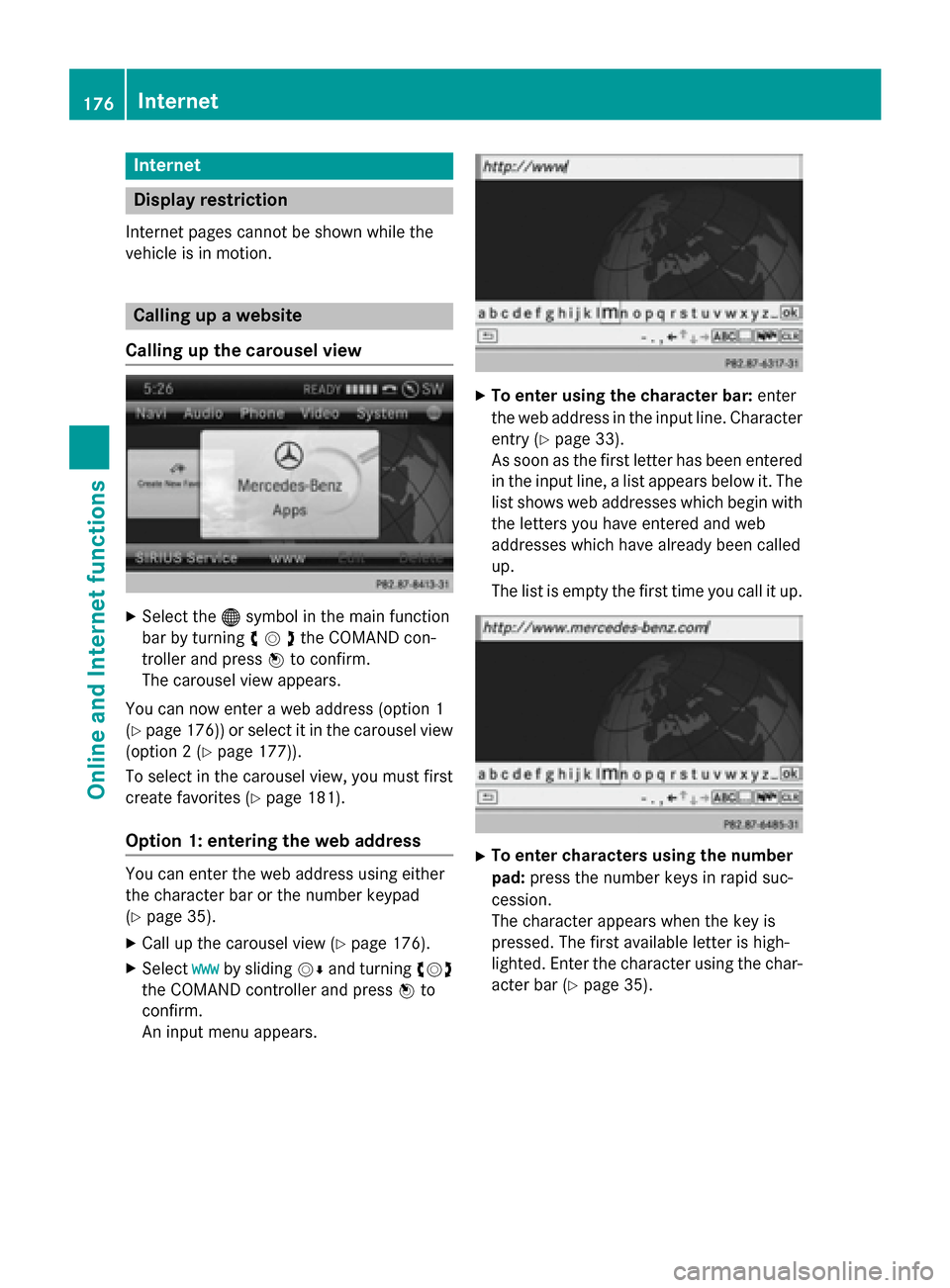
To enter using the character bar: enter
the web address in the input line. Character entry (Y page 33).
As soon as the first letter has been entered
in the input line, a list appears below it. The
list shows web addresses which begin with the letters you have entered and web
addresses which have already been called
up.
The list is empty the first time you call it up. X
To enter characters using the number
pad: press the number keys in rapid suc-
cession.
The character appears when the key is
pressed. The first available letter is high-
lighted. Enter the character using the char- acter bar (Y page 35).176
InternetOnline and
Internet functions
Page 184 of 270

Editing favorites in the Favorites menu
X Call up the menu (Y page 179).
X Select Display Favorites
Display Favorites by turning
00790052007A the COMAND controller and press 0098
to confirm.
The favorite is displayed.
X Press 0098the COMAND controller.
The favorites menu appears.
X Select Edit
Edit by turning 00790052007Aor sliding 009700520064
the COMAND controller and press 0098to
confirm.
or
X Press the 007Dbutton on the number key-
pad (this function is not available if you are using the telephone at the same time).
An input menu appears.
X Enter the web address (URL) and name
using either the character bar or the num-
ber keypad. Character entry (Y page 33).
Other functions in the favorites menu Opening current favorites
X Call up the Favorites menu (Y page 181).
X Confirm Open Openby pressing 0098the COMAND
controller.
Opens the current favorites in a new window.
Opening in a new window
X Call up the Favorites menu (Y page 181).
X Select Open In A New Window
Open In A New Window by turning
00790052007A or sliding 009700520064the COMAND control-
ler and press 0098to confirm.
Calling up details X Call up the Favorites menu (Y page 181).
X Select Details
Details by turning 00790052007Aor sliding
009700520064 the COMAND controller and press 0098
to confirm.
or
X Press the 0090button on the number key-
pad (this function is not available if you are using the telephone at the same time).
The detailed view appears. Exiting
X Call up the Favorites menu (Y page 181).
X Select Exit
Exit by turning 00790052007Aor sliding 009700520064
the COMAND controller and press 0098to
confirm.
or
X Press the 003Dback button on the left next
to the COMAND controller.
The Favorites menu closes.
Deleting favorites Deleting favorites in the carousel view
X Call up the carousel view (Y page 176).
X Select Delete Delete by sliding 00520064and turning
00790052007A the COMAND controller and press 0098
to confirm.
A prompt appears.
X Select Yes
Yes and press 0098to confirm.
The favorite is deleted.
If you select No No, the process will be can-
celed.
Deleting favorites in the Favorites menu X Select Delete
Delete by turning 00790052007Aor sliding
009700520064 the COMAND controller and press 0098
to confirm.
or
X Press the 0084button to the right of the
COMAND controller.
The favorite is deleted. 182
InternetOnline and Internet functions
Page 185 of 270

Settings
Settings menu X
Call up the menu (Y page 179).
X Select Settings
Settings by turning00790052007Aor sliding
009700520064 the COMAND controller and press 0098
to confirm.
You can activate/deactivate the following
settings:
R Download Images Automatically
Download Images Automatically
It may take some time to download the
contents of websites that contain a large
amount of images. Therefore, it may be
useful to deactivate this option.
R Block Pop-Ups
Block Pop-Ups
Pop-ups are windows (usually with adver-
tisements) which are displayed automati-
cally when you call up a website. You can
block these displays.
R Activate Javascript
Activate Javascript
Javascript makes it possible to display and
interact with dynamic content on the web-
site.
R Allow Cookies Allow Cookies
Some websites save information in small
text files (cookies) in COMAND. You can
determine whether cookies may be stored.
R Character Size Character Size
You can select the font size which is used
when displaying the website.
R Character Code
Character Code You can select a different character set
here, e.g. if the characters of a website
appear distorted.
R Delete Private Data Delete Private Data
Deletes data which has been saved by the
browser during Internet use.
Changing settings X
Select a setting by turning 00790052007Athe
COMAND controller and press 0098to con-
firm.
Switch the setting on 0073or off 0053.
X Select Character Size Character Size orCharacter
Character
Code
Code by turning 00790052007Aor sliding 009700520064the
COMAND controller and press 0098to con-
firm.
X Select a setting using the COMAND con-
troller and press 0098to confirm.
i If you change the settings, the websites
may not be displayed correctly.
Deleting private data X
Select Delete Private Data Delete Private Data and press
0098 to confirm.
A menu appears. Internet
183Online and Internet functions Z
Page 188 of 270
Your COMAND equipment
These operating instructions describe all the
standard and optional equipment for your
COMAND system, as available at the time of
going to print. Country-specific differences
are possible. Please note that your
COMAND system may not be equipped with
all the features described. Radio mode
Important notes
Portable electronic devices in the vehicle may seriously impair radio reception. Switching to radio mode
Switching modes using the function
button X
Press the 002Afunction button.
The radio display appears. You will hear the
last station played on the last waveband.
i Repeatedly pressing this function button
switches through the wavebands in this
order: FM, AM, WB. You then call up satel-
lite radio mode. Pressing the button again
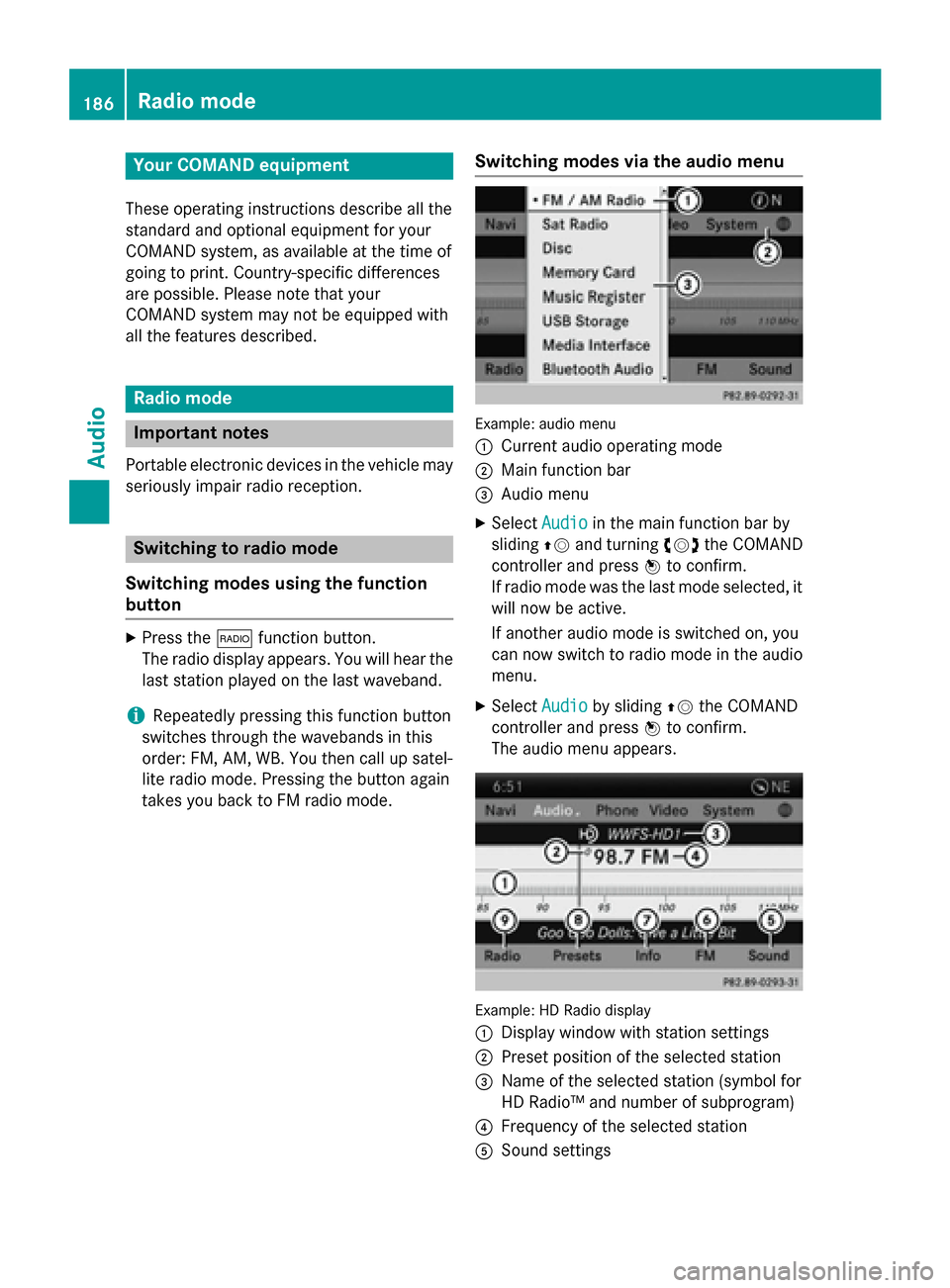
takes you back to FM radio mode. Switching modes via the audio menu Example: audio menu
0043
Current audio operating mode
0044 Main function bar
0087 Audio menu
X Select Audio Audioin the main function bar by
sliding 00970052and turning 00790052the COMAND
controller and press 0098to confirm.
If radio mode was the last mode selected, it
will now be active.
If another audio mode is switched on, you
can now switch to radio mode in the audio menu.
X Select Audio
Audio by sliding 00970052the COMAND
controller and press 0098to confirm.
The audio menu appears. Example: HD Radio display
0043 Display window with station settings
0044 Preset position of the selected station
0087 Name of the selected station (symbol for
HD Radio™ and number of subprogram)
0085 Frequency of the selected station
0083 Sound settings 186
Radio
modeAudio
Page 192 of 270
X
Select a channel by turning 00790052007Athe
COMAND controller and press 0098to con-
firm.
or X Press a number key on the control panel,
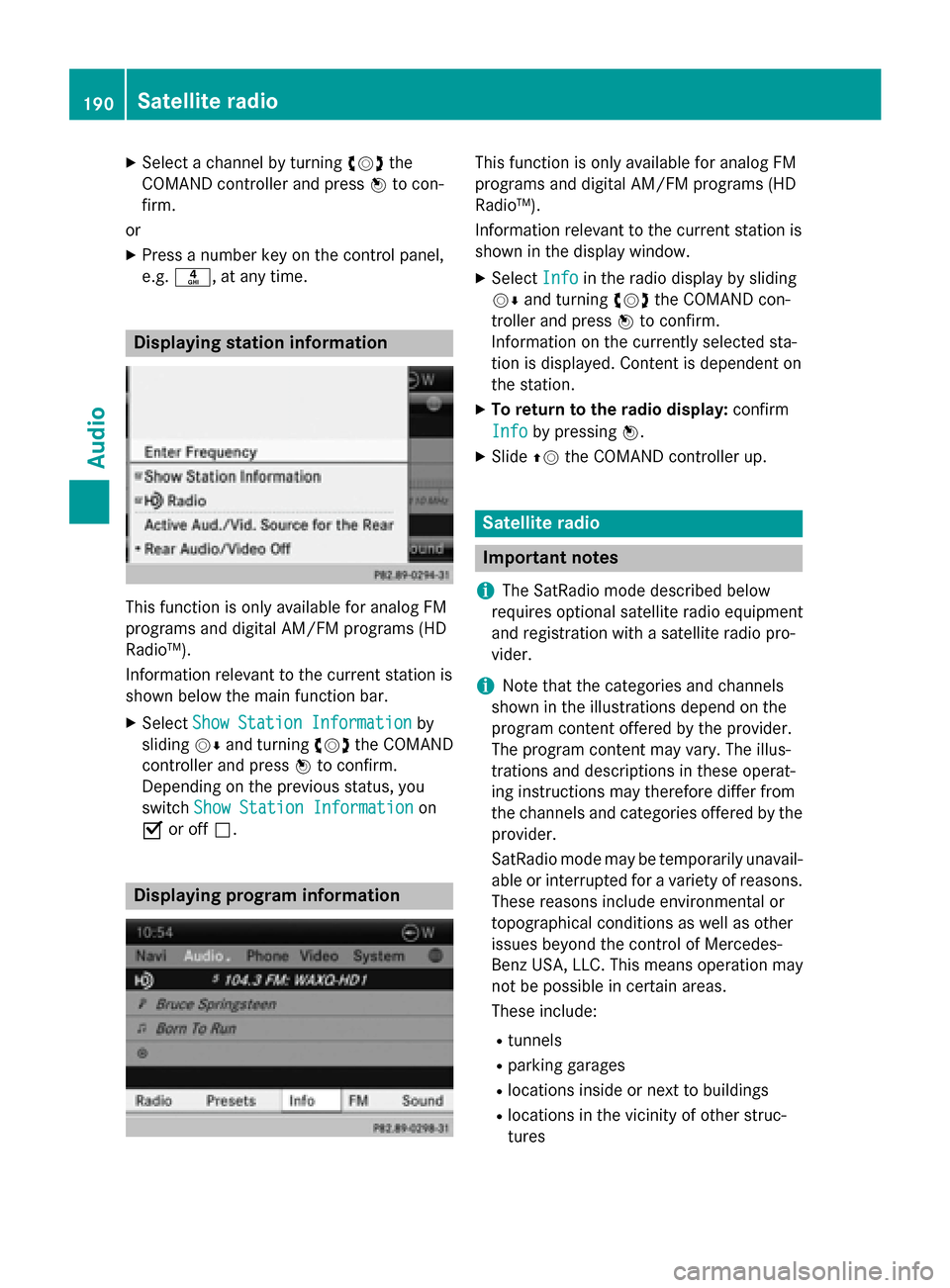
e.g. 0084, at any time. Displaying station information
This function is only available for analog FM
programs and digital AM/FM programs (HD
Radio™).
Information relevant to the current station is
shown below the main function bar.
X Select Show Station Information
Show Station Information by
sliding 00520064and turning 00790052007Athe COMAND
controller and press 0098to confirm.
Depending on the previous status, you
switch Show Station Information
Show Station Information on
0073 or off 0053. Displaying program information This function is only available for analog FM
programs and digital AM/FM programs (HD
Radio™).
Information relevant to the current station is
shown in the display window.
X Select Info Infoin the radio display by sliding
00520064 and turning 00790052007Athe COMAND con-
troller and press 0098to confirm.
Information on the currently selected sta-
tion is displayed. Content is dependent on
the station.
X To return to the radio display: confirm
Info Info by pressing 0098.
X Slide 00970052the COMAND controller up. Satellite radio
Important notes
i The SatRadio mode described below
requires optional satellite radio equipment
and registration with a satellite radio pro-
vider.
i Note that the categories and channels
shown in the illustrations depend on the
program content offered by the provider.
The program content may vary. The illus-
trations and descriptions in these operat-
ing instructions may therefore differ from
the channels and categories offered by the
provider.
SatRadio mode may be temporarily unavail- able or interrupted for a variety of reasons.These reasons include environmental or
topographical conditions as well as other
issues beyond the control of Mercedes-
Benz USA, LLC. This means operation may
not be possible in certain areas.
These include:
R tunnels
R parking garages
R locations inside or next to buildings
R locations in the vicinity of other struc-
tures 190
Satellite radioAudio
Page 197 of 270
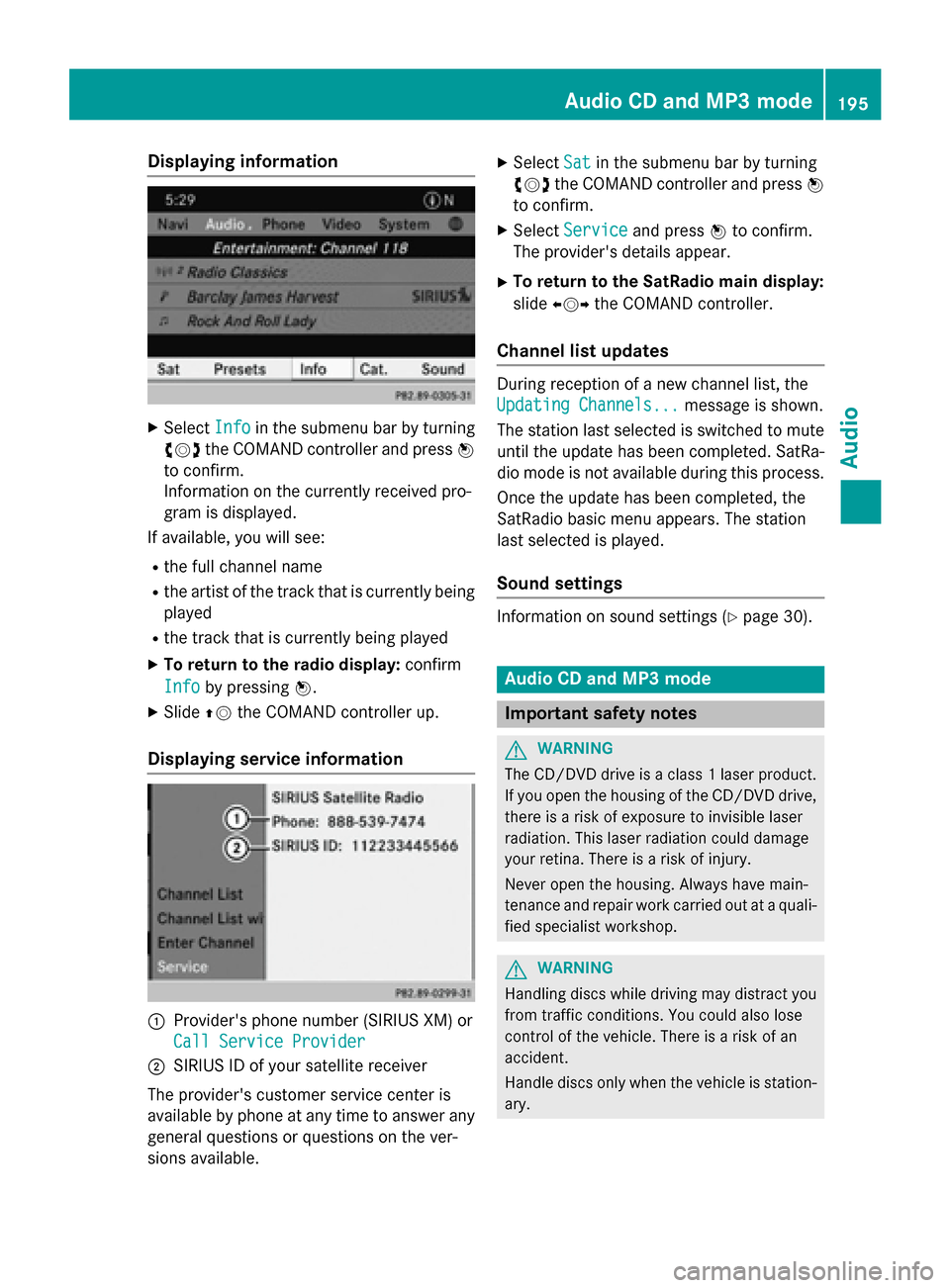
Displaying information
X
Select Info
Info in the submenu bar by turning
00790052007A the COMAND controller and press 0098
to confirm.
Information on the currently received pro-
gram is displayed.
If available, you will see:
R the full channel name
R the artist of the track that is currently being
played
R the track that is currently being played
X To return to the radio display: confirm
Info
Info by pressing 0098.
X Slide 00970052the COMAND controller up.
Displaying service information 0043
Provider's phone number (SIRIUS XM) or
Call Service Provider
Call Service Provider
0044 SIRIUS ID of your satellite receiver
The provider's customer service center is
available by phone at any time to answer any
general questions or questions on the ver-
sions available. X
Select Sat
Sat in the submenu bar by turning
00790052007A the COMAND controller and press 0098
to confirm.
X Select Service Service and press 0098to confirm.
The provider's details appear.
X To return to the SatRadio main display:
slide 009500520096 the COMAND controller.
Channel list updates During reception of a new channel list, the
Updating Channels... Updating Channels...
message is shown.
The station last selected is switched to mute until the update has been completed. SatRa-
dio mode is not available during this process.
Once the update has been completed, the
SatRadio basic menu appears. The station
last selected is played.
Sound settings Information on sound settings (Y
page 30). Audio CD and MP3 mode
Important safety notes
G
WARNING
The CD/DVD drive is a class 1 laser product. If you open the housing of the CD/DVD drive,
there is a risk of exposure to invisible laser
radiation. This laser radiation could damage
your retina. There is a risk of injury.
Never open the housing. Always have main-
tenance and repair work carried out at a quali- fied specialist workshop. G
WARNING
Handling discs while driving may distract you from traffic conditions. You could also lose
control of the vehicle. There is a risk of an
accident.
Handle discs only when the vehicle is station-
ary. Audio CD and MP3
mode
195Audio Z
Page 198 of 270
Bear in mind that at a speed of only 30 mph
(approximately 50 km/h), your vehicle covers
a distance of 44 feet (approximately 14 m)
every se cond. G
WARNING
SD memory cards are small parts. They can be swallowed and cause asphyxiation. This
poses an increased risk of injury or even fatal injury.
Keep SD memory cards out of the reach of
children. If an SD memory card is swallowed,
seek immediate medical attention. Inserting/ejecting CDs/DVDs
Notes If the CD/DVD has a printed side, this must
face upwards when the CD/DVD is inserted.
If neither side is printed, the side to be played should face downwards. CDs/DVDs with
copy protection may not be able to be played
by the system.
i If a medium contains other files in addi-
tion to music files, the loading time before
the first track starts to play may be longer.
Inserting X
Press the 0062button.
If there is a disc already inserted, it will be
ejected.
X Take the disc out of the slot.
X Insert a disc into the slot.
When a suitable data carrier is correctly
inserted, the drive draws it in and plays it.
Removing X
Press the 0062button.
X Take the disc out of the slot.
If you do not take the disc out of the slot, it
is drawn in again automatically after a short
while and reloaded. Inserting and ejecting an SD memory
card
General information COMAND supports SD memory cards
(Secure
Digital), SDHC memory cards
(Secure DigitalHighCapacity) and SDXC
memory cards (Secure Digital eXtended
Capacity.
i Not all memory cards available on the
market are designed for the temperatures
which may be reached in the vehicle.
If the SD memory card is no longer in use,
you should remove it from COMAND. High
temperatures can damage the card.
Due to the wide range of SD memory cards
available on the market, playback cannot
be guaranteed for all brands of SD memory card.
The readable storage capacity depends on
the memory card used. You can obtain fur-
ther information at any authorized
Mercedes-Benz Center.
Inserting an SD memory card X
Insert the memory card into the slot on the
control panel until it engages in place. The
side with the contacts must face down-
wards and point towards the slot.
If no MP3 tracks can be found, you will see a message to this effect.
The first 100 MP3 tracks are loaded. The
first MP3 track is then played. Further
tracks are loaded in the background; this is
indicated by an hourglass symbol.
Ejecting an SD memory card X
Press the memory card.
The memory card is ejected.
X Remove the memory card from slot. 196
Audio CD and MP3 modeAudio