heating MERCEDES-BENZ SLK ROADSTER 2008 Owners Manual
[x] Cancel search | Manufacturer: MERCEDES-BENZ, Model Year: 2008, Model line: SLK ROADSTER, Model: MERCEDES-BENZ SLK ROADSTER 2008Pages: 273, PDF Size: 4.42 MB
Page 6 of 273
31, 2, 3 ...
7G–TRONIC . . . . . . . . . . . . . . . . . . . . . .86 A
ABS (Anti-lock Braking System ). . . . .50
Display message . . . . . . . . . . . . . .176
Warning lamp . . . . . . . . . . . . . . . . .193
Acceleratio n
Technical data . . . . . . . . . . . . . . . .245
Accident
Notes . . . . . . . . . . . . . . . . . . . . . . .199
Active Service Syste m
see ASSYST PLUS
Airbag
Activation . . . . . . . . . . . . . . . . . . . . .39
Control unit . . . . . . . . . . . . . . . . . . .39
Driver's . . . . . . . . . . . . . . . . . . . . . . .42
Front . . . . . . . . . . . . . . . . . . . . . . . .42
Front passenger . . . . . . . . . . . . . . . .42
Head/thorax airbags . . . . . . . . . . . .43
PASSENGER AIRBAG OFF warning
lamp . . . . . . . . . . . . . . . . . . . . . . .191
System . . . . . . . . . . . . . . . . . . . . . . .41
Air conditioning
2-zone Thermatic . . . . . . . . . . . . . .122
Activating/deactivating air-recir-
culation mode . . . . . . . . . . . . . . . .131
Activating/deactivating auxiliary
heating/ventilatio n.. . . . . . . . . ..132 Air-recirculation mode with con-
venience opening/closing feature
.131
Controlling automatically . . . . . . . .127
Cooling with air dehumidification . .126
Demisting the windscreen . . . . . . .130
Heatmatic . . . . . . . . . . . . . . . . . . .120
Malfunction indicator lamp . . . . . .191
Misted up windows . . . . . . . . . . . .130
Rear window heating . . . . . . . . . . .130
Setting the air distribution . . . . . . .129
Setting the airflow . . . . . . . . . . . . .129
Setting the air vents . . . . . . . . . . . .128
Setting the temperature . . . . . . . . .127
Thermotronic . . . . . . . . . . . . . . . . .124
see Climate control
Air-conditionin g
Activating/deactivating . . . . . . . . .126
AIRSCARF neck-level heatin g. . . . . . .62
Antifreeze concentratio n. . . . . . . . .260
Anti-lock braking syste m
see ABS
Anti-theft alarm system
see ATA
Anti-theft systems . . . . . . . . . . . . . . ..52
Ashtra y. . . . . . . . . . . . . . . . . . . . . . . .140
ASSYST PLU S. . . . . . . . . . . . . . . . . . .165
ATA (anti-theft alarm system) . . . . ..52
Switching off the alarm . . . . . . . . . .53
Audible warning signa l. . . . . . . . . . .197 AUTO lights
Display message . . . . . . . . . . . . . .183
Automatic car wash . . . . . . . . . . . ..166
Automatic transmission Changing gear yoursel f.. . . . . . . . .86
Display in the speedomete r.. . . . ..85
Display message . . . . . . . . . . . . . .177
Driving tips . . . . . . . . . . . . . . . . . . . .87
Emergency running mod e.. . . . . .203
Malfunction . . . . . . . . . . . . . . . . . .203
One-touch gearshifting . . . . . . . . . . .86
Program selector button . . . . . . . . .87
Releasing the parking lock man -
ually . . . . . . . . . . . . . . . . . . . . . . . .212
Selector lever positions . . . . . . . . . .85
Shift ranges . . . . . . . . . . . . . . . . . . .86
Axle load, maximum permissibl e
. . . . . . . . . . . . . . . . . . . . . . . . . .253, 254 B
BAS (Brake Assist) . . . . . . . . . . . . . . ..50
Battery Changing (key) . . . . . . . . . . . . . . . .212
Charging . . . . . . . . . . . . . . . . . . . . .232
Checking (key ).. . . . . . . . . . . . . . .212
Check lamp (key ).. . . . . . . . . . . . .212
Disconnecting . . . . . . . . . . . . . . . .231
Display message . . . . . . . . . . . . . .180
Maintenance (vehicle ).. . . . . . . ..230
Reconnecting . . . . . . . . . . . . . . . . .232 Index
171_AKB; 3; 4, en-GB
vpfaff7,
2007-11-13T10:50:25+01:00 - Seite
3
Page 13 of 273
10
Rear window heating
Malfunction indicator lamp . . . . . .191
Refuelling . . . . . . . . . . . . . . . . . . . . . .148
Remote control Garage door opene r.. . . . . . . . . . .144
Programming (garage door
opener) . . . . . . . . . . . . . . . . . . . . . .144
Replacing the wiper blade s. . . . . . .217
Reserve Display message . . . . . . . . . . . . . .187
Reserve fuel . . . . . . . . . . . . . . . . . . . .255
Display message . . . . . . . . . . . . . .187
Fuel tank . . . . . . . . . . . . . . . . . . . .255
Warning lamp . . . . . . . . . . . . . . . . .197
Reset button . . . . . . . . . . . . . . . . .25, 27
Restraint syste m. . . . . . . . . . . . . . . .178
Airbags . . . . . . . . . . . . . . . . . . . . . . .41
Restraint systems
For childre n.. . . . . . . . . . . . . . . . . .44
Rev counte r. . . . . . . . . . . . . . . . . . . . .90
Reverse gear Engaging (automatic transmission) .85
Engaging (manual transmission) . . .85
Reversing lamp
Display messag e.. . . . . . . . . . . . .185
Roof . . . . . . . . . . . . . . . . . . . . . . . . . . .132
Closing (key ).. . . . . . . . . . . . . . . .134
Closing (switch) . . . . . . . . . . . . . . .133
Display message . . . . . . . . . . . . . .188
Opening (key ).. . . . . . . . . . . . . . . .134 Opening (switch) . . . . . . . . . . . . .
.133
Relocking . . . . . . . . . . . . . . . . . . . .134
Roof load, maximum . . . . . . . ..253, 254
Roof rack . . . . . . . . . . . . . . . . . . . . . .136
Roof switch . . . . . . . . . . . . . . . . . . . .133
Run-on time (mobile phone ). . . . . . .143 S
Seat Adjusting . . . . . . . . . . . . . . . . . .60, 61
Correct driver's seat position . . . . . .71
Storing settings . . . . . . . . . . . . . . . .68
Seat belt
Fastening. . . . . . . . . . . . . . . . . . . . .69
Warning lamp . . . . . . . . . . . . . .71, 195
Seat heatin g. . . . . . . . . . . . . . . . . . . . .63
Seat ventilation Malfunction indicator lamp . . . . . .190
Selector lever
Positions . . . . . . . . . . . . . . . . . . . . .85
Service
Display message . . . . . . . . . . . . . .165
Service display
see ASSYST PLUS
Service indicator
see ASSYST PLUS
Service products . . . . . . . . . . . . . . . .255
Brake fluid . . . . . . . . . . . . . . . . . . .260 Coolant . . . . . . . . . . . . . . . . . . . .
.259
Windscreen washer fluid . . . . . . . .260
Settings
Calling up a stored setting . . . . . . . .68
Factory (key ).. . . . . . . . . . . . . .56, 57
Factory (on-board computer) . . . . .101
Setting the unit (on-board computer)
Speedometer . . . . . . . . . . . . . . . . .102
Shift range s
Automatic transmission . . . . . . . . . .86
Display in the speedomete r.. . . . ..85
Side window
Fault . . . . . . . . . . . . . . . . . . . . . . . .206
Opening/closing . . . . . . . . . . . . . . .79
Resettin g.. . . . . . . . . . . . . . . . . . . .81
Side windows
Cleaning . . . . . . . . . . . . . . . . . . . . .168
Snow chains . . . . . . . . . . . . . . . . . . . .161
Socket . . . . . . . . . . . . . . . . . . . . . . . . .141
Soft top see Roo f
Spare wheel
Fitting . . . . . . . . . . . . . . . . . . . . . . .225
Storage location . . . . . . . . . . . . . . .172
Technical data . . . . . . . . . . . . . . . .252
Spee d
Technical data . . . . . . . . . . . . . . . .245
Speed limiter
Speedtronic . . . . . . . . . . . . . . . . . .112 Index
171_AKB; 3; 4, en-GB
vpfaff7,
2007-11-13T10:50:25+01:00 - Seite 10
Page 14 of 273
11
Speedometer
Digital speedometer (on-board
computer) . . . . . . . . . . . . . . . . . . . .96
Setting the unit (on-board com-
puter) . . . . . . . . . . . . . . . . . . . . . . .102
Speedtronic . . . . . . . . . . . . . . . . . . . .112
Display message . . . . . . . . . . . . . .179
Permanent . . . . . . . . . . . . . . . . . . .114
Variabl e.. . . . . . . . . . . . . . . . . . . .113
SRS (Supplemental Restraint Sys-
tem) . . . . . . . . . . . . . . . . . . . . . . . . . . . .39
warning lamp . . . . . . . . . . . . . . . . . .39
Standard display (on-board com-
puter) . . . . . . . . . . . . . . . . . . . . . . . . . .95
Station see Radio
Status line (on-board computer) . . ..92
Selecting the display . . . . . . . . . . .103
Steering wheel
Adjusting . . . . . . . . . . . . . . . . . .63, 64
Buttons (on-board computer) . . . . . .91
Storing settings . . . . . . . . . . . . . . . .68
Steering wheel gearshift paddles . ..8 8
Steering wheel heating . . . . . . . . . . ..64
Stowage compartment . . . . . . . . . ..138
Armrest (under) . . . . . . . . . . . . . . .138
Centre console . . . . . . . . . . . . . . . .139
Glove compartment . . . . . . . . . . . .138
Stowage compartments
Overview . . . . . . . . . . . . . . . . . . . . .34 Stowage space
Cup holder . . . . . . . . . . . . . . . . . . .136
Rear wall . . . . . . . . . . . . . . . . . . . .139
Stowage well
Boot floor (underneath) . . . . . . . . .137
Submenu (on-board computer) . . ..1 01
Instrument cluster . . . . . . . . . . . . .102
Lighting . . . . . . . . . . . . . . . . . . . . .102
Vehicle . . . . . . . . . . . . . . . . . . . . . .102
Sun viso r. . . . . . . . . . . . . . . . . . . . . . .140
Supplemental Restraint Syste m
see SRS
Supplemental Restraint System (SRS)
Display message . . . . . . . . . . . . . .178
Warning lamp . . . . . . . . . . . . . . . . .194
Surround lighting
Switching on/off (on-board com-
puter) . . . . . . . . . . . . . . . . . . . . . . .104
Switching off the alarm
ATA . . . . . . . . . . . . . . . . . . . . . . . . . .53 T
Tail lamps Display message . . . . . . . . . . . . . .186
Tank capacity . . . . . . . . . . . . . . . . . . .255
Tank content Calling up the range (on-board
computer) . . . . . . . . . . . . . . . . . . .107 Technical data
Acceleration . . . . . . . . . . . . . . . . . .245
Engine . . . . . . . . . . . . . . . . . . . . . .244
Speed . . . . . . . . . . . . . . . . . . . . . . .245
Tyres . . . . . . . . . . . . . . . . . . . . . . .247
Vehicle dimensions . . . . . . . . . . . .253
Vehicle weights . . . . . . . . . . . . . . .253
Wheels . . . . . . . . . . . . . . . . . . . . . .247
Telephone
see Mobile phone
Temperature
Engine oil (on-board computer) . . . .96
Outside temperature . . . . . . . . . . . .91
Thermatic
Malfunction indicator lamp . . . . . .191
Thermotroni c
Malfunction indicator lamp . . . . . .191
Third brake lamp
Display message . . . . . . . . . . . . . .184
Tightening torque . . . . . . . . . . . . . ..229
Time Lap time (on-board computer) . . . . .97
Setting (on-board computer) . . . . .103
Setting the time (on-board com-
puter) . . . . . . . . . . . . . . . . . . . . . . .103
Timer (on-board computer) . . . . . . . ..97
TIREFIT kit Using . . . . . . . . . . . . . . . . . . . . . . .219
Total distance recorder . . . . . . . . . . ..95
Resetting the trip meter . . . . . . . . . .90 Index
171_AKB; 3; 4, en-G
B
vpfaff7, 2007-11-13T10:50:25+01:00 - Seite 11
Page 24 of 273
Cockpit
21Function Page
1
Automatic transmission*
:
steering wheel gearshift
paddles* 88
2 Multi-function steering
wheel
28
3 Horn
4 Instrument cluster
24
5 Overhead control panel
32
6
Parktronic* warning dis-
play
116
7 Opens the glove compart-
ment
138
8 Centre console
29
9 Ignition lock
59
a Adjusts the steering whee
l
manually 64 Function Page
b Adjusts the steering whee
l
electrically* 64
Switches steering wheel
heating* on/off 64
c Adjusts the headlamp
range
76
d Opens the bonnet
150
e Opens/closes the side win-
dows
79
f Light switch
73
g Combination switch with:
• Main-beam headlamps 75
• Turn signals 75
• Windscreen wiper
s 78
h Opens the door
57 Function Page
j Cruise control lever:
• Cruise control 10
9 • Speedtronic 11
2 At a glance
* optional
171_AKB; 3; 4, en-G
B
vpfaff7, 2007-11-13T10:50:25+01:00 - Seite 21
Page 26 of 273
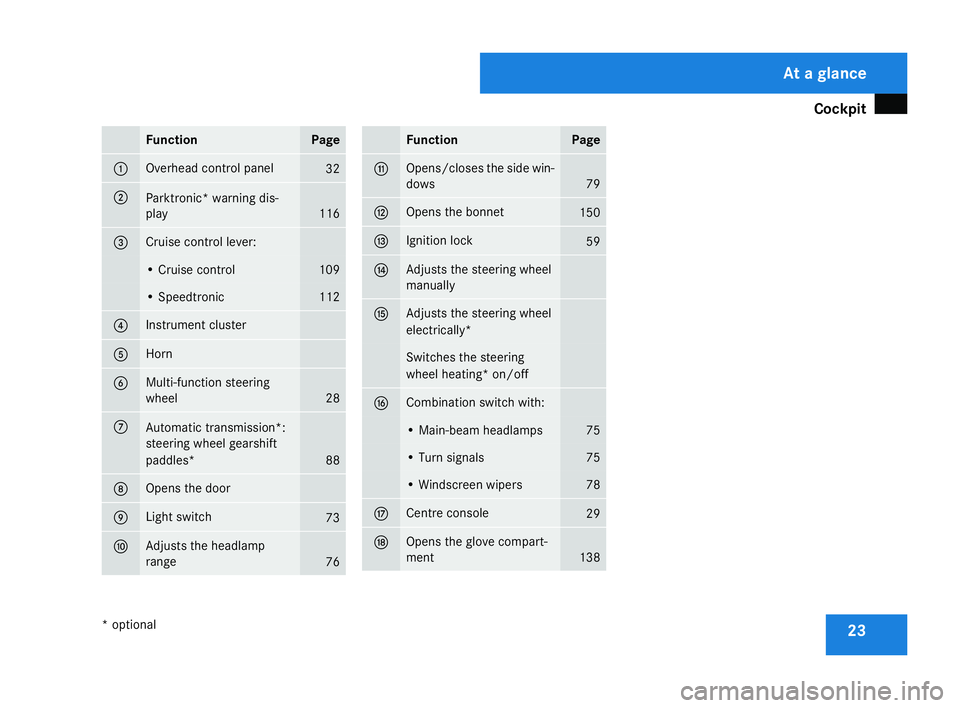
Cockpit
23Function Page
1 Overhead control panel
32
2
Parktronic* warning dis-
play
116
3 Cruise control lever:
• Cruise control 10
9 • Speedtronic 11
2 4 Instrument cluster
5 Horn
6 Multi-function steering
wheel
28
7
Automatic transmission*
:
steering wheel gearshift
paddles* 88
8 Opens the door
9 Light switch
73
a Adjusts the headlamp
range
76 Functio
n Page
b Opens/closes the side win-
dows
79
c Opens the bonnet
150
d Ignition lock
59
e Adjusts the steering whee
l
manually f Adjusts the steering whee
l
electrically* Switches the steering
wheel heating* on/off g Combination switch with:
• Main-beam headlamps 75
• Turn signals 75
• Windscreen wiper
s 78
h Centre console
29
j Opens the glove compart-
ment 138 At a glance
* optional
171_AKB; 3; 4, en-GB
vpfaff7,
2007-11-13T10:50:25+01:00 - Seite 23
Page 32 of 273
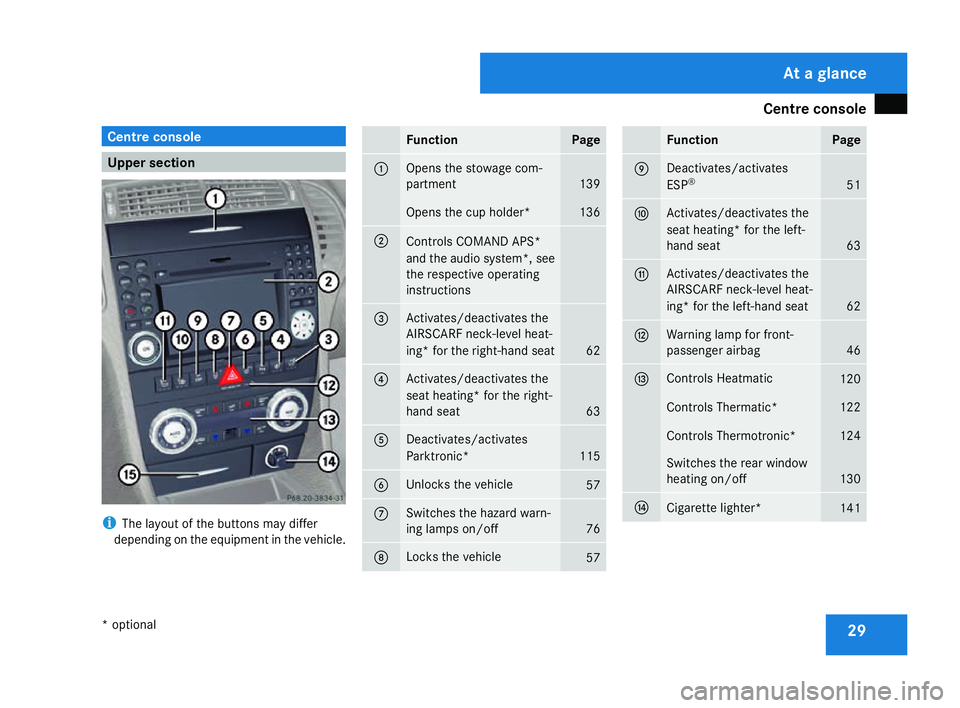
Centre console
29Centre console
Upper section
i
The layout of the buttons may differ
depending on the equipment in the vehicle. Function Page
1 Opens the stowage com-
partment
139
Opens the cup holder* 136
2
Controls COMAND APS
*
and the audio system*, see
the respective operating
instructions 3 Activates/deactivates the
AIRSCARF neck-level heat
-
ing* for the right-hand seat 62
4 Activates/deactivates the
seat heating* for the right-
hand seat
63
5 Deactivates/activates
Parktronic*
115
6 Unlocks the vehicl
e 57
7 Switches the hazard warn-
ing lamps on/off
76
8 Locks the vehicle
57 Functio
n Page
9 Deactivates/activates
ESP
® 51
a Activates/deactivates the
seat heating* for the left-
hand seat
63
b Activates/deactivates the
AIRSCARF neck-level heat
-
ing* for the left-hand seat 62
c Warning lamp for front-
passenger airbag
46
d Controls Heatmatic
120
Controls Thermatic
* 122
Controls Thermotronic* 124
Switches the rear window
heating on/of
f 130
e
Cigarette lighter*
141At a glance
* optional
171_AKB; 3; 4, en-GB
vpfaff7
, 2007-11-13T10:50:25+01:00 - Seite 29
Page 65 of 273

Seats
621
Upper backrest contour
2 Lower backrest contour
X Make sure that the key is in position 2in
the ignition lock .
X Turn thumbwheels 1and 2until th e
desired backrest contour has been set. AIRSCARF neck-level heating*
The AIRSCARF neck-level heating function
blows warm air around the heads of car occu-
pants. The warm air flows out of the holes in
the head restraints. G
Risk of injury
When AIRSCARF is in operation, very hot ai r
can flow from the vents in the head
restraints. This could cause burns to bare
skin in the immediate vicinity of the vents .
Make sure that you reduce the heater out-
put in time.
The three red indicator lamps in the button
indicate the heating level you have selected. 1
AIRSCARF neck-level heating X
Make sure the key is in position 2in the
ignition lock .
X To activate :press button 1.
Three red indicator lamps in the button light
up. The blower starts up after a preheating
phase of seven seconds.
X Press button 1repeatedly until the
desired heating level is set.
X To switch off: press button1repeatedly
until all the indicator lamps go out.
i The blower continues running for seven
seconds to cool down the heating ele-
ments.
i If the battery voltage is too low, the AIR-
SCARF neck level heating may switch off. Controls
* optional
171_AKB; 3; 4, en-GB
vpfaff7,
2007-11-13T10:50:25+01:00 - Seite 62
Page 66 of 273
Steering wheel
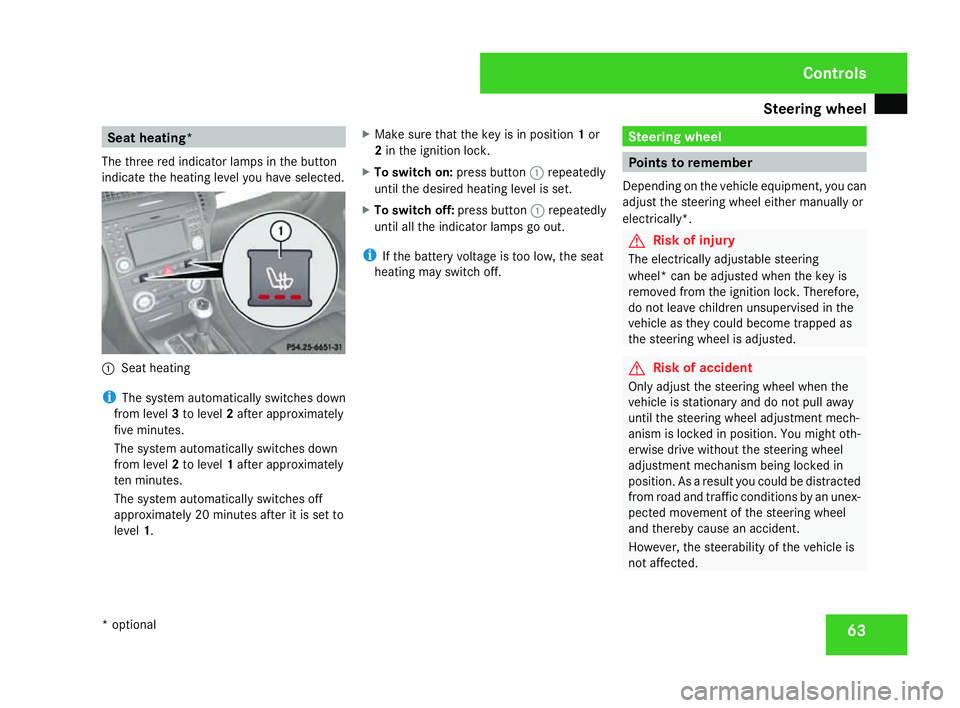
63Seat heating*
The three red indicator lamps in the button
indicate the heating level you have selected. 1
Seat heating
i The system automatically switches down
from level 3to level 2after approximately
five minutes.
The system automatically switches down
from level 2to level 1after approximately
ten minutes.
The system automatically switches off
approximately 20 minutes after it is set to
level 1. X
Make sure that the key is in position 1or
2 in the ignition lock .
X To switch on: press button1repeatedly
until the desired heating level is set.
X To switch off: press button1repeatedly
until all the indicator lamps go out.
i If the battery voltage is too low, the sea t
heating may switch off. Steering wheel
Points to remember
Depending on the vehicle equipment, you can
adjust the steering wheel either manually or
electrically*. G
Risk of injury
The electrically adjustable steering
wheel* can be adjusted when the key is
removed from the ignition lock. Therefore,
do not leave children unsupervised in the
vehicle as they could become trapped as
the steering wheel is adjusted . G
Risk of acciden
t
Only adjust the steering wheel when the
vehicle is stationary and do not pull away
until the steering wheel adjustment mech-
anism is locked in position. You might oth-
erwise drive without the steering whee l
adjustment mechanism being locked in
position. As a result you could be distracted
from road and traffic conditions by an unex -
pected movement of the steering wheel
and thereby cause an accident.
However, the steerability of the vehicle is
not affected. Controls
* optional
171_AKB; 3; 4, en-GB
vpfaff7,
2007-11-13T10:50:25+01:00 - Seite 63
Page 67 of 273

Steering wheel
64
When you adjust the steering wheel, make
sure that:
R
the steering wheel can be reached with
your arms slightly bent
R you can move your legs freely
R you can see all the displays in the instru-
ment cluster clearly Adjusting the steering wheel man-
ually
1
Release handle
2 Steering column height
3 Steering column fore-and-aft adjustment X
Pull handle 1out completely.
The steering column is unlocked.
X Set the desired steering wheel position.
X Push handle 1in completely until it
engages fully.
The steering wheel is locked in position . Adjusting the steering wheel electri-
cally*
1
Steering column height
2 Steering column fore-and-aft adjustment
X Press the lever in the direction of arrow
1 or2 until the steering wheel has
moved into the desired position.
You can find more information under :R
Easy-entry/exit feature (Y page 65)
R Storing settings (Y page 68) Steering wheel heating*
1
To switch on the steering-wheel heating
2 To switch off the steering-wheel heating
3 Indicator lamp
X To switch on or off: make sure that the
key is in position 2in the ignition lock .
X Turn the lever in the direction of arrow 1
or 2 .
Indicator lamp 3comes on or goes out.
i The steering-wheel heating does not
switch off automatically. Controls
* optional
171_AKB; 3; 4, en-GB
vpfaff7,
2007-11-13T10:50:25+01:00 - Seite 64
Page 112 of 273
Driving sys
tems 10
9
X
Press the jork button to call up
the phone book.
X Press the jork button to select the
desired name. To scroll through the tele-
phone book faster, press and hold the
j ork button for longer than 1 sec-
ond.
X Press the sbutton to start dialling.
The DIALLING message appears in the
multi-function display.
The number dialled is stored in the redial
memory.
When there is a connection, the call dura-
tion appears in the multi-function display.
The name also appears, provided it is
stored in the phone book, otherwise the
dialled number is still displayed.
or
X If you do not wish to make a call, press the
t button.
Redialling The on-board computer stores the last phone
numbers which were dialled. X
Press the sbutton to call up the most
recently dialled number in the redial mem-
ory.
X Press the jork button to select the
desired name or number.
X Press the sbutton to start dialling. Driving system
s
Your vehicle's driving systems are described
on the following pages:
R Cruise control and Speedtronic, which you
can use to control the speed of the vehicl e
R Parktronic*, which assists you in parking
and manoeuvrin g
The ABS, BAS and ESP ®
driving safety sys-
tems are described in the "Driving safety sys-
tems" section (Y page 50). Cruise control
Cruise control maintains a constant road
speed for you. It brakes automatically in order
to avoid exceeding the set speed. On long and
steep downhill gradients, especially if the
vehicle is laden, you must shift to a lower gear
in good time or select shift range 1,2 or 3in
vehicles with automatic transmission*. In this
way you will make use of the braking effect of
the engine, which relieves the load on the
brake system and prevents the brakes fro m
overheating and wearing too quickly. Controls
* optional
171_AKB; 3; 4, en-GB
vpfaff7,
2007-11-13T10:50:25+01:00 - Seite 109 Z