light MERCEDES-BENZ SLS AMG 2011 User Guide
[x] Cancel search | Manufacturer: MERCEDES-BENZ, Model Year: 2011, Model line: SLS AMG, Model: MERCEDES-BENZ SLS AMG 2011Pages: 436, PDF Size: 17.73 MB
Page 41 of 436
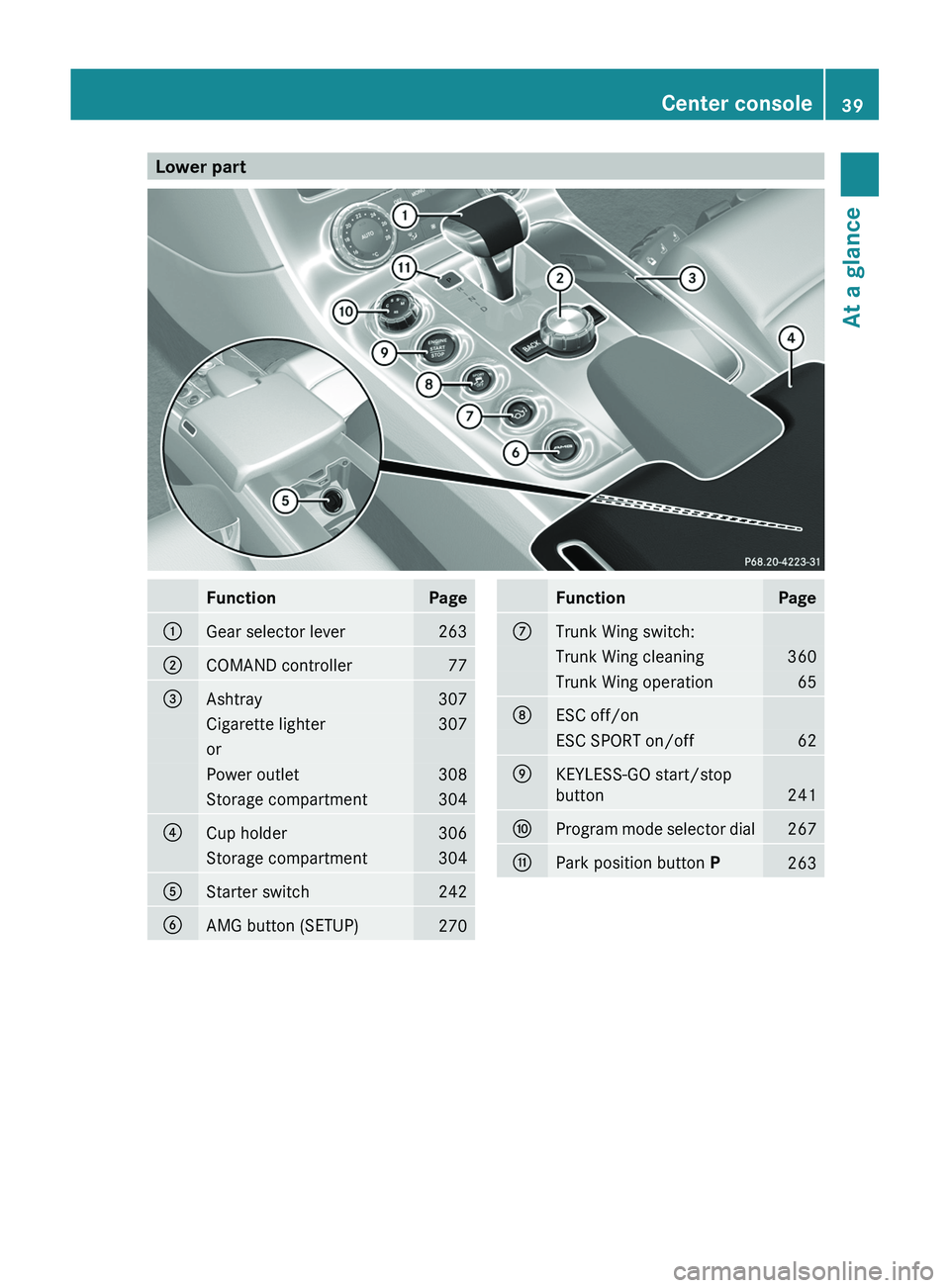
Lower partFunctionPage0046Gear selector lever2630047COMAND controller77008AAshtray307Cigarette lighter307orPower outlet308Storage compartment3040088Cup holder306Storage compartment3040086Starter switch2420087AMG button (SETUP)270FunctionPage006ETrunk Wing switch:Trunk Wing cleaning360Trunk Wing operation65006FESC off/onESC SPORT on/off620070KEYLESS-GO start/stop
button
241
0071Program mode selector dial2670072Park position button P263Center console39At a glanceBA 197 USA, CA Edition A 2011; 1; 27, en-UShereepeVersion: 3.0.3.52010-03-24T15:31:10+01:00 - Seite 39
Page 42 of 436
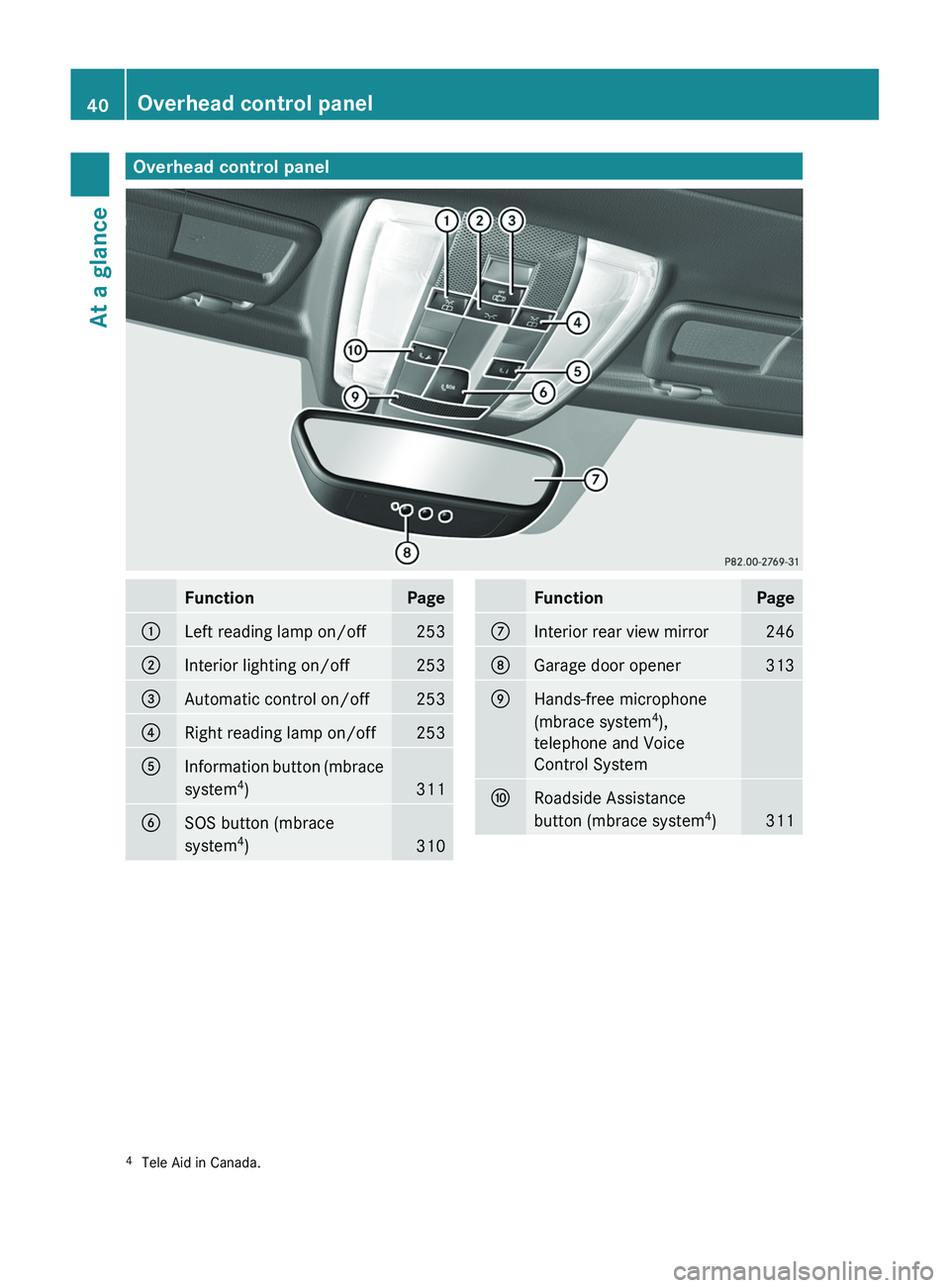
Overhead control panelFunctionPage0046Left reading lamp on/off2530047Interior lighting on/off253008AAutomatic control on/off2530088Right reading lamp on/off2530086Information button (mbrace
system 4
)
311
0087SOS button (mbrace
system 4
)
310
FunctionPage006EInterior rear view mirror246006FGarage door opener3130070Hands-free microphone
(mbrace system 4
),
telephone and Voice
Control System0071Roadside Assistance
button (mbrace system 4
)
3114 Tele Aid in Canada.40Overhead control panelAt a glance
BA 197 USA, CA Edition A 2011; 1; 27, en-UShereepeVersion: 3.0.3.52010-03-24T15:31:10+01:00 - Seite 40
Page 50 of 436
weight category as identified by the Occupant
Classification System (OCS) (Y page 49).
The lighter the passenger-side occupant, the
higher the vehicle deceleration rate required
for second stage inflation of the passenger
front air bag.
The air bags will not deploy in impacts which
do not exceed the system’s preset
deployment thresholds. You will then be
protected by the fastened seat belts.
The front air bags will not deploy in the event
of a rollover unless the vehicle’s rate of
longitudinal deceleration or acceleration
exceeds the preset deployment threshold for
the front air bags.
The passenger air bag will only be deployed if
Rthe system, based on OCS weight sensor
readings, detects that the passenger seat
is occupied
Rthe \000 \000
Page 58 of 436
more snugly against the body. Seat belt force
limiters, when activated, are employed to
help reduce the peak force exerted by the
seat belts on occupants during a crash.
iThe ETDs do not correct an incorrect seat
position or incorrectly worn seat belts.
The ETDs do not pull occupants back
toward the seat backrest.
GWarning!
Pyrotechnic ETDs that were activated must be
replaced.
For your safety, when disposing of the
pyrotechnic ETDs always follow our safety
instructions. These are available at any
authorized Mercedes-Benz Center.
Correct driver seat adjustment
GWarning!
In order to avoid possible loss of vehicle
control the following must be done before the
vehicle is put into motion:
Rseat adjustment
Rsteering wheel adjustment
Rrear view mirror adjustment
Rfastening of seat belts
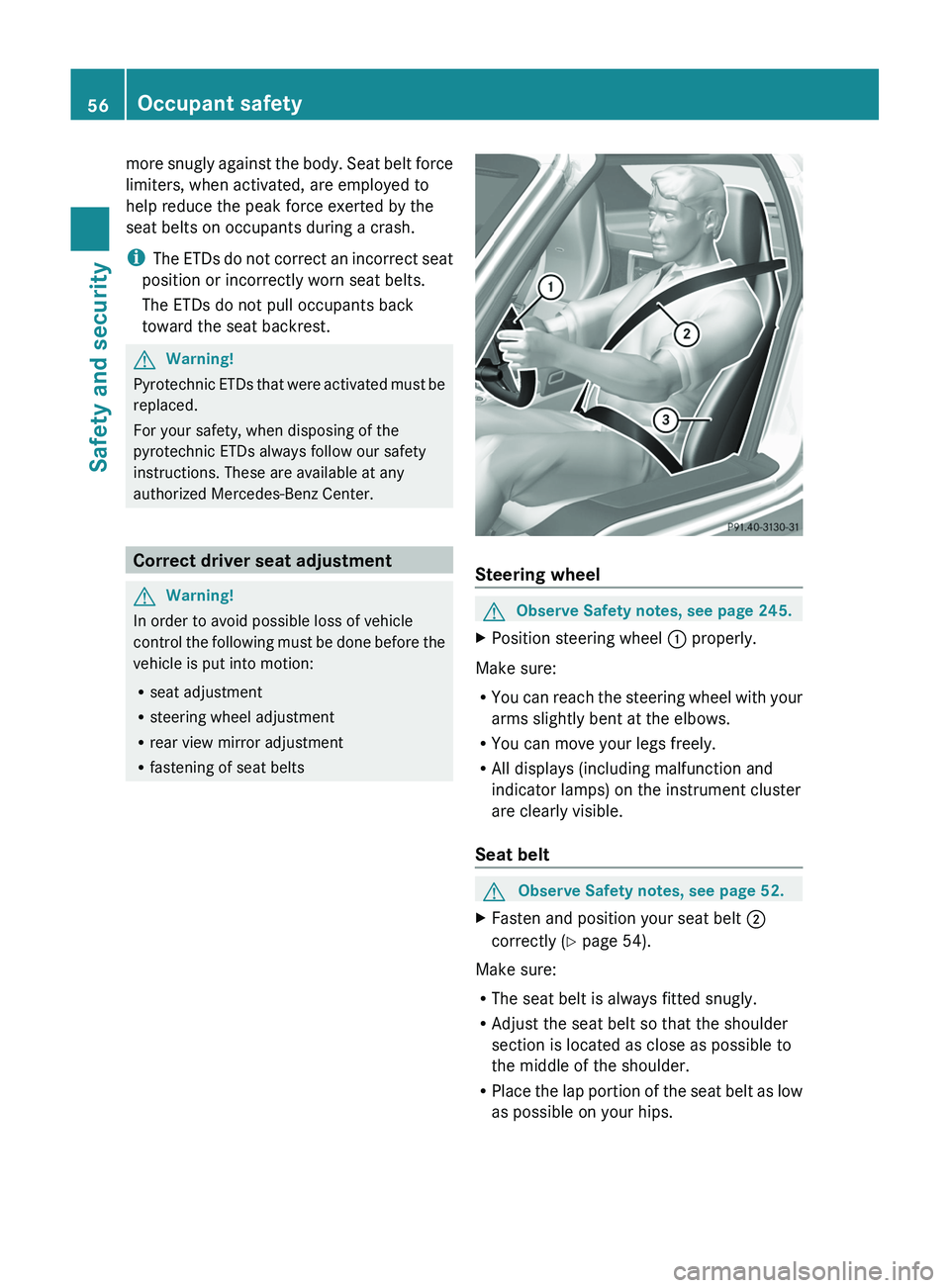
Steering wheel
GObserve Safety notes, see page 245.XPosition steering wheel \000F properly.
Make sure:
RYou can reach the steering wheel with your
arms slightly bent at the elbows.
RYou can move your legs freely.
RAll displays (including malfunction and
indicator lamps) on the instrument cluster
are clearly visible.
Seat belt
GObserve Safety notes, see page 52.XFasten and position your seat belt \000G
correctly (Y page 54).
Make sure:
RThe seat belt is always fitted snugly.
RAdjust the seat belt so that the shoulder
section is located as close as possible to
the middle of the shoulder.
RPlace the lap portion of the seat belt as low
as possible on your hips.
56Occupant safetySafety and security
BA 197 USA, CA Edition A 2011; 1; 27, en-UShereepeVersion: 3.0.3.52010-03-24T15:31:10+01:00 - Seite 56
Page 59 of 436
SeatGObserve Safety notes, see page 243.XPosition seat 008A properly. See
( Y page 244) for seat adjustment.
Observe the following points:
R Always be in a properly seated position.
R The position should be as far rearward from
the front air bag in the steering wheel as
possible, while still permitting proper
operation of vehicle controls.
R Adjust the seat to a comfortable seating
position that still allows you to reach the
accelerator/brake pedal safely.
R The seat must be adjusted so that you can
correctly fasten and position your seat belt.
R The seat backrest must be in a position that
is as nearly upright as possible.
R Adjust the seat cushion so that the front
edge of the seat cushion lightly supports
your legs.
R Never place hands under the seat or near
any moving parts while the seat is being
adjusted.
Exiting the vehicle in an emergency
If the vehicle lies on the roof after an accident,
the locks in the door hinges of the gullwing
doors are opened pyrotechnically. You will
hear a bang when this happens. Once the
locks were opened, the doors are pushed
outward. The door locks are released at the
same time. The SRS warning lamp 0081
comes on.
i The hinge locks will be opened
pyrotechnically only when the vehicle has
come to rest on its roof and does not move
anymore.
The doors can then be moved by pulling on
the door handle from the inside or outside.
Children in the vehicle
Safety notes
If an infant or child is traveling with you in the
vehicle:
XSecure the child using an infant or child
restraint appropriate to the age and size of
the child.XMake sure the infant or child is properly
secured at all times while the vehicle is in
motion.GWarning!
When leaving the vehicle, always remove the
SmartKey from the starter switch. Always
take the SmartKey with you and lock the
vehicle. Do not leave children unattended in
the vehicle, even if they are secured in a child
restraint system, or with access to an
unlocked vehicle. A child’s unsupervised
access to a vehicle could result in an accident
and/or serious personal injury. The children
could
R injure themselves on parts of the vehicle
R be seriously or fatally injured through
excessive exposure to extreme heat or cold
R injure themselves or cause an accident with
vehicle equipment that can be operated
even if the SmartKey is removed from the
starter switch or removed from the vehicle,
such as seat adjustment, steering wheel
adjustment, or the memory function
If children open a door, they could injure other
persons or get out of the vehicle and injure
themselves or be injured by following traffic.
Do not expose the child restraint system to
direct sunlight. The child restraint system’s
metal parts, for example, could become very
hot, and the child could be burned by these
parts.
GWarning!
Do not carry heavy or hard objects in the
passenger compartment unless they are
firmly secured in place.
Occupant safety57Safety and securityBA 197 USA, CA Edition A 2011; 1; 27, en-UShereepeVersion: 3.0.3.52010-03-24T15:31:10+01:00 - Seite 57Z
Page 63 of 436
Driving safety systems
Introduction
This section contains information about the
following driving safety systems:
R ABS ( Antilock Brake System)
R Adaptive Brake
R BAS ( Brake Assist System)
R EBP ( Electronic Brake Proportioning)
R ESC ( Electronic Stability Control)
R Trunk Wing
Safety notes
GWarning!
The following factors increase the risk of
accidents:
R Excessive speed, especially in turns
R Wet and slippery road surfaces
R Following another vehicle too closely
The driving safety systems described in this
section cannot reduce these risks or prevent
the natural laws of physics from acting on the
vehicle. They cannot increase braking or
steering efficiency beyond that afforded by
the condition of the vehicle brakes and tires
or the traction afforded.
Only a safe, attentive, and skillful driver can
prevent accidents.
The capabilities of a vehicle equipped with the
driving safety systems described in this
section must never be exploited in a reckless
or dangerous manner which could jeopardize
the user’s safety or the safety of others.
Always adjust your driving style to the
prevailing road and weather conditions and
keep a safe distance from other road users
and objects on the street.
If a driving system malfunctions, other driving
safety systems may also switch off. Observe
indicator and warning lamps that may come
on as well as messages in the multifunction
display that may appear.
i In winter operation, the maximum
effectiveness of most of the driving
systems described in this section is only
achieved with winter tires, or snow chains
as required.
ABS
GObserve Safety notes, see page 61.GWarning!
Do not pump the brake pedal. Use firm, steady
brake pedal pressure instead. Pumping the
brake pedal defeats the purpose of the ABS
and significantly reduces braking
effectiveness.
The Antilock Brake System (ABS) regulates
the brake pressure so that the wheels do not
lock during braking. This allows you to
maintain the ability to steer your vehicle.
The ABS is functional above a speed of
approximately 5 mph (8 km/h) independent
of road surface conditions.
On slippery road surfaces, the ABS will
respond even to light brake pressure.
The ABS indicator lamp 0031 in the
instrument cluster comes on when you switch
on the ignition. It goes out when the engine
is running.
Braking
At the instant one of the wheels is about to
lock up, a slight pulsation can be felt in the
brake pedal. The pulsation indicates that the
ABS is in the regulating mode.
XKeep firm and steady pressure on the brake
pedal while you feel the pulsation.
Continuous, steady brake pedal pressure
yields the advantages provided by the ABS,
namely braking power and the ability to steer
the vehicle.
The pulsating brake pedal can be an
indication of hazardous road conditions and
Driving safety systems61Safety and securityBA 197 USA, CA Edition A 2011; 1; 27, en-UShereepeVersion: 3.0.3.52010-03-24T15:31:10+01:00 - Seite 61Z
Page 72 of 436
Introduction
Where to Find it
This operator's manual has been designed to
help you use your COMAND control unit in all
situations. Since not all models have the
same standard equipment, your COMAND
system equipment may deviate from some
descriptions and illustrations.
At a Glance
Here you will find an overview of the
components of COMAND. Then you will find
examples illustrating how to operate
COMAND and information on the basic
functions. If you are operating a COMAND for
the first time or have rented the vehicle, you
should first read this chapter.
System Settings
Here you will find all the important
information regarding the system settings of
the COMAND.
Navigation
Here you will find detailed information
regarding the following topics:
R Setting options for the map display and the
route calculation
R Destination input
R Search & Send
R POI input
R Route guidance
R Traffic information
R Destination memory
Telephone
The telephone functions are described here.
You will also find information on the address
book.
Audio
Here you will find all information regarding
the audio function and its Radio, SatRadio,
CD-audio/DVD audio/MP3, Music Register,
Media Interface and Audio Aux modes.
Video
Here you will find all information regarding
the video system.
Voice Control
Here you will find information about operating
several COMAND functions via Voice Control.
Indexes
Content and keyword indexes are intended to
help you find information quickly.
Symbols
Trademarks ®
:
R Bluetooth ®
is a registered trademark of
Bluetooth SIG Inc.
R Microsoft ®
is a registered trademark of
Microsoft Corporation in the United States
and other countries
R SIRIUS and related marks are trademarks
of SIRIUS Satellite Radio Inc.
R Windows media ®
is a registered trademark
of Microsoft Corporation in the United
States and other countries
You will find the following symbols in these
operating instructions:
GWarning!
Warning notices draw your attention to
hazards that may endanger your health or life,
or the health or life of others.
! Highlights hazards that may result in
damage to your COMAND.
i Helpful hints or further information you
may find useful.
70IntroductionCOMAND APS
BA 197 USA, CA Edition A 2011; 1; 27, en-UShereepeVersion: 3.0.3.52010-03-24T15:31:10+01:00 - Seite 70
Page 89 of 436
A possible option:XTo switch predictive speller language
(character set): Select !.
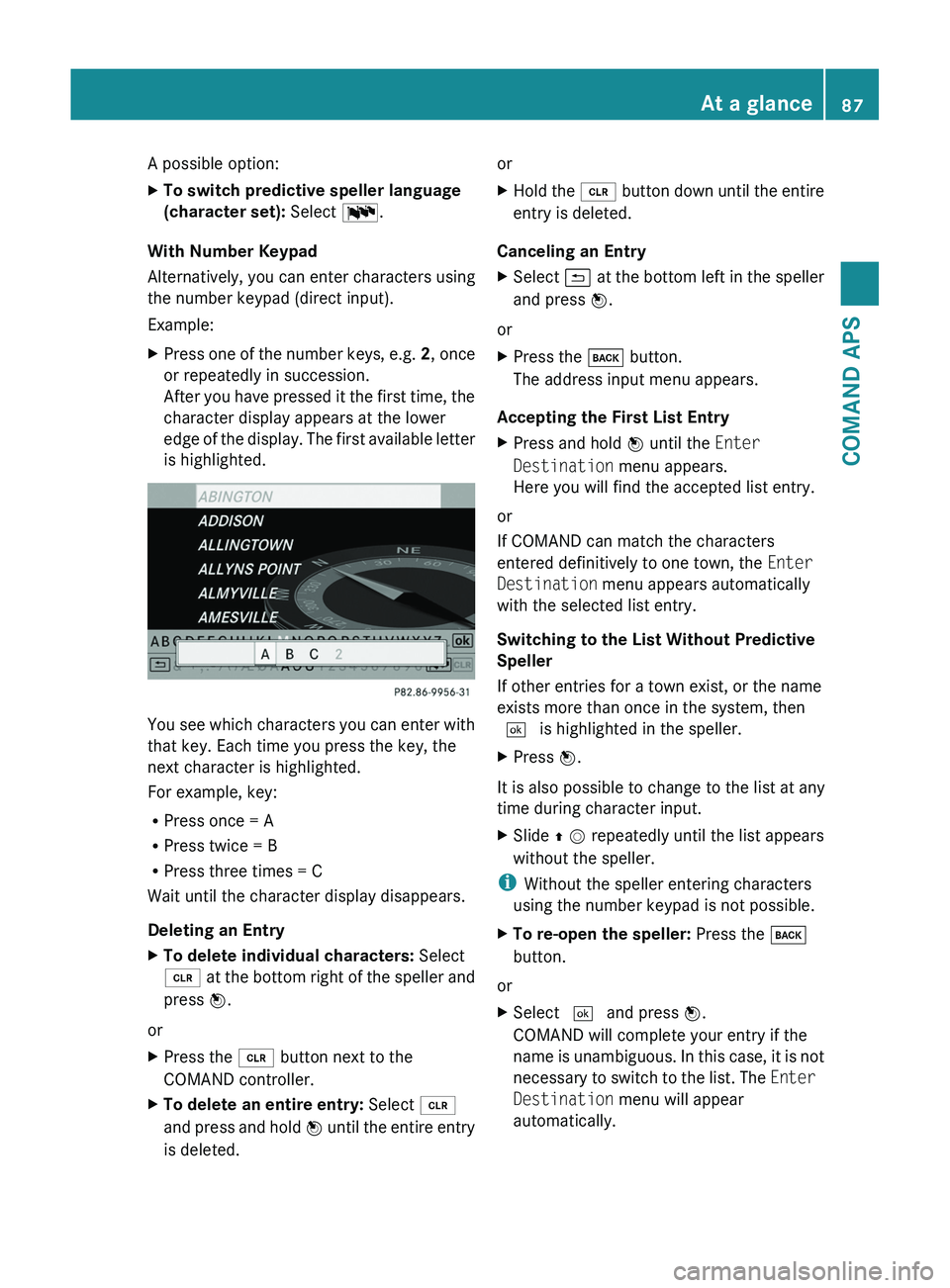
With Number Keypad
Alternatively, you can enter characters using
the number keypad (direct input).
Example:
XPress one of the number keys, e.g. 2, once
or repeatedly in succession.
After you have pressed it the first time, the
character display appears at the lower
edge of the display. The first available letter
is highlighted.
You see which characters you can enter with
that key. Each time you press the key, the
next character is highlighted.
For example, key:
RPress once = A
RPress twice = B
RPress three times = C
Wait until the character display disappears.
Deleting an Entry
XTo delete individual characters: Select
õ at the bottom right of the speller and
press n.
or
XPress the \000
Page 91 of 436
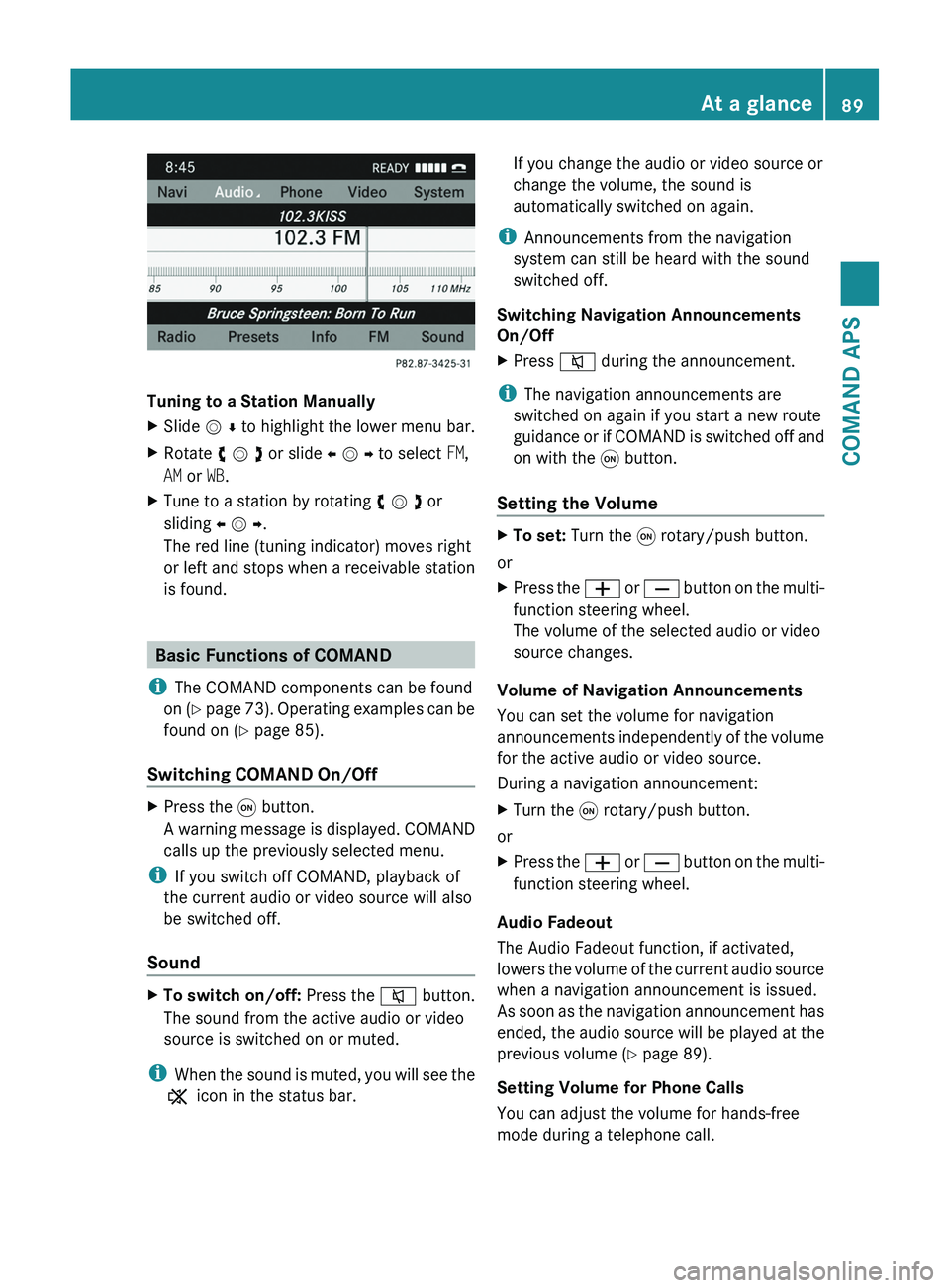
Tuning to a Station Manually
XSlide m r to highlight the lower menu bar.XRotate y m z or slide o m p to select FM,
AM or WB.
XTune to a station by rotating y m z or
sliding o m p.
The red line (tuning indicator) moves right
or left and stops when a receivable station
is found.
Basic Functions of COMAND
iThe COMAND components can be found
on (Y page 73). Operating examples can be
found on (Y page 85).
Switching COMAND On/Off
XPress the \000C button.
A warning message is displayed. COMAND
calls up the previously selected menu.
iIf you switch off COMAND, playback of
the current audio or video source will also
be switched off.
Sound
XTo switch on/off: Press the \000l button.
The sound from the active audio or video
source is switched on or muted.
iWhen the sound is muted, you will see the
X icon in the status bar.
If you change the audio or video source or
change the volume, the sound is
automatically switched on again.
iAnnouncements from the navigation
system can still be heard with the sound
switched off.
Switching Navigation Announcements
On/Off
XPress \000l during the announcement.
iThe navigation announcements are
switched on again if you start a new route
guidance or if COMAND is switched off and
on with the \000C button.
Setting the Volume
XTo set: Turn the \000C rotary/push button.
or
XPress the \000Z or \000[ button on the multi-
function steering wheel.
The volume of the selected audio or video
source changes.
Volume of Navigation Announcements
You can set the volume for navigation
announcements independently of the volume
for the active audio or video source.
During a navigation announcement:
XTurn the \000C rotary/push button.
or
XPress the \000Z or \000[ button on the multi-
function steering wheel.
Audio Fadeout
The Audio Fadeout function, if activated,
lowers the volume of the current audio source
when a navigation announcement is issued.
As soon as the navigation announcement has
ended, the audio source will be played at the
previous volume (Y page 89).
Setting Volume for Phone Calls
You can adjust the volume for hands-free
mode during a telephone call.
At a glance89COMAND APSBA 197 USA, CA Edition A 2011; 1; 27, en-UShereepeVersion: 3.0.3.52010-03-24T15:31:10+01:00 - Seite 89Z
Page 93 of 436
The Bang & Olufsen sound system provides
the following operating modes:
RRadio (FM only)
RSat radio
RAudio CD
RAudio DVD (MLP, DTS, PCM and Dolby
Digital audio formats)
RMP3 (including PCMCIA memory card)
RMedia Interface
RVideo DVD (PCM, DTS and Dolby Digital
audio formats)
RAUX
Since many DVDs contain both stereo and
multi-channel audio formats, it may be
necessary to set the audio format
(Y page 189).
Discs which support the audio formats
mentioned have the following logos:
Dolby® Digital
DTS™
MLP™
Selecting settings for the
Bang & Olufsen sound system
Calling up the selection menu
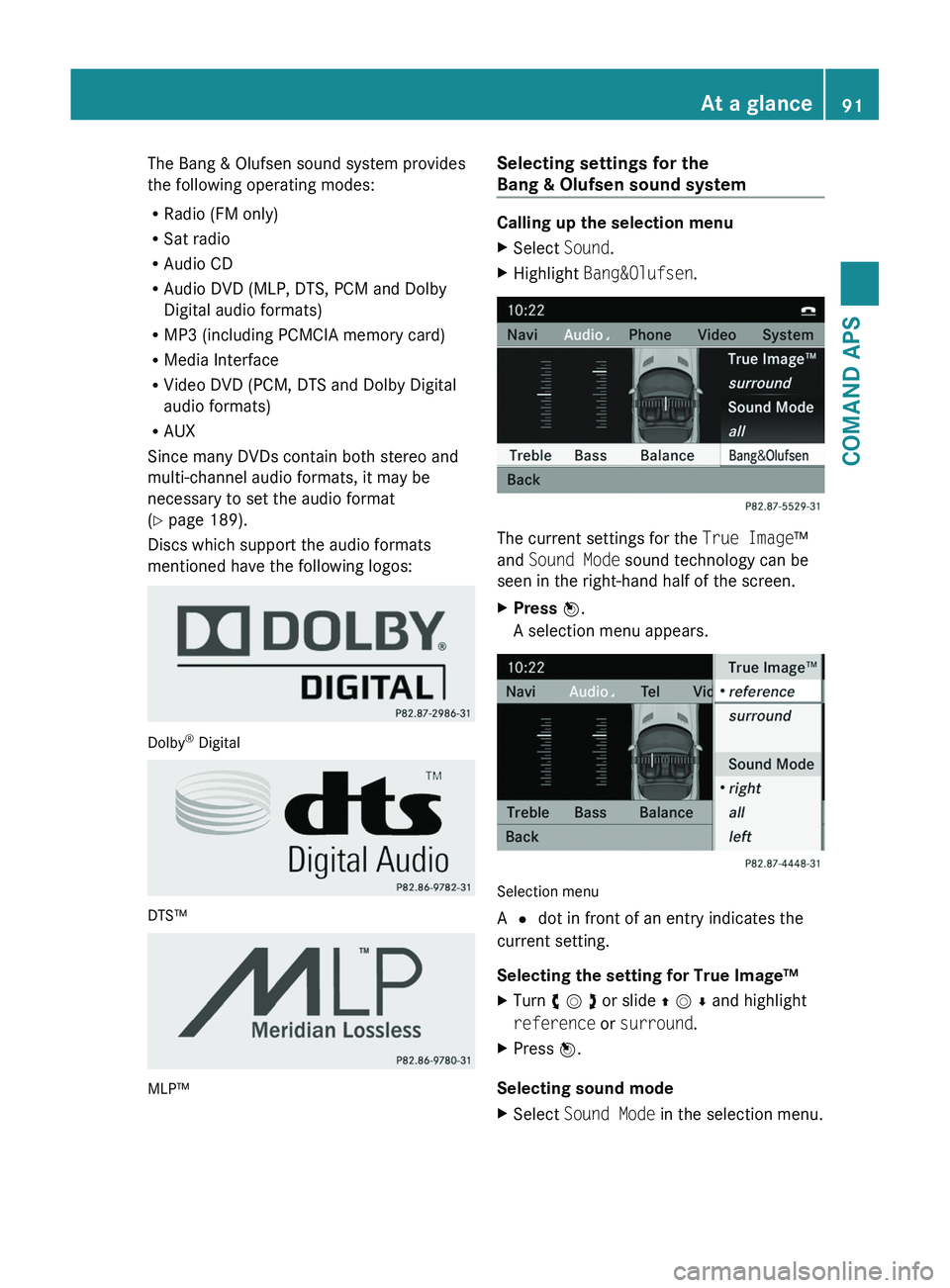
XSelect Sound.XHighlight Bang&Olufsen.
The current settings for the True Image™
and Sound Mode sound technology can be
seen in the right-hand half of the screen.
XPress \000