service MERCEDES-BENZ SLS-CLASS 2013 User Guide
[x] Cancel search | Manufacturer: MERCEDES-BENZ, Model Year: 2013, Model line: SLS-CLASS, Model: MERCEDES-BENZ SLS-CLASS 2013Pages: 286, PDF Size: 3.6 MB
Page 22 of 286
notified Mercedes-Benz USA, LLC in
writing of the need for its repair,
(2) the same substantial defect or malfunction of a less serious nature than
category (1) has been subject to repair
four or more times and you have directly
notified us in writing of the need for its
repair, or
(3) the vehicle is out of service by reason of repair of the same or different substantial
defects or malfunctions for a cumulative
total of more than 30 calendar days.
Please send your written notice to:
Mercedes-Benz USA, LLC
Customer Assistance Center
One Mercedes Drive
Montvale, NJ 07645-0350 Maintenance
The Service and Warranty Booklet describes
all the necessary maintenance work which
should be done at regular intervals.
Always have the Service and Warranty
Booklet with you when you bring the vehicle
to an authorized Mercedes-Benz Center. The
service advisor will record every service for
you in the Service and Warranty Booklet. Roadside Assistance
The Mercedes-Benz Roadside Assistance
Program offers technical help in the event of
a breakdown. Calls to the toll-free Roadside
Assistance Hotline are answered by our
agents 24 hours a day, 365 days a year.
1-800-FOR-MERCedes(1-800-367-6372)
(USA)
1-800-387-0100 (Canada)
For additional information, refer to the
Mercedes-Benz Roadside Assistance
Program brochure (USA) or the "Roadside
Assistance" section in the Service and
Warranty booklet (Canada). You will find both
in your vehicle literature portfolio. Change of address or change of
ownership
In the event of a change of address, please
send us the "Notification of Address Change"
in the Service and Guarantee booklet or
simply call the Mercedes-Benz Customer
Assistance Center (USA) at the hotline
number
1-800-FOR-MERCedes(1-800-367-6372) or
Customer Service Center (Canada) at
1-800-387-010 0.This will assist us in
contacting you in a timely manner should the
need arise.
If you sell your Mercedes, please leave the
entire literature in the vehicle so that it is
available to the next owner.
If you have purchased a used car, please send
us the "Notification of Used Car Purchase" in
the Service and Guarantee booklet or simply
call the Mercedes-Benz Customer Assistance
Center (USA) at the hotline number
1-800-FOR-MERCedes(1-800-367-6372) or
Customer Service (Canada) at
1-800-387-0100. Vehicle operation outside the USA
and Canada
If you plan to operate your vehicle in foreign
countries, please be aware that:
R service facilities or replacement parts may
not be readily available.
R unleaded fuel for vehicles with a catalytic
converter may not be available. Leaded fuel
may cause damage to the catalytic
converter.
R the fuel may have a considerably lower
octane rating. Unsuitable fuel can cause
engine damage.
Some Mercedes-Benz models are available
for delivery in Europe through our European
Delivery Program. For details, consult an
authorized Mercedes-Benz Center or write to
one of the following addresses.
In the USA 20
IntroductionProCarManuals.com
Page 24 of 286
operation of the vehicle systems. This can
impair the operating safety of your vehicle
while driving. There is a risk of an accident.
Do not connect any equipment to the on-
board diagnostics connection. G
WARNING
Loose equipment or equipment cables which
are connected to the on-board diagnostics
connection can obstruct the area around the
pedals. The equipment or the cables could
come between the pedals in the event of
sudden braking or acceleration. This may
affect the function of the pedals. There is a
risk of an accident.
Do not attach any equipment or cables in the
driver's footwell.
! If the engine is switched off and
equipment on the diagnostics connection
is used, the starter battery may discharge.
The diagnostics connection is only intended
for the connection of diagnostic equipment at
a qualified specialist workshop.
Connecting equipment to the diagnostics
connection can, for example, lead to
emissions monitoring information being
reset. This may lead to the vehicle failing to
meet the requirements of the next emissions
test during the main inspection. Qualified specialist workshop
An authorized Mercedes-Benz Center is a
qualified specialist workshop. It has the
necessary specialist knowledge, tools and
qualifications to correctly carry out the work
required on your vehicle. This is especially the
case for work relevant to safety.
Observe the notes in the Maintenance
Booklet.
Always have the following work carried out at
an authorized Mercedes-Benz Center:
R work relevant to safety
R service and maintenance work R
repair work
R alterations, installation work and
modifications
R work on electronic components Correct use
G
WARNING
There are various warning stickers affixed to
your vehicle. Their purpose is to alert you and
others to various dangers. Therefore, do not
remove any warning stickers unless the
sticker clearly states that you may do so.
If you remove any warning stickers, you or
others could fail to recognize certain dangers
and be injured.
When driving your vehicle observe the
following information:
R the safety notes in this manual
R the Technical Data section in this manual
R traffic rules and regulations
R laws and safety standards pertaining to
motor vehicles Problems with your vehicle
If you should experience a problem with your
vehicle, particularly one that you believe may
affect its safe operation, we urge you to
contact an authorized Mercedes-Benz Center
immediately to have the problem diagnosed
and rectified. If the problem is not resolved to
your satisfaction, please discuss the problem
again with a Mercedes-Benz Center or
contact us at one of the following addresses.
In the USA
Customer Assistance Center
Mercedes-Benz USA, LLC
One Mercedes Drive
Montvale, NJ 07645-0350
In Canada
Customer Relations Department
Mercedes-Benz Canada, Inc. 22
IntroductionProCarManuals.com
Page 25 of 286
98 Vanderhoof Avenue
Toronto, Ontario M4G 4C9
Reporting safety defects
USA only:
The following text is published as required of
manufacturers under Title 49, Code of U.S.
Federal Regulations, Part 575 pursuant to the
"National Traffic and Motor Vehicle Safety Act
of 1966".
If you believe that your vehicle has a defect
which could cause a crash or could cause
injury or death, you should immediately
inform the National Highway Traffic Safety
Administration (NHTSA) in addition to
notifying Mercedes-Benz USA, LLC.
If NHTSA receives similar complaints, it may
open an investigation, and if it finds that a
safety defect exists in a group of vehicles, it
may order a recall and remedy campaign.
However, NHTSA cannot become involved in
individual problems between you, your
dealer, or Mercedes-Benz USA, LLC.
To contact NHTSA, you may call the Vehicle
Safety Hotline toll-free at
1-888-327-4236(TTY: 1-800-424-9153); go
to http://www.safercar.gov ; or write to:
Administrator, NHTSA, 400 Seventh Street,
SW., Washington, DC 20590.
You can also obtain other information about
motor vehicle safety from
http://www.safercar.gov Limited Warranty
! Follow the instructions in this manual
about the proper operation of your vehicle
as well as about possible vehicle damage.
Damage to your vehicle that arises from
culpable contraventions against these
instructions is not covered either by the
Mercedes-Benz Limited Warranty or by the
New or Used-Vehicle Warranty. Information on copyright
General information You can find information on licenses for free
and open-source software used in your
vehicle and its electronic components on the
following website:
http://www.mercedes-benz.com/
opensource
Data stored in the vehicle
Information about electronic data
acquisition in the vehicle
(Including notice pursuant to California Code
§ 9951)
Your vehicle records electronic data. If your
vehicle is equipped with mbrace (Canada:
TELE AID), data is transmitted in the event of
an accident.
This information helps, for example, to test
vehicle systems after an accident and to
continually improve vehicle safety.
Daimler AG can access this data and submit
it:
R for safety research or vehicle diagnosis
purposes
R with the consent of the vehicle owner
R on the instruction of prosecuting
authorities
R for use in arbitration of disputes that
involve Daimler AG, its affiliates or its sales
and service organizations
R as otherwise required or permitted by law.
Please check your mbrace (Canada: TELE
AID) purchase agreement to find out more
about data that can be recorded and
transmitted by this system. Introduction
23 ZProCarManuals.com
Page 41 of 286
possible, wear the seat belt properly and
use an appropriately sized infant restraint,
toddler restraint, or booster seat
recommended for the size and weight of the
child.
Failure to follow these instructions can result
in severe injuries to you or other occupants.
If you sell your vehicle, it is important that you
make the buyer aware of this safety
information. Be sure to give the buyer this
Operator's Manual. G
WARNING
There is a possibility of a head bag- or side
impact air bag-related injury if occupants,
especially children, are not properly seated or
restrained when next to a head bag or side
impact air bag that needs to deploy rapidly in
a side impact in order to do its job.
To help avoid the possibility of injury, please
follow these guidelines:
(1) Occupants, especially children, should never place their bodies or
lean their heads in the area of the
door or the seat where the head
bag or side impact air bag inflates.
This could result in serious injuries
or death should the head bag or
side impact air bag be deployed.
(2) Always sit as upright as possible, and use the seat belts properly.
Make sure that children 12 years
old and under use an appropriately
infant restraint, toddler restraint
or booster seat recommended for
the size and weight of the child.
(3) Always wear seat belts properly.
If you believe that, even with the use of these
guidelines, it would be safer for your
passenger seat occupants to have the
passenger side head bag or side impact air
bag deactivated, then deactivation can be
carried out upon your written request at an
authorized Mercedes-Benz Center at an
additional cost. Please contact an authorized Mercedes-Benz
Center or call the Customer Assistance
Center (in the USA) at 1-800-FOR-MERCedes
(1-800-367-6372), or Customer Service (in
Canada) at 1-800-387-0100 for details.
The air bags are only deployed if the air bag
control unit detects the need for deployment.
Only in the event of such a situation, will the
air bags provide their supplemental
protection.
The driver and passenger should always wear
their seat belts. Otherwise it is not possible
for the air bags to provide their supplemental
protection.
In case of other types of impacts and impacts
below air bag deployment thresholds, air
bags will not deploy. The driver and passenger
will then be protected to the extent possible
by a properly fastened seat belt. A properly
fastened seat belt is also needed to provide
the best possible protection in a rollover.
Air bags provide additional protection; they
are not, however, a substitute for seat belts.
All vehicle occupants must fasten their seat
belts regardless of whether your vehicle is
equipped with air bags or not.
It is important for your safety and that of your
passengers to have deployed air bags
replaced and to have any malfunctioning air
bags repaired. This will help to make sure the
air bags continue to perform their protective
function for the vehicle occupants in the
event of an accident.
Front air bags The front air bags increase protection for the
driver's and front-passenger's head and
chest. Occupant safety
39Safety Z
ProCarManuals.com
Page 61 of 286
R
the hood
R Roadster: the glove box
R Roadster: a compartment in the center
console
R the vehicle with the mechanical key
The alarm is not switched off, even if you
close the open door that triggered it, for
example.
i If the alarm stays on for more than
30 seconds, the mbrace emergency call
system 1
automatically initiates a call to the
Customer Assistance center. The mbrace
emergency call system initiates the call if:
R you have subscribed to the mbrace
service
R the mbrace service has been activated
properly
R the required mobile phone, power supply
and GPS are available. X
To arm: lock the vehicle with the
SmartKey.
The turn signal lamps flash three times and
an acoustic warning sounds three times to
indicate that the vehicle is locked. Flashing
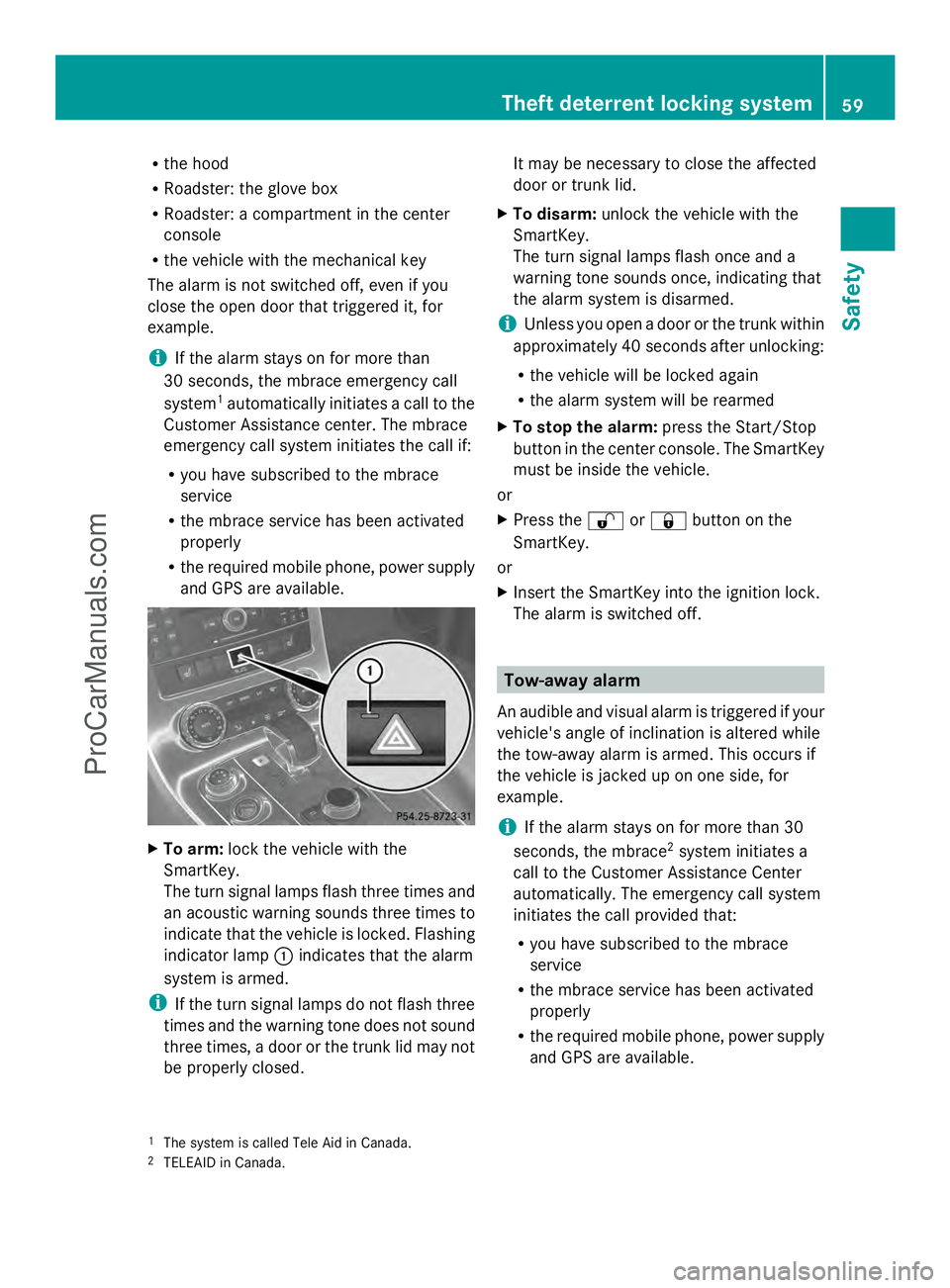
indicator lamp :indicates that the alarm
system is armed.
i If the turn signal lamps do not flash three
times and the warning tone does not sound
three times, a door or the trunk lid may not
be properly closed. It may be necessary to close the affected
door or trunk lid.
X To disarm: unlock the vehicle with the
SmartKey.
The turn signal lamps flash once and a
warning tone sounds once, indicating that
the alarm system is disarmed.
i Unless you open a door or the trunk within
approximately 40 second safter unlocking:
R the vehicle will be locked again
R the alarm system will be rearmed
X To stop the alarm: press the Start/Stop
button in the center console. The SmartKey
must be inside the vehicle.
or
X Press the %or& button on the
SmartKey.
or
X Insert the SmartKey into the ignition lock.
The alarm is switched off. Tow-away alarm
An audible and visual alarm is triggered if your
vehicle's angle of inclination is altered while
the tow-away alarm is armed. This occurs if
the vehicle is jacked up on one side, for
example.
i If the alarm stays on for more than 30
seconds, the mbrace 2
system initiates a
call to the Customer Assistance Center
automatically. The emergency call system
initiates the call provided that:
R you have subscribed to the mbrace
service
R the mbrace service has been activated
properly
R the required mobile phone, power supply
and GPS are available.
1 The system is called Tele Aid in Canada.
2 TELEAID in Canada. Theft deterrent locking system
59Safety Z
ProCarManuals.com
Page 98 of 286
The interior light is activated for a short while
when the SmartKey is removed from the
ignition lock. You can activate this delayed
switch-off using the on-board computer
(Y page 155).
Manual interior lighting control X
To switch the interior lighting on/off:
press the cbutton.
X To switch the reading lamps on/off:
press the pbutton. Crash-responsive emergency lighting
The interior lighting is activated automatically
if the vehicle is involved in an accident.
X To switch off the crash-responsive
emergency lighting: press the hazard
warning lamp button.
or
X Lock and then unlock the vehicle using the
key. Replacing bulbs
Important safety notes
Xenon bulbs G
DANGER
Xenon bulbs carry a high voltage. You can get
an electric shock if you remove the cover of
the Xenon bulb and touch the electrical
contacts. There is a risk of fatal injury.
Never touch the parts or the electrical
contacts of the Xenon bulb. Always have work
on the Xenon bulbs carried out at a qualified
specialist workshop.
If your vehicle is equipped with Xenon bulbs,
you can recognize this by the following: the
cone of light from the Xenon bulbs moves
from the top to the bottom and back again
when you start the engine. For this to be observed, the lights must be switched on
before starting the engine.
Bulbs and lamps are an important aspect of
vehicle safety. You must therefore make sure
that these function correctly at all times.
Have the headlamp setting checked regularly.
Other bulbs
G
WARNING
Bulbs, lamps and connectors can get very hot
when operating. If you change a bulb, you
could burn yourself on these components.
There is a risk of injury.
Allow these components to cool down before
changing a bulb.
There are bulbs other than the Xenon bulbs
that you cannot replace. Replace only the
bulbs listed (Y page 97). Have the bulbs that
you cannot replace yourself changed at a
qualified specialist workshop.
If you require assistance changing bulbs,
consult a qualified specialist workshop.
Do not touch the glass tube of new bulbs with
your bare hands. Even minor contamination
can burn into the glass surface and reduce
the service life of the bulbs. Always use a lint-
free cloth or only touch the base of the bulb
when installing.
Only use bulbs of the correct type.
If the new bulb still does not light up, consult
a qualified specialist workshop.
Bulbs and lamps are an important aspect of
vehicle safety. You must therefore make sure
that these function correctly at all times.
Have the headlamp setting checked regularly. Changing the front bulbs
You cannot replace the bulbs at the front
yourself. Contact a qualified specialist
workshop which has the necessary specialist
knowledge and tools to carry out the work
required. Mercedes-Benz recommends that 96
Replacing bulbsLights and windshield wipers
ProCarManuals.com
Page 132 of 286
X
While driving, push handle :of the electric
parking brake (Y page 129).
i The vehicle is braked as long as you keep
the handle of the electric parking brake
pressed. The longer the electric parking
brake handle is depressed, the greater the
braking force.
During braking:
R a warning tone sounds.
R the Release Parking Brake
Release Parking Brake message
appears
R the red F(USA only) or !(Canada
only) indicator lamp in the instrument
cluster appears.
When the vehicle has been braked to a
standstill, the electric parking brake is
engaged. Parking the vehicle for a long period
If you leave the vehicle parked for longer than
four weeks, the battery may be damaged by
exhaustive discharging.
If you leave the vehicle parked up for longer
than six weeks, the vehicle may suffer
damage as a result of lack of use.
X Visit a qualified specialist workshop and
seek advice.
i You can obtain information about trickle
chargers from a qualified specialist
workshop. Driving tips
General driving tips
Important safety notes G
WARNING
If you switch off the ignition while driving,
safety-relevant functions are only available
with limitations, or not at all. This could affect, for example, the power steering and the brake
boosting effect. You will require considerably
more effort to steer and brake. There is a risk
of an accident.
Do not switch off the ignition while driving. G
WARNING
Please do not forget that your primary
responsibility is to drive the vehicle. A driver's
attention to the road must always be his/her
primary focus when driving. For your safety
and the safety of others, we recommend that
you pull over to a safe location and stop
before placing or taking a telephone call.
If you choose to use the telephone 5
while
driving, please use the hands-free device and
only use the telephone when road, weather
and traffic conditions permit. Some
jurisdictions prohibit the driver from using a
mobile telephone while driving a vehicle.
Only operate the COMAND 5
(Cockpit
Management and Data System) if road,
weather and traffic conditions permit.
Otherwise, you may not be able to observe
traffic conditions and could endanger yourself
and others.
Bear in mind that at a speed of just 30 mph
(approximately 50 km/h), your vehicle is
covering a distance of 44 feet (approximately
14 m) every second.
Drive sensibly – save fuel Observe the following tips to save fuel:
X
The tires should always be inflated to the
recommended tire pressure.
X Remove unnecessary loads.
X Warm up the engine at low engine speeds.
X Avoid frequent acceleration or braking.
X Have all maintenance work carried out
according to the service intervals listed in
the Maintenance Booklet or the service
interval display.
5 Observe all legal requirements. 130
Driving tipsDriving and parking
ProCarManuals.com
Page 133 of 286
Fuel consumption also increases when
driving in cold weather, in stop-start traffic
and in hilly terrain.
Drinking and driving G
WARNING
Drinking and driving and/or taking drugs and
driving are very dangerous combinations.
Even a small amount of alcohol or drugs can
affect your reflexes, perceptions and
judgment.
The possibility of a serious or even fatal
accident are greatly increased when you drink
or take drugs and drive.
Do not drink or take drugs and drive or allow
anyone to drive who has been drinking or
taking drugs.
Emission control G
WARNING
Combustion engines emit poisonous exhaust
gases such as carbon monoxide. Inhaling
these exhaust gases leads to poisoning. There
is a risk of fatal injury. Therefore never leave
the engine running in enclosed spaces
without sufficient ventilation.
Certain engine systems are designed to keep
the level of poisonous components in exhaust
fumes within legal limits.
These systems only work at peak efficiency if
they are serviced exactly in accordance with
the manufacturer's specifications. For this
reason, all work on the engine must be carried
out by qualified and authorized Mercedes-
Benz technicians.
The engine settings must not be changed
under any circumstances. Furthermore, all
specific service work must be carried out at
regular intervals and in accordance with the
Mercedes-Benz service requirements. Details
can be found in the Maintenance Booklet. Braking
Important safety notes G
WARNING
If you shift down on a slippery road surface in
an attempt to increase the engine's braking
effect, the drive wheels could lose their grip.
There is an increased danger of skidding and
accidents.
Do not shift down for additional engine
braking on a slippery road surface.
Downhill gradients !
On long and steep gradients, you must
reduce the load on the brakes by shifting
early to a lower gear. This allows you to take
advantage of the engine braking effect and
helps avoid overheating and excessive
wear of the brakes.
When you take advantage of the engine
braking effect, a drive wheel may not turn
for some time, e.g. on a slippery road
surface. This could cause damage to the
drive train. This type of damage is not
covered by the Mercedes-Benz warranty.
Heavy and light loads G
WARNING
If you rest your foot on the brake pedal while
driving, the braking system can overheat. This
increases the stopping distance and can even
cause the braking system to fail. There is a
risk of an accident.
Never use the brake pedal as a footrest. Never
depress the brake pedal and the accelerator
pedal at the same time.
! Depressing the brake pedal constantly
results in excessive and premature wear to
the brake pads.
If the brakes have been subjected to a heavy
load, do not stop the vehicle immediately.
Drive on for a short while. This allows the
airflow to cool the brakes more quickly. Driving tips
131Driving and parking Z
ProCarManuals.com
Page 150 of 286
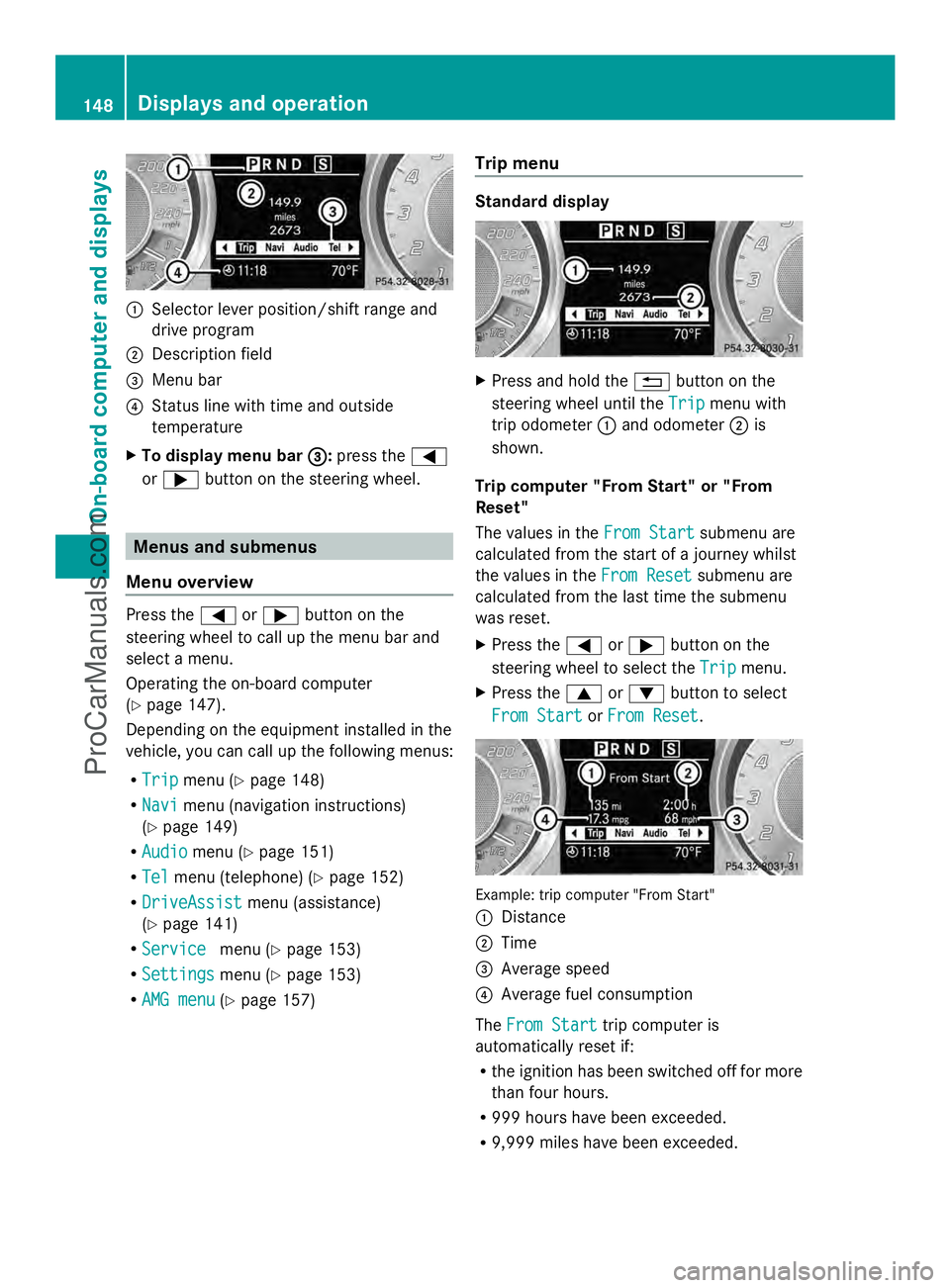
:
Selector lever position/shift range and
drive program
; Description field
= Menu bar
? Status line with time and outside
temperature
X To display menu bar = =:press the =
or ; button on the steering wheel. Menus and submenus
Menu overview Press the
=or; button on the
steering wheel to call up the menu bar and
select a menu.
Operating the on-board computer
(Y page 147).
Depending on the equipment installed in the
vehicle, you can call up the following menus:
R Trip Trip menu (Y page 148)
R Navi
Navi menu (navigation instructions)
(Y page 149)
R Audio Audio menu (Y page 151)
R Tel Tel menu (telephone) (Y page 152)
R DriveAssist
DriveAssist menu (assistance)
(Y page 141)
R Service
Service menu (Ypage 153)
R Settings Settings menu (Ypage 153)
R AMG menu AMG menu (Ypage 157) Trip menu Standard display
X
Press and hold the %button on the
steering wheel until the Trip
Tripmenu with
trip odometer :and odometer ;is
shown.
Trip computer "From Start" or "From
Reset"
The values in the From Start From Startsubmenu are
calculated from the start of a journey whilst
the values in the From Reset
From Reset submenu are
calculated from the last time the submenu
was reset.
X Press the =or; button on the
steering wheel to select the Trip Tripmenu.
X Press the 9or: button to select
From Start
From Start orFrom Reset
From Reset . Example: trip computer "From Start"
:
Distance
; Time
= Average speed
? Average fuel consumption
The From Start From Start trip computer is
automatically reset if:
R the ignition has been switched off for more
than four hours.
R 999 hours have been exceeded.
R 9,999 miles have been exceeded. 148
Displays and operationOn-board computer and displays
ProCarManuals.com
Page 154 of 286
Telephone menu
Introduction
G
WARNING
A driver's attention to the road must always
be his/her primary focus when driving. For
your safety and the safety of others, we
recommend that you pull over to a safe
location and stop before placing or taking a
telephone call. If you choose to use the
telephone while driving, please use the hands-
free device and only use the telephone when
weather, road and traffic conditions permit.
Some jurisdictions prohibit the driver from
using a mobile phone while driving a vehicle.
Bear in mind that at a speed of just 30 mph
(approximately 50 km/h ), your vehicle is
covering a distance of 44 feet (approximately
14 m) every second.
Functions and displays are dependent on the
optional equipment installed in your vehicle.
You can establish a Bluetooth ®
connection to
COMAND (see the separate operating
instructions).
X Switch on the mobile phone and COMAND.
X Press the =or; button on the
steering wheel to select the Tel
Tel menu.
You will see one of the following display
messages in the multifunction display:
R Enter PIN Enter PIN : the mobile phone has been
placed in the mobile phone bracket and the
PIN has not been entered.
X Enter the PIN using the mobile phone,
Voice Control System or COMAND.
The mobile phone will search for a network.
In the meantime, the Phone No Service Phone No Service
display message appears in the
multifunction display.
R Phone Ready Phone Ready or the name of the network
provider: the mobile phone has found a
network and is ready to receive.
R Phone No Service Phone No Service: there is no network
available or the mobile phone is searching
for a network. Accepting a call
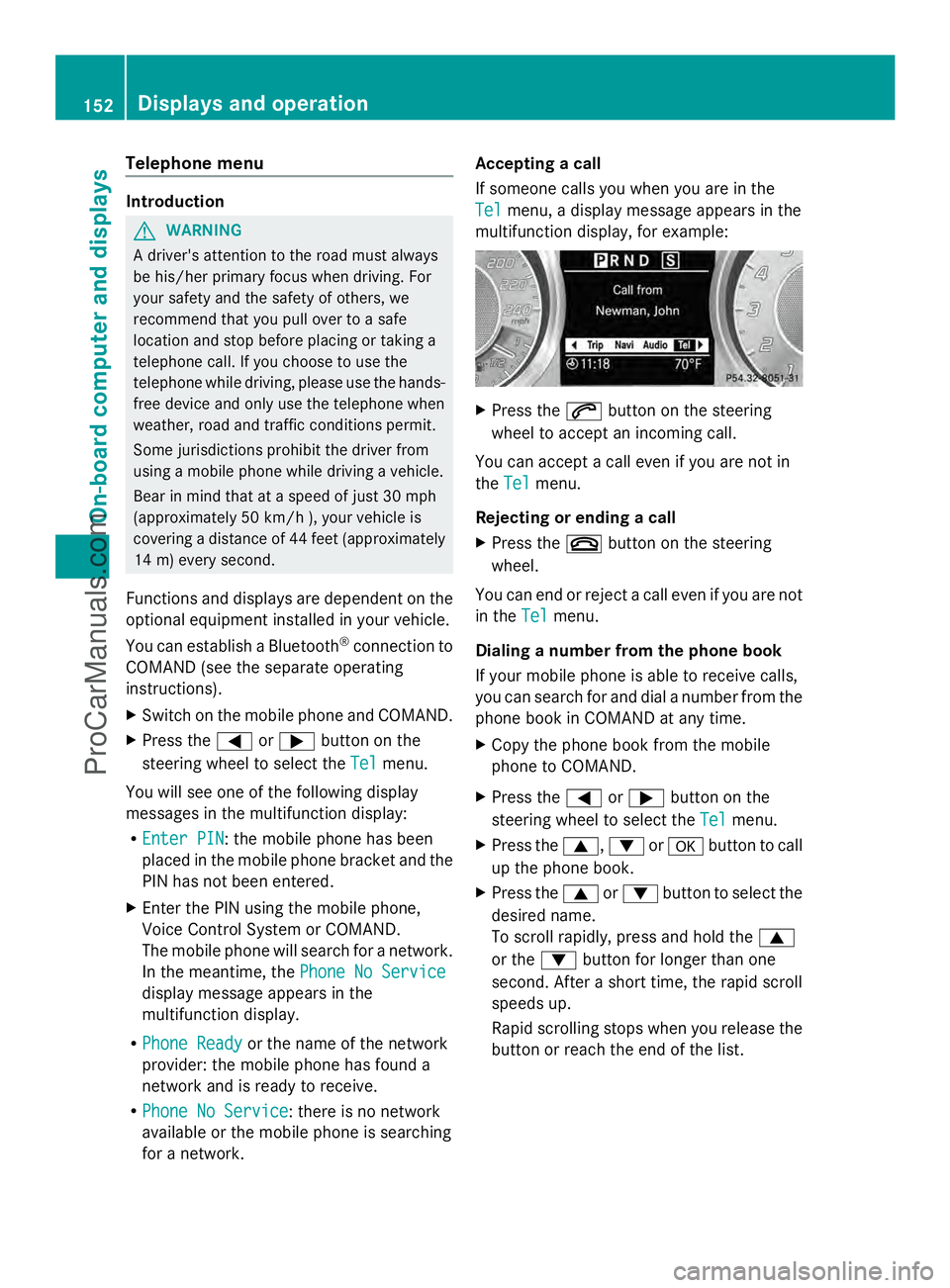
If someone calls you when you are in the
Tel Tel
menu, a display message appears in the
multifunction display, for example: X
Press the 6button on the steering
wheel to accept an incoming call.
You can accept a call even if you are not in
the Tel Tel menu.
Rejecting or ending a call
X Press the ~button on the steering
wheel.
You can end or reject a call even if you are not
in the Tel Telmenu.
Dialing a number from the phone book
If your mobile phone is able to receive calls,
you can search for and dial a number from the
phone book in COMAND at any time.
X Copy the phone book from the mobile
phone to COMAND.
X Press the =or; button on the
steering wheel to select the Tel Telmenu.
X Press the 9,:ora button to call
up the phone book.
X Press the 9or: button to select the
desired name.
To scroll rapidly, press and hold the 9
or the :button for longer than one
second. After a short time, the rapid scroll
speeds up.
Rapid scrolling stops when you release the
button or reach the end of the list. 152
Displays and operationOn-boa
rdcompu ter and displays
ProCarManuals.com