display MERCEDES-BENZ SLS-CLASS 2013 Owner's Manual
[x] Cancel search | Manufacturer: MERCEDES-BENZ, Model Year: 2013, Model line: SLS-CLASS, Model: MERCEDES-BENZ SLS-CLASS 2013Pages: 286, PDF Size: 3.6 MB
Page 57 of 286
The driving safety systems described in this
section cannot reduce these risks or prevent
the natural laws of physics from acting on the
vehicle. They cannot increase braking or
steering efficiency beyond that afforded by
the condition of the vehicle brakes and tires
or the traction afforded.
Only a safe, attentive, and skillful driver can
prevent accidents.
The capabilities of a vehicle equipped with the
driving safety systems described in this
section must never be exploited in a reckless
or dangerous manner which could jeopardize
the user's safety or the safety of others.
Always adjust your driving style to the
prevailing road and weather conditions and
keep a safe distance to other road users and
objects on the street.
If a driving system malfunctions, other driving
safety systems may also switch off. Observe
indicator and warning lamps that may come
on as well as messages in the multifunction
display that may appear.
i In wintry driving conditions, always use
winter tires (M+S tires) and if necessary,
snow chains. Only in this way will the
driving safety systems described in this
section work as effectively as possible. ABS (Anti-lock Braking System)
Important safety notes G
WARNING
Do not pump the brake pedal. Use firm, steady
brake pedal pressure instead. Pumping the
brake pedal reduces the braking effect.
ABS regulates brake pressure in such a way
that the wheels do not lock when you brake.
This allows you to continue steering the
vehicle when braking.
ABS works from a speed of about
5 mph(8 km/h) upwards, regardless of road- surface conditions. ABS works on slippery
surfaces, even if you only brake gently.
The
! warning lamp in the instrument
cluster lights up when the ignition is switched
on. It goes out when the engine is running.
Braking If ABS intervenes when braking, you will feel
a pulsing in the brake pedal.
X
If ABS intervenes: continue to depress the
brake pedal vigorously until the braking
situation is over.
X To make a full brake application:
depress the brake pedal with full force. G
WARNING
If the ABS malfunctions, other driving systems
such as the BAS or the ESP ®
are also switched
off. Observe indicator and warning lamps that
may come on as well as messages in the
multifunction display that may appear.
If the ABS malfunctions, the wheels may lock
during hard braking, reducing the steering
capability and extending the braking distance.
The pulsating brake pedal can be an
indication of hazardous road conditions, and
functions as a reminder to take extra care
while driving. BAS (Brake Assist System)
Observe the "Important safety notes" section
(Y page 56).
BAS operates in emergency braking
situations. If you depress the brake pedal
quickly, BAS automatically boosts the braking
force, thus shortening the stopping distance.
X Keep the brake pedal firmly depressed until
the emergency braking situation is over.
ABS prevents the wheels from locking.
The brakes will function as usual once you
release the brake pedal. BAS is deactivated. Driving safety systems
55Safety Z
ProCarManuals.com
Page 58 of 286
G
WARNING
If the BAS malfunctions, the brake system still
functions, but without the additional brake
boost available that the BAS would normally
provide in an emergency braking maneuver.
Therefore, the braking distance may increase. ESP
®
(Electronic Stability Program)
General notes i
Observe the "Important safety notes"
section (Y page 56).
ESP ®
monitors driving stability and traction,
i.e. power transmission between the tires and
the road surface.
If ESP ®
detects that the vehicle is deviating
from the direction desired by the driver, one
or more wheels are braked to stabilize the
vehicle. The engine output is also modified to
keep the vehicle on the desired course within
physical limits. ESP ®
assists the driver when
pulling away on wet or slippery roads. ESP ®
can also stabilize the vehicle during braking.
ETS (Electronic Traction System) i
Observe the "Important safety notes"
section (Y page 56).
Traction control is part of ESP ®
.
Traction control brakes the drive wheels
individually if they spin. This enables you to
pull away and accelerate on slippery surfaces,
for example if the road surface is slippery on
one side.
Traction control remains active, even if you
deactivate ESP ®
.
Important safety notes G
WARNING
If ESP ®
is malfunctioning, ESP ®
is unable to
stabilize the vehicle. Additionally, further
driving safety systems are deactivated. This
increases the risk of skidding and an accident. Drive on carefully. Have ESP
®
checked at a
qualified specialist workshop.
! Switch the ignition off when:
R the electric parking brake is being tested
using a brake dynamometer.
R the vehicle is being towed with the rear
axle raised.
Application of the brakes by ESP ®
may
otherwise destroy the brake system.
When SPORT handling mode is activated, the
M warning lamp lights up in the instrument
panel.
When ESP ®
is deactivated, the åand
h warning lamps light up in the instrument
panel.
Observe the information on warning lamps
(Y page 190) and display messages which
may be shown in the instrument cluster
(Y page 166).
i Only use wheels with the recommended
tire sizes. Only then will ESP ®
function
properly.
Characteristics of ESP ® ESP
®
is activated automatically when the
engine is started.
If ESP ®
intervenes, the hESP®
warning
lamp flashes in the instrument cluster.
If ESP ®
intervenes:
X Do not deactivate ESP ®
under any
circumstances.
X Only depress the accelerator pedal as far
as necessary when pulling away.
X Adapt your driving style to suit the
prevailing road and weather conditions.
Deactivating/activating ESP ® Important safety notes
i Observe the "Important safety notes"
section (Y page 54). 56
Driving safety systemsSafety
ProCarManuals.com
Page 59 of 286
You can select between the following states
of ESP ®
:
R ESP ®
is activated.
R SPORT handling mode is activated.
R ESP ®
is deactivated. G
WARNING
When SPORT handling mode is activated,
there is a greater risk of skidding and
accidents.
Only activate SPORT handling mode in the
situations described in the following. G
WARNING
If you deactivate ESP ®
, ESP ®
no longer
stabilizes the vehicle. There is an increased
risk of skidding and an accident.
Only deactivate ESP ®
in the situations
described in the following.
In the following situations, it may be better to
activate SPORT handling mode or deactivate
ESP ®
:
R when using snow chains
R in deep snow
R on sand or gravel
R when driving on designated roads when the
vehicle's own oversteering and
understeering characteristics are desired
Driving in SPORT handling mode or without
ESP ®
requires an extremely qualified and
experienced driver.
i Activate ESP ®
as soon as the situations
described above no longer apply. ESP ®
will
otherwise not be able to stabilize the
vehicle if the vehicle starts to skid or a
wheel starts to spin.
! Avoid spinning the driven wheels for an
extended period with ESP ®
deactivated.
You could otherwise damage the drivetrain. Deactivating/activating ESP
® X
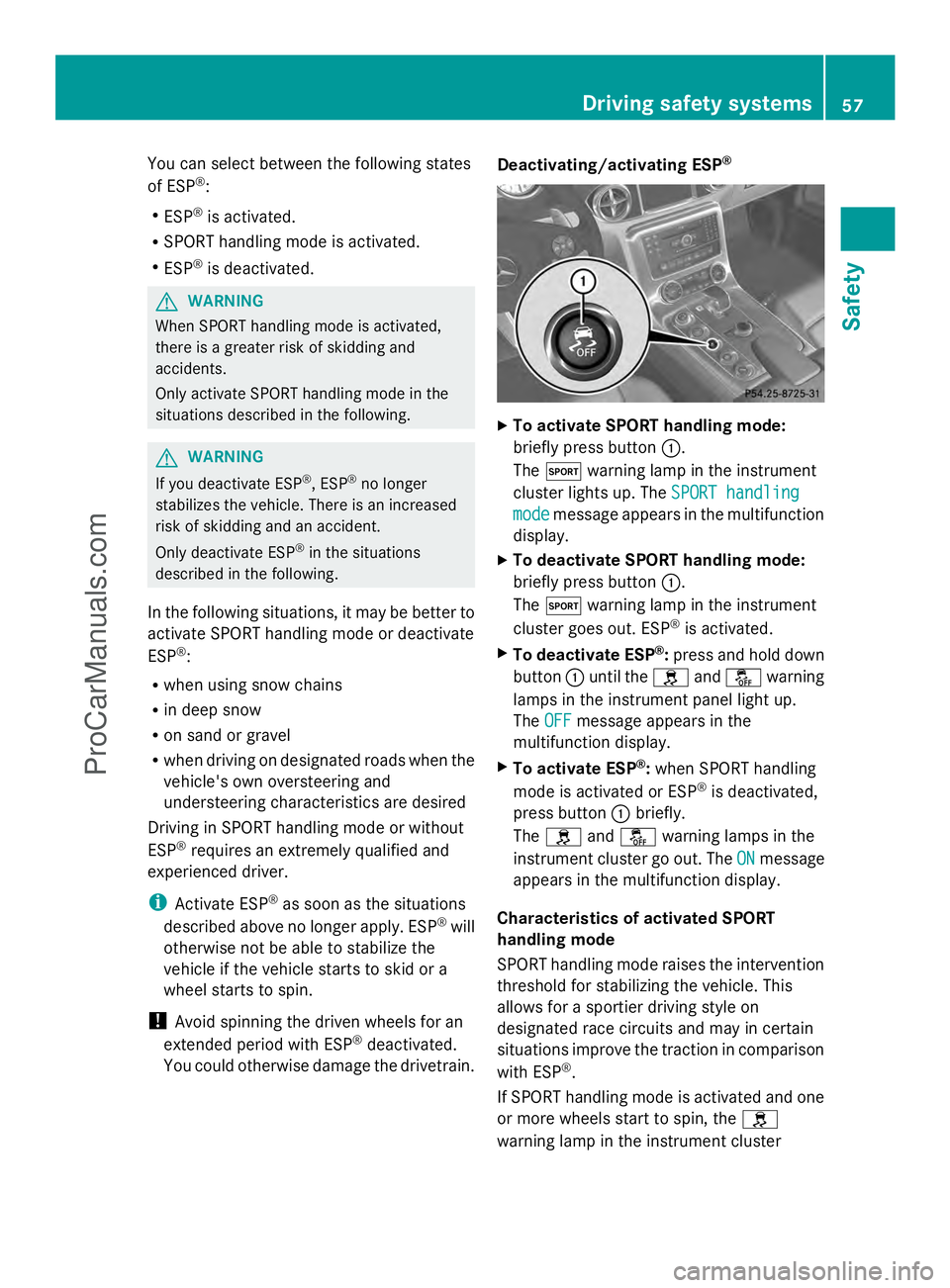
To activate SPORT handling mode:
briefly press button :.
The M warning lamp in the instrument
cluster lights up. The SPORT handling SPORT handling
mode
mode message appears in the multifunction
display.
X To deactivate SPORT handling mode:
briefly press button :.
The M warning lamp in the instrument
cluster goes out. ESP ®
is activated.
X To deactivate ESP ®
:press and hold down
button :until the handå warning
lamps in the instrument panel light up.
The OFF OFF message appears in the
multifunction display.
X To activate ESP ®
:when SPORT handling
mode is activated or ESP ®
is deactivated,
press button :briefly.
The h andå warning lamps in the
instrument cluster go out. The ON
ONmessage
appears in the multifunction display.
Characteristics of activated SPORT
handling mode
SPORT handling mode raises the intervention
threshold for stabilizing the vehicle. This
allows for a sportier driving style on
designated race circuits and may in certain
situations improve the traction in comparison
with ESP ®
.
If SPORT handling mode is activated and one
or more wheels start to spin, the h
warning lamp in the instrument cluster Driving safety systems
57Safety Z
ProCarManuals.com
Page 78 of 286
Problems with the side windows
Problem Possible causes/consequences and
M
MSolutions A side window will not
close. Objects prevent it from closing.
X
Remove the objects.
X Close the side window. A side window will not
close. You cannot see the cause.
If a side window is obstructed during closing and reopens again
slightly:
X
Immediately after the window blocks, pull the corresponding
switch again until the side window has closed.
The side window is closed with increased force.
G WARNING
Pulling and holding the switch to close the door window immediately
after it had been blocked two times will cause the door window to
close without the anti-entrapment feature for as long as you hold
the switch.
If a side window is obstructed again during closing and reopens
again slightly:
X Immediately after the window blocks, pull the corresponding
switch again until the side window has closed.
The side window is closed without the anti-entrapment feature. Soft top (Roadster)
Important safety notes
G
WARNING
Only drive with the soft top fully open or
closed.
If the soft top does not open or close fully, the
soft-top hydraulics are depressurized and the
soft top is lowered:
R after about seven minutes if the ignition is
switched on
R immediately if the ignition is switched off
A warning tone sounds shortly beforehand.
The Top lowering
Top lowering message appears in the
multifunction display..
Lock the soft top again before driving on.
Otherwise the unlocked soft top could open during the journey and cause you to lose
control of your vehicle. You and/or other
persons could be injured as a result.
You can open or close the soft top:
R if the vehicle is stationary or
R if the speed does not exceed 30 mph
(50 km/h)
If there is a strong head wind, it may not be
possible to close the soft top fully. In order to
close the soft top fully, reduce speed or stop.
For safety reasons, Mercedes-Benz
recommends that you only open or close the
soft top when the vehicle is stationary.
! Never sit on the soft top when it is closed
or store heavy objects on it. You will 76
Soft top (Roadster)Opening and closing
ProCarManuals.com
Page 79 of 286
otherwise damage the soft top of the
vehicle.
! When opening and closing the soft top,
make sure that:
R there is sufficient clearance above it, as
the soft top swings upwards.
R there are no objects on the soft top or
the soft-top covers to the side.
R the fabric is not dirty, wet or frozen
R the outside temperature is above -10 †.
You could otherwise damage the soft top
as well as other parts of the vehicle.
i Make sure that the soft top is dry and
clean before closing it. Otherwise, water or
dirt could enter the vehicle interior or trunk. Opening and closing with the soft top
switch
Important safety notes G
WARNING
Make sure nobody can be trapped or injured
by moving parts, such as the soft-top linkage
or soft-top compartment cover, when opening
or closing the soft top.
Release the soft-top switch in the event of
danger. The soft-top mechanism stops
immediately. G
WARNING
The soft top stops moving during the opening
or closing procedure if you drive faster than
30 mph (50 km/h). This could impair your rear
view. At high speeds the soft top may be
damaged.
Reduce your speed to below 30 mph
(50 km/h) or stop in accordance with traffic
conditions. Press the soft-top switch again in
order to open or close the soft top fully. Opening and closing X
When the vehicle is stationary, depress the
brake pedal.
X Select key position 1using the Start/Stop
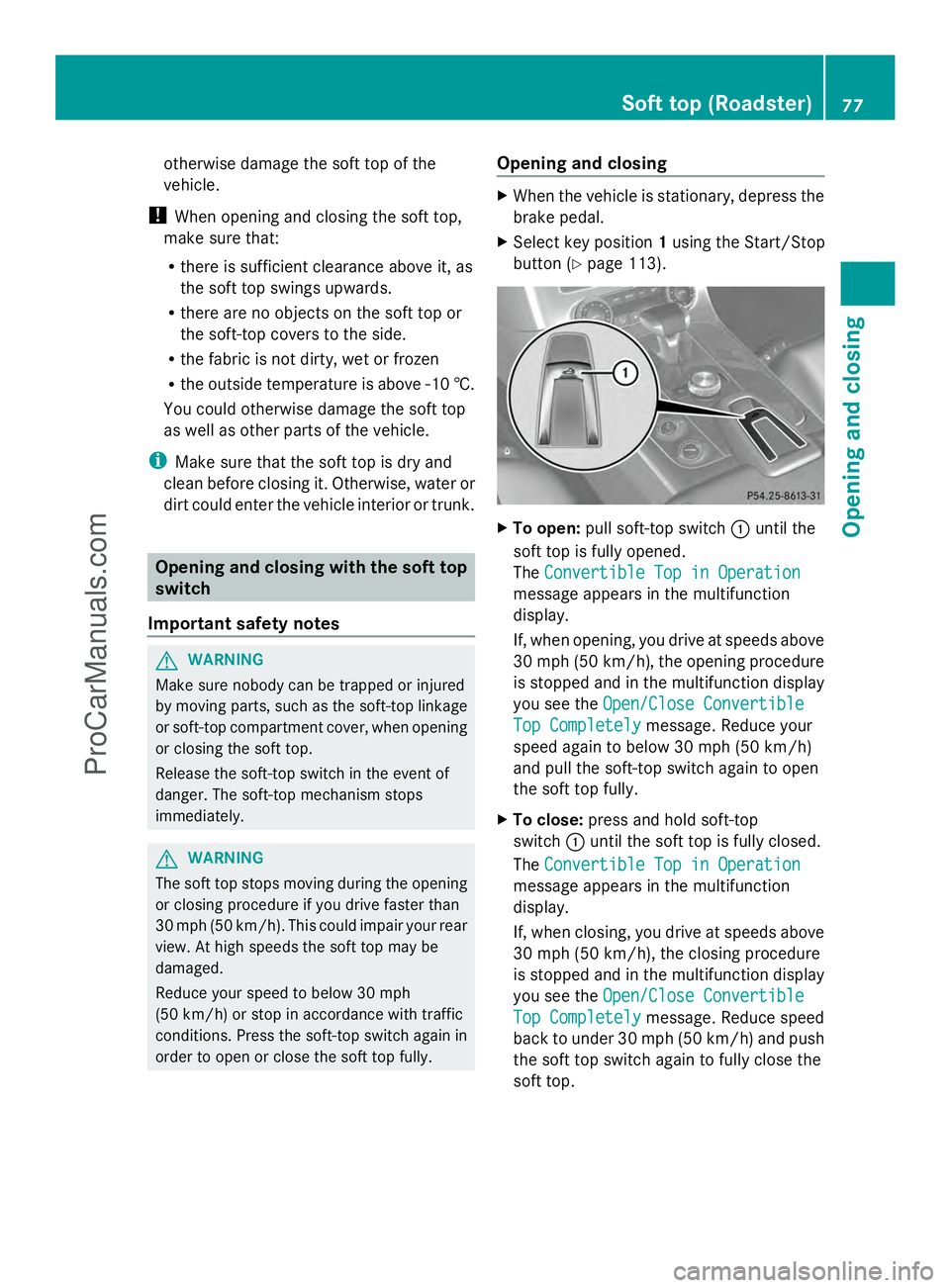
button (Y page 113). X
To open: pull soft-top switch :until the
soft top is fully opened.
The Convertible Top in Operation Convertible Top in Operation
message appears in the multifunction
display.
If, when opening, you drive at speeds above
30 mph (50 km/h), the opening procedure
is stopped and in the multifunction display
you see the Open/Close Convertible Open/Close Convertible
Top Completely
Top Completely message. Reduce your
speed again to below 30 mph (50 km/h)
and pull the soft-top switch again to open
the soft top fully.
X To close: press and hold soft-top
switch :until the soft top is fully closed.
The Convertible Top in Operation Convertible Top in Operation
message appears in the multifunction
display.
If, when closing, you drive at speeds above
30 mph (50 km/h), the closing procedure
is stopped and in the multifunction display
you see the Open/Close Convertible Open/Close Convertible
Top Completely
Top Completely message. Reduce speed
back to under 30 mph (50 km/h) and push
the soft top switch again to fully close the
soft top. Soft top (Roadster)
77Opening and closing Z
ProCarManuals.com
Page 80 of 286
Opening and closing using the
SmartKey
Important safety notes G
WARNING
Make sure nobody can be trapped or injured
by moving parts, such as the soft-top linkage
or soft-top compartment cover, when opening
or closing the soft top.
If there is a risk of entrapment, immediately
release the %or& button on the
SmartKey. The soft-top mechanism stops
immediately.
Opening and closing i
The SmartKey must be close to the
driver's door handle.
X Point the tip of the SmartKey at the driver's
door handle.
X To open: press and hold the %button
on the SmartKey until the soft top is fully
opened.
The Convertible Top in Operation Convertible Top in Operation
message appears in the multifunction
display.
X To close: press and hold the &button
on the SmartKey until the soft top is fully
closed.
The Convertible Top in Operation Convertible Top in Operation
message appears in the multifunction
display. The soft top and the side windows
close. Relocking the soft top
G
WARNING
Stop the vehicle at a suitable location as soon
as it is possible to do so safely and lock the
soft top before driving on. You could
otherwise endanger yourself and others. The soft top is not locked if:
R the Convertible Top in Operation Convertible Top in Operation
message appears in the multifunction
display.
R you hear a warning tone for up to ten
seconds when pulling away or while driving.
You can lock the soft top again if it is not
locked fully.
X Pull over and stop the vehicle safely as soon
as possible, paying attention to road and
traffic conditions.
X Select key position 2with the Start/Stop
button (Y page 113).
X Press the soft-top switch. Installing/removing the wind screen
G
WARNING
You could lose control of the vehicle and
injure yourself or others if you operate the
wind screen while driving.
Install or remove the wind screen only when
the vehicle is stationary. G
WARNING
If the wind screen is not properly engaged and
the fastening levers are not folded outwards,
it could become detached while driving. There
is a risk of accident and injury.
Make sure that you push in the wind screen
up to the locking point and then fold the
fastening levers outwards.
! Install or remove the wind screen only
when the soft top is open. You could
otherwise damage the wind screen or the
vehicle interior.
! Mercedes-Benz recommends that you
only use wind screens which have been
tested and approved for Mercedes-Benz
vehicles. This helps to prevent damage to
the vehicle. 78
Soft top (Roadster)Opening and closing
ProCarManuals.com
Page 84 of 286
Useful information
i This Operator's Manual describes all
models and all standard and optional
equipment of your vehicle available at the
time of publication of the Operator's
Manual. Country-specific differences are
possible. Please note that your vehicle may
not be equipped with all features
described. This also applies to safety-
related systems and functions.
i Please read the information on qualified
specialist workshops (Y page 22).Correct driver's seat position
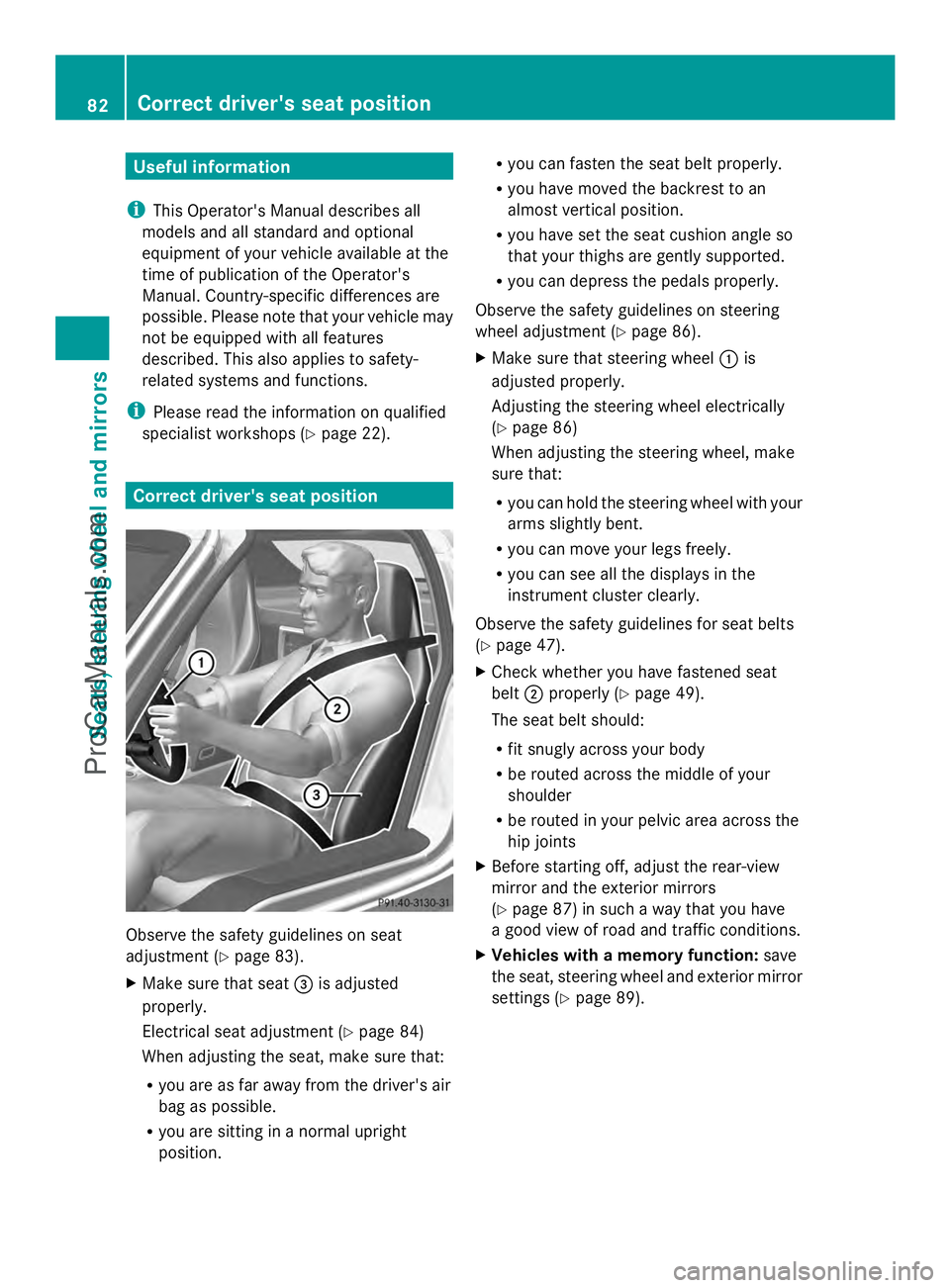
Observe the safety guidelines on seat
adjustment (Y
page 83).
X Make sure that seat =is adjusted
properly.
Electrical seat adjustment (Y page 84)
When adjusting the seat, make sure that:
R you are as far away from the driver's air
bag as possible.
R you are sitting in a normal upright
position. R
you can fasten the seat belt properly.
R you have moved the backrest to an
almost vertical position.
R you have set the seat cushion angle so
that your thighs are gently supported.
R you can depress the pedals properly.
Observe the safety guidelines on steering
wheel adjustment (Y page 86).
X Make sure that steering wheel :is
adjusted properly.
Adjusting the steering wheel electrically
(Y page 86)
When adjusting the steering wheel, make
sure that:
R you can hold the steering wheel with your
arms slightly bent.
R you can move your legs freely.
R you can see all the displays in the
instrument cluster clearly.
Observe the safety guidelines for seat belts
(Y page 47).
X Check whether you have fastened seat
belt ;properly (Y page 49).
The seat belt should:
R fit snugly across your body
R be routed across the middle of your
shoulder
R be routed in your pelvic area across the
hip joints
X Before starting off, adjust the rear-view
mirror and the exterior mirrors
(Y page 87) in such a way that you have
a good view of road and traffic conditions.
X Vehicles with a memory function: save
the seat, steering wheel and exterior mirror
settings (Y page 89). 82
Correct driver's seat positionSeats, steering wheel and mirrors
ProCarManuals.com
Page 105 of 286
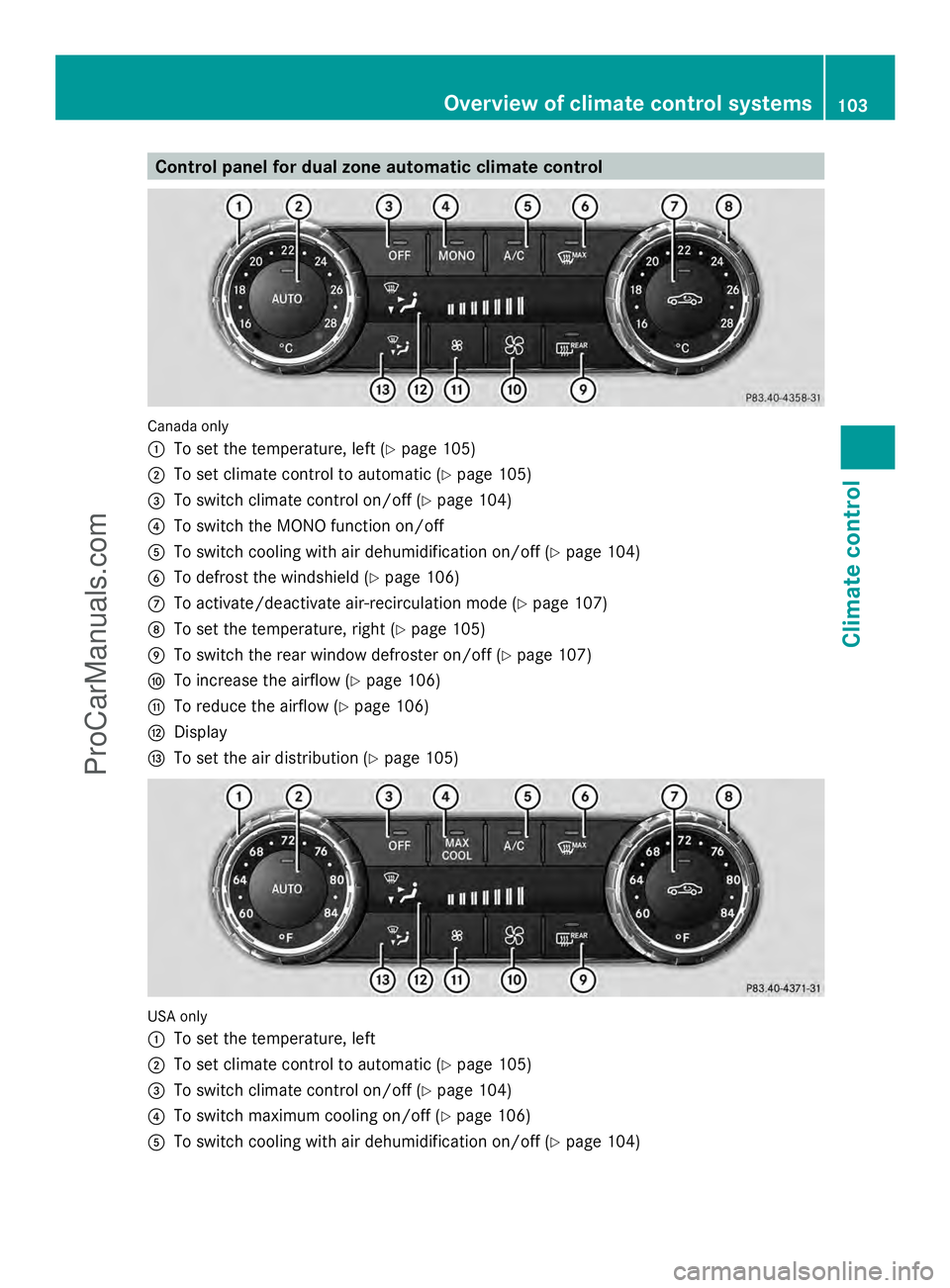
Control panel for dual zone automatic climate control
Canada only
:
To set the temperature, left (Y page 105)
; To set climate control to automatic (Y page 105)
= To switch climate control on/off (Y page 104)
? To switch the MONO function on/off
A To switch cooling with air dehumidification on/off (Y page 104)
B To defrost the windshield (Y page 106)
C To activate/deactivate air-recirculation mode (Y page 107)
D To set the temperature, right (Y page 105)
E To switch the rear window defroster on/off (Y page 107)
F To increase the airflow (Y page 106)
G To reduce the airflow (Y page 106)
H Display
I To set the air distribution (Y page 105)USA only
:
To set the temperature, left
; To set climate control to automatic (Y page 105)
= To switch climate control on/off (Y page 104)
? To switch maximum cooling on/off (Y page 106)
A To switch cooling with air dehumidification on/off (Y page 104) Overview of climate control systems
103Climate control Z
ProCarManuals.com
Page 106 of 286
B
To defrost the windshield (Y page 106)
C To activate/deactivate air-recirculation mode (Y page 107)
D To set the temperature, right (Y page 105)
E To switch the rear window defroster on/off (Y page 107)
F To increase the airflow (Y page 106)
G To reduce the airflow (Y page 106)
H Display
I To set the air distribution (Y page 105)Notes on using automatic climate
control
The following contains instructions and
recommendations to enable you to get the
most out of your automatic climate control.
R Activate climate control using the Ãand
¿ buttons. The indicator lamps in
the à and¿ buttons light up.
R Set the temperature to 72 ‡ (22 †).
R Only use the defrosting function briefly
until the windshield is clear again.
R Only use air-recirculation mode briefly, e.g.
if there are unpleasant outside odors or
when in a tunnel. The windows could
otherwise fog up, since no fresh air is drawn
into the vehicle in air-recirculation mode.
R Use the MONO function if you want to
adopt the temperature and air distribution
settings from the driver's side for all
climate control zones. The indicator lamp
in the ºbutton lights up. Operating the climate control
systems
Switching climate control on/off
G
WARNING
When the climate control system is
deactivated, the outside air supply and
circulation are also deactivated. Only choose
this setting for a short time. Otherwise the
windows could fog up, impairing visibility and
endangering you and others. i
Switch on climate control primarily using
the à button (Y page 105).
X Select key position 2with the Start/Stop
button.
X To activate: press theÃbutton.
The indicator lamp in the Ãbutton lights
up. Airflow and air distribution are set to
automatic mode.
or
X Press the ^button.
The indicator lamp in the ^button goes
out. The previously selected settings are
restored.
X To deactivate: press the^button.
The indicator lamp in the ^button lights
up. Activating/deactivating cooling with
air dehumidification
Points to observe before use The cooling with air dehumidification function
is only available when the engine is running.
The air inside the vehicle is cooled and
dehumidified according to the temperature
selected.
G
WARNING
If you switch off the cooling function, the
vehicle will not be cooled when weather
conditions are warm. The windows can fog up
more quickly. Window fogging may impair
visibility and endanger you and others. 104
Operating the climate control systemsClimate control
ProCarManuals.com
Page 108 of 286
X
Select key position 2with the Start/Stop
button.
X Press the _button repeatedly until the
desired symbol appears in the display.
The indicator lamp in the Ãbutton goes
out. Automatic control is deactivated and
the air distribution is controlled according
to the selected setting. Setting the airflow
X Select key position 2with the Start/Stop
button.
X To increase/reduce: press theKor
I button. Switching the mono function on/off
The MONO function is only available in
vehicles for Canada.
You can use the MONO function to adopt the
temperature and air distribution settings on
the driver's side for the front-passenger side.
X Press the ºbutton.
The indicator lamp in the ºbutton lights
up or goes out. Defrosting the windshield
i You should only select the defrosting
function until the windshield is clear again.
X Select SmartKey position 2with the Start/
Stop button.
X To activate: press the¬button.
The indicator lamp in the ¬button lights
up.
The system automatically switches to the
following functions:
R high airflow
R high temperature
R air distribution to the windshield and
front side windows
R air-recirculation mode off X
To deactivate: press the¬button.
The indicator lamp in the ¬button goes
out. The previously selected settings are
restored. Air-recirculation mode remains
deactivated.
or
X Press the Ãbutton.
The indicator lamp in the ¬button goes
out. Airflow and air distribution are set to
automatic mode.
or
X Turn controls :orD clockwise or
counter-clockwise ( Ypage 103).
or
X Press the KorI button. Switching maximum cooling on/off
The MAX COOL function is only available in
vehicles for the USA.
MAX COOL is only operational when the
engine is running.
When you activate MAX COOL, climate
control switches to the following functions:
R maximum cooling
R maximum airflow
R air-recirculation mode on
X To activate: press theÙbutton.
The indicator lamp in the button lights up.
X To deactivate: press theÙbutton
again.
The indicator lamp in the button goes out.
The previously selected settings come into
effect again.
i To deactivate MAX COOL press the ^,
Ã, or ¬button. 106
Operating the climate control systemsClimate control
ProCarManuals.com