display MERCEDES-BENZ SLS COUPE 2010 User Guide
[x] Cancel search | Manufacturer: MERCEDES-BENZ, Model Year: 2010, Model line: SLS COUPE, Model: MERCEDES-BENZ SLS COUPE 2010Pages: 361, PDF Size: 6.32 MB
Page 17 of 361
S
Safety notes Using the telephone ....................... 128
Seat
Correct driver's seat position ........213
Storing settings ............................. 210
Seat adjustment ................................ 203
Seat belt Fastening ....................................... 210
Seat belts
Warning lamp ........................ 212, 311
Seat covers
Cleaning ......................................... 285
Seat heating ....................................... 205
Seats Adjusting (bucket seat) ..................205
Adjusting (electrically). ..................204
Adjusting (manually). .....................204
Seat adjustment ............................ 205
Seat ventilation
Malfunction indicator lamp ............307
Selector lever
Display message ............................ 291
Sensors
Cleaning ......................................... 284
Service indicator
see ASSYST PLUS service interval
displa y........................................... 279
Service products ............................... 349
Brake fluid ..................................... 351
Coolant .......................................... 351
Engine oil ....................................... 350
Fuel ................................................ 349
Windscreen washer fluid ................352
Settings
Calling up a stored setting .............210
Factory (on-board computer) .........240
On-board computer .......................238
SETUP (on-board computer) .............241
Sidebag ................................................ 39
Side windows Convenience closing ......................219
Convenience opening ....................219
Fault .............................................. 318
Opening/closing ............................ 218
Snow chains ...................................... 276
Socket ................................................ 260Sound
Switching on/off .............................. 67
Sound Modus ....................................... 68
Soun dsettings .................................... .67
Balance ............................................ 68
Special destination
Category ........................................ 106
Entering ......................................... 106
Entering using the map ..................110
Special destination icon
Setting ............................................. 85
Special destination list .....................109
Spee dlimiter
SPEEDTRONIC ............................... 245
Speedometer
Digital speedometer (on-board
computer) ...................................... 233
Selecting the display unit (on-
board computer) ............................ 238
Speedtronic ....................................... 245
Display message ............................ 293
Permanent ..................................... 247
Variabl e......................................... 246
SRS (Supplemental Restraint Sys-
tem) ...................................................... 35
Display message ............................ 304
Warning lamp ........................... 35, 309
Standard display (on-board com-
puter) ................................................. .233
Station list ......................................... 161
Station pre-sets ................................. 162
Stations Saving ............................................ 163
Tuning in ........................................ 161
Station search ................................... 162
Steering wheel Adjusting ....................................... 206
Adjusting (electrically). ..................207
Adjusting (manually). .....................206
Buttons (on-board computer) ......... 230
Storing settings ............................. 210
Steering wheel boss
Cleaning ......................................... 284
Steering wheel gearshift paddles ....227
Stowage compartment Rear stowage compartment ........... 258 14
Index BA 197 ECE RE 2010/6a; 1; 2, en-GB
sabbae uV ersion: 3.0.3.6
2010-05-07T14:19:43+02:00 - Seite 14
Page 18 of 361
Stowage compartments
...................257
Armrest (under) ............................. 258
Cuph older..................................... 258
Glove compartment .......................257
Telephone compartment ................258
Submenu (on-board computer)
Convenience .................................. 240
Factory setting ............................... 240
Instrument cluster .........................238
Lights ............................................ .238
Standard displa y............................ 233
Vehicle .......................................... .240
Sub-programmes (DAB) ....................165
Summer and standard time Switching ......................................... 73
Summer opening
see Convenience opening
Sun visor ............................................ 259
Supplemental Restraint System see SRS ........................................... 35
See SRS ........................................... 35
Surround lighting
Switching on/off (on-board com-
puter) ............................................. 239
Switching off the alarm
ATA .................................................. 49
Syste mlanguage
Setting ............................................. 78
Syste mmenu....................................... 71
Syste msettings
Menu overview ................................ .71T
Tail lamps Display message ............................ 301
Tail pipes
Cleaning ......................................... 284
Tank
see Fuel tank
Tank capacity .................................... 349
Technical data ................................... 352
Emergency spare wheel .................355
Telephone
Accepting/ending call ...................144
Accepting or rejecting a waiting
call ................................................. 146
Ending an active call ......................146Entering phone numbers ................ 145
Incoming call
................................. 144
Outgoing call ................................. 144
Reception and transmission vol-
ume ............................................... 135
see Mobile phone .......................... 236
Sending DTMF tones ..................... .146
Single call ...................................... 145
Switching hands-free microphone
on/off ............................................ 146
Telephone basic menu
Bluetooth interface ........................132
Convenience telephony .................134
Telephone compartment ..................258
Telephone mode Redialling ....................................... 145
Telephone number
Entering ......................................... 144
Temperature
Engine oil ....................................... 229
Engine oil (on-board computer) ...... 241
Outside temperature ..................... .230
Transmissio noil (on-board com-
puter )............................................. 241
Text message (SMS) (convenience
telephone)
Calling the sende r.......................... 148
Deleting ......................................... 149
Incoming ........................................ 147
Read-aloud function .......................148
Reading .......................................... 148
Storing the sende rinthe address
book ...................................... 148, 149
THERMOTRONIC
Malfunction indicator lamp ............307
Tightening torque .............................. 332
Time Lap time (on-board computer) .......241
Setting ............................................. 72
Time format
Setting ............................................. 72
Timer (on-board computer) ..............241
Time zone Setting ............................................. 73
TIREFIT kit
Using ............................................. 326
TMCPro ............................................... 119 Index
15 BA 197 ECE RE 2010/6a; 1; 2, en-GB
sabbae uV ersion: 3.0.3.6
2010-05-07T14:19:43+02:00 - Seite 15
Page 19 of 361
Tone settings
Trebl eand bass ............................... 68
Total distance recorder ....................233
Tow-away protection ..........................49
Towing ........................................ 339, 341
Towing eye Fitting ............................................ 341
Removing ....................................... 341
Town
Entering ........................................... 94
Traffic announcements on ...............164
Traffic jam function ........................... 117
Traffic Programme Switching traffic announcements
on/off ............................................ 164
Transferring acall (convenience
telephone) .......................................... 146
Transmission oil Temperature gauge (on-board
computer) ...................................... 241
Transmission output (maximum)
Telephone/two-way radio ..............347
Transport (vehicle) ............................341
Trim strips Cleaning ......................................... 285
Trip computer
On-board computer .......................232
Trip meter .......................................... 233
Resetting (on-board computer) ......234
True Image™ ........................................ 68
Turn signal Display message ............................ 300
Two-way radio
Installatio n..................................... 347
Type identification plate
see Vehicle identification plate ......348
Tyre grip ............................................. 278
Tyre pressure ..................................... 272
Calling up (on-board computer) .....273
Display message ............................ 304
Tyre pressure monitor
Warning lamp ................................. 311
Tyres
Direction of rotatio n...................... 272
General notes ................................ 270
Technical data ............................... 354
Tyre tread .......................................... .272 U
Unladen weight ................................. 352
Unlocking Emergency unlocking ..................... 322
Updating
Map software ................................... 89
Upshift indicator ............................... 229
USB devices Connecting to the Media Inter-
face ............................................... 184
Folders and playlists ......................187
Using the telephone ..........................144
Multi-function steering wheel ..........62 V
Variable Speedtronic ........................246
vCards Receiving ....................................... 137
Vehicle
Emergency unlocking ..................... 322
Individual settings (on-board com-
puter) ............................................. 238
Leaving parked up .........................321
Towing ........................................... 341
Transporting .................................. 341
Unlocking (key ).............................. 200
Vehicle battery .................................. 334
Vehicle dimensions ...........................352
Vehicle electronics ...........................346
Vehicle identification number
(VIN) ................................................... 348
Vehicle identification plate ..............348
Vehicle position Saving ...................................... 83, 127
Vehicle tool kit .................................. 288
Vehicle weights ................................. 352
Video DVD Fast forward/rewind ..................... .194
Operation ....................................... 190
Pause function ............................... 195
Picture settings .............................. 195
Selecting a film/title ..................... .195
Selecting a scene/chapter ............195
Stop function ................................. 194
Video mode
Automatic picture shutoff ..............190 16
Index BA 197 ECE RE 2010/6a; 1; 2, en-GB
sabbae uV ersion: 3.0.3.6
2010-05-07T14:19:43+02:00 - Seite 16
Page 20 of 361
Volume
Adjusting ......................................... 67
Phone call s...................................... 67
Traffi cannouncements ....................67 W
Warning and indicator lamps ABS (yellow) ................................... 308
ESP ®
........................................ 47, 308
ESP ®
OFF ....................................... 309
ESP ®
Sport .................................... 309
LIM (cruise control) ........................ 244
LIM (variable Speedtronic) .............246
Tyr ep ressure monitor ...................311
Warning tone ..................................... 312
Warning triangle ................................ 288
Washer fluid Display message ............................ 305
Washer fluid reservoir ..............270, 352
Filling capacity ............................... 352
Waveband
Switching (radio )............................ 160
Wearing seat belts ............................210
Wheel bolts Tightening torque ........................... 332
Wheel chock
Use ................................................ 329
Wheels
General notes ................................ 270
Interchanging ................................. 275
Windows
Cleaning ......................................... 283
see Side windows
Windscreen washe rfluid .................. 352
Topping up ..................................... 270
Windscreen washer system .....270, 352
Windscreen wipers ...........................217
Malfunction ................................... .317
Replacing the wiper blades ............325
Winte rdriving ............................ 275, 276
Winter tyres ....................................... 275
Limiting the speed (on-board com-
puter) ............................................. 248
Wiper blades
Cleaning ......................................... 283
Replacing ....................................... 325 Index
17 BA 197 ECE RE 2010/6a; 1; 2, en-GB
sabbae uV ersion: 3.0.3.6
2010-05-07T14:19:43+02:00 - Seite 17
Page 26 of 361
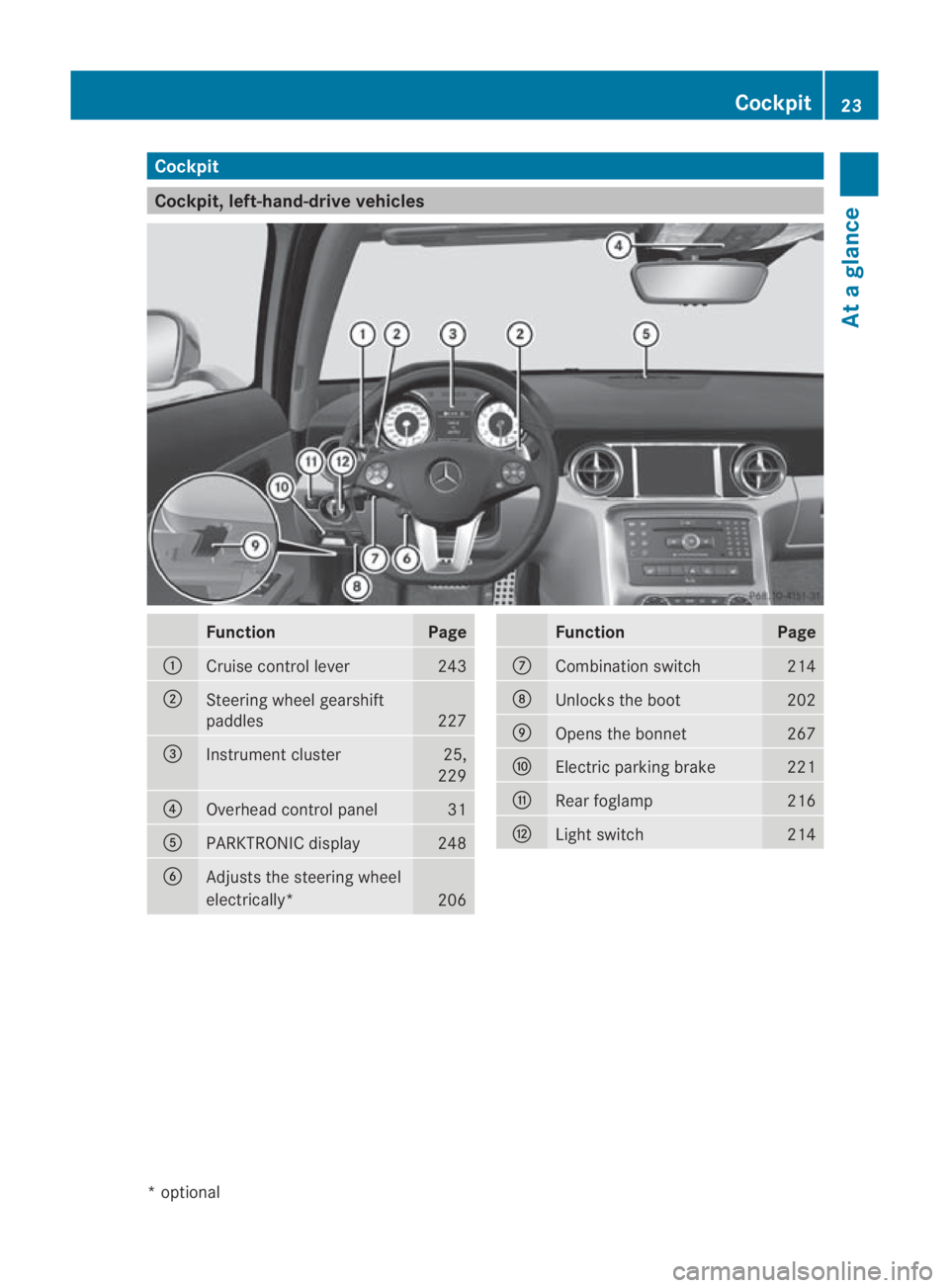
Cockpit
Cockpit, left-hand-drive vehicles
Function Page
0001
Cruise control lever 243
0002
Steering wheel gearshift
paddles
227
0015
Instrument cluster 25,
229 0014
Overhead control panel 31
0012
PARKTRONIC display 248
0013
Adjusts the steering wheel
electrically*
206 Function Page
000A
Combination switch 214
000B
Unlocks the boot 202
000C
Opens the bonnet 267
000D
Electric parking brake 221
000E
Rear foglamp 216
000F
Ligh
tswitch 214Cockpit
23At a glance
*optional
BA 197 ECE RE 2010/6a; 1; 2, en-GB
sabbaeu Version: 3.0.3.6 2010-05-07T14:19:43+02:00 - Seite 23
Page 27 of 361
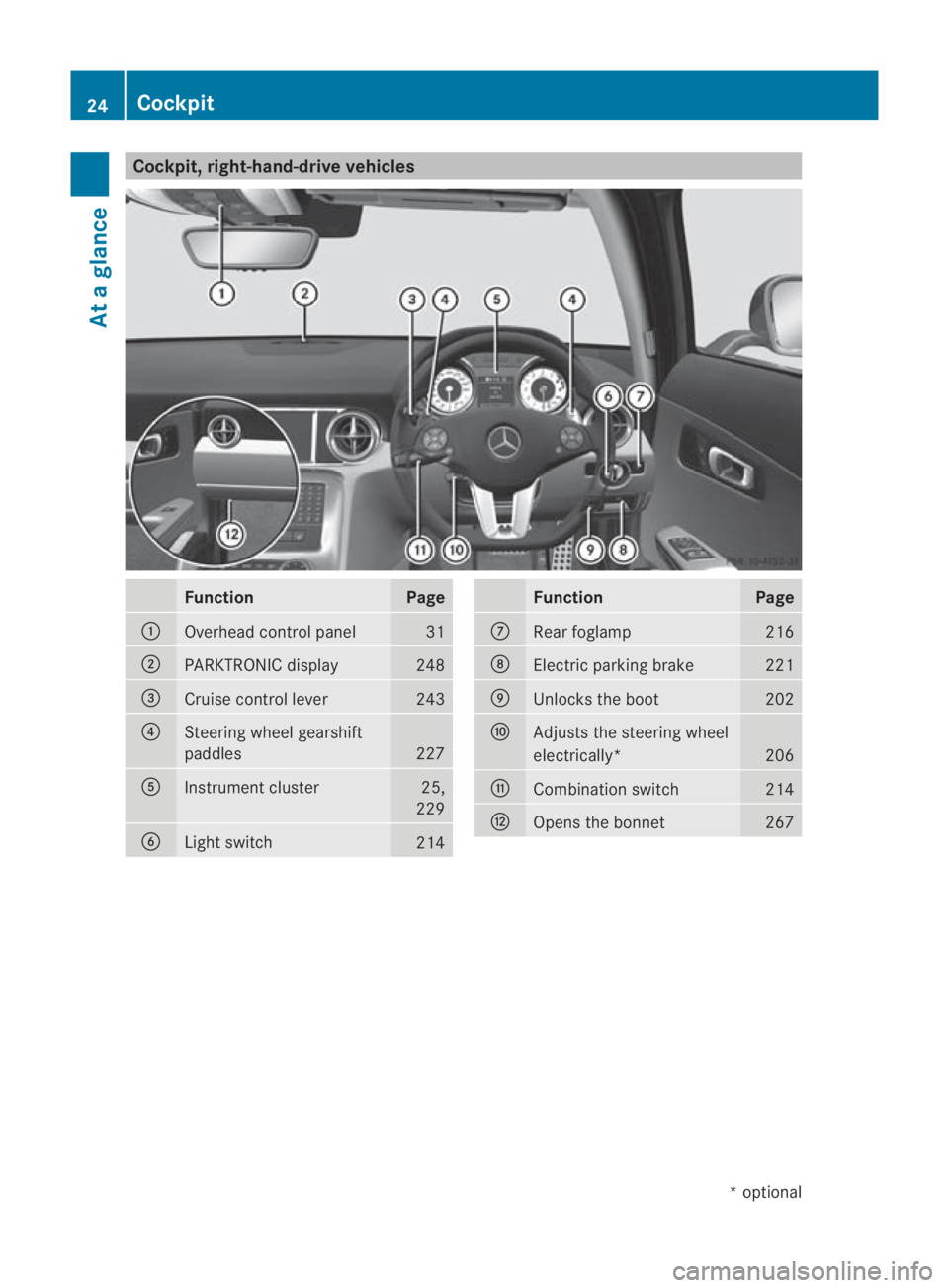
Cockpit, right-hand-drive vehicles
Function Page
0001
Overhead control panel 31
0002
PARKTRONIC display 248
0015
Cruise control lever 243
0014
Steering wheel gearshift
paddles
227
0012
Instrument cluster 25,
229 0013
Ligh
tswitch 214 Function Page
000A
Rear foglamp 216
000B
Electric parking brake 221
000C
Unlocks the boot 202
000D
Adjusts the steering wheel
electrically*
206
000E
Combinatio
nswitch 214
000F
Opens the bonnet 26724
CockpitAt a glance
*o
ptional
BA 197 ECE RE 2010/6a; 1; 2, en-GB
sabbaeu
Version: 3.0.3.6 2010-05-07T14:19:43+02:00 - Seite 24
Page 28 of 361
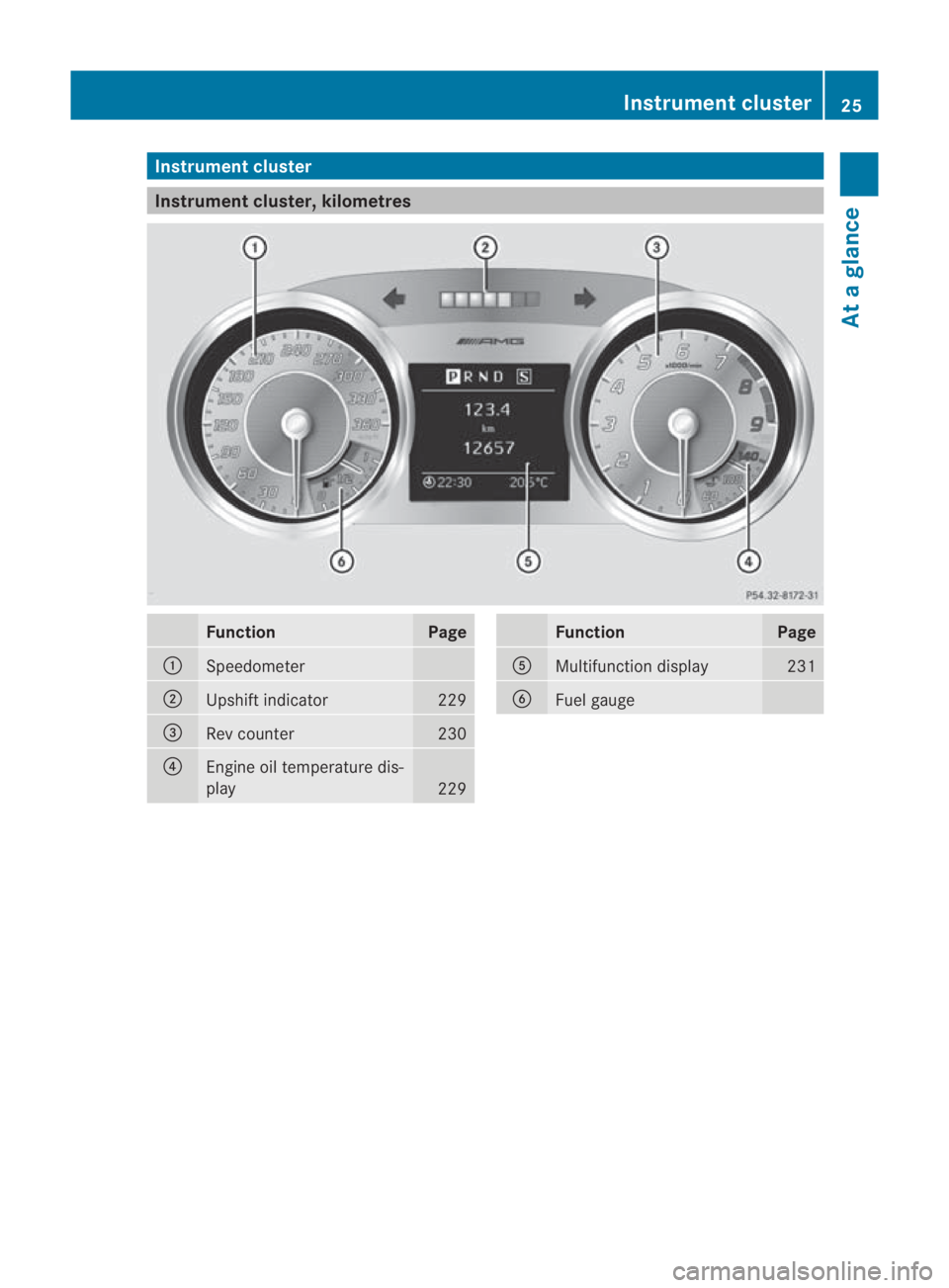
Instrumen
tcluster Instrument cluster, kilometres
Function Page
0001
Speedometer
0002
Upshif
tindicator 229
0015
Re
vc ounter 230
0014
Engine oil temperature dis-
play
229 Function Page
0012
Multifunction display 231
0013
Fuel gauge Instrument cluster
25At a glance
BA 197 ECE RE 2010/6a; 1; 2, en-GB
sabbaeu Version: 3.0.3.6 2010-05-07T14:19:43+02:00 - Seite 25
Page 29 of 361
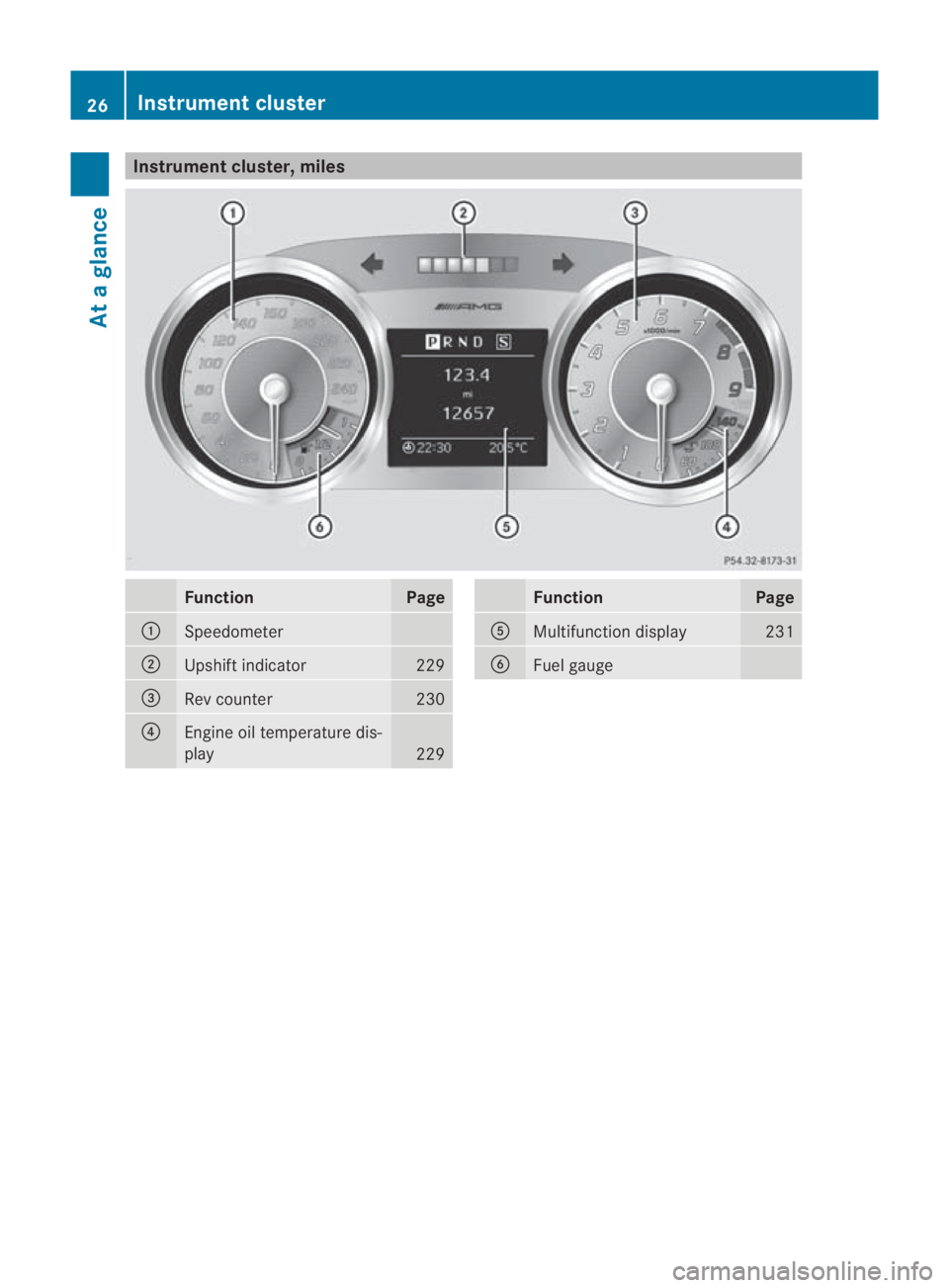
Instrumen
tcluster, miles Function Page
0001
Speedometer
0002
Upshif
tindicator 229
0015
Re
vc ounter 230
0014
Engine oil temperature dis-
play
229 Function Page
0012
Multifunction display 231
0013
Fuel gauge26
Instrument clusterAt a glance
BA 197 ECE RE 2010/6a; 1; 2, en-GB
sabbaeu
Version: 3.0.3.6 2010-05-07T14:19:43+02:00 - Seite 26
Page 31 of 361
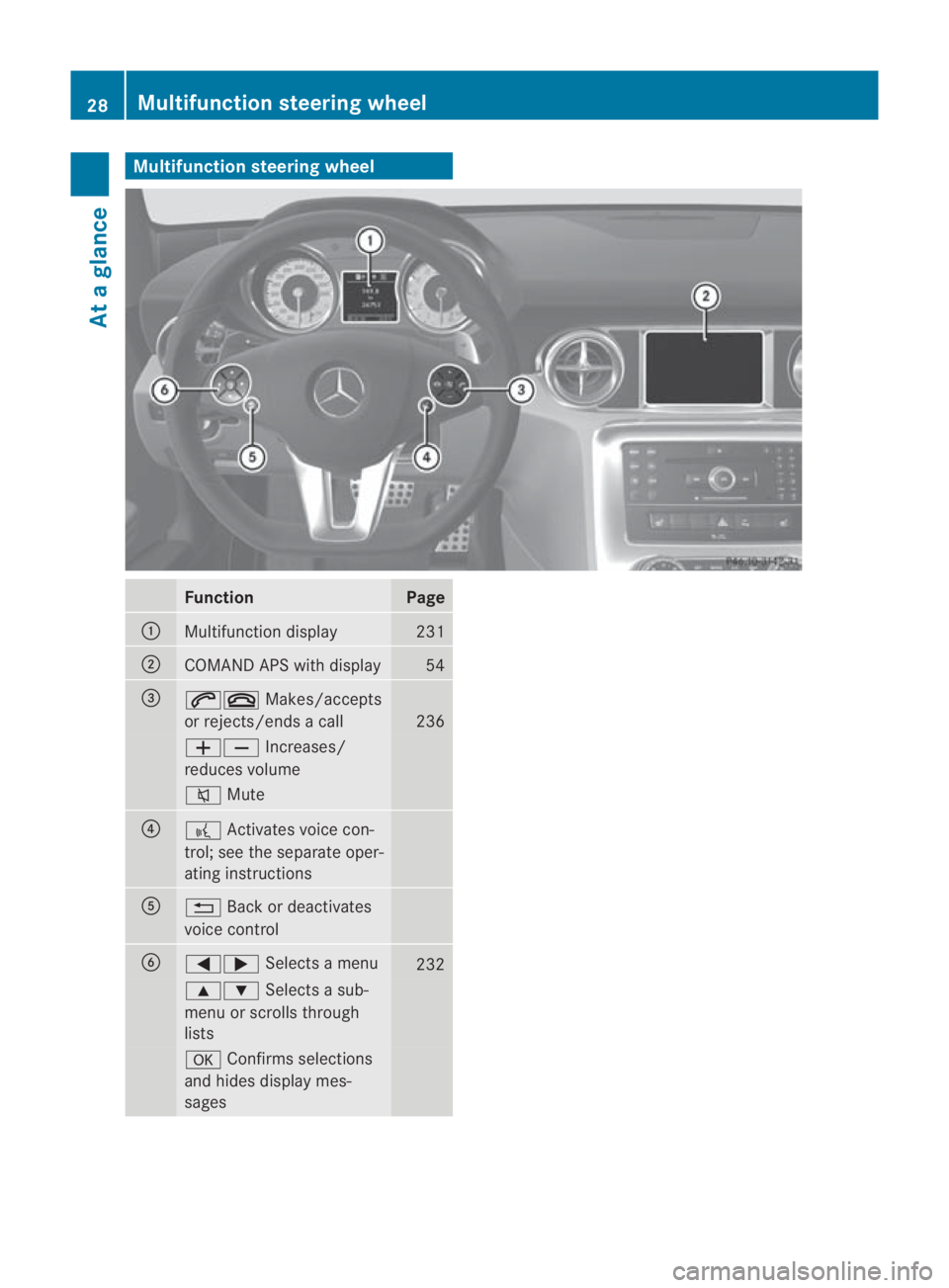
Multifunction steering wheel
Function Page
0001
Multifunction display 231
0002
COMAND APS with display 54
0015
001C0015
Makes/accepts
or rejects/ends a call 236
00050009
Increases/
reduces volume 001E
Mute 0014
0012
Activates voice con-
trol; see the separate oper-
ating instructions 0012
0001
Back or deactivates
voice control 0013
0008000E
Selects a menu 232
000F000C
Selects a sub-
menu or scrolls through
lists 000A
Confirms selections
and hides display mes-
sages 28
Multifunction steering wheelAt a glance
BA 197 ECE RE 2010/6a; 1; 2, en-GB
sabbaeu Version: 3.0.3.6 2010-05-07T14:19:43+02:00 - Seite 28
Page 51 of 361
R
traction control is still activated.
R ESP ®
still provides support when you brake
firmly.
i If ESP ®
Sport is activated and one or more
wheels start to spin, the 0002warning lamp
in the instrument cluste rflashes. ESP ®
only
stabilises the vehicle to a limited degree.
Characteristics when ESP ®
is deactiva-
ted When you deactivate ESP
®
:
R ESP ®
no longer improves driving stability.
R engine torque is no longer limited and the
drive wheels are able to spin .The spinning
wheels produce a cutting effect for better
traction.
R traction control is still activated.
R ESP ®
still provides support when you brake
firmly.
i If ESP ®
is deactivated and one or more
wheels start to spin, the 0002warning lamp
in the instrumentc luster does not flash. In
such situations, ESP ®
will not stabilise the
vehicle.
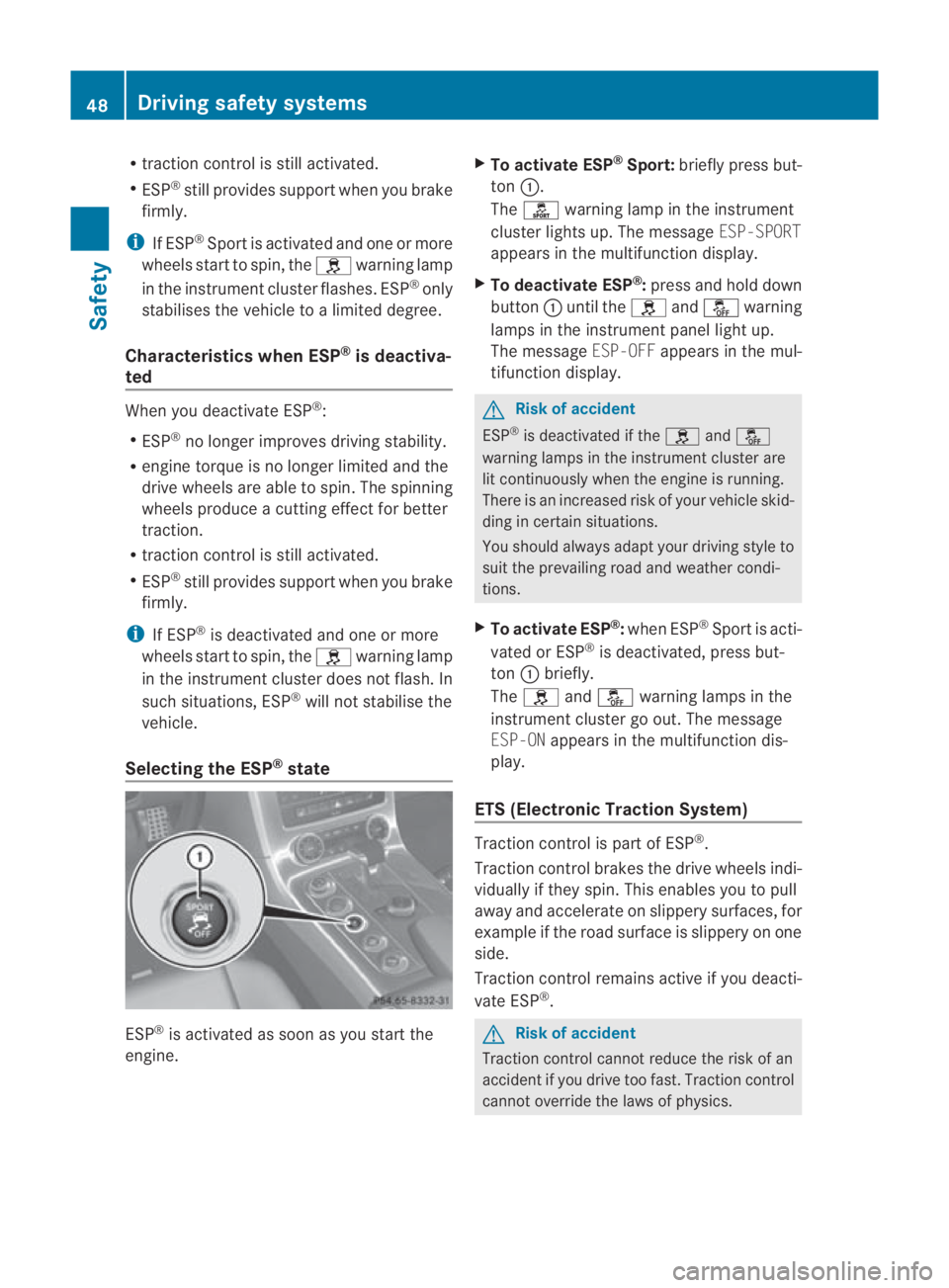
Selecting the ESP ®
state ESP
®
is activated as soon as you start the
engine. X
To activate ESP ®
Sport: briefly press but-
ton 0001.
The 0005 warning lamp in the instrument
cluster lights up. The message ESP-SPORT
appears in the multifunction display.
X To deactivate ESP ®
:press and hold down
button 0001until the 0002and0001 warning
lamps in the instrumen tpanel light up.
The message ESP-OFFappears in the mul-
tifunctio ndisplay. G
Risk of accident
ESP ®
is deactivated if the 0002and0001
warning lamps in the instrument cluster are
lit continuously when the engine is running.
There is an increased risk of your vehicle skid-
ding in certain situations.
You should always adapt your driving style to
suit the prevailing road and weathe rcondi-
tions.
X To activate ESP ®
:when ESP ®
Sport is acti-
vated or ESP ®
is deactivated, press but-
ton 0001briefly.
The 0002 and0001 warning lamps in the
instrument cluster go out. The message
ESP-ON appears in the multifunction dis-
play.
ETS (Electronic Traction System) Traction control is part of ESP
®
.
Traction control brakes the drive wheels indi-
vidually if they spin. This enables you to pull
away and accelerate on slippery surfaces, for
example if the road surface is slippery on one
side.
Traction control remains active if you deacti-
vate ESP ®
. G
Risk of accident
Traction control cannot reduce the risk of an
accident if you drive too fast. Traction control
cannot override the laws of physics. 48
Driving safety systemsSafety
BA 197 ECE RE 2010/6a; 1; 2, en-GB
sabbaeu
Version: 3.0.3.6 2010-05-07T14:19:43+02:00 - Seite 48