engine MERCEDES-BENZ SLS COUPE 2010 User Guide
[x] Cancel search | Manufacturer: MERCEDES-BENZ, Model Year: 2010, Model line: SLS COUPE, Model: MERCEDES-BENZ SLS COUPE 2010Pages: 361, PDF Size: 6.32 MB
Page 30 of 361
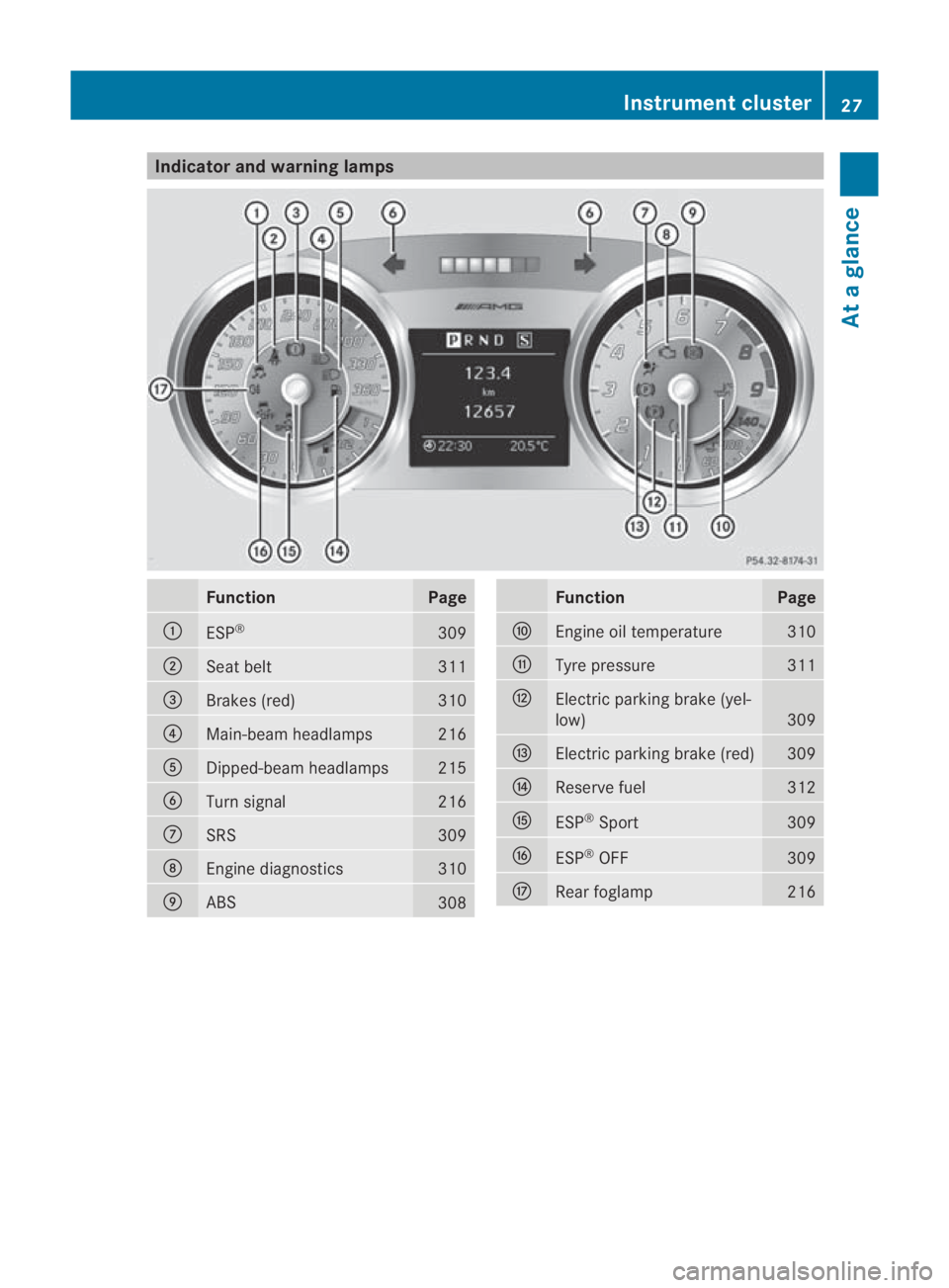
Indicator and warning lamps
Function Page
0001
ESP
® 309
0002
Seat belt 311
0015
Brakes (red) 310
0014
Main-beam headlamps 216
0012
Dipped-beam headlamps 215
0013
Turn signal 216
000A
SRS 309
000B
Engine diagnostics 310
000C
ABS
308 Function Page
000D
Engine oil temperature 310
000E
Tyre pressure 311
000F
Electric parking brake (yel-
low)
309
0010
Electric parking brak
e(red) 309
0011
Reserve fuel 312
0016
ESP
®
Sport 309
0017
ESP
®
OFF 309
0018
Rearf
oglamp 216Instrument cluster
27At a glance
BA 197 ECE RE 2010/6a; 1; 2, en-GB
sabbaeu Version: 3.0.3.6 2010-05-07T14:19:43+02:00 - Seite 27
Page 38 of 361
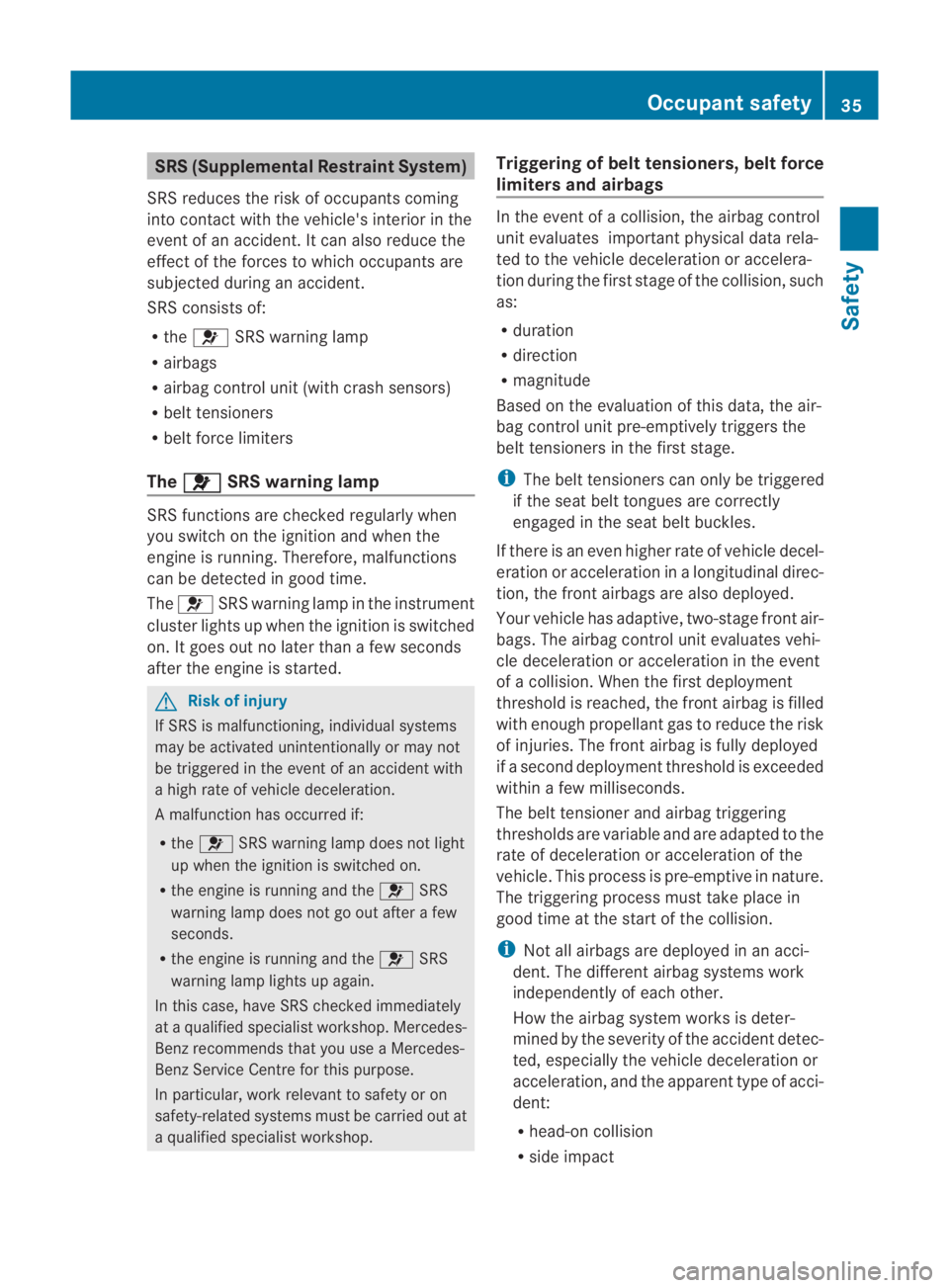
SRS (Supplemental Restraint System)
SRS reduces the risk of occupants coming
into contact with the vehicle's interior in the
event of an accident. It can also reduce the
effect of the forces to which occupants are
subjected during an accident.
SRS consists of:
R the 0018 SRS warning lamp
R airbags
R airbag control unit (with crash sensors)
R belt tensioners
R belt force limiters
The 0018 SRS warning lamp
SRS functions are checked regularly when
you switch on the ignition and when the
engine is running. Therefore, malfunctions
can be detected in good time.
The 0018 SRS warning lamp in the instrument
cluster lights up when the ignition is switched
on. It goes out no later than a few seconds
after the engine is started. G
Risk of injury
If SRS is malfunctioning, individual systems
may be activated unintentionally or may not
be triggered in the event of an accident with
a high rate of vehicle deceleration.
A malfunction has occurred if:
R the 0018 SRS warning lamp does not light
up when the ignition is switched on.
R the engine is running and the 0018SRS
warning lamp does not go out after a few
seconds.
R the engine is running and the 0018SRS
warning lamp lights up again.
In this case, have SRS checked immediately
at a qualified specialist workshop. Mercedes-
Benz recommends that you use a Mercedes-
Benz Service Centre for this purpose.
In particular, work relevant to safety or on
safety-related systems must be carried out at
a qualified specialist workshop. Triggering of belt tensioners, belt force
limiters and airbags In the event of a collision, the airbag control
unit evaluates important physical data rela-
ted to the vehicle deceleration or accelera-
tion during the first stage of the collision, such
as:
R
duration
R direction
R magnitude
Based on the evaluation of this data, the air-
bag control unit pre-emptively triggers the
belt tensioners in the first stage.
i The belt tensioners can only be triggered
if the seat belt tongues are correctly
engaged in the seat belt buckles.
If there is an even higher rate of vehicle decel-
eration or acceleration in a longitudinal direc-
tion, the front airbags are also deployed.
Your vehicle has adaptive, two-stage front air-
bags. The airbag control unit evaluates vehi-
cle deceleration or acceleration in the event
of a collision. When the first deployment
threshold is reached, the front airbag is filled
with enough propellant gas to reduce the risk
of injuries. The front airbag is fully deployed
if a second deployment threshold is exceeded
within a few milliseconds.
The belt tensioner and airbag triggering
thresholds are variable and are adapted to the
rate of deceleration or acceleration of the
vehicle. This process is pre-emptive in nature.
The triggering process must take place in
good time at the start of the collision.
i Not all airbags are deployed in an acci-
dent. The different airbag systems work
independently of each other.
How the airbag system works is deter-
mined by the severity of the accident detec-
ted, especially the vehicle deceleration or
acceleration, and the apparent type of acci-
dent:
R head-on collision
R side impact Occupant safety
35Safety
BA 197 ECE RE 2010/6a; 1; 2, en-GB
sabbaeu Version: 3.0.3.6 2010-05-07T14:19:43+02:00 - Seite 35 Z
Page 50 of 361
brakes are applied again, the brake lamps
light up continuously. The hazard warning
lamps switch off automatically if you travel
faster than 10 km/ h.You can also switch off
the hazard warning lamps using the hazard
warning switch button (Y page 216).ESP
®
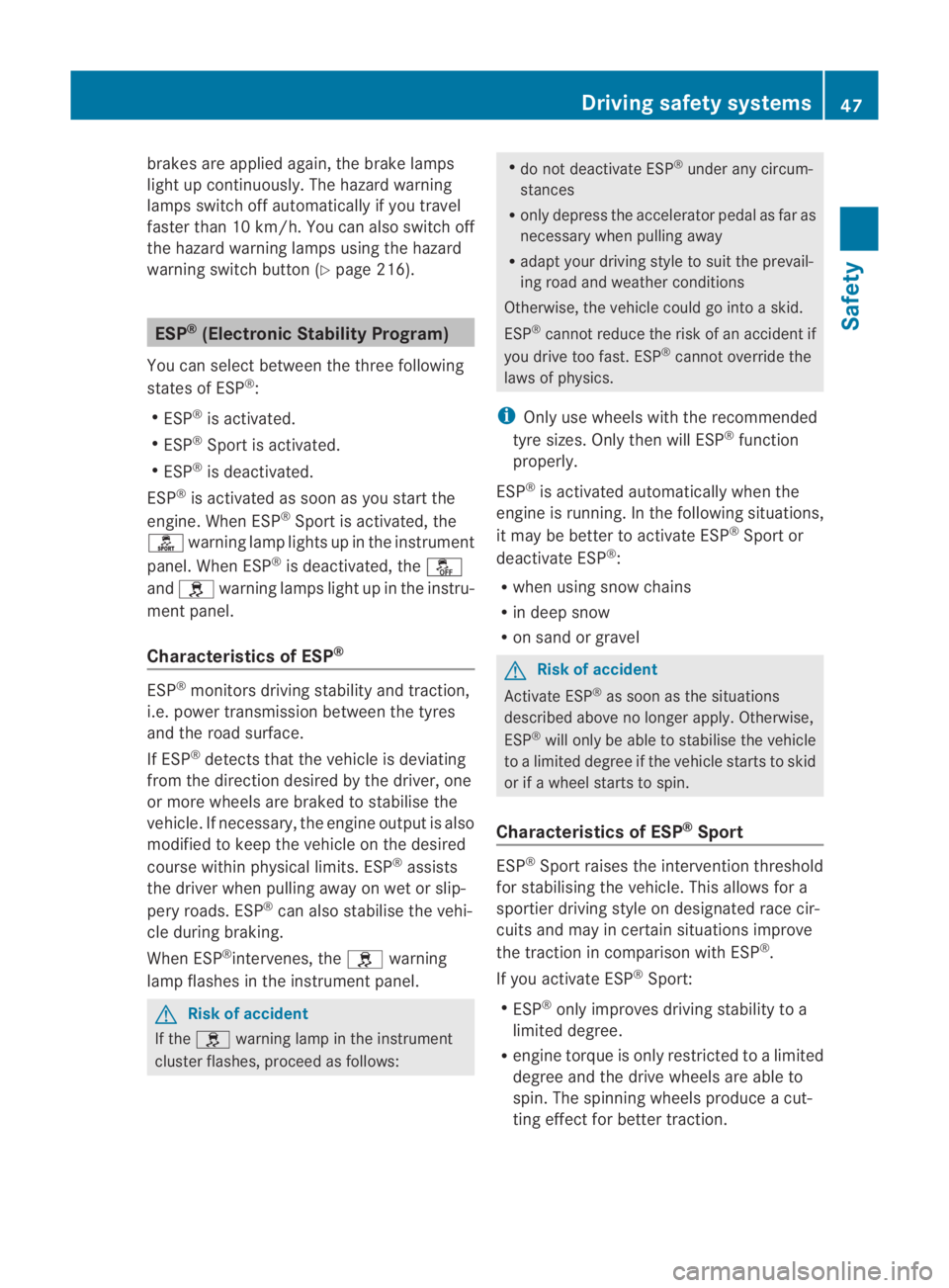
(Electronic Stability Program)
You can selec tbetween the three following
states of ESP ®
:
R ESP ®
is activated.
R ESP ®
Sport is activated.
R ESP ®
is deactivated.
ESP ®
is activated as soon as you start the
engine. When ESP ®
Sport is activated, the
0005 warning lamp lights up in the instrument
panel. When ESP ®
is deactivated, the 0001
and 0002 warning lamps light up in the instru-
ment panel.
Characteristics of ESP ®ESP
®
monitors driving stability and traction,
i.e. power transmission between the tyres
and the road surface.
If ESP ®
detects that the vehicle is deviating
from the direction desired by the driver, one
or more wheels are braked to stabilise the
vehicle. If necessary, the engine output is also
modified to keep the vehicle on the desired
course within physical limits. ESP ®
assists
the driver when pulling away on wet or slip-
pery roads. ESP ®
can also stabilise the vehi-
cle during braking.
When ESP ®
intervenes, the 0002warning
lamp flashes in the instrument panel. G
Risk of accident
If the 0002 warning lamp in the instrument
cluster flashes, proceed as follows: R
do not deactivate ESP ®
under any circum-
stances
R only depress the accelerator pedal as far as
necessary when pulling away
R adapt your driving style to suit the prevail-
ing road and weather conditions
Otherwise, the vehicle could go into a skid.
ESP ®
cannot reduce the risk of an acciden tif
you drive too fast. ESP ®
cannot override the
laws of physics.
i Only use wheels with the recommended
tyre sizes. Only then will ESP ®
function
properly.
ESP ®
is activated automatically when the
engine is running .Inthe following situations,
it may be better to activate ESP ®
Sport or
deactivate ESP ®
:
R when using snow chains
R in deep snow
R on sand or gravel G
Risk of accident
Activate ESP ®
as soon as the situations
described above no longer apply.O therwise,
ESP ®
will only be able to stabilise the vehicle
to a limited degree if the vehicle starts to skid
or if a wheel starts to spin.
Characteristics of ESP ®
Sport ESP
®
Sport raises the interventio nthreshold
for stabilising the vehicle. This allows for a
sportier driving style on designated race cir-
cuits and may in certain situations improve
the traction in comparison with ESP ®
.
If you activate ESP ®
Sport:
R ESP ®
only improves driving stability to a
limited degree.
R engine torque is only restricted to a limited
degree and the drive wheels are able to
spin. The spinning wheels produce a cut-
ting effect for better traction. Driving safety systems
47Safety
BA 197 ECE RE 2010/6a; 1; 2, en-GB
sabbaeu Version: 3.0.3.6 2010-05-07T14:19:43+02:00 - Seite 47 Z
Page 51 of 361
R
traction control is still activated.
R ESP ®
still provides support when you brake
firmly.
i If ESP ®
Sport is activated and one or more
wheels start to spin, the 0002warning lamp
in the instrument cluste rflashes. ESP ®
only
stabilises the vehicle to a limited degree.
Characteristics when ESP ®
is deactiva-
ted When you deactivate ESP
®
:
R ESP ®
no longer improves driving stability.
R engine torque is no longer limited and the
drive wheels are able to spin .The spinning
wheels produce a cutting effect for better
traction.
R traction control is still activated.
R ESP ®
still provides support when you brake
firmly.
i If ESP ®
is deactivated and one or more
wheels start to spin, the 0002warning lamp
in the instrumentc luster does not flash. In
such situations, ESP ®
will not stabilise the
vehicle.
Selecting the ESP ®
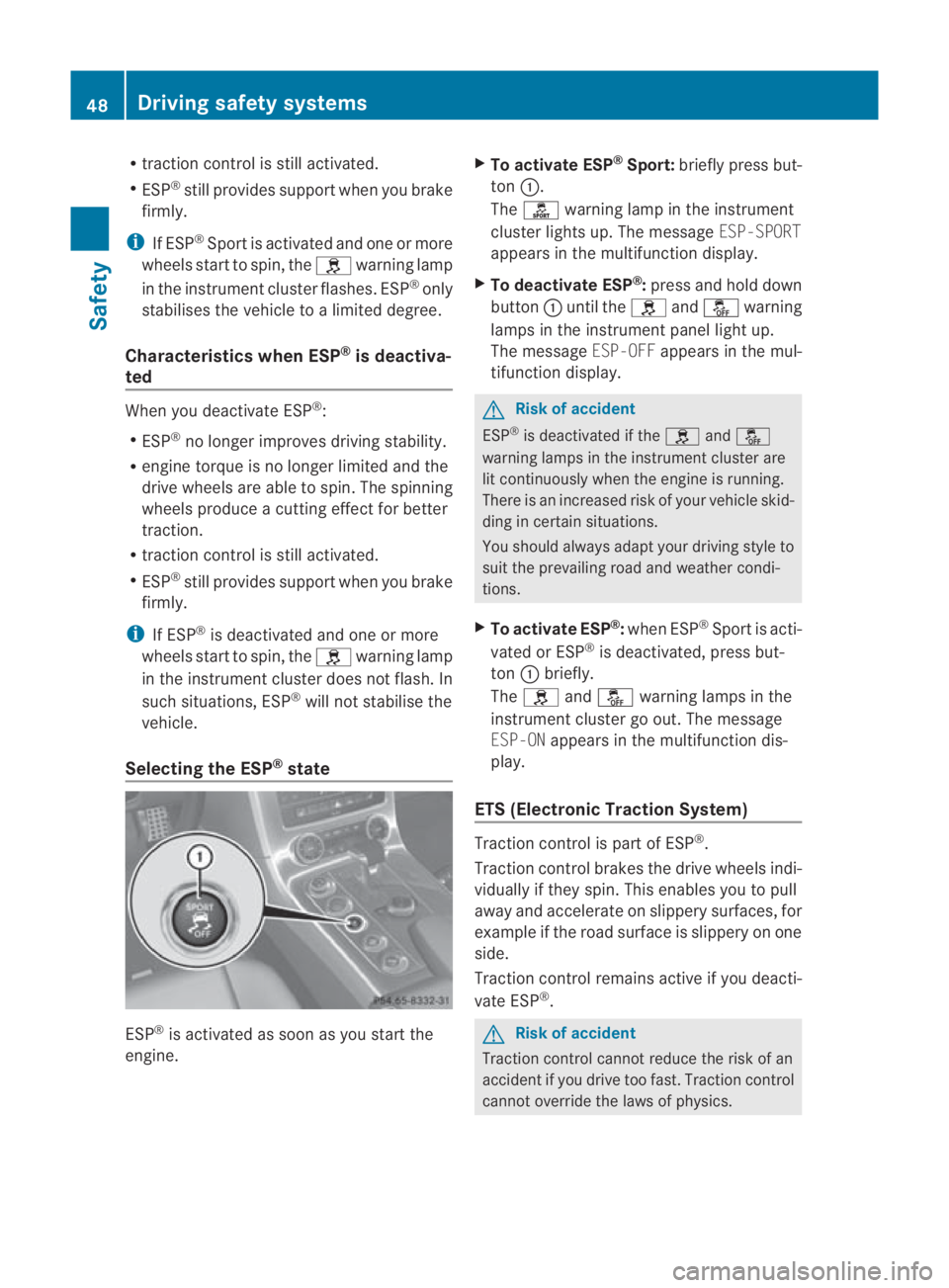
state ESP
®
is activated as soon as you start the
engine. X
To activate ESP ®
Sport: briefly press but-
ton 0001.
The 0005 warning lamp in the instrument
cluster lights up. The message ESP-SPORT
appears in the multifunction display.
X To deactivate ESP ®
:press and hold down
button 0001until the 0002and0001 warning
lamps in the instrumen tpanel light up.
The message ESP-OFFappears in the mul-
tifunctio ndisplay. G
Risk of accident
ESP ®
is deactivated if the 0002and0001
warning lamps in the instrument cluster are
lit continuously when the engine is running.
There is an increased risk of your vehicle skid-
ding in certain situations.
You should always adapt your driving style to
suit the prevailing road and weathe rcondi-
tions.
X To activate ESP ®
:when ESP ®
Sport is acti-
vated or ESP ®
is deactivated, press but-
ton 0001briefly.
The 0002 and0001 warning lamps in the
instrument cluster go out. The message
ESP-ON appears in the multifunction dis-
play.
ETS (Electronic Traction System) Traction control is part of ESP
®
.
Traction control brakes the drive wheels indi-
vidually if they spin. This enables you to pull
away and accelerate on slippery surfaces, for
example if the road surface is slippery on one
side.
Traction control remains active if you deacti-
vate ESP ®
. G
Risk of accident
Traction control cannot reduce the risk of an
accident if you drive too fast. Traction control
cannot override the laws of physics. 48
Driving safety systemsSafety
BA 197 ECE RE 2010/6a; 1; 2, en-GB
sabbaeu
Version: 3.0.3.6 2010-05-07T14:19:43+02:00 - Seite 48
Page 52 of 361
EBD (Electronic Brake-force Distribu-
tion)
EBD monitors and controls the brake pres-
sure on the rear wheels to improve driving
stability while braking. G
Ris
kofa ccident
If EBV is malfunctioning, the brake system is
still available with full brak eboosting effect.
However, the rear wheels can still lock, e.g.
under full braking. This could cause you to
lose control of your vehicle and cause an acci-
dent. You should therefore adapt your driving
style to the different handling characteristics. ADAPTIVE BRAKE
ADAPTIVE BRAKE enhances braking safety
and offers increased braking comfort. In addi-
tion to the braking function, ADAPTIVE BRAKE
also features the hill start assist function
(Y page 221). For further information, see
Driving tips (Y page 277). Anti-theft systems
Immobiliser
The immobiliser prevents your vehicle from
being started without the correc tkey.
Activating the immobiliser X
While the engine is running turn the Start/
Stop button to key position 0
(Y page 202).
The engine switches off.
or
X Remove the key from the ignition lock.
Deactivating the immobiliser X
Turn the Start/Stop button to key position
2without depressing the brake pedal.
i The immobiliser is always deactivated
when you start the engine. ATA (Anti-Theft Alarm system)
Av isual and audible alarm is triggered if the
alarm system is primed and you open:
R a door
R a door using the emergency key element
R the boot lid
R the bonnet
The alarm is not switched off even if you close
an open door again. X
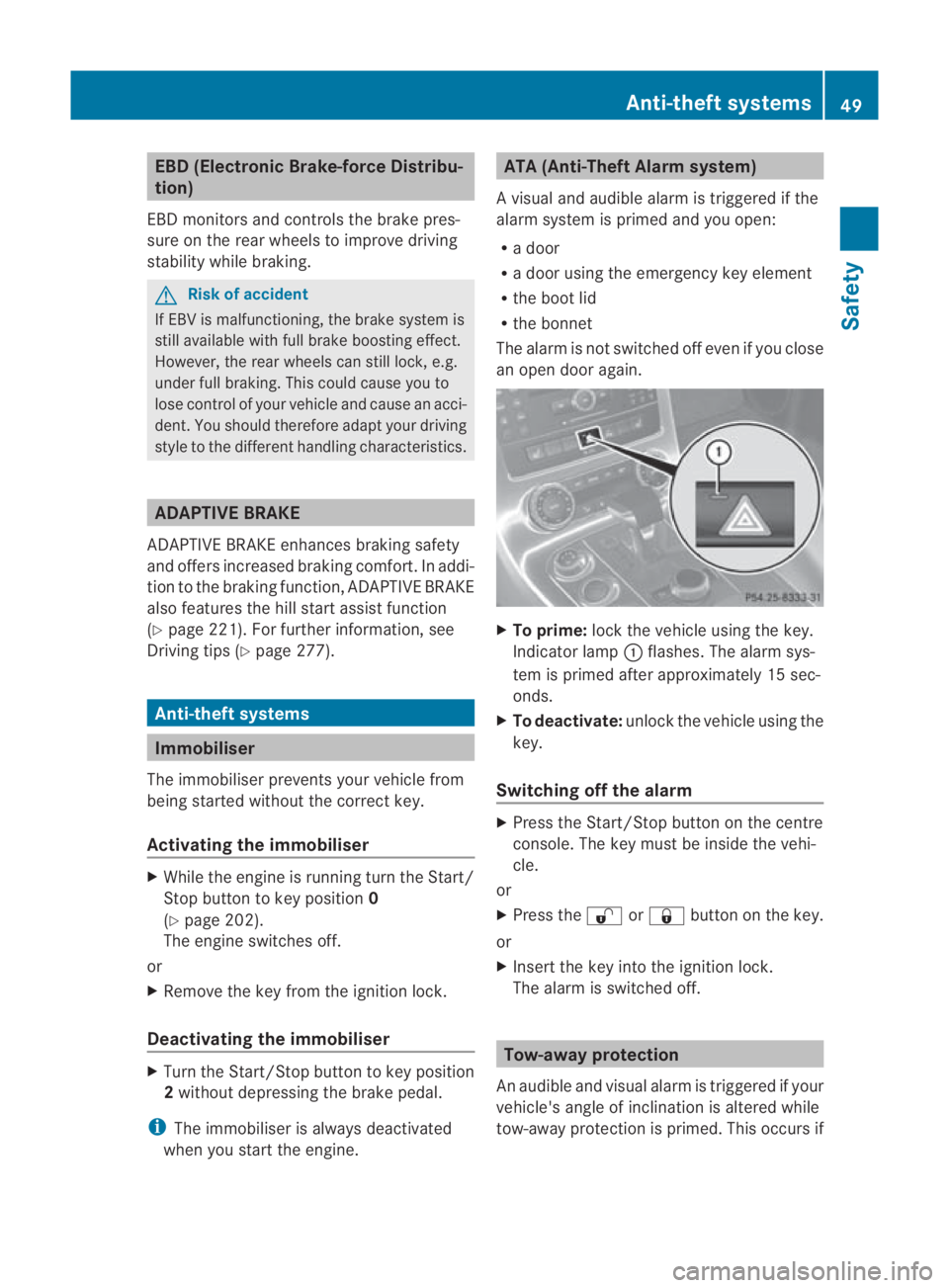
To prime: lock the vehicle using the key.
Indicator lamp 0001flashes .The alarm sys-
tem is primed after approximately 15 sec-
onds.
X To deactivate: unlock the vehicle using the
key.
Switching off the alarm X
Press the Start/Stop button on the centre
console. The key must be inside the vehi-
cle.
or
X Press the 000Bor0009 button on the key.
or
X Insert the key into the ignition lock.
The alarm is switched off. Tow-away protection
An audible and visual alarm is triggered if your
vehicle's angle of inclination is altered while
tow-away protection is primed. This occurs if Anti-theft systems
49Safety
BA 197 ECE RE 2010/6a; 1; 2, en-GB
sabbaeu Version: 3.0.3.6 2010-05-07T14:19:43+02:00 - Seite 49 Z
Page 93 of 361
conventional road maps. Optimal route guid-
ance can only be provided by the navigation
system in conjunction with the most up-to-
date map software.
Information about new map software ver-
sions can be obtained from a Mercedes-Benz
Service Centre.
You can have your map software updated
there with a DVD, or you can update it your-
self.
Notes on handling DVDs R
Only hold discs by the edge.
R Handle discs carefully to prevent read
errors.
R Avoid getting scratches, fingerprints and
dust on discs.
R Use a commercially available cleaning cloth
to clean discs. Do not wipe them with a cir-
cular motion, bu tonly in straight lines from
the centre outwards.
R Place discs back in thei rcases after use.
R Protect discs from heat and direct sunlight.
Updating process The process consists of th
efollowing steps:
R insert the DVD into the single DVD drive or
the DVD changer*.
R then, the updating process begins.
i The update process can take between
60 and 150 minutes, depending on the size
of the map software. All functions which do
not require access to the single DVD drive,
the DVD changer* or the COMAND hard
drive are still operational.
If possible, carry out the update when the
vehicle is stationary. This way you require
less time for the update process, as the
DVD read speed is faster when the vehicle
is stationary.
If you perform the update when the engine
is switched off and the starter battery does
not have enough charge, COMAND may
switch off automatically during the process in order to preserve the battery. If this
occurs, restart the update with the engine
running. G
Risk of poisoning
Never run the engine in an enclosed space.
The exhaust fumes contain poisonous carbon
monoxide. Inhaling exhaust fumes is hazard-
ous to your health and can lead to loss of con-
sciousness and death.
i You can interrupt the update process and
recommence later. If you interrupt the
update process, the navigation system will
not be operational.
Inserting aDVD into the single DVD
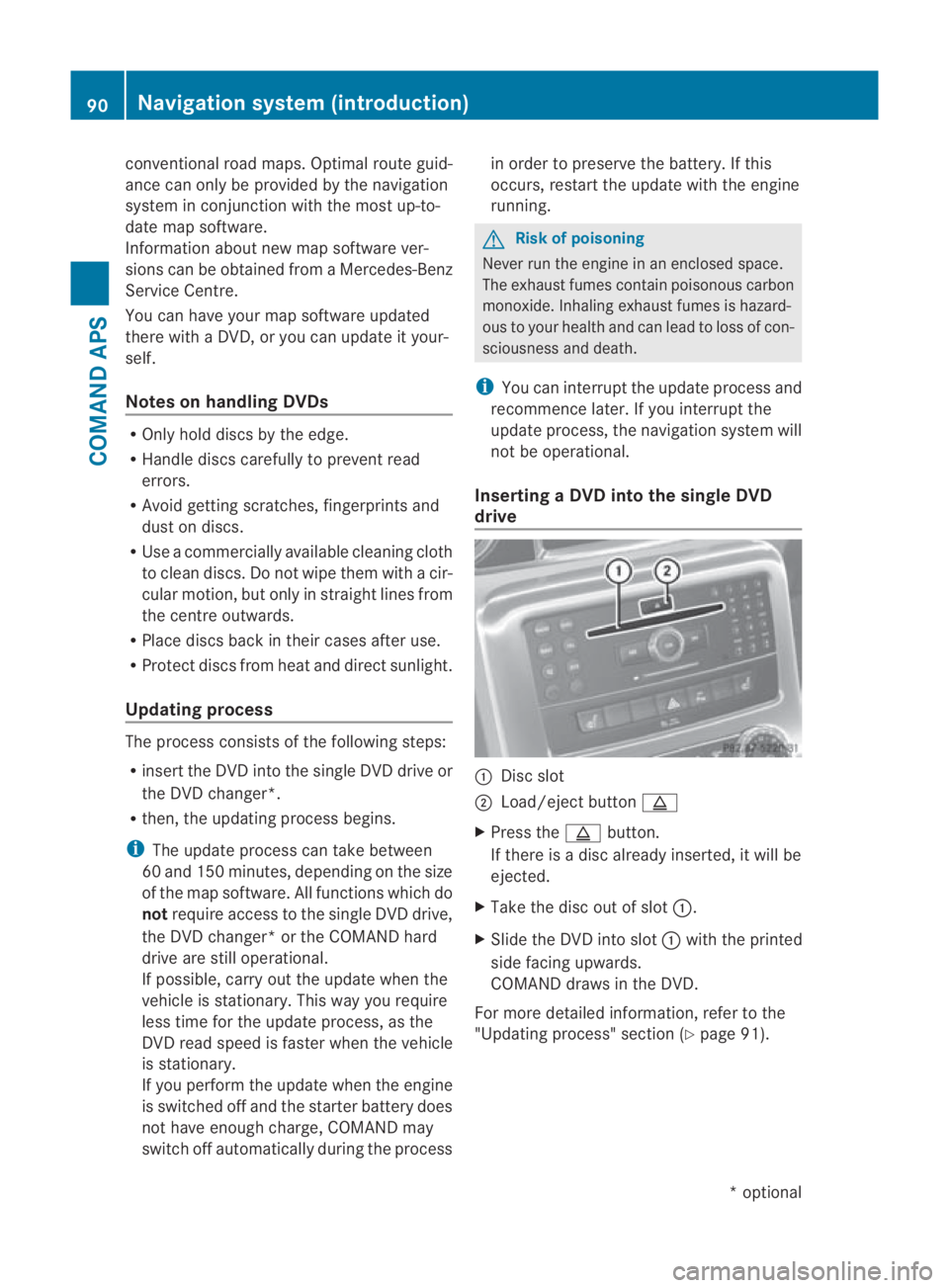
drive 0001
Disc slot
0002 Load/eject button 0017
X Press the 0017button.
If there is a disc already inserted, it will be
ejected.
X Take the disc ou tofslot0001.
X Slide the DV Dinto slot 0001with the printed
side facing upwards.
COMAND draws in the DVD.
For more detailed information, refer to the
"Updating process" sectio n(Ypage 91). 90
Navigation system (introduction)COMAND APS
*o
ptional
BA 197 ECE RE 2010/6a; 1; 2, en-GB
sabbaeu
Version: 3.0.3.6 2010-05-07T14:19:43+02:00 - Seite 90
Page 119 of 361
message, a directio
narrow and the distance
to the destination or to the intermediate stop,
if this was configured (Y page 104). The direc-
tional arrow shows the linea rdirection of the
destination. The distance and the estimated
arrival time are displayed in grey in this case.
The route is highlighted blue, starting from
the last recognised street the vehicle was on
before it left the map.
As soon as the vehicle is back on a digitised
road, the distance to the destination appears,
based on the calculated route. Route guid-
ance continues in the usual way.
Route guidance from an off-map loca-
tion to adestination If the vehicle position is outside the area cov-
ered by the digital map, then the vehicle is in
an off-map location. COMAND is also able to
guide you to a destination even from such a
location.
At the start of route guidance you will see the
Off road message, a directio narrow and the
linea rdistance to the destination or to the
intermediate stop, if this has been config-
ured. The arrow shows the compass heading
to the road left last.
The route is highlighted blue fro mthe nearest
road known to the system.
As soon as the vehicle is back on a road
known to the system, route guidance contin-
ues in the usual way.
Off-road during route guidance Due to roadworks, for example, there may be
differences between the data on the digital
map and the actual course of the road.
In such cases, the system will temporarily be
unable to locate the vehicle position on the
digital map and thus considers the vehicle to
be in an off-road position.
You will see the Off roadmessage in the
display, a direction arrow and the distance to
the destination or to the intermediate stop, if
this was configured. As soon as the system can assign the vehicle
position to the map again, route guidance
continues in the usual way. Navigation announcements
i Audible navigation announcements are
muted during a telephone call.
If you have missed an announcement, you can
call up the current announcement at any
time.
X To call up the current announcement:
select 0025in the map display with the menu
system (Y page 83) shown.
X To switch off navigation announce-
ments: during the announcement, press
and hold the 000Bbutton.
You will briefly see the message: The
guidance instructions have been
muted.
X To switch navigation announcements
on again manually: select0025in the map
display with menu system displayed.
or
X Start a new route calculation
(Y page 101).
or
X Switch COMAND on again or start the
engine.
i COMAND switches the navigation
announcements on automatically if it
receives RDS-TMC traffic announcements
during dynamic route guidance
(Y page 119) and starts recalculating the
route.
X To adjust the volume of the announce-
ments: adjust the volume during the auto-
matic announcement (Y page 67).
or
X Call up an announcemen tmanually using
Navi00040025 and adjust the volume.116
Navigation system (route guidance)COMAND APS
BA 197 ECE RE 2010/6a; 1; 2, en-GB
sabbaeu
Version: 3.0.3.6
2010-05-07T14:19:43+02:00 - Seite 116
Page 204 of 361
X
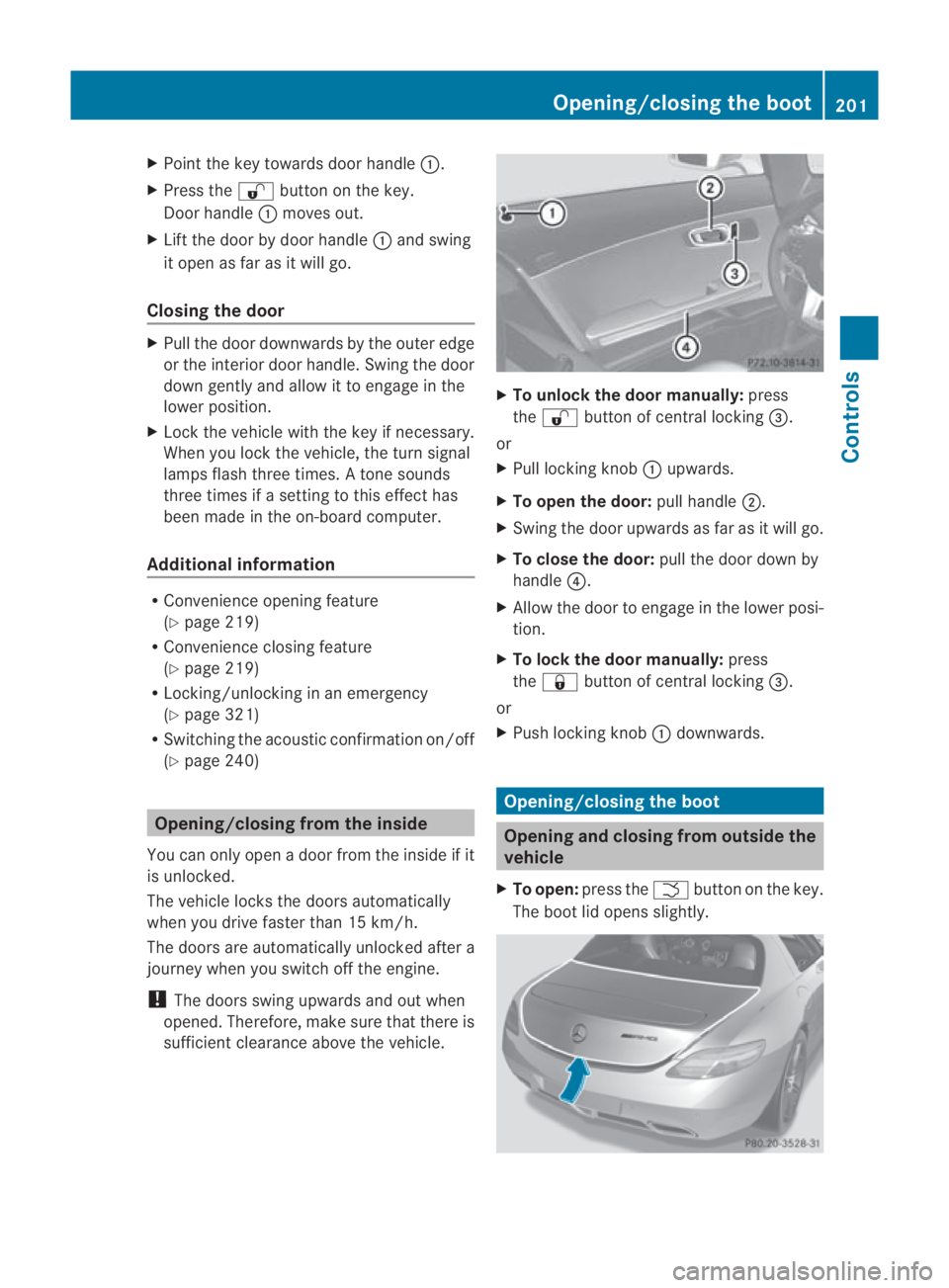
Point the key towards door handle 0001.
X Press the 000Bbutton on the key.
Door handle 0001moves out.
X Lift the door by door handle 0001and swing
it open as far as it will go.
Closing the door X
Pull the door downwards by the outer edge
or the interior door handle. Swing the door
down gently and allow it to engage in the
lower position.
X Lock the vehicle with the key if necessary.
When you lock the vehicle, the turn signal
lamps flash three times. Atone sounds
three times if a setting to this effect has
been made in the on-board computer.
Additional information R
Convenience opening feature
(Y page 219)
R Convenience closing feature
(Y page 219)
R Locking/unlocking in an emergency
(Y page 321)
R Switching the acoustic confirmation on/off
(Y page 240) Opening/closing from the inside
You can only open a door from the inside if it
is unlocked.
The vehicle locks the doors automatically
when you drive faster than 15 km/h.
The doors are automatically unlocked after a
journey when you switch off the engine.
! The doors swing upwards and out when
opened. Therefore, make sure that there is
sufficient clearance above the vehicle. X
To unlock the door manually: press
the 000B button of central locking 0015.
or
X Pull locking knob 0001upwards.
X To open the door: pull handle0002.
X Swing the door upwards as far as it will go.
X To close the door: pull the door down by
handle 0014.
X Allow the door to engage in the lower posi-
tion.
X To lock the door manually: press
the 0009 button of central locking 0015.
or
X Push locking knob 0001downwards. Opening/closing the boot
Opening and closing from outside the
vehicle
X To open: press the 0002button on the key.
The boot lid opens slightly. Opening/closing the boot
201Controls
BA 197 ECE RE 2010/6a; 1; 2, en-GB
sabbaeu Version: 3.0.3.6 2010-05-07T14:19:43+02:00 - Seite 201 Z
Page 205 of 361
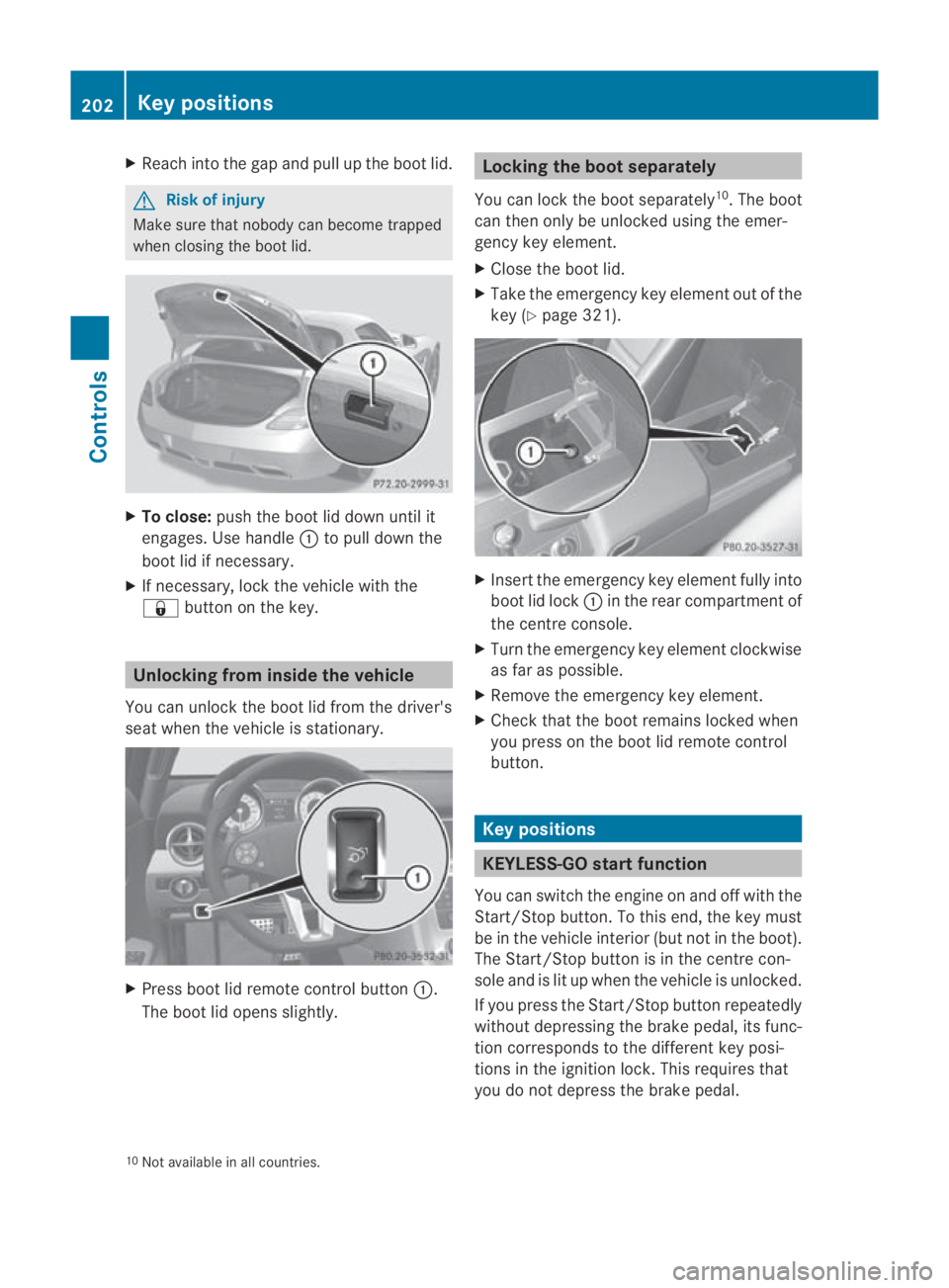
X
Reach into the gap and pull up the boo tlid. G
Risk of injury
Make sure that nobody can become trapped
when closing the boot lid. X
To close: push the boot lid down until it
engages. Use handle 0001to pull down the
boot lid if necessary.
X If necessary, lock the vehicle with the
0009 button on the key. Unlocking from inside the vehicle
You can unlock the boot lid from the driver's
seat when the vehicle is stationary. X
Press boot lid remote control button 0001.
The boot lid opens slightly. Locking the boot separately
You can lock the boot separately 10
.T he boot
can then only be unlocked using the emer-
gency key element.
X Close the boot lid.
X Take the emergency key element out of the
key (Y page 321). X
Insert the emergency key element fully into
boot lid lock 0001in the rear compartment of
the centre console.
X Turn the emergency key element clockwise
as far as possible.
X Remove the emergency key element.
X Check that the boot remains locked when
you press on the boot lid remote control
button. Key positions
KEYLESS-GO startf
unction
You can switch the engine on and off with the
Start/Stop button. To this end, the key must
be in the vehicle interio r(but not in the boot).
The Start/Stop button is in the centre con-
sole and is lit up when the vehicle is unlocked.
If you press the Start/Stop button repeatedly
without depressing the brake pedal, its func-
tion corresponds to the differen tkey posi-
tions in the ignition lock. This requires that
you do not depress the brake pedal.
10 Not available in all countries. 202
Key positionsControls
BA 197 ECE RE 2010/6a; 1; 2, en-GB
sabbaeu
Version: 3.0.3.6 2010-05-07T14:19:43+02:00 - Seite 202
Page 206 of 361
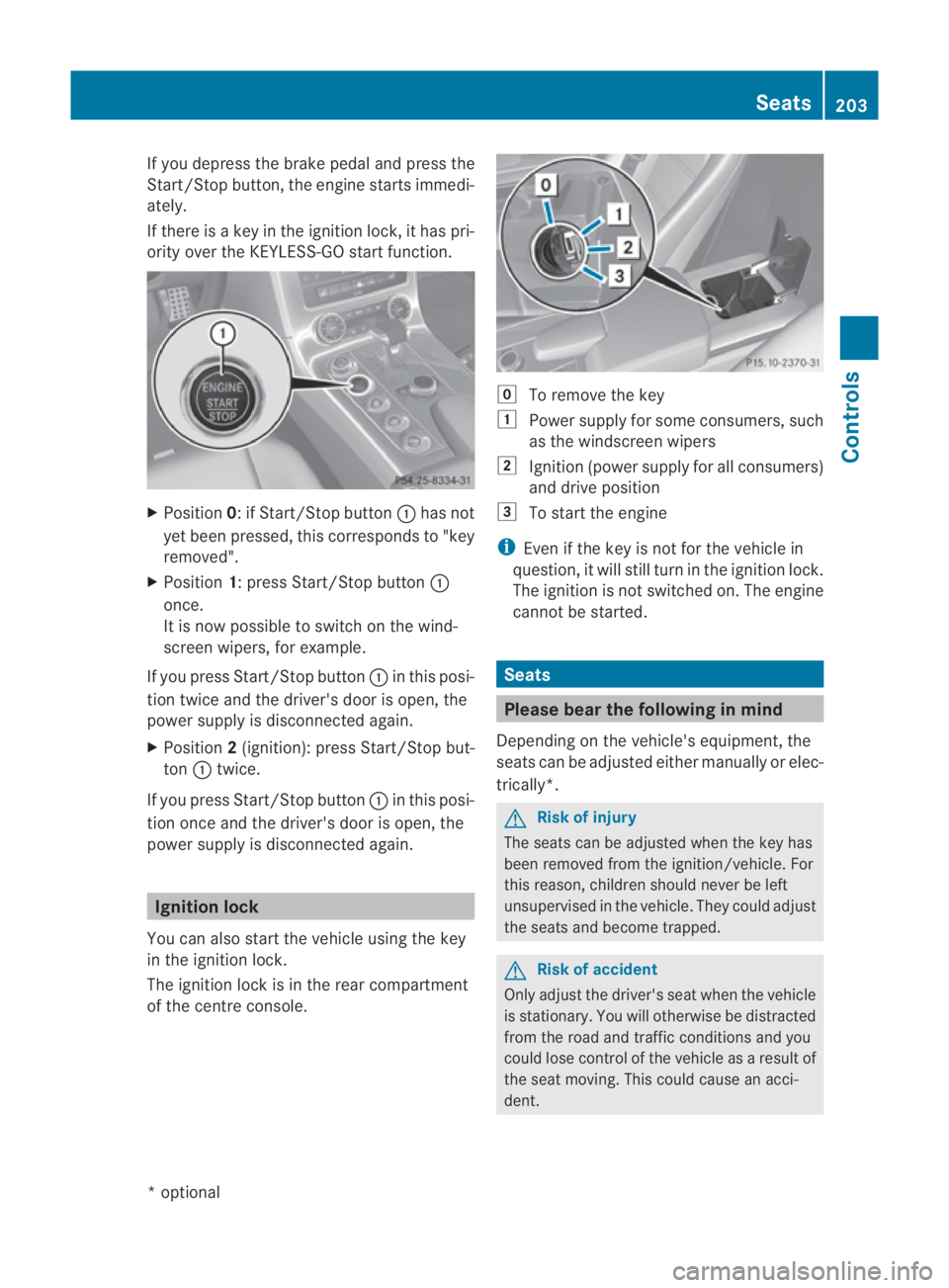
If you depress the brake pedal and press the
Start/Stop button, the engine starts immedi-
ately.
If there is a key in the ignition lock, it has pri-
ority over the KEYLESS-GO start function. X
Position 0: if Start/Stop button 0001has not
yet been pressed, this corresponds to "key
removed".
X Position 1: press Start/Stop button 0001
once.
It is now possible to switch on the wind-
screen wipers, for example.
If you press Start/Stop button 0001in this posi-
tion twice and the driver's door is open, the
powers upply is disconnected again.
X Position 2(ignition): press Start/Stop but-
ton 0001twice.
If you press Start/Stop button 0001in this posi-
tion once and the driver's door is open, the
power supply is disconnected again. Ignition lock
You can also start the vehicle using the key
in the ignition lock.
The ignition lock is in the rear compartment
of the centre console. 0008
To remove the key
0003 Power supply for some consumers, such
as the windscree nwipers
0004 Ignition (power supply for all consumers)
and drive position
0005 To start the engine
i Even if the key is not for the vehicle in
question, it will still tur ninthe ignition lock.
The ignition is not switched on. The engine
cannot be started. Seats
Please bear the following in mind
Depending on the vehicle's equipment, the
seats can be adjusted either manually or elec-
trically*. G
Risk of injury
The seats can be adjusted when the key has
been removed from the ignition/vehicle. For
this reason, children should never be left
unsupervised in the vehicle. They could adjust
the seats and become trapped. G
Risk of accident
Only adjust the driver's seat when the vehicle
is stationary. You will otherwise be distracted
from the road and traffic conditions and you
could lose control of the vehicle as a result of
the seat moving. This could cause an acci-
dent. Seats
203Controls
*optional
BA 197 ECE RE 2010/6a; 1; 2, en-GB
sabbaeu
Version: 3.0.3.6 2010-05-07T14:19:43+02:00 - Seite 203 Z