ignition MERCEDES-BENZ SLS COUPE 2010 User Guide
[x] Cancel search | Manufacturer: MERCEDES-BENZ, Model Year: 2010, Model line: SLS COUPE, Model: MERCEDES-BENZ SLS COUPE 2010Pages: 361, PDF Size: 6.32 MB
Page 212 of 361
i
If you are driving faster than 47 km/h, you
can no longer fold in the exterior mirrors.
Make sure that the exterior mirrors are
always folded out fully while the vehicle is
in motion, as they may otherwise vibrate.
Resetting the exterio rmirrors If the battery has been disconnected or com-
pletely discharged, the exterior mirrors must
be reset .The exterior mirrors will otherwise
not fold in when you select the "Fold in mir-
rors when locking" function in the on-board
computer (Y page 240).
X Select key position 1with the Start/Stop
button.
X Briefly press button 0014.
Folding the exterior mirrors in/out
automatically* If the "Fold in mirrors when locking" function
is activated in the on-board computer
(Y
page 240):
R the exterior mirrors fold in automatically as
soon as you lock the vehicle from the out-
side.
R the exterior mirrors fold out again automat-
ically as soon as you unlock the vehicle and
then open the driver's or front-passenger
door.
i If you have activated this function and fold
in the exterior mirrors using button 0014, they
will not be folded out automatically .You
can then only fold out the exterior mirrors
using button 0014. Automatic anti-dazzle mirrors*
The rear-view mirror and the exterior mirror
on the driver's side automatically go into anti-
dazzle mode if the ignition is switched on and
incident light from headlamps strikes the sen-
sor in the rear-view mirror.
The mirrors do not go into anti-dazzle mode if
reverse gear is engaged. G
Risk of accident
If incident light from headlamps is prevented
from striking the sensor in the rear-view mir-
ror, for instance, by luggage piled too high in
the vehicle, the mirror's automatic anti-dazzle
function will not operate.
Incident light could then dazzle you. This may
distract you from the traffic conditions, and
as a result, you may cause an accident .Inthis
case, adjust the rear-view mirror manually. Parking position for the exterior mir-
ror on the front-passenger side
To make it easier to park, you can set and
store the front-passenger side exterior mirror
position in such a way that you can see the
rear wheel on that side as soon as you engage
reverse gear.
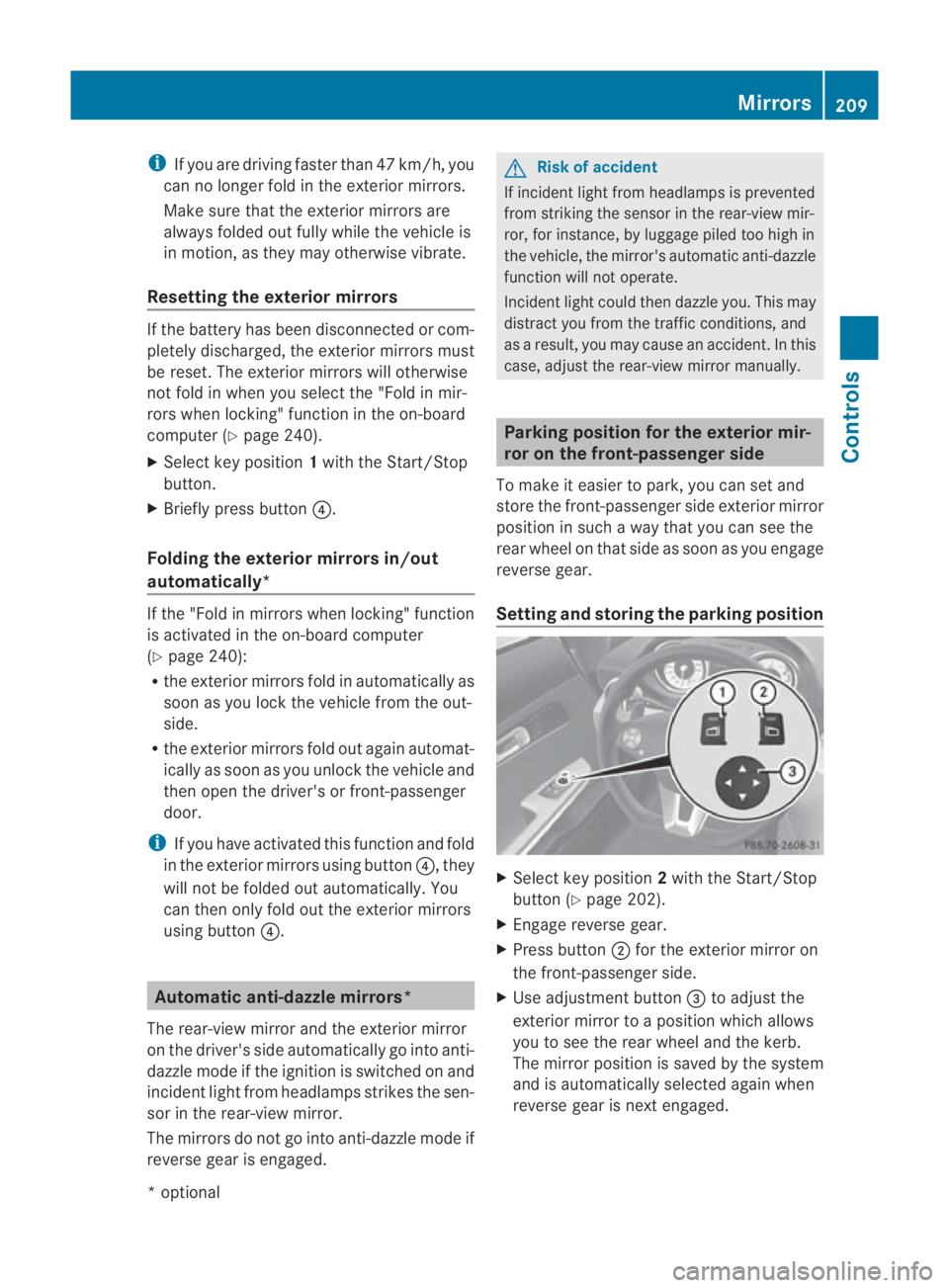
Setting and storing the parking position X
Select key position 2with the Start/Stop
button (Y page 202).
X Engage reverse gear.
X Press button 0002for the exterior mirror on
the front-passenger side.
X Use adjustment button 0015to adjust the
exterior mirror to a position which allows
you to see the rear wheel and the kerb.
The mirror position is saved by the system
and is automatically selected again when
reverse gear is next engaged. Mirrors
209Controls
*optional
BA 197 ECE RE 2010/6a; 1; 2, en-GB
sabbaeu
Version: 3.0.3.6 2010-05-07T14:19:43+02:00 - Seite 209 Z
Page 217 of 361
Lights
Exterior lighting
Notes For reasons of safety, Mercedes-Ben
zrecom-
mends that you drive with the lights switched
on even during the daytime. In some coun-
tries, operation of the headlamps varies due
to legal requirements and self-imposed obli-
gations .Inthese countries, the daytime driv-
ing lights are automatically switched on when
the engine is started.
i The dipped-beamh eadlamps are asym-
metrical. In countries in which traffic drives
on the opposite side of the road to the
country where the vehicle is registered,
oncoming traffic may be dazzled. Have the
headlamps changed to symmetrical dipped
beam when driving in these countries. You
can obtain information about this from any
Mercedes-Benz Service Centre.
The exterior lighting (except for the parking
lamps/side lamps) switches off automatically
when the ignition is switched off.
! Switch off the side lamps and parking
lamp when you leave the vehicle. This pre-
vents the battery from discharging. 214
LightsControls
BA 197 ECE RE 2010/6a; 1; 2, en-GB
sabbaeu
Version: 3.0.3.6 2010-05-07T14:19:43+02:00 - Seite 214
Page 218 of 361
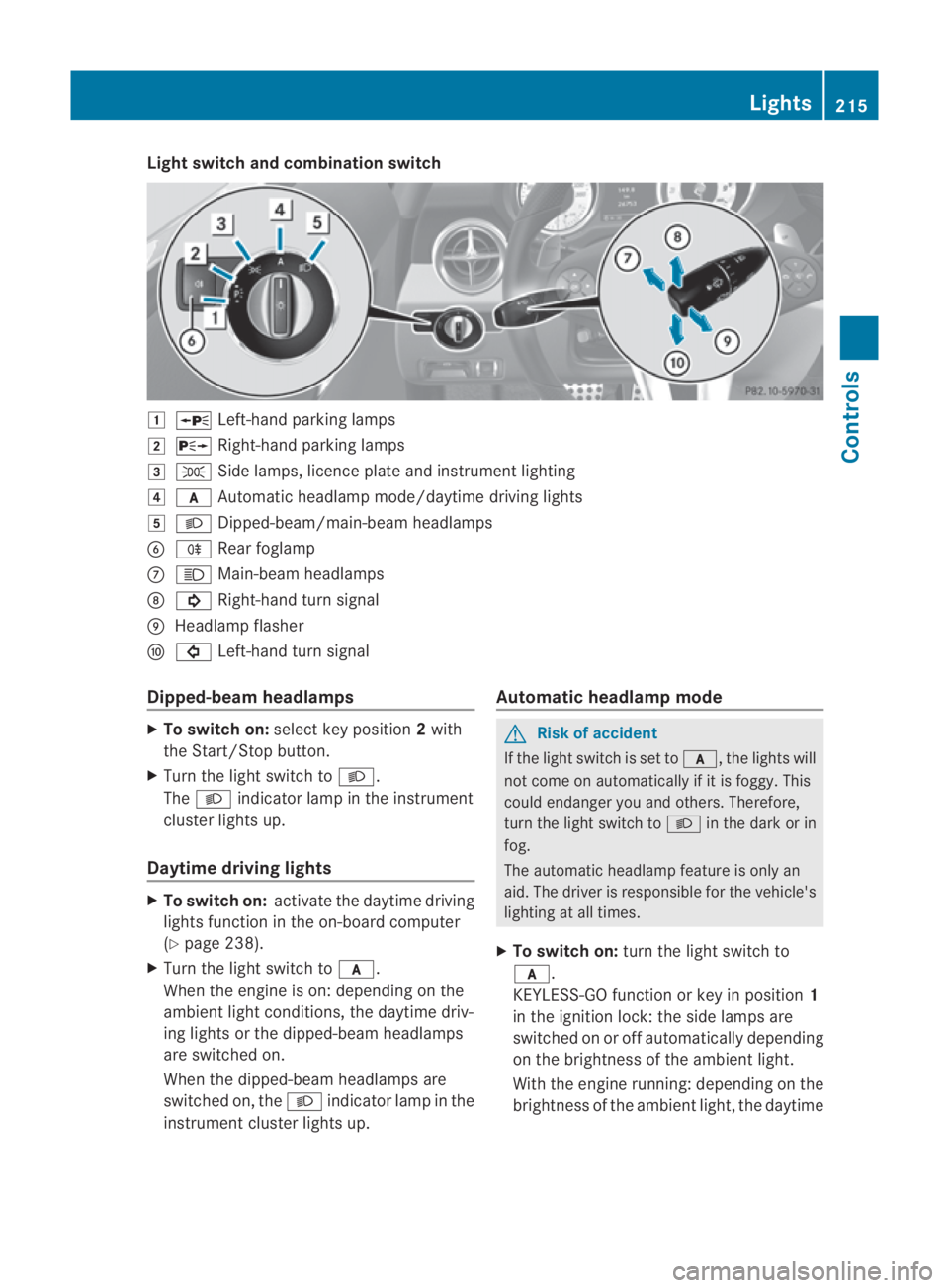
Light switch and combination switch
0003
0010 Left-hand parking lamps
0004 0013 Right-hand parking lamps
0005 000E Side lamps, licence plate and instrumen tlighting
0006 000D Automatic headlamp mode/daytime driving lights
0007 000B Dipped-beam/main-beam headlamps
0013 000D Rear foglamp
000A 0009 Main-beam headlamps
000B 000B Right-hand tur nsignal
000C Headlamp flasher
000D 0007 Left-hand turn signal
Dipped-beam headlamps X
To switch on: selectkey position 2with
the Start/Stop button.
X Turn the light switch to 000B.
The 000B indicator lamp in the instrument
cluster lights up.
Daytime driving lights X
To switch on: activate the daytime driving
lights function in the on-board computer
(Y page 238).
X Turn the light switch to 000D.
When the engine is on: depending on the
ambient light conditions, the daytime driv-
ing lights or the dipped-beam headlamps
are switched on.
When the dipped-beam headlamps are
switched on, the 000Bindicator lamp in the
instrument cluster lights up. Automatic headlamp mode G
Risk of accident
If the light switch is set to 000D, the lights will
not come on automatically if it is foggy. This
could endanger you and others. Therefore,
turn the light switch to 000Bin the dark or in
fog.
The automatic headlamp feature is only an
aid. The driver is responsible for the vehicle's
lighting at all times.
X To switch on: turn the light switch to
000D.
KEYLESS-GO function or key in position 1
in the ignition lock: the side lamps are
switched on or off automatically depending
on the brightness of the ambient light.
With the engine running: depending on the
brightness of the ambient light, the daytime Lights
215Controls
BA 197 ECE RE 2010/6a; 1; 2, en-GB
sabbaeu Version: 3.0.3.6 2010-05-07T14:19:43+02:00 - Seite 215 Z
Page 219 of 361
driving lights
12
or the dipped-beam head-
lamps (in addition to the side lamps) are
switched on or off automatically.
When the dipped-beam headlamps are
switched on, the 000Bindicator lamp in the
instrument cluster lights up.
Rear foglamps i
If you switch off the engine (KEYLESS-GO
function or key in position 1in the ignition
lock) and then restart the engine, the pre-
vious settings for the rear foglamp take
effec tagain.
X Select key position 2with the Start/Stop
button or start the engine.
X Turn the light switch to 000Bor000D 13
.
X To switch on: press the000Dbutton.
The yellow 000Dindicator lamp in the
instrument cluster lights up.
X To switch off: press the000Dbutton.
The yellow 000Dindicator lamp in the
instrument cluster goes out.
Main-beam headlamps X
Select key position 2with the Start/Stop
button or start the engine.
X To switch on: turn the light switch to
000B.
X Press the combination switch beyond the
pressure point in the direction of arrow
000A(Y page 215).
The 0009 indicator lamp in the instrument
cluster lights up.
X To deactivate: move the combination
switch back to its normal position.
The 0009 indicator lamp in the instrument
cluster goes out. Turn signals X
Select key position 2with the Start/Stop
button.
X To indicate briefly: press the combination
switch briefly in the direction of arrow 000B
or 000D(Y page 215).
The corresponding turn signal flashes three
times.
X To indicate: push the combination switch
beyond the pressure point in the direction
of arrow 000Bor000D(Y page 215).
The corresponding turn signal indicator
lamp (000B or0007) flashes in the instru-
ment cluster.
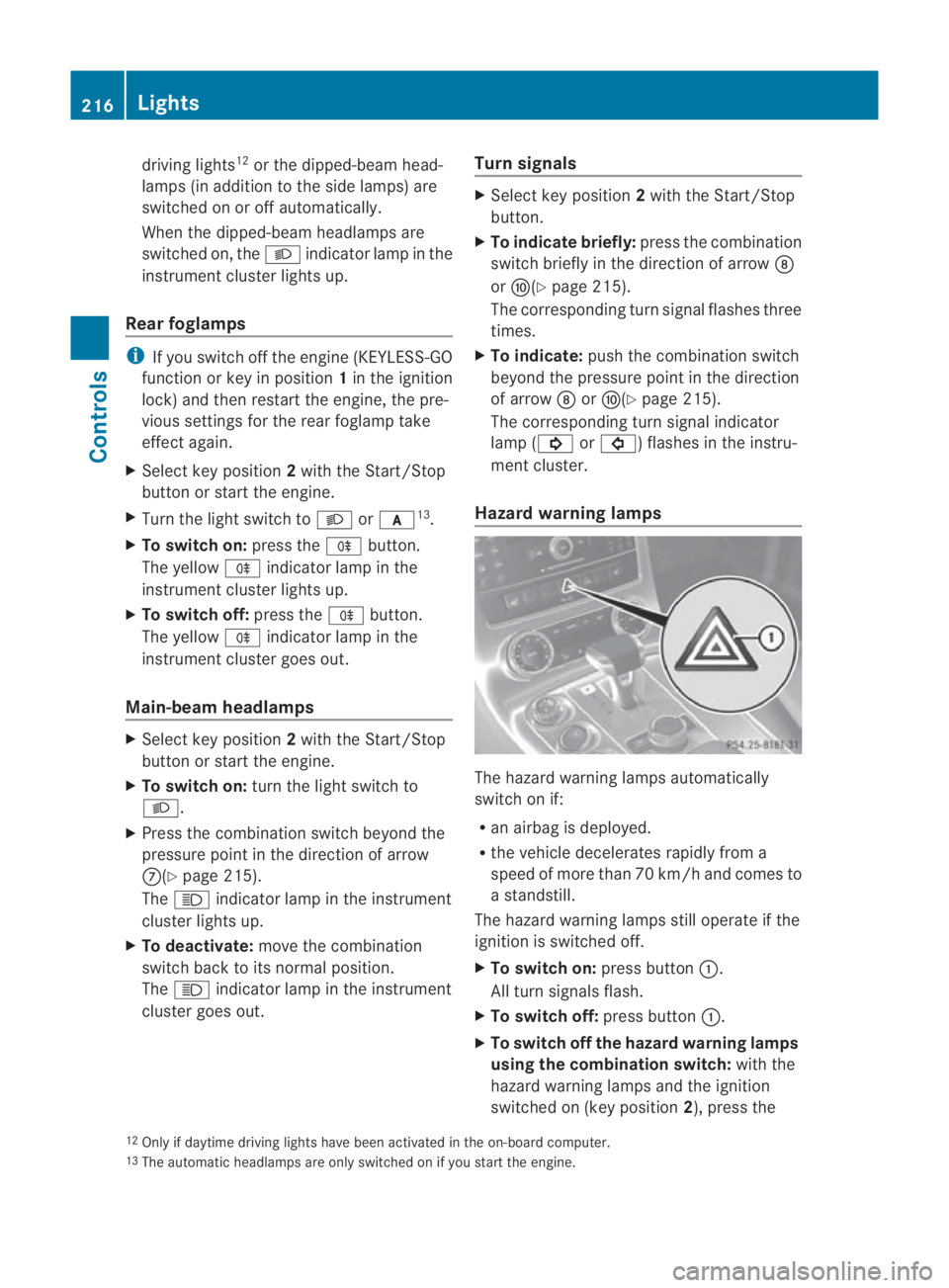
Hazard warning lamps The hazard warning lamps automatically
switch on if:
R
an airbag is deployed.
R the vehicle decelerates rapidly from a
speed of more than 70 km/ha nd comes to
a standstill.
The hazard warning lamps still operate if the
ignition is switched off.
X To switc hon:press button 0001.
All turn signals flash.
X To switch off: press button0001.
X To switch off the hazard warning lamps
using the combination switch: with the
hazard warning lamps and the ignition
switched on (key position 2), press the
12 Only if daytime driving lights have been activated in the on-board computer.
13 The automatic headlamps are only switched on if you start the engine. 216
LightsControls
BA 197 ECE RE 2010/6a; 1; 2, en-GB
sabbaeu
Version: 3.0.3.6 2010-05-07T14:19:43+02:00 - Seite 216
Page 220 of 361
combination switch beyond the pressure
point in the direction of arrow 000Bor
000D(Y page 215).
The indicator lamp on the corresponding
side of the vehicle flashes.
The hazard warning lamps switch off auto-
matically afte rfull brak eapplication if the
vehicle reaches a speed of over 10 km/h
again. Headlamp cleaning system
The headlamps are cleaned automatically if
the "Wipe with washer fluid" function is oper-
ated 10 times while the lights are on and the
engine is running. The headlamps are cleaned
again every tenth time the windscreen is
wiped with washer fluid. When you switch off
the ignition, the automatic headlamp cleaning
system is reset and counting is resumed from
0. Interior lighting
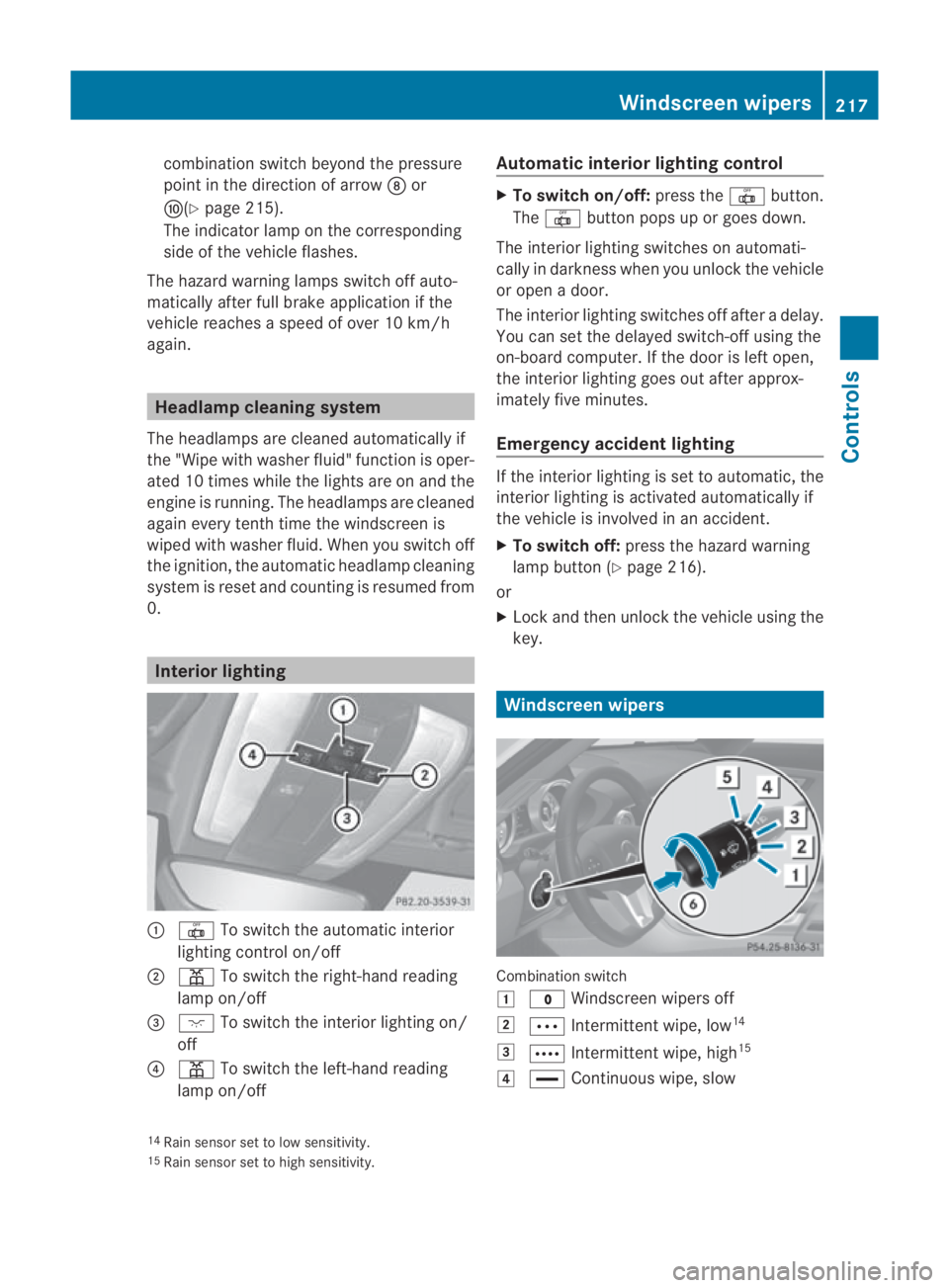
0001
0015 To switch the automatic interior
lighting control on/off
0002 0002 To switch the right-han dreading
lamp on/off
0015 0007 To switch the interior lighting on/
off
0014 0002 To switch the left-hand reading
lamp on/off Automatic interior lighting control X
To switch on/off: press the0015button.
The 0015 button pops up or goes down.
The interior lighting switches on automati-
cally in darkness when you unlock the vehicle
or open a door.
The interior lighting switches off after a delay.
You can set the delayed switch-off using the
on-board computer. If the door is left open,
the interior lighting goes out after approx-
imately five minutes.
Emergency accident lighting If the interior lighting is set to automatic, the
interior lighting is activated automatically if
the vehicle is involved in an accident.
X
To switch off: press the hazard warning
lamp button (Y page 216).
or
X Lock and then unlock the vehicle using the
key. Windscreen wipers
Combination switch
0003
0010 Windscreen wipers off
0004 000A Intermittent wipe, low 14
0005 000C Intermittent wipe, high 15
0006 0014 Continuous wipe, slow
14 Rain sensor set to low sensitivity.
15 Rain sensor set to high sensitivity. Windscreen wipers
217Controls
BA 197 ECE RE 2010/6a; 1; 2, en-GB
sabbaeu Version: 3.0.3.6 2010-05-07T14:19:43+02:00 - Seite 217 Z
Page 223 of 361
Driving an
dparking Starting the engine
G
Risk of accident
Do not place any objects in the driver's foot-
well. If you use a floormat or carpet in the
driver's footwell, make sure that it is correctly
secured and that there is sufficient clearance
for the pedals.
Do not place several floormats on top of one
another.
Loose objects or the floormats could other-
wise get caught between the pedals if you
accelerate or brake suddenly. You will then
not be able to brake, declutch or accelerate
as intended .This could lead to accidents and
injury. G
Risk of poisoning
Never leave the engine running in enclosed
spaces. The exhaust gases contain carbon
monoxide. Inhaling exhaust fumes consti-
tutes a health hazard and could lead to loss
of consciousness or even death.
i Do not depress the accelerator pedal
when starting the engine.
KEYLESS-GO starting function G
Risk of injury
Your vehicle can be started using a valid KEY-
LESS GO key. For this reason, children should
never be left unsupervised in the vehicle.
Always take the KEYLESS GO key with you
when leaving the vehicle, even if you are only
leaving it for a short time.
i The Start/Stop button can be used to
start the vehicle without inserting the key
in the ignition lock. You merely need to
carry the key on your person.
When starting the engine and while the vehi-
cle is in motion, KEYLESS-GO regularly
checks whether a valid key is located in the
vehicle interior by means of brief radio con- nections. The boot is not covered by the
checks.
X
Shift the transmission to position P.
i You can also start the engine when the
transmission is in position N.
X Depress the brake pedal and keep it
depressed.
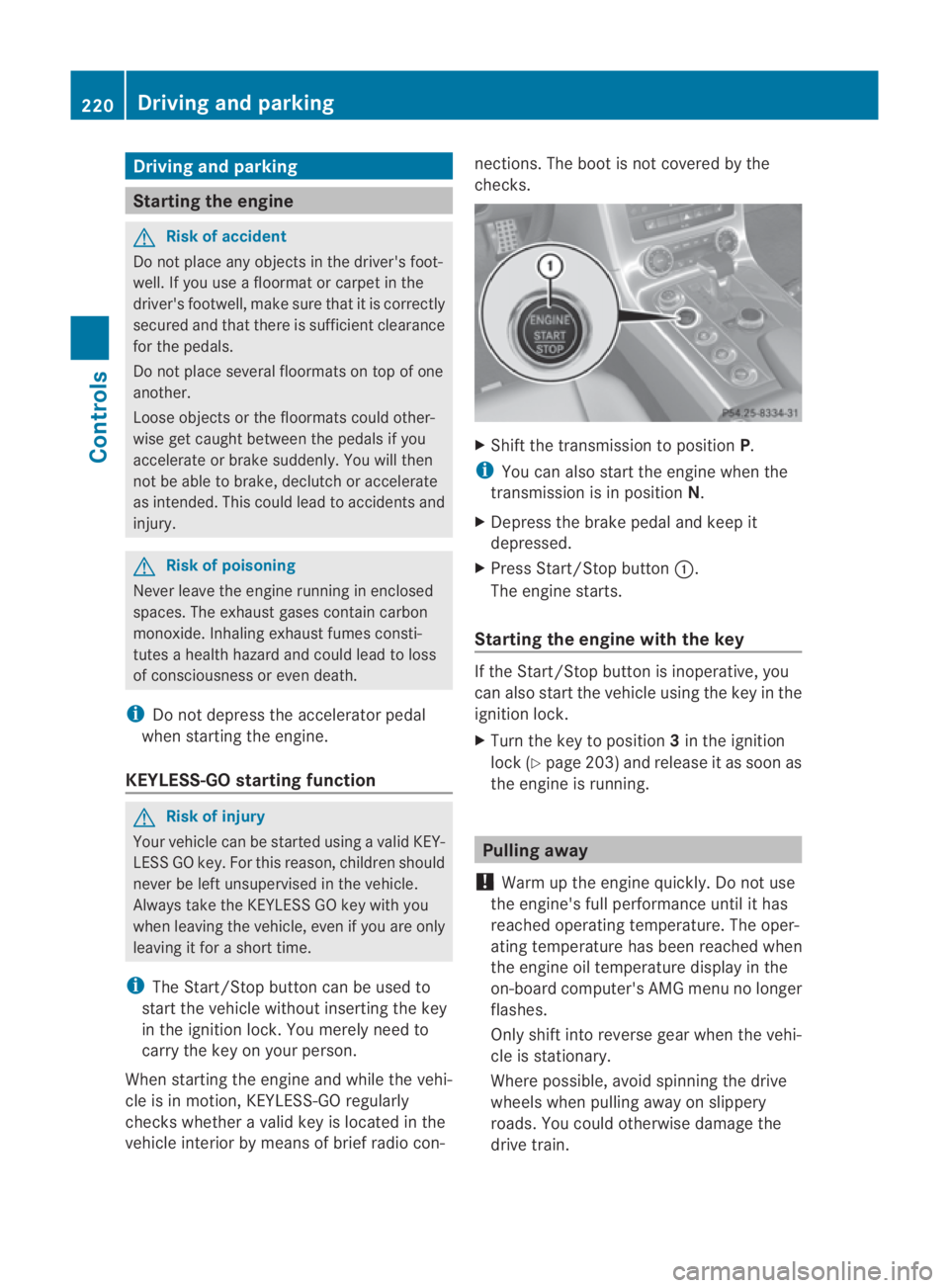
X Press Start/Stop button 0001.
The engine starts.
Starting the engine with the key If the Start/Stop button is inoperative, you
can also start the vehicle using the key in the
ignition lock.
X
Turn the key to position 3in the ignition
lock (Y page 203) and release it as soon as
the engine is running. Pulling away
! Warm up the engine quickly. Do not use
the engine's full performance until it has
reached operating temperature. The oper-
ating temperature has been reached when
the engine oil temperature display in the
on-board computer's AMG menu no longer
flashes.
Only shift into reverse gear when the vehi-
cle is stationary.
Where possible, avoid spinning the drive
wheels when pulling away on slippery
roads. You could otherwise damage the
drive train. 220
Driving and parkingControls
BA 197 ECE RE 2010/6a; 1; 2, en-GB
sabbaeu
Version: 3.0.3.6 2010-05-07T14:19:43+02:00 - Seite 220
Page 225 of 361
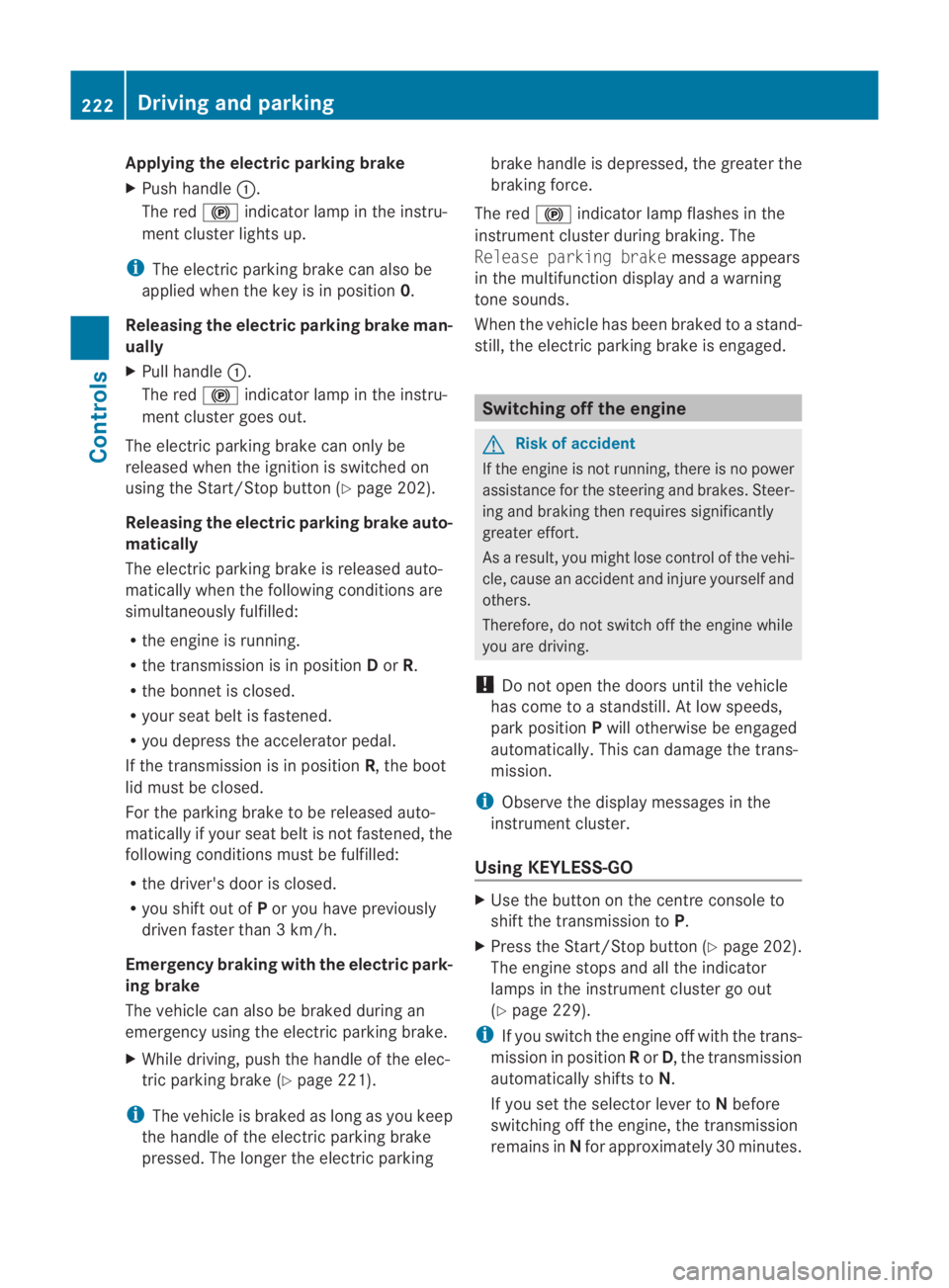
Applying the electric parking brake
X Push handle 0001.
The red 0009indicator lamp in the instru-
men tcluster lights up.
i The electric parking brake can also be
applied when the key is in position 0.
Releasing the electric parking brake man-
ually
X Pull handle 0001.
The red 0009indicator lamp in the instru-
men tcluster goes out.
The electric parking brake can only be
released when the ignition is switched on
using the Start/Stop button (Y page 202).
Releasing the electric parking brake auto-
matically
The electric parking brake is released auto-
matically when the following conditions are
simultaneously fulfilled:
R the engine is running.
R the transmission is in position Dor R.
R the bonnet is closed.
R your seat belt is fastened.
R you depress the accelerator pedal.
If the transmission is in position R, the boot
lid must be closed.
For the parking brake to be released auto-
matically if your seat belt is not fastened, the
following conditions must be fulfilled:
R the driver's door is closed.
R you shift out of Por you have previously
driven faster than 3 km/h.
Emergency braking with the electric park-
ing brake
The vehicle can also be braked during an
emergency using the electric parking brake.
X While driving, push the handle of the elec-
tric parking brake (Y page 221).
i The vehicle is braked as long as you keep
the handle of the electric parking brake
pressed. The longer the electric parking brake handle is depressed, the greater the
braking force.
The red 0009indicator lamp flashes in the
instrument cluster during braking. The
Release parking brake message appears
in the multifunction display and a warning
tone sounds.
When the vehicle has been braked to a stand-
still, the electric parking brake is engaged. Switching off the engine
G
Risk of accident
If the engine is not running, there is no power
assistance for the steerin gand brakes. Steer-
ing and braking then requires significantly
greater effort.
As a result, you might lose control of the vehi-
cle, cause an accident and injure yoursel fand
others.
Therefore, do not switch off the engine while
you are driving.
! Do not open the doors until the vehicle
has come to a standstill .Atlow speeds,
park position Pwill otherwise be engaged
automatically. This can damage the trans-
mission.
i Observe the display messages in the
instrument cluster.
Using KEYLESS-GO X
Use the button on the centre console to
shift the transmission to P.
X Press the Start/Stop button (Y page 202).
The engine stops and all the indicator
lamps in the instrument cluster go out
(Y page 229).
i If you switch the engine off with the trans-
mission in position Ror D, the transmission
automatically shifts to N.
If you set the selector lever to Nbefore
switching off the engine, the transmission
remains in Nfor approximately 30 minutes. 222
Driving and parkingControls
BA 197 ECE RE 2010/6a; 1; 2, en-GB
sabbaeu
Version: 3.0.3.6 2010-05-07T14:19:43+02:00 - Seite 222
Page 226 of 361
If you open the driver's or front-passenger
door during this period, the transmission
automatically shifts to
P.
i The engine can be turned off while the
vehicle is in motion by pressing and holding
the Start/Stop button for three seconds.
Using the key !
Do not remove the key while the vehicle
is in motion. At low speeds, park position
P will otherwise be engaged automatically.
This can damage the transmission.
X Use the button on the centre console to
shift the transmission to P.
X Turn the key to position 0in the ignition
lock (Y page 203) and remove it.
The immobiliser/parking lock is activated.
i If you set the selector lever to Nbefore
switching off the engine, the transmission
remains in Nfor approximately 30 minutes.
While the key is in the ignition lock, the
transmission remains in Neven if you open
the driver's or front-passenger door. AMG SPEEDSHIFT DCT7
-speedsports
transmission Notes on the transmission
G
Ris
kofa ccident
Do no tchange down for additional engine
braking on a slippery road surface. This could
cause the drive wheels to lose their grip and
the vehicle could skid. This could cause you
to lose control of your vehicle and cause an
accident. Selector lever
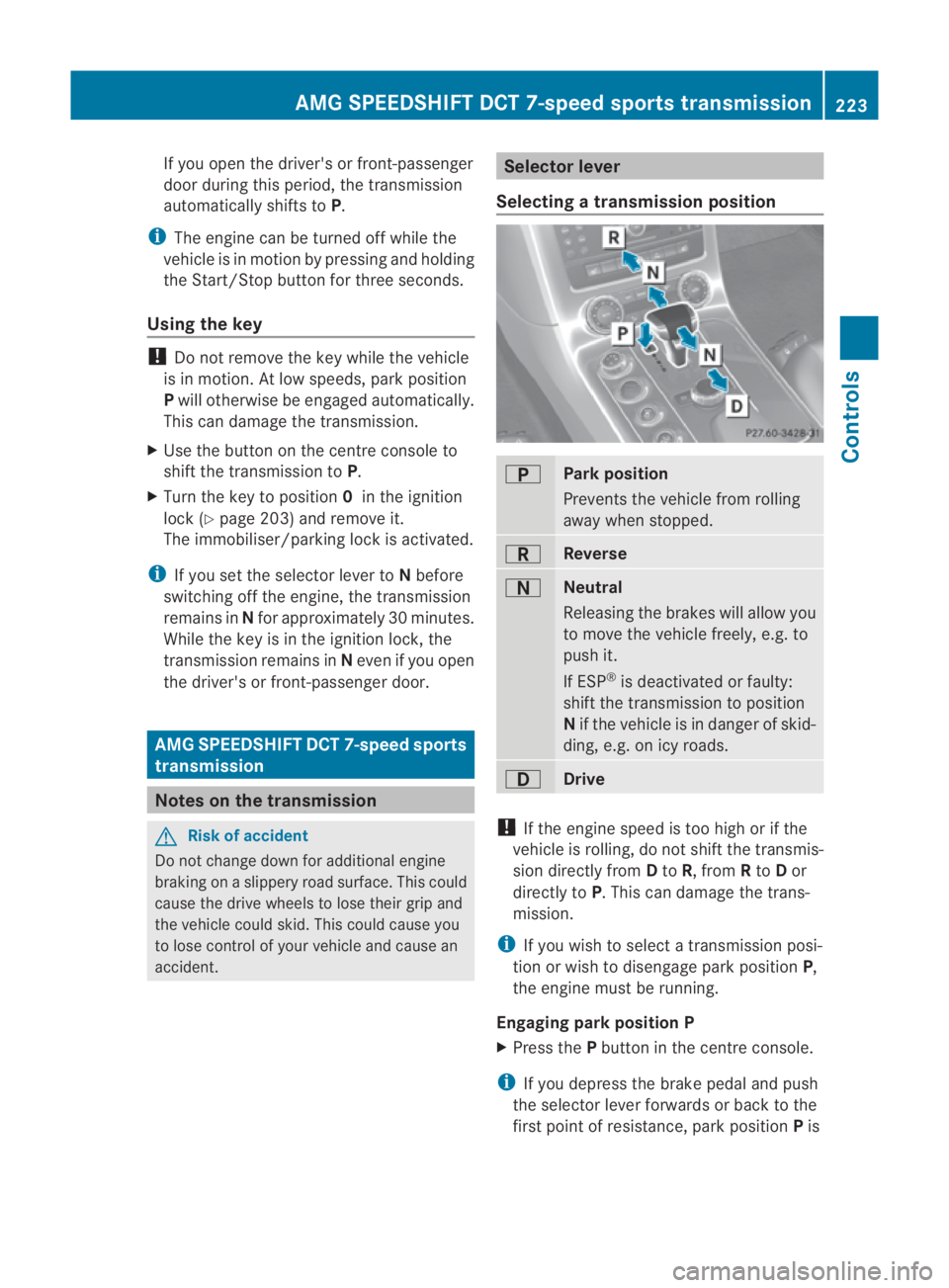
Selecting atransmission position 0002
Park position
Prevents the vehicle fro
mrolling
away when stopped. 0003
Reverse
0001
Neutral
Releasing the brakes will allow you
to move the vehicle freely, e.g. to
push it.
If ESP
®
is deactivated or faulty:
shift the transmission to position
N if the vehicle is in danger of skid-
ding, e.g. on icy roads. 0008
Drive
!
If the engine speed is too high or if the
vehicle is rolling, do not shift the transmis-
sion directly from Dto R, from Rto Dor
directly to P.This can damage the trans-
mission.
i If you wish to select a transmission posi-
tion or wish to disengage park position P,
the engine must be running.
Engaging parkp osition P
X Press the Pbutton in the centre console.
i If you depress the brake pedal and push
the selector lever forwards or back to the
first poin tofresistance, park position Pis AMG SPEEDSHIF
TDCT 7-speed sports transmission
223Controls
BA 197 ECE RE 2010/6a; 1; 2, en-GB
sabbaeuV ersion: 3.0.3.6
2010-05-07T14:19:43+02:00 - Seite 223 Z
Page 227 of 361
disengaged. The transmission shifts to neu-
tral N.
To shift directly from Pto R:
X Depress the brake pedal and push the
selector lever forwards past the first
point of resistance.
To shift directly from Pto D:
X Depress the brake pedal and push the
selector lever back past the first point
of resistance.
Engaging par kposition P automatically
If you switch off the engine using the Start/
Stop button and open the driver's or front-
passenger door, the transmission automati-
cally engages park position P.
Shifting to neutral N
X Push the selecto rlever forwards or back to
the first point of resistance.
i If you set the selector lever to Nbefore
switching off the engine, the transmission
remains in Nfor approximately 30 minutes.
If you open the driver's or front-passenger
door during this period, the transmission
automatically shifts to P.Ifthe key is in the
ignition lock and you open the driver's or
front-passenger door, the transmission
remains in N.
Engaging reverse gear R
X Push the selector lever forwards past the
first point of resistance.
Engaging transmission position D
X Push the selector lever back past the first
point of resistance.
Changing gears
The transmission shifts into individual gears
automatically .This automatic gearshifting
behaviouri s determined by:
R drive position D
R the selected drive program (C/S/S+)
R the position of the accelerator pedal R
the road speed
R a shift range restriction, if selected
Driving tips Shift point
The shift points primarily depend on:
R
the position of the accelerator pedal
Little throttle: early upshifts; high throttle:
late upshifts
R the driving dynamics
Ad ynamic driving style with high longitudi-
nal and lateral acceleration delays the shift
points.
Double-clutch function
Whe nshifting down, the double-clutch func-
tion is active regardless of the currently selec-
ted drive program. The double-clutch function
reduces load change reactions and is condu-
cive to a sporty driving style. The sound gen-
erated by the double-clutchf unction depends
on the drive program selected.
Kickdown
i Kickdown is no tavailable in manual drive
program M.
Use kickdown for maximum acceleration.
X Depress the accelerator pedal beyond the
pressure point.
Depending on the selected drive program,
the transmission shifts to the lowest gear
allowing ideal acceleration. Driving programs
Program selector switch The progra
mselecto rswitch allows you to
choose fro marange of different transmission
configurations. 224
AMG SPEEDSHIFTD
CT 7-speed sports transmissionControls
BA 197 ECE RE 2010/6a; 1; 2, en-GB
sabbaeuV ersion: 3.0.3.6
2010-05-07T14:19:43+02:00 - Seite 224
Page 233 of 361
The transmission fluid temperature and the
coolant temperature are displayed in the
AMG menu (Y page 241). Rev counter
The red band in the rev counter indicates the
engine's overrevving range. The fuel supply is
interrupted to protect the engine when the
red band is reached.
! Do not drive in the overrevving range.
Doing so will damage the engine. Outside temperature display
G
Risk of accident
At temperatures just above freezing point, the
street may be icy, especially in wooded areas
or on bridges. If you do not adapt your driving
style to the conditions, the vehicle could skid.
For this reason, adapt your driving style and
speed to the weather conditions.
Changes in the outside temperature are dis-
played after a short delay. On-board computer
Please bear the following in mind
If the ignition is switched on, you can operate
the on-board computer. G
Risk of accident
Only use the on-board computer when road
and traffic conditions permit. You would oth-
erwise be distracted and unable to concen-
trate properly on driving, and could cause an
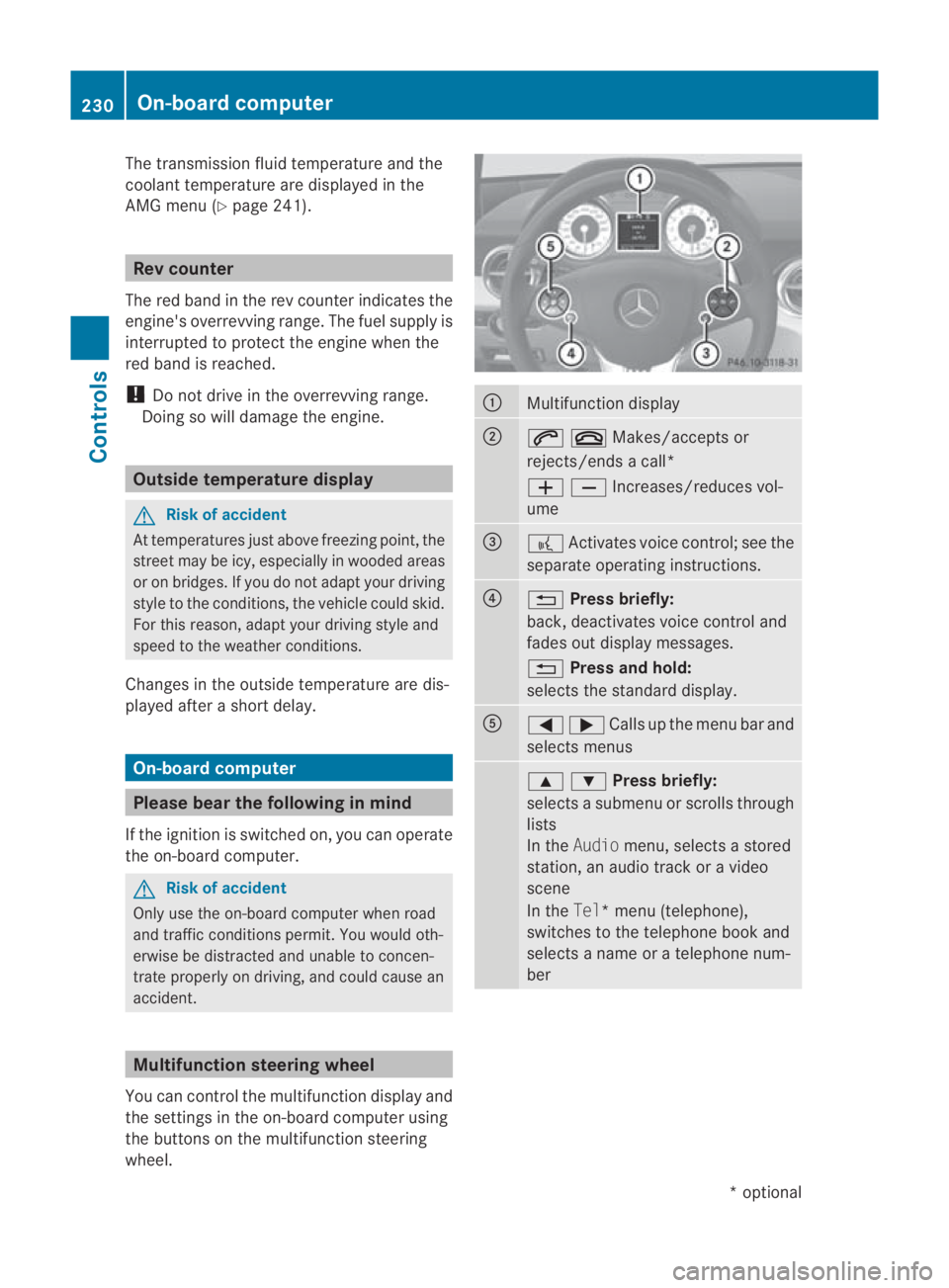
accident. Multifunction steering wheel
You can control the multifunction display and
the settings in the on-board computer using
the buttons on the multifunction steering
wheel. 0001
Multifunction display
0002
001C0015Makes/accepts or
rejects/ends a call*
00050009Increases/reduces vol-
ume 0015
0012
Activates voice control; see the
separate operating instructions. 0014
0001
Press briefly:
back, deactivates voice control and
fades out display messages.
0001 Press and hold:
selects the standard display. 0012
0008000ECalls up the menu bar and
selects menus 000F000CPress briefly:
selects a submenu or scrolls through
lists
In the
Audio menu, selects a stored
station, an audio track or a video
scene
In the Tel*m enu (telephone),
switches to the telephone book and
selects a name or a telephone num-
ber 230
On-board computerControls
*o
ptional
BA 197 ECE RE 2010/6a; 1; 2, en-GB
sabbaeu
Version: 3.0.3.6 2010-05-07T14:19:43+02:00 - Seite 230