boot MERCEDES-BENZ SLS COUPE 2010 Owners Manual
[x] Cancel search | Manufacturer: MERCEDES-BENZ, Model Year: 2010, Model line: SLS COUPE, Model: MERCEDES-BENZ SLS COUPE 2010Pages: 361, PDF Size: 6.32 MB
Page 8 of 361
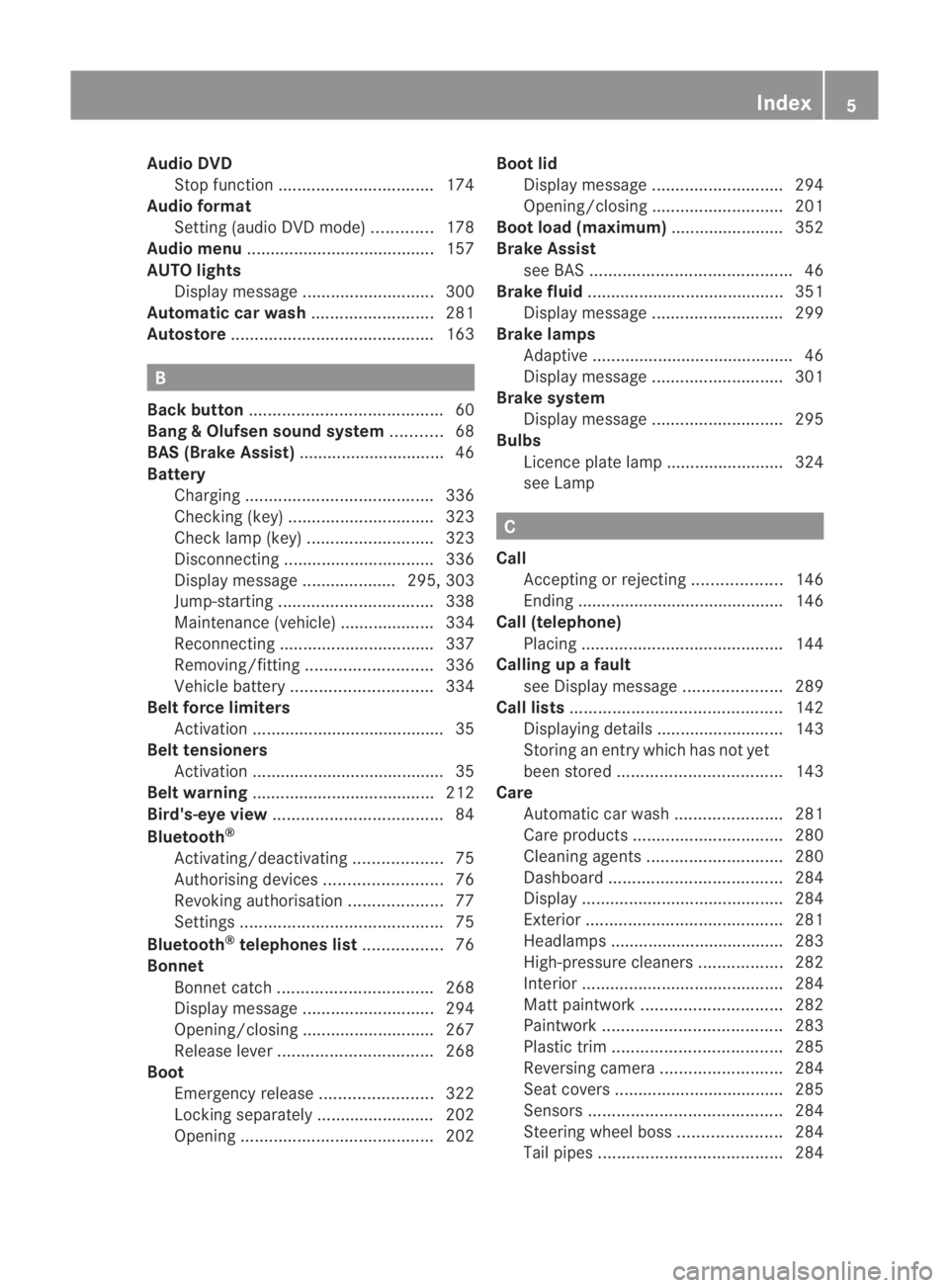
Audio DVD
Stop function ................................. 174
Audio format
Setting (audio DVD mode )............. 178
Audio menu ........................................ 157
AUTO lights Display message ............................ 300
Automatic car wash ..........................281
Autostore ........................................... 163B
Back button ......................................... 60
Bang &Olufsen sound system ...........68
BAS (Brake Assist) ............................... 46
Battery Charging ........................................ 336
Checking (key )............................... 323
Check lamp (key )........................... 323
Disconnecting ................................ 336
Display message .................... 295, 303
Jump-starting ................................. 338
Maintenance (vehicle) .................... 334
Reconnecting ................................. 337
Removing/fitting ........................... 336
Vehicle battery .............................. 334
Belt force limiters
Activation ......................................... 35
Belt tensioners
Activation ......................................... 35
Belt warning ....................................... 212
Bird's-eye view .................................... 84
Bluetooth ®
Activating/deactivating ...................75
Authorising devices .........................76
Revoking authorisatio n.................... 77
Settings ........................................... 75
Bluetooth ®
telephones list .................76
Bonnet Bonnet catch ................................. 268
Display message ............................ 294
Opening/closing ............................ 267
Releas elever ................................. 268
Boot
Emergency release ........................322
Locking separatel y......................... 202
Opening ......................................... 202Boot lid
Display message ............................ 294
Opening/closing ............................ 201
Boot load (maximum) ........................ 352
Brake Assist see BAS ........................................... 46
Brake fluid .......................................... 351
Display message ............................ 299
Brake lamps
Adaptive .......................................... .46
Display message ............................ 301
Brake system
Display message ............................ 295
Bulbs
Licence plate lamp ......................... 324
see Lamp C
Call Accepting or rejecting ...................146
Ending ............................................ 146
Call (telephone)
Placing ........................................... 144
Calling up a fault
see Display message .....................289
Call lists ............................................. 142
Displaying details ........................... 143
Storing an entry which has not yet
bee nstore d................................... 143
Care
Automatic car wash .......................281
Care products ................................ 280
Cleaning agents ............................. 280
Dashboard ..................................... 284
Display ........................................... 284
Exterior .......................................... 281
Headlamps ..................................... 283
High-pressure cleaners ..................282
Interior ........................................... 284
Matt paintwork .............................. 282
Paintwork ...................................... 283
Plastic trim .................................... 285
Reversing camera ..........................284
Seat covers .................................... 285
Sensors ......................................... 284
Steering wheel boss ......................284
Tai lpipes ....................................... 284 Index
5 BA 197 ECE RE 2010/6a; 1; 2, en-GB
sabbae uV ersion: 3.0.3.6
2010-05-07T14:19:43+02:00 - Seite 5
Page 11 of 361
DVD
Copy protection ............................. 167
Disc ............................................... 167
Selecting atrack ............................ 176
DVD audio
Operation (on-board computer) .....235
DVD playbac kconditions ................. 191
DVD video Operating (on-board computer) .....236
Dynamic route guidance ................... 119
Switching on/off ........................... 119
TMC/TMCPro ................................ 119E
EASY-ENTRY feature .........................207
Activating/deactivating (on-
board computer) ............................ 240
EASY-EXIT feature ............................. 207
Crash-responsive ........................... 207
EBD
Display message ............................ 299
EBV (electronic brake force distri-
bution) .................................................. 49
Electronic brake force distribution See EBV ........................................... 49
Electronic Stability Program
see ESP ®
Electronic Traction Support see ETS
Emergency call 999 or 112 ..............129
Emergency key element ...................321
Lost ............................................... 320
Emergency spare wheel
Inflating ......................................... 333
Stowing .......................................... 334
Technical data ............................... 355
Emergency unlocking
Boot ............................................... 322
Vehicle .......................................... .322
Engine
Running irregularl y......................... 315
Starting .................................. 202, 220
Starting problems ..........................315
Starting the engine with the key ....220
Starting with KEYLESS GO .............220
Starting with the key ..................... .220
Stopping ........................................ 222Engine diagnostics warning lamp
....310
Engine electronics .............................346
Malfunction ................................... .315
Engine number .................................. 349
Engine oil ........................................... 350
Capacities ...................................... 269
Checking the oil level (dipstick) .....269
Consumption ................................. 269
Display mes-
sag e....................................... 302, 303
Filler neck ...................................... 269
Temperature display (on-board
computer) ...................................... 241
Temperature gauge ........................ 229
Topping up ..................................... 269
Ensemble ........................................... 161
ESP ®
(Electronic Stability Pro-
gram) .................................................... 47
Activating/deactivating .............47, 48
AMG menu (on-board computer) ...241
Warning lamp ..................47, 308, 309
ETS (Electronic Traction Support) ...... 48
Example of operation ..........................66
Exterior lighting Delayed switch-off (on-board
computer) ...................................... 239
Exterior mirrors
Adjusting ....................................... 208
Anti-dazzle mode (automatic) ........209
Folding in/ou t(automatically) .......209
Folding in/ou t(electrically) ...........208
Folding in whe nlocking (on-board
computer) ...................................... 240
Malfunction ................................... .318
Parking position ............................. 209
Resetting ....................................... 209
Storing settings ............................. 210
Exterior view
Overview .......................................... 22
External authorisation ........................77
External data Deleting (convenience telephone) .137
Importing (convenience tele-
phone )................................... 136, 155
External devices (Media Interface)
Connecting .................................... 1848
Index BA 197 ECE RE 2010/6a; 1; 2, en-GB
sabbae uV ersion: 3.0.3.6
2010-05-07T14:19:43+02:00 - Seite 8
Page 25 of 361
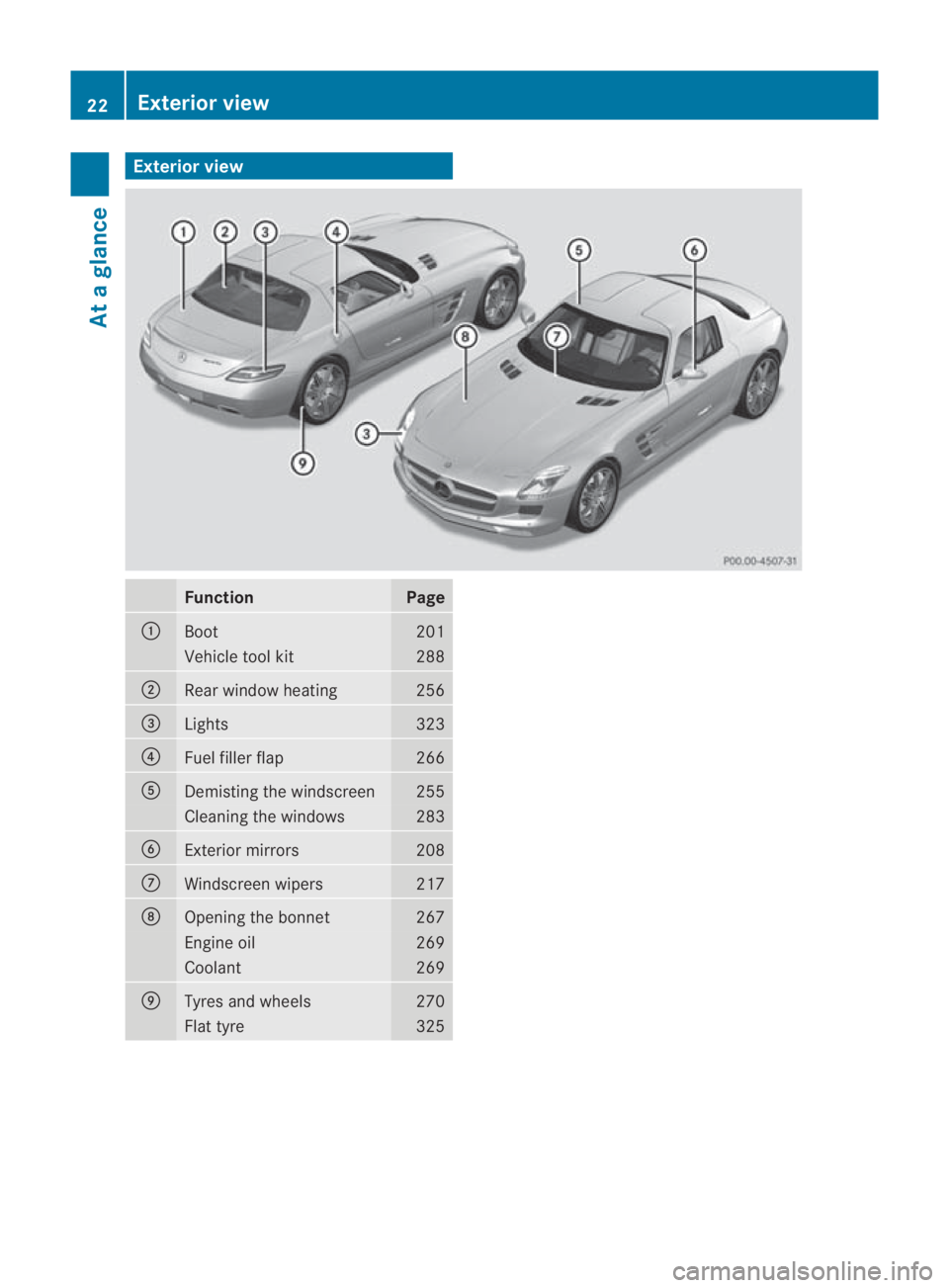
Exterio
rview Function Page
0001
Boot 201
Vehicle tool kit 288
0002
Rear window heating 256
0015
Lights 323
0014
Fuel filler flap 266
0012
Demisting the windscreen 255
Cleaning the windows 283
0013
Exterior mirrors 208
000A
Windscreen wipers 217
000B
Opening the bonnet 267
Engine oil 269
Coolant 269
000C
Tyres and wheels 270
Flat tyre 32522
Exterior viewAt a glance
BA 197 ECE RE 2010/6a; 1; 2, en-GB
sabbaeu Version: 3.0.3.6 2010-05-07T14:19:43+02:00 - Seite22
Page 26 of 361
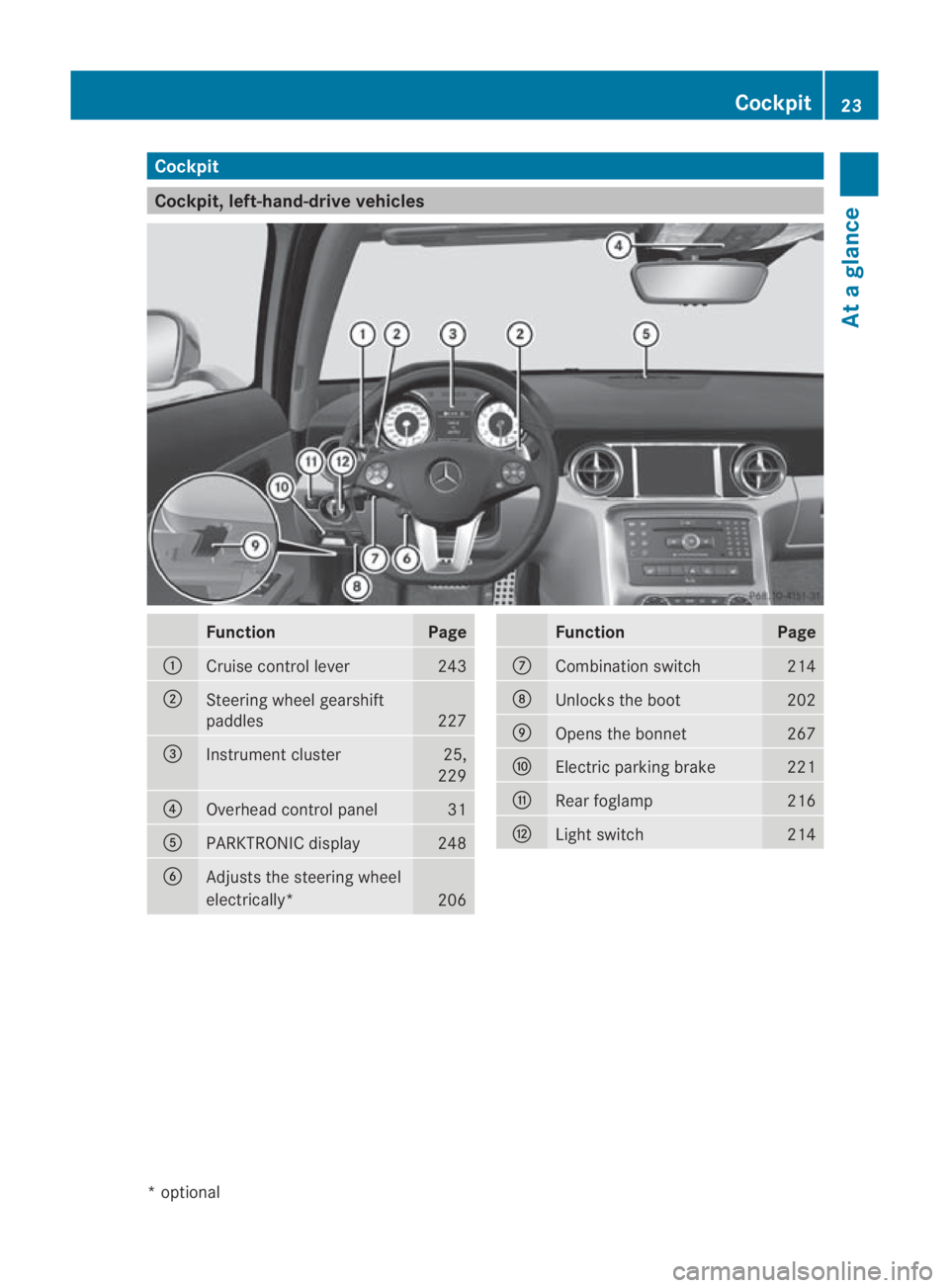
Cockpit
Cockpit, left-hand-drive vehicles
Function Page
0001
Cruise control lever 243
0002
Steering wheel gearshift
paddles
227
0015
Instrument cluster 25,
229 0014
Overhead control panel 31
0012
PARKTRONIC display 248
0013
Adjusts the steering wheel
electrically*
206 Function Page
000A
Combination switch 214
000B
Unlocks the boot 202
000C
Opens the bonnet 267
000D
Electric parking brake 221
000E
Rear foglamp 216
000F
Ligh
tswitch 214Cockpit
23At a glance
*optional
BA 197 ECE RE 2010/6a; 1; 2, en-GB
sabbaeu Version: 3.0.3.6 2010-05-07T14:19:43+02:00 - Seite 23
Page 27 of 361
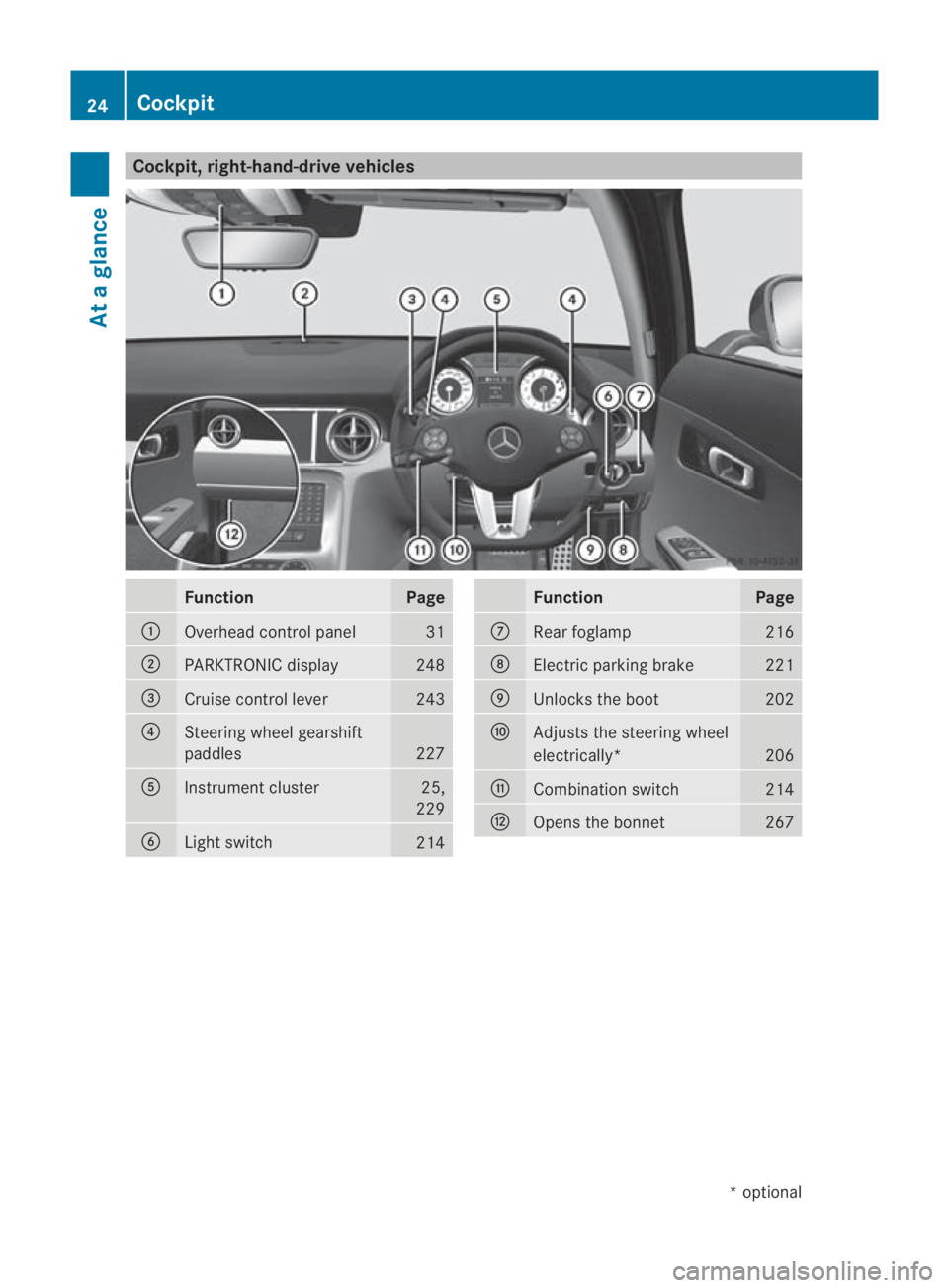
Cockpit, right-hand-drive vehicles
Function Page
0001
Overhead control panel 31
0002
PARKTRONIC display 248
0015
Cruise control lever 243
0014
Steering wheel gearshift
paddles
227
0012
Instrument cluster 25,
229 0013
Ligh
tswitch 214 Function Page
000A
Rear foglamp 216
000B
Electric parking brake 221
000C
Unlocks the boot 202
000D
Adjusts the steering wheel
electrically*
206
000E
Combinatio
nswitch 214
000F
Opens the bonnet 26724
CockpitAt a glance
*o
ptional
BA 197 ECE RE 2010/6a; 1; 2, en-GB
sabbaeu
Version: 3.0.3.6 2010-05-07T14:19:43+02:00 - Seite 24
Page 52 of 361
EBD (Electronic Brake-force Distribu-
tion)
EBD monitors and controls the brake pres-
sure on the rear wheels to improve driving
stability while braking. G
Ris
kofa ccident
If EBV is malfunctioning, the brake system is
still available with full brak eboosting effect.
However, the rear wheels can still lock, e.g.
under full braking. This could cause you to
lose control of your vehicle and cause an acci-
dent. You should therefore adapt your driving
style to the different handling characteristics. ADAPTIVE BRAKE
ADAPTIVE BRAKE enhances braking safety
and offers increased braking comfort. In addi-
tion to the braking function, ADAPTIVE BRAKE
also features the hill start assist function
(Y page 221). For further information, see
Driving tips (Y page 277). Anti-theft systems
Immobiliser
The immobiliser prevents your vehicle from
being started without the correc tkey.
Activating the immobiliser X
While the engine is running turn the Start/
Stop button to key position 0
(Y page 202).
The engine switches off.
or
X Remove the key from the ignition lock.
Deactivating the immobiliser X
Turn the Start/Stop button to key position
2without depressing the brake pedal.
i The immobiliser is always deactivated
when you start the engine. ATA (Anti-Theft Alarm system)
Av isual and audible alarm is triggered if the
alarm system is primed and you open:
R a door
R a door using the emergency key element
R the boot lid
R the bonnet
The alarm is not switched off even if you close
an open door again. X
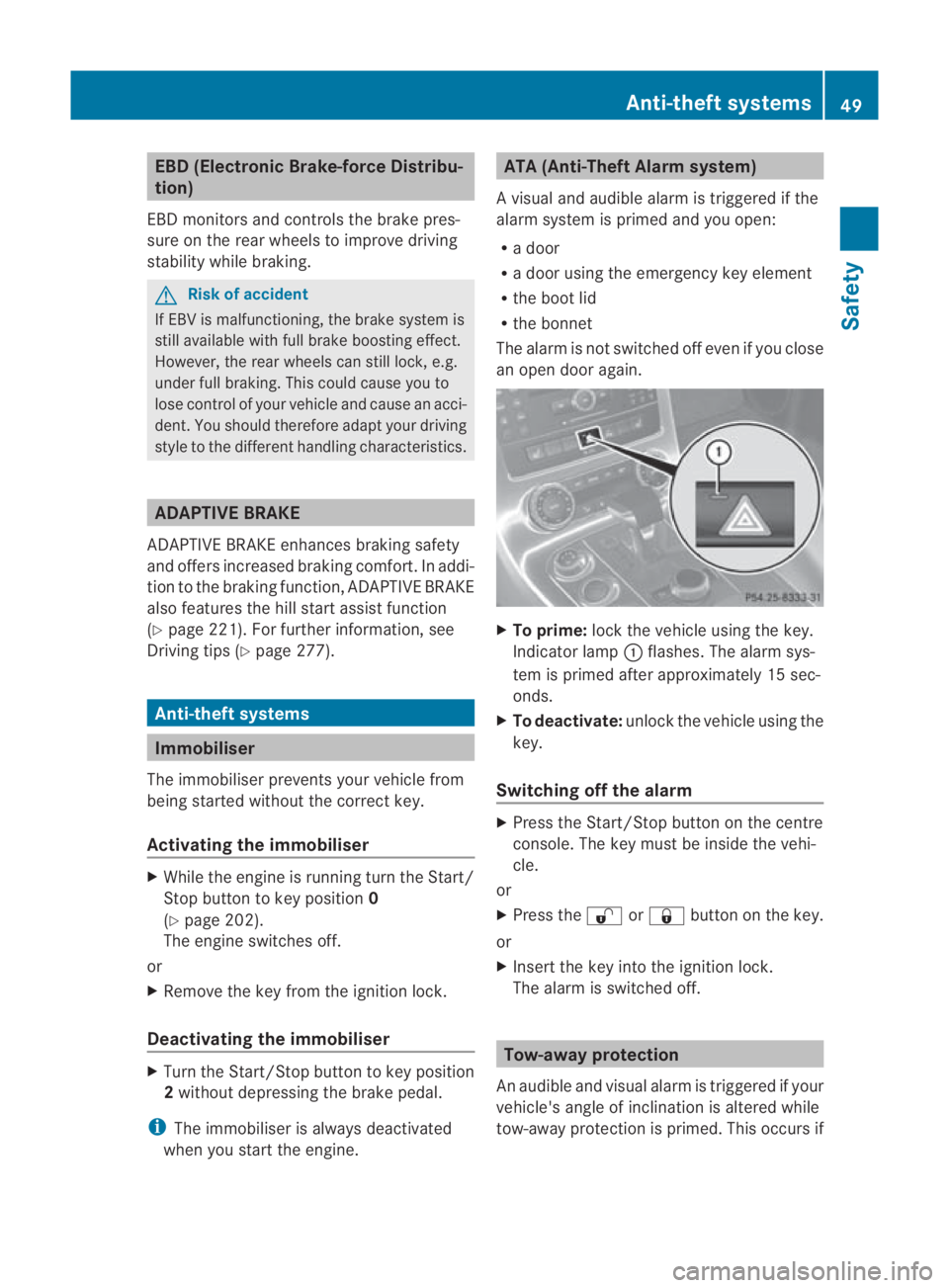
To prime: lock the vehicle using the key.
Indicator lamp 0001flashes .The alarm sys-
tem is primed after approximately 15 sec-
onds.
X To deactivate: unlock the vehicle using the
key.
Switching off the alarm X
Press the Start/Stop button on the centre
console. The key must be inside the vehi-
cle.
or
X Press the 000Bor0009 button on the key.
or
X Insert the key into the ignition lock.
The alarm is switched off. Tow-away protection
An audible and visual alarm is triggered if your
vehicle's angle of inclination is altered while
tow-away protection is primed. This occurs if Anti-theft systems
49Safety
BA 197 ECE RE 2010/6a; 1; 2, en-GB
sabbaeu Version: 3.0.3.6 2010-05-07T14:19:43+02:00 - Seite 49 Z
Page 53 of 361
the vehicle is jacked up on one side, for exam-
ple.
Priming tow-away protection X
Loc kthe vehicle using the key.
Tow-away protection is primed after
approximately 30 seconds.
Deactivating tow-away protection Tow-away protection is automatically deacti-
vated when you unlock your vehicle using the
key.
To prevent a false alarm, deactivate tow-away
protection manually if your vehicle:
R is being transported
R is being loaded, e.g. onto a ferry or car
transporter
R is parked on a movable surface, e.g. in a
split-level garage X
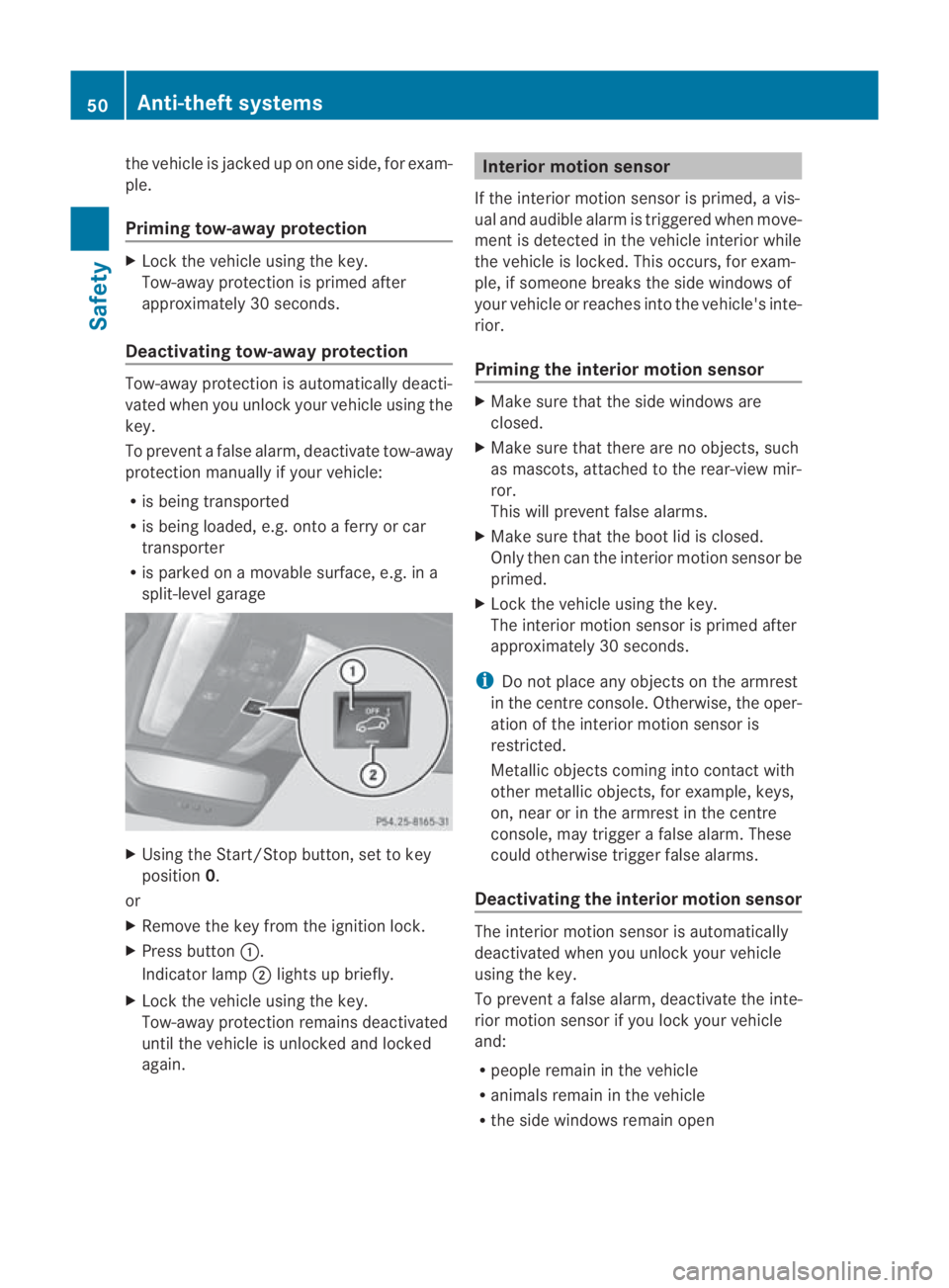
Using the Start/Stop button, set to key
position 0.
or
X Remove the key from the ignition lock.
X Press button 0001.
Indicator lamp 0002lights up briefly.
X Lock the vehicle using the key.
Tow-away protection remains deactivated
until the vehicle is unlocked and locked
again. Interior motion sensor
If the interior motion sensor is primed, a vis-
ual and audible alarm is triggered when move-
ment is detected in the vehicle interior while
the vehicle is locked. This occurs, for exam-
ple, if someone breaks the side windows of
your vehicle or reaches into the vehicle's inte-
rior.
Priming the interior motion sensor X
Make sure that the side windows are
closed.
X Make sure that there are no objects, such
as mascots, attached to the rear-view mir-
ror.
This will prevent false alarms.
X Make sure that the boot lid is closed.
Only then can the interior motion sensor be
primed.
X Lock the vehicle using the key.
The interior motion sensor is primed after
approximately 30 seconds.
i Do not place any objects on the armrest
in the centre console. Otherwise, the oper-
ation of the interior motion sensor is
restricted.
Metallic objects coming into contact with
other metallic objects, for example, keys,
on, near or in the armrest in the centre
console, may trigger a false alarm. These
could otherwise trigger false alarms.
Deactivating the interior motion sensor The interior motion sensor is automatically
deactivated when you unlock your vehicle
using the key.
To prevent a false alarm, deactivate the inte-
rior motion sensor if you lock your vehicle
and:
R people remain in the vehicle
R animals remain in the vehicle
R the side windows remain open 50
Anti-theft systemsSafety
BA 197 ECE RE 2010/6a; 1; 2, en-GB
sabbaeu
Version: 3.0.3.6 2010-05-07T14:19:43+02:00 - Seite 50
Page 73 of 361
You will achieve the best sound results on
your Bang &Olufsen sound system by play-
ing high-quality audio DVDs and CDs.
MP3 tracks should have abit rate of at least
224 kbit/s.
When playing using an iPod ®
, the bit rate
should also be at least 224 kbit/s.
For optimum playback quality:
XDeactivate the EQsetting on the
iPod ®
.
Surround-sound playback does not work
for mono signal sources, such as the AM
waveband in radio mode.
On some stereo recordings, the sound
characteristics may differ from conven-
tional stereo playback. Reversing camera*
G
Risk of accident
The reversing camera is only an aid and may
display obstacles in a distorted or incorrect
manner, or may not even display the matall.
The reversing camera does not relieve you of
the responsibility to pay attention. The cam-
era cannot show objects:
R very near to the rear bumper
R below the rear bumper
R in the area immediately above the boot lid
handle
You are always responsible for safety and
must continue to pay attention to your imme-
diate surroundings when parking and
manoeuvring. This applies to the areas
behind, in front of and nex tto the vehicle. You
could otherwise endanger yourself and oth-
ers.
The reversing camera image is automatically
shown on COMAND when:
R the Activation by R gear function is
selected.
R you engage reverse gear. When you shift out of reverse gear or select
Back, COMAND will show the previous dis-
play again.
Showing/hiding the reversing camera
image X
Call up the system menu (Y page 71).
X Select Settings0004Rear view camera.
X Select Activation by R gear.
The function is switched on 0019or off 0004,
depending on the previous status. 70
At
ag lanceCOMAND APS
*optional
BA 197 ECE RE 2010/6a; 1; 2, en-GB
sabbaeu
Version: 3.0.3.6 2010-05-07T14:19:43+02:00 - Seite 70
Page 202 of 361
Doors
.................................................. 200
Opening/closing the boot ................201
Key positions .................................... 202
Seats .................................................. 203
Steering wheel .................................. 206
Mirrors ............................................... 207
Memory functions* ...........................210
Seat belts ........................................... 210
Lights ................................................. 214
Windscreen wipers ...........................217
Side windows .................................... 218
Driving and parking ..........................220
AMG SPEEDSHIFT DCT 7-speed
sports transmission .........................223
Instrument cluster ............................229
On-board computer ..........................230
Driving systems ................................ 243
Climate control ................................. 251
Loading and stowing ........................257
Features ............................................. 259 199Controls
BA 197 ECE RE 2010/6a; 1; 2, en-GB
sabbaeu
Version: 3.0.3.6 2010-05-07T14:19:43+02:00 - Seite 199
Page 203 of 361
Doors
Opening/closing from the outside
G
Risk of accident
If children are lef tunsupervised in the vehicle,
they could:
R open a door from inside the vehicle at any
time, eve nifithas been locked
R start the vehicle using akey which has been
left in the vehicle
R release the parking brake
They could thereby endanger themselves and
others. Never leave children unsupervised in
the vehicle. Always take the key with you
when leaving the vehicle, even if you are only
leaving it for a short time.
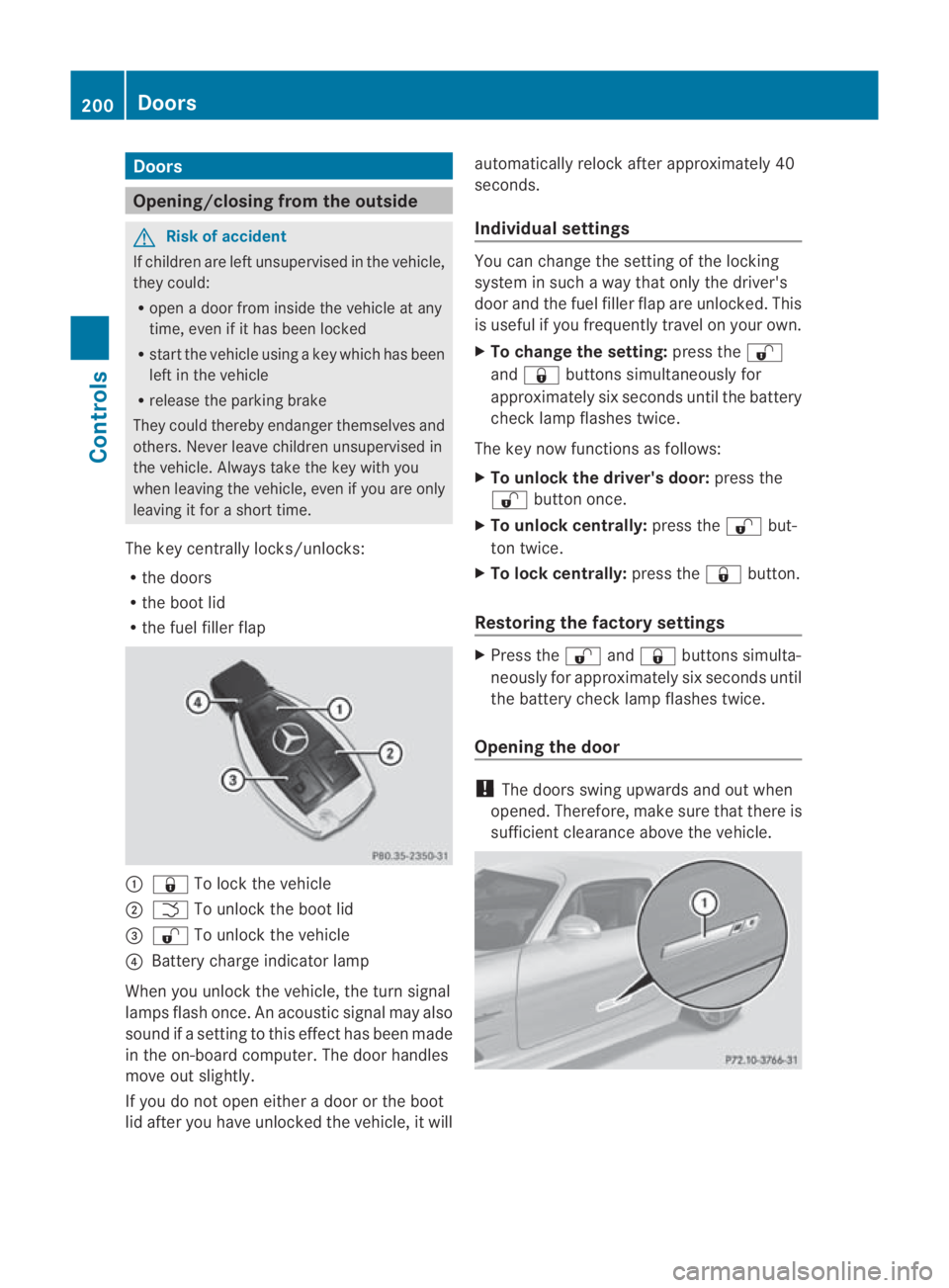
The key centrally locks/unlocks:
R the doors
R the boot lid
R the fuel filler flap 0001
0009 To lock the vehicle
0002 0002 To unlock the boot lid
0015 000B To unlock the vehicle
0014 Battery charge indicator lamp
When you unlock the vehicle, the turn signal
lamps flash once. An acoustic signal may also
sound if a setting to this effec thas been made
in the on-board computer. The door handles
move out slightly.
If you do no topen either a door or the boot
lid after you have unlocked the vehicle, it will automatically relock after approximately 40
seconds.
Individual settings You can change the setting of the locking
system in such a way that only the driver's
door and the fuel filler flap are unlocked. This
is useful if you frequently travel on your own.
X To change the setting: press the000B
and 0009 buttons simultaneously for
approximately six seconds until the battery
chec klamp flashes twice.
The key now functions as follows:
X To unlock the driver's door: press the
000B button once.
X To unlock centrally: press the000Bbut-
ton twice.
X To lock centrally: press the0009button.
Restoring the factory settings X
Press the 000Band0009 buttons simulta-
neously for approximately six seconds until
the battery check lamp flashes twice.
Opening the door !
The doors swing upwards and out when
opened. Therefore, make sure that there is
sufficient clearance above the vehicle. 200
DoorsControls
BA 197 ECE RE 2010/6a; 1; 2, en-GB
sabbaeu
Version: 3.0.3.6
2010-05-07T14:19:43+02:00 - Seite 200