boot MERCEDES-BENZ SLS COUPE 2010 User Guide
[x] Cancel search | Manufacturer: MERCEDES-BENZ, Model Year: 2010, Model line: SLS COUPE, Model: MERCEDES-BENZ SLS COUPE 2010Pages: 361, PDF Size: 6.32 MB
Page 204 of 361
X
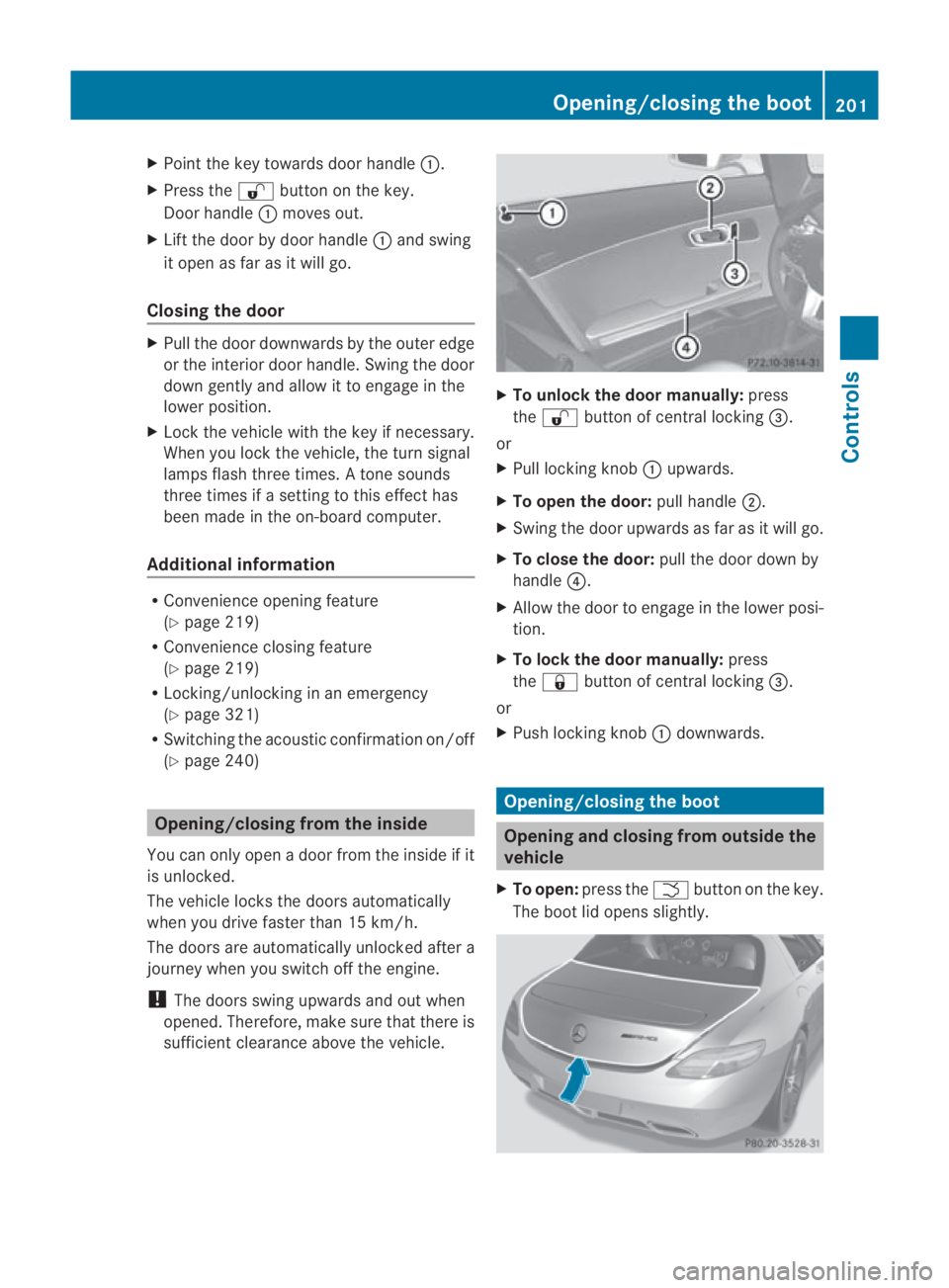
Point the key towards door handle 0001.
X Press the 000Bbutton on the key.
Door handle 0001moves out.
X Lift the door by door handle 0001and swing
it open as far as it will go.
Closing the door X
Pull the door downwards by the outer edge
or the interior door handle. Swing the door
down gently and allow it to engage in the
lower position.
X Lock the vehicle with the key if necessary.
When you lock the vehicle, the turn signal
lamps flash three times. Atone sounds
three times if a setting to this effect has
been made in the on-board computer.
Additional information R
Convenience opening feature
(Y page 219)
R Convenience closing feature
(Y page 219)
R Locking/unlocking in an emergency
(Y page 321)
R Switching the acoustic confirmation on/off
(Y page 240) Opening/closing from the inside
You can only open a door from the inside if it
is unlocked.
The vehicle locks the doors automatically
when you drive faster than 15 km/h.
The doors are automatically unlocked after a
journey when you switch off the engine.
! The doors swing upwards and out when
opened. Therefore, make sure that there is
sufficient clearance above the vehicle. X
To unlock the door manually: press
the 000B button of central locking 0015.
or
X Pull locking knob 0001upwards.
X To open the door: pull handle0002.
X Swing the door upwards as far as it will go.
X To close the door: pull the door down by
handle 0014.
X Allow the door to engage in the lower posi-
tion.
X To lock the door manually: press
the 0009 button of central locking 0015.
or
X Push locking knob 0001downwards. Opening/closing the boot
Opening and closing from outside the
vehicle
X To open: press the 0002button on the key.
The boot lid opens slightly. Opening/closing the boot
201Controls
BA 197 ECE RE 2010/6a; 1; 2, en-GB
sabbaeu Version: 3.0.3.6 2010-05-07T14:19:43+02:00 - Seite 201 Z
Page 205 of 361
X
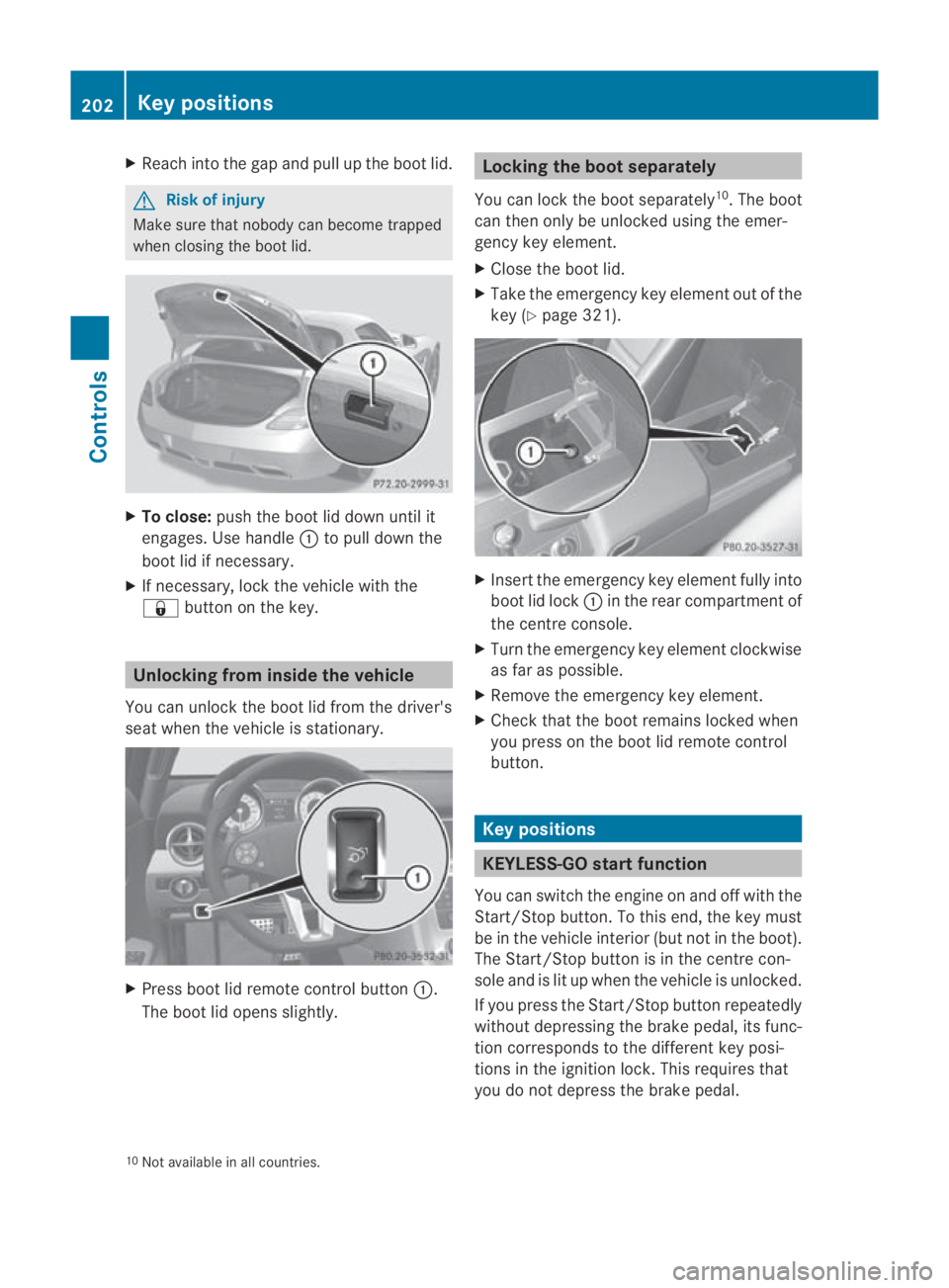
Reach into the gap and pull up the boo tlid. G
Risk of injury
Make sure that nobody can become trapped
when closing the boot lid. X
To close: push the boot lid down until it
engages. Use handle 0001to pull down the
boot lid if necessary.
X If necessary, lock the vehicle with the
0009 button on the key. Unlocking from inside the vehicle
You can unlock the boot lid from the driver's
seat when the vehicle is stationary. X
Press boot lid remote control button 0001.
The boot lid opens slightly. Locking the boot separately
You can lock the boot separately 10
.T he boot
can then only be unlocked using the emer-
gency key element.
X Close the boot lid.
X Take the emergency key element out of the
key (Y page 321). X
Insert the emergency key element fully into
boot lid lock 0001in the rear compartment of
the centre console.
X Turn the emergency key element clockwise
as far as possible.
X Remove the emergency key element.
X Check that the boot remains locked when
you press on the boot lid remote control
button. Key positions
KEYLESS-GO startf
unction
You can switch the engine on and off with the
Start/Stop button. To this end, the key must
be in the vehicle interio r(but not in the boot).
The Start/Stop button is in the centre con-
sole and is lit up when the vehicle is unlocked.
If you press the Start/Stop button repeatedly
without depressing the brake pedal, its func-
tion corresponds to the differen tkey posi-
tions in the ignition lock. This requires that
you do not depress the brake pedal.
10 Not available in all countries. 202
Key positionsControls
BA 197 ECE RE 2010/6a; 1; 2, en-GB
sabbaeu
Version: 3.0.3.6 2010-05-07T14:19:43+02:00 - Seite 202
Page 223 of 361
Driving an
dparking Starting the engine
G
Risk of accident
Do not place any objects in the driver's foot-
well. If you use a floormat or carpet in the
driver's footwell, make sure that it is correctly
secured and that there is sufficient clearance
for the pedals.
Do not place several floormats on top of one
another.
Loose objects or the floormats could other-
wise get caught between the pedals if you
accelerate or brake suddenly. You will then
not be able to brake, declutch or accelerate
as intended .This could lead to accidents and
injury. G
Risk of poisoning
Never leave the engine running in enclosed
spaces. The exhaust gases contain carbon
monoxide. Inhaling exhaust fumes consti-
tutes a health hazard and could lead to loss
of consciousness or even death.
i Do not depress the accelerator pedal
when starting the engine.
KEYLESS-GO starting function G
Risk of injury
Your vehicle can be started using a valid KEY-
LESS GO key. For this reason, children should
never be left unsupervised in the vehicle.
Always take the KEYLESS GO key with you
when leaving the vehicle, even if you are only
leaving it for a short time.
i The Start/Stop button can be used to
start the vehicle without inserting the key
in the ignition lock. You merely need to
carry the key on your person.
When starting the engine and while the vehi-
cle is in motion, KEYLESS-GO regularly
checks whether a valid key is located in the
vehicle interior by means of brief radio con- nections. The boot is not covered by the
checks.
X
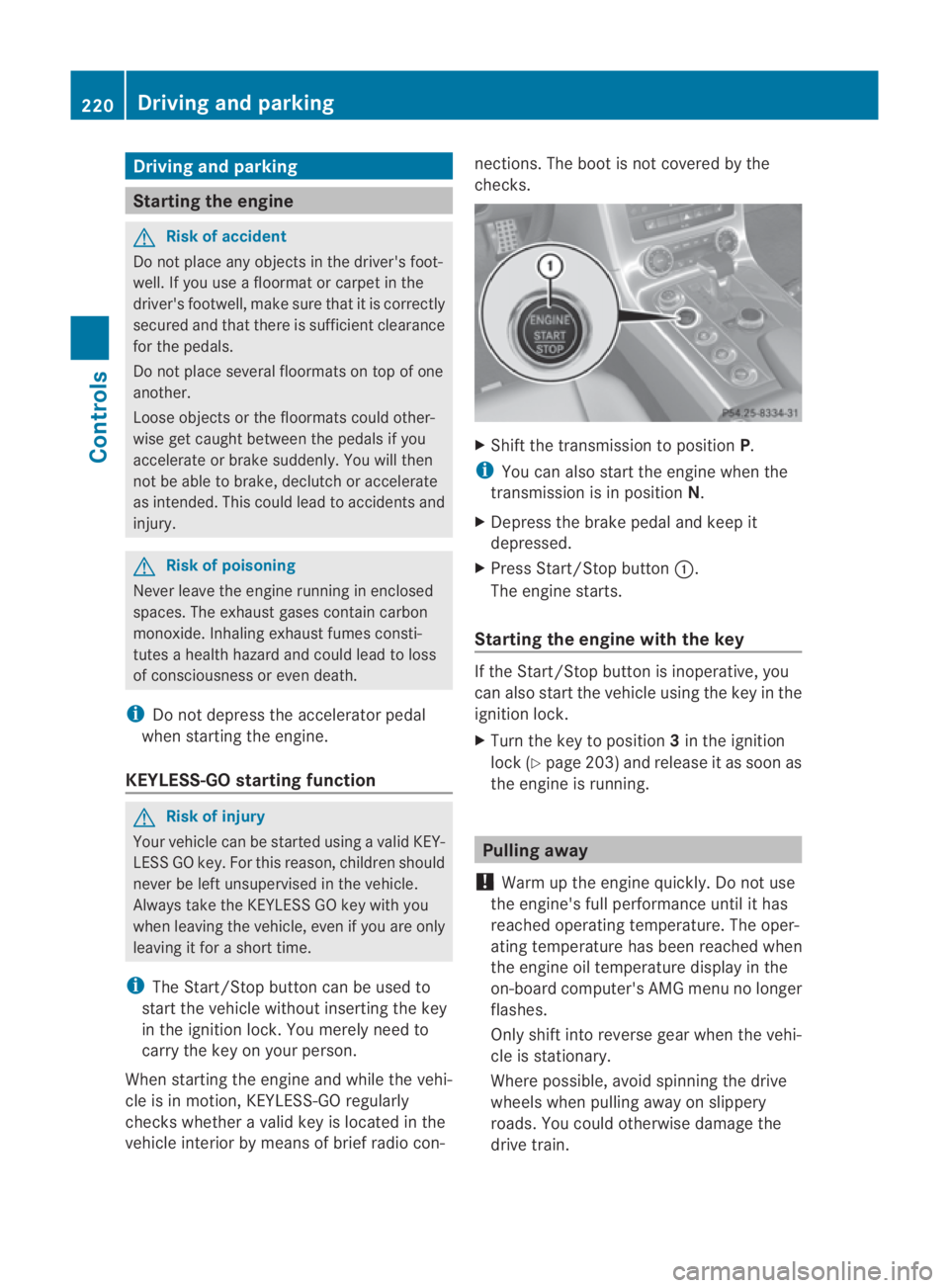
Shift the transmission to position P.
i You can also start the engine when the
transmission is in position N.
X Depress the brake pedal and keep it
depressed.
X Press Start/Stop button 0001.
The engine starts.
Starting the engine with the key If the Start/Stop button is inoperative, you
can also start the vehicle using the key in the
ignition lock.
X
Turn the key to position 3in the ignition
lock (Y page 203) and release it as soon as
the engine is running. Pulling away
! Warm up the engine quickly. Do not use
the engine's full performance until it has
reached operating temperature. The oper-
ating temperature has been reached when
the engine oil temperature display in the
on-board computer's AMG menu no longer
flashes.
Only shift into reverse gear when the vehi-
cle is stationary.
Where possible, avoid spinning the drive
wheels when pulling away on slippery
roads. You could otherwise damage the
drive train. 220
Driving and parkingControls
BA 197 ECE RE 2010/6a; 1; 2, en-GB
sabbaeu
Version: 3.0.3.6 2010-05-07T14:19:43+02:00 - Seite 220
Page 225 of 361
Applying the electric parking brake
X Push handle 0001.
The red 0009indicator lamp in the instru-
men tcluster lights up.
i The electric parking brake can also be
applied when the key is in position 0.
Releasing the electric parking brake man-
ually
X Pull handle 0001.
The red 0009indicator lamp in the instru-
men tcluster goes out.
The electric parking brake can only be
released when the ignition is switched on
using the Start/Stop button (Y page 202).
Releasing the electric parking brake auto-
matically
The electric parking brake is released auto-
matically when the following conditions are
simultaneously fulfilled:
R the engine is running.
R the transmission is in position Dor R.
R the bonnet is closed.
R your seat belt is fastened.
R you depress the accelerator pedal.
If the transmission is in position R, the boot
lid must be closed.
For the parking brake to be released auto-
matically if your seat belt is not fastened, the
following conditions must be fulfilled:
R the driver's door is closed.
R you shift out of Por you have previously
driven faster than 3 km/h.
Emergency braking with the electric park-
ing brake
The vehicle can also be braked during an
emergency using the electric parking brake.
X While driving, push the handle of the elec-
tric parking brake (Y page 221).
i The vehicle is braked as long as you keep
the handle of the electric parking brake
pressed. The longer the electric parking brake handle is depressed, the greater the
braking force.
The red 0009indicator lamp flashes in the
instrument cluster during braking. The
Release parking brake message appears
in the multifunction display and a warning
tone sounds.
When the vehicle has been braked to a stand-
still, the electric parking brake is engaged. Switching off the engine
G
Risk of accident
If the engine is not running, there is no power
assistance for the steerin gand brakes. Steer-
ing and braking then requires significantly
greater effort.
As a result, you might lose control of the vehi-
cle, cause an accident and injure yoursel fand
others.
Therefore, do not switch off the engine while
you are driving.
! Do not open the doors until the vehicle
has come to a standstill .Atlow speeds,
park position Pwill otherwise be engaged
automatically. This can damage the trans-
mission.
i Observe the display messages in the
instrument cluster.
Using KEYLESS-GO X
Use the button on the centre console to
shift the transmission to P.
X Press the Start/Stop button (Y page 202).
The engine stops and all the indicator
lamps in the instrument cluster go out
(Y page 229).
i If you switch the engine off with the trans-
mission in position Ror D, the transmission
automatically shifts to N.
If you set the selector lever to Nbefore
switching off the engine, the transmission
remains in Nfor approximately 30 minutes. 222
Driving and parkingControls
BA 197 ECE RE 2010/6a; 1; 2, en-GB
sabbaeu
Version: 3.0.3.6 2010-05-07T14:19:43+02:00 - Seite 222
Page 253 of 361
One or more segments light up as the vehicle
approaches an obstacle, depending on the
vehicle's distance from the obstacle. From
the sixth segment onwards, you will hear an
intermittent warning tone; from the seventh
segment onwards, you will hear a continuous
warning tone for a maximum of two seconds.
This indicates that you have now reached the
minimum distance.
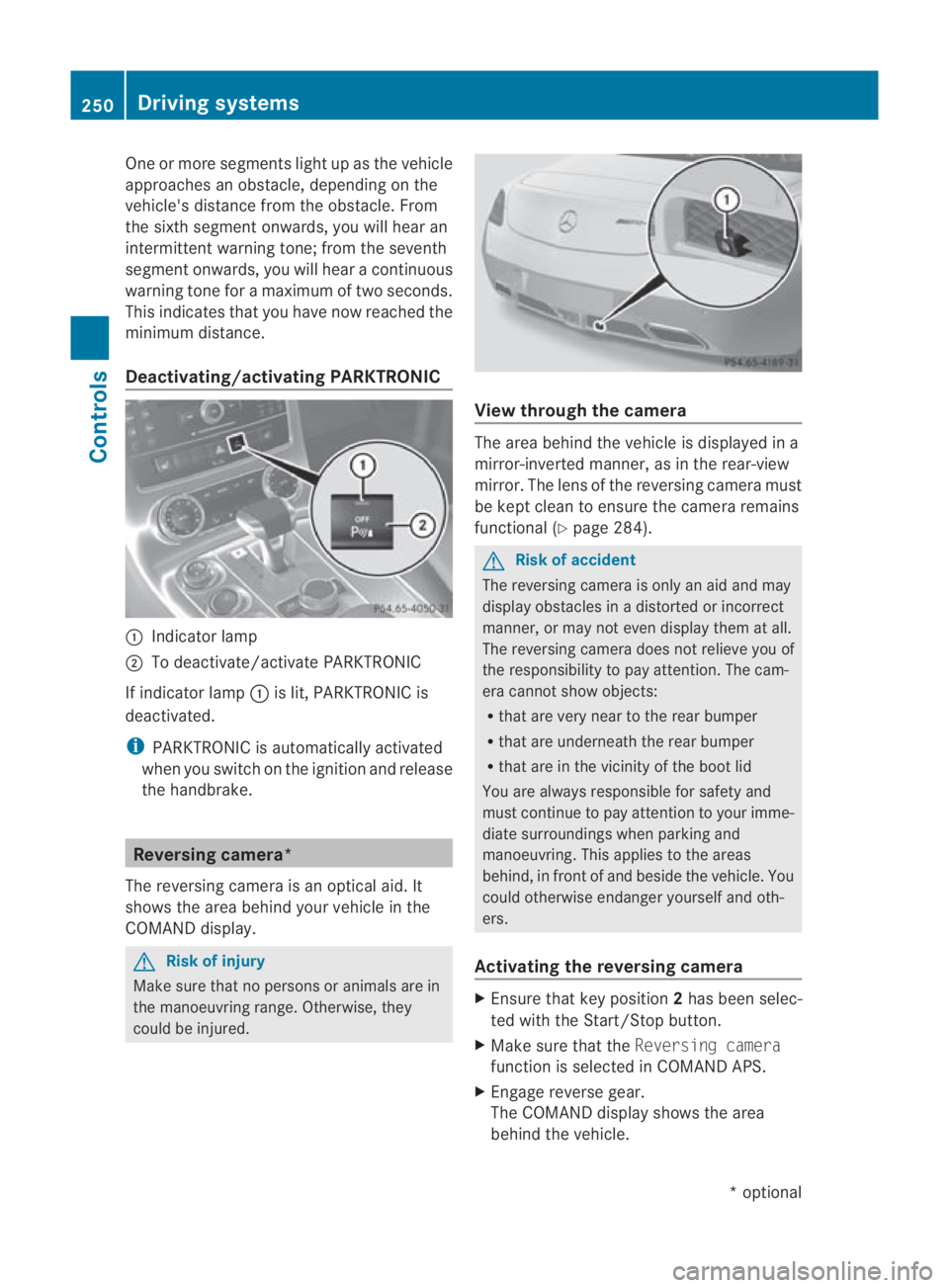
Deactivating/activating PARKTRONIC 0001
Indicator lamp
0002 To deactivate/activate PARKTRONIC
If indicator lamp 0001is lit, PARKTRONIC is
deactivated.
i PARKTRONIC is automatically activated
when you switch on the ignition and release
the handbrake. Reversing camera*
The reversing camera is an optical aid. It
shows the area behind your vehicle in the
COMAND display. G
Risk of injury
Make sure that no persons or animals are in
the manoeuvring range. Otherwise, they
could be injured. View through the camera
The area behind the vehicle is displayed in a
mirror-inverted manner, as in the rear-view
mirror. The lens of the reversing camera must
be kept clean to ensure the camera remains
functional (Y
page 284). G
Risk of accident
The reversing camera is only an aid and may
display obstacles in a distorted or incorrect
manner, or may not even display them at all.
The reversing camera does not relieve you of
the responsibility to pay attention. The cam-
era cannot show objects:
R that are very near to the rear bumper
R that are underneath the rear bumper
R that are in the vicinity of the boot lid
You are always responsible for safety and
must continue to pay attention to your imme-
diate surroundings when parking and
manoeuvring. This applies to the areas
behind, in front of and beside the vehicle. You
could otherwise endanger yourselfa nd oth-
ers.
Activating the reversing camera X
Ensure tha tkey position 2has been selec-
ted with the Start/Stop button.
X Make sure that the Reversing camera
function is selected in COMAND APS.
X Engage reverse gear.
The COMAND display shows the area
behind the vehicle. 250
Driving systemsControls
*o
ptional
BA 197 ECE RE 2010/6a; 1; 2, en-GB
sabbaeu
Version: 3.0.3.6 2010-05-07T14:19:43+02:00 - Seite 250
Page 261 of 361
or
R an ashtray* and a cigarette
lighter*(Y page 259) X
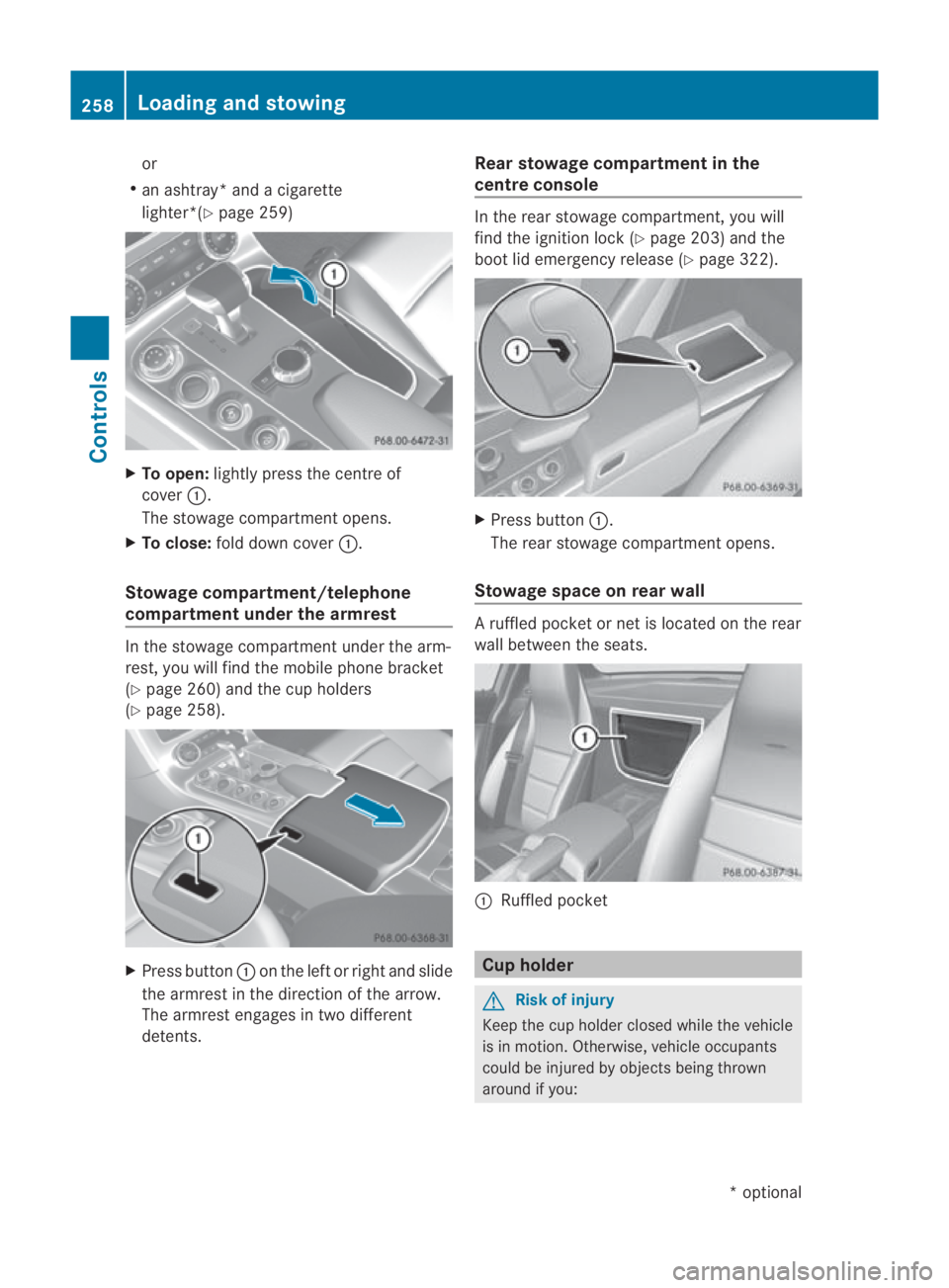
To open: lightly press the centre of
cover 0001.
The stowage compartment opens.
X To close: fold down cover 0001.
Stowage compartment/telephone
compartment under the armrest In the stowage compartment under the arm-
rest, you will find the mobile phone bracket
(Y page 260) and the cup holders
(Y page 258). X
Press button 0001on the left or right and slide
the armrest in the direction of the arrow.
The armrest engages in two different
detents. Rear stowage compartment in the
centre console In the rear stowage compartment, you will
find the ignition lock (Y
page 203) and the
boot lid emergency release (Y page 322). X
Press button 0001.
The rear stowage compartment opens.
Stowage space on rear wall A ruffled pocket or net is located on the rear
wall between the seats.
0001
Ruffled pocket Cup holder
G
Risk of injury
Keep the cup holder closed while the vehicle
is in motion .Otherwise, vehicle occupants
could be injured by objects being thrown
around if you: 258
Loading and sto
wingControls
*optional
BA 197 ECE RE 2010/6a; 1; 2, en-GB
sabbaeu
Version: 3.0.3.6 2010-05-07T14:19:43+02:00 - Seite 258
Page 265 of 361
If there is
arisk of entrapment, sto pretracting
the rear aerofoil. To do so, release the button.
The rear aerofoil extends again.
Never leave children unsupervised in the vehi-
cle. They could inadvertently retract the
extended rear aerofoil. Somebody could
become trapped.
! Do not enter an automatic car wash with
the rear aerofoil extended. Otherwise, the
rear aerofoil may be damaged.
Only extend the rear aerofoil in order to
wash it by hand. Retract it again when you
have finished cleaning it.
You can extend the rear spoiler manually at
speeds below 120 km/h.
X Close the boot lid.
X Select key position 2with the Start/Stop
button.
X Press button 0001.
The rear spoiler is extended.
Button 0001flashes until the rear spoiler has
extended and then lights up in red.
You can retract the rear spoiler manually at
speeds below 120 km/h.
X At speeds between 120 km/h and
80 km/h: briefly press button 0001.
Button 0001flashes until the rear spoiler has
retracted and then goes out.
X At speeds below 80 km/h: press and hold
button 0001until the rear spoiler is fully
retracted.
Button 0001flashes until the rear spoiler has
retracted and then goes out.
Rear spoiler retracts manually
appears in the display.
i If you release button 0001while retracting
the rear spoiler, it extends again automati-
cally. Garage door opener*
The remote control integrated in the rear-
view mirror allows you to operate up to three
differen tdoor and gate systems.
i The garage door opener is only available
for certain countries. Observe the legal
requirements in all countries concerned.
The HomeLink ®
garage door opener is
compatible with most European garage and
gate opener drives. More information on
HomeLink ®
and/or compatible products is
available from:
R any Mercedes-Benz Service Centre
R the HomeLink ®
hotline
(0) 08000 466 354 65 (free of charge) or
+49 (0) 6838 907-277 (charges apply)
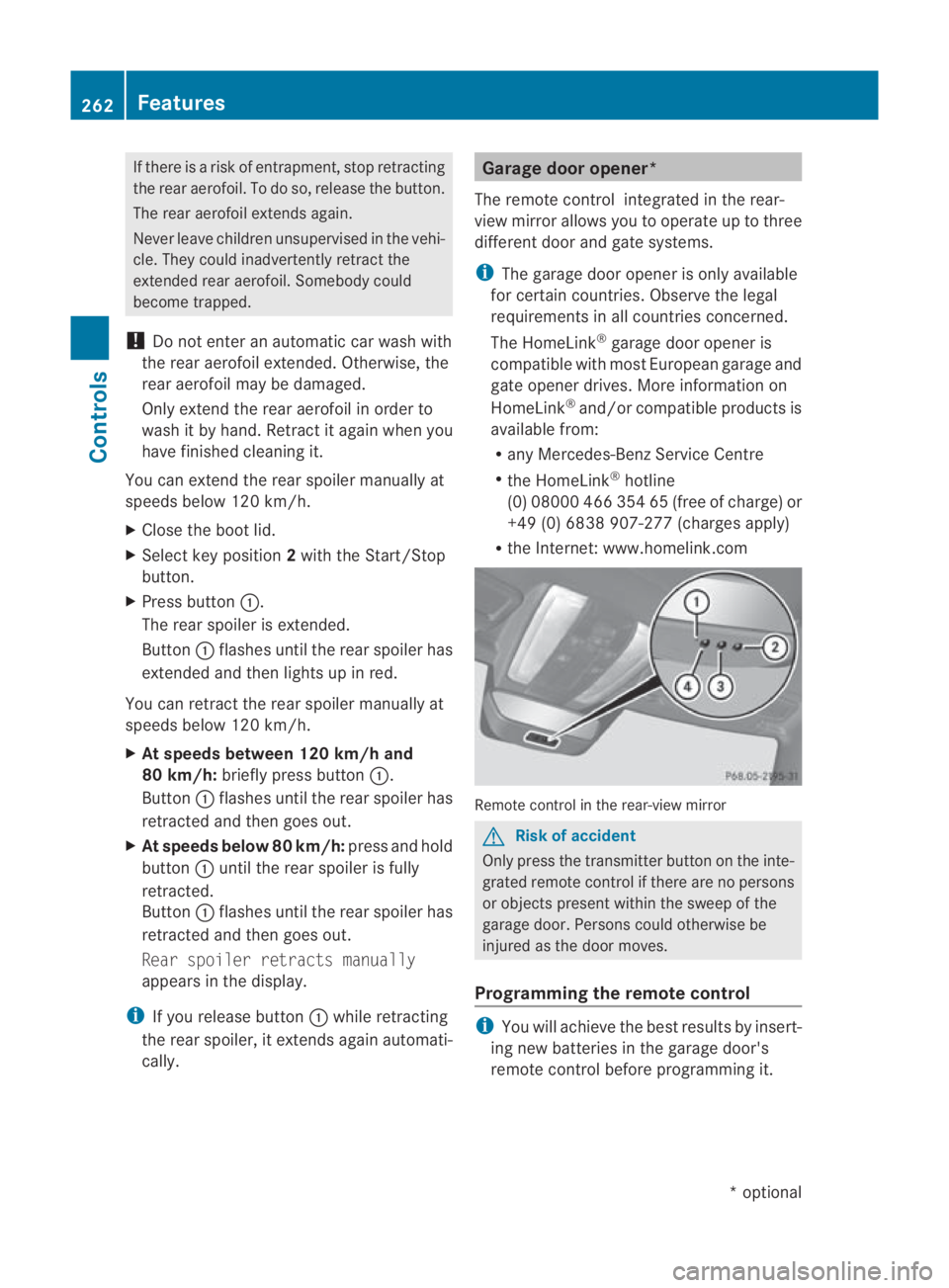
R the Internet: www.homelink.com Remote control in the rear-view mirror
G
Risk of accident
Only press the transmitter button on the inte-
grated remote control if there are no persons
or objects present within the sweep of the
garage door. Persons could otherwise be
injured as the door moves.
Programming the remote control i
You will achieve the best results by insert-
ing new batteries in the garage door's
remote control before programming it. 262
FeaturesControls
*o
ptional
BA 197 ECE RE 2010/6a; 1; 2, en-GB
sabbaeu
Version: 3.0.3.6 2010-05-07T14:19:43+02:00 - Seite 262
Page 267 of 361
Deleting the remote control memory
X
Selec tkey position 2with the Start/Stop
button (Y page 202).
X Press and hold transmitter buttons 0002
and 0014for approximately 20 seconds until
indicator lamp 0001flashes rapidly.
The memory is cleared.
i You should clear the remot econtrol mem-
ory before selling the vehicle. Charge maintenance socket*
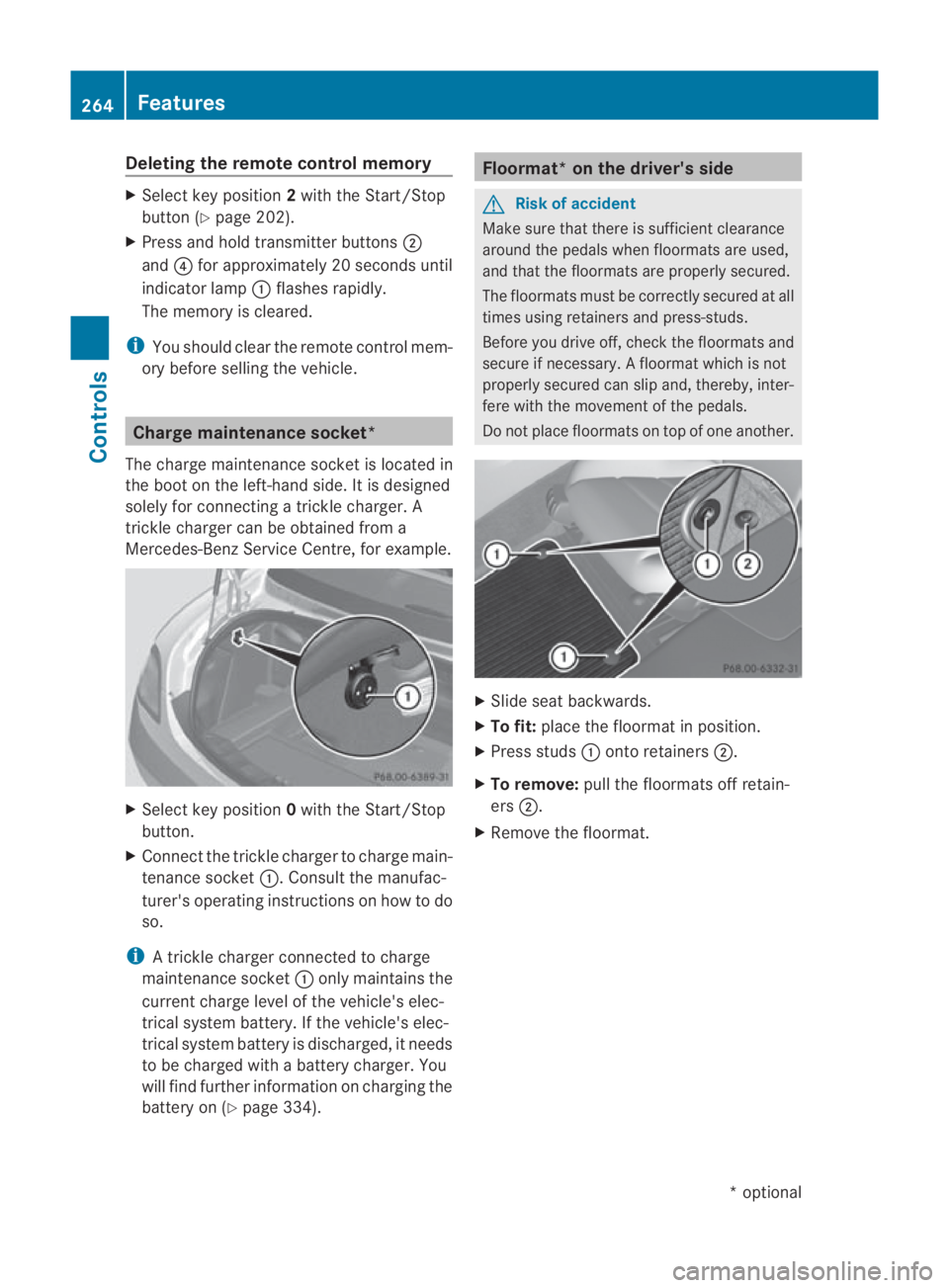
The charge maintenance socket is located in
the boot on the left-hand side. It is designed
solely for connecting a trickle charger. A
trickle charger can be obtained from a
Mercedes-Benz Service Centre, for example. X
Select key position 0with the Start/Stop
button.
X Connect the trickle charger to charge main-
tenance socket 0001. Consult the manufac-
turer's operating instructions on how to do
so.
i A trickle charger connected to charge
maintenance socket 0001only maintains the
current charge level of the vehicle's elec-
trical system battery. If the vehicle's elec-
trical system battery is discharged, it needs
to be charged with a battery charger. You
will find further information on charging the
battery on (Y page 334). Floormat* on the driver's side
G
Risk of accident
Make sure that there is sufficient clearance
around the pedals when floormats are used,
and that the floormats are properly secured.
The floormats must be correctly secured at all
times using retainers and press-studs.
Before you drive off, check the floormats and
secure if necessary. Afloormat which is not
properly secured can slip and, thereby, inter-
fere with the movemen tofthe pedals.
Do not place floormats on top of one another. X
Slide seat backwards.
X To fit: place the floormat in position.
X Press studs 0001onto retainers 0002.
X To remove: pull the floormats off retain-
ers 0002.
X Remove the floormat. 264
FeaturesControls
*o
ptional
BA 197 ECE RE 2010/6a; 1; 2, en-GB
sabbaeu
Version: 3.0.3.6 2010-05-07T14:19:43+02:00 - Seite 264
Page 291 of 361
Where will I find...?
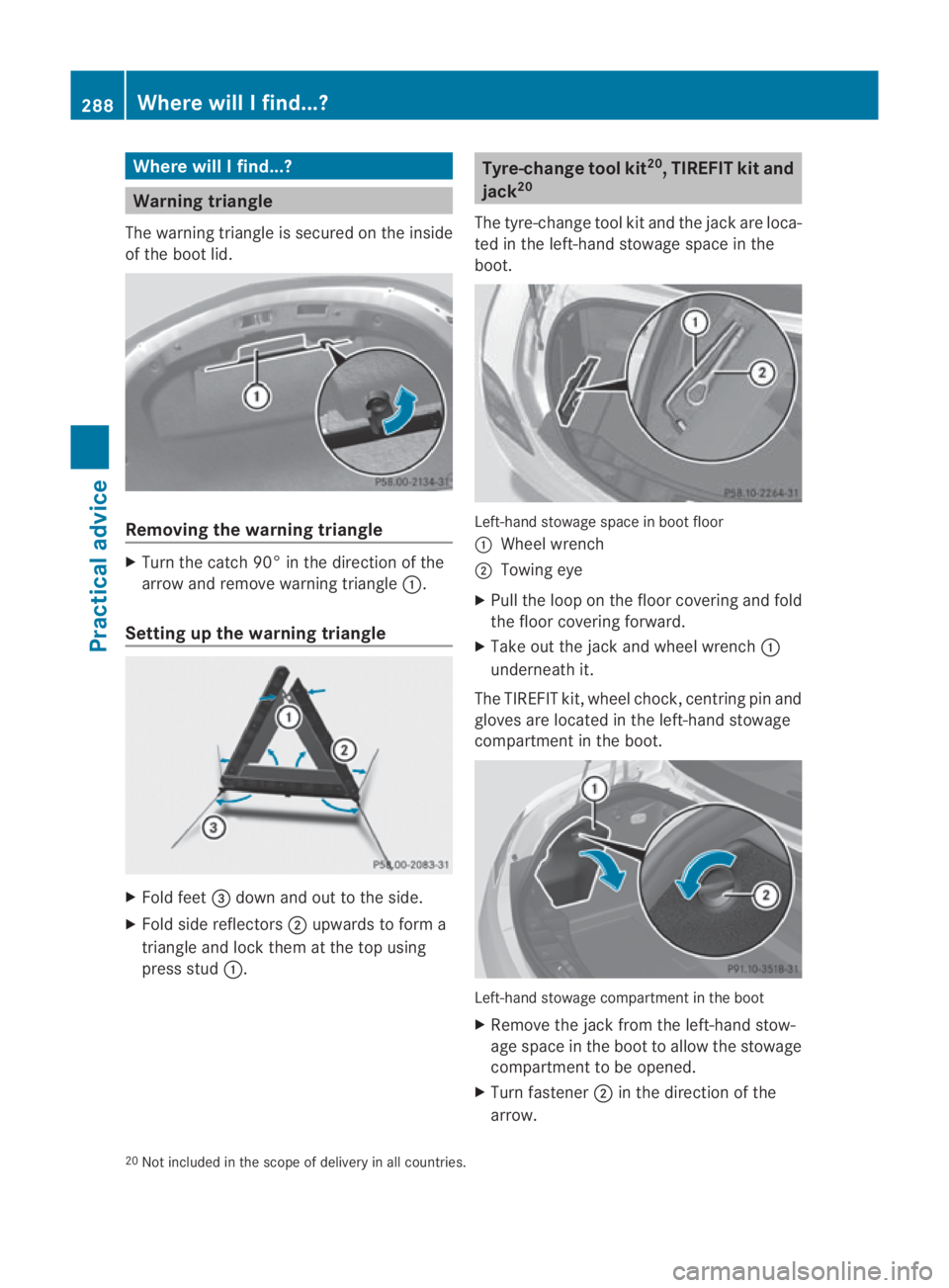
Warning triangle
The warning triangle is secured on the inside
of the boot lid. Removing the warning triangle
X
Turn the catch 90° in the direction of the
arrow and remove warning triangle 0001.
Setting up the warning triangle X
Fold feet 0015dow nand ou tto the side.
X Fold side reflectors 0002upwards to form a
triangle and lock them at the top using
press stud 0001. Tyre-change tool kit
20
, TIREFIT kit and
jack 20
The tyre-change tool kit and the jack are loca-
ted in the left-hand stowage space in the
boot. Left-hand stowage space in boot floor
0001
Wheel wrench
0002 Towing eye
X Pull the loop on the floor covering and fold
the floor covering forward.
X Take out the jack and wheel wrench 0001
underneath it.
The TIREFIT kit, wheel chock, centring pin and
gloves are located in the left-hand stowage
compartment in the boot. Left-hand stowage compartment in the boot
X
Remove the jack from the left-hand stow-
age space in the boot to allow the stowage
compartment to be opened.
X Turn fastener 0002in the direction of the
arrow.
20 Not included in the scope of delivery in all countries. 288
Where will I find...?Practical advice
BA 197 ECE RE 2010/6a; 1; 2, en-GB
sabbaeu Version: 3.0.3.6 2010-05-07T14:19:43+02:00 - Seite 288
Page 292 of 361
X
Open stowage compartment 0001.
X Remove the TIREFIT kit, wheel chock, cen-
tring pin and gloves. G
Risk of injury
The jack is designed only to raise and hold the
vehicle for a short time while a wheel is being
changed.
You must use stands if you are carrying out
work on the vehicle.
Make sure that the jack is placed on a firm,
non-slip, level surface. Do not use wooden
blocks or similaro bjects as a jack underlay.
Otherwise, the jack will not be able to achieve
its load-bearing capacity due to the restricted
height.
Do not start the engine at any time while a
wheel is being changed.
i When using the jack, you should also
observe the safety notes in the "Flat tyre"
section (Y page 325). Fire extinguisher*
i Have the fire extinguisher refilled after
each use and checked every one or two
years. It may otherwise fail in an emer-
gency.
Observe the legal requirements in all coun-
tries concerned.
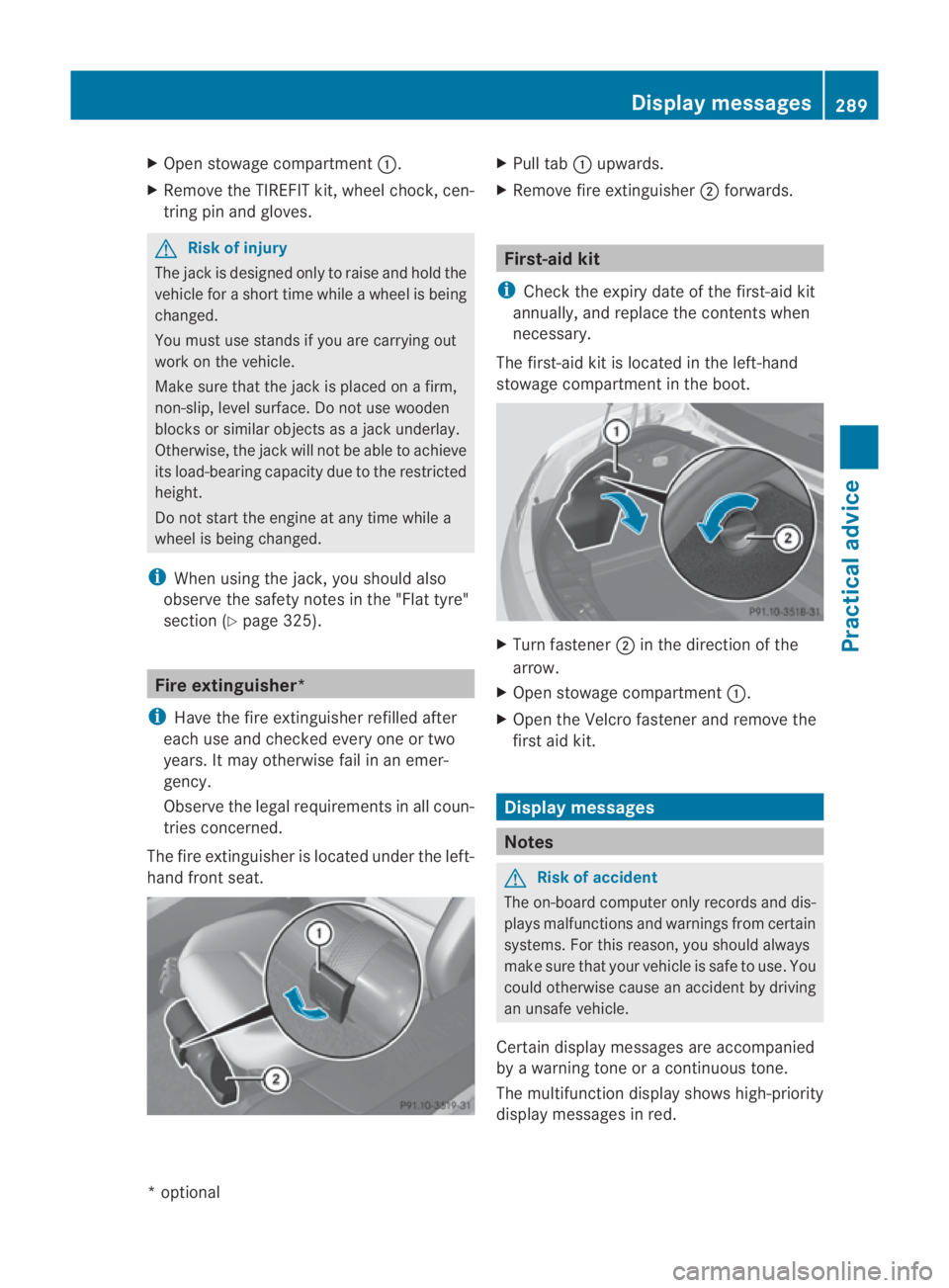
The fire extinguisher is located under the left-
hand front seat. X
Pull tab 0001upwards.
X Remove fire extinguisher 0002forwards. First-aid kit
i Check the expiry date of the first-aid kit
annually, and replace the contents when
necessary.
The first-aid kit is located in the left-hand
stowage compartment in the boot. X
Turn fastener 0002in the direction of the
arrow.
X Open stowage compartment 0001.
X Open the Velcro fastener and remove the
first aid kit. Display messages
Notes
G
Risk of accident
The on-board computer only records and dis-
plays malfunctions and warnings from certain
systems .For this reason, you should always
make sure that your vehicle is safe to use. You
could otherwise cause an accident by driving
an unsafe vehicle.
Certain display messages are accompanied
by a warning tone or acontinuous tone.
The multifunction display shows high-priority
display messages in red. Display messages
289Practical advice
*optional
BA 197 ECE RE 2010/6a; 1; 2, en-GB
sabbaeu
Version: 3.0.3.6 2010-05-07T14:19:43+02:00 - Seite 289 Z