interior lights MERCEDES-BENZ SLS COUPE 2010 Owners Manual
[x] Cancel search | Manufacturer: MERCEDES-BENZ, Model Year: 2010, Model line: SLS COUPE, Model: MERCEDES-BENZ SLS COUPE 2010Pages: 361, PDF Size: 6.32 MB
Page 8 of 361
Audio DVD
Stop function ................................. 174
Audio format
Setting (audio DVD mode )............. 178
Audio menu ........................................ 157
AUTO lights Display message ............................ 300
Automatic car wash ..........................281
Autostore ........................................... 163B
Back button ......................................... 60
Bang &Olufsen sound system ...........68
BAS (Brake Assist) ............................... 46
Battery Charging ........................................ 336
Checking (key )............................... 323
Check lamp (key )........................... 323
Disconnecting ................................ 336
Display message .................... 295, 303
Jump-starting ................................. 338
Maintenance (vehicle) .................... 334
Reconnecting ................................. 337
Removing/fitting ........................... 336
Vehicle battery .............................. 334
Belt force limiters
Activation ......................................... 35
Belt tensioners
Activation ......................................... 35
Belt warning ....................................... 212
Bird's-eye view .................................... 84
Bluetooth ®
Activating/deactivating ...................75
Authorising devices .........................76
Revoking authorisatio n.................... 77
Settings ........................................... 75
Bluetooth ®
telephones list .................76
Bonnet Bonnet catch ................................. 268
Display message ............................ 294
Opening/closing ............................ 267
Releas elever ................................. 268
Boot
Emergency release ........................322
Locking separatel y......................... 202
Opening ......................................... 202Boot lid
Display message ............................ 294
Opening/closing ............................ 201
Boot load (maximum) ........................ 352
Brake Assist see BAS ........................................... 46
Brake fluid .......................................... 351
Display message ............................ 299
Brake lamps
Adaptive .......................................... .46
Display message ............................ 301
Brake system
Display message ............................ 295
Bulbs
Licence plate lamp ......................... 324
see Lamp C
Call Accepting or rejecting ...................146
Ending ............................................ 146
Call (telephone)
Placing ........................................... 144
Calling up a fault
see Display message .....................289
Call lists ............................................. 142
Displaying details ........................... 143
Storing an entry which has not yet
bee nstore d................................... 143
Care
Automatic car wash .......................281
Care products ................................ 280
Cleaning agents ............................. 280
Dashboard ..................................... 284
Display ........................................... 284
Exterior .......................................... 281
Headlamps ..................................... 283
High-pressure cleaners ..................282
Interior ........................................... 284
Matt paintwork .............................. 282
Paintwork ...................................... 283
Plastic trim .................................... 285
Reversing camera ..........................284
Seat covers .................................... 285
Sensors ......................................... 284
Steering wheel boss ......................284
Tai lpipes ....................................... 284 Index
5 BA 197 ECE RE 2010/6a; 1; 2, en-GB
sabbae uV ersion: 3.0.3.6
2010-05-07T14:19:43+02:00 - Seite 5
Page 10 of 361
Dashboard
Cleaning ........................................ .284
see Cockpit
see Instrument cluster
Dashboard lighting
see Instrument lighting ..................239
Date format
Setting ............................................. 72
Daytime driving lights ......................215
Display message ............................ 302
Switching on/off (on-board com-
puter) ............................................. 238
Delaye dswitch-off
Exterio rlighting (on-board com-
puter )............................................. 239
Interior lighting (on-board com-
puter) ............................................. 239
Delete button ....................................... 61
Deleting Call lists ......................................... 142
Destination
Deleting ................................. 126, 127
Entering from the destination
memory ......................................... 101
Entering from the list of last des-
tinations ......................................... 103
Entering using the map ..................103
Saving ............................................ 125
Destination entry
Specia ldestination ........................ 106
Destination information ...................118
Destination input ................................. 92
destination memory ..........................123
Destination memory Deleting an entry ........................... 126
My address .................................... 123
Storing adestination ..................... 125
Digital speedometer .........................233
Dipped-beam headlamps Display message ............................ 300
Symmetrical ................................... 279
Disc
CD/DVD ........................................ 167
MP3 ............................................... 166
Display
Adjusting the brightness ..................72
see Multifunctio ndisplay ............... 231Display design
Setting ............................................. 72
Display messages ............................. 289
ASSYST PLUS service interval dis-
pla y................................................ 279
Symbo lmessages .......................... 293
Text messages ............................... 291
Distance recorder
Total distance recorde r.................. 233
Trip meter ...................................... 233
Door
Display message .................... 294, 303
Emergency unlocking ..................... 322
Not unlocking the front-
passenger door .............................. 200
Opening (from the inside) ..............201
Unlocking all (factory setting) ........200
Door control panel
Overview .......................................... 32
Drinks holder
see Cuph older
Drive program .................................... 224
Manual .......................................... .229
Driver's airbag ..................................... 38
Driver's knee airbag ............................39
Driver's seat position ........................ 213
Driving abroad ................................... 279
Driving safety systems .......................45
ABS .................................................. 46
ADAPTIVE BRAKE ............................. 49
Adaptive brake lamps ......................46
BAS .................................................. 46
EBV .................................................. 49
ESP ®
................................................ 47
Driving systems ................................ 243
Cruise control ................................ 243
Parktroni c...................................... 248
Reversing camera ..........................250
Speedtronic ................................... 245
Driving tips
Braking .......................................... 277
Driving abroad ............................... 279
Driving on wet road s...................... 278
Fording .......................................... 278
Winter ............................................ 276
DTMF tones
Sending ......................................... 146 Index
7 BA 197 ECE RE 2010/6a; 1; 2, en-GB
sabbae uV ersion: 3.0.3.6
2010-05-07T14:19:43+02:00 - Seite 7
Page 13 of 361
PASSENGER AIRBAG OFF
........42, 307
Reserve fuel ................................... 312
Seat bel t........................................ 311
SRS .......................................... 35, 309
THERMOTRONIC (malfunction) ......307
Indicator lamps
see Warning and indicator lamps ...308
Input restriction
Navigation ........................................ 80
Instrument cluster ............................229
On-board computer .......................238
Overview .......................................... 25
Instrument lighting ...........................239
Interior lighting Automatic control system ..............217
Delayed switch-off (on-board
computer) ...................................... 239
Emergency lighting ........................217
Manual control ............................... 217
Reading lamp ................................. 217
Interior motion sensor ........................50
Intermediate stop Deleting ......................................... 105
Entering ......................................... 104
iPod ®
Alphabetic track selection .............188
Connecting to Media Interface ......185
Device variants .............................. 184
Selecting a category/playlis t......... 187 J
Jack .................................................... .288
Operation ....................................... 329
Jump-starting ..................................... 338
Jump leads ..................................... 338
Junction
Entering ......................................... 100K
Key ...................................................... 200
Changing the battery .....................323
Checking the battery .....................323
Convenience closing feature .......... 219
Convenience opening feature ........219
Display message ............................ 303
Emergency key element ................. 321 Loss
............................................... 320
Malfunction ................................... .319
Modifying the programming ...........200
Unlocking/locking vehicle .............200
KEYLESS-GO
Changing the battery .....................323
Display message ............................ 303
Malfunction ................................... .319
Starting the engine ........................220
Keyp ositions
Key ................................................ 203
KEYLESS GO .................................. 202
Kickdown ........................................... 224 L
Lamps see Warning and indicator lamps ...308
Lane recommendations ....................113
Explanation .................................... 114
Licence plate lighting
Display message ............................ 301
Lighting
see Lights
Lights
Automatic headlamp mode ............215
Combination switch .......................214
Daytime driving lights ....................215
Dipped-bea mheadlamps ............... 215
Hazard warning lamps ...................216
Headlamp flasher ........................... 215
Ligh tswitc h................................... 214
Main-beam headlamps ................... 216
Parking lamps ................................ 215
Rea rfoglamp ................................. 216
Side lamps ..................................... 215
Switching surround lighting on/
off (on-board computer) ................. 239
Switching the daytime driving
lights on/off (on-board computer) .238
Switching the exterio rlighting
delayed switch-off on/off (on-
board computer )............................ 239
Turn signals ................................... 216
LIM indicator lamp
Cruise control ................................ 244
Variabl eSPEEDTRONIC .................24610
Index BA 197 ECE RE 2010/6a; 1; 2, en-GB
sabbae uV ersion: 3.0.3.6
2010-05-07T14:19:43+02:00 - Seite 10
Page 38 of 361
SRS (Supplemental Restraint System)
SRS reduces the risk of occupants coming
into contact with the vehicle's interior in the
event of an accident. It can also reduce the
effect of the forces to which occupants are
subjected during an accident.
SRS consists of:
R the 0018 SRS warning lamp
R airbags
R airbag control unit (with crash sensors)
R belt tensioners
R belt force limiters
The 0018 SRS warning lamp
SRS functions are checked regularly when
you switch on the ignition and when the
engine is running. Therefore, malfunctions
can be detected in good time.
The 0018 SRS warning lamp in the instrument
cluster lights up when the ignition is switched
on. It goes out no later than a few seconds
after the engine is started. G
Risk of injury
If SRS is malfunctioning, individual systems
may be activated unintentionally or may not
be triggered in the event of an accident with
a high rate of vehicle deceleration.
A malfunction has occurred if:
R the 0018 SRS warning lamp does not light
up when the ignition is switched on.
R the engine is running and the 0018SRS
warning lamp does not go out after a few
seconds.
R the engine is running and the 0018SRS
warning lamp lights up again.
In this case, have SRS checked immediately
at a qualified specialist workshop. Mercedes-
Benz recommends that you use a Mercedes-
Benz Service Centre for this purpose.
In particular, work relevant to safety or on
safety-related systems must be carried out at
a qualified specialist workshop. Triggering of belt tensioners, belt force
limiters and airbags In the event of a collision, the airbag control
unit evaluates important physical data rela-
ted to the vehicle deceleration or accelera-
tion during the first stage of the collision, such
as:
R
duration
R direction
R magnitude
Based on the evaluation of this data, the air-
bag control unit pre-emptively triggers the
belt tensioners in the first stage.
i The belt tensioners can only be triggered
if the seat belt tongues are correctly
engaged in the seat belt buckles.
If there is an even higher rate of vehicle decel-
eration or acceleration in a longitudinal direc-
tion, the front airbags are also deployed.
Your vehicle has adaptive, two-stage front air-
bags. The airbag control unit evaluates vehi-
cle deceleration or acceleration in the event
of a collision. When the first deployment
threshold is reached, the front airbag is filled
with enough propellant gas to reduce the risk
of injuries. The front airbag is fully deployed
if a second deployment threshold is exceeded
within a few milliseconds.
The belt tensioner and airbag triggering
thresholds are variable and are adapted to the
rate of deceleration or acceleration of the
vehicle. This process is pre-emptive in nature.
The triggering process must take place in
good time at the start of the collision.
i Not all airbags are deployed in an acci-
dent. The different airbag systems work
independently of each other.
How the airbag system works is deter-
mined by the severity of the accident detec-
ted, especially the vehicle deceleration or
acceleration, and the apparent type of acci-
dent:
R head-on collision
R side impact Occupant safety
35Safety
BA 197 ECE RE 2010/6a; 1; 2, en-GB
sabbaeu Version: 3.0.3.6 2010-05-07T14:19:43+02:00 - Seite 35 Z
Page 41 of 361
G
Risk of injury
The airbag's functionality can only be assured
if the following parts are not covered and no
badges or stickers are attached to them:
R padded steering wheel boss
R kneebag covers under the steering column
and glove compartment
R front-passenger front airbag cover
R outer sea tcushions (no tonbucket seats*)
R the top of the door frame in the area of the
side window G
Risk of injury
When an airbag deploys, a small amoun tof
powder is released. The powder may cause
short-term breathing difficulties to persons
suffering from asthma or other pulmonary
conditions.
In order to prevent potential breathing diffi-
culties, you should leave the vehicle as soon
as it is safe to do so. You can also open the
window to allow fresh air to enter the vehicle
interior. The powder generally does not con-
stitute a health hazard and does not indicate
that there is a fire in the vehicle. G
Risk of injury
The airbag parts are hot after the airbag has
been deployed. Do not touch them as you
could burn yourself.
Have the airbags replaced at a qualified spe-
cialist workshop. Otherwise, occupants are
not protected by the airbags in the event of
another accident.
Features specific to bucket seats*
Vehicles with bucket seats have no sidebags.
The additional passive safety offered by the
sidebag is not available as aresult. Therefore,
there is an increased risk of injury during side
impacts and if the vehicle overturns. In par-
ticular, the chest area may be affected. Direct
contact with the vehicle's interior compo-
nents and possibly external objects is more likely. Thus, there is an increased risk of
injury.
Front airbags
Fron
tairbags are designed to increase pro-
tection for the driver's and front-passenger's
head and chest. Driver's airbag
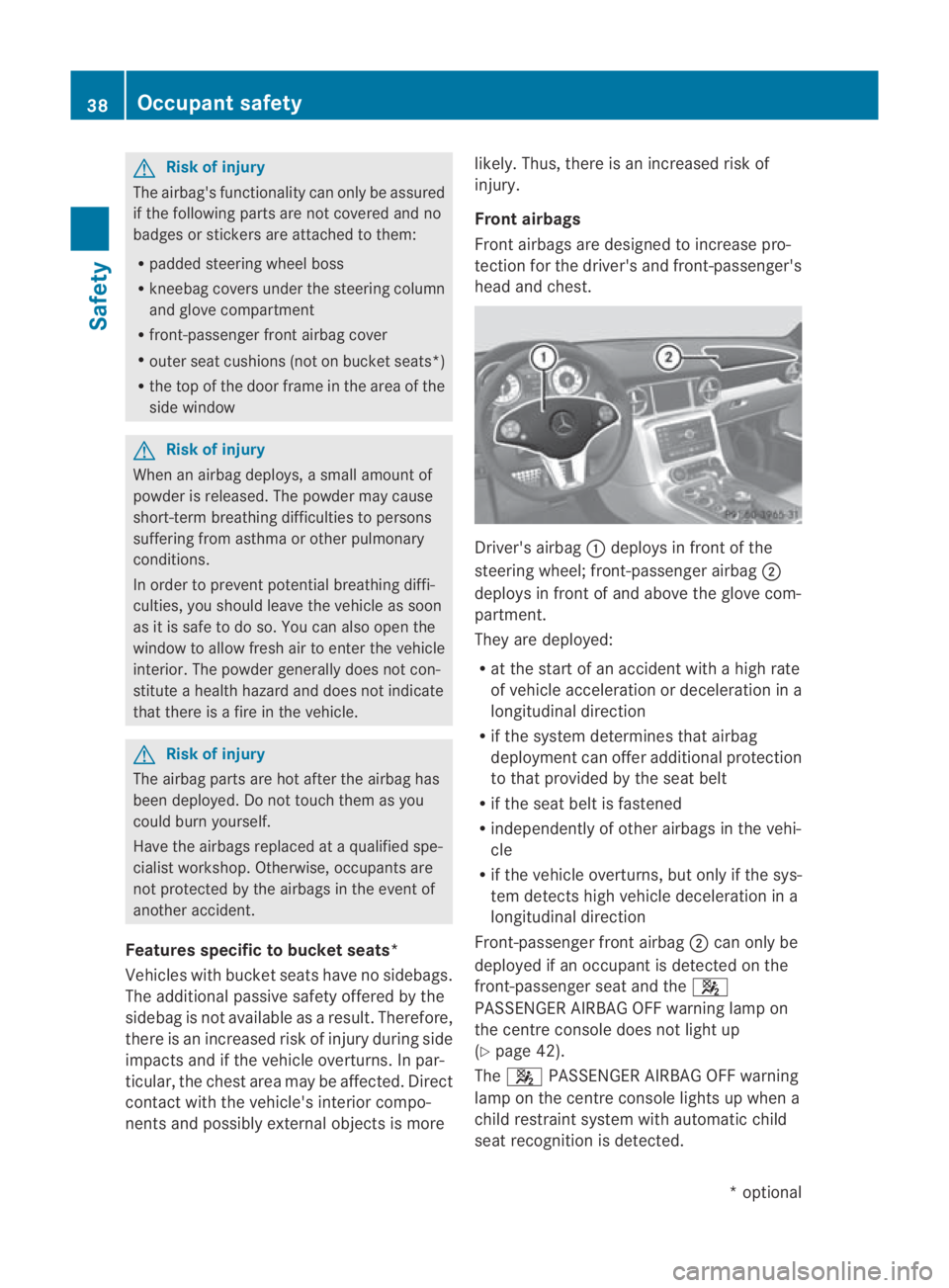
0001deploys in front of the
steering wheel; front-passenger airbag 0002
deploys in front of and above the glove com-
partment.
They are deployed:
R at the start of an accident with a high rate
of vehicle acceleration or deceleration in a
longitudinal direction
R if the system determines that airbag
deploymen tcan offer additional protection
to that provided by the seat belt
R if the seat belt is fastened
R independently of other airbag sinthe vehi-
cle
R if the vehicle overturns,b ut only if the sys-
te md etects high vehicle deceleration in a
longitudinal direction
Front-passenger fron tairbag 0002can only be
deployed if an occupant is detected on the
front-passenger seat and the 000A
PASSENGER AIRBAG OFF warning lamp on
the centre console does not light up
(Y page 42).
The 000A PASSENGER AIRBAG OFF warning
lamp on the centre console lights up when a
child restraint system with automatic child
seat recognition is detected. 38
Occupant safetySafety
*o
ptional
BA 197 ECE RE 2010/6a; 1; 2, en-GB
sabbaeu
Version: 3.0.3.6 2010-05-07T14:19:43+02:00 - Seite 38
Page 53 of 361
the vehicle is jacked up on one side, for exam-
ple.
Priming tow-away protection X
Loc kthe vehicle using the key.
Tow-away protection is primed after
approximately 30 seconds.
Deactivating tow-away protection Tow-away protection is automatically deacti-
vated when you unlock your vehicle using the
key.
To prevent a false alarm, deactivate tow-away
protection manually if your vehicle:
R is being transported
R is being loaded, e.g. onto a ferry or car
transporter
R is parked on a movable surface, e.g. in a
split-level garage X
Using the Start/Stop button, set to key
position 0.
or
X Remove the key from the ignition lock.
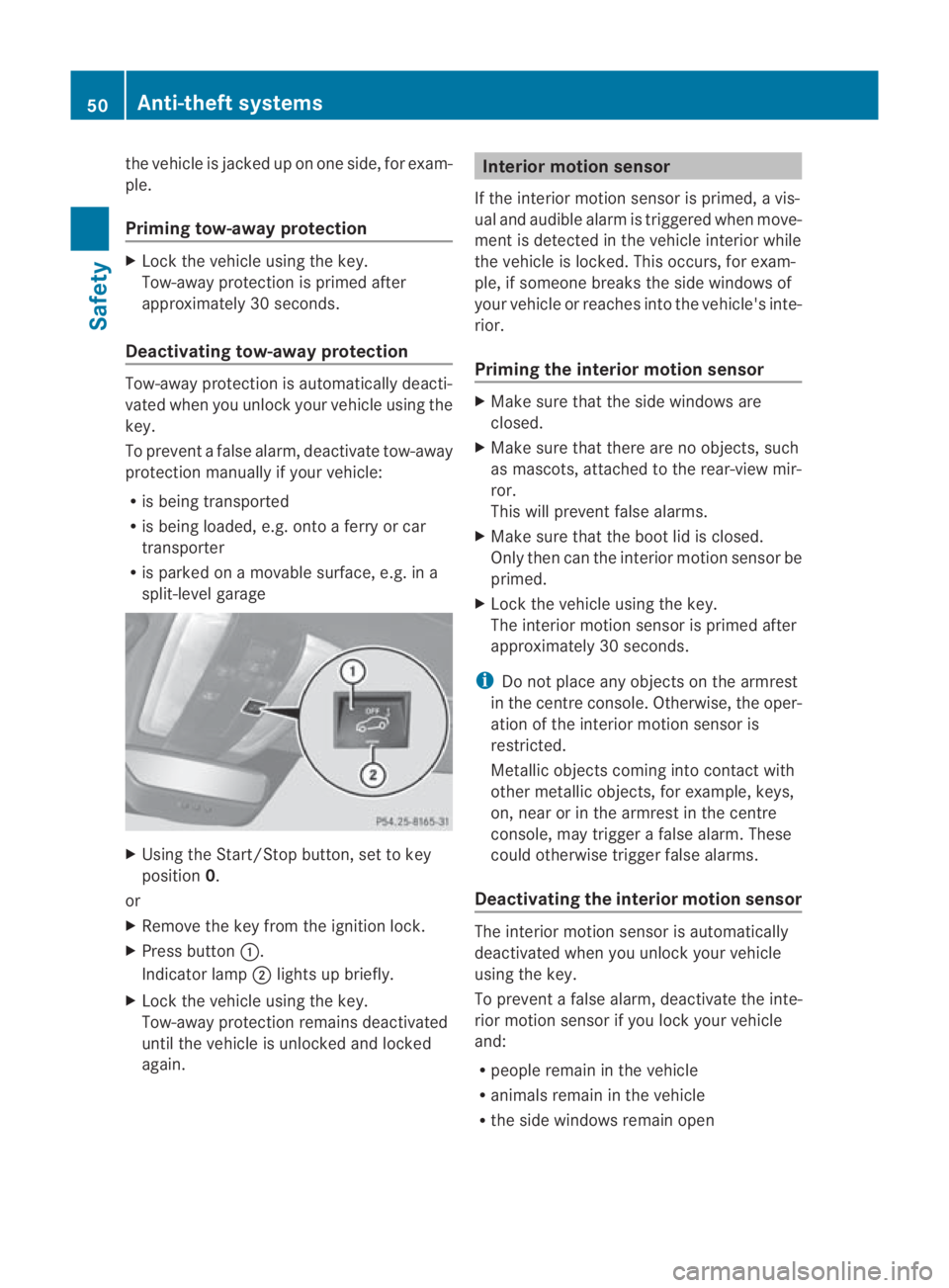
X Press button 0001.
Indicator lamp 0002lights up briefly.
X Lock the vehicle using the key.
Tow-away protection remains deactivated
until the vehicle is unlocked and locked
again. Interior motion sensor
If the interior motion sensor is primed, a vis-
ual and audible alarm is triggered when move-
ment is detected in the vehicle interior while
the vehicle is locked. This occurs, for exam-
ple, if someone breaks the side windows of
your vehicle or reaches into the vehicle's inte-
rior.
Priming the interior motion sensor X
Make sure that the side windows are
closed.
X Make sure that there are no objects, such
as mascots, attached to the rear-view mir-
ror.
This will prevent false alarms.
X Make sure that the boot lid is closed.
Only then can the interior motion sensor be
primed.
X Lock the vehicle using the key.
The interior motion sensor is primed after
approximately 30 seconds.
i Do not place any objects on the armrest
in the centre console. Otherwise, the oper-
ation of the interior motion sensor is
restricted.
Metallic objects coming into contact with
other metallic objects, for example, keys,
on, near or in the armrest in the centre
console, may trigger a false alarm. These
could otherwise trigger false alarms.
Deactivating the interior motion sensor The interior motion sensor is automatically
deactivated when you unlock your vehicle
using the key.
To prevent a false alarm, deactivate the inte-
rior motion sensor if you lock your vehicle
and:
R people remain in the vehicle
R animals remain in the vehicle
R the side windows remain open 50
Anti-theft systemsSafety
BA 197 ECE RE 2010/6a; 1; 2, en-GB
sabbaeu
Version: 3.0.3.6 2010-05-07T14:19:43+02:00 - Seite 50
Page 220 of 361
combination switch beyond the pressure
point in the direction of arrow 000Bor
000D(Y page 215).
The indicator lamp on the corresponding
side of the vehicle flashes.
The hazard warning lamps switch off auto-
matically afte rfull brak eapplication if the
vehicle reaches a speed of over 10 km/h
again. Headlamp cleaning system
The headlamps are cleaned automatically if
the "Wipe with washer fluid" function is oper-
ated 10 times while the lights are on and the
engine is running. The headlamps are cleaned
again every tenth time the windscreen is
wiped with washer fluid. When you switch off
the ignition, the automatic headlamp cleaning
system is reset and counting is resumed from
0. Interior lighting
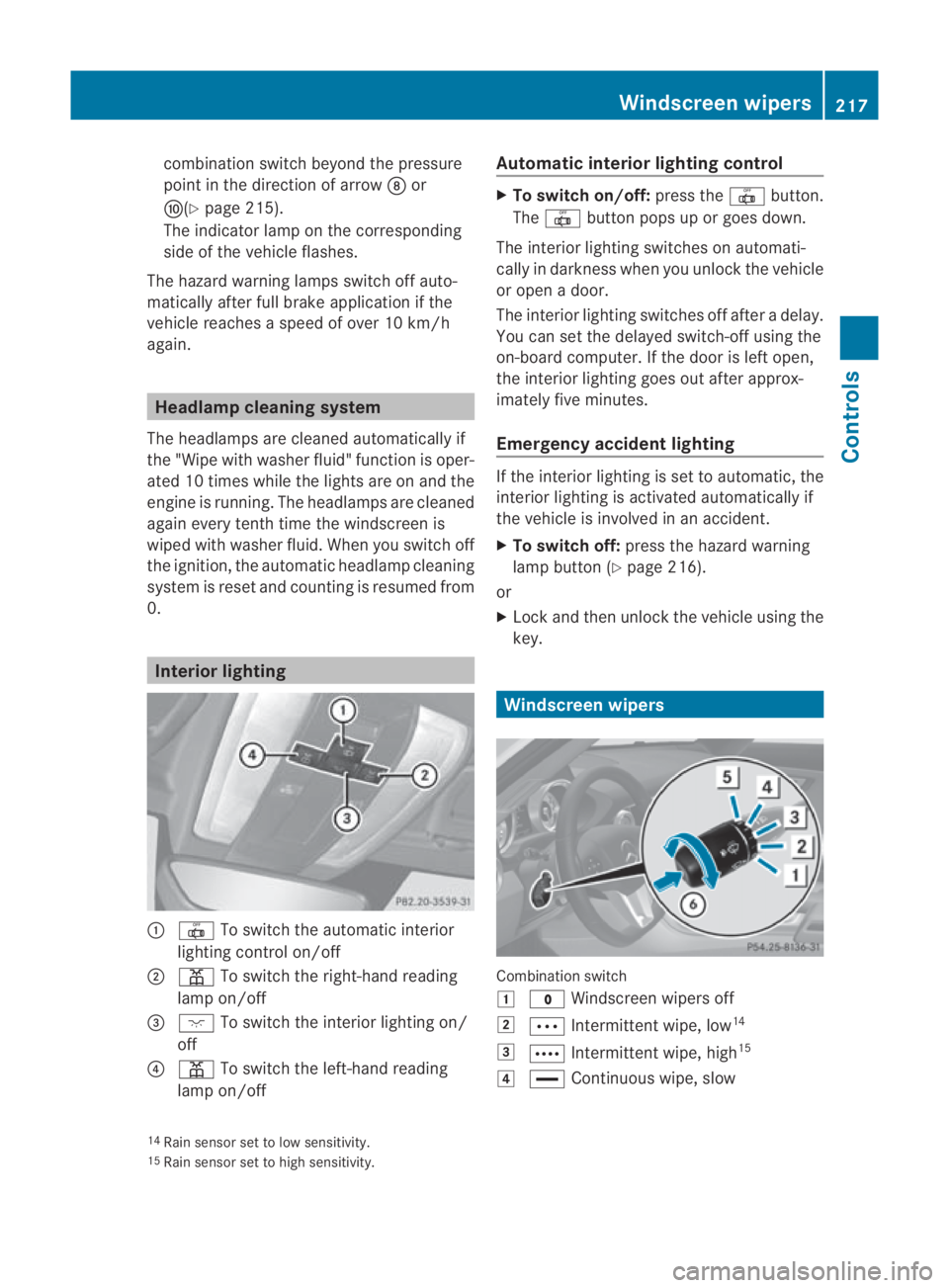
0001
0015 To switch the automatic interior
lighting control on/off
0002 0002 To switch the right-han dreading
lamp on/off
0015 0007 To switch the interior lighting on/
off
0014 0002 To switch the left-hand reading
lamp on/off Automatic interior lighting control X
To switch on/off: press the0015button.
The 0015 button pops up or goes down.
The interior lighting switches on automati-
cally in darkness when you unlock the vehicle
or open a door.
The interior lighting switches off after a delay.
You can set the delayed switch-off using the
on-board computer. If the door is left open,
the interior lighting goes out after approx-
imately five minutes.
Emergency accident lighting If the interior lighting is set to automatic, the
interior lighting is activated automatically if
the vehicle is involved in an accident.
X
To switch off: press the hazard warning
lamp button (Y page 216).
or
X Lock and then unlock the vehicle using the
key. Windscreen wipers
Combination switch
0003
0010 Windscreen wipers off
0004 000A Intermittent wipe, low 14
0005 000C Intermittent wipe, high 15
0006 0014 Continuous wipe, slow
14 Rain sensor set to low sensitivity.
15 Rain sensor set to high sensitivity. Windscreen wipers
217Controls
BA 197 ECE RE 2010/6a; 1; 2, en-GB
sabbaeu Version: 3.0.3.6 2010-05-07T14:19:43+02:00 - Seite 217 Z
Page 242 of 361
X
Press the 000Cor000F button to select the
Daytime driving lamps function.
You will see the selected setting: onor
off.
X Press the 000Abutton to save the setting.
Setting brightness for display and
switches
You can use the Brightness display/
switches function to set the brightness of
the multifunction display and the switches in
the vehicle.
X Press the 0008or000E button on the steer-
ing wheel to select the Settingsmenu.
X Press the 000Cor000F button to select the
Light submenu.
X Press the 000Abutton to confirm.
X Press the 000Cor000F button to select the
Brightness Display/switches func-
tion.
You see the selected setting Levelwith a
value of between 0 and 100.
X Press the 000Abutton to save the setting.
X Press 000Cor000F to increase or decrease
the brightness.
Activating or deactivating the surround
lighting and exterior lighting delayed
switch-off
The Surround lighting function allows you
to set whether the exterior lighting should
come on when it is dark:
R for 40 seconds after unlocking the vehicle
with the key
The exterior lighting switches off when you
open the driver’s door.
R for 15 seconds after switching off the
engine and closing the doors
If the engine is switched off and then none
of the doors are opened, or if an open door
is not closed, the exterior lighting goes out
after 60 seconds.
If you activate the Surround lighting func-
tion, the following light up: R
the side lamps
R the dipped-beam headlamps
R the licence plate lighting
X Press the 0008or000E button on the steer-
ing wheel to select the Settingsmenu.
X Press the 000Cor000F button to select the
LIGHT submenu.
X Press the 000Abutton to confirm.
X Press the 000Cor000F button to select the
Surround lighting: function.
You will see the selected setting: onor
off.
X Press the 000Abutton to save the setting.
Deactivating the delayed switch-off tempora-
rily:
X Select key position 0with the Start/Stop
button before leaving the vehicle.
X Select key position 2and then key position
0 again with the Start/Stop button
The delayed switch-off is deactivated.
Delayed switch-off is reactivated the next
time you start the engine.
Activating/deactivating the interior light-
ing delayed switch-off
If you select key position 0with the Start/
Stop button when the Light. delayfunc-
tion is activated, the interior lighting lights up
for approximately 20 seconds if it is dark.
X Press the 0008or000E button on the steer-
ing wheel to select the Settingsmenu.
X Press the 000Cor000F button to select the
LIGHT submenu.
X Press the 000Abutton to confirm.
X Press the 000Cor000F button to select the
Interior lighting delay sw. off:
function.
You will see the selected setting: onor
off.
X Press the 000Abutton to save the setting. On-board computer
239Controls
BA 197 ECE RE 2010/6a; 1; 2, en-GB
sabbaeu Version: 3.0.3.6 2010-05-07T14:19:43+02:00 - Seite 239 Z
Page 258 of 361
0013
directs the airflow to the entire vehicle
interior
0012 directs the airflow through the centre
and side air vents, as well as the demis-
ter vents
0011 directs the airflow through the footwell
and demister vents
X Select key position 2with the Start/Stop
button.
X Press the 0013button repeatedly until the
desired symbol appears in the display.
The indicator lamp in the 0001button goes
out. Automatic control is deactivated and
the air distribution is controlled according
to the selected setting. Setting the airflow
X Select key position 2with the Start/Stop
button.
X To increase/reduce: press the0015or
0014 button. Switching the MONO function on/off
You can use the mono function to adopt the
temperature and air distribution settings on
the driver's side for the front-passenger side.
X Press the 0005button.
The indicator lamp in the 0005button lights
up or goes out. Demisting the windscreen
i You should only select the demisting
function until the windscreen is clear again.
X Select key position 2with the Start/Stop
button.
X To activate: press the0009button.
The indicator lamp in the 0009button lights
up. The system automatically switches to the
following functions:
R cooling with air dehumidification on
R high airflow 16
R high temperature 16
R air distribution to the windscreen and
fron tside windows
R air-recirculation mode off
X To deactivate: press the0009button.
The indicator lamp in the 0009button goes
out. The previously selected settings come
into effect again. The cooling with air dehu-
midification function remains on. Air-recir-
culation mode remains deactivated.
or
X Press the 0001button.
The indicator lamp in the 0009button goes
out. Airflow and air distribution are set to
automatic mode.
or
X Turn controls 0001or000B clockwise or anti-
clockwise (Y page 252).
or
X Press the 0015or0014 button. Demisting the windows
Windows misted up on th einside X
Activate the cooling with air dehumidifica-
tion function.
X Activate automatic mode.
X If the windows continue to mist up, activate
the demisting function.
Windows misted up on the outside X
Activate the windscreen wipers.
X Press the 0013button repeatedly until the
0016 or0017 symbol appears in the dis-
play.
16 Depending on the outside temperature. Climate control
255Controls
BA 197 ECE RE 2010/6a; 1; 2, en-GB
sabbaeu Version: 3.0.3.6 2010-05-07T14:19:43+02:00 - Seite 255 Z
Page 264 of 361
fere with the vehicle's electronics and thereby
jeopardise the operating safety of the vehicle
and you rsafety. Therefore, you must only use
this equipment if it is correctly connected to
a separate reflection-free exterio raerial. G
Risk of injury
Excessive levels of electromagnetic radiation
may cause damage to your health and the
health of others. Using an exterior aerial takes
into account current scientific discussions
relating to the possible health risk posed by
electromagnetic fields.
To ensure optimum reception quality for
mobile phones in the vehicle, and to minimise
mutual influences between the vehicle elec-
tronics and mobile phones, Mercedes–Benz
recommends the use of an approved exterior
aerial. An exterior aerial conducts the elec-
tromagnetic fields generated by a wireless
device to the exterior of the vehicle; the field
strength within the vehicle interior is lower
than in a vehicle that does not have an exte-
rior aerial.
i There are various mobile phone brackets
that may be fitted to your vehicle; in some
cases, these are country-specific. You can
obtain these mobile phone brackets from a
qualified specialist workshop, e.g. a
Mercedes-Benz Service Centre.
The functions and services available when
you use the phone depend on your mobile
phone model and service provider.
X To insert amobile phone: open the tele-
phone compartment (Y page 258).
X Place the mobile phone bracket into the
pre-installed bracket; see the separate
mobile phone bracket installation instruc-
tions.
X Insert the mobile phone into the mobile
phone bracket; see the separate mobile
phone bracket installation instructions.
If the mobile phone is inserted in the mobile
phone bracket, you can speak to the person
you are calling using the hands-free system. You can operate the telephon
eusing the
001C and0015 buttons on the multifunction
steering wheel. You can operate other mobile
phone functions via the on-board computer
(Y page 236).
When you select key position 0with the
Start/Stop button, the mobile phone stays on
but you can no longer use the hands-free sys-
tem.
If you are making a call and you would like to
take the key out of the ignition lock, first
remove the mobile phone from the bracket.
Otherwise, the call will be ended. Rear spoiler
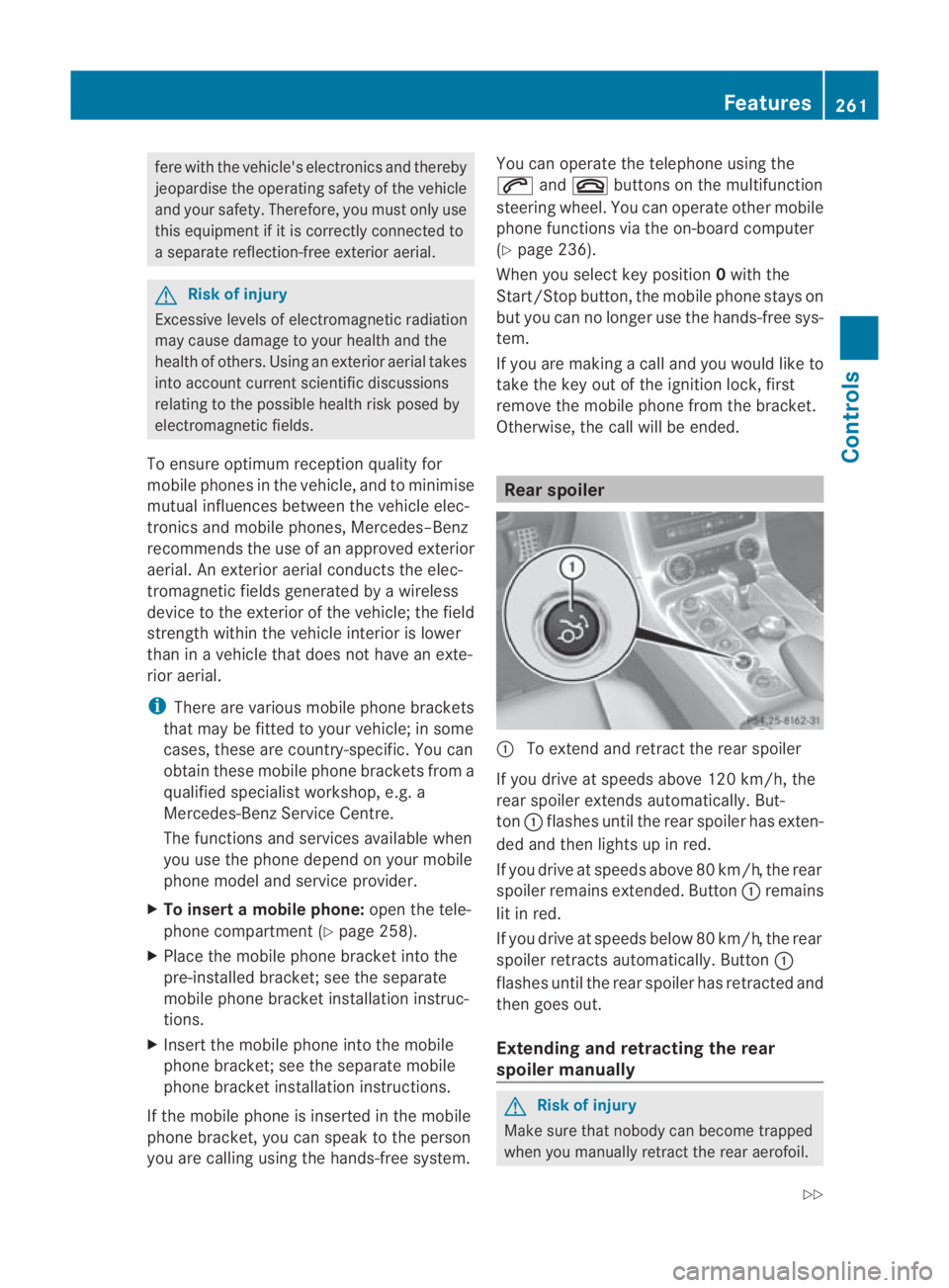
0001
To extend and retract the rear spoiler
If you drive at speeds above 120 km/h, the
rear spoiler extends automatically. But-
ton 0001flashes until the rear spoiler has exten-
ded and then lights up in red.
If you drive at speeds above 80 km/h, the rear
spoiler remains extended. Button 0001remains
lit in red.
If you drive at speeds below 80 km/h, the rear
spoiler retracts automatically. Button 0001
flashes until the rear spoiler has retracted and
then goes out.
Extending and retracting the rear
spoiler manually G
Risk of injury
Make sure that nobody can become trapped
when you manually retract the rear aerofoil. Features
261Controls
BA 197 ECE RE 2010/6a; 1; 2, en-GB
sabbaeu Version: 3.0.3.6 2010-05-07T14:19:43+02:00 - Seite 261 Z