tow MERCEDES-BENZ SLS COUPE 2010 Owners Manual
[x] Cancel search | Manufacturer: MERCEDES-BENZ, Model Year: 2010, Model line: SLS COUPE, Model: MERCEDES-BENZ SLS COUPE 2010Pages: 361, PDF Size: 6.32 MB
Page 11 of 361
DVD
Copy protection ............................. 167
Disc ............................................... 167
Selecting atrack ............................ 176
DVD audio
Operation (on-board computer) .....235
DVD playbac kconditions ................. 191
DVD video Operating (on-board computer) .....236
Dynamic route guidance ................... 119
Switching on/off ........................... 119
TMC/TMCPro ................................ 119E
EASY-ENTRY feature .........................207
Activating/deactivating (on-
board computer) ............................ 240
EASY-EXIT feature ............................. 207
Crash-responsive ........................... 207
EBD
Display message ............................ 299
EBV (electronic brake force distri-
bution) .................................................. 49
Electronic brake force distribution See EBV ........................................... 49
Electronic Stability Program
see ESP ®
Electronic Traction Support see ETS
Emergency call 999 or 112 ..............129
Emergency key element ...................321
Lost ............................................... 320
Emergency spare wheel
Inflating ......................................... 333
Stowing .......................................... 334
Technical data ............................... 355
Emergency unlocking
Boot ............................................... 322
Vehicle .......................................... .322
Engine
Running irregularl y......................... 315
Starting .................................. 202, 220
Starting problems ..........................315
Starting the engine with the key ....220
Starting with KEYLESS GO .............220
Starting with the key ..................... .220
Stopping ........................................ 222Engine diagnostics warning lamp
....310
Engine electronics .............................346
Malfunction ................................... .315
Engine number .................................. 349
Engine oil ........................................... 350
Capacities ...................................... 269
Checking the oil level (dipstick) .....269
Consumption ................................. 269
Display mes-
sag e....................................... 302, 303
Filler neck ...................................... 269
Temperature display (on-board
computer) ...................................... 241
Temperature gauge ........................ 229
Topping up ..................................... 269
Ensemble ........................................... 161
ESP ®
(Electronic Stability Pro-
gram) .................................................... 47
Activating/deactivating .............47, 48
AMG menu (on-board computer) ...241
Warning lamp ..................47, 308, 309
ETS (Electronic Traction Support) ...... 48
Example of operation ..........................66
Exterior lighting Delayed switch-off (on-board
computer) ...................................... 239
Exterior mirrors
Adjusting ....................................... 208
Anti-dazzle mode (automatic) ........209
Folding in/ou t(automatically) .......209
Folding in/ou t(electrically) ...........208
Folding in whe nlocking (on-board
computer) ...................................... 240
Malfunction ................................... .318
Parking position ............................. 209
Resetting ....................................... 209
Storing settings ............................. 210
Exterior view
Overview .......................................... 22
External authorisation ........................77
External data Deleting (convenience telephone) .137
Importing (convenience tele-
phone )................................... 136, 155
External devices (Media Interface)
Connecting .................................... 1848
Index BA 197 ECE RE 2010/6a; 1; 2, en-GB
sabbae uV ersion: 3.0.3.6
2010-05-07T14:19:43+02:00 - Seite 8
Page 17 of 361
S
Safety notes Using the telephone ....................... 128
Seat
Correct driver's seat position ........213
Storing settings ............................. 210
Seat adjustment ................................ 203
Seat belt Fastening ....................................... 210
Seat belts
Warning lamp ........................ 212, 311
Seat covers
Cleaning ......................................... 285
Seat heating ....................................... 205
Seats Adjusting (bucket seat) ..................205
Adjusting (electrically). ..................204
Adjusting (manually). .....................204
Seat adjustment ............................ 205
Seat ventilation
Malfunction indicator lamp ............307
Selector lever
Display message ............................ 291
Sensors
Cleaning ......................................... 284
Service indicator
see ASSYST PLUS service interval
displa y........................................... 279
Service products ............................... 349
Brake fluid ..................................... 351
Coolant .......................................... 351
Engine oil ....................................... 350
Fuel ................................................ 349
Windscreen washer fluid ................352
Settings
Calling up a stored setting .............210
Factory (on-board computer) .........240
On-board computer .......................238
SETUP (on-board computer) .............241
Sidebag ................................................ 39
Side windows Convenience closing ......................219
Convenience opening ....................219
Fault .............................................. 318
Opening/closing ............................ 218
Snow chains ...................................... 276
Socket ................................................ 260Sound
Switching on/off .............................. 67
Sound Modus ....................................... 68
Soun dsettings .................................... .67
Balance ............................................ 68
Special destination
Category ........................................ 106
Entering ......................................... 106
Entering using the map ..................110
Special destination icon
Setting ............................................. 85
Special destination list .....................109
Spee dlimiter
SPEEDTRONIC ............................... 245
Speedometer
Digital speedometer (on-board
computer) ...................................... 233
Selecting the display unit (on-
board computer) ............................ 238
Speedtronic ....................................... 245
Display message ............................ 293
Permanent ..................................... 247
Variabl e......................................... 246
SRS (Supplemental Restraint Sys-
tem) ...................................................... 35
Display message ............................ 304
Warning lamp ........................... 35, 309
Standard display (on-board com-
puter) ................................................. .233
Station list ......................................... 161
Station pre-sets ................................. 162
Stations Saving ............................................ 163
Tuning in ........................................ 161
Station search ................................... 162
Steering wheel Adjusting ....................................... 206
Adjusting (electrically). ..................207
Adjusting (manually). .....................206
Buttons (on-board computer) ......... 230
Storing settings ............................. 210
Steering wheel boss
Cleaning ......................................... 284
Steering wheel gearshift paddles ....227
Stowage compartment Rear stowage compartment ........... 258 14
Index BA 197 ECE RE 2010/6a; 1; 2, en-GB
sabbae uV ersion: 3.0.3.6
2010-05-07T14:19:43+02:00 - Seite 14
Page 18 of 361
Stowage compartments
...................257
Armrest (under) ............................. 258
Cuph older..................................... 258
Glove compartment .......................257
Telephone compartment ................258
Submenu (on-board computer)
Convenience .................................. 240
Factory setting ............................... 240
Instrument cluster .........................238
Lights ............................................ .238
Standard displa y............................ 233
Vehicle .......................................... .240
Sub-programmes (DAB) ....................165
Summer and standard time Switching ......................................... 73
Summer opening
see Convenience opening
Sun visor ............................................ 259
Supplemental Restraint System see SRS ........................................... 35
See SRS ........................................... 35
Surround lighting
Switching on/off (on-board com-
puter) ............................................. 239
Switching off the alarm
ATA .................................................. 49
Syste mlanguage
Setting ............................................. 78
Syste mmenu....................................... 71
Syste msettings
Menu overview ................................ .71T
Tail lamps Display message ............................ 301
Tail pipes
Cleaning ......................................... 284
Tank
see Fuel tank
Tank capacity .................................... 349
Technical data ................................... 352
Emergency spare wheel .................355
Telephone
Accepting/ending call ...................144
Accepting or rejecting a waiting
call ................................................. 146
Ending an active call ......................146Entering phone numbers ................ 145
Incoming call
................................. 144
Outgoing call ................................. 144
Reception and transmission vol-
ume ............................................... 135
see Mobile phone .......................... 236
Sending DTMF tones ..................... .146
Single call ...................................... 145
Switching hands-free microphone
on/off ............................................ 146
Telephone basic menu
Bluetooth interface ........................132
Convenience telephony .................134
Telephone compartment ..................258
Telephone mode Redialling ....................................... 145
Telephone number
Entering ......................................... 144
Temperature
Engine oil ....................................... 229
Engine oil (on-board computer) ...... 241
Outside temperature ..................... .230
Transmissio noil (on-board com-
puter )............................................. 241
Text message (SMS) (convenience
telephone)
Calling the sende r.......................... 148
Deleting ......................................... 149
Incoming ........................................ 147
Read-aloud function .......................148
Reading .......................................... 148
Storing the sende rinthe address
book ...................................... 148, 149
THERMOTRONIC
Malfunction indicator lamp ............307
Tightening torque .............................. 332
Time Lap time (on-board computer) .......241
Setting ............................................. 72
Time format
Setting ............................................. 72
Timer (on-board computer) ..............241
Time zone Setting ............................................. 73
TIREFIT kit
Using ............................................. 326
TMCPro ............................................... 119 Index
15 BA 197 ECE RE 2010/6a; 1; 2, en-GB
sabbae uV ersion: 3.0.3.6
2010-05-07T14:19:43+02:00 - Seite 15
Page 19 of 361
Tone settings
Trebl eand bass ............................... 68
Total distance recorder ....................233
Tow-away protection ..........................49
Towing ........................................ 339, 341
Towing eye Fitting ............................................ 341
Removing ....................................... 341
Town
Entering ........................................... 94
Traffic announcements on ...............164
Traffic jam function ........................... 117
Traffic Programme Switching traffic announcements
on/off ............................................ 164
Transferring acall (convenience
telephone) .......................................... 146
Transmission oil Temperature gauge (on-board
computer) ...................................... 241
Transmission output (maximum)
Telephone/two-way radio ..............347
Transport (vehicle) ............................341
Trim strips Cleaning ......................................... 285
Trip computer
On-board computer .......................232
Trip meter .......................................... 233
Resetting (on-board computer) ......234
True Image™ ........................................ 68
Turn signal Display message ............................ 300
Two-way radio
Installatio n..................................... 347
Type identification plate
see Vehicle identification plate ......348
Tyre grip ............................................. 278
Tyre pressure ..................................... 272
Calling up (on-board computer) .....273
Display message ............................ 304
Tyre pressure monitor
Warning lamp ................................. 311
Tyres
Direction of rotatio n...................... 272
General notes ................................ 270
Technical data ............................... 354
Tyre tread .......................................... .272 U
Unladen weight ................................. 352
Unlocking Emergency unlocking ..................... 322
Updating
Map software ................................... 89
Upshift indicator ............................... 229
USB devices Connecting to the Media Inter-
face ............................................... 184
Folders and playlists ......................187
Using the telephone ..........................144
Multi-function steering wheel ..........62 V
Variable Speedtronic ........................246
vCards Receiving ....................................... 137
Vehicle
Emergency unlocking ..................... 322
Individual settings (on-board com-
puter) ............................................. 238
Leaving parked up .........................321
Towing ........................................... 341
Transporting .................................. 341
Unlocking (key ).............................. 200
Vehicle battery .................................. 334
Vehicle dimensions ...........................352
Vehicle electronics ...........................346
Vehicle identification number
(VIN) ................................................... 348
Vehicle identification plate ..............348
Vehicle position Saving ...................................... 83, 127
Vehicle tool kit .................................. 288
Vehicle weights ................................. 352
Video DVD Fast forward/rewind ..................... .194
Operation ....................................... 190
Pause function ............................... 195
Picture settings .............................. 195
Selecting a film/title ..................... .195
Selecting a scene/chapter ............195
Stop function ................................. 194
Video mode
Automatic picture shutoff ..............190 16
Index BA 197 ECE RE 2010/6a; 1; 2, en-GB
sabbae uV ersion: 3.0.3.6
2010-05-07T14:19:43+02:00 - Seite 16
Page 33 of 361
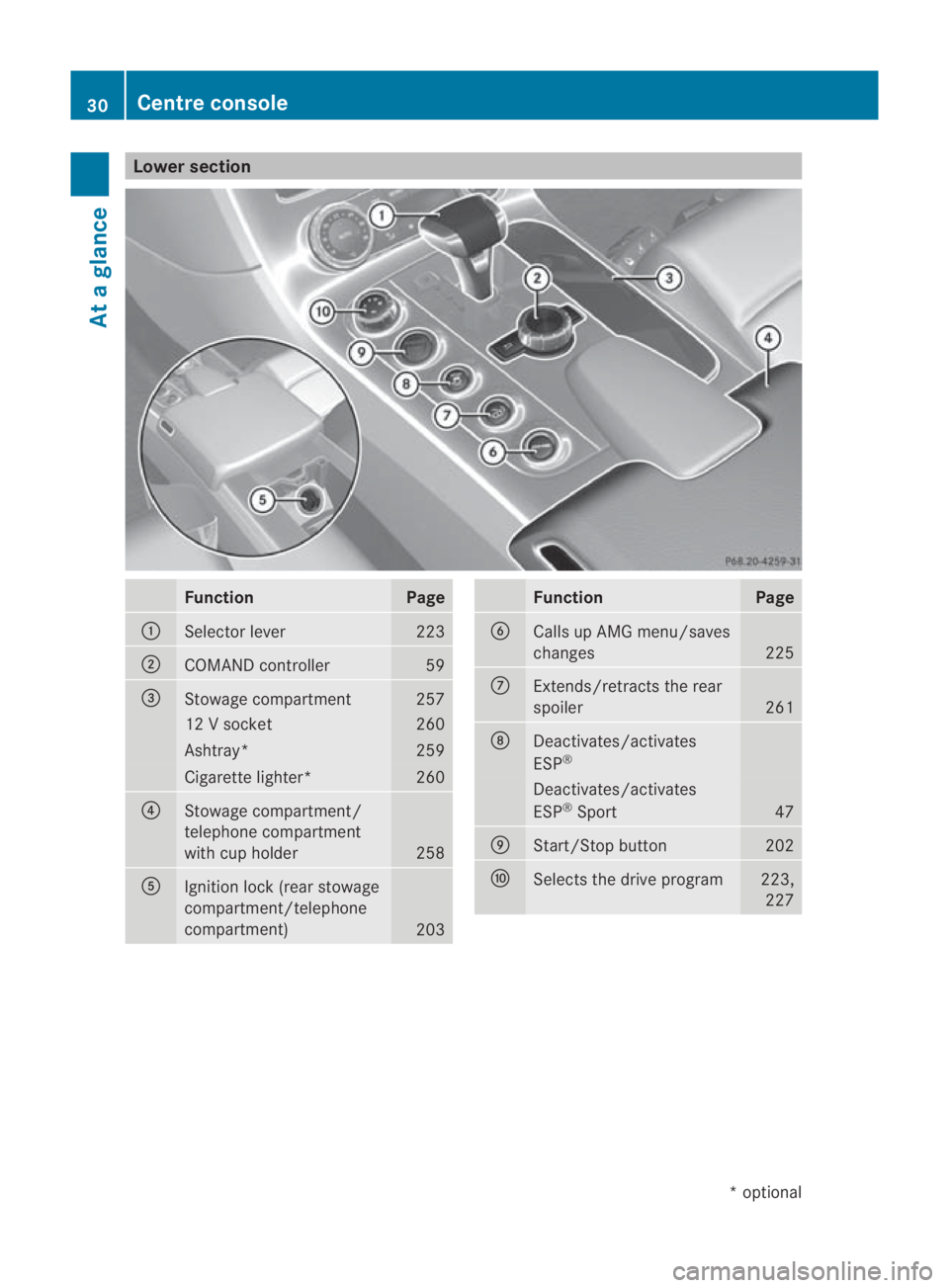
Lower section
Function Page
0001
Selector lever 223
0002
COMAND controller 59
0015
Stowage compartment 257
12 V socket 260
Ashtray* 259
Cigarette lighter* 260
0014
Stowage compartment/
telephone compartment
with cup holder
258
0012
Ignitio
nlock (rear stowage
compartment/telephone
compartment) 203 Function Page
0013
Calls up AMG menu/saves
changes
225
000A
Extends/retracts the rear
spoiler
261
000B
Deactivates/activates
ESP
® Deactivates/activates
ESP
®
Sport 47
000C
Start/Stop button 202
000D
Selects the drive program 223,
227 30
Centre consoleAt a glance
*o
ptional
BA 197 ECE RE 2010/6a; 1; 2, en-GB
sabbaeu
Version: 3.0.3.6 2010-05-07T14:19:43+02:00 - Seite 30
Page 34 of 361
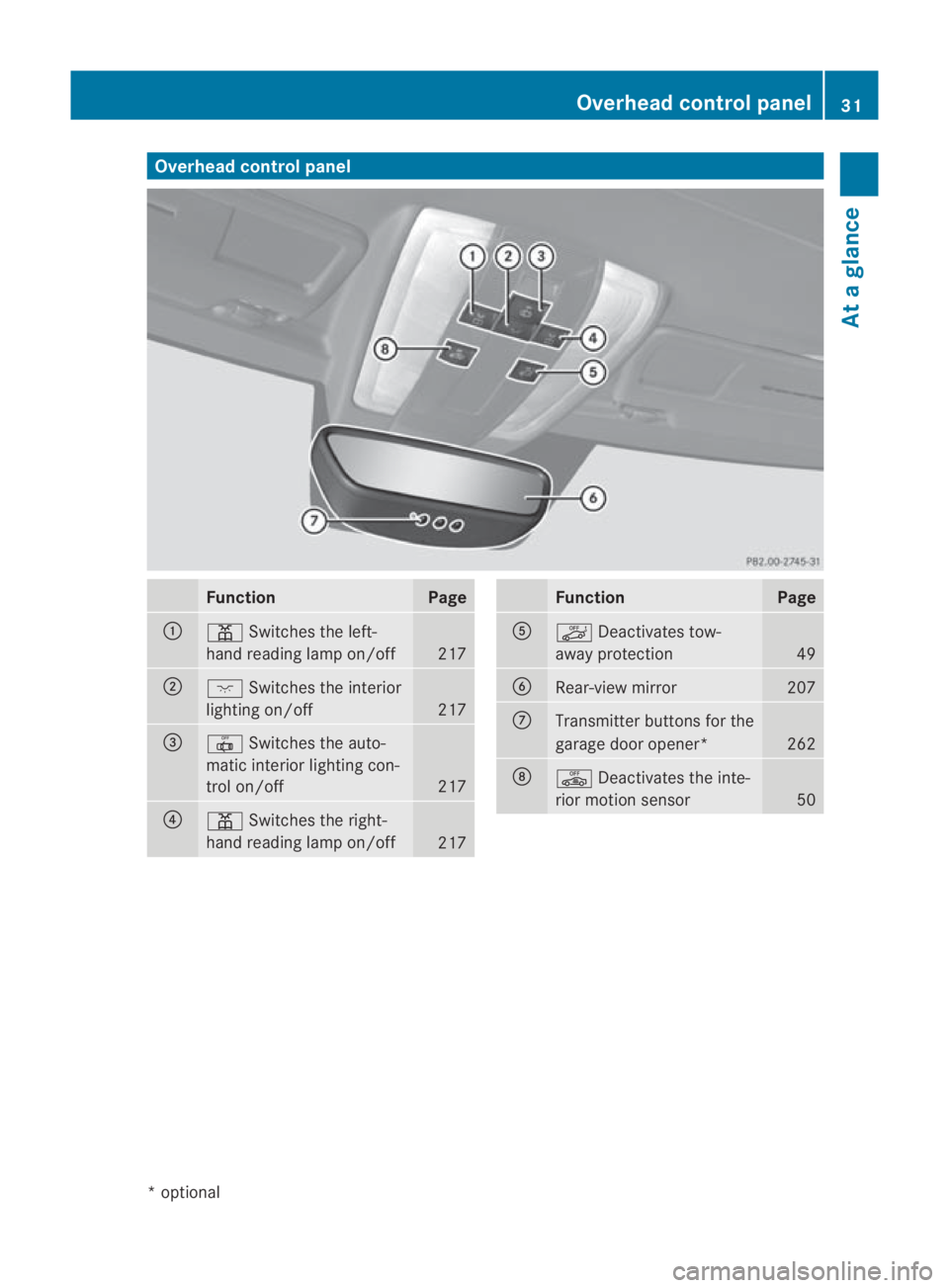
Overhea
dcontrol panel Function Page
0001
0002
Switches the left-
hand reading lamp on/off 217
0002
0007
Switches the interior
lighting on/off 217
0015
0015
Switches the auto-
matic interior lighting con-
trol on/off 217
0014
0002
Switches the right-
hand reading lamp on/off 217 Function Page
0012
0004
Deactivates tow-
away protection 49
0013
Rear-view mirror 207
000A
Transmitter buttons for the
garage door opener*
262
000B
0003
Deactivates the inte-
rior motion sensor 50Overhea
dcontrol panel
31At a glance
*optional
BA 197 ECE RE 2010/6a; 1; 2, en-GB
sabbaeu Version: 3.0.3.6 2010-05-07T14:19:43+02:00 - Seite 31
Page 37 of 361
Occupant safety
Notes on occupant safety
Seat belts, together with belt tensioners, belt
force limiters and airbags, are complemen-
tary, coordinated restraint systems. They
reduce the risk of injury in specific, pre-
defined types of acciden tsituations and
thereby increase occupant safety. However,
seat belts and airbags generally do not pro-
tec tagainst objects penetrating the vehicle
from the outside.
To ensure that the restraint systems can
deliver their full potential protection, make
sure that:
R the seat is adjusted properly
(Y page 203)
R the seat belt has been fastened properly
(Y page 210)
R the airbags can inflate unrestricted if
deployed (Y page 37)
R the steering wheel is adjusted properly
(Y page 206)
R the restraint systems have not been modi-
fied
i An airbag increases the protection of
vehicle occupants wearing a seat belt.
However, airbags are only an additional
restraint system which complements, but
does not replace, the seat belt. All vehicle
occupants must wear their seat belt cor-
rectly at all times, even if the vehicle is
equipped with airbags. This is because –on
the one hand –airbags are not deployed in
all types of accident, as in some situations
airbag deploymen twould not increase the
protection afforded to vehicle occupants,
provided they are wearing their seat belt
correctly. On the other hand, airbag deploy-
ment only provides increased protection if
the seat belt is worn correctly because: R
the seat belt helps to keep the vehicle
occupant in the best position in relation
to the airbag.
R for example, in a head-on collision, the
seat belt can more adequately prevent
the occupant from being propelled
towards the point of the impact, and is
thus better suited to prevent injury.
Therefore, in accident situations where an
airbag is deployed, it only provides protec-
tion in addition to the seat belt if the seat
belt is being worn correctly. G
Risk of accident and injury
Always have maintenance work carried out at
a qualified specialist workshop which has the
necessary specialist knowledge and tools to
carry out the work required.
Mercedes-Benz recommends that you use a
Mercedes-Benz Service Centre for this pur-
pose.
In particular, work relevant to safety or on
safety-related systems must be carried out at
a qualified specialist workshop. If this work is
not carried out correctly, the operating safety
of your vehicle may be affected. There is a risk
of an accident and injury. G
Risk of injury
The restraint system may not work as inten-
ded if the following components have been
modified or work on these components has
not been performed correctly:
R restraint system, consisting of the seat
belts and anchorages, belt tensioners, belt
force limiters, airbags
R wiring
R networked electronic systems
Airbags or belt tensioners could then fail, e.g.
in the event of an accident in which the decel-
eration force would normally be high enough
to trigger the systems, or they could be trig-
gered unintentionally. Never carry out any
modifications on the restraint systems.
Never tamper with electronic components
and their software. 34
Occupant safetySafety
BA 197 ECE RE 2010/6a; 1; 2, en-GB
sabbaeu
Version: 3.0.3.6 2010-05-07T14:19:43+02:00 - Seite 34
Page 39 of 361
R
rear impact
R overturn
The rate of vehicle deceleratio noraccelera-
tion and the direction of the force are essen-
tially determined by:
R the distribution of forces during the colli-
sion
R the collisio nangle
R the deformation characteristics of the vehi-
cle
R the characteristics of the object with which
the vehicle has collided
Factors which can only be see nand measured
after a collision has occurred do not play a
decisive role in the deployment of an airbag
nor do they provide an indicatio nofairbag
deployment.
The vehicle may be deformed significantly,
e.g. the bonnet or the wing, without an airbag
being deployed. This is the case if only parts
which are relatively easily deformed are affec-
ted and the deploymen tthreshold is not
reached. Conversely, airbags may be
deployed even though the vehicle suffers only
minor deformation. This is the case if, for
example, very rigid vehicle parts such as lon-
gitudinal body members are hit and sufficient
deceleration occurs as a result.
Belt tensioners and belt force limiters The seat belts are fitted with belt tensioners.
! If the front-passenger seat is not occu-
pied, do not engage the seat belt tongue in
the buckle on the front-passenger seat.
Otherwise, the belt tensioner could be trig-
gered in the event of an accident.
The belt tensioners tighten the seat belts in
an accident, pulling them close against the
body.
Belt tensioners do not correct incorrect seat
positions or incorrectly fastened seat belts.
Belt tensioners do not pull occupants back
towards the backrest. If the seat belt is also fitted with a belt force
limiter and this is triggered, the force exerted
by the seat belt on the vehicle occupant is
reduced.
The belt force limiters are synchronised with
the front airbags, which take on a part of the
deceleration force. Thus, the force exerted on
the occupant is distributed over a greater
area.
When the ignition is switched on, the belt ten-
sioners cannot be triggered unless:
R
the restraint systems are operational; see
0018 SRS warning lamp
R the belt tongue is engaged in the buckle on
each three-point seat belt
R the front-passenger seat is occupied and
the belt tongue is engaged in the buckle on
the front-passenger side
Depending on the type and severity of an
accident, the belt tensioners may be trig-
gered:
R in the event of a head-on or rear-end colli-
sion if the vehicle decelerates or acceler-
ates rapidly in a longitudinal direction dur-
ing the initial stages of the impact
R in the event of a side impact if the vehicle
is subjected to high lateral acceleration/
deceleration
R in certain situations if the vehicle over-
turns, and the system determines that it
can provide additional protection
If the airbags are deployed, you will hear a
bang and a small amount of powder may also
be released. Only in rare cases will the bang
affect your hearing. The powder that is
released generally does not constitute a
health hazard. The 0018SRS warning lamp
lights up. G
Risk of injury
If the seat belt tensioners have been trig-
gered, they provide no additional protection
in the event of another accident. Therefore,
have belt tensioners which have been trig- 36
Occupant safetySafety
BA 197 ECE RE 2010/6a; 1; 2, en-GB
sabbaeu
Version: 3.0.3.6 2010-05-07T14:19:43+02:00 - Seite 36
Page 52 of 361
EBD (Electronic Brake-force Distribu-
tion)
EBD monitors and controls the brake pres-
sure on the rear wheels to improve driving
stability while braking. G
Ris
kofa ccident
If EBV is malfunctioning, the brake system is
still available with full brak eboosting effect.
However, the rear wheels can still lock, e.g.
under full braking. This could cause you to
lose control of your vehicle and cause an acci-
dent. You should therefore adapt your driving
style to the different handling characteristics. ADAPTIVE BRAKE
ADAPTIVE BRAKE enhances braking safety
and offers increased braking comfort. In addi-
tion to the braking function, ADAPTIVE BRAKE
also features the hill start assist function
(Y page 221). For further information, see
Driving tips (Y page 277). Anti-theft systems
Immobiliser
The immobiliser prevents your vehicle from
being started without the correc tkey.
Activating the immobiliser X
While the engine is running turn the Start/
Stop button to key position 0
(Y page 202).
The engine switches off.
or
X Remove the key from the ignition lock.
Deactivating the immobiliser X
Turn the Start/Stop button to key position
2without depressing the brake pedal.
i The immobiliser is always deactivated
when you start the engine. ATA (Anti-Theft Alarm system)
Av isual and audible alarm is triggered if the
alarm system is primed and you open:
R a door
R a door using the emergency key element
R the boot lid
R the bonnet
The alarm is not switched off even if you close
an open door again. X
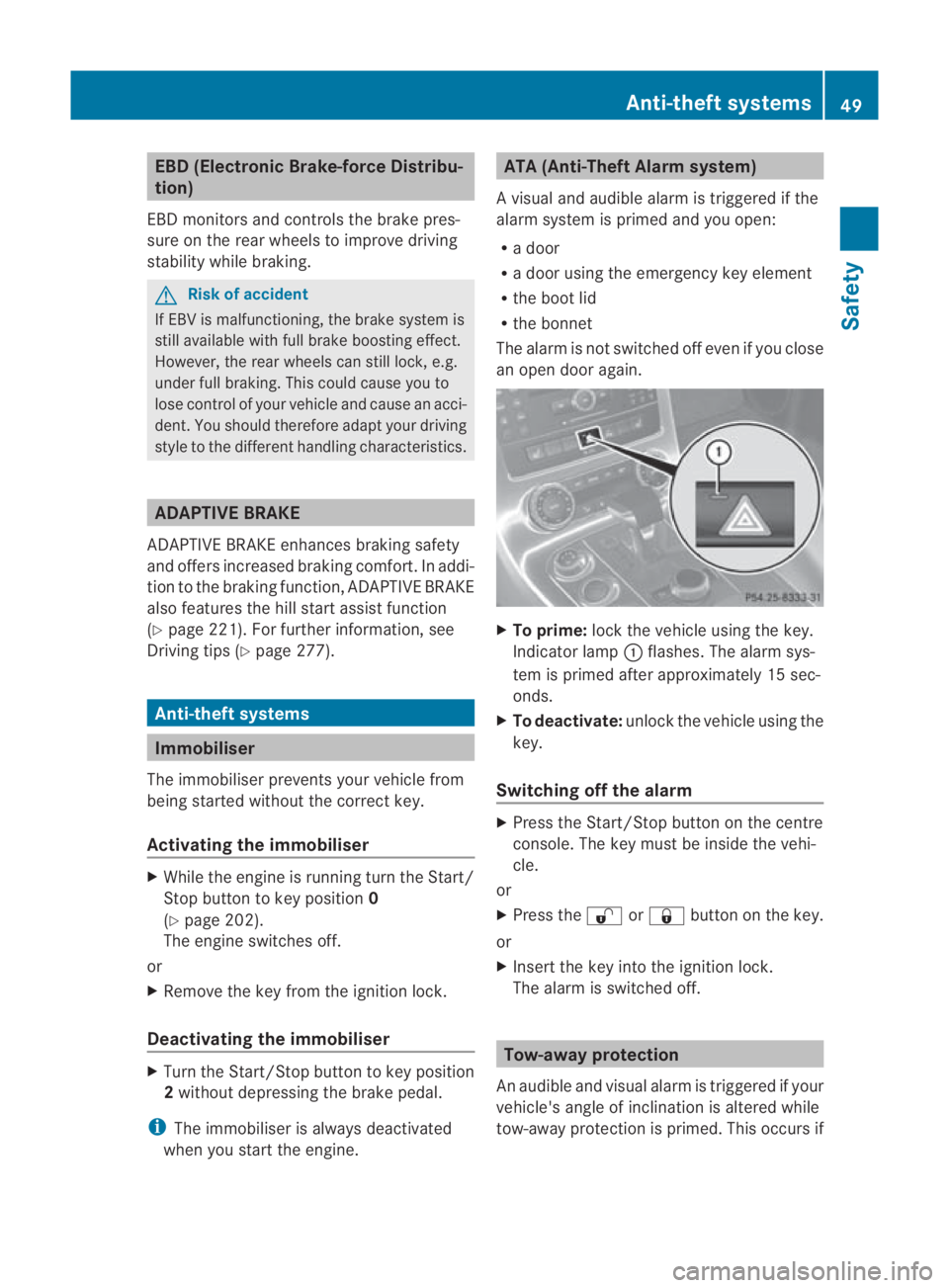
To prime: lock the vehicle using the key.
Indicator lamp 0001flashes .The alarm sys-
tem is primed after approximately 15 sec-
onds.
X To deactivate: unlock the vehicle using the
key.
Switching off the alarm X
Press the Start/Stop button on the centre
console. The key must be inside the vehi-
cle.
or
X Press the 000Bor0009 button on the key.
or
X Insert the key into the ignition lock.
The alarm is switched off. Tow-away protection
An audible and visual alarm is triggered if your
vehicle's angle of inclination is altered while
tow-away protection is primed. This occurs if Anti-theft systems
49Safety
BA 197 ECE RE 2010/6a; 1; 2, en-GB
sabbaeu Version: 3.0.3.6 2010-05-07T14:19:43+02:00 - Seite 49 Z
Page 53 of 361
the vehicle is jacked up on one side, for exam-
ple.
Priming tow-away protection X
Loc kthe vehicle using the key.
Tow-away protection is primed after
approximately 30 seconds.
Deactivating tow-away protection Tow-away protection is automatically deacti-
vated when you unlock your vehicle using the
key.
To prevent a false alarm, deactivate tow-away
protection manually if your vehicle:
R is being transported
R is being loaded, e.g. onto a ferry or car
transporter
R is parked on a movable surface, e.g. in a
split-level garage X
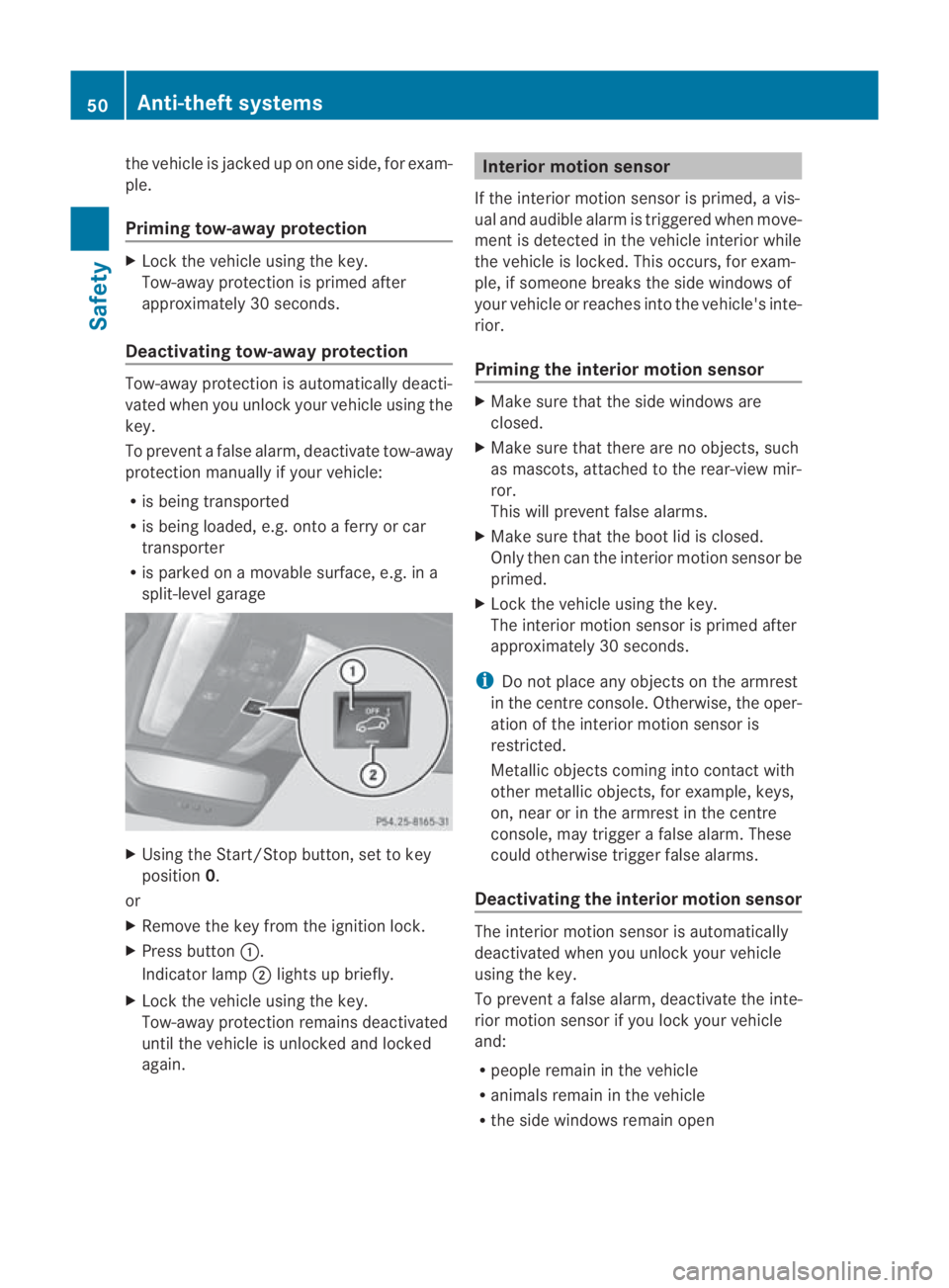
Using the Start/Stop button, set to key
position 0.
or
X Remove the key from the ignition lock.
X Press button 0001.
Indicator lamp 0002lights up briefly.
X Lock the vehicle using the key.
Tow-away protection remains deactivated
until the vehicle is unlocked and locked
again. Interior motion sensor
If the interior motion sensor is primed, a vis-
ual and audible alarm is triggered when move-
ment is detected in the vehicle interior while
the vehicle is locked. This occurs, for exam-
ple, if someone breaks the side windows of
your vehicle or reaches into the vehicle's inte-
rior.
Priming the interior motion sensor X
Make sure that the side windows are
closed.
X Make sure that there are no objects, such
as mascots, attached to the rear-view mir-
ror.
This will prevent false alarms.
X Make sure that the boot lid is closed.
Only then can the interior motion sensor be
primed.
X Lock the vehicle using the key.
The interior motion sensor is primed after
approximately 30 seconds.
i Do not place any objects on the armrest
in the centre console. Otherwise, the oper-
ation of the interior motion sensor is
restricted.
Metallic objects coming into contact with
other metallic objects, for example, keys,
on, near or in the armrest in the centre
console, may trigger a false alarm. These
could otherwise trigger false alarms.
Deactivating the interior motion sensor The interior motion sensor is automatically
deactivated when you unlock your vehicle
using the key.
To prevent a false alarm, deactivate the inte-
rior motion sensor if you lock your vehicle
and:
R people remain in the vehicle
R animals remain in the vehicle
R the side windows remain open 50
Anti-theft systemsSafety
BA 197 ECE RE 2010/6a; 1; 2, en-GB
sabbaeu
Version: 3.0.3.6 2010-05-07T14:19:43+02:00 - Seite 50