change time MERCEDES-BENZ SPRINTER 2006 Service Manual
[x] Cancel search | Manufacturer: MERCEDES-BENZ, Model Year: 2006, Model line: SPRINTER, Model: MERCEDES-BENZ SPRINTER 2006Pages: 2305, PDF Size: 48.12 MB
Page 934 of 2305
clock remains functional regardless of the ignition
switch position.
The vehicle operator can choose to have the
optional ambient temperature indicator displayed
instead of the clock information, but the clock and
ambient temperature indicator cannot be displayed
at the same time. The clock or ambient temperature
indicator display option is selected using the multi-
function indicator clock switch on the instrument
cluster circuit board. This switch is actuated manu-
ally by depressing the clock switch push button that
extends through the lower edge of the cluster lens
below the left end of the multi-function indicator.
Actuating this switch momentarily will toggle the
display between the clock and ambient temperature
indicator modes. Actuating this switch twice within
about one second will cause the display to toggle, but
then automatically revert to the originally selected
mode after about twenty seconds.
See the owner's manual in the vehicle glove box for
more information on the features, use, operation and
setting procedures for the clock. For proper testing of
the instrument cluster circuitry that controls the
clock functions, a diagnostic scan tool is required.
Refer to the appropriate diagnostic information.
COOLANT LOW INDICATOR
DESCRIPTION
A coolant low indicator is standard equipment on
all instrument clusters. The coolant low indicator is
located near the lower edge of the instrument cluster,
to the left of the multi-function indicator display. The
coolant low indicator consists of the International
Control and Display Symbol icon for ªLow Engine
Coolantº imprinted within a rectangular cutout in
the opaque layer of the instrument cluster overlay.
The dark outer layer of the overlay prevents the indi-
cator from being clearly visible when it is not illumi-
nated. A red Light Emitting Diode (LED) behind the
cutout in the opaque layer of the overlay causes the
icon to appear silhouetted against a red field through
the translucent outer layer of the overlay when the
indicator is illuminated from behind by the LED,
which is soldered onto the instrument cluster elec-
tronic circuit board. The coolant low indicator is ser-
viced as a unit with the instrument cluster.
OPERATION
The coolant low indicator gives an indication to the
vehicle operator when the engine coolant level is low.
This indicator is controlled by a transistor on the
instrument cluster circuit board based upon cluster
programming and a hard wired input received by the
cluster from the engine coolant level switch. The cool-
ant low indicator Light Emitting Diode (LED) is com-
pletely controlled by the instrument cluster logiccircuit, and that logic will only allow this indicator to
operate when the instrument cluster detects that the
ignition switch is in the On position. Therefore, the
LED will always be off when the ignition switch is in
any position except On. The LED only illuminates
when it is provided a path to ground by the instru-
ment cluster transistor. The instrument cluster will
turn on the coolant low indicator for the following
reasons:
²Bulb Test- Each time the ignition switch is
turned to the On position the coolant low indicator is
illuminated for about two seconds as a bulb test.
²Engine Coolant Level Switch Input- Each
time the cluster detects an appropriate input on the
low coolant fluid level sense circuit (engine coolant
level switch resistance low = engine coolant level low)
while the ignition switch is in the On position, the
coolant low indicator will be illuminated. The indica-
tor remains illuminated until the low coolant fluid
level sense input to the cluster changes (engine cool-
ant level switch resistance high = engine coolant
level full), or until the ignition switch is turned to
the Off position, whichever occurs first. The engine
coolant level switch also features a diagnostic resis-
tor connected in parallel between the switch input
and output to provide the cluster with verification
that the low coolant fluid level sense circuit is not
open or shorted.
The engine coolant level switch integral to the cool-
ant bottle provides a hard wired input to the instru-
ment cluster circuitry through the low coolant fluid
level sense circuit. The engine coolant level switch
and the low coolant fluid level sense circuit to the
instrument cluster can be diagnosed using conven-
tional diagnostic tools and methods. For proper diag-
nosis of the instrument cluster circuitry that controls
the coolant low indicator, a diagnostic scan tool is
required. Refer to the appropriate diagnostic infor-
mation.
ENGINE TEMPERATURE
GAUGE
DESCRIPTION
An engine coolant temperature gauge is standard
equipment on all instrument clusters. The engine
coolant temperature gauge is located in the upper
right corner of the instrument cluster, to the right of
the speedometer. The engine coolant temperature
gauge consists of a movable gauge needle or pointer
controlled by the instrument cluster circuitry and a
fixed 45 degree scale on the cluster overlay that
reads left-to-right from 120É C to 40É C for Canadian
vehicles, or from 250É F to 110É F for United States
vehicles. An International Control and Display Sym-
bol icon for ªEngine Coolant Temperatureº is located
VAINSTRUMENT CLUSTER 8J - 15
Page 939 of 2305
through the fuel level sense circuit. The fuel level
sensor is a potentiometer that changes resistance
according to the fuel level. As the fuel level
decreases, the resistance through the fuel level sen-
sor increases. The instrument cluster applies a fuel
tank characteristic curve and fuel tank reserve valve
setting to the fuel level sensor input, which must be
configured when the cluster is initialized. These
characteristics determine the algorithm the cluster
uses to display the fuel level data on the fuel gauge
and the control for the low fuel warning indicator.
The fuel level sensor and the fuel level sense circuit
to the instrument cluster can be diagnosed using con-
ventional diagnostic tools and methods. For proper
diagnosis of the instrument cluster circuitry that con-
trols the fuel gauge, a diagnostic scan tool is
required. Refer to the appropriate diagnostic infor-
mation.
LOW OIL LEVEL INDICATOR
DESCRIPTION
A low oil level indicator is standard equipment on
all instrument clusters. The low oil level indicator is
located near the lower edge of the instrument cluster,
to the left of the multi-function indicator display. The
low oil level indicator consists of the International
Control and Display Symbol icon for ªEngine Oilº
imprinted within a rectangular cutout in the opaque
layer of the instrument cluster overlay. The dark
outer layer of the overlay prevents the indicator from
being clearly visible when it is not illuminated. A red
Light Emitting Diode (LED) behind the cutout in the
opaque layer of the overlay causes the icon to appear
silhouetted against a red field through the translu-
cent outer layer of the overlay when the indicator is
illuminated from behind by the LED, which is sol-
dered onto the instrument cluster electronic circuit
board. The low oil level indicator is serviced as a unit
with the instrument cluster.
OPERATION
The low oil level indicator gives an indication to
the vehicle operator when the engine oil level is low.
This indicator is controlled by a transistor on the
instrument cluster electronic circuit board based
upon cluster programming and electronic messages
received by the cluster from the Engine Control Mod-
ule (ECM) over the Controller Area Network (CAN)
data bus. The low oil level indicator Light Emitting
Diode (LED) is completely controlled by the instru-
ment cluster logic circuit, and that logic will only
allow this indicator to operate when the instrument
cluster detects that the ignition switch is in the On
position. Therefore, the LED will always be off when
the ignition switch is in any position except On. The
LED only illuminates when it is provided a path toground by the instrument cluster transistor. The
instrument cluster will turn on the low oil level indi-
cator for the following reasons:
²Bulb Test- Each time the ignition switch is
turned to the On position the low oil level indicator
is illuminated for about two seconds as a bulb test.
²Engine Oil Level Low Message- Once the
engine has been started, each time the cluster
receives a message from the ECM indicating that the
engine oil level is at or near the ªMinimumº mark on
the dipstick, the low oil level indicator is illuminated.
The indicator remains illuminated briefly at first, but
will remain illuminated for longer periods as subse-
quent messages indicate that the oil level has
dropped further. Eventually, the indicator will
remain illuminated solid until the engine oil level is
corrected, or until the ignition switch is turned to the
Off position, whichever occurs first.
The instrument cluster also supplements the oil
level indicator by displaying an engine oil icon along
with alpha-numeric messages in the multi-function
indicator Liquid Crystal Display (LCD) advising the
vehicle operator how much oil is required to correct
the engine oil level, and when the ªMaximumº engine
oil level has been exceeded. See the owner's manual
in the vehicle glove box for more information on this
feature.
The ECM continually monitors the engine oil level
and temperature sensor to determine the engine oil
level. The ECM then sends the proper engine oil
level messages to the instrument cluster. If the
instrument cluster turns on the indicator after the
bulb test, even after the engine oil level is sufficient,
it may indicate that the engine or the engine oiling
system requires service. For proper diagnosis of the
engine oil level and temperature sensor, the ECM,
the CAN data bus, or the electronic message inputs
to the instrument cluster that control the low oil
level indicator, a diagnostic scan tool is required.
Refer to the appropriate diagnostic information.
MAINTENANCE INDICATOR
DESCRIPTION
An Active Service SYSTem (ASSYST) engine oil
maintenance indicator is optional equipment on all
instrument clusters. In vehicles so equipped, a sec-
ond, dedicated ASSYST microprocessor is integral to
the cluster electronic circuit board. The ASSYST indi-
cations are displayed and can be toggled with the
clock indication on the right side of the multi-func-
tion indicator Liquid Crystal Display (LCD) located
near the lower edge of the instrument cluster,
directly below the speedometer. The ASSYST displays
include numeric values combined with several icons
to indicate actual engine oil level, and reminders in
time (days) or distance (miles or kilometers) until the
8J - 20 INSTRUMENT CLUSTERVA
Page 942 of 2305
the instrument cluster, directly below the speedome-
ter. However, the odometer and trip odometer infor-
mation are not displayed simultaneously. The ªmiº
(miles) or ªkmº (kilometers) switch on the instrument
cluster circuit board toggles the display between
odometer and trip odometer modes by depressing the
switch push button that extends through the lower
edge of the cluster lens, directly below the multi-
function indicator LCD.
The odometer and trip odometer information is
stored in the instrument cluster memory. This infor-
mation can be increased when the proper inputs are
provided to the instrument cluster, but the informa-
tion cannot be decreased. The odometer can display
values up to 999,999 kilometers (999,999 miles). The
odometer latches at these values, and will not roll
over to zero. The trip odometer can display values up
to 999.9 kilometers (999.9 miles) before it rolls over
to zero. The odometer display does not have a deci-
mal point and will not show values less than a full
unit (kilometer or mile), while the trip odometer dis-
play does have a decimal point and will show tenths
of a unit (kilometer or mile). The unit of measure
(kilometers or miles) for the odometer and trip odom-
eter display is imprinted on the cluster overlay below
the left end of the LCD. The unit of measure for the
instrument cluster odometer/trip odometer is selected
at the time that it is manufactured, and cannot be
changed.
The indications of the odometer/trip odometer are
not visible when the LCD is not illuminated. When
illuminated the indications appear as dark charac-
ters silhouetted against an amber field. When the
exterior lighting is turned Off, the display is illumi-
nated at maximum brightness. When the exterior
lighting is turned On the display illumination level
can be adjusted in concert with the cluster general
illumination lighting using the plus and minus multi-
function indicator push buttons. The odometer has a
ªRental Carº mode, which will activate the multi-
function indicator LCD and illuminate the odometer
information for about thirty seconds after one of the
multi-function indicator push buttons is momentarily
depressed, or after the key is inserted into the igni-
tion switch lock cylinder with the ignition switch in
the Off position.
The odometer/trip odometer and the miles/kilome-
ters switch, and the miles/kilometers switch push
button are serviced as a unit with the instrument
cluster.
OPERATION
The odometer and trip odometer give an indication
to the vehicle operator of the distance the vehicle has
traveled. This indicator is controlled by the instru-
ment cluster circuitry based upon cluster program-
ming and electronic messages received by the cluster
from the Controller Anti-lock Brake (CAB) over theController Area Network (CAN) data bus. The odom-
eter and trip odometer information is displayed by
the multi-function indicator Liquid Crystal Display
(LCD). The LCD will display the odometer informa-
tion whenever it is activated, and will display the
last previously selected odometer or trip odometer
information when the ignition switch is turned to the
On position. The instrument cluster circuitry controls
the LCD and provides the following features:
²Odometer/Trip Odometer Display Toggling-
Actuating the multi-function indicator ªmiº (miles) or
ªkmº (kilometers) switch push button momentarily
with the LCD illuminated will toggle the display
between the odometer and trip odometer information.
Each time the LCD is illuminated with the ignition
switch in the On or Start positions, the display will
automatically return to the last mode previously
selected (odometer or trip odometer).
²Trip Odometer Reset- When the multi-func-
tion indicator ªmiº (miles) or ªkmº (kilometers) switch
push button is pressed and held for longer than
about two seconds, the trip odometer will be reset to
000.0 kilometers (miles). The LCD must be display-
ing the trip odometer information in order for the
trip odometer information to be reset.
The CAB continually monitors the vehicle speed
pulse information received from the four wheel speed
sensors, then sends the proper distance messages to
the instrument cluster. For proper diagnosis of the
wheel speed sensors, the CAB, the CAN data bus, or
the electronic message inputs to the instrument clus-
ter that control the odometer/trip odometer, a diag-
nostic scan tool is required. Refer to the appropriate
diagnostic information.
PARK BRAKE INDICATOR
DESCRIPTION
A park brake indicator is standard equipment on
all instrument clusters. The park brake indicator is
located near the lower edge of the instrument cluster,
to the left of the multi-function indicator display. The
park brake indicator consists of stencil-like cutout of
the word ªPARKº in the opaque layer of the instru-
ment cluster overlay. The dark outer layer of the
overlay prevents the indicator from being clearly vis-
ible when it is not illuminated. A red Light Emitting
Diode (LED) behind the cutout in the opaque layer of
the overlay causes the ªPARKº text to appear in red
through the translucent outer layer of the overlay
when the indicator is illuminated from behind by the
LED, which is soldered onto the instrument cluster
electronic circuit board. The park brake indicator is
serviced as a unit with the instrument cluster.
VAINSTRUMENT CLUSTER 8J - 23
Page 953 of 2305
seat riser, a fog lamp switch installed in the cluster
bezel on the instrument panel outboard of the steer-
ing column, and a fog lamp bulb installed in each of
the two front lamp units. The front fog lamps have a
path to ground at all times through their connection
to the vehicle wire harness. The headlamp switch cir-
cuitry of the left (lighting) control stalk of the multi-
function switch controls front fog lamp operation by
providing battery current to the front fog lamp relay
only when the low beam headlamps are selected. The
fog lamp switch controls front fog lamp operation by
energizing or de-energizing the front fog lamp relay
control coil.
HAZARD WARNING LAMPS
With the hazard switch in the On position, the
hazard switch button illuminates and the right and
left turn signal indicators as well as the right and
left turn signal lamps begin to flash on and off. When
the hazard warning system is activated, the hazard
switch circuitry within the multi-function switch and
the wipers, turn signals and engine start control
module electronic circuitry within the fuse block will
repeatedly energize and de-energize the turn signal
relay located in the fuse block. The turn signal relay
switches battery current from a fused B(+) fuse in
the fuse block to the turn signal indicators and the
turn signal lamps. The flashing of the hazard switch
button illumination lamp is also controlled by the
output from the turn signal relay.
HEADLAMPS
The headlamp system includes the exterior lighting
switches integral to the left (lighting) control stalk of
the multi-function switch as well as the low and high
beam bulbs installed in the right and left front lamp
units (Fig. 1). The headlamp bulbs have a path to
ground at all times through the vehicle wire harness.
The exterior lighting switches control headlamp oper-
ation by providing battery current to the selected low
or high beam bulbs. Each front lamp unit includes
two integral adjustment screws to be used for static
horizontal and vertical aiming of the headlamp beam
reflectors.HEADLAMP LEVELING
The headlamp leveling system includes a leveling
actuator motor integral to each front lamp unit, and
a rotary thumbwheel actuated headlamp leveling
switch in the cluster bezel on the instrument panel
outboard of the steering column. The headlamp lev-
eling system allows the headlamp beam reflectors to
be adjusted to one of four vertical positions to com-
pensate for changes in inclination caused by the load-
ing of the vehicle suspension. The actuator motors
are mechanically connected through an integral
pushrod to an adjustable headlamp reflector. The
headlamp leveling switch is a resistor multiplexed
unit that provides one of four voltage outputs to the
headlamp leveling motors. The headlamp leveling
motors will move the headlamps to the selected posi-
tion based upon the voltage input received from the
switch. The headlamp leveling motors and switch
have a path to ground at all times. The headlamp
leveling components operate on battery current
received through the park lamps circuit so that the
system will only operate when the exterior lighting is
turned on.
PARK LAMPS
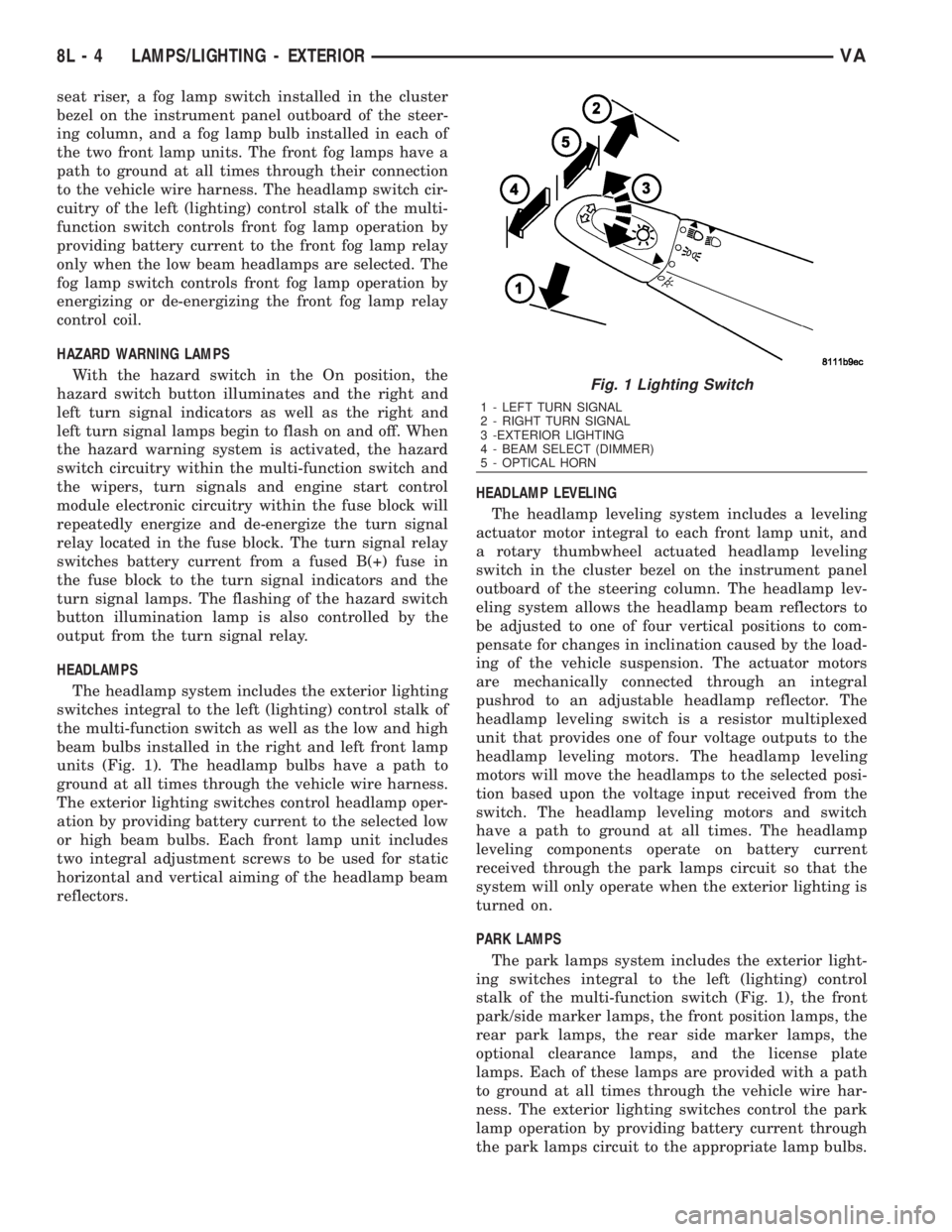
The park lamps system includes the exterior light-
ing switches integral to the left (lighting) control
stalk of the multi-function switch (Fig. 1), the front
park/side marker lamps, the front position lamps, the
rear park lamps, the rear side marker lamps, the
optional clearance lamps, and the license plate
lamps. Each of these lamps are provided with a path
to ground at all times through the vehicle wire har-
ness. The exterior lighting switches control the park
lamp operation by providing battery current through
the park lamps circuit to the appropriate lamp bulbs.
Fig. 1 Lighting Switch
1 - LEFT TURN SIGNAL
2 - RIGHT TURN SIGNAL
3 -EXTERIOR LIGHTING
4 - BEAM SELECT (DIMMER)
5 - OPTICAL HORN
8L - 4 LAMPS/LIGHTING - EXTERIORVA
Page 996 of 2305
WARNINGS - RESTRAINT SYSTEM
WARNING: To avoid personal injury or death, during
and following any seat belt service, carefully
inspect all seat belts, buckles, mounting hardware,
retractors, tether straps, and anchors for proper
installation, operation, or damage. Replace any belt
that is cut, frayed, or torn. Straighten any belt that
is twisted. Tighten any loose fasteners. Replace any
belt that has a damaged or inoperative buckle or
retractor. Replace any belt that has a bent or dam-
aged latch plate or anchor plate. Never attempt to
repair a seat belt component. Always replace dam-
aged or faulty seat belt components with the cor-
rect, new and unused replacement parts listed in
the DaimlerChrysler Mopar Parts Catalog.
WARNING: To avoid personal injury or death, on
vehicles equipped with airbags, disable the supple-
mental restraint system before attempting any
steering wheel, steering column, airbag, seat belt
tensioner, impact sensor, or instrument panel com-
ponent diagnosis or service. Disconnect and isolate
the battery negative (ground) cable, then wait two
minutes for the system capacitor to discharge
before performing further diagnosis or service. This
is the only sure way to disable the supplemental
restraint system. Failure to take the proper precau-
tions could result in accidental airbag deployment.
WARNING: To avoid personal injury or death on
vehicles equipped with airbags, before performing
any welding operations disconnect and isolate the
battery negative (ground) cable and disconnect all
wire harness connectors from the Airbag Control
Module (ACM). Failure to take the proper precau-
tions could result in accidental airbag deployment
and other possible damage to the supplemental
restraint system circuits and components.
WARNING: To avoid personal injury or death, do not
attempt to dismantle an airbag unit or tamper with
its inflator. Do not puncture, incinerate, or bring
into contact with electricity. Do not store at temper-
atures exceeding 93É C (200É F). An airbag inflator
unit may contain sodium azide and potassium
nitrate. These materials are poisonous and
extremely flammable. Contact with acid, water, or
heavy metals may produce harmful and irritating
gases (sodium hydroxide is formed in the presence
of moisture) or combustible compounds. An airbag
inflator unit may also contain a gas canister pres-
surized to over 2500 psi.WARNING: To avoid personal injury or death, when
handling a seat belt tensioner retractor, proper care
should be exercised to keep fingers out from under
the retractor cover and away from the seat belt
webbing where it exits from the retractor cover.
WARNING: To avoid personal injury or death,
replace all restraint system components only with
parts specified in the DaimlerChrysler Mopar Parts
Catalog. Substitute parts may appear interchange-
able, but internal differences may result in inferior
occupant protection.
WARNING: To avoid personal injury or death, the
fasteners, screws, and bolts originally used for the
restraint system components must never be
replaced with any substitutes. These fasteners have
special coatings and are specifically designed for
the restraint system. Any time a new fastener is
needed, replace it with the correct fasteners pro-
vided in the service package or specified in the
DaimlerChrysler Mopar Parts Catalog.
WARNING: To avoid personal injury or death, when
a steering column has an airbag unit attached,
never place the column on the floor or any other
surface with the steering wheel or airbag unit face
down.
DIAGNOSIS AND TESTING - SUPPLEMENTAL
RESTRAINT SYSTEM
Proper diagnosis and testing of the supplemental
restraint system components or the Airbag Control
Module (ACM), initialization of the ACM, as well as
the retrieval or erasure of a Diagnostic Trouble Code
(DTC) from the ACM requires the use of a DRBIIIt
scan tool. Refer to the appropriate diagnostic infor-
mation.
WARNING: To avoid personal injury or death, on
vehicles equipped with airbags, disable the supple-
mental restraint system before attempting any
steering wheel, steering column, airbag, seat belt
tensioner, impact sensor, or instrument panel com-
ponent diagnosis or service. Disconnect and isolate
the battery negative (ground) cable, then wait two
minutes for the system capacitor to discharge
before performing further diagnosis or service. This
is the only sure way to disable the supplemental
restraint system. Failure to take the proper precau-
tions could result in accidental airbag deployment.
VARESTRAINTS 8O - 5
Page 1004 of 2305
side of the rotor hub also serves as an integral
molded plastic turn signal cancel cam.
A single connector receptacle on the upper surface
of the rotor has pigtail wires that connect to the horn
switch and the driver airbag on the steering wheel,
while a single connector receptacle on the lower sur-
face of the case has pigtail wires that connect the
clockspring to the vehicle wire harness on the steer-
ing column. Within the plastic case and wound
around the rotor spool is a long ribbon-like tape that
consists of several thin copper wire leads sandwiched
between two thin plastic membranes. The outer end
of the tape terminates at the connector receptacle
that faces the steering column, while the inner end of
the tape terminates at the connector receptacle on
the hub of the clockspring rotor that faces the steer-
ing wheel.
Service replacement clocksprings are shipped pre-
centered and with the mounting screws backed out
from the case far enough to engage the access holes
in the upper surface of the rotor. The mounting
screws secure the centered clockspring rotor to the
clockspring case during shipment, but allow free
rotation of the rotor once the clockspring is properly
installed on the steering column. (Refer to 8 - ELEC-
TRICAL/RESTRAINTS/CLOCKSPRING - STAN-
DARD PROCEDURE - CLOCKSPRING
CENTERING).
The clockspring cannot be repaired. If the clock-
spring is faulty, damaged, or if the driver airbag has
been deployed, the clockspring must be replaced.
OPERATION
The clockspring is a mechanical electrical circuit
component that is used to provide continuous electri-
cal continuity between the fixed vehicle wire harness
and the electrical components mounted on or in the
rotating steering wheel. On this model the rotating
electrical components include the driver airbag and
the horn switch. The clockspring case is positioned
and secured to the multi-function switch housing
near the top of the steering column. The connector
receptacle on the underside of the fixed clockspring
case connects the clockspring to the vehicle electrical
system through two take outs with connectors from
the vehicle wire harness.
The clockspring rotor is movable and is keyed by
integral molded ribs on the inner circumference of
the rotor hub to the splines on the external circum-
ference of the upper steering column shaft. The two
integral lobes of the turn signal cancel cam formation
on the lower surface of the clockspring rotor hub con-
tact the turn signal cancel actuator of the multi-func-
tion switch to provide automatic turn signal
cancellation. The yellow sleeved pigtail wire on the
upper surface of the clockspring rotor connects the
clockspring to the driver airbag, while two single pig-
tail wires connect to the feed and ground terminals ofthe horn switch located within the hub cavity of the
steering wheel.
Like the clockspring in a timepiece, the clockspring
tape has travel limits and can be damaged by being
wound too tightly during full stop-to-stop steering
wheel rotation. To prevent this from occurring, the
clockspring is centered when it is installed on the
steering column. Centering the clockspring indexes
the clockspring tape to the movable steering compo-
nents so that the tape can operate within its
designed travel limits. However, if the clockspring is
removed from the steering column or if the steering
shaft is disconnected from the steering gear, the
clockspring spool can change position relative to the
movable steering components. The clockspring must
be re-centered following completion of this service or
the tape may be damaged.
Service replacement clocksprings are shipped pre-
centered and with the mounting screws backed out
from the case far enough to engage the access holes
in the upper surface of the rotor. The mounting
screws secure the centered clockspring rotor to the
clockspring case during shipment, but allow free
rotation of the rotor once the clockspring is properly
installed on the steering column. The clockspring
mounting screws should not be tightened into the
clockspring case until the clockspring has been
installed on the steering column. If the screws are
tightened into or removed from the case before the
clockspring is installed on a steering column, the
clockspring centering procedure must be performed.
(Refer to 8 - ELECTRICAL/RESTRAINTS/CLOCK-
SPRING - STANDARD PROCEDURE - CLOCK-
SPRING CENTERING).
STANDARD PROCEDURE - CLOCKSPRING
CENTERING
The clockspring is designed to wind and unwind
when the steering wheel is rotated, but is only
designed to rotate the same number of turns (about
six to seven complete rotations) as the steering wheel
can be turned from stop to stop. Centering the clock-
spring indexes the clockspring tape to other steering
components so that it can operate within its designed
travel limits. The rotor of a centered clockspring can
be rotated three to three and one-half turns in either
direction from the centered position, without damag-
ing the clockspring tape.
However, if the clockspring is removed for service
or if the steering column is disconnected from the
steering gear, the clockspring tape can change posi-
tion relative to the other steering components. The
clockspring must then be re-centered following com-
pletion of such service or the clockspring tape may be
damaged. Service replacement clocksprings are
shipped pre-centered and with the mounting screws
backed out from the case far enough to engage the
VARESTRAINTS 8O - 13
Page 1018 of 2305
straight out from the inflator to disconnect it from
the receptacle.
(7) Remove the passenger airbag and airbag door
from the instrument panel as a unit.
INSTALLATION
The following procedure is for replacement of a
faulty or damaged passenger airbag. If the airbag is
faulty or damaged, but not deployed, review the rec-
ommended procedures for handling non-deployed
supplemental restraints. (Refer to 8 - ELECTRICAL/
RESTRAINTS - STANDARD PROCEDURE - HAN-
DLING NON-DEPLOYED SUPPLEMENTAL
RESTRAINTS). If the passenger airbag has been
deployed, review the recommended procedures for
service after a supplemental restraint deployment
before removing the airbag from the vehicle. (Refer to
8 - ELECTRICAL/RESTRAINTS - STANDARD PRO-
CEDURE - SERVICE AFTER A SUPPLEMENTAL
RESTRAINT DEPLOYMENT).
WARNING: To avoid personal injury or death, on
vehicles equipped with airbags, disable the supple-
mental restraint system before attempting any
steering wheel, steering column, airbag, seat belt
tensioner, impact sensor, or instrument panel com-
ponent diagnosis or service. Disconnect and isolate
the battery negative (ground) cable, then wait two
minutes for the system capacitor to discharge
before performing further diagnosis or service. This
is the only sure way to disable the supplemental
restraint system. Failure to take the proper precau-
tions could result in accidental airbag deployment.
WARNING: To avoid personal injury or death, use
extreme care to prevent any foreign material from
entering the passenger airbag, or becoming
entrapped between the passenger airbag cushion
and the passenger airbag door. Failure to observe
this warning could result in occupant injuries upon
airbag deployment.
WARNING: To avoid personal injury or death, the
passenger airbag door must never be painted.
Replacement passenger airbags are serviced with
doors in the original colors. Paint may change the
way in which the material of the airbag door
responds to an airbag deployment. Failure to
observe this warning could result in occupant inju-
ries upon airbag deployment.
(1) Carefully position the passenger airbag and
airbag door unit to the instrument panel (Fig. 29).
(2) When installing the passenger airbag, recon-
nect the vehicle wire harness connector to the airbag
inflator connector receptacle by pressing straight in
on the connector. You can be certain that the connec-tor is fully engaged by listening carefully for a dis-
tinct, audible click as the connector snaps into place.
(3) Push the passenger airbag unit forward far
enough to engage the lower edge of the airbag door
with the two lower clips in the instrument panel.
(4) Install and tighten the two screws that secure
the flange of the passenger airbag housing to the
bracket on the instrument panel structural support.
Tighten the screws to 10 N´m (89 in. lbs.).
(5) Install and tighten the two screws that secure
the passenger airbag door upper clips to the instru-
ment panel base trim. Tighten the screws to 2 N´m
(18 in. lbs.).
(6) Reinstall the instrument panel top cover tray
onto the instrument panel. (Refer to 23 - BODY/IN-
STRUMENT PANEL/INSTRUMENT PANEL TOP
COVER - TRAY - INSTALLATION).
(7) Do not reconnect the battery negative cable at
this time. The supplemental restraint system verifi-
cation test procedure should be performed following
service of any supplemental restraint system compo-
nent. (Refer to 8 - ELECTRICAL/RESTRAINTS -
STANDARD PROCEDURE - VERIFICATION TEST).
PASSENGER AIRBAG
BRACKET
REMOVAL
WARNING: To avoid personal injury or death, on
vehicles equipped with airbags, disable the supple-
mental restraint system before attempting any
steering wheel, steering column, airbag, seat belt
tensioner, impact sensor, or instrument panel com-
ponent diagnosis or service. Disconnect and isolate
the battery negative (ground) cable, then wait two
minutes for the system capacitor to discharge
before performing further diagnosis or service. This
is the only sure way to disable the supplemental
restraint system. Failure to take the proper precau-
tions could result in accidental airbag deployment.
(1) Remove the passenger airbag from the instru-
ment panel. (Refer to 8 - ELECTRICAL/RE-
STRAINTS/PASSENGER AIRBAG - REMOVAL).
(2) Remove the four screws that secure the passen-
ger airbag bracket to the instrument panel structural
support (Fig. 30).
VARESTRAINTS 8O - 27
Page 1069 of 2305
WIPER BLADE
DESCRIPTION
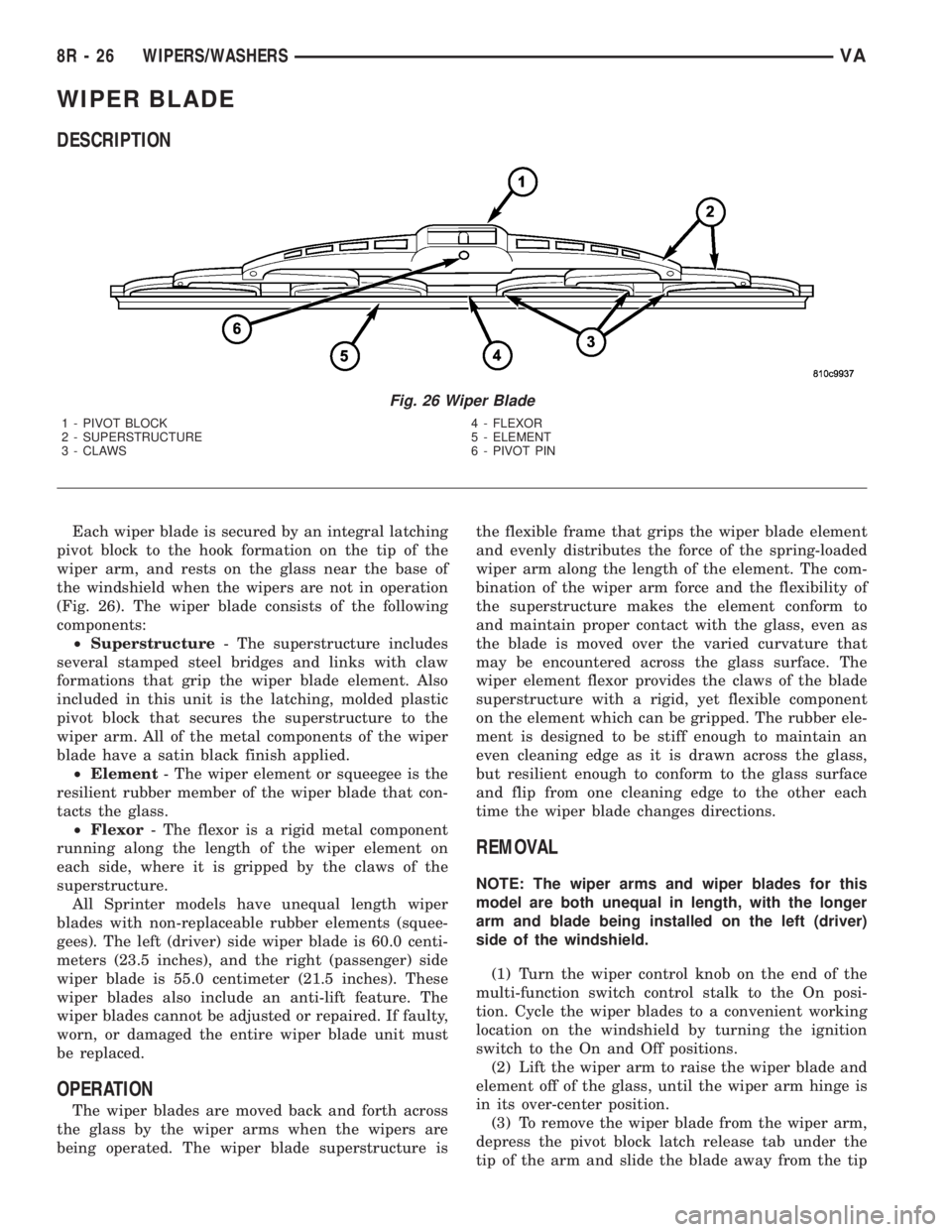
Each wiper blade is secured by an integral latching
pivot block to the hook formation on the tip of the
wiper arm, and rests on the glass near the base of
the windshield when the wipers are not in operation
(Fig. 26). The wiper blade consists of the following
components:
²Superstructure- The superstructure includes
several stamped steel bridges and links with claw
formations that grip the wiper blade element. Also
included in this unit is the latching, molded plastic
pivot block that secures the superstructure to the
wiper arm. All of the metal components of the wiper
blade have a satin black finish applied.
²Element- The wiper element or squeegee is the
resilient rubber member of the wiper blade that con-
tacts the glass.
²Flexor- The flexor is a rigid metal component
running along the length of the wiper element on
each side, where it is gripped by the claws of the
superstructure.
All Sprinter models have unequal length wiper
blades with non-replaceable rubber elements (squee-
gees). The left (driver) side wiper blade is 60.0 centi-
meters (23.5 inches), and the right (passenger) side
wiper blade is 55.0 centimeter (21.5 inches). These
wiper blades also include an anti-lift feature. The
wiper blades cannot be adjusted or repaired. If faulty,
worn, or damaged the entire wiper blade unit must
be replaced.
OPERATION
The wiper blades are moved back and forth across
the glass by the wiper arms when the wipers are
being operated. The wiper blade superstructure isthe flexible frame that grips the wiper blade element
and evenly distributes the force of the spring-loaded
wiper arm along the length of the element. The com-
bination of the wiper arm force and the flexibility of
the superstructure makes the element conform to
and maintain proper contact with the glass, even as
the blade is moved over the varied curvature that
may be encountered across the glass surface. The
wiper element flexor provides the claws of the blade
superstructure with a rigid, yet flexible component
on the element which can be gripped. The rubber ele-
ment is designed to be stiff enough to maintain an
even cleaning edge as it is drawn across the glass,
but resilient enough to conform to the glass surface
and flip from one cleaning edge to the other each
time the wiper blade changes directions.
REMOVAL
NOTE: The wiper arms and wiper blades for this
model are both unequal in length, with the longer
arm and blade being installed on the left (driver)
side of the windshield.
(1) Turn the wiper control knob on the end of the
multi-function switch control stalk to the On posi-
tion. Cycle the wiper blades to a convenient working
location on the windshield by turning the ignition
switch to the On and Off positions.
(2) Lift the wiper arm to raise the wiper blade and
element off of the glass, until the wiper arm hinge is
in its over-center position.
(3) To remove the wiper blade from the wiper arm,
depress the pivot block latch release tab under the
tip of the arm and slide the blade away from the tip
Fig. 26 Wiper Blade
1 - PIVOT BLOCK 4 - FLEXOR
2 - SUPERSTRUCTURE 5 - ELEMENT
3 - CLAWS 6 - PIVOT PIN
8R - 26 WIPERS/WASHERSVA
Page 1092 of 2305

8W-02 COMPONENT INDEX
Component Page
A/C Auxiliary Fan..................... 8W-42
A/C Auxiliary Fan Relay................ 8W-42
A/C Compressor Clutch................. 8W-42
A/C Compressor Clutch Relay............ 8W-42
A/C Roof Auxiliary Fan................. 8W-42
A/C Roof Auxiliary Fan Relay............ 8W-42
Accelerator Pedal Position Sensor......... 8W-30
Additional Heat Exchanger.............. 8W-42
Additional Heat Exchanger Relay......... 8W-42
Additional Heat Exchanger Switch........ 8W-42
Air Outlet Temperature Sensor........... 8W-42
Airbag Control Module................. 8W-43
Airbag Squibs........................ 8W-43
Ambient Temperature Sensor............ 8W-42
Anti Icing Switch..................... 8W-42
Ash Receiver Lamp.................... 8W-44
Automatic Temperature Control Module.... 8W-42
Auxiliary Heater Control................ 8W-42
Battery............................. 8W-20
Battery Relay-Auxiliary................ 8W-20
Battery-Auxiliary..................... 8W-20
Beam Select Switch.................... 8W-50
Blower Motor Resistor Block............. 8W-42
Blower Motor-Front.................... 8W-42
Blower Stage I Diode................... 8W-42
Body Plug Connector................... 8W-11
Boost Pressure Sensor.................. 8W-30
Boost Pressure Servomotor.............. 8W-30
Boost Pressure Solenoid................ 8W-30
Brake Fluid Level Switch............... 8W-35
Brake Lamp Switch.................... 8W-35
Brake Lamp Switch 4 Pole.............. 8W-35
Brake Pressure Sensor................. 8W-35
Brake Wear Sensors................... 8W-35
CTEL Antenna Connector............... 8W-55
CTEL Connector...................... 8W-55
Cabin Heater Assembly................. 8W-42
Cabin Heater Module.................. 8W-42
Camshaft Position Sensor............... 8W-30
Center High Mounted Stop Lamp......... 8W-51
Central Timer Module.................. 8W-45
Cigar Lighter......................... 8W-41
Cigar Lighter Lamp................... 8W-44
Circulation Pump..................... 8W-42
Circulation Pump Diode................ 8W-42
Circulation Pump Relay-Cabin Heater
Module........................... 8W-42
Clockspring....................... 8W-41, 43
Controller Antilock Brake............... 8W-35
Courtesy Lamps...................... 8W-44
Crankcase Heater..................... 8W-30
Crankshaft Position Sensor.............. 8W-30Component Page
Cylinder Lock Switch-Driver............. 8W-61
D+ Relays........................ 8W-10, 11
Data Link Connector................... 8W-18
Daytime Running Lamp Relays........... 8W-50
Differential Lock Solenoid Valve.......... 8W-31
Dome Lamp.......................... 8W-44
Door Jamb Switch-Rear................. 8W-61
Door Jamb Switches................... 8W-44
Door Jamb Switches-Sliding............. 8W-61
Door Lock Motor/Ajar Switch Assemblies . . . 8W-61
Dosing Pump......................... 8W-42
EGR Valve........................... 8W-30
Electrohydraulic Control Unit............ 8W-31
Engine Control Module................. 8W-30
Engine Control Relay.................. 8W-31
Engine Coolant Level Switch............. 8W-30
Engine Coolant Temperature Sensor....... 8W-30
Engine Oil Sensor..................... 8W-30
Evaporator Temperature Sensor.......... 8W-42
Fan Stage 1 Relay..................... 8W-42
Fog Lamp Relay...................... 8W-50
Fog Lamp Switch..................... 8W-50
Fuel Injectors........................ 8W-30
Fuel Level Sensor..................... 8W-30
Fuel Pressure Sensor.................. 8W-30
Fuel Pressure Solenoid................. 8W-30
Fuel Pump........................... 8W-30
Fuel Pump Relay...................... 8W-30
Fuel Quantity Control Valve............. 8W-30
Fuel Shutdown Solenoid................ 8W-30
Fuel Temperature Sensor............... 8W-30
Fuse Blocks.................... 8W-10, 11, 30
Fuse/Relay Block...................... 8W-11
Fused Ignition Switch Run-Start Relay..... 8W-11
Fuses......................... 8W-10, 11, 42
Generator........................... 8W-20
Glow Plug Control Module.............. 8W-30
Glow Plugs.......................... 8W-30
Grounds............................ 8W-15
Hazard Warning Switch................ 8W-52
Headlamp Adjust Switch................ 8W-50
Headlamp Assemblies............... 8W-50, 52
Headlamp Switch..................... 8W-50
Heated Seat Modules.................. 8W-63
Heated Seat Switches.................. 8W-63
Heater Timer-Auxiliary................. 8W-42
High Idle Switch...................... 8W-30
High Pressure Switch.................. 8W-42
Hood Ajar Switch..................... 8W-39
Horn............................... 8W-41
Horn Relay.......................... 8W-41
Horn Switch......................... 8W-41
VA8W-02 COMPONENT INDEX 8W - 02 - 1
Page 1128 of 2305
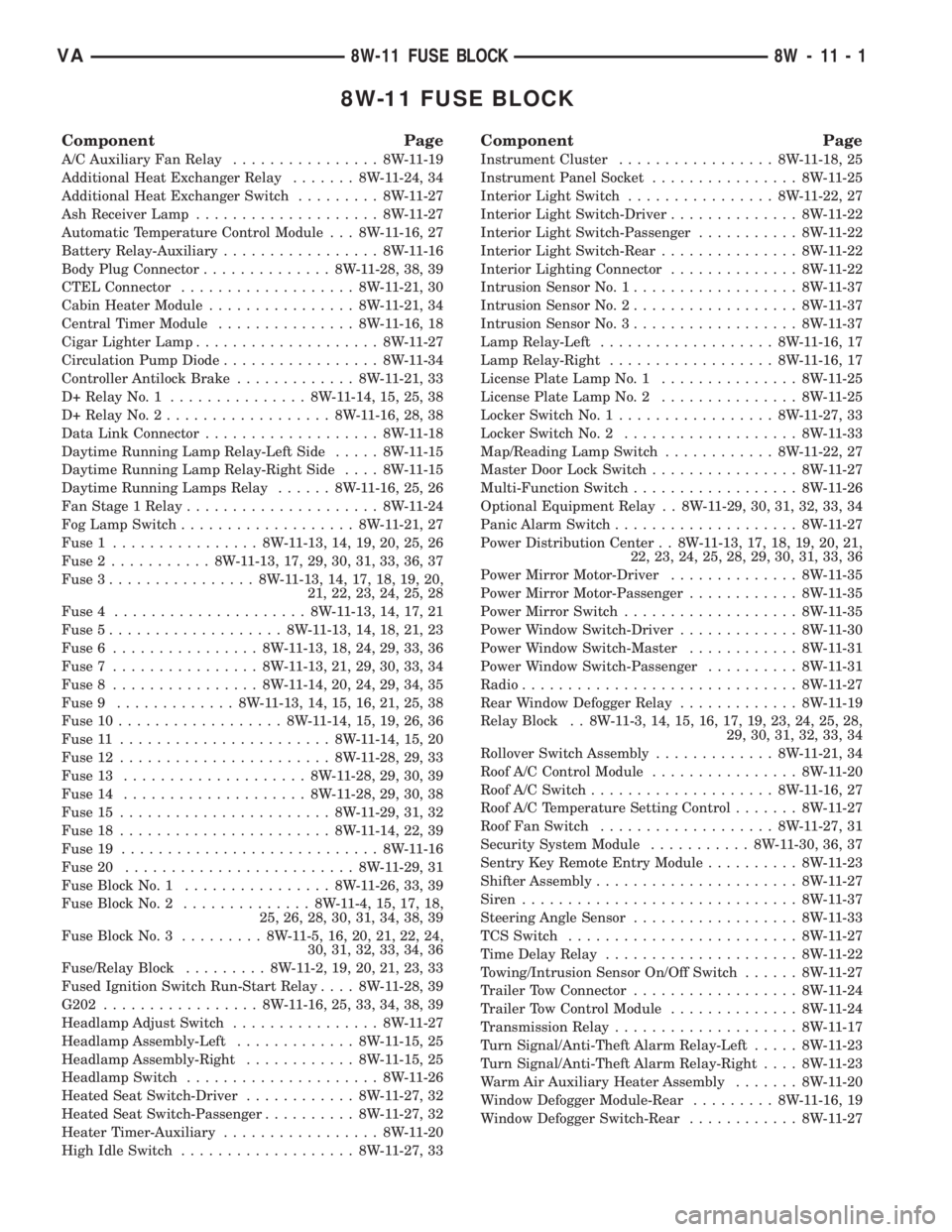
8W-11 FUSE BLOCK
Component Page
A/C Auxiliary Fan Relay................ 8W-11-19
Additional Heat Exchanger Relay....... 8W-11-24, 34
Additional Heat Exchanger Switch......... 8W-11-27
Ash Receiver Lamp.................... 8W-11-27
Automatic Temperature Control Module . . . 8W-11-16, 27
Battery Relay-Auxiliary................. 8W-11-16
Body Plug Connector.............. 8W-11-28, 38, 39
CTEL Connector................... 8W-11-21, 30
Cabin Heater Module................ 8W-11-21, 34
Central Timer Module............... 8W-11-16, 18
Cigar Lighter Lamp.................... 8W-11-27
Circulation Pump Diode................. 8W-11-34
Controller Antilock Brake............. 8W-11-21, 33
D+ Relay No. 1............... 8W-11-14, 15, 25, 38
D+ Relay No. 2.................. 8W-11-16, 28, 38
Data Link Connector................... 8W-11-18
Daytime Running Lamp Relay-Left Side..... 8W-11-15
Daytime Running Lamp Relay-Right Side.... 8W-11-15
Daytime Running Lamps Relay...... 8W-11-16, 25, 26
Fan Stage 1 Relay..................... 8W-11-24
Fog Lamp Switch................... 8W-11-21, 27
Fuse 1................ 8W-11-13, 14, 19, 20, 25, 26
Fuse 2........... 8W-11-13, 17, 29, 30, 31, 33, 36, 37
Fuse 3................ 8W-11-13, 14, 17, 18, 19, 20,
21, 22, 23, 24, 25, 28
Fuse 4..................... 8W-11-13, 14, 17, 21
Fuse 5................... 8W-11-13, 14, 18, 21, 23
Fuse 6................ 8W-11-13, 18, 24, 29, 33, 36
Fuse 7................ 8W-11-13, 21, 29, 30, 33, 34
Fuse 8................ 8W-11-14, 20, 24, 29, 34, 35
Fuse 9............. 8W-11-13, 14, 15, 16, 21, 25, 38
Fuse 10.................. 8W-11-14, 15, 19, 26, 36
Fuse 11....................... 8W-11-14, 15, 20
Fuse 12....................... 8W-11-28, 29, 33
Fuse 13.................... 8W-11-28, 29, 30, 39
Fuse 14.................... 8W-11-28, 29, 30, 38
Fuse 15....................... 8W-11-29, 31, 32
Fuse 18....................... 8W-11-14, 22, 39
Fuse 19............................ 8W-11-16
Fuse 20......................... 8W-11-29, 31
Fuse Block No. 1................ 8W-11-26, 33, 39
Fuse Block No. 2.............. 8W-11-4, 15, 17, 18,
25, 26, 28, 30, 31, 34, 38, 39
Fuse Block No. 3......... 8W-11-5, 16, 20, 21, 22, 24,
30, 31, 32, 33, 34, 36
Fuse/Relay Block......... 8W-11-2, 19, 20, 21, 23, 33
Fused Ignition Switch Run-Start Relay.... 8W-11-28, 39
G202................. 8W-11-16, 25, 33, 34, 38, 39
Headlamp Adjust Switch................ 8W-11-27
Headlamp Assembly-Left............. 8W-11-15, 25
Headlamp Assembly-Right............ 8W-11-15, 25
Headlamp Switch..................... 8W-11-26
Heated Seat Switch-Driver............ 8W-11-27, 32
Heated Seat Switch-Passenger.......... 8W-11-27, 32
Heater Timer-Auxiliary................. 8W-11-20
High Idle Switch................... 8W-11-27, 33
Component Page
Instrument Cluster................. 8W-11-18, 25
Instrument Panel Socket................ 8W-11-25
Interior Light Switch................ 8W-11-22, 27
Interior Light Switch-Driver.............. 8W-11-22
Interior Light Switch-Passenger........... 8W-11-22
Interior Light Switch-Rear............... 8W-11-22
Interior Lighting Connector.............. 8W-11-22
Intrusion Sensor No. 1.................. 8W-11-37
Intrusion Sensor No. 2.................. 8W-11-37
Intrusion Sensor No. 3.................. 8W-11-37
Lamp Relay-Left................... 8W-11-16, 17
Lamp Relay-Right.................. 8W-11-16, 17
License Plate Lamp No. 1............... 8W-11-25
License Plate Lamp No. 2............... 8W-11-25
Locker Switch No. 1................. 8W-11-27, 33
Locker Switch No. 2................... 8W-11-33
Map/Reading Lamp Switch............ 8W-11-22, 27
Master Door Lock Switch................ 8W-11-27
Multi-Function Switch.................. 8W-11-26
Optional Equipment Relay . . 8W-11-29, 30, 31, 32, 33, 34
Panic Alarm Switch.................... 8W-11-27
Power Distribution Center . . 8W-11-13, 17, 18, 19, 20, 21,
22, 23, 24, 25, 28, 29, 30, 31, 33, 36
Power Mirror Motor-Driver.............. 8W-11-35
Power Mirror Motor-Passenger............ 8W-11-35
Power Mirror Switch................... 8W-11-35
Power Window Switch-Driver............. 8W-11-30
Power Window Switch-Master............ 8W-11-31
Power Window Switch-Passenger.......... 8W-11-31
Radio.............................. 8W-11-27
Rear Window Defogger Relay............. 8W-11-19
Relay Block . . 8W-11-3, 14, 15, 16, 17, 19, 23, 24, 25, 28,
29, 30, 31, 32, 33, 34
Rollover Switch Assembly............. 8W-11-21, 34
Roof A/C Control Module................ 8W-11-20
Roof A/C Switch.................... 8W-11-16, 27
Roof A/C Temperature Setting Control....... 8W-11-27
Roof Fan Switch................... 8W-11-27, 31
Security System Module........... 8W-11-30, 36, 37
Sentry Key Remote Entry Module.......... 8W-11-23
Shifter Assembly...................... 8W-11-27
Siren.............................. 8W-11-37
Steering Angle Sensor.................. 8W-11-33
TCS Switch......................... 8W-11-27
Time Delay Relay..................... 8W-11-22
Towing/Intrusion Sensor On/Off Switch...... 8W-11-27
Trailer Tow Connector.................. 8W-11-24
Trailer Tow Control Module.............. 8W-11-24
Transmission Relay.................... 8W-11-17
Turn Signal/Anti-Theft Alarm Relay-Left..... 8W-11-23
Turn Signal/Anti-Theft Alarm Relay-Right.... 8W-11-23
Warm Air Auxiliary Heater Assembly....... 8W-11-20
Window Defogger Module-Rear......... 8W-11-16, 19
Window Defogger Switch-Rear............ 8W-11-27
VA8W-11 FUSE BLOCK 8W - 11 - 1