buttons MERCEDES-BENZ SPRINTER 2011 MY11 Operator’s Manual
[x] Cancel search | Manufacturer: MERCEDES-BENZ, Model Year: 2011, Model line: SPRINTER, Model: MERCEDES-BENZ SPRINTER 2011Pages: 292, PDF Size: 6.75 MB
Page 23 of 292
Cockpit
................................................. 22
Instrument cluster variants ...............24
Steering wheel with buttons ..............26
Center console .................................... 26
Switch units ......................................... 27 21At a glance
Page 24 of 292

Cockpit
Cockpit
i
This Operator's Manual describes all the
standard and optional
equipment available
for your vehicle at the time of purchase.
Country specific differences are possible.
Please note that your vehicle might not be
equipped with all the functions described
here. This also includes safety relevant
systems and functions. Function Page
0046
Door control panel 28
0047
Light switch 89
008A
Combination switch:
• turn signals 90
• high-beam headlamps 90
• windshield wipers 94
• rear window wiper 94
0088
Cruise control lever 118
0086
Horn
0087
Steering wheel without/
with buttons
26 Function Page
006E
Instrument cluster 24
006F
Stowage compartment
0070
• Stowage compartment
with interior light
92
• Overhead control panel 27
0071
Rear-view mirror 69
0072
Rear-view camera monitor 122
0073
PARKTRONIC warning
display
119
0074
Opens/closes the right-
hand side window
60
0075
Jack and vehicle tool kit 182
0076
Glove box 131
0077
Center console 26
0078
Ignition lock 56
0079
Additional switch unit 2822
Cockpit
At a glance
Page 26 of 292
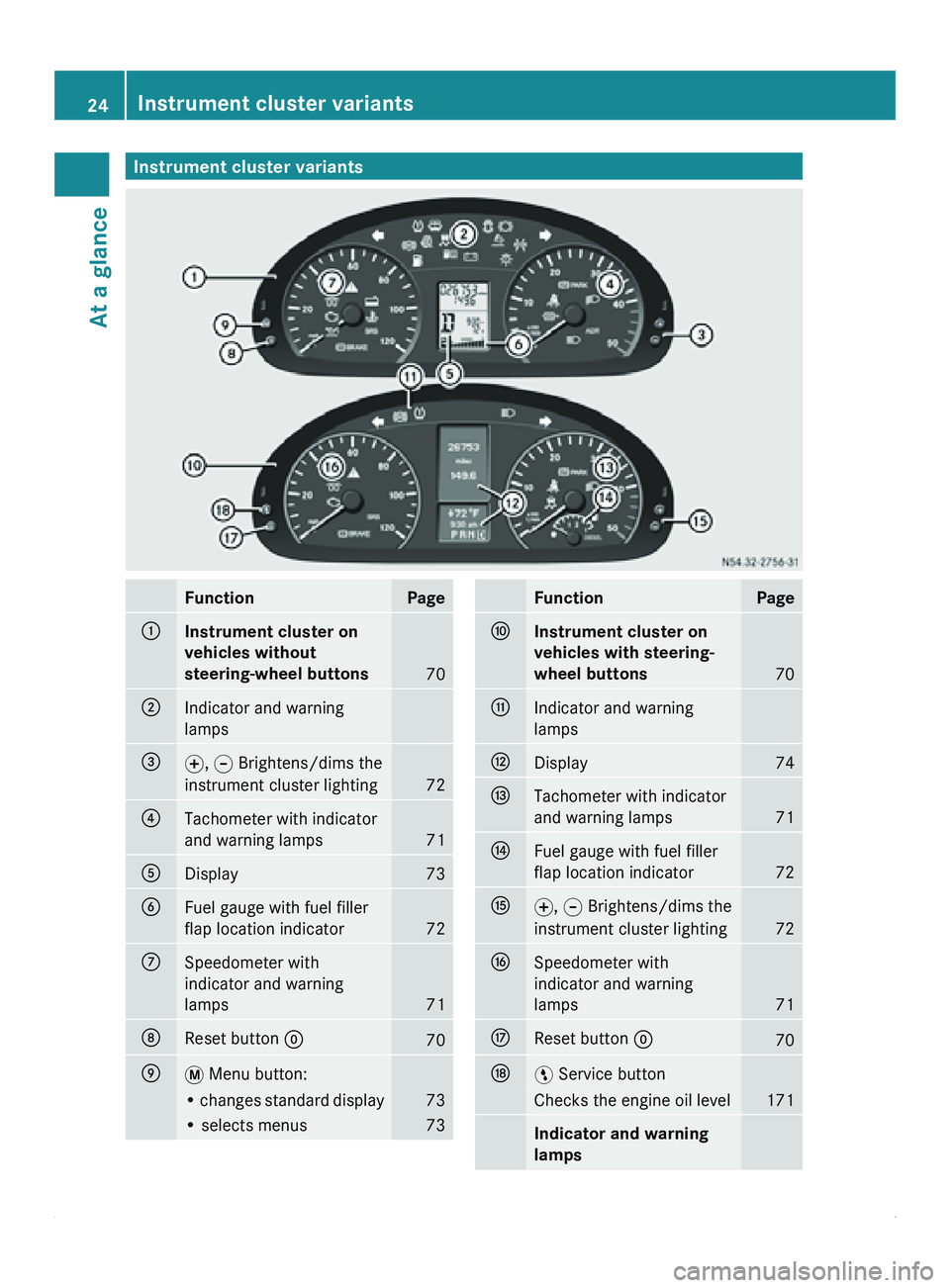
Instrument cluster variants
Function Page
0046
Instrument cluster on
vehicles without
steering-wheel buttons
70
0047
Indicator and warning
lamps
008A
0069, 006A Brightens/dims the
instrument cluster lighting 72
0088
Tachometer with indicator
and warning lamps
71
0086
Display 73
0087
Fuel gauge with fuel filler
flap location indicator
72
006E
Speedometer with
indicator and warning
lamps
71
006F
Reset button 0048
70
0070
007B Menu button:
• changes standard display 73
• selects menus 73 Function Page
0071
Instrument cluster on
vehicles with steering-
wheel buttons
70
0072
Indicator and warning
lamps
0073
Display 74
0074
Tachometer with indicator
and warning lamps
71
0075
Fuel gauge with fuel filler
flap location indicator
72
0076
0069, 006A Brightens/dims the
instrument cluster lighting 72
0077
Speedometer with
indicator and warning
lamps
71
0078
Reset button 0048
70
0079
00A4 Service button
Checks the engine oil level 171
Indicator and warning
lamps24
Instrument cluster variants
At a glance
Page 27 of 292
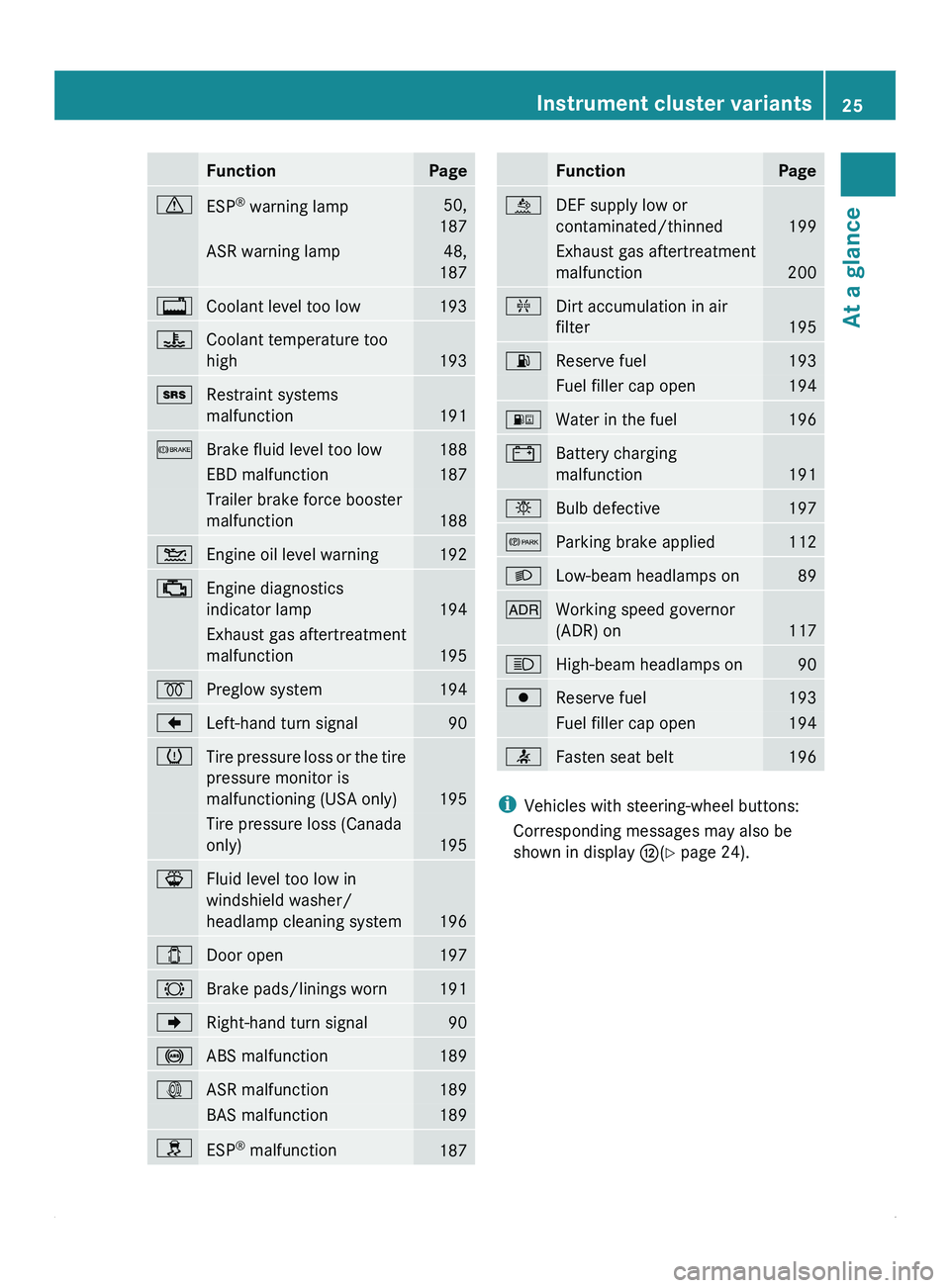
Function Page
0067
ESP
®
warning lamp 50,
187 ASR warning lamp 48,
187 0041
Coolant level too low 193
00AE
Coolant temperature too
high
193
008A
Restraint systems
malfunction
191
0065
Brake fluid level too low 188
EBD malfunction 187
Trailer brake force booster
malfunction
188
00B4
Engine oil level warning 192
00BB
Engine diagnostics
indicator lamp
194
Exhaust gas aftertreatment
malfunction
195
0028
Preglow system 194
004A
Left-hand turn signal 90
0077
Tire pressure loss or the tire
pressure monitor is
malfunctioning (USA only)
195
Tire pressure loss (Canada
only)
195
00BD
Fluid level too low in
windshield washer/
headlamp cleaning system
196
003E
Door open 197
0026
Brake pads/linings worn 191
004D
Right-hand turn signal 90
0031
ABS malfunction 189
003D
ASR malfunction 189
BAS malfunction 189
009E
ESP
®
malfunction 187 Function Page
00E4
DEF supply low or
contaminated/thinned
199
Exhaust gas aftertreatment
malfunction
200
00AB
Dirt accumulation in air
filter
195
00B6
Reserve fuel 193
Fuel filler cap open 194
00BA
Water in the fuel 196
003F
Battery charging
malfunction
191
0055
Bulb defective 197
0066
Parking brake applied 112
0064
Low-beam headlamps on 89
004E
Working speed governor
(ADR) on
117
0063
High-beam headlamps on 90
0080
Reserve fuel 193
Fuel filler cap open 194
0082
Fasten seat belt 196
i
Vehicles with steering-wheel buttons:
Corresponding messages may also be
shown in display 0073(Y page 24). Instrument cluster variants
25At a glance
Page 28 of 292
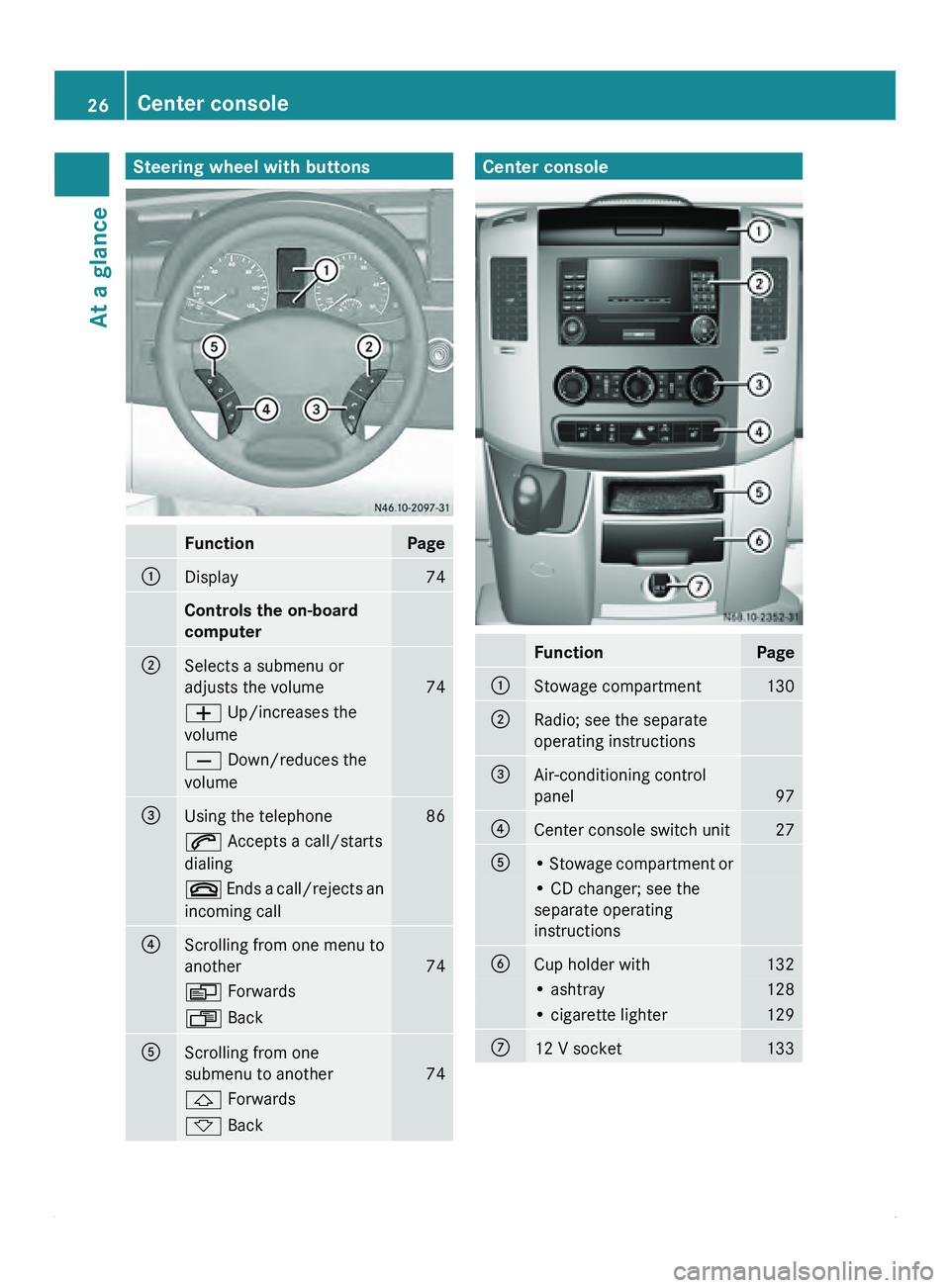
Steering wheel with buttons
Function Page
0046
Display 74
Controls the on-board
computer
0047
Selects a submenu or
adjusts the volume
74
005A Up/increases the
volume
005B Down/reduces the
volume
008A
Using the telephone 86
006A Accepts a call/starts
dialing
007F Ends a call/rejects an
incoming call 0088
Scrolling from one menu to
another
74
0059 Forwards
0058 Back
0086
Scrolling from one
submenu to another
74
0029 Forwards
002D Back Center console
Function Page
0046
Stowage compartment 130
0047
Radio; see the separate
operating instructions
008A
Air-conditioning control
panel
97
0088
Center console switch unit 27
0086
• Stowage compartment or
• CD changer; see the
separate operating
instructions
0087
Cup holder with 132
• ashtray 128
• cigarette lighter 129
006E
12 V socket 13326
Center console
At a glance
Page 51 of 292
G
Warning
Never switch off ASR when you see the
0067 warning lamp
flashing in the instrument
cluster. In this case proceed as follows:
R when driving off, apply as little throttle as
possible.
R while driving, ease off the accelerator
pedal.
R adapt your speed and driving style to the
prevailing road conditions.
Failure to observe these guidelines could
cause the vehicle to skid. ESP ®
cannot
prevent accidents resulting from excessive
speed.
If, taking tires, cargo load and gradient into
consideration, the surface driven on still
provides insufficient traction, you may
experience difficulties in pulling away despite
ASR.
Vehicles without steering-wheel buttons:
the 003D indicator lamp in the instrument
cluster lights up when you switch on the
ignition. It goes out when the engine is
running.
Activating/deactivating ASR G
Warning
ASR should
not be switched off during normal
driving other than in the circumstances
described below. Deactivating
the system will
reduce vehicle stability in driving maneuvers.
Do not switch off ASR when a spare wheel is
mounted.
ASR is activated automatically when the
engine is running.
It may be best to deactivate ASR briefly in the
following situations:
R when using snow chains
R in deep snow
R on sand or gravel If you deactivate ASR:
R
the engine's torque
is no longer limited and
the drive wheels can spin. The spinning of
the wheels results in a cutting action, which
provides better grip.
R brake intervention will continue to improve
traction where a drive wheel begins to spin,
e.g. if only the side of the road is slippery.
The wheel will be braked to increase
traction under such circumstances.
R active brake intervention by ESP ®
to
increase driving stability remains active. G
Warning
Even with ASR deactivated, ESP ®
remains
active and continues to perform brake
interventions where this is necessary to
improve driving stability. The 0067 warning
lamp flashes.
With ASR deactivated, there is an increased
risk of your vehicle's brake system
overheating and suffering damage due to
prolonged application. A
hot brake system will
also result in increased stopping distance.
Therefore, only deactivate ASR when
absolutely necessary. X
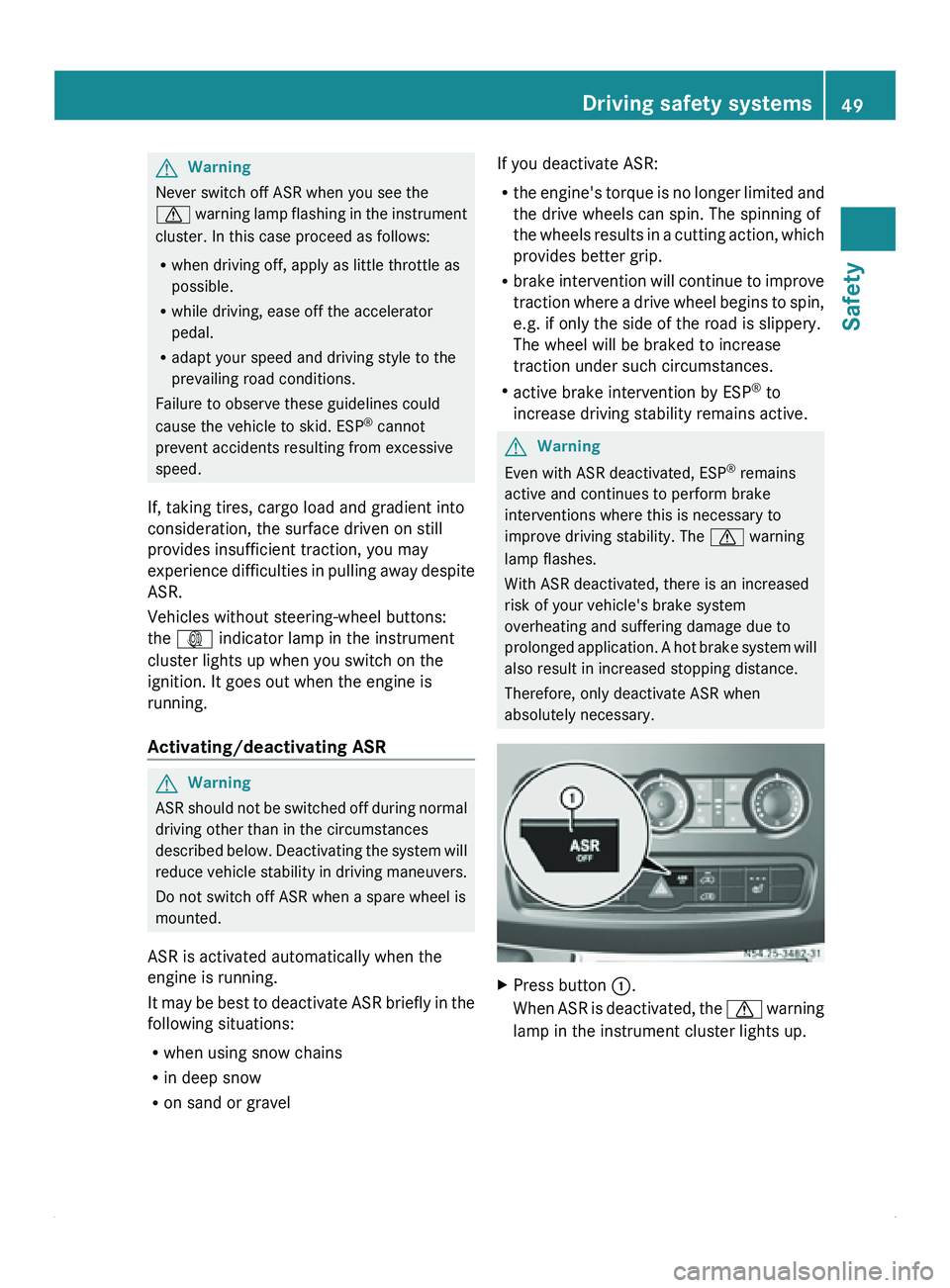
Press button 0046
.
When ASR is
deactivated, the 0067 warning
lamp in the instrument cluster lights up. Driving safety systems
49
Safety Z
Page 53 of 292
Vehicle equipment ..............................
52
Opening and closing ...........................52
Anti-theft systems .............................. 61
Seats .................................................... 63
Steering wheel .................................... 69
Mirrors ................................................. 69
Instrument cluster ..............................70
On-board computer without steer-
ing wheel buttons ............................... 72
On-board computer with steering
wheel buttons ..................................... 74
Power supply ....................................... 87
Lighting ................................................ 88
Good visibility ...................................... 94
Climate control .................................... 97
Driving and parking .......................... 108
Brakes ................................................ 112
Automatic transmission ................... 113
Driving the vehicle ............................116
Driving systems ................................ 117
Features ............................................. 128
Communications ............................... 133 51Controls
Page 56 of 292
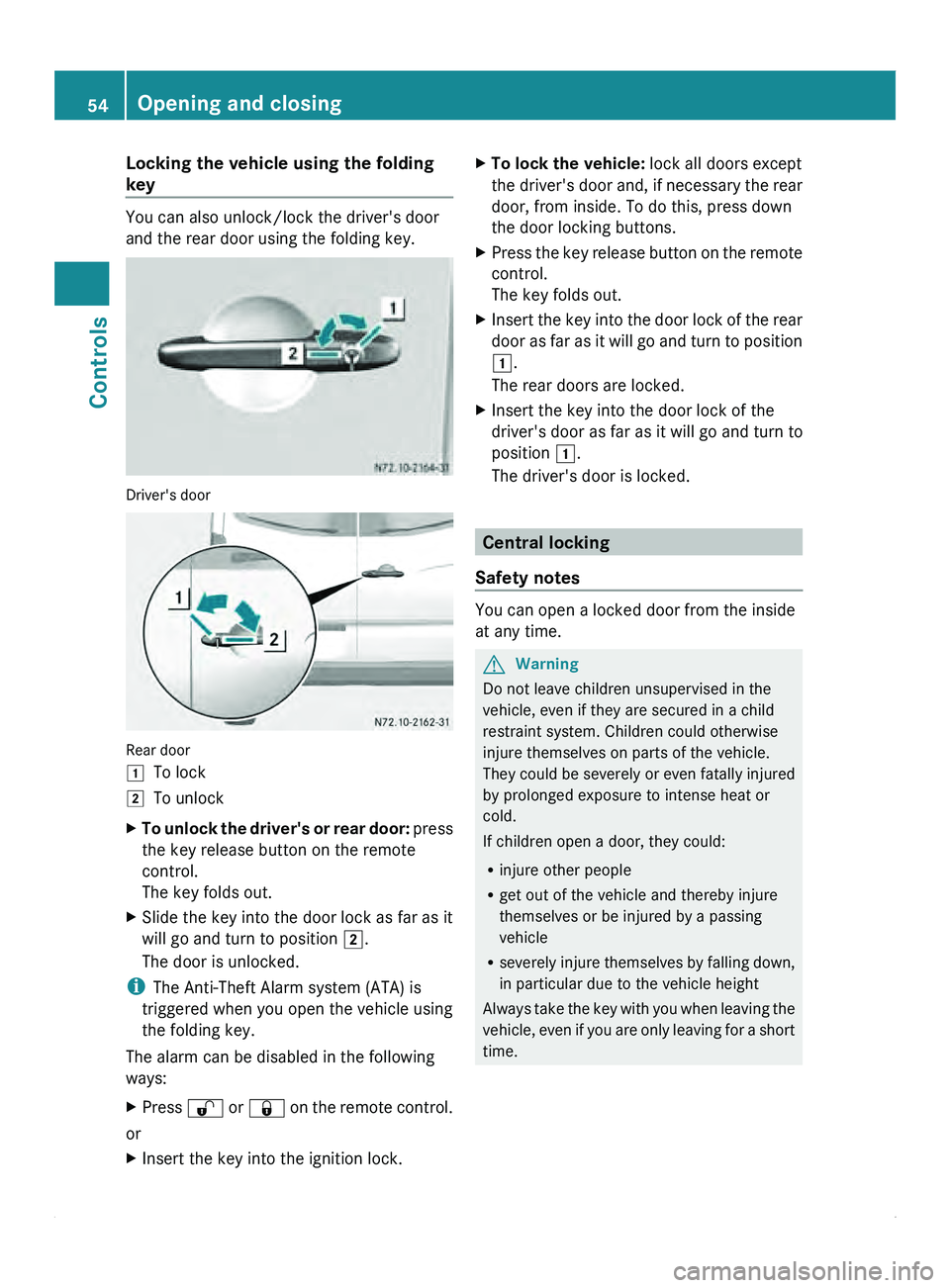
Locking the vehicle using the folding
key
You can also unlock/lock the driver's door
and the rear door using the folding key.
Driver's door
Rear door
004A
To lock
004B To unlock
X To unlock the driver's or rear door: press
the key release button on the remote
control.
The key folds out.
X Slide the key into the door lock as far as it
will go and turn to position 004B.
The door is unlocked.
i The Anti-Theft Alarm system (ATA) is
triggered when you open the vehicle using
the folding key.
The alarm can be disabled in the following
ways:
X Press 0036
or 0037
on the remote control.
or
X Insert the key into the ignition lock. X
To lock the vehicle: lock all doors except
the driver's door
and, if necessary the rear
door, from inside. To do this, press down
the door locking buttons.
X Press the key release button on the remote
control.
The key folds out.
X Insert the key into the door lock of the rear
door as far
as it will go and turn to position
004A.
The rear doors are locked.
X Insert the key into the door lock of the
driver's door as far as it will go and turn to
position 004A.
The driver's door is locked. Central locking
Safety notes You can open a locked door from the inside
at any time.
G
Warning
Do not leave children unsupervised in the
vehicle, even if they are secured in a child
restraint system. Children could otherwise
injure themselves on parts of the vehicle.
They could be
severely or even fatally injured
by prolonged exposure to intense heat or
cold.
If children open a door, they could:
R injure other people
R get out of the vehicle and thereby injure
themselves or be injured by a passing
vehicle
R severely injure themselves by falling down,
in particular due to the vehicle height
Always take the key with you when leaving the
vehicle, even if you are only leaving for a short
time. 54
Opening and closing
Controls
Page 72 of 292
X
Anti-glare mode: push anti-glare lever 0046
in the direction of the arrow. Exterior mirrors
Important safety notes G
Warning
The additional mirrors in the exterior mirrors
reduce the size
of the image. The objects are
actually closer than they appear. You could
cause an accident if you only observe the
traffic through the additional mirrors.
Therefore, pay particular attention to traffic
behind you when maneuvering or passing
using the main mirror in the exterior mirrors
also and, if necessary, the rear-view mirror.
Adjusting manually X
Before starting off, manually adjust the
exterior mirrors in
such a way that you can
get a good overview of road and traffic
conditions.
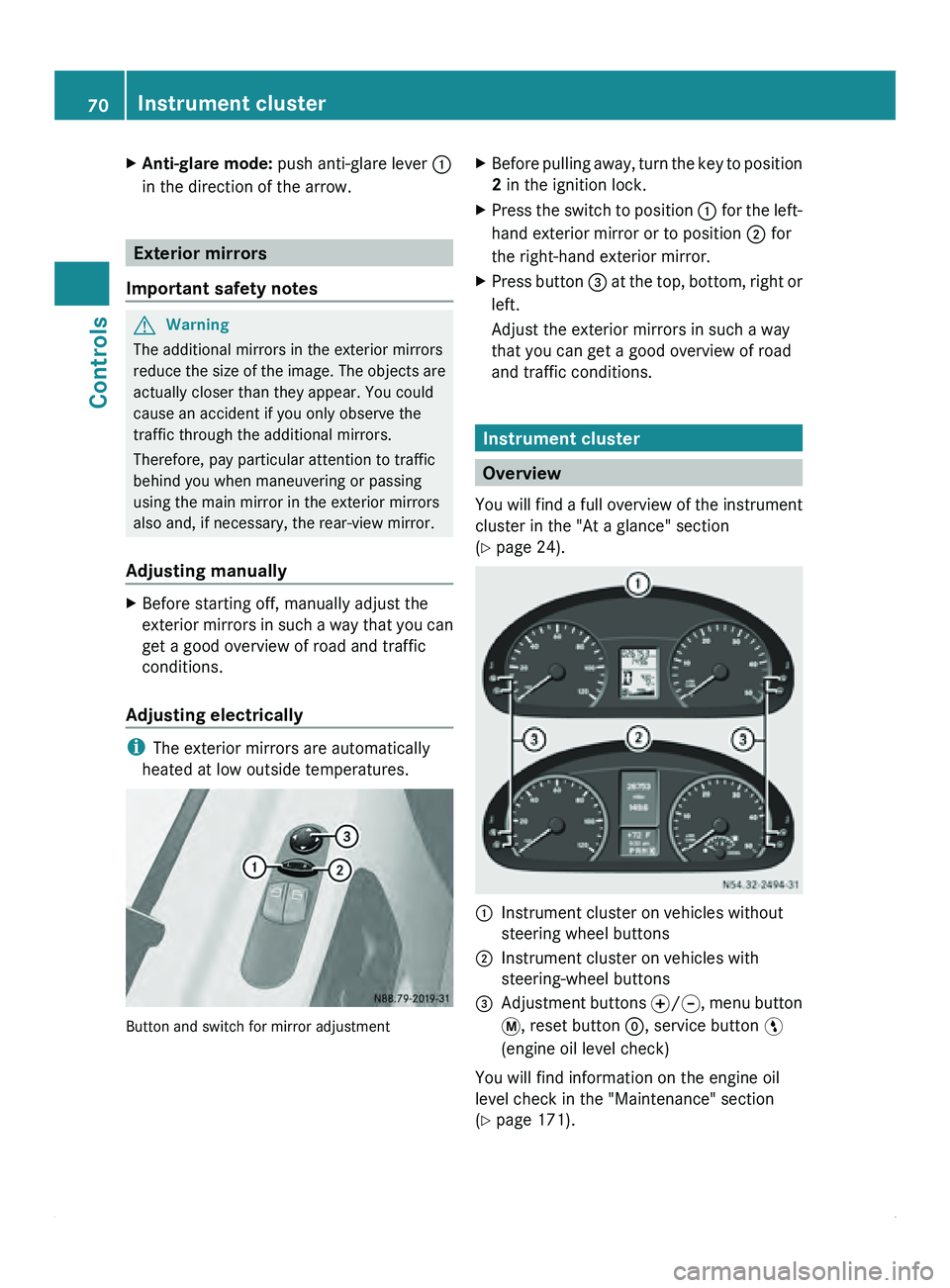
Adjusting electrically i
The exterior mirrors are automatically
heated at low outside temperatures. Button and switch for mirror adjustment X
Before pulling away, turn the key to position
2 in the ignition lock.
X Press the switch to position 0046 for the
left-
hand exterior mirror or to position 0047 for
the right-hand exterior mirror.
X Press button 008A at
the
top, bottom, right or
left.
Adjust the exterior mirrors in such a way
that you can get a good overview of road
and traffic conditions. Instrument cluster
Overview
You will find
a full overview of the instrument
cluster in the "At a glance" section
(Y page 24). 0046
Instrument cluster on vehicles without
steering wheel buttons
0047 Instrument cluster on vehicles with
steering-wheel buttons
008A Adjustment buttons 0069/006A, menu button
007B
, reset button 0048, service button 00A4
(engine oil level check)
You will find information on the engine oil
level check in the "Maintenance" section
(Y page 171). 70
Instrument cluster
Controls
Page 73 of 292
The display in the instrument cluster is
activated when you:
R
open the driver's door
R turn the key
to position 2 in the ignition lock
R press the 0048 reset button
R switch on the lights
The display switches off automatically after
approximately 30 seconds if:
R the vehicle lighting is not switched on.
R the key is in position 0 in the ignition lock.G
Warning
No messages can be displayed if the
instrument cluster and/or the display fails.
You will then not be able to see information
about the vehicle status, such as speed and
outside temperature, warning/indicator
lamps and display messages or the failure of
systems. Handling characteristics may be
affected. Adapt your speed and driving style
accordingly.
Immediately consult a qualified specialist
workshop. The qualified specialist workshop
must have the necessary specialist
knowledge and tools to carry out the work
required. We recommend an authorized
Sprinter Dealer for
this purpose. In particular,
all work relevant to safety or on safety-related
systems must be carried out at a qualified
specialist workshop. G
Warning
Only use the adjustment buttons on the
instrument cluster when
the traffic conditions
permit. You would otherwise be too distracted
and could cause an accident.
Do not reach through the steering wheel to
operate the adjustment buttons. The
movement of the steering wheel would be
significantly impeded. Your attention would
also be diverted from road and traffic
conditions. This could cause you to lose
control of the vehicle, and lead to an accident. Do not rest your head or chest on the steering
wheel or dashboard when operating the
adjustment buttons.
You will find page references for further
information in the index under "Air bag".
Speedometer
i In some countries, a warning sounds
when the vehicle reaches the maximum
speed limit, e.g. at 75 mph (120 km/h).
The speed can also be shown in the display.
You can find information on the digital
speedometer for vehicles without steering
wheel buttons under ( Y page 73) and for
vehicles with steering wheel buttons under
(Y page 77). Tachometer
The red band
in the tachometer indicates the
engine's overrevving range.
To protect the engine, the fuel supply is
interrupted when the red band is reached.
! Do not drive in the overrevving range, as
this could damage the engine.
0040Environmental information
Avoid driving at high engine revs. This driving
style causes an unnecessary increase in
vehicle fuel consumption and, therefore,
damage to the
environment due to increased
emission of pollution. Instrument cluster
71
Controls Z