display MERCEDES-BENZ SPRINTER 2011 MY11 Operator’s Manual
[x] Cancel search | Manufacturer: MERCEDES-BENZ, Model Year: 2011, Model line: SPRINTER, Model: MERCEDES-BENZ SPRINTER 2011Pages: 292, PDF Size: 6.75 MB
Page 15 of 292
Stowage space above the
headliner ........................................ 130
Stowage
space
under the twin co-
driver's seat ................................... 130
Submenu (on-board computer)
Clock/Date ...................................... 82
Convenience .................................... 85
Instrument cluster ........................... 80
Lighting ............................................ 82
Selecting .......................................... 79
Settings overview ............................ 79
Vehicle ............................................. 84
Summer tires ..................................... 254
Supplemental Restraint System see SRS
Surround lighting
Setting (vehicles with steering
wheel buttons) ................................. 83
Switching off the alarm (ATA) ............62
Switch unit Additional ........................................ 28
Center console ................................ 27
Driver's door .................................... 28
Swivel seat ........................................... 65T
Tachometer .......................................... 71
Tank content Reserve fuel warning lamp ............. 193
Tank contents
...................................... 72
Range (vehicles with steering
wheel buttons) ................................. 86
Technical data
Capacities ...................................... 287
Speed ............................................ 280
Tire pressure .................................. 281
Tires/wheels ................................. 280
Vehicle dimensions ........................280
vehicle weights .............................. 280
Telephone .......................................... 134
Operation (vehicles with steering
wheel buttons) ................................. 86
Temperature
Setting (heating/air conditioning) . 100
Setting the unit (vehicles with
steering wheel buttons) ................... 80Theft deterrent locking system
Immobilizer ...................................... 61
Tightening torque
Wheel nuts/wheel bolts ................ 232
Time
Setting
the time (vehicles without
steering wheel buttons) ................... 73
Setting the time (vehicles with
steering wheel buttons) ................... 82
tire
Wheel change ................................ 229
Tire
Labels ............................................ 279
Tire and Loading Information label .. 279
Tire Inflation Pressure label .............279
tire pressure Calling up (vehicles with steering
wheel buttons) ............................... 260
Tire pressure
Calling up (on-board computer) ..... 258
Checking manually ........................258
Display message ...........199, 203, 208
Maximum ....................................... 257
Recommended ...................... 255, 281
Setting the unit (vehicles with
steering wheel buttons) ................... 81
Tables ............................................ 281
Tire and Loading Information
label ............................................... 279
Tire Inflation Pressure label ...........279
Tire label ................................ 256, 279
Warning lamp ................................. 195
Tire pressure monitoring system
Function/notes ............................. 258
Tires
Aspect ratio (definition) ................. 270
Average weight of the vehicle
occupants (definition) .................... 269
Bar (definition) ............................... 268
Characteristics .............................. 268
Checking ........................................ 253
Definition of terms ......................... 268
Direction of rotation ......................272
Distribution of the vehicle
occupants (definition) .................... 271
DOT, Tire Identification Number
(TIN) ............................................... 268 Index
13
Page 17 of 292
Troubleshooting
Automatic transmission .................214
Driving systems
............................. 215
Turn signals ......................................... 90
Changing bulbs .............. 235, 236, 237
Two-way radio
Installation ..................................... 277U
Unlocking With button ...................................... 55
With key ........................................... 52V
Vehicle Assemblies .................................... 174
Cleaning ......................................... 162
Dimensions .................................... 280
Electronics
..................................... 276
Individual settings (vehicles with
steering wheel buttons) ................... 78
Loading .......................................... 261
Towing ........................................... 248
Tow-starting ................................... 248
Transporting .................................. 250
Weights .......................................... 280
Vehicle identification number .......... 277
Vehicle identification plates ............277
Vehicle key Malfunction .................................... 217
Vehicle tool kit .................................. 182
Voltage supply Fuses ............................................. 239W
Warning and indicator lamp Diesel Exhaust Fluid (DEF) ............. 190
Warning and indicator lamps .............24
PARKTRONIC ................................. 215
Seat belt ........................................ 196
Warning lamp .................................... 183
Warning tones ................................... 212
Warning triangle ................................ 183
Washer fluid Display message ............................ 208
Indicator lamp ................................
196Topping up .....................................
171
Wiping with ...................................... 95
Wheel
Changing ....................................... 229
Rim size ......................................... 280
Spare wheel ................................... 185
Wheel chock
...................................... 229
Wheel nuts/wheel bolts Retightening .................................. 233
Tightening torque ........................... 232
Wheels
Changing/replacing .......................271
Checking ........................................ 253
Storing ........................................... 273
Wheel size/tire size ....................... 280
Window curtain air bag ....................... 41
Windows
Cleaning ......................................... 162
Cleaning the windshield ................. 163
Washing system ....................... 95, 171
Windshield
Cleaning ......................................... 163
Windshield heater ............................... 95
windshield heating Malfunction .................................... 211
Windshield washer fluid
Indicator lamp ................................ 196
Windshield wipers ............................... 94
Malfunction .................................... 219
Rain/light sensor ............................. 94
Replacing the wiper blades ............ 174
Setting the sensitivity (vehicles
with steering wheel buttons and
rain/light sensor) ............................. 84
Winter diesel ..................................... 154
Winter operation ....................... 153, 254
Winter tires M+S tires ....................................... 254
Working speed governor (ADR) ........ 117 X
Xenon headlamps see Bi-Xenon headlamps
Index
15
Page 24 of 292

Cockpit
Cockpit
i
This Operator's Manual describes all the
standard and optional
equipment available
for your vehicle at the time of purchase.
Country specific differences are possible.
Please note that your vehicle might not be
equipped with all the functions described
here. This also includes safety relevant
systems and functions. Function Page
0046
Door control panel 28
0047
Light switch 89
008A
Combination switch:
• turn signals 90
• high-beam headlamps 90
• windshield wipers 94
• rear window wiper 94
0088
Cruise control lever 118
0086
Horn
0087
Steering wheel without/
with buttons
26 Function Page
006E
Instrument cluster 24
006F
Stowage compartment
0070
• Stowage compartment
with interior light
92
• Overhead control panel 27
0071
Rear-view mirror 69
0072
Rear-view camera monitor 122
0073
PARKTRONIC warning
display
119
0074
Opens/closes the right-
hand side window
60
0075
Jack and vehicle tool kit 182
0076
Glove box 131
0077
Center console 26
0078
Ignition lock 56
0079
Additional switch unit 2822
Cockpit
At a glance
Page 26 of 292
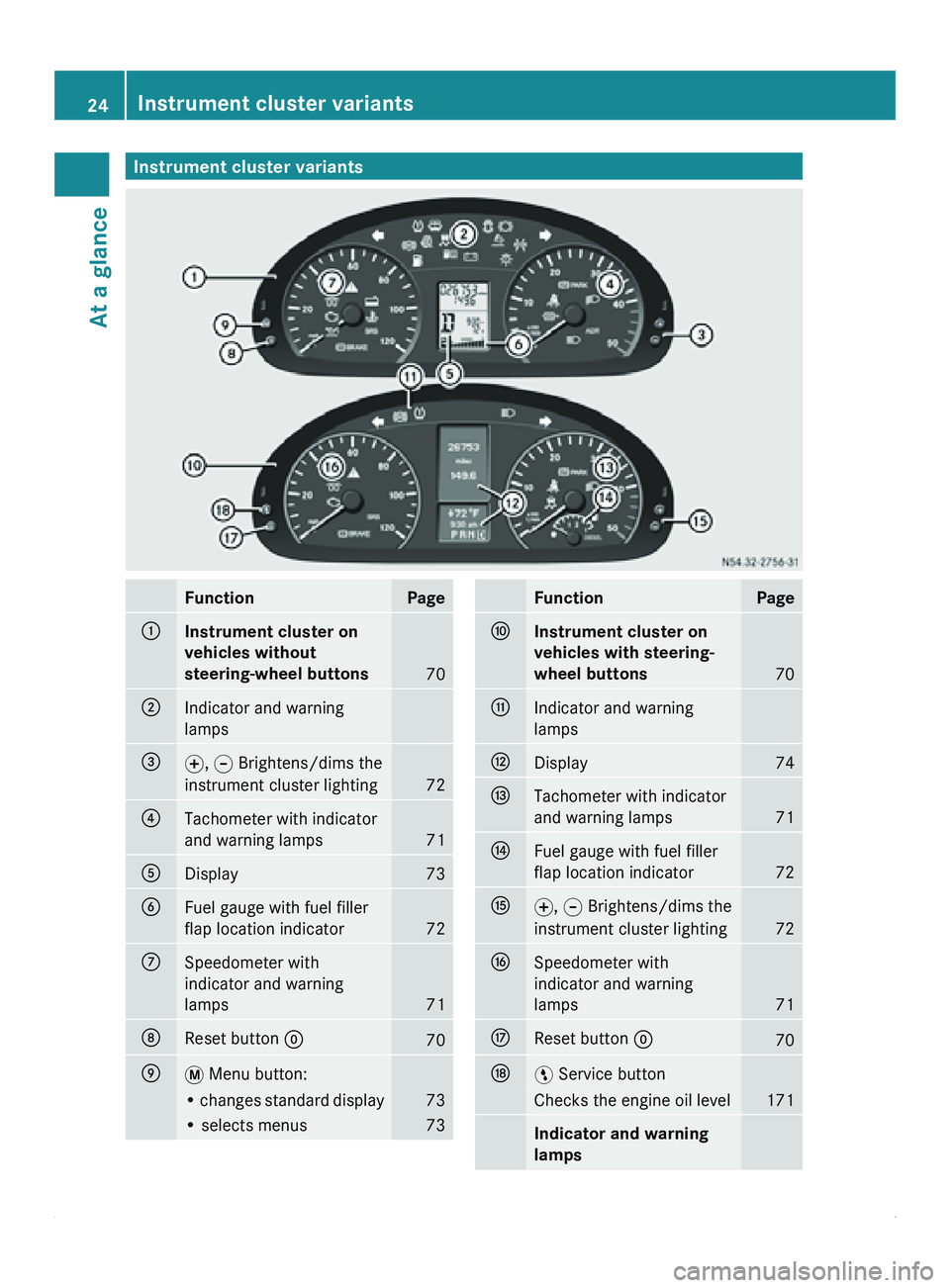
Instrument cluster variants
Function Page
0046
Instrument cluster on
vehicles without
steering-wheel buttons
70
0047
Indicator and warning
lamps
008A
0069, 006A Brightens/dims the
instrument cluster lighting 72
0088
Tachometer with indicator
and warning lamps
71
0086
Display 73
0087
Fuel gauge with fuel filler
flap location indicator
72
006E
Speedometer with
indicator and warning
lamps
71
006F
Reset button 0048
70
0070
007B Menu button:
• changes standard display 73
• selects menus 73 Function Page
0071
Instrument cluster on
vehicles with steering-
wheel buttons
70
0072
Indicator and warning
lamps
0073
Display 74
0074
Tachometer with indicator
and warning lamps
71
0075
Fuel gauge with fuel filler
flap location indicator
72
0076
0069, 006A Brightens/dims the
instrument cluster lighting 72
0077
Speedometer with
indicator and warning
lamps
71
0078
Reset button 0048
70
0079
00A4 Service button
Checks the engine oil level 171
Indicator and warning
lamps24
Instrument cluster variants
At a glance
Page 27 of 292
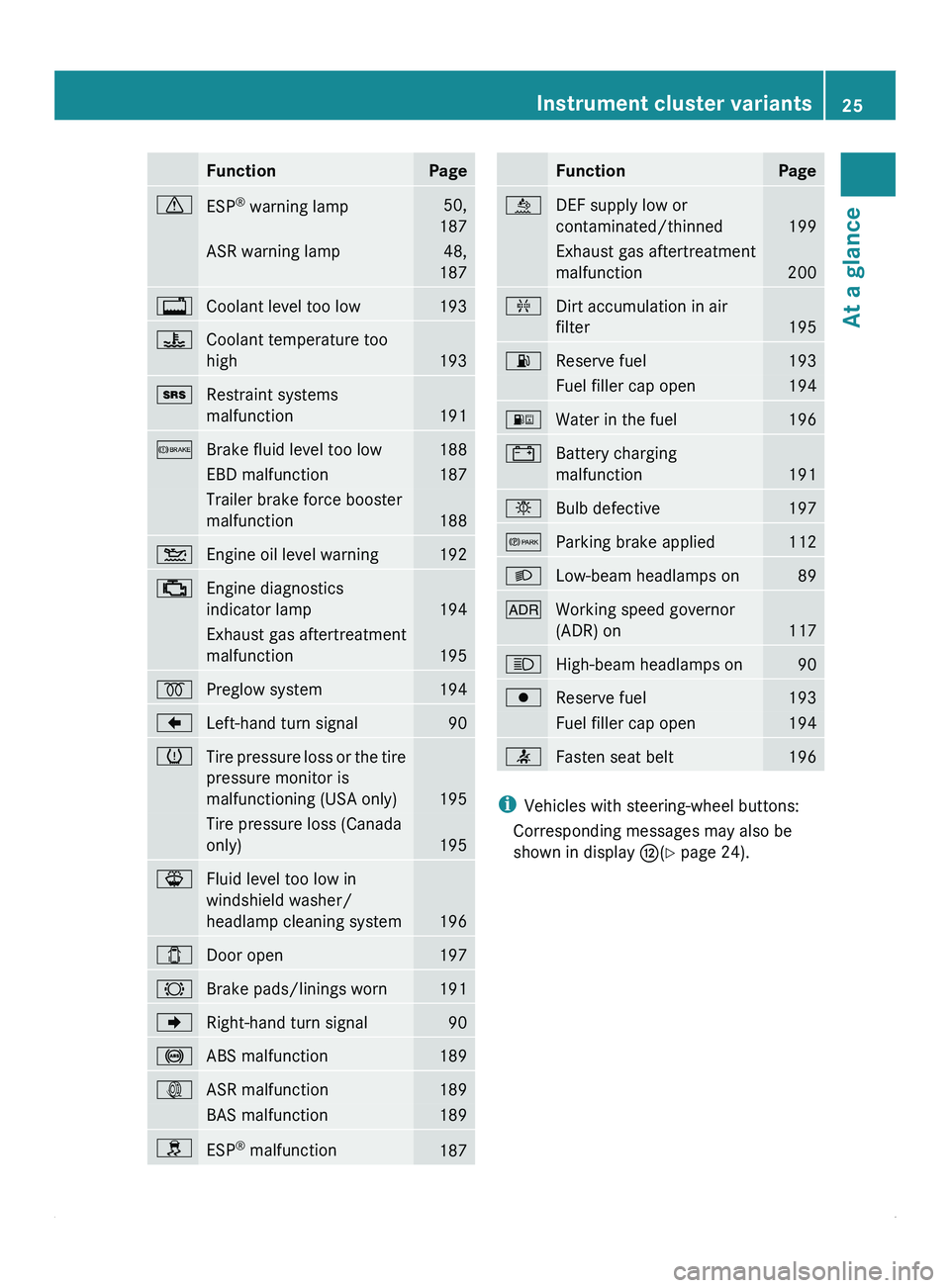
Function Page
0067
ESP
®
warning lamp 50,
187 ASR warning lamp 48,
187 0041
Coolant level too low 193
00AE
Coolant temperature too
high
193
008A
Restraint systems
malfunction
191
0065
Brake fluid level too low 188
EBD malfunction 187
Trailer brake force booster
malfunction
188
00B4
Engine oil level warning 192
00BB
Engine diagnostics
indicator lamp
194
Exhaust gas aftertreatment
malfunction
195
0028
Preglow system 194
004A
Left-hand turn signal 90
0077
Tire pressure loss or the tire
pressure monitor is
malfunctioning (USA only)
195
Tire pressure loss (Canada
only)
195
00BD
Fluid level too low in
windshield washer/
headlamp cleaning system
196
003E
Door open 197
0026
Brake pads/linings worn 191
004D
Right-hand turn signal 90
0031
ABS malfunction 189
003D
ASR malfunction 189
BAS malfunction 189
009E
ESP
®
malfunction 187 Function Page
00E4
DEF supply low or
contaminated/thinned
199
Exhaust gas aftertreatment
malfunction
200
00AB
Dirt accumulation in air
filter
195
00B6
Reserve fuel 193
Fuel filler cap open 194
00BA
Water in the fuel 196
003F
Battery charging
malfunction
191
0055
Bulb defective 197
0066
Parking brake applied 112
0064
Low-beam headlamps on 89
004E
Working speed governor
(ADR) on
117
0063
High-beam headlamps on 90
0080
Reserve fuel 193
Fuel filler cap open 194
0082
Fasten seat belt 196
i
Vehicles with steering-wheel buttons:
Corresponding messages may also be
shown in display 0073(Y page 24). Instrument cluster variants
25At a glance
Page 28 of 292
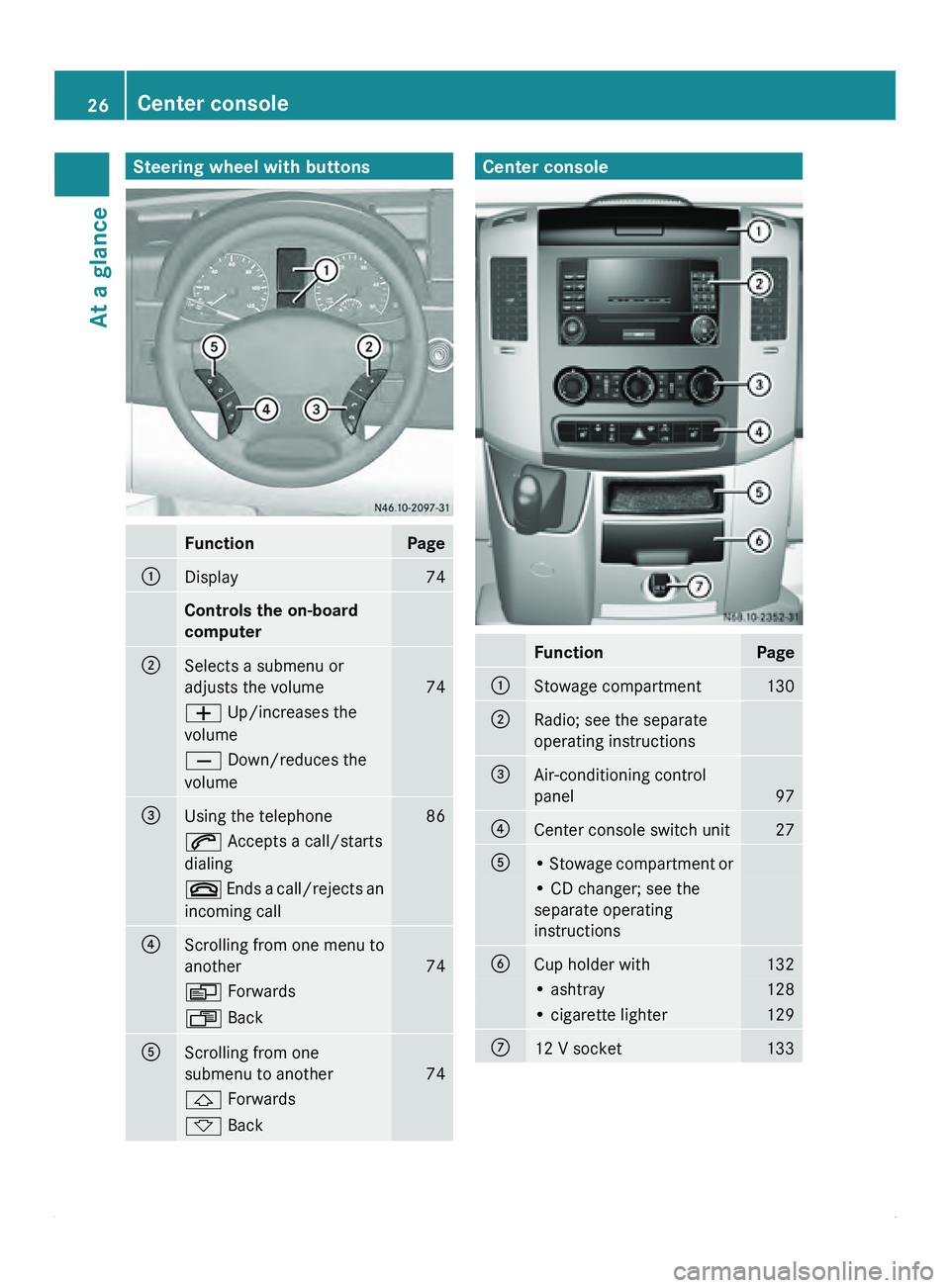
Steering wheel with buttons
Function Page
0046
Display 74
Controls the on-board
computer
0047
Selects a submenu or
adjusts the volume
74
005A Up/increases the
volume
005B Down/reduces the
volume
008A
Using the telephone 86
006A Accepts a call/starts
dialing
007F Ends a call/rejects an
incoming call 0088
Scrolling from one menu to
another
74
0059 Forwards
0058 Back
0086
Scrolling from one
submenu to another
74
0029 Forwards
002D Back Center console
Function Page
0046
Stowage compartment 130
0047
Radio; see the separate
operating instructions
008A
Air-conditioning control
panel
97
0088
Center console switch unit 27
0086
• Stowage compartment or
• CD changer; see the
separate operating
instructions
0087
Cup holder with 132
• ashtray 128
• cigarette lighter 129
006E
12 V socket 13326
Center console
At a glance
Page 49 of 292
X
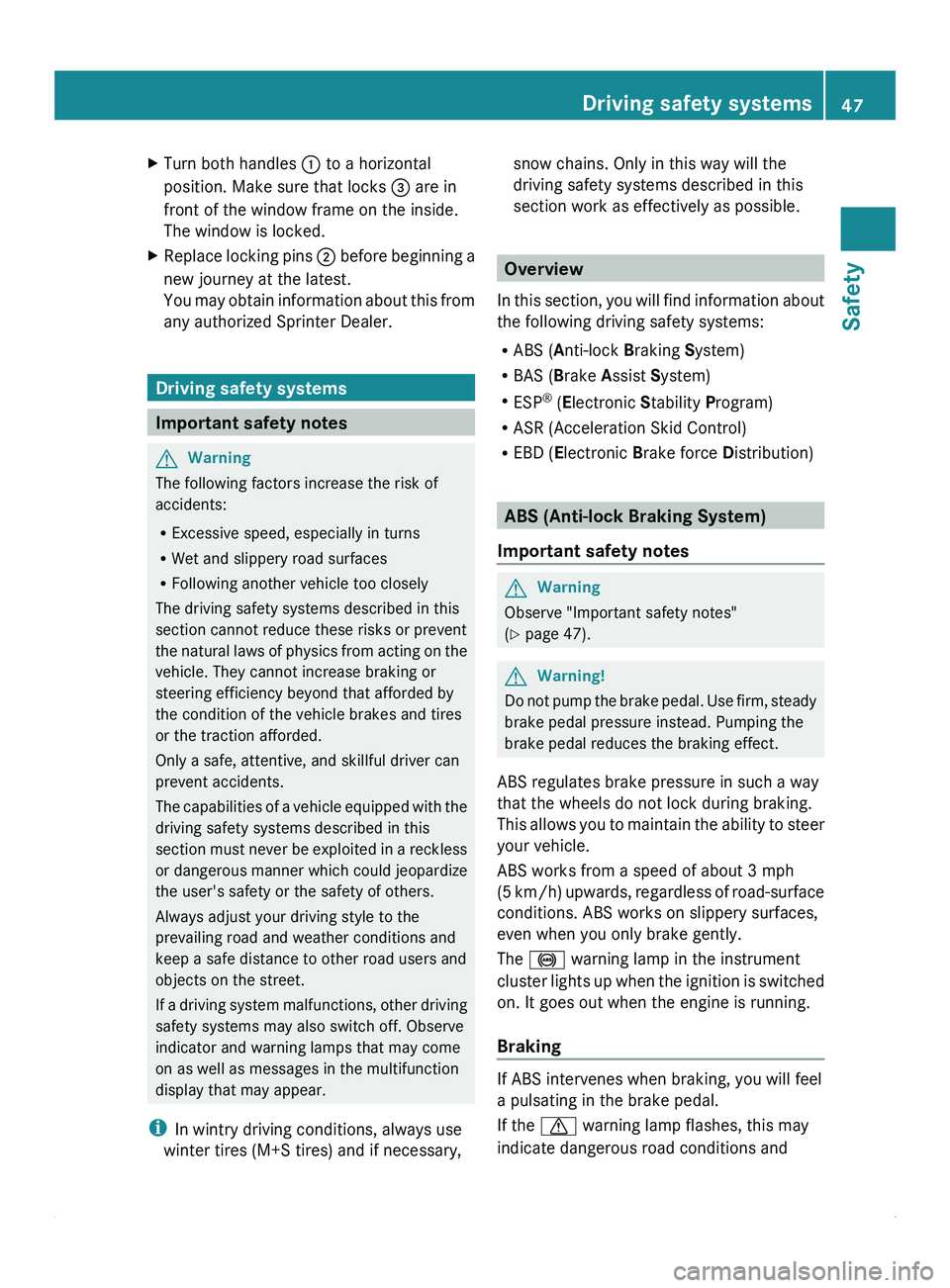
Turn both handles 0046 to a horizontal
position. Make sure that locks 008A are in
front of the window frame on the inside.
The window is locked.
X Replace locking pins 0047 before
beginning a
new journey at the latest.
You may obtain information about this from
any authorized Sprinter Dealer. Driving safety systems
Important safety notes
G
Warning
The following factors increase the risk of
accidents:
R Excessive speed, especially in turns
R Wet and slippery road surfaces
R Following another vehicle too closely
The driving safety systems described in this
section cannot reduce these risks or prevent
the natural laws
of physics from acting on the
vehicle. They cannot increase braking or
steering efficiency beyond that afforded by
the condition of the vehicle brakes and tires
or the traction afforded.
Only a safe, attentive, and skillful driver can
prevent accidents.
The capabilities of a vehicle equipped with the
driving safety systems described in this
section must never be exploited in a reckless
or dangerous manner which could jeopardize
the user's safety or the safety of others.
Always adjust your driving style to the
prevailing road and weather conditions and
keep a safe distance to other road users and
objects on the street.
If a driving system malfunctions, other driving
safety systems may also switch off. Observe
indicator and warning lamps that may come
on as well as messages in the multifunction
display that may appear.
i In wintry driving conditions, always use
winter tires (M+S tires) and if necessary, snow chains. Only in this way will the
driving safety systems described in this
section work as effectively as possible.
Overview
In this section,
you will find information about
the following driving safety systems:
R ABS ( Anti-lock Braking System)
R BAS ( Brake Assist System)
R ESP ®
(Electronic Stability Program)
R ASR (Acceleration Skid Control)
R EBD ( Electronic Brake force Distribution) ABS (Anti-lock Braking System)
Important safety notes G
Warning
Observe "Important safety notes"
(Y page 47). G
Warning!
Do not pump the brake pedal. Use firm, steady
brake pedal pressure instead. Pumping the
brake pedal reduces the braking effect.
ABS regulates brake pressure in such a way
that the wheels do not lock during braking.
This allows you
to maintain the ability to steer
your vehicle.
ABS works from a speed of about 3 mph
(5 km/h) upwards, regardless of road-surface
conditions. ABS works on slippery surfaces,
even when you only brake gently.
The 0031 warning lamp in the instrument
cluster lights up when the ignition is switched
on. It goes out when the engine is running.
Braking If ABS intervenes when braking, you will feel
a pulsating in the brake pedal.
If the
0067 warning lamp flashes, this may
indicate dangerous road conditions and Driving safety systems
47
Safety Z
Page 50 of 292
serves as a reminder to take extra care while
driving.
X
If ABS intervenes: continue to depress the
brake pedal with force until the braking
situation is over.
X To make a full brake application:
depress the brake pedal with full force. G
Warning
If the ABS malfunctions, other driving systems
such as the
BAS or the ESP ®
are also switched
off. Observe indicator and warning lamps that
may come on as well as messages in the
multifunction display that may appear.
If the ABS malfunctions, the wheels may lock
during hard braking, reducing the steering
capability and extending the braking distance. BAS (Brake Assist System)
G
Warning
Observe "Important safety notes"
(Y page 47).
BAS operates in emergency braking
situations. If you depress the brake pedal
quickly, BAS automatically
boosts the braking
force, potentially reducing the stopping
distance.
X Keep the brake pedal firmly depressed until
the emergency braking situation is over.
ABS prevents the wheels from locking.
The brakes will function as usual once you
release the brake pedal. BAS is deactivated. G
Warning
If the BAS malfunctions, the brake system still
functions, but without the additional brake
boost available that the BAS would normally
provide in an emergency braking maneuver.
Therefore, the braking
distance may increase. EBD (Electronic Brake force
Distribution)
G
Warning
Observe "Important safety notes"
(Y page 47).
EBD monitors and controls the brake
pressure on the rear wheels to improve
driving stability while braking. G
Warning
If the 009E, 003D, 0031 and 0065 indicator
lamps light up while the vehicle is in motion,
EBD may be defective.
If EBD malfunctions,
the brake system will still
function with full brake boost. However, the
rear wheels could lock up during emergency
braking situations, for example. You could
lose control of the vehicle and cause an
accident.
Adapt your driving style to the changed
driving characteristics. ASR (acceleration skid control)
Important safety notes G
Warning
Observe "Important safety notes"
(Y page 47).
ASR can significantly improve traction, i.e.
the transmission of power from the tires to
the road surface, and thus may increase the
vehicle's driving stability. ASR assists in
pulling away and
accelerating, particularly on
smooth and slippery surfaces.
ASR can brake individual wheels and limits
the engine torque to help prevent the drive
wheels from spinning.
If ASR intervenes, the 0067 warning lamp
flashes in the instrument cluster. 48
Driving safety systems
Safety
Page 73 of 292
The display in the instrument cluster is
activated when you:
R
open the driver's door
R turn the key
to position 2 in the ignition lock
R press the 0048 reset button
R switch on the lights
The display switches off automatically after
approximately 30 seconds if:
R the vehicle lighting is not switched on.
R the key is in position 0 in the ignition lock.G
Warning
No messages can be displayed if the
instrument cluster and/or the display fails.
You will then not be able to see information
about the vehicle status, such as speed and
outside temperature, warning/indicator
lamps and display messages or the failure of
systems. Handling characteristics may be
affected. Adapt your speed and driving style
accordingly.
Immediately consult a qualified specialist
workshop. The qualified specialist workshop
must have the necessary specialist
knowledge and tools to carry out the work
required. We recommend an authorized
Sprinter Dealer for
this purpose. In particular,
all work relevant to safety or on safety-related
systems must be carried out at a qualified
specialist workshop. G
Warning
Only use the adjustment buttons on the
instrument cluster when
the traffic conditions
permit. You would otherwise be too distracted
and could cause an accident.
Do not reach through the steering wheel to
operate the adjustment buttons. The
movement of the steering wheel would be
significantly impeded. Your attention would
also be diverted from road and traffic
conditions. This could cause you to lose
control of the vehicle, and lead to an accident. Do not rest your head or chest on the steering
wheel or dashboard when operating the
adjustment buttons.
You will find page references for further
information in the index under "Air bag".
Speedometer
i In some countries, a warning sounds
when the vehicle reaches the maximum
speed limit, e.g. at 75 mph (120 km/h).
The speed can also be shown in the display.
You can find information on the digital
speedometer for vehicles without steering
wheel buttons under ( Y page 73) and for
vehicles with steering wheel buttons under
(Y page 77). Tachometer
The red band
in the tachometer indicates the
engine's overrevving range.
To protect the engine, the fuel supply is
interrupted when the red band is reached.
! Do not drive in the overrevving range, as
this could damage the engine.
0040Environmental information
Avoid driving at high engine revs. This driving
style causes an unnecessary increase in
vehicle fuel consumption and, therefore,
damage to the
environment due to increased
emission of pollution. Instrument cluster
71
Controls Z
Page 74 of 292
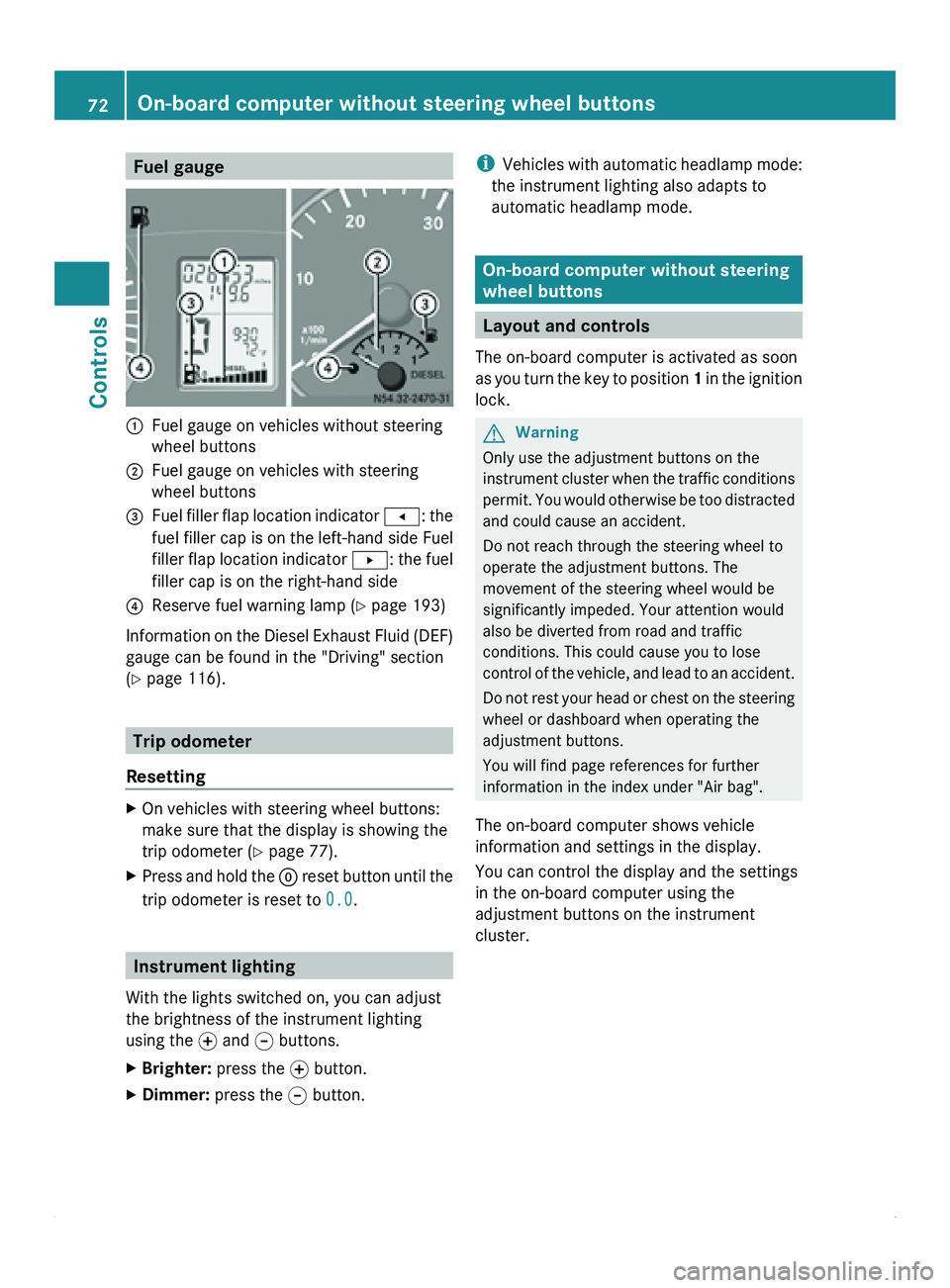
Fuel gauge
0046
Fuel gauge on vehicles without steering
wheel buttons
0047 Fuel gauge on vehicles with steering
wheel buttons
008A Fuel filler flap location indicator
0081: the
fuel filler
cap is on the left-hand side Fuel
filler flap location indicator 0082: the fuel
filler cap is on the right-hand side
0088 Reserve fuel warning lamp ( Y page 193)
Information on the Diesel Exhaust Fluid (DEF)
gauge can be found in the "Driving" section
(Y page 116). Trip odometer
Resetting X
On vehicles with steering wheel buttons:
make sure that the display is showing the
trip odometer (Y
page 77).
X Press and hold the 0048 reset button
until the
trip odometer is reset to 0.0.Instrument lighting
With the lights switched on, you can adjust
the brightness of the instrument lighting
using the 0069
and 006A buttons.
X Brighter: press the 0069 button.
X Dimmer: press the 006A button. i
Vehicles with automatic
headlamp mode:
the instrument lighting also adapts to
automatic headlamp mode. On-board computer without steering
wheel buttons
Layout and controls
The on-board computer is activated as soon
as you turn
the key to position 1 in the ignition
lock. G
Warning
Only use the adjustment buttons on the
instrument cluster when
the traffic conditions
permit. You would otherwise be too distracted
and could cause an accident.
Do not reach through the steering wheel to
operate the adjustment buttons. The
movement of the steering wheel would be
significantly impeded. Your attention would
also be diverted from road and traffic
conditions. This could cause you to lose
control of the vehicle, and lead to an accident.
Do not rest your head or chest on the steering
wheel or dashboard when operating the
adjustment buttons.
You will find page references for further
information in the index under "Air bag".
The on-board computer shows vehicle
information and settings in the display.
You can control the display and the settings
in the on-board computer using the
adjustment buttons on the instrument
cluster. 72
On-board computer without steering wheel buttons
Controls