display MERCEDES-BENZ SPRINTER 2011 MY11 Operator’s Manual
[x] Cancel search | Manufacturer: MERCEDES-BENZ, Model Year: 2011, Model line: SPRINTER, Model: MERCEDES-BENZ SPRINTER 2011Pages: 292, PDF Size: 6.75 MB
Page 128 of 292
X
Press the 0093 button.
The main menu
(menu level 1) is displayed
(Y page 124).
X Press the 003D or 003C button until the
Display menu is highlighted.
The Display menu is selected.
X Press the 0093 button.
The submenus (menu level 2) are
displayed.
X Press the 003D or 003C button until the
Contrast submenu is highlighted.
X Press the 0093 button.
The contrast setting is displayed.
X Press the 003D or 003C button.
The contrast is adjusted in increments.
X Press the 0093 button.
The submenus (menu level 2) are
displayed.
Color submenu
You can adjust the color setting of the
monitor in the Color submenu.
X Press the 0093 button.
The main
menu
(menu level 1) is displayed
(Y page 124).
X Press the 003D or 003C button until the
Display menu is highlighted.
The Display menu is selected.
X Press the 0093 button.
The submenus (menu level 2) are
displayed.
X Press the 003D or 003C button until the
Color submenu is highlighted.
X Press the 0093 button.
The color setting is displayed.
X Press the 003D or 003C button.
The contrast is adjusted in increments.
X Press the 0093 button.
The submenus (menu level 2) are
displayed. Tint submenu (NTSC color balance)
In
the NTSC
standard you can adjust the color
balance of the monitor in the TINT submenu.
X Press the 0093 button.
The main menu
(menu level 1) is displayed
(Y page 124).
X Press the 003D or 003C button until the
Display menu is highlighted.
The Display menu is selected.
X Press the 0093 button.
The submenus (menu level 2) are
displayed.
X Press the 003D or 003C button until the
TINT submenu is highlighted.
X Press the 0093 button.
The color balance setting is displayed.
X Press the 003D or 003C button.
The color balance is adjusted in
increments.
X Press the 0093 button.
The submenus (menu level 2) are
displayed.
Picture format menu
You can
set
the display format for the monitor
in the Picture format menu.
X Press the 0093 button.
The main menu
(menu level 1) is displayed
(Y page 124).
X Press the 003D or 003C button until the
Picture format menu is highlighted.
X Press the 0093 button.
The submenu (menu level 2) is displayed.
i The current
picture
format is marked with
the 0050 symbol. 126
Driving systems
Controls
Page 129 of 292
X
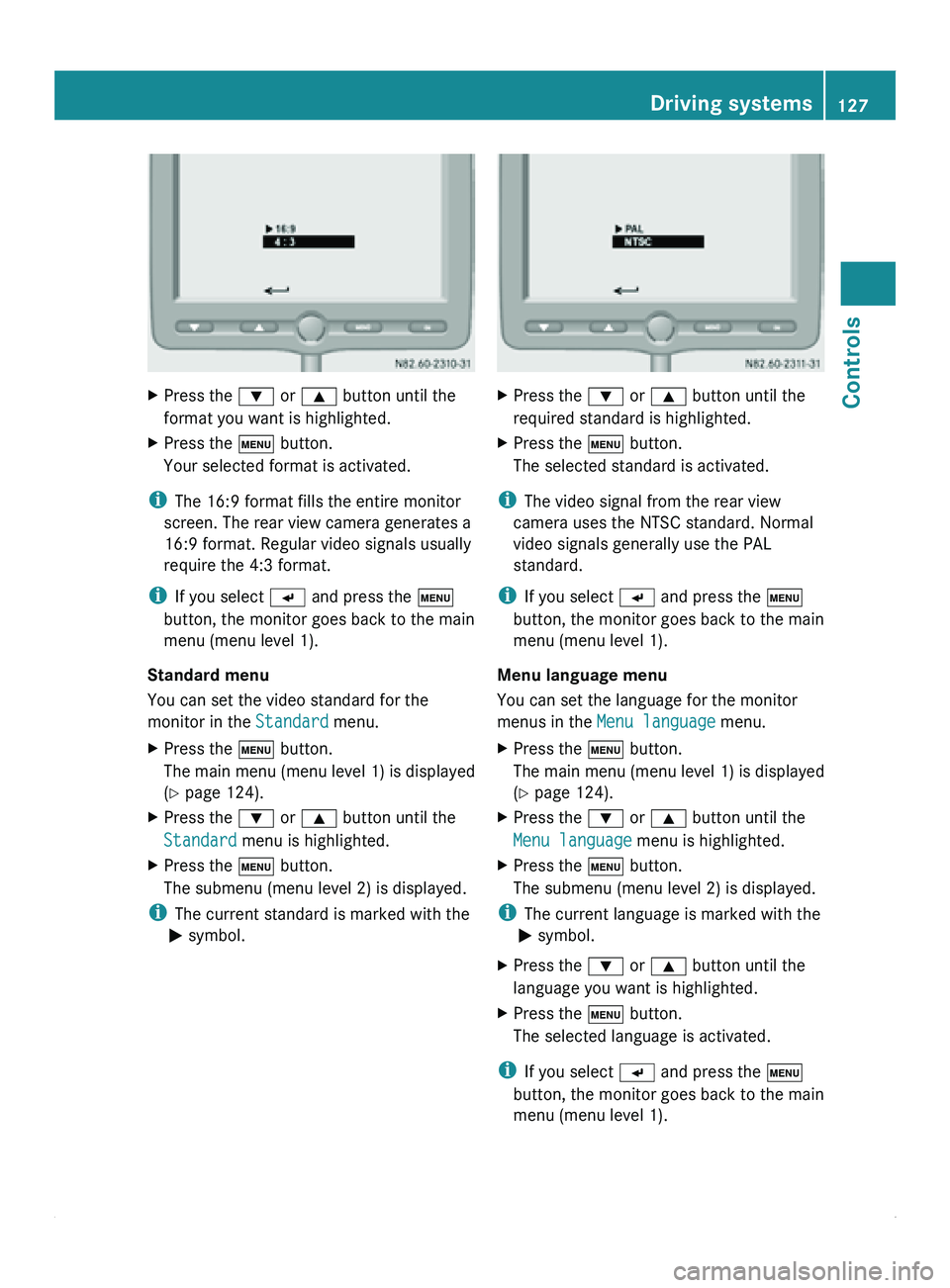
Press the 003D or 003C button until the
format you want is highlighted.
X Press the 0093 button.
Your selected format is activated.
i The 16:9 format fills the entire monitor
screen. The rear view camera generates a
16:9 format. Regular video signals usually
require the 4:3 format.
i If you select 0056 and press the 0093
button, the monitor goes back to the main
menu (menu level 1).
Standard menu
You can set the video standard for the
monitor in the Standard menu.
X Press the 0093 button.
The main
menu
(menu level 1) is displayed
(Y page 124).
X Press the 003D or 003C button until the
Standard menu is highlighted.
X Press the 0093 button.
The submenu (menu level 2) is displayed.
i The current standard is marked with the
0050 symbol. X
Press the 003D or 003C button until the
required standard is highlighted.
X Press the 0093 button.
The selected standard is activated.
i The video signal from the rear view
camera uses the NTSC standard. Normal
video signals generally use the PAL
standard.
i If you select 0056 and press the 0093
button, the monitor goes back to the main
menu (menu level 1).
Menu language menu
You can set the language for the monitor
menus in the Menu language menu.
X Press the 0093 button.
The main
menu
(menu level 1) is displayed
(Y page 124).
X Press the 003D or 003C button until the
Menu language menu is highlighted.
X Press the 0093 button.
The submenu (menu level 2) is displayed.
i The current language is marked with the
0050 symbol.
X Press the 003D or 003C button until the
language you want is highlighted.
X Press the 0093 button.
The selected language is activated.
i If you select 0056 and press the 0093
button, the monitor goes back to the main
menu (menu level 1). Driving systems
127
Controls Z
Page 130 of 292
Factory setting menu
You can reset the monitor to the factory
settings in the
Factory setting menu.
X Press the 0093 button.
The main menu
(menu level 1) is displayed
(Y page 124).
X Press the 003D or 003C button until the
Factory setting menu is highlighted.
X Press the 0093 button.
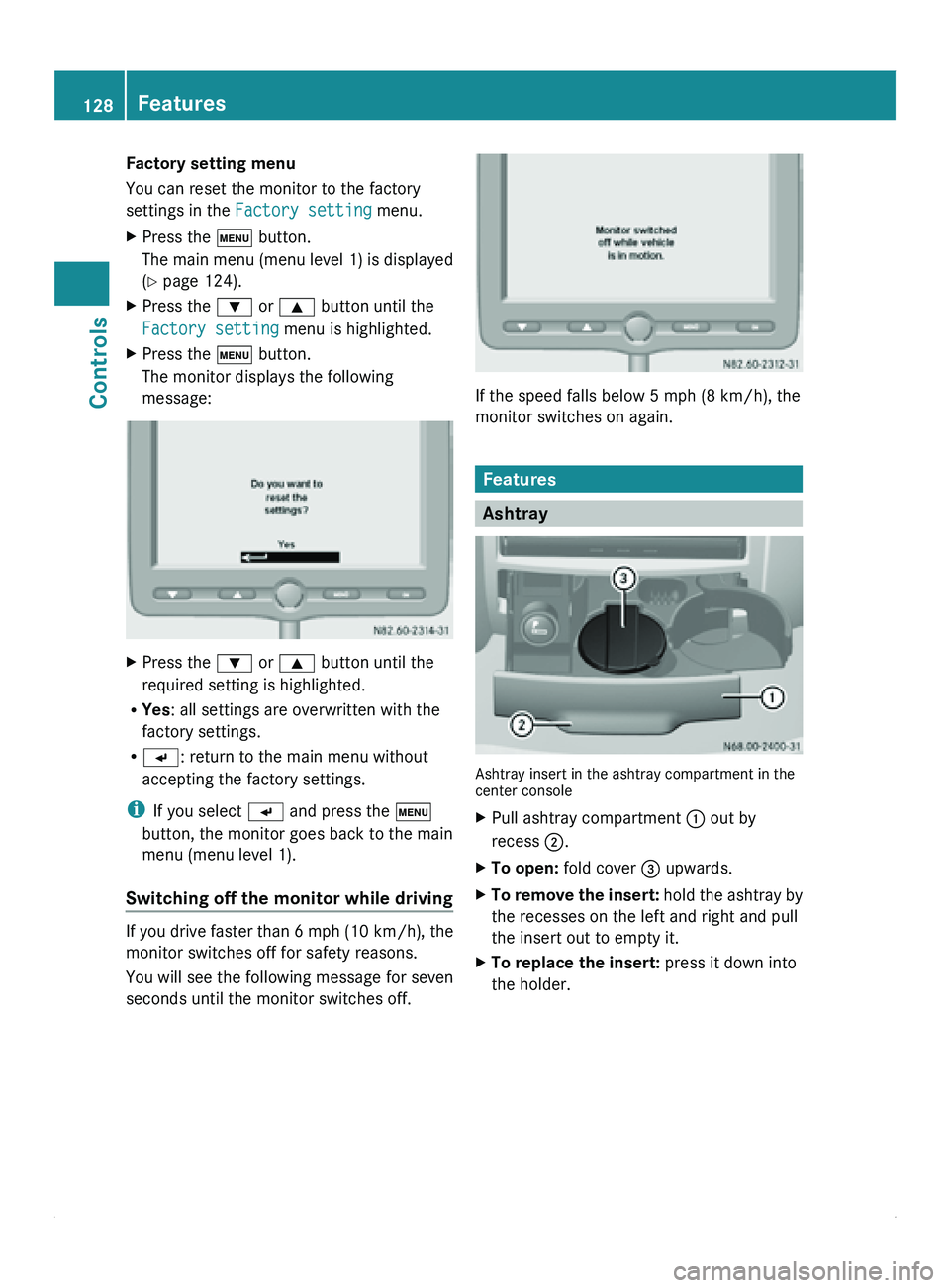
The monitor displays the following
message: X
Press the 003D or 003C button until the
required setting is highlighted.
R Yes : all settings are overwritten with the
factory settings.
R 0056: return to the main menu without
accepting the factory settings.
i If you select 0056 and press the 0093
button, the monitor goes back to the main
menu (menu level 1).
Switching off the monitor while driving If you drive faster than 6 mph (10 km/h)
, the
monitor switches off for safety reasons.
You will see the following message for seven
seconds until the monitor switches off. If the speed falls below 5 mph (8 km/h), the
monitor switches on again.
Features
Ashtray
Ashtray insert in the ashtray compartment in the
center console
X
Pull ashtray compartment 0046 out by
recess 0047.
X To open: fold cover 008A upwards.
X To remove the insert: hold the
ashtray by
the recesses on the left and right and pull
the insert out to empty it.
X To replace the insert: press it down into
the holder.128
Features
Controls
Page 137 of 292
status and the position of the key in the
ignition lock. The mobile phone display
indicates the charging status. Communications
135Controls Z
Page 158 of 292
Storage
Only store DEF in containers made of high-
alloy Cr-Ni steel or Mo-Cr-Ni steel in
accordance with DIN EN 10 088-1/2/3 or
plastic containers made of polypropylene or
polyethylene.
!
Containers made of aluminum, copper,
copper alloys as well as unalloyed or
galvanized steel
are not suitable for storing
DEF. If stored in these types of containers,
DEF could cause constituents of these
metals to dissolve and cause irreparable
damage to the exhaust gas aftertreatment.
Damage caused by dissolved components
of the storage container will result in a loss
of your New Vehicle Limited Warranty
entitlements.
Disposal Observe country-specific laws and
regulations when disposing of DEF.
0040Environmental note
Dispose of DEF in an environmentally
responsible manner.
Purity
The purity of DEF is essential to prevent
malfunctions in the exhaust gas
aftertreatment.
If DEF is pumped out of the DEF tank, e.g.
during repair work, the same liquid must not
be used
to
refill the tank. Its purity is no longer
guaranteed.
! Impurities in DEF (e.g. caused by other
service products, cleaning agents, dust,
etc.) result in increased emissions,
malfunctions, catalytic converter damage
or engine damage. Engine oils
Use only approved engine oil that complies
with the MB Specifications for Service
Products.
! The bottles of
the various engine oil types
are marked with ACEA (Association des
Constructeurs Européens d'Automobiles)
and/or API (American Petroleum Institute)
classifications. Only use approved engine
oils that conform to the following MB
Specifications for Service Products and the
prescribed ACEA and/or API
classifications. Using engine oils of another
quality is not permitted and may lead to a
loss of your New Vehicle Limited Warranty
entitlements.
The use of other, non-approved engine oils
for diesel engines can cause damage to the
diesel particle filter (DPF).
The MB Specifications for Service Products
apply to your vehicle 1
R 228.51
R 229.51
These engine oils are of high quality and have
a beneficial effect on:
R engine wear
R fuel consumption
R emissions
Multi-grade engine oils of the prescribed SAE
class (viscosity) may be used all year round,
taking the outside temperatures into
account.
Oil change Oil change intervals depend on the vehicle's
operating conditions and the quality of the
engine oil used.
The on-board computer automatically shows
the date for the next oil change as an event
message in the display.
1 If the quality
level for diesel engines is not available, you may refill with engine oils that comply with the MB
Specifications for Service Products, Sheet No. 228.5, 229.3 and 229.5. The refill quantity is then limited to
a maximum of 1 qt (1 l). 156
Service products
Operation
Page 164 of 292
G
Warning
Never use openings in the bodywork as steps.
You may otherwise
damage the vehicle or lose
your footing and injure yourself or others.
If you have to clean the upper areas of the
vehicle, always use suitable ladders or other
secure climbing aids. G
Warning
Dirty or
iced-up steps and entrances create a
risk of slipping or falling.
Keep steps, entrances
and footwear free from
dirt (e.g. mud, clay, snow and ice). Cleaning the interior of the vehicle
Seat belts !
Observe the following notes on cleaning
the seat belts:
R Remove any stains or dirt immediately.
This will avoid residue or damage.
R Do not bleach
or dye the seat belts. This
could impair the function of the seat
belts.
R Do not dry the seat belts in direct
sunlight or at temperatures above
176 ‡ (80 †).
Steering wheel boss and cockpit G
Warning!
When cleaning the steering wheel boss and
dashboard, do not use cockpit sprays or
cleaning agents containing
solvents. Cleaning
agents containing solvents cause the surface
to become porous, and as a result, plastic
parts may break away and be thrown around
the interior when an air bag is deployed, which
may result in severe injuries.
Use a damp, clean and lint-free cloth to clean
the plastic components and the cockpit. If
particularly dirty, use a mild detergent. !
Do not use
dry, coarse or hard cloths and
do not scrub. You could otherwise scratch
or damage the surfaces.
Radio and monitor display X
Switch off the radio or rear-view camera
monitor and let it cool.
X Clean the display surface with a
commercially available microfiber cloth
and cleaner for TFT/LCD displays.
X After drying,
polish the display surface with
a dry microfiber cloth, applying only light
pressure.
! Do not use dry, rough or hard cloths or
abrasive products, solvents or cleaning
agents containing solvents. Do not scrub.
Only apply light pressure when cleaning.
Otherwise, you will damage the display
surface, as it is sensitive to pressure and
susceptible to scratches.
Windows !
Do not use
dry cloths, abrasive products,
solvents or cleaning agents containing
solvents to clean the inside of the windows.
Clean the inside of the windows with a
damp cloth or a commercially available
glass cleaner.
Do not touch the inside of the rear and side
windows with hard objects, e.g. an ice
scraper or ring. You could otherwise
damage the windows or the rear window
defroster. Cleaning the exterior of the vehicle
General notes Scratches, corrosive
deposits, areas affected
by corrosion and damage caused by neglect
or inadequate care cannot always be
completely remedied. In this case, visit a
qualified specialist workshop, e.g. the
nearest authorized Sprinter Dealer. 162
Cleaning and care
Operation
Page 169 of 292
authorized Sprinter Dealer. All work relevant
to safety or on safety-related systems must
be carried out at a qualified specialist
workshop.
Observe the notes on parts in the "Technical
data" section ( Y page 276).
0040 Environmental note
Observe measures to protect the
environment when working on the vehicle.
You must observe the legal requirements
when disposing of service products, e.g.
engine oil. This
also includes all components,
e.g. filters, which have come into contact with
service products.
Any qualified specialist workshop, e.g. an
authorized Sprinter Dealer, can provide
information about this.
Dispose of empty containers, cleaning cloths
and care products in an environmentally-
responsible manner. Comply with the
instructions for use of the care products.
Do not run the engine for longer than
necessary when the vehicle is stationary. Active Service System (ASSYST)
The ASSYST service indicator informs you of
the next service due date.
A service that is due is displayed about a
month in advance. A message is then
displayed while the vehicle is in motion or
while the ignition is switched on.
i Periods when the
battery is disconnected
will not be recorded by ASSYST. To make
sure that you have the vehicle serviced at
the correct time, you should therefore
subtract periods when the battery is
disconnected from the days shown.
The service indicator does not provide
information about the oil level. The service
indicator should therefore not be confused
with the 00B5 engine oil level display. i
The service due date is displayed in days
or miles (kilometers), depending on the
total distance driven.
The symbols or
letters in the service indicator
show the service due.
009B or A for a minor service
009C or B for a major service
Service due date indicator Vehicles with steering wheel buttons
The following messages may be displayed:
R
009B
Service A in ... days
R 009B Service A in ... mi (km)
R 009B Service A due now
Vehicles without steering wheel buttons
The following messages may be displayed:
R 009B for service A
R 009C for service B
Additionally you will see the remaining
distance in
miles
(mi) or kilometers ( km) or the
remaining time in days ( d).
Service due date exceeded A qualified specialist workshop, e.g. an
authorized Sprinter
Dealer,
resets the service
indicator when the service has been carried
out.
Vehicles with steering wheel buttons
If you have missed the service due date, one
of the following messages appears in the
display:
R 009B Service A overdue by ... days
R 009B Service A overdue by ... mi
(km)
Additionally a warning tone sounds.
Vehicles without steering wheel buttons
If the service due date has been exceeded,
ten seconds after switching on the ignition
the 009B or 009C symbol flashes for the Maintenance
167
Operation Z
Page 170 of 292
service. You will also see a minus sign before
the service due date.
Calling up the service due date
X
Turn the key to position 2 in the ignition
lock.
The display is activated.
Vehicles with steering wheel buttons
X Press the 0059 or 0058 button on the
steering wheel repeatedly
until you see the
standard display (Y page 77).
X Press the 0029 or 002D button on the
steering wheel repeatedly
until you see the
following in the display, for example:
R 009B Service A in ... days
R 009B Service A in ... mi (km)
Vehicles without steering wheel buttons
X Press the 007B menu button on the
instrument cluster repeatedly until the
009B or 009C symbol for the service
appears.
Additionally you will see the remaining
distance in miles ( mi) or kilometers ( km) or
the remaining time in days ( d).Hood
Opening the hood G
Warning
Do not pull the release lever while the vehicle
is in motion.
If you do so, the hood may open
up and block your view. G
Warning!
There is a risk of injury if the hood is open,
even if the engine is not running.
Some engine components can become very
hot.
To avoid the risk of burns, only touch those
components described in the Operator's
Manual and observe
the relevant safety notes. G
Warning
The radiator fan between the radiator and the
engine can start
automatically, even if the key
has been removed from the ignition lock.
Keep away from the area of rotation of the fan
blades. You could otherwise be injured.
The electronic injector control operates at
high voltage. For this reason, you must never
touch injection system components while:
R the engine is running.
R the engine is being started.
R the ignition is switched on.
You could otherwise receive an electric shock
and be severely or fatally injured. Hood release lever in the driver's footwell
X
Pull release handle 0046.
The hood is released.
! Make sure
that
the windshield wipers are
not folded away from the windshield. You
could otherwise damage the windshield
wipers or the hood. 168
Maintenance
Operation
Page 173 of 292
Have the system checked immediately at a
qualified specialist workshop, e.g. at an
authorized Sprinter Dealer.
i There is usually a notice in the engine
compartment to remind
you when the next
brake fluid change is due. Windshield washer system/
headlamp cleaning system
Add windshield washer concentrate to the
washer fluid all year round. G
Warning
Windshield washer concentrate is highly
flammable.
Fire, naked flames
and smoking are therefore
prohibited when you are handling windshield
washer concentrate.
! Only use washer fluid concentrate which
is suitable for plastic lenses. Unsuitable
washer fluid concentrate could damage the
plastic lenses of the headlamps.
Adapt the mixing ratio to the ambient
temperature. If the temperature is above
freezing, use Summerwash to prevent
smearing. If there is a risk of frost, use
Winterwash to prevent the water from
freezing on the windshield.
The washer fluid reservoir has a capacity of
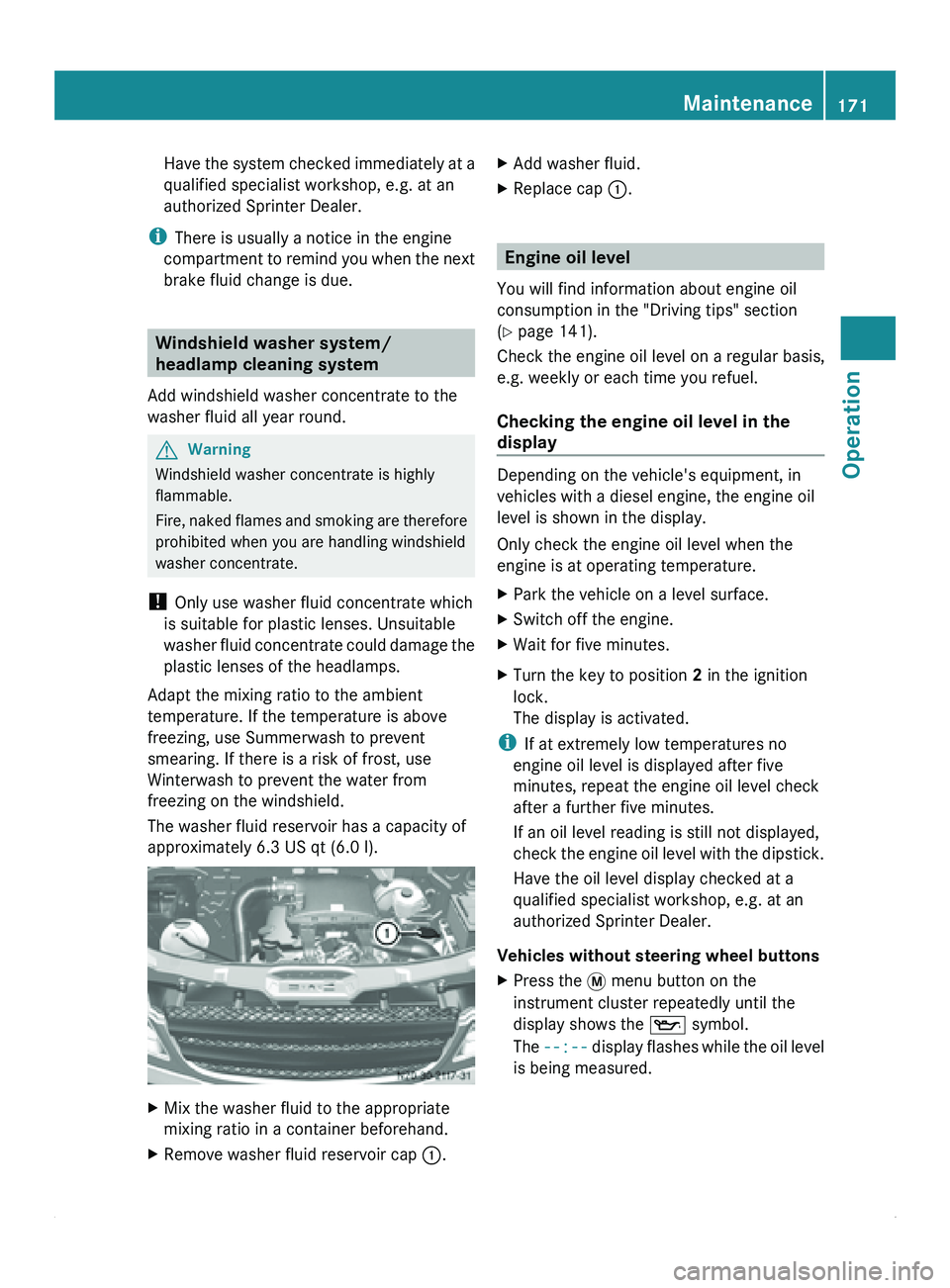
approximately 6.3 US qt (6.0 l). X
Mix the washer fluid to the appropriate
mixing ratio in a container beforehand.
X Remove washer fluid reservoir cap 0046.X
Add washer fluid.
X Replace cap 0046. Engine oil level
You will find information about engine oil
consumption in the "Driving tips" section
(Y page 141).
Check the engine oil level on a regular basis,
e.g. weekly or each time you refuel.
Checking the engine oil level in the
display Depending on the vehicle's equipment, in
vehicles with a diesel engine, the engine oil
level is shown in the display.
Only check the engine oil level when the
engine is at operating temperature.
X
Park the vehicle on a level surface.
X Switch off the engine.
X Wait for five minutes.
X Turn the key to position 2 in the ignition
lock.
The display is activated.
i If at extremely low temperatures no
engine oil level is displayed after five
minutes, repeat the engine oil level check
after a further five minutes.
If an oil level reading is still not displayed,
check the engine
oil level with the dipstick.
Have the oil level display checked at a
qualified specialist workshop, e.g. at an
authorized Sprinter Dealer.
Vehicles without steering wheel buttons
X Press the 007B menu button on the
instrument cluster repeatedly until the
display shows the 00B1 symbol.
The --:-- display flashes
while the oil level
is being measured. Maintenance
171
Operation Z
Page 174 of 292
The following messages may be displayed:
00B1
OK X
Do not add oil. – 1.0 qts X
Add the amount of oil
shown (Y page 173).
X Check the engine oil
level again after a few
minutes. – 1.5 qts
– 2.0 qts
HI X
Have excess oil
removed. The oil
level is
too high. Measurement units in the display:
R
qts USA only
R ltr Canada only
Vehicles with steering wheel buttons
X Press the 00A4 button on the instrument
cluster (Y page 70).
The following message is displayed for the
duration of the measurement process:
00B4Engine oil
level
Measuring in
progress
The following messages may be displayed: 00B1
Engine oil
level OK X
Do not add oil. Engine oil
Add 1.0
quart X
Add the amount of oil
shown (Y page 173).
X Check the engine oil
level again after a few
minutes. Engine oil
Add 1.5
quarts
Engine oil
Add 2.0
quarts Engine oil
level
Reduce oil
level X
Have excess oil
removed. The oil
level is
too high. Eng. oil
lev. Turn
ignition
on for
level X
Turn the key to position
2 in the ignition lock. Observe
wait.
period X
Repeat the
measurement after
about five minutes
if the
engine is at normal
operating temperature.
X Repeat the
measurement after
about 30 minutes if the
engine is not at normal
operating temperature. Engine oil
level Not
when eng.
running X
Switch off the engine
and wait for
approximately five
minutes, if the engine is
at normal operating
temperature, before
performing the
measurement. Measurement units in the display:
R
quart(s) USA only
R liter(s) Canada only
Checking the engine oil level using the
dipstick Vehicles with a red oil dipstick: only check the
oil level when the engine is at normal
operating temperature.
X
Park the vehicle on a level surface.
X Switch off the engine.
X Wait for five minutes.172
Maintenance
Operation