instrument cluster MERCEDES-BENZ SPRINTER 2011 MY11 Operator’s Manual
[x] Cancel search | Manufacturer: MERCEDES-BENZ, Model Year: 2011, Model line: SPRINTER, Model: MERCEDES-BENZ SPRINTER 2011Pages: 292, PDF Size: 6.75 MB
Page 51 of 292
G
Warning
Never switch off ASR when you see the
0067 warning lamp
flashing in the instrument
cluster. In this case proceed as follows:
R when driving off, apply as little throttle as
possible.
R while driving, ease off the accelerator
pedal.
R adapt your speed and driving style to the
prevailing road conditions.
Failure to observe these guidelines could
cause the vehicle to skid. ESP ®
cannot
prevent accidents resulting from excessive
speed.
If, taking tires, cargo load and gradient into
consideration, the surface driven on still
provides insufficient traction, you may
experience difficulties in pulling away despite
ASR.
Vehicles without steering-wheel buttons:
the 003D indicator lamp in the instrument
cluster lights up when you switch on the
ignition. It goes out when the engine is
running.
Activating/deactivating ASR G
Warning
ASR should
not be switched off during normal
driving other than in the circumstances
described below. Deactivating
the system will
reduce vehicle stability in driving maneuvers.
Do not switch off ASR when a spare wheel is
mounted.
ASR is activated automatically when the
engine is running.
It may be best to deactivate ASR briefly in the
following situations:
R when using snow chains
R in deep snow
R on sand or gravel If you deactivate ASR:
R
the engine's torque
is no longer limited and
the drive wheels can spin. The spinning of
the wheels results in a cutting action, which
provides better grip.
R brake intervention will continue to improve
traction where a drive wheel begins to spin,
e.g. if only the side of the road is slippery.
The wheel will be braked to increase
traction under such circumstances.
R active brake intervention by ESP ®
to
increase driving stability remains active. G
Warning
Even with ASR deactivated, ESP ®
remains
active and continues to perform brake
interventions where this is necessary to
improve driving stability. The 0067 warning
lamp flashes.
With ASR deactivated, there is an increased
risk of your vehicle's brake system
overheating and suffering damage due to
prolonged application. A
hot brake system will
also result in increased stopping distance.
Therefore, only deactivate ASR when
absolutely necessary. X
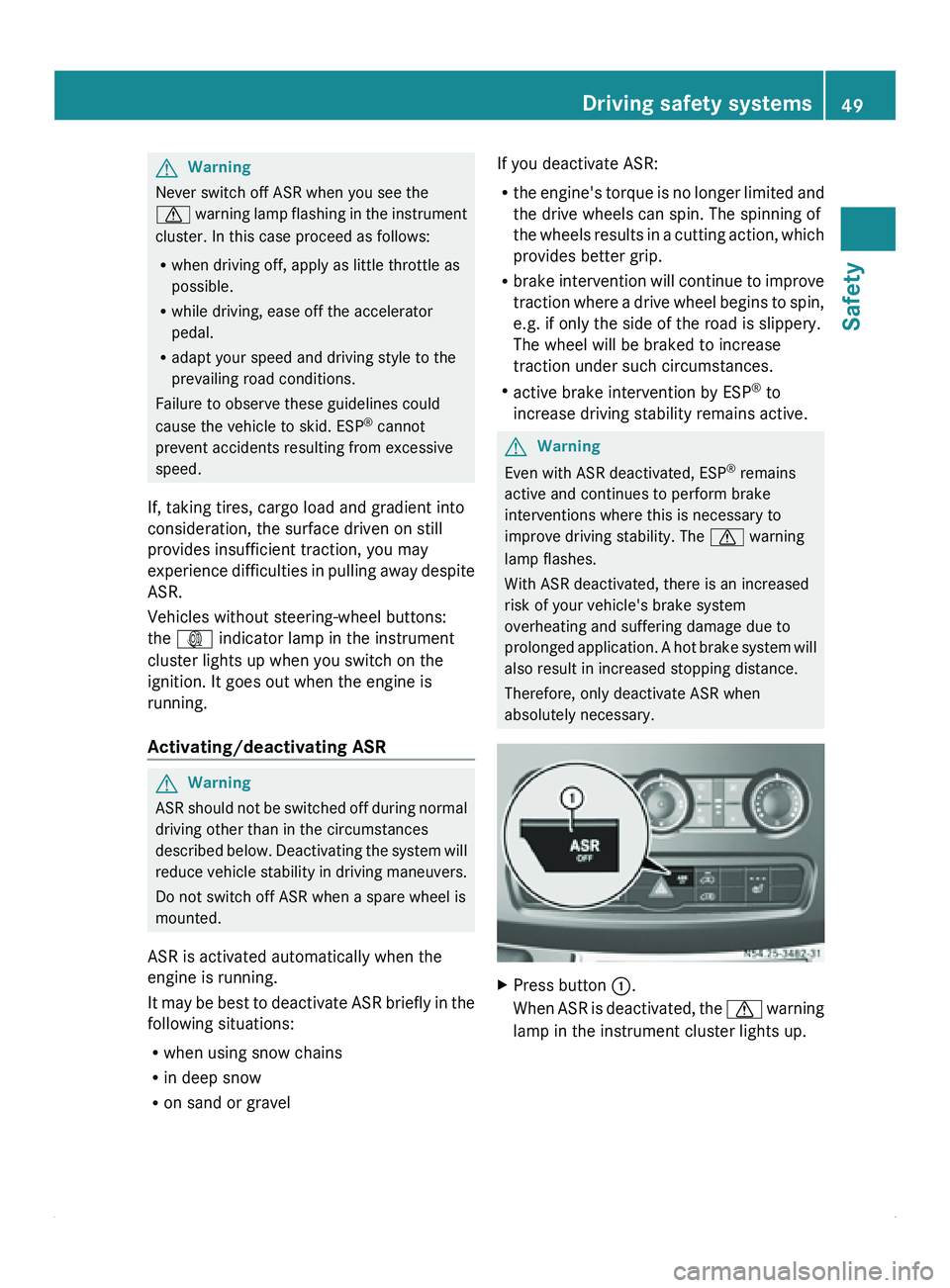
Press button 0046
.
When ASR is
deactivated, the 0067 warning
lamp in the instrument cluster lights up. Driving safety systems
49
Safety Z
Page 52 of 292
ESP
®
(Electronic Stability Program) G
Warning
Observe "Important safety notes"
(Y page 47).
If ESP ®
detects that the vehicle is deviating
from the direction desired by the driver, one
or more wheels are braked to help stabilize
the vehicle. If
necessary, the engine output is
also modified to help keep the vehicle on the
desired course within physical limits. ESP ®
assists the driver when pulling away on wet
or slippery roads. ESP ®
can also help stabilize
the vehicle during braking.
If ESP ®
intervenes, the 0067 warning lamp
flashes in the instrument cluster. G
Warning
If the 009E
indicator lamp remains lit, ESP ®
is
not available due to a malfunction. Vehicle
stability in standard driving maneuvers is
reduced.
Adapt your speed and driving style to the
prevailing road conditions and to the non-
operating status of ESP ®
.
If ESP ®
is malfunctioning, the engine output
may be reduced.
! Only operate the vehicle for a maximum
of ten seconds on a brake test
dynamometer. Switch off the ignition.
Application of the brakes by ESP ®
may
otherwise destroy the brake system.
! Do not operate the vehicle on a
dynamometer
(e.g. for a performance test).
If you would like to operate the vehicle on
a dynamometer, consult an authorized
Sprinter Dealer beforehand. The drive train
or brake system could otherwise be
damaged.
i Only use wheels with the recommended
tire sizes. Only then will ESP ®
function
properly. 50
Driving safety systems
Safety
Page 53 of 292
Vehicle equipment ..............................
52
Opening and closing ...........................52
Anti-theft systems .............................. 61
Seats .................................................... 63
Steering wheel .................................... 69
Mirrors ................................................. 69
Instrument cluster ..............................70
On-board computer without steer-
ing wheel buttons ............................... 72
On-board computer with steering
wheel buttons ..................................... 74
Power supply ....................................... 87
Lighting ................................................ 88
Good visibility ...................................... 94
Climate control .................................... 97
Driving and parking .......................... 108
Brakes ................................................ 112
Automatic transmission ................... 113
Driving the vehicle ............................116
Driving systems ................................ 117
Features ............................................. 128
Communications ............................... 133 51Controls
Page 72 of 292
X
Anti-glare mode: push anti-glare lever 0046
in the direction of the arrow. Exterior mirrors
Important safety notes G
Warning
The additional mirrors in the exterior mirrors
reduce the size
of the image. The objects are
actually closer than they appear. You could
cause an accident if you only observe the
traffic through the additional mirrors.
Therefore, pay particular attention to traffic
behind you when maneuvering or passing
using the main mirror in the exterior mirrors
also and, if necessary, the rear-view mirror.
Adjusting manually X
Before starting off, manually adjust the
exterior mirrors in
such a way that you can
get a good overview of road and traffic
conditions.
Adjusting electrically i
The exterior mirrors are automatically
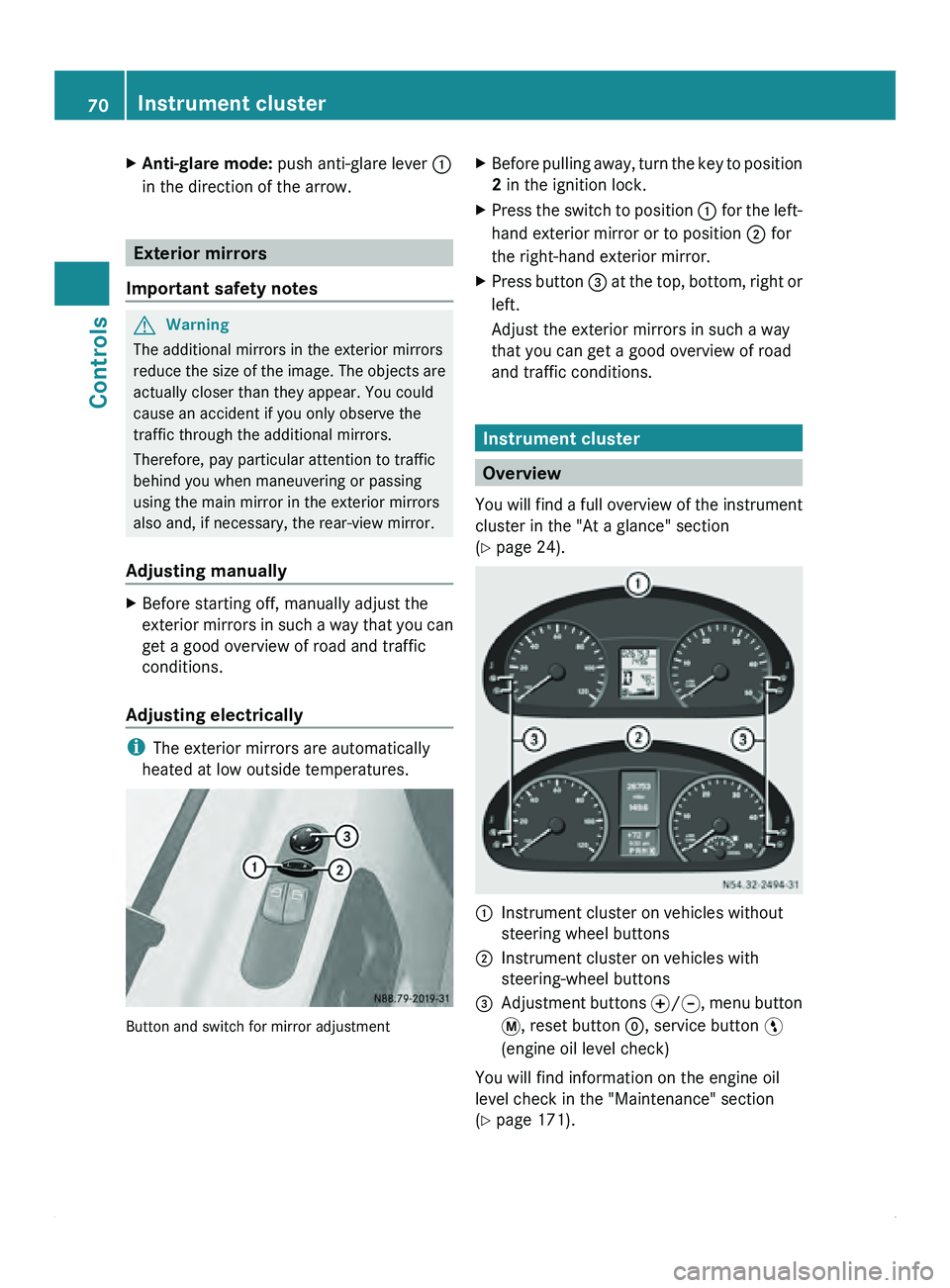
heated at low outside temperatures. Button and switch for mirror adjustment X
Before pulling away, turn the key to position
2 in the ignition lock.
X Press the switch to position 0046 for the
left-
hand exterior mirror or to position 0047 for
the right-hand exterior mirror.
X Press button 008A at
the
top, bottom, right or
left.
Adjust the exterior mirrors in such a way
that you can get a good overview of road
and traffic conditions. Instrument cluster
Overview
You will find
a full overview of the instrument
cluster in the "At a glance" section
(Y page 24). 0046
Instrument cluster on vehicles without
steering wheel buttons
0047 Instrument cluster on vehicles with
steering-wheel buttons
008A Adjustment buttons 0069/006A, menu button
007B
, reset button 0048, service button 00A4
(engine oil level check)
You will find information on the engine oil
level check in the "Maintenance" section
(Y page 171). 70
Instrument cluster
Controls
Page 73 of 292
The display in the instrument cluster is
activated when you:
R
open the driver's door
R turn the key
to position 2 in the ignition lock
R press the 0048 reset button
R switch on the lights
The display switches off automatically after
approximately 30 seconds if:
R the vehicle lighting is not switched on.
R the key is in position 0 in the ignition lock.G
Warning
No messages can be displayed if the
instrument cluster and/or the display fails.
You will then not be able to see information
about the vehicle status, such as speed and
outside temperature, warning/indicator
lamps and display messages or the failure of
systems. Handling characteristics may be
affected. Adapt your speed and driving style
accordingly.
Immediately consult a qualified specialist
workshop. The qualified specialist workshop
must have the necessary specialist
knowledge and tools to carry out the work
required. We recommend an authorized
Sprinter Dealer for
this purpose. In particular,
all work relevant to safety or on safety-related
systems must be carried out at a qualified
specialist workshop. G
Warning
Only use the adjustment buttons on the
instrument cluster when
the traffic conditions
permit. You would otherwise be too distracted
and could cause an accident.
Do not reach through the steering wheel to
operate the adjustment buttons. The
movement of the steering wheel would be
significantly impeded. Your attention would
also be diverted from road and traffic
conditions. This could cause you to lose
control of the vehicle, and lead to an accident. Do not rest your head or chest on the steering
wheel or dashboard when operating the
adjustment buttons.
You will find page references for further
information in the index under "Air bag".
Speedometer
i In some countries, a warning sounds
when the vehicle reaches the maximum
speed limit, e.g. at 75 mph (120 km/h).
The speed can also be shown in the display.
You can find information on the digital
speedometer for vehicles without steering
wheel buttons under ( Y page 73) and for
vehicles with steering wheel buttons under
(Y page 77). Tachometer
The red band
in the tachometer indicates the
engine's overrevving range.
To protect the engine, the fuel supply is
interrupted when the red band is reached.
! Do not drive in the overrevving range, as
this could damage the engine.
0040Environmental information
Avoid driving at high engine revs. This driving
style causes an unnecessary increase in
vehicle fuel consumption and, therefore,
damage to the
environment due to increased
emission of pollution. Instrument cluster
71
Controls Z
Page 74 of 292
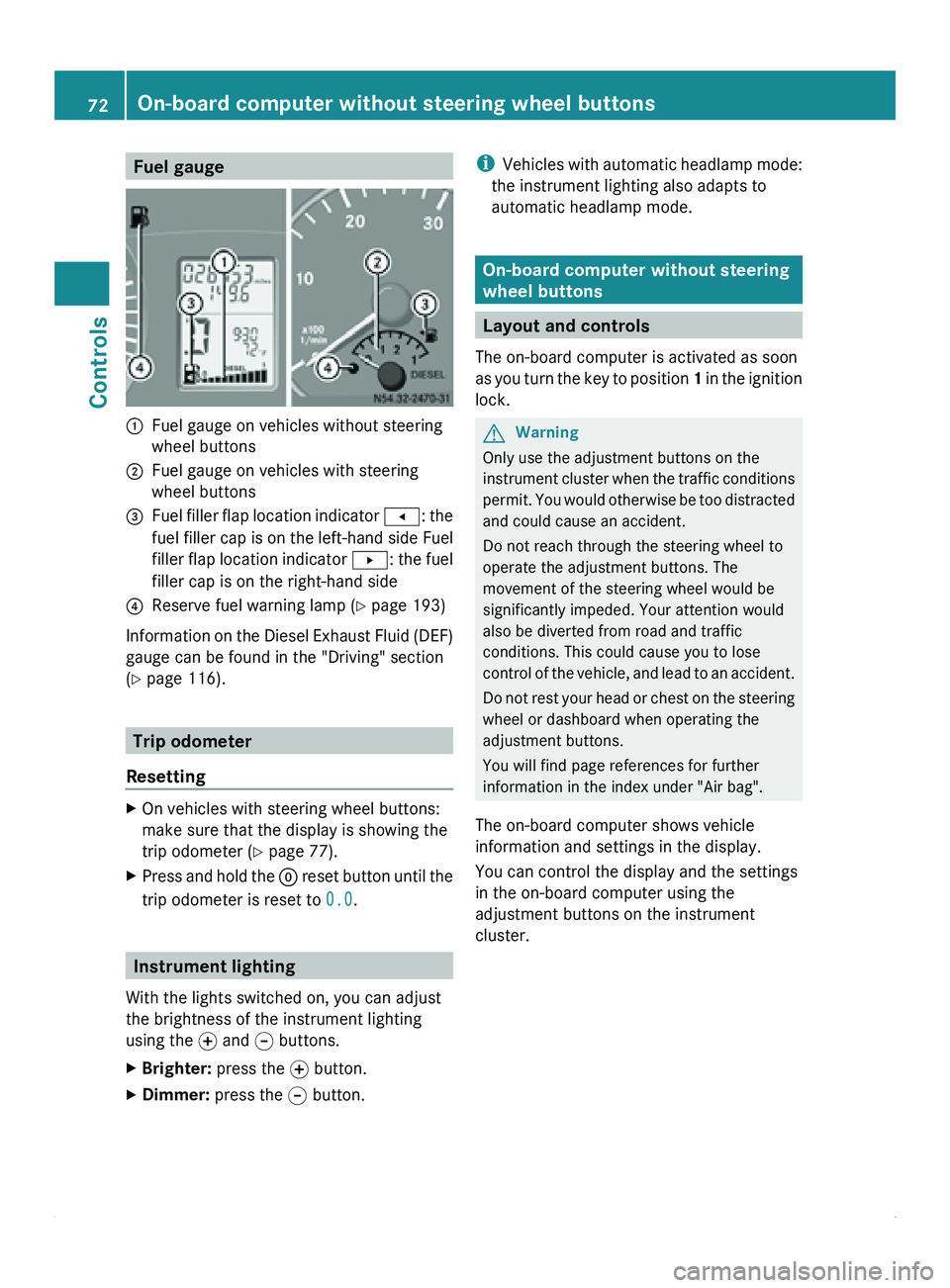
Fuel gauge
0046
Fuel gauge on vehicles without steering
wheel buttons
0047 Fuel gauge on vehicles with steering
wheel buttons
008A Fuel filler flap location indicator
0081: the
fuel filler
cap is on the left-hand side Fuel
filler flap location indicator 0082: the fuel
filler cap is on the right-hand side
0088 Reserve fuel warning lamp ( Y page 193)
Information on the Diesel Exhaust Fluid (DEF)
gauge can be found in the "Driving" section
(Y page 116). Trip odometer
Resetting X
On vehicles with steering wheel buttons:
make sure that the display is showing the
trip odometer (Y
page 77).
X Press and hold the 0048 reset button
until the
trip odometer is reset to 0.0.Instrument lighting
With the lights switched on, you can adjust
the brightness of the instrument lighting
using the 0069
and 006A buttons.
X Brighter: press the 0069 button.
X Dimmer: press the 006A button. i
Vehicles with automatic
headlamp mode:
the instrument lighting also adapts to
automatic headlamp mode. On-board computer without steering
wheel buttons
Layout and controls
The on-board computer is activated as soon
as you turn
the key to position 1 in the ignition
lock. G
Warning
Only use the adjustment buttons on the
instrument cluster when
the traffic conditions
permit. You would otherwise be too distracted
and could cause an accident.
Do not reach through the steering wheel to
operate the adjustment buttons. The
movement of the steering wheel would be
significantly impeded. Your attention would
also be diverted from road and traffic
conditions. This could cause you to lose
control of the vehicle, and lead to an accident.
Do not rest your head or chest on the steering
wheel or dashboard when operating the
adjustment buttons.
You will find page references for further
information in the index under "Air bag".
The on-board computer shows vehicle
information and settings in the display.
You can control the display and the settings
in the on-board computer using the
adjustment buttons on the instrument
cluster. 72
On-board computer without steering wheel buttons
Controls
Page 76 of 292
X
Press reset button 0048.
The year display flashes.
X Press 0069 or 006A to set the year.
i If you keep the 0069 or 006A button pressed,
the value will change continuously.
Setting daytime running lamp mode If you have switched daytime running lamp
mode on and the light switch is in the 0027
position, the following light up automatically
when the engine is running: the parking
lamps, the low-beam headlamps, the tail
lamps and the license plate lamps.
For safety reasons, it is only possible to
change this setting when the vehicle is
stationary. The factory setting is ON in
countries in which daytime running lamp
mode is mandatory.
X
Turn the key to position 2 in the ignition
lock.
X Press the 007B menu button repeatedly until
the 0064 indicator lamp in the instrument
cluster flashes and the message ON or
OFF appears in the display.
X Press 0069 or 006A to activate or deactivate
daytime running lamp mode.
i USA only:
If you turn the light switch to 006C or
0064, the corresponding light is switched
on. Daytime running lamp mode remains
activated if the light switch is turned to
005A.
Canada only:
If you turn
the light switch to 0064, the low-
beam headlamps are switched on. Daytime
running lamp mode remains activated if the
light switch is turned to 006C or 005A. On-board computer with steering
wheel buttons
Layout and controls
The on-board computer is activated as soon
as you turn
the key to position 1 in the ignition
lock. G
Warning
Only use the on-board computer when road
and traffic conditions permit. You would
otherwise be distracted and unable to
concentrate properly on driving, and could
cause an accident.
The on-board computer shows vehicle
information and settings in the display.
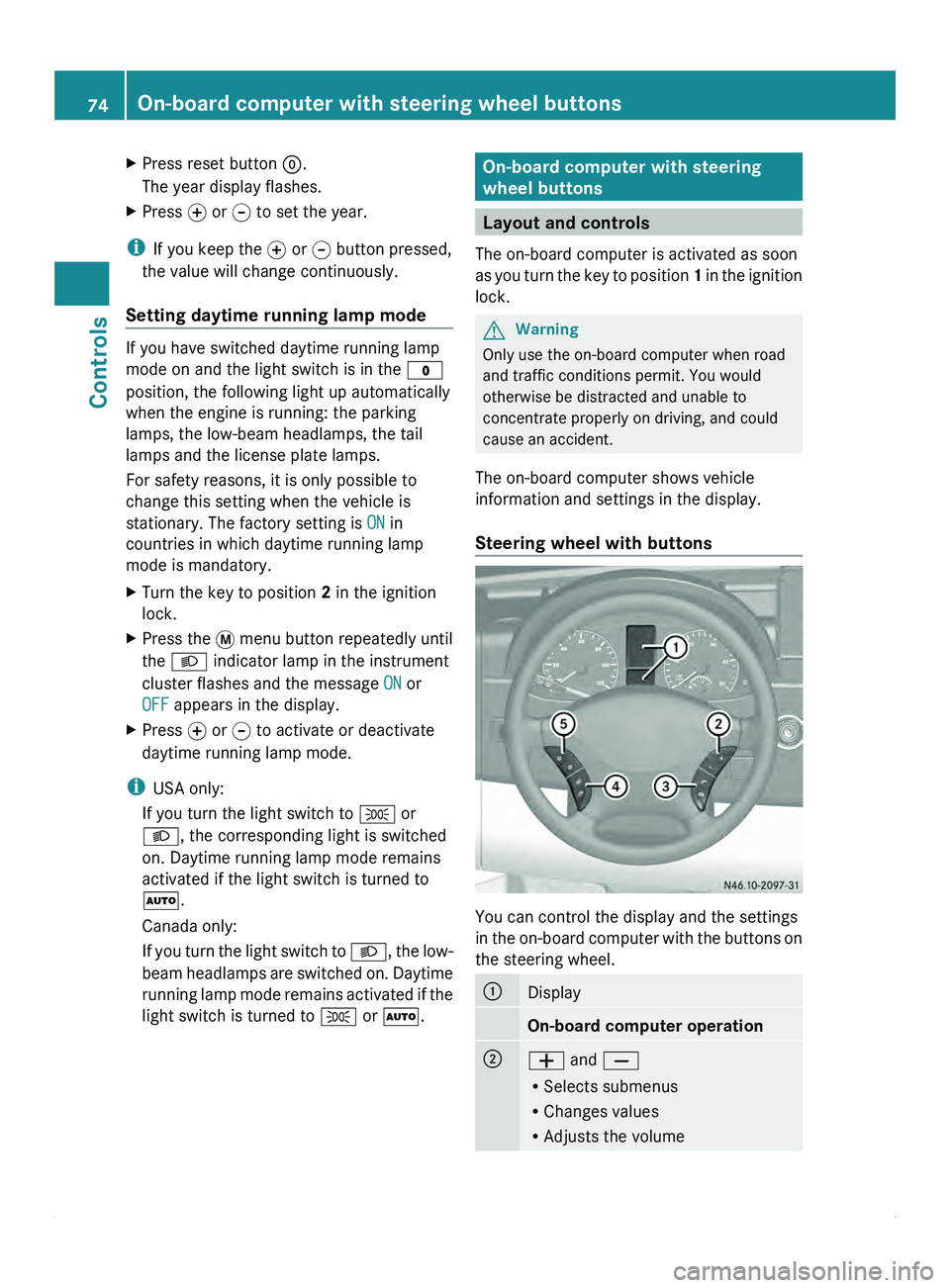
Steering wheel with buttons You can control the display and the settings
in the
on-board
computer with the buttons on
the steering wheel. 0046
Display
On-board computer operation
0047
005A and 005B
R
Selects submenus
R Changes values
R Adjusts the volume74
On-board computer with steering wheel buttons
Controls
Page 81 of 292
Using the steering wheel buttons
X
Press the 0059 or 0058 button repeatedly
until the Settings menu appears in the
display.
X Press the 0048 reset button for about three
seconds.
You will see a message in the display
prompting you to
press the 0048 reset button
again to confirm.
X Press the 0048 reset button again.
The functions of all submenus are reset to
the factory settings.
i If you do not press the 0048 reset button a
second time to confirm, the settings are
retained. The Settings menu appears
again after approximately five seconds.
For safety reasons, it is not possible to
reset all of the functions while the vehicle
is in motion. For example, the Hdlmp
mode function in the Lighting submenu
remains unchanged.
Resetting the functions of a submenu You can reset the functions of an individual
submenu to the factory settings.
Using the steering wheel buttons
X
Press the 0059 or 0058 button repeatedly
until the Settings menu appears in the
display.
X Press 0029 to switch to the submenu
selection.
X Press 005A or 005B to select a submenu.
X Press the 0048 reset button for about three
seconds.
You will see a message in the display
prompting you
to
press the 0048 reset button
again to confirm.
X Press the 0048 reset button again.
All functions of the submenu are reset to
the factory settings.
i If you do not press the 0048 reset button a
second time to confirm, the settings are retained. The Settings menu appears
again after approximately five seconds.
For safety reasons, it is not possible to
reset all of the functions while the vehicle
is in motion. For example, the Hdlmp
mode function in the
Lighting submenu
remains unchanged.
Submenus in the Settings menu Using the steering wheel buttons
X
Press the 0059 or 0058 button repeatedly
until the Settings menu appears in the
display.
X Press 0029 to switch to the submenu
selection.
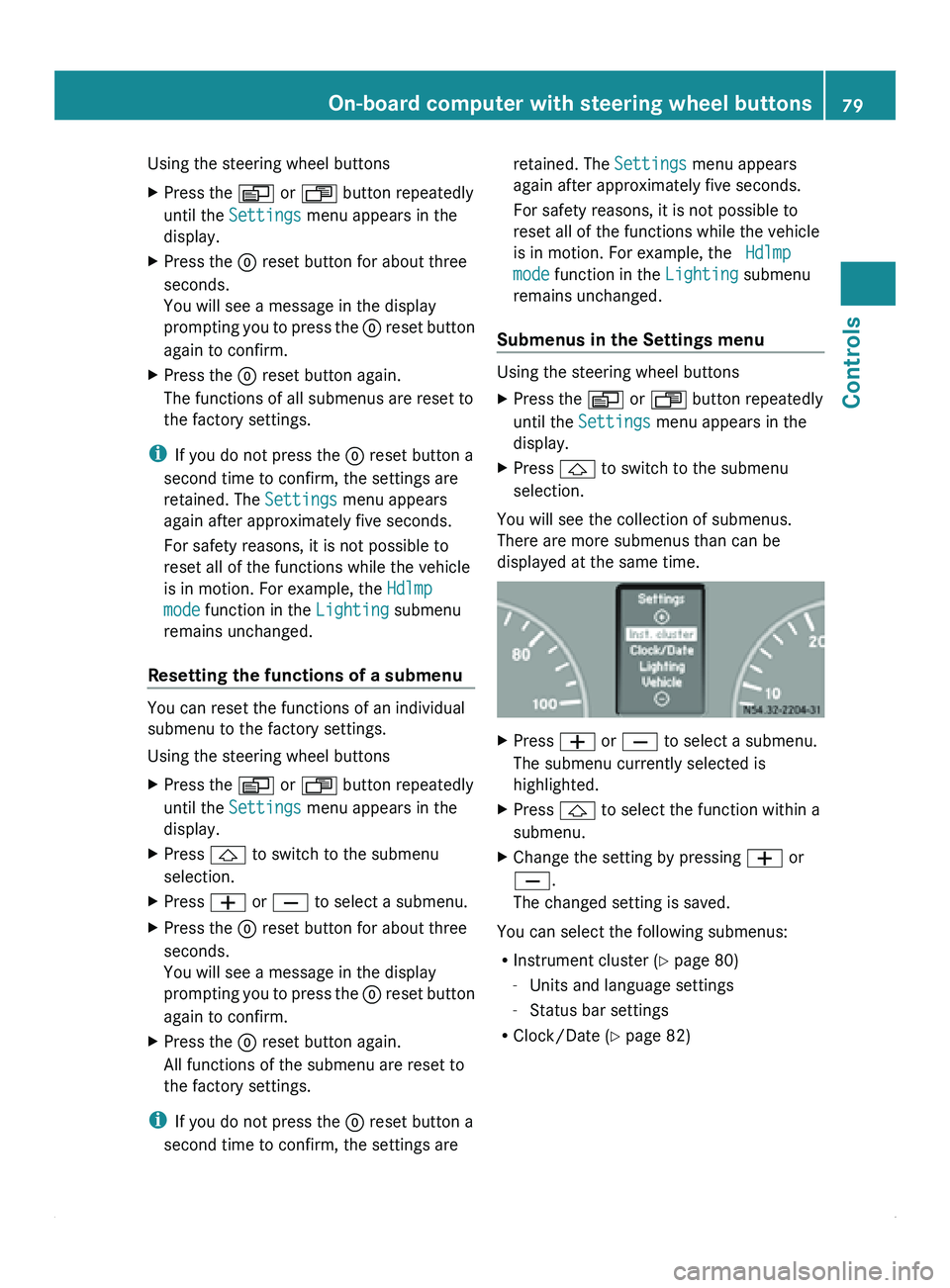
You will see the collection of submenus.
There are more submenus than can be
displayed at the same time. X
Press 005A or 005B to select a submenu.
The submenu currently selected is
highlighted.
X Press 0029 to select the function within a
submenu.
X Change the setting by pressing 005A or
005B.
The changed setting is saved.
You can select the following submenus:
R Instrument cluster ( Y
page 80)
- Units and language settings
- Status bar settings
R Clock/Date (Y page 82) On-board computer with steering wheel buttons
79
Controls Z
Page 82 of 292
R
Lighting (Y page 82)
-Activating/deactivating daytime running
lamp
mode and surround lighting (locator
lighting)
- Setting the exterior lighting delayed
switch-off
R Vehicle ( Y page 84)
- Setting the radio station selection
- Setting the windshield wiper sensitivity
R Auxiliary heating( Y page 104)
R Convenience(Y page 85)
-Key-dependent settings
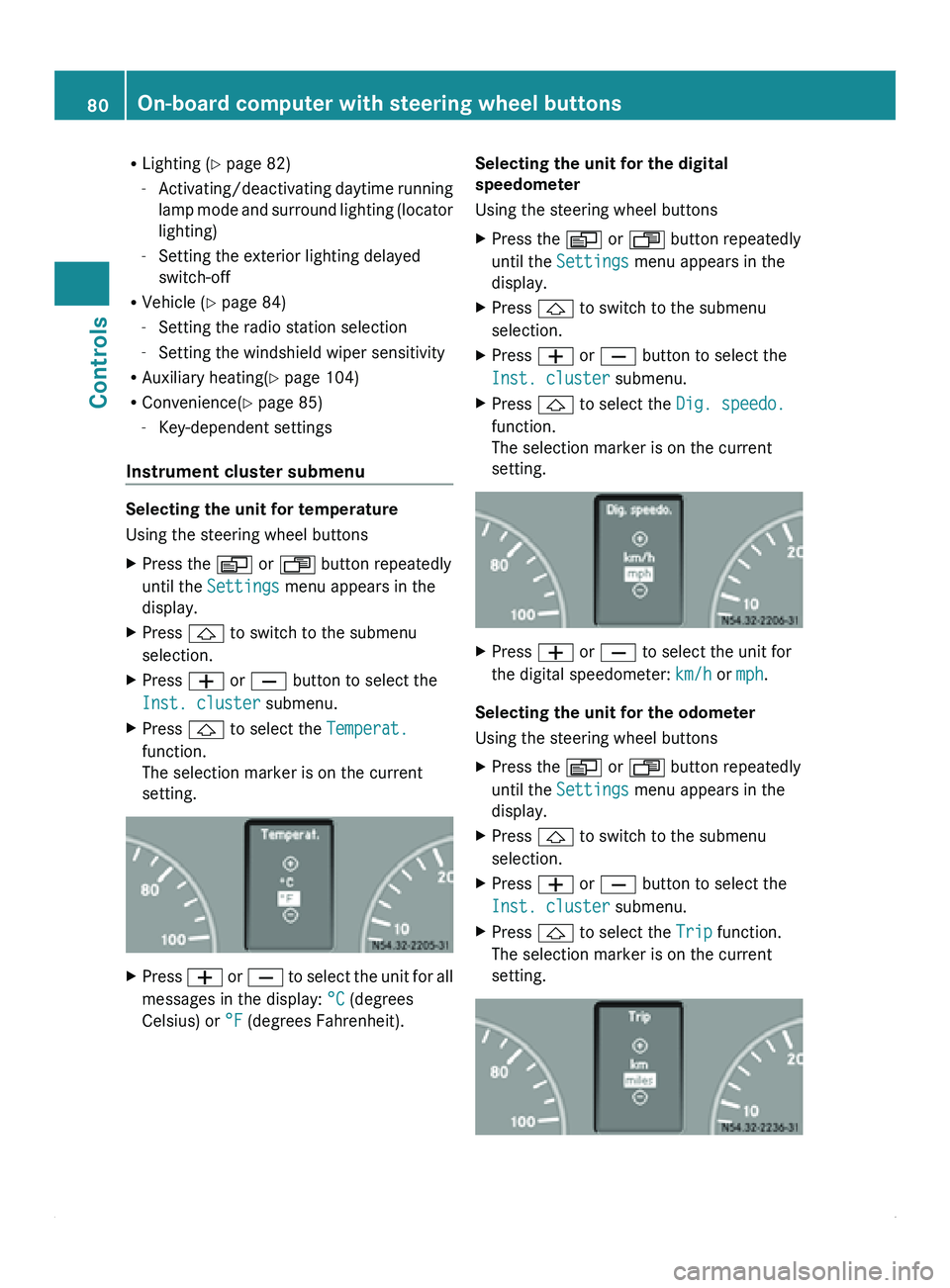
Instrument cluster submenu Selecting the unit for temperature
Using the steering wheel buttons
X
Press the 0059 or 0058 button repeatedly
until the Settings menu appears in the
display.
X Press 0029 to switch to the submenu
selection.
X Press 005A or 005B button to select the
Inst. cluster submenu.
X Press 0029 to select the Temperat.
function.
The selection marker is on the current
setting. X
Press 005A or 005B
to select the unit for all
messages in the display: °C (degrees
Celsius) or °F (degrees Fahrenheit). Selecting the unit for the digital
speedometer
Using the steering wheel buttons
X
Press the 0059 or 0058 button repeatedly
until the Settings menu appears in the
display.
X Press 0029 to switch to the submenu
selection.
X Press 005A or 005B button to select the
Inst. cluster submenu.
X Press 0029 to select the Dig. speedo.
function.
The selection marker is on the current
setting. X
Press 005A or 005B to select the unit for
the digital speedometer: km/h or mph.
Selecting the unit for the odometer
Using the steering wheel buttons
X Press the 0059 or 0058 button repeatedly
until the Settings menu appears in the
display.
X Press 0029 to switch to the submenu
selection.
X Press 005A or 005B button to select the
Inst. cluster submenu.
X Press 0029 to select the Trip function.
The selection marker is on the current
setting. 80
On-board computer with steering wheel buttons
Controls
Page 87 of 292
Convenience submenu
Key-dependent settings
The
Key function allows
you to define whether
settings for the following submenus are
stored with a key dependence:
R Inst. cluster (instrument cluster)
R Lighting
R Vehicle
Using the steering wheel buttons
X Press the 0059 or 0058 button repeatedly
until the Settings menu appears in the
display.
X Press 005A or 005B to select the
Convenience submenu.
X Press the 0029 button to select the Key
function.
The selection marker is on the current
setting. X
Press 005A or 005B to activate or
deactivate key dependency.
i For safety
reasons,
it is not possible to set
the Key function while the vehicle is in
motion. You will see the following message
in the display: Setting only possible
at standstill Trip computer menu
You can call
up or reset statistical data for the
vehicle in the Trip computer menu.
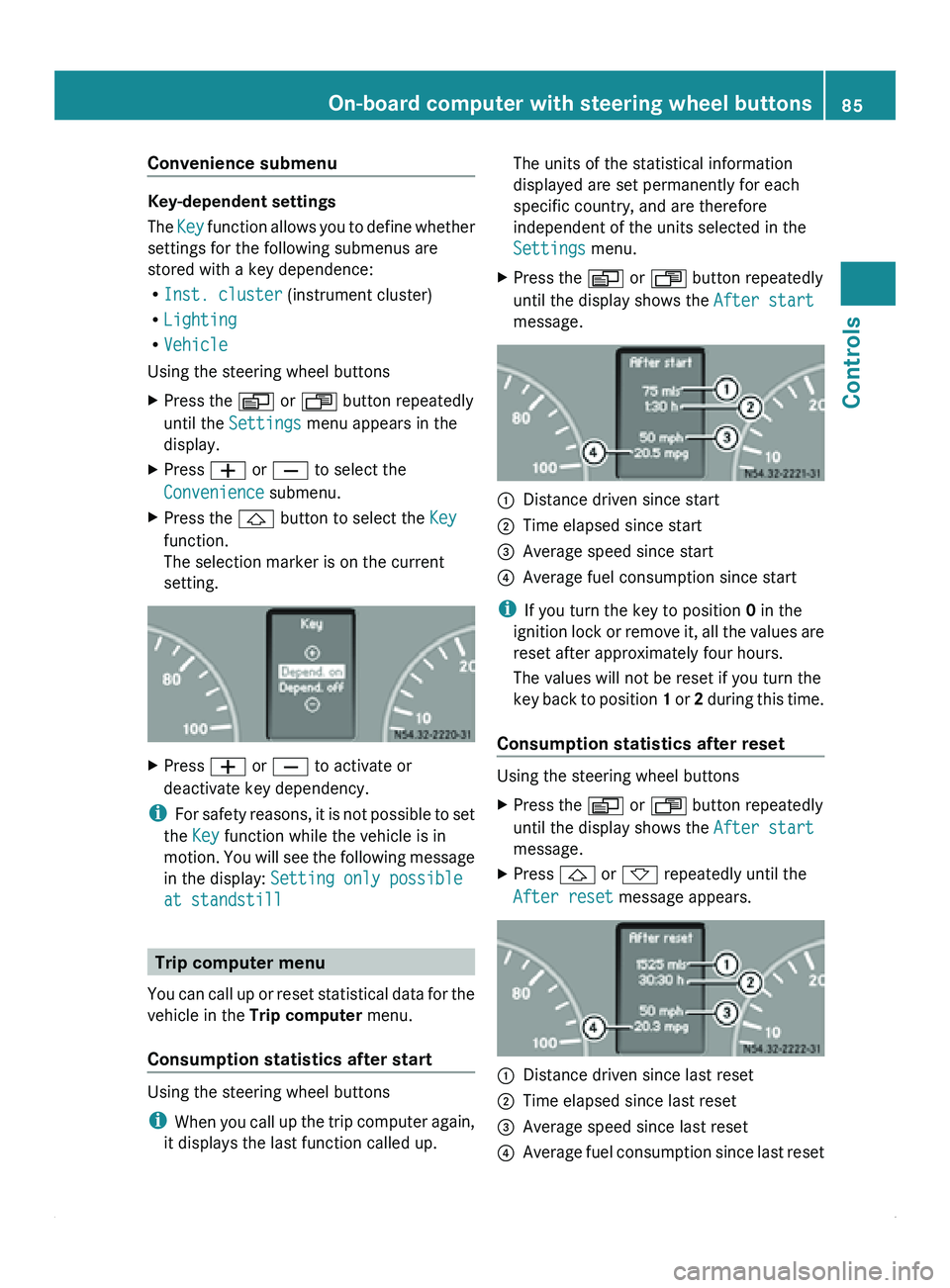
Consumption statistics after start Using the steering wheel buttons
i
When you call
up the trip computer again,
it displays the last function called up. The units of the statistical information
displayed are set permanently for each
specific country, and are therefore
independent of the units selected in the
Settings menu.
X Press the 0059 or 0058 button repeatedly
until the display shows the After start
message. 0046
Distance driven since start
0047 Time elapsed since start
008A Average speed since start
0088 Average fuel consumption since start
i If you turn the key to position 0 in the
ignition lock
or
remove it, all the values are
reset after approximately four hours.
The values will not be reset if you turn the
key back to position 1 or 2 during this time.
Consumption statistics after reset Using the steering wheel buttons
X
Press the 0059 or 0058 button repeatedly
until the display shows the After start
message.
X Press 0029 or 002D repeatedly until the
After reset message appears. 0046
Distance driven since last reset
0047 Time elapsed since last reset
008A Average speed since last reset
0088 Average fuel consumption since last reset On-board computer with steering wheel buttons
85
Controls Z