instrument cluster MERCEDES-BENZ SPRINTER 2011 MY11 Operator’s Manual
[x] Cancel search | Manufacturer: MERCEDES-BENZ, Model Year: 2011, Model line: SPRINTER, Model: MERCEDES-BENZ SPRINTER 2011Pages: 292, PDF Size: 6.75 MB
Page 108 of 292
X
To switch off the auxiliary heating: press
the 0086
switch.
or
X Turn the key to position 0 in the ignition
lock.
The red indicator lamp in the switch goes
out.
The auxiliary heating operates for about
another two minutes
and then switches off
automatically.
Selecting a switch-on time You can use the on-board computer to define
up to
three
switch-on times, one of which can
be selected.
On-board computer without steering
wheel buttons
X Turn the SmartKey to position 2 in the
ignition lock.
X Press the 0086 switch.
The 0086 symbol in the display flashes.
or
X Press the 007B menu button on the
instrument cluster repeatedly until the
0086 symbol flashes in the display.
X Use the 0069 or 006A
buttons on the instrument
cluster to select switch-on time 1 to 3
The switch-on time selected is displayed.
X Wait 10 seconds for the standard display to
appear.
The switch-on time is selected. The yellow
indicator lamp in the 0086 switch comes
on.
If you have not preselected a switch-on time
and --:-- is
shown
in the display, this means
that automatic switch-on mode is
deactivated. The yellow indicator lamp in the
0086 switch goes out.
i If you turn the key to position 0 in the
ignition lock, the yellow indicator lamp in
the 0086 switch goes off after 30 minutes. The red indicator lamp in the
0086 switch
comes on when the auxiliary heating
switches on.
On-board computer with steering wheel
buttons
X Turn the SmartKey to position 2 in the
ignition lock.
X Press the 0086 switch.
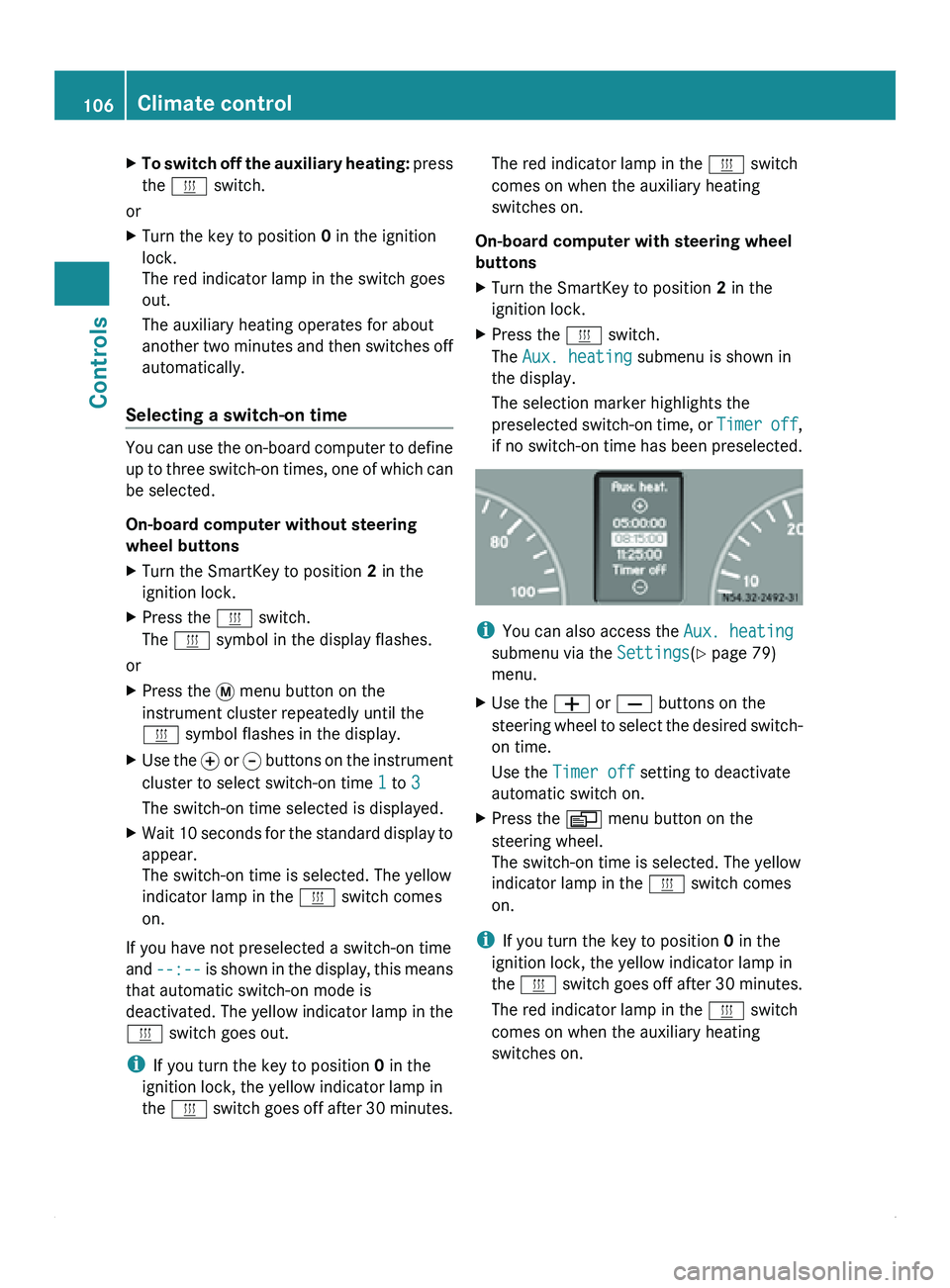
The Aux. heating submenu is shown in
the display.
The selection marker highlights the
preselected switch-on
time,
or Timer off,
if no switch-on time has been preselected. i
You can also access the Aux. heating
submenu via the Settings(Y page 79)
menu.
X Use the 005A or 005B buttons on the
steering wheel
to
select the desired switch-
on time.
Use the Timer off setting to deactivate
automatic switch on.
X Press the 0059 menu button on the
steering wheel.
The switch-on time is selected. The yellow
indicator lamp in the 0086 switch comes
on.
i If you turn the key to position 0 in the
ignition lock, the yellow indicator lamp in
the 0086 switch goes
off after 30 minutes.
The red indicator lamp in the 0086 switch
comes on when the auxiliary heating
switches on. 106
Climate control
Controls
Page 109 of 292
Setting the switch-on time
On-board computer without steering
wheel buttons
X
Use the same method to select a switch-on
time as described in the "Preselecting a
switch-on time" section.
X Press the 0048 reset button on the
instrument cluster to set the desired
switch-on time.
The hour display flashes.
X Use the 0069 and 006A buttons on the
instrument cluster to set the hours.
X Press the 0048 reset button.
The minute display flashes.
X Use the 0069 and 006A buttons to set the
minutes.
On-board computer with steering wheel
buttons
X Use the same method to select a switch-on
time as described in the "Preselecting a
switch-on time" section.
X Press the 0029 menu button on the
steering wheel.
The Hours submenu is shown in the
display.
X Press the 005A or 005B button on the
steering wheel to set the hours.
X Press the 0029 button.
The Minutes submenu is shown in the
display.
X Press the 005A or 005B button to set the
minutes.
X Press the 0059 button.
The switch-on time is set and selected.
Heater booster function If the outside temperature is lower than
39 ‡ (4 †), the fuel-operated auxiliary
heating heats the vehicle as quickly as
possible when the engine is running. The auxiliary heating automatically switches
to heater booster mode after the engine is
started.
i
If the outside temperature rises above
39 ‡ (4 †),
the auxiliary heating and heater
booster function switch off automatically. Vehicles with auxiliary heating
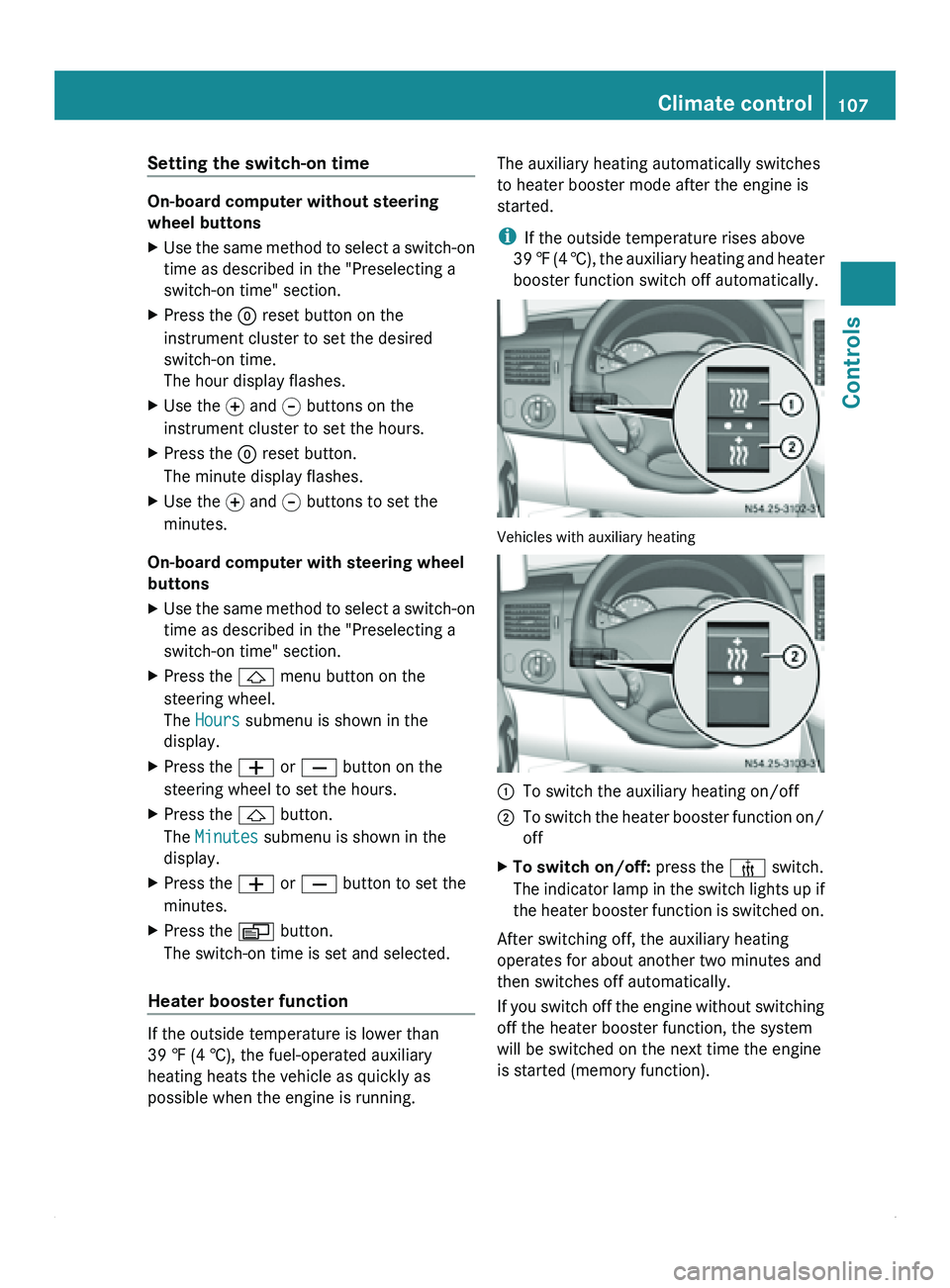
0046
To switch the auxiliary heating on/off
0047 To switch the heater booster function on/
off
X To switch on/off: press the 006C switch.
The indicator lamp
in the switch lights up if
the heater booster function is switched on.
After switching off, the auxiliary heating
operates for about another two minutes and
then switches off automatically.
If you switch
off the engine without switching
off the heater booster function, the system
will be switched on the next time the engine
is started (memory function). Climate control
107
Controls Z
Page 112 of 292
Starting the engine
X
Turn the key to position 2 in the ignition
lock.
The 0028 preglow indicator lamp in the
instrument cluster lights up.
X When the 0028 preglow indicator lamp
goes out, turn the key to position 3 in the
ignition lock and release it as soon as the
engine is running.
i You can start
the engine without preglow
when the engine is warm.
i Depending on the equipment installed,
the vehicle either automatically locks
centrally after switching on the ignition or
after pulling away. The locking knobs in the
doors drop down.
You can open the doors from the inside at
any time.
Automatic door locking can be deactivated
(Y page 55). Driving off
G
Warning
Do not downshift for additional engine
braking on a
slippery road surface. This could
cause the drive wheels to lose their grip and
the vehicle could skid. You could lose control
of the vehicle and cause an accident.
i After pulling away or switching on the
ignition, the vehicle automatically locks
centrally. The locking knobs in the doors
drop down.
You can open the doors from the inside at
any time.
Automatic door locking can be deactivated
(Y page 55). X
Depress the brake pedal and keep it
depressed.
The selector lever lock is released.
X Release the parking brake ( Y page 112).
The 0066 indicator lamp in the instrument
cluster goes out.
X Move the selector lever to position D or R.
i On vehicles with a reverse warning
feature, a warning signal sounds when
reverse gear is
engaged to alert other road
users.
! Only shift into reverse gear when the
vehicle is stationary. You could otherwise
damage the transmission.
X Release the brake pedal.
X Carefully depress the accelerator pedal. General driving tips
Steering G
Warning
Do not switch off the engine while the vehicle
is in motion.
There is no
power assistance for the steering
or the service brake when the engine is not
running.
Steering and braking require significantly
more effort and you could lose control of the
vehicle and cause an accident as a result.
! Do not hold the steering wheel at full
steering angle for a long time, e.g. when
turning or maneuvering.
The hydraulic pump could be damaged if
the hydraulic fluid temperature increases.
Overrun cut-off If you take your foot off the accelerator pedal,
the diesel fuel supply is cut off in overrun
mode when the
engine speed is out of the idle
speed control range. 110
Driving and parking
Controls
Page 115 of 292
Applying the parking brake
X
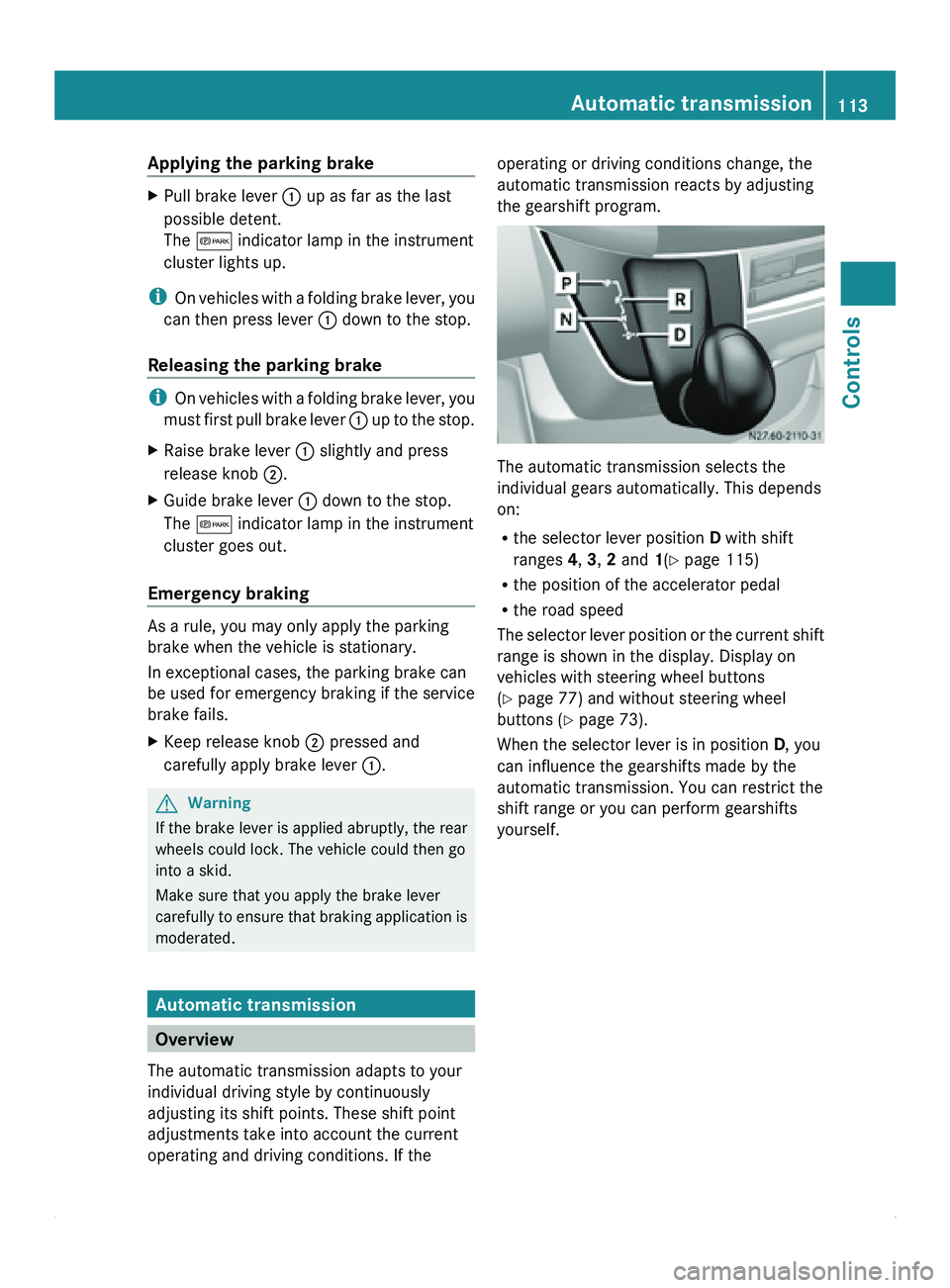
Pull brake lever 0046 up as far as the last
possible detent.
The 0066 indicator lamp in the instrument
cluster lights up.
i On vehicles with
a folding brake lever, you
can then press lever 0046 down to the stop.
Releasing the parking brake i
On vehicles with
a folding brake lever, you
must first pull brake lever 0046 up to the stop.
X Raise brake lever 0046 slightly and press
release knob 0047.
X Guide brake lever 0046 down to the stop.
The 0066 indicator lamp in the instrument
cluster goes out.
Emergency braking As a rule, you may only apply the parking
brake when the vehicle is stationary.
In exceptional cases, the parking brake can
be used for emergency braking if the service
brake fails.
X
Keep release knob 0047 pressed and
carefully apply brake lever 0046.G
Warning
If the brake lever is applied abruptly, the rear
wheels could lock. The vehicle could then go
into a skid.
Make sure that you apply the brake lever
carefully to ensure
that braking application is
moderated. Automatic transmission
Overview
The automatic transmission adapts to your
individual driving style by continuously
adjusting its shift points. These shift point
adjustments take into account the current
operating and driving conditions. If the operating or driving conditions change, the
automatic transmission reacts by adjusting
the gearshift program.
The automatic transmission selects the
individual gears automatically. This depends
on:
R
the selector lever position D with shift
ranges 4, 3, 2 and 1(Y page 115)
R the position of the accelerator pedal
R the road speed
The selector lever
position or the current shift
range is shown in the display. Display on
vehicles with steering wheel buttons
(Y page 77) and without steering wheel
buttons ( Y page 73).
When the selector lever is in position D, you
can influence the gearshifts made by the
automatic transmission. You can restrict the
shift range or you can perform gearshifts
yourself. Automatic transmission
113
Controls Z
Page 118 of 292
vehicle. Otherwise, the vehicle could roll
away.
Driving the vehicle
Exhaust gas aftertreatment
The exhaust gas aftertreatment requires a
reducing agent, Diesel
Exhaust Fluid (DEF), in
order to function correctly. Filling up the DEF
tank is usually part of the service scope. DEF
consumption depends on operational and
driving conditions; the supply does not have
to suffice until the next scheduled service. For
this reason, refill the DEF tank regularly
during vehicle operation, or, at the latest,
after the first warning message has been
received from the on-board computer.
To conform with emission regulations, you
must operate the vehicle with DEF and refill
the supply regularly. If you try to operate the
vehicle without DEF, with diluted DEF, or with
a different reduction agent, the engine
management detects this and issues a
warning message, after which the engine
cannot be restarted.
If the DEF supply drops below
1.5 US gal (5.5 l), you receive the first warning
message and you hear a warning tone. After
the first message appears, the remaining DEF
supply suffices for approximately 1000 miles
(1600 km) in normal driving conditions.
Then, the reserve range of 0.8 US gal (3.0 l)
is reached. Once the reserve range has been
reached, you receive the next warning
message and you hear a series of warning
tones. After the first message appears, the
DEF reserve suffices for approximately
1200 miles (1900 km). You can, however,
only start the engine another 16 times.
You should now, at the latest, fill up with at
least 2.0 US gal (7.6 l) of DEF (Y page 143)
or have the DEF tank filled at a qualified
specialist workshop. When the number of remaining engine starts
is 0, the engine management prevents the
engine from being started.
If the
00BB
check engine indicator lamp lights
up, the exhaust gas aftertreatment is faulty or
an emission-relevant malfunction has
occurred (Y page 195). You can then drive a
maximum of 50 miles (80 km) before the
engine management limits the number of
remaining engine starts.
If the exhaust gas aftertreatment is faulty,
have it checked and repaired at a qualified
specialist workshop. We recommend that you
use an authorized Sprinter Dealer for this
purpose.
You will find further information on DEF in the
"Service products" section (Y page 155).
Level indicator You will find further information about DEF
consumption in the "Driving tips" section
(Y
page 140).
Vehicles without steering wheel buttons
If the DEF supply is less than
1.5 US gal (5.5 l), the 00E4 indicator lamp in
the instrument cluster lights up and the
009BdEF Chk message appears in the
display.
If the DEF supply drops below the reserve
level of 0.8 US gal (3.0 l), the 00E4 indicator
lamp in the instrument cluster lights up and
the 009BStArtS RE
xx
message is shown in
the display. xx refers to the number of
remaining engine starts (from 16 to 0).
Vehicles with steering wheel buttons
If the DEF supply is less than
1.5 US gal (5.5 l), the Check Diesel
Exhaust Fluid See Operator's Manual
message appears in the display.
If the DEF supply drops below the reserve
level of 0.8 US gal (3.0 l), the 00E4xx
starts remaining message appears in the
display. xx refers to the number of remaining
engine starts (from 16 to 0).116
Driving the vehicle
Controls
Page 119 of 292
ADR (working speed governor)
When activated, the working speed governor
(ADR) automatically increases the engine
speed to a preset or adjustable speed
(Y page 117).
i After a cold start, the idling speed of the
engine is increased automatically. If the
preset working speed is lower than the
increased idling speed, the working speed
is only reached once the engine has
completed the warm-up phase.
It is only possible to activate ADR with the
vehicle stationary and the parking brake
applied.
The selector lever must be in position P.
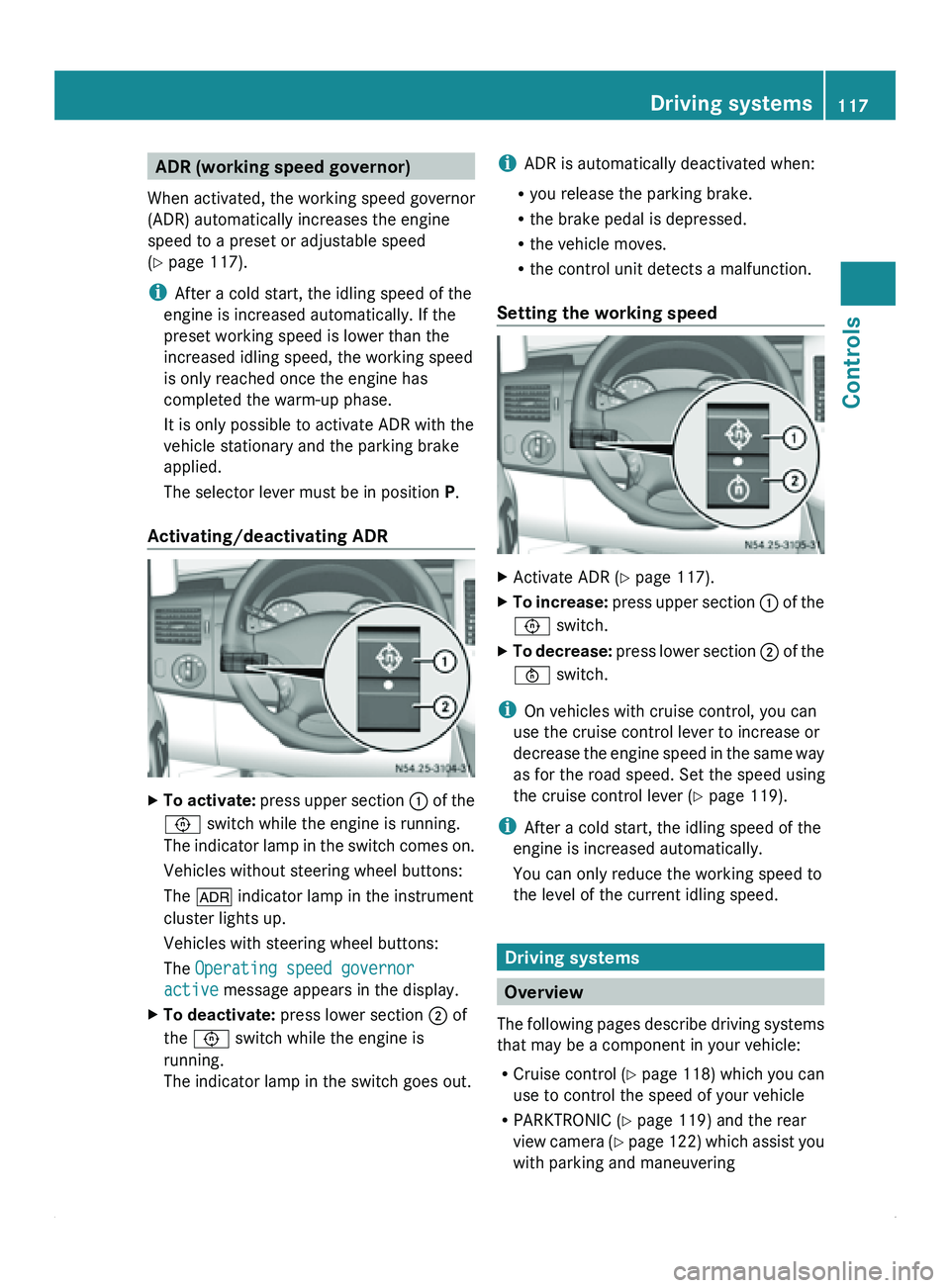
Activating/deactivating ADR X
To activate: press upper
section 0046 of the
0093 switch while the engine is running.
The indicator lamp in the switch comes on.
Vehicles without steering wheel buttons:
The 004E indicator lamp in the instrument
cluster lights up.
Vehicles with steering wheel buttons:
The Operating speed governor
active message appears in the display.
X To deactivate: press lower section 0047 of
the 0093 switch while the engine is
running.
The indicator lamp in the switch goes out. i
ADR is automatically deactivated when:
R you release the parking brake.
R the brake pedal is depressed.
R the vehicle moves.
R the control unit detects a malfunction.
Setting the working speed X
Activate ADR (
Y page 117).
X To increase: press upper
section 0046 of the
0093 switch.
X To decrease: press lower
section 0047 of the
0094 switch.
i On vehicles with cruise control, you can
use the cruise control lever to increase or
decrease the engine
speed in the same way
as for the road speed. Set the speed using
the cruise control lever (Y page 119).
i After a cold start, the idling speed of the
engine is increased automatically.
You can only reduce the working speed to
the level of the current idling speed. Driving systems
Overview
The
following pages
describe driving systems
that may be a component in your vehicle:
R Cruise control ( Y page 118) which you can
use to control the speed of your vehicle
R PARKTRONIC ( Y page 119) and the rear
view camera (Y page 122) which assist you
with parking and maneuvering Driving systems
117
Controls Z
Page 120 of 292
Cruise control
General notes Cruise control maintains the speed of the
vehicle for you.
Use cruise control if road and traffic
conditions make it appropriate to maintain a
steady speed
for
a prolonged period. You can
set any speed from 20 mph upwards in
increments of 1 mph.
i If you have set km/h as the unit for the
digital speedometer , you can set any speed
from 30 km/h upwards in increments of
1 km/h. G
Warning
Cruise control is unable to take account of
road and traffic conditions.
Always pay attention
to the traffic conditions,
even when cruise control is activated.
Cruise control is only an aid designed to assist
driving. You are always responsible for the
vehicle's speed and for braking in good time.
If there is a change of drivers, make sure that
you inform the new driver about the set cruise
speed. Otherwise, sudden acceleration or
braking could endanger you or others. G
Warning
Do not use cruise control:
R in road and traffic conditions which do not
allow you to
maintain a constant speed (e.g.
heavy traffic or winding roads). You could
otherwise cause an accident.
R on slippery roads. Braking or accelerating
could cause the drive wheels to lose
traction and the vehicle could then skid.
R when there is poor visibility, e.g. due to fog,
heavy rain or snow
i Cruise control may not be able to
maintain the stored speed on uphill or
downhill gradients. The stored speed is
resumed if the gradient evens out and the
vehicle's speed does not fall below 20 mph
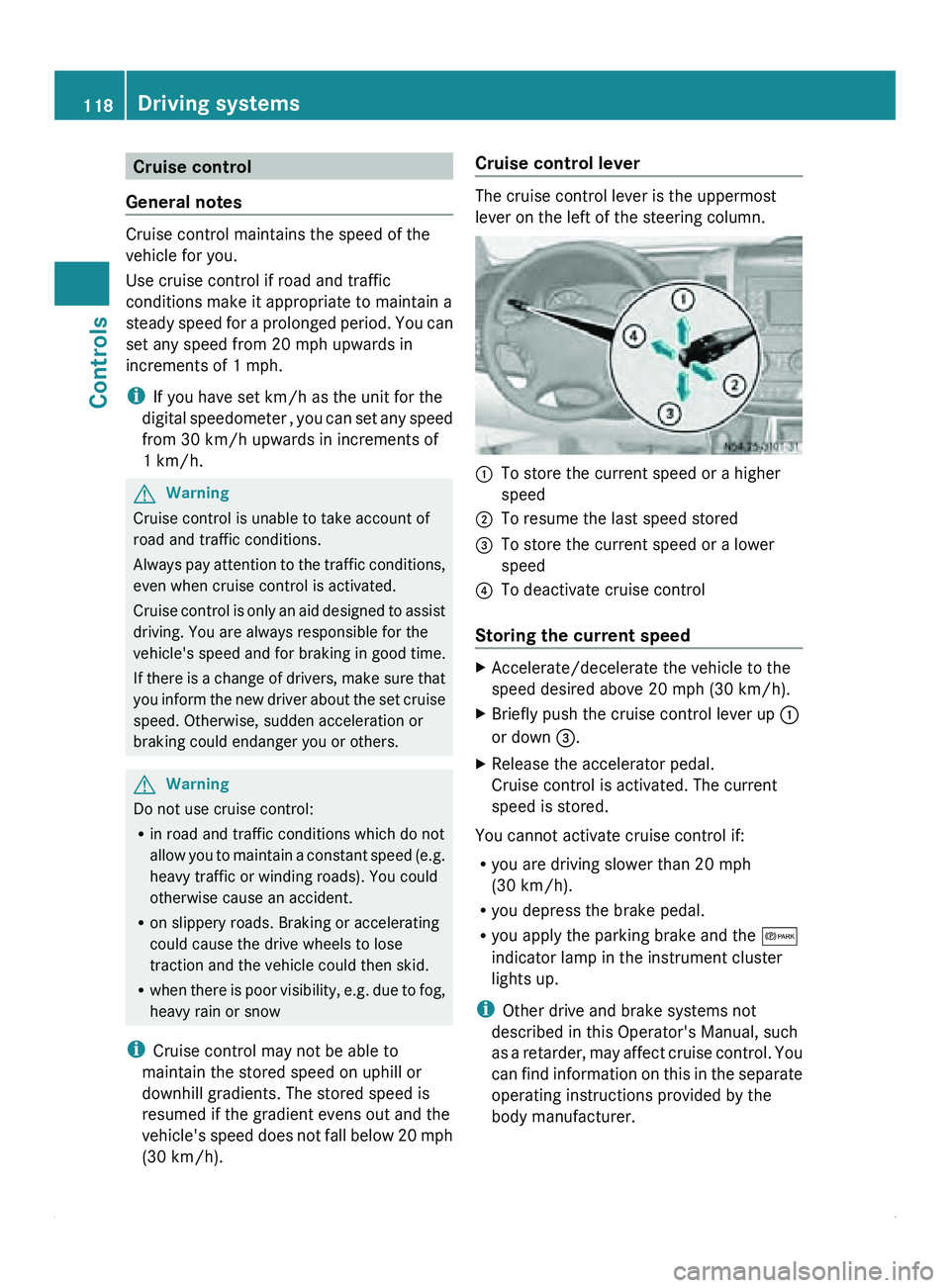
(30 km/h). Cruise control lever The cruise control lever is the uppermost
lever on the left of the steering column.
0046
To store the current speed or a higher
speed
0047 To resume the last speed stored
008A To store the current speed or a lower
speed
0088 To deactivate cruise control
Storing the current speed X
Accelerate/decelerate the vehicle to the
speed desired above 20 mph
(30 km/h).
X Briefly push the cruise control lever up 0046
or down 008A
.
X Release the accelerator pedal.
Cruise control is activated. The current
speed is stored.
You cannot activate cruise control if:
R you are driving slower than 20 mph
(30 km/h).
R you depress the brake pedal.
R you apply the parking brake and the 0066
indicator lamp in the instrument cluster
lights up.
i Other drive and brake systems not
described in this Operator's Manual, such
as a
retarder,
may affect cruise control. You
can find information on this in the separate
operating instructions provided by the
body manufacturer. 118
Driving systems
Controls
Page 121 of 292
Resuming the stored speed
G
Warning
Only select a stored speed if you know what
that speed is
and whether it is suitable for the
current driving and traffic situation. You can
otherwise endanger yourself and others by
unintentionally triggering sudden
acceleration or braking.
X Briefly pull the cruise control lever in the
direction of arrow 0047.
X Release the accelerator pedal.
Cruise control is
activated and resumes the
vehicle's speed to the last speed stored.
i When you first move the cruise control
lever in the direction of arrow 0047 after
starting the engine, cruise control is
activated and the current road speed is
stored.
Setting the speed G
Warning
The rate at which you increase the speed in
increments of 1 mph (1 km/h) may be faster
than your vehicle is able to accelerate. Your
vehicle may
then continue to accelerate up to
the newly set speed even after you have
released the cruise control lever.
Only increase the speed as the prevailing
conditions permit. Sudden acceleration could
otherwise endanger you and others.
X Briefly push the cruise control lever
upwards 0046 to increase the speed or
downwards 008A to reduce the speed.
The last speed stored is increased/
reduced in increments of 1 mph
(1 km/h
).
or
X Press and hold the cruise control lever
up 0046 or down 008A until the desired speed
has been reached.
X Release the cruise control lever.
The current speed is stored. i
Cruise control is not deactivated if you
depress the accelerator pedal. If you
accelerate briefly, e.g. to overtake, and
then ease off the accelerator pedal again,
cruise control adjusts the vehicle's speed
to the last speed stored.
Deactivating cruise control There are various ways to deactivate cruise
control:
X
Briefly push the cruise control lever
forwards 0088.
or
X Apply the brakes.
The last speed set remains stored.
i The last speed set is deleted when you
switch off the engine.
i Cruise control is deactivated
automatically when:
R you apply the brakes.
R you apply the parking brake and the
0066 indicator lamp in the instrument
cluster lights up.
R you are driving slower than 20 mph
(30 km/h).
R ESP ®
or ASR intervenes.
R you shift the automatic transmission to
neutral position N while the vehicle is in
motion.
R there is a malfunction in the ESP ®
, ASR
or ABS system. PARKTRONIC
General notes G
Warning
PARKTRONIC is only an aid and may not
detect all obstacles. It is not a substitute for
attentive driving.
You are always responsible for safety and
must continue to pay attention to your Driving systems
119
Controls
Z
Page 170 of 292
service. You will also see a minus sign before
the service due date.
Calling up the service due date
X
Turn the key to position 2 in the ignition
lock.
The display is activated.
Vehicles with steering wheel buttons
X Press the 0059 or 0058 button on the
steering wheel repeatedly
until you see the
standard display (Y page 77).
X Press the 0029 or 002D button on the
steering wheel repeatedly
until you see the
following in the display, for example:
R 009B Service A in ... days
R 009B Service A in ... mi (km)
Vehicles without steering wheel buttons
X Press the 007B menu button on the
instrument cluster repeatedly until the
009B or 009C symbol for the service
appears.
Additionally you will see the remaining
distance in miles ( mi) or kilometers ( km) or
the remaining time in days ( d).Hood
Opening the hood G
Warning
Do not pull the release lever while the vehicle
is in motion.
If you do so, the hood may open
up and block your view. G
Warning!
There is a risk of injury if the hood is open,
even if the engine is not running.
Some engine components can become very
hot.
To avoid the risk of burns, only touch those
components described in the Operator's
Manual and observe
the relevant safety notes. G
Warning
The radiator fan between the radiator and the
engine can start
automatically, even if the key
has been removed from the ignition lock.
Keep away from the area of rotation of the fan
blades. You could otherwise be injured.
The electronic injector control operates at
high voltage. For this reason, you must never
touch injection system components while:
R the engine is running.
R the engine is being started.
R the ignition is switched on.
You could otherwise receive an electric shock
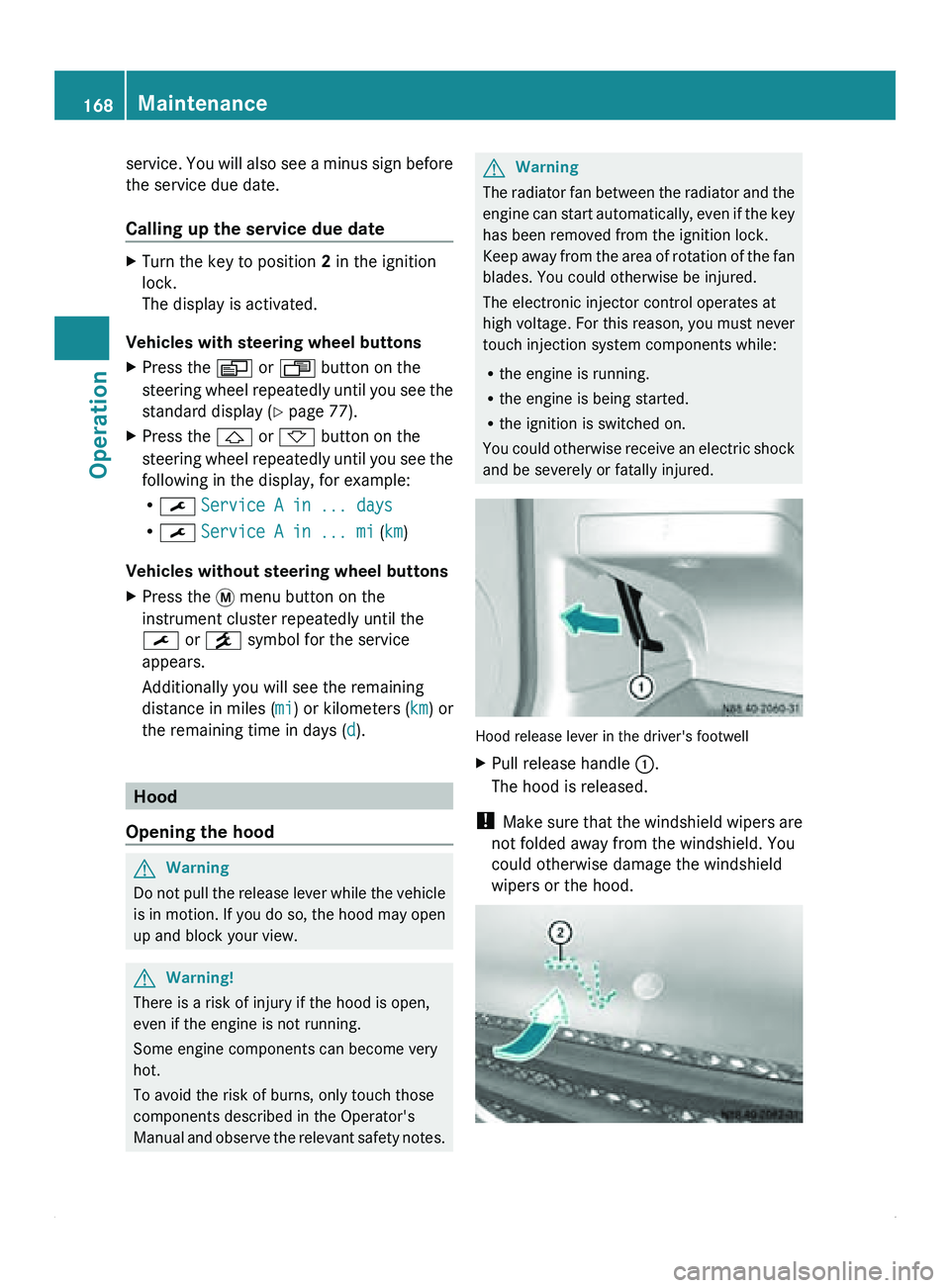
and be severely or fatally injured. Hood release lever in the driver's footwell
X
Pull release handle 0046.
The hood is released.
! Make sure
that
the windshield wipers are
not folded away from the windshield. You
could otherwise damage the windshield
wipers or the hood. 168
Maintenance
Operation
Page 173 of 292
Have the system checked immediately at a
qualified specialist workshop, e.g. at an
authorized Sprinter Dealer.
i There is usually a notice in the engine
compartment to remind
you when the next
brake fluid change is due. Windshield washer system/
headlamp cleaning system
Add windshield washer concentrate to the
washer fluid all year round. G
Warning
Windshield washer concentrate is highly
flammable.
Fire, naked flames
and smoking are therefore
prohibited when you are handling windshield
washer concentrate.
! Only use washer fluid concentrate which
is suitable for plastic lenses. Unsuitable
washer fluid concentrate could damage the
plastic lenses of the headlamps.
Adapt the mixing ratio to the ambient
temperature. If the temperature is above
freezing, use Summerwash to prevent
smearing. If there is a risk of frost, use
Winterwash to prevent the water from
freezing on the windshield.
The washer fluid reservoir has a capacity of
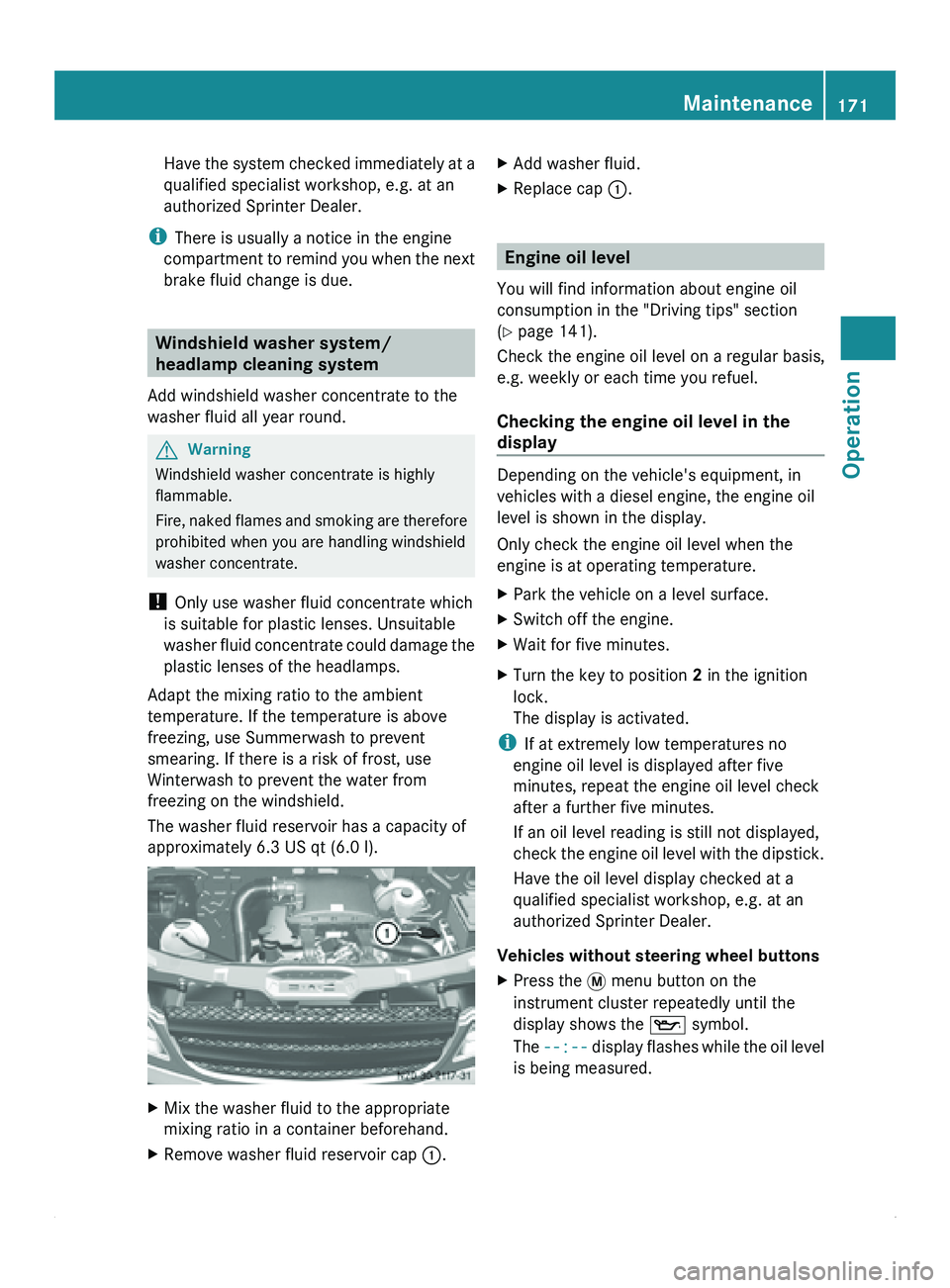
approximately 6.3 US qt (6.0 l). X
Mix the washer fluid to the appropriate
mixing ratio in a container beforehand.
X Remove washer fluid reservoir cap 0046.X
Add washer fluid.
X Replace cap 0046. Engine oil level
You will find information about engine oil
consumption in the "Driving tips" section
(Y page 141).
Check the engine oil level on a regular basis,
e.g. weekly or each time you refuel.
Checking the engine oil level in the
display Depending on the vehicle's equipment, in
vehicles with a diesel engine, the engine oil
level is shown in the display.
Only check the engine oil level when the
engine is at operating temperature.
X
Park the vehicle on a level surface.
X Switch off the engine.
X Wait for five minutes.
X Turn the key to position 2 in the ignition
lock.
The display is activated.
i If at extremely low temperatures no
engine oil level is displayed after five
minutes, repeat the engine oil level check
after a further five minutes.
If an oil level reading is still not displayed,
check the engine
oil level with the dipstick.
Have the oil level display checked at a
qualified specialist workshop, e.g. at an
authorized Sprinter Dealer.
Vehicles without steering wheel buttons
X Press the 007B menu button on the
instrument cluster repeatedly until the
display shows the 00B1 symbol.
The --:-- display flashes
while the oil level
is being measured. Maintenance
171
Operation Z