reset MERCEDES-BENZ SPRINTER 2012 MY12 Operator’s Manual
[x] Cancel search | Manufacturer: MERCEDES-BENZ, Model Year: 2012, Model line: SPRINTER, Model: MERCEDES-BENZ SPRINTER 2012Pages: 292, PDF Size: 6.75 MB
Page 74 of 292
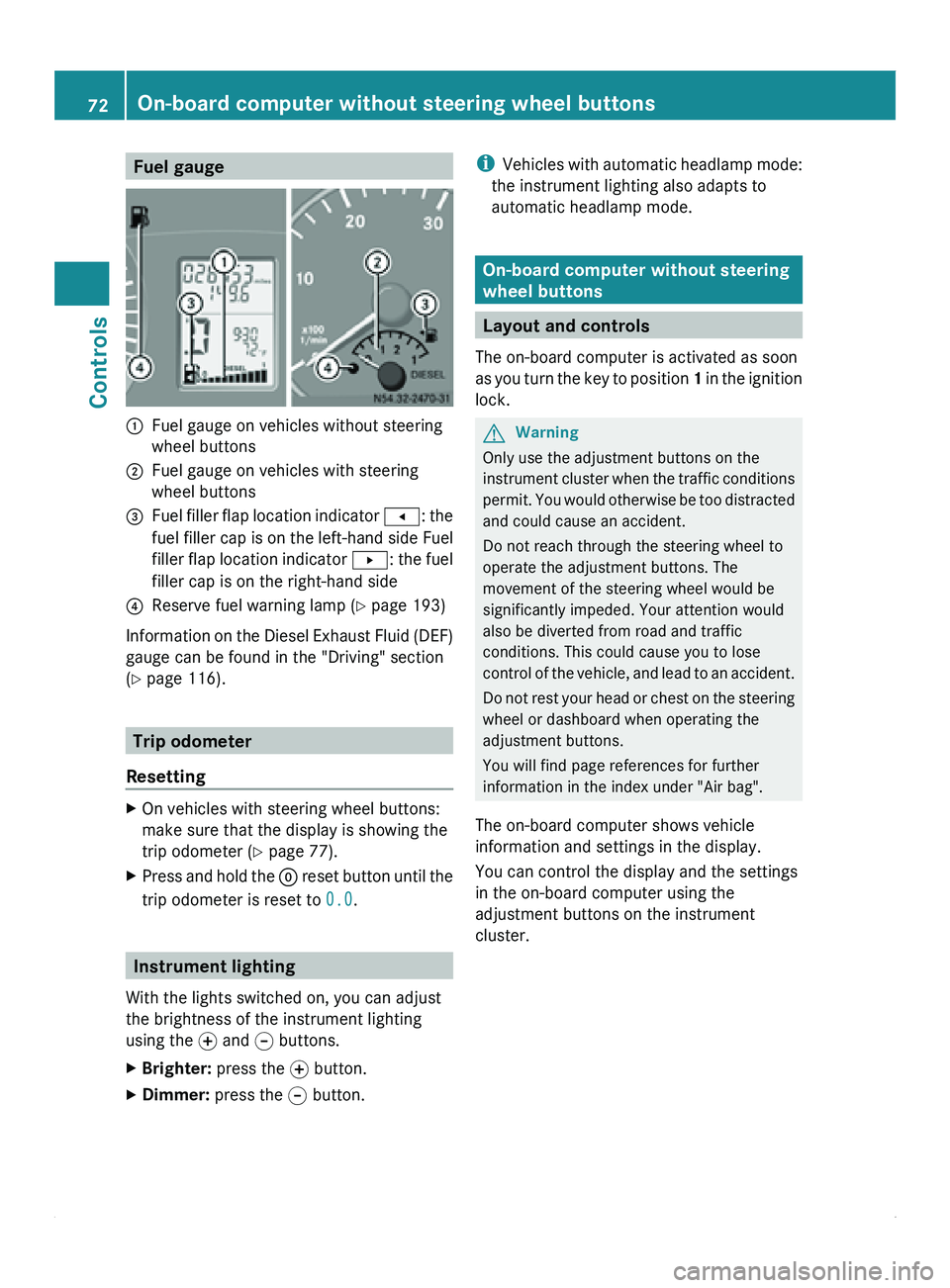
Fuel gauge
0046
Fuel gauge on vehicles without steering
wheel buttons
0047 Fuel gauge on vehicles with steering
wheel buttons
008A Fuel filler flap location indicator
0081: the
fuel filler
cap is on the left-hand side Fuel
filler flap location indicator 0082: the fuel
filler cap is on the right-hand side
0088 Reserve fuel warning lamp ( Y page 193)
Information on the Diesel Exhaust Fluid (DEF)
gauge can be found in the "Driving" section
(Y page 116). Trip odometer
Resetting X
On vehicles with steering wheel buttons:
make sure that the display is showing the
trip odometer (Y
page 77).
X Press and hold the 0048 reset button
until the
trip odometer is reset to 0.0.Instrument lighting
With the lights switched on, you can adjust
the brightness of the instrument lighting
using the 0069
and 006A buttons.
X Brighter: press the 0069 button.
X Dimmer: press the 006A button. i
Vehicles with automatic
headlamp mode:
the instrument lighting also adapts to
automatic headlamp mode. On-board computer without steering
wheel buttons
Layout and controls
The on-board computer is activated as soon
as you turn
the key to position 1 in the ignition
lock. G
Warning
Only use the adjustment buttons on the
instrument cluster when
the traffic conditions
permit. You would otherwise be too distracted
and could cause an accident.
Do not reach through the steering wheel to
operate the adjustment buttons. The
movement of the steering wheel would be
significantly impeded. Your attention would
also be diverted from road and traffic
conditions. This could cause you to lose
control of the vehicle, and lead to an accident.
Do not rest your head or chest on the steering
wheel or dashboard when operating the
adjustment buttons.
You will find page references for further
information in the index under "Air bag".
The on-board computer shows vehicle
information and settings in the display.
You can control the display and the settings
in the on-board computer using the
adjustment buttons on the instrument
cluster. 72
On-board computer without steering wheel buttons
Controls
Page 75 of 292
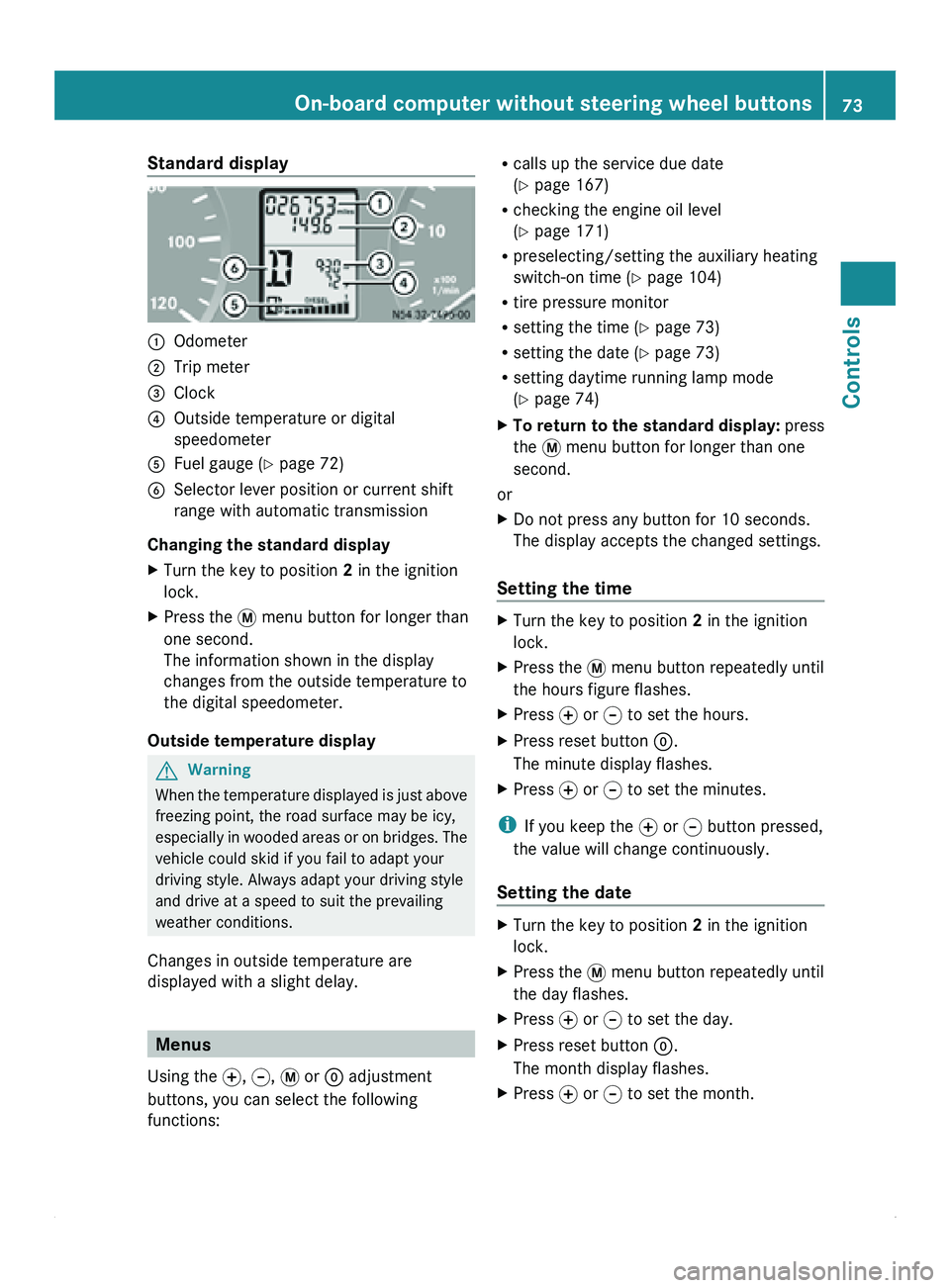
Standard display
0046
Odometer
0047 Trip meter
008A Clock
0088 Outside temperature or digital
speedometer
0086 Fuel gauge ( Y page 72)
0087 Selector lever position or current shift
range with automatic transmission
Changing the standard display
X Turn the key to position 2 in the ignition
lock.
X Press the 007B menu button for longer than
one second.
The information shown in the display
changes from the outside temperature to
the digital speedometer.
Outside temperature display G
Warning
When the temperature displayed is just above
freezing point, the road surface may be icy,
especially in wooded
areas or on bridges. The
vehicle could skid if you fail to adapt your
driving style. Always adapt your driving style
and drive at a speed to suit the prevailing
weather conditions.
Changes in outside temperature are
displayed with a slight delay. Menus
Using the 0069, 006A, 007B or 0048 adjustment
buttons, you can select the following
functions: R
calls up the service due date
(Y page 167)
R checking the engine oil level
(Y page 171)
R preselecting/setting the auxiliary heating
switch-on time ( Y page 104)
R tire pressure monitor
R setting the time (Y
page 73)
R setting the date ( Y page 73)
R setting daytime running lamp mode
(Y page 74)
X To return to the standard display: press
the 007B menu button for longer than one
second.
or
X Do not press any button for 10 seconds.
The display accepts the changed settings.
Setting the time X
Turn the key to position 2 in the ignition
lock.
X Press the 007B menu button repeatedly until
the hours figure flashes.
X Press 0069 or 006A to set the hours.
X Press reset button 0048.
The minute display flashes.
X Press 0069 or 006A to set the minutes.
i If you keep the 0069 or 006A button pressed,
the value will change continuously.
Setting the date X
Turn the key to position 2 in the ignition
lock.
X Press the 007B menu button repeatedly until
the day flashes.
X Press 0069 or 006A to set the day.
X Press reset button 0048.
The month display flashes.
X Press 0069 or 006A to set the month. On-board computer without steering wheel buttons
73
Controls Z
Page 76 of 292
X
Press reset button 0048.
The year display flashes.
X Press 0069 or 006A to set the year.
i If you keep the 0069 or 006A button pressed,
the value will change continuously.
Setting daytime running lamp mode If you have switched daytime running lamp
mode on and the light switch is in the 0027
position, the following light up automatically
when the engine is running: the parking
lamps, the low-beam headlamps, the tail
lamps and the license plate lamps.
For safety reasons, it is only possible to
change this setting when the vehicle is
stationary. The factory setting is ON in
countries in which daytime running lamp
mode is mandatory.
X
Turn the key to position 2 in the ignition
lock.
X Press the 007B menu button repeatedly until
the 0064 indicator lamp in the instrument
cluster flashes and the message ON or
OFF appears in the display.
X Press 0069 or 006A to activate or deactivate
daytime running lamp mode.
i USA only:
If you turn the light switch to 006C or
0064, the corresponding light is switched
on. Daytime running lamp mode remains
activated if the light switch is turned to
005A.
Canada only:
If you turn
the light switch to 0064, the low-
beam headlamps are switched on. Daytime
running lamp mode remains activated if the
light switch is turned to 006C or 005A. On-board computer with steering
wheel buttons
Layout and controls
The on-board computer is activated as soon
as you turn
the key to position 1 in the ignition
lock. G
Warning
Only use the on-board computer when road
and traffic conditions permit. You would
otherwise be distracted and unable to
concentrate properly on driving, and could
cause an accident.
The on-board computer shows vehicle
information and settings in the display.
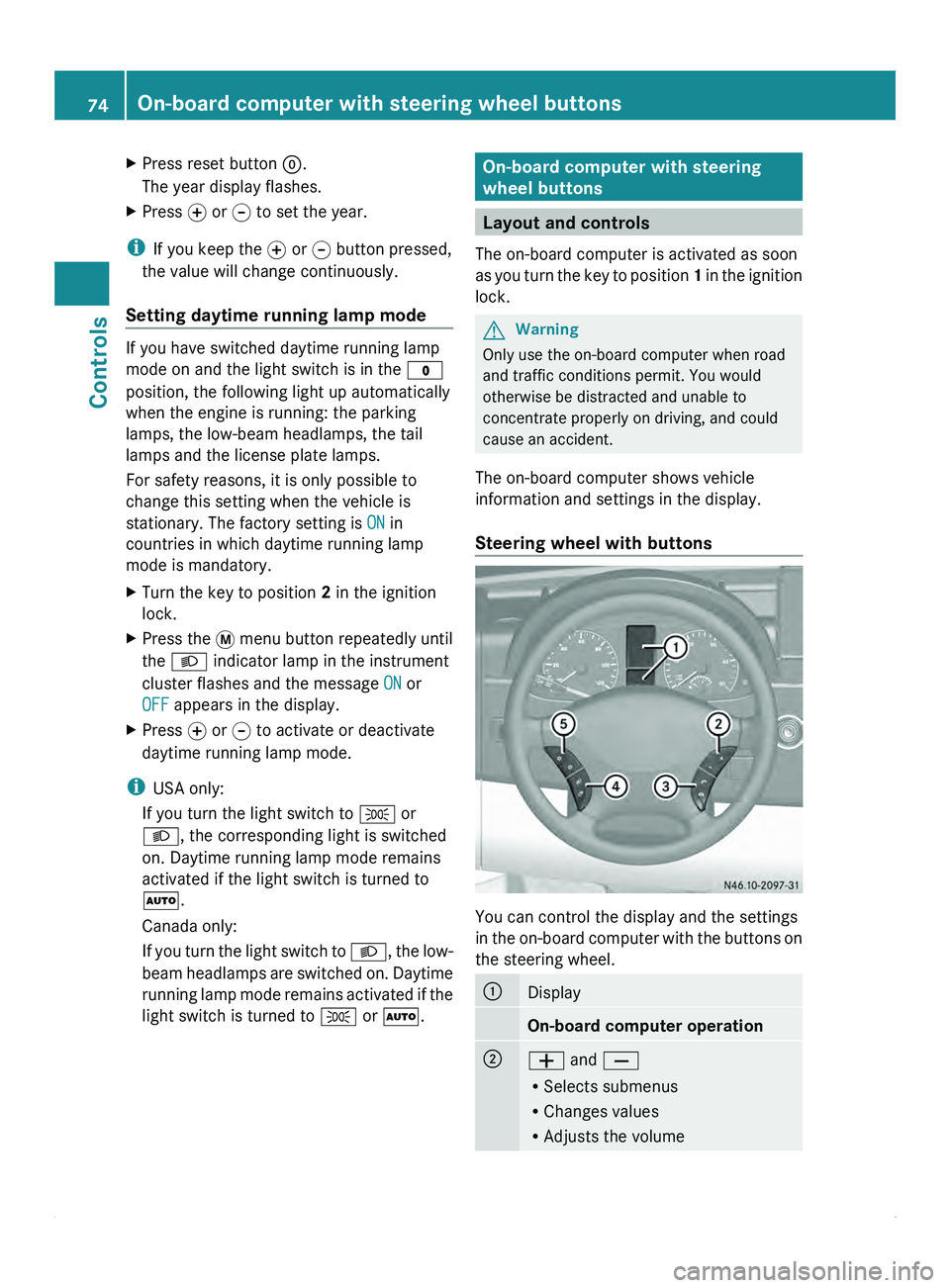
Steering wheel with buttons You can control the display and the settings
in the
on-board
computer with the buttons on
the steering wheel. 0046
Display
On-board computer operation
0047
005A and 005B
R
Selects submenus
R Changes values
R Adjusts the volume74
On-board computer with steering wheel buttons
Controls
Page 79 of 292
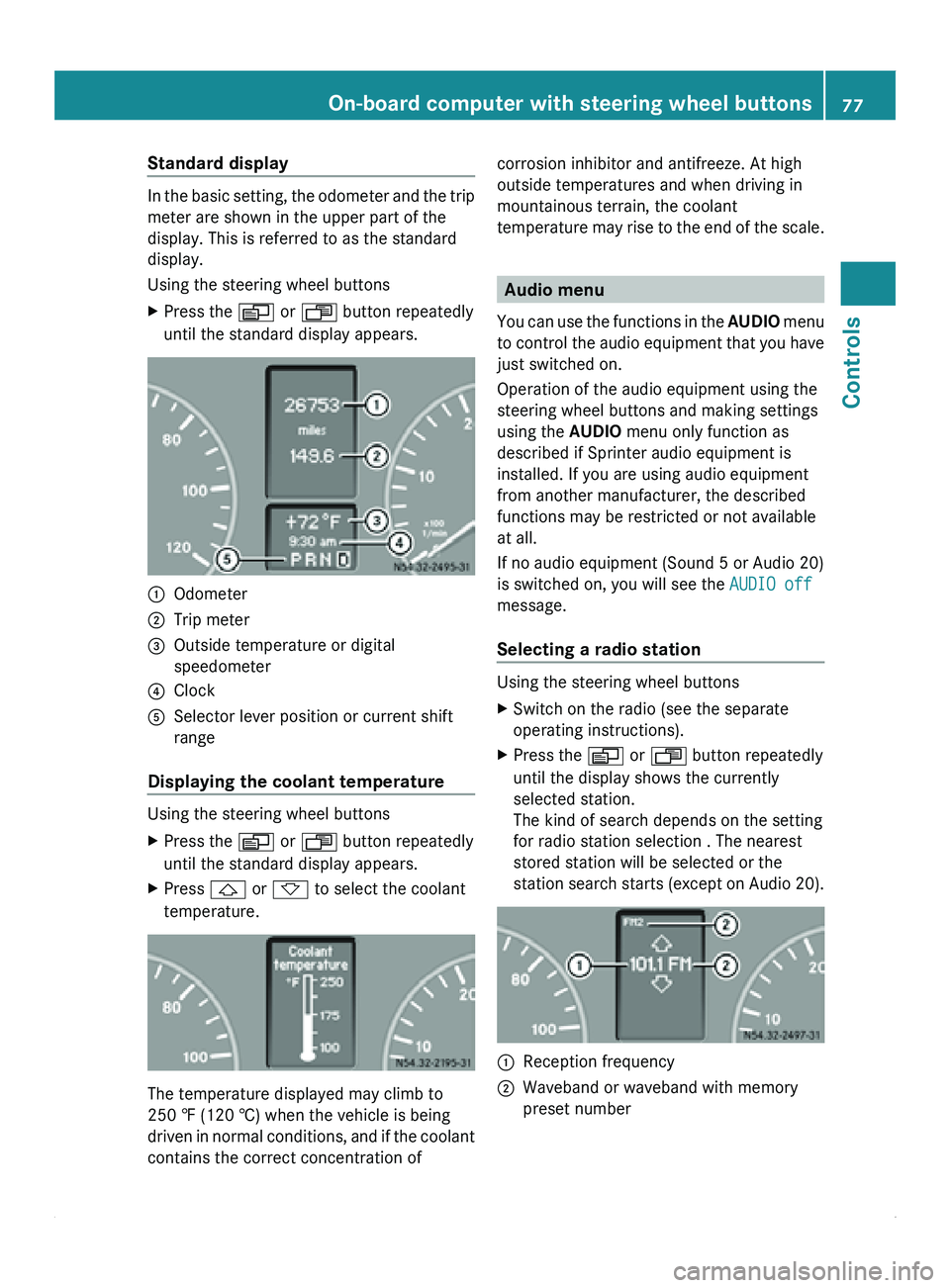
Standard display
In the basic setting, the odometer and the trip
meter are shown in the upper part of the
display. This is referred to as the standard
display.
Using the steering wheel buttons
X
Press the 0059 or 0058 button repeatedly
until the standard display appears. 0046
Odometer
0047 Trip meter
008A Outside temperature or digital
speedometer
0088 Clock
0086 Selector lever position or current shift
range
Displaying the coolant temperature Using the steering wheel buttons
X
Press the 0059 or 0058 button repeatedly
until the standard display appears.
X Press 0029 or 002D to select the coolant
temperature. The temperature displayed may climb to
250 ‡ (120 †) when the vehicle is being
driven
in
normal conditions, and if the coolant
contains the correct concentration of corrosion inhibitor and antifreeze. At high
outside temperatures and when driving in
mountainous terrain, the coolant
temperature may
rise
to the end of the scale. Audio menu
You can use
the functions in the AUDIO menu
to control the audio equipment that you have
just switched on.
Operation of the audio equipment using the
steering wheel buttons and making settings
using the AUDIO menu only function as
described if Sprinter audio equipment is
installed. If you are using audio equipment
from another manufacturer, the described
functions may be restricted or not available
at all.
If no audio equipment (Sound 5 or Audio 20)
is switched on, you will see the AUDIO off
message.
Selecting a radio station Using the steering wheel buttons
X
Switch on the radio (see the separate
operating instructions).
X Press the 0059 or 0058 button repeatedly
until the display shows the currently
selected station.
The kind of search depends on the setting
for radio station selection . The nearest
stored station will be selected or the
station search starts
(except on Audio 20). 0046
Reception frequency
0047 Waveband or waveband with memory
preset number On-board computer with steering wheel buttons
77
Controls Z
Page 80 of 292
X
Press 0029 or 002D to select the desired
station.
i It is only possible to store new stations
using the audio system. See the separate
operating instructions.
You can also operate the radio in the same
way as usual.
Operating the CD player Using the steering wheel buttons
X
Switch on the radio (see the separate
operating instructions) and select the CD
player.
X Press the 0059 or 0058 button repeatedly
until the
settings for the current CD appear
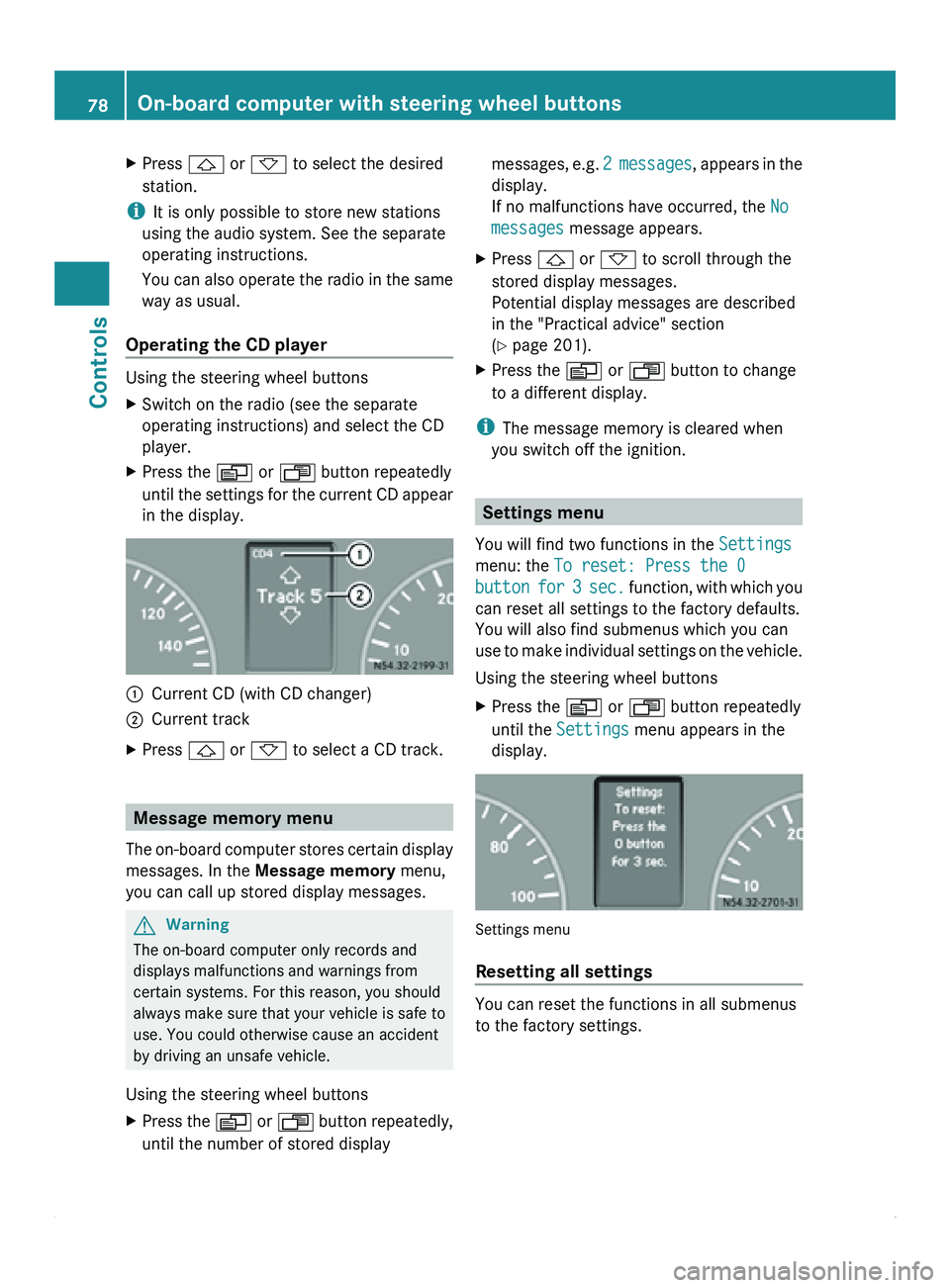
in the display. 0046
Current CD (with CD changer)
0047 Current track
X Press 0029 or 002D to select a CD track. Message memory menu
The on-board computer stores certain display
messages. In the Message memory menu,
you can call up stored display messages. G
Warning
The on-board computer only records and
displays malfunctions and warnings from
certain systems. For this reason, you should
always make sure that your vehicle is safe to
use. You could otherwise cause an accident
by driving an unsafe vehicle.
Using the steering wheel buttons
X Press the 0059
or 0058 button repeatedly,
until the number of stored display messages,
e.g. 2
messages, appears in the
display.
If no malfunctions have occurred, the No
messages message appears.
X Press 0029
or 002D to scroll through the
stored display messages.
Potential display messages are described
in the "Practical advice" section
(Y page 201).
X Press the 0059 or 0058 button to change
to a different display.
i The message memory is cleared when
you switch off the ignition. Settings menu
You will find two functions in the Settings
menu: the To reset: Press the 0
button for 3 sec. function, with which you
can reset all settings to the factory defaults.
You will also find submenus which you can
use to make individual settings on the vehicle.
Using the steering wheel buttons
X Press the 0059 or 0058 button repeatedly
until the Settings
menu appears in the
display. Settings menu
Resetting all settings
You can reset the functions in all submenus
to the factory settings.78
On-board computer with steering wheel buttons
Controls
Page 81 of 292
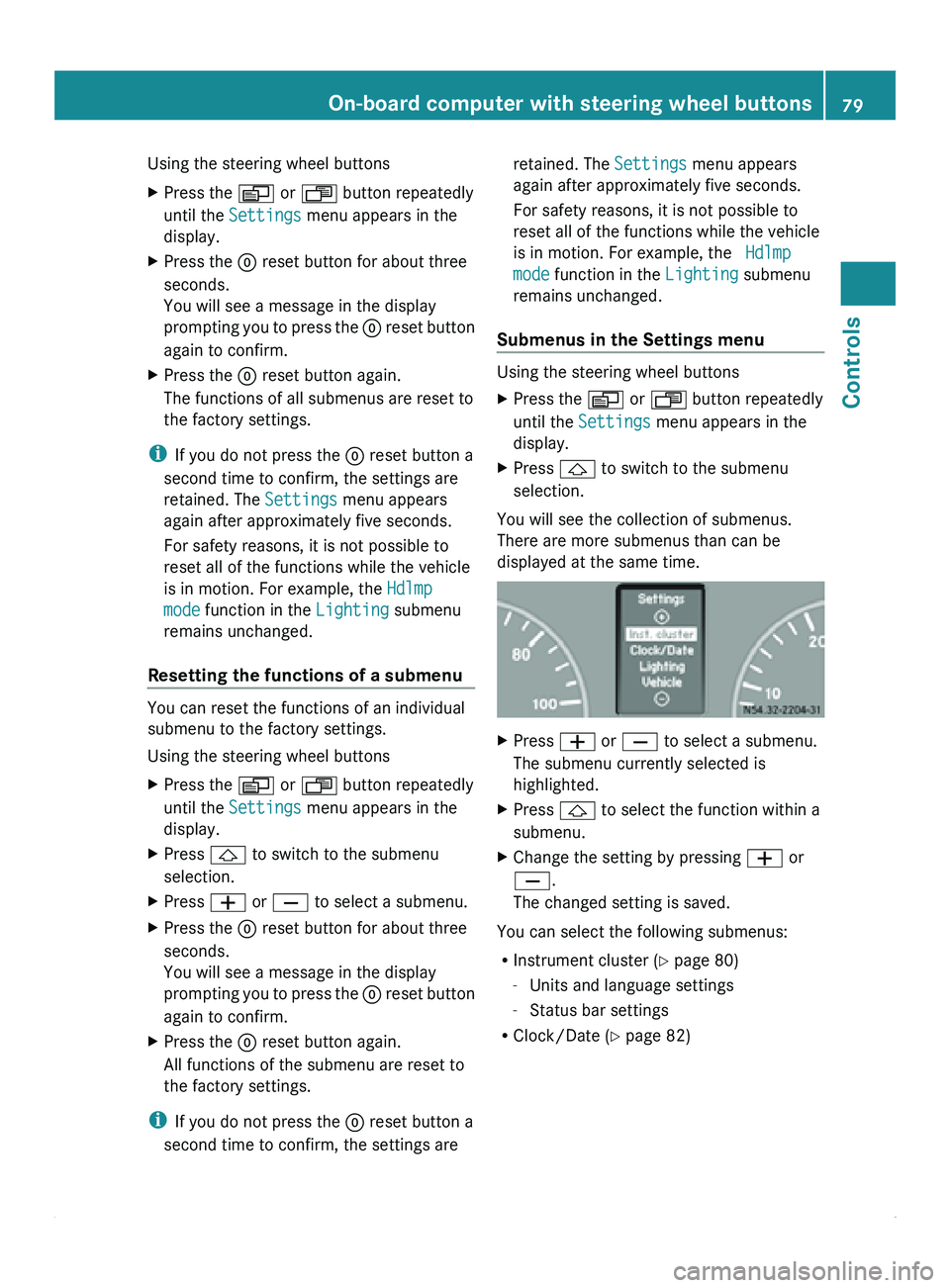
Using the steering wheel buttons
X
Press the 0059 or 0058 button repeatedly
until the Settings menu appears in the
display.
X Press the 0048 reset button for about three
seconds.
You will see a message in the display
prompting you to
press the 0048 reset button
again to confirm.
X Press the 0048 reset button again.
The functions of all submenus are reset to
the factory settings.
i If you do not press the 0048 reset button a
second time to confirm, the settings are
retained. The Settings menu appears
again after approximately five seconds.
For safety reasons, it is not possible to
reset all of the functions while the vehicle
is in motion. For example, the Hdlmp
mode function in the Lighting submenu
remains unchanged.
Resetting the functions of a submenu You can reset the functions of an individual
submenu to the factory settings.
Using the steering wheel buttons
X
Press the 0059 or 0058 button repeatedly
until the Settings menu appears in the
display.
X Press 0029 to switch to the submenu
selection.
X Press 005A or 005B to select a submenu.
X Press the 0048 reset button for about three
seconds.
You will see a message in the display
prompting you
to
press the 0048 reset button
again to confirm.
X Press the 0048 reset button again.
All functions of the submenu are reset to
the factory settings.
i If you do not press the 0048 reset button a
second time to confirm, the settings are retained. The Settings menu appears
again after approximately five seconds.
For safety reasons, it is not possible to
reset all of the functions while the vehicle
is in motion. For example, the Hdlmp
mode function in the
Lighting submenu
remains unchanged.
Submenus in the Settings menu Using the steering wheel buttons
X
Press the 0059 or 0058 button repeatedly
until the Settings menu appears in the
display.
X Press 0029 to switch to the submenu
selection.
You will see the collection of submenus.
There are more submenus than can be
displayed at the same time. X
Press 005A or 005B to select a submenu.
The submenu currently selected is
highlighted.
X Press 0029 to select the function within a
submenu.
X Change the setting by pressing 005A or
005B.
The changed setting is saved.
You can select the following submenus:
R Instrument cluster ( Y
page 80)
- Units and language settings
- Status bar settings
R Clock/Date (Y page 82) On-board computer with steering wheel buttons
79
Controls Z
Page 85 of 292
X
Press 005A or 005B to select the
Lighting submenu.
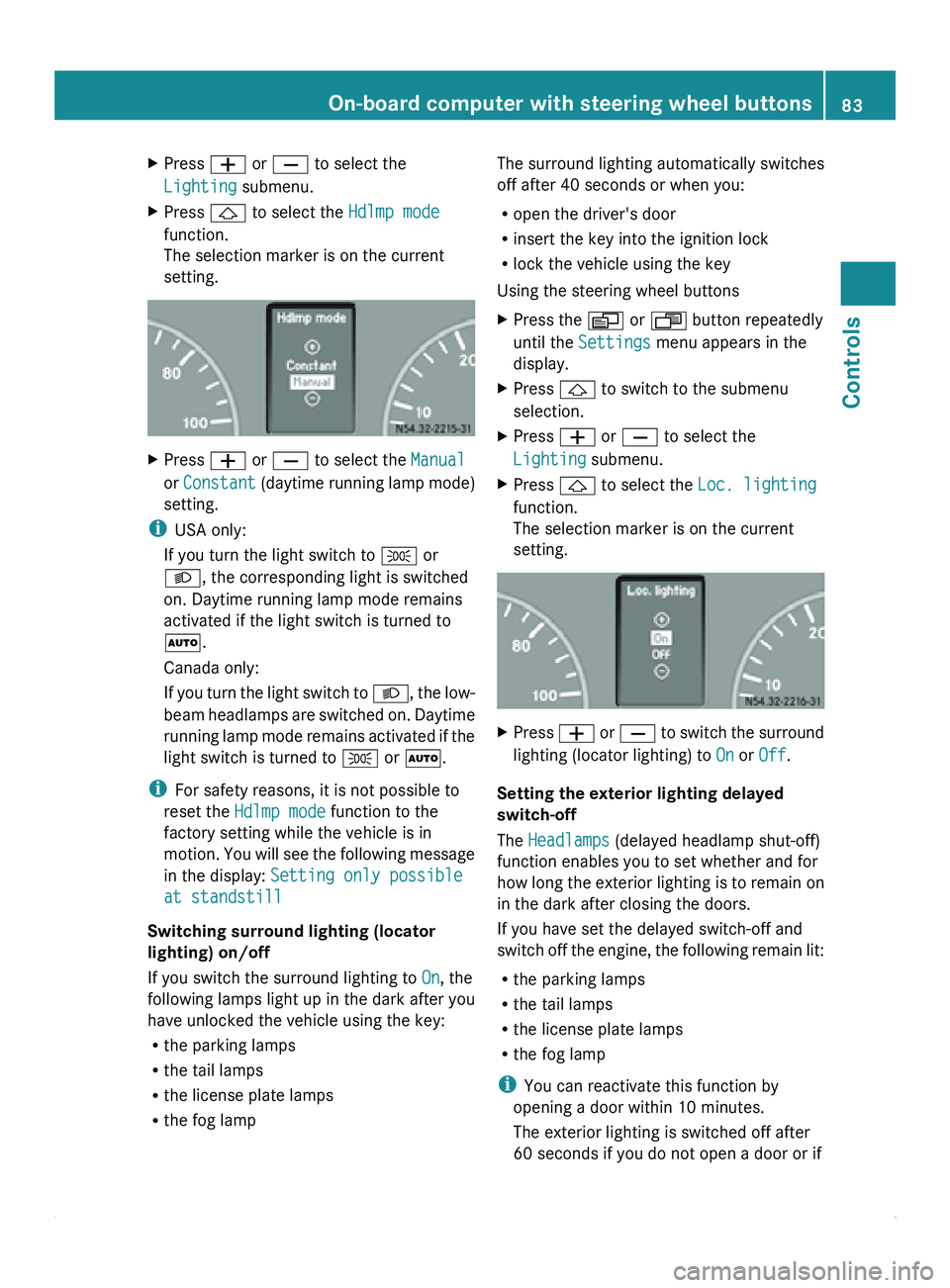
X Press 0029 to select the Hdlmp mode
function.
The selection marker is on the current
setting. X
Press 005A or 005B to select the Manual
or Constant (daytime running
lamp mode)
setting.
i USA only:
If you turn the light switch to 006C or
0064, the corresponding light is switched
on. Daytime running lamp mode remains
activated if the light switch is turned to
005A.
Canada only:
If you turn
the light switch to 0064, the low-
beam headlamps are switched on. Daytime
running lamp mode remains activated if the
light switch is turned to 006C or 005A.
i For safety reasons, it is not possible to
reset the Hdlmp mode function to the
factory setting while the vehicle is in
motion. You will see the following message
in the display: Setting only possible
at standstill
Switching surround lighting (locator
lighting) on/off
If you switch the surround lighting to On, the
following lamps light up in the dark after you
have unlocked the vehicle using the key:
R the parking lamps
R the tail lamps
R the license plate lamps
R the fog lamp The surround lighting automatically switches
off after 40 seconds or when you:
R
open the driver's door
R insert the key into the ignition lock
R lock the vehicle using the key
Using the steering wheel buttons
X Press the 0059 or 0058 button repeatedly
until the Settings menu appears in the
display.
X Press 0029 to switch to the submenu
selection.
X Press 005A or 005B to select the
Lighting submenu.
X Press 0029 to select the Loc. lighting
function.
The selection marker is on the current
setting. X
Press 005A
or 005B
to switch the surround
lighting (locator lighting) to On or Off.
Setting the exterior lighting delayed
switch-off
The Headlamps (delayed headlamp shut-off)
function enables you to set whether and for
how long
the
exterior lighting is to remain on
in the dark after closing the doors.
If you have set the delayed switch-off and
switch off the engine, the following remain lit:
R the parking lamps
R the tail lamps
R the license plate lamps
R the fog lamp
i You can reactivate this function by
opening a door within 10 minutes.
The exterior lighting is switched off after
60 seconds if you do not open a door or if On-board computer with steering wheel buttons
83
Controls Z
Page 87 of 292
Convenience submenu
Key-dependent settings
The
Key function allows
you to define whether
settings for the following submenus are
stored with a key dependence:
R Inst. cluster (instrument cluster)
R Lighting
R Vehicle
Using the steering wheel buttons
X Press the 0059 or 0058 button repeatedly
until the Settings menu appears in the
display.
X Press 005A or 005B to select the
Convenience submenu.
X Press the 0029 button to select the Key
function.
The selection marker is on the current
setting. X
Press 005A or 005B to activate or
deactivate key dependency.
i For safety
reasons,
it is not possible to set
the Key function while the vehicle is in
motion. You will see the following message
in the display: Setting only possible
at standstill Trip computer menu
You can call
up or reset statistical data for the
vehicle in the Trip computer menu.
Consumption statistics after start Using the steering wheel buttons
i
When you call
up the trip computer again,
it displays the last function called up. The units of the statistical information
displayed are set permanently for each
specific country, and are therefore
independent of the units selected in the
Settings menu.
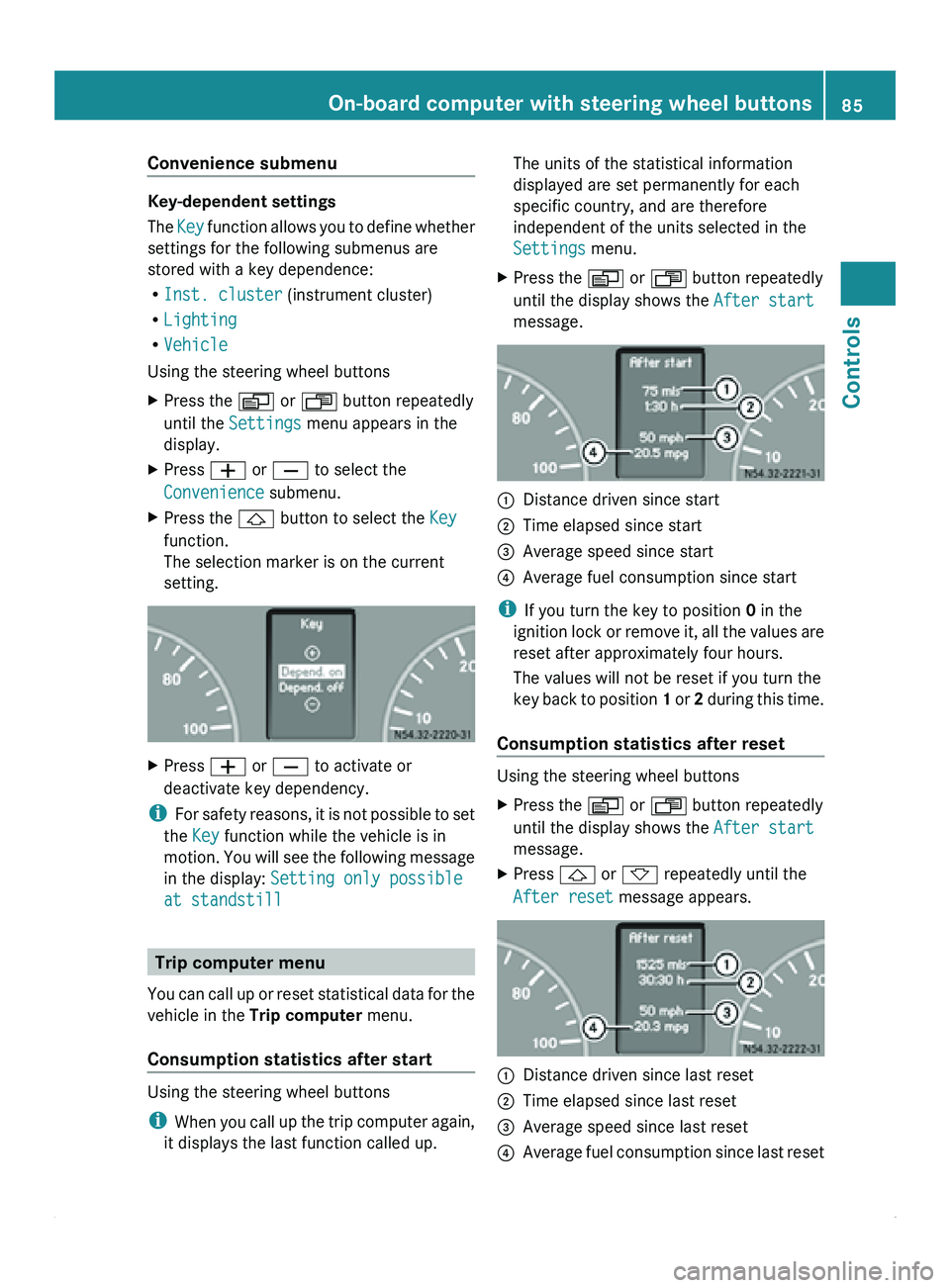
X Press the 0059 or 0058 button repeatedly
until the display shows the After start
message. 0046
Distance driven since start
0047 Time elapsed since start
008A Average speed since start
0088 Average fuel consumption since start
i If you turn the key to position 0 in the
ignition lock
or
remove it, all the values are
reset after approximately four hours.
The values will not be reset if you turn the
key back to position 1 or 2 during this time.
Consumption statistics after reset Using the steering wheel buttons
X
Press the 0059 or 0058 button repeatedly
until the display shows the After start
message.
X Press 0029 or 002D repeatedly until the
After reset message appears. 0046
Distance driven since last reset
0047 Time elapsed since last reset
008A Average speed since last reset
0088 Average fuel consumption since last reset On-board computer with steering wheel buttons
85
Controls Z
Page 88 of 292
Calling up the range
Using the steering wheel buttons
X
Press the 0059 or 0058 button repeatedly
until the display shows the After start
message.
X Press the 0029 or 002D button repeatedly
until the Range message appears.
The approximate distance which can be
covered with the tank's current contents
and your current style of driving is shown.
i If the fuel tank is almost empty, the
00B7 Please refuel message is shown
instead of the range.
Resetting the consumption statistics Using the steering wheel buttons
X
Press the 0059 or 0058 button repeatedly
until the display shows the After start
message.
X Press 0029 or 002D to select the function
you would like to reset.
X Press and hold the 0048 reset
button until the
values are reset to "0".
i The consumption statistics After
start are automatically reset after 999
hours or 9,999 miles (kilometers).
The consumption statistics After Reset
are automatically reset after 9,999 hours
or 99,999 miles (kilometers). Telephone menu
You can operate the mobile phone using the
functions in the TEL menu, provided it is
connected to the
Sprinter hands-free system.G
Warning
A driver's attention to the road must always
be his/her primary focus when driving. For
your safety and the safety of others, we
recommend that you pull over to a safe
location and stop before placing or taking a
telephone call. If you choose to use the telephone while driving, please use the hands-
free device and only use the telephone when
weather, road and traffic conditions permit.
Some jurisdictions prohibit the driver from
using a mobile phone while driving a vehicle.
Bear in mind that at a speed of just 30 mph
(approximately 50 km/h
), your vehicle is
covering
a distance of 44 feet (approximately
14 m) every second.
Switching the mobile phone on Using the steering wheel buttons
X
Switch on the mobile phone and the audio
system; see the separate operating
instructions.
X Press the 0059 or 0058 button repeatedly
until the TEL menu appears in the display.
The information in the display depends on
the status of the mobile phone:
R
Mobile phone off:
the display shows the
TEL off (Audio 20) message.
R PIN not entered: the display shows the
TEL PIN (Audio 20) message.
X Enter the PIN code using the mobile phone
or audio system.
The mobile phone searches for a network.
The display
remains
blank during this time.
You will see the operational readiness
display as soon as the mobile phone has
found a network.
Once the operational readiness symbol is
shown, you can operate the mobile phone
using the steering wheel buttons.
i If the operational readiness symbol goes
out, your vehicle is outside the
transmission/reception range.
Accepting a call You can accept a call at any time, provided
the mobile phone is ready to receive calls.
You will see the following message in the
display:86
On-board computer with steering wheel buttons
Controls
Page 90 of 292
then is the electrical system fully
disconnected from the power supply.
i Only disconnect the vehicle electrical
system from the power supply using the
battery isolating switch if the vehicle is to
be parked up for a long period or if it is
absolutely necessary. After the power
supply has been activated, you must reset
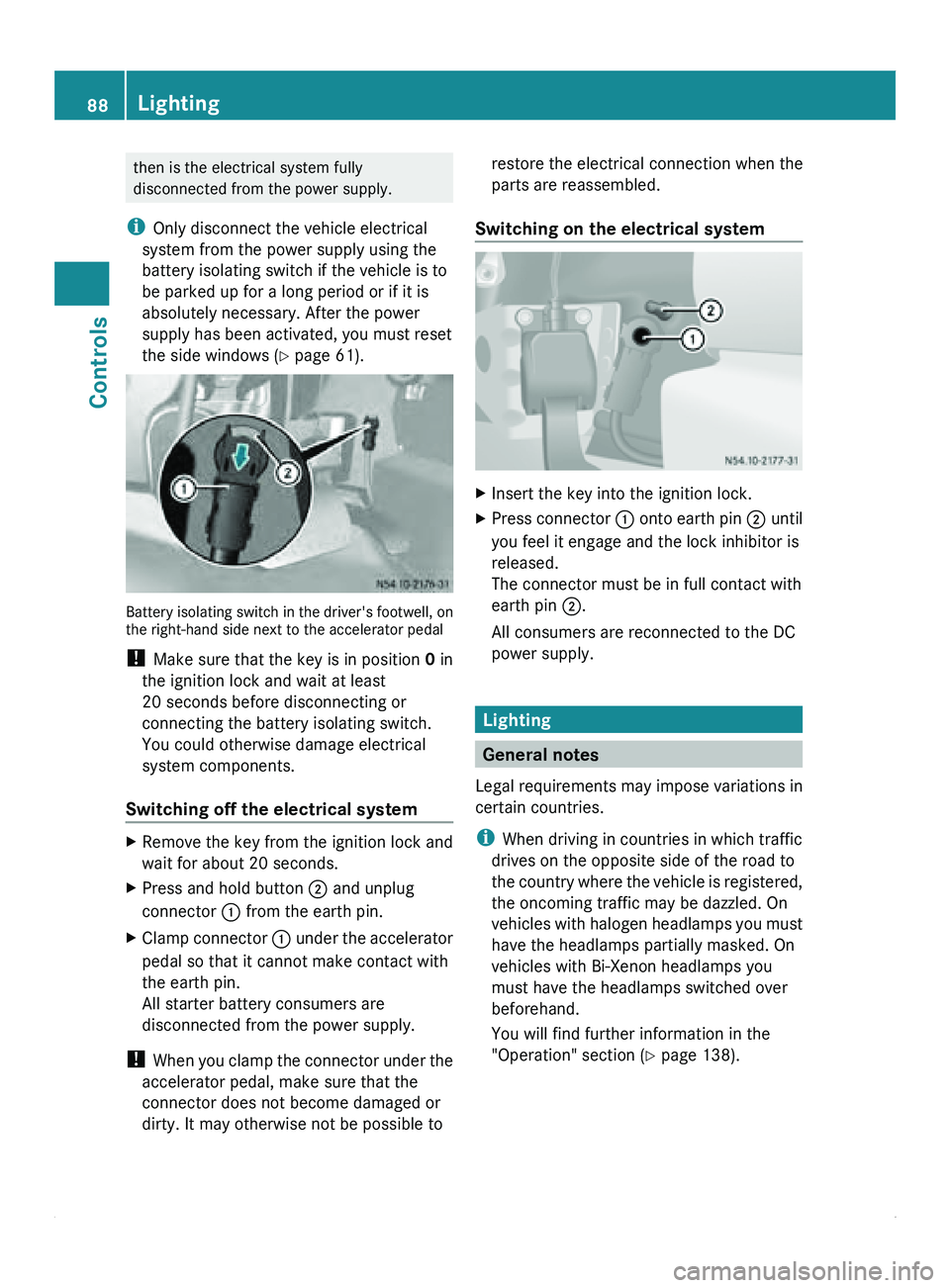
the side windows ( Y page 61). Battery isolating switch in the driver's footwell, on
the right-hand side next to the accelerator pedal
! Make sure that the key is in position 0 in
the ignition lock and wait at least
20 seconds before disconnecting or
connecting the battery isolating switch.
You could otherwise damage electrical
system components.
Switching off the electrical system X
Remove the key from the ignition lock and
wait for about 20 seconds.
X Press and hold button 0047 and unplug
connector 0046 from the earth pin.
X Clamp connector 0046 under
the
accelerator
pedal so that it cannot make contact with
the earth pin.
All starter battery consumers are
disconnected from the power supply.
! When you
clamp
the connector under the
accelerator pedal, make sure that the
connector does not become damaged or
dirty. It may otherwise not be possible to restore the electrical connection when the
parts are reassembled.
Switching on the electrical system X
Insert the key into the ignition lock.
X Press connector 0046
onto
earth
pin 0047 until
you feel it engage and the lock inhibitor is
released.
The connector must be in full contact with
earth pin 0047.
All consumers are reconnected to the DC
power supply. Lighting
General notes
Legal requirements may
impose variations in
certain countries.
i When driving in countries in which traffic
drives on the opposite side of the road to
the country where the vehicle is registered,
the oncoming traffic may be dazzled. On
vehicles with halogen headlamps you must
have the headlamps partially masked. On
vehicles with Bi-Xenon headlamps you
must have the headlamps switched over
beforehand.
You will find further information in the
"Operation" section ( Y page 138).88
Lighting
Controls