reset MERCEDES-BENZ SPRINTER 2012 MY12 Operator’s Manual
[x] Cancel search | Manufacturer: MERCEDES-BENZ, Model Year: 2012, Model line: SPRINTER, Model: MERCEDES-BENZ SPRINTER 2012Pages: 292, PDF Size: 6.75 MB
Page 109 of 292
Setting the switch-on time
On-board computer without steering
wheel buttons
X
Use the same method to select a switch-on
time as described in the "Preselecting a
switch-on time" section.
X Press the 0048 reset button on the
instrument cluster to set the desired
switch-on time.
The hour display flashes.
X Use the 0069 and 006A buttons on the
instrument cluster to set the hours.
X Press the 0048 reset button.
The minute display flashes.
X Use the 0069 and 006A buttons to set the
minutes.
On-board computer with steering wheel
buttons
X Use the same method to select a switch-on
time as described in the "Preselecting a
switch-on time" section.
X Press the 0029 menu button on the
steering wheel.
The Hours submenu is shown in the
display.
X Press the 005A or 005B button on the
steering wheel to set the hours.
X Press the 0029 button.
The Minutes submenu is shown in the
display.
X Press the 005A or 005B button to set the
minutes.
X Press the 0059 button.
The switch-on time is set and selected.
Heater booster function If the outside temperature is lower than
39 ‡ (4 †), the fuel-operated auxiliary
heating heats the vehicle as quickly as
possible when the engine is running. The auxiliary heating automatically switches
to heater booster mode after the engine is
started.
i
If the outside temperature rises above
39 ‡ (4 †),
the auxiliary heating and heater
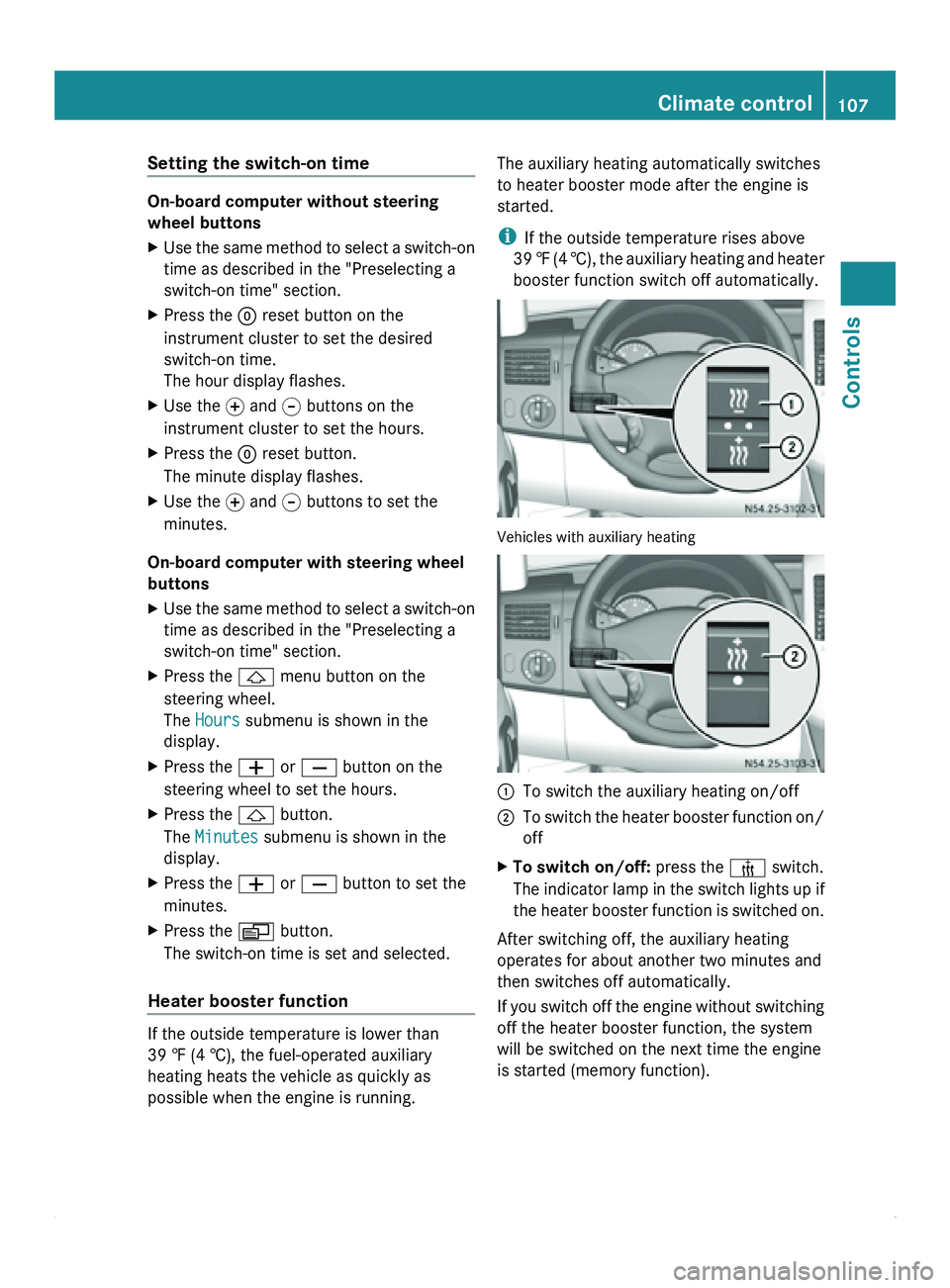
booster function switch off automatically. Vehicles with auxiliary heating
0046
To switch the auxiliary heating on/off
0047 To switch the heater booster function on/
off
X To switch on/off: press the 006C switch.
The indicator lamp
in the switch lights up if
the heater booster function is switched on.
After switching off, the auxiliary heating
operates for about another two minutes and
then switches off automatically.
If you switch
off the engine without switching
off the heater booster function, the system
will be switched on the next time the engine
is started (memory function). Climate control
107
Controls Z
Page 119 of 292
ADR (working speed governor)
When activated, the working speed governor
(ADR) automatically increases the engine
speed to a preset or adjustable speed
(Y page 117).
i After a cold start, the idling speed of the
engine is increased automatically. If the
preset working speed is lower than the
increased idling speed, the working speed
is only reached once the engine has
completed the warm-up phase.
It is only possible to activate ADR with the
vehicle stationary and the parking brake
applied.
The selector lever must be in position P.
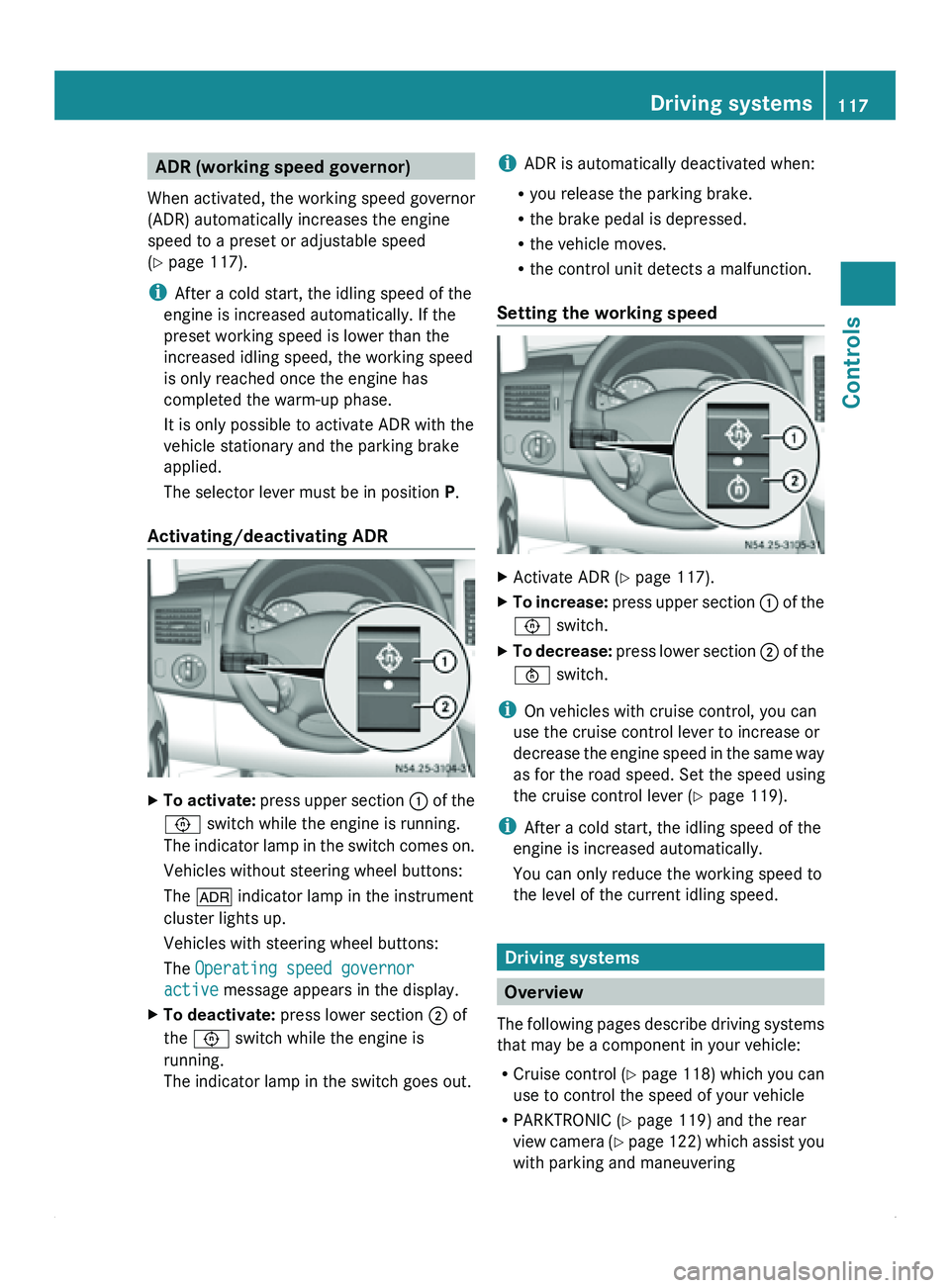
Activating/deactivating ADR X
To activate: press upper
section 0046 of the
0093 switch while the engine is running.
The indicator lamp in the switch comes on.
Vehicles without steering wheel buttons:
The 004E indicator lamp in the instrument
cluster lights up.
Vehicles with steering wheel buttons:
The Operating speed governor
active message appears in the display.
X To deactivate: press lower section 0047 of
the 0093 switch while the engine is
running.
The indicator lamp in the switch goes out. i
ADR is automatically deactivated when:
R you release the parking brake.
R the brake pedal is depressed.
R the vehicle moves.
R the control unit detects a malfunction.
Setting the working speed X
Activate ADR (
Y page 117).
X To increase: press upper
section 0046 of the
0093 switch.
X To decrease: press lower
section 0047 of the
0094 switch.
i On vehicles with cruise control, you can
use the cruise control lever to increase or
decrease the engine
speed in the same way
as for the road speed. Set the speed using
the cruise control lever (Y page 119).
i After a cold start, the idling speed of the
engine is increased automatically.
You can only reduce the working speed to
the level of the current idling speed. Driving systems
Overview
The
following pages
describe driving systems
that may be a component in your vehicle:
R Cruise control ( Y page 118) which you can
use to control the speed of your vehicle
R PARKTRONIC ( Y page 119) and the rear
view camera (Y page 122) which assist you
with parking and maneuvering Driving systems
117
Controls Z
Page 130 of 292
Factory setting menu
You can reset the monitor to the factory
settings in the
Factory setting menu.
X Press the 0093 button.
The main menu
(menu level 1) is displayed
(Y page 124).
X Press the 003D or 003C button until the
Factory setting menu is highlighted.
X Press the 0093 button.
The monitor displays the following
message: X
Press the 003D or 003C button until the
required setting is highlighted.
R Yes : all settings are overwritten with the
factory settings.
R 0056: return to the main menu without
accepting the factory settings.
i If you select 0056 and press the 0093
button, the monitor goes back to the main
menu (menu level 1).
Switching off the monitor while driving If you drive faster than 6 mph (10 km/h)
, the
monitor switches off for safety reasons.
You will see the following message for seven
seconds until the monitor switches off. If the speed falls below 5 mph (8 km/h), the
monitor switches on again.
Features
Ashtray
Ashtray insert in the ashtray compartment in the
center console
X
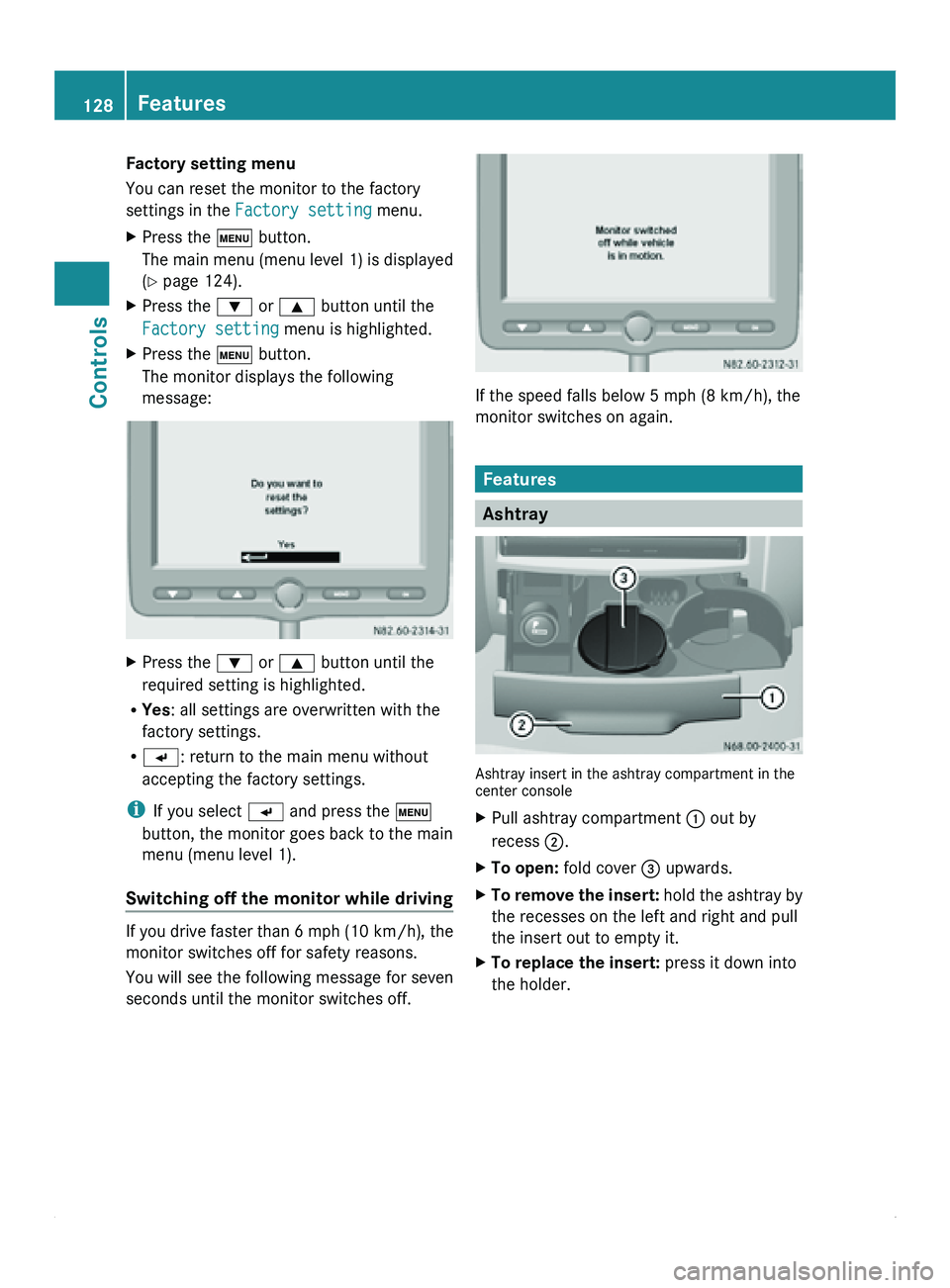
Pull ashtray compartment 0046 out by
recess 0047.
X To open: fold cover 008A upwards.
X To remove the insert: hold the
ashtray by
the recesses on the left and right and pull
the insert out to empty it.
X To replace the insert: press it down into
the holder.128
Features
Controls
Page 169 of 292
authorized Sprinter Dealer. All work relevant
to safety or on safety-related systems must
be carried out at a qualified specialist
workshop.
Observe the notes on parts in the "Technical
data" section ( Y page 276).
0040 Environmental note
Observe measures to protect the
environment when working on the vehicle.
You must observe the legal requirements
when disposing of service products, e.g.
engine oil. This
also includes all components,
e.g. filters, which have come into contact with
service products.
Any qualified specialist workshop, e.g. an
authorized Sprinter Dealer, can provide
information about this.
Dispose of empty containers, cleaning cloths
and care products in an environmentally-
responsible manner. Comply with the
instructions for use of the care products.
Do not run the engine for longer than
necessary when the vehicle is stationary. Active Service System (ASSYST)
The ASSYST service indicator informs you of
the next service due date.
A service that is due is displayed about a
month in advance. A message is then
displayed while the vehicle is in motion or
while the ignition is switched on.
i Periods when the
battery is disconnected
will not be recorded by ASSYST. To make
sure that you have the vehicle serviced at
the correct time, you should therefore
subtract periods when the battery is
disconnected from the days shown.
The service indicator does not provide
information about the oil level. The service
indicator should therefore not be confused
with the 00B5 engine oil level display. i
The service due date is displayed in days
or miles (kilometers), depending on the
total distance driven.
The symbols or
letters in the service indicator
show the service due.
009B or A for a minor service
009C or B for a major service
Service due date indicator Vehicles with steering wheel buttons
The following messages may be displayed:
R
009B
Service A in ... days
R 009B Service A in ... mi (km)
R 009B Service A due now
Vehicles without steering wheel buttons
The following messages may be displayed:
R 009B for service A
R 009C for service B
Additionally you will see the remaining
distance in
miles
(mi) or kilometers ( km) or the
remaining time in days ( d).
Service due date exceeded A qualified specialist workshop, e.g. an
authorized Sprinter
Dealer,
resets the service
indicator when the service has been carried
out.
Vehicles with steering wheel buttons
If you have missed the service due date, one
of the following messages appears in the
display:
R 009B Service A overdue by ... days
R 009B Service A overdue by ... mi
(km)
Additionally a warning tone sounds.
Vehicles without steering wheel buttons
If the service due date has been exceeded,
ten seconds after switching on the ignition
the 009B or 009C symbol flashes for the Maintenance
167
Operation Z
Page 180 of 292
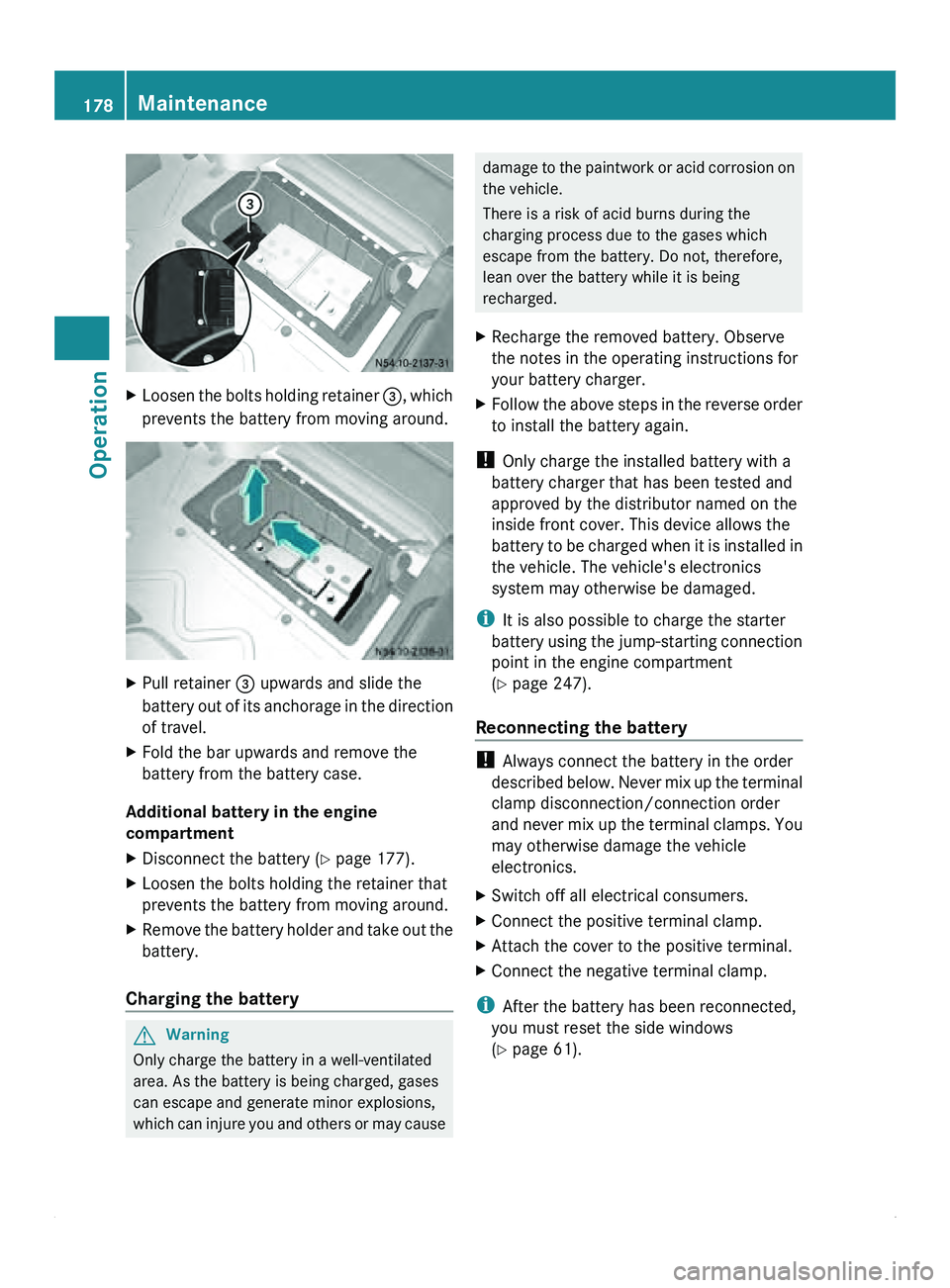
X
Loosen the bolts holding retainer 008A, which
prevents the battery from moving around. X
Pull retainer 008A upwards and slide the
battery out of
its anchorage in the direction
of travel.
X Fold the bar upwards and remove the
battery from the battery case.
Additional battery in the engine
compartment
X Disconnect the battery ( Y page 177).
X Loosen the bolts holding the retainer that
prevents the battery from moving around.
X Remove the battery holder and take out the
battery.
Charging the battery G
Warning
Only charge the battery in a well-ventilated
area. As the battery is being charged, gases
can escape and generate minor explosions,
which can injure
you and others or may cause damage to the paintwork or acid corrosion on
the vehicle.
There is a risk of acid burns during the
charging process due to the gases which
escape from the battery. Do not, therefore,
lean over the battery while it is being
recharged.
X Recharge the removed battery. Observe
the notes in the operating instructions for
your battery charger.
X Follow the above steps in the reverse order
to install the battery again.
! Only charge the installed battery with a
battery charger that has been tested and
approved by the distributor named on the
inside front cover. This device allows the
battery to be
charged when it is installed in
the vehicle. The vehicle's electronics
system may otherwise be damaged.
i It is also possible to charge the starter
battery using the jump-starting connection
point in the engine compartment
(Y page 247).
Reconnecting the battery !
Always connect the battery in the order
described below. Never
mix up the terminal
clamp disconnection/connection order
and never mix up the terminal clamps. You
may otherwise damage the vehicle
electronics.
X Switch off all electrical consumers.
X Connect the positive terminal clamp.
X Attach the cover to the positive terminal.
X Connect the negative terminal clamp.
i After the battery has been reconnected,
you must reset the side windows
(Y page 61). 178
Maintenance
Operation
Page 200 of 292
Vehicles with steering wheel buttons
The on-board computer shows warnings,
malfunctions or additional information in the
display. For certain display messages, a
warning tone or a continuous tone will also
sound. Display
messages
of a high priority are
shown in red.
Please respond in accordance with the
display messages and follow the additional
notes in this Operator's Manual.
You can hide low-priority display messages
using the 0059, 0058, 0029 or 002D button
on the steering wheel or the reset button on
the instrument cluster.
You cannot hide display messages of the
highest priority. These messages will
continue to be shown in the display until their
cause has been eliminated.
The on-board computer stores certain display
messages in the message memory
(Y page 78).
The following tables show all the display
messages. They are divided into
alphabetically sorted text messages
(Y page 201) and symbol messages
(Y page 204). 198
Troubleshooting
Practical advice
Page 263 of 292
Vehicles without steering wheel buttons
X
Turn the key to position 2 in the ignition
lock.
X Press the 007B menu button on the
instrument cluster repeatedly until the
following message is displayed:
+CAL- TPMS
X Press the 0069 button on the instrument
cluster.
The following message is displayed:
OK TPMS
The tire pressure monitor activation
process has begun. The tire pressures
measured for the individual wheels are
stored as the new reference values,
provided that the tire pressure monitor
considers them to be plausible.
If you wish to cancel the activation process:
X Press the 006A button or the 007B menu button
on the instrument cluster.
The activation process is canceled
automatically if 30 seconds elapse with no
input.
Vehicles with steering wheel buttons
X Turn the key to position 2 in the ignition
lock.
X Press the 0059 or 0058 button on the
steering wheel repeatedly until the
standard display (Y
page 77) appears.
X Press the 0029 or 002D button on the
steering wheel repeatedly
until the current
pressure of the individual tires is displayed,
or the display shows the following
message:
tire press. displayed after
driving for several minutes
X Press the 0048 reset button on the
instrument cluster.
The following message is displayed:
Monitor current tire pressure?
X Press the 005A button on the steering
wheel.
The following message is displayed: tire press. monitor reactivated
The tire pressure monitor activation
process has begun. The tire pressures
measured for the individual wheels are
stored as the new reference values,
provided that the tire pressure monitor
considers them to be plausible.
If you wish to cancel the activation process:
X Press the 005B button on the steering
wheel. Loading the vehicle
Instruction labels for tires and loads
G
Warning!
Do not overload the tires by exceeding the
specified load limit as indicated on the Tire
and Loading Information placard on the
B-pillar on the driver's side or on the vehicle
identification plate on the driver seat frame.
Overloading the tires can overheat them,
possibly causing a blowout. Overloading the
tires can also result in handling or steering
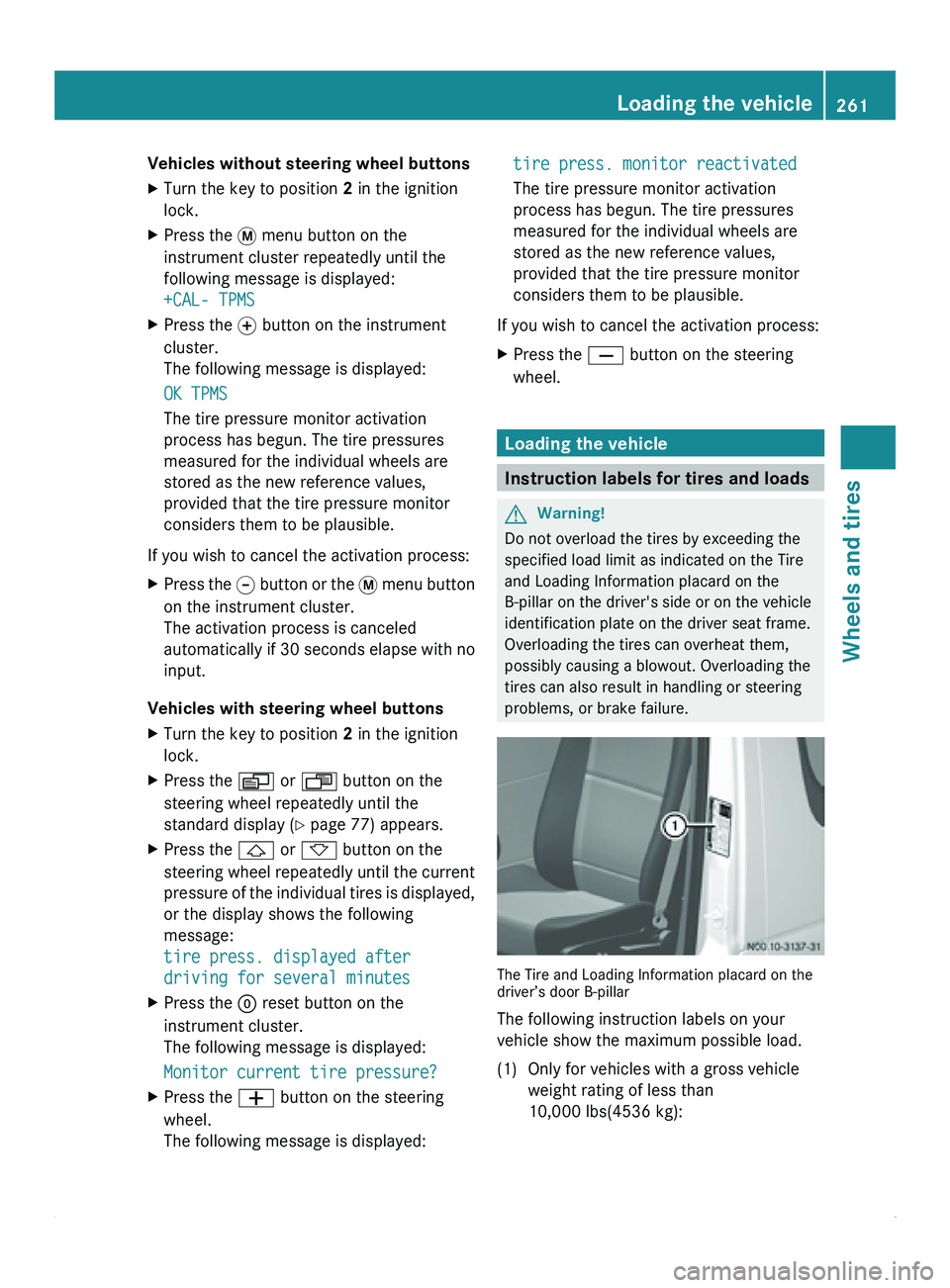
problems, or brake failure. The Tire and Loading Information placard on the
driver’s door B-pillar
The following instruction labels on your
vehicle show the maximum possible load.
(1) Only for vehicles with a gross vehicle
weight rating of less than
10,000 lbs(4536 kg): Loading the vehicle
261
Wheels and tires Z