buttons MERCEDES-BENZ SPRINTER 2012 MY12 Operator’s Manual
[x] Cancel search | Manufacturer: MERCEDES-BENZ, Model Year: 2012, Model line: SPRINTER, Model: MERCEDES-BENZ SPRINTER 2012Pages: 292, PDF Size: 6.75 MB
Page 218 of 292
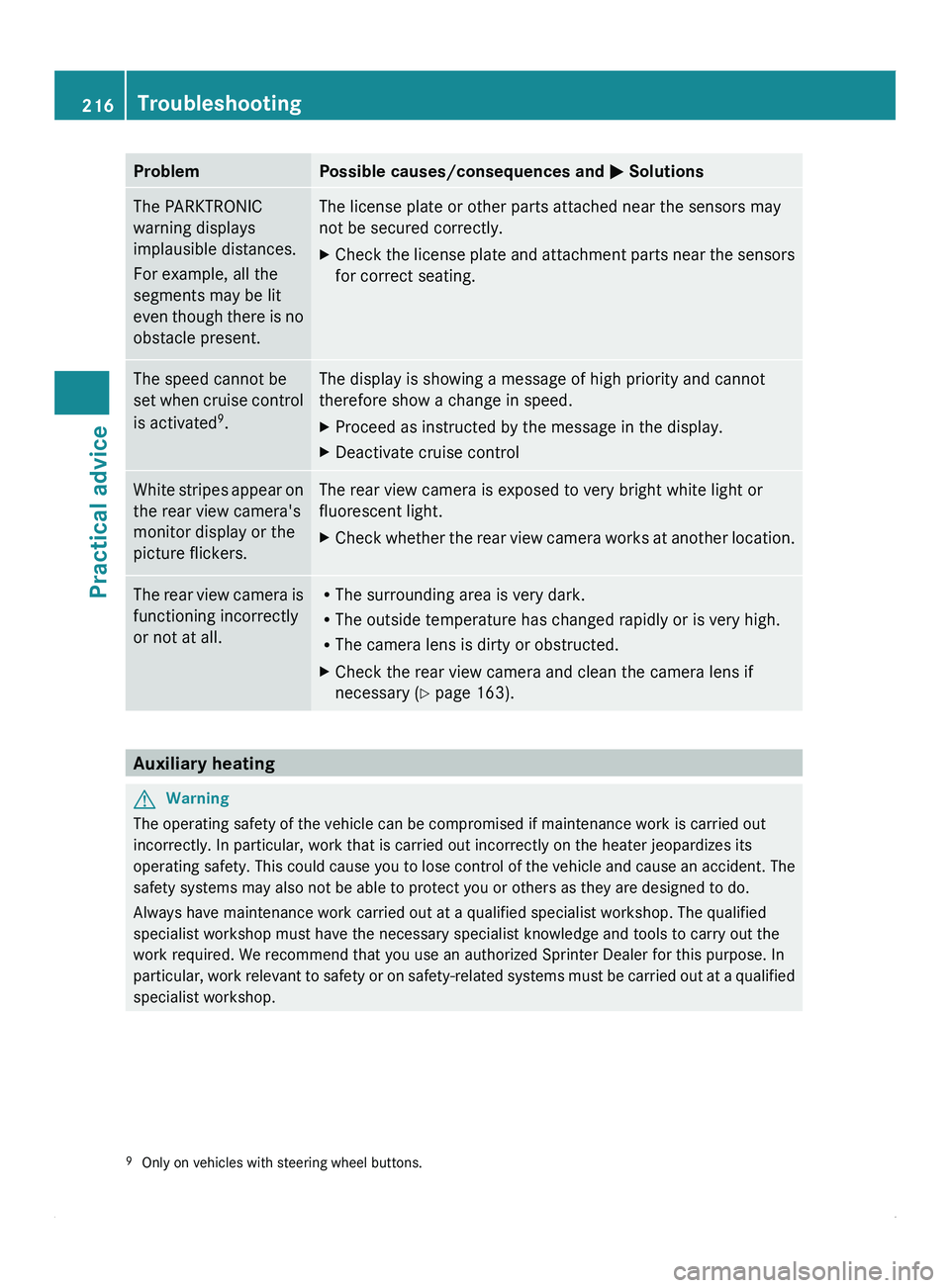
Problem Possible causes/consequences and
0050 SolutionsThe PARKTRONIC
warning displays
implausible distances.
For example, all the
segments may be lit
even though there
is no
obstacle present. The license plate or other parts attached near the sensors may
not be secured correctly.
X
Check the license plate and attachment parts near the sensors
for correct seating. The speed cannot be
set when cruise
control
is activated 9
. The display is showing a message of high priority and cannot
therefore show a change in speed.
X
Proceed as instructed by the message in the display.
X Deactivate cruise control White stripes appear on
the rear view camera's
monitor display or the
picture flickers. The rear view camera is exposed to very bright white light or
fluorescent light.
X
Check whether the rear view camera works at another location. The rear view camera is
functioning incorrectly
or not at all. R
The surrounding area is very dark.
R The outside temperature has changed rapidly or is very high.
R The camera lens is dirty or obstructed.
X Check the rear view camera and clean the camera lens if
necessary ( Y page 163).Auxiliary heating
G
Warning
The operating safety of the vehicle can be compromised if maintenance work is carried out
incorrectly. In particular, work that is carried out incorrectly on the heater jeopardizes its
operating safety. This
could cause you to lose control of the vehicle and cause an accident. The
safety systems may also not be able to protect you or others as they are designed to do.
Always have maintenance work carried out at a qualified specialist workshop. The qualified
specialist workshop must have the necessary specialist knowledge and tools to carry out the
work required. We recommend that you use an authorized Sprinter Dealer for this purpose. In
particular, work relevant to safety or on safety-related systems must be carried out at a qualified
specialist workshop.
9 Only on vehicles with steering wheel buttons.216
Troubleshooting
Practical advice
Page 248 of 292
recycled in an environmentally
responsible manner.
Dispose of old batteries in an
environmentally responsible
manner. Take discharged batteries
to a qualified specialist workshop,
e.g. an authorized Sprinter Dealer,
or to a special collection point for
old batteries.
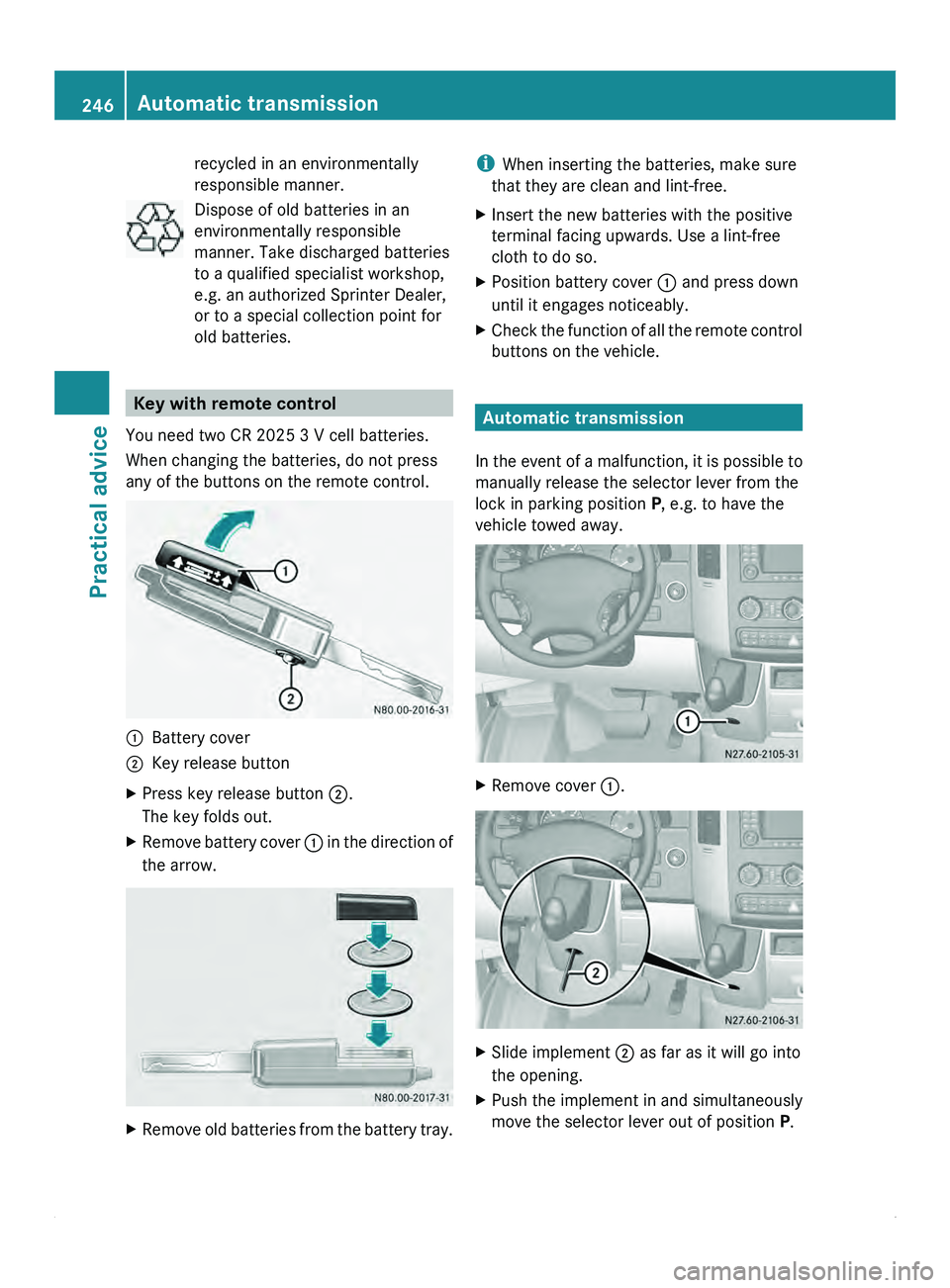
Key with remote control
You need two CR 2025 3 V cell batteries.
When changing the batteries, do not press
any of the buttons on the remote control. 0046
Battery cover
0047 Key release button
X Press key release button 0047.
The key folds out.
X Remove battery cover 0046 in
the direction of
the arrow. X
Remove old batteries from the battery tray. i
When inserting the batteries, make sure
that they are clean and lint-free.
X Insert the new batteries with the positive
terminal facing upwards. Use a lint-free
cloth to do so.
X Position battery cover 0046 and press down
until it engages noticeably.
X Check the function of all the remote control
buttons on the vehicle. Automatic transmission
In the event
of a malfunction, it is possible to
manually release the selector lever from the
lock in parking position P, e.g. to have the
vehicle towed away. X
Remove cover 0046. X
Slide implement 0047 as far as it will go into
the opening.
X Push the implement in and simultaneously
move the selector lever out of position P.246
Automatic transmission
Practical advice
Page 262 of 292
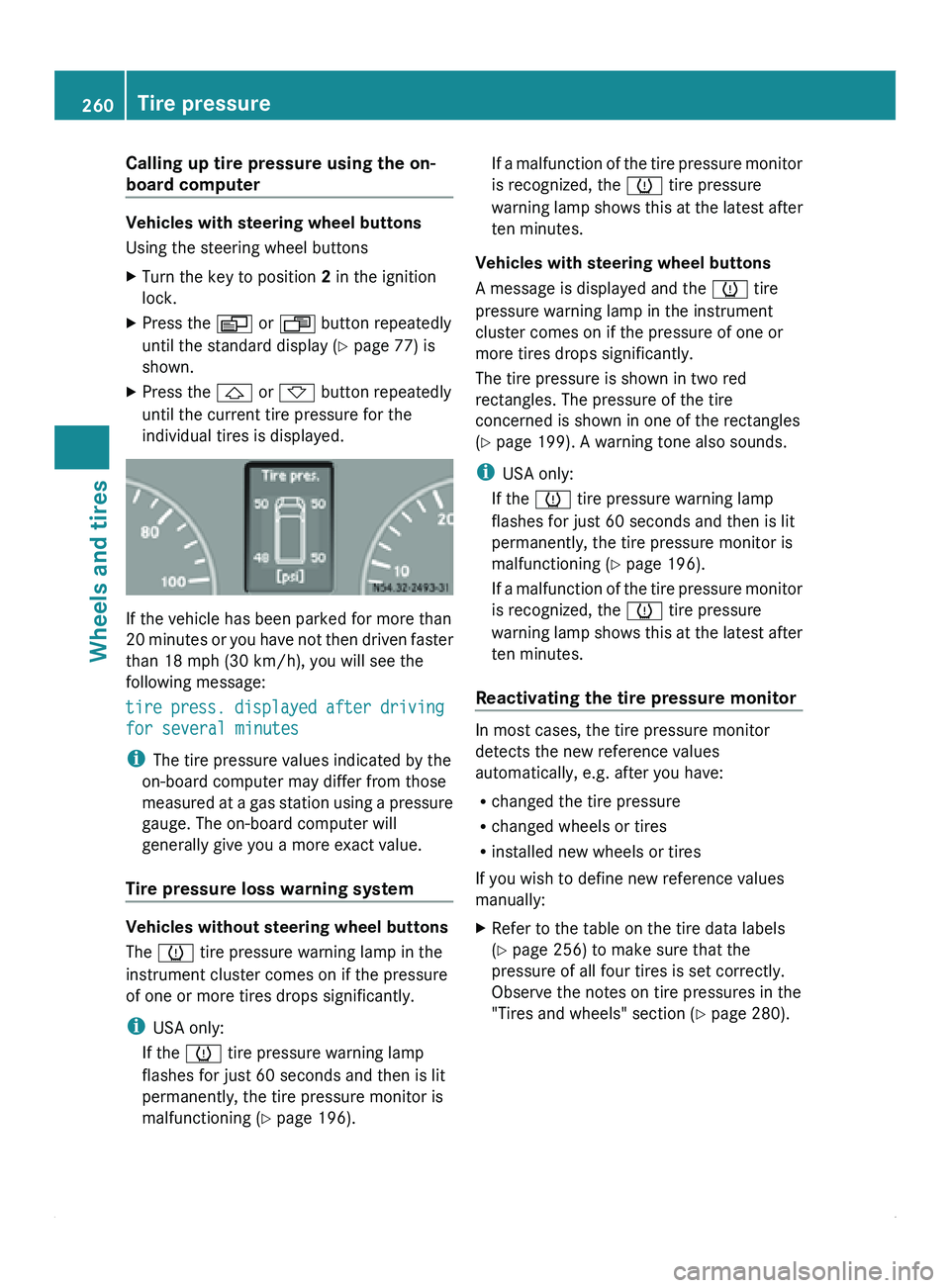
Calling up tire pressure using the on-
board computer
Vehicles with steering wheel buttons
Using the steering wheel buttons
X
Turn the key to position 2 in the ignition
lock.
X Press the 0059 or 0058 button repeatedly
until the standard display ( Y page 77) is
shown.
X Press the
0029 or 002D button repeatedly
until the current tire pressure for the
individual tires is displayed. If the vehicle has been parked for more than
20 minutes
or
you have not then driven faster
than 18 mph (30 km/h), you will see the
following message:
tire press. displayed after driving
for several minutes
i The tire pressure values indicated by the
on-board computer may differ from those
measured at a gas station using a pressure
gauge. The on-board computer will
generally give you a more exact value.
Tire pressure loss warning system Vehicles without steering wheel buttons
The 0077 tire pressure warning lamp in the
instrument cluster comes on if the pressure
of one or more tires drops significantly.
i
USA only:
If the 0077 tire pressure warning lamp
flashes for just 60 seconds and then is lit
permanently, the tire pressure monitor is
malfunctioning (Y page 196). If a malfunction of the tire pressure monitor
is recognized, the 0077 tire pressure
warning lamp
shows
this at the latest after
ten minutes.
Vehicles with steering wheel buttons
A message is displayed and the 0077 tire
pressure warning lamp in the instrument
cluster comes on if the pressure of one or
more tires drops significantly.
The tire pressure is shown in two red
rectangles. The pressure of the tire
concerned is shown in one of the rectangles
(Y page 199). A warning tone also sounds.
i USA only:
If the 0077 tire pressure warning lamp
flashes for just 60 seconds and then is lit
permanently, the tire pressure monitor is
malfunctioning (Y page 196).
If a malfunction of the tire pressure monitor
is recognized, the 0077 tire pressure
warning lamp shows this at the latest after
ten minutes.
Reactivating the tire pressure monitor In most cases, the tire pressure monitor
detects the new reference values
automatically, e.g. after you have:
R
changed the tire pressure
R changed wheels or tires
R installed new wheels or tires
If you wish to define new reference values
manually:
X Refer to the table on the tire data labels
(Y page 256) to make sure that the
pressure of all four tires is set correctly.
Observe the notes on tire pressures in the
"Tires and wheels" section ( Y page 280).260
Tire pressure
Wheels and tires
Page 263 of 292
Vehicles without steering wheel buttons
X
Turn the key to position 2 in the ignition
lock.
X Press the 007B menu button on the
instrument cluster repeatedly until the
following message is displayed:
+CAL- TPMS
X Press the 0069 button on the instrument
cluster.
The following message is displayed:
OK TPMS
The tire pressure monitor activation
process has begun. The tire pressures
measured for the individual wheels are
stored as the new reference values,
provided that the tire pressure monitor
considers them to be plausible.
If you wish to cancel the activation process:
X Press the 006A button or the 007B menu button
on the instrument cluster.
The activation process is canceled
automatically if 30 seconds elapse with no
input.
Vehicles with steering wheel buttons
X Turn the key to position 2 in the ignition
lock.
X Press the 0059 or 0058 button on the
steering wheel repeatedly until the
standard display (Y
page 77) appears.
X Press the 0029 or 002D button on the
steering wheel repeatedly
until the current
pressure of the individual tires is displayed,
or the display shows the following
message:
tire press. displayed after
driving for several minutes
X Press the 0048 reset button on the
instrument cluster.
The following message is displayed:
Monitor current tire pressure?
X Press the 005A button on the steering
wheel.
The following message is displayed: tire press. monitor reactivated
The tire pressure monitor activation
process has begun. The tire pressures
measured for the individual wheels are
stored as the new reference values,
provided that the tire pressure monitor
considers them to be plausible.
If you wish to cancel the activation process:
X Press the 005B button on the steering
wheel. Loading the vehicle
Instruction labels for tires and loads
G
Warning!
Do not overload the tires by exceeding the
specified load limit as indicated on the Tire
and Loading Information placard on the
B-pillar on the driver's side or on the vehicle
identification plate on the driver seat frame.
Overloading the tires can overheat them,
possibly causing a blowout. Overloading the
tires can also result in handling or steering
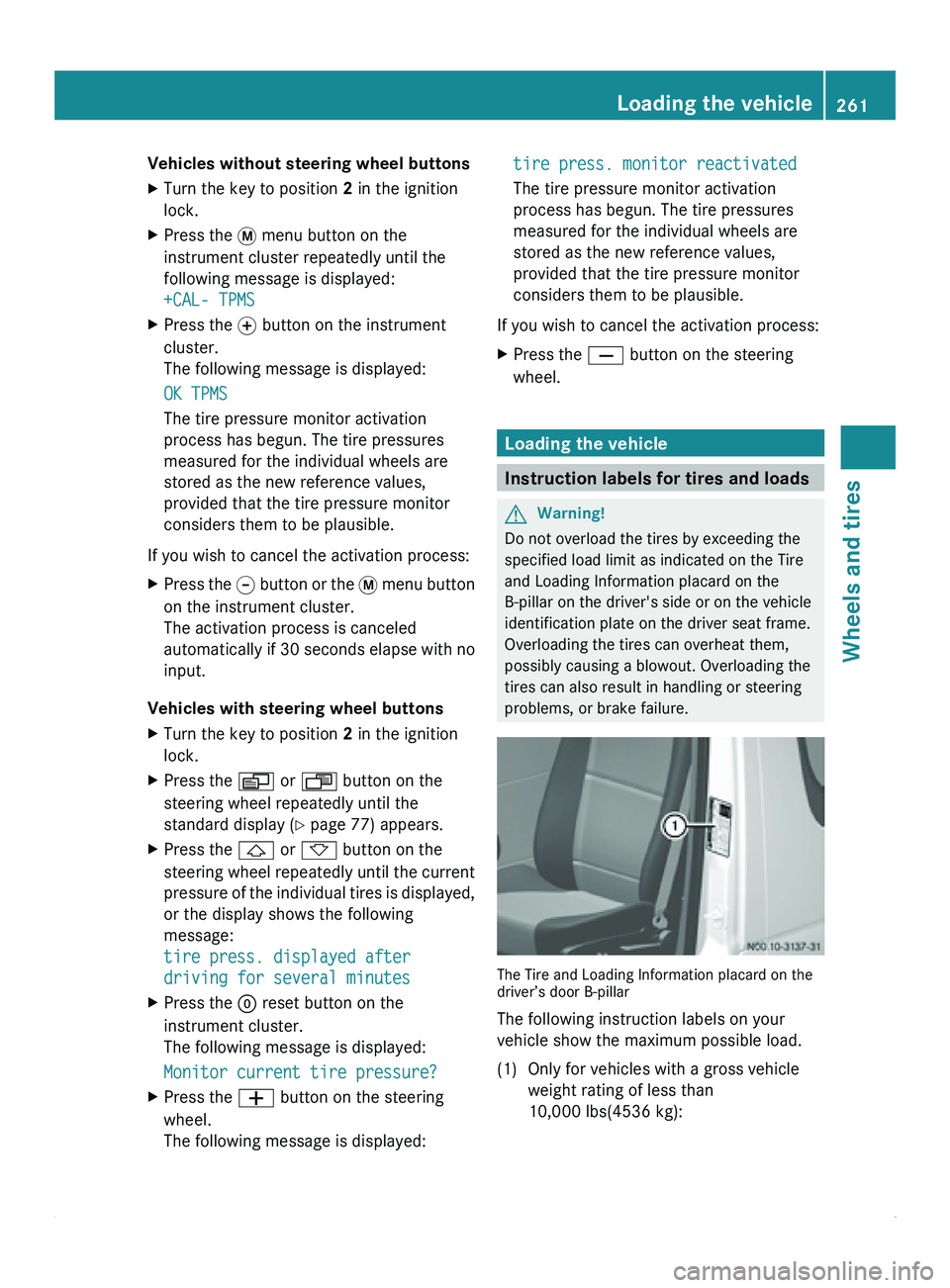
problems, or brake failure. The Tire and Loading Information placard on the
driver’s door B-pillar
The following instruction labels on your
vehicle show the maximum possible load.
(1) Only for vehicles with a gross vehicle
weight rating of less than
10,000 lbs(4536 kg): Loading the vehicle
261
Wheels and tires Z