lock MERCEDES-BENZ SPRINTER 2014 MY14 Operator’s Manual
[x] Cancel search | Manufacturer: MERCEDES-BENZ, Model Year: 2014, Model line: SPRINTER, Model: MERCEDES-BENZ SPRINTER 2014Pages: 338, PDF Size: 6.78 MB
Page 212 of 338
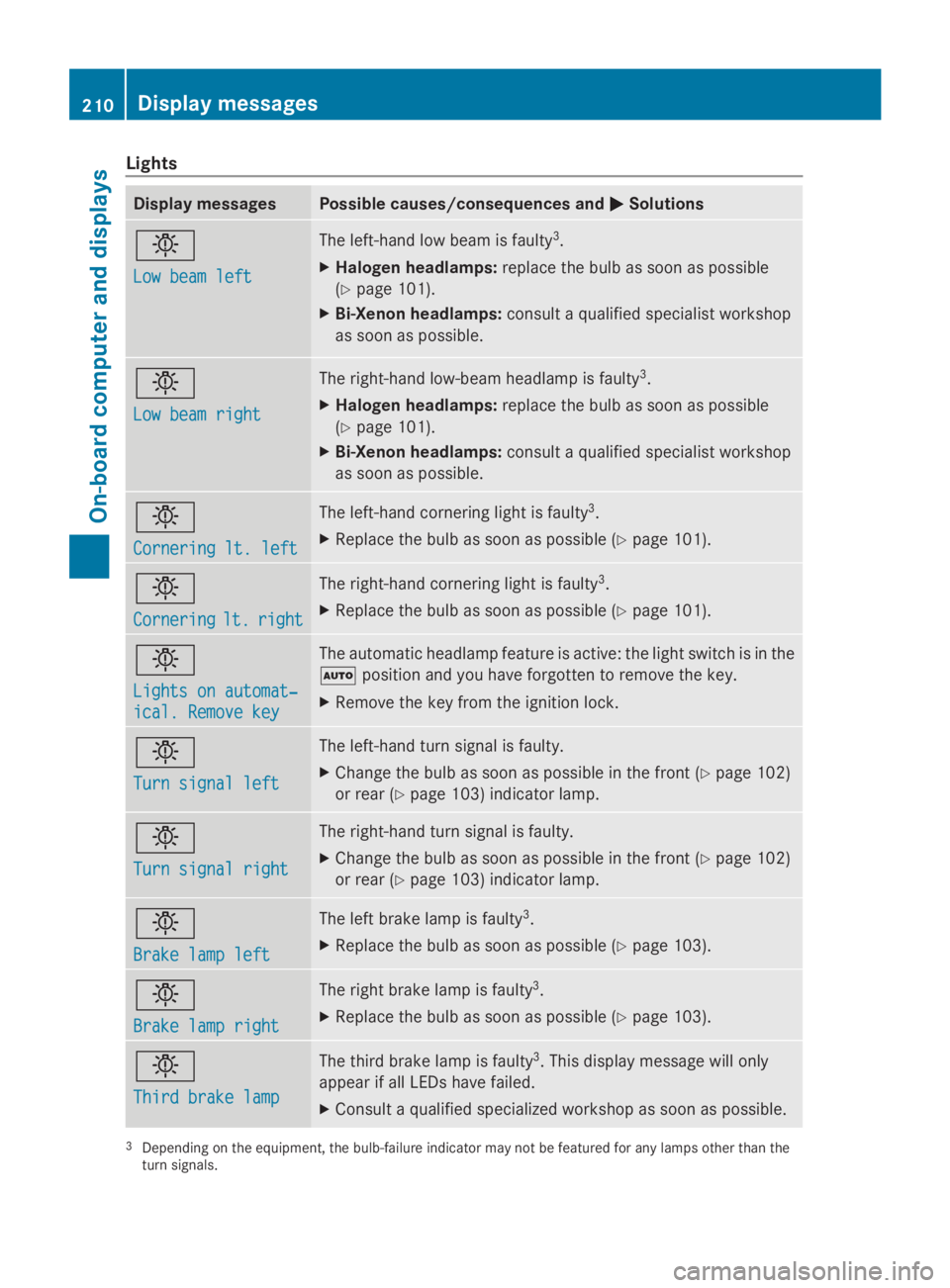
Lights
Display messages Possible causes/consequences and
0050
0050Solutions 0049
Low beam left Low beam left The left-hand low beam is faulty
3
.
X Halogen headlamps: replace the bulb as soon as possible
(Y page 101).
X Bi-Xenon headlamps: consult a qualified specialist workshop
as soon as possible. 0049
Low beam right Low beam right The right-hand low-beam headlamp is faulty
3
.
X Halogen headlamps: replace the bulb as soon as possible
(Y page 101).
X Bi-Xenon headlamps: consult a qualified specialist workshop
as soon as possible. 0049
Cornering lt. left Cornering lt. left The left-hand cornering light is faulty
3
.
X Replace the bulb as soon as possible (Y page 101).0049
Cornering Cornering
lt.
lt.right
right The right-hand cornering light is faulty
3
.
X Replace the bulb as soon as possible (Y page 101).0049
Lights on automat‐ Lights on automat‐
ical. Remove key ical. Remove key The automatic headlamp feature is active: the light switch is in the
0058
position and you have forgotten to remove the key.
X Remove the key from the ignition lock. 0049
Turn signal left Turn signal left The left-hand turn signal is faulty.
X
Change the bulb as soon as possible in the front ( Ypage 102)
or rear (Y page 103) indicator lamp. 0049
Turn signal right Turn signal right The right-hand turn signal is faulty.
X
Change the bulb as soon as possible in the front ( Ypage 102)
or rear (Y page 103) indicator lamp. 0049
Brake lamp left Brake lamp left The left brake lamp is faulty
3
.
X Replace the bulb as soon as possible (Y page 103).0049
Brake lamp right Brake lamp right The right brake lamp is faulty
3
.
X Replace the bulb as soon as possible (Y page 103).0049
Third brake lamp Third brake lamp The third brake lamp is faulty
3
. This display message will only
appear if all LEDs have failed.
X Consult a qualified specialized workshop as soon as possible. 3
Depending on the equipment, the bulb-failure indicator may not be featured for any lamps other than the
turn signals. 210
Display messagesOn-board computer and displays
Page 223 of 338
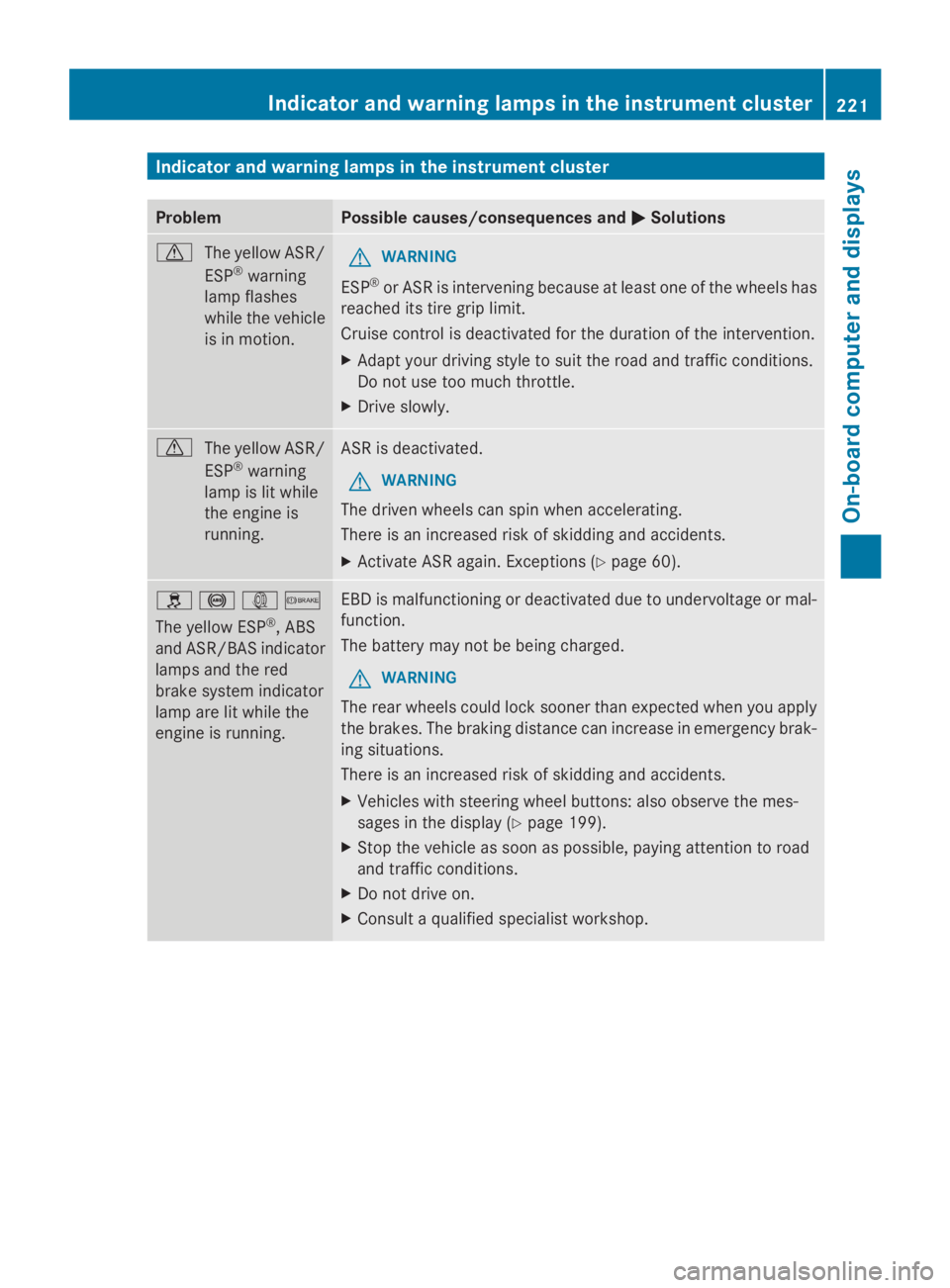
Indicator and warning lamps in the instrument cluster
Problem Possible causes/consequences and
0050
0050Solutions 0072
The yellow ASR/
ESP®
warning
lamp flashes
while the vehicle
is in motion. G
WARNING
ESP ®
or ASR is intervening because at least one of the wheels has
reached its tire grip limit.
Cruise control is deactivated for the duration of the intervention.
X Adapt your driving style to suit the road and traffic conditions.
Do not use too much throttle.
X Drive slowly. 0072
The yellow ASR/
ESP®
warning
lamp is lit while
the engine is
running. ASR is deactivated.
G WARNING
The driven wheels can spin when accelerating.
There is an increased risk of skidding and accidents.
X Activate ASR again. Exceptions (Y page 60).0089
0025003D0065
The yellow ESP ®
, ABS
and ASR/BAS indicator
lamps and the red
brake system indicator
lamp are lit while the
engine is running. EBD is malfunctioning or deactivated due to undervoltage or mal-
function.
The battery may not be being charged.
G WARNING
The rear wheels could lock sooner than expected when you apply
the brakes. The braking distance can increase in emergency brak-
ing situations.
There is an increased risk of skidding and accidents.
X Vehicles with steering wheel buttons: also observe the mes-
sages in the display (Y page 199).
X Stop the vehicle as soon as possible, paying attention to road
and traffic conditions.
X Do not drive on.
X Consult a qualified specialist workshop. Indicator and warning lamps in the instrument cluster
221On-board computer and displays Z
Page 226 of 338
Problem Possible causes/consequences and
0050
0050Solutions 0025
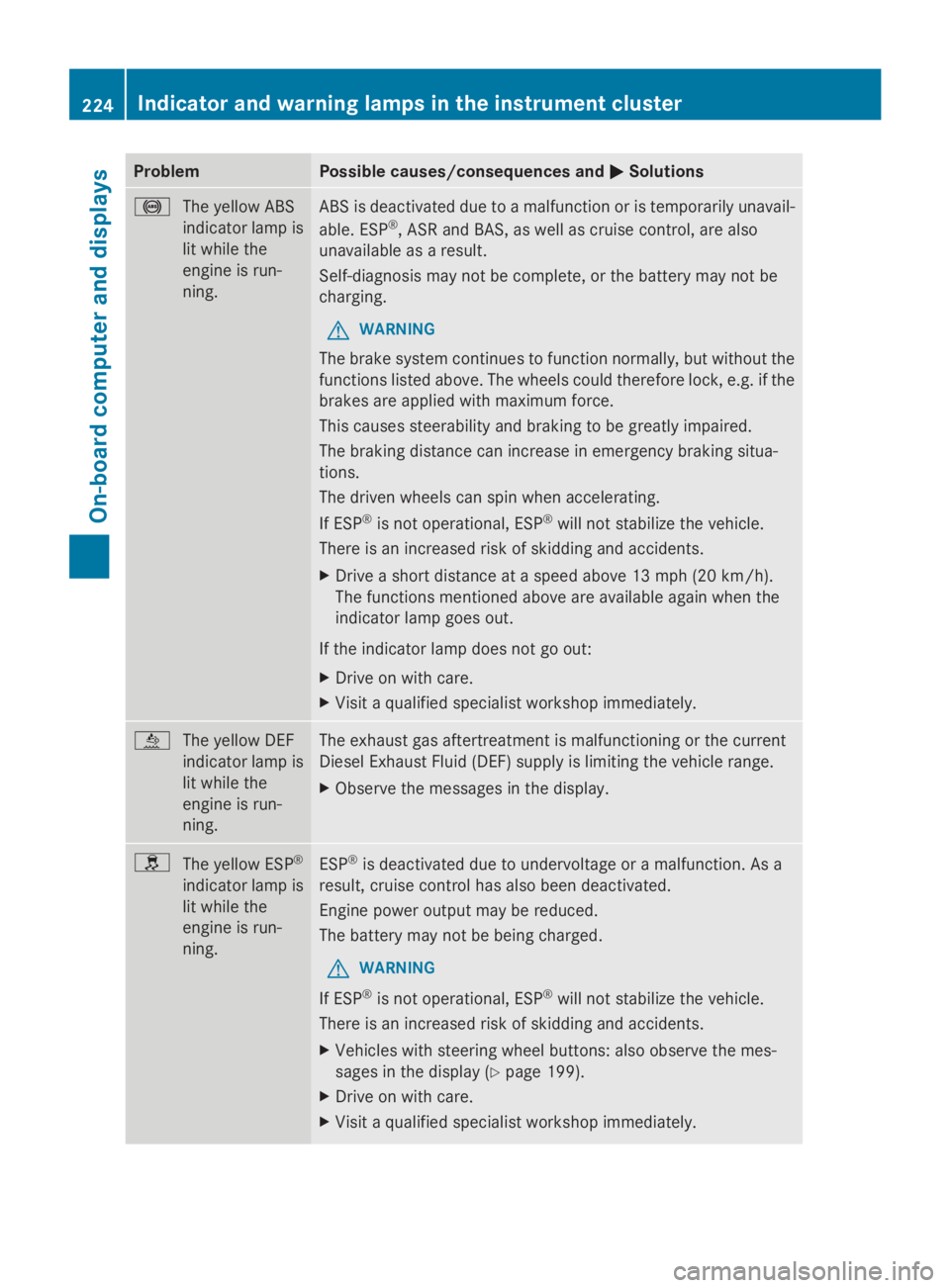
The yellow ABS
indicator lamp is
lit while the
engine is run-
ning. ABS is deactivated due to a malfunction or is temporarily unavail-
able. ESP
®
, ASR and BAS, as well as cruise control, are also
unavailable as a result.
Self-diagnosis may not be complete, or the battery may not be
charging.
G WARNING
The brake system continues to function normally, but without the
functions listed above. The wheels could therefore lock, e.g. if the
brakes are applied with maximum force.
This causes steerability and braking to be greatly impaired.
The braking distance can increase in emergency braking situa-
tions.
The driven wheels can spin when accelerating.
If ESP ®
is not operational, ESP ®
will not stabilize the vehicle.
There is an increased risk of skidding and accidents.
X Drive a short distance at a speed above 13 mph (20 km/h).
The functions mentioned above are available again when the
indicator lamp goes out.
If the indicator lamp does not go out:
X Drive on with care.
X Visit a qualified specialist workshop immediately. 00E2
The yellow DEF
indicator lamp is
lit while the
engine is run-
ning. The exhaust gas aftertreatment is malfunctioning or the current
Diesel Exhaust Fluid (DEF) supply is limiting the vehicle range.
X
Observe the messages in the display. 0089
The yellow ESP ®
indicator lamp is
lit while the
engine is run-
ning. ESP
®
is deactivated due to undervoltage or a malfunction. As a
result, cruise control has also been deactivated.
Engine power output may be reduced.
The battery may not be being charged.
G WARNING
If ESP ®
is not operational, ESP ®
will not stabilize the vehicle.
There is an increased risk of skidding and accidents.
X Vehicles with steering wheel buttons: also observe the mes-
sages in the display (Y page 199).
X Drive on with care.
X Visit a qualified specialist workshop immediately. 224
Indicator and warning lamps in the instrument clusterOn-board computer and displays
Page 230 of 338
Problem Possible causes/consequences and
0050
0050Solutions 00B9
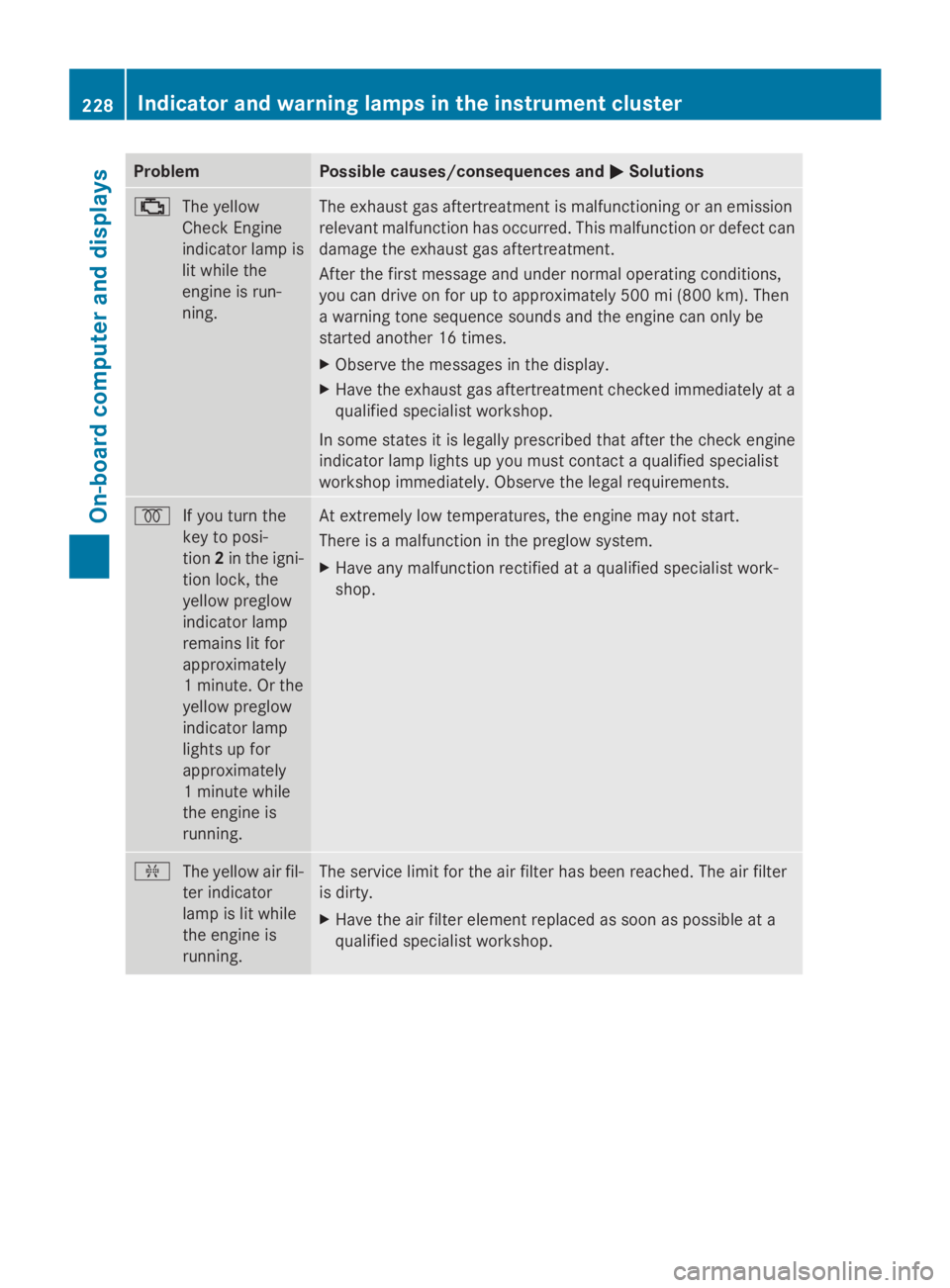
The yellow
Check Engine
indicator lamp is
lit while the
engine is run-
ning. The exhaust gas aftertreatment is malfunctioning or an emission
relevant malfunction has occurred. This malfunction or defect can
damage the exhaust gas aftertreatment.
After the first message and under normal operating conditions,
you can drive on for up to approximately 500 mi (800 km). Then
a warning tone sequence sounds and the engine can only be
started another 16 times.
X
Observe the messages in the display.
X Have the exhaust gas aftertreatment checked immediately at a
qualified specialist workshop.
In some states it is legally prescribed that after the check engine
indicator lamp lights up you must contact a qualified specialist
workshop immediately. Observe the legal requirements. 0028
If you turn the
key to posi-
tion2in the igni-
tion lock, the
yellow preglow
indicator lamp
remains lit for
approximately
1 minute. Or the
yellow preglow
indicator lamp
lights up for
approximately
1 minute while
the engine is
running. At extremely low temperatures, the engine may not start.
There is a malfunction in the preglow system.
X
Have any malfunction rectified at a qualified specialist work-
shop. 009F
The yellow air fil-
ter indicator
lamp is lit while
the engine is
running. The service limit for the air filter has been reached. The air filter
is dirty.
X
Have the air filter element replaced as soon as possible at a
qualified specialist workshop. 228
Indicator and warning lamps in the instrument clusterOn-board computer and displays
Page 232 of 338
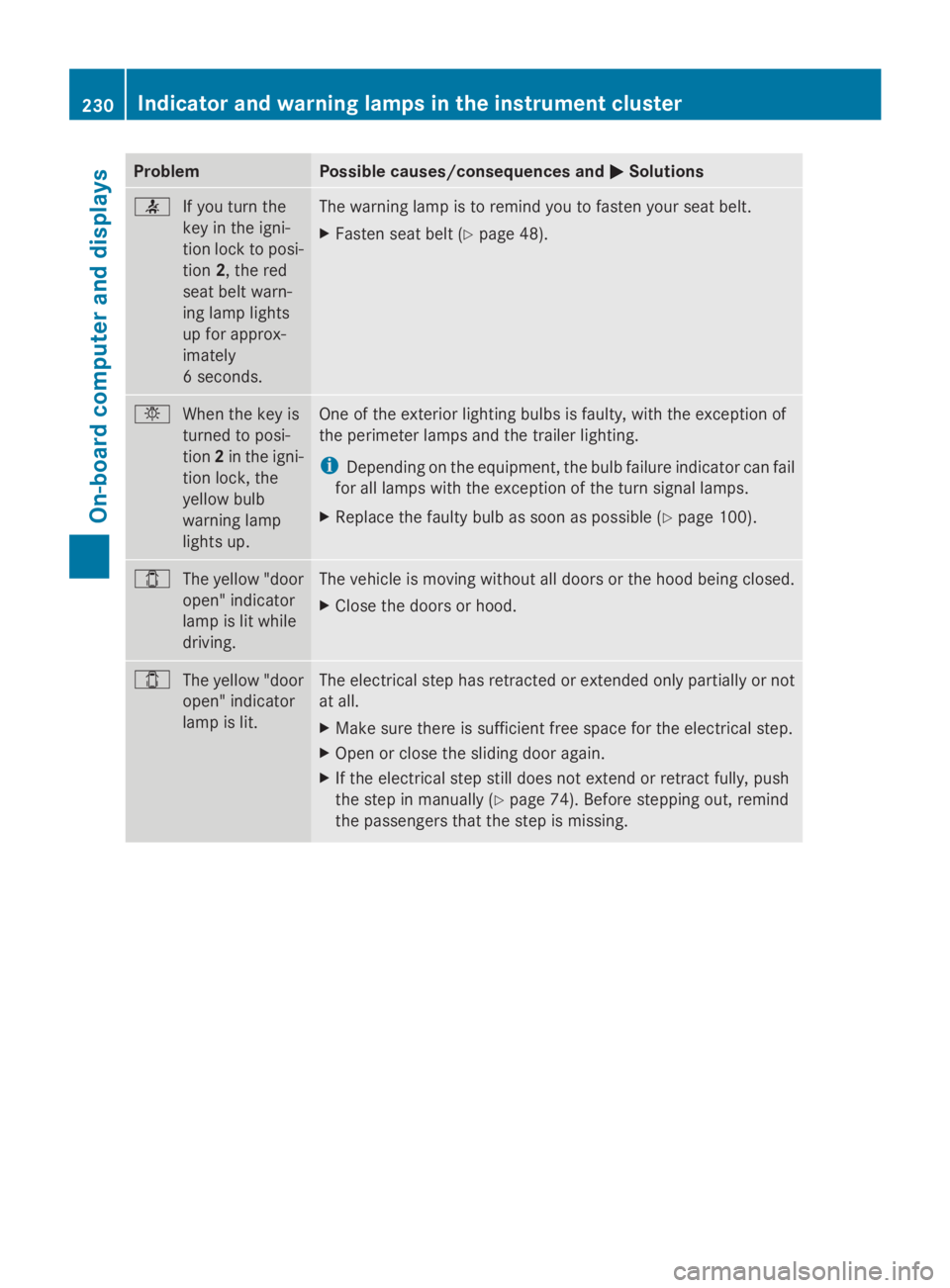
Problem Possible causes/consequences and
0050
0050Solutions 0076
If you turn the
key in the igni-
tion lock to posi-
tion2, the red
seat belt warn-
ing lamp lights
up for approx-
imately
6 seconds. The warning lamp is to remind you to fasten your seat belt.
X
Fasten seat belt (Y page 48).0049
When the key is
turned to posi-
tion2in the igni-
tion lock, the
yellow bulb
warning lamp
lights up. One of the exterior lighting bulbs is faulty, with the exception of
the perimeter lamps and the trailer lighting.
i
Depending on the equipment, the bulb failure indicator can fail
for all lamps with the exception of the turn signal lamps.
X Replace the faulty bulb as soon as possible (Y page 100).003E
The yellow "door
open" indicator
lamp is lit while
driving. The vehicle is moving without all doors or the hood being closed.
X
Close the doors or hood. 003E
The yellow "door
open" indicator
lamp is lit. The electrical step has retracted or extended only partially or not
at all.
X
Make sure there is sufficient free space for the electrical step.
X Open or close the sliding door again.
X If the electrical step still does not extend or retract fully, push
the step in manually (Y page 74). Before stepping out, remind
the passengers that the step is missing. 230
Indicator and warning lamps in the instrument clusterOn-board computer and displays
Page 234 of 338
Useful information
This Operator's Manual describes all models
as well as standard and optional equipment
of your vehicle that were available at the time
of going to print. Country-specific variations
are possible. Note that your vehicle may not
be equipped with all of the described func-
tions. This also applies to systems and func-
tions relevant to safety.
Read the information on qualified specialist
workshops (Y page 26). Stowage spaces and stowage com-
partments Important safety notes
G
WARNING
If you do not correctly store objects in the
vehicle interior, they can slip or be flung
around, thus striking vehicle occupants.
There is a risk of injury, especially when brak-
ing or abruptly changing directions.
R Always store objects so that they cannot be
flung around in these or in similar situa-
tions.
R Always make sure that objects do not pro-
trude from stowage compartments, parcel
nets or stowage nets.
R Close lockable stowage compartments
while driving.
R Stow and secure objects that are heavy,
hard, pointy, sharp-edged, fragile or too
large in the trunk.
In addition, observe the information in the
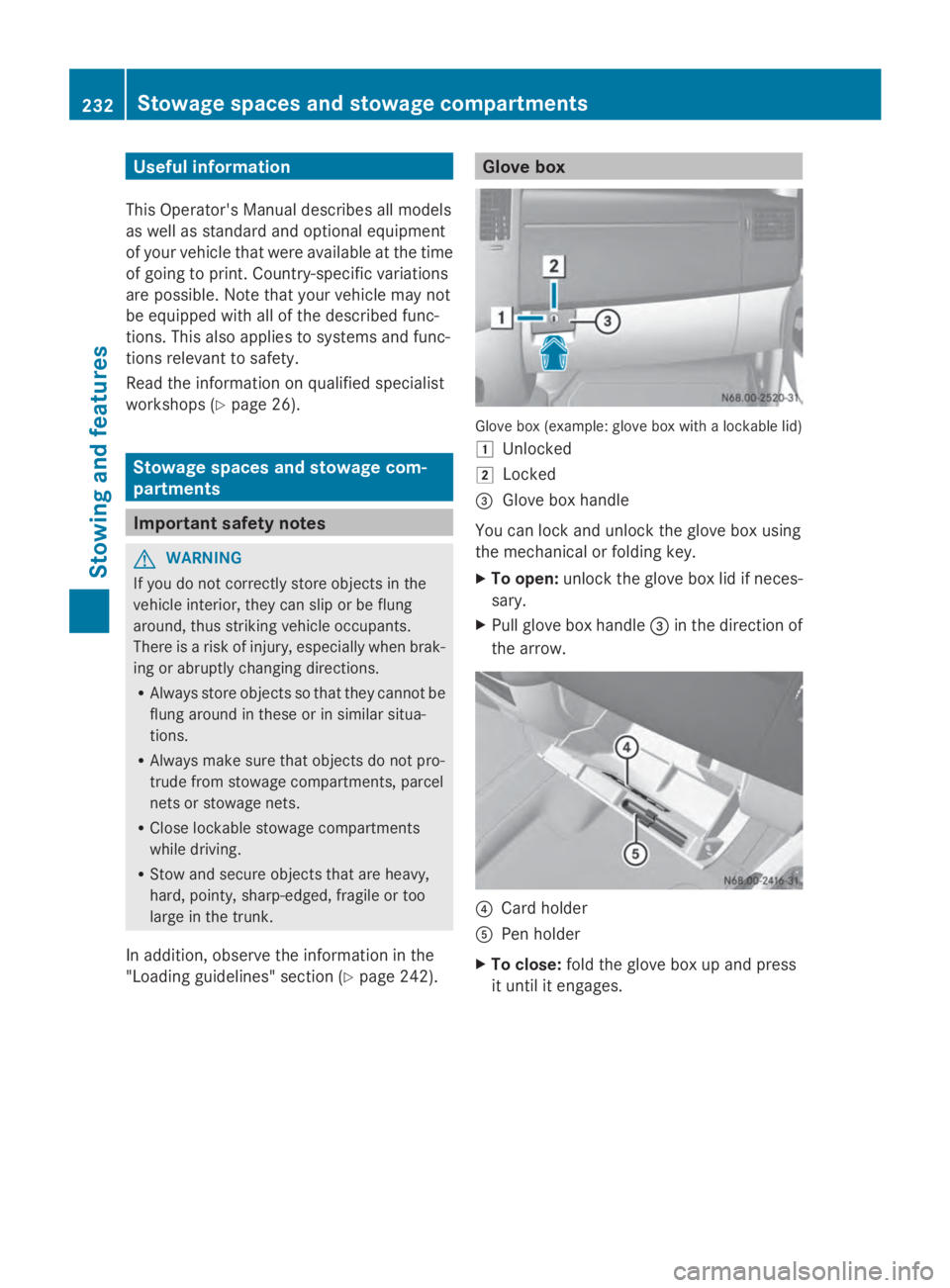
"Loading guidelines" section (Y page 242). Glove box
Glove box (example: glove box with a lockable lid)
0047
Unlocked
0048 Locked
0087 Glove box handle
You can lock and unlock the glove box using
the mechanical or folding key.
X To open: unlock the glove box lid if neces-
sary.
X Pull glove box handle 0087in the direction of
the arrow. 0085
Card holder
0083 Pen holder
X To close: fold the glove box up and press
it until it engages. 232
Stowage spaces and stowage compartmentsStowing and features
Page 240 of 338
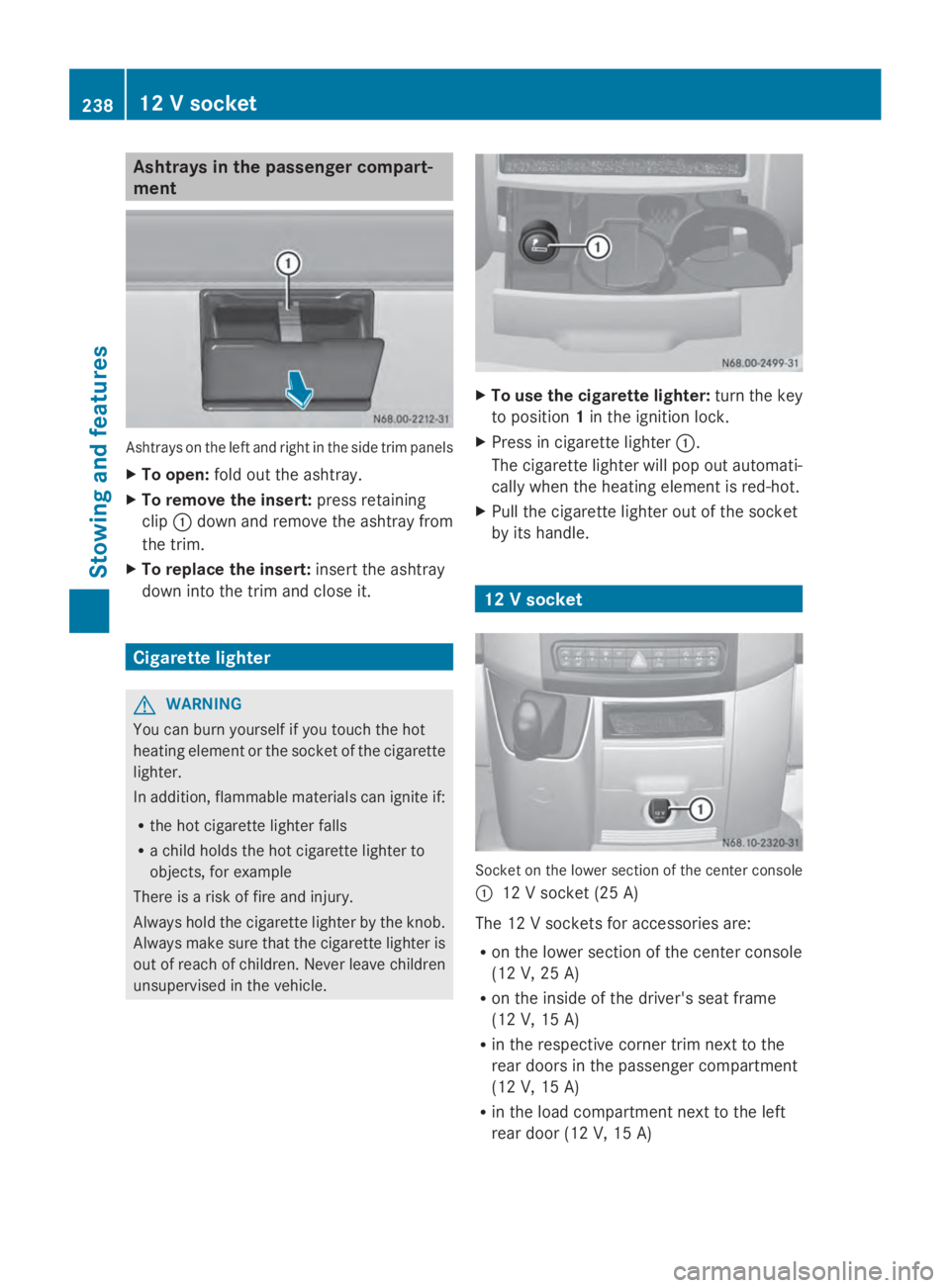
Ashtrays in the passenger compart-
ment Ashtrays on the left and right in the side trim panels
X To open: fold out the ashtray.
X To remove the insert: press retaining
clip 0043down and remove the ashtray from
the trim.
X To replace the insert: insert the ashtray
down into the trim and close it. Cigarette lighter
G
WARNING
You can burn yourself if you touch the hot
heating element or the socket of the cigarette
lighter.
In addition, flammable materials can ignite if:
R the hot cigarette lighter falls
R a child holds the hot cigarette lighter to
objects, for example
There is a risk of fire and injury.
Always hold the cigarette lighter by the knob.
Always make sure that the cigarette lighter is
out of reach of children. Never leave children
unsupervised in the vehicle. X
To use the cigarette lighter: turn the key
to position 1in the ignition lock.
X Press in cigarette lighter 0043.
The cigarette lighter will pop out automati-
cally when the heating element is red-hot.
X Pull the cigarette lighter out of the socket
by its handle. 12 V socket
Socket on the lower section of the center console
0043 12 V socket (25 A)
The 12 V sockets for accessories are:
R on the lower section of the center console
(12 V, 25 A)
R on the inside of the driver's seat frame
(12 V, 15 A)
R in the respective corner trim next to the
rear doors in the passenger compartment
(12 V, 15 A)
R in the load compartment next to the left
rear door (12 V, 15 A) 238
12 V socketStowing and featu
res
Page 241 of 338
You can use the 12 V sockets (15 A) for
accessories with a maximum power con-
sumption of 180 W. You can connect acces-
sories with a maximum power consumption
of 300 W to the 12 V socket (25 A) on the
lower section of the center console.
i The sockets are supplied with power even
when the key is removed from the ignition
lock. If accessories, e.g. a coolbox, remain
connected while the engine is not running,
the battery will discharge. Mobile phone
Important safety notes
G
WARNING
If you operate information systems and com-
munication equipment integrated in the vehi-
cle while driving, you will be distracted from
traffic conditions. You could also lose control
of the vehicle. There is a risk of an accident.
Only operate the equipment when the traffic
situation permits. If you are not sure that this
is possible, park the vehicle paying attention
to traffic conditions and operate the equip-
ment when the vehicle is stationary.
You must observe the legal requirements for
the country in which you are currently driving
when operating mobile phones.
Bear in mind that at a speed of just 30 mph
(approximately 50 km/h), your vehicle is cov-
ering a distance of 44 feet (approximately
14 m) every second.
You and others can suffer health-related dam-
age through electromagnetic radiation. By
using an exterior antenna, a possible health
risk caused by electromagnetic fields, as dis-
cussed in scientific circles, is taken into
account. Only have the exterior antenna
installed by a qualified specialist workshop.
We recommend the use of an approved exte-
rior antenna for operating the mobile phone.
Only in this way can optimal mobile phone
reception quality in the vehicle be ensured and mutual interference between the vehicle
electronics and mobile phones minimized.
Observe the legal requirements for each indi-
vidual country. Mobile phone pre-installation
The mobile phone pre-installation includes a
hands-free system integrated into the vehi-
cle. The microphone for the hands-free sys-
tem is installed in the overhead control panel
or in the overhead stowage compartment
together with the front interior light.
In order to use the hands-free system, you will
need a special bracket. The Sprinter acces-
sories include brackets for various mobile
phone models.
i Mobile phone brackets which are availa-
ble from various manufacturers on the
open market are not compatible with the
Sprinter telephone system. You can recog-
nize suitable holders for your mobile phone
by the imprinted star and the B6 spare part
number on the back of the bracket.
Detailed instructions for use can be found in
the operating instructions for the mobile
phone bracket and in the separate operating
instructions for the mobile phone pre-instal-
lation.
i The mobile phone battery is charged
depending on the condition of charge and
the position of the key in the ignition lock.
The mobile phone display indicates the
charging process. Additional communications equip-
ment
Important safety notes
G
WARNING
If you operate mobile communication equip-
ment while driving, you will be distracted from
traffic conditions. You could also lose control
of the vehicle. There is a risk of an accident. Additional communications equipment
239Stowing and features
Z
Page 247 of 338
maximum loading capacity of the weakest
cargo tie-down point into account.
If you brake hard, for example, the forces
acting could be up to several times the
weight force of the load. Always use multi-
ple cargo tie-down points in order to dis-
tribute the force absorption. Load the
anchorages evenly.
Spread the load evenly between the cargo tie-
down points or tie-down rings.
Please also refer to the notes about qualified
specialist workshops (Y page 26).
Always observe the operating instructions or
the notes of the lashing strap manufacturer
for the operation of the lashing strap.
Information about the maximum loading
capacity of the cargo tie-down points can be
found in the "Technical data" section
(Y page 331).
As the driver, you are responsible for ensuring
that:
R The applicable requirements and guide-
lines relating to load-securing practices
must be met.
If this is not the case, this may constitute a
punishable offense, depending on local leg-
islation and any ensuing consequences.
You should therefore observe the respec-
tive legal requirements for the relevant
country.
Make sure that the load is secure before every
journey and at regular intervals during a long
journey. Correct an incorrectly or inade-
quately secured load if necessary.
You can obtain information about securing
the load correctly from the manufacturer of
the load securing aids or tie down for securing
the load.
X Fill spaces between the load and the cargo
compartment walls or wheel housings
(form-locking). Use rigid load securing aids,
such as wedges, wooden fixings or pad-
ding.
X Attach secured and stabilized loads in all
directions. Use the cargo tie-down points or cargo tie-down rings and the loading rails
in the cargo compartment or on the cargo
area.
Only use tie downs, such as lashing rods or
lashing nets and lashing straps, that have
been tested in accordance with current
standards (e.g. DIN EN).
Always use the cargo tie-down rings closest
to the load to secure it and pad sharp edges
for protection.
Loads, and heavy loads in particular, should
preferably be secured using the cargo tie-
down rings.
i Tie downs tested in accordance with cur-
rent standards (e.g. DIN EN) are available
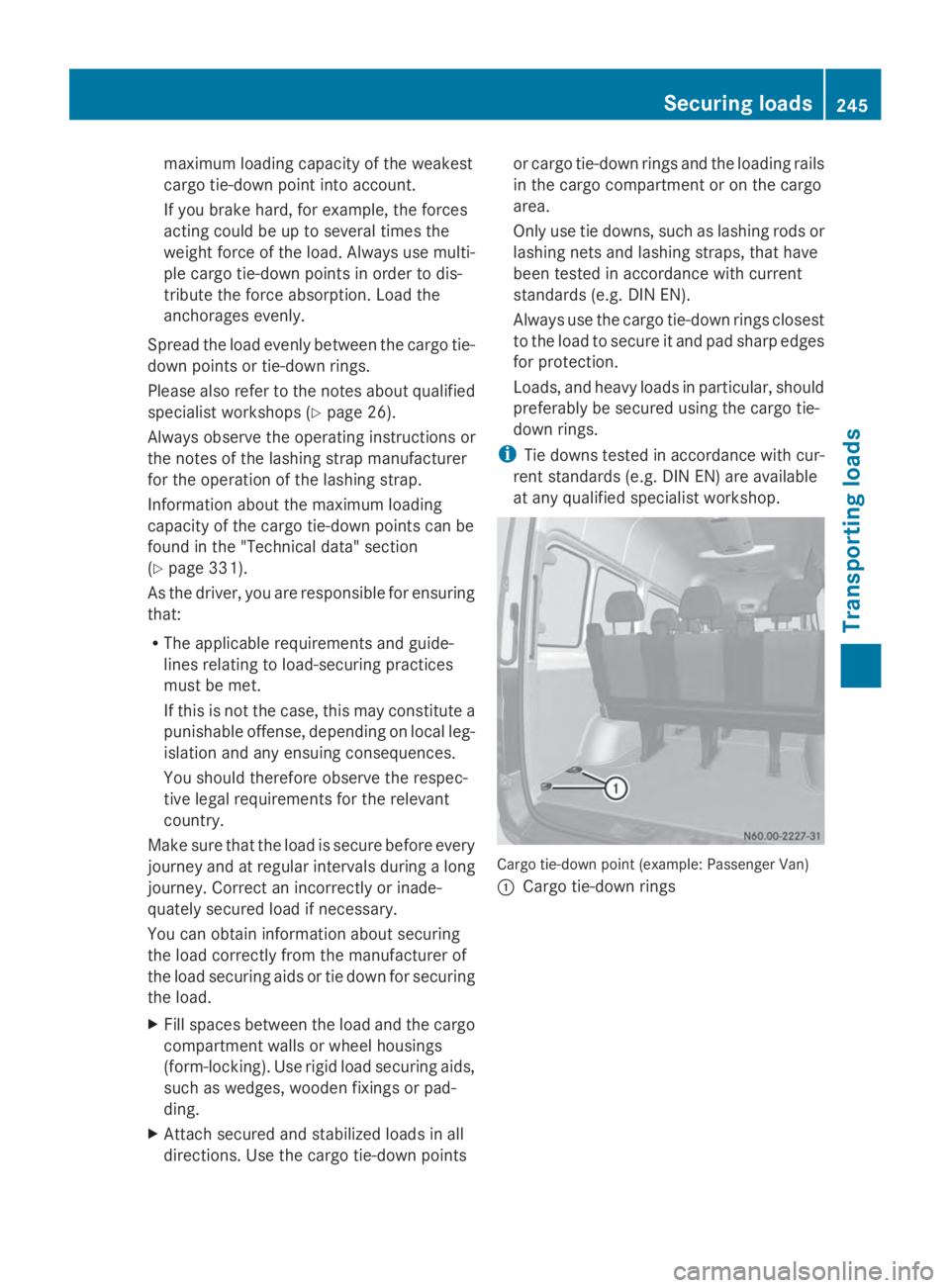
at any qualified specialist workshop. Cargo tie-down point (example: Passenger Van)
0043
Cargo tie-down rings Securing loads
245Transporting loads Z
Page 248 of 338
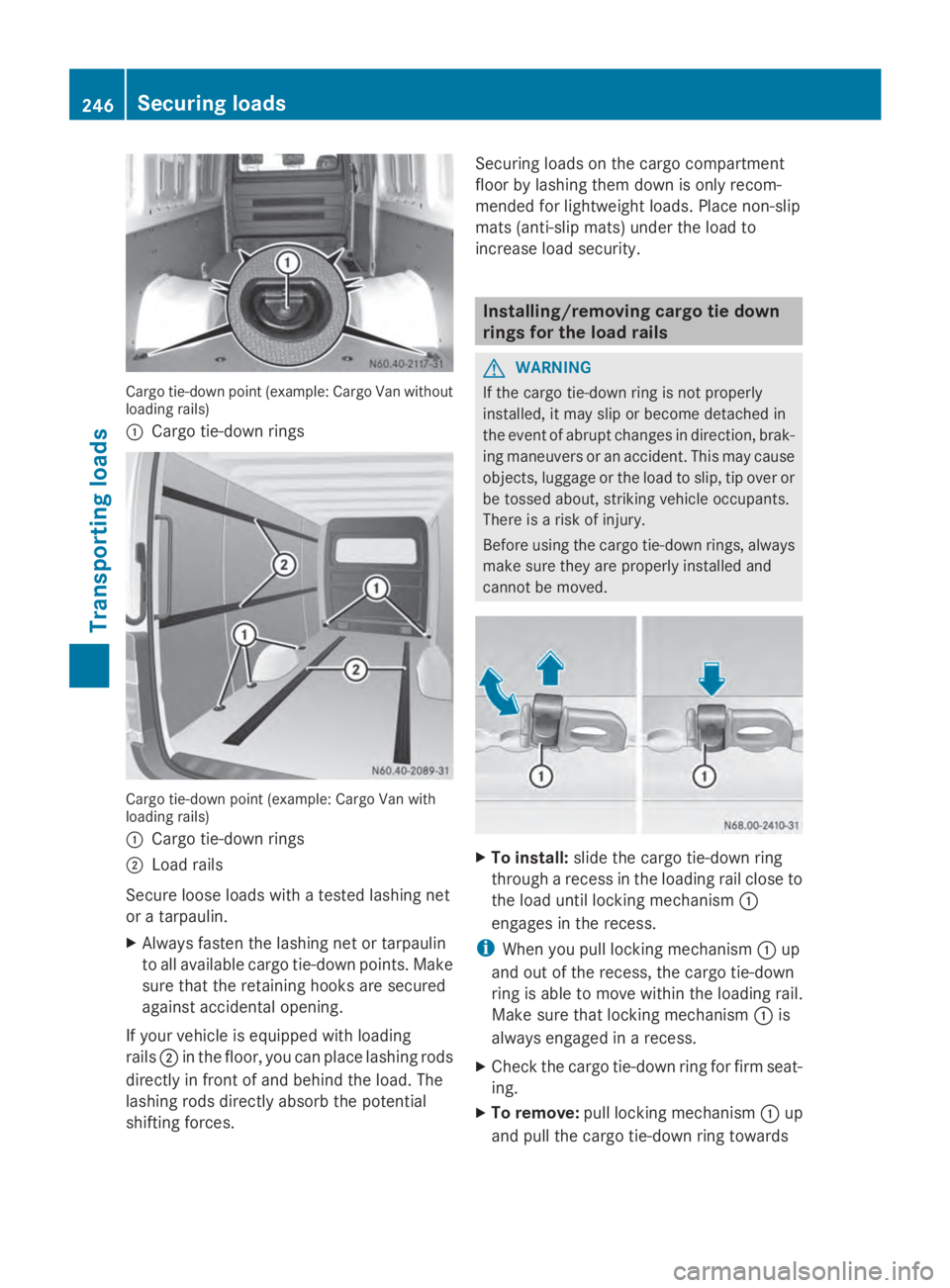
Cargo tie-down point (example: Cargo Van without
loading rails)
0043 Cargo tie-down rings Cargo tie-down point (example: Cargo Van with
loading rails)
0043 Cargo tie-down rings
0044 Load rails
Secure loose loads with a tested lashing net
or a tarpaulin.
X Always fasten the lashing net or tarpaulin
to all available cargo tie-down points. Make
sure that the retaining hooks are secured
against accidental opening.
If your vehicle is equipped with loading
rails 0044in the floor, you can place lashing rods
directly in front of and behind the load. The
lashing rods directly absorb the potential
shifting forces. Securing loads on the cargo compartment
floor by lashing them down is only recom-
mended for lightweight loads. Place non-slip
mats (anti-slip mats) under the load to
increase load security. Installing/removing cargo tie down
rings for the load rails
G
WARNING
If the cargo tie-down ring is not properly
installed, it may slip or become detached in
the event of abrupt changes in direction, brak-
ing maneuvers or an accident. This may cause
objects, luggage or the load to slip, tip over or
be tossed about, striking vehicle occupants.
There is a risk of injury.
Before using the cargo tie-down rings, always
make sure they are properly installed and
cannot be moved. X
To install: slide the cargo tie-down ring
through a recess in the loading rail close to
the load until locking mechanism 0043
engages in the recess.
i When you pull locking mechanism 0043up
and out of the recess, the cargo tie-down
ring is able to move within the loading rail.
Make sure that locking mechanism 0043is
always engaged in a recess.
X Check the cargo tie-down ring for firm seat-
ing.
X To remove: pull locking mechanism 0043up
and pull the cargo tie-down ring towards 246
Securing loadsTransporting loads