engine oil MERCEDES-BENZ SPRINTER 2014 MY14 Operator’s Manual
[x] Cancel search | Manufacturer: MERCEDES-BENZ, Model Year: 2014, Model line: SPRINTER, Model: MERCEDES-BENZ SPRINTER 2014Pages: 338, PDF Size: 6.78 MB
Page 68 of 338
Useful information
This Operator's Manual describes all models
as well as standard and optional equipment
of your vehicle that were available at the time
of going to print. Country-specific variations
are possible. Note that your vehicle may not
be equipped with all of the described func-
tions. This also applies to systems and func-
tions relevant to safety.
Read the information on qualified specialist
workshops (Y page 26). Key
Important safety notes
G
WARNING
Activate the child-proof door locks if children
are traveling in the vehicle. The children could
otherwise open the doors while the vehicle is
in motion, injuring themselves and others. G
WARNING
Do not leave children unsupervised in the
vehicle, even if they are secured in a child
restraint system. Children could otherwise
injure themselves on parts of the vehicle.
They could be severely or even fatally injured
by prolonged exposure to intense heat or
cold.
If children open a door, they could:
R injure other people
R get out of the vehicle and thereby injure
themselves or be injured by a passing vehi-
cle
R severely injure themselves by falling down,
in particular due to the vehicle height
Always take the key with you when leaving the
vehicle, even if you are only leaving for a short
time. G
WARNING
If you attach heavy or large objects to the
SmartKey, the SmartKey could be uninten- tionally turned in the ignition lock. This could
cause the engine to be switched off. There is
a risk of an accident.
Do not attach any heavy or large objects to
the SmartKey. Remove any bulky key rings
before inserting the SmartKey into the igni-
tion lock.
Do not keep the key with remote control:
R with electronic devices, e.g. a mobile
phone or another key with remote control
R with metallic objects, e.g. coins or metal
foil
R in metallic objects, e.g. metal cases
This can affect the key's functionality. Key functions of the remote control
General notes The vehicle is equipped with either 2 or
4 remote controls with a folding key, or 4
mechanical keys. In this Operator's Manual,
both the mechanical keys and the keys with
remote control are referred to as keys. The
remote control key has a range of up to
32 ft (10 m). Use the remote control of the
key only when in immediate proximity of the
vehicle. This prevents theft.
Remote controls that are not included in the
scope of delivery for the vehicle must be pro-
grammed before use. Further information can
be obtained at any authorized Sprinter
Dealer.
The key's remote control locks/unlocks the
driver's door and/or the following centrally if
the factory settings have not been changed:
R the driver's and the co-driver's door
R the sliding doors
R the rear doors
i If the driver's or co-driver's door is not
closed, the corresponding door is not
locked. If a sliding door or a rear door is not
closed properly, none of the rear doors are
locked. 66
KeyOpening and closing
Page 149 of 338
Problems with the transmission
Problem Possible causes/consequences and
0050
0050Solutions The transmission mal-
functions when shifting
gear. The transmission is losing oil.
X
Have the transmission checked immediately at a qualified spe-
cialist workshop. The acceleration char-
acteristics have deter-
iorated noticeably.
The transmission does
not shift. The transmission is in emergency mode.
It is only possible to shift into second gear or reverse gear
R.
X Stop the vehicle.
X Depress the brake pedal.
X Move the selector lever to position P.
X Switch off the engine.
X Wait at least 10 seconds before restarting the engine.
X Depress the brake pedal.
X Move the selector lever to position Dor R.
In position D, the transmission shifts into second gear; in posi-
tion R, the transmission shifts into reverse gear.
X Have the transmission checked immediately at a qualified spe-
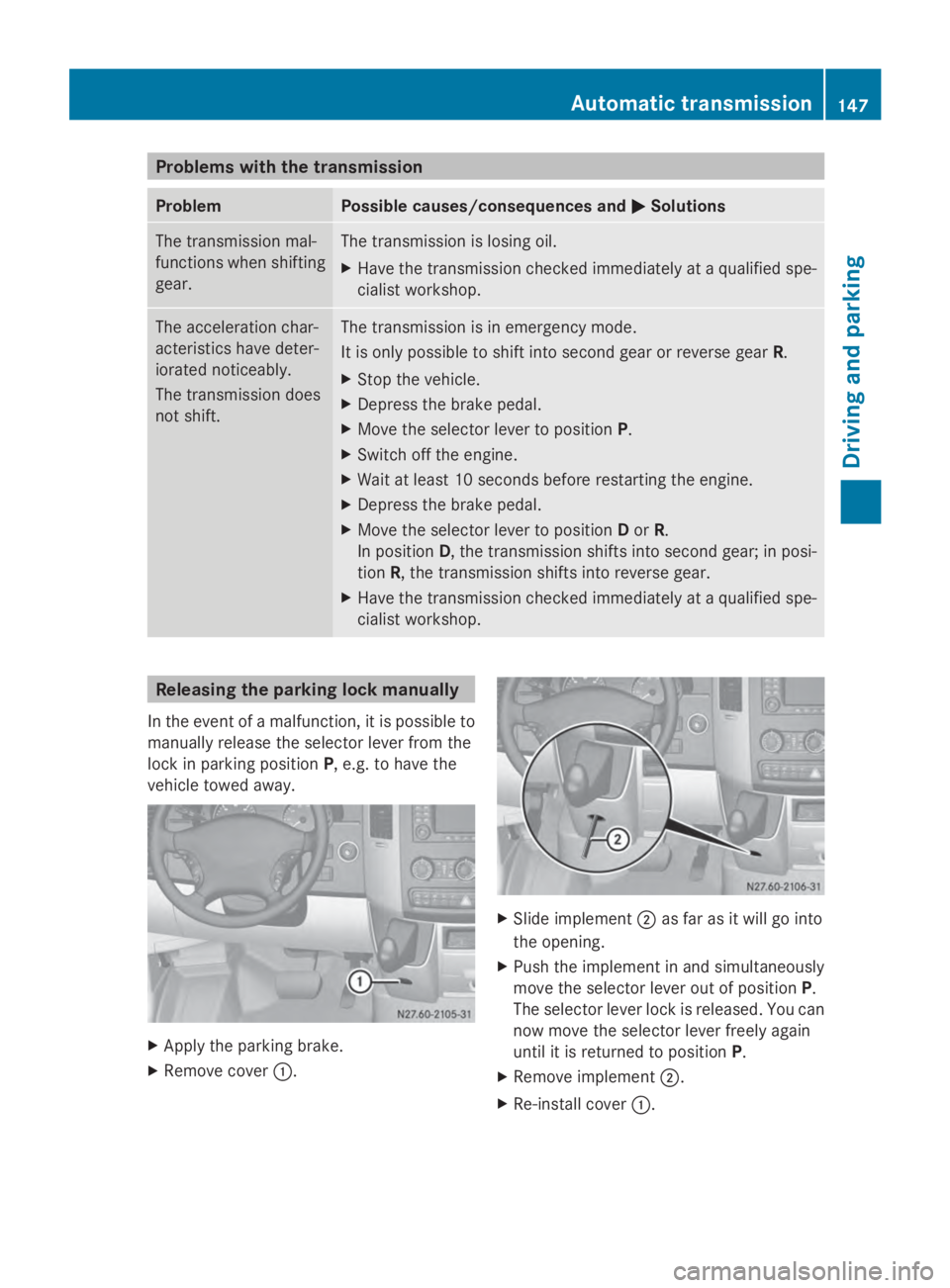
cialist workshop. Releasing the parking lock manually
In the event of a malfunction, it is possible to
manually release the selector lever from the
lock in parking position P, e.g. to have the
vehicle towed away. X
Apply the parking brake.
X Remove cover 0043. X
Slide implement 0044as far as it will go into
the opening.
X Push the implement in and simultaneously
move the selector lever out of position P.
The selector lever lock is released. You can
now move the selector lever freely again
until it is returned to position P.
X Remove implement 0044.
X Re-install cover 0043. Automatic transmission
147Driving and parking Z
Page 157 of 338
here on the inside title page. Details can be
found in the Maintenance Booklet. Short journey
! If the vehicle is predominantly used for
short-distance driving, this could lead to a
malfunction in the automatic cleaning func-
tion for the diesel particle filter. As a result,
fuel may accumulate in the engine oil and
cause engine failure.
Therefore, if you mainly drive short distan-
ces, you should drive on a highway or on
rural roads for 20 minutes every 310 miles
(500 km). This ensures sufficient regener-
ation of the diesel particle filter.
Therefore, if you mainly drive short distances,
drive on a freeway or an inter-urban road for
20 minutes every 300 miles (500 km). This
facilitates the diesel particle filter's burn-off
process. Speed limiter
G
WARNING
Exceeding the stated tire load-bearing capa-
city and the approved maximum speed could
lead to tire damage or the tire bursting. There
is a risk of accident.
Therefore, only use tire types and sizes
approved for your vehicle model. Observe the
tire load rating and speed rating required for
your vehicle.
As the driver, you must find out about the
maximum speed of the vehicle and the result-
ing permissible maximum speed of the tires
(tire and tire pressure). In particular, also
observe the tire approval regulations for each
country.
You must not exceed the speed limit for the
tires listed in the tire pressure tables. You can
find information on tire pressures in the
"Wheels and tires" section (Y page 290).You can permanently limit the maximum
speed of your vehicle to 75 mph (120 km/h).
We recommend that you use an authorized
Sprinter Dealer for the programming of the
maximum speed.
Before overtaking, take into consideration
that the engine speed limiter prevents the
speed increasing beyond the programmed
maximum speed. Travel abroad
Service An extensive network of authorized Sprinter
Dealers is also at your disposal when you are
traveling abroad. Nevertheless, please bear
in mind that service facilities or replacement
parts may not always be immediately availa-
ble. You can obtain a list of workshops at any
authorized Sprinter Dealer.
Fuel
In some countries, only fuels with a higher
sulfur content are available.
Unsuitable fuel can cause engine damage.
Information on fuel (Y
page 320).
Low-beam headlamps If you are traveling in countries where vehi-
cles are driven on the opposite side of the
road to that in which the vehicle is registered,
you will need to:
R
have the halogen headlamps partially
masked
R have the Bi-Xenon headlamps set to sym-
metrical low beam
This prevents glare to oncoming traffic and no
longer illuminates the edge of the road to the
same height and distance.
Have the headlamps masked or adjusted at a
qualified specialist workshop before you
cross the border, but as close to it as possi-
ble. Driving tips
155Driving and parking Z
Page 162 of 338
When loading your vehicle for driving off-road
or on a construction site, keep the vehicle's
center of gravity as low as possible.
Checklist before driving off-road X
Check the fuel and DEF levels
(Y page 183) and top up (Y page 150).
X Engine: check the oil level (Y page 252)
and add oil (Y page 254).
Before driving up or down steep gradients,
fill the oil to the maximum level.
i If you drive up or down steep gradients,
the 00B2 symbol may appear in the display.
The engine operating safety is not put at
risk if you have filled the engine oil to the
maximum level before the journey.
X Vehicle tool kit: check that the jack is
working (Y page 276).
X Make sure that a wheel bolt wrench
(Y page 276), wooden underlay for the
jack, a robust tow cable and a folding spade
are carried in the vehicle.
X Wheels and tires: check the tire tread
depth (Y page 287) and tire pressure
(Y page 290).
Rules for driving off-road !
Always bear the vehicle's ground clear-
ance in mind and avoid obstacles, e.g. deep
ruts.
Obstacles may damage the following parts
of the vehicle:
R the chassis
R the drive train
R the fuel and supply tanks
For this reason, you should always drive
slowly when driving off-road. If you have to
drive over obstacles, have the co-driver
direct you.
i We recommend that you additionally
carry a shovel and a recovery rope with
shackle in the vehicle. R
Ensure that loads and items of luggage are
securely stowed or lashed down
(Y page 242).
R Before driving off-road, stop the vehicle and
shift to a low gear.
R If the surface demands it, temporarily deac-
tivate ASR when pulling away (Y page 60).
R Only drive off-road with the engine running
and a gear engaged.
R Drive slowly and smoothly. Walking pace is
necessary in many situations.
R Avoid spinning the drive wheels.
R Make sure that the wheels always remain
in contact with the ground.
R Drive with extreme care over unknown ter-
rain where you can only see for a short dis-
tance. As a precaution, get out of the vehi-
cle to take a look at the route to be taken
in advance.
R Check the water depth before fording.
R Watch out for obstacles (e.g. rocks, holes,
tree stumps and ruts).
R Avoid edges where the surface could crum-
ble or break away.
Checklist after driving off-road !
If you detect damage to the vehicle after
driving off-road, have the vehicle checked
immediately at a qualified specialist work-
shop.
Off-road driving places a higher demand on
your vehicle than normal road operation.
Check your vehicle after driving on rough ter-
rain. By doing so you will notice any damage
in good time and reduce the risk of an acci-
dent for yourself and other road users. Clean
your vehicle thoroughly before driving on pub-
lic roads.
Observe the following points after driving off-
road, on construction sites and before driving
on public roads:
X Activate ASR (Y page 60).
X Clean the headlamps and tail lamps and
check them for damage. 160
Driving tipsDriving and parking
Page 184 of 338
Useful information
This Operator's Manual describes all models
as well as standard and optional equipment
of your vehicle that were available at the time
of going to print. Country-specific variations
are possible. Note that your vehicle may not
be equipped with all of the described func-
tions. This also applies to systems and func-
tions relevant to safety.
Read the information on qualified specialist
workshops (Y page 26). Important safety notes
G
WARNING
If you are driving and reach through the steer-
ing wheel to operate the adjustment knob,
you could lose control of the vehicle. There is
a risk of an accident and injury.
Only operate the adjustment knobs when the
vehicle is stationary. Do not reach through the
steering wheel when driving. G
WARNING
If you operate information systems and com-
munication equipment integrated in the vehi-
cle while driving, you will be distracted from
traffic conditions. You could also lose control
of the vehicle. There is a risk of an accident.
Only operate the equipment when the traffic
situation permits. If you are not sure that this
is possible, park the vehicle paying attention
to traffic conditions and operate the equip-
ment when the vehicle is stationary. G
WARNING
If the instrument cluster has failed or mal-
functioned, you may not recognize function
restrictions in systems relevant to safety. The
operating safety of your vehicle may be
impaired. There is a risk of an accident.
Drive on carefully. Have the vehicle checked
at a qualified specialist workshop immedi-
ately. If uncertainties regarding the operating safety
of the vehicle arise when continuing the jour-
ney, stop the vehicle, paying attention to road
and traffic conditions. Instrument cluster
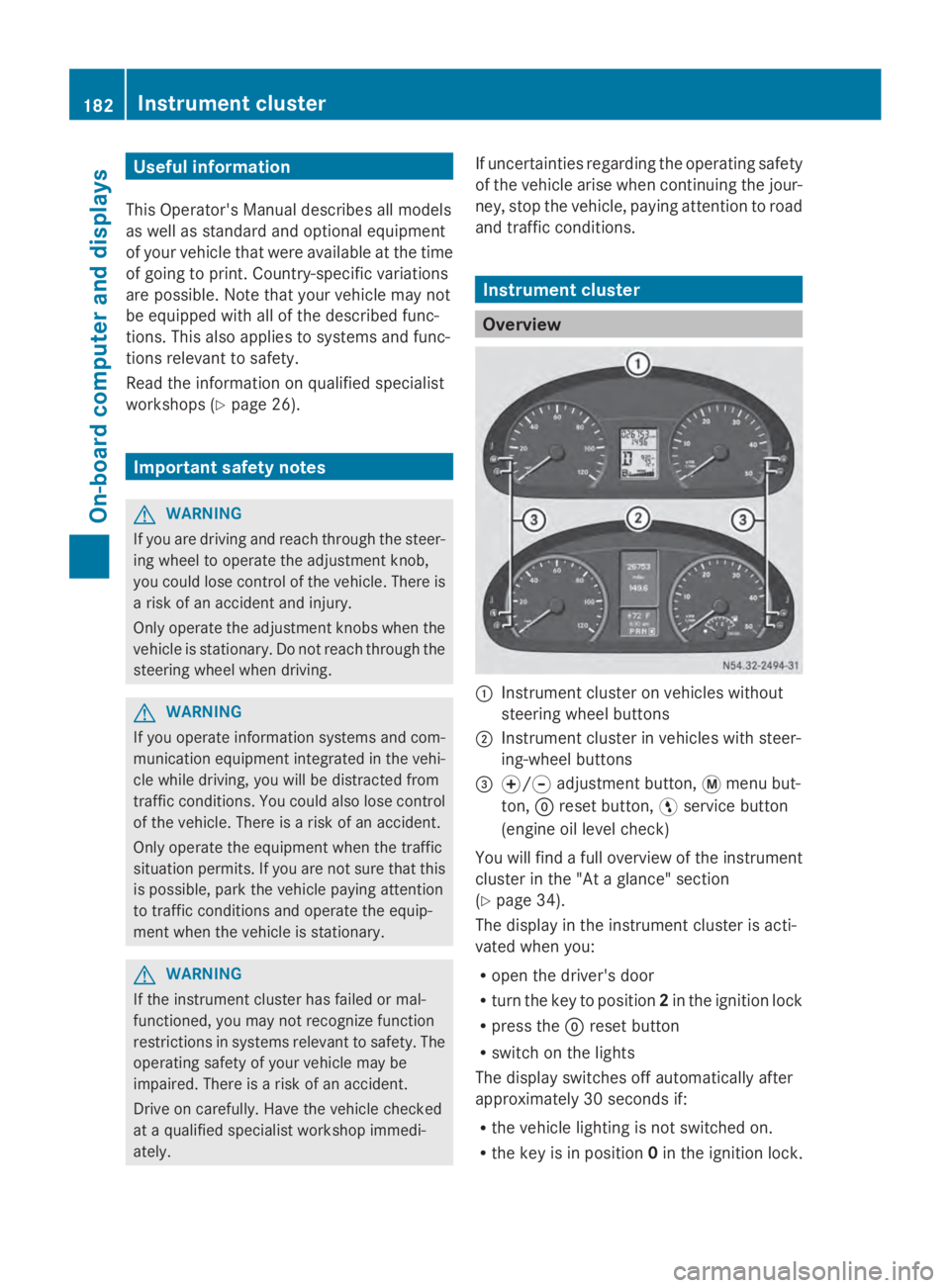
Overview
0043
Instrument cluster on vehicles without
steering wheel buttons
0044 Instrument cluster in vehicles with steer-
ing-wheel buttons
0087 0074/0075 adjustment button, 0079menu but-
ton, 0045reset button, 0098service button
(engine oil level check)
You will find a full overview of the instrument
cluster in the "At a glance" section
(Y page 34).
The display in the instrument cluster is acti-
vated when you:
R open the driver's door
R turn the key to position 2in the ignition lock
R press the 0045reset button
R switch on the lights
The display switches off automatically after
approximately 30 seconds if:
R the vehicle lighting is not switched on.
R the key is in position 0in the ignition lock. 182
Instrument clusterOn-board computer and displays
Page 187 of 338
Using the
0074,0075,0079or0045 adjustment but-
tons, you can select the following functions:
R Calling up the service due date
(Y page 260)
R Checking the oil level (Y page 252)
R Checking the DEF supply (Y page 184)
R Preselecting/setting the auxiliary heating
switch-on time (Y page 124)
R Tire pressure monitor (Y page 293)
R Setting the time (Y page 185)
R Activating/deactivating Highbeam Assist
(Y page 194)
R Setting the daytime running lamps
(Y page 185)
Setting the time X
Turn the key to position 2in the ignition
lock.
X Press the 0079menu button repeatedly until
the hours figure flashes.
X Press the 0074or0075 button to set the hour.
X Press the 0045reset button.
The minute display flashes.
X Press the 0074or0075 button to set the minute.
i If you keep the 0074or0075 button pressed,
the value will change continuously.
Activating/deactivating Highbeam
Assist X
Turn the key to position 2in the ignition
lock.
X Press the 0079menu button repeatedly until
the 00CE indicator lamp flashes and the
on
on orOFF
OFF message appears in the display.
X Use the 0074or0075 button to switch High-
beam Assist on/off.
Switching the daytime running lamps
on/off If you switch the daytime running lights
ON ON,
the daytime running lights will automatically
light up when the engine is running. For safety reasons, it is only possible to
change this setting when the vehicle is sta-
tionary. The factory setting is
ON ONin countries
in which constant headlamp mode or daytime
running lights are mandatory.
X Turn the key to position 2in the ignition
lock.
X Press the 0079menu button repeatedly until
the 0058 indicator lamp flashes and the
on on orOFF
OFF message appears in the display.
X Press the 0074or0075 button to activate or
deactivate the daytime running lamps.
i USA only:
If you turn the light switch to 0060or
0058, the corresponding light switches on.
If you turn the light switch to 0058, the
daytime running lamps remain switched
on.
Canada only:
If you turn the light switch to 0058, the low-
beam headlamps switch on. If you turn the
light switch to 0060or0058, the daytime
running lamps remain switched on. On-board computer (vehicles without steering wheel buttons)
185On-board computer and displays Z
Page 190 of 338
Menu Overview
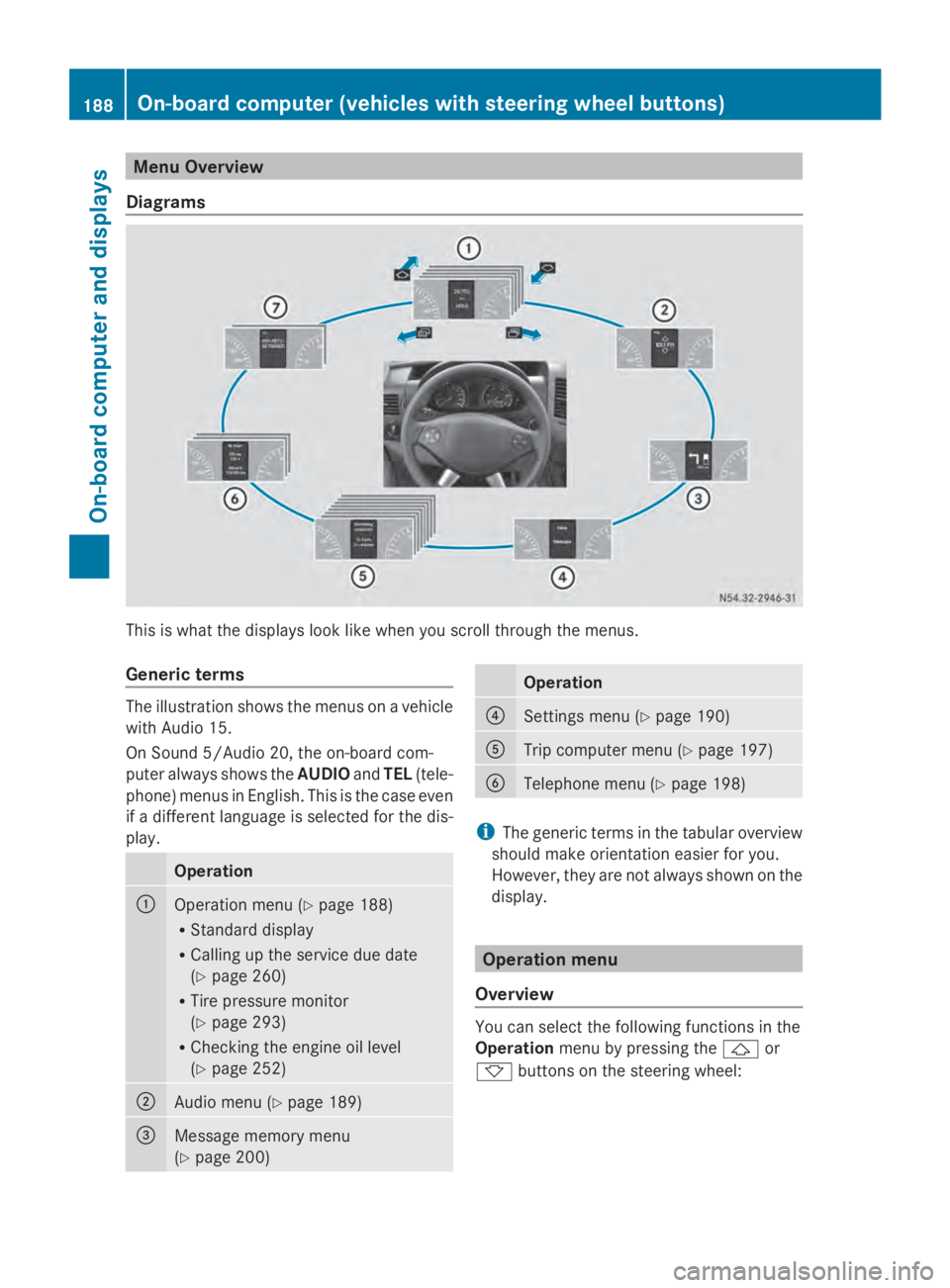
Diagrams This is what the displays look like when you scroll through the menus.
Generic terms The illustration shows the menus on a vehicle
with Audio 15.
On Sound 5/Audio 20, the on-board com-
puter always shows the AUDIOandTEL (tele-
phone) menus in English. This is the case even
if a different language is selected for the dis-
play. Operation
0043
Operation menu (Y
page 188)
R Standard display
R Calling up the service due date
(Y page 260)
R Tire pressure monitor
(Y page 293)
R Checking the engine oil level
(Y page 252) 0044
Audio menu (Y
page 189) 0087
Message memory menu
(Y
page 200) Operation
0085
Settings menu (Y
page 190) 0083
Trip computer menu (Y
page 197) 0084
Telephone menu (Y
page 198) i
The generic terms in the tabular overview
should make orientation easier for you.
However, they are not always shown on the
display. Operation menu
Overview You can select the following functions in the
Operation
menu by pressing the 0041or
0068 buttons on the steering wheel: 188
On-board computer (vehicles with steering wheel buttons)On-board computer and displays
Page 217 of 338
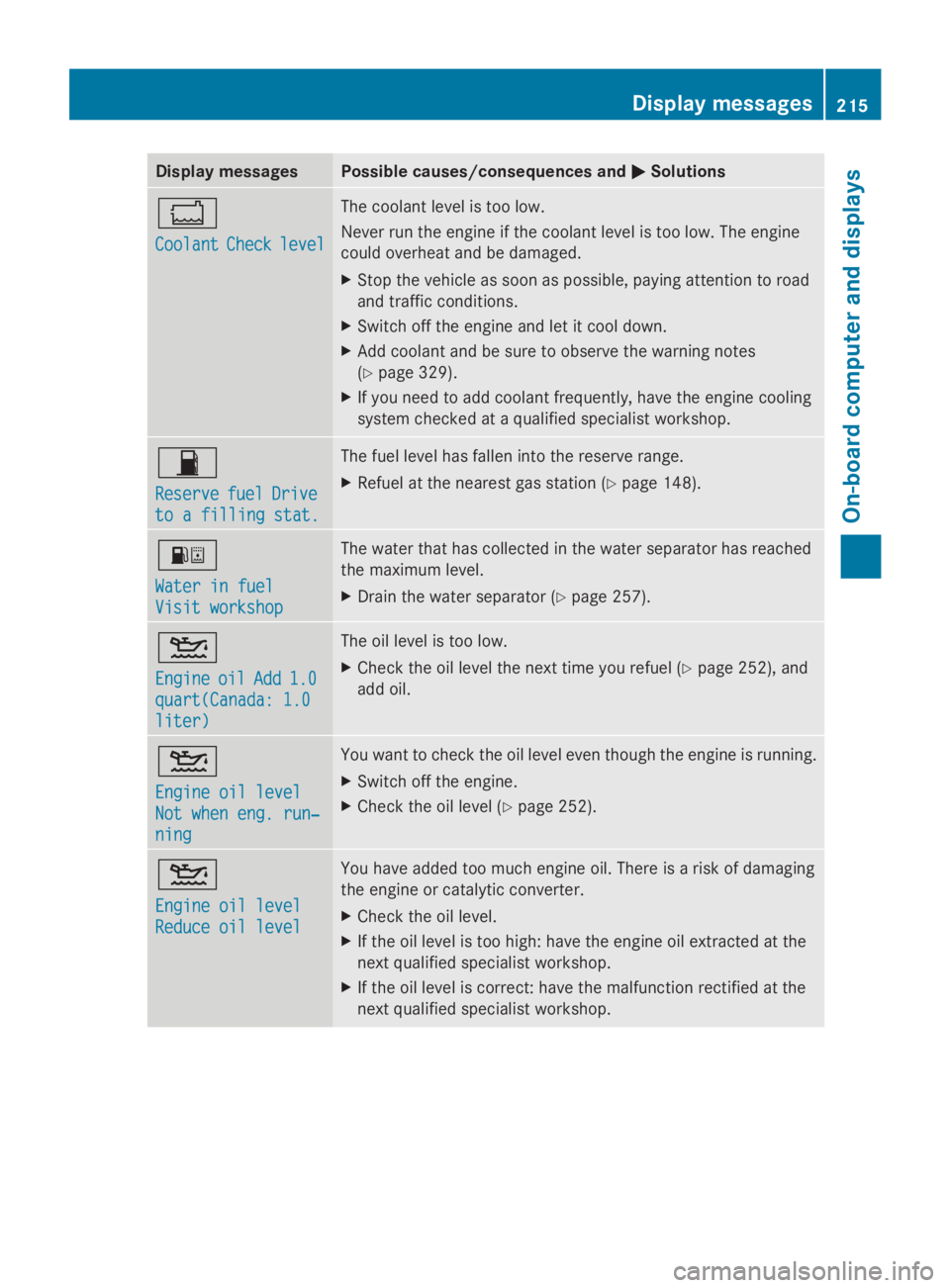
Display messages Possible causes/consequences and
0050
0050Solutions 00BC
Coolant Coolant
Check
Checklevel
level The coolant level is too low.
Never run the engine if the coolant level is too low. The engine
could overheat and be damaged.
X
Stop the vehicle as soon as possible, paying attention to road
and traffic conditions.
X Switch off the engine and let it cool down.
X Add coolant and be sure to observe the warning notes
(Y page 329).
X If you need to add coolant frequently, have the engine cooling
system checked at a qualified specialist workshop. 00B5
Reserve Reserve
fuel
fuelDrive
Drive
to a filling stat.
to a filling stat. The fuel level has fallen into the reserve range.
X
Refuel at the nearest gas station ( Ypage 148). 00B8
Water in fuel Water in fuel
Visit workshop Visit workshop The water that has collected in the water separator has reached
the maximum level.
X
Drain the water separator (Y page 257).00B2
Engine Engine
oil
oilAdd
Add 1.0
1.0
quart(Canada: 1.0
quart(Canada: 1.0
liter) liter) The oil level is too low.
X
Check the oil level the next time you refuel (Y page 252), and
add oil. 00B2
Engine oil level Engine oil level
Not when eng. run‐ Not when eng. run‐
ning ning You want to check the oil level even though the engine is running.
X
Switch off the engine.
X Check the oil level (Y page 252).00B2
Engine oil level Engine oil level
Reduce oil level Reduce oil level You have added too much engine oil. There is a risk of damaging
the engine or catalytic converter.
X
Check the oil level.
X If the oil level is too high: have the engine oil extracted at the
next qualified specialist workshop.
X If the oil level is correct: have the malfunction rectified at the
next qualified specialist workshop. Display
messages
215On-board computer and displays Z
Page 218 of 338
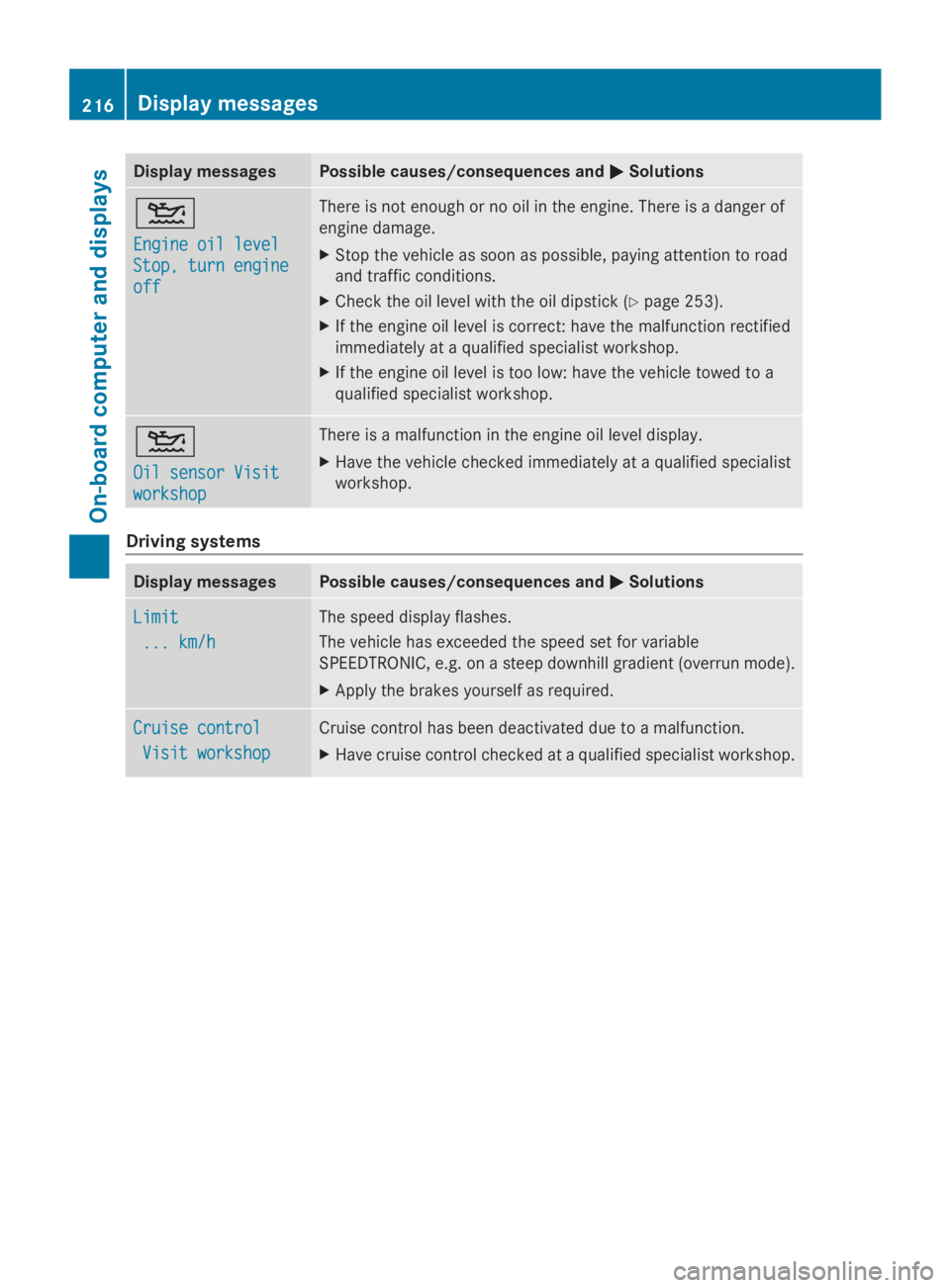
Display messages Possible causes/consequences and
0050
0050Solutions 00B2
Engine oil level Engine oil level
Stop, turn engine Stop, turn engine
off off There is not enough or no oil in the engine. There is a danger of
engine damage.
X
Stop the vehicle as soon as possible, paying attention to road
and traffic conditions.
X Check the oil level with the oil dipstick (Y page 253).
X If the engine oil level is correct: have the malfunction rectified
immediately at a qualified specialist workshop.
X If the engine oil level is too low: have the vehicle towed to a
qualified specialist workshop. 00B2
Oil sensor Visit Oil sensor Visit
workshop workshop There is a malfunction in the engine oil level display.
X
Have the vehicle checked immediately at a qualified specialist
workshop. Driving systems
Display messages Possible causes/consequences and
0050 0050Solutions Limit
Limit
... km/h
... km/h The speed display flashes.
The vehicle has exceeded the speed set for variable
SPEEDTRONIC, e.g. on a steep downhill gradient (overrun mode).
X Apply the brakes yourself as required. Cruise control Cruise control
Visit workshop
Visit workshop Cruise control has been deactivated due to a malfunction.
X
Have cruise control checked at a qualified specialist workshop. 216
Display
messagesOn-board computer and displays
Page 227 of 338
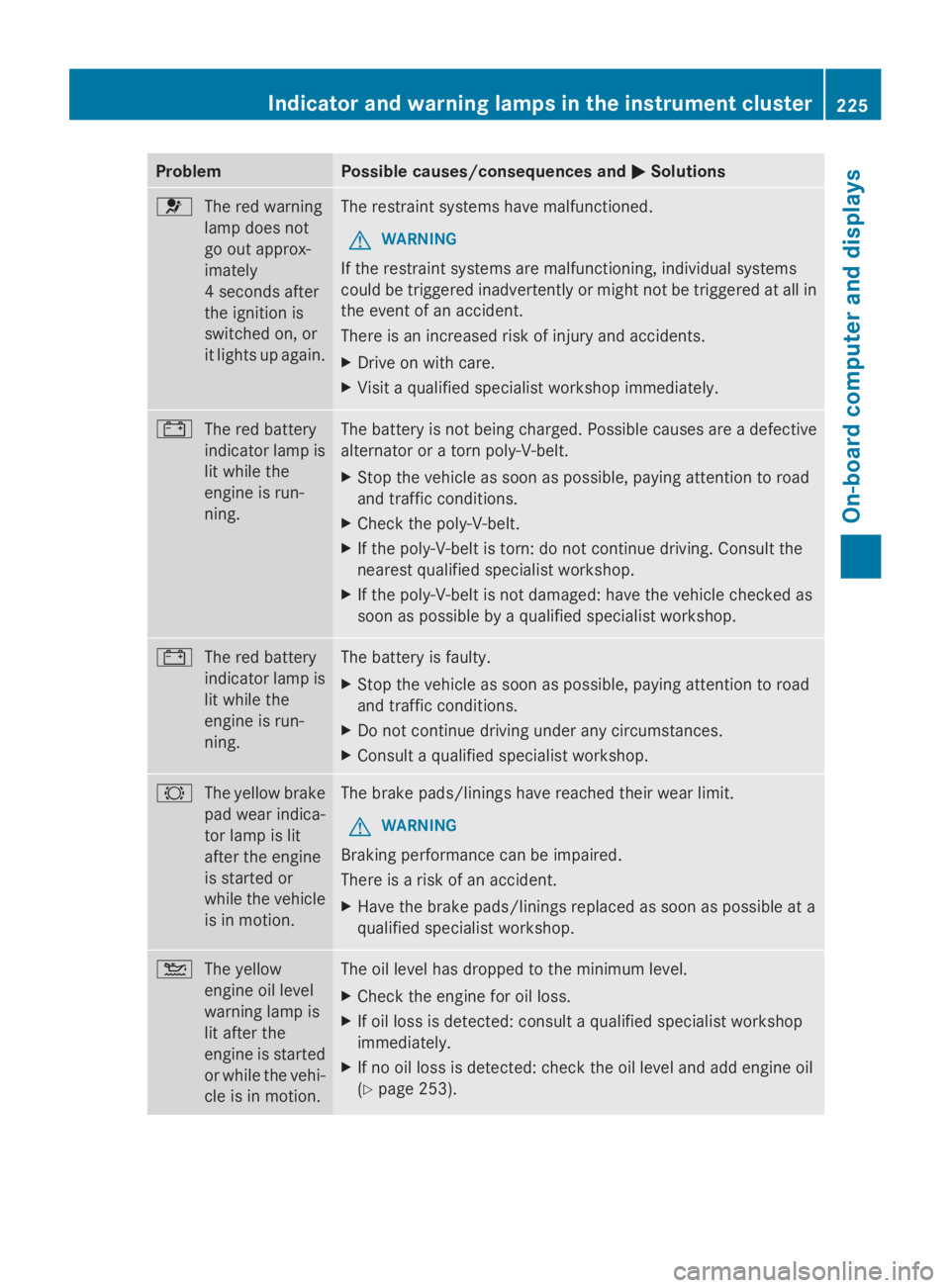
Problem Possible causes/consequences and
0050
0050Solutions 0075
The red warning
lamp does not
go out approx-
imately
4 seconds after
the ignition is
switched on, or
it lights up again. The restraint systems have malfunctioned.
G WARNING
If the restraint systems are malfunctioning, individual systems
could be triggered inadvertently or might not be triggered at all in
the event of an accident.
There is an increased risk of injury and accidents.
X Drive on with care.
X Visit a qualified specialist workshop immediately. 003D
The red battery
indicator lamp is
lit while the
engine is run-
ning. The battery is not being charged. Possible causes are a defective
alternator or a torn poly-V-belt.
X
Stop the vehicle as soon as possible, paying attention to road
and traffic conditions.
X Check the poly-V-belt.
X If the poly-V-belt is torn: do not continue driving. Consult the
nearest qualified specialist workshop.
X If the poly-V-belt is not damaged: have the vehicle checked as
soon as possible by a qualified specialist workshop. 003D
The red battery
indicator lamp is
lit while the
engine is run-
ning. The battery is faulty.
X
Stop the vehicle as soon as possible, paying attention to road
and traffic conditions.
X Do not continue driving under any circumstances.
X Consult a qualified specialist workshop. 0026
The yellow brake
pad wear indica-
tor lamp is lit
after the engine
is started or
while the vehicle
is in motion. The brake pads/linings have reached their wear limit.
G WARNING
Braking performance can be impaired.
There is a risk of an accident.
X Have the brake pads/linings replaced as soon as possible at a
qualified specialist workshop. 00B2
The yellow
engine oil level
warning lamp is
lit after the
engine is started
or while the vehi-
cle is in motion. The oil level has dropped to the minimum level.
X
Check the engine for oil loss.
X If oil loss is detected: consult a qualified specialist workshop
immediately.
X If no oil loss is detected: check the oil level and add engine oil
(Y page 253). Indicator and warning lamps in the instrument cluster
225On-board computer and displays Z