instrument cluster MERCEDES-BENZ SPRINTER 2014 MY14 Operator’s Manual
[x] Cancel search | Manufacturer: MERCEDES-BENZ, Model Year: 2014, Model line: SPRINTER, Model: MERCEDES-BENZ SPRINTER 2014Pages: 338, PDF Size: 6.78 MB
Page 192 of 338
Using the steering wheel buttons
X
Switch on the audio equipment (see the
separate operating instructions).
X Press the 0080or007F button repeatedly
until the station selected appears in the
display.
The type of search depends on the setting
of the radio station selection
(Y page 196): the nearest stored station
will be selected or the station search starts.
X Press the 0041or0068 button to select the
desired station.
i You can only store new stations on the
audio system itself. See the separate oper-
ating instructions.
You can also operate the audio equipment
in the same way as usual.
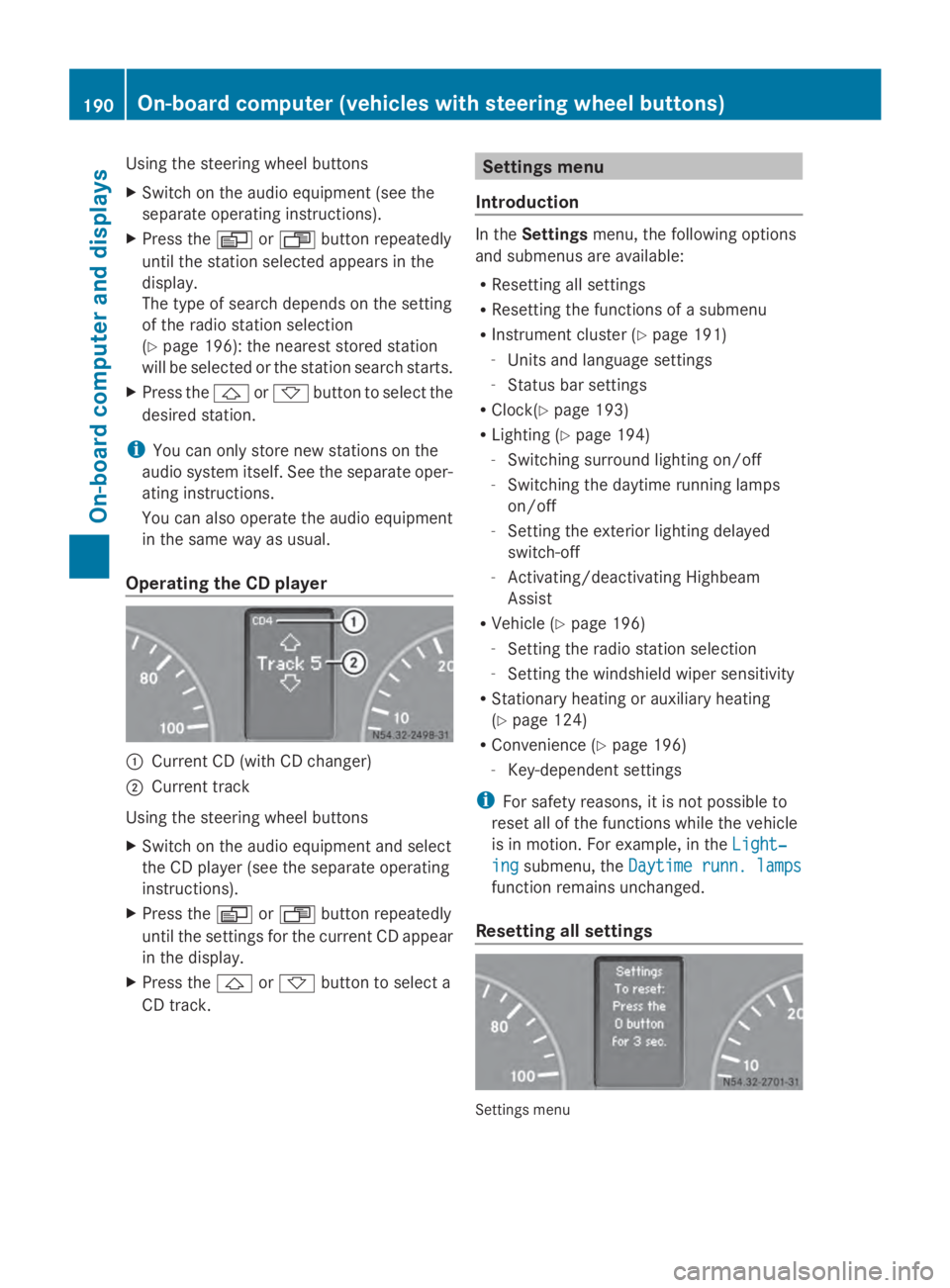
Operating the CD player 0043
Current CD (with CD changer)
0044 Current track
Using the steering wheel buttons
X Switch on the audio equipment and select
the CD player (see the separate operating
instructions).
X Press the 0080or007F button repeatedly
until the settings for the current CD appear
in the display.
X Press the 0041or0068 button to select a
CD track. Settings menu
Introduction In the
Settings menu, the following options
and submenus are available:
R Resetting all settings
R Resetting the functions of a submenu
R Instrument cluster (Y page 191)
- Units and language settings
- Status bar settings
R Clock(Y page 193)
R Lighting (Y page 194)
- Switching surround lighting on/off
- Switching the daytime running lamps
on/off
- Setting the exterior lighting delayed
switch-off
- Activating/deactivating Highbeam
Assist
R Vehicle (Y page 196)
- Setting the radio station selection
- Setting the windshield wiper sensitivity
R Stationary heating or auxiliary heating
(Y page 124)
R Convenience (Y page 196)
- Key-dependent settings
i For safety reasons, it is not possible to
reset all of the functions while the vehicle
is in motion. For example, in the Light‐ Light‐
ing
ing submenu, the Daytime runn. lamps
Daytime runn. lamps
function remains unchanged.
Resetting all settings Settings menu190
On-board computer (vehicles with steering wheel buttons)On-board computer and displays
Page 193 of 338
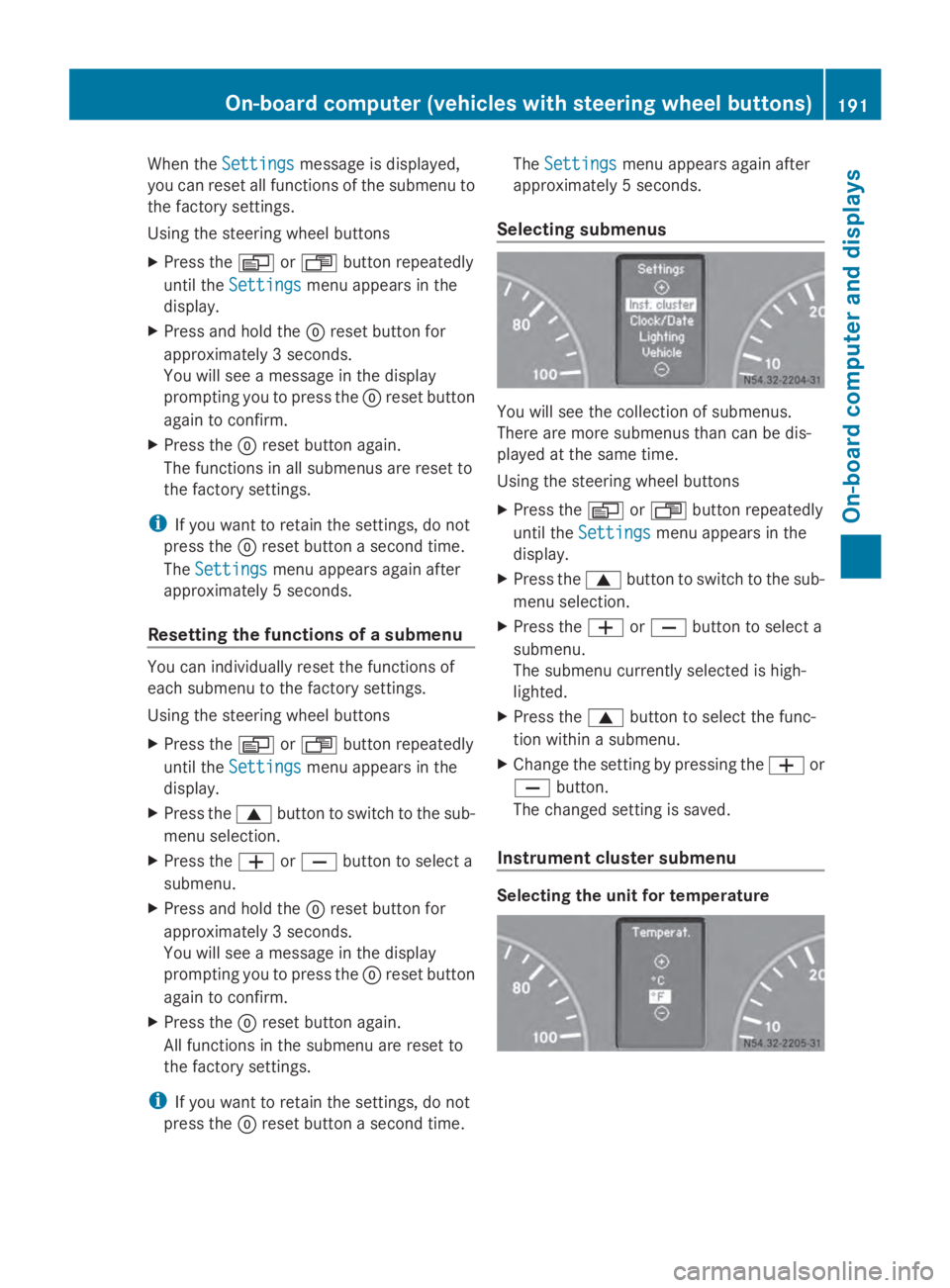
When the
Settings
Settings message is displayed,
you can reset all functions of the submenu to
the factory settings.
Using the steering wheel buttons
X Press the 0080or007F button repeatedly
until the Settings
Settings menu appears in the
display.
X Press and hold the 0045reset button for
approximately 3 seconds.
You will see a message in the display
prompting you to press the 0045reset button
again to confirm.
X Press the 0045reset button again.
The functions in all submenus are reset to
the factory settings.
i If you want to retain the settings, do not
press the 0045reset button a second time.
The Settings
Settings menu appears again after
approximately 5 seconds.
Resetting the functions of a submenu You can individually reset the functions of
each submenu to the factory settings.
Using the steering wheel buttons
X Press the 0080or007F button repeatedly
until the Settings
Settings menu appears in the
display.
X Press the 0063button to switch to the sub-
menu selection.
X Press the 0081or0082 button to select a
submenu.
X Press and hold the 0045reset button for
approximately 3 seconds.
You will see a message in the display
prompting you to press the 0045reset button
again to confirm.
X Press the 0045reset button again.
All functions in the submenu are reset to
the factory settings.
i If you want to retain the settings, do not
press the 0045reset button a second time. The
Settings
Settings menu appears again after
approximately 5 seconds.
Selecting submenus You will see the collection of submenus.
There are more submenus than can be dis-
played at the same time.
Using the steering wheel buttons
X
Press the 0080or007F button repeatedly
until the Settings Settings menu appears in the
display.
X Press the 0063button to switch to the sub-
menu selection.
X Press the 0081or0082 button to select a
submenu.
The submenu currently selected is high-
lighted.
X Press the 0063button to select the func-
tion within a submenu.
X Change the setting by pressing the 0081or
0082 button.
The changed setting is saved.
Instrument cluster submenu Selecting the unit for temperatureOn-board computer (vehicles with steering wheel buttons)
191On-board computer and displays Z
Page 198 of 338
Vehicle submenu
Setting the radio station selection
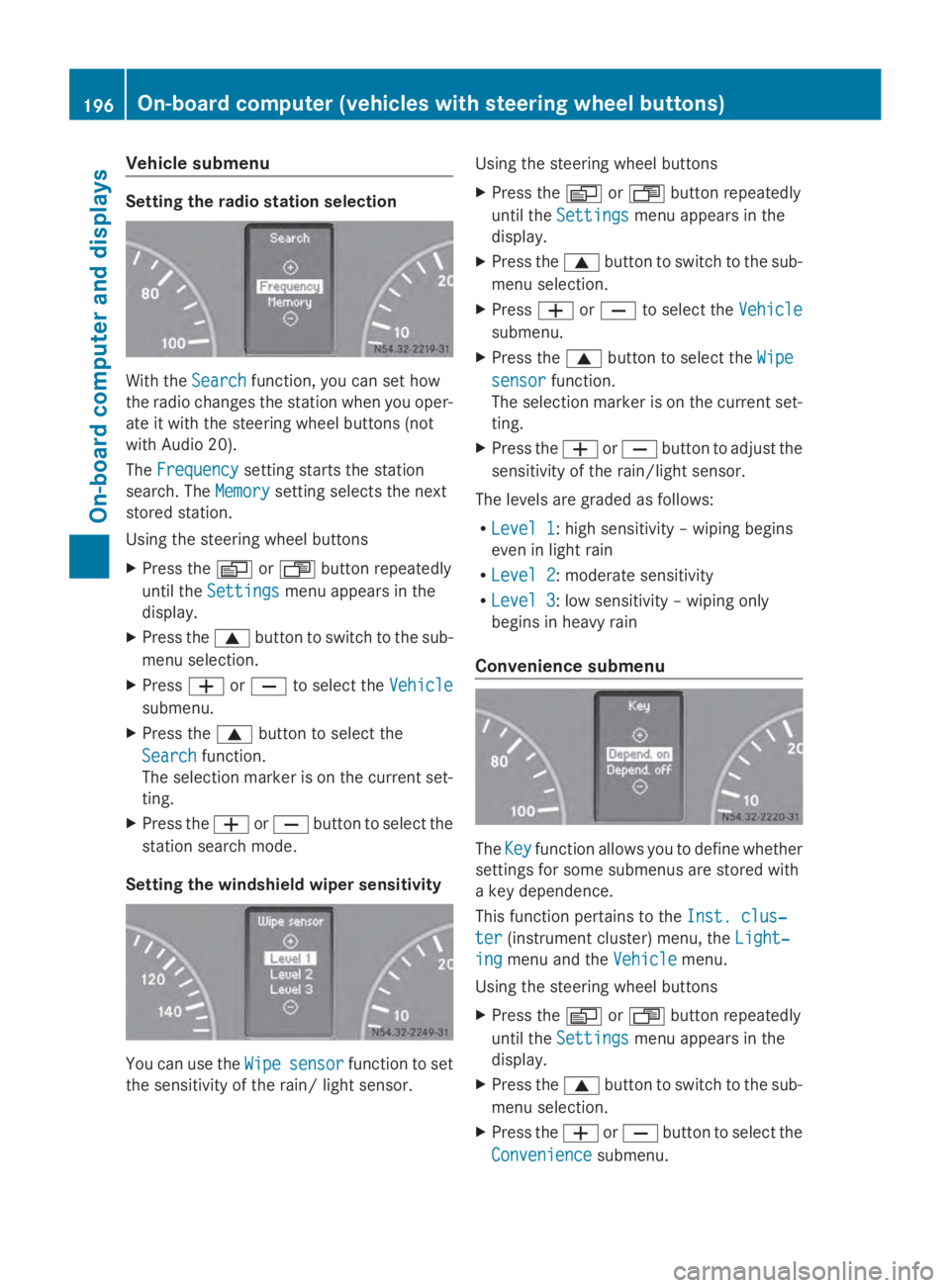
With the
Search
Searchfunction, you can set how
the radio changes the station when you oper-
ate it with the steering wheel buttons (not
with Audio 20).
The Frequency
Frequency setting starts the station
search. The Memory
Memorysetting selects the next
stored station.
Using the steering wheel buttons
X Press the 0080or007F button repeatedly
until the Settings Settings menu appears in the
display.
X Press the 0063button to switch to the sub-
menu selection.
X Press 0081or0082 to select the Vehicle
Vehicle
submenu.
X Press the 0063button to select the
Search
Search function.
The selection marker is on the current set-
ting.
X Press the 0081or0082 button to select the
station search mode.
Setting the windshield wiper sensitivity You can use the
Wipe
Wipesensor
sensor function to set
the sensitivity of the rain/ light sensor. Using the steering wheel buttons
X
Press the 0080or007F button repeatedly
until the Settings Settings menu appears in the
display.
X Press the 0063button to switch to the sub-
menu selection.
X Press 0081or0082 to select the Vehicle
Vehicle
submenu.
X Press the 0063button to select the Wipe
Wipe
sensor
sensor function.
The selection marker is on the current set-
ting.
X Press the 0081or0082 button to adjust the
sensitivity of the rain/light sensor.
The levels are graded as follows:
R Level 1 Level 1: high sensitivity – wiping begins
even in light rain
R Level 2 Level 2: moderate sensitivity
R Level 3
Level 3: low sensitivity – wiping only
begins in heavy rain
Convenience submenu The
Key Key function allows you to define whether
settings for some submenus are stored with
a key dependence.
This function pertains to the Inst. clus‐ Inst. clus‐
ter
ter (instrument cluster) menu, the Light‐
Light‐
ing
ing menu and the Vehicle
Vehiclemenu.
Using the steering wheel buttons
X Press the 0080or007F button repeatedly
until the Settings Settings menu appears in the
display.
X Press the 0063button to switch to the sub-
menu selection.
X Press the 0081or0082 button to select the
Convenience
Convenience submenu.196
On-board computer (vehicles with steering wheel buttons)On-board computer and displays
Page 201 of 338
X
Press the 0041or0068 button to select the
desired name.
Or
X To start rapid scrolling: press and hold
the 0041 or0068 button longer than 1 sec-
ond.
Rapid scrolling stops when you release the
button or reach the end of the list.
Using the steering wheel buttons
X To start dialing: press the0061button.
The on-board computer dials the corre-
sponding phone number.
When a connection is established, the
name of the other person and/or the call
duration appear in the display.
X To exit the telephone book: press the
0076 button.
Redialing The on-board computer saves the last names
or numbers dialed in the redial memory.
Using the steering wheel buttons
X Use the 0080or007F buttons to select the
TEL
TEL menu.
The display shows the mobile phone opera-
tional readiness symbol.
X Press the 0061button.
The display shows the most recently dialed
numbers or names in the redial memory.
X Press the 0041or0068 button to select the
desired name or number.
X To start dialing: press the0061button.
The on-board computer dials the corre-
sponding phone number.
When a connection is established, the
name of the other person and/or the call
duration appear in the display.
Or
X To exit the redial memory: press the
0076 button. Display messages
Notes on display messages
Important safety notes G
WARNING
No information will be displayed if either the
instrument cluster or the display is inopera-
tive.
As a result, you will not be able to see warning
and indicator lamps or information about the
driving conditions, such as speed or outside
temperature. Driving characteristics may be
impaired. Adjust your driving style and vehicle
speed accordingly.
Contact a qualified specialist workshop
immediately. G
WARNING
If service work is not carried out correctly, the
operating safety of your vehicle may be
affected. This could cause you to lose control
of your vehicle and cause an accident. More-
over, the safety systems may no longer be
able to protect you or others as they are
designed to do.
Always have service work carried out at a
qualified specialist workshop.
i If you turn the key to position 2in the
ignition, a display check is performed. All
warning/indicator lamps (except the turn
signal indicator lamps) and the display are
activated. Before starting the journey,
check that the warning and indicator lamps
are operating correctly.
Vehicles without steering wheel but-
tons Warnings, malfunctions or additional infor-
mation may also be shown in the display. The
following tables show all the display mes-
sages. A warning tone sounds with certain
display messages. Display messages
199On-board computer and displays Z
Page 223 of 338
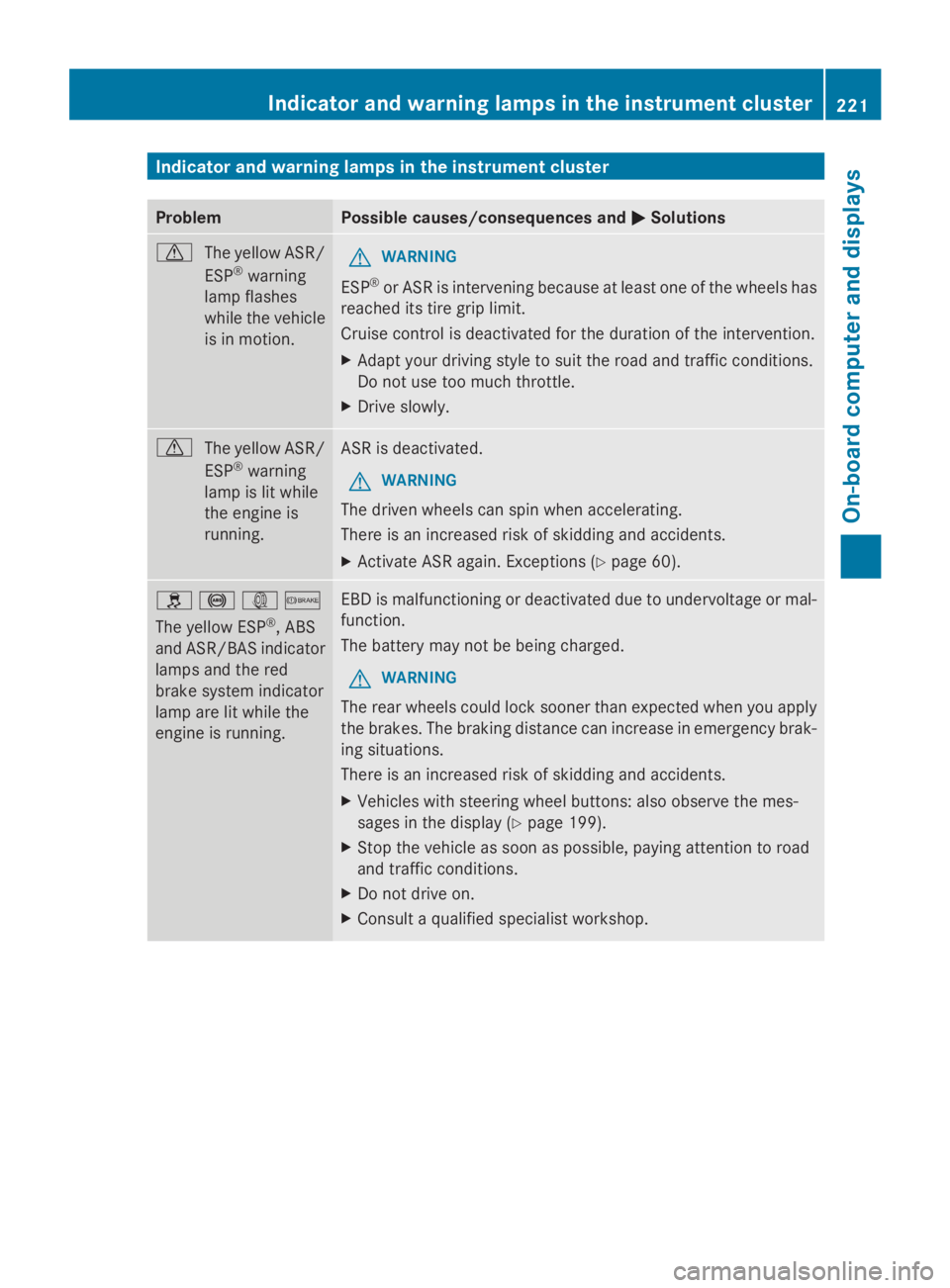
Indicator and warning lamps in the instrument cluster
Problem Possible causes/consequences and
0050
0050Solutions 0072
The yellow ASR/
ESP®
warning
lamp flashes
while the vehicle
is in motion. G
WARNING
ESP ®
or ASR is intervening because at least one of the wheels has
reached its tire grip limit.
Cruise control is deactivated for the duration of the intervention.
X Adapt your driving style to suit the road and traffic conditions.
Do not use too much throttle.
X Drive slowly. 0072
The yellow ASR/
ESP®
warning
lamp is lit while
the engine is
running. ASR is deactivated.
G WARNING
The driven wheels can spin when accelerating.
There is an increased risk of skidding and accidents.
X Activate ASR again. Exceptions (Y page 60).0089
0025003D0065
The yellow ESP ®
, ABS
and ASR/BAS indicator
lamps and the red
brake system indicator
lamp are lit while the
engine is running. EBD is malfunctioning or deactivated due to undervoltage or mal-
function.
The battery may not be being charged.
G WARNING
The rear wheels could lock sooner than expected when you apply
the brakes. The braking distance can increase in emergency brak-
ing situations.
There is an increased risk of skidding and accidents.
X Vehicles with steering wheel buttons: also observe the mes-
sages in the display (Y page 199).
X Stop the vehicle as soon as possible, paying attention to road
and traffic conditions.
X Do not drive on.
X Consult a qualified specialist workshop. Indicator and warning lamps in the instrument cluster
221On-board computer and displays Z
Page 224 of 338
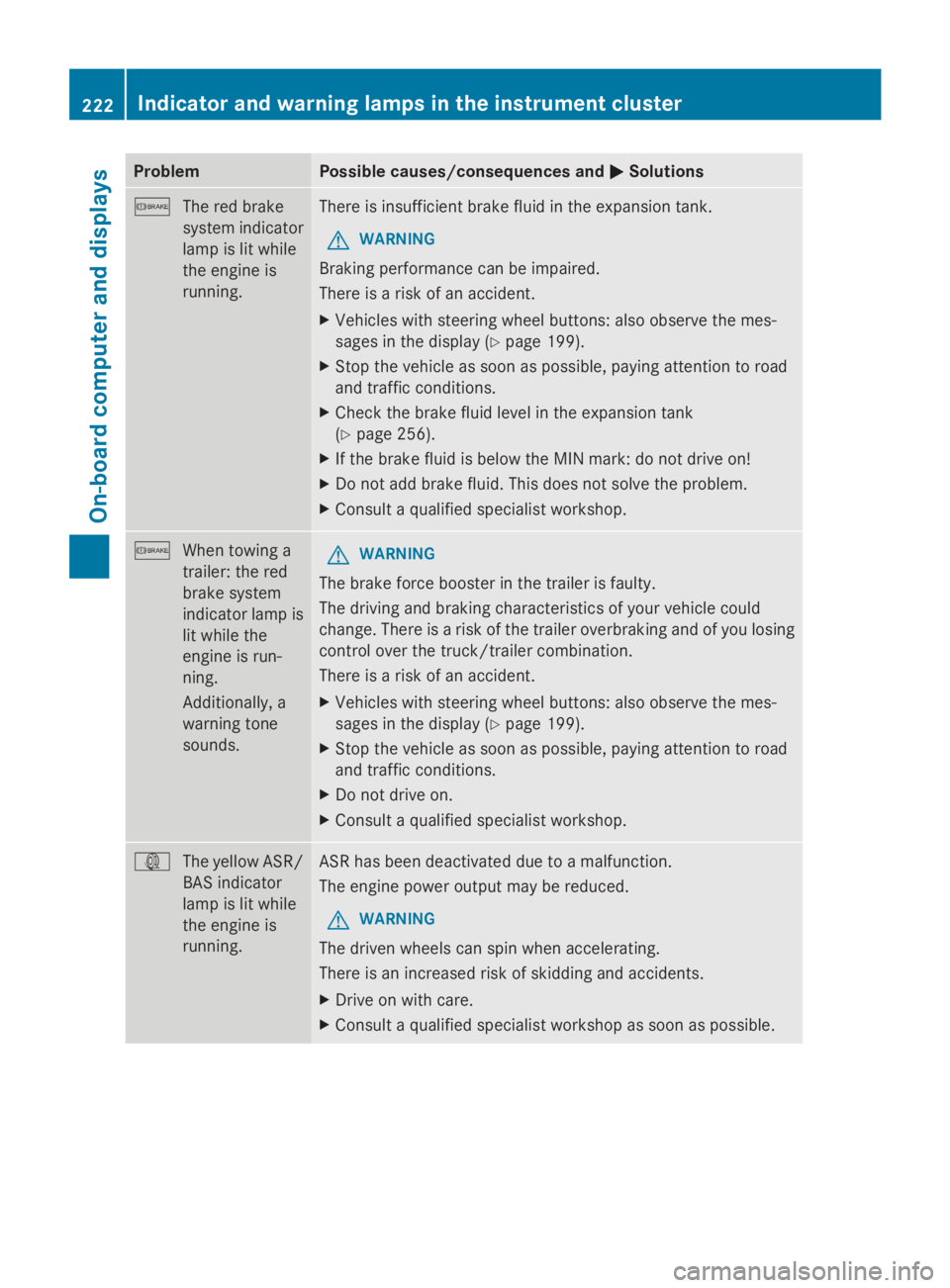
Problem Possible causes/consequences and
0050
0050Solutions 0065
The red brake
system indicator
lamp is lit while
the engine is
running. There is insufficient brake fluid in the expansion tank.
G WARNING
Braking performance can be impaired.
There is a risk of an accident.
X Vehicles with steering wheel buttons: also observe the mes-
sages in the display (Y page 199).
X Stop the vehicle as soon as possible, paying attention to road
and traffic conditions.
X Check the brake fluid level in the expansion tank
(Y page 256).
X If the brake fluid is below the MIN mark: do not drive on!
X Do not add brake fluid. This does not solve the problem.
X Consult a qualified specialist workshop. 0065
When towing a
trailer: the red
brake system
indicator lamp is
lit while the
engine is run-
ning.
Additionally, a
warning tone
sounds. G
WARNING
The brake force booster in the trailer is faulty.
The driving and braking characteristics of your vehicle could
change. There is a risk of the trailer overbraking and of you losing
control over the truck/trailer combination.
There is a risk of an accident.
X Vehicles with steering wheel buttons: also observe the mes-
sages in the display (Y page 199).
X Stop the vehicle as soon as possible, paying attention to road
and traffic conditions.
X Do not drive on.
X Consult a qualified specialist workshop. 003D
The yellow ASR/
BAS indicator
lamp is lit while
the engine is
running. ASR has been deactivated due to a malfunction.
The engine power output may be reduced.
G WARNING
The driven wheels can spin when accelerating.
There is an increased risk of skidding and accidents.
X Drive on with care.
X Consult a qualified specialist workshop as soon as possible. 222
Indicator and warning lamps in the instrument clusterOn-board computer and displays
Page 225 of 338
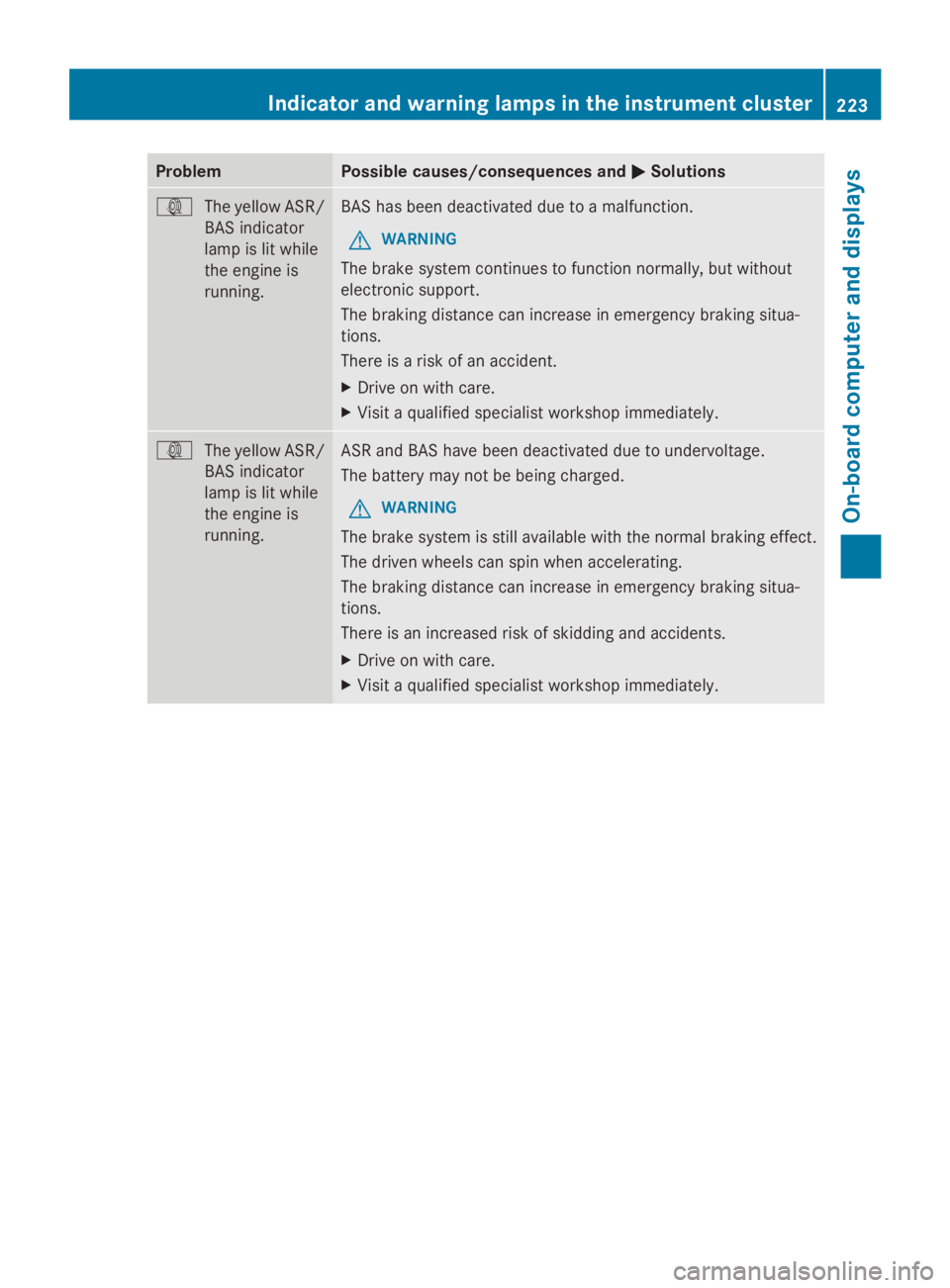
Problem Possible causes/consequences and
0050
0050Solutions 003D
The yellow ASR/
BAS indicator
lamp is lit while
the engine is
running. BAS has been deactivated due to a malfunction.
G WARNING
The brake system continues to function normally, but without
electronic support.
The braking distance can increase in emergency braking situa-
tions.
There is a risk of an accident.
X Drive on with care.
X Visit a qualified specialist workshop immediately. 003D
The yellow ASR/
BAS indicator
lamp is lit while
the engine is
running. ASR and BAS have been deactivated due to undervoltage.
The battery may not be being charged.
G WARNING
The brake system is still available with the normal braking effect.
The driven wheels can spin when accelerating.
The braking distance can increase in emergency braking situa-
tions.
There is an increased risk of skidding and accidents.
X Drive on with care.
X Visit a qualified specialist workshop immediately. Indicator and warning lamps in the instrument cluster
223On-board computer and displays Z
Page 226 of 338
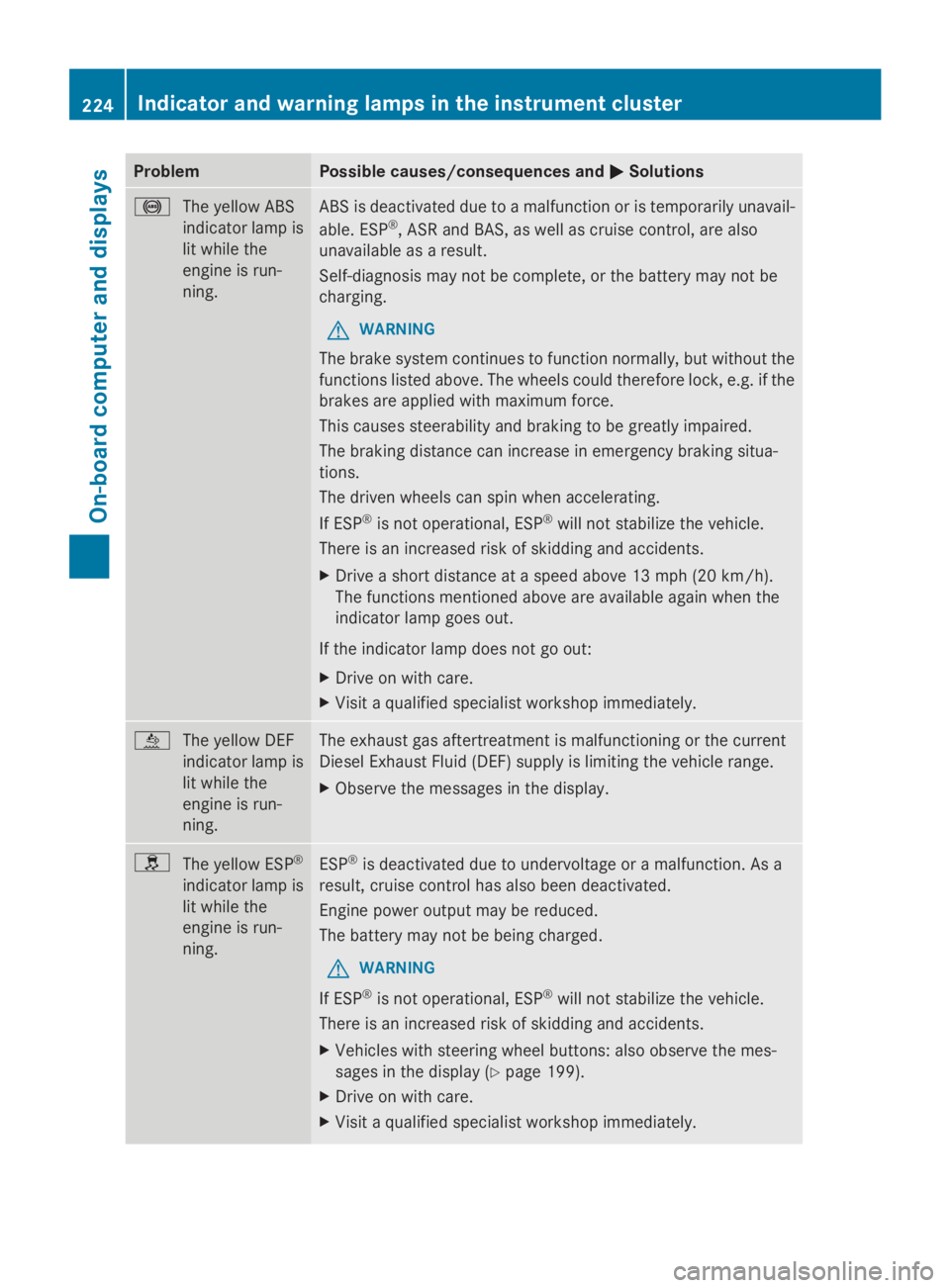
Problem Possible causes/consequences and
0050
0050Solutions 0025
The yellow ABS
indicator lamp is
lit while the
engine is run-
ning. ABS is deactivated due to a malfunction or is temporarily unavail-
able. ESP
®
, ASR and BAS, as well as cruise control, are also
unavailable as a result.
Self-diagnosis may not be complete, or the battery may not be
charging.
G WARNING
The brake system continues to function normally, but without the
functions listed above. The wheels could therefore lock, e.g. if the
brakes are applied with maximum force.
This causes steerability and braking to be greatly impaired.
The braking distance can increase in emergency braking situa-
tions.
The driven wheels can spin when accelerating.
If ESP ®
is not operational, ESP ®
will not stabilize the vehicle.
There is an increased risk of skidding and accidents.
X Drive a short distance at a speed above 13 mph (20 km/h).
The functions mentioned above are available again when the
indicator lamp goes out.
If the indicator lamp does not go out:
X Drive on with care.
X Visit a qualified specialist workshop immediately. 00E2
The yellow DEF
indicator lamp is
lit while the
engine is run-
ning. The exhaust gas aftertreatment is malfunctioning or the current
Diesel Exhaust Fluid (DEF) supply is limiting the vehicle range.
X
Observe the messages in the display. 0089
The yellow ESP ®
indicator lamp is
lit while the
engine is run-
ning. ESP
®
is deactivated due to undervoltage or a malfunction. As a
result, cruise control has also been deactivated.
Engine power output may be reduced.
The battery may not be being charged.
G WARNING
If ESP ®
is not operational, ESP ®
will not stabilize the vehicle.
There is an increased risk of skidding and accidents.
X Vehicles with steering wheel buttons: also observe the mes-
sages in the display (Y page 199).
X Drive on with care.
X Visit a qualified specialist workshop immediately. 224
Indicator and warning lamps in the instrument clusterOn-board computer and displays
Page 227 of 338
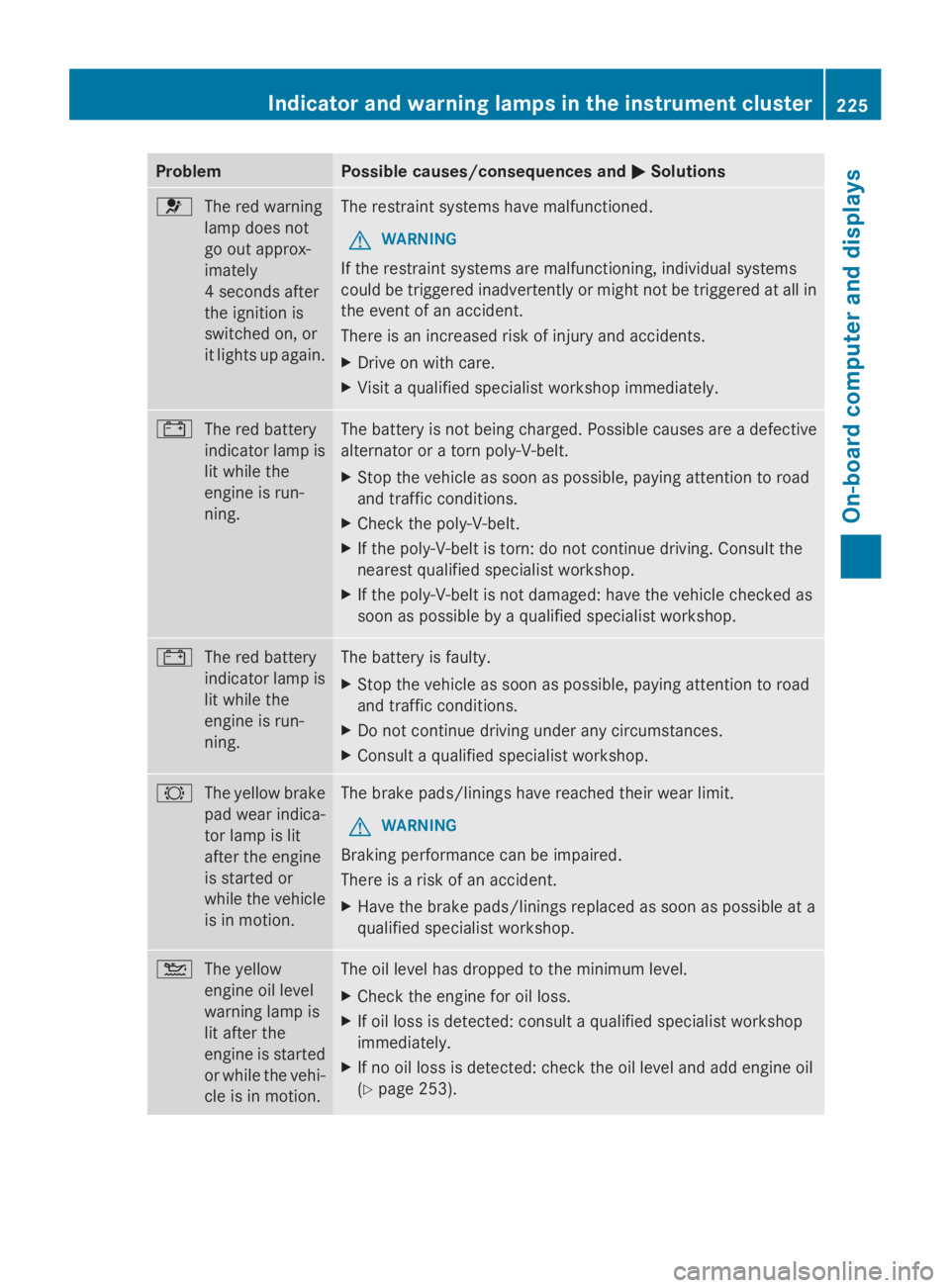
Problem Possible causes/consequences and
0050
0050Solutions 0075
The red warning
lamp does not
go out approx-
imately
4 seconds after
the ignition is
switched on, or
it lights up again. The restraint systems have malfunctioned.
G WARNING
If the restraint systems are malfunctioning, individual systems
could be triggered inadvertently or might not be triggered at all in
the event of an accident.
There is an increased risk of injury and accidents.
X Drive on with care.
X Visit a qualified specialist workshop immediately. 003D
The red battery
indicator lamp is
lit while the
engine is run-
ning. The battery is not being charged. Possible causes are a defective
alternator or a torn poly-V-belt.
X
Stop the vehicle as soon as possible, paying attention to road
and traffic conditions.
X Check the poly-V-belt.
X If the poly-V-belt is torn: do not continue driving. Consult the
nearest qualified specialist workshop.
X If the poly-V-belt is not damaged: have the vehicle checked as
soon as possible by a qualified specialist workshop. 003D
The red battery
indicator lamp is
lit while the
engine is run-
ning. The battery is faulty.
X
Stop the vehicle as soon as possible, paying attention to road
and traffic conditions.
X Do not continue driving under any circumstances.
X Consult a qualified specialist workshop. 0026
The yellow brake
pad wear indica-
tor lamp is lit
after the engine
is started or
while the vehicle
is in motion. The brake pads/linings have reached their wear limit.
G WARNING
Braking performance can be impaired.
There is a risk of an accident.
X Have the brake pads/linings replaced as soon as possible at a
qualified specialist workshop. 00B2
The yellow
engine oil level
warning lamp is
lit after the
engine is started
or while the vehi-
cle is in motion. The oil level has dropped to the minimum level.
X
Check the engine for oil loss.
X If oil loss is detected: consult a qualified specialist workshop
immediately.
X If no oil loss is detected: check the oil level and add engine oil
(Y page 253). Indicator and warning lamps in the instrument cluster
225On-board computer and displays Z
Page 228 of 338
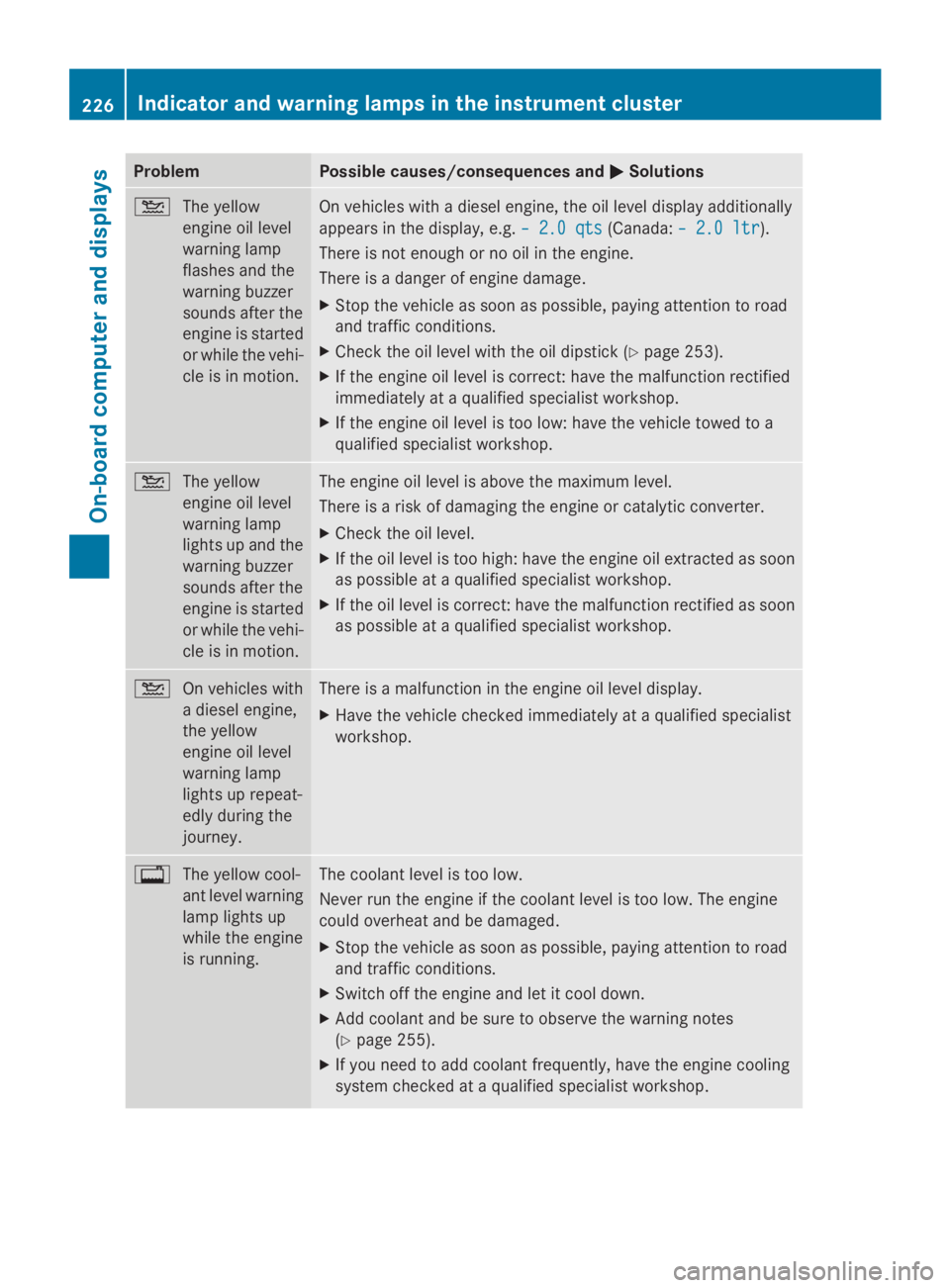
Problem Possible causes/consequences and
0050
0050Solutions 00B2
The yellow
engine oil level
warning lamp
flashes and the
warning buzzer
sounds after the
engine is started
or while the vehi-
cle is in motion. On vehicles with a diesel engine, the oil level display additionally
appears in the display, e.g.
– 2.0 qts
– 2.0 qts (Canada:– 2.0 ltr – 2.0 ltr).
There is not enough or no oil in the engine.
There is a danger of engine damage.
X Stop the vehicle as soon as possible, paying attention to road
and traffic conditions.
X Check the oil level with the oil dipstick (Y page 253).
X If the engine oil level is correct: have the malfunction rectified
immediately at a qualified specialist workshop.
X If the engine oil level is too low: have the vehicle towed to a
qualified specialist workshop. 00B2
The yellow
engine oil level
warning lamp
lights up and the
warning buzzer
sounds after the
engine is started
or while the vehi-
cle is in motion. The engine oil level is above the maximum level.
There is a risk of damaging the engine or catalytic converter.
X
Check the oil level.
X If the oil level is too high: have the engine oil extracted as soon
as possible at a qualified specialist workshop.
X If the oil level is correct: have the malfunction rectified as soon
as possible at a qualified specialist workshop. 00B2
On vehicles with
a diesel engine,
the yellow
engine oil level
warning lamp
lights up repeat-
edly during the
journey. There is a malfunction in the engine oil level display.
X
Have the vehicle checked immediately at a qualified specialist
workshop. 003F
The yellow cool-
ant level warning
lamp lights up
while the engine
is running. The coolant level is too low.
Never run the engine if the coolant level is too low. The engine
could overheat and be damaged.
X
Stop the vehicle as soon as possible, paying attention to road
and traffic conditions.
X Switch off the engine and let it cool down.
X Add coolant and be sure to observe the warning notes
(Y page 255).
X If you need to add coolant frequently, have the engine cooling
system checked at a qualified specialist workshop. 226
Indicator and warning lamps in the instrument clusterOn-board computer and displays